

10 migliori alternative a Plutio per attività freelance nel 2026

Elenco delle migliori alternative a Plutio


Una valida alternativa a Plutio offre al tuo team un’automazione flessibile dei flussi di lavoro, una gestione integrata dei clienti e funzionalità di collaborazione adatte ai tuoi processi aziendali. Se stai cercando alternative a Plutio, probabilmente cerchi strumenti in grado di gestire il monitoraggio dei progetti, la fatturazione e il coordinamento del team, senza costringerti ad adottare un sistema rigido. La piattaforma giusta dovrebbe adattarsi ai tuoi flussi di lavoro, supportare team interfunzionali e crescere insieme alle tue esigenze. In questo elenco troverai soluzioni per la gestione aziendale che offrono una vasta gamma di funzionalità e integrazioni, così potrai confrontare le opzioni e scegliere quella più adatta alle esigenze specifiche del tuo team.
Che cos’è Plutio?
Plutio è una piattaforma per la gestione aziendale che combina il monitoraggio dei progetti, la gestione dei clienti, la fatturazione e gli strumenti di collaborazione in un unico spazio di lavoro. Team e liberi professionisti utilizzano Plutio per organizzare le attività, gestire le comunicazioni con i clienti e occuparsi della fatturazione da un’unica dashboard. I suoi flussi di lavoro personalizzabili e le integrazioni aiutano gli utenti a coordinare i progetti e centralizzare le operazioni aziendali senza dover passare da un’app all’altra.
Tabella di confronto delle alternative a Plutio
Questa tabella di confronto riassume i dettagli sui prezzi delle mie migliori alternative a Plutio.
| Tool | Best For | Trial Info | Price | ||
|---|---|---|---|---|---|
| 1 | Ideale per la gestione amministrativa dei freelance indipendenti | Piano gratuito + prova gratuita disponibili | Da $18.75/mese (fatturato annualmente) | Website | |
| 2 | Ideale per freelance che gestiscono contratti | Prova gratuita di 7 giorni + demo gratuita disponibile | Da $9/utente/mese (fatturazione annuale) | Website | |
| 3 | Ideale per la collaborazione di team unificata | Piano gratuito disponibile | Da $8/mese (fatturato annualmente) | Website | |
| 4 | Ideale per suite all-in-one di app aziendali | Prova gratuita disponibile | Da $37/utente/mese (fatturazione annuale) | Website | |
| 5 | Ideale per l'automazione dell'onboarding dei clienti | Prova gratuita di 21 giorni disponibile | Da $35/mese | Website | |
| 6 | Ideale per servizi di agenzia prodotto | Prova gratuita disponibile | Da $39/mese (fatturato annualmente) | Website | |
| 7 | Ideale per la gestione di aziende di servizi locali | Demo gratuita disponibile | Prezzi su richiesta | Website | |
| 8 | Ideale per la pianificazione delle risorse in agenzia | Prova gratuita di 14 giorni + demo gratuita disponibile | Da $10/mese (fatturato annualmente) | Website | |
| 9 | Ideale per le attività delle piccole imprese | Versione di prova gratuita disponibile | Da $35/utente/mese | Website | |
| 10 | Ideale per la fatturazione delle attività creative | Prova gratuita disponibile | A partire da $29/mese (con fatturazione annuale) | Website |

Perché fidarsi dei nostri consigli sui software
Il nostro team testa e recensisce software dal 2012. In quanto project manager noi stessi, sappiamo quanto sia difficile — e importante — scegliere il software giusto.
Per questa guida, abbiamo valutato gli strumenti attraverso test pratici e ricerche indipendenti, assegnando un punteggio agli strumenti in base ai nostri criteri di selezione. Ci basiamo inoltre sulle competenze di leader di pensiero del settore e di professionisti attivi nella gestione dei progetti.
Le nostre recensioni riflettono il nostro giudizio editoriale umano, non un discorso di vendita.
Revisori esperti:
Recensioni delle migliori alternative a Plutio
Di seguito trovi i miei riepiloghi dettagliati delle alternative a Plutio incluse nel mio elenco. Le mie recensioni offrono uno sguardo approfondito sulle funzionalità, sui casi d’uso ideali e sulle integrazioni di ciascuna piattaforma, per aiutarti a trovare quella più adatta alla tua azienda.

Indy
Ideale per la gestione amministrativa dei freelance indipendenti
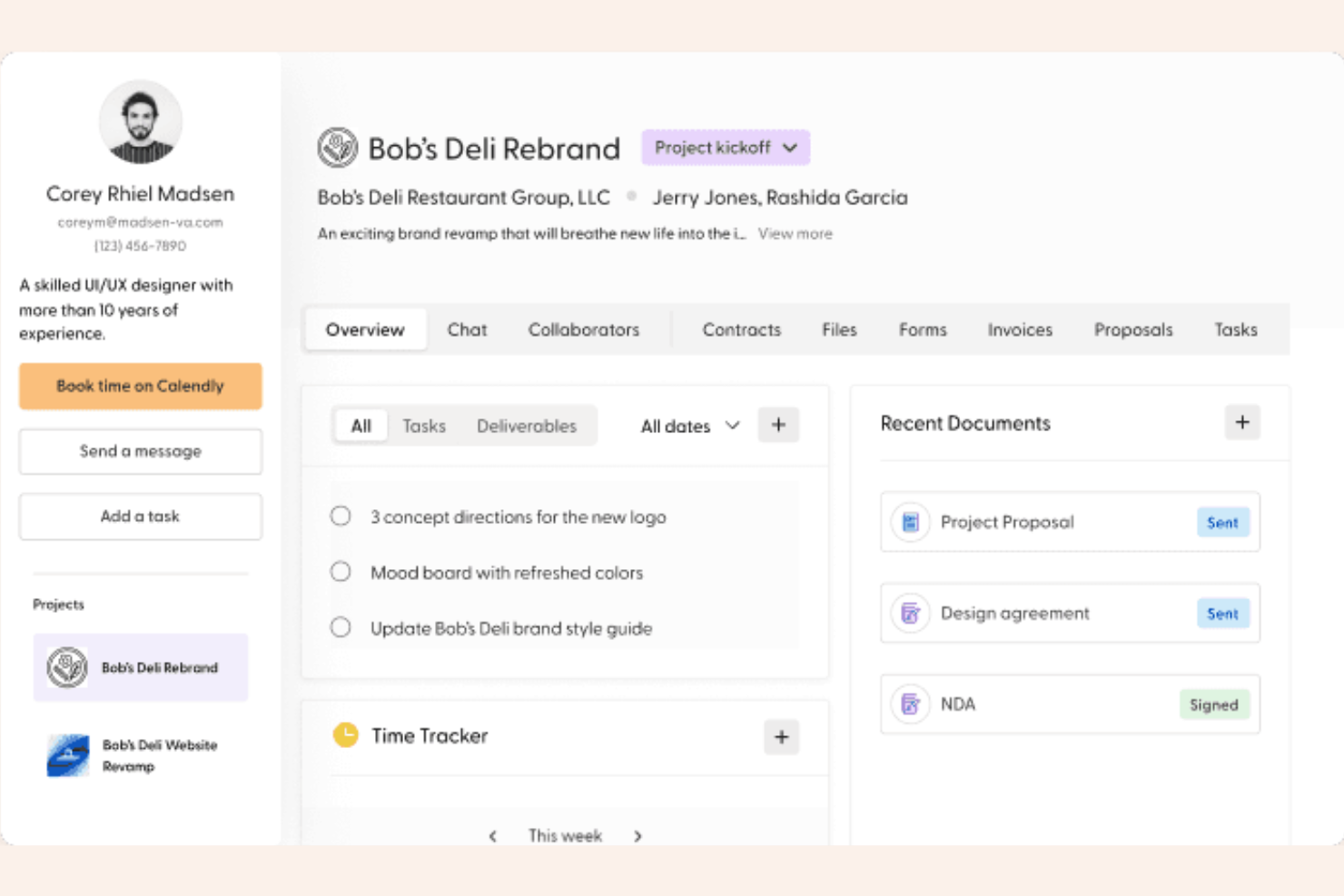
Indy è una suite amministrativa creata appositamente per i professionisti indipendenti che desiderano gestire il lato business delle attività freelance. Riunisce strumenti essenziali come proposte, contratti e fatturazione in un unico spazio di lavoro ordinato, eliminando la necessità di sottoscrivere più abbonamenti.
Perché ho scelto Indy
Ho scelto Indy perché è una delle poche piattaforme che rimangono accessibili anche ai freelancer alle prime armi. Mentre Plutio offre una profonda personalizzazione dei progetti, Indy si distingue per un flusso di lavoro amministrativo semplice: far firmare un contratto e ricevere un pagamento su fattura senza alcuna difficoltà tecnica. La sua attenzione alla semplicità la rende la scelta migliore per chi vuole dedicare meno tempo a configurare lo spazio di lavoro e più tempo ad attività fatturabili.
Funzionalità principali di Indy
Oltre alle funzionalità di personalizzazione dei progetti, Indy offre anche:
- Assistente per Contratti: Crea contratti legalmente validi e verificati da avvocati in pochi minuti, semplicemente inserendo i dettagli del tuo progetto.
- Moduli per la generazione di lead: Crea ed incorpora moduli personalizzati nel tuo sito per raccogliere direttamente le richieste dei nuovi clienti nel tuo CRM.
- Fatturazione con un clic: Trasforma automaticamente le ore tracciate e le attività di progetto non ancora fatturate in fatture professionali.
- File & feedback: Condividi le consegne di progetto con i clienti, che possono lasciare commenti con data e ora e approvazioni senza creare un account.
Integrazioni di Indy
Le integrazioni includono Gmail e Zapier.
Pros and Cons
Pros:
- Piano gratuito generoso per i principianti
- Curva di apprendimento minima
- Modelli integrati e verificati da avvocati
Cons:
- Funzionalità di gestione delle attività basilari
- Nessuna app mobile nativa

Bonsai
Ideale per freelance che gestiscono contratti

I liberi professionisti che hanno bisogno di gestire contratti, proposte e pagamenti in un unico posto si affidano spesso a Bonsai. La piattaforma è progettata specificamente per i professionisti indipendenti che vogliono automatizzare l'onboarding dei clienti, la creazione dei contratti e la fatturazione. A differenza di strumenti di gestione aziendale più generici, Bonsai offre modelli di contratto legalmente verificati e funzionalità di firma elettronica pensate per il flusso di lavoro dei freelance.
Perché Bonsai è una buona alternativa a Plutio
Se sei un libero professionista che deve gestire contratti e documentazione con i clienti, Bonsai offre una soluzione mirata che Plutio non eguaglia. Ho scelto Bonsai perché fornisce modelli di contratto personalizzabili e legalmente verificati e una funzionalità di firma elettronica integrata, che facilita la formalizzazione degli accordi con i clienti. La piattaforma include anche la creazione di proposte e la fatturazione automatizzata, così puoi gestire l'intero ciclo di vita del cliente da un unico posto. Per i professionisti indipendenti, queste funzionalità rendono Bonsai una valida alternativa alle più generiche piattaforme di gestione aziendale.
Funzionalità principali di Bonsai
Altre funzionalità che rendono Bonsai interessante includono:
- Tracciamento del tempo: Monitora le ore fatturabili direttamente all'interno di progetti e attività.
- Gestione delle spese: Registra e categorizza le spese per ogni cliente o progetto.
- CRM clienti: Conserva i dettagli di contatto dei clienti, le note e lo storico dei progetti in un unico posto.
- Gestione di attività e progetti: Organizza le consegne, imposta le scadenze e monitora l'avanzamento di più progetti.
Integrazioni Bonsai
Le integrazioni includono QuickBooks Online, Zapier, Calendly, Xero e altro ancora.
Pros and Cons
Pros:
- Modelli di contratto legalmente verificati per freelance
- Firma elettronica integrata per gli accordi con i clienti
- Tracciamento del tempo integrato per le ore fatturabili
Cons:
- Nessuna bacheca kanban o avanzata per i progetti
- Nessuna personalizzazione white-label del portale clienti

OneDeck
Ideale per la collaborazione di team unificata
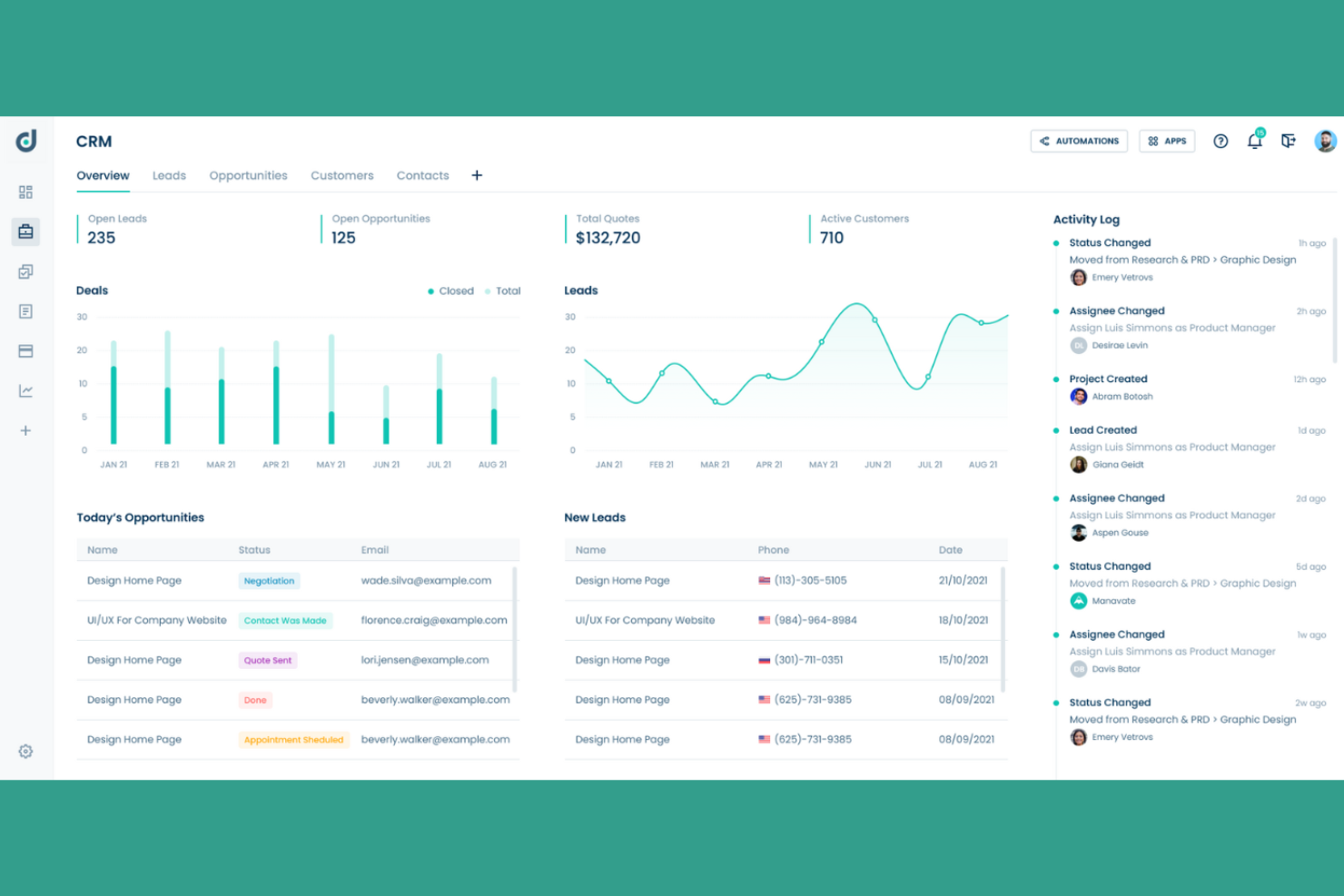
Se il tuo team ha bisogno di uno spazio di lavoro unico per gestire progetti, documenti e comunicazione, OneDeck riunisce tutto in un'unica piattaforma. È pensato per team trasversali che vogliono ridurre il cambio di strumento e mantenere tutta la collaborazione nel contesto giusto. OneDeck si distingue per il suo approccio unificato, combinando monitoraggio dei progetti, modifica dei documenti e chat di team in un'unica interfaccia utente.
Perché OneDeck è una valida alternativa a Plutio
A differenza delle piattaforme che separano gestione progetti, documenti e chat, OneDeck unifica queste funzioni fondamentali in un solo spazio di lavoro. Ho scelto OneDeck perché permette ai team di gestire attività, collaborare su documenti e comunicare in tempo reale senza cambiare strumento. Gli spazi condivisi della piattaforma mantengono file di progetto, discussioni e aggiornamenti organizzati e accessibili a tutti gli interessati. Se al tuo team interessa avere tutta la collaborazione e il lavoro di progetto in un unico posto, OneDeck offre un'alternativa mirata a Plutio.
Funzionalità chiave di OneDeck
Altre funzionalità di OneDeck che potrebbero interessare ai team di gestione aziendale includono:
- Bacheche Kanban: Visualizza e organizza le attività tramite bacheche drag-and-drop.
- Flussi di lavoro personalizzabili: Configura flussi di lavoro unici per adattarsi ai processi del tuo team.
- Permessi basati sul ruolo: Controlla l'accesso a progetti, documenti e conversazioni in base al ruolo utente.
- Condivisione e archiviazione file: Carica, archivia e condividi file direttamente all'interno della piattaforma.
Integrazioni di OneDeck
Le integrazioni includono LinkedIn, WooCommerce, Instagram, Google Sheets, Excel, Gmail, Google Calendar, Google Docs, Facebook e altro ancora.
Pros and Cons
Pros:
- Combina gestione progetti e chat di team
- Modifica collaborativa dei documenti in tempo reale
- Bacheche Kanban e diagrammi di Gantt per il monitoraggio delle attività
Cons:
- Nessuno strumento di fatturazione integrato
- Manca la funzionalità di portale clienti

Se cerchi una suite unificata per gestire ogni aspetto della tua azienda, Zoho One riunisce oltre 40 app integrate in un unico abbonamento. Questa piattaforma è particolarmente indicata per le aziende e i team in crescita che vogliono centralizzare vendite, finanza, HR e operazioni senza dover gestire diversi fornitori. A differenza di Plutio, Zoho One copre un ventaglio più ampio di funzioni aziendali in un unico ecosistema perfettamente integrato.
Perché Zoho One è una valida alternativa a Plutio
Ciò che distingue Zoho One è la sua soluzione all-in-one come app aziendale che copre praticamente ogni esigenza operativa. Ho scelto Zoho One perché riunisce strumenti per CRM, gestione progetti, HR, finanza e collaborazione sotto un unico abbonamento. Questo approccio unificato permette al tuo team di gestire vendite, progetti e funzioni amministrative senza dover passare da una piattaforma all'altra. Se vuoi una piattaforma di gestione aziendale che centralizzi i tuoi flussi di lavoro e dati, Zoho One è una valida alternativa a Plutio.
Funzionalità principali di Zoho One
Altre funzioni che rendono Zoho One utile per la gestione aziendale includono:
- Creazione di app personalizzate: Crea applicazioni aziendali su misura tramite un’interfaccia drag-and-drop, senza programmazione.
- Analisi approfondite integrate: Accedi a dashboard e report unificati che raccolgono dati da tutte le app Zoho della suite.
- Comunicazione multicanale: Gestisci e-mail, social media, chat dal vivo e telefonia da un'unica piattaforma.
- Controlli di accesso basati sui ruoli: Definisci permessi e livelli di accesso per gli utenti su diverse app e reparti.
Integrazioni di Zoho One
Le integrazioni includono Zoho CRM, Zoho Books, Zoho Projects, Zoho People, Zoho Desk, Zoho Inventory, Zoho Mail e altre ancora.
Pros and Cons
Pros:
- Automazione del flusso di lavoro integrata su tutte le app
- Pannello di amministrazione centralizzato per la gestione degli utenti
- App native per dispositivi mobili per la maggior parte dei moduli
Cons:
- Occasionali ritardi di sincronizzazione tra alcune app
- Alcune funzioni richiedono fasi di configurazione separate
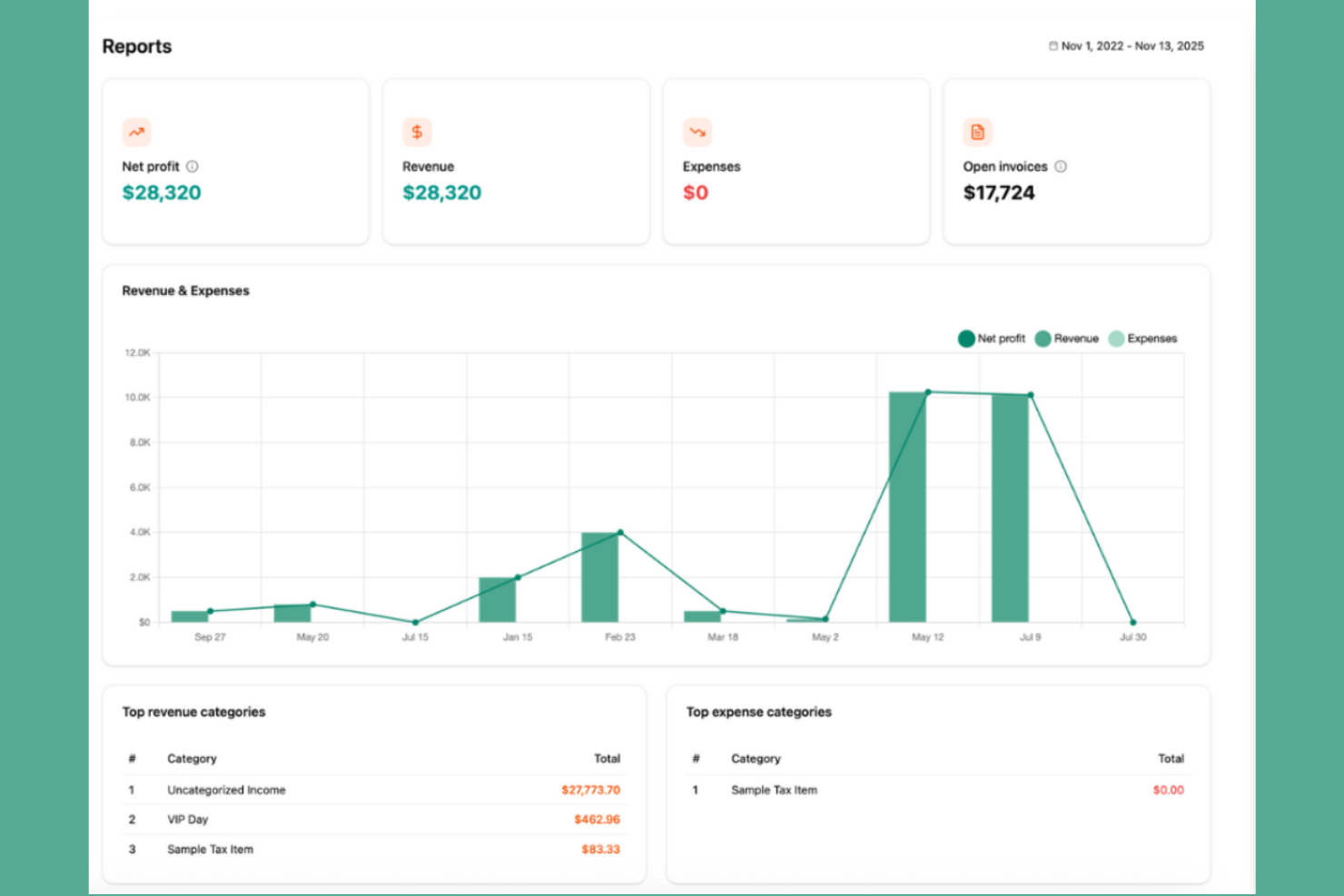
Freelance e piccole agenzie che desiderano automatizzare l'onboarding dei clienti spesso si rivolgono a Dubsado. Questa piattaforma è specializzata nel semplificare proposte, contratti e fatturazione, consentendo di accompagnare i clienti dalla richiesta iniziale fino all'avvio del progetto con meno lavoro manuale. Dubsado si distingue per i flussi di lavoro personalizzabili e i portali clienti, che rendono più semplice gestire l'intero processo di onboarding in un unico luogo.
Perché Dubsado è una buona alternativa a Plutio
Per i team che desiderano automatizzare l'onboarding dei clienti dall'inizio alla fine, Dubsado offre una serie di strumenti mirati che Plutio non offre. Ho scelto Dubsado perché la sua automazione dei flussi di lavoro consente di attivare moduli, contratti e fatture in base alle azioni del cliente. I portali clienti personalizzabili della piattaforma offrono a ciascun cliente uno spazio con il proprio marchio dove visualizzare documenti e monitorare i progressi. Se la tua attività si basa su un onboarding fluido dei clienti, le funzionalità di automazione di Dubsado lo rendono una valida alternativa.
Funzionalità principali di Dubsado
Altre funzionalità di Dubsado che potrebbero interessare ai team di gestione aziendale includono:
- Strumento di pianificazione: Prenota appuntamenti e riunioni direttamente dalla piattaforma.
- Gestione delle attività: Crea, assegna e monitora le attività per te o per il tuo team.
- Modelli personalizzabili: Crea modelli riutilizzabili per email, moduli e contratti.
- Gestione dei pagamenti: Accetta pagamenti online tramite integrazioni con Stripe.
Integrazioni Dubsado
Le integrazioni includono Gmail, Microsoft 365, Stripe, QuickBooks e altro.
Pros and Cons
Pros:
- Automatizza l'invio di contratti e proposte
- Strumento di pianificazione integrato nei flussi di lavoro con i clienti
- Portali clienti personalizzabili per ogni progetto
Cons:
- La maggior parte delle integrazioni richiede il piano più costoso
- Manca di chat di gruppo o strumenti di messaggistica nativi

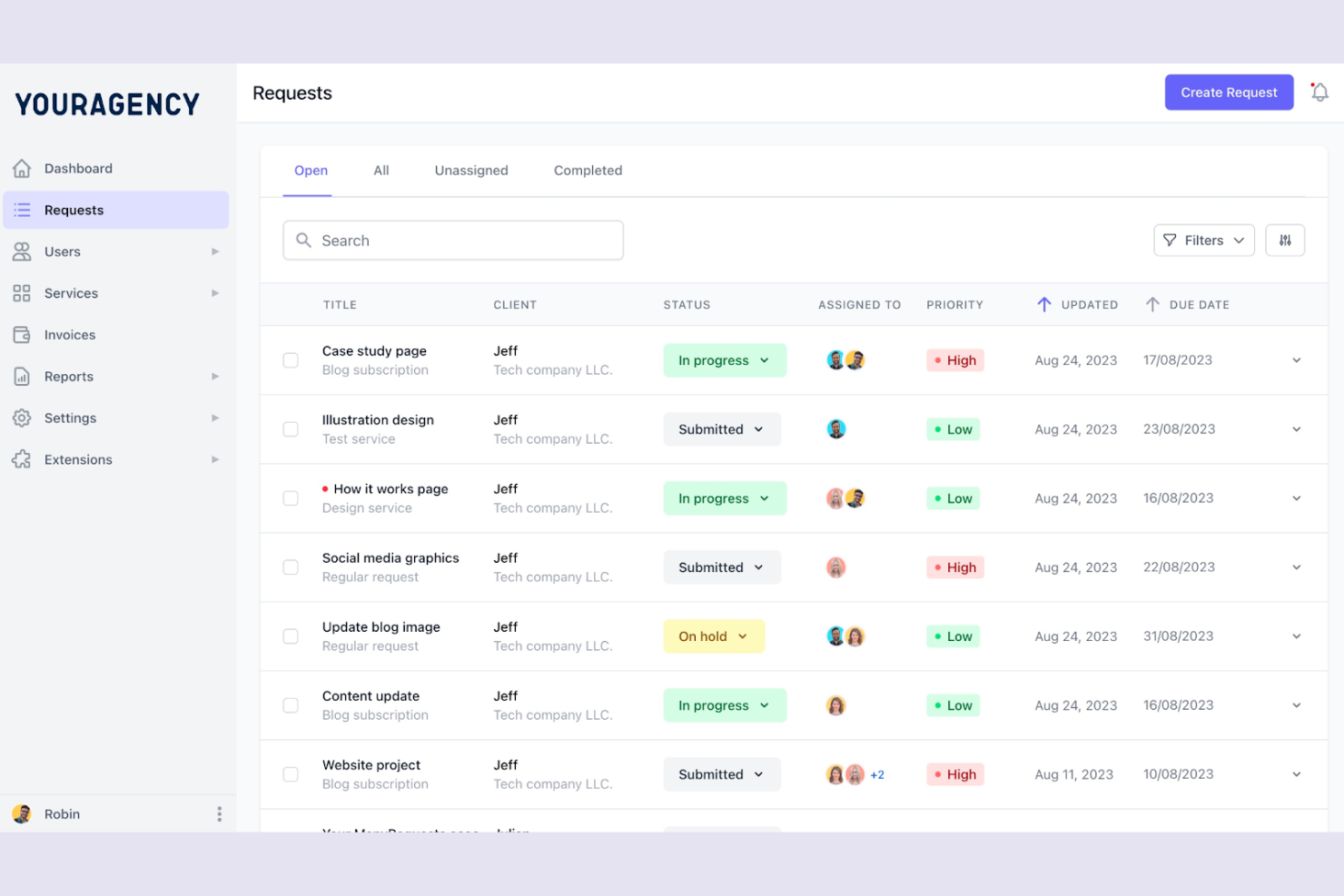
ManyRequests è un software di portale clienti e una piattaforma commerciale progettata per le agenzie che vendono servizi come pacchetti ripetibili. Combina una vetrina professionale con un flusso di lavoro basato sulle richieste per spostare i clienti dal checkout alla consegna del progetto senza interventi manuali.
Perché ho scelto ManyRequests
Ho scelto ManyRequests perché trasforma il modello di agenzia tradizionale in un'esperienza da prodotto. Mentre Plutio è una toolkit flessibile per progetti su misura, ManyRequests è costruito specificamente per il flusso di lavoro di servizi prodotto, utilizzando un catalogo di servizi e una raccolta dati automatizzata per eliminare il continuo scambio di proposte personalizzate. È la scelta migliore per le agenzie che vogliono crescere vendendo pacchetti a prezzo fisso o abbonamenti mensili tramite un checkout personalizzato.
Caratteristiche principali di ManyRequests
- Catalogo Servizi: Mostra le tue offerte in una galleria professionale dove i clienti possono acquistare attività una tantum oppure abbonamenti ricorrenti.
- Dashboard Basata su Richieste: Sostituisci le caotiche conversazioni email con una coda centralizzata dove i clienti inviano brief strutturati in base al piano acquistato.
- Design & Revisione Video: Carica risorse creative affinché i clienti possano lasciare feedback e annotazioni con timestamp direttamente sui file.
- Portale Clienti White-Label: Offri un'esperienza completamente personalizzata con dominio, logo e colori propri, così la piattaforma sembra il tuo software proprietario.
Integrazioni ManyRequests
Le integrazioni includono Slack, Zapier e altro.
Pros and Cons
Pros:
- Checkout integrato per i servizi
- Clienti illimitati su tutti i piani
- Strumenti dedicati alle annotazioni di design
Cons:
- Prezzo iniziale elevato
- Funzionalità di automazione interna limitate
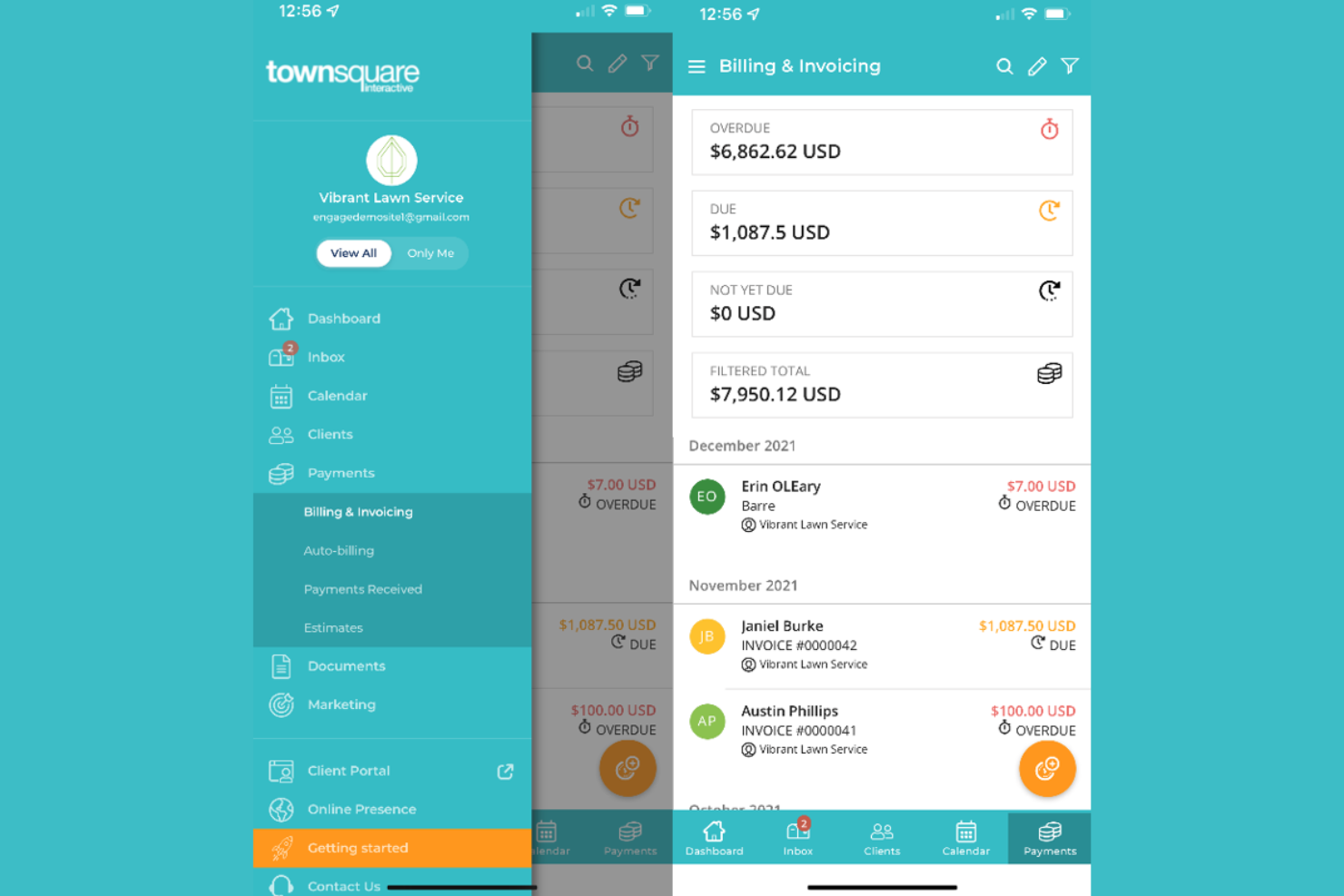
I proprietari di aziende di servizi locali che cercano una soluzione completa per la gestione del lavoro e il marketing potrebbero prendere in considerazione Townsquare Interactive. La piattaforma è progettata per appaltatori, servizi per la casa e altri fornitori locali che necessitano di supporto per la presenza online, la gestione dei lead e la comunicazione con i clienti. A differenza degli strumenti di gestione aziendale più generici, Townsquare Interactive unisce la gestione del sito web, la SEO e i servizi di marketing digitale pensati specificamente per le attività locali di servizi.
Perché Townsquare Interactive è una buona alternativa a Plutio
Per le aziende di servizi locali che necessitano di più di un semplice strumento di gestione progetti, Townsquare Interactive offre un insieme mirato di strumenti progettati per le loro esigenze specifiche. Ho scelto Townsquare Interactive perché combina la gestione aziendale con la creazione di siti web, la SEO locale e il monitoraggio dei lead in un’unica piattaforma. Il CRM integrato aiuta a gestire le relazioni e le comunicazioni con i clienti, mentre la dashboard di marketing offre una visione delle performance online. Se la tua attività dipende dall’attrarre e gestire clienti locali, Townsquare Interactive propone funzionalità che vanno oltre quelle offerte da Plutio.
Caratteristiche principali di Townsquare Interactive
Altre funzionalità degne di nota in Townsquare Interactive includono:
- Monitoraggio della reputazione: Monitora e rispondi alle recensioni dei clienti da diverse piattaforme in un unico posto.
- Pianificazione appuntamenti: Permetti ai clienti di prenotare servizi direttamente dal tuo sito web.
- Gestione dei social media: Gestisci e programma post sui principali social network da un’unica dashboard.
- Gestione delle schede aziendali: Aggiorna e sincronizza le informazioni della tua azienda attraverso le directory locali.
Integrazioni di Townsquare Interactive
Le integrazioni non sono disponibili pubblicamente.
Pros and Cons
Pros:
- Include servizi di progettazione e hosting siti web
- Offre SEO locale e gestione delle directory
- Monitoraggio della reputazione per le recensioni online
Cons:
- Nessuno strumento di gestione progetti o attività integrato
- Non include il monitoraggio del tempo per gli incarichi

Ideale per la pianificazione delle risorse in agenzia

Le agenzie che cercano di ottimizzare la pianificazione delle risorse e la redditività dei progetti spesso scelgono Productive. La piattaforma è pensata per le agenzie che devono gestire la capacità, monitorare le ore fatturabili e prevedere i carichi di lavoro su più progetti. A differenza di strumenti di gestione aziendale più generici, Productive combina gestione delle risorse, monitoraggio del tempo e approfondimenti finanziari in un unico luogo per aiutare i team delle agenzie a bilanciare le attività e massimizzare i ricavi.
Perché Productive è una buona alternativa a Plutio
Per le agenzie che devono pianificare e allocare risorse su più progetti, Productive offre un livello di visibilità che Plutio non garantisce. Ho scelto Productive perché il suo modulo di pianificazione delle risorse consente di assegnare i membri del team in base alla disponibilità e alle competenze, aiutando così a evitare sovraccarichi o sotto-utilizzo del personale. La piattaforma include anche il monitoraggio integrato del tempo e report sull'utilizzo, così puoi controllare l'avanzamento dei progetti e aggiustare i carichi di lavoro in tempo reale. Queste funzionalità rendono Productive particolarmente adatto alle agenzie che desiderano massimizzare la capacità del team e la redditività dei progetti.
Caratteristiche principali di Productive
Altre funzionalità che rendono Productive utile per le agenzie includono:
- Budget e monitoraggio della redditività: Monitora i budget di progetto e i margini con dashboard finanziari in tempo reale.
- Gestione del pipeline di vendita: Tieni traccia di lead, affari e attività di vendita dalla richiesta alla chiusura.
- Gestione documentale: Archivia, organizza e condividi file e documenti di progetto all'interno della piattaforma.
- Report personalizzati: Crea e programma report su misura relativi a dati di progetto, finanziari o operativi.
Integrazioni Productive
Le integrazioni includono Jira, HubSpot, Xero, Google Calendar, Sage, Gmail, Microsoft Outlook, Slack e altro.
Pros and Cons
Pros:
- Il monitoraggio della redditività collega tempo e dati finanziari
- I report personalizzati supportano metriche specifiche dell'agenzia
- Il pipeline di vendita traccia le trattative insieme ai progetti
Cons:
- Mancano modelli integrati per contratti o preventivi
- Automazione limitata per attività ricorrenti di progetto
New Product Updates from Productive
Productive Adds Voice Dictation, Slack Connector, Proposals, and Overtime
Productive adds voice dictation, a Slack Connector, proposal controls, and overtime tracking. These updates support faster AI interactions, client proposals, and time management. For more information, visit Productive’s official site.

Striven
Ideale per le attività delle piccole imprese

Striven è uno strumento tutto-in-uno per la gestione aziendale progettato pensando alle piccole imprese. Riunisce contabilità, CRM, risorse umane e gestione dei progetti in un unico sistema, facilitando il collegamento tra tutti gli aspetti del business. Se stai cercando una soluzione che riduca la necessità di molteplici strumenti separati, Striven offre un approccio unificato che si distingue rispetto a piattaforme più frammentate come Plutio.
Perché Striven è una valida alternativa a Plutio
Per le piccole imprese che necessitano di una piattaforma unificata, Striven si distingue come una forte alternativa a Plutio. L’ho scelto per questa lista perché combina funzioni aziendali essenziali come contabilità, risorse umane e gestione dei progetti in un unico posto: una rarità tra i software di gestione aziendale. Le funzionalità CRM e di gestione finanziaria integrate aiutano i piccoli team a evitare di dover gestire molteplici sistemi scollegati. Se desideri una soluzione costruita appositamente per le attività delle piccole imprese, l’approccio tutto-in-uno di Striven è difficile da eguagliare.
Funzionalità principali di Striven
Alcune altre funzionalità degne di nota di Striven includono:
- Gestione documentale: Archivia, organizza e condividi documenti aziendali in modo sicuro all'interno della piattaforma.
- Monitoraggio dell’inventario: Monitora i livelli di stock, gestisci gli ordini e traccia i movimenti delle scorte in tempo reale.
- Reportistica personalizzata: Crea e pianifica report personalizzati su tutte le funzioni aziendali per una migliore analisi.
- Gestione dei fornitori: Mantieni registri dettagliati dei fornitori, traccia gli ordini di acquisto e gestisci le relazioni con i fornitori.
Integrazioni di Striven
Le integrazioni includono Authorize.net, Email Relay, Google Calendar, Microsoft Calendar, ShipStation, Shopify, Square, Stripe e altri ancora.
Pros and Cons
Pros:
- Strumenti integrati di gestione inventario e ordini
- Dashboard personalizzabili per ruoli utente differenti
- Elaborazione paghe compresa tra le funzionalità HR
Cons:
- Nessun portale clienti nativo per utenti esterni
- Modelli di report basilari

HoneyBook
Ideale per la fatturazione delle attività creative

Se gestisci un'attività creativa e hai bisogno di un modo migliore per gestire la fatturazione, HoneyBook è stato creato per te. Questa piattaforma combina la gestione dei clienti, la fatturazione e gli strumenti per i contratti in un unico posto, risultando particolarmente utile per fotografi, designer e professionisti degli eventi. A differenza di Plutio, HoneyBook si concentra sulla semplificazione dell'esperienza del cliente, dalla proposta al pagamento, così puoi gestire la pianificazione dei progetti e i pagamenti senza complicazioni aggiuntive.
Perché HoneyBook è una buona alternativa a Plutio
Per i professionisti creativi che hanno bisogno di una fatturazione adatta al proprio flusso di lavoro, HoneyBook offre una soluzione mirata che Plutio non è in grado di eguagliare. Ho scelto HoneyBook perché consente di creare fatture personalizzate con il proprio marchio, automatizzare i promemoria di pagamento e gestire i contratti in un unico posto. Il flusso di lavoro dalla proposta al pagamento è progettato specificamente per le attività orientate ai clienti, come quelle di fotografi, organizzatori di eventi e designer. Se desideri una piattaforma di gestione aziendale che metta la fatturazione e l'esperienza del cliente al centro, HoneyBook è una valida alternativa.
Funzionalità principali di HoneyBook
Altre funzionalità di HoneyBook che vale la pena evidenziare includono:
- Portale clienti: Offri ai clienti uno spazio dedicato per visualizzare progetti, fatture e messaggi.
- Automazione dei flussi di lavoro: Configura sequenze automatiche di attività per l'inserimento dei clienti, i solleciti e le tappe fondamentali dei progetti.
- Pianificazione del calendario: Consenti ai clienti di prenotare riunioni direttamente tramite il tuo calendario HoneyBook.
- Monitoraggio delle spese: Registra e categorizza le spese aziendali all'interno della piattaforma.
Integrazioni di HoneyBook
Le integrazioni sono disponibili tramite Zapier.
Pros and Cons
Pros:
- Modelli di fatture personalizzati con il marchio per le attività creative
- Portale clienti per la comunicazione sui progetti
- Monitoraggio di proposte e fatture in un unico posto
Cons:
- Nessuna funzionalità integrata per il monitoraggio del tempo
- Visualizzazioni limitate delle schede di gestione dei progetti
Altre alternative a Plutio
Ecco alcune ulteriori alternative a Plutio che non sono state incluse nel mio elenco, ma che vale comunque la pena valutare:
- monday.com
Ideale per l'automazione personalizzabile dei flussi di lavoro
- ClickUp
Ideale per la personalizzazione interna del team
- CoordinateHQ
Ideale per la collaborazione con i clienti senza password


Come valuto le alternative a Plutio
Valuto queste piattaforme su due livelli: le capacità fondamentali che uno strumento deve avere per essere incluso nella lista, e i fattori differenzianti—come il white-labeling, la fatturazione ricorrente o l'automazione—che distinguono una soluzione dall'altra.
Funzionalità di base (Requisiti minimi per questa lista)
Quando seleziono gli strumenti per la mia lista, ne valuto ciascuno su una scala da 0 (non offre la funzionalità) a 5 (eccelle in quest'area) per ogni funzionalità fondamentale elencata qui sotto. Poi, calcolo il punteggio totale dello strumento come percentuale. Ogni strumento deve raggiungere un punteggio totale minimo del 65% per essere preso in considerazione.
- Gestione progetti & attività: Cerco viste multiple come bacheche Kanban, diagrammi di Gantt e calendari, oltre alla possibilità di impostare dipendenze e traguardi su più progetti clienti contemporaneamente.
- Strumenti di fatturazione clienti: Ogni strumento dovrebbe consentirti di creare e inviare fatture, e verifico se anche preventivi o contratti con firma elettronica fanno parte del flusso di fatturazione.
- Monitoraggio del tempo: Timer integrati collegati direttamente alle attività sono fondamentali qui, soprattutto per i freelance che devono convertire le ore tracciate in voci fatturabili nelle fatture ai clienti.
- Portale di collaborazione cliente: Valuto se la piattaforma offre uno spazio dedicato dove i clienti possono vedere i progressi dei progetti, condividere file e inviare approvazioni senza bisogno di avere un account completo.
- Messaggistica integrata: Chat in tempo reale o discussioni con thread all'interno della piattaforma mantengono le conversazioni nel contesto del progetto, invece di disperderle tra email e app esterne.
- Funzionalità CRM: La gestione dei contatti con viste a pipeline o fasi di trattativa aiuta freelance e titolari di agenzie a tenere traccia dei lead dal primo contatto fino alla firma del contratto.
Una volta che ho una lista di strumenti che soddisfano questi criteri, considero ciò che rende ciascuna piattaforma unica.
Fattori differenzianti (Cosa distingue i fornitori)
Ecco come confronto e metto a confronto i diversi fornitori:
Funzionalità distintive
Il branding white-label è un grande elemento di distinzione per i titolari di agenzia che vogliono che i clienti interagiscano con un portale che riporta il proprio logo, colori e dominio personalizzato. Valuto anche se uno strumento supporta la fatturazione ricorrente per i clienti in abbonamento fisso, dato che ricreare manualmente le fatture ogni mese aggiunge frizione superflua. I flussi di lavoro automatizzati completano il quadro—gli strumenti che possono attivare promemoria di fattura, assegnazioni di attività o aggiornamenti di stato in base alle tappe del progetto fanno risparmiare ore di attività amministrative ripetitive.
Oltre le funzionalità
La struttura dei prezzi conta molto qui—freelance e piccole agenzie devono sapere se stanno pagando per utente o avranno accessi illimitati a prezzo fisso. Inoltre, verifico quanto bene ogni strumento si connette ai gateway di pagamento come Stripe e PayPal, oltre che a piattaforme di contabilità come QuickBooks e Xero, dato che i dati di fatturazione devono fluire da qualche parte. Anche la velocità di onboarding è un fattore: i lavoratori autonomi raramente hanno tempo per lunghi setup, quindi cerco template preconfezionati e guide che ti rendono operativo in pochi giorni.
Perché cercare un’alternativa a Plutio?
Sebbene Plutio sia una buona scelta come piattaforma per la gestione aziendale, ci sono diversi motivi per cui alcuni utenti cercano soluzioni alternative. Potresti cercare un’alternativa a Plutio perché…
- Hai bisogno di funzionalità di fatturazione più avanzate
- Il tuo team necessita di strumenti integrati per il monitoraggio del tempo
- Vuoi integrazioni più approfondite con i software di contabilità
- Gestisci progetti con flussi di lavoro complessi
- La tua azienda opera al di fuori delle regioni supportate da Plutio
Se ti riconosci in una di queste situazioni, sei nel posto giusto. Il mio elenco contiene diverse opzioni di piattaforme per la gestione aziendale più adatte ai team che affrontano queste difficoltà con Plutio e cercano soluzioni alternative.
Funzionalità principali di Plutio
Ecco alcune delle funzionalità principali di Plutio, che ti aiuteranno a confrontare ciò che offrono le soluzioni alternative:
- Bacheche per la gestione di progetti e attività
- Monitoraggio del tempo e gestione dei fogli presenze
- Strumenti personalizzabili per la fatturazione e gli addebiti
- Portale clienti per la comunicazione e la condivisione di file
- Creazione di proposte e contratti con firme elettroniche
- CRM integrato per la gestione dei clienti
- Automazione dei flussi di lavoro per le attività ripetitive
- Integrazione con calendario e pianificazione
- Opzioni di branding con marchio personalizzato
- Chat di gruppo e collaborazione in tempo reale