

10 migliori alternative a Google Meet per le videochiamate nel 2026

Le migliori alternative a Google Meet in sintesi


Una valida alternativa a Google Meet offre videochiamate affidabili, accesso semplice per chiunque, funzionalità intelligenti per le chiamate e una collaborazione fluida tra i team. Se stai cercando alternative a Google Meet, probabilmente cerchi un software che renda più semplici le riunioni video, si integri con gli strumenti che già utilizzi o gestisca gruppi più numerosi. In questa guida troverai le migliori soluzioni per videoconferenze, che si distinguono per funzionalità specializzate, modalità di accesso uniche e opzioni più adatte al modo in cui lavora effettivamente il tuo team. Usa questo elenco per confrontare le opzioni e trovare quella più adatta alla tua prossima chiamata, sessione di formazione o evento virtuale.
Che cos'è Google Meet?
Google Meet è una piattaforma di videoconferenze basata sul cloud di Google, che consente ai team di organizzare, partecipare e programmare riunioni online sicure. Supporta video, audio, chat e condivisione dello schermo in tempo reale da qualsiasi dispositivo. Gli utenti possono collaborare virtualmente, connettersi con partecipanti da remoto e integrare le riunioni con strumenti di Google Workspace come Calendar e Gmail. Google Meet è adatto alle organizzazioni che hanno bisogno di una soluzione semplice e affidabile per riunioni virtuali, colloqui, webinar e aggiornamenti quotidiani.
Tabella di confronto delle alternative a Google Meet
Questa tabella di confronto riassume i dettagli sui prezzi delle mie migliori alternative a Google Meet:
| Tool | Best For | Trial Info | Price | ||
|---|---|---|---|---|---|
| 1 | Ideale per partecipare istantaneamente senza download | Piano gratuito disponibile | Da $10.99/organizzatore/mese | Website | |
| 2 | Ideale per flussi di lavoro automatizzati degli eventi | Piano gratuito + demo gratuita disponibile | Da $3/partecipante (fatturazione annuale) | Website | |
| 3 | Ideale per la trascrizione IA integrata | Prova gratuita di 14 giorni | Da $15/utente/mese (con fatturazione annuale) | Website | |
| 4 | Ideale per webinar interattivi | Sono disponibili una prova gratuita e una demo gratuita | A partire da $37/mese (fatturato annualmente) | Website | |
| 5 | Ideale come suite di comunicazione unificata | Demo gratuita disponibile | Prezzi su richiesta | Website | |
| 6 | Ideale per sale riunioni personalizzabili | Demo gratuita disponibile | A partire da $190 per organizzatore (fatturazione annuale) | Website | |
| 7 | Ideale per la personalizzazione a codice sorgente aperto | Gratis per sempre | Gratis per sempre | Website | |
| 8 | Ideale per le funzionalità di chiamata internazionale | Not available | Gratis | Website | |
| 9 | Ideale per sale di videoconferenza 4K | Not available | Website | ||
| 10 | Ideale per l'interoperabilità con i sistemi legacy | Not available | Website |
Perché fidarsi dei nostri consigli sui software
Il nostro team testa e recensisce software dal 2012. In quanto project manager noi stessi, sappiamo quanto sia difficile — e importante — scegliere il software giusto.
Per questa guida, abbiamo valutato gli strumenti attraverso test pratici e ricerche indipendenti, assegnando un punteggio agli strumenti in base ai nostri criteri di selezione. Ci basiamo inoltre sulle competenze di leader di pensiero del settore e di professionisti attivi nella gestione dei progetti.
Le nostre recensioni riflettono il nostro giudizio editoriale umano, non un discorso di vendita.
Revisori esperti:
Recensioni delle migliori alternative a Google Meet
Di seguito trovi i miei riepiloghi dettagliati delle migliori alternative a Google Meet incluse nella mia selezione. Le mie recensioni offrono una panoramica approfondita delle funzionalità, dei casi d’uso migliori e delle integrazioni di ciascuna piattaforma di videoconferenza, per aiutarti a trovare quella più adatta alle tue esigenze.

Whereby
Ideale per partecipare istantaneamente senza download
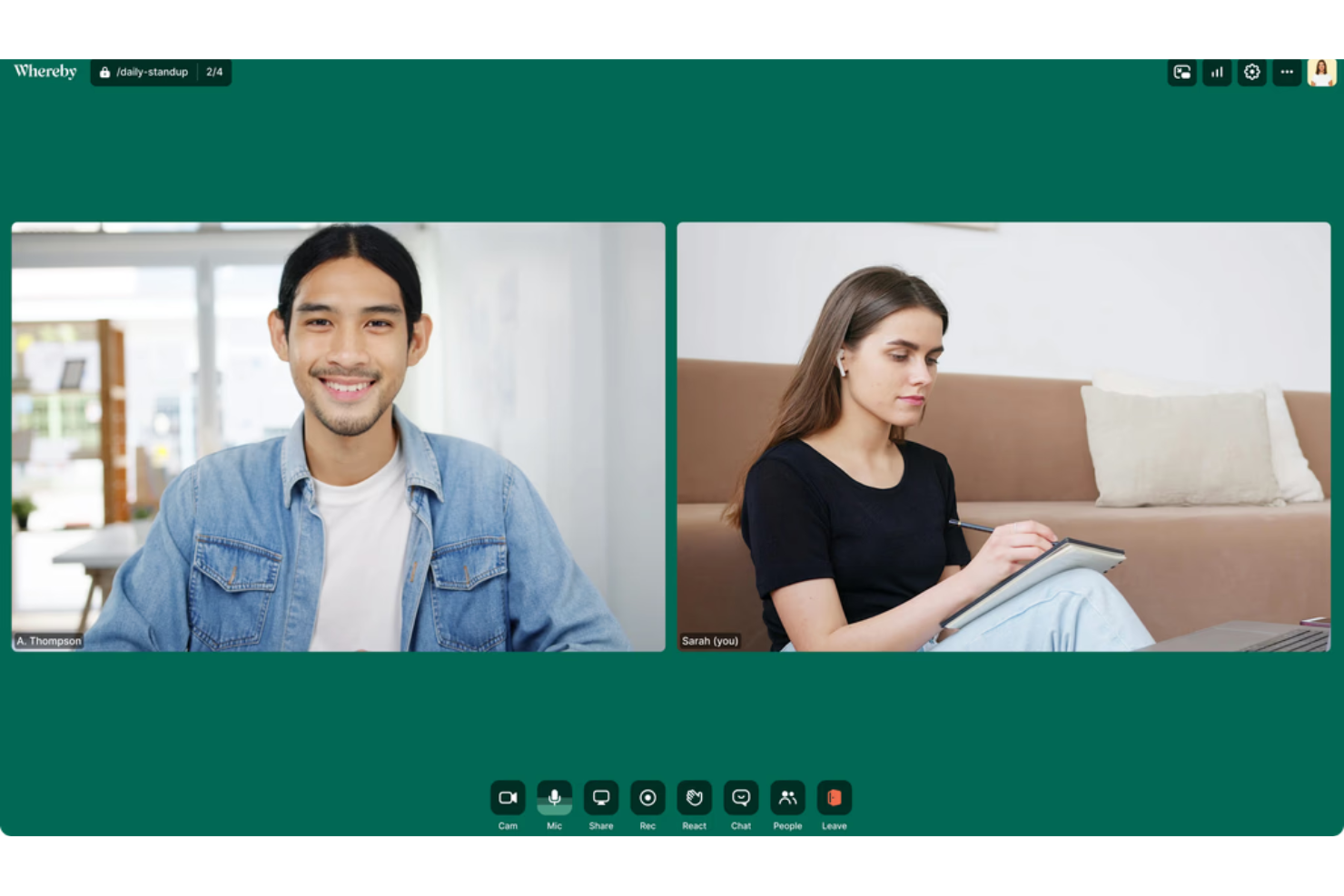
Whereby è una piattaforma per videoriunioni basata sul browser che consente al tuo team di organizzare e partecipare alle chiamate senza installazioni o accessi. Ritengo che possa risultare interessante per piccole imprese, consulenti o professionisti a contatto con i clienti che hanno bisogno di videoriunioni rapide e senza complicazioni.
Per chi è più adatto Whereby?
Piccoli team e consulenti indipendenti che hanno bisogno di videochiamate rapide e senza complicazioni con clienti esterni.
Perché Whereby è una buona alternativa a Google Meet
Ho scelto Whereby perché gli ospiti possono partecipare a una riunione facendo clic su un link: non servono account, app o configurazioni. È davvero utile quando organizzi riunioni con clienti esterni o collaboratori che non installeranno nulla solo per una chiamata veloce. Mi piace anche il fatto che ogni organizzatore riceva un URL permanente e personalizzato per la propria stanza, così il link della riunione non cambia mai e non devi generarne uno nuovo ogni volta. Per i controlli periodici con i clienti o gli orari di ricevimento aperti, questo tipo di coerenza elimina una fonte di attrito piccola ma concreta.
Funzionalità principali di Whereby
- Lavagna virtuale: Collabora visivamente durante le chiamate utilizzando una lavagna integrata, senza passare a uno strumento esterno.
- Condivisione di file: Condividi i file direttamente all'interno di una sala riunioni senza affidarti a una conversazione separata.
- Chat durante la riunione: Invia messaggi di testo ai partecipanti durante una chiamata in corso senza interrompere chi sta parlando.
- Trascrizioni delle riunioni: Genera trascrizioni scritte delle tue chiamate per consultare in seguito i punti principali.
Integrazioni di Whereby
Whereby offre integrazioni native con Involve Interpreter, Salesforce Quick Call, Cronofy e Assuric. È disponibile un'API REST per le integrazioni personalizzate.
Pros and Cons
Pros:
- Gli ospiti non devono creare un account per partecipare
- Le riunioni basate sul browser non richiedono download
- Link fissi alle sale riunioni per un utilizzo ricorrente
Cons:
- Il piano gratuito è limitato a quattro partecipanti
- Gli strumenti avanzati di moderazione sono limitati

Ideale per flussi di lavoro automatizzati degli eventi

Livestorm è una piattaforma basata su browser progettata per i team che desiderano automatizzare i flussi di lavoro relativi all'organizzazione di eventi. Le aziende che gestiscono demo di prodotto, webinar o sessioni di onboarding per i dipendenti spesso scelgono Livestorm per ottimizzare pianificazione, coinvolgimento e analisi in un unico posto.
A chi si rivolge Livestorm?
Responsabili marketing per eventi e team HR di aziende in crescita che necessitano di automatizzare webinar ricorrenti o sessioni di formazione dal vivo.
Perché Livestorm è una valida alternativa a Google Meet
Ho scelto Livestorm perché i suoi strumenti di automazione degli eventi vanno ben oltre ciò che offre Google Meet. Posso configurare in anticipo l'intero flusso di lavoro di un evento—email di registrazione, promemoria e sequenze di follow-up—senza dover intervenire il giorno stesso dell'evento. Apprezzo anche la funzione video on-demand, che consente al mio team di riutilizzare le sessioni dal vivo trasformandole in registrazioni self-service accessibili in qualsiasi momento dai nuovi iscritti. Per i team che organizzano eventi ricorrenti come demo di prodotto o webinar di onboarding, questo tipo di automazione elimina molte delle attività manuali che Google Meet lascia a carico dell'utente.
Funzionalità principali di Livestorm
- Sottotitoli in tempo reale: Trascrive automaticamente in tempo reale i contenuti parlati durante le sessioni.
- Riproporzionamento contenuti tramite AI: Estrae contenuti dalle trascrizioni degli eventi per generare risorse per diversi canali.
- Personalizzazione delle sale evento: Permette di marchiare ogni sala evento con logo, immagini di sfondo e colori personalizzati.
- Registrazione multisessione: Consente ai partecipanti di registrarsi una sola volta per accedere a più sessioni dello stesso evento.
Integrazioni Livestorm
Livestorm offre integrazioni native con Google Analytics, HubSpot, Salesforce, Slack, Intercom, Microsoft Dynamics e Google Calendar. Si collega anche con Zapier e mette a disposizione un'API per integrazioni personalizzate.
Pros and Cons
Pros:
- Pianificazione automatica per webinar e riunioni ricorrenti
- Registrazione eventi ed email personalizzabili
- Replay on-demand degli eventi per gli iscritti
Cons:
- Funzionalità limitate per le stanze di gruppo
- Occasionali problemi di sincronizzazione tra video e audio

Dialpad
Ideale per la trascrizione IA integrata
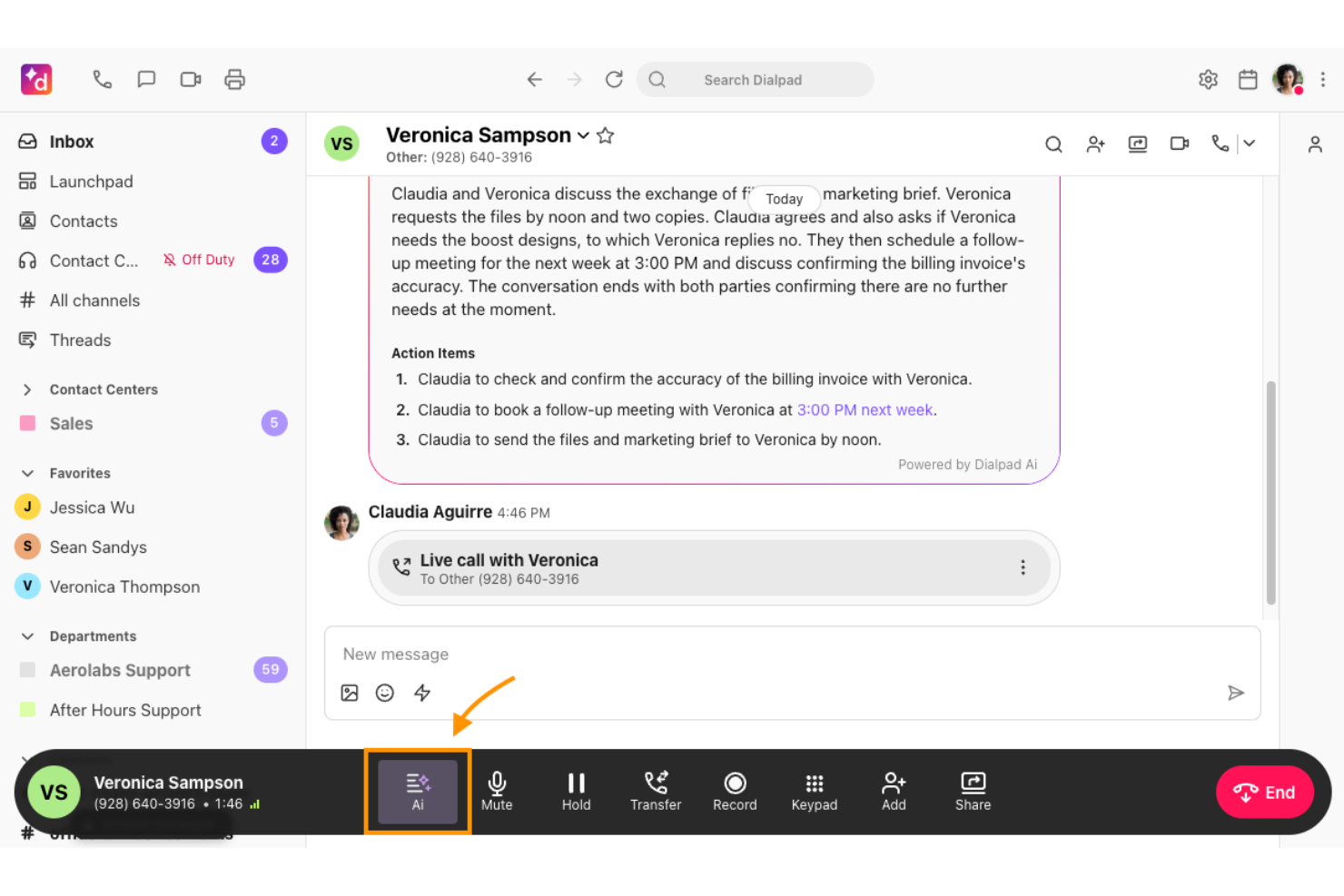
Dialpad è una piattaforma di comunicazioni unificate progettata per le aziende che necessitano di video, voce e messaggistica fluidi in un unico ambiente. Si distingue per i team che desiderano strumenti basati sull'IA per semplificare le riunioni e migliorare la collaborazione.
Per chi è più adatto Dialpad?
Team di vendita e assistenza di piccole e medie imprese che desiderano riunioni video, chiamate e messaggistica con trascrizione automatica delle chiamate.
Perché Dialpad è una buona alternativa a Google Meet
Ho scelto Dialpad perché la sua trascrizione IA integrata funziona in tempo reale durante le chiamate e le riunioni, quindi il mio team non ha bisogno di aggiungere uno strumento di trascrizione di terze parti. Apprezzo in particolare le attività generate dall'IA, che fanno emergere automaticamente i prossimi passaggi dalla conversazione senza che nessuno debba prendere appunti manualmente. Dialpad produce anche riepiloghi post-riunione a cui il mio team può fare riferimento o che può condividere subito dopo la fine di una chiamata. Per i team di vendita o assistenza che registrano decine di chiamate alla settimana, questo tipo di documentazione integrata è difficile da replicare utilizzando solo Google Meet.
Funzionalità principali di Dialpad
- Riunioni video: Organizza videochiamate HD con condivisione dello schermo direttamente nella piattaforma.
- Sistema telefonico integrato: Effettua e ricevi chiamate tramite un numero di telefono aziendale basato sul cloud.
- Messaggistica del team: Invia messaggi diretti e crea canali di gruppo insieme alle tue riunioni.
- Dashboard di analisi: Monitora l'attività delle chiamate e delle riunioni all'interno del team con report sull'utilizzo.
Integrazioni di Dialpad
Dialpad offre integrazioni native con Google Workspace, Microsoft 365, Salesforce, Slack, HubSpot, Zendesk, ServiceNow, Okta e altro ancora. Sono inoltre disponibili Zapier e un'API per integrazioni personalizzate.
Pros and Cons
Pros:
- Trascrizioni delle riunioni generate dall'IA in tempo reale
- Piattaforma integrata per voce, video e messaggistica
- Attività automatiche dopo le chiamate
Cons:
- Occasionali ritardi nella precisione della trascrizione
- Le funzionalità IA avanzate richiedono piani a pagamento

Ideale per webinar interattivi
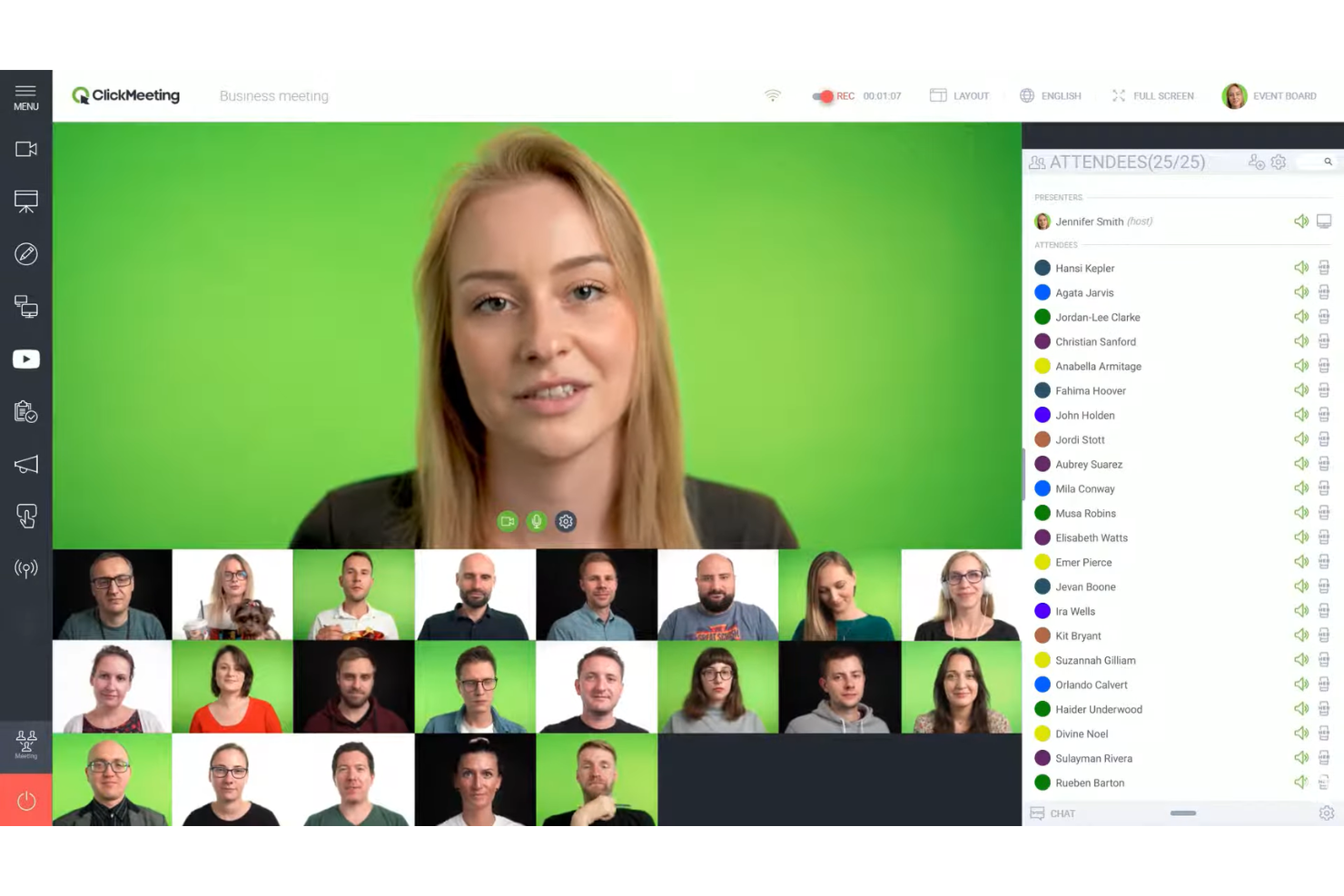
ClickMeeting offre funzionalità per webinar dal vivo alle organizzazioni che desiderano coinvolgere un vasto pubblico online. È adatto ai team che necessitano di strumenti per sondaggi, sessioni di domande e risposte e presentazioni interattive durante gli eventi virtuali.
A chi è più adatto ClickMeeting?
Ai team di marketing e formazione che organizzano frequentemente webinar interattivi o sessioni di formazione online per un vasto pubblico.
Perché ClickMeeting è una buona alternativa a Google Meet
Ho scelto ClickMeeting perché è progettato appositamente per i webinar, a differenza di Google Meet. Funzionalità come i sondaggi dal vivo, le sessioni di domande e risposte moderate e i pulsanti di invito all'azione durante una presentazione offrono al mio team strumenti concreti per stimolare la partecipazione del pubblico. Apprezzo anche l'opzione per i webinar automatizzati, che ci permette di programmare e svolgere sessioni preregistrate come se fossero dal vivo. Per i team che organizzano regolarmente eventi online strutturati con un vasto pubblico, ClickMeeting gestisce questo formato molto meglio di uno strumento per riunioni di uso generale.
Funzionalità principali di ClickMeeting
- Modalità Edu: Limita le azioni dei partecipanti durante una sessione per mantenere l'attenzione sul relatore.
- Trasmissione simultanea: Trasmetti le sessioni dal vivo contemporaneamente sulle piattaforme dei social network.
- Sala d'attesa con agenda: Mostra ai partecipanti i dettagli dell'evento e l'identità visiva prima dell'inizio di una sessione.
- Statistiche dell'evento: Esamina i dati sulla partecipazione dopo l'evento, le metriche di coinvolgimento e i registri delle attività dei partecipanti.
Integrazioni di ClickMeeting
ClickMeeting offre integrazioni native con Stripe, PayPal, Keap, Pipedrive, Moodle, GetResponse, HubSpot, Slack, Dropbox e altri. Si connette inoltre a Zapier ed è disponibile un'API per integrazioni personalizzate.
Pros and Cons
Pros:
- Moduli di registrazione personalizzati per i partecipanti disponibili
- Analisi del coinvolgimento dei partecipanti durante gli eventi
Cons:
- Webinar automatizzati per presentazioni ricorrenti
- Limiti di archiviazione rigidi per le registrazioni delle riunioni
- Meno opzioni per le sale separate rispetto ai concorrenti

Ideale come suite di comunicazione unificata

RingCentral offre una piattaforma di comunicazione unificata che riunisce riunioni video, messaggistica e telefonia in un'unica applicazione. Ritengo che i responsabili IT e i gruppi distribuiti che desiderano gestire tutte le chiamate e la collaborazione in uno spazio centralizzato ne apprezzeranno i vantaggi.
Per chi è più adatto RingCentral?
Grandi organizzazioni e reparti IT che necessitano di una soluzione unificata per voce, riunioni video e messaggistica aziendale tra gruppi globali.
Perché RingCentral è una buona alternativa a Google Meet
Ho scelto RingCentral perché è una delle poche piattaforme che combina davvero riunioni video, messaggistica per i gruppi e un sistema telefonico cloud in un'unica soluzione. Quando il mio gruppo deve trasformare una chat in una videochiamata o una videochiamata in una conferenza telefonica, possiamo farlo senza cambiare applicazione. Apprezzo anche le funzionalità di gestione delle chiamate di RingCentral, come il risponditore automatico e l'instradamento delle chiamate, che vanno ben oltre ciò che offre un normale strumento per videoconferenze. Per le organizzazioni che gestiscono sia la collaborazione interna sia le chiamate con i clienti esterni, è difficile trovare una soluzione altrettanto completa.
Funzionalità principali di RingCentral
- Registrazione delle riunioni video: Acquisisci e archivia le videochiamate direttamente sulla piattaforma per rivederle in seguito.
- Sale per sottogruppi: Dividi i partecipanti in gruppi più piccoli durante una riunione per discussioni mirate.
- Lavagna: Collabora visivamente durante le chiamate utilizzando una lavagna digitale integrata nella riunione.
- Analisi delle riunioni: Visualizza i dati relativi a partecipazione, coinvolgimento e utilizzo delle riunioni video del tuo gruppo.
Integrazioni di RingCentral
RingCentral offre oltre 500 integrazioni preconfigurate, tra cui Google Workspace, Microsoft Teams, Salesforce, Jira e Google Sheets. È disponibile un'API per le integrazioni personalizzate.
Pros and Cons
Pros:
- Passa istantaneamente da video, messaggistica e telefonia
- Supporta riunioni di grandi dimensioni con video di alta qualità
- Funzionalità avanzate di gestione delle chiamate incluse
Cons:
- Le registrazioni delle riunioni dispongono di spazio di archiviazione cloud limitato
- Occasionali problemi di sincronizzazione tra dispositivi

Ideale per sale riunioni personalizzabili
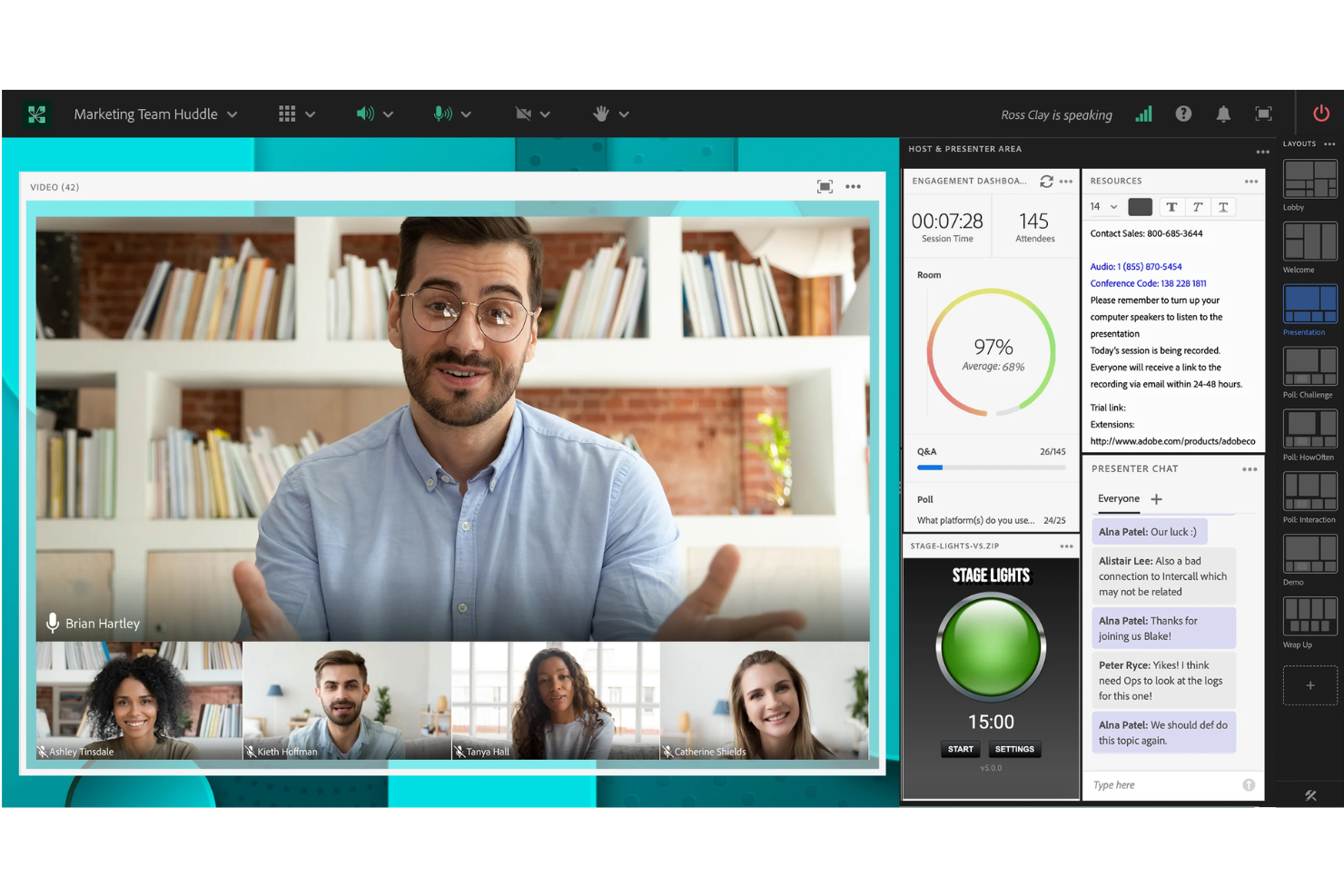
Adobe Connect è una piattaforma per videoconferenze progettata per le organizzazioni che necessitano di ambienti avanzati per la collaborazione virtuale e la formazione. È ideale per i team che desiderano disposizioni per riunioni flessibili e spazi riunione permanenti che vadano oltre le tipiche conferenze web.
A chi è più adatto Adobe Connect?
Formatori ed educatori che necessitano di aule virtuali altamente personalizzabili o di spazi ricorrenti per laboratori online.
Perché Adobe Connect è una buona alternativa a Google Meet
Ho scelto Adobe Connect perché le sue sale riunioni personalizzabili, chiamate 'moduli', consentono di organizzare e salvare disposizioni per casi d'uso specifici, come sessioni di formazione, laboratori o riunioni quotidiane ricorrenti del team. Apprezzo il fatto che queste disposizioni delle sale rimangano invariate tra una sessione e l'altra, così il mio team non deve riconfigurare nulla ogni volta che si riunisce. I moduli per lavagna, condivisione dei file e sondaggi possono essere posizionati e ridimensionati in modo da adattarsi esattamente al flusso di una riunione. Per i team che organizzano ripetutamente sessioni strutturate, questo tipo di progettazione riutilizzabile delle sale è qualcosa che Google Meet semplicemente non offre.
Funzionalità principali di Adobe Connect
- Sale per sottogruppi: dividono i partecipanti in gruppi più piccoli durante una sessione per discussioni o attività mirate.
- Retropalco virtuale: i moderatori e i relatori possono comunicare privatamente senza che i partecipanti li vedano o li sentano.
- Pannello di controllo del coinvolgimento: monitora in tempo reale i livelli di partecipazione dei presenti durante le sessioni dal vivo.
- Registrazione e riproduzione: registra le sessioni complete e condividile come repliche su richiesta al termine della riunione.
Integrazioni di Adobe Connect
Adobe Connect offre integrazioni native con Salesforce, Microsoft Outlook e Adobe Learning Manager. È disponibile un'API per le integrazioni personalizzate.
Pros and Cons
Pros:
- Sale riunioni permanenti per sessioni ricorrenti
- Moduli modulari per elementi interattivi delle sessioni
- Pannello di controllo del coinvolgimento del pubblico durante gli eventi dal vivo
Cons:
- Esperienza mobile meno affidabile rispetto a quella desktop
- Curva di apprendimento ripida per i nuovi moderatori
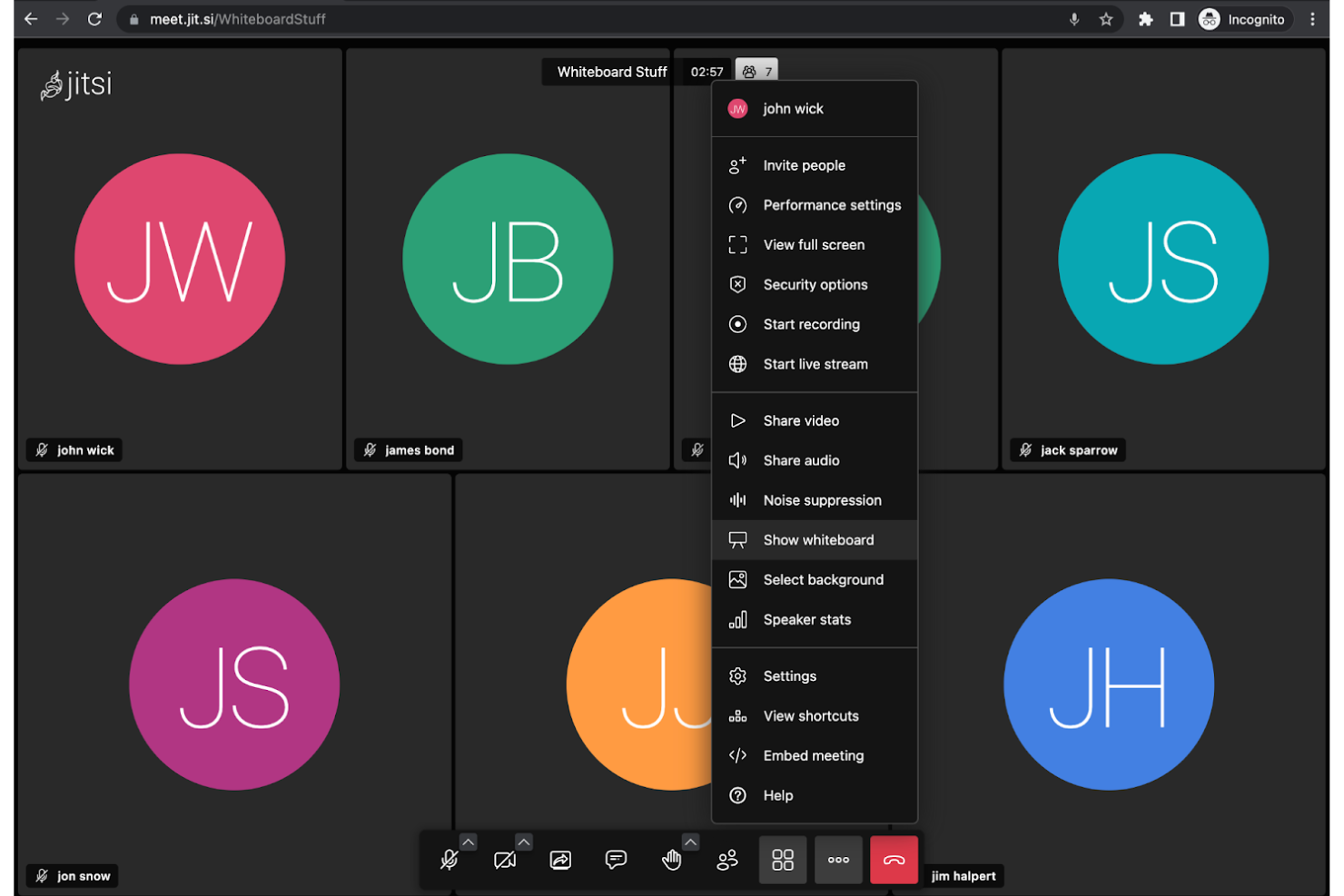
Jitsi Meet è una soluzione a codice sorgente aperto per riunioni video progettata per sviluppatori, team IT o organizzazioni attente alla privacy che desiderano il pieno controllo della propria infrastruttura per le videoconferenze. È possibile distribuirla sui propri server, personalizzarne le funzionalità e soddisfare rigorosi requisiti di sicurezza o conformità.
Per chi è più indicato Jitsi Meet?
Team IT e sviluppatori che necessitano del pieno controllo su privacy, distribuzione e personalizzazione delle funzionalità nelle videoconferenze.
Perché Jitsi Meet è una valida alternativa a Google Meet
Ho scelto Jitsi Meet perché consente ai team di ingegneria e IT di ospitare autonomamente l'intera infrastruttura video, una possibilità che la maggior parte delle alternative a Meet non offre. È possibile creare un fork del codice sorgente, modificare l'interfaccia e rimuovere o aggiungere funzionalità per adattarle al proprio ambiente specifico. Ho visto team utilizzare questa soluzione per integrare le videochiamate direttamente negli strumenti interni o nei prodotti destinati ai clienti, senza dipendere dalla disponibilità o dalle variazioni di prezzo di un fornitore di terze parti. Per le organizzazioni con rigorosi requisiti di residenza dei dati, la possibilità di eseguire tutto sui propri server rappresenta un autentico elemento distintivo.
Funzionalità principali di Jitsi Meet
- Riunioni senza account: Avvia o partecipa a una chiamata senza creare un account o effettuare l'accesso.
- Crittografia end-to-end: Abilita le chiamate crittografate per mantenere privati i contenuti delle riunioni.
- Streaming dal vivo: Trasmetti le riunioni direttamente su YouTube Live dalla piattaforma.
- Stanze separate: Dividi i partecipanti in gruppi più piccoli durante una sessione di riunione dal vivo.
Integrazioni di Jitsi Meet
Le integrazioni non sono elencate pubblicamente.
Pros and Cons
Pros:
- Soluzione completamente a codice sorgente aperto e installabile sui propri server
- Durata delle riunioni illimitata senza restrizioni
- Non richiede un account Google né l'accesso
Cons:
- Non dispone nativamente di uno spazio di archiviazione cloud integrato
- La qualità audio e video può variare in base al server
Skype
Ideale per le funzionalità di chiamata internazionale


Lifesize
Ideale per sale di videoconferenza 4K
Pexip
Ideale per l'interoperabilità con i sistemi legacy
Altre alternative a Google Meet
Ecco alcune ulteriori alternative a Google Meet che non sono state incluse nella mia selezione, ma che vale comunque la pena prendere in considerazione:
- Nextiva
Ideale per combinare chiamate e riunioni
- Amazon Chime
Ideale per l'integrazione nell'ecosistema AWS
- Discord
Ideale per stanze vocali persistenti basate su argomenti


Come Valuto le Alternative a Google Meet
Per prima cosa verifico se uno strumento offre ciò che già fornisce Google Meet: video in HD, condivisione dello schermo, registrazione e sincronizzazione con il calendario per standup e chiamate con i clienti. Da lì, valuto le funzionalità extra che distinguono una piattaforma dall'altra per i team di progetto.
Funzionalità Core (Requisiti Indispensabili per Questa Lista)
Quando seleziono gli strumenti per la mia lista, valuto ciascuno su una scala da 0 (non offre la funzionalità) a 5 (eccelle in quest'area) per ogni funzionalità core elencata qui sotto. Poi calcolo il punteggio totale dello strumento come percentuale. Ogni strumento deve raggiungere un punteggio minimo pari al 75% per essere considerato per l'inclusione.
- Videoconferenza HD: Valuto la qualità della chiamata, la capacità dei partecipanti e la stabilità in condizioni reali, come una pianificazione sprint con 15 persone, videocamere attive e condivisioni schermo in simultanea.
- Condivisione Schermo: La possibilità di condividere schermi interi, finestre specifiche o singole schede del browser è importante quando si mostrano ai responsabili una board Jira o un diagramma di Gantt in tempo reale.
- Registrazione Riunioni: Cerco la registrazione in cloud con spazio e tempi di conservazione sufficienti per permettere ai team di rivedere riunioni di sprint o incontri con clienti anche giorni o settimane dopo che si sono svolti.
- Chat all'interno della Riunione: Una chat efficace permette ai partecipanti di condividere link a ticket, specifiche o documenti durante la chiamata senza interrompere chi parla—verifico anche se i messaggi rimangono disponibili dopo la fine della riunione.
- Integrazione con Calendari e Pianificazione: Controllo la presenza di connessioni native con Google Calendar e Outlook, così i PM possono pianificare standup ricorrenti e inviare i link per accedere direttamente dal loro flusso di lavoro attuale.
- Accesso Multipiattaforma: I team distribuiti si collegano da laptop, telefoni e browser, quindi mi assicuro che ci sia parità di funzionalità tra app desktop, app mobili e accesso via browser sia per iOS che per Android.
Una volta che ho una lista di strumenti che soddisfano i criteri, considero cosa distingue ciascuna piattaforma.
Fattori Differenzianti (Cosa Distingue i Fornitori)
Ecco come confronto i diversi fornitori:
Funzionalità di Spicco
Un assistente AI per le riunioni può far risparmiare ore ogni settimana ai PM generando trascrizioni, riassunti e task da inserire direttamente in strumenti come Jira o Asana. Le sale per sottogruppi sono un'altra funzione che cerco, soprattutto per retrospettive e workshop dove serve dividere in gruppi ristretti per poi tornare insieme. Considero anche la lavagna integrata: poter abbozzare una roadmap o gestire una sessione di story mapping senza dover passare a uno strumento esterno come Miro mantiene il team concentrato e riduce i cambi di contesto.
Oltre le Funzionalità
L'integrazione con i tool di project management è fondamentale: verifico se una piattaforma permette di avviare chiamate da un ticket Jira o un'attività Asana e di riportare le note della riunione direttamente nella cronologia del progetto. Anche la sicurezza è un aspetto che valuto con attenzione, soprattutto per le chiamate con clienti nelle quali sono fondamentali SSO, crittografia end-to-end e certificazioni di conformità come SOC 2 o GDPR. Anche la struttura dei prezzi influenza le mie raccomandazioni: un modello "per host" funziona in modo molto diverso rispetto alla licenza "per utente" quando si deve implementare la soluzione in un PMO di 50 persone.
Perché cercare un'alternativa a Google Meet?
Sebbene Google Meet sia una buona scelta per le videoconferenze, esistono diversi motivi per cui alcuni utenti cercano soluzioni alternative. Potresti cercare un'alternativa a Google Meet perché…
- Hai bisogno di strumenti integrati per webinar o per l'automazione degli eventi
- Vuoi funzionalità avanzate per il coinvolgimento, come sondaggi e domande e risposte
- Hai bisogno di controlli più avanzati sull'accesso alle riunioni o sulla moderazione
- La tua organizzazione ha bisogno di un marchio personalizzato per le riunioni
- Riscontri problemi di qualità o stabilità del video
- Collabori con partecipanti che hanno difficoltà ad accedere all'account Google
Se ti riconosci in una di queste situazioni, sei nel posto giusto. Il mio elenco contiene diverse opzioni software per videoconferenze più adatte ai team che affrontano queste difficoltà con Google Meet e cercano soluzioni alternative.
Funzionalità principali di Google Meet
Ecco alcune delle funzionalità principali di Google Meet, che ti aiuteranno a confrontare ciò che offrono le soluzioni alternative:
- Riunioni video: Ospita riunioni video sicure per un massimo di 500 partecipanti, con audio e video ad alta definizione, utilizzando qualsiasi dispositivo dotato di browser web o app per dispositivi mobili.
- Condivisione dello schermo: Presenta l'intero schermo, una scheda specifica o la finestra di un'applicazione agli altri partecipanti per discussioni collaborative e dimostrazioni guidate.
- Sottotitoli in tempo reale: Utilizza la conversione vocale in testo integrata per visualizzare i sottotitoli in tempo reale durante le riunioni, migliorando l'accessibilità per tutti i partecipanti.
- Registrazione delle riunioni: Registra le riunioni direttamente su Google Drive, semplificando la condivisione o la revisione delle discussioni in un secondo momento.
- Integrazione con Google Workspace: Pianifica e partecipa alle riunioni direttamente da Google Calendar o Gmail, con link e promemoria automatici.
- Cancellazione del rumore: Riduce automaticamente il rumore di fondo per migliorare la nitidezza dell'audio, anche in ambienti rumorosi.
- Controlli per l'organizzatore: Gestisci le autorizzazioni dei partecipanti, disattiva il microfono o rimuovi i partecipanti e blocca le riunioni per una maggiore sicurezza.
- Sale riunioni secondarie: Dividi i partecipanti in sessioni separate per attività e discussioni di gruppo, quindi riunisci tutti nella riunione principale.
- Chat durante la riunione: Comunica tramite un pannello di chat testuale per condividere link, domande o note senza interrompere la conversazione.
- Accesso tramite telefono: Offri opzioni di accesso telefonico per consentire ai partecipanti di unirsi alle riunioni anche senza una connessione Internet.