

10 migliori alternative a Document360 per la documentazione di supporto nel 2026

10 Migliori alternative a Document360: selezione


Gestire la conoscenza interna non dovrebbe sembrare una soluzione provvisoria. Se Document360 non offre la flessibilità, le integrazioni o la scalabilità di cui il tuo team ha bisogno, probabilmente stai dedicando più tempo alla manutenzione della tua base di conoscenza che al suo miglioramento.
Lo strumento giusto per la gestione della conoscenza dovrebbe ridurre gli ostacoli, non aggiungerne. Dopo aver analizzato e confrontato le principali alternative, ho selezionato le opzioni migliori in base a usabilità, personalizzazione, integrazioni e adeguatezza a lungo termine.
In questa guida troverai le principali alternative a Document360, i loro punti di forza, i loro limiti e i tipi di team per cui sono più adatte, così potrai scegliere una piattaforma che supporti davvero il modo in cui lavora il tuo team.
Che cos'è Document360?
Document360 è un software per la gestione della conoscenza progettato per aiutare te e il tuo team a organizzare e condividere le informazioni in modo efficiente. Viene comunemente utilizzato da project manager, team di assistenza clienti e professionisti IT che hanno bisogno di uno strumento affidabile per gestire la documentazione.
Le sue funzionalità, come il controllo delle versioni, l'analisi dei dati e un editor intuitivo, aiutano a mantenere basi di conoscenza chiare e accessibili. Nel complesso, Document360 ottimizza il modo in cui il tuo team crea, organizza e utilizza le informazioni.
Tabella di confronto delle alternative a Document360
Questa tabella di confronto riassume i dettagli sui prezzi delle migliori alternative a Document360 che ho selezionato:
| Tool | Best For | Trial Info | Price | ||
|---|---|---|---|---|---|
| 1 | Ideale per hub leggeri di conoscenza interna | Piano gratuito disponibile | A partire da $6/user/month (con fatturazione annuale) | Website | |
| 2 | Ideale per strumenti di team integrati | Piano gratuito disponibile | A partire da $12/user/month (fatturato annualmente) | Website | |
| 3 | Ideale per l'autoassistenza basata sull'IA | Piano gratuito disponibile | A partire da $49/autore/mese (fatturato annualmente) | Website | |
| 4 | Ideale per strumenti di conoscenza centralizzati basati sui dati | Demo gratuita disponibile | Prezzi su richiesta | Website | |
| 5 | Ideale per la documentazione dinamica | Prova gratuita di 14 giorni disponibile | A partire da $80/mese | Website | |
| 6 | Ideale per migliorare l'esperienza del servizio clienti | Demo gratuita disponibile | Prezzi su richiesta | Website | |
| 7 | Ideale per gli spazi di lavoro collaborativi dei team | Prova gratuita + piano gratuito disponibili | Da $5.42/utente/mese | Website | |
| 8 | Ideale per un accesso ai contenuti personalizzabile e controllato | Prova gratuita di 30 giorni | Da $100/mese | Website | |
| 9 | Ideale per il monitoraggio dei feedback degli utenti | Prova gratuita di 10 giorni + piano gratuito + demo gratuita disponibili | A partire da $29/postazione/mese (con fatturazione annuale) | Website | |
| 10 | Ideale per la documentazione delle API orientata agli sviluppatori | Prova gratuita di 14 giorni + piano gratuito disponibile | A partire da $65/sito/mese + $12/utente/mese (con fatturazione annuale) | Website |
Perché fidarsi dei nostri consigli sui software
Il nostro team testa e recensisce software dal 2012. In quanto project manager noi stessi, sappiamo quanto sia difficile — e importante — scegliere il software giusto.
Per questa guida, abbiamo valutato gli strumenti attraverso test pratici e ricerche indipendenti, assegnando un punteggio agli strumenti in base ai nostri criteri di selezione. Ci basiamo inoltre sulle competenze di leader di pensiero del settore e di professionisti attivi nella gestione dei progetti.
Le nostre recensioni riflettono il nostro giudizio editoriale umano, non un discorso di vendita.
Revisori esperti:
Recensioni delle migliori alternative a Document360
Di seguito trovi le mie analisi dettagliate delle migliori alternative a Document360 incluse nella mia selezione. Le recensioni offrono una panoramica approfondita delle funzionalità principali, dei pro e dei contro, delle integrazioni e dei casi d’uso ideali di ciascuno strumento, per aiutarti a trovare quello più adatto a te.

Nuclino
Ideale per hub leggeri di conoscenza interna
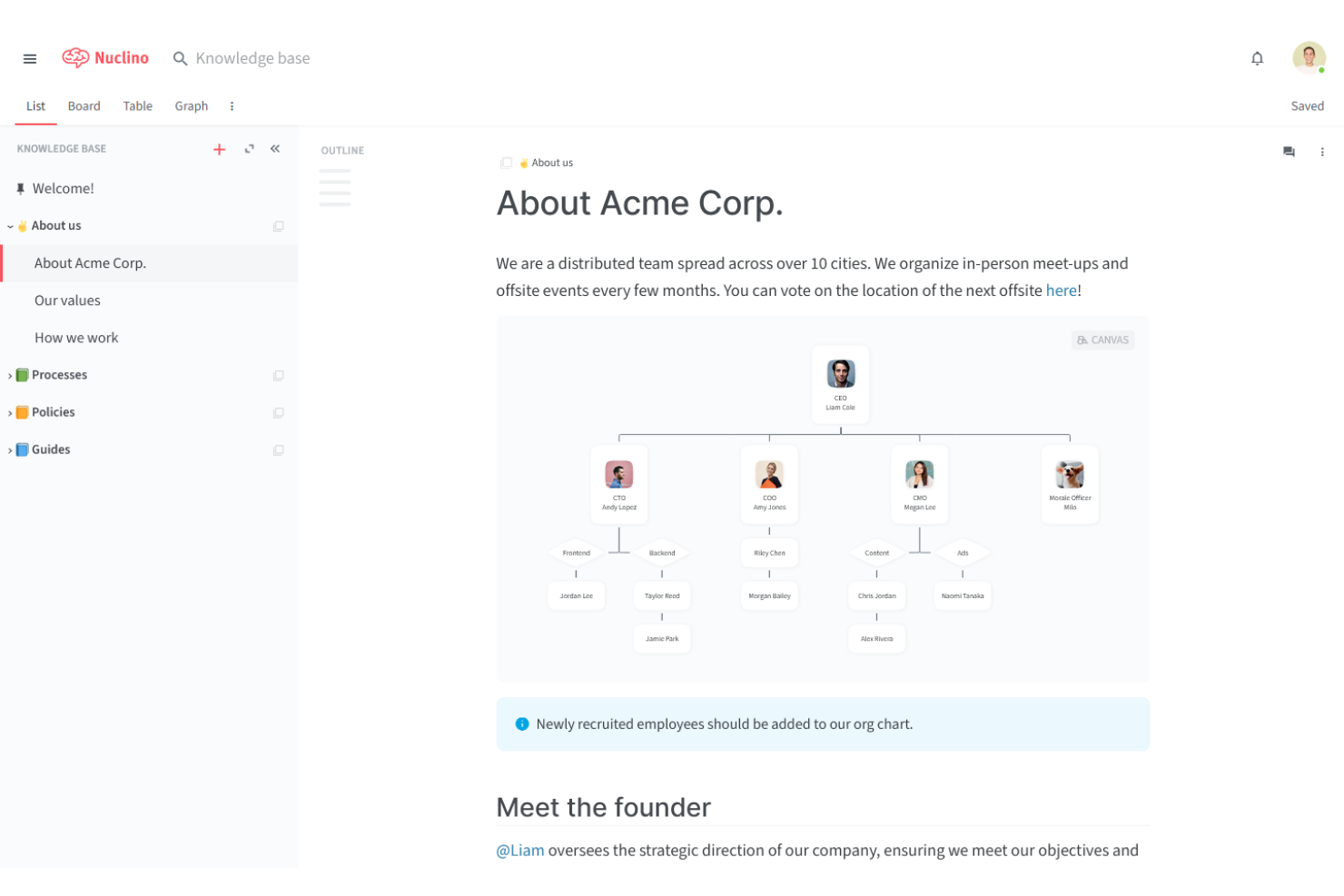
Nuclino è uno strumento collaborativo per la gestione della conoscenza, ideale per i piccoli team che hanno bisogno di organizzare e condividere le informazioni senza difficoltà. È popolare tra startup, piccole imprese e team agili per ottimizzare i processi di documentazione e comunicazione.
Perché è una valida alternativa a Document360: Nuclino offre uno spazio di lavoro visivo, una ricerca istantanea e la collaborazione in tempo reale, organizzando la conoscenza in modo più intuitivo. La possibilità di collegare elementi correlati tramite link interni e il suo design leggero lo rendono una scelta eccellente per i team che desiderano semplificare la gestione della conoscenza.
Caratteristiche distintive e integrazioni:
Le funzionalità includono uno spazio di lavoro visivo che aiuta il team a organizzare progetti e idee. È possibile utilizzare la ricerca istantanea per trovare rapidamente le informazioni necessarie. La piattaforma supporta inoltre il markdown per facilitare la formattazione e la creazione dei contenuti.
Le integrazioni includono Slack, Google Drive, GitHub Gist, Dropbox, OneDrive, Microsoft Teams, Figma, Lucidchart e altro.
Pros and Cons
Pros:
- Design semplice e intuitivo
- Funzionalità di ricerca istantanea
- Supporta la formattazione markdown
Cons:
- Operazioni in blocco limitate
- Esportazione API/dei dati inefficiente
Coda
Ideale per strumenti di team integrati
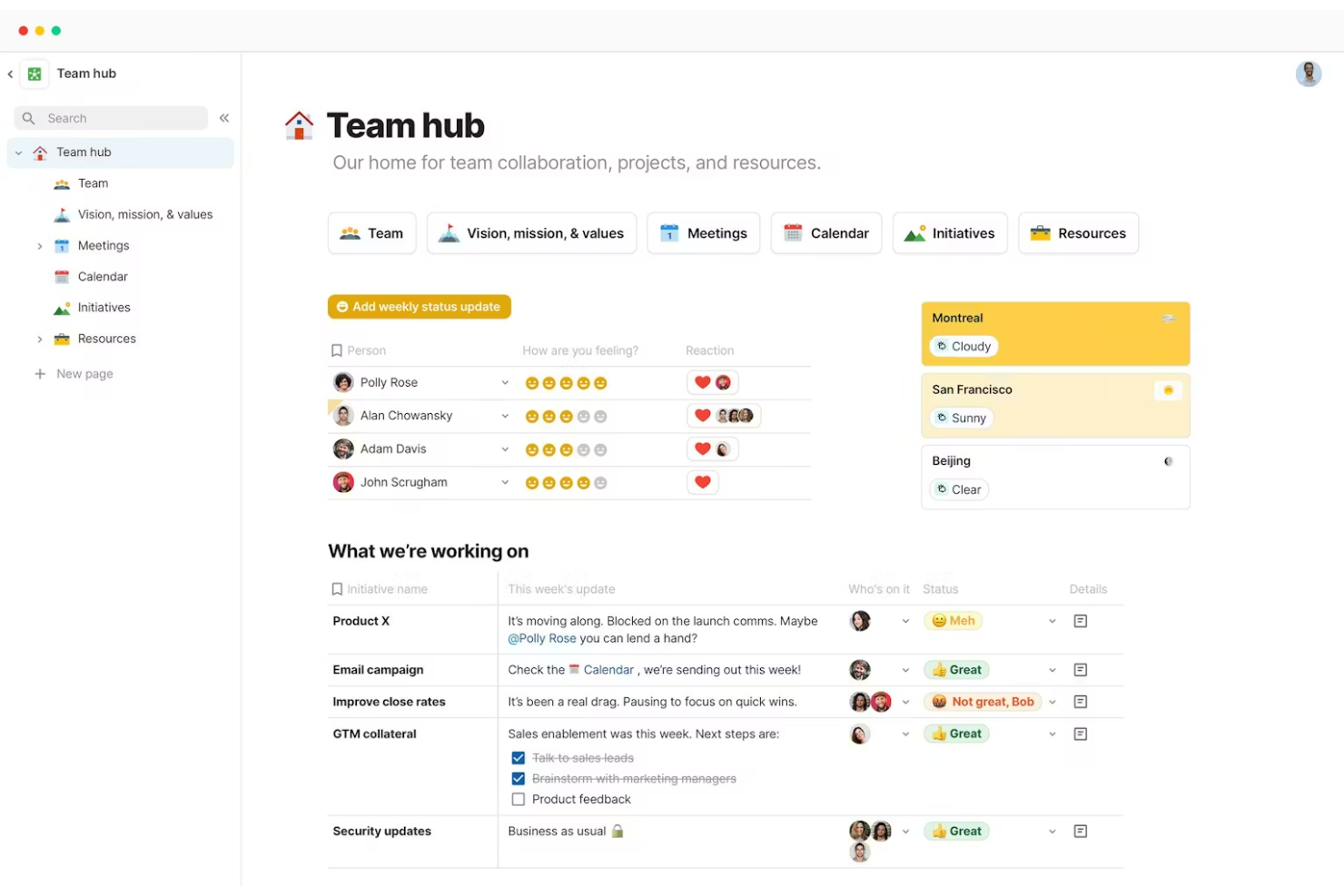
Coda è una versatile piattaforma di gestione dei documenti che combina documenti, fogli di calcolo e app in uno spazio di lavoro unificato. È popolare tra project manager, team di prodotto e startup per organizzare le attività e collaborare in modo efficiente.
Perché è una buona alternativa a Document360: Coda offre tabelle interattive, modelli personalizzabili e collaborazione in tempo reale, integrando diversi strumenti per i team in un'unica piattaforma.
Caratteristiche e integrazioni principali:
Le caratteristiche includono tabelle interattive che aiutano il team a gestire dati come quelli dei fogli di calcolo. È possibile utilizzare modelli personalizzabili per configurare rapidamente nuovi progetti. La piattaforma supporta inoltre la collaborazione in tempo reale, consentendo ai membri del team di lavorare insieme in modo efficace.
Le integrazioni includono Slack, Google Calendar, Jira, GitHub, Figma, Salesforce e altro.
Pros and Cons
Pros:
- Combina documenti e fogli di calcolo
- Supporta la collaborazione in tempo reale
- Integra diversi strumenti per i team
Cons:
- Supporto limitato per Markdown
- Si applicano limiti all'API e alla sincronizzazione

Ideale per l'autoassistenza basata sull'IA
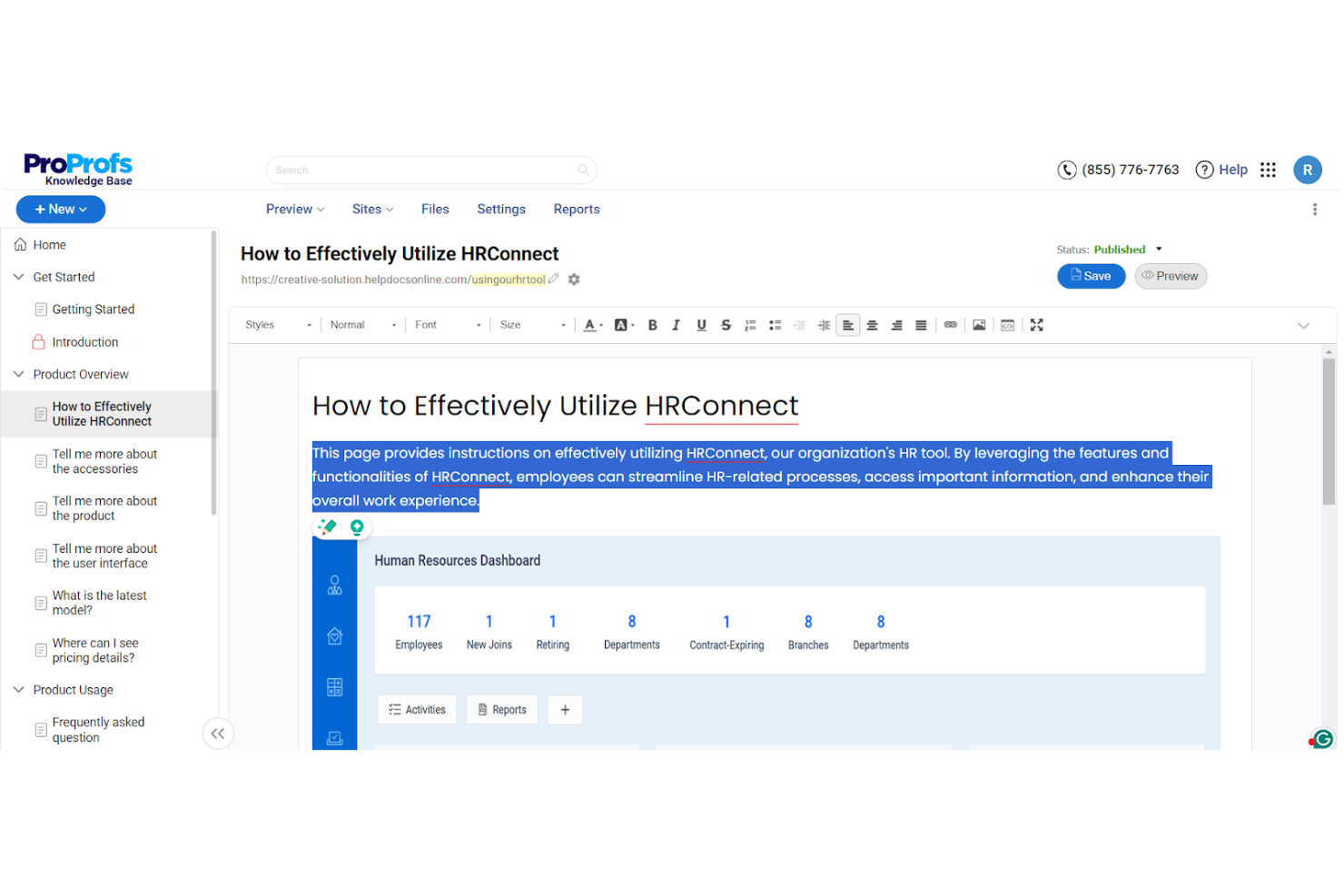
ProProfs Knowledge Base è uno strumento di gestione della conoscenza basato sull'IA, progettato per i team che necessitano di documentazione efficiente e soluzioni di autoassistenza. Viene utilizzato dai team di assistenza clienti, vendite e IT per ridurre i ticket di assistenza e migliorare l'accesso alle informazioni.
Perché è una buona alternativa a Document360: ProProfs Knowledge Base si distingue per la creazione di contenuti assistita dall'IA, il branding personalizzabile e i controlli di sicurezza che supportano la realizzazione di hub della conoscenza personalizzati e sicuri. Include inoltre widget di assistenza contestuale, analisi integrate che mostrano come gli utenti interagiscono con i contenuti e approfondimenti basati sull'IA per un approccio alla gestione della conoscenza incentrato sull'automazione.
Caratteristiche e integrazioni principali:
Caratteristiche includono la creazione di contenuti basata sull'IA, che aiuta il tuo team a produrre articoli in modo efficiente. Puoi personalizzare il branding per allinearlo all'identità della tua azienda. La piattaforma supporta oltre 90 lingue, rendendola versatile per i team internazionali.
Integrazioni includono Google Analytics, Zendesk, Freshdesk, Salesforce, Slack, Jira e altro.
Pros and Cons
Pros:
- Supporto multilingue disponibile
- Collaborazione in tempo reale
- Controlli di accesso sicuri
Cons:
- Monitoraggio di base del controllo delle versioni
- Azioni collettive limitate sui contenuti

Ideale per strumenti di conoscenza centralizzati basati sui dati
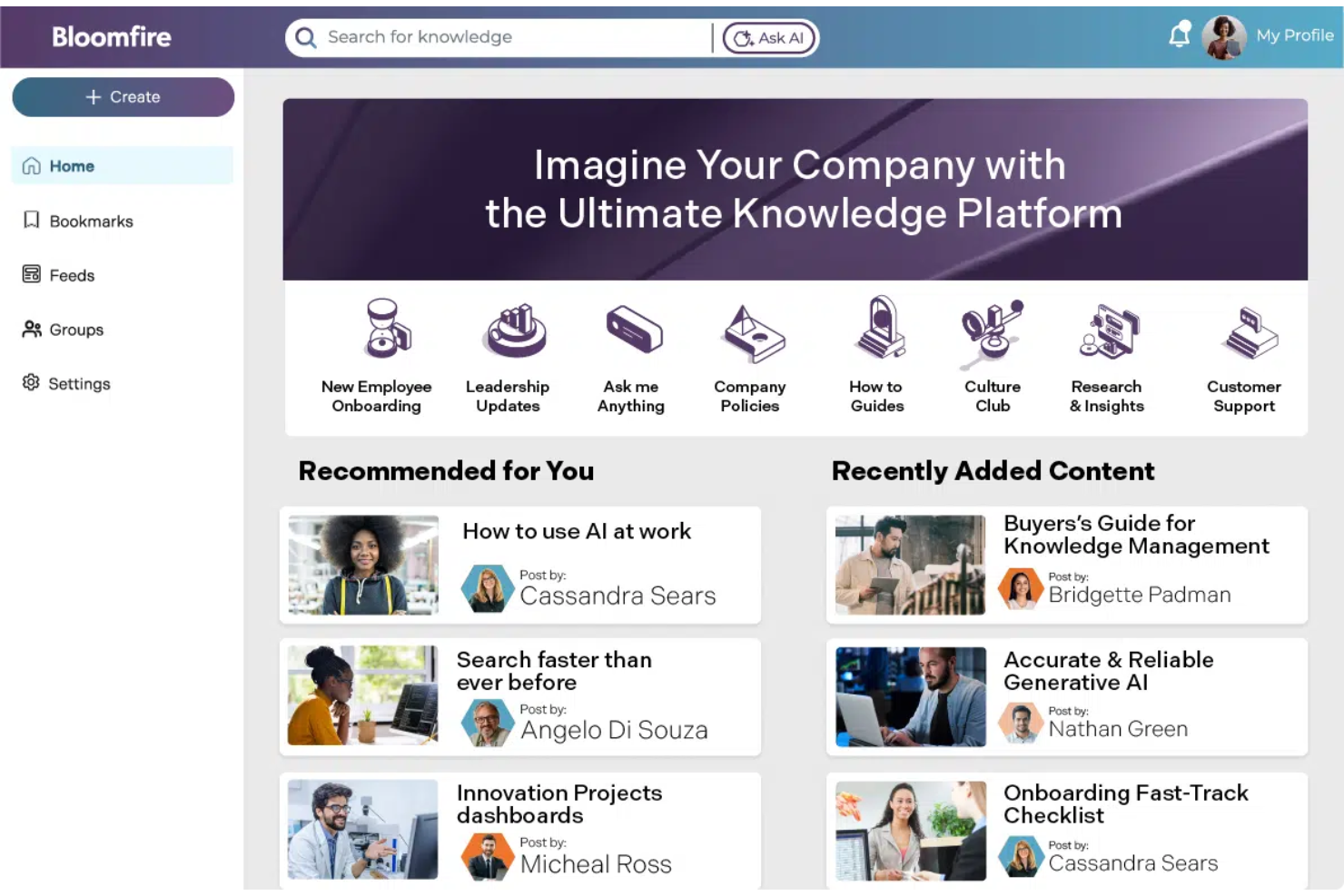
Bloomfire è una piattaforma per la condivisione della conoscenza progettata per aiutare i team ad accedere agli insight e condividerli in modo efficiente. Viene utilizzata principalmente dai team di vendita, marketing e assistenza clienti per migliorare la collaborazione e i processi decisionali.
Perché è una valida alternativa a Document360: Bloomfire offre funzionalità di ricerca avanzate, categorizzazione dei contenuti e analisi che estraggono gli insight dai dati in modo più efficace. La sua attenzione al processo decisionale basato sui dati e la facilità d'uso per la condivisione dei contenuti la rendono una scelta adatta per i team che desiderano migliorare la gestione della conoscenza con insight utili.
Funzionalità e integrazioni principali:
Le funzionalità includono l'etichettatura personalizzabile dei contenuti, che aiuta il team a organizzare e recuperare rapidamente le informazioni. È possibile utilizzare la sezione Domande e risposte per favorire discussioni interattive e condividere conoscenze. La piattaforma supporta inoltre i contenuti multimediali, consentendo di condividere facilmente video, immagini e documenti.
Le integrazioni includono Salesforce, Slack, Microsoft Teams, Google Drive, Zendesk, SharePoint, Okta e altro ancora.
Pros and Cons
Pros:
- Supporta i contenuti multimediali
- Funzionalità di ricerca avanzate
- Favorisce le discussioni interattive
Cons:
- La ricerca richiede una formulazione esatta
- L'indicizzazione dei contenuti a volte è lenta
Archbee
Ideale per la documentazione dinamica
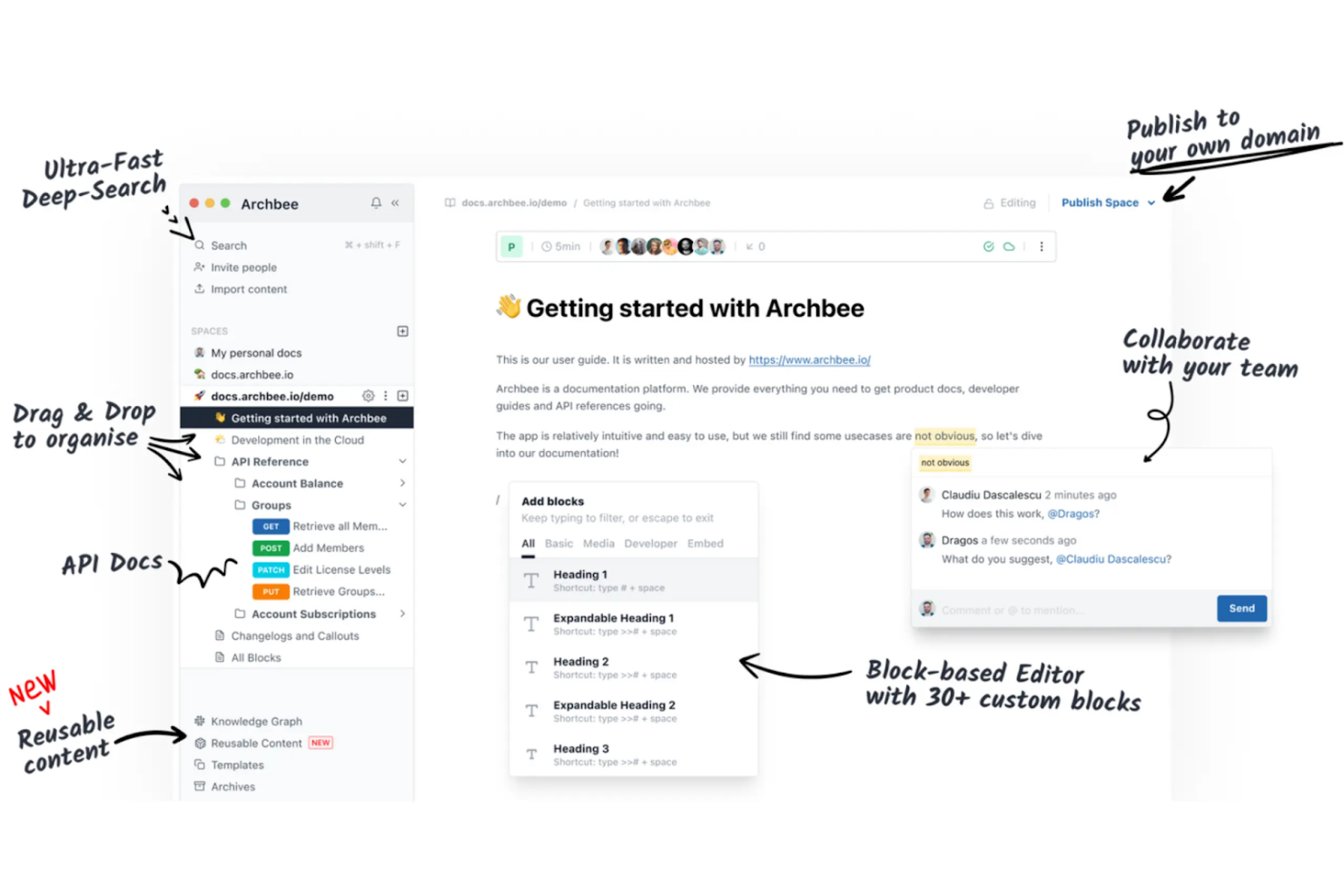
Archbee è una piattaforma di documentazione pensata per team software e startup, che consente di creare, gestire e condividere la conoscenza in modo efficiente. Viene utilizzata da sviluppatori e redattori tecnici per mantenere una documentazione dinamica che si evolve insieme ai loro progetti.
Perché è una buona alternativa a Document360: Archbee offre modifica collaborativa in tempo reale, supporto per Markdown e documentazione API personalizzata, mantenendo i contenuti aggiornati e accessibili. La sua attenzione per la documentazione interattiva la rende una scelta adatta ai team che devono adattare rapidamente la propria comunicazione.
Funzionalità e integrazioni principali:
Le funzionalità includono un editor di diagrammi integrato che aiuta il team a visualizzare processi complessi. È possibile utilizzare il sistema di versionamento per tenere traccia delle modifiche e ripristinare le versioni precedenti, se necessario. La piattaforma supporta anche l'hosting su dominio personalizzato per un aspetto professionale.
Le integrazioni includono Slack, GitHub, Google Analytics, Intercom, Trello, Jira, Zapier, Figma e altro.
Pros and Cons
Pros:
- Hosting su dominio personalizzato
- Modifica collaborativa in tempo reale
- Supporta la documentazione API personalizzata
Cons:
- Opzioni limitate per i formati di esportazione
- Azioni limitate sui contenuti in blocco
Knowmax
Ideale per migliorare l'esperienza del servizio clienti
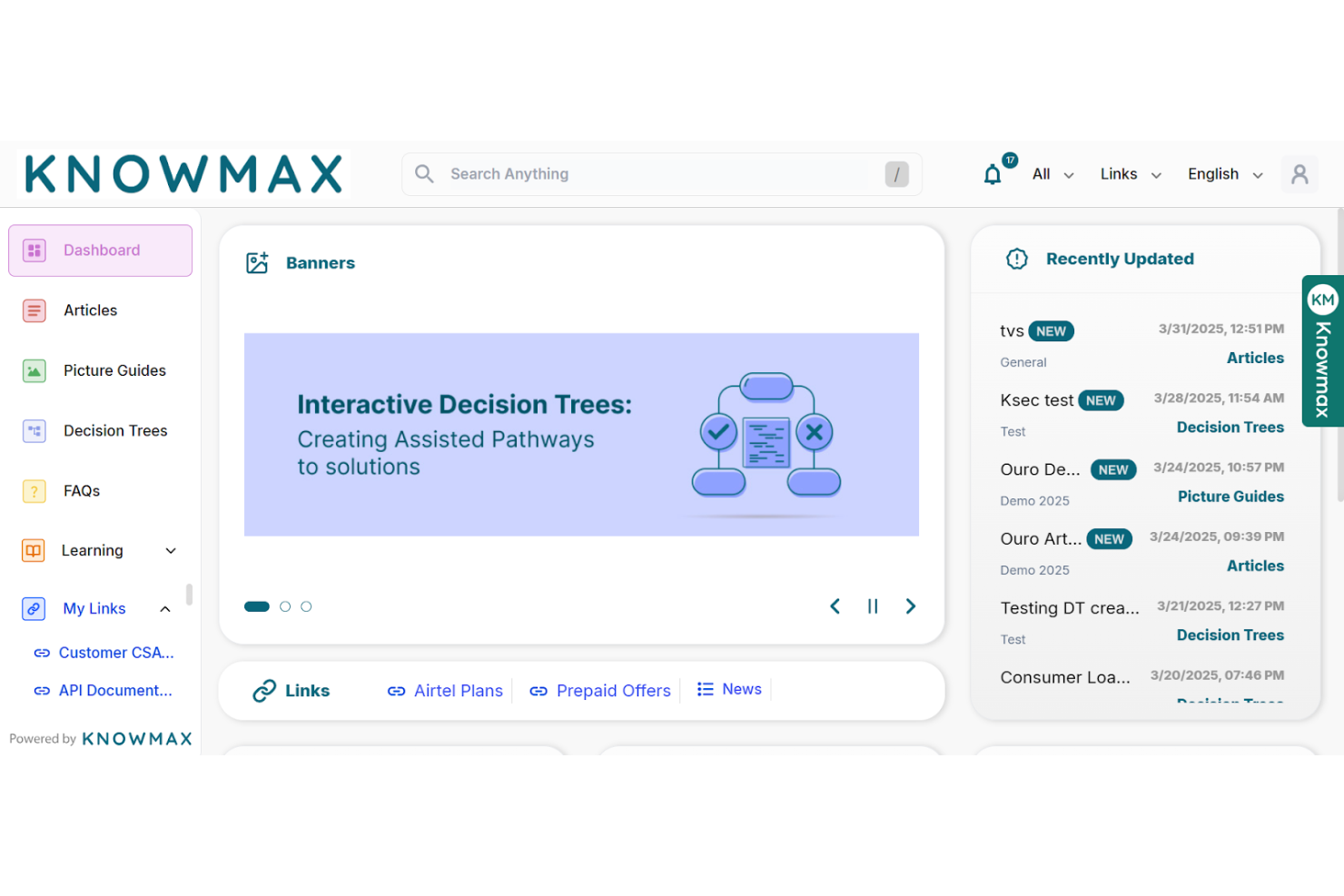
Knowmax è una piattaforma di gestione della conoscenza basata sull'AI, progettata per migliorare l'esperienza del cliente in settori come telecomunicazioni, banche e assistenza sanitaria. Viene utilizzata dai team che si occupano dell'esperienza del cliente per fornire un accesso rapido a conoscenze utilizzabili e migliorare l'erogazione del servizio.
Perché è una buona alternativa a Document360: Knowmax offre flussi guidati, guide visive alla risoluzione dei problemi e canali self-service, che riducono i tempi di risposta e aumentano la soddisfazione dei clienti. La sua attenzione alla conoscenza contestuale basata sull'AI la rende ideale per i team che desiderano migliorare la risoluzione al primo contatto e la qualità complessiva del servizio.
Funzionalità e integrazioni distintive:
Le funzionalità includono flussi guidati che aiutano il team a risolvere i problemi più rapidamente. Le guide visive alla risoluzione dei problemi rendono più semplici da comprendere i processi complessi. La piattaforma supporta inoltre canali self-service per ridurre le richieste di assistenza ripetitive.
Le integrazioni includono Salesforce, Zendesk, SAP, Freshdesk, Genesys e altro ancora.
Pros and Cons
Pros:
- Migliora la risoluzione al primo contatto
- Supporta diversi settori
- Riduce il tempo medio di gestione
Cons:
- Funzionalità di collaborazione di base
- Permessi dei ruoli poco flessibili

Ideale per gli spazi di lavoro collaborativi dei team
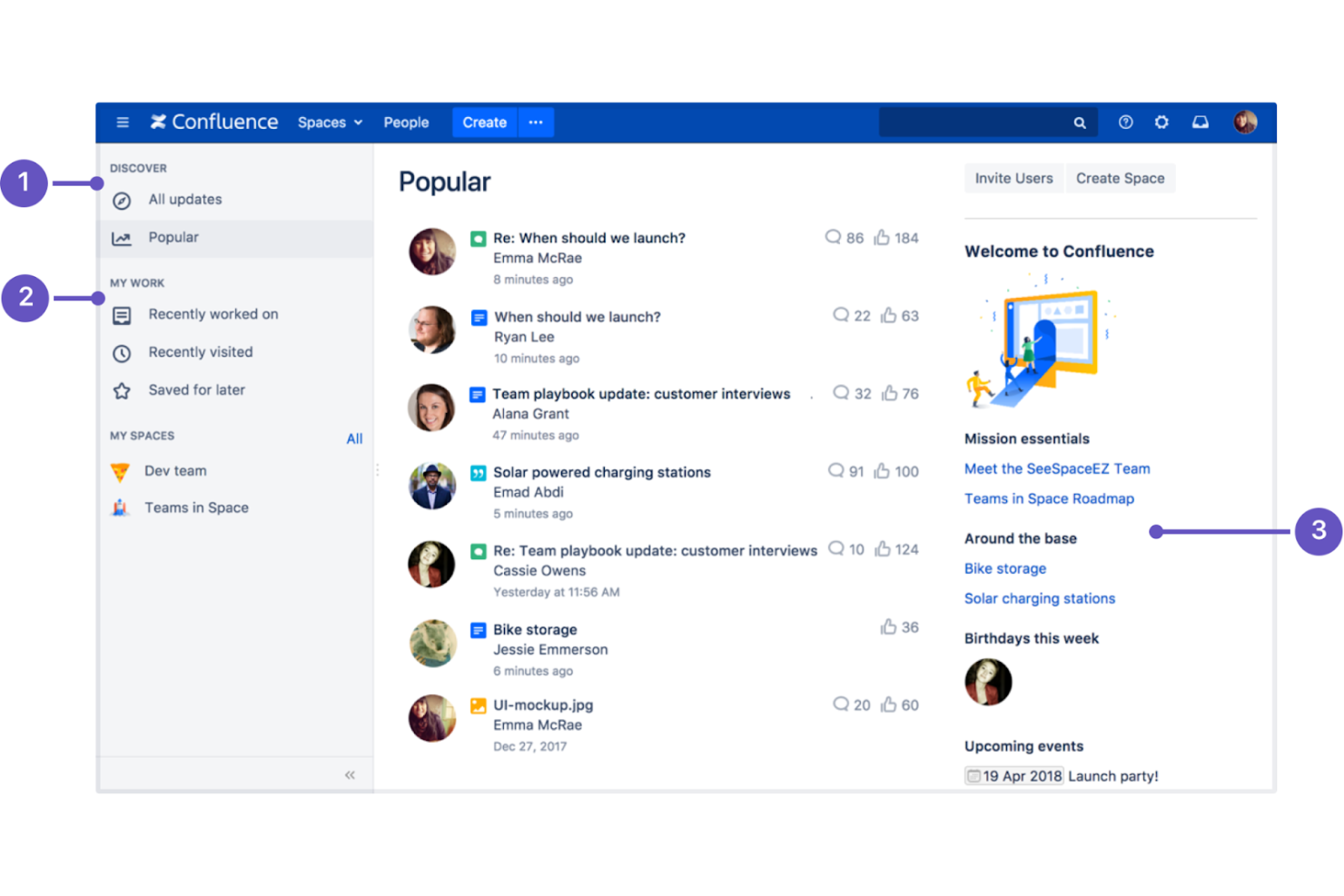
Confluence è un software per spazi di lavoro collaborativi progettato per i team che devono creare, organizzare e discutere il lavoro in un unico luogo. È ampiamente utilizzato da project manager, sviluppatori software e professionisti IT per migliorare la collaborazione del team e i processi di documentazione.
Perché è una buona alternativa a Document360: Confluence offre la modifica in tempo reale, modelli personalizzabili e un editor di testo avanzato per la creazione collaborativa di contenuti. La sua forte attenzione al lavoro di squadra e l'integrazione con altri prodotti Atlassian lo rendono una scelta versatile per i team che desiderano migliorare la comunicazione e la gestione dei contenuti.
Funzionalità e integrazioni principali:
Le funzionalità includono un sistema di versionamento delle pagine che aiuta a monitorare le modifiche e a mantenere la cronologia dei documenti. Puoi utilizzare gli strumenti di gestione delle attività per assegnare e monitorare il lavoro all'interno del team. La piattaforma offre inoltre una vasta gamma di modelli per gestire la creazione dei contenuti.
Le integrazioni includono Jira, Trello, Bitbucket, Slack, Microsoft Teams, Google Drive, Dropbox, Zoom, GitHub, Lucidchart e altro.
Pros and Cons
Pros:
- Supporta la modifica in tempo reale
- Integrazione con gli strumenti Atlassian
- Ampia libreria di modelli
Cons:
- Le esportazioni in PDF spesso presentano una formattazione errata
- Configurazione complessa delle autorizzazioni

Ideale per un accesso ai contenuti personalizzabile e controllato
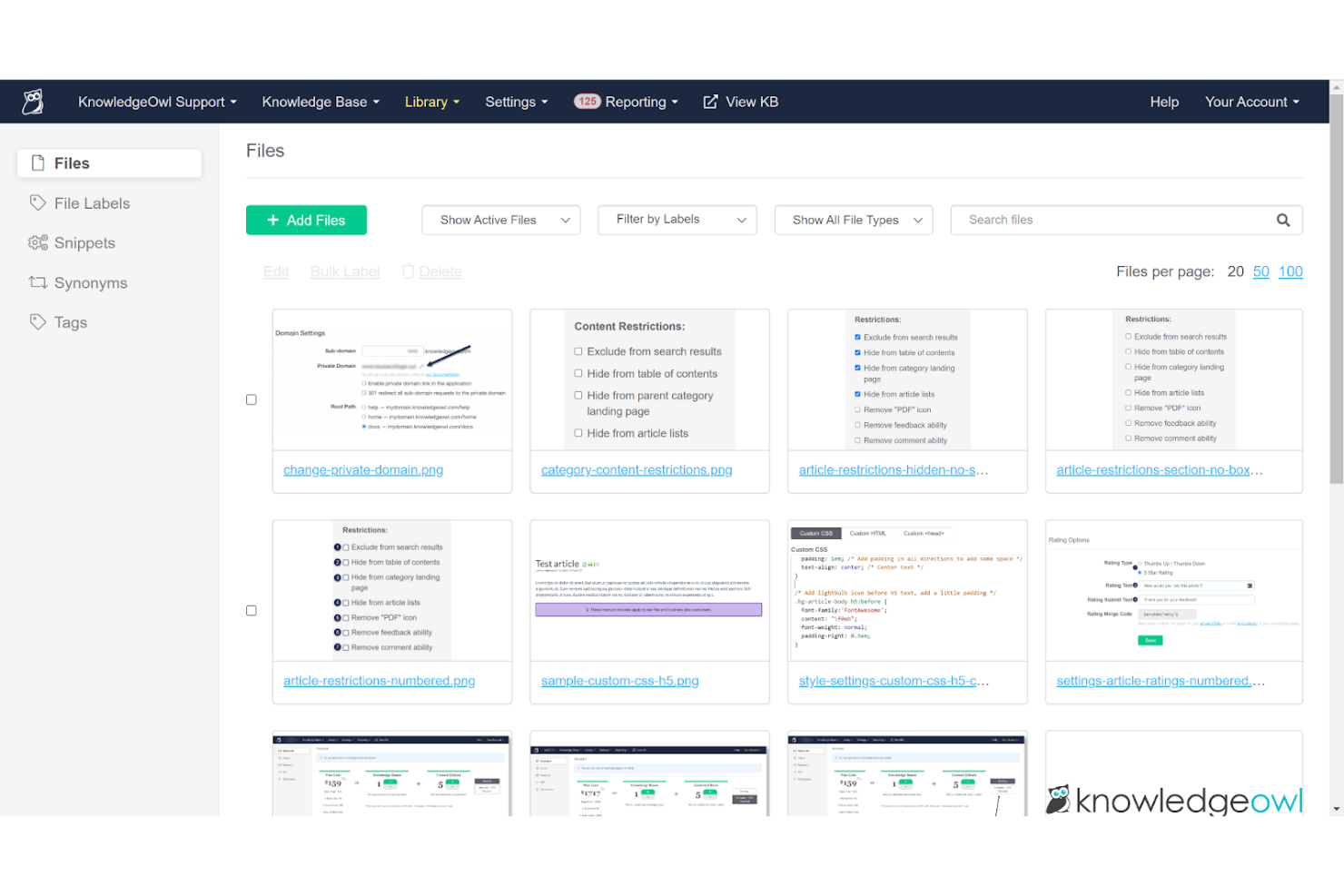
KnowledgeOwl è un software per basi di conoscenza progettato per aiutare le aziende a creare e gestire documentazione online e portali di supporto. Viene utilizzato dalle squadre del servizio clienti e dagli scrittori tecnici per fornire informazioni organizzate e accessibili.
Perché è una buona alternativa a Document360: KnowledgeOwl offre impostazioni di sicurezza personalizzabili, categorizzazione dei contenuti e analisi, che consentono di mantenere basi di conoscenza sicure e ben organizzate. La possibilità di personalizzare le funzionalità di sicurezza garantisce che le informazioni rimangano protette e accessibili agli utenti appropriati.
Funzionalità e integrazioni principali:
Le funzionalità includono uno strumento di modifica con funzionalità di trascinamento che aiuta la squadra a creare e aggiornare facilmente i contenuti. È possibile personalizzare l'aspetto e lo stile della propria base di conoscenza per adattarli al marchio. La piattaforma supporta inoltre la cronologia delle versioni, consentendo di monitorare le modifiche nel tempo.
Le integrazioni includono Salesforce, Zendesk, Freshdesk, Google Analytics, Slack, Mailchimp, Zapier e altro.
Pros and Cons
Pros:
- Impostazioni di sicurezza altamente personalizzabili
- Supporta analisi dettagliate
- Strumento di modifica dei contenuti con funzionalità di trascinamento
Cons:
- I caricamenti superiori a 200 MB sono bloccati
- Numero limitato di componenti aggiuntivi integrati

Ideale per il monitoraggio dei feedback degli utenti
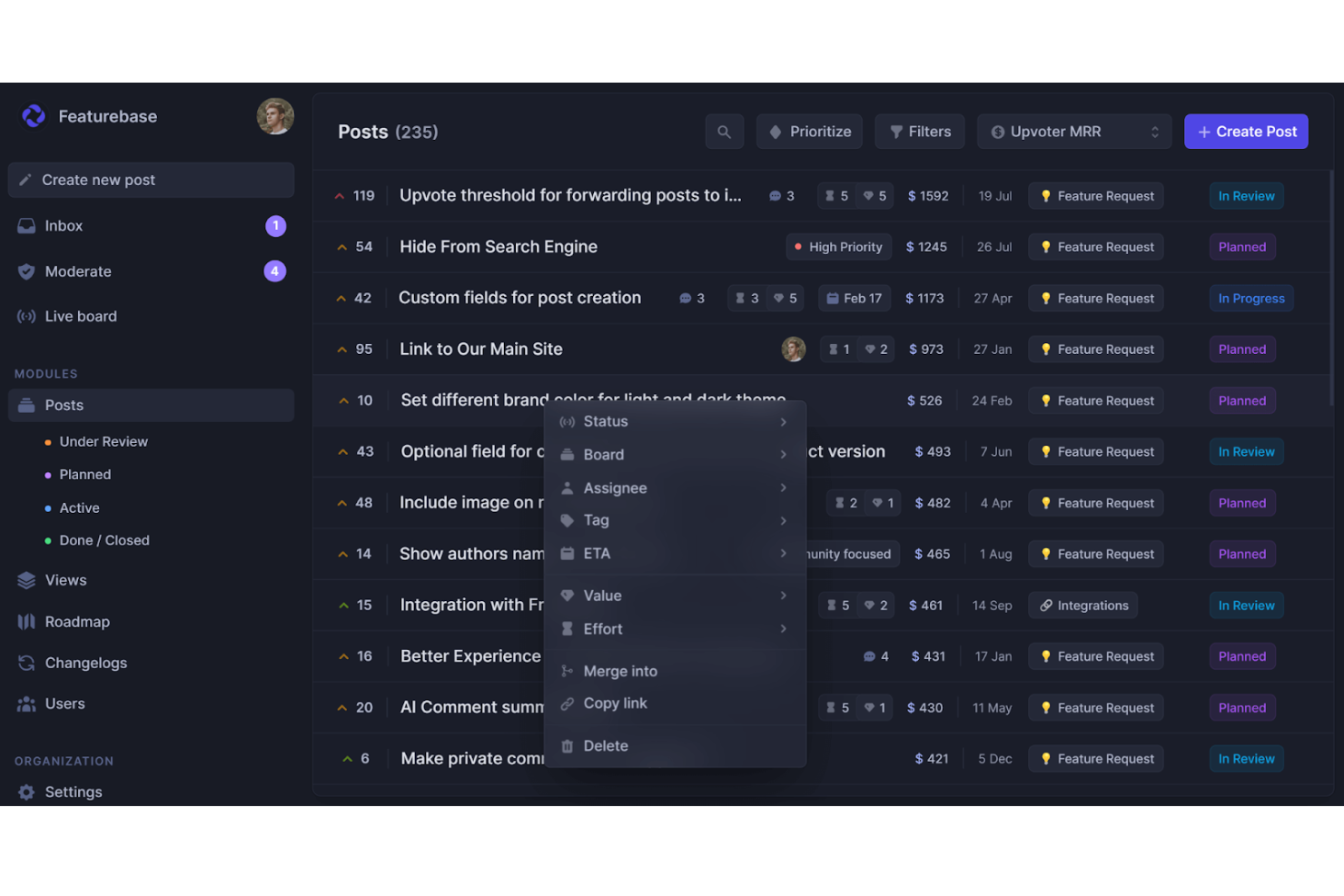
Featurebase è una piattaforma basata sul cloud per i team di prodotto che unifica la gestione dei feedback, la pubblicazione della base di conoscenza, l'assistenza clienti e i registri delle modifiche dei prodotti in un unico luogo. È utilizzata da team SaaS di piccole e medie dimensioni che desiderano centralizzare i feedback degli utenti, la documentazione e gli aggiornamenti dei prodotti.
Perché è una buona alternativa a Document360: Featurebase include un centro assistenza integrato per creare documentazione pubblica o privata. Il suo componente di assistenza incorporabile facilita l'assistenza all'interno dell'app, mentre un motore di ricerca basato sull'IA aiuta gli utenti a trovare rapidamente le risposte giuste. Grazie al branding, alle opzioni di personalizzazione e al supporto per contenuti multilingue, offre le funzionalità di una piattaforma di base di conoscenza dedicata, con l'ulteriore vantaggio del monitoraggio integrato dei feedback.
Funzionalità e integrazioni principali:
Le funzionalità includono una base di conoscenza pubblica e interna con controlli sulle autorizzazioni, così puoi decidere chi può accedere. Il suo editor in stile Notion rende intuitiva la creazione degli articoli e il supporto per oltre 40 lingue ti aiuta a raggiungere un pubblico globale. Sono inoltre disponibili analisi in tempo reale sulle visualizzazioni e sulle prestazioni degli articoli.
Le integrazioni includono Slack, Intercom, GitHub, Jira, ClickUp, Zendesk, Segment, Discord e altro.
Pros and Cons
Pros:
- Base di conoscenza multilingue
- Analisi delle prestazioni degli articoli
- Widget di assistenza all'interno dell'app
Cons:
- Nessuna app mobile dedicata
- Non ideale per le esigenze di documentazione delle grandi aziende

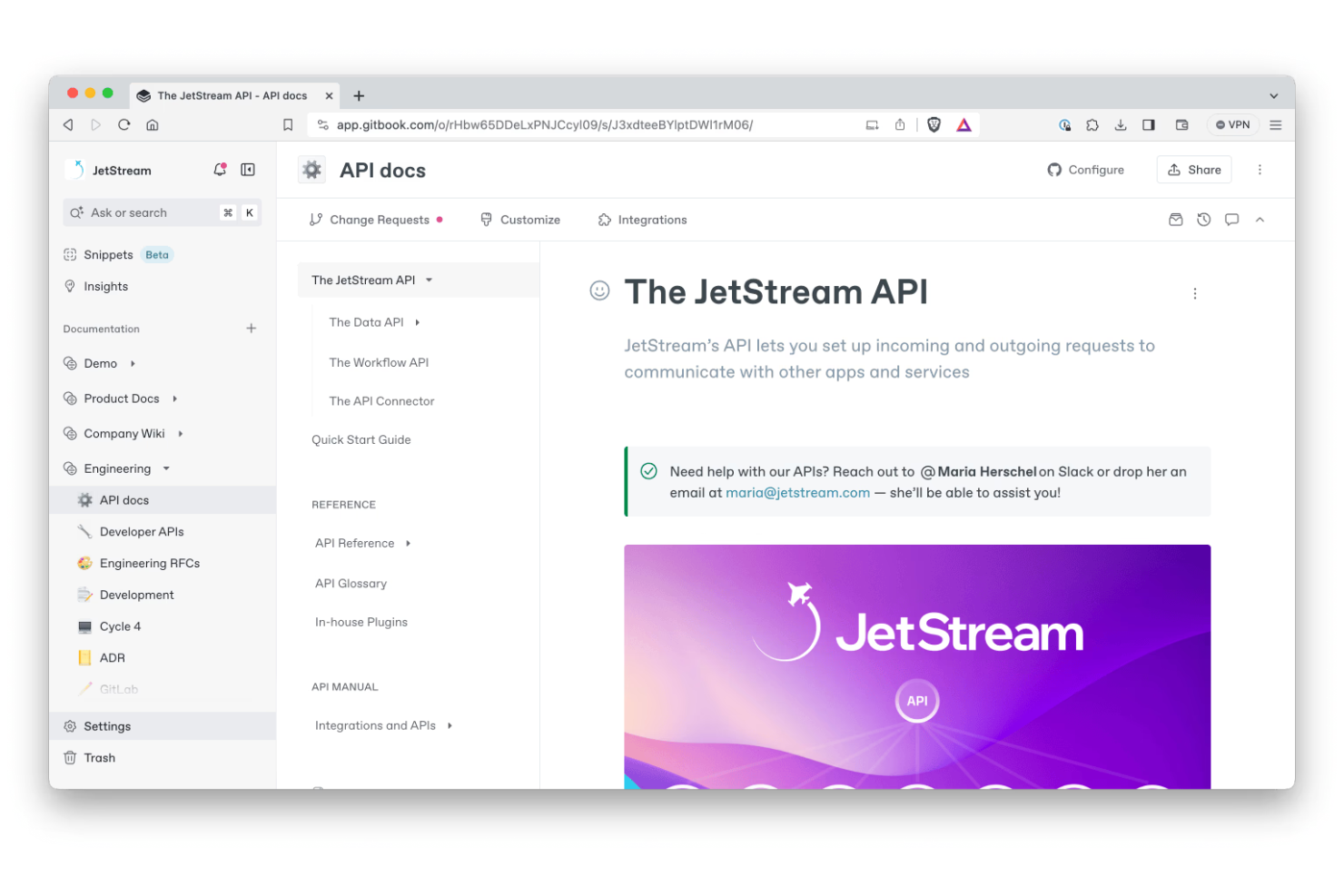
GitBook è una piattaforma collaborativa per la documentazione, progettata per consentire agli sviluppatori e ai team tecnici di creare e gestire la documentazione delle API. Viene utilizzata dagli ingegneri del software e dai team di prodotto per produrre contenuti tecnici chiari e accessibili.
Perché è una buona alternativa a Document360: GitBook offre blocchi di codice dinamici, controllo delle versioni e modifica collaborativa, funzionalità che aiutano a creare e mantenere aggiornata la documentazione delle API. La sua interfaccia intuitiva e l'attenzione alla documentazione tecnica lo rendono una scelta ideale per i team che devono documentare le API in modo efficace.
Funzionalità e integrazioni principali:
Le funzionalità includono un editor collaborativo in tempo reale che aiuta il tuo team a lavorare in modo efficace. Puoi utilizzare il supporto per Markdown per formattare facilmente i tuoi documenti. La piattaforma offre inoltre domini personalizzati per conferire alla documentazione un aspetto professionale.
Le integrazioni includono Slack, GitHub, Google Analytics, Intercom, Segment, Sentry, Trello, Jira, Figma e altro.
Pros and Cons
Pros:
- Supporta la collaborazione in tempo reale
- Funzionalità per blocchi di codice dinamici
- Offre il controllo delle versioni
Cons:
- Opzioni di personalizzazione limitate
- Strumenti di collaborazione di base
Altre alternative a Document360
Ecco alcune ulteriori alternative a Document360 che non sono state incluse nella mia selezione, ma che vale comunque la pena prendere in considerazione:
- Helpjuice
Ideale per la creazione di contenuti assistita dall'IA
- MadCap Flare
Ideale per la documentazione tecnica di livello aziendale avanzato
- HelpDocs
Ideale per creare hub di autoassistenza per i clienti


Come Valuto le Alternative a Document360
Valuto gli strumenti su due livelli: i requisiti fondamentali — come strutture di knowledge base versionate, creazione collaborativa dei contenuti e controlli di accesso — e i fattori distintivi come le integrazioni PMO e gli strumenti AI.
Funzionalità Principali (Requisiti Base per Questo Elenco)
Quando seleziono gli strumenti per il mio elenco, ne valuto ciascuno su una scala da 0 (non offre la funzionalità) a 5 (eccelle in quest'area) per ogni funzionalità principale elencata di seguito. Poi calcolo il punteggio totale dello strumento in percentuale. Ogni strumento deve raggiungere un punteggio totale minimo del 65% per essere preso in considerazione.
- Creazione della Knowledge Base: Cerco gerarchie strutturate di categorie multilivello che consentano di organizzare i documenti di progetto secondo il modo in cui il PMO realmente pensa — per fase, flusso di lavoro o tipo di deliverable.
- Editor di Contenuti Avanzato: Che sia markdown o WYSIWYG, valuto quanto bene l'editor gestisce tabelle, blocchi di codice, diagrammi incorporati e note rilevanti nella documentazione tecnica di progetto.
- Controllo Versioni e Cronologia: Ogni buona knowledge base tiene traccia delle revisioni, ma verifico la presenza di confronti fianco a fianco e ripristino delle versioni, così da poter aggiornare una runbook anche a sprint in corso senza perdere l’originale.
- Creazione Collaborativa dei Contenuti: I team necessitano di più della semplice modifica condivisa. Cerco workflow di revisione, commenti in linea e permessi basati sui ruoli che rispecchino il contributo dei team di progetto cross-funzionali.
- Ricerca e Scoperta: Una knowledge base è utile solo se le persone trovano ciò che serve. Valuto la qualità della ricerca full-text, il filtraggio tramite tag e l'efficacia dei risultati su ampi set documentali.
- Pubblicazione e Controllo Accessi: Considero la possibilità di mantenere sia una wiki interna privata per il team di delivery, sia un portale client con branding separato e permessi di lettura differenziati.
Una volta individuati gli strumenti che soddisfano questi criteri, considero cosa distingue ciascuna piattaforma.
Fattori Differenzianti (Cosa Distingue i Fornitori)
Ecco come confronto i diversi fornitori:
Funzionalità Distintive
Presto particolare attenzione a quanto bene una piattaforma si collega agli strumenti di progetto come Jira, Asana o ClickUp — collegare articoli della knowledge base a ticket o epiche in corso mantiene la documentazione rilevante. Anche le analisi integrate sono importanti. Voglio vedere quali articoli non vengono letti o quali ricerche non restituiscono risultati, cosicché i PMO possano individuare le lacune documentali. I modelli per project charter, retrospettive e log RAID sono un altro elemento distintivo, poiché aiutano i team a standardizzare la documentazione su più progetti senza dover partire da zero.
Oltre le Funzionalità
La struttura dei prezzi qui conta molto. Alcune piattaforme fanno pagare per autore mentre i lettori accedono gratuitamente, soluzione ideale per PMO con grandi team che consultano i documenti ma pochi contributori. Anche il supporto alla migrazione è un fattore che valuto — passare da Document360 o Confluence durante un progetto è difficile senza validi strumenti di importazione e assistenza per l’onboarding. Le certificazioni di sicurezza e conformità come SOC 2 e il supporto SSO hanno molto peso, soprattutto per team che gestiscono dati di progetto sensibili o che collaborano con clienti enterprise che richiedono una governance rigorosa degli accessi.
Perché cercare un'alternativa a Document360?
Sebbene Document360 sia una buona scelta per la gestione della conoscenza, esistono diversi motivi per cui alcuni utenti cercano soluzioni alternative. Potresti essere alla ricerca di un'alternativa a Document360 perché…
- Hai bisogno di più opzioni di personalizzazione.
- Il tuo team richiede migliori capacità di integrazione.
- Cerchi una soluzione più conveniente.
- Hai bisogno del supporto per più lingue.
- Il tuo team richiede funzionalità di collaborazione più avanzate.
- Hai bisogno di analisi e reportistica avanzate.
Se ti riconosci in una di queste situazioni, sei nel posto giusto. La mia lista include diverse opzioni di software per la gestione della conoscenza più adatte ai team che affrontano queste difficoltà con Document360 e cercano soluzioni alternative.
Funzionalità principali di Document360
Ecco alcune delle principali funzionalità di Document360 che ti aiuteranno a mettere a confronto le caratteristiche offerte dalle soluzioni alternative:
- Portale della base di conoscenza: offre strumenti avanzati di modifica e gestione per le tue esigenze di creazione dei contenuti.
- Sito della base di conoscenza: personalizza basi di conoscenza pubbliche o private per i tuoi utenti.
- Assistente della base di conoscenza: utilizza un widget incorporabile per accedere facilmente alle basi di conoscenza dai tuoi prodotti SaaS o siti web.
- Integrazioni ed estensioni: connettiti a diversi strumenti di terze parti per ampliare le funzionalità.
- API della piattaforma: interagisci direttamente con la base di conoscenza tramite un'API REST per una maggiore flessibilità.
- Analisi avanzate: ottieni informazioni sul comportamento degli utenti e sulle prestazioni dei contenuti per migliorare la tua base di conoscenza.
- Creazione di flussi di lavoro personalizzati: adatta i flussi di lavoro alle esigenze e ai processi specifici del tuo team.
- Riduzione dei ticket di supporto: riduci i ticket di supporto fornendo agli utenti articoli pertinenti della base di conoscenza.
- Archiviazione dei contenuti multimediali: archivia e gestisci in modo efficiente i file multimediali all'interno della piattaforma.
- Eddy AI: sfrutta l'intelligenza artificiale generativa per un'assistenza avanzata nella documentazione.