

10 soluzioni software online per la revisione selezionate per il 2026

Elenco dei software per la revisione online


Il software per la revisione online consente al tuo team di esaminare, annotare e approvare risorse creative in un unico luogo, sostituendo le conversazioni frammentate via e-mail e i cicli manuali di raccolta dei feedback. Se stai cercando il miglior software per la revisione online, probabilmente devi affrontare approvazioni lente, confusione tra le versioni o feedback persi tra diversi canali.
Questo elenco ti aiuterà a confrontare i principali strumenti progettati per i team creativi, di marketing e digitali, così potrai scegliere una soluzione adatta al tuo flusso di lavoro, mantenere i progetti in movimento e assicurarti che il contributo di ogni parte interessata venga acquisito.
Perché fidarsi dei nostri consigli sui software
Il nostro team testa e recensisce software dal 2012. In quanto project manager noi stessi, sappiamo quanto sia difficile — e importante — scegliere il software giusto.
Per questa guida, abbiamo valutato gli strumenti attraverso test pratici e ricerche indipendenti, assegnando un punteggio agli strumenti in base ai nostri criteri di selezione. Ci basiamo inoltre sulle competenze di leader di pensiero del settore e di professionisti attivi nella gestione dei progetti.
Le nostre recensioni riflettono il nostro giudizio editoriale umano, non un discorso di vendita.
Revisori esperti:
Tabella di confronto dei software per la revisione online
Questa tabella di confronto riassume i dettagli sui prezzi delle mie migliori selezioni di software per la revisione online:
| Tool | Best For | Trial Info | Price | ||
|---|---|---|---|---|---|
| 1 | Ottimale con l'automazione personalizzabile dei flussi di lavoro senza codice | Demo gratuita disponibile | Prezzi su richiesta | Website | |
| 2 | Ideale per revisioni di documenti guidate dalla conformità | Demo gratuita + prova gratuita di 10 giorni disponibile | Da $249/mese | Website | |
| 3 | Ideale per feedback creativi a risposta rapida | Piano gratuito + demo gratuita disponibile | Da $66/mese (fatturato annualmente) | Website | |
| 4 | Ideale per sessioni di markup di gruppo in tempo reale | Prova gratuita + demo gratuita disponibili | Da $12/mese (fatturazione annuale) | Website | |
| 5 | Ideale per revisioni di contenuti multilingue | Demo gratuita disponibile | Prezzi su richiesta | Website | |
| 6 | Ideale per automazione avanzata dei flussi di lavoro aziendali | Demo gratuita disponibile | Prezzo su richiesta | Website | |
| 7 | Ideale per gestione attività e revisione file tutto-in-uno | Piano gratuito disponibile | Da $7/utente/mese (fatturazione annuale) | Website | |
| 8 | Ideale per la gestione di asset ad alto volume | Demo gratuita disponibile | Prezzo su richiesta | Website | |
| 9 | Ideale per l'integrazione dei flussi di lavoro nella produzione di stampa | Demo gratuita + prova gratuita di 15 giorni disponibile | Da $112/mese | Website | |
| 10 | Ideale per bacheche visive di feedback completamente personalizzabili | Piano gratuito disponibile | Da $9/utente/mese (fatturazione annuale) | Website |


Recensioni dei software per la revisione online

Ottimale con l'automazione personalizzabile dei flussi di lavoro senza codice
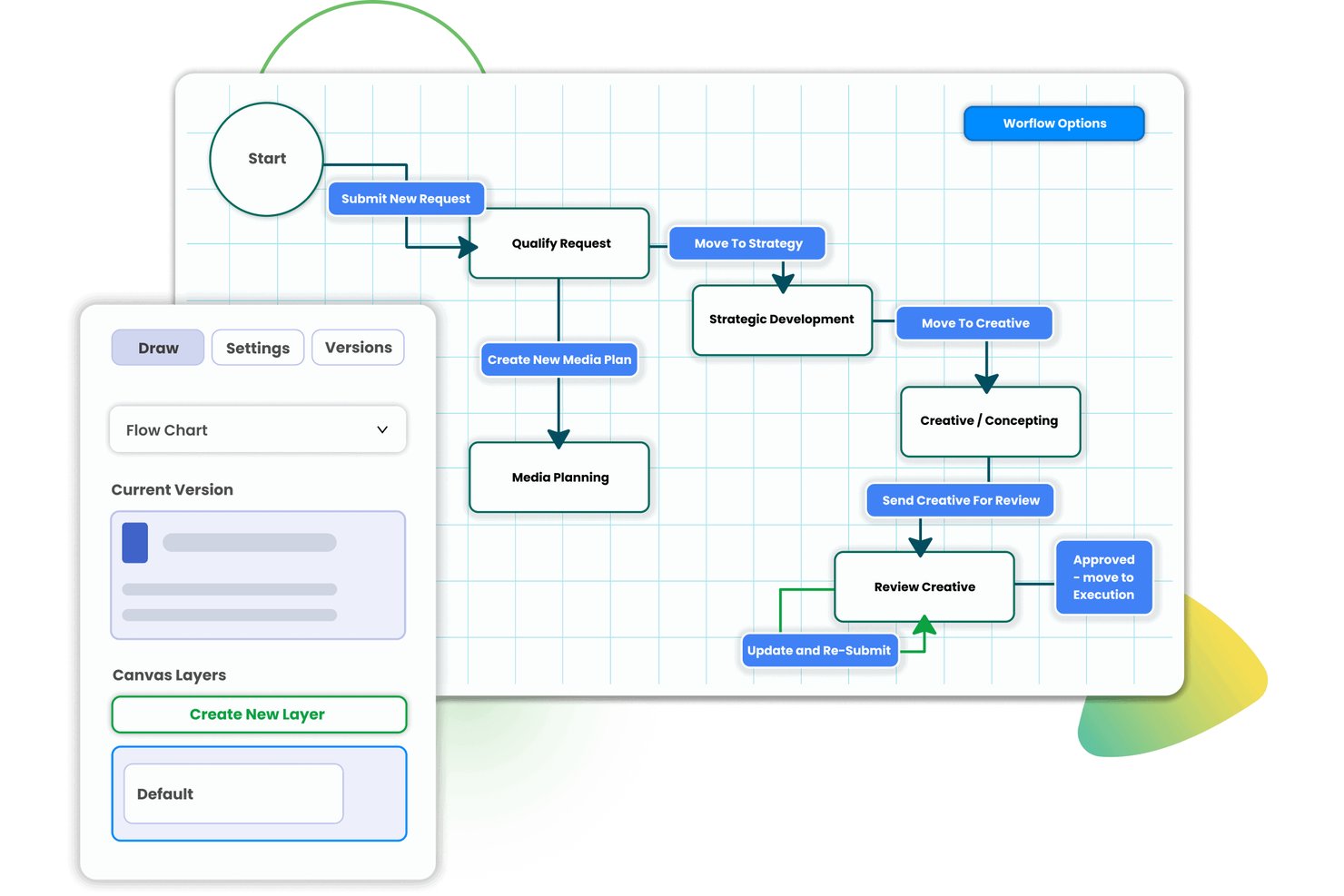
Screendragon è una piattaforma di gestione del lavoro per team di marketing e agenzie che riunisce in un unico sistema integrato la revisione online, i flussi di lavoro di approvazione a più fasi, il controllo delle versioni e la gestione delle risorse.
Per chi è più adatto Screendragon?
Screendragon è particolarmente adatto ai team di marketing aziendali e alle agenzie di grandi dimensioni che devono gestire elevati volumi di risorse creative distribuite tra più stakeholder e livelli di approvazione.
Perché ho scelto Screendragon
Screendragon è entrato nella mia rosa di finalisti perché il suo generatore di flussi di lavoro senza codice offre una funzione che la maggior parte degli strumenti di revisione tralascia: il routing condizionale, che invia automaticamente un video lungo un percorso di approvazione diverso rispetto a un annuncio stampa. L'assegnazione delle attività avviene in base al ruolo o alla disponibilità, così il revisore giusto partecipa nella fase corretta senza alcun passaggio manuale. Il confronto affiancato delle versioni e un registro di controllo completo completano una configurazione di revisione che riterrei affidabile per campagne soggette a rigorosi requisiti di conformità.
Funzionalità principali di Screendragon
- Hub centralizzato per la revisione online: Organizza tutte le risorse creative, le annotazioni e le discussioni di approvazione in un unico spazio di lavoro ricercabile.
- Supporto per file di più formati: Esamina, annota e confronta immagini, documenti, elementi grafici, PDF e video direttamente all'interno della piattaforma.
- Confronto affiancato delle versioni: Apri istantaneamente due versioni di una risorsa insieme, evidenziando le modifiche tra un'iterazione e l'altra.
- Report del registro di controllo: Esporta registri con data e ora di tutti i commenti, le decisioni e le approvazioni associati a ciascuna revisione.
Integrazioni di Screendragon
Screendragon offre integrazioni native con Jira, Trello, Salesforce, SAP, Office 365, Google Drive, Box, Slack e Adobe Creative Cloud, oltre a fornire un'API per integrazioni personalizzate.
Pros and Cons
Pros:
- Generatore configurabile di flussi di lavoro di approvazione senza codice
- Routing condizionale delle revisioni in base al tipo di risorsa
- Registri di controllo delle approvazioni esportabili e conformi ai requisiti normativi
Cons:
- La complessità della configurazione può rallentare l'implementazione iniziale
- Interfaccia di revisione meno intuitiva rispetto agli strumenti specializzati
New Product Updates from Screendragon
Screendragon Unveils New AI Hub
Screendragon introduced AI Hub, a new capability that lets teams build and manage AI agents directly within workflows. The update helps marketing teams automate tasks, maintain governance controls, and scale AI-driven operations more efficiently. For more information, visit Screendragon's official site.

Ideale per revisioni di documenti guidate dalla conformità

PageProof è progettato per i team che devono gestire revisioni di documenti con requisiti rigorosi di conformità e audit. Settori come quello legale, finanziario e regolamentato utilizzano i suoi workflow crittografati e i dettagliati registri di audit per soddisfare standard interni ed esterni. Se il tuo processo di revisione richiede tracciabilità e approvazioni sicure, PageProof risponde direttamente a queste esigenze.
Perché ho scelto PageProof
Quando la conformità e l'auditabilità sono le massime priorità, PageProof offre funzionalità che vanno oltre i classici strumenti di online proofing. L'ho scelto perché i suoi workflow crittografati e il processo di approvazione digitale aiutano i team a rispettare requisiti normativi rigorosi.
PageProof fornisce inoltre un registro dettagliato delle attività per ogni revisione, facilitando la dimostrazione della conformità durante gli audit. Queste caratteristiche lo rendono una scelta solida per le organizzazioni in cui le revisioni di documenti devono essere sicure e tracciabili.
Funzionalità principali di PageProof
Altre funzionalità di PageProof che supportano la revisione dei documenti e la collaborazione includono:
- Promemoria automatici: Imposta notifiche per ricordare ai revisori attività in sospeso o scadenze imminenti.
- Supporto multi-formato: Rivedi e annota PDF, immagini, video, presentazioni e pagine web all'interno della stessa piattaforma.
- Personalizzazione del branding: Applica il logo e i colori della tua organizzazione all'interfaccia di revisione per un'esperienza coerente.
- Thread dei commenti: Organizza il feedback permettendo agli utenti di rispondere direttamente a commenti specifici.
Integrazioni PageProof
Le integrazioni includono Asana, monday.com, Airtable, ClickUp, Trello, Slack, Microsoft Teams, Adobe Creative Cloud, Figma e altro ancora.
Pros and Cons
Pros:
- La verifica crittografata soddisfa gli standard di conformità più rigorosi
- L'approvazione digitale supporta processi regolamentati di approvazione
- Il supporto multi-formato copre documenti e media
Cons:
- Il caricamento in blocco è limitato per i team numerosi
- La personalizzazione del branding è disponibile solo nei piani di fascia superiore

Ideale per feedback creativi a risposta rapida

QuickReviewer è pensato per i team creativi che hanno bisogno di raccogliere feedback e approvare asset rapidamente. È una soluzione ideale per agenzie, graphic designer e marketer che lavorano con scadenze strette e revisioni frequenti. La piattaforma ti aiuta a centralizzare commenti e approvazioni su video, immagini, PDF e contenuti web in modo da mantenere i progetti in movimento senza ritardi.
Perché ho scelto QuickReviewer
Quando la rapidità nel ciclo di feedback è una priorità, QuickReviewer offre strumenti che aiutano i team creativi a tenere i progetti sulla giusta strada. L'ho scelto perché permette di revisionare e annotare video, immagini, PDF e persino pagine web HTML dal vivo in tempo reale, ideale per iterazioni creative rapide.
Il sistema di notifiche istantanee della piattaforma garantisce che i revisori vengano avvisati non appena vengono caricate nuove versioni, così il feedback avviene senza ritardi. Questa soluzione è particolarmente utile per agenzie e team marketing che devono consegnare asset rifiniti entro scadenze strette.
Funzionalità principali di QuickReviewer
Altre funzionalità di QuickReviewer che aiutano i team nella gestione delle revisioni creative includono:
- Branding personalizzato: Aggiungi il logo e i colori della tua azienda all'interfaccia di revisione per un'esperienza brandizzata.
- Confronto tra versioni: Visualizza e confronta affiancate diverse versioni di un file per tracciare le modifiche.
- Controllo accessi basato sui ruoli: Assegna permessi specifici a revisori, collaboratori e clienti.
- Caricamento multiplo di file: Carica più file alla volta per velocizzare il processo di revisione.
Integrazioni di QuickReviewer
Le integrazioni includono Adobe Creative Cloud, Google Drive, Box, Dropbox, YouTube, Vimeo, Shopify, Wix, Jira e altro ancora.
Pros and Cons
Pros:
- Commenti in tempo reale su pagine web dal vivo
- Caricamento multiplo per grandi progetti creativi
- Permessi basati sui ruoli per la collaborazione con i clienti
Cons:
- Nessuna funzione di gestione attività integrata
- L'esperienza su mobile può essere incoerente

Ideale per sessioni di markup di gruppo in tempo reale

ReviewStudio è progettato per i team che hanno bisogno di collaborare in tempo reale su asset creativi. Team di marketing, agenzie e studi di design lo utilizzano per sessioni di markup interattivo su file condivisi. Questa configurazione aiuta a risolvere i feedback più rapidamente e mantiene tutti allineati durante i cicli di revisione.
Perché ho scelto ReviewStudio
Ciò che distingue ReviewStudio è l'attenzione sulle sessioni di markup di gruppo in tempo reale, particolarmente preziose per i team creativi che devono collaborare dal vivo. L'ho scelto perché puoi invitare più revisori ad annotare, commentare e disegnare direttamente sugli asset durante una sessione.
Il tracciamento del cursore in tempo reale e la visualizzazione sincronizzata garantiscono che tutti siano letteralmente sulla stessa pagina, riducendo confusione e incomprensioni. Questo rende ReviewStudio una scelta forte per i team che vogliono accelerare i cicli di feedback e mantenere le discussioni focalizzate in un unico posto.
Funzionalità principali di ReviewStudio
Altre funzionalità di ReviewStudio che aiutano i team a gestire le revisioni creative includono:
- Version stacking: Organizza e confronta più versioni di un asset all'interno di un unico thread di revisione.
- Assegnazione dei compiti: Assegna attività concrete a membri specifici del team direttamente dai feedback.
- Branding personalizzato: Aggiungi il logo e i colori della tua azienda all'ambiente di revisione.
- Tracciamento attività: Tieni traccia di tutti i commenti, modifiche e approvazioni per garantire responsabilità.
Integrazioni di ReviewStudio
Le integrazioni includono Asana, Zapier, Wrike, Kantata, Dropbox e altri.
Pros and Cons
Pros:
- Sessioni di markup in tempo reale per feedback di gruppo
- Branding personalizzato per revisioni rivolte ai clienti
- Tracciamento delle attività per seguire tutte le azioni
Cons:
- Nessuna app mobile per revisioni in mobilità
- Non è supportato il download di asset in blocco

WebProof
Ideale per revisioni di contenuti multilingue

WebProof è pensato per i team che devono revisionare e approvare contenuti in più lingue. È particolarmente utile per i reparti marketing, gli editori e le agenzie che gestiscono campagne globali o documenti multilingue. La piattaforma consente di centralizzare i feedback e tracciare le modifiche tra le varie versioni linguistiche, così nulla va perso nella traduzione.
Perché ho scelto WebProof
Per i team che gestiscono progetti multilingue, WebProof si distingue rendendo semplice il controllo dei contenuti tra più lingue contemporaneamente. L'ho scelto perché permette di organizzare, revisionare e approvare differenti versioni linguistiche dello stesso documento in un unico flusso di lavoro.
Gli strumenti di gestione delle traduzioni sulla piattaforma permettono di monitorare modifiche e commenti per lingua, così sai sempre quale versione viene discussa. Questo approccio aiuta i team globali a evitare confusioni e a portare avanti le campagne multilingue senza tralasciare i dettagli.
Funzionalità chiave di WebProof
Altre funzionalità di WebProof che aiutano i team nella revisione dei contenuti includono:
- Gestione automatizzata dei flussi di lavoro: Imposta fasi di revisione e approvazione personalizzate per ogni progetto.
- Integrazione con Adobe InDesign: Collegati direttamente a InDesign per aggiornare e revisionare i file senza caricamenti manuali.
- Fissaggio dei commenti: Inserisci commenti direttamente su aree specifiche del documento per un feedback preciso.
- Tracciamento delle revisioni: Visualizza la cronologia completa di tutte le modifiche, i commenti e le approvazioni per ogni progetto.
Integrazioni WebProof
Le integrazioni includono Adobe InDesign, Adobe Illustrator e altro ancora.
Pros and Cons
Pros:
- Strumenti di revisione multilingue per team internazionali
- Integrazione diretta con Adobe InDesign e Illustrator
- Fissaggio dei commenti per un posizionamento preciso delle annotazioni
Cons:
- L'interfaccia potrebbe sembrare datata ad alcuni utenti
- Le informazioni sui prezzi non sono pubbliche

Ideale per automazione avanzata dei flussi di lavoro aziendali

Adobe Workfront si distingue per le grandi organizzazioni che hanno bisogno di automatizzare flussi di lavoro creativi estremamente precisi e gestire un alto volume di revisioni di contenuti. Se il vostro team gestisce simultaneamente più progetti, stakeholder e requisiti di conformità, gli strumenti di revisione online di Workfront aiutano a centralizzare feedback e approvazioni su larga scala. La potente automazione dei flussi di lavoro e l'integrazione con Adobe Creative Cloud lo rendono particolarmente utile per i team aziendali di marketing e operations creative.
Perché ho scelto Adobe Workfront
Per i team che necessitano di automatizzare e orchestrare cicli di revisione complessi, Adobe Workfront offre un'automazione dei flussi di lavoro a livello enterprise difficile da eguagliare. Ho scelto Workfront perché i suoi strumenti di revisione sono strettamente collegati a flussi di lavoro personalizzabili, così puoi indirizzare automaticamente le risorse creative per feedback, approvazioni e controlli di conformità in base alle regole della tua organizzazione.
La piattaforma supporta inoltre tracciamenti dettagliati dei log di audit e promemoria automatizzati, che aiutano i grandi team a far avanzare i progetti senza bisogno di sollecitare manualmente. Questo livello di automazione è particolarmente prezioso per le aziende che gestiscono considerevoli volumi di lavoro creativo e rigorosi requisiti normativi.
Caratteristiche principali di Adobe Workfront
Altre funzionalità presenti in Adobe Workfront che supportano la revisione creativa e la gestione progetti includono:
- Integrazione con la gestione delle risorse digitali: Collega direttamente Adobe Experience Manager per accedere e gestire i file creativi all'interno del tuo flusso di lavoro.
- Moduli personalizzati: Crea moduli di raccolta per standardizzare le richieste creative e raccogliere tutte le informazioni necessarie sin dall'inizio.
- Controlli di accesso basati sui ruoli: Imposta permessi dettagliati per revisori, collaboratori e partner esterni.
- App mobile: Rivedi, commenta e approva risorse creative ovunque ti trovi utilizzando l'app mobile Workfront.
Integrazioni di Adobe Workfront
Le integrazioni includono Adobe Creative Cloud, Adobe Experience Manager, Adobe Express, Microsoft Teams, Slack, Jira, Salesforce, Google Drive, Box e molte altre.
Pros and Cons
Pros:
- Integra la revisione con Adobe Creative Cloud
- Traccia le attività dei revisori con log di audit dettagliati
- Supporta la revisione in batch di più risorse
Cons:
- Nessun strumento di markup per contenuti video
- Le funzionalità di revisione richiedono un abbonamento enterprise


ClickUp riunisce la gestione delle attività e la revisione dei file in un unico spazio di lavoro, risultando ideale per i team che devono gestire sia il monitoraggio dei progetti sia i feedback creativi. I reparti marketing, le agenzie e i team di prodotto utilizzano gli strumenti di revisione integrati per commentare immagini, PDF e video direttamente insieme alle attività. Questo approccio tutto-in-uno aiuta le squadre a mantenere feedback, approvazioni e aggiornamenti di progetto strettamente collegati.
Perché ho scelto ClickUp
A differenza di molti strumenti che separano la gestione dei progetti dalla revisione creativa, ClickUp combina entrambe su un'unica piattaforma: per questo l'ho scelto per i team che necessitano di una soluzione unificata per la gestione delle attività e la revisione dei file. Si possono allegare file direttamente alle attività e utilizzare lo strumento di revisione integrato per aggiungere commenti, markup e discussioni sul filo delle immagini, PDF e video.
Questa configurazione mantiene feedback e approvazioni legati a deliverable specifici, così nulla si perde tra strumenti diversi. Per i team che vogliono gestire sia l’avanzamento dei progetti sia il feedback creativo in un unico flusso di lavoro, ClickUp offre una soluzione unificata.
Funzionalità principali di ClickUp
Altre funzionalità di ClickUp che supportano la revisione online e la collaborazione creativa includono:
- Stati personalizzati: Imposta fasi di flusso di lavoro uniche per adattarsi al processo di revisione e approvazione del tuo team.
- Permessi basati sui ruoli: Controlla chi può visualizzare, commentare o modificare file e attività in ogni spazio di lavoro.
- Promemoria automatici: Pianifica notifiche per revisori e assegnatari per mantenere i cicli di feedback in regola.
- Registro delle attività: Visualizza una cronologia dettagliata di commenti, modifiche e approvazioni per ogni file o attività.
Integrazioni di ClickUp
Tra le integrazioni figurano Slack, GitHub, GitLab, HubSpot, Google Drive, Dropbox, Outlook, Figma, Zoom e altri.
Pros and Cons
Pros:
- La revisione supporta immagini, PDF e video
- I commenti possono essere risolti o assegnati come attività
- I revisori possono annotare i file senza scaricarli
Cons:
- Nessuna modifica collaborativa in tempo reale sui file creativi
- Strumenti di markup limitati per feedback su design complessi

Aproove
Ideale per la gestione di asset ad alto volume
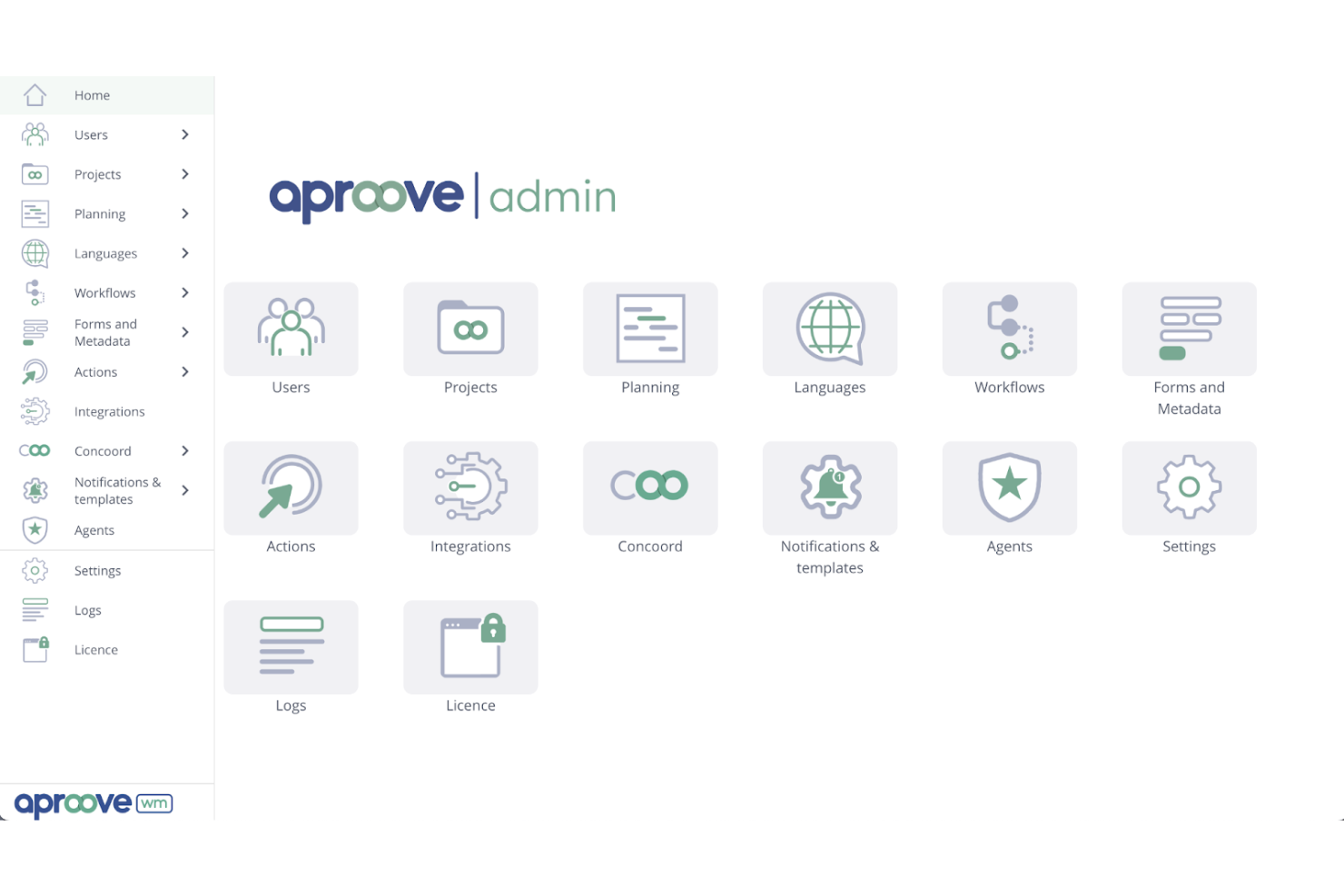
Aproove è pensato per le organizzazioni che hanno bisogno di gestire e revisionare grandi volumi di asset creativi tra più team o dipartimenti. È particolarmente utile per aziende, editori e agenzie che si occupano di workflow complessi e di un alto turnover di asset. La piattaforma unisce gestione degli asset, instradamento automatico per le approvazioni e tracciabilità dettagliata delle attività, aiutandoti a mantenere il controllo su ogni fase del processo creativo.
Perché ho scelto Aproove
Per i team che gestiscono centinaia o migliaia di asset creativi, Aproove si distingue per il suo focus sulla gestione di grandi volumi. L'ho scelto perché combina una gestione avanzata degli asset digitali con un instradamento automatico dei workflow, così puoi mantenere organizzati e in movimento anche i progetti più corposi.
I controlli granulari dei permessi della piattaforma ti permettono di assegnare a scala diritti di accesso e approvazione, fondamentale in ambienti aziendali. Le sue tracciature dettagliate delle attività aiutano inoltre a seguire ogni azione e decisione, facilitando la gestione della conformità e la responsabilità durante cicli di revisione complessi.
Funzionalità principali di Aproove
Altre funzionalità di Aproove che aiutano i team nella revisione creativa includono:
- Costruttore di workflow personalizzati: Progetta e automatizza processi di approvazione a più step adattati alle esigenze della tua organizzazione.
- Strumenti di revisione in batch: Revisiona, commenta e approva più asset contemporaneamente per accelerare i progetti ad alto volume.
- Ricerca e filtri avanzati: Trova rapidamente file o commenti specifici utilizzando metadati, tag e filtri.
- Opzioni di white-labeling: Personalizza l'interfaccia della piattaforma con il branding della tua azienda per un'esperienza omogenea ai clienti.
Integrazioni di Aproove
Aproove offre un'API per integrazioni personalizzate.
Pros and Cons
Pros:
- Costruttore di workflow personalizzati per approvazioni complesse
- White-labeling che supporta il branding di agenzia e cliente
- Filtri di ricerca avanzata per grandi librerie di asset
Cons:
- Mancano integrazioni native con strumenti di terze parti
- Reportistica e analytics integrati limitati
Ideale per l'integrazione dei flussi di lavoro nella produzione di stampa

ProofStuff è pensato per le tipografie e i team di produzione che necessitano di una revisione online strettamente integrata con il loro flusso di lavoro di stampa. È particolarmente utile per le aziende che vogliono gestire bozze, approvazioni e fasi di produzione tutte in un unico posto. La piattaforma aiuta a ridurre errori e tempi di consegna collegando la revisione delle bozze direttamente alle schede di lavoro e ai calendari di produzione.
Perché ho scelto ProofStuff
Ciò che distingue ProofStuff è proprio la connessione diretta tra la revisione online delle bozze e i flussi di lavoro della produzione di stampa. L'ho scelto perché permette di gestire bozze, approvazioni e fasi produttive da un'unica dashboard, una caratteristica rara in questo settore.
Lo strumento collega le attività di revisione alle schede di lavoro e ai calendari di produzione, così si può seguire ogni fase di una commessa di stampa senza cambiare sistema. Questo livello di integrazione aiuta tipografie e team di produzione a ridurre errori e rispettare le scadenze dei progetti.
Funzionalità principali di ProofStuff
Altre funzionalità utili per i team di stampa includono:
- Strumenti di confronto delle versioni: Confronta rapidamente diverse versioni di una bozza affiancandole per individuare modifiche o errori.
- Notifiche email automatiche: Tieni clienti e membri del team aggiornati sullo stato della bozza e sulle azioni richieste.
- Strumenti di commento e annotazione: Aggiungi commenti, evidenziazioni e annotazioni direttamente sulle bozze per un feedback chiaro.
- Controlli di accesso basati sui ruoli: Assegna permessi specifici agli utenti in base al loro ruolo nel progetto.
Integrazioni di ProofStuff
Le integrazioni includono ShipStation, WooCommerce, Shopify, Avalara Sales Tax e altre.
Pros and Cons
Pros:
- Integra la revisione delle bozze con le schede di lavoro di stampa
- Notifiche automatiche per aggiornamenti sullo stato della bozza
- Strumenti di marcatura diretta per il feedback del cliente
Cons:
- Supporto limitato per i contenuti multimediali avanzati
- Le funzionalità di reportistica sono basilari e limitate

Ideale per bacheche visive di feedback completamente personalizzabili

monday.com offre bacheche visive progettate per i team che necessitano di un modo flessibile per raccogliere e organizzare feedback creativi. I team marketing, le agenzie creative e i designer di prodotto utilizzano i suoi layout drag-and-drop per centralizzare commenti, approvazioni e versioni dei file. La sua struttura visiva aiuta a monitorare i cicli di feedback e mantiene tutti gli stakeholder allineati sullo stato del progetto.
Perché ho scelto monday.com
Ciò che distingue monday.com per l’online proofing è la possibilità di creare bacheche visive personalizzate che rispecchiano esattamente il processo di feedback della tua squadra. Ho scelto monday.com perché le sue bacheche consentono di creare colonne per stato, revisori, caricamento di file e anche campi di feedback personalizzati, così puoi adattare il flusso di lavoro a qualsiasi progetto creativo.
La possibilità di aggiungere commenti direttamente agli elementi e tracciare le modifiche in più round di revisione aiuta i team a mantenere il feedback organizzato e visibile. Questa flessibilità è particolarmente utile per i team creativi che devono gestire feedback su diversi tipi di contenuti e fasi di approvazione.
Funzionalità principali di monday.com
Altre funzionalità di monday.com che supportano la revisione creativa e la collaborazione includono:
- Annotazione dei file: aggiungi commenti e marcature direttamente su file immagine e documenti per feedback precisi.
- Automazioni: imposta notifiche e cambi di stato automatici per mantenere attivo il ciclo di revisione.
- Accesso ospite: invita revisori esterni alle bacheche con permessi controllati per una collaborazione sicura.
- Cronologia delle versioni: traccia e ripristina le versioni precedenti di file e voci di bacheca man mano che evolve il feedback.
Integrazioni di monday.com
Le integrazioni includono Slack, Gmail, Microsoft Teams, GitLab, Mailchimp, Microsoft Excel, Outlook, Docusign, Google Drive e altre ancora.
Pros and Cons
Pros:
- Le bacheche visive supportano feedback su più risorse
- Le automazioni inviano promemoria per approvazioni in sospeso
- Accesso ospite consente collaborazione esterna sicura
Cons:
- Discussioni in thread limitate nei commenti ai file
- I revisori necessitano di un account per accedere a tutte le funzionalità
New Product Updates from monday AI Workspace
monday AI Workspace Adds Human Approval Routing
monday AI Workspace adds a human-in-the-loop approval block to AI Workflows, sending approval requests and routing workflow paths based on responses. For more information, visit monday AI Workspace's official site.
Altri software per la revisione online
Ecco alcune opzioni aggiuntive di software per la revisione online che non sono entrate nel mio elenco, ma che vale comunque la pena prendere in considerazione:
- Ziflow
Ideale per chi cerca strumenti avanzati di controllo versione
- Wrike
Ideale per la collaborazione creativa tra team
- StreamWork
Ideale per approvazioni video e multimediali
- Krock.io
Ideale per feedback su storyboard e progetti video


Come valuto il software di revisione online
Valuto ogni strumento su due livelli: le funzionalità di base necessarie per gestire effettivamente un ciclo di revisione e approvazione, e i fattori che differenziano un fornitore dall'altro.
Funzionalità di base (requisiti fondamentali per questa lista)
Quando seleziono gli strumenti per la mia lista, assegno a ciascuno un punteggio da 0 (non offre la funzionalità) a 5 (eccelle in quest'area) per ogni funzionalità di base elencata di seguito. Poi, calcolo il punteggio totale dello strumento in percentuale. Ogni strumento deve ottenere un punteggio totale minimo del 65% per essere preso in considerazione.
- Supporto multi-formato file: Verifico se uno strumento gestisce tutta la gamma di deliverable effettivamente prodotti da un team creativo—PDF, immagini, video, audio, HTML e documenti—con rendering nativo.
- Strumenti di marcatura e annotazione: Commenti precisi e strumenti di disegno sono importanti, ma cerco anche marcature specifiche per il formato, come annotazioni video accurate al fotogramma e supporto per risposte in thread.
- Controllo versioni e confronto: Ogni revisione dovrebbe essere tracciata e facilmente confrontabile. Valuto se è possibile alternare, sovrapporre o visualizzare versioni affiancate con i commenti mantenuti.
- Flussi di approvazione e instradamento: Gli strumenti ottengono punteggi più alti quando supportano l'instradamento multi-fase e basato sui ruoli con scadenze—ad esempio un ciclo di revisione in tre fasi che va dal copywriter al legale al direttore creativo.
- Integrazione con la gestione progetti: Guardo quanto bene la piattaforma si connette con strumenti come Asana, Jira, Monday o Wrike, verificando la presenza di una sincronizzazione bidirezionale piuttosto che semplici notifiche unidirezionali.
- Audit trail e tracciamento delle decisioni: Per i team che necessitano di approvazioni documentate, valuto se lo strumento registra ogni azione con timestamp, attribuzione utente e registri esportabili.
Una volta che ho una lista di strumenti che soddisfano questi criteri, considero cosa distingue ciascuna piattaforma.
Fattori differenzianti (cosa distingue i fornitori)
Ecco come confronto e metto a confronto i diversi fornitori:
Caratteristiche distintive
L'accesso per clienti e revisori esterni è un grande elemento distintivo—cerco strumenti che permettano alle parti esterne di commentare e approvare tramite un semplice link, senza bisogno di un account. Anche l'instradamento automatico delle prove è importante; i migliori sistemi inviano promemoria e segnalano le revisioni in ritardo senza che il traffic manager debba intervenire manualmente. Vale la pena valutare anche la revisione assistita dall'AI. Funzionalità come il controllo ortografico automatico o il rilevamento intelligente delle modifiche tra una versione e l'altra individuano errori che i revisori umani non dovrebbero essere costretti a cercare.
Oltre le funzionalità
L'ecosistema di integrazione è una delle prime cose che valuto. Uno strumento di revisione che si sincronizza con Adobe Creative Cloud, Figma e la tua piattaforma di gestione progetti elimina caricamenti manuali di file e aggiornamenti sullo stato. Anche la scalabilità è importante—considero se la licenza distingue tra utenti completi e revisori ospiti, dato che la maggior parte dei team ha molti più approvatori che creatori. I report completano la mia valutazione. Dashboard che mostrano i tempi di consegna delle prove e i colli di bottiglia dei revisori forniscono ai responsabili delle operazioni creative i dati necessari per ottimizzare i cicli di revisione.
Come scegliere un software per la revisione online
È facile perdersi tra lunghi elenchi di funzionalità e strutture tariffarie complesse. Per aiutarti a rimanere concentrato mentre affronti il tuo processo specifico di selezione del software, ecco una lista di fattori da tenere a mente:
| Fattore | Cosa considerare |
|---|---|
| Scalabilità | Il software sarà in grado di gestire il volume attuale e futuro dei tuoi progetti? Considera i limiti di utenti, i limiti di archiviazione e la complessità dei flussi di lavoro man mano che il tuo team cresce. |
| Integrazioni | Si connette nativamente agli strumenti che già utilizzi, come quelli per la gestione dei progetti, la gestione delle risorse digitali o i sistemi di stampa? Verifica la presenza di integrazioni dirette, non solo dell'accesso tramite API. |
| Personalizzazione | Puoi adattare i flussi di lavoro, le fasi di approvazione e le notifiche per rispecchiare i processi del tuo team? Evita i sistemi rigidi che ti costringono ad adattare il flusso di lavoro. |
| Semplicità d'uso | Tutte le parti interessate, inclusi clienti e revisori esterni, troveranno l'interfaccia intuitiva? Esegui un test con un utente non tecnico prima di prendere una decisione. |
| Implementazione e avviamento | Quanto tempo occorrerà per rendere operativo il tuo team? Cerca supporto per la migrazione, risorse formative e tempistiche chiare per l'avviamento. |
| Costo | I livelli tariffari sono trasparenti e prevedibili con la crescita dell'utilizzo? Fai attenzione ai costi nascosti, ai numeri minimi di utenti o agli addebiti per spazio di archiviazione o revisori aggiuntivi. |
| Misure di sicurezza | La piattaforma offre accesso basato sui ruoli, crittografia dei dati e registri di controllo? Assicurati che soddisfi gli standard di sicurezza e privacy della tua organizzazione. |
| Disponibilità dell'assistenza | Quali canali di assistenza sono disponibili e in quali orari? Valuta se avrai bisogno di chat dal vivo, assistenza telefonica o supporto dedicato per l'avviamento, soprattutto durante la distribuzione. |
Che cos'è un software per la revisione online?
Il software per la revisione online è una piattaforma digitale che consente ai team di esaminare, annotare e approvare risorse creative o documenti in un ambiente centralizzato e basato sul Web.
Centralizza il processo di feedback e approvazione consentendo a più parti interessate di commentare, confrontare le versioni e monitorare le modifiche in tempo reale. Questo aiuta a ridurre gli errori, abbreviare i tempi dei progetti e garantire che tutti rimangano allineati durante l'intero ciclo di revisione.
Vantaggi
L'implementazione di un software di revisione online offre diversi vantaggi al tuo team e alla tua azienda. Eccone alcuni:
- Cicli di revisione più rapidi: Le notifiche automatiche, i feedback centralizzati e i flussi di lavoro strutturati per le approvazioni aiutano a ridurre i ritardi e a mantenere i progetti in movimento.
- Feedback più chiari: Gli strumenti di annotazione consentono ai revisori di fornire indicazioni precise e attuabili direttamente sulle risorse creative.
- Controllo delle versioni migliorato: Il monitoraggio integrato delle versioni garantisce che tutti stiano esaminando il file corretto e semplifica il confronto tra le modifiche.
- Maggiore responsabilità: I registri di controllo e le autorizzazioni basate sui ruoli garantiscono trasparenza su chi ha effettuato le approvazioni creative e quando.
- Collaborazione migliorata: Più parti interessate possono esaminare, commentare e approvare le risorse tramite la collaborazione in tempo reale, indipendentemente dalla loro posizione.
- Riduzione dei colli di bottiglia nelle approvazioni: I promemoria automatici e il monitoraggio dello stato aiutano a evitare che i progetti si blocchino in qualsiasi fase del processo di revisione.
- Migliore conformità e conservazione dei registri: I registri dettagliati di feedback, approvazioni e modifiche all'interno del processo di revisione supportano i requisiti normativi e gli audit interni.
Costi e prezzi
La scelta di un software di revisione online richiede la comprensione dei vari modelli e piani tariffari disponibili. I costi variano in base alle funzionalità, alle dimensioni del team, agli elementi aggiuntivi e ad altro ancora. La tabella seguente riassume i piani più comuni, i relativi prezzi medi e le funzionalità tipicamente incluse nelle soluzioni di software di revisione online:
Tabella comparativa dei piani per il software di revisione online
| Tipo di piano | Prezzo medio | Funzionalità comuni |
|---|---|---|
| Piano gratuito | $0 | Caricamenti di file di base, revisori limitati, strumenti di annotazione semplici e notifiche di base. |
| Piano personale | $5-$25/user/month | Progetti illimitati, controllo delle versioni, strumenti di annotazione avanzati e notifiche via e-mail. |
| Piano aziendale | $20-$50/user/month | Gestione del team, flussi di lavoro per le approvazioni, integrazioni, registri di controllo e funzionalità di reportistica. |
| Piano per grandi aziende | $40-$100/user/month | Identità del marchio personalizzata, sicurezza avanzata, supporto dedicato, accesso API e gestione della conformità. |
Domande frequenti sul software di revisione online
Ecco alcune risposte alle domande comuni sul software di revisione online:
Il software di revisione online è in grado di gestire file di grandi dimensioni?
Sì, la maggior parte dei software di revisione online è in grado di gestire file di grandi dimensioni, soprattutto immagini, video o file di progettazione di alta qualità e ad alta risoluzione. Tuttavia, i limiti di caricamento e le prestazioni possono variare in base al fornitore e al piano, quindi verifica le specifiche se il tuo team lavora con risorse particolarmente grandi.
Quanto è sicuro il software di revisione online per i progetti riservati?
La maggior parte delle piattaforme di revisione online offre funzionalità di sicurezza come la crittografia dei dati, le autorizzazioni basate sui ruoli e i registri di controllo. Per i progetti altamente riservati, verifica che il software soddisfi gli standard di sicurezza della tua organizzazione e chiedi informazioni sulle certificazioni di conformità come SOC 2 o ISO 27001.
I clienti o le parti interessate esterne possono partecipare al processo di revisione?
Sì, molti strumenti di revisione online consentono di invitare revisori o clienti esterni tramite link sicuri o accesso ospite. Di solito puoi controllare ciò che possono vedere o fare, ad esempio commentare, approvare o visualizzare soltanto i file.
Quali tipi di file possono essere esaminati con un software di revisione online?
La maggior parte delle piattaforme supporta un’ampia gamma di tipi di file, tra cui immagini, PDF, video e file di progettazione. Alcuni strumenti supportano anche formati di documenti come Word o PowerPoint. Verifica sempre la compatibilità dei file se il tuo flusso di lavoro si basa su formati specializzati.
È possibile integrare il software di revisione online con gli strumenti di gestione dei progetti?
Sì, molte soluzioni di revisione online offrono integrazioni con piattaforme di gestione dei progetti, DAM o archiviazione. Questo aiuta a mantenere sincronizzati feedback e approvazioni con il flusso di lavoro più ampio e riduce gli aggiornamenti manuali.