
Meilleurs outils logiciels de planification des ressources de 2026

15 La liste des meilleurs logiciels de planification des ressources
Here's my pick of the 15 best software from the 26 tools reviewed.


L’essentiel de la planification des ressources
Qu’est-ce que la planification des ressources?
La planification des ressources est une étape clé dans la gestion de projet. C’est le processus et les méthodes utilisés pour affecter les ressources d’une organisation à des projets ou à des tâches en fonction de la disponibilité des ressources. Il s’agit de lister les tâches, d’estimer leur durée, d’identifier les contraintes, de fixer des délais, d’identifier la demande de ressources, de prévoir la disponibilité future des ressources, d’identifier les ressources potentielles et d’utiliser toutes ces informations pour faire correspondre efficacement les ressources appropriées aux tâches ou emplois.
En quoi consiste la planification des ressources?
La planification des ressources implique généralement un ensemble d’outils qui aident à allouer, planifier et agréger les ressources. Généralement, les gens pensent à un diagramme de Gantt, mais les gestionnaires de ressources et les gestionnaires de projets utilisent divers outils pour planifier les ressources, notamment des calendriers, des échéanciers et des histogrammes avec des données agrégées sur les ressources.
Qu’est-ce qu’un logiciel de planification des ressources?
Le logiciel de planification des ressources peut vous aider à planifier, organiser et gérer vos projets ainsi que les ressources de votre agence – qu’il s’agisse de personnes, de salles ou de lignes téléphoniques. Ils peuvent être utilisés pour élaborer des plans de ressources et créer des prévisions des besoins en ressources. Selon la sophistication du logiciel, ils peuvent également inclure des outils d’estimation et de planification, de programmation, de contrôle des coûts et de gestion budgétaire, d’allocation des ressources et de stockage des documents.
Les logiciels de planification des ressources sont également connus sous bien d’autres noms – si vous entendez parler de logiciels de planification des ressources, de logiciels de répartition des ressources, d’outils de répartition des ressources ou d’outils de gestion de la charge de travail, ils parlent tous de la même chose – il s’agit de planification efficace des ressources et des outils pour vous aider à mieux le faire.
Le défi avec les logiciels de planification des ressources est qu’il y a souvent beaucoup de chevauchement avec d’autres fonctions de l’entreprise. Les logiciels de gestion des ressources, de suivi du temps, de communication de projet, de dépenses, de stockage, d’automatisation des services professionnels (PSA) et de planification des ressources de services (SRP) peuvent tous être regroupés. C’est bien, mais si vous devez intégrer ou remplacer des systèmes existants, les choses peuvent se compliquer.
Quels sont les avantages des logiciels de planification des ressources?
Voici quelques principaux avantages des logiciels de planification des ressources :
- Gagnez du temps en déplaçant manuellement les ressources
- Faites moins d’erreurs en sur-réservant votre équipe
- Comprenez clairement la capacité et l’utilisation de l’équipe
- Déployez les ressources limitées dont vous disposez de manière plus efficace et efficiente
Au fur et à mesure que les agences et les studios se développent, les systèmes de planification des ressources qui ont pu fonctionner pour une petite agence ont souvent du mal à s’adapter. Excel et Google Docs sont des outils de planification des ressources gratuits, mais les logiciels de planification des ressources peuvent vous aider à travailler plus rapidement, plus intelligemment et vous aider à affecter des personnes aux projets, et vous permettre de planifier des projets plus efficacement. Si vous êtes toujours à la recherche d’un outil gratuit de planification des ressources, alors je vous recommande d’utiliser des feuilles de calcul Google ou Excel, mais faire l’investissement dans un outil approprié sera rapidement un investissement rentable.
Qu’entend-on par ressources?
Dans une organisation, les ressources peuvent comprendre tout ce qui contribue au produit fini : les personnes (ressources humaines et compétences), les ressources financières, les stocks, l’équipement et les fournitures, les locaux comme les bureaux et les salles de réunion, les ressources informatiques, la production et les ressources naturelles, etc.
Vous venez de réaliser que vous ne recherchez pas un logiciel de gestion des ressources? Jetez un coup d’œil à d’autres outils utiles :
- Logiciel de planification de projet pour vous aider à planifier, suivre et analyser vos projets.
- Logiciel de gestion des ressources pour vous aider à gérer les ressources organisationnelles.
Si vous êtes à la recherche d’un logiciel de planification des ressources, vous trouverez dans cet article une comparaison rapide, simple et facile à lire de dix des meilleurs outils de planification des ressources disponibles en 2026.
Comparez et évaluez rapidement le meilleur logiciel de planification des ressources
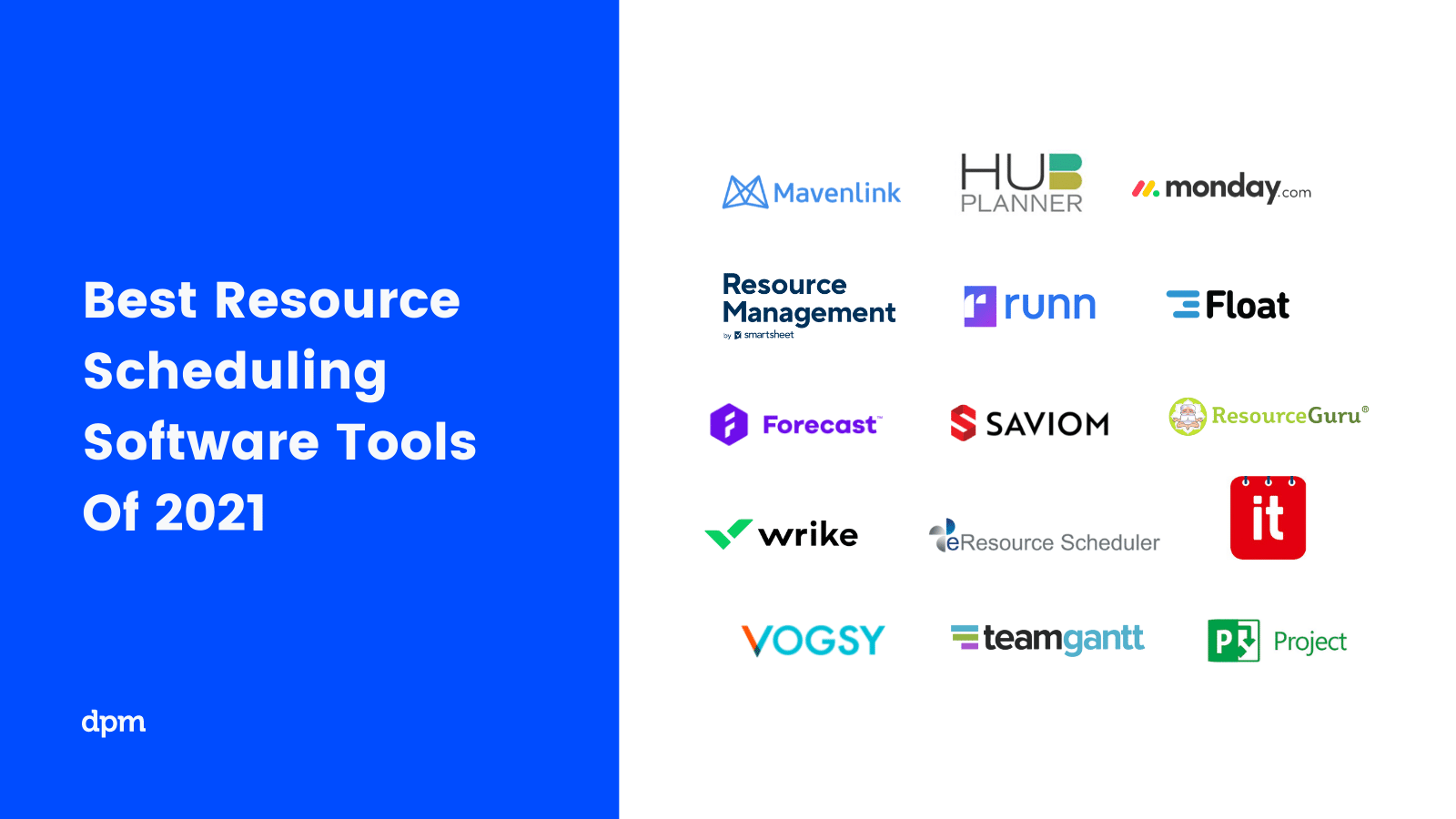
The Digital Project Manager est sponsorisé par le lecteur. Lorsque vous cliquez sur les liens de notre site, nous pouvons gagner une commission. En Savoir Plus.
Dans cet article, nous vous expliquerons également ce qu’est un logiciel de planification des ressources, comment il vous aidera à mieux gérer, allouer et planifier votre équipe et vos ressources, et vous fournirons un résumé de leurs caractéristiques afin que vous puissiez facilement comparer et trouver les bons outils de planification des ressources pour votre équipe et projet.
Vidéo: Comment choisir le meilleur logiciel de planification des ressources
Vous vous demandez ce que vous devez rechercher lorsque vous vérifiez les options du logiciel de planification des ressources? Voici une vidéo qui couvre nos critères et vous donne une idée de ce à quoi ressemblent les différentes interfaces d’outils.

Critères de comparaison des logiciels de gestion des ressources
Pour figurer sur cette liste de logiciels de gestion des ressources, j’ai évalué les outils en fonction des critères suivants :
- Interface utilisateur (IU) : Dans quelle mesure est-elle bien conçue? Offre-t-elle des affichages clairs et une navigation intuitive?
- Facilité d’utilisation : Est-ce facile à apprendre et à maîtriser? Y a-t-il des tutoriels et de la formation? L’entreprise offre-t-elle un bon soutien technique et aux utilisateurs?
- Caractéristiques et fonctionnalités : Combien de fonctions et de fonctionnalités clés du logiciel de gestion des ressources offre-t-il, et quelle est leur puissance? Plus précisément, j’ai cherché :
- Automatisation : Les fonctions de planification automatique sont l’une des principales raisons d’utiliser un logiciel de planification des ressources. Cela signifie à tout le moins que vos tâches s’ajusteront automatiquement lorsqu’elles seront déplacées, en fonction des dépendances que vous aurez définies. Cela peut également inclure des flux de travail personnalisés avec automatisation pour aider à rationaliser les processus répétitifs.
- Planification en temps réel : Les meilleurs outils de ressourcement vous donnent une visibilité en temps réel sur les charges de travail et vous permettent de suivre les progrès, de voir l’utilisation des ressources et de faire des ajustements en temps réel.
- Alertes : Un bon planificateur de ressources vous permet de personnaliser le type de notifications et d’alertes que chaque utilisateur reçoit (e-mail, bureau, etc.), en vous assurant que les alertes sur l’utilisation des ressources et la charge de travail mettent les bonnes personnes au courant.
- Intégrations : Est-il facile de se connecter avec d’autres outils? Des fonctionnalités pré-intégrées?
- Valeur pour $ : Dans quelle mesure le prix est-il approprié pour ses caractéristiques, ses capacités et son cas d’utilisation? Les prix sont-ils clairs, transparents et flexibles?
-

Insightful
Visit WebsiteThis is an aggregated rating for this tool including ratings from Crozdesk users and ratings from other sites.4.8 -
Accelo
Visit WebsiteThis is an aggregated rating for this tool including ratings from Crozdesk users and ratings from other sites.4.4 -
Forecast
Visit WebsiteThis is an aggregated rating for this tool including ratings from Crozdesk users and ratings from other sites.4.6




Aperçu des 15 meilleurs logiciels de planification de ressources
Cette revue couvre les outils d’optimisation de planification de ressources mentionnés ci-dessus et présente ensuite une liste d’autres outils de planification de ressources à vérifier.


Float.com offers a tailored approach to resource scheduling. By addressing challenges such as time tracking and capacity planning, it empowers your team to make informed decisions and improve project delivery. With features like real-time tracking of roles and skills, along with finance and estimation capabilities, Float provides a comprehensive solution for organizations looking to forecast revenue and enhance operational efficiency.
Who Is Float.com Best For?
For creative and professional services teams, agencies, and consultancies that need clear visibility into team capacity, billable utilization, and profitability across projects.
Why I Picked Float.com
I picked Float because it excels in profitable resource scheduling, making it a prime choice for organizations looking to optimize project margins and resource allocation. The software's visual scheduling interface provides a clear overview of team workloads, allowing you to efficiently allocate and adjust resources in real time. Its capacity planning tools help you forecast revenue and manage project costs, ensuring that your team is always working on the most profitable projects. Additionally, Float's integration capabilities with tools like Slack and Jira streamline workflows, keeping your team aligned and informed, which is crucial for maintaining profitability.
Float.com Key Features
In addition to its capacity planning and financial insights, Float offers several other features that enhance its appeal as a resource scheduling software.
- Visual Resource Schedule: This feature provides a clear, graphical overview of your team's workload, making it easy to allocate and adjust resources as needed.
- Built-in Time Tracking: Track the time spent on tasks directly within the platform, allowing for more accurate project timelines and resource allocation.
- Role-Based Access Control: Customize user permissions based on roles, ensuring that each team member has access to the necessary tools and information.
- Skill-Based Assignment: Assign tasks based on team members' skills, helping to optimize resource utilization and improve project outcomes.
Float.com Integrations
Integrations include Asana, Basecamp, ClickUp, Jira, Google Calendar, Aprimo, Hubspot, Karbon, monday.com, and Salesforce.
Pros and Cons
Pros:
- Built-in time tracking enhances project accuracy and timelines.
- Strong forecasting tools improve resource allocation decisions.
- Flexible dashboards help organize complex project management.
Cons:
- Interface complexity may overwhelm users with simple projects.
- Time tracking features require a higher plan.
New Product Updates from Float.com

Float Introduces Smart Assign for Faster Team Staffing
Float.com releases Smart Assign, powered by machine learning, to quickly suggest roles for team members. For more information, visit Float’s official site.
 .
.

Kantata is designed for organizations that need to match the right people to the right projects based on skills, availability, and preferences. Professional services teams and consultancies use Kantata to manage resource allocation with a focus on individual strengths and workload balance. Its people-centric approach helps you optimize project outcomes while supporting employee satisfaction and retention.
Who Is Kantata Best For?
People-focused professional services organizations that need to balance resource planning with skills, availability, and project demand.
Why I Picked Kantata
What sets Kantata apart is its focus on aligning people’s skills and interests with project needs. The resource management dashboard lets you see individual availability, skill sets, and utilization rates, making it easier to assign the right person to each task. I like how Kantata’s talent profiles and forecasting tools help you plan for future project demands while considering employee preferences. This people-centric approach supports both project delivery and team satisfaction, which is especially valuable for professional services organizations.
Kantata Key Features
Some other features in Kantata help teams manage resources and projects more effectively:
- Project Portfolio Management: Track multiple projects and their resource needs in one centralized view.
- Role-Based Permissions: Control access to sensitive resource and project data based on user roles.
- Time and Expense Tracking: Capture billable hours and expenses directly within the platform.
- Scenario Planning: Model different resource allocation scenarios to see potential impacts before making changes.
Kantata Integrations
Integrations include Salesforce, SAP, Jira, Xero, BambooHR, Slack, Worday, QuickBooks, HubSpot, and NetSuite.
Pros and Cons
Pros:
- Distinguishes between soft and firm allocation
- Resourcing fully integrated with master planning
- Good reporting functionality for resource data
- Easy capacity management
Cons:
- Custom reports can be difficult to create without training
- Proofing solution is an add-on
New Product Updates from Kantata
Kantata Integrates E-Invoicing With Avalara
Kantata introduces integrated e-invoicing through its partnership with Avalara, enabling compliant, automated invoicing across regions. For more information, visit Kantata's official site.
 .
.
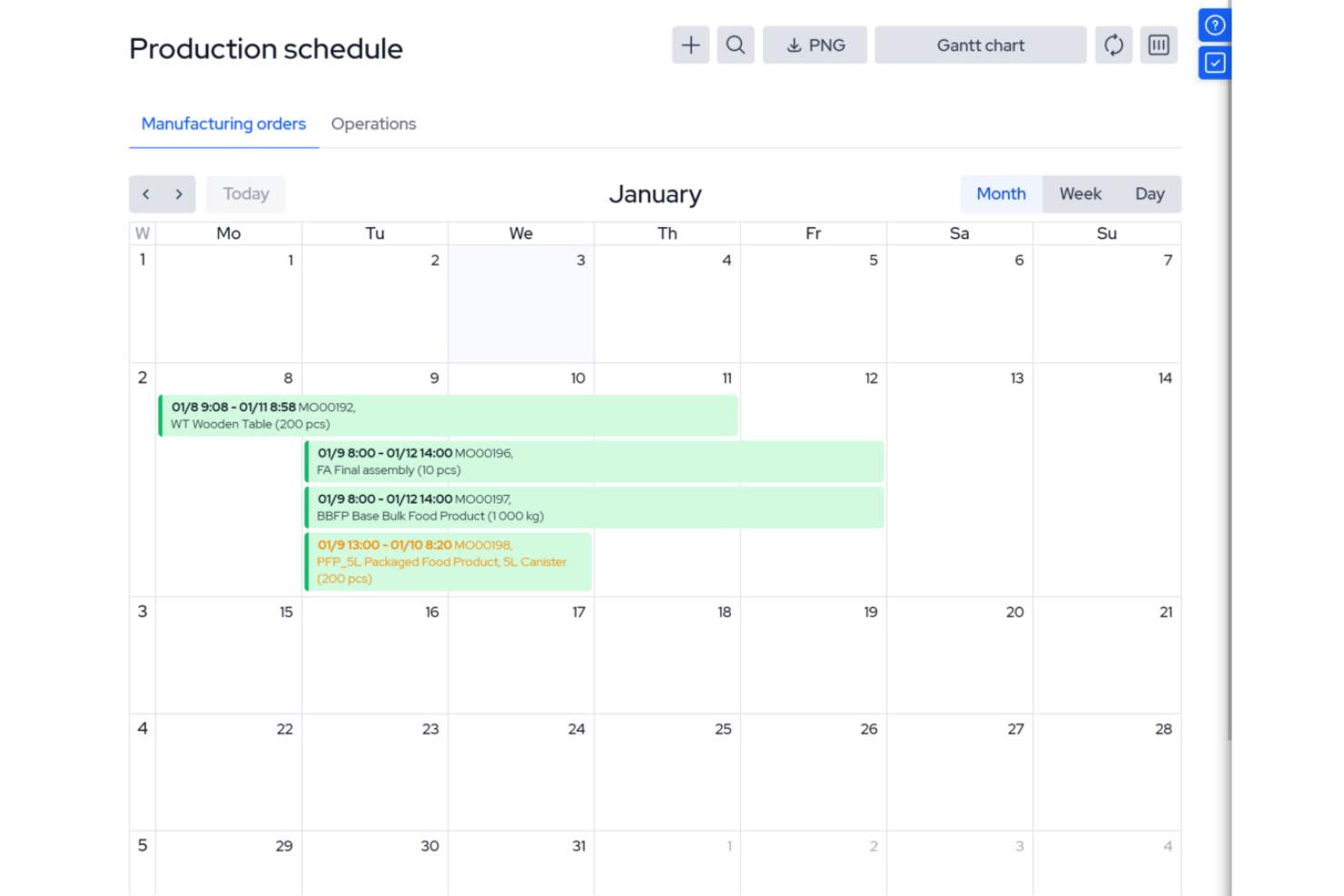
MRPeasy is a manufacturing resource planning (MRP) software, specifically tailored for the manufacturing sector. It integrates with industry processes, offering real-time visibility into production scheduling, inventory management, and operational efficiency. It’s especially useful for operations managers and production planners who want to automate job routing, track materials, and manage shop floor workloads. The platform’s focus on manufacturing resource planning sets it apart from general project scheduling tools.
Who Is MRPeasy For?
Small to mid-sized manufacturers that need integrated production scheduling and resource planning tied to inventory and operations.
Why I Picked MRPeasy
For manufacturers who need more than basic scheduling, MRPeasy offers resource planning tools built specifically for production environments. The platform’s visual production calendar and drag-and-drop job scheduling help you allocate machines, workstations, and labor with precision. I like that MRPeasy automatically factors in material availability and lead times when generating production schedules. This level of manufacturing-specific detail makes it a strong fit for teams managing complex shop floor operations.
MRPeasy Key Features
Some other features that stand out for manufacturers using MRPeasy include:
- BOM (Bill of Materials) Management: Lets you create, edit, and track multi-level BOMs for accurate production planning.
- Shop Floor Reporting: Provides real-time updates from the shop floor on job status and worker activity.
- Inventory Tracking: Monitors raw materials and finished goods across multiple locations.
- Purchase Order Management: Automates the creation and tracking of purchase orders for materials and components.
MRPeasy Integrations
Integrations include Amazon, Xero, WooCommerce, BigCommerce, Crossfire, Dropbox, Google Drive, OneDrive, HubSpot, QuickBooks, ShipStation, Salesforce, Shopify, Zapier, and more.
Pros and Cons
Pros:
- Comprehensive view of resource scheduling
- Automated production planning
- Simple, easy-to-use interface
Cons:
- Limited customizations
- Lack of advanced features due to a simple platform
New Product Updates from MRPeasy
MRPeasy Adds Estimated Weight Calculation for Items
MRPeasy introduces an estimated weight calculation feature, enhancing efficiency. For more information, visit MRPeasy's official site.
 .
.

Scoro gives project managers and operations leads a real-time view of team workloads and project timelines. Agencies and consultancies use Scoro to spot bottlenecks, balance assignments, and adjust plans as priorities shift. Its live dashboards and visual planners help you make fast, informed decisions about resource allocation.
Who Is Scoro Best For?
Services businesses that need real-time insight into workloads, utilization, and business performance across projects and teams.
Why I Picked Scoro
Scoro stands out for its ability to give you instant visibility into team workloads and project progress. The real-time dashboards and interactive Gantt charts let you see who’s overloaded, who’s available, and where deadlines might slip. I appreciate how Scoro’s workload planner updates automatically as tasks shift, so you always have an up-to-date picture of resource allocation. This level of transparency is especially useful for agencies and consultancies managing multiple projects at once.
Scoro Key Features
In addition to its real-time workload visibility, Scoro offers several other features that support resource scheduling:
- Calendar Sync: Connects with Google Calendar and Outlook for unified scheduling across platforms.
- Task Dependencies: Lets you set and manage dependencies between tasks to control project flow.
- Billable and Non-Billable Time Tracking: Tracks both billable and internal hours for accurate reporting.
- Customizable Dashboards: Allows you to tailor dashboard widgets to display the metrics and data most relevant to your team.
Scoro Integrations
Integrations include Google Calendar, Xero, QuickBooks, Sage Intacct, Exact Online, Expensify, Stripe, Jira, HubSpot, Salesforce, Google Drive, Dropbox, Okta, Azure AD, and Zapier.
Pros and Cons
Pros:
- Real-time project tracking
- Robust utilization reports
- Good invoicing and financial management features
Cons:
- Mobile app is less robust than web version
- Its many customization options can feel overwhelming
New Product Updates from Scoro

Scoro Introduces Subtasks for More Granular Work Planning
Scoro introduces subtasks and improved price list deletion warnings, enabling teams to break down work into smaller units for detailed planning while protecting pricing data from accidental changes. For more information, visit Scoro’s official site.
 .
.

Productive is purpose-built for agencies and professional services teams that need to manage people, projects, and profitability in one place. It’s especially useful for operations leads and resource managers who want to balance workloads, track billable hours, and forecast capacity across multiple clients. The platform’s focus on agency workflows and integrated financial tracking sets it apart from more generic resource scheduling tools.
Who Is Productive Best For?
Agencies and professional services firms that want integrated resource planning, budgeting, time tracking, and financial visibility.
Why I Picked Productive
Agencies and professional services teams have unique needs when it comes to resource scheduling, and Productive is built with those workflows in mind. The platform’s resource planning module lets you assign people to projects based on skills, availability, and billable rates, which is essential for managing client work. I appreciate how Productive connects scheduling with time tracking and project budgets, so you can see the impact of resource allocation on profitability in real time. This focus on agency-specific resource management makes it a strong fit for teams juggling multiple clients and shifting priorities.
Productive Key Features
Some other features that make Productive useful for agencies and professional services include:
- Customizable Project Templates: Let you create and reuse templates for common project types and workflows.
- Utilization Reporting: Tracks team member workload and utilization rates across projects.
- Integrated Document Management: Stores project files and documents directly within the platform.
- Client Portal: Provides clients with access to project updates, deliverables, and communication threads.
Productive Integrations
Integrations include Jira, Xero, Exact, Slack, QuickBooks, Microsoft Outlook, Fortnox, Personio, and Zapier. It also has an open API available for custom integrations.
Pros and Cons
Pros:
- Built-in time management can bill multiple business entities
- Plenty of custom tags to choose from
- Quite easy to set up collaborative tasks
Cons:
- Invoicing and quotation features are limited
- Roles/user rights are not as granular
New Product Updates from Productive

Productive Introduces Resource Request Feature
Productive introduces a resource request feature that helps teams request and allocate resources more efficiently. For more information, visit Productive's official site.
 .
.
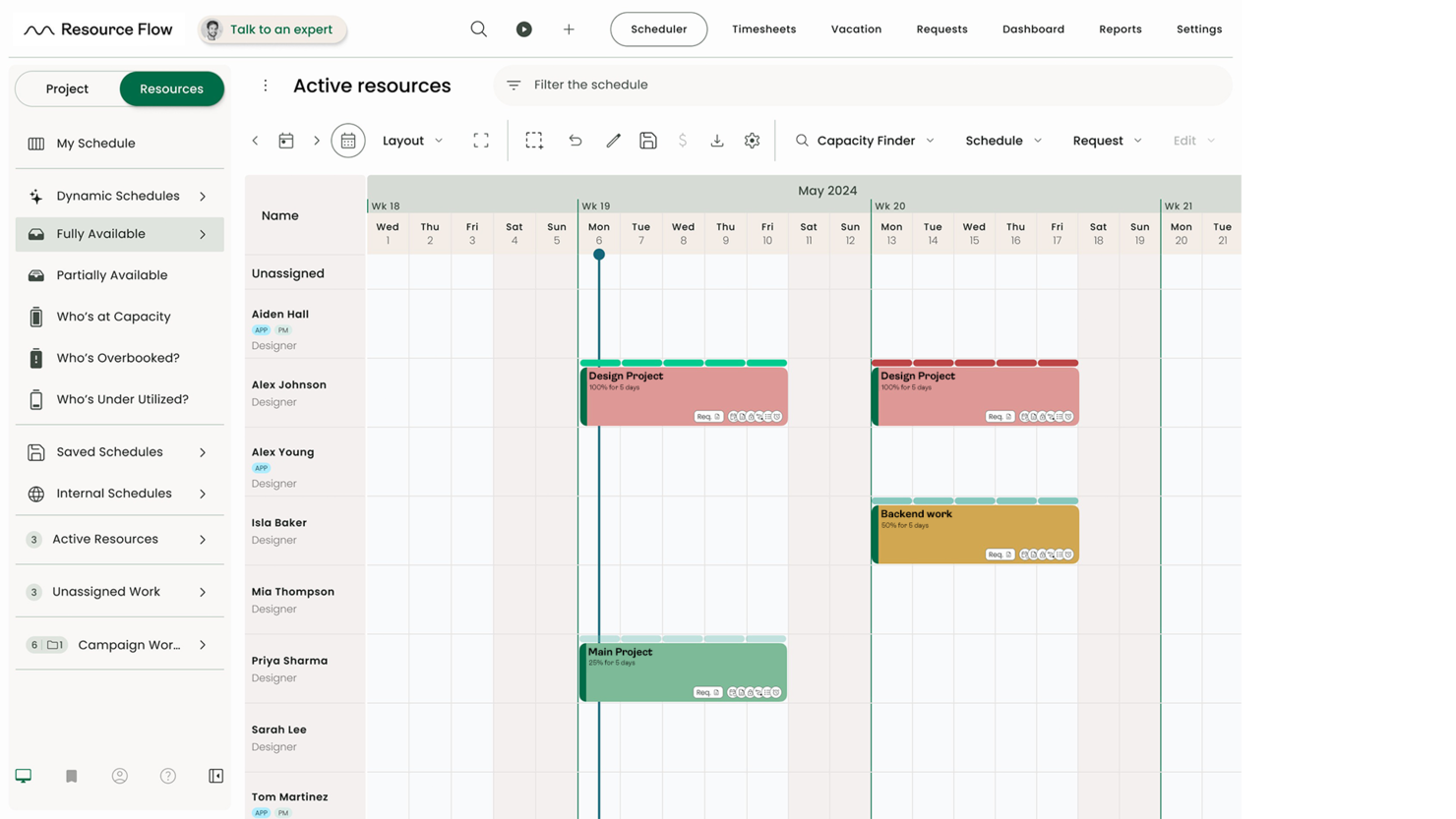
Hub Planner is a resource scheduling software with a full suite of scheduling, time entry, and reporting features. The platform’s advanced scheduling, approval workflows, and reporting tools help teams coordinate large-scale resource planning with clarity and precision.
Helen Ní Mháirtín, Head of Customer Success at Milient, highlights how the platform helps teams stay efficient: “Resource management with Hub Planner allows users to avoid overbooking and align availability accurately. It also has a powerful capacity finder, which helps identify available resources across projects.”
Who Is Hub Planner Best For?
Hub Planner by Milient is built for mid-sized and large organizations that need to manage complex resource pools across multiple projects. It’s especially useful for PMOs, operations leads, and consultancies that require granular control over capacity, forecasting, and utilization.
Why I Picked Hub Planner by Milient
For organizations with larger teams and complex project portfolios, Hub Planner by Milient offers the depth needed to manage resources at scale. The platform’s resource scheduler supports drag-and-drop planning across departments, locations, and roles, which is essential for mid-sized to large companies. I appreciate the built-in approval workflows that help maintain oversight as resource requests and changes move through different managers. Its advanced reporting and forecasting tools also give leadership the visibility they need to make informed decisions about capacity and utilization.
Hub Planner by Milient Key Features
Some other features that make Hub Planner by Milient a strong choice for resource scheduling include:
- Timesheets Module: Team members can log hours directly against projects and tasks.
- Vacation and Leave Management: Tracks all types of leave and integrates them into resource availability.
- Custom Fields: Allows you to add organization-specific data points to resources or projects.
- Project Billing Rates: Supports multiple billing rates for different projects, roles, or clients.
Hub Planner by Milient Integrations
Integrations include Basecamp, Slack, iCal, and Zapier, which lets you connect to thousands of apps. A REst API is also available for custom-built integrations.
Pros and Cons
Pros:
- Good overview of staff task/time allocations and availability
- Easily track several projects and generate reports
- Filter planning & forecasting data by project, resource, group or skill set
Cons:
- 24/7 support starts in the Premium plan
- To customize views and schedule layout you need to edit settings


Bonsai Agency Software brings resource planning and forecasting tools together for agencies and consultancies managing multiple projects and clients. It’s built for teams that need to balance workloads, track utilization, and anticipate future capacity needs. The platform’s forecasting features help leaders spot resourcing gaps and make informed staffing decisions before projects hit bottlenecks.
Who Is Bonsai Agency Best For?
Agencies and service firms that need forecasting, workload planning, and financial tracking in one system.
Why I Picked Bonsai Agency Software
Resource planning and forecasting are at the core of Bonsai Agency Software’s approach, which is why I picked it for this list. The platform offers visual workload charts and utilization dashboards that help agencies see who’s available, who’s overbooked, and where future gaps might appear. I appreciate how Bonsai lets you forecast project needs and allocate resources based on real-time and projected data. These features make it a strong choice for teams that need to plan ahead and keep projects staffed without overloading anyone.
Bonsai Agency Software Key Features
Some other features that make Bonsai Agency Software useful for resource scheduling include:
- Project Templates: Quickly set up new projects with pre-defined tasks and milestones.
- Time Tracking: Tracks billable and non-billable hours directly within each project.
- Client Portal: Provides clients with access to project status, deliverables, and communications.
- Automated Invoicing: Generates and sends invoices based on tracked time and completed work.
Bonsai Agency Software Integrations
Integrations include Gmail, Google Calendar, Zapier, Slack, QuickBooks Online, Calendly, ClickUp, Trello, Google Drive, Google Sheets, Xero, HubSpot, and more.
Pros and Cons
Pros:
- All-in-one solution with invoicing, time tracking, and accounting
- Automation features that streamline workflow and manage time
- Professional templates for contracts, proposals, and invoices
Cons:
- Limitations with scalability
- Lacks advanced features


Resource Guru is designed for teams that need a clear view of capacity and resource allocation, especially in project-based environments. It’s a strong fit for operations managers and project leads who want to balance workloads, track availability, and manage timesheets without complexity. The platform’s visual scheduling grid and built-in leave management make it easy to spot conflicts and optimize team utilization.
Who Is Resource Guru Best For?
Teams that need simple, visual capacity planning with integrated timesheets and minimal setup complexity.
Why I Picked Resource Guru
When capacity planning and timesheet management are top priorities, Resource Guru stands out for its focused approach. The tool’s scheduling grid gives you a real-time view of team availability, making it easy to allocate work without overbooking. I like how Resource Guru includes built-in timesheets that automatically capture booked hours, so you can compare planned versus actual time spent. This combination of visual scheduling and integrated time tracking is especially useful for teams that need to manage workloads and monitor utilization closely.
Resource Guru Key Features
Some other features that make Resource Guru useful for capacity planning and scheduling include:
- Resource Filters: Let you filter resources by skills, location, or custom tags for faster assignment.
- Personal Dashboards: Each team member gets a personalized dashboard showing their bookings and availability.
- Leave Management: Tracks vacation, sick days, and other leave types directly in the schedule.
- API Access: Offers an API for custom integrations with other business tools.
Resource Guru Integrations
Integrations include Google Calendar, Microsoft Outlook, Slack, Microsoft Teams, Asana, Jira Software Cloud, Google Sheets, Salesforce, HubSpot, Smartsheet, Basecamp, and Clockify.
Pros and Cons
Pros:
- Heatmaps for quick capacity insights
- Affordable per-user rate
- Daily resource summary emails
Cons:
- Limited reporting depth compared to larger enterprise tools
- Lacks zooming options in the calendar view
New Product Updates from Resource Guru

Resource Guru Launches Asana Integration
Resource Guru now integrates with Asana to enhance task scheduling by providing insights into availability and skills. For more information, visit Resource Guru's official site.
 .
.

Connecteam is a resource scheduling and employee management platform designed for deskless teams. It combines scheduling, time tracking, and task management into one mobile-friendly system, making it easier for businesses to manage employees across multiple locations.
Who Is Connecteam Best For?
Multi-location businesses with deskless or frontline employees that need shift scheduling and workforce coordination.
Why I Picked Connecteam
When you need to manage shift scheduling across several locations, Connecteam stands out for its location-based scheduling and mobile-first design. The platform lets managers assign shifts to specific sites, track employee check-ins with GPS, and quickly fill open shifts with qualified staff. I like that you can set location-specific rules and notifications, which helps prevent scheduling conflicts and ensures coverage where it’s needed most. These features make Connecteam a strong fit for businesses with distributed teams and complex shift requirements.
Connecteam Key Features
Some other features that make Connecteam useful for resource scheduling include:
- Shift Templates: Create and reuse common shift patterns for faster scheduling.
- Automated Shift Reminders: Sends push notifications to employees before their shifts start.
- Time Off Requests: Allows staff to submit vacation or sick leave requests directly in the app.
- Payroll Export: Exports timesheets and attendance data for payroll processing.
Connecteam Integrations
Integrations include Gusto, QuickBooks, Paychex, Xero, ADP, Zapier, Wix Bookings, Lightspeed POS, and PrismHR.
Pros and Cons
Pros:
- Detailed time tracking with GPS stamping
- Customizable forms and task workflows
- Auto-scheduling reduces manual shift planning
Cons:
- Geolocation tools may struggle in remote areas
- Interface can feel complex for new users


Hive is a project management and collaboration platform designed to help teams plan, execute, and monitor their work in a centralized workspace. It offers various tools to manage tasks, track progress, and facilitate communication among team members. If you need a clear view of team workloads and availability, Hive offers visual resource scheduling built for fast-moving teams
Who Is Hive Best For?
Teams that want clear visibility into team availability and workload distribution across active projects.
Why I Picked Hive
When I need to visualize team availability at a glance, Hive stands out for its clear resource management tools. The platform’s Team View gives you a real-time look at who’s busy, who’s free, and how work is distributed across your team. I like that you can filter by project, role, or individual to quickly spot scheduling conflicts or underutilized resources. These features make Hive a strong fit for project managers who want to keep workloads balanced and avoid bottlenecks.
Hive Key Features
Some other features that make Hive useful for resource scheduling include:
- Gantt Chart View: Lets you map out project timelines and dependencies visually.
- Time Tracking: Allows team members to log hours directly within tasks.
- Automated Workflows: Enables you to set up recurring tasks and approval processes.
- Native Messaging: Provides built-in chat for real-time team communication.
Hive Integrations
Integrations include Google Drive, Google Calendar, Dropbox, Microsoft Teams, Outlook Calendar, Slack, Jira, Zoom, Microsoft OneDrive, GitHub, Box, and Asana.
Pros and Cons
Pros:
- Good for optimizing team capacity
- Effective time tracking capabilities
- Comprehensive project management features
Cons:
- Mobile app lacks some desktop functionalities
- Team resourcing is a paid add-on
New Product Updates from Hive

Hive Launches AI-Powered Buzz Mail
Hive introduces Buzz Mail, an AI-driven email organizer that prioritizes messages and suggests personalized replies. For more information, visit Hive's official site.
 .
.
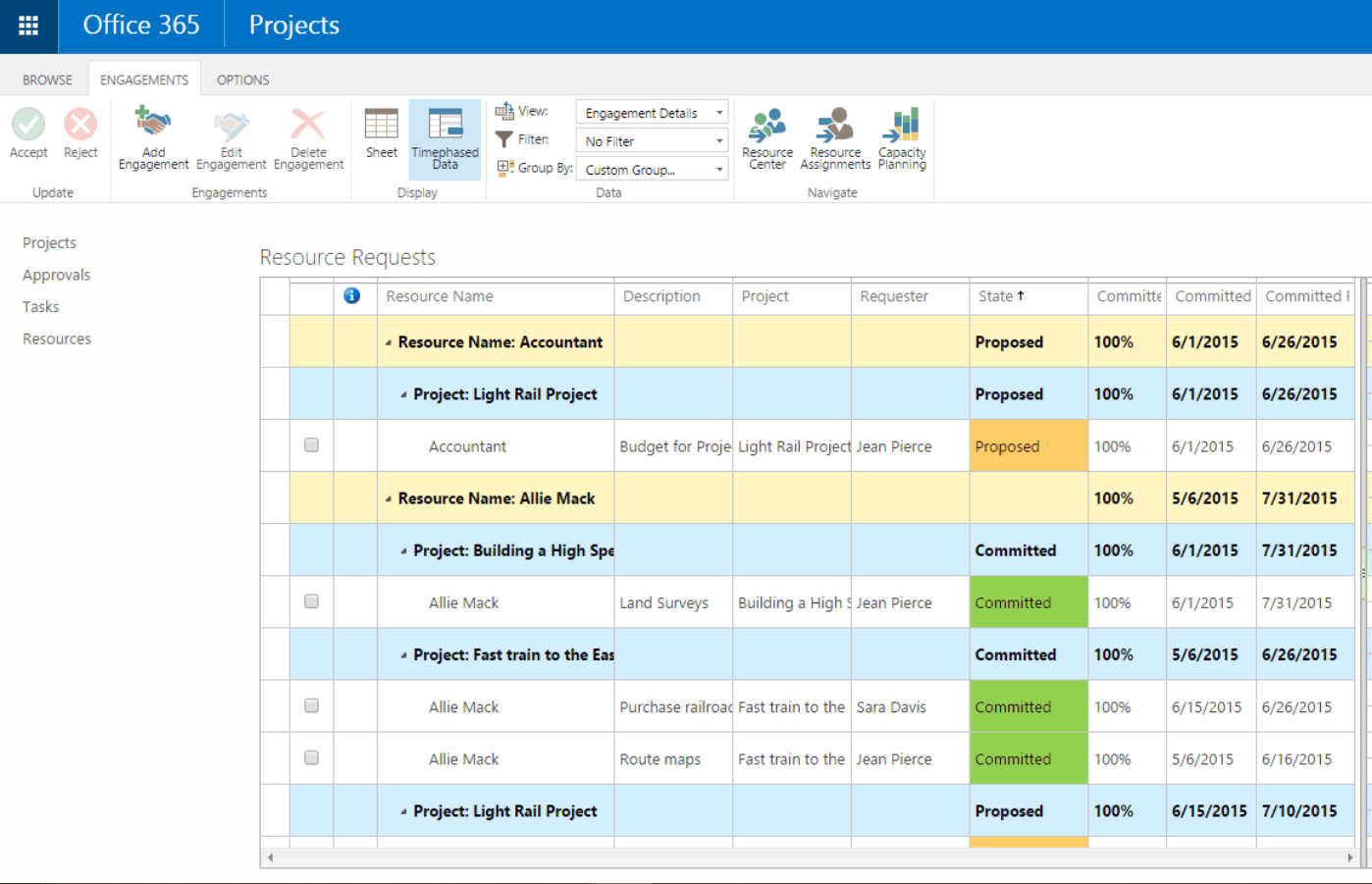
For teams already using Microsoft 365, Microsoft Project offers resource scheduling that fits right into your existing workflows. It’s a strong choice for project managers in organizations that rely on Microsoft tools for collaboration and reporting. With its deep integration across Microsoft apps, you can coordinate resources, track workloads, and manage dependencies without leaving your familiar environment.
Microsoft Project can be clunky (which is why many people search for MS Project alternatives), but MS Project is still a standard, well-supported, and widely adopted tool.
For Allan Hou, Sales Director at TSL Australia, the platform delivered clarity that spreadsheets couldn’t match: “Microsoft Project provided me with much clearer insight into time allocation compared to using a spreadsheet. I liked having the ability to frame each task in hours on the calendar instead of abstract time-based blocks, which allowed the project to progress without guesswork.”
Who Is Microsoft Project Best For?
Organizations already invested in the Microsoft ecosystem that need structured project and resource management tools.
Why I Picked Microsoft Project
Because Microsoft Project is built to work seamlessly with the Microsoft 365 suite, it’s a natural fit for teams already invested in that ecosystem. The tool’s resource scheduling features let you assign tasks, monitor workloads, and adjust allocations directly alongside your existing files and communications in Microsoft Teams, Outlook, and SharePoint. I appreciate how you can pull in data from other Microsoft apps to inform resource planning and reporting. This level of integration helps project managers keep everything connected and reduces the friction of switching between platforms.
Microsoft Project Key Features
Some other features that make Microsoft Project useful for resource scheduling include:
- Gantt Chart Visualization: Lets you build and adjust project timelines with drag-and-drop functionality.
- Resource Pool Management: Allows you to create a centralized pool of resources for use across multiple projects.
- Built-In Reporting Tools: Generates visual reports on resource allocation, project progress, and workload distribution.
- Task Dependency Mapping: Enables you to define and manage task relationships and constraints within your schedule.
Microsoft Project Integrations
Integrations include other Microsoft software, like Outlook, Excel, Skype, and more.
Pros and Cons
Pros:
- Integration with other Microsoft software
- Driver prioritization module for ranking strategies/objectives
- Helpful project template descriptions for guidance
- Can generate a Gantt chart from a spreadsheet
Cons:
- Few customization options
- Higher learning curve
- Limitations on collaboration tools


If your team manages complex projects with frequent changes and dependencies, Jira brings issue tracking and resource scheduling together in one platform. It’s especially useful for software development teams and IT departments that need to coordinate tasks, bugs, and workloads across sprints or releases. With its customizable workflows and granular assignment features, Jira helps you keep resources aligned with shifting project priorities.
Who Is Jira Best For?
Software development and technical teams that manage resources alongside issue tracking and sprint planning.
Why I Picked Jira
Jira stands out for resource scheduling when your projects revolve around tracking issues, tasks, and bugs in detail. Its issue tracking system lets you assign, prioritize, and monitor work items, making it easy to see who’s working on what and where bottlenecks might appear. I like how you can use boards and filters to visualize workloads and shift resources as priorities change. For teams that need to balance ongoing support with project delivery, Jira’s granular tracking and assignment features help keep everything organized.
Jira Key Features
Some other features that make Jira useful for resource scheduling include:
- Sprint Planning Boards: Organize and allocate tasks for each sprint cycle.
- Customizable Workflows: Allows you to tailor task progress stages to match your team’s process.
- Time Tracking Fields: Enables you to log and monitor estimated and actual time spent on tasks.
- Bulk Issue Editing: Lets you update assignments, priorities, or statuses for multiple issues at once.
Jira Integrations
Integrations include Confluence, Slack, Trello, Google Drive, Bitbucket, GitHub, Salesforce, Zoom, and Microsoft Teams.
Pros and Cons
Pros:
- Great for companies of all sizes
- Tons of integration options
- Freemium paln for 10 users
Cons:
- Limited functionality on free version
- Limited mobile app functionality


Agencies and client-focused teams looking to manage both project schedules and invoicing in one place often turn to ActiveCollab. The platform combines resource scheduling with built-in time tracking and invoicing, making it easier to connect project work to billable hours. If you need to keep client billing tightly linked to your team’s workload, ActiveCollab offers a unified approach.
Who Is ActiveCollab Best For?
Service teams that need project tracking combined with client billing and invoicing workflows.
Why I Picked ActiveCollab
For teams that need to connect project schedules directly to client billing, ActiveCollab offers a rare combination of resource scheduling and invoicing in one platform. Its built-in time tracking lets you log hours against specific tasks, which you can then convert into invoices without leaving the tool. I appreciate how you can manage project assignments and monitor billable hours side by side, making it easier to keep client work and payments aligned. This setup is especially useful for agencies and consultancies that juggle multiple client projects and need to keep billing transparent.
ActiveCollab Key Features
Some other features that make ActiveCollab useful for resource scheduling include:
- Workload Management View: Lets you see team availability and task assignments on a visual timeline.
- Recurring Tasks: Allows you to set up tasks that repeat on a regular schedule for ongoing work.
- Project Templates: Enables you to quickly launch new projects with pre-set tasks and schedules.
- Task Dependencies: Lets you define relationships between tasks to manage sequencing and deadlines.
ActiveCollab Integrations
Integrations include Google Drive, Dropbox, Trello, Basecamp, Asana, Wrike, Slack, Hubstaff, TimeCamp, QuickBooks, Xero, Authorize.Net, Braintree, PayPal, Stripe, and hundreds of other third-party apps using Zapier.
Pros and Cons
Pros:
- Great organization of task overview
- Fully customizable API
- People/role management
- Easy to invite collaborators
Cons:
- No Kanban cards/tasks
- No integration with GitHub
- Can’t duplicate task lists

Planview AdaptiveWork is designed for large organizations that need to coordinate complex projects and resources across multiple departments. Enterprise project managers can use its advanced resource scheduling, portfolio management, and workflow automation to handle high-volume, cross-team initiatives. If your business requires granular control over resource allocation and real-time visibility into enterprise-wide workloads, this platform brings those capabilities together in one place.
Who Is Planview AdaptiveWork Best For?
Enterprises managing large-scale, cross-departmental initiatives that require portfolio oversight and governance.
Why I Picked Planview AdaptiveWork
When you need to manage resources at an enterprise scale, Planview AdaptiveWork stands out for its ability to handle complex, multi-project environments. The platform offers advanced resource forecasting and capacity planning tools, which help large organizations balance workloads and avoid bottlenecks across teams. I picked it because its portfolio management features let you prioritize projects and allocate resources based on real-time business needs. For enterprise project managers, these capabilities make it possible to align resource scheduling with strategic goals and shifting priorities.
Planview AdaptiveWork Key Features
Some other features that make Planview AdaptiveWork valuable for resource scheduling include:
- Automated Workflow Engine: Lets you design and automate multi-step approval and task processes.
- Customizable Dashboards: Allows you to build real-time views of project and resource data tailored to your needs.
- Document Management: Provides a centralized space to store, share, and version project files.
- Time and Expense Tracking: Enables team members to log hours and expenses directly within each project.
Planview AdaptiveWork Integrations
Integrations include Microsoft Teams, Salesforce, Jira, SAP, Workday, ServiceNow, Google Workspace, Slack, Tableau, and QuickBooks.
Pros and Cons
Pros:
- Highlighting for what changes and the critical path
- Simpler and more intuitive to use than other apps
- Good at forecasting future workload
Cons:
- Doesn’t track or allocate requests automatically on the basis of FIFO (First-in, First-out)
- No request tracking on hourly basis
- Highlighting for what changes and the critical path


EZOfficeInventory, now known as EZO, is a versatile asset management software designed to enhance the way you handle your resources. If your team needs a single place to manage asset requests and reservations, Ezo offers a centralized platform built for that purpose. Facilities managers, IT teams, and operations leads can use it to track, schedule, and approve equipment usage across locations. Its focus on asset visibility and request workflows helps organizations avoid double-booking and keep inventory in check.
Who Is Ezo Best For?
Organizations managing shared equipment and asset requests alongside scheduling and resource allocation.
Why I Picked Ezo
Centralizing asset requests is a challenge for organizations with distributed teams and shared equipment, which is why Ezo caught my attention. The platform’s asset reservation calendar lets users see availability and book resources in advance, reducing conflicts and double-bookings. I picked Ezo because its approval workflows and automated notifications keep everyone in the loop when assets are checked out or returned. These features make it a strong fit for teams that need to manage asset scheduling and requests from a single, organized hub.
Ezo Key Features
Some other features that make Ezo useful for resource scheduling include:
- Barcode and QR Code Scanning: Lets you quickly check assets in and out using mobile devices.
- Customizable Asset Fields: Allows you to track unique details for each asset type.
- Maintenance Scheduling: Enables you to set recurring service dates and track maintenance history.
- Role-Based Access Controls: Gives you the ability to set permissions for different user groups.
Ezo Integrations
Integrations include Google Sheets, monday.com, Google Forms, Slack, QuickBooks Online, Microsoft Office 365, Smartsheet, Knack, Salesforce, HubSpot, Microsoft Teams, and Zendesk.
Pros and Cons
Pros:
- Offers cloud backup management
- Supports multiple tracking technologies like barcode, QR code, and RFID
- Customizable reporting and analytics
Cons:
- Requires training for effective use
- Lack of a sandbox environment for testing new features
Le tableau comparatif des meilleurs logiciels de planification des ressources
Ci-dessous, nous avons résumé dans un tableau facile à lire les informations de base des meilleurs outils de ressourcement décrits dans cet article. Il n’existe pas vraiment de “meilleur logiciel de planification” – vous devez choisir l’outil qui vous convient. Un outil de planification de projet simple et allégé pourrait convenir parfaitement à une petite agence interne, tandis qu’un logiciel de planification pour les petites entreprises comptant 100 employés à distance a besoin d’une solution d’entreprise avec beaucoup plus de fonctionnalités. Dans le tableau récapitulatif ci-dessous, nous avons rassemblé quelques-unes des principales caractéristiques qui vous aideront à prendre une décision, notamment la durée de l’essai, le prix par utilisateur et notre évaluation.
| Tool | Best For | Trial Info | Price | ||
|---|---|---|---|---|---|
| 1 | Best for profitable resource scheduling | 30-day free trial available | From $7/scheduled user/month | Website | |
| 2 | Best for people-centric resource scheduling | Free demo available | Pricing upon request | Website | |
| 3 | Best for manufacturer resource planning | Free trial available | From $44.92/user/month (billed annually) | Website | |
| 4 | Best for real-time workload visibility | Free 14-day trial available + free demo available | From $19.90/user/month (billed annually) | Website | |
| 5 | Best for agencies and professional services | 14-day free trial available | From $10/user/month (billed annually) | Website | |
| 6 | Best for midsized to large companies | 14-day free trial + free demo available | From $7/user/month | Website | |
| 7 | Best for resource planning and forecasting | Free 7-day trial available | From $9/user/month (billed annually) | Website | |
| 8 | Best for capacity planning with timesheets | Free 30-day trial available | From $4.16/user/month | Website | |
| 9 | Best for multi-location shift scheduling | Free plan + free demo available | From $29/month | Website | |
| 10 | Best for visualizing team availability | Free plan available | From $1/user/month (billed annually) | Website | |
| 11 | Best for Microsoft integrations | 30-day free trial | From $10/user/month (billed annually) | Website | |
| 12 | Best for project issue tracking | 14-day free trial + free plan available | From $7.91/user/month | Website | |
| 13 | Best for client invoicing | 14-day free trial | From $12.50/month (billed annually, up to 3 users) | Website | |
| 14 | Best for enterprise project management | Free demo available | Pricing upon request | Website | |
| 15 | Best for centralized asset requests | 15-day free trial | From $35/month (billed annually) | Website |

Autre outil de planification des ressources
Vous trouverez ci-dessous une liste d’outils supplémentaires pour la planification des ressources que nous n’avons pas cités dans la liste ci-dessus :
- Schedule It
For contractor scheduling
- Planview Vantage
For project portfolio management
- Runn
For real-time planning
- Silverbucket
For project-based work
- Parallax
For software development firms
- Acuity PPM
For strategic portfolio resource alignment
- elapseit
For integrated financial features
- eResource Scheduler
Simple, standalone scheduling module
- Primetric
For IT service companies
- Dayshape
AI-powered resource scheduling


Vous voulez de l’aide pour réduire les options?
Cet outil est très utile. Nous nous sommes associés à Crozdesk pour vous donner accès à leur “Software Finder”.
Si vous saisissez certains détails sur votre projet et les fonctionnalités que vous recherchez dans un outil de gestion de projet, une liste d’outils correspondant à vos préférences sera générée. Vous fournissez votre email, et ils vous envoient un beau guide PDF avec un résumé de vos meilleures options.
Qu’en pensez-vous?
Existent-t-ils d’autres outils de gestion de projet et des logiciels de planification des ressources? Nous aimerions avoir vos suggestions, conseils ou idées sur l’utilisation de ce type de logiciel – pourquoi ne pas les partager en utilisant les commentaires ci-dessous?