

10 meilleures alternatives à Obsidian pour la prise de notes en 2026

Sélection des meilleures alternatives à Obsidian


La gestion de projets est difficile, et trouver les bons outils peut faire toute la différence. Si vous utilisez Obsidian, mais constatez qu’il ne répond pas tout à fait aux besoins de votre équipe, vous envisagez peut-être des alternatives. Vous recherchez peut-être de meilleures fonctionnalités de collaboration ou quelque chose de plus convivial.
D’après mon expérience, les applications de prise de notes peuvent vous aider à organiser efficacement vos tâches et vos idées. J’ai testé et évalué différents logiciels afin de vous fournir des informations impartiales. Cet article comparatif vous guidera parmi les meilleures alternatives à Obsidian, en mettant l’accent sur ce qui peut réellement être utile à votre équipe.
Vous découvrirez des options adaptées à différents secteurs d’activité et tailles d’équipe. Qu’il s’agisse d’intégration, de stockage ou de conformité, je vous aiderai à trouver la solution la mieux adaptée. Plongeons-nous dans le sujet pour découvrir celle qui pourrait être la solution idéale à vos défis de gestion de projets.
Qu’est-ce qu’Obsidian ?
Obsidian est une application de prise de notes qui vous aide à organiser et à relier vos idées à l’aide du format Markdown. Elle est populaire auprès des écrivains, des chercheurs et des chefs de projet qui ont besoin d’un outil flexible pour gérer des informations complexes.
Les liens, la vue en graphe et les fonctionnalités Markdown d’Obsidian permettent de visualiser les connexions, d’organiser les idées et de maintenir un flux de travail structuré. Dans l’ensemble, Obsidian offre une plateforme polyvalente pour gérer des notes détaillées et stimuler la créativité.
Résumé des meilleures alternatives à Obsidian
Ce tableau comparatif résume les informations tarifaires de mes meilleures alternatives à Obsidian afin de vous aider à trouver celle qui convient le mieux à votre budget et aux besoins de votre entreprise.
| Tool | Best For | Trial Info | Price | ||
|---|---|---|---|---|---|
| 1 | Idéal pour une synchronisation fluide avec iCloud | Formule gratuite disponible à vie | Utilisation gratuite | Website | |
| 2 | Idéal pour la recherche avancée et la capture de contenu Web | Formule gratuite disponible | À partir de $8.33/mois (facturé annuellement) | Website | |
| 3 | Idéal pour l'intégration avec les applications Microsoft | Essai gratuit de 30 jours disponible | À partir de $6/utilisateur/mois (facturé annuellement) | Website | |
| 4 | Idéal pour la collaboration et la gestion d'équipe | Formule gratuite + démonstration gratuite disponible | À partir de $10/membre/mois (facturé annuellement) | Website | |
| 5 | Idéal pour les notes à code source ouvert et sécurisées | Forfait gratuit disponible à vie | Utilisation gratuite | Website | |
| 6 | Idéal pour une productivité optimisée par l'IA | Formule gratuite disponible | À partir de $16/mois (facturé annuellement) | Website | |
| 7 | Idéal pour la collaboration en temps réel | Forfait gratuit disponible | À partir de $11.99/an | Website | |
| 8 | Idéale pour les outils d’apprentissage interactifs | Formule gratuite disponible | À partir de $20/an | Website | |
| 9 | Idéal pour la simplicité et l’accessibilité | Forfait gratuit disponible | Utilisation gratuite | Website | |
| 10 | Idéal pour le marquage et la collaboration en temps réel sur les PDF | Essai gratuit de 7 jours + forfait gratuit + démo gratuite disponible | À partir de $4.19/mois | Website |
Pourquoi faire confiance à nos recommandations de logiciels
Notre équipe teste et évalue des logiciels depuis 2012. En tant que chefs de projet nous-mêmes, nous savons à quel point il est difficile — et important — de choisir le bon logiciel.
Pour ce guide, nous avons évalué les outils grâce à des tests pratiques et une recherche indépendante, en notant les outils selon nos critères de sélection. Nous nous appuyons également sur les enseignements de leaders d’opinion du secteur et de professionnels de la gestion de projet en activité.
Nos avis reflètent notre jugement éditorial humain, et non un argumentaire de vente.
Réviseurs experts:
Avis sur les meilleures alternatives à Obsidian
Vous trouverez ci-dessous mes résumés détaillés des meilleures alternatives à Obsidian qui ont intégré ma sélection. Mes avis présentent un examen approfondi des fonctionnalités clés, des avantages et des inconvénients, des intégrations et des cas d’utilisation idéaux de chaque outil afin de vous aider à trouver celui qui vous convient le mieux.

Idéal pour une synchronisation fluide avec iCloud

Notes Apple est un outil de prise de notes qui s’adresse principalement aux utilisateurs d’appareils Apple, notamment aux étudiants, aux professionnels et aux créatifs. Il permet de capturer des idées, d’organiser des notes et de collaborer avec d’autres personnes grâce aux notes partagées.
Pourquoi c’est une bonne alternative à Obsidian : l’application offre une synchronisation fluide avec iCloud, ce qui permet d’accéder à vos notes sur tous vos appareils Apple. Grâce à des fonctionnalités telles que les dossiers partagés et la possibilité de verrouiller les notes, l’app Notes convient aussi bien aux projets personnels qu’aux projets collaboratifs. Son intégration avec Siri vous permet de créer rapidement des notes à l’aide de commandes vocales. Notes Apple prend également en charge la mise en forme enrichie du texte et les pièces jointes, ce qui la rend polyvalente pour divers cas d’utilisation.
Fonctionnalités et intégrations remarquables :
Les fonctionnalités comprennent la possibilité de numériser des documents directement dans l’application, d’organiser les notes à l’aide de balises et de créer des listes de contrôle pour la gestion des tâches. Vous pouvez également dessiner des croquis et les ajouter à vos notes, ce qui est idéal pour les personnes ayant une pensée visuelle. L’application prend en charge le partage de notes avec d’autres personnes, ce qui améliore la collaboration.
Les intégrations comprennent Apple iCloud et bien plus encore.
Pros and Cons
Pros:
- Synchronisation sur les appareils Apple
- Partage de notes avec d’autres personnes
- S’intègre à Siri pour prendre des notes vocales
Cons:
- Options de mise en forme limitées
- Limité à l’écosystème Apple

Evernote
Idéal pour la recherche avancée et la capture de contenu Web
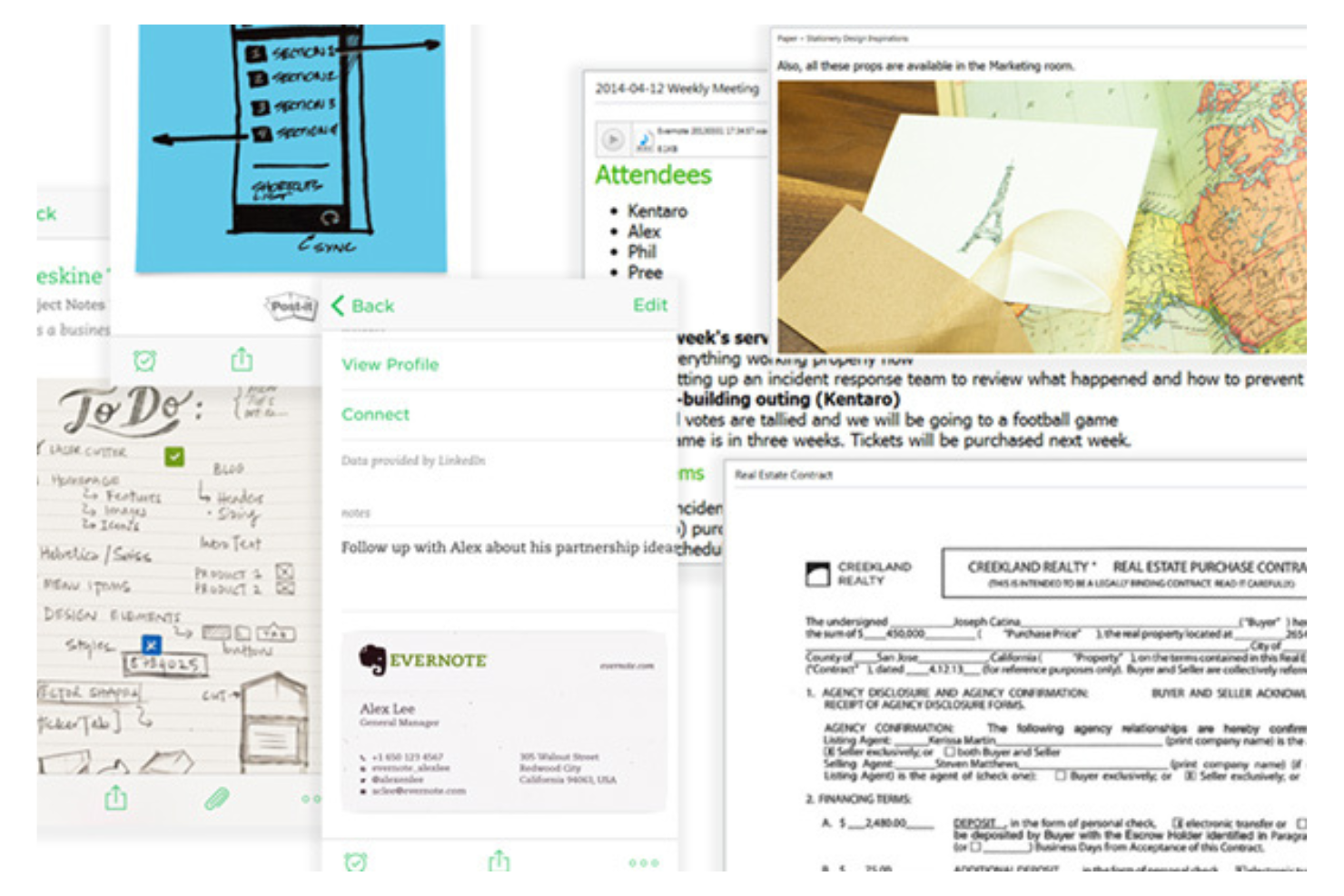
Evernote est un outil de prise de notes et d’organisation utilisé par les professionnels et les étudiants pour saisir des idées, gérer des projets et stocker des informations. Il fonctionne comme un second cerveau et aide les utilisateurs à suivre leurs notes, tâches et documents dans un emplacement centralisé.
Pourquoi c’est une bonne alternative à Obsidian : Il offre des fonctionnalités avancées de recherche et de capture de contenu Web, ce qui le rend idéal pour les utilisateurs qui doivent recueillir et organiser efficacement des informations. Evernote permet d’effectuer des recherches dans les PDF et les images, ce qui est utile pour la recherche et la documentation. L’outil de capture Web vous permet d’enregistrer directement des articles, des pages Web et des e-mails dans vos notes. Son système d’étiquettes vous aide à classer et à retrouver rapidement vos notes.
Fonctionnalités et intégrations remarquables :
Les fonctionnalités comprennent la possibilité d’organiser les carnets par projet ou par sujet, ainsi qu’un assistant IA pour vous aider à gérer vos tâches. Vous pouvez également définir des rappels pour suivre les échéances et utiliser son modèle de journal quotidien pour noter vos pensées et vos émotions. La reconnaissance de l’écriture manuscrite d’Evernote vous permet de rechercher des notes manuscrites, ajoutant une couche supplémentaire d’utilité pour les différents styles de prise de notes.
Les intégrations comprennent Google Drive, Google Calendar, Slack, Microsoft Outlook, Google Gmail, Zapier et bien plus encore.
Pros and Cons
Pros:
- Fonctionnalités de recherche
- Outil de capture de contenu Web
- Rappels pour la gestion des tâches
Cons:
- Nécessite des mises à jour régulières
- Limites strictes dans la version gratuite
Idéal pour l'intégration avec les applications Microsoft
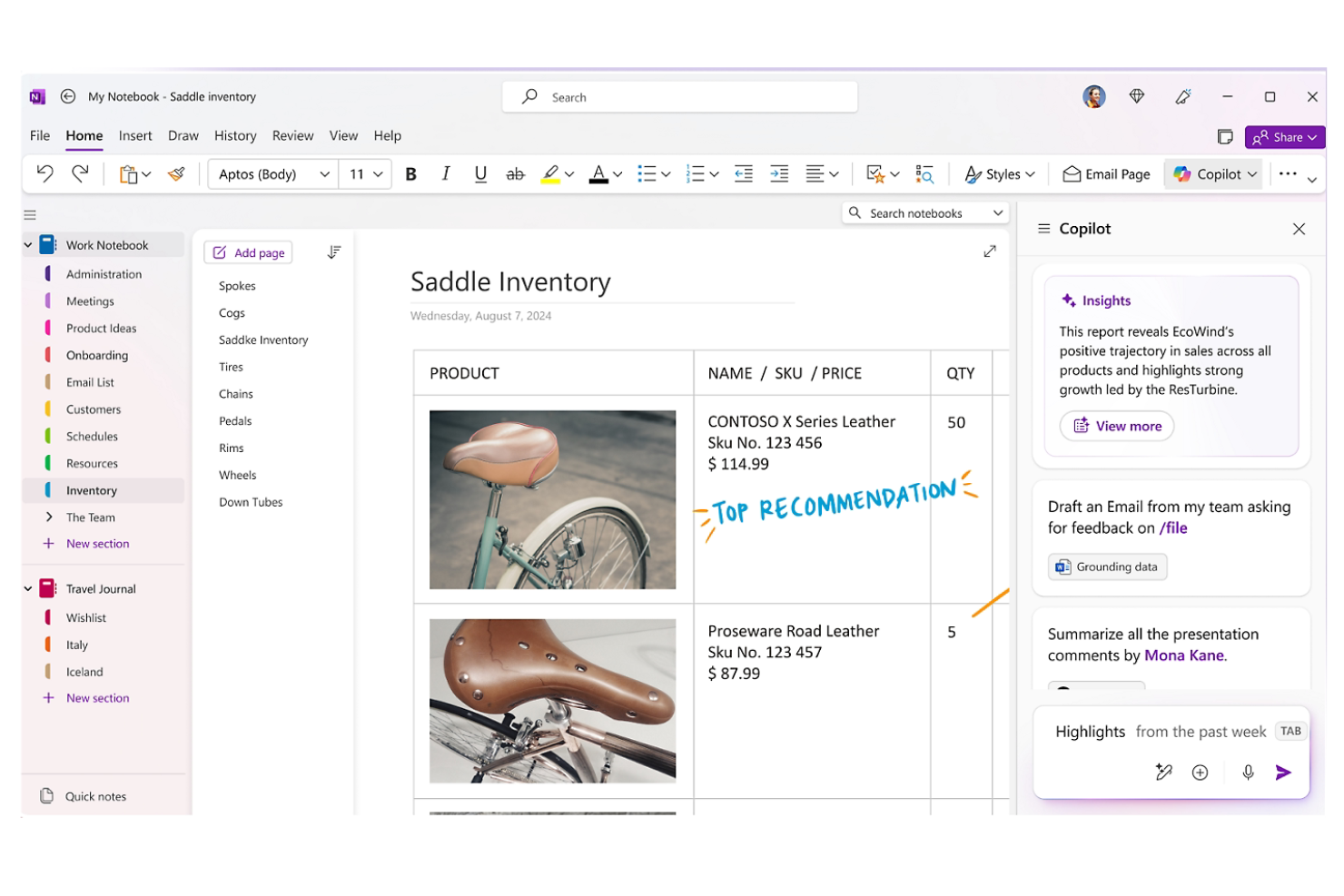
Microsoft OneNote est une application numérique de prise de notes principalement utilisée par les étudiants, les enseignants et les professionnels pour organiser des informations et collaborer sur des projets. Elle permet de capturer des idées, d'organiser du contenu et de partager des notes avec d'autres personnes.
Pourquoi c'est une bonne alternative à Obsidian : Elle s'intègre parfaitement aux autres applications Microsoft, ce qui en fait un choix idéal si votre équipe utilise déjà Microsoft 365. Grâce à des fonctionnalités telles que les blocs-notes partagés et la collaboration en temps réel, OneNote permet un travail d'équipe efficace. La possibilité d'intégrer des documents et des contenus multimédias améliore la prise de notes. Sa structure organisationnelle intuitive vous aide à suivre des projets complexes.
Fonctionnalités et intégrations remarquables :
Les fonctionnalités comprennent la possibilité de créer des sections et des pages, de dessiner et d'annoter avec un stylet, ainsi que des fonctions d'enregistrement audio pour capturer les notes de réunion. Vous pouvez également rechercher des notes manuscrites, ce qui facilite la recherche de contenu spécifique. La flexibilité de l'application permet d'intégrer différents types de médias dans les notes.
Les intégrations comprennent Microsoft 365, Microsoft SharePoint et bien plus encore.
Pros and Cons
Pros:
- S'intègre parfaitement à l'écosystème Microsoft
- Fonctionnalités de collaboration en temps réel
- Permet la recherche dans les notes manuscrites
Cons:
- L'application mobile ne dispose pas de certaines fonctionnalités de bureau
- Nécessite un compte Microsoft

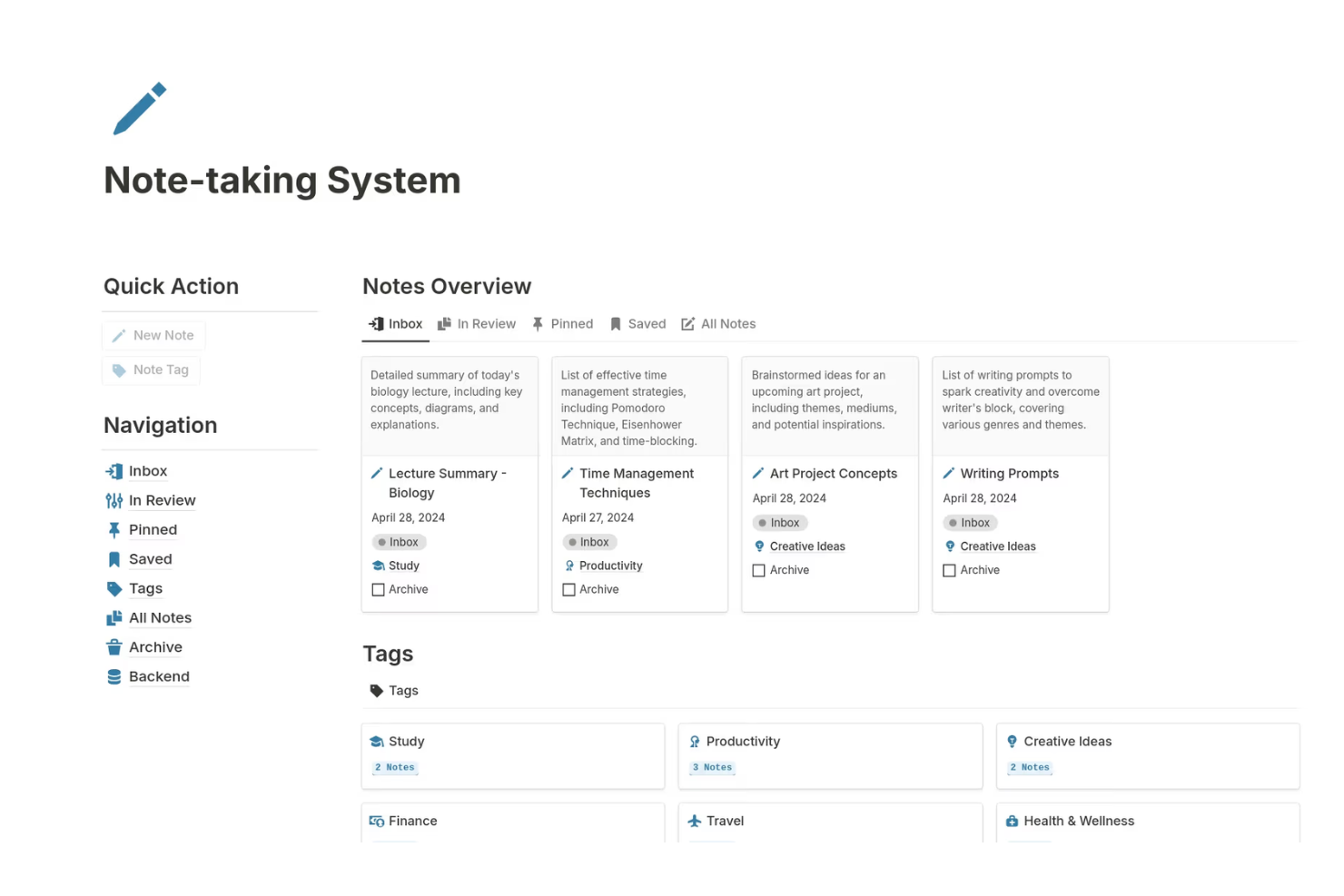
Notion est un outil polyvalent de gestion des connaissances personnelles utilisé par les équipes et les particuliers comme organisateur de notes, outil de structuration et outil de bases de données pour la gestion de projets et les bases de connaissances. Il offre une plateforme flexible où vous pouvez créer des notes, des bases de données et des wikis pour répondre à diverses fonctions professionnelles.
Pourquoi c'est une bonne alternative à Obsidian : Il excelle dans la collaboration et la gestion d'équipe, en fournissant des espaces de travail partagés qui renforcent le travail d'équipe. Vous pouvez créer des tableaux de bord personnalisés pour suivre les projets et leur progression, ce qui est idéal pour maintenir tout le monde sur la même longueur d'onde. Les modèles de Notion vous permettent de configurer rapidement des pages à différentes fins, ce qui vous fait gagner du temps lors de la configuration. Son interface glisser-déposer facilite l'organisation du contenu selon vos besoins.
Fonctionnalités et intégrations remarquables :
Les fonctionnalités comprennent la possibilité de créer des bases de données relationnelles, ce qui facilite la mise en relation de différents types de contenu. Vous pouvez également utiliser des tableaux Kanban pour visualiser les tâches et les flux de travail. L'application prend en charge l'intégration de différents types de médias, ce qui en fait un outil dynamique pour la création de contenu.
Les intégrations comprennent Slack, Google Drive, Trello, GitHub, Asana, Zapier, Typeform, Figma et bien plus encore.
Pros and Cons
Pros:
- Prend en charge la gestion de projets
- Pages hautement personnalisables
- Modèles faciles à configurer
Cons:
- Fonctionnalités hors ligne limitées
- Trop complet pour de simples notes


Joplin est une application à code source ouvert de prise de notes et de gestion des tâches conçue selon une approche privilégiant le stockage local, pour les utilisateurs qui accordent la priorité à la confidentialité et à la sécurité. Elle s'adresse aux particuliers et aux équipes souhaitant organiser efficacement leurs notes et leurs tâches tout en gardant le contrôle de leurs données.
Pourquoi c'est une bonne alternative à Obsidian : Il s'agit d'une alternative à code source ouvert disponible sur les appareils mobiles et les ordinateurs de bureau, notamment Windows, Linux et Mac, qui offre une prise de notes sécurisée et vous permet d'héberger vos données sur vos propres serveurs. Joplin prend en charge le chiffrement de bout en bout, afin de protéger vos notes contre les accès non autorisés. Vous pouvez organiser vos notes à l'aide de carnets, d'étiquettes et d'un éditeur Markdown, ce qui offre une grande flexibilité dans la gestion de vos informations. Les fonctionnalités de l'application conçues pour fonctionner hors ligne vous permettent d'accéder à vos notes sans connexion Internet, ce qui est pratique lors de vos déplacements.
Fonctionnalités et intégrations remarquables :
Les fonctionnalités comprennent la possibilité de synchroniser vos notes sur plusieurs appareils à l'aide de votre service infonuagique préféré. L'application prend également en charge les liens bidirectionnels grâce à des plugins dédiés, afin de créer des notes interconnectées. Vous pouvez aussi effectuer des recherches dans vos notes à l'aide d'options de recherche avancées pour trouver rapidement un contenu précis. L'outil de capture Web de Joplin vous permet d'enregistrer des pages Web et des captures d'écran dans vos notes, ce qui améliore vos recherches et votre documentation.
Les intégrations comprennent Nextcloud, Dropbox, Microsoft OneDrive, Evernote, Microsoft Azure, et bien plus encore.
Pros and Cons
Pros:
- À code source ouvert avec des options de personnalisation
- Fort accent mis sur la confidentialité des données
- Accès hors ligne aux notes
Cons:
- Pas d'OCR intégré pour les images
- Fonctionnalités de collaboration limitées

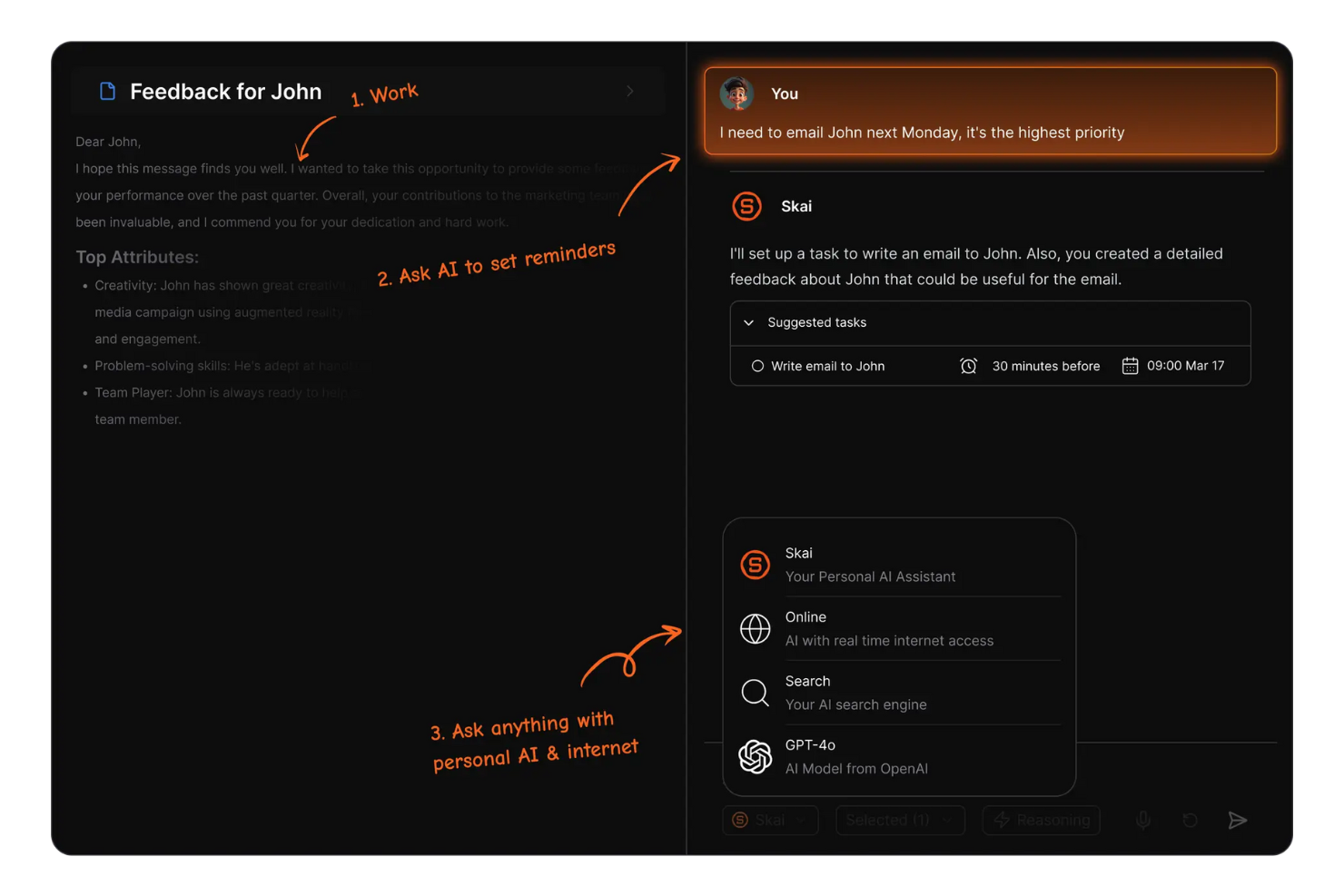
Saner.AI est un outil de productivité qui utilise l'intelligence artificielle pour améliorer la prise de notes et la gestion des tâches des professionnels et des équipes. Il est conçu pour aider les utilisateurs à organiser leurs flux de travail et à améliorer leur efficacité.
Pourquoi c'est une bonne alternative à Obsidian : Il propose des fonctionnalités de productivité optimisées par l'IA, vous aidant à automatiser les tâches et à gérer les notes plus efficacement. Grâce à ses suggestions intelligentes, Saner.AI peut aider à hiérarchiser les tâches en fonction de leur urgence et de leur importance. Ses capacités d'IA permettent une catégorisation intelligente des notes, ce qui facilite la recherche de ce dont vous avez besoin. Les fonctionnalités de productivité pilotées par l'IA de cet outil vous aident, vous et votre équipe, à travailler plus intelligemment, et non plus durement.
Fonctionnalités et intégrations remarquables :
Les fonctionnalités comprennent la saisie de texte prédictive, qui accélère le processus de prise de notes. Vous pouvez également configurer des rappels automatisés pour suivre les échéances importantes. L'outil propose des analyses qui fournissent des informations sur vos habitudes de productivité, vous aidant à identifier les domaines à améliorer.
Les intégrations comprennent Slack, Google Calendar, Google Gmail et bien plus encore.
Pros and Cons
Pros:
- Hiérarchisation des tâches pilotée par l'IA
- Catégorisation intelligente des notes
- Saisie de texte prédictive
Cons:
- Dépend fortement des crédits d'IA
- Priorité donnée à l'ordinateur de bureau ; fonctionnalités mobiles limitées


Goodnotes est une application de prise de notes conçue pour les étudiants, les enseignants et les professionnels qui préfèrent prendre des notes manuscrites sur des appareils numériques, notamment sur Mac, Windows et Android. Elle permet aux utilisateurs de créer, d'organiser et de partager des notes, ce qui en fait un outil polyvalent à usage personnel et universitaire.
Pourquoi c'est une bonne alternative à Obsidian : Elle prend en charge la collaboration en temps réel, ce qui vous permet, à vous et à votre équipe, de travailler simultanément sur des notes. Goodnotes offre une expérience d'écriture fluide grâce à sa fonctionnalité de reconnaissance de l'écriture manuscrite. Vous pouvez convertir les notes manuscrites en texte, ce qui est pratique pour organiser vos idées. Le système de carnets de l'application vous permet de classer et d'accéder efficacement aux notes, ce qui en fait une option pratique pour les projets collaboratifs.
Fonctionnalités et intégrations remarquables :
Les fonctionnalités comprennent la possibilité d'annoter directement des fichiers PDF dans l'application, ce qui est utile pour examiner des documents. Vous pouvez également importer des images et des diagrammes dans vos notes, ajoutant ainsi des éléments visuels à votre contenu. La fonction de recherche de l'application vous aide à trouver rapidement des notes ou des mots-clés précis.
Les intégrations comprennent Apple iCloud, Google Drive, Microsoft OneDrive, Microsoft Teams et bien plus encore.
Pros and Cons
Pros:
- Prend en charge la reconnaissance de l'écriture manuscrite
- Permet d'annoter les fichiers PDF
- Fonctionnalités de collaboration en temps réel
Cons:
- La recherche dans l'écriture manuscrite peut échouer
- Prise en charge multiplateforme limitée

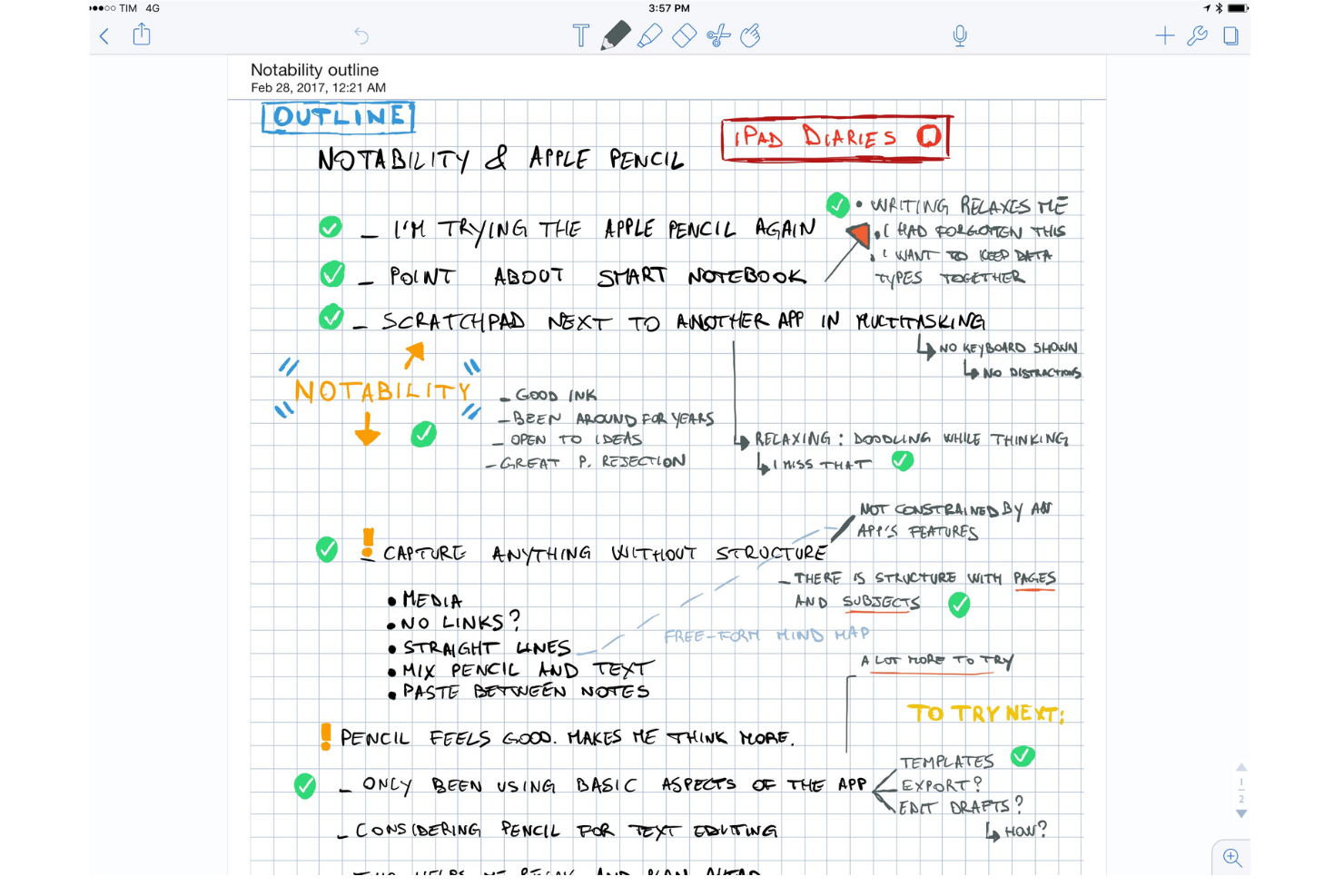
Notability est une application de prise de notes populaire auprès des étudiants, des enseignants et des professionnels, grâce à sa capacité à combiner l’écriture manuscrite, les photos et la saisie au clavier dans une seule note. Elle permet aux utilisateurs de capturer leurs idées, d’annoter des documents, d’organiser efficacement leurs notes et peut être utilisée comme tableau blanc numérique.
Pourquoi c’est une bonne alternative à Obsidian : Elle propose des outils d’apprentissage interactifs qui améliorent la prise de notes grâce aux éléments multimédias. Vous pouvez enregistrer des notes audio tout en écrivant, ce qui est utile pour les cours et les réunions. La capacité de l’application à annoter des PDF et des images, ainsi que sa fonctionnalité de cartes mémoire alimentée par l’IA, la rend polyvalente pour différents styles d’apprentissage. L’interface conviviale de Notability vous permet de vous concentrer sur votre contenu sans vous laisser accaparer par des fonctionnalités complexes.
Fonctionnalités et intégrations remarquables :
Les fonctionnalités comprennent la possibilité de rechercher des notes manuscrites et de les convertir en texte. Vous pouvez également organiser les notes par matières et séparateurs afin de mieux les catégoriser. L’application prend en charge l’importation et l’exportation de documents dans différents formats, ce qui facilite le partage de votre travail.
Les intégrations comprennent Apple iCloud, Google Drive, Dropbox, Microsoft OneDrive, Box, Apple Pencil, Evernote et bien plus encore.
Pros and Cons
Pros:
- Combine l’écriture manuscrite avec l’enregistrement audio
- Permet d’annoter les PDF et les images
- Prend en charge les éléments multimédias
Cons:
- Nécessite un Apple Pencil pour une utilisation optimale
- La collaboration n’est pas en temps réel

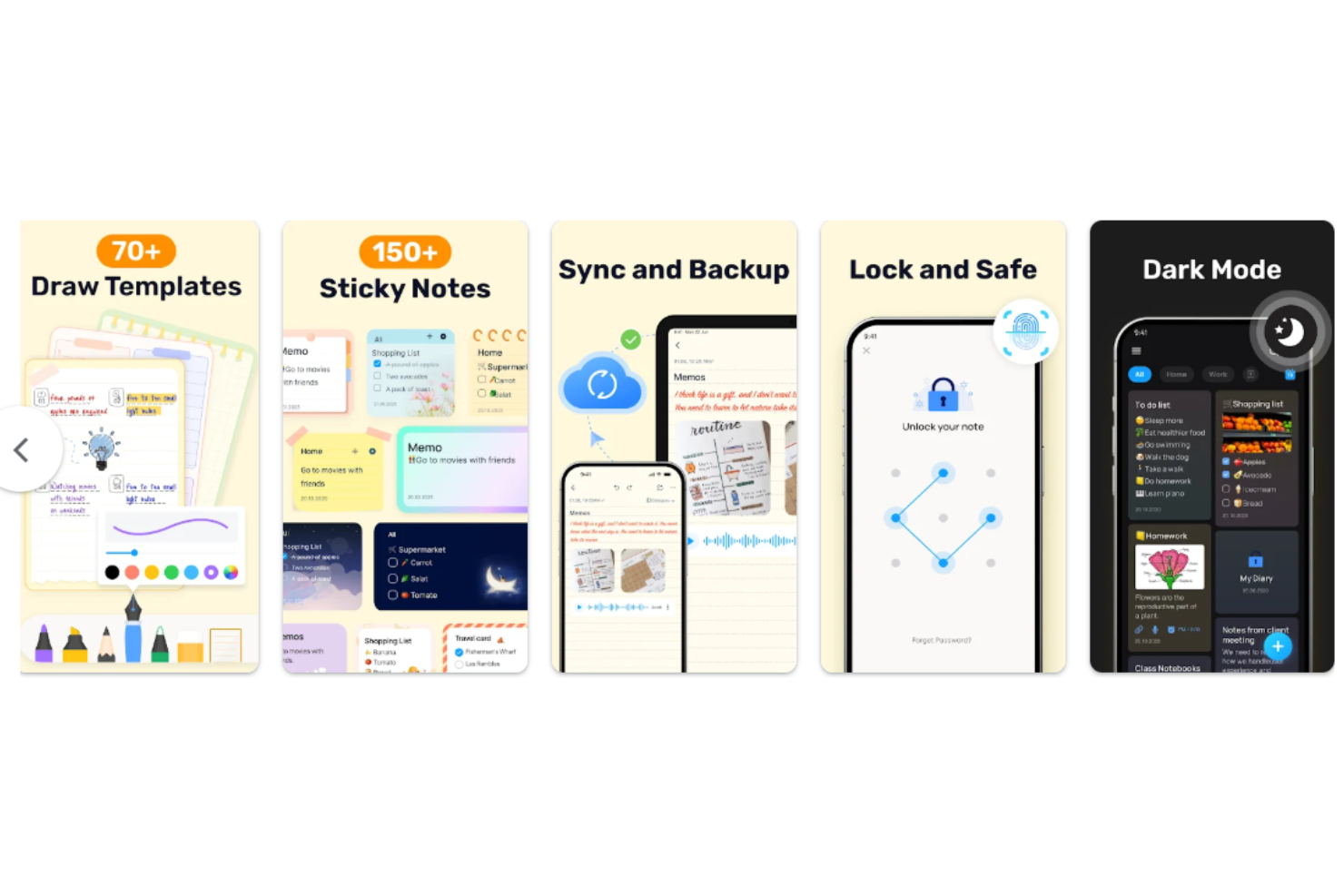
Easy Notes est une application minimaliste de prise de notes personnelle destinée aux utilisateurs qui souhaitent disposer d’un moyen simple et accessible de noter des informations et d’organiser leurs données. Elle est populaire auprès des personnes à la recherche d’un outil convivial pour capturer rapidement leurs idées et leurs tâches.
Pourquoi c’est une bonne alternative à Obsidian : Elle offre simplicité et accessibilité, ce qui la rend facile à utiliser pour tout le monde. L’interface épurée de l’application vous permet de vous concentrer sur vos notes sans distractions. Vous pouvez créer des notes et des listes colorées pour organiser efficacement vos idées. Sa fonctionnalité d’accès rapide vous permet de noter vos idées dès qu’elles vous viennent à l’esprit, ce qui stimule la productivité.
Fonctionnalités et intégrations remarquables :
Les fonctionnalités comprennent la possibilité de créer des listes de contrôle pour suivre les tâches et les éléments à faire. Vous pouvez également définir des rappels afin de ne pas oublier les tâches importantes. L’application vous permet d’épingler des notes pour les maintenir en haut de votre liste et y accéder facilement.
Les intégrations ne sont pas répertoriées publiquement.
Pros and Cons
Pros:
- Design simple et intuitif
- Accès rapide aux notes
- Suivi des tâches
Cons:
- Synchronisation dans le cloud limitée à la version premium
- Structure de dossiers limitée aux fonctions de base

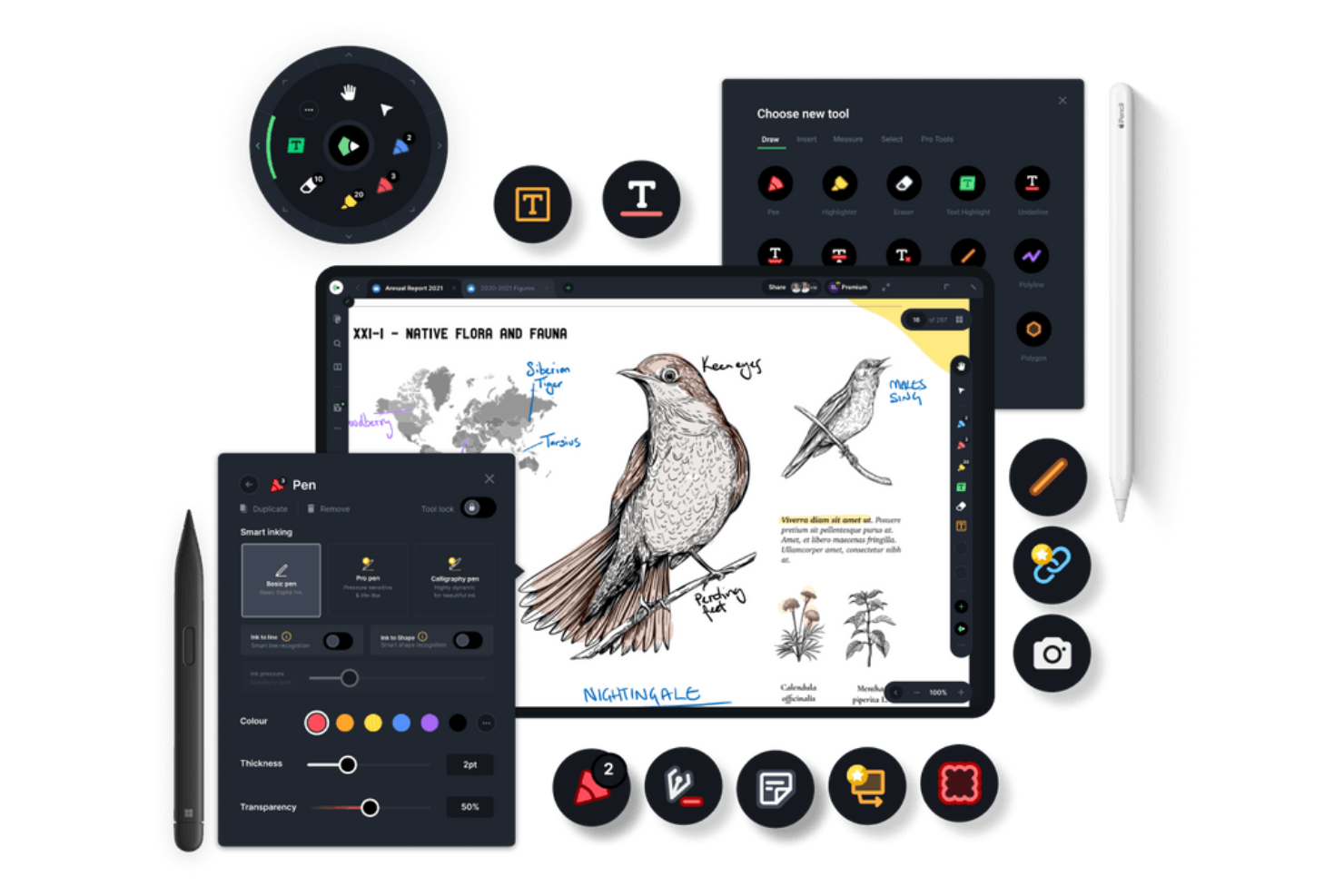
Drawboard PDF est un outil de productivité documentaire utilisé par les professionnels et les équipes pour annoter, modifier et gérer la collaboration sur des documents PDF. Il est idéal pour les architectes, les ingénieurs et les designers qui ont besoin d'outils de marquage précis.
Pourquoi c'est une bonne alternative à Obsidian : Il offre le marquage et la collaboration en temps réel sur les PDF, permettant à votre équipe de travailler simultanément sur des documents. Vous pouvez utiliser des outils tels que des zones de texte, des formes et le dessin à main levée pour annoter les PDF, ce qui est idéal pour les examens détaillés. L'application prend en charge les signatures numériques, ce qui simplifie les processus d'approbation des documents. Son orientation vers la collaboration et le marquage en fait un outil polyvalent adapté à divers besoins professionnels.
Fonctionnalités et intégrations remarquables :
Les fonctionnalités comprennent la possibilité de personnaliser les barres d'outils pour accéder rapidement aux outils fréquemment utilisés. Vous pouvez également utiliser une encre sensible à la pression pour une écriture manuscrite et un dessin plus naturels. L'application vous permet de superposer des images et du texte sur les PDF, améliorant ainsi la clarté des documents.
Les intégrations comprennent Microsoft OneDrive, Microsoft SharePoint, Dropbox, Google Drive, Box, Microsoft Teams, Slack, et bien plus encore.
Pros and Cons
Pros:
- Fonctionnalités de collaboration en temps réel
- Prend en charge les signatures numériques
- Prise en charge de l'encre sensible à la pression
Cons:
- Consomme beaucoup de batterie
- Les performances ralentissent avec les PDF volumineux
Autres alternatives à Obsidian
Voici quelques alternatives supplémentaires à Obsidian qui n’ont pas intégré ma sélection, mais qui méritent tout de même votre attention :
- Hive Notes
Idéal pour les notes de réunion d'équipe
- Logseq
Idéal pour la confidentialité et la structuration
- Heptabase
Idéal pour l’apprentissage visuel


Comment j’évalue les alternatives à Obsidian
Je divise mon évaluation en deux niveaux : les fonctionnalités de base dont tout outil de gestion des connaissances fiable a besoin, et les éléments différenciateurs — comme les vues en graphe ou la synchronisation avec Jira — qui comptent le plus pour les responsables produit.
Fonctionnalités essentielles (indispensables pour cette liste)
Lorsque je sélectionne les outils de ma liste, j’évalue chacun d’entre eux sur une échelle de 0 (ne propose pas la fonctionnalité) à 5 (excelle dans ce domaine) pour chaque fonctionnalité de base énumérée ci-dessous. Je convertis ensuite le score total de l’outil en pourcentage. Chaque outil doit obtenir un score total minimum de 75 % pour être pris en compte.
- Édition Markdown et de texte enrichi : Je recherche un éditeur flexible prenant en charge le Markdown, les blocs de code, les tableaux et les contenus intégrés — le type de mise en forme dont vous avez réellement besoin pour rédiger des briefs de sprint ou des PRD.
- Liens bidirectionnels : Les backlinks et les références liées aident les responsables produit à retracer les décisions jusqu’à leur source. Je vérifie si les outils font automatiquement apparaître ces connexions ou s’ils nécessitent une maintenance manuelle.
- Suivi des tâches et des projets : Chaque outil devrait permettre d’attribuer des tâches, de définir des échéances et de suivre la progression sans devoir passer à une autre application. Des outils comme Notion et Coda intègrent nativement les tâches aux documents.
- Collaboration en temps réel : J’évalue la possibilité pour les équipes de modifier des pages simultanément, de laisser des commentaires en ligne et d’identifier leurs collègues — notamment pour les réunions quotidiennes asynchrones et les sessions de rétrospective avec des équipes distribuées.
- Synchronisation cloud et accès multiplateforme : Les notes de projet doivent être accessibles depuis un ordinateur portable, un téléphone ou un navigateur. Je vérifie la fiabilité de la synchronisation entre les appareils et le bon fonctionnement réel du mode hors ligne.
- Recherche et organisation des connaissances : Un wiki de projet qui s’agrandit devient vite difficile à gérer. Je recherche une recherche en texte intégral, des balises, des hiérarchies de pages imbriquées et des filtres permettant de retrouver facilement les décisions passées.
Une fois que j’ai établi une liste d’outils répondant à ce critère, j’examine ce qui distingue chaque plateforme.
Facteurs différenciateurs (ce qui distingue les fournisseurs)
Voici comment je compare les différents fournisseurs :
Fonctionnalités remarquables
Les fonctionnalités d’IA sont importantes lorsque vous gérez plusieurs projets. Des outils comme Notion et Coda proposent une IA capable de résumer de longues notes de réunion ou de rédiger des mises à jour de statut à partir d’informations dispersées. J’évalue également la prise en charge des bases de données et des vues personnalisées, car les responsables produit doivent souvent passer d’un tableau Kanban pour le travail de sprint à une vue chronologique pour les rapports destinés aux parties prenantes au sein d’un même espace de travail. Les modèles destinés aux processus récurrents, comme les rétrospectives de sprint ou les lancements de projet, permettent de gagner un temps réel lors de la configuration, en particulier lorsqu’ils sont associés à des automatisations qui attribuent des tâches ou mettent à jour les statuts en fonction d’un déclencheur.
Au-delà des fonctionnalités
Les intégrations déterminent dans quelle mesure un outil s’intègre à votre flux de travail existant. Je vérifie si chaque plateforme se connecte à des outils comme Jira, Slack et GitHub, car une base de connaissances isolée crée plus de contraintes qu’elle n’en résout. La portabilité des données pèse également lourd dans la balance — l’exportation au format Markdown et l’historique des versions signifient que vous n’êtes pas captif d’un fournisseur si vos besoins évoluent. L’un des principaux attraits d’Obsidian est la propriété des données ; j’examine donc si les alternatives proposent un stockage local ou des options d’auto-hébergement. Enfin, je prends en compte l’évolution du prix par utilisateur, car un déploiement au sein d’un bureau de gestion de projets est très différent d’un abonnement individuel pour un responsable produit.
Pourquoi chercher une alternative à Obsidian ?
Bien qu’Obsidian soit une bonne application de prise de notes, plusieurs raisons peuvent pousser certains utilisateurs à rechercher d’autres solutions. Vous cherchez peut-être une alternative à Obsidian parce que…
- Vous avez besoin de davantage de fonctionnalités de collaboration
- Votre équipe a besoin d’un accès mobile
- Vous souhaitez une gestion intégrée des tâches
- Votre projet nécessite des outils de recherche avancée
- Vous avez besoin d’une interface utilisateur plus simple
- Votre équipe travaille dans différents fuseaux horaires
Si l’un de ces points vous correspond, vous êtes au bon endroit. Ma liste comprend plusieurs applications de prise de notes mieux adaptées aux équipes confrontées à ces difficultés avec Obsidian et à la recherche de solutions alternatives.
Fonctionnalités d’Obsidian
Voici quelques-unes des fonctionnalités clés d’Obsidian, pour vous aider à comparer les offres des solutions alternatives :
- Stockage basé sur Markdown : Les notes sont enregistrées sous forme de fichiers Markdown en texte brut, ce qui vous offre contrôle et portabilité.
- Liens réciproques : Créez des liens entre les notes pour établir un réseau de connaissances interconnecté et améliorer votre capacité à trouver les informations associées.
- Vue en graphe : La vue en graphe visualise les connexions entre vos notes, ce qui vous aide à voir la situation dans son ensemble ainsi que les relations entre vos données.
- Extensions : Étendez les fonctionnalités grâce aux extensions développées par la communauté, afin de personnaliser Obsidian selon vos besoins.
- Stockage local : Stockez vos notes en privé sur votre appareil, pour un accès rapide et une meilleure confidentialité.
- Thèmes personnalisables : Adaptez l’apparence de votre espace de travail à vos préférences pour le rendre plus agréable à utiliser.
- Notes quotidiennes : Créez et organisez automatiquement les notes par date, afin de vous aider à suivre vos pensées et vos tâches quotidiennes.
- Gestion des versions : Suivez les modifications apportées à vos notes, ce qui vous permet de revenir aux versions précédentes si nécessaire.
- Disponibilité multiplateforme : Accédez à vos notes sur différents appareils tout en assurant la continuité de votre flux de travail.
- Recherche avancée : Trouvez rapidement des notes spécifiques ou du contenu dans vos notes pour gagner en efficacité.
Et ensuite :
Si vous êtes en train de chercher une application de prise de notes, contactez gratuitement un conseiller SoftwareSelect pour obtenir des recommandations.
Vous remplissez un formulaire et échangez brièvement avec un conseiller qui examine en détail vos besoins. Vous recevez ensuite une liste restreinte de logiciels à étudier. Les conseillers vous accompagnent même tout au long du processus d’achat, notamment lors des négociations tarifaires.