

10 meilleures alternatives à DocuSign évaluées en 2026

Sélection des meilleures alternatives à Docusign


La gestion des contrats et des approbations contribue à faire avancer les projets, mais la recherche de signatures et le suivi du statut des documents peuvent ralentir l’ensemble du processus. Si DocuSign ne convient pas à votre équipe, que ce soit en raison de son prix, de ses intégrations ou des limites de ses flux de travail, de nombreuses alternatives performantes méritent d’être envisagées.
D’après mon expérience avec les plateformes de signature électronique, les meilleures options ne se contentent pas de recueillir des signatures. Elles favorisent une collaboration plus fluide, des pistes d’audit plus claires, des délais d’exécution plus courts et moins de goulots d’étranglement lorsque les documents doivent être examinés, approuvés et signés. J’ai évalué des alternatives gratuites à DocuSign ainsi que des concurrents payants afin de vous aider à comparer les meilleures options.
Dans cet article, je vous présente les principaux concurrents de DocuSign, en mettant en évidence les points forts de chaque outil et la manière dont leurs fonctionnalités répondent aux flux de travail réels des projets. Trouvons la solution adaptée à votre équipe.
Qu’est-ce que Docusign ?
Docusign est un logiciel de gestion de documents et de signature électronique qui vous aide à gérer efficacement les accords électroniques. Il est couramment utilisé par les professionnels du droit, de l’immobilier et de la finance comme outil rapide et sécurisé pour signer des documents.
Des fonctionnalités telles que la signature à distance, le suivi en temps réel et la conformité aux normes légales simplifient les flux de travail et garantissent la sécurité.
Tableau comparatif des alternatives à Docusign
Ce tableau comparatif présente les informations tarifaires de mes meilleures alternatives à Docusign.
| Tool | Best For | Trial Info | Price | ||
|---|---|---|---|---|---|
| 1 | Idéal pour l'intégration à QuickBooks Online | Formule gratuite disponible | À partir de $10/expéditeur/mois (facturé annuellement) | Website | |
| 2 | Idéal pour la conformité juridique et les modèles | Essai gratuit disponible | À partir de $20/mois ; les forfaits API commencent à $49/mois | Website | |
| 3 | Idéal pour la gestion des contrats pilotée par l’IA | Démo gratuite disponible | Tarification sur demande | Website | |
| 4 | Idéal pour les flux de travail de signature électronique simples et économiques | Essai gratuit disponible | À partir de $4/mois | Website | |
| 5 | Idéal pour l’automatisation des documents dans les flux de travail CRM | Essai gratuit de 14 jours + forfait gratuit + démo gratuite disponible | À partir de $19/utilisateur/mois (facturé annuellement) | Website | |
| 6 | Idéal pour l'intégration avec Dropbox | Essai gratuit disponible | À partir de $9.99/utilisateur/mois (facturé annuellement) | Website | |
| 7 | Idéal pour les signatures électroniques dans les secteurs réglementés | Forfait gratuit + essai gratuit de 14 jours + démo disponible | À partir de $10/utilisateur/mois | Website | |
| 8 | Idéal pour la vérification d'identité de niveau entreprise | Démo gratuite disponible | Tarification sur demande | Website | |
| 9 | Idéal pour la sécurité grâce au chiffrement de bout en bout | Forfait gratuit + essai gratuit de 30 jours + démonstration disponible | À partir de $10/utilisateur/mois | Website | |
| 10 | Idéal pour les signatures électroniques auto-hébergées et open source | Forfait gratuit disponible | À partir de 9,99 $/mois (facturation annuelle) | Website |
Pourquoi faire confiance à nos recommandations de logiciels
Notre équipe teste et évalue des logiciels depuis 2012. En tant que chefs de projet nous-mêmes, nous savons à quel point il est difficile — et important — de choisir le bon logiciel.
Pour ce guide, nous avons évalué les outils grâce à des tests pratiques et une recherche indépendante, en notant les outils selon nos critères de sélection. Nous nous appuyons également sur les enseignements de leaders d’opinion du secteur et de professionnels de la gestion de projet en activité.
Nos avis reflètent notre jugement éditorial humain, et non un argumentaire de vente.
Réviseurs experts:
Avis sur les meilleures alternatives à Docusign
Vous trouverez ci-dessous mes résumés détaillés des meilleures alternatives à Docusign qui ont intégré ma sélection. Mes avis présentent en détail les fonctionnalités clés, les avantages et les inconvénients, les intégrations ainsi que les cas d’utilisation idéaux de chaque outil, afin de vous aider à trouver celui qui vous convient le mieux.

Signwell
Idéal pour l'intégration à QuickBooks Online

Contrairement à Adobe Sign, qui constitue une excellente option pour les grandes entreprises, SignWell est un outil de signature électronique conçu pour les petites et moyennes entreprises qui ont besoin de fonctionnalités efficaces de signature de documents. Il aide les utilisateurs à créer, gérer et signer des documents en ligne, rendant le processus rapide et juridiquement contraignant.
Pourquoi c'est une bonne alternative à DocuSign : SignWell s'intègre à QuickBooks Online, ce qui est avantageux pour les entreprises qui utilisent déjà QuickBooks pour leurs besoins comptables. La plateforme propose des modèles personnalisables qui font gagner du temps et garantissent une mise en forme cohérente des documents. Les notifications en temps réel tiennent votre équipe informée de l'état des documents, contribuant ainsi à éviter les retards. En privilégiant la simplicité, SignWell vous permet de gérer vos documents sans complexité inutile.
Fonctionnalités et intégrations remarquables :
Les fonctionnalités comprennent des pistes d'audit, qui fournissent des enregistrements détaillés des interactions avec les documents. La plateforme vous permet de configurer des flux de signature, afin que les documents soient signés dans le bon ordre et avec les autorisations appropriées. Vous apprécierez également l'éditeur glisser-déposer, qui facilite la personnalisation des documents.
Les intégrations comprennent QuickBooks Online, Google Drive, Dropbox, Zapier, Microsoft 365, et bien plus encore.
Pros and Cons
Pros:
- S'intègre à QuickBooks Online
- Éditeur glisser-déposer simple
- Fournit des pistes d'audit
Cons:
- Fonctionnalités de rapports limitées
- Ne convient pas idéalement aux grandes entreprises

Idéal pour la conformité juridique et les modèles

Signaturely est une plateforme qui fournit des signatures électroniques gratuites et juridiquement contraignantes. Elle s'adresse aussi bien aux particuliers qu'aux entreprises et aide les utilisateurs à gérer et à signer des documents rapidement et en toute sécurité.
Pourquoi c'est une bonne alternative à Docusign : Signaturely met l'accent sur la conformité juridique et propose un éventail de modèles à la fois pratiques et faciles à utiliser. Des rappels automatiques évitent que les documents restent non signés, tandis que son interface conviviale simplifie la gestion des documents. Ces fonctionnalités répondent aux besoins des équipes et des organisations à la recherche d'une solution de signature électronique simple et fiable.
Fonctionnalités et intégrations remarquables :
Les fonctionnalités comprennent des rappels automatiques pour les documents non signés, des fonctions de gestion documentaire et des modèles qui permettent de gagner du temps. Signaturely prend également en charge les opérations sans papier, en accord avec les objectifs environnementaux.
Les intégrations comprennent Google Drive, Dropbox, OneDrive, Box, Microsoft Teams, Zapier et bien plus encore.
Pros and Cons
Pros:
- Garantie de conformité juridique
- Rappels automatiques
- Modèles permettant de gagner du temps
Cons:
- Options de personnalisation limitées
- Ne convient pas idéalement aux grandes entreprises

Juro
Idéal pour la gestion des contrats pilotée par l’IA

Juro est une plateforme intelligente de gestion des contrats conçue pour les équipes juridiques, RH, achats, commerciales et financières. Elle aide ces équipes à gérer efficacement les contrats grâce à l’analyse par IA et à une gestion en libre-service.
Pourquoi c’est une bonne alternative à Docusign : Juro propose une analyse des contrats basée sur l’IA et un référentiel intelligent pour les données contractuelles, ce qui favorise une meilleure efficacité dans la gestion des contrats. Contrairement à Docusign, Juro est conçu pour les équipes qui recherchent des fonctionnalités d’automatisation des contrats plus avancées. Les fonctions en libre-service et la mise en place rapide séduisent les utilisateurs qui souhaitent remplacer les systèmes traditionnels de gestion des contrats.
Fonctionnalités et intégrations remarquables :
Les fonctionnalités comprennent l’analyse des contrats par IA, la gestion des contrats en libre-service et un référentiel intelligent pour les données contractuelles. Juro accorde également la priorité à la sécurité grâce à des mesures de niveau entreprise.
Les intégrations comprennent Salesforce, HubSpot, ChatGPT, Slack, Google Drive, Zapier, Greenhouse et bien plus encore.
Pros and Cons
Pros:
- Automatisation des contrats pilotée par l’IA
- Normes de sécurité élevées
- Référentiel de données efficace
Cons:
- Peu de possibilités de personnalisation
- Pas idéal pour les très petites entreprises

Idéal pour les flux de travail de signature électronique simples et économiques
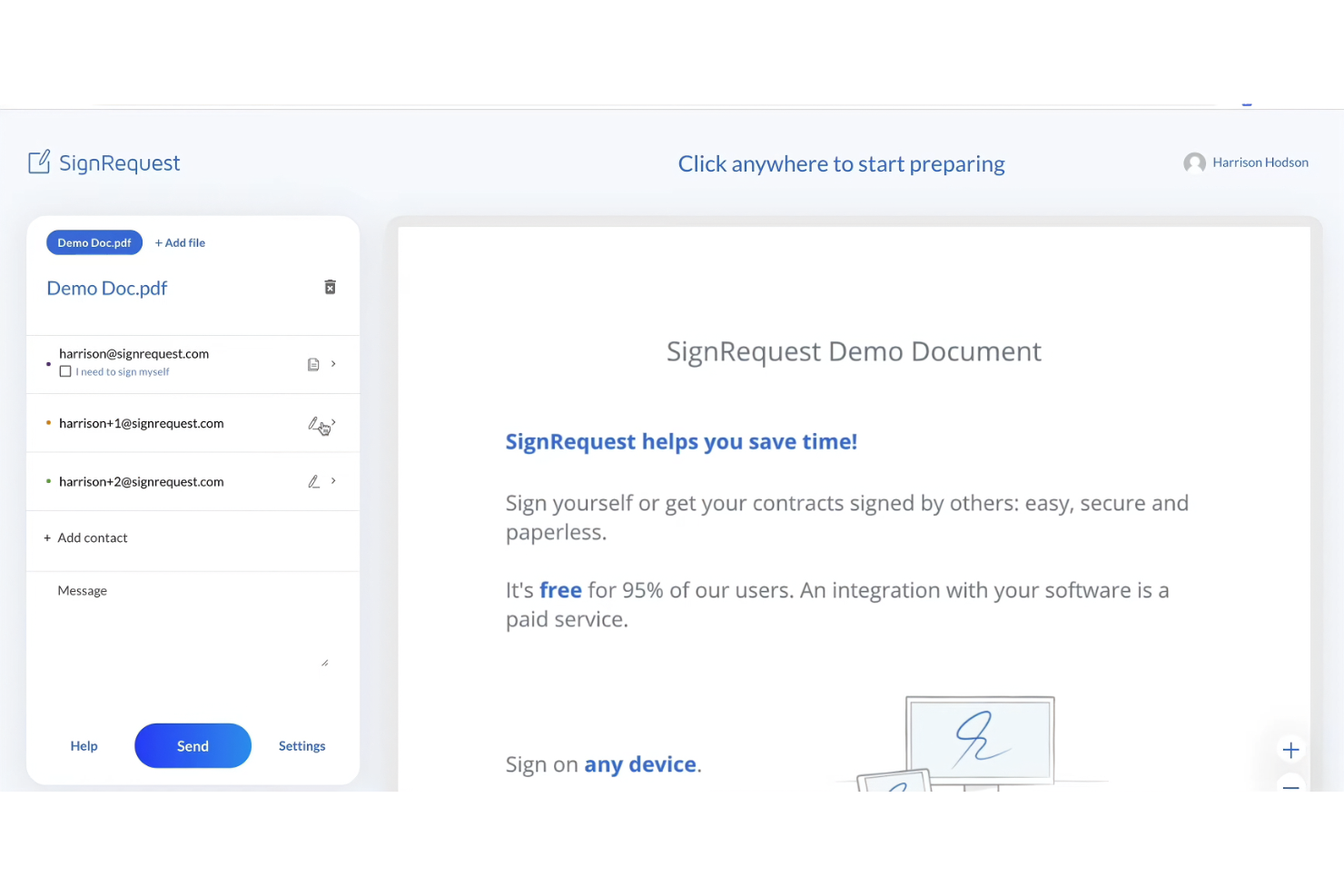
SignRequest est un outil de signature électronique idéal pour les petites et moyennes entreprises qui souhaitent optimiser leurs processus de signature de documents. Il fournit une plateforme simple pour créer et gérer des signatures électroniques juridiquement contraignantes.
Pourquoi c’est une bonne alternative à Docusign : SignRequest propose une solution simple et économique pour les signatures électroniques, ce qui la rend accessible aux petites équipes et entreprises. La plateforme met l’accent sur une conception conviviale, ce qui signifie que votre équipe peut rapidement la prendre en main. Avec SignRequest, vous pouvez facilement suivre l’état des documents et envoyer des rappels, afin de garantir des finalisations dans les délais. Son approche axée sur la simplicité et l’accessibilité financière la distingue des alternatives plus complexes.
Fonctionnalités et intégrations remarquables :
Les fonctionnalités comprennent des modèles personnalisables, qui vous permettent d’adapter les documents à des besoins spécifiques. La plateforme prend en charge plusieurs langues, ce qui la rend polyvalente pour les équipes internationales. Vous trouverez également les pistes d’audit utiles pour conserver un historique détaillé des interactions avec les documents.
Les intégrations comprennent Google Drive, Slack, Zapier, HubSpot, Gmail, Google Workspace, et bien plus encore.
Pros and Cons
Pros:
- Économique pour les petites entreprises
- Prend en charge plusieurs langues
- Fournit des pistes d’audit
Cons:
- Fonctionnalités de création de rapports basiques
- Personnalisation limitée
PandaDoc
Idéal pour l’automatisation des documents dans les flux de travail CRM

PandaDoc est un logiciel d’automatisation des documents destiné aux équipes commerciales, aux professionnels du marketing et aux entreprises qui doivent créer, envoyer et signer électroniquement des documents efficacement. Il prend en charge les flux de travail en automatisant la génération de documents et en améliorant la collaboration.
Pourquoi c’est une bonne alternative à Docusign : PandaDoc propose des fonctionnalités avancées d’automatisation des documents qui simplifient leur création et leur gestion. Ses capacités d’intégration aux systèmes de gestion de la relation client (CRM) permettent à votre équipe de connecter les flux de travail documentaires aux systèmes CRM. Le logiciel fournit des modèles personnalisables, ce qui permet de gagner du temps et d’assurer la cohérence de vos documents. Les fonctionnalités de collaboration en temps réel améliorent le travail d’équipe et la communication.
Fonctionnalités et intégrations remarquables :
Les fonctionnalités comprennent une bibliothèque de contenu, qui vous aide à stocker et à réutiliser des éléments de document. Le logiciel fournit également des analyses pour suivre les performances et l’engagement liés aux documents. Vous apprécierez l’éditeur glisser-déposer, qui facilite la personnalisation des documents.
Les intégrations comprennent Salesforce, HubSpot, Zoho CRM, Pipedrive, Microsoft Dynamics, Dropbox, Zapier, Slack, QuickBooks et bien d’autres.
Pros and Cons
Pros:
- Fonctionnalités robustes d’automatisation des documents
- Collaboration en temps réel
- Éditeur glisser-déposer facile à utiliser
Cons:
- Configuration initiale longue
- Pas idéal pour les très petites équipes

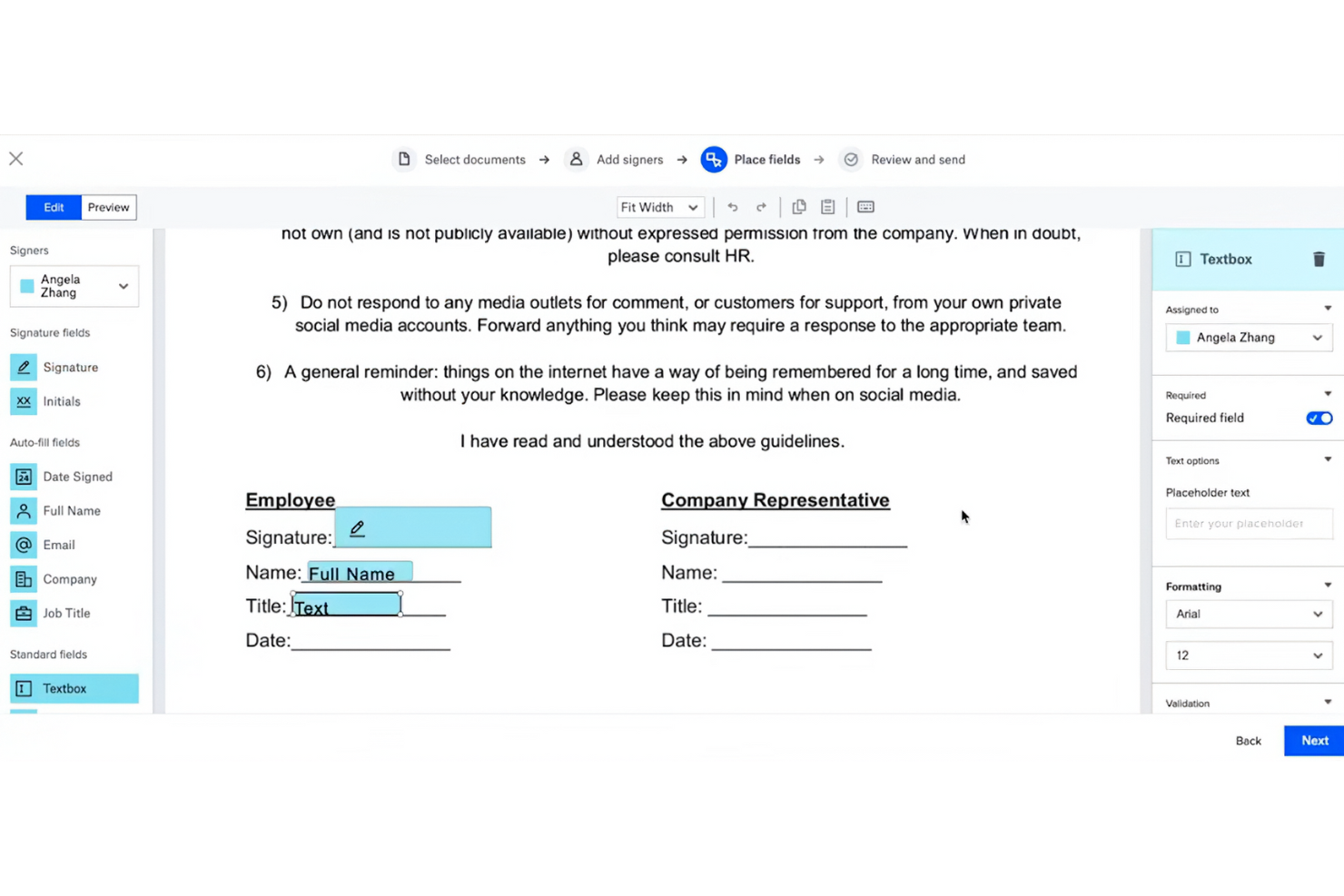
Dropbox Sign (anciennement HelloSign) est un outil de signature électronique conçu pour les entreprises et les équipes souhaitant signer des documents électroniquement et gérer efficacement les accords, de manière similaire à Acrobat Pro. Ses principaux utilisateurs sont des professionnels du droit, de la finance et de la vente qui ont besoin de fonctionnalités fiables de signature de documents.
Pourquoi c'est une bonne alternative à DocuSign : Dropbox Sign s'intègre à Dropbox, ce qui en fait un outil idéal pour les utilisateurs qui s'appuient déjà sur Dropbox pour le stockage. Son interface simple et ses fonctionnalités faciles à utiliser favorisent la productivité des équipes habituées à l'environnement Dropbox. Grâce à l'importance accordée à la sécurité et à la conformité, il offre une tranquillité d'esprit aux entreprises qui traitent des documents sensibles.
Fonctionnalités et intégrations remarquables :
Les fonctionnalités comprennent des modèles personnalisables, des pistes d'audit et des options de signature en personne. Vous pouvez facilement suivre l'état des documents grâce aux notifications et aux rappels automatiques. La plateforme prend également en charge des fonctionnalités de gestion des équipes, qui vous aident à organiser et à superviser les flux de travail liés aux documents.
Les intégrations comprennent Adobe Acrobat, Microsoft 365, Zapier et bien plus encore.
Pros and Cons
Pros:
- S'intègre parfaitement à Dropbox
- Fonctionnalités de sécurité robustes
- Prend en charge la signature en personne
Cons:
- Peut nécessiter un compte Dropbox
- Ne convient pas idéalement aux grandes entreprises

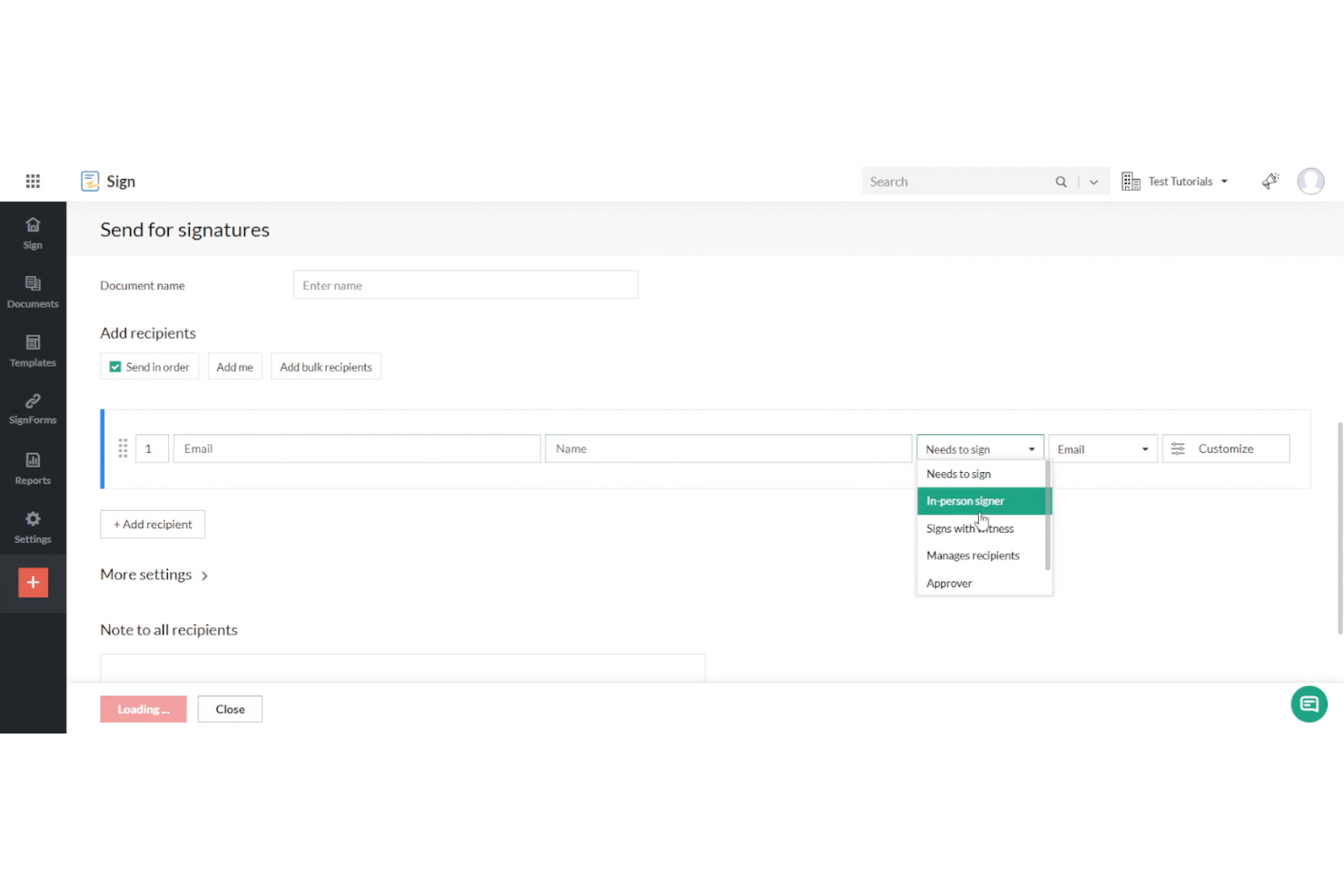
Zoho Sign est une solution de signature électronique conçue pour les entreprises et les professionnels souhaitant signer des documents numériquement. Elle s’adresse aux secteurs qui exigent des normes élevées de conformité et de confidentialité dans la gestion des documents, tels que la finance et la santé.
Pourquoi c’est une bonne alternative à DocuSign : Zoho Sign offre de solides fonctionnalités de conformité réglementaire, ce qui la rend adaptée aux secteurs soumis à des exigences strictes en matière de confidentialité. La plateforme fournit un chiffrement et des pistes d’audit pour garantir la sécurité des données. Les flux de travail personnalisables permettent à votre équipe d’adapter le processus de signature à ses besoins spécifiques. Son intégration avec les autres produits Zoho améliore la productivité et la gestion des données.
Fonctionnalités et intégrations remarquables :
Les fonctionnalités comprennent des options d’envoi groupé, qui vous permettent d’envoyer des documents à plusieurs destinataires à la fois. La plateforme propose une piste d’audit pour assurer la transparence et la responsabilisation. Vous trouverez également la bibliothèque de modèles utile pour créer rapidement des documents cohérents et professionnels.
Les intégrations comprennent Zoho CRM, Zoho Forms, Google Drive, Dropbox, OneDrive, Box, Microsoft 365, Zapier et bien plus encore.
Pros and Cons
Pros:
- Solide conformité réglementaire
- Garantit la sécurité des données
- Options d’envoi groupé disponibles
Cons:
- Peu adapté aux très petites équipes
- Fonctionnalités de reporting basiques

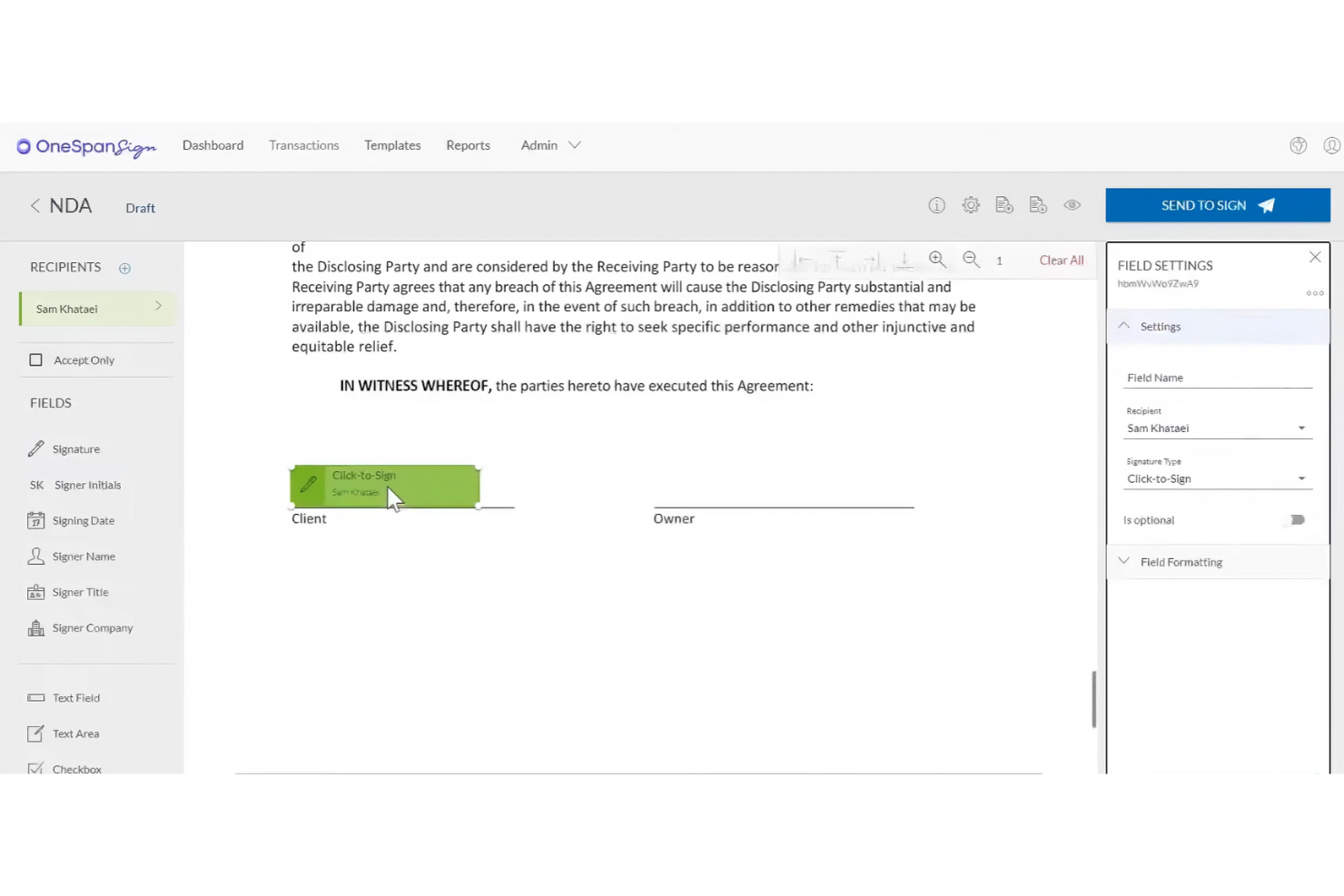
OneSpan Sign (anciennement eSignLive) est une solution de signature électronique conçue pour les entreprises qui ont besoin de fonctionnalités de signature électronique sécurisées, conformes et évolutives, de manière similaire à Acrobat Sign. Elle s'adresse principalement aux institutions financières, aux agences gouvernementales et aux grandes entreprises qui ont besoin de solutions fiables de signature de documents.
Pourquoi c'est une bonne alternative à DocuSign : OneSpan Sign est réputé pour ses solides fonctionnalités de sécurité, ce qui en fait une solution idéale pour les secteurs préoccupés par la protection des données. La plateforme est conforme à des normes de sécurité strictes, tandis que les méthodes d'authentification avancées et les pistes d'audit offrent une couche de sécurité supplémentaire. Ces fonctionnalités rendent OneSpan Sign particulièrement adapté aux entreprises qui accordent la priorité à la sécurité et à la conformité.
Fonctionnalités et intégrations remarquables :
Fonctionnalités : elles comprennent des méthodes d'authentification avancées, vous permettant de vérifier efficacement l'identité des signataires. La plateforme propose des pistes d'audit détaillées pour suivre l'activité des documents et garantir la transparence. Vous bénéficierez également d'options de déploiement flexibles, que vous préfériez des solutions en nuage ou sur site.
Intégrations : notamment avec Salesforce, Microsoft Dynamics 365, SharePoint, Google Drive, Oracle Fusion et bien d'autres.
Pros and Cons
Pros:
- Normes de sécurité élevées
- Options d'authentification avancées
- Adapté aux grandes entreprises
Cons:
- Options de personnalisation rigides
- L'interface semble complexe et peu intuitive

eSignly
Idéal pour la sécurité grâce au chiffrement de bout en bout

eSignly est un logiciel de signature électronique conçu pour les entreprises et les particuliers qui ont besoin d'un moyen sécurisé et efficace de signer des documents en ligne. Ses principales fonctions comprennent la fourniture de signatures électroniques juridiquement contraignantes, la garantie de la sécurité des documents et le maintien de la conformité aux normes internationales.
Pourquoi c'est une bonne alternative à Docusign : eSignly met l'accent sur un chiffrement de bout en bout robuste, offrant une sécurité supérieure pour vos documents. La plateforme est conforme à des réglementations telles que le RGPD et la HIPAA, offrant une sécurité supplémentaire aux entreprises qui traitent des informations sensibles. Les modèles et champs de signature personnalisables améliorent la flexibilité, et l'accent mis par le logiciel sur la sécurité garantit que vos documents restent confidentiels et protégés tout au long du processus de signature.
Fonctionnalités et intégrations remarquables :
Fonctionnalités comprennent la validité juridique des signatures électroniques, garantissant qu'elles sont reconnues comme contraignantes. La plateforme fournit un chiffrement robuste pour protéger l'authenticité et la confidentialité des documents. Vous pouvez également utiliser des rappels automatisés pour maintenir le processus de signature sur la bonne voie.
Intégrations comprennent Dropbox, Google Drive, OneDrive, Box, Salesforce, Microsoft Teams, Slack, Zoom, et bien plus encore.
Pros and Cons
Pros:
- Sécurité grâce à un chiffrement robuste
- Conforme aux réglementations
- Rappels automatisés
Cons:
- Fonctionnalités d'analyse de base
- Options de personnalisation avancées limitées

OpenSign
Idéal pour les signatures électroniques auto-hébergées et open source

OpenSign est une plateforme open source de signature électronique de PDF destinée aux particuliers, aux équipes et aux organisations qui souhaitent garder davantage de contrôle sur la signature numérique. Elle vous aide à signer, stocker et sécuriser vos documents en ligne tout en assurant le suivi de ce qui arrive à chaque document.
Pourquoi OpenSign est une bonne alternative à Docusign : Avec OpenSign, vous bénéficiez de signatures numériques illimitées avec un forfait gratuit, au lieu de vous soucier des limites par enveloppe. Comme le code est open source, votre équipe peut l'héberger elle-même et garder le contrôle des données et de la configuration. Les certificats d'achèvement et les journaux d'accès intégrés fournissent une preuve claire de l'identité du signataire, du document signé et de la date, sans modules complémentaires supplémentaires.
Fonctionnalités et intégrations remarquables :
Les fonctionnalités prennent notamment en charge la signature de PDF chiffrés, de fichiers DOCX et d'images, afin que vous puissiez gérer de nombreux types de documents au même endroit. Vous pouvez modifier les polices et les couleurs des champs de formulaire, faire pivoter les pages et compter sur la sauvegarde automatique lors de la préparation des documents pour ne pas perdre votre travail. Votre équipe peut également utiliser des profils publics et des modèles pour permettre aux utilisateurs de commencer eux-mêmes des accords courants sans devoir préparer chaque document à partir de zéro.
Les intégrations comprennent Gmail, AWS S3, DigitalOcean Spaces, et bien plus encore.
Pros and Cons
Pros:
- Code open source
- Signatures illimitées
- API flexible
Cons:
- La configuration auto-hébergée nécessite des compétences techniques
- Peu d'outils pour les flux de travail complexes
Autres alternatives à Docusign
Voici quelques alternatives supplémentaires à Docusign qui n’ont pas intégré ma sélection, mais qui méritent tout de même votre attention :
- eSignatures
Idéal pour une tarification économique
- airSlate SignNow
Idéal pour la signature de documents sur mobile
- Documenso
Idéal pour le contrôle du code source des signatures électroniques


Comment j'évalue les alternatives à DocuSign
Je divise chaque évaluation en exigences de base—comme les signatures juridiquement contraignantes et le circuit multi-parties—et en différenciateurs qui distinguent un outil d’un autre pour les équipes de gestion de projet.
Fonctionnalités principales (Critères essentiels pour cette liste)
Lorsque je sélectionne les outils pour ma liste, je note chacun sur une échelle de 0 (la fonctionnalité n’est pas proposée) à 5 (excellent dans ce domaine) pour chaque fonctionnalité principale ci-dessous. Ensuite, je calcule le score total de l’outil en pourcentage. Chaque outil doit obtenir un score total minimum de 65 % pour être pris en compte.
- Signatures électroniques juridiquement contraignantes : Je vérifie la conformité avec ESIGN, UETA et eIDAS afin que les SOW et les avenants signés soient valables dans toutes les juridictions.
- Modèles de documents et réutilisabilité : Les modèles réutilisables accessibles à l’équipe sont essentiels ici—pensez aux modèles de NDA et de SOW utilisés par votre PMO à chaque prestation.
- Workflows de signature multi-parties : J’évalue les options de routage pour la signature séquentielle et parallèle, car la plupart des contrats de projet impliquent de multiples approbateurs et clients.
- Piste d’audit et suivi du statut : Un journal inviolable avec le statut des signataires en temps réel aide les chefs de projet à repérer les blocages avant qu’ils ne retardent une échéance clé.
- Intégrations avec les outils de gestion de projet : Des connexions natives avec des outils comme Asana, Jira ou Smartsheet—ainsi qu’un accès API ou Zapier—permettent d’intégrer la signature dans les workflows existants.
- Champs à remplir et préparation des documents : L’éditeur de champs doit prendre en charge signatures, initiales, dates, texte et cases à cocher pour préparer un document complet sans quitter la plateforme.
Une fois que j’ai recensé les outils répondant à ces critères, j’étudie ce qui distingue chaque plateforme.
Facteurs de différenciation (Ce qui distingue les fournisseurs)
Voici comment je compare et distingue les différents fournisseurs :
Fonctionnalités remarquables
L’envoi en masse est très important lorsqu’on intègre des dizaines de sous-traitants ou que l’on diffuse de nouveaux termes de projet à une liste de fournisseurs. J’examine aussi la signature mobile et hors ligne, puisque les coordinateurs de projets terrain doivent souvent recueillir des signatures sur site sans connexion fiable. L’analyse contractuelle par IA mérite également l’attention : les outils capables d’extraire dates clés, livrables et montants des contrats entrants font réellement gagner du temps aux chefs de projet lors des cycles de revue contractuelle.
Au-delà des fonctionnalités
La structure tarifaire compte beaucoup ici. Une tarification par enveloppe peut rapidement devenir onéreuse pour les PMO traitant de gros volumes d’avenants, donc j’évalue si la plateforme propose une facturation par utilisateur ou des forfaits envois illimités. Les certifications de conformité comme SOC 2 ou ISO 27001 sont aussi à vérifier, surtout pour les équipes menant des projets dans des secteurs réglementés. J’intègre également la rapidité de mise en œuvre : des modèles de documents projet pré-construits et une prise en main autonome permettent à votre équipe de collecter des signatures en quelques jours, pas en semaines.
Pourquoi chercher une alternative à Docusign ?
Bien que Docusign propose des outils de gestion de documents et de signature électronique, plusieurs raisons peuvent pousser certains utilisateurs à rechercher d’autres solutions. Vous cherchez peut-être une alternative à Docusign parce que…
- Vous avez besoin d’options tarifaires plus abordables.
- Votre équipe souhaite une meilleure intégration avec les outils existants.
- Vous recherchez des fonctionnalités de sécurité renforcées.
- Vous devez respecter des réglementations spécifiques.
- Votre entreprise a besoin de davantage d’options de personnalisation.
Si vous vous reconnaissez dans l’un de ces cas, vous êtes au bon endroit. Ma liste comprend plusieurs solutions de gestion de documents et de signature électronique, notamment des logiciels de signature électronique dotés d’intelligence artificielle, mieux adaptés aux équipes confrontées à ces difficultés avec Docusign et à la recherche d’autres solutions.
Fonctionnalités
Voici quelques-unes des fonctionnalités clés de Docusign pour vous aider à comparer les offres des solutions alternatives :
- Signature électronique : Envoyez, signez et suivez efficacement les documents afin d’optimiser votre flux de travail.
- Modèles : Créez des modèles réutilisables pour gagner du temps et standardiser vos documents.
- Formulaires web : Collectez facilement des données grâce à des formulaires interactifs, ce qui accélère le processus de signature.
- Actions groupées : Gérez plusieurs documents à la fois afin d’équilibrer votre charge de travail.
- Signature mobile : Signez des documents depuis n’importe quel appareil, ce qui permet à votre équipe de travailler facilement en temps réel.
- Authentification : Vérifiez l’identité des signataires grâce à plusieurs méthodes d’authentification afin de garantir la sécurité.
- Piste d’audit : Conservez un historique complet des interactions avec les documents pour assurer la transparence et la conformité.
- Conformité : Respectez les réglementations du secteur afin de répondre sereinement aux exigences légales.
- Intégrations : Connectez-vous à diverses plateformes pour enrichir votre environnement technologique existant.
- Personnalisation de la marque : Modifiez les e-mails et les pages web avec votre logo et vos couleurs afin de préserver la cohérence de votre identité de marque.