

10 meilleures alternatives à Scribe pour créer des procédures opératoires standard en 2026

Sélection des meilleures alternatives à Scribe


Si vous gérez des projets, vous savez à quel point il peut être difficile de garder la documentation organisée. Scribe est un outil utile, mais il ne correspond pas toujours au flux de travail de votre équipe et ne permet pas forcément à tout le monde de rester sur la même longueur d’onde.
Explorer des alternatives peut permettre de trouver des solutions mieux adaptées aux défis de votre entreprise. Cet article vous guidera à travers les meilleures alternatives à Scribe, sur la base de tests et d’une analyse approfondis.
Vous découvrirez des outils qui pourraient proposer exactement les fonctionnalités qui vous manquent ou simplifier des processus qui vous semblaient auparavant trop complexes. Trouvons ensemble la solution idéale pour votre équipe.
Qu’est-ce que Scribe ?
Scribe est un outil de documentation des processus qui vous aide à capturer et à partager facilement les flux de travail. Il est souvent utilisé par les chefs de projet, les responsables d’équipe et les formateurs qui doivent conserver une documentation organisée et accessible. Grâce à des fonctionnalités telles que la création de guides étape par étape, la capture d’écran et les mises à jour automatiques, Scribe contribue à maintenir une documentation claire et concise. Dans l’ensemble, Scribe offre une manière simple de documenter les processus, ce qui permet à votre équipe de rester plus facilement alignée.
Tableau comparatif des alternatives à Scribe
Ce tableau comparatif résume les détails tarifaires de mes meilleures alternatives à Scribe.
| Tool | Best For | Trial Info | Price | ||
|---|---|---|---|---|---|
| 1 | Idéal pour des guides de flux de travail narrés par IA | Offre gratuite disponible | À partir de 29 $/utilisateur/mois (facturé annuellement) | Website | |
| 2 | Idéal pour produire une vidéo et un document à partir d’un seul enregistrement | Essai gratuit de 10 jours + démo gratuite disponible | À partir de $40/mois (facturé annuellement) | Website | |
| 3 | Idéal pour centraliser la documentation de formation | Démo gratuite disponible | Tarification sur demande | Website | |
| 4 | Idéal pour les démos produits interactives | Essai gratuit de 14 jours + offre gratuite + démo gratuite disponible | À partir de $38/créateur/mois (facturé annuellement) | Website | |
| 5 | Idéal pour la création vidéo assistée par IA | Essai gratuit de 7 jours + offre gratuite + démo gratuite disponible | À partir de $18/créateur/mois (facturé annuellement) | Website | |
| 6 | Idéal pour la messagerie vidéo en équipe | Démo gratuite disponible | 18 $/mois | Website | |
| 7 | Idéal pour les environnements réglementés | Essai gratuit de 7 jours disponible | À partir de $44/utilisateur/appareil/mois (facturation annuelle) | Website | |
| 8 | Idéal pour des guides de processus intégrables | Offre gratuite disponible | À partir de $10/siège/mois (facturé annuellement) | Website | |
| 9 | Idéal pour le partage de guides en un clic | Essai gratuit de 14 jours + offre gratuite disponible | À partir de $18/mois (facturation annuelle) | Website | |
| 10 | Idéal pour des tutoriels multi-formats | Essai gratuit disponible | À partir de $200/mois | Website |
Pourquoi faire confiance à nos recommandations de logiciels
Notre équipe teste et évalue des logiciels depuis 2012. En tant que chefs de projet nous-mêmes, nous savons à quel point il est difficile — et important — de choisir le bon logiciel.
Pour ce guide, nous avons évalué les outils grâce à des tests pratiques et une recherche indépendante, en notant les outils selon nos critères de sélection. Nous nous appuyons également sur les enseignements de leaders d’opinion du secteur et de professionnels de la gestion de projet en activité.
Nos avis reflètent notre jugement éditorial humain, et non un argumentaire de vente.
Réviseurs experts:
Avis sur les meilleures alternatives à Scribe
Vous trouverez ci-dessous des résumés détaillés des meilleures alternatives à Scribe de notre sélection. Nos avis proposent une analyse approfondie des fonctionnalités clés, des avantages et des inconvénients, des intégrations et des cas d’utilisation idéaux de chaque outil, afin de vous aider à trouver celui qui vous convient le mieux.

Idéal pour des guides de flux de travail narrés par IA
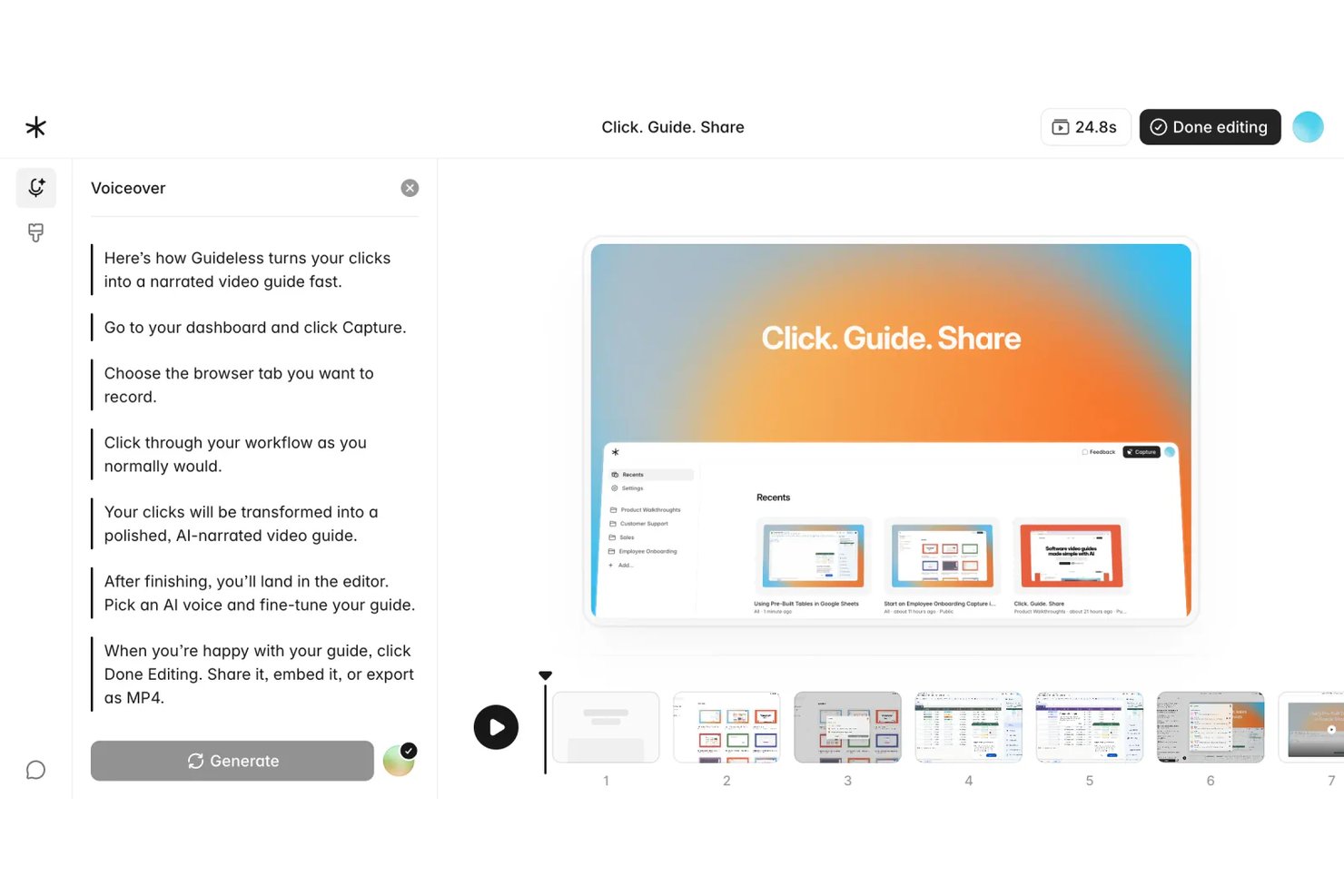
Guideless est un outil de création de guides basé sur le navigateur qui transforme les enregistrements de flux de travail en guides vidéo narrés par IA, ce qui en fait un excellent choix pour les équipes opérations et projets ayant besoin d'une documentation des processus attrayante et facile à mettre à jour, sans capture d'écran manuelle.
À qui Guideless s'adresse-t-il le mieux ?
Guideless convient aux équipes SaaS et technologiques de petite à moyenne taille dont le flux de travail se déroule entièrement dans le navigateur et qui ont besoin de contenus de formation soignés sans recourir à un processus de production vidéo dédié.
Pourquoi Guideless est une bonne alternative à Scribe parmi les meilleurs outils testés
J'ai choisi Guideless parmi les meilleurs car il va là où Scribe ne va pas : il génère des guides vidéo narrés par IA directement à partir de la capture de flux de travail dans le navigateur. Alors que Scribe produit des étapes sous forme de captures d'écran statiques, Guideless associe chaque action capturée à des instructions rédigées par l'IA, une voix off naturelle et des effets de zoom intelligents. J'apprécie particulièrement l'éditeur régénératif, qui me permet de mettre à jour uniquement les étapes modifiées et de reconstruire la narration sans devoir réenregistrer tout le guide.
Principales fonctionnalités de Guideless
- Capture de flux de travail dans le navigateur : Enregistrez automatiquement chaque étape dans n'importe quelle application web grâce à une extension Chrome.
- Floutage des données sensibles : Floutez les informations confidentielles ou sensibles sur les captures d'écran lors de la création du guide.
- Exportation vers MP4, PDF et Markdown : Téléchargez les guides aux formats vidéo et document pour les partager ou les archiver.
- Personnalisation de l'identité visuelle : Appliquez les thèmes, logos et couleurs de votre organisation à tous les guides pour une cohérence de marque.
Intégrations Guideless
Guideless propose des intégrations natives avec Notion, Confluence et Slack. Une API est disponible pour des intégrations personnalisées.
Pros and Cons
Pros:
- La voix off IA élimine l'enregistrement manuel de la narration
- Les guides sont exportés directement sous forme de vidéo MP4
- L'éditeur régénératif met à jour uniquement les étapes modifiées
Cons:
- La capture uniquement dans le navigateur limite les flux de travail des applications de bureau
- Plateforme récente avec une bibliothèque de modèles limitée

Trupeer
Idéal pour produire une vidéo et un document à partir d’un seul enregistrement
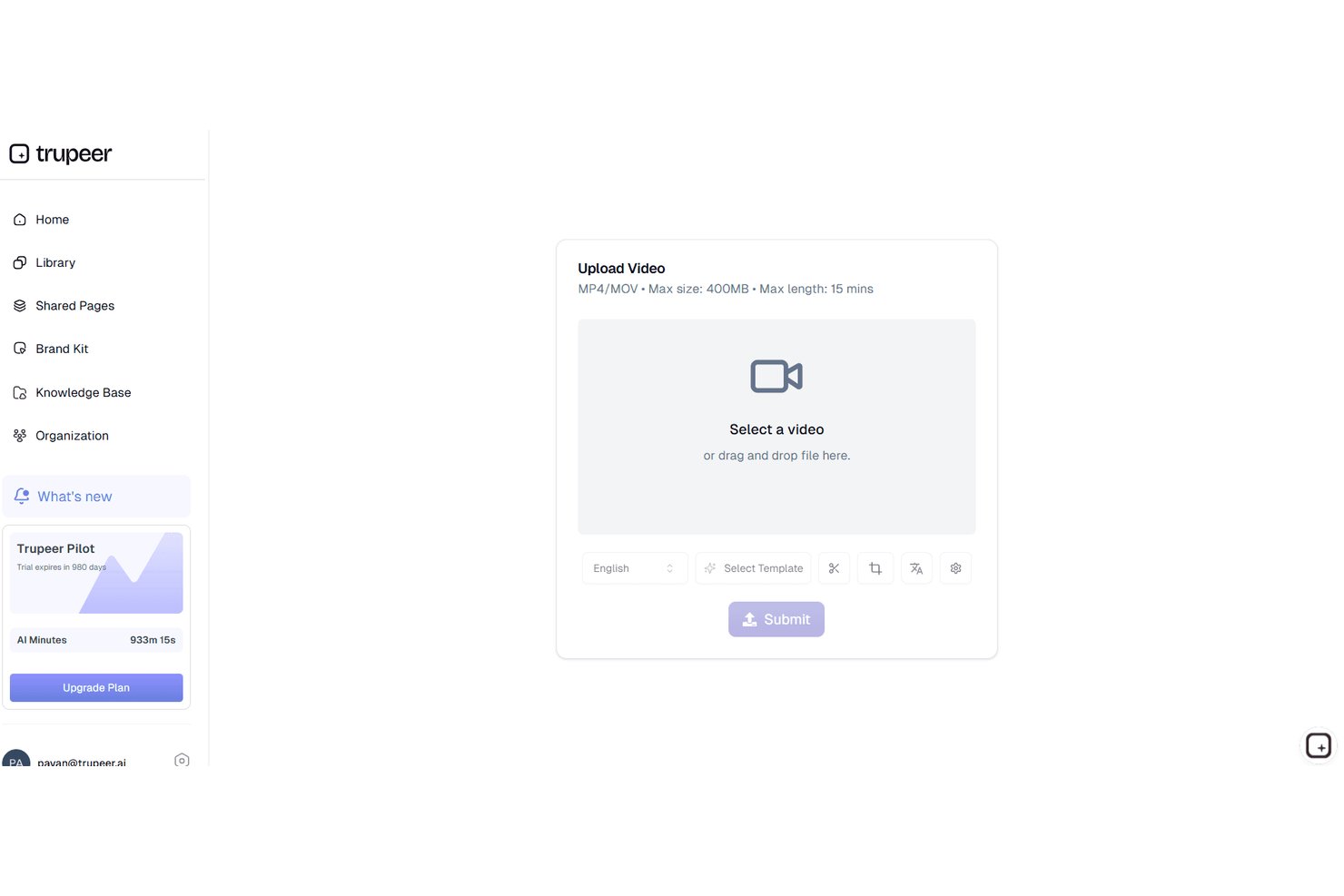
Trupeer aide les équipes produit, d’ingénierie et clientèle à transformer les réunions enregistrées en récapitulatifs vidéo partageables et en documentation écrite, facilitant ainsi la consignation des décisions de projet, des mises à jour et des présentations techniques sans effort manuel supplémentaire.
À qui Trupeer s’adresse-t-il le mieux ?
Aux équipes produit, d’ingénierie ou clientèle qui doivent rapidement partager des récapitulatifs de réunions et de la documentation à partir d’appels enregistrés.
Pourquoi Trupeer figure parmi les bonnes alternatives à Scribe
J’ai choisi Trupeer comme l’un des meilleurs outils, car il me permet de transformer un seul enregistrement de réunion en un récapitulatif vidéo et en documentation écrite. Mon équipe utilise Trupeer pour consigner rapidement les décisions importantes et les détails techniques sans étapes supplémentaires, ce qui nous permet de partager des mises à jour et des présentations juste après un appel.
Fonctionnalités clés de Trupeer
- Transcription des réunions optimisée par l’AI : Transcrit automatiquement la voix en texte pour chaque réunion enregistrée.
- Identification des intervenants : Identifie et suit qui a parlé et à quel moment pendant une session.
- Signets horodatés : Permet de marquer les moments clés de vos enregistrements et d’y revenir.
- Intégrations avec les outils de collaboration : Permet le partage direct vers Slack, Jira et les autres applications utilisées par votre équipe.
Intégrations de Trupeer
Trupeer propose des intégrations natives avec Slack, Notion, Jira et Confluence, ainsi que l’importation depuis Loom et Zoom. Les clients Entreprise peuvent créer des intégrations personnalisées via l’API REST, tandis que MCP connecte Trupeer à Claude et ChatGPT.
Pros and Cons
Pros:
- Convertit les enregistrements de réunions en vidéos et en documents
- Permet d’identifier et de marquer les moments importants des discussions
- Capture les interventions des participants pour assurer un suivi clair
Cons:
- La qualité de la documentation dépend de la clarté audio
- Aucune option de tarification transparente en libre-service

Trainual
Idéal pour centraliser la documentation de formation

Trainual est un logiciel de gestion de la formation qui aide les petites entreprises à organiser et partager leurs procédures opérationnelles standard et leurs politiques. Il s'adresse aux équipes qui souhaitent améliorer leurs processus d'intégration et de formation.
Pourquoi c’est une bonne alternative à Scribe : Trainual centralise vos documents de formation, ce qui permet d’y accéder et de les mettre à jour facilement. Grâce à des modèles personnalisables et des affectations basées sur les rôles, vous pouvez adapter le contenu aux membres de l’équipe concernés. La plateforme permet également de suivre la progression, afin que tout le monde dans votre espace de travail reste à jour.
Fonctionnalités et intégrations remarquables :
Fonctionnalités : création de documents par glisser-déposer, quiz pour tester les connaissances et notifications automatiques en cas de mise à jour. Vous pouvez également utiliser la fonction de recherche pour retrouver des documents spécifiques. Cela rend facile pour votre équipe de rester informée et conforme aux politiques de l’entreprise.
Intégrations : ADP Run, Paycom, Zapier, Dayforce, Figma, et plus encore.
Pros and Cons
Pros:
- Plateforme centrale pour guides, politiques et procédures
- Affectations par rôle pour automatiser l'intégration des employés
- Quiz intégrés pour valider la compréhension du contenu de formation
Cons:
- Pas de tutoriels en temps réel ni d'accompagnement intégré
- Organisation manuelle du contenu peut ralentir la mise en place

Supademo
Idéal pour les démos produits interactives

Supademo est une plateforme de création de démonstrations interactives de produits, principalement destinée aux équipes commerciales et de réussite client. Elle aide les entreprises à mettre en valeur leurs produits de manière efficace auprès de clients potentiels.
Pourquoi c'est une bonne alternative à Scribe : Supademo propose des démonstrations interactives qui engagent votre audience grâce à des éléments cliquables et des parcours guidés. Vous pouvez personnaliser efficacement les démos afin de mettre en avant certaines fonctionnalités spécifiques, les rendant pertinentes selon les besoins des utilisateurs. La plateforme suit aussi les interactions des utilisateurs, fournissant des informations sur ce qui attire l'attention. Ces fonctionnalités font de Supademo une solution idéale pour les équipes désirant proposer des présentations de produits engageantes et informatives.
Fonctionnalités phares et intégrations :
Fonctionnalités : modèles de démonstration personnalisables, analyses de l'engagement des utilisateurs et possibilité d’intégrer les démos sur des sites web. Vous pouvez également créer des scénarios à embranchements pour personnaliser l'expérience de démonstration selon les audiences. Cette flexibilité aide votre équipe à réaliser des présentations ciblées et efficaces.
Intégrations : Calendly, Slack, SurveyMonkey, HubSpot, Salesforce, Google Forms et bien d’autres.
Pros and Cons
Pros:
- L'IA transforme les enregistrements en démos interactives
- Intègre les démos sur des sites web et applications
- Les analyses révèlent les clics et abandons des visiteurs
Cons:
- Fonctionnalités de montage vidéo limitées
- L’offre de fonctionnalités évolue encore pour les grandes entreprises

Guidde
Idéal pour la création vidéo assistée par IA

Guidde est une plateforme alimentée par l'IA qui simplifie la création de documentation vidéo, destinée aux entreprises et aux équipes ayant besoin de produire efficacement des tutoriels et des guides. Elle aide principalement les entreprises à renforcer l'intégration des employés et la formation des clients.
Pourquoi c'est une bonne alternative à Scribe : Guidde se distingue grâce à ses outils pilotés par l'IA qui transforment les captures de workflow en tutoriels vidéo montés. La fonctionnalité Magic Mic ajoute une narration générée par l'IA à vos guides pour une meilleure expérience d'apprentissage. Vous pouvez également diffuser votre contenu aussi bien aux employés qu'aux clients, ce qui le rend adapté à divers besoins. Ces fonctionnalités en font un excellent choix si vous recherchez une solution allant au-delà de la documentation traditionnelle.
Fonctionnalités et intégrations remarquables :
Fonctionnalités : Outil Magic Capture pour enregistrer des workflows, scénarios générés par l'IA et voix off personnalisables avec plus de 200 options. Vous pouvez créer rapidement des tutoriels professionnels, idéal pour les équipes devant publier fréquemment des mises à jour. La plateforme propose aussi des options de partage intelligent pour diffuser le contenu.
Intégrations : GitLab, ClickUp, Zendesk, Notion, Slack, Zoom, et plus encore.
Pros and Cons
Pros:
- L'IA transforme les enregistrements en tutoriels professionnels
- Modèles personnalisés pour une documentation vidéo cohérente
- Prend en charge les instructions vidéo et texte
Cons:
- Analyses limitées par rapport aux plateformes d'entreprise
- Nombre limité d'étapes par guide

Loom
Idéal pour la messagerie vidéo en équipe

Loom est un outil de messagerie vidéo destiné aux équipes et aux entreprises qui doivent communiquer par le biais de la vidéo. Les utilisateurs peuvent enregistrer, partager et visionner des messages vidéo pour favoriser une meilleure collaboration et communication à distance.
Pourquoi c'est une bonne alternative à Scribe : Loom propose une approche unique de la communication grâce à ses capacités de messagerie vidéo. Vous pouvez enregistrer simultanément votre écran, votre voix et votre visage, ce qui permet de transmettre rapidement des informations complexes. La fonctionnalité de partage instantané permet à votre équipe de voir les messages sans attendre, ce qui garde tout le monde synchronisé. Ces fonctionnalités en font un outil idéal pour les équipes qui privilégient la communication en temps réel et la narration visuelle.
Fonctionnalités et intégrations remarquables :
Fonctionnalités comprenant l'enregistrement de vidéos en HD, l'ajout de boutons d'appel à l'action et l'utilisation d'informations sur les spectateurs pour suivre l'engagement. Vous pouvez également couper et modifier les vidéos directement sur la plateforme, ce qui facilite l'amélioration du contenu. L'interface intuitive de l'outil vous permet de commencer à créer des vidéos avec un minimum de configuration.
Intégrations comprenant Slack, Salesforce, Jira, Confluence, Calendly, Zoom, et bien d'autres.
Pros and Cons
Pros:
- Des liens partageables instantanément remplacent de nombreuses réunions
- Enregistre simultanément l'écran, la caméra et le micro
- Les analyses des spectateurs montrent l'engagement et le taux de complétion
Cons:
- La version gratuite limite la durée et certaines fonctionnalités d'enregistrement
- Qualité vidéo parfois faible

Idéal pour les environnements réglementés

FlowShare est un logiciel de documentation conçu pour les environnements réglementés qui automatise la création de guides étape par étape. Il s'adresse principalement aux entreprises ayant besoin d'une documentation efficace pour la formation et la conformité.
Pourquoi c'est une bonne alternative à Scribe : FlowShare capture les actions des utilisateurs en arrière-plan, générant des guides pendant que vous travaillez. Cette fonctionnalité est adaptée aux environnements réglementés où la précision de la documentation est essentielle. Avec des options d'identité visuelle d'entreprise et de modification en lot, vous pouvez adapter les guides aux besoins de votre organisation. L'export dans plusieurs formats offre une flexibilité pour différents besoins de documentation.
Fonctionnalités marquantes et intégrations :
Fonctionnalités incluent la capture automatique des actions, les paramètres d'identité visuelle d'entreprise pour le branding, et le floutage en masse des données sensibles. Vous pouvez également exporter les guides aux formats PDF, PPTX et HTML. Cette polyvalence aide votre équipe à maintenir une documentation cohérente et professionnelle.
Intégrations comprennent Confluence, SharePoint, WordPress, Guru, et plus encore.
Pros and Cons
Pros:
- L'application de bureau enregistre automatiquement chaque action à l'écran
- Exporte les guides aux formats PDF, PPTX et HTML
- L'accès hors ligne convient aux environnements strictement réglementés
Cons:
- Uniquement disponible sur le bureau Microsoft Windows
- Limitations de mise en forme

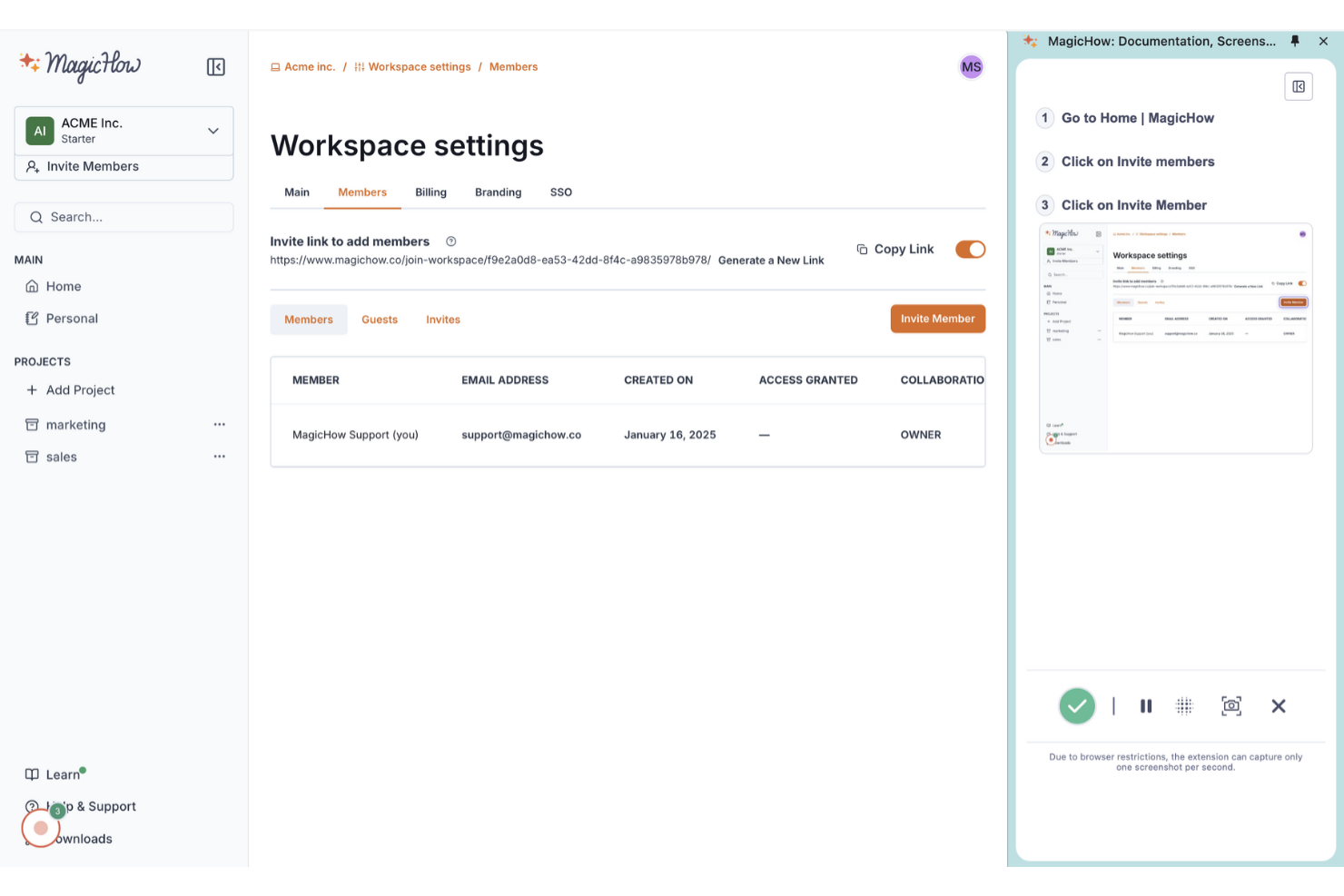
MagicHow est un outil convivial pour créer des guides pas à pas, des instructions et des manuels, s'adressant aux équipes qui doivent documenter des processus efficacement. Il s'adresse aux entreprises souhaitant simplifier leurs pratiques de documentation sans avoir besoin de compétences spécialisées.
Pourquoi c'est une bonne alternative à Scribe : MagicHow permet une création rapide de guides, faisant gagner du temps à votre équipe lors de la documentation. L'enregistrement automatisé des processus et la modification aisée du contenu vous permettent de produire et de personnaliser rapidement un nombre illimité de guides, tandis que les options de partage via liens, PDF et HTML facilitent la distribution.
Fonctionnalités marquantes et intégrations :
Fonctionnalités incluent la compatibilité avec les versions bureau et navigateur, des guides personnalisables et la possibilité d'intégrer du contenu sur des plateformes. Vous pouvez également partager les guides dans différents formats, ce qui offre une grande flexibilité dans la circulation de l'information. Cette polyvalence aide votre équipe à maintenir une documentation claire et accessible.
Intégrations incluent Confluence, Notion, WordPress, et plus encore.
Pros and Cons
Pros:
- Plan principal gratuit pour les petites équipes
- Extension Chrome enregistre automatiquement les workflows du navigateur
- Exporte les guides vers des liens partageables et des PDF
Cons:
- Analyses limitées par rapport aux concurrents plus matures
- Écosystème plus restreint avec moins d'intégrations poussées


Dubble est un outil permettant de créer des guides pas à pas, des tutoriels et des ressources d'intégration en capturant les actions des utilisateurs. Il est idéal pour les équipes qui ont besoin d'une documentation de processus rapide et efficace sans saisie manuelle.
Pourquoi c'est une bonne alternative à Scribe : Dubble offre une documentation instantanée en enregistrant vos actions et en les convertissant en guides. Des fonctionnalités comme la capture automatique de captures d'écran et les outils d'édition vous permettent de créer une documentation détaillée avec un minimum d'effort de modification. Vous pouvez également partager les guides en un seul clic, ce qui facilite la collaboration. Ces fonctionnalités font de Dubble un outil adapté aux équipes qui privilégient la rapidité et la simplicité dans la documentation.
Fonctionnalités remarquables et intégrations :
Fonctionnalités incluent une édition rapide, avec la possibilité de mettre à jour les descriptions et les captures d'écran, ainsi que de supprimer les informations sensibles. Vous pouvez aussi partager des guides facilement, car Dubble prend en charge divers formats, y compris du contenu enrichi et le markdown. Cette flexibilité aide votre équipe à garder la documentation à jour et accessible.
Intégrations : Notion, Confluence, Google Docs et plus encore.
Pros and Cons
Pros:
- Le suivi Chrome transforme vos actions en documentation
- Exportation des guides au format Markdown pour les développeurs
- Prend en charge les captures d'écran, les vidéos et le texte des étapes
Cons:
- Les fonctionnalités de collaboration sont basiques
- Idéal pour les applications web ; les flux de travail desktop ou non-navigateurs sont limités


iorad est un outil numérique destiné aux éducateurs et formateurs pour capturer et expliquer des processus via des tutoriels interactifs et des guides pratiques, simplifiant ainsi les procédures complexes.
Pourquoi c'est une bonne alternative à Scribe : iorad propose une approche interactive pour la création de tutoriels, avec des fonctionnalités comme des présentations étape par étape et des clics pour mettre en évidence des éléments. Vous pouvez intégrer les tutoriels directement dans des sites web ou les partager via un lien, les rendant facilement accessibles à votre audience. La plateforme propose aussi l'édition en temps réel, ce qui permet de mettre à jour le contenu à mesure que les processus évoluent. Ces fonctionnalités rendent iorad idéal pour les équipes recherchant un contenu pédagogique dynamique et engageant.
Fonctionnalités et intégrations remarquables :
Fonctionnalités : capture automatique des étapes, possibilité d'ajouter des commentaires vocaux et thèmes personnalisables. Il est également possible d’exporter les tutoriels sous différents formats, tels que PDF ou HTML, offrant une flexibilité sur la manière de partager l’information. Cela permet à votre équipe d’accéder facilement aux tutoriels et de les utiliser efficacement.
Intégrations : Slack, ServiceNow, Confluence, YouTube, HubSpot et plus encore.
Pros and Cons
Pros:
- Les simulations interactives permettent aux utilisateurs de s’entraîner sur les processus
- L’extension Chrome capture automatiquement les tutoriels de navigation
- Exporte les tutoriels en PDF pour utilisation hors ligne
Cons:
- L’interface peut sembler complexe pour les créateurs non techniques
- La personnalisation avancée nécessite une formation
Autres alternatives à Scribe
Voici quelques alternatives supplémentaires à Scribe qui ne figurent pas dans ma sélection, mais qui méritent tout de même votre attention :
- Tango
Idéal pour la capture de processus en temps réel
- UserGuiding
Idéal pour les outils d’onboarding utilisateur
- Fluency
Idéal pour la documentation multilingue
- Fleeq
Idéal pour le contenu de formation basé sur la vidéo
- Glitter AI
Idéal pour la documentation des processus par l'IA


Comment j’évalue les alternatives à Scribe
J’analyse chaque outil selon deux axes : les exigences de base telles que la capture automatique des étapes et l’édition de guides, et les différenciateurs comme le texte généré par IA, les statistiques et les intégrations avec l’écosystème de gestion de projet.
Fonctionnalités essentielles (Critères de base pour cette liste)
Lorsque je sélectionne des outils pour ma liste, j’évalue chacun sur une échelle de 0 (fonctionnalité absente) à 5 (outil performant dans ce domaine) pour chaque fonctionnalité essentielle ci-dessous. J’additionne ensuite ces notes pour obtenir un pourcentage. Chaque outil doit obtenir un score total minimum de 65 % pour être retenu.
- Capture automatique des étapes : J’évalue la capacité de chaque outil à enregistrer les clics, défilements et frappes clavier en étapes structurées—par exemple, documenter la création d’un ticket Jira sans faire des captures manuelles de chaque champ.
- Annotation des captures d’écran : L’offre d’outils d’annotation est importante : je vérifie la présence de flèches, encadrés, surbrillance et boîtes facilitant la compréhension des étapes, comme naviguer sur un tableau de sprint ou configurer un tableau de bord.
- Édition et personnalisation des guides : J’analyse la marge de manœuvre sur le contenu généré—restructurer les étapes, réécrire les descriptions, ajouter de la personnalisation—pour garantir une homogénéité des SOPs au sein de la documentation projet.
- Partage et export multi-format : Qu’il s’agisse d’un PDF destiné à des parties prenantes ou d’un guide intégré à Confluence, j’évalue la diversité des formats de sortie et d’options de partage proposés par chaque outil.
- Masquage des données sensibles : Les outils doivent permettre de flouter ou masquer des identifiants, des noms de clients ou des données financières dans les captures avant de partager des procédures avec des prestataires ou des équipes transverses.
- Intégrations avec vos outils de travail : Je vérifie la présence de connexions natives aux plateformes comme Jira, Slack, Notion et Confluence, afin que vos guides soient consultés là où votre équipe projet travaille déjà, et non isolés.
Quand j’ai sélectionné les outils répondant à ces critères, j’étudie ce qui différencie chaque plateforme.
Facteurs de différenciation (Ce qui distingue les fournisseurs)
Voici comment je compare concrètement les différents fournisseurs :
Fonctionnalités remarquables
Les descriptions d’étapes générées par l’IA font gagner un temps réel—lorsqu’il s’agit de documenter une rétro d’un sprint en 20 étapes, éditer un texte automatique vaut mieux qu’écrire chaque phrase. Je recherche aussi une bibliothèque centralisée de guides, pour que les équipes organisent leurs SOPs par projet ou département, indispensable dès que la documentation dépasse quelques guides. Les statistiques de consultation ou de complétion permettent aux PMO de savoir si les parcours d’onboarding sont consultés ou oubliés.
Au-delà des fonctionnalités
La sécurité et la conformité sont cruciales si vos guides contiennent des données clients ou des identifiants internes : je regarde la conformité SOC 2 et le support SSO, surtout pour les PMO en entreprise qui partagent leur documentation entre fournisseurs. La tarification compte aussi : un forfait gratuit permet à un chef de projet de tester l’outil avant de le proposer à toute l’équipe. J’évalue aussi la rapidité de prise en main : à quelle vitesse un nouvel utilisateur peut-il installer l’extension, capturer un process et partager un guide professionnel dès le premier jour.
Pourquoi chercher une alternative à Scribe ?
Bien que Scribe soit un bon choix pour documenter les processus, plusieurs raisons poussent certains utilisateurs à rechercher d’autres solutions. Vous cherchez peut-être une alternative à Scribe parce que…
- Vous avez besoin de davantage d’options de personnalisation
- Votre équipe a besoin d’un accès hors ligne
- Vous souhaitez une meilleure intégration avec les outils existants
- Votre organisation a besoin d’une prise en charge multilingue
- Vous avez besoin de fonctionnalités avancées pour l’analyse des données
- Votre équipe se développe rapidement avec l’arrivée de nouvelles recrues et a besoin d’une solution évolutive
Si vous vous reconnaissez dans l’une de ces situations, vous êtes au bon endroit. Notre liste comprend plusieurs outils de documentation des processus tout-en-un, mieux adaptés aux équipes confrontées à ces difficultés avec Scribe et à la recherche de solutions alternatives.
Fonctionnalités clés de Scribe
Voici quelques-unes des principales fonctionnalités de Scribe, afin de vous aider à mettre en contraste et à comparer les offres des solutions alternatives :
- Capture automatique : Enregistre automatiquement les processus des applications web, de bureau et mobiles, permettant à votre équipe de gagner du temps sur la documentation manuelle.
- Personnalisation : Personnalisez les guides avec du contenu généré par l’IA, l’image de marque de l’entreprise et des options de mise en forme adaptées aux besoins de votre équipe.
- Modification des captures d’écran : Modifiez les captures d’écran pour mettre en avant les informations clés et améliorer la clarté pour votre audience.
- Options de partage : Partagez les guides par e-mail ou via des liens, intégrez-les à des pages web ou exportez-les sous forme de fichiers PDF et HTML afin de rendre le contenu accessible.
- Données sur l’engagement : Suivez les consultations et les achèvements des guides, ainsi que d’autres indicateurs, afin de maintenir votre contenu pertinent et à jour.
- Pages : Regroupez plusieurs guides dans un seul document comprenant du texte, des vidéos et des captures d’écran pour documenter en détail les processus.
- Scribe Sidekick : Offre un accès à la demande aux informations, réduisant les questions répétitives et les interruptions.
- Masquage automatique : Masquez automatiquement ou manuellement les informations sensibles en toute sécurité afin de protéger la confidentialité des données.