

Avis sur Air : avantages, inconvénients, fonctionnalités et tarifs



Cluttered files, disorganized folders, missing assets – all symptoms of a disorganized collaborative workflow, and a major headache in the making. With the right digital asset management software, you can eliminate these factors completely, and Air is built to do just that. Designed for creative teams in marketing, advertising, and media industries, Air helps you organize and collaborate on digital content in cloud storage, streamlining asset management with intuitive features and robust collaboration tools.
In this review, I'll cover Air's features, pros and cons, use cases, integrations, and pricing so you can decide whether it’s suitable for your asset management needs.
Air Evaluation Summary
- From $10/month (billed annually)
- Free plan available
Pourquoi faire confiance à nos recommandations de logiciels
Notre équipe teste et évalue des logiciels depuis 2012. En tant que chefs de projet nous-mêmes, nous savons à quel point il est difficile — et important — de choisir le bon logiciel.
Pour ce guide, nous avons évalué les outils grâce à des tests pratiques et une recherche indépendante, en notant les outils selon nos critères de sélection. Nous nous appuyons également sur les enseignements de leaders d’opinion du secteur et de professionnels de la gestion de projet en activité.
Nos avis reflètent notre jugement éditorial humain, et non un argumentaire de vente.
Réviseurs experts:
Air Overview
In my opinion, Air is a top choice for digital asset management, especially for creative marketing and media teams needing strong asset organization and collaboration tools that cover numerous file formats. It excels in user-friendly features and integrations, making it easy to manage assets across collaboration platforms. If your team is looking for seamless day-to-day use and efficient asset management, Air is definitely worth considering.
pros
-
Asset organization features help keep digital content well-structured and accessible.
-
Collaboration tools improve team communication and workflow efficiency.
-
The intuitive interface makes it easy to navigate and manage assets.
cons
-
Onboarding could be smoother for new team members.
-
The AI tagging feature could be more intuitive.
-
Advanced customization options are limited.
Is Air Right For Your Needs?
Who Would be a Good Fit for Air?
Air is ideal for creative teams in marketing, advertising, and social media. If your team wants to use Air to manage large volumes of digital assets, its intuitive interface, ease of use, and collaboration tools can simplify your workflow. The platform's asset organization features make it easy to keep digital content well structured, which is essential for working on multiple projects. It’s a great fit for teams that need to improve communication and asset accessibility.
-
Tech & Saas Companies
Air gives tech teams a centralized hub to organize and scale their digital assets as their product output grows.
-
Creative Departments
Air supports your creative work with efficient collaboration and easy asset access.
-
Media Companies
Its asset organization features help keep content well structured and accessible for various media projects.
-
Advertising Agencies
Its intuitive interface can make asset navigation and management easier.
-
Marketing Teams
Air offers collaboration tools to improve communication and simplify asset management for marketing projects.
Who Would be a Bad Fit for Air?
Air may not be the best fit for solo freelancers or individual creators who don't require collaborative features, or for teams that primarily work with text-based documents and data files rather than visual content. Similarly, small businesses with very low asset volume that could get by with a simple shared drive may find it difficult to justify the cost.
-
Document-Heavy Teams
It may not translate well for teams whose work revolves around text-based files and data documents.
-
Businesses With Limited Assets
Air’s extensive features are too robust for businesses with minimal digital assets.
-
Solo Freelancers
Solo freelancers might not need Air’s collaborative features.
Notre méthodologie d'évaluation
Comment nous testons et notons les outils
Nous avons passé des années à construire, affiner et améliorer notre système de test et de notation de logiciels. Notre grille d’évaluation est conçue pour capturer les subtilités de la sélection de logiciels et ce qui rend un outil efficace, en mettant l’accent sur les aspects critiques de la prise de décision. Ci-dessous, vous pouvez voir exactement comment notre processus de test et de notation fonctionne sur sept critères. Cela nous permet de fournir une évaluation impartiale des logiciels selon leur fonctionnalité principale, leurs fonctionnalités remarquables, leur facilité d’utilisation, l’onboarding, le support client, les intégrations, les avis clients et le rapport qualité/prix.
Fonctionnalités principales (25 % du score final)
Le point de départ de notre évaluation est toujours la fonctionnalité principale de l’outil. Dispose-t-il des fonctionnalités et caractéristiques de base attendues par l’utilisateur ? Certaines de ces fonctionnalités de base sont-elles réservées aux formules tarifaires supérieures ? Nous nous attendons à ce qu’un outil soit à la hauteur des capacités de base de ses concurrents.
Fonctionnalités remarquables (25 % du score final)
Ensuite, nous évaluons les fonctionnalités remarquables et peu communes qui vont au-delà de la fonctionnalité de base habituellement retrouvée dans ce type d’outils. Un score élevé reflète des fonctionnalités spécialisées ou uniques qui rendent le produit plus rapide, plus efficace, ou offrent une valeur supplémentaire à l’utilisateur. Nous évaluons également la facilité d’intégration avec d’autres outils couramment présents dans l’environnement technique pour étendre la puissance et l’utilité du logiciel. Les outils offrant de nombreuses intégrations natives, des connexions tierces et un accès API pour créer des intégrations personnalisées obtiennent la meilleure note.
Facilité d’utilisation (10 % du score final)
Nous considérons la rapidité et la facilité d’exécution des tâches principales à l’aide de l’outil. Un logiciel bien noté est conçu intelligemment, intuitif à utiliser, propose des applications mobiles, fournit des modèles et simplifie les tâches relativement complexes.
Onboarding (10 % du score final)
Nous savons à quel point l’adoption rapide par l’équipe est cruciale lors de la mise en place d’une nouvelle plateforme. Nous évaluons donc la facilité avec laquelle un utilisateur peut apprendre et utiliser le logiciel avec un minimum de formation. Nous vérifions la rapidité avec laquelle un membre peut s’installer et démarrer sans expérience préalable. Les solutions ayant une note élevée nécessitent peu ou pas de support.
Support client (10 % du score final)
Nous examinons la rapidité et la facilité d’obtention d’une aide par téléphone, chat en direct ou base de connaissances. Les outils et sociétés proposant un support en temps réel obtiennent la meilleure note, tandis que les chatbots sont les moins bien notés.
Avis clients (10 % du score final)
Au-delà de nos propres tests et évaluations, nous tenons compte du net promoter score des clients actuels et passés. Nous étudions la probabilité, pour eux, de choisir à nouveau l’outil pour ses fonctionnalités principales. Un logiciel ayant une note élevée reflète un score NPS élevé de la part des utilisateurs actuels ou passés.
Rapport qualité/prix (10 % du score final)
Enfin, en tenant compte de tous les autres critères, nous comparons le prix moyen des forfaits d’entrée de gamme aux fonctionnalités principales et considérons la valeur des autres critères d’évaluation. Un logiciel qui en offre davantage pour moins cher sera mieux noté.
Core Features
Intuitive Interface
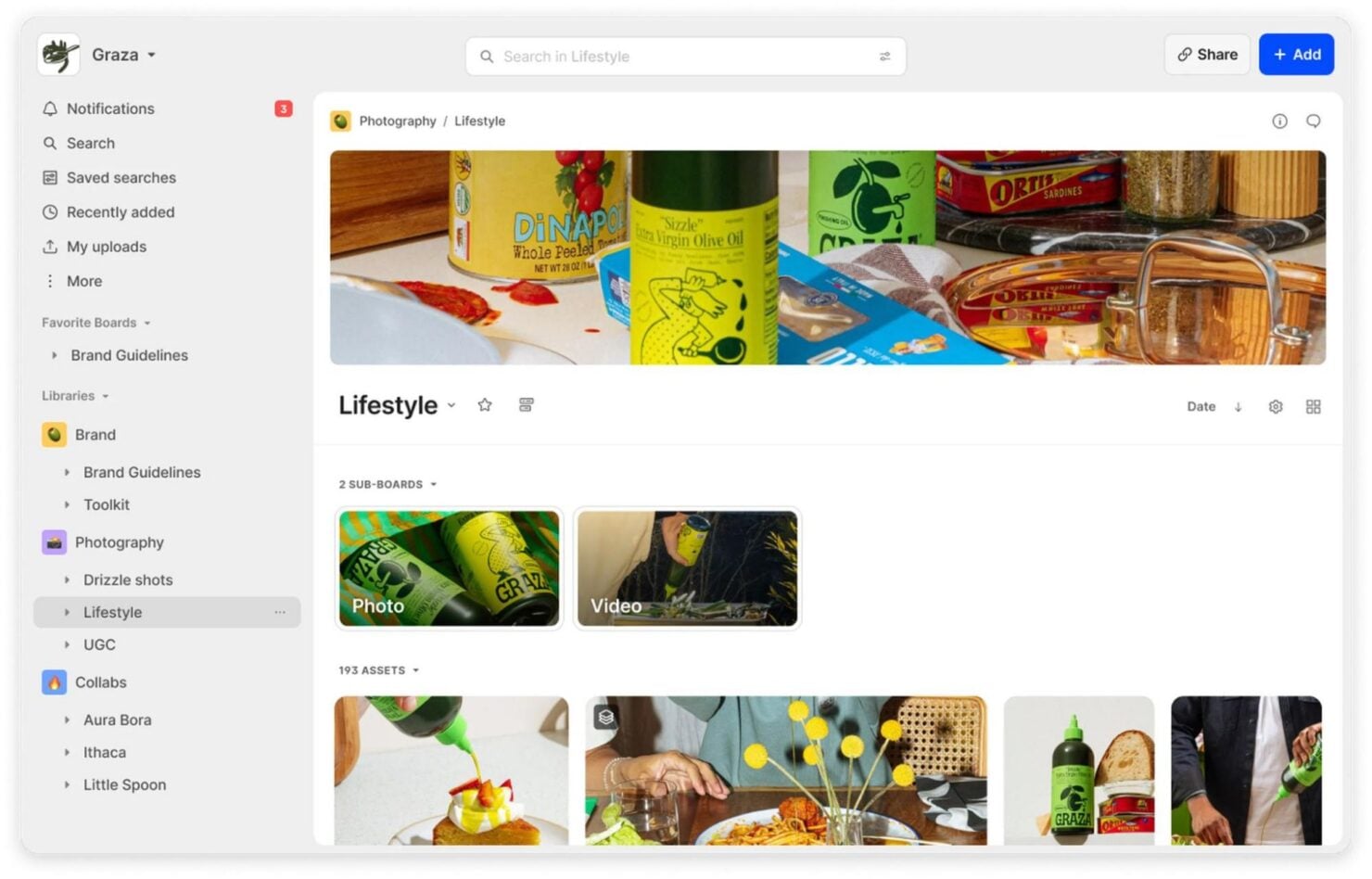
Seamlessly navigate through your assets and find what you need with Air's simple and user-friendly design.
Creative Intelligence
Air's Creative Intelligence automatically analyzes and organizes your content, giving your team a deeper understanding of your creative library.
Asset Organization
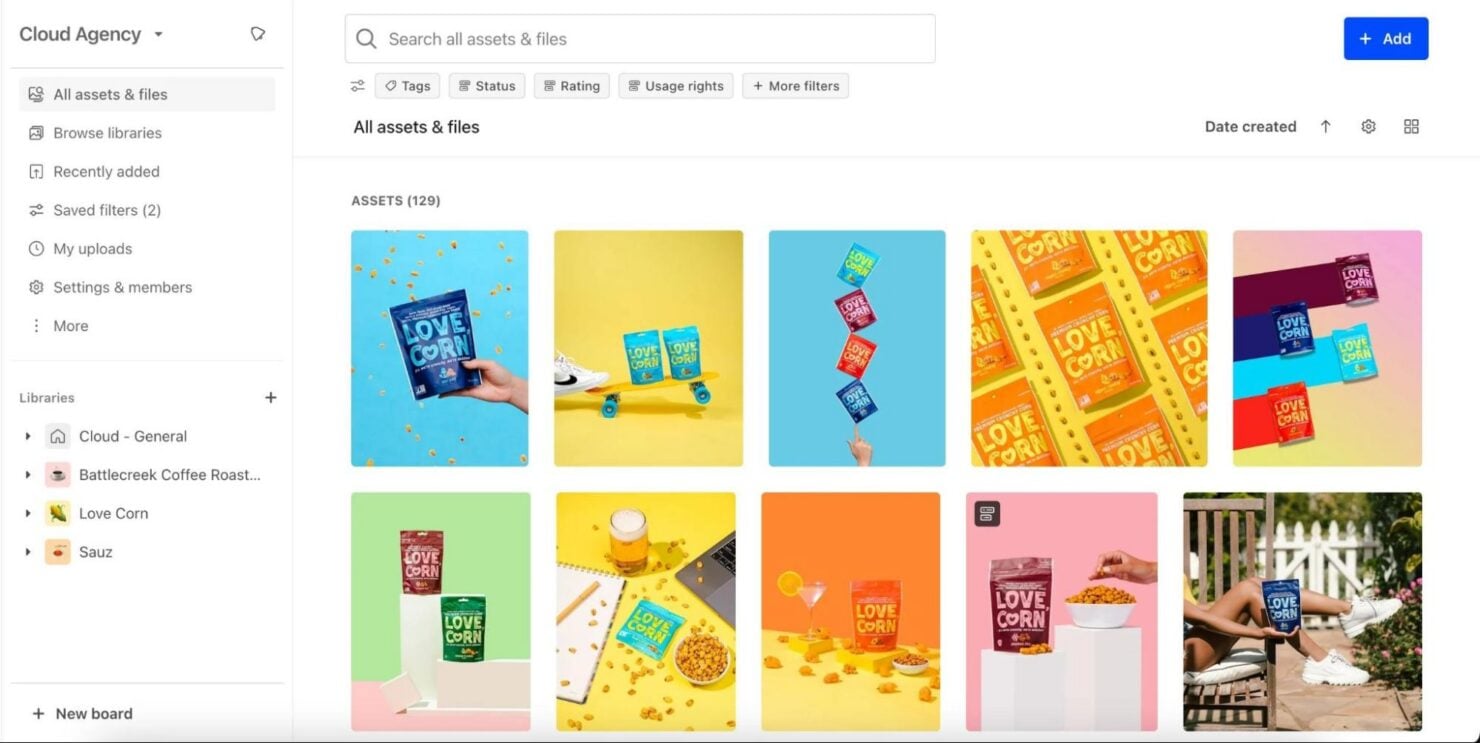
Sort, categorize, and add metadata to your digital assets so they’re well structured and accessible.
Analytics
Air surfaces actionable insights across your creative inventory. This gives your team a clearer view of what's being used, and what's performing best.
Conversational Search
Air's conversational search lets you locate files using natural language queries, cutting down the time spent hunting for assets.
AI Design & Editing
Air's AI-powered editing tools let your team adapt, polish, and prepare assets for use without ever having to leave the platform.
Standout Features
Visual Collaboration
Engage with your team visually to make brainstorming and project reviews more interactive through improved creativity and feedback.
Customizable Workflows
Tailor workflows, adjust templates, and organize task management to fit your team's unique processes.

Ease of Use
Air provides a straightforward user experience. Its intuitive interface helps you navigate and locate files with ease, while the customizable workflows fit smoothly into your existing processes. Users appreciate the simple design that minimizes the learning curve and allows you to focus on your work rather than figuring out the software. Compared to Air alternatives such as MediaValet or Stockpress, Air stands out in Trustpilot user reviews for its clear layout and efficient asset management capabilities.

Onboarding
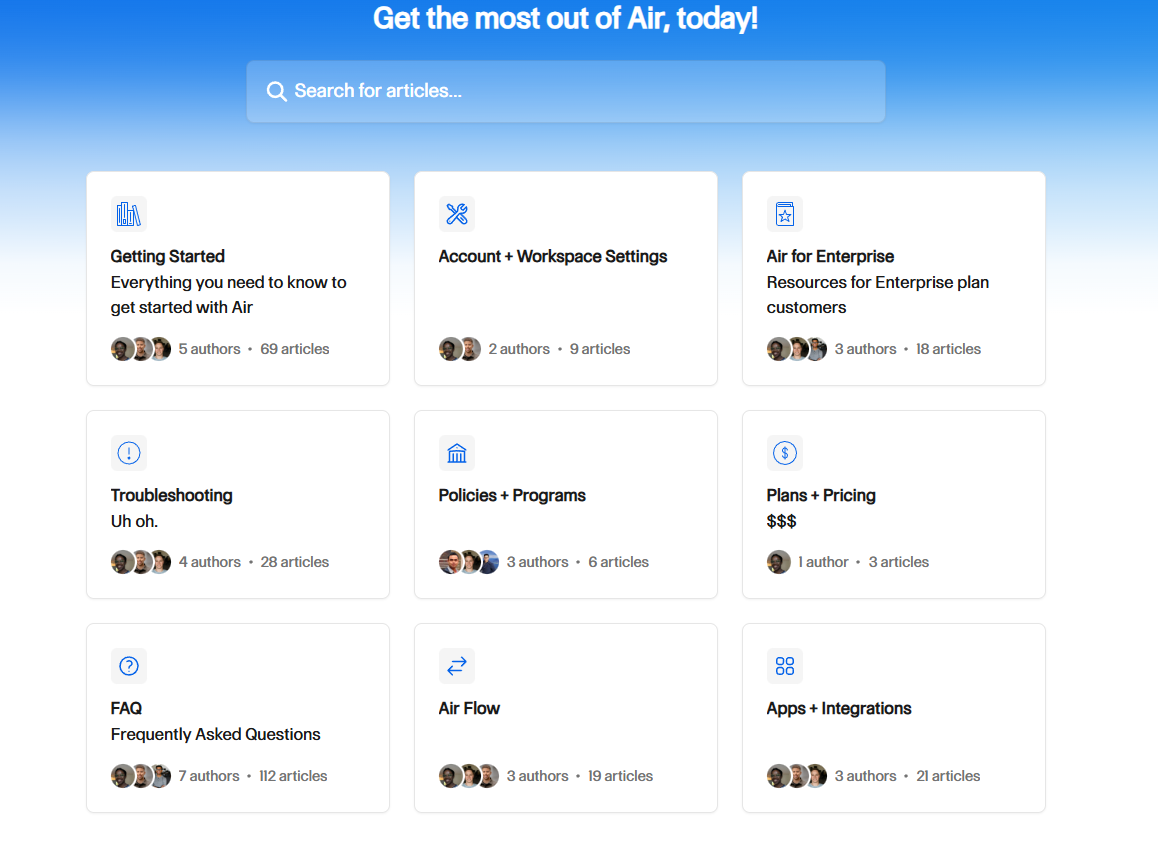
Air offers a straightforward onboarding process with clear guides and tutorials, reducing the time it takes for new users to understand its features. However, some users feel that more personalized support could simplify the experience further. Despite this, the available resources help you navigate the system, providing value without delay.
Customer Support
Air provides reliable and responsive customer support, ensuring that there’s prompt access to help when needed. The platform offers various support channels, including email and live chat, though some users report long response times. Despite this, the available resources generally meet user needs by helping resolve problems and maintain productivity.
Integrations
Air natively integrates with platforms such as Slack, HubSpot, Adobe Creative Cloud, CapCut, Shopify, Canva, and Sprout Social, among others.
Air also provides an API for custom integrations and connects with third-party tools such as Zapier and n8n for automations and additional flexibility.

Value for Money
Air’s pricing model offers flexible plans for various needs, making it a viable option for managing digital assets. Users find the pricing reasonable, given features such as AI-powered search and collaboration tools. The free version is a great starting point, while paid options provide more storage and advanced features. A free trial is available, allowing you to evaluate the software before making a purchase decision.
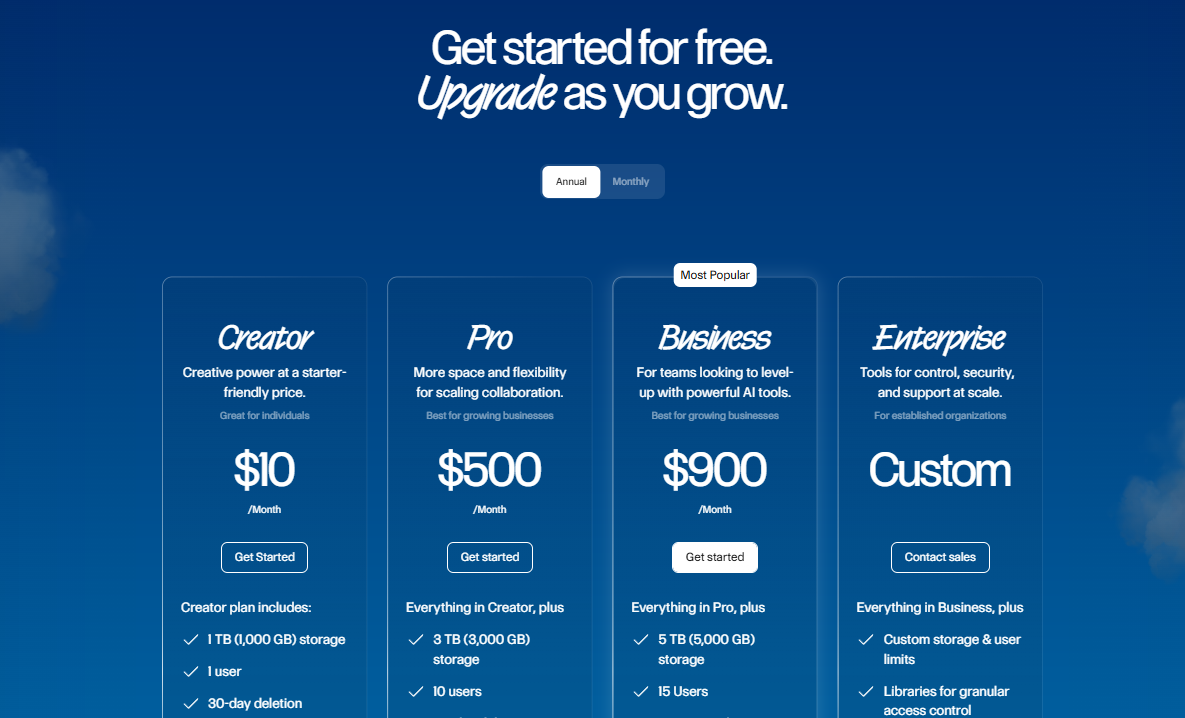
- Free Plan: Provides 10 GB of storage and organization tools for individuals.
- Creator Plan: Includes 1 TB of storage for one user, with annotations and imports from Google Drive and Dropbox
- Pro Plan:Offers 3 TB of storage for 10 users, basic editing tools, and share link permissions.
- Business Plan: Adds 5 TB of storage for 15 users, AI-powered editing, and audio/video transcription.
- Enterprise Plan: Custom pricing with tailored features for established businesses, access to the API, and a dedicated onboarding manager.
New Product Updates from Air

Air Showcases Introduces Custom Branding, Content Blocks, and Sub-Pages
Air Showcases introduces custom branding, content blocks, sub-pages, saved default settings, and additional sharing controls. These updates make it easier to create branded portals, organize shared content, and control how viewers access and interact with assets. Highlights include:
- Custom Branding: Lets users apply logos, banners, brand colors, and fonts to create a more consistent sharing experience.
- Content Blocks: Supports text, images, videos, and links directly within Showcase pages for richer content presentation.
- Sub-Pages: Adds top-level navigation and separate pages for organizing content into structured sections.
- Saved Defaults: Lets users save preferred Showcase and board share-link settings for reuse.
- Sharing Controls: Provides options to hide search, lock sorting, disable nested content expansion, and remove the download-all button.
- White-Labeling: Lets Enterprise users remove Air branding from Showcases.
Visit Air’s official site for more details.
 for more details.
Air Adds New Video Models and Smart Resize in Canvas
Air adds new video models, expanded generation controls, reference-to-video, and Video Smart Resize in Canvas. These updates give users more flexibility when creating, editing, and resizing videos for social and custom formats. Highlights include:
- Wan 3.0: Generates videos in 1080p with native audio, instruction-based editing, and support for clips up to 30 seconds.
- Veo 3.1: Extends existing videos and supports generation using defined first and last frames.
- MiniMax H3 Max: Provides faster video generation and reference-to-video for more consistent characters and motion.
- Gemini Omni Flash 1.1: Improves generation speed while reducing the cost of creating videos.
- Seedance 2.5: Adds more realistic video and audio generation for clips up to 30 seconds and replaces Seedance 1.5 Pro as the default model.
- First- and Last-Frame Generation: Lets users define starting and ending frames across supported models for greater control over video outputs.
- Video Smart Resize: Resizes videos for Instagram, Facebook, TikTok, Snapchat, YouTube, LinkedIn, X, and custom dimensions without cropping the original frame.
Visit Air’s official site for more details.
Air Expands MCP Write Actions and Connects FigJam, Premiere Pro, Workato
Air adds MCP write capabilities, easier Claude setup, FigJam support, Premiere Pro .mogrt installation, and a new Workato connection. These updates make it easier to automate workflows, move creative assets between tools, and let connected AI clients take actions in Air. Highlights include:
- MCP Write Scopes: Lets Claude and other MCP clients create boards, tag assets, and upload files directly in Air.
- Claude Connector: Adds Air’s Remote MCP server to Claude’s connector directory for easier setup without manually entering a connector URL.
- FigJam Support: Extends Air’s Figma plugin to FigJam so users can export stickers, shapes, and other elements directly into Air.
- Premiere Pro .mogrt Support: Lets users install Motion Graphics templates directly into Premiere Pro’s Graphics panel.
- Workato Integration: Connects Air with Workato for building enterprise automations across other systems without working directly with Air’s API.
Visit Air’s official site for more details.

Air Integrates With WordPress and Shopify
Air adds WordPress and Shopify integrations, letting users access their Air workspace directly from the WordPress block editor and Shopify admin. These updates make it easier for teams to use approved images and videos across content and product pages. Highlights include:
- WordPress Integration: Users can browse, search, and insert Air images and videos directly from the WordPress block editor.
- Shopify Integration: Users can search, browse, and upload Air assets to Shopify product listings without leaving the Shopify admin.
Visit Air’s official site for more details.

Air Launches Chrome Extension for Image Saving
Air launches a Chrome extension that lets users save images from the web directly into Air while browsing. The update makes it easier for teams to capture and organize assets without downloading and reuploading files manually. Highlights include:
- One-Click Image Saving: Users can right-click images and save them directly into an Air Canvas or Board.
- Cross-Browser Support: The extension works across Chrome, Edge, Brave, Opera, and other Chromium-based browsers.
Visit Air's official site for more details.

Air Adds Reusable AI Skills for Canvas Workflows
Air introduced reusable AI Skills in Canvas, enabling users to save edits as named workflows and run them across multiple assets. These updates simplify repetitive editing processes and help teams standardize workflows across shared projects. Highlights include:
- Reusable AI Skills: Lets users save AI edits as reusable workflows for future use.
- Canvas Skill Access: Allows teams to instantly run Skills directly from Canvas using slash commands.
- Batch Workflow Execution: Supports multi-select actions to run the same Skill across multiple assets at once.
- Shared Team Access: Enables editors across the workspace to create and use shared Skills.
Visit Air's official site for more details.

Air Adds Lighting Effects and Text Editing in Canvas
Air introduces lighting effects to adjust image lighting and adds text editing to modify text directly within images in Canvas. These updates improve image editing by making it faster and more flexible without needing source files. Highlights include:
- Lighting Effects: Adjust lighting sources, direction, and brightness to enhance images directly in Canvas.
- Text Editing on Images: Detect and edit text within images without requiring original design files.
Visit Air’s official site for more details.
Air MCP is Now Available
Air has launched its new MCP Server, enabling users to seamlessly integrate their creative libraries with AI platforms such as Claude, Cursor, and ChatGPT without API expertise. This improves workflow efficiency by enabling users to manage assets, boards, and uploads using natural language across connected tools. Highlights include:
- Non-API Integration: Connect your creative library to various AI platforms without the need for API knowledge, simplifying the process for all users.
- Enhanced Management: Manage assets, boards, tags, and uploads using plain English commands, making the system more accessible and user-friendly.
- Advanced API SDK: A robust TypeScript/JavaScript client is provided for developers, featuring auto-pagination, retries, and multipart upload support, enhancing the development experience.
Visit Air's official site for more details.
Air Upgrades Video Generation With Seedance 2.0
Air upgrades its video generation with Seedance 2.0 and adds a reference-to-video feature that generates videos from images, clips, and audio. These updates improve creative efficiency by producing high-quality outputs while maintaining visual consistency with brand assets. Highlights include:
- Seedance 2.0 Model: Enhances video generation with improved quality and performance.
- Reference-to-Video Feature: Generates videos from existing media while preserving brand visuals.
Visit Air’s official site for more details.
Air Improves Canvas With Brand Kit and Perspective Tools
Air adds brand kit regeneration using a URL and introduces a perspective feature that allows users to adjust image viewpoints using natural language or manual controls. These updates improve efficiency by streamlining brand updates and enabling quick creation of visual variations without leaving the canvas. Highlights include:
- Brand Kit Regeneration: Automatically updates colors and fonts by re-scraping a provided URL.
- Canvas Perspective Control: Adjusts image angles and viewpoints using natural language or precise controls.
Visit Air’s official site for more details.
Air Specs
- Access Management
- API
- Asset Tagging
- Automatic Transcription
- Batch Permissions & Access
- Brand Asset Creation
- Brand Management
- Dashboards
- Database Search
- Document Comparison
- Document Sharing
- Downloading
- External Integrations
- File Format Conversion
- File Sharing
- File Transfer
- History/Version Control
- Keyword Tracking
- Materials Library
- Metadata Management
- Multi-User
- Product Catalog
- Reports
- Review Monitoring
- Template Designer
Air FAQs
How does Air handle data security and compliance?
Can Air support remote teams effectively?
How does Air help with version control?
Is customer support available for Air users?
Can Air handle large volumes of digital assets?
Is it easy to onboard new team members to Air?
Does Air offer customization options?
How does Air support collaboration?
Air Company Overview & History
Air is headquartered in Brooklyn, New York, and currently employs over 50 people. Founded in 2017 by Shane Hegde, the company empowers creative departments with tools for digital asset management, editing, and storage, currently used by over 1,000 teams. With recent Series B funding of over $35 million, Air continues to grow and expand its reach globally.
Air Major Milestones
- 2017: Founded by Shane Hegde.
- 2024: Raised $35 million in Series B funding.