


Avis sur Runn : Avantages, inconvénients, fonctionnalités et tarifs expliqués pour 2026



Capacity planning across projects can quickly descend into guesswork without the right tools. Demand changes, priorities shift, disconnected spreadsheets create conflicting versions of the truth, and leaders are left scrambling to answer a deceptively simple question: do we actually have the capacity to take this on?
Runn is a resource management and capacity planning software designed for organizations that need better visibility into how people are allocated across projects, combining resource scheduling, capacity planning, forecasting, and reporting in a single platform. Runn can help balance workloads, anticipate future resourcing needs, and make informed decisions about project delivery, giving teams a clearer picture of both current commitments and upcoming demand.
In this detailed review, I've evaluated and tested Runn using my expertise as a project manager to help you determine whether this tool is the right fit for your project needs and goals.
Runn Evaluation Summary
- From $7/user/month (billed annually)
- 30-day free trial
Pourquoi faire confiance à nos recommandations de logiciels
Notre équipe teste et évalue des logiciels depuis 2012. En tant que chefs de projet nous-mêmes, nous savons à quel point il est difficile — et important — de choisir le bon logiciel.
Pour ce guide, nous avons évalué les outils grâce à des tests pratiques et une recherche indépendante, en notant les outils selon nos critères de sélection. Nous nous appuyons également sur les enseignements de leaders d’opinion du secteur et de professionnels de la gestion de projet en activité.
Nos avis reflètent notre jugement éditorial humain, et non un argumentaire de vente.
Réviseurs experts:
Runn Overview
In my opinion, Runn stands out as a capable tool for resource and capacity planning. Its real-time visual project visibility is appealing, especially for technical development teams balancing multiple deliverables. With features like forecasting, capacity planning, and financial reporting, Runn provides a comprehensive view of ongoing projects and resource allocation. The software's ease of use and intuitive onboarding experience set it apart from competitors.
pros
-
Accurate forecasting tools provide insights into project health and resource needs, and help make informed decisions about future projects.
-
Custom tags and fields make it easier to structure your data and make faster decisions.
-
Reusable project templates reduce manual setup and help maintain consistency across recurring projects.
cons
-
Teams with highly complex permission requirements should review whether Runn’s role-based permissions meet their needs
-
You may experience issues with managing over 1000 resources.
-
Timesheet functionality isn't as robust as dedicated timesheet solutions.
Is Runn Right For Your Needs?
Who Would be a Good Fit for Runn?
Runn is ideal for technical-facing outfits like IT departments and software development teams that need real-time resource management and capacity planning. Its clear visual timelines and intuitive interface make it perfect for creative agencies that juggle multiple projects. If your team needs quick onboarding and easy task reassignment, Runn can save you time and effort. It can also generate instant reports to help you make informed decisions.
-
IT Solutions
Runn's project forecasting and capacity planning features are tailored for IT teams and help you manage resources effectively.
-
Software Delivery
The intuitive timeline view helps with planning sprints and managing project phases seamlessly.
-
Digital Transformation Agencies
Runn helps manage specialist workloads, plan future projects, and allocate resources more effectively across client engagements.
-
Consulting firms
With Runn, you can quickly adapt to changing client needs through its flexible scheduling.
-
Marketing teams
Its visual timelines help you coordinate campaigns and track deliverables efficiently.
-
Cross-functional teams
The skills management feature helps you assign tasks based on expertise and improve collaboration across departments.
Who Would be a Bad Fit for Runn?
Runn may not be the best fit for very large organizations managing thousands of resources or companies that need a single platform for both workforce planning and detailed task management. It can also be less suitable for businesses with highly variable shift-based scheduling, multi-year project lifecycles, or very short-duration projects that require rapid day-to-day resource changes.
-
Large enterprises
Organizations managing thousands of resources across complex portfolios may find the platform less suited to their scale and operational requirements.
-
Organizations Without Project Management Software
Companies with more than 100 employees that lack a dedicated project management tool may need additional software to handle task tracking and project execution.
-
Shift-Based Work Environments
Businesses that rely on highly variable shift-based scheduling may struggle with frequent changes to staffing requirements and working hours.
-
Short-Duration Project Work
Teams running projects that last only a few days may find the platform's planning capabilities more robust than their workflows require.
Notre méthodologie d'évaluation
Comment nous testons et notons les outils
Nous avons passé des années à construire, affiner et améliorer notre système de test et de notation de logiciels. Notre grille d’évaluation est conçue pour capturer les subtilités de la sélection de logiciels et ce qui rend un outil efficace, en mettant l’accent sur les aspects critiques de la prise de décision. Ci-dessous, vous pouvez voir exactement comment notre processus de test et de notation fonctionne sur sept critères. Cela nous permet de fournir une évaluation impartiale des logiciels selon leur fonctionnalité principale, leurs fonctionnalités remarquables, leur facilité d’utilisation, l’onboarding, le support client, les intégrations, les avis clients et le rapport qualité/prix.
Fonctionnalités principales (25 % du score final)
Le point de départ de notre évaluation est toujours la fonctionnalité principale de l’outil. Dispose-t-il des fonctionnalités et caractéristiques de base attendues par l’utilisateur ? Certaines de ces fonctionnalités de base sont-elles réservées aux formules tarifaires supérieures ? Nous nous attendons à ce qu’un outil soit à la hauteur des capacités de base de ses concurrents.
Fonctionnalités remarquables (25 % du score final)
Ensuite, nous évaluons les fonctionnalités remarquables et peu communes qui vont au-delà de la fonctionnalité de base habituellement retrouvée dans ce type d’outils. Un score élevé reflète des fonctionnalités spécialisées ou uniques qui rendent le produit plus rapide, plus efficace, ou offrent une valeur supplémentaire à l’utilisateur. Nous évaluons également la facilité d’intégration avec d’autres outils couramment présents dans l’environnement technique pour étendre la puissance et l’utilité du logiciel. Les outils offrant de nombreuses intégrations natives, des connexions tierces et un accès API pour créer des intégrations personnalisées obtiennent la meilleure note.
Facilité d’utilisation (10 % du score final)
Nous considérons la rapidité et la facilité d’exécution des tâches principales à l’aide de l’outil. Un logiciel bien noté est conçu intelligemment, intuitif à utiliser, propose des applications mobiles, fournit des modèles et simplifie les tâches relativement complexes.
Onboarding (10 % du score final)
Nous savons à quel point l’adoption rapide par l’équipe est cruciale lors de la mise en place d’une nouvelle plateforme. Nous évaluons donc la facilité avec laquelle un utilisateur peut apprendre et utiliser le logiciel avec un minimum de formation. Nous vérifions la rapidité avec laquelle un membre peut s’installer et démarrer sans expérience préalable. Les solutions ayant une note élevée nécessitent peu ou pas de support.
Support client (10 % du score final)
Nous examinons la rapidité et la facilité d’obtention d’une aide par téléphone, chat en direct ou base de connaissances. Les outils et sociétés proposant un support en temps réel obtiennent la meilleure note, tandis que les chatbots sont les moins bien notés.
Avis clients (10 % du score final)
Au-delà de nos propres tests et évaluations, nous tenons compte du net promoter score des clients actuels et passés. Nous étudions la probabilité, pour eux, de choisir à nouveau l’outil pour ses fonctionnalités principales. Un logiciel ayant une note élevée reflète un score NPS élevé de la part des utilisateurs actuels ou passés.
Rapport qualité/prix (10 % du score final)
Enfin, en tenant compte de tous les autres critères, nous comparons le prix moyen des forfaits d’entrée de gamme aux fonctionnalités principales et considérons la valeur des autres critères d’évaluation. Un logiciel qui en offre davantage pour moins cher sera mieux noté.
Core Features
Resource Management
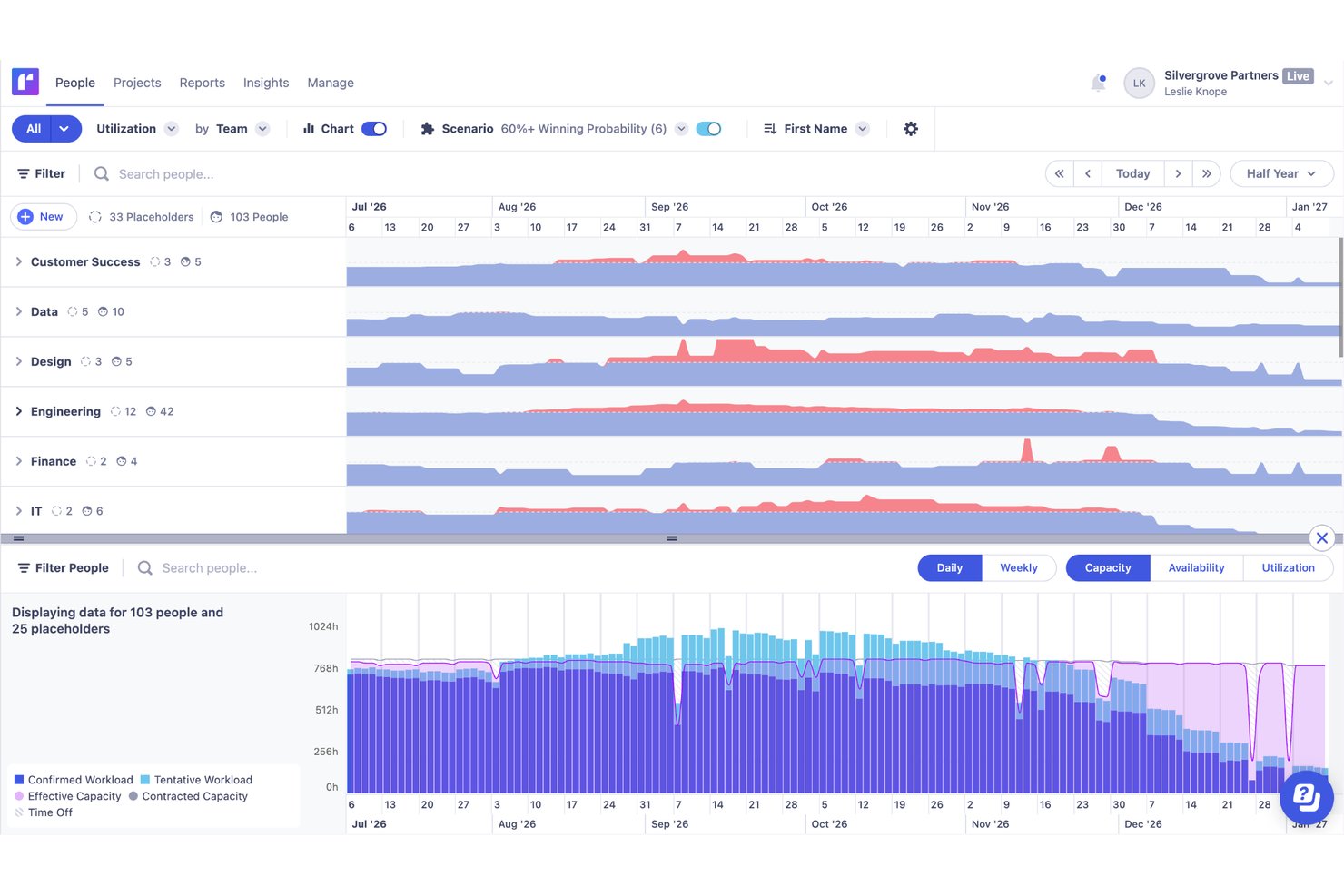
You can easily manage resources with Runn's drag-and-drop interface, which lets you quickly assign and reassign work. Live reports give you real-time insights into how your decisions impact resources.
Forecasting and Capacity Planning
Runn lets you forecast resources using placeholders and tentative work. This helps you understand team capacity and plan for potential hires or reallocations.
Resource Scheduling
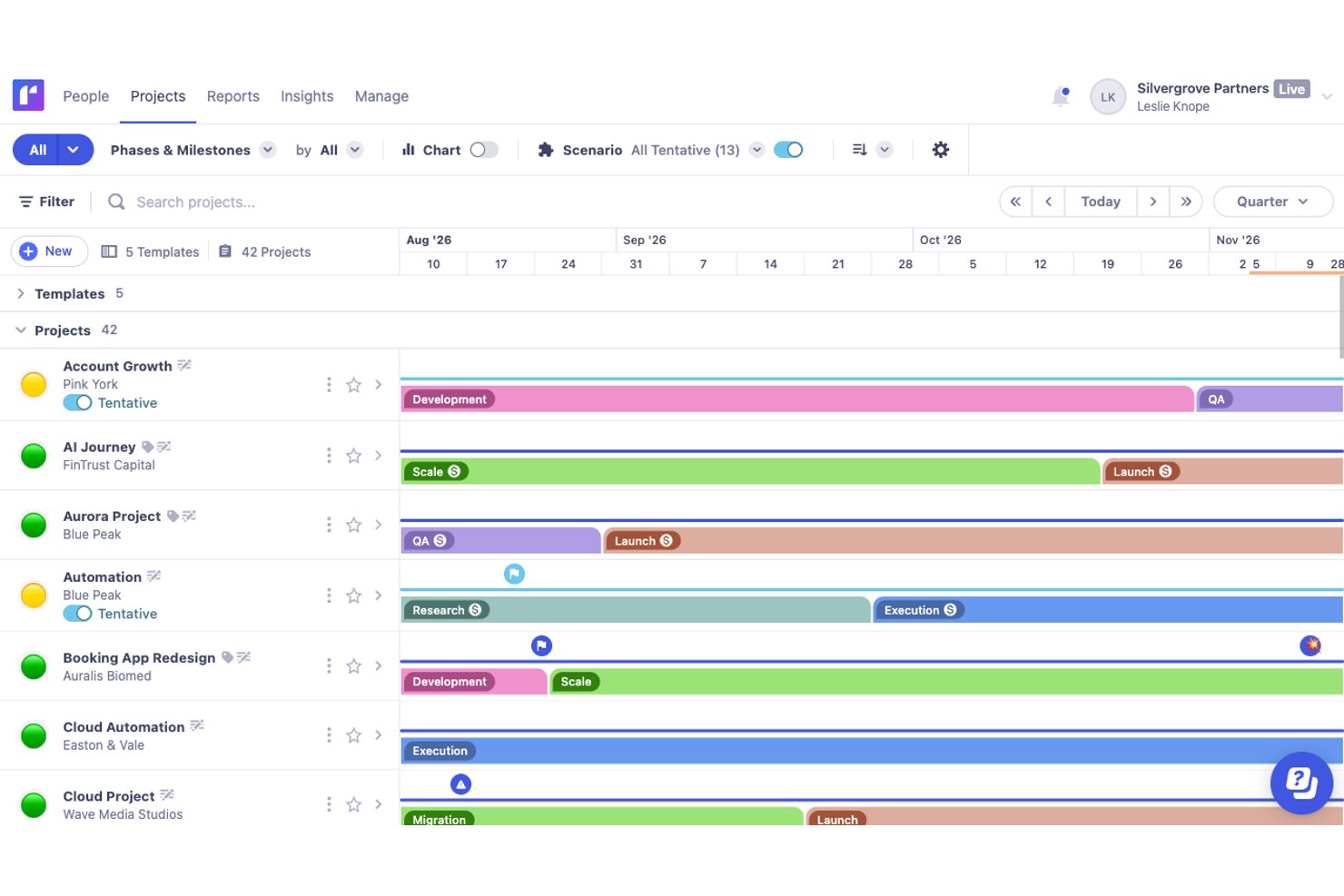
Assigning resources to projects is straightforward with Runn's intuitive drag-and-drop timeline. Multi-select mode allows for bulk actions and makes scheduling adjustments quick and efficient.
Scenario Planning
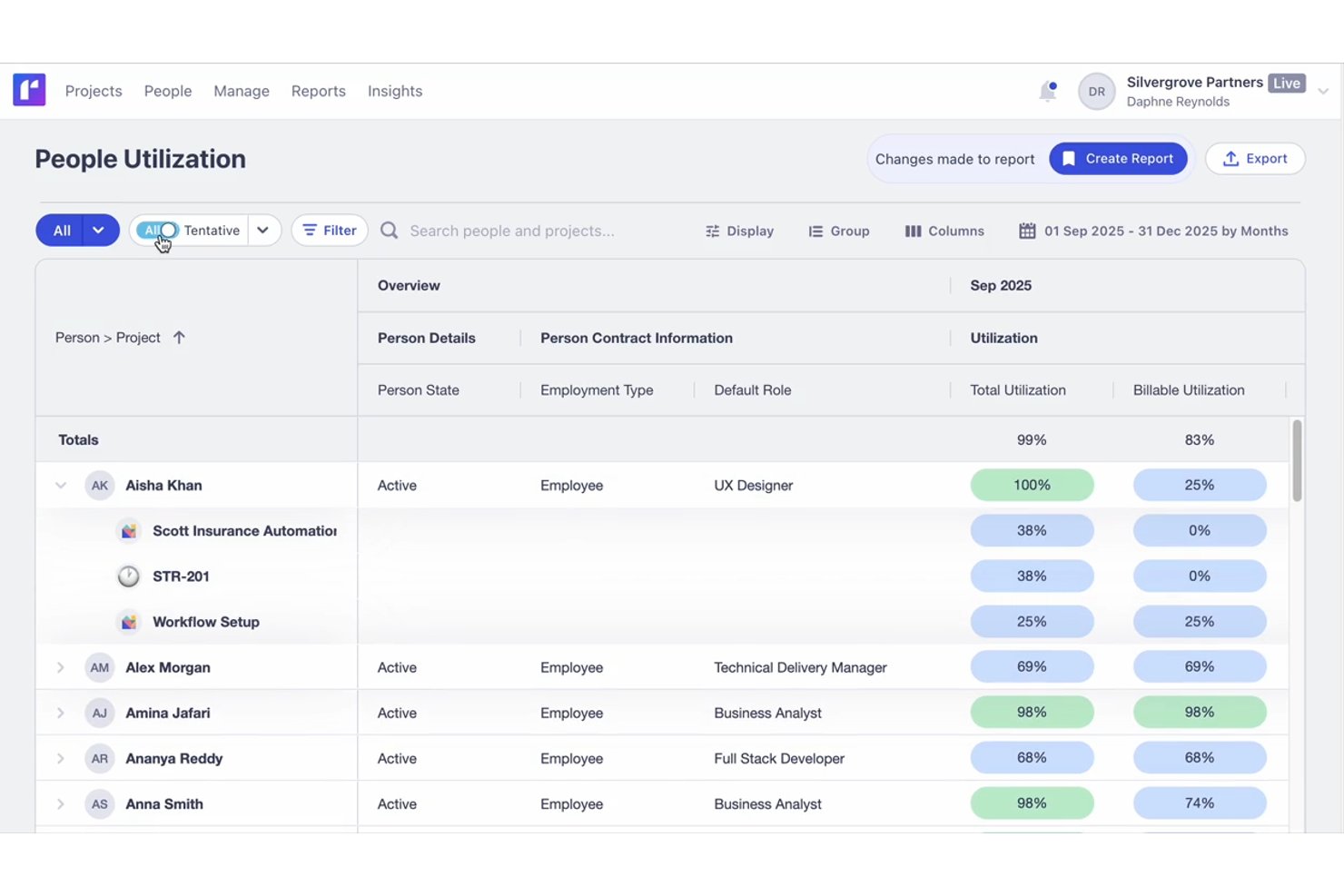
Runn's side-by-side reports let you see utilization and capacity in real-time and conduct scenario planning. You can adjust schedules and immediately see the impact on your team's resources.
Financial Reporting
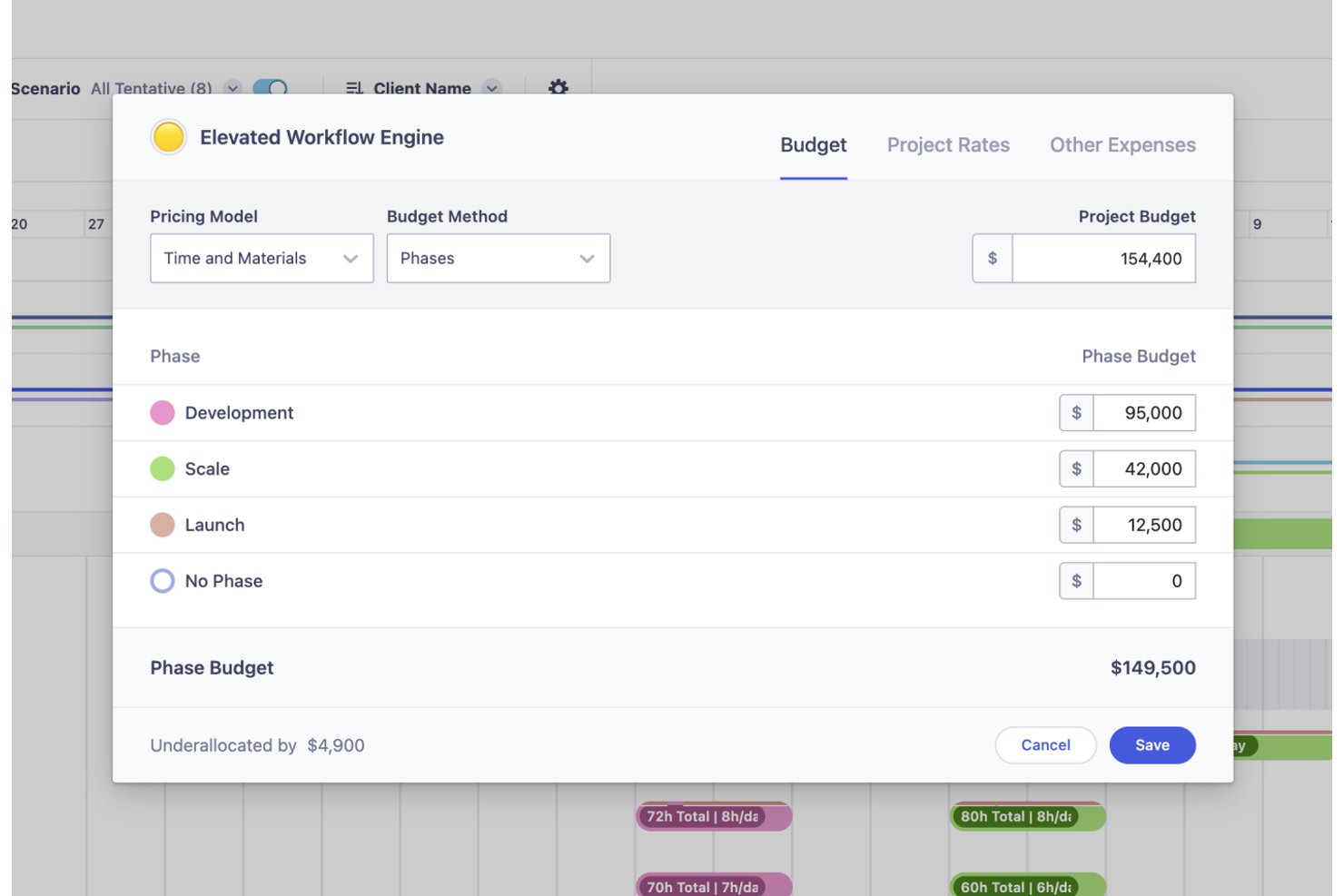
Runn’s financial tools help you track project budgets and costs, so you can meet financial goals. Its support for both fixed-price and time-and-materials billing models adds flexibility to budget management.
Standout Features
Milestones
Runn's milestone feature lets you add context to projects with categories like financial milestones and warning symbols. This helps in signaling important phases, payments, or potential issues to improve project clarity.
Skills Management:
Runn’s skill database lets you list and filter skills across your organization which helps with decision-making. You can assign expertise levels to team members to make it easier to form cross-functional teams for various projects.
Ease of Use
Runn stands out for making complex capacity questions easier to answer. Its visual planning interface helps teams see availability, forecast demand, and understand whether they have the right people to take on upcoming work. Instead of digging through disconnected spreadsheets or guessing at staffing needs, teams can quickly spot capacity gaps, compare future scenarios, and make more confident resourcing decisions.
Onboarding
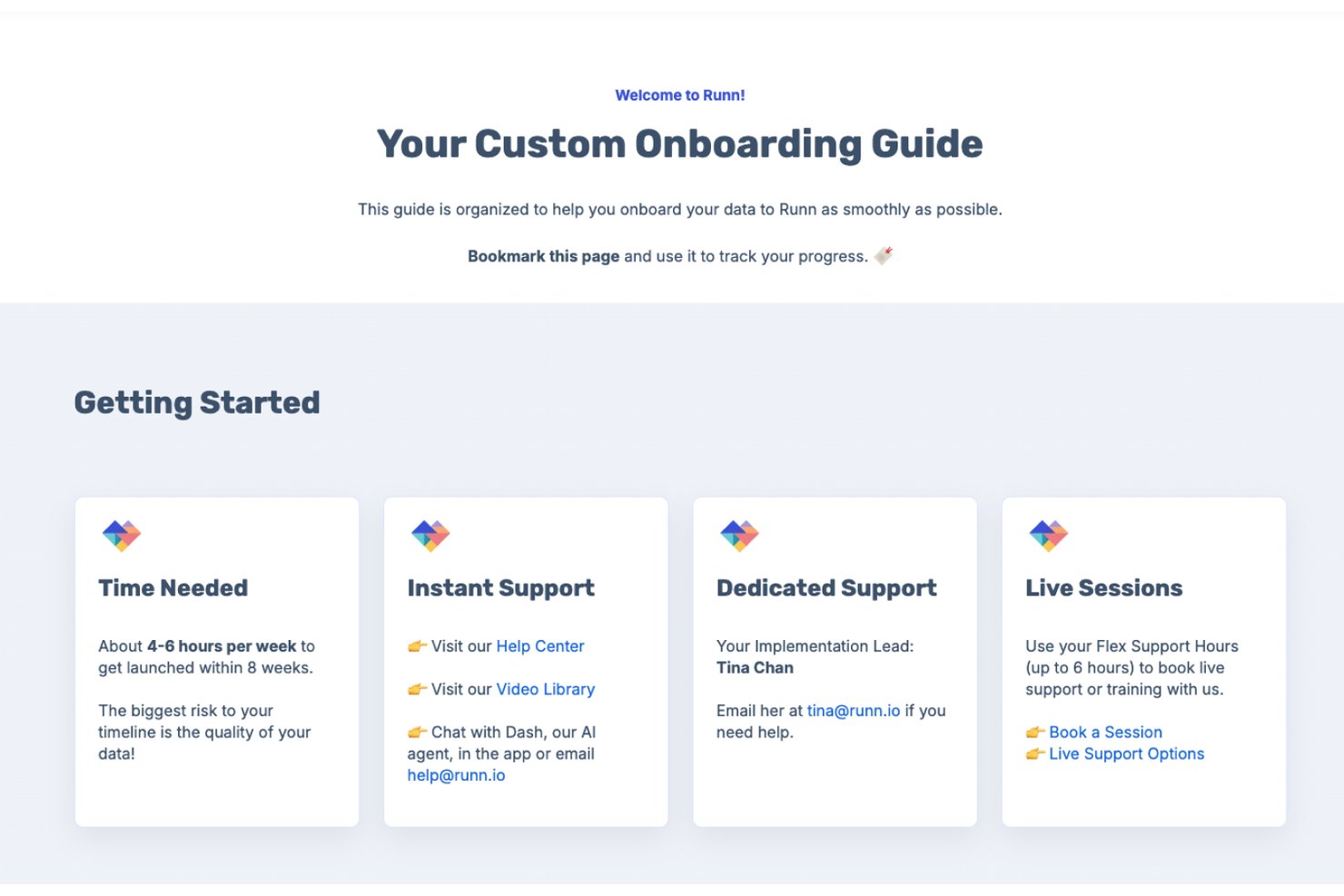
Runn offers flexible onboarding options to suit different team sizes and implementation needs. Organizations can get started quickly through a self-service free trial with guided in-app tutorials and walkthroughs, while those requiring a more hands-on approach can work directly with Runn's customer success team for tailored onboarding and data migration support. Depending on the complexity of the rollout, teams can be fully operational in a matter of days or follow a structured implementation process over several weeks. Users also benefit from ongoing support from resource management specialists who help ensure teams get the most value from the platform.
Customer Support
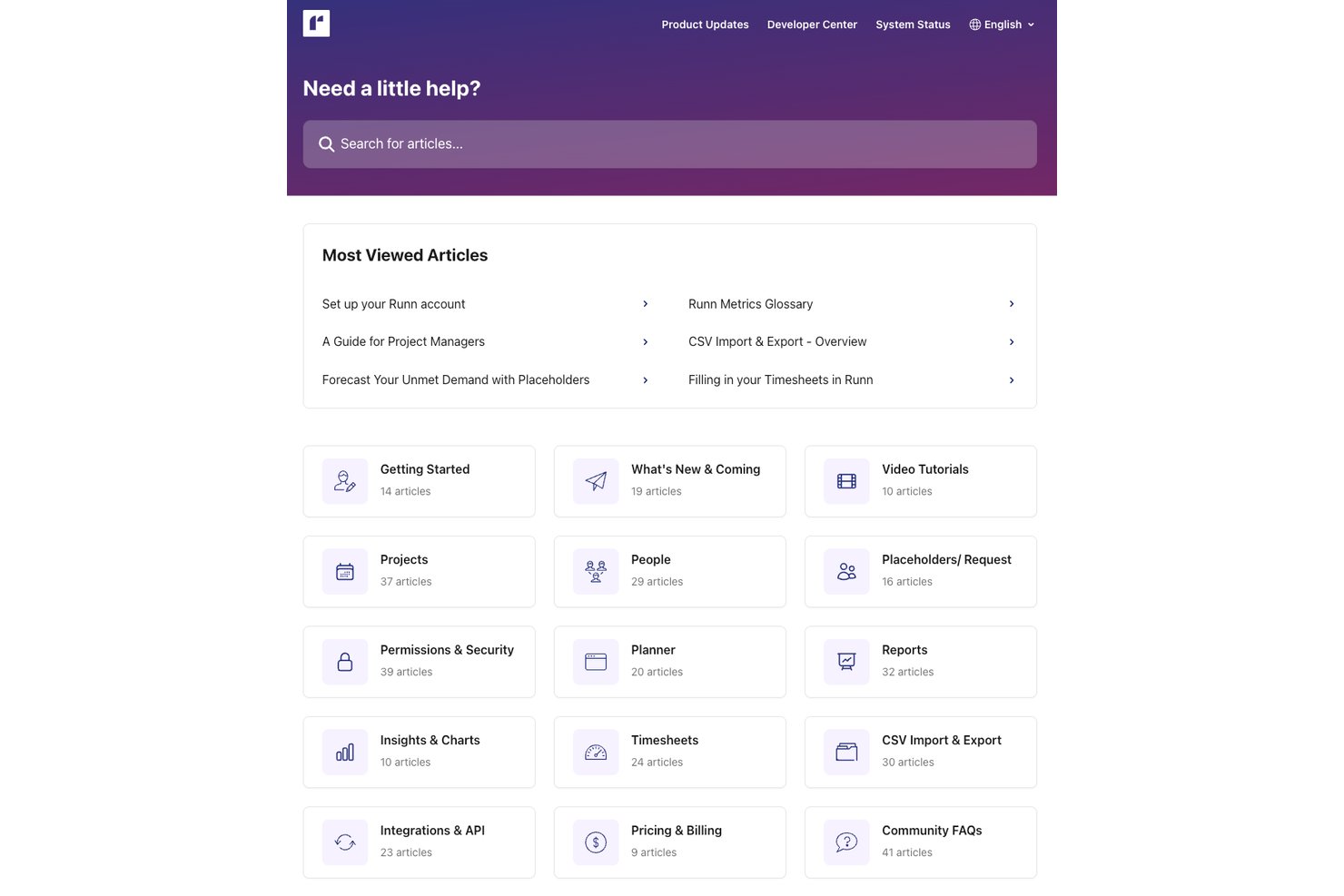
Runn provides reliable customer support from a knowledgeable and helpful team. You can also access guides, FAQs, and other resources through its extensive knowledge center.
Integrations
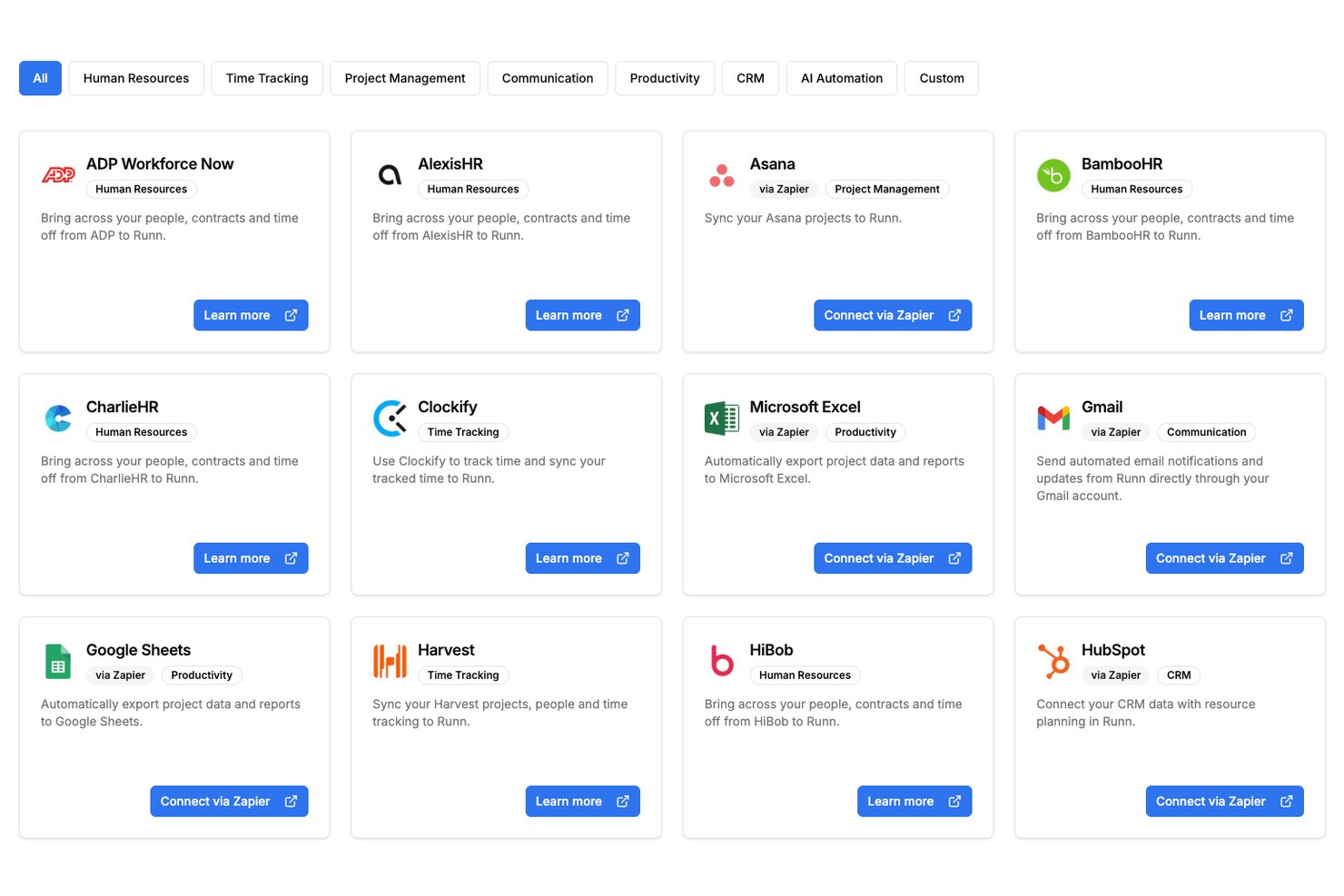
Runn offers native integrations with selected tools, plus API access and additional connections through Zapier and n8n.
Value for Money
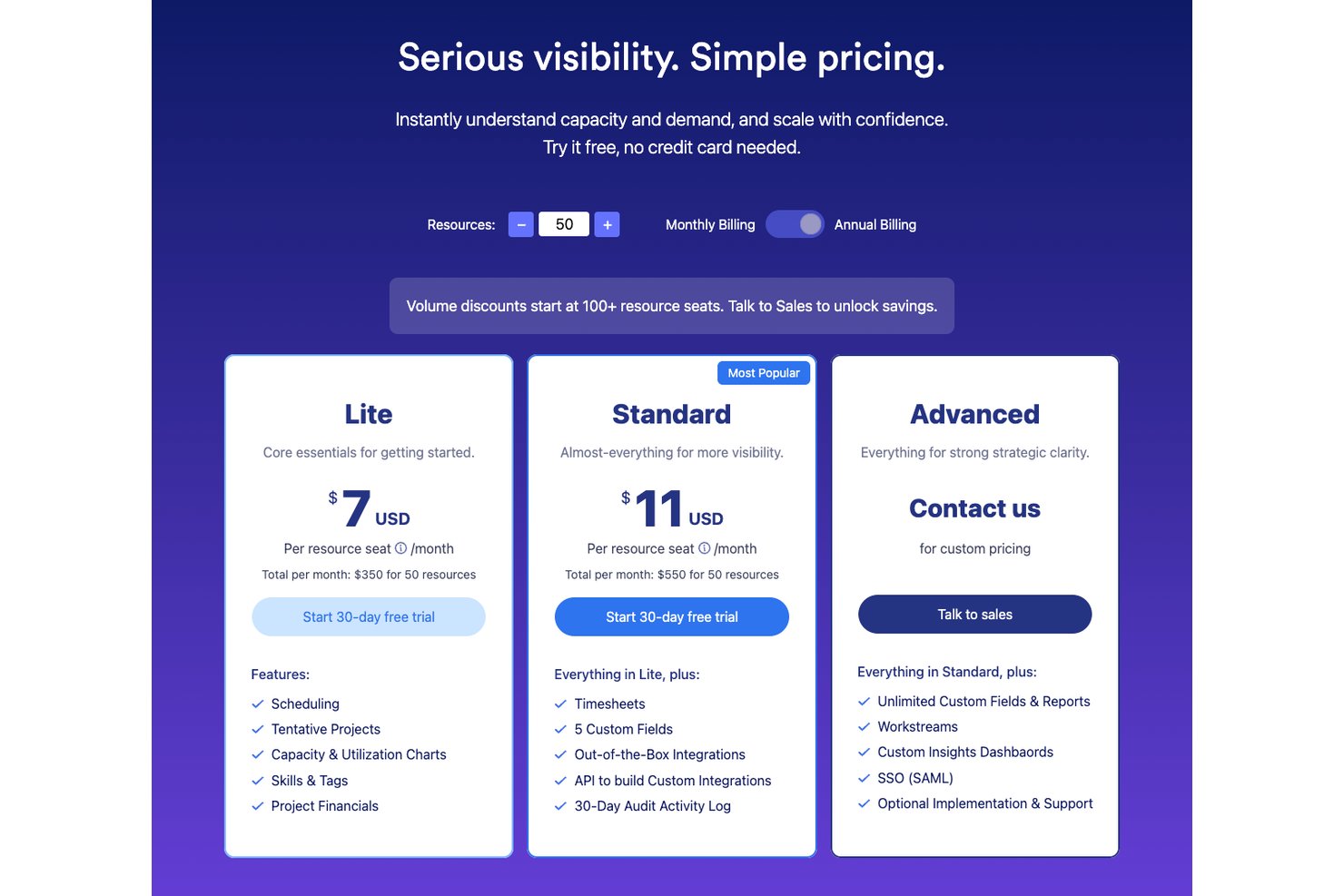
Runn's pricing is based on the number of resource seats and is split across three plans: Lite, Standard, and Advanced. The Lite and Standard plans are charged per resource seat and include progressively more advanced resource planning, reporting, and integration features. There is also an Advanced plan designed for organizations that need enterprise-grade capabilities, which requires contacting Runn for a custom quote. Larger teams can access volume discounts at higher seat counts. Users appreciate Runn's intuitive design, capacity planning tools, and project financial visibility, which help justify its cost compared to more general project management platforms.
- Lite: Includes capacity planning, scheduling, project planning, and advanced filtering.
- Standard: Adds timesheets, utilization insights, integrations, and API access.
- Advanced: Offers custom dashboards, SAML, SSO, resource requests, and workforce insights.
Runn Specs
- API
- Approval Workflows
- Audit Trail
- Budgeting
- Calendar Management
- Compliance Tracking
- Custom Reports
- Customer Management
- Dashboard
- Data Export
- Data Import
- Data Visualization
- Document Management
- Expense Tracking
- External Integrations
- Forecasting
- Inventory Tracking
- Multi-Currency
- Multi-User
- Notifications
- Prioritization
- Process Reporting
- Project Management
- Resource Management
- Risk Assessment
- Roadmapping
- Scheduling
- Supplier Management
- Third-Party Plugins/Add-Ons
- Workflow Management
Runn FAQs
How does Runn handle data security and compliance?
Is there a mobile app for Runn?
How often does Runn update its software?
What kind of training does Runn offer new users?
How does Runn facilitate resource planning?
Does Runn offer customer support on weekends?
Runn Company Overview & History
Runn was founded in 2018 and is headquartered in Wellington, New Zealand. The team is fully remote and operates across three continents. It specializes in resource scheduling and project management solutions for industries like IT and consulting. Runn aims to improve visibility and collaboration in project workflows has over 10,000 users worldwide.
Runn Major Milestones
- 2018: Founded in New Zealand.
- 2025: Reached $6.9 million ARR.