

10 alternativas a TapClicks para informes de marketing en 2026

Lista de alternativas a TapClicks


Las mejores alternativas a TapClicks ofrecen a tu agencia informes flexibles, integraciones sólidas y paneles que realmente tienen sentido para los clientes. Si estás buscando opciones, probablemente buscas una plataforma de software de informes para agencias que combine los informes con la gestión de datos, facilite una mejor toma de decisiones y mejore la facilidad de uso general.
Muchas herramientas van más allá de los informes básicos al ofrecer funciones de inteligencia empresarial, integraciones con CRM e incluso soluciones todo en uno que centralizan tus datos de marketing. En esta guía encontrarás plataformas de software de informes para agencias con las mejores valoraciones, que te ayudarán a automatizar los informes, conectar todos tus datos de marketing y ofrecer la información que interesa a tus clientes, para que dediques menos tiempo a gestionar hojas de cálculo y más a impulsar resultados.
¿Qué es TapClicks?
TapClicks es una plataforma de análisis e informes de marketing diseñada para agencias y equipos de marketing. Conecta datos de múltiples fuentes, automatiza los informes para clientes y ofrece paneles personalizables. Con TapClicks puedes centralizar el rendimiento de las campañas, visualizar métricas clave y simplificar la forma de compartir resultados con los clientes. Las agencias utilizan TapClicks para ahorrar tiempo en la elaboración manual de informes y ofrecer información clara y práctica en todos sus canales de marketing.
Resumen de las mejores alternativas a TapClicks
Este cuadro comparativo resume los detalles de precios de mis principales alternativas a TapClicks para ayudarte a encontrar la mejor opción para tu presupuesto y las necesidades de tu empresa.
| Tool | Best For | Trial Info | Price | ||
|---|---|---|---|---|---|
| 1 | Ideal para paneles empresariales en tiempo real | Prueba gratuita de 14 días | Desde $120/mes (facturado anualmente) | Website | |
| 2 | Ideal para informes de marketing para clientes | Prueba gratuita de 14 días + demostración gratuita | Desde $20/cliente/mes (facturado anualmente) | Website | |
| 3 | Ideal para informes de marketing visuales | Plan gratuito disponible | Desde $229/mes (facturado anualmente) | Website | |
| 4 | Ideal para flujos personalizados de datos de marketing | Demo gratuita disponible | Precio a consultar | Website | |
| 5 | Ideal para el seguimiento del rendimiento en tiempo real | Plan gratuito + prueba gratis + demo gratuita disponible | Desde $64/mes (facturado anualmente) | Website | |
| 6 | Ideal para reportes de marketing automatizados | Prueba gratuita de 14 días + demo gratuita disponible | Desde $62/mes (facturado anualmente) | Website | |
| 7 | Ideal para automatizar datos de marketing | Prueba gratuita de 14 días + demostración gratuita disponible | Desde $44/mes (facturado anualmente) | Website | |
| 8 | Ideal para análisis y reportes de agencias | Demostración gratuita disponible | Precio a consultar | Website | |
| 9 | Ideal para datos de marketing centralizados | Demostración gratuita disponible | Desde $200/mes (facturación anual) | Website | |
| 10 | Ideal para integración de datos de marketing | Demo gratuita disponible | Precio a consultar | Website |
Por qué confiar en nuestras recomendaciones de software
Nuestro equipo lleva probando y evaluando software desde 2012. Como gestores de proyectos, sabemos lo difícil —y lo importante— que es elegir el software adecuado.
Para esta guía, evaluamos las herramientas mediante pruebas prácticas e investigación independiente, puntuando las herramientas según nuestros criterios de selección. También nos basamos en la experiencia de líderes de opinión del sector y de profesionales en activo de la gestión de proyectos.
Nuestras reseñas reflejan nuestro criterio editorial humano, no un discurso de ventas.
Revisores expertos:
Opiniones sobre las alternativas a TapClicks
A continuación encontrarás mis resúmenes detallados de las mejores alternativas a TapClicks que llegaron a mi lista de preselección. Mis análisis ofrecen una visión detallada de las funciones, integraciones y casos de uso más adecuados de cada plataforma para ayudarte a encontrar la mejor opción para ti.

Ideal para paneles empresariales en tiempo real

Klipfolio es una plataforma de paneles y reportes diseñada para agencias y equipos que necesitan visualizar datos de marketing y negocios en tiempo real desde múltiples fuentes. Si deseas crear paneles altamente personalizables y automatizar la elaboración de informes para clientes, esta herramienta está pensada para ti.
¿Para quién es mejor Klipfolio?
Agencias y equipos de marketing que necesitan monitorear y generar reportes de datos en tiempo real provenientes de varias fuentes.
Por qué Klipfolio es una buena alternativa a TapClicks
Elegí Klipfolio por el nivel de control que ofrece sobre el diseño de los paneles. El Klip Editor me permite crear visualizaciones de datos personalizadas desde cero usando fórmulas y transformaciones de datos, algo que la mayoría de herramientas de reportes no permiten a este nivel. También valoro PowerMetrics, la capa de métricas de Klipfolio, que permite a mi equipo definir y estandarizar los KPIs una vez y reutilizarlos en varios paneles. En la práctica, eso significa que cada reporte de cliente extrae de las mismas definiciones de datos consistentes, lo que reduce las discrepancias y las correcciones manuales.
Características clave de Klipfolio
- Amplia biblioteca de gráficos: Elige entre más de 30 tipos de gráficos, incluidos indicadores, pictogramas, mapas y embudos.
- Personalización con HTML, CSS y JS: Modifica los visuales de los paneles utilizando temas personalizados, JavaScript y CSS en línea para informes de clientes con imagen de marca total.
- Reportes automatizados: Programa paneles e informes para renderizarse como PDF o imágenes y envíalos por correo electrónico automatizado.
- Enlaces publicados: Comparte paneles con clientes dentro o fuera de tu organización usando enlaces públicos o protegidos con contraseña.
Integraciones de Klipfolio
Klipfolio ofrece más de 100 integraciones nativas, incluidas Google Analytics, Facebook Ads, HubSpot, Salesforce, Google Sheets, Xero, QuickBooks, Shopify, Snowflake y Zapier. También dispone de una API para integraciones personalizadas.
Pros and Cons
Pros:
- Seguimiento de KPIs en tiempo real con actualización instantánea
- Cálculo profundo de métricas personalizadas mediante fórmulas
- Plantillas predefinidas para una configuración rápida de paneles
Cons:
- Las conexiones iniciales de datos pueden ser complejas
- La programación de informes por correo electrónico requiere planes de pago

Ideal para informes de marketing para clientes

AgencyAnalytics es una plataforma de informes diseñada para agencias de marketing que quieren automatizar los informes para clientes y supervisar el rendimiento de las campañas en un solo lugar. Si gestionas varios clientes y necesitas conectar decenas de canales de marketing, esta herramienta te ayuda a centralizar los análisis y agilizar las actualizaciones.
¿Para quién es más adecuada AgencyAnalytics?
Agencias y consultores de marketing que necesitan informes automatizados para clientes en múltiples canales.
Por qué AgencyAnalytics es una buena alternativa a TapClicks
Elegí AgencyAnalytics porque la función de programación automática de informes realmente elimina el trabajo manual de preparar informes para clientes a gran escala. Me gusta que puedas convertir un panel en vivo en un informe pulido y programado en cuestión de minutos, con datos de más de 85 integraciones ya incorporados. El flujo de aprobación de informes es una función que considero especialmente útil: me permite revisar y añadir comentarios antes de que cualquier contenido se envíe a los clientes. En la práctica, eso significa que cada informe refleja la voz de mi agencia y no solo datos sin procesar.
Características principales de AgencyAnalytics
- Creador de informes de arrastrar y soltar: Crea y personaliza informes para clientes mediante un editor visual con widgets, fuentes, colores e imágenes de fondo ajustables.
- Creación de informes en presentaciones: Convierte los datos de rendimiento de marketing en presentaciones listas para exponer directamente dentro del creador de informes.
- Widget de seguimiento de objetivos: Establece objetivos para cualquier métrica y muestra el progreso en tiempo real hacia las metas de los clientes dentro de los paneles y los informes.
- Informes y paneles consolidados: Agrupa métricas clave de varios clientes o ubicaciones en una única vista consolidada.
Integraciones de AgencyAnalytics
AgencyAnalytics ofrece más de 85 integraciones nativas, incluidas Google Analytics, Google Ads, Facebook Ads, LinkedIn Ads, Mailchimp y otras, además de una API disponible para integraciones personalizadas.
Pros and Cons
Pros:
- Paneles con marca blanca para la imagen de marca del cliente
- Seguimiento personalizado de objetivos y widgets de KPI
- Flujo de aprobación integrado para revisar informes
Cons:
- No incluye un almacén de datos ni herramientas ETL integrados
- Carece de modelado avanzado de atribución entre canales

Ideal para informes de marketing visuales

Whatagraph es una plataforma de informes multicanal diseñada para agencias de marketing que necesitan unificar datos de múltiples fuentes. Si deseas automatizar los informes para tus clientes y entregar análisis visualmente atractivos en tiempo real, esta herramienta está pensada para ti.
¿Para quién es mejor Whatagraph?
Agencias de marketing y equipos internos que gestionan campañas digitales multicanal.
¿Por qué Whatagraph es una buena alternativa a TapClicks?
Elegí Whatagraph porque su pipeline de datos integrado se encarga de la unificación de datos multicanal sin necesidad de middleware o trabajos manuales de ETL. Me gusta la función Source Blends, que permite combinar datos de plataformas como Google Ads y Facebook Ads en una sola vista multicanal. El motor de transformación sin código también resulta realmente útil: puedo estandarizar convenciones de nombres y construir métricas calculadas como ROAS combinado entre cuentas. En la práctica, esto significa que paso menos tiempo organizando datos y más tiempo entregando ideas accionables para los clientes.
Funciones principales de Whatagraph
- Creación de informes con IA: Usa instrucciones en lenguaje natural para generar informes de marketing completos sin construirlos manualmente desde cero.
- Chat con IA para clientes: Permite que los clientes consulten directamente sus propios datos a través de un chat integrado en su informe en vivo.
- Espacios de trabajo para múltiples clientes: Gestiona cientos de clientes en espacios de trabajo aislados y personalizados, con historial de versiones y plantillas vinculadas.
- Control de acceso basado en roles: Asigna permisos en cuatro niveles para controlar quién puede conectar datos, editar transformaciones o ver tableros.
Integraciones de Whatagraph
Whatagraph ofrece integraciones nativas con Google Analytics, Google Ads, Facebook Ads, LinkedIn Ads, HubSpot, Mailchimp, Shopify, Klaviyo, TikTok Ads, y más, además de una API disponible para integraciones personalizadas.
Pros and Cons
Pros:
- Informes programados automáticos para múltiples clientes
- Seguimiento de objetivos personalizados y widgets de KPI
- Flujo de aprobación incorporado para revisión de informes
Cons:
- Carece de configuración de permisos granulares en profundidad
- No está disponible la edición masiva de fuentes de datos

Ideal para flujos personalizados de datos de marketing
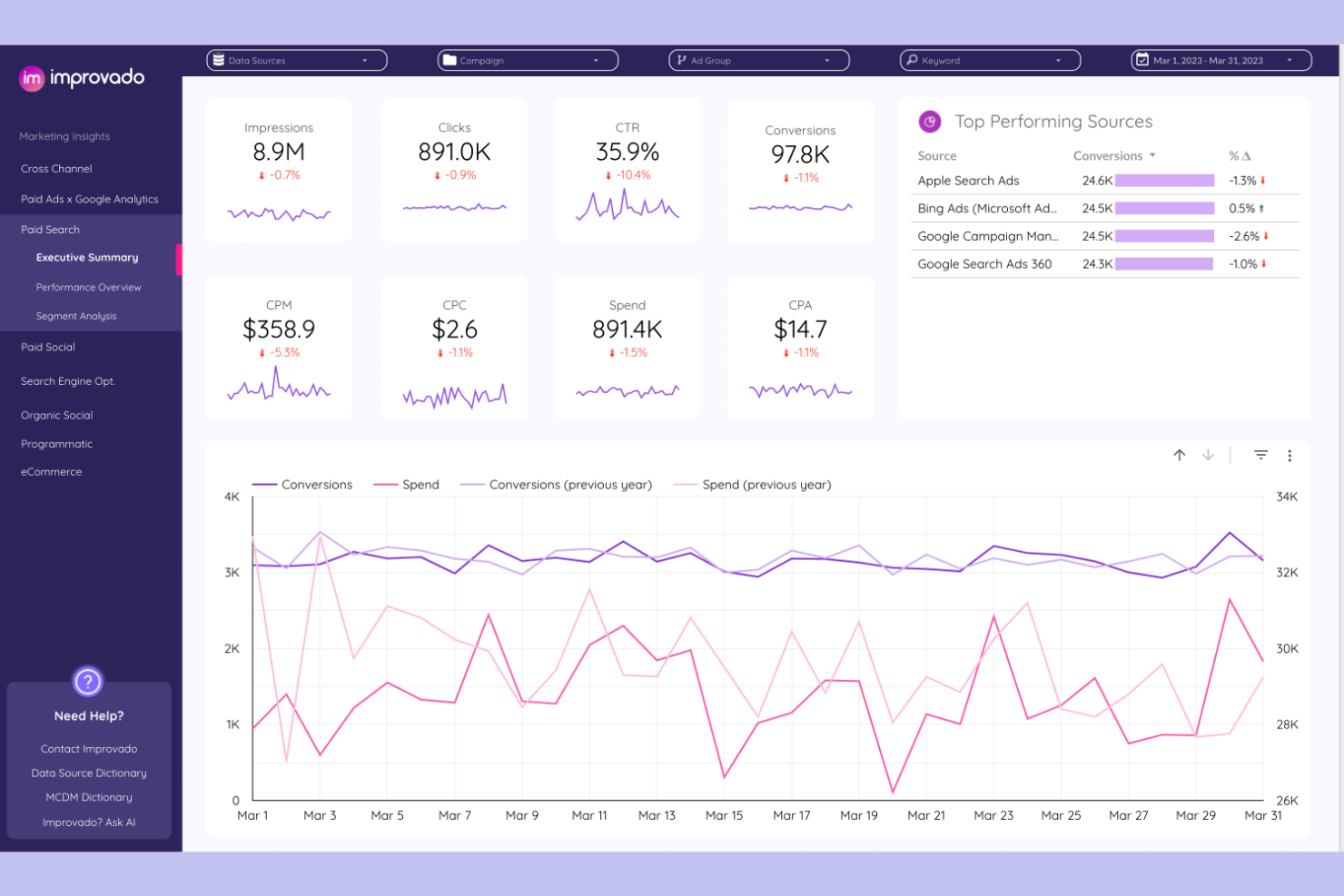
Improvado es una plataforma de análisis de marketing diseñada para agencias y equipos empresariales que necesitan centralizar, transformar y visualizar datos de docenas de fuentes de anuncios y analítica. Si buscas automatizar flujos de trabajo de informes complejos y obtener ideas accionables en múltiples canales, esta herramienta está pensada para ti.
¿Para quién es ideal Improvado?
Equipos de análisis de marketing en grandes agencias o marcas empresariales que gestionan campañas multicanal de alto volumen.
Por qué Improvado es una buena alternativa a TapClicks
Elegí Improvado porque su capa de descubrimiento impulsada por IA detecta anomalías y cambios de rendimiento en los canales sin que tenga que revisar manualmente los paneles. Me gusta mucho la función Insights, que marca automáticamente los cambios significativos en métricas como ROAS o CPC y explica la causa probable. En la práctica, esto significa que mi equipo puede detectar campañas con bajo rendimiento antes de que gasten el presupuesto, en lugar de enterarse después. Para las agencias que gestionan grandes carteras de anuncios complejos, ese tipo de descubrimiento automatizado es difícil de encontrar en otros lugares.
Características clave de Improvado
- Paneles de BI preconfigurados: Accede a plantillas de paneles ya preparadas compatibles con Power BI, Looker Studio y Tableau para los casos de uso habituales en marketing.
- Informes automatizados de periodo a periodo: Programa y automatiza informes recurrentes que comparan el rendimiento entre periodos personalizados sin configuración manual.
- Gobernanza de datos de marketing: Aplica reglas desde una biblioteca de directrices integrada para controlar la calidad de los datos de las campañas y señalar problemas de cumplimiento en toda tu canalización.
- Co-piloto de análisis con IA: Consulta tus datos de marketing en lenguaje natural y obtén respuestas presentadas como gráficos, tablas o diagramas en segundos.
Integraciones de Improvado
Improvado ofrece más de 500 integraciones nativas, incluyendo Google Ads, Facebook Ads, LinkedIn Ads, Google Analytics, HubSpot, Salesforce, Shopify, Amazon Ads, TikTok Ads y Google Sheets, con una API disponible para integraciones personalizadas.
Pros and Cons
Pros:
- Paneles preconfigurados para Power BI y Tableau
- Informes automatizados de periodo a periodo
- Co-piloto de análisis en lenguaje natural
Cons:
- Opciones limitadas de personalización de visualización
- No cuenta con modelado avanzado de atribución multicanal

Databox
Ideal para el seguimiento del rendimiento en tiempo real

Databox es una plataforma de análisis empresarial diseñada para agencias y equipos de marketing que necesitan consolidar datos de múltiples fuentes en paneles en tiempo real. Es una opción ideal para equipos que desean hacer seguimiento de KPIs, visualizar el rendimiento de campañas y automatizar informes a clientes sin una configuración compleja.
¿Para quién es mejor Databox?
Agencias de marketing y equipos internos que necesitan centralizar la analítica y automatizar reportes en tiempo real desde múltiples fuentes de datos.
Por qué Databox es una buena alternativa a TapClicks
Elegí Databox por su función Data Stories, que me permite insertar valores de métricas dinámicas directamente en el texto de los reportes. Cuando envío un informe mensual a un cliente, la narrativa se actualiza automáticamente con los últimos números, sin necesidad de ediciones manuales. También utilizo el modo de presentación de Databox, que formatea los reportes en diapositivas a pantalla completa con notas para el orador en reuniones en vivo con clientes. Esa combinación de informes automatizados y formato de presentación en vivo es algo que la mayoría de herramientas de informes para agencias no ofrecen juntas.
Funciones clave de Databox
- Resúmenes de rendimiento por IA: El analista Genie AI de Databox genera resúmenes escritos de métricas clave directamente en los reportes.
- Programación de informes: Envía automáticamente informes PDF por correo electrónico o Slack de forma diaria, semanal, mensual o trimestral.
- Plantillas de informes prediseñadas: Accede a plantillas listas para canales como Google Ads, Facebook Ads, HubSpot y Google Analytics 4.
- Personalización de marca: Ajusta tipografías, logotipos, imágenes y colores para adaptarlos a la marca de tu empresa o cliente dentro de los reportes.
Integraciones de Databox
Databox ofrece más de 130 integraciones nativas, incluyendo Google Analytics, Google Ads, Facebook Ads, HubSpot, Salesforce, Shopify, LinkedIn Ads, Mailchimp, Stripe y Google Sheets. Se dispone de una API para integraciones personalizadas.
Pros and Cons
Pros:
- Aplicación móvil para acceder a los datos desde cualquier lugar
- Amplia galería de plantillas de informes con un solo clic
- Alertas automáticas de datos por cambios en KPIs
Cons:
- Actualizaciones manuales de datos en planes gratuitos
- Retención de datos históricos limitada en niveles inferiores

Swydo
Ideal para reportes de marketing automatizados

Swydo es una plataforma de generación de informes y monitoreo diseñada para agencias y especialistas en marketing digital que necesitan automatizar los reportes de clientes en múltiples canales. Destaca por su enfoque basado en flujos de trabajo, que facilita programar, personalizar y gestionar informes recurrentes para los clientes.
¿Para quién es ideal Swydo?
Agencias y equipos de marketing digital que necesitan automatizar y gestionar informes recurrentes de clientes a través de diversas plataformas de publicidad y análisis.
Por qué Swydo es una buena alternativa a TapClicks
Elegí Swydo por la forma en que gestiona la generación automatizada de informes de clientes a gran escala. Las plantillas de informes dinámicos permiten a mi equipo crear una plantilla maestra y aplicarla instantáneamente a todas las cuentas de clientes: cualquier actualización en un widget o métrica se replica en todos los informes a la vez, eliminando mucho trabajo repetitivo de mantenimiento. También dependo de los tableros de monitoreo de Swydo para vigilar los KPIs de los clientes en todas las cuentas desde una sola vista, con alertas basadas en umbrales que detectan problemas antes de que los clientes los noten. Para agencias que gestionan un alto volumen de informes recurrentes, esa combinación de programación automatizada y monitoreo proactivo es difícil de igualar.
Características clave de Swydo
- Plantillas de informes predefinidas: Accede a una biblioteca de plantillas listas para usar con widgets y KPIs preestablecidos para canales como Google Ads, Meta y LinkedIn.
- Seguimiento de objetivos: Establece objetivos personalizados para conversiones, ROAS o clientes potenciales y haz un seguimiento automático del progreso contra esos objetivos dentro de los informes.
- Tableros para clientes: Crea tableros de monitoreo personalizados por cliente con tablas de KPIs, umbrales de objetivo y filtros por responsable de cuenta o estado del KPI.
- Compartir en PDF y paneles online: Entrega informes como PDFs descargables o paneles online compartibles, según la preferencia del cliente.
Integraciones de Swydo
Swydo ofrece más de 32 integraciones nativas que incluyen Google Ads, Facebook Ads, Google Analytics, LinkedIn Ads, Microsoft Advertising, Google Sheets, Mailchimp, HubSpot, Instagram Insights y YouTube. Dispone de una API para integraciones personalizadas.
Pros and Cons
Pros:
- Recordatorios automáticos para la entrega de informes
- Seguimiento de objetivos integrado para los clientes
- Duplica informes entre cuentas de clientes al instante
Cons:
- Sin funcionalidades integradas de almacenamiento de datos
- La programación de informes está disponible solo en planes superiores

Ideal para automatizar datos de marketing

Supermetrics es una plataforma de canalización de datos diseñada para equipos de marketing y análisis que necesitan trasladar datos de decenas de fuentes a sus herramientas de informes preferidas. Si buscas automatizar la recopilación de datos y centralizar los análisis de marketing para los informes de clientes, vale la pena considerar Supermetrics.
¿Para quién es más adecuado Supermetrics?
Agencias de marketing y equipos de análisis que necesitan automatizar la recopilación de datos multicanal para los informes de clientes.
Por qué Supermetrics es una buena alternativa a TapClicks
Elegí Supermetrics porque hace una cosa excepcionalmente bien: extraer datos de marketing de decenas de fuentes y enviarlos directamente a las herramientas que mi equipo ya utiliza para elaborar informes. Me gusta que se conecte de forma nativa con Google Sheets, Looker Studio y Power BI, por lo que no me obliga a utilizar un entorno de panel propietario. La programación de actualizaciones automáticas de datos de Supermetrics mantiene los informes de los clientes actualizados sin necesidad de exportaciones manuales. Para los equipos que quieren controlar su propia capa de informes en lugar de depender de una plataforma integrada, esa flexibilidad es una ventaja real.
Funciones principales de Supermetrics
- Plantillas de informes prediseñadas: Comienza con plantillas listas para usar en Looker Studio, Google Sheets y Power BI en lugar de crear informes desde cero.
- Combinación de datos sin código: Combina datos de varios canales de marketing en un editor visual sin escribir código.
- Supervisión de UTM y de las convenciones de nomenclatura: Realiza un seguimiento de los parámetros UTM y de los cambios en las etiquetas, con alertas que se activan en el momento en que algo deja de funcionar.
- Almacenamiento y reproducción de datos: Almacena datos sin procesar y modelados directamente en Supermetrics para rellenar periodos anteriores y reproducir datos sin configurar un almacén de datos independiente.
Integraciones de Supermetrics
Supermetrics ofrece integraciones nativas con plataformas de marketing y análisis, como Google Analytics, Facebook Ads, Google Ads, HubSpot, LinkedIn Ads, Twitter Ads, Bing Ads, Mailchimp, Shopify y Google Search Console. También hay una API disponible para integraciones personalizadas.
Pros and Cons
Pros:
- Automatiza la agregación de datos de marketing de varias fuentes
- Permite la entrega directa de datos a herramientas de inteligencia empresarial
- Supervisa la coherencia de las UTM y las convenciones de nomenclatura
Cons:
- No incluye un panel ni un estudio de visualización integrados
- Compatibilidad limitada con fuentes de datos que no son de marketing

NinjaCat
Ideal para análisis y reportes de agencias
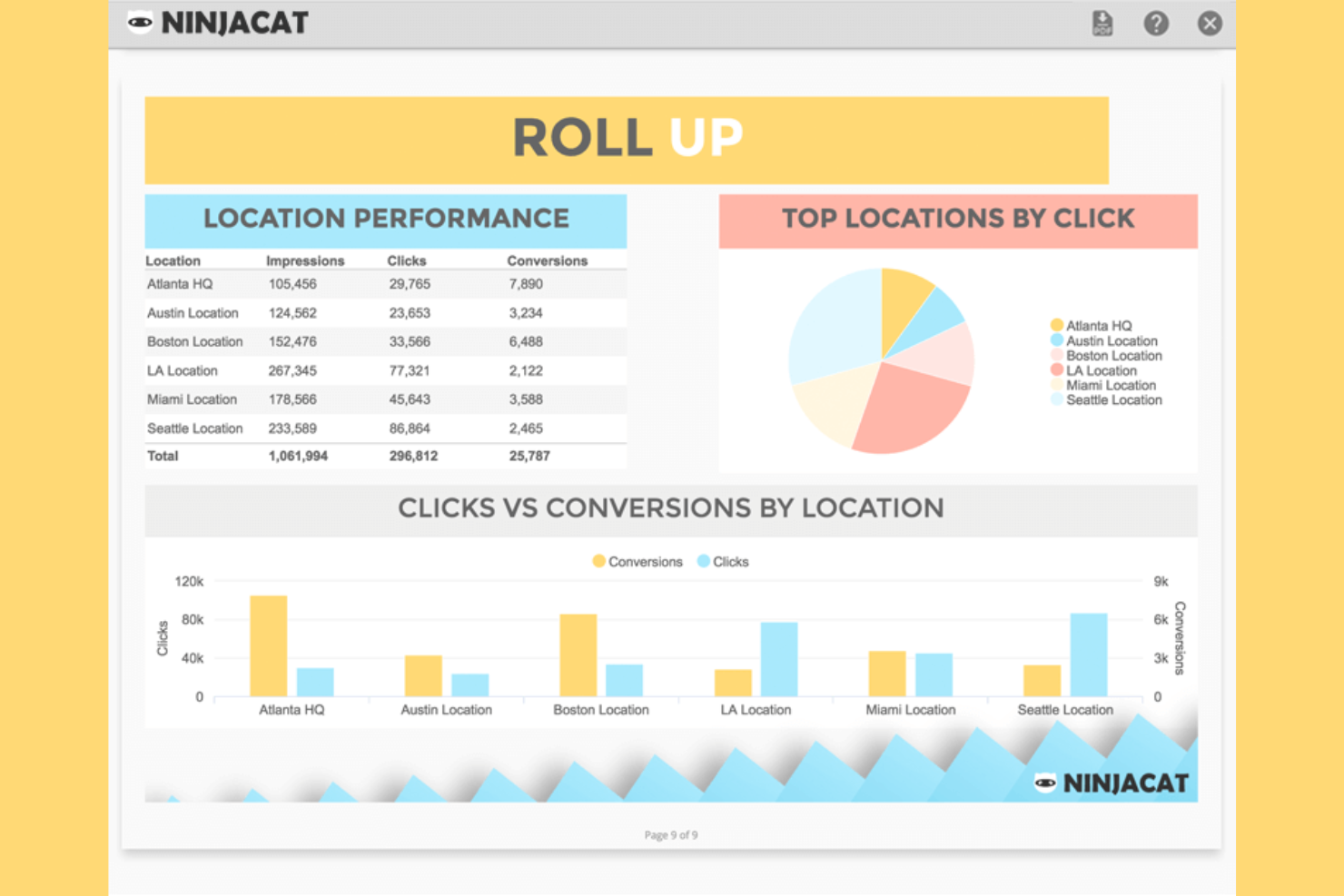
NinjaCat es una plataforma de generación de informes de marketing creada para agencias y empresas de medios que necesitan unificar datos de campañas, llamadas y gastos en un solo lugar. Si deseas automatizar los informes para clientes en múltiples canales publicitarios y rastrear el rendimiento hasta el nivel de cada llamada, vale la pena considerar NinjaCat.
¿Para quién es mejor NinjaCat?
Agencias de marketing y equipos de medios que gestionan campañas multicanal y reportes de clientes a escala.
Por qué NinjaCat es una buena alternativa a TapClicks
He seleccionado NinjaCat porque gestiona el flujo completo de informes para agencias que manejan múltiples clientes entre diferentes canales, incluyendo campañas de comercio electrónico. Me gusta que combina el seguimiento de llamadas con los datos de medios pagados en una sola vista, ayudándome a presentar una imagen completa del rendimiento. Sus reportes globales facilitan la agregación de datos entre diferentes cuentas, sin dejar de profundizar en los detalles, y funciones como usuarios ilimitados apoyan el crecimiento de los equipos. A pesar de sus capacidades avanzadas, la plataforma mantiene una curva de aprendizaje asequible, lo que facilita escalar los informes sin mayor complejidad.
Características clave de NinjaCat
- Widget de Insights de IA: Genera resúmenes de datos y narrativas en lenguaje sencillo directamente junto a los widgets del panel o en los informes.
- Galería de plantillas de informes: Comienza con plantillas prediseñadas o guarda tu propio diseño maestro para reutilizarlo entre clientes y campañas.
- Cálculo de márgenes de agencia: Incorpora las comisiones de la agencia directamente en métricas calculadas como CPC o CPM dentro de los informes.
- Paneles interactivos para clientes: Comparte paneles en tiempo real con permisos para que los clientes puedan filtrar y explorar datos cuando lo deseen.
Integraciones de NinjaCat
NinjaCat ofrece integraciones nativas con Google Ads, Facebook, Google Analytics 4, Google Sheets, LinkedIn, Facebook Insights y más. Hay conectores personalizados disponibles para fuentes de datos adicionales.
Pros and Cons
Pros:
- Integra el seguimiento de llamadas con los informes publicitarios
- Admite informes para múltiples ubicaciones y franquicias
- Ofrece paneles personalizables de marca blanca orientados al cliente
Cons:
- No incluye herramientas integradas de SEO o analítica web
- El editor de plantillas de informes puede resultar limitado

Funnel
Ideal para datos de marketing centralizados

Funnel es una plataforma de datos de marketing creada para agencias y equipos internos que necesitan centralizar, limpiar e informar sobre los datos de campañas provenientes de cientos de fuentes. Si deseas automatizar la recopilación de datos y entregar informes actualizados y listos para el cliente sin trabajo manual, esta herramienta está diseñada para ti.
¿Para Quién es Mejor Funnel?
Agencias de marketing y equipos internos que gestionan campañas digitales multicanal para varios clientes o marcas.
Por Qué Funnel Es una Buena Alternativa a TapClicks
Elegí Funnel porque elimina el trabajo manual de extraer datos de decenas de plataformas publicitarias y consolidarlos en una única capa de informes limpia. Lo que realmente me gusta es el pipeline automatizado de recopilación de datos—Funnel se conecta a tus fuentes, normaliza los datos y los mantiene actualizados sin que nadie toque una hoja de cálculo. También valoro la función de Informe, que permite a mi equipo crear informes listos para el cliente y compartibles directamente sobre datos en vivo. En la práctica, esto significa que no estamos rehaciendo informes cada semana: se actualizan automáticamente a medida que llegan nuevos datos de campaña.
Funciones Clave de Funnel
- Funnel Portals: Crea portales seguros y específicos para cada cliente que les permiten acceder a su propio panel personalizado sin compartir datos no relacionados.
- Constructor de paneles drag-and-drop: Crea informes desde cero o personaliza plantillas preconstruidas sin escribir código.
- Soporte para múltiples destinos de BI: Envía el mismo conjunto de datos a Looker Studio, Power BI, Tableau, Google Sheets y Excel simultáneamente.
- Plantillas de panel preconstruidas: Comienza con plantillas listas para casos de uso como anuncios pagados, Google Analytics, Shopify y marketing de rendimiento multicanal.
Integraciones de Funnel
Funnel ofrece integraciones nativas con Google Ads, Facebook Ads, LinkedIn Ads, Google Analytics, HubSpot, Shopify, Amazon Ads, TikTok Ads y Google Sheets, con una API disponible para integraciones personalizadas.
Pros and Cons
Pros:
- Tableros en vivo que se actualizan con los nuevos datos de campaña
- Exportaciones a Power BI, Tableau y Google Sheets
- Mapeo de datos personalizado para necesidades de informes complejos
Cons:
- Sin visualización integrada más allá de los tableros
- No ofrece un panel de control de marca blanca directo para clientes


Adverity es una plataforma de integración y análisis de datos diseñada para equipos de marketing y agencias que necesitan unificar, limpiar y analizar datos de múltiples fuentes. Si buscas automatizar flujos de trabajo de datos complejos y ofrecer información accionable a los clientes, Adverity es una opción a considerar.
¿Para quién es mejor Adverity?
Analistas de marketing y equipos de datos en agencias medianas y grandes que necesitan integración y análisis de datos automatizados.
Por qué Adverity es una buena alternativa a TapClicks
He elegido Adverity porque su integración de datos automatizada va más allá que la mayoría de las herramientas de generación de informes. Me gusta que se encargue de la armonización de datos automáticamente, mapeando convenciones de nombres inconsistentes entre plataformas, para que mi equipo no tenga que pasar horas limpiando datos antes de crear informes. La función DataStream de Adverity me permite extraer información de cientos de fuentes y programar actualizaciones de datos automáticas, manteniendo los paneles siempre actualizados sin intervención manual. Para agencias que gestionan grandes volúmenes de datos de múltiples canales, ese nivel de automatización es difícil de igualar.
Características clave de Adverity
- Supervisión de la calidad de los datos: Detecta automáticamente anomalías e inconsistencias en tu almacén de datos antes de que lleguen a los informes.
- Controles granulares de acceso de usuario: Establece permisos basados en roles para gestionar quién puede ver, editar o exportar datos en equipos y clientes.
- Consultas con IA conversacional: Plantea preguntas en lenguaje natural directamente a tus datos para obtener información sin escribir SQL.
- Enrutamiento de destino de datos: Envía datos armonizados a herramientas de BI y plataformas como Tableau, Power BI, Snowflake y Google BigQuery.
Integraciones de Adverity
Adverity ofrece más de 600 integraciones nativas con plataformas de marketing, análisis y nube, incluyendo Google Analytics, Facebook Ads, Amazon Advertising, Salesforce, HubSpot y Snowflake. Se ofrece una API para integraciones personalizadas.
Pros and Cons
Pros:
- Gestiona automáticamente la armonización de datos complejos
- Ofrece herramientas avanzadas de supervisión de calidad de datos
- Permite actualizaciones automatizadas y programadas de datos
Cons:
- Requiere configuración técnica para flujos de trabajo avanzados
- No incluye funciones directas de informes marca blanca
Otras alternativas a TapClicks
Estas son algunas alternativas adicionales a TapClicks que no llegaron a mi lista de preselección, pero que siguen siendo dignas de consideración:
- Scoro
Ideal para reportes empresariales y paneles de control
- DashThis
Ideal para informes automatizados de agencias
- Reporting Ninja
Mejor para informes de marca blanca


Cómo evalúo las alternativas a TapClicks
Divido mi evaluación en dos niveles: la base que toda herramienta debe superar —como la extracción de datos de múltiples fuentes y la generación automatizada de informes para clientes— y los factores diferenciadores que separan lo bueno de lo excelente.
Funcionalidad principal (requisitos básicos para esta lista)
Al seleccionar herramientas para mi lista, clasifico cada una en una escala del 0 (no ofrece la funcionalidad) al 5 (sobresale en esta área) para cada funcionalidad principal que se indica a continuación. Después, convierto la puntuación total de la herramienta en un porcentaje. Cada herramienta debe alcanzar una puntuación total mínima del 65% para ser considerada.
- Integraciones de datos unificadas: Compruebo cuántos conectores nativos ofrece cada herramienta para plataformas publicitarias, analítica y CRM, extrayendo datos de fuentes como Google Ads, Meta y HubSpot desde un solo lugar.
- Paneles e informes personalizados: Cada herramienta debería permitirte crear paneles visuales desde cero, no solo elegir entre plantillas rígidas; aquí son importantes los editores de arrastrar y soltar y las métricas calculadas.
- Gestión de proyectos y flujos de trabajo: Busco asignación de tareas, seguimiento de hitos y automatización de flujos de trabajo que vinculen la ejecución de campañas con los plazos de generación de informes entre equipos.
- Gestión de cuentas de múltiples clientes: Las agencias que gestionan decenas de cuentas necesitan espacios de trabajo segmentados con permisos basados en roles, por lo que evalúo con qué claridad separa cada herramienta los datos de los clientes.
- Programación y alertas automatizadas: Compruebo si puedes programar el envío recurrente de informes y configurar alertas basadas en el rendimiento, como notificaciones cuando el ritmo de gasto publicitario se queda por debajo del objetivo.
- Colaboración y marca blanca: Las herramientas deberían admitir comentarios del equipo y resultados con marca personalizada, para que tus clientes vean tu logotipo y tus colores en cada panel o informe PDF que compartas.
Una vez que tengo una lista de herramientas que cumplen estos criterios, analizo qué distingue a cada plataforma.
Factores diferenciadores (qué distingue a los proveedores)
Así es como comparo y contrasto diferentes proveedores:
Funciones destacadas
Los portales de autoservicio para clientes marcan una verdadera diferencia para las agencias. Cuando los clientes pueden iniciar sesión y consultar por su cuenta paneles en tiempo real o el estado de los proyectos, se reducen las solicitudes de actualización de estado y la comunicación de ida y vuelta. También busco información basada en inteligencia artificial que señale anomalías de rendimiento o genere automáticamente resúmenes de informes. El seguimiento del presupuesto y del ritmo de gasto es otra función que evalúo detenidamente, especialmente para equipos que gestionan varias campañas, donde es importante detectar los excesos de gasto antes de que se descontrolen.
Más allá de las funciones
La estructura de precios es muy importante en este ámbito. Evalúo si un proveedor cobra por usuario, por cliente o por fuente de datos, ya que el modelo equivocado puede encarecerse rápidamente a medida que crece tu agencia. La amplitud del ecosistema de integraciones es otro factor que sopeso. Una herramienta puede cumplir todos los requisitos de funciones, pero si no puede sincronizarse con tu conjunto actual de herramientas de gestión de proyectos o con tu CRM, tendrás que recurrir a soluciones manuales. También analizo certificaciones de seguridad como SOC 2 y el cumplimiento del RGPD, especialmente en el caso de agencias que gestionan datos confidenciales sobre el gasto publicitario de sus clientes.
¿Por qué buscar una alternativa a TapClicks?
Aunque TapClicks es una buena opción de software de informes para agencias, hay varias razones por las que algunos usuarios buscan soluciones alternativas. Puede que estés buscando una alternativa a TapClicks porque…
- Necesitas opciones más flexibles de personalización de marca blanca
- Quieres integraciones más profundas con herramientas de marketing especializadas
- Necesitas funciones más avanzadas de visualización de datos
- Necesitas una mejor compatibilidad con la gestión de varias cuentas
- Quieres un proceso de incorporación más sencillo para los nuevos usuarios
Si alguna de estas situaciones te resulta familiar, has llegado al lugar adecuado. Mi lista incluye varias opciones de software de informes para agencias más adecuadas para equipos que afrontan estos desafíos con TapClicks y buscan soluciones alternativas.
Funciones principales de TapClicks
Estas son algunas de las funciones principales de TapClicks, que te ayudarán a contrastar y comparar lo que ofrecen las soluciones alternativas:
- Panel de marketing unificado: TapClicks reúne datos de múltiples canales de marketing en un único panel personalizable, lo que facilita supervisar el rendimiento de las campañas de un vistazo.
- Informes automatizados: Programa y automatiza informes recurrentes para clientes, de modo que tu equipo pueda ofrecer información actualizada sin esfuerzo manual.
- Conectores de datos: TapClicks ofrece una amplia variedad de conectores integrados para plataformas como Google Ads, Facebook Ads, LinkedIn y muchas más, lo que permite importar datos de decenas de fuentes de marketing.
- Marca blanca: Las agencias pueden aplicar completamente su propia marca a los paneles y los informes con sus logotipos, colores y dominio, proporcionando una experiencia fluida a los clientes.
- Controles de acceso basados en roles: Asigna distintos niveles de permisos a los miembros del equipo y a los clientes, garantizando que las personas adecuadas tengan acceso a los datos correctos.
- Herramientas de transformación de datos: Limpia, asigna y combina datos de distintas fuentes mediante las funciones de transformación integradas de TapClicks, para que puedas crear informes unificados incluso a partir de conjuntos de datos dispares.
- Gestión de campañas: Supervisa, gestiona y optimiza las campañas de marketing directamente desde la plataforma, incluido el ritmo de consumo del presupuesto y las alertas de rendimiento.
- Portal del cliente: Proporciona a los clientes acceso seguro y en tiempo real a sus propios paneles e informes a través de un portal específico.
- Biblioteca de visualizaciones: Elige entre una variedad de tipos de gráficos, diagramas y widgets para presentar los datos de la forma más impactante para tu audiencia.
- Acceso a la API: Integra TapClicks con tus propios sistemas o flujos de trabajo personalizados mediante su API, con compatibilidad para necesidades avanzadas de automatización y sincronización de datos.