

Las 10 mejores alternativas a PandaDoc para propuestas en 2026

10 Mejores alternativas a PandaDoc: selección


Gestionar documentos empresariales de forma eficiente es un desafío al que se enfrentan muchos directores de proyectos. Es posible que estés buscando una alternativa a PandaDoc porque no satisface por completo las necesidades específicas de tu equipo. Ya sea para mejorar la colaboración, reducir costes o encontrar una solución que se adapte mejor a tu flujo de trabajo, existen muchas opciones.
Según mi experiencia, evaluar el software de forma independiente ayuda a descubrir qué funciona realmente. He investigado y analizado diversas alternativas para ayudarte a encontrar la adecuada. Esta lista te guiará por las mejores opciones y destacará las funciones que podrían marcar la diferencia para tu equipo. Exploremos soluciones que pueden mejorar tus flujos de trabajo documentales y abordar tus desafíos específicos.
¿Qué es PandaDoc?
PandaDoc es una plataforma de flujo de trabajo de documentos empresariales que te ayuda a crear, gestionar y compartir documentos en línea. La utilizan habitualmente equipos de ventas, profesionales de marketing y directores de proyectos que necesitan gestionar documentos de forma eficiente.
Tú y tu equipo podéis beneficiaros de su capacidad para simplificar los procesos de ventas y mejorar la colaboración. Sus funciones de firma electrónica, análisis de documentos y plantillas ayudan a realizar un seguimiento del progreso de los documentos, gestionar las aprobaciones de forma segura y mantener la coherencia. En general, PandaDoc ofrece una forma fiable de gestionar flujos de trabajo documentales complejos de manera sencilla.
Tabla comparativa de alternativas a PandaDoc
Esta tabla comparativa resume los detalles de precios de mis principales alternativas a PandaDoc:
| Tool | Best For | Trial Info | Price | ||
|---|---|---|---|---|---|
| 1 | Ideal para funciones de envío en masa | Plan gratuito disponible | Desde $10/usuario/mes (facturado anualmente) | Website | |
| 2 | Ideal para plantillas personalizables | Prueba gratuita de 14 días + demostración gratuita disponible | Desde $19/usuario/mes (facturado anualmente) | Website | |
| 3 | Ideal para soluciones específicas de cada sector | Plan gratuito disponible | Desde $10/usuario/mes | Website | |
| 4 | Ideal para propuestas interactivas | Prueba gratuita de 14 días disponible | Desde $35/usuario/mes (facturado anualmente) | Website | |
| 5 | Ideal para herramientas de ventas impulsadas por IA | Prueba gratuita + demostración gratuita disponible | Desde $25/usuario/mes | Website | |
| 6 | Ideal para la verificación avanzada de identidad | Prueba gratuita de 30 días + demostración disponible | Desde $10/usuario/mes (facturado anualmente) | Website | |
| 7 | Ideal para firmas desde dispositivos móviles | Prueba gratuita disponible | Desde $9.99/usuario/mes (facturado anualmente) | Website | |
| 8 | La mejor opción para la privacidad de los datos de los usuarios | Plan gratuito + prueba gratuita de 14 días + demostración disponible | Desde $10/usuario/mes | Website | |
| 9 | La mejor opción para soluciones seguras de firma electrónica | Demostración gratuita disponible | Precios bajo solicitud | Website | |
| 10 | Ideal para flujos de trabajo de contratos integrados | Prueba gratuita y demostración disponibles | Desde $200/usuario completo/mes | Website |
Por qué confiar en nuestras recomendaciones de software
Nuestro equipo lleva probando y evaluando software desde 2012. Como gestores de proyectos, sabemos lo difícil —y lo importante— que es elegir el software adecuado.
Para esta guía, evaluamos las herramientas mediante pruebas prácticas e investigación independiente, puntuando las herramientas según nuestros criterios de selección. También nos basamos en la experiencia de líderes de opinión del sector y de profesionales en activo de la gestión de proyectos.
Nuestras reseñas reflejan nuestro criterio editorial humano, no un discurso de ventas.
Revisores expertos:
Análisis de las mejores alternativas a PandaDoc
A continuación encontrarás mis resúmenes detallados de las mejores alternativas a PandaDoc que han entrado en mi selección. En mis análisis examino en profundidad las funciones clave, las ventajas y desventajas, las integraciones y los casos de uso ideales de cada herramienta para ayudarte a encontrar la mejor opción para ti.

BoldSign
Ideal para funciones de envío en masa
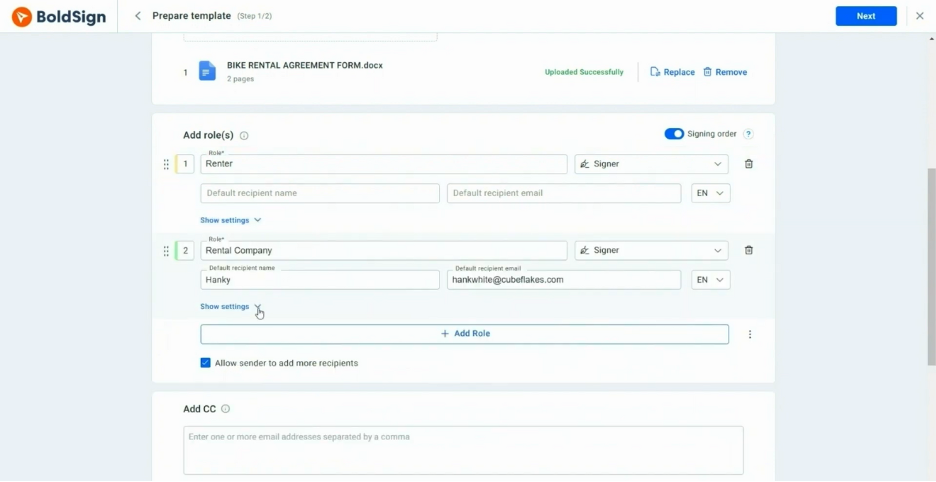
BoldSign es una plataforma de firma electrónica diseñada para empresas que necesitan soluciones eficientes para la firma de documentos. Se utiliza principalmente por organizaciones que requieren enviar documentos en masa a múltiples destinatarios.
Por qué BoldSign es una buena alternativa a PandaDoc: BoldSign ofrece funciones de envío en masa que permiten distribuir documentos a grandes grupos con facilidad. Su interfaz fácil de usar ayuda a tu equipo a gestionar de manera eficiente procesos documentales de gran volumen. Las plantillas personalizables de la plataforma permiten mantener la coherencia entre los documentos. Con BoldSign, puedes simplificar tus flujos de trabajo documentales y mejorar la productividad.
Funciones destacadas e integraciones:
Las funciones incluyen análisis avanzados que proporcionan información sobre el estado y la interacción con los documentos. La plataforma admite recordatorios automatizados para garantizar la finalización puntual de la firma de documentos. También puedes personalizar los flujos de trabajo para adaptarlos a las necesidades específicas de tu equipo.
Las integraciones incluyen Microsoft 365, Google Drive, Dropbox, Zapier y más.
Pros and Cons
Pros:
- Capacidades de envío en masa
- Interfaz fácil de usar
- Planes rentables para autónomos y pequeñas empresas
Cons:
- Personalización avanzada limitada
- Algunas funciones requieren conocimientos técnicos

Ideal para plantillas personalizables

Proposify es un software de gestión de propuestas diseñado para ayudar a las empresas a crear, gestionar y enviar propuestas de manera eficiente. Se utiliza habitualmente en equipos de ventas y agencias para simplificar el proceso de elaboración de propuestas y mejorar las interacciones con los clientes.
Por qué Proposify es una buena alternativa a PandaDoc: Proposify ofrece plantillas de documentos personalizables que permiten adaptar las propuestas a la identidad de tu marca. Su editor de arrastrar y soltar facilita el diseño y el formato de documentos sin necesidad de conocimientos técnicos. También puedes hacer un seguimiento de las visualizaciones y las interacciones con las propuestas, lo que te proporciona información valiosa sobre la participación de los clientes. Con Proposify, tu equipo puede crear propuestas profesionales que destaquen.
Características e integraciones destacadas:
Las características incluyen una biblioteca de contenido que almacena los elementos de propuesta que utilizas con frecuencia para acceder a ellos rápidamente. La plataforma admite firmas electrónicas, lo que garantiza un proceso de firma sencillo. También puedes configurar flujos de aprobación para revisiones internas antes de enviar las propuestas a los clientes.
Las integraciones incluyen Salesforce, HubSpot, QuickBooks, Stripe, Zapier, Slack, Pipedrive, Basecamp, Trello y más.
Pros and Cons
Pros:
- Editor de arrastrar y soltar
- Hace un seguimiento de las visualizaciones y las interacciones con las propuestas
- Biblioteca de contenido para crear rápidamente
Cons:
- Puede resultar complejo para los usuarios nuevos
- Requiere tiempo para la configuración inicial
Docusign
Ideal para soluciones específicas de cada sector

Docusign es una plataforma de firma electrónica ampliamente utilizada por las empresas para facilitar la firma de documentos de forma segura y eficiente. Es popular en sectores como el inmobiliario, las finanzas y la atención sanitaria por su fiabilidad en la gestión de flujos de trabajo documentales.
Por qué Docusign es una buena alternativa a PandaDoc: Docusign ofrece soluciones adaptadas a diferentes sectores, lo que la convierte en una opción versátil para necesidades especializadas. Sus avanzadas funciones de seguridad y el cumplimiento de las normativas del sector la distinguen, garantizando que tus documentos se gestionen con cuidado. La interfaz fácil de usar de la plataforma y su amplia biblioteca de plantillas te ayudan a agilizar los procesos de preparación y firma de documentos. Con Docusign, puedes gestionar con confianza tus flujos de trabajo documentales en diversos sectores.
Funciones e integraciones destacadas:
Las funciones incluyen personalización de marca, firma presencial y compatibilidad con varios idiomas para adaptarse a las distintas necesidades de los usuarios. También puedes beneficiarte de su función de registro de auditoría, que proporciona registros detallados de las actividades de los documentos. Otra función clave es la posibilidad de establecer el orden de firma y los permisos, garantizando que los documentos se firmen en la secuencia correcta.
Las integraciones incluyen Salesforce, Microsoft 365, Google Workspace, SAP, Oracle, Workday, Box, Dropbox, Slack, NetSuite y muchas más.
Pros and Cons
Pros:
- Admite normativas específicas del sector
- Ofrece un registro de auditoría detallado
- Permite la firma presencial
Cons:
- Personalización limitada de las plantillas
- Coste superior al de algunas alternativas

Qwilr
Ideal para propuestas interactivas

Qwilr es una herramienta de creación de propuestas diseñada para empresas de todos los tamaños que desean elaborar documentos atractivos e interactivos. Es popular entre los equipos de ventas y marketing que quieren cautivar a los clientes con propuestas visualmente atractivas.
Por qué Qwilr es una buena alternativa a PandaDoc: Qwilr ofrece propuestas interactivas que permiten crear documentos dinámicos y atractivos. El editor de arrastrar y soltar de la plataforma facilita la inclusión de elementos multimedia, como vídeos e imágenes. También puedes hacer un seguimiento de cómo interactúan los destinatarios con tus propuestas, lo que proporciona información sobre la participación de los clientes. Con Qwilr, tu equipo puede crear propuestas que no solo informen, sino que también atraigan a tu audiencia.
Funciones e integraciones destacadas:
Las funciones incluyen análisis que ofrecen información sobre cómo interactúan los clientes con tus propuestas. La plataforma admite plantillas personalizables, lo que te permite mantener la coherencia de la marca. También puedes utilizar sus herramientas de colaboración para trabajar con tu equipo en tiempo real.
Las integraciones incluyen Salesforce, HubSpot, Slack, QuickBooks, Stripe, Zapier y más.
Pros and Cons
Pros:
- Capacidades para crear propuestas interactivas
- Editor de arrastrar y soltar incluido
- Plantillas de propuestas personalizables disponibles
Cons:
- Precio más elevado que otras opciones
- Flexibilidad limitada en diseño y formato

Ideal para herramientas de ventas impulsadas por IA
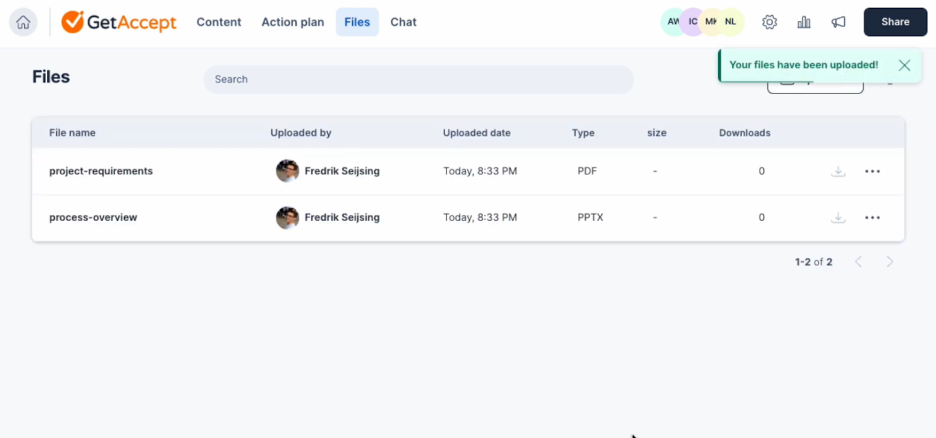
GetAccept es una plataforma de ventas digitales diseñada para mejorar los flujos de trabajo de los documentos e impulsar la interacción en las ventas. Se utiliza principalmente por equipos de ventas que buscan mejorar la gestión de documentos y las interacciones con los clientes.
Por qué GetAccept es una buena alternativa a PandaDoc: GetAccept aprovecha herramientas de ventas impulsadas por IA para aumentar la productividad y la interacción de tu equipo. Su función de mensajería por video te permite crear introducciones personalizadas para tus documentos. La plataforma también incluye análisis para realizar un seguimiento de las métricas y la interacción de los documentos. Estas capacidades te ayudan a adaptar tu enfoque y cerrar acuerdos de manera más eficaz.
Funciones e integraciones destacadas:
Las funciones incluyen opciones de personalización de marca que te permiten mantener una imagen coherente de la empresa. La plataforma ofrece seguimiento de documentos para supervisar las interacciones con los clientes en tiempo real. Además, puedes automatizar los seguimientos para asegurarte de que no se pierda ninguna oportunidad.
Las integraciones incluyen Salesforce, HubSpot, Pipedrive, Microsoft Dynamics 365, Slack, Google Drive, Dropbox, Zapier, Gmail, Outlook y más.
Pros and Cons
Pros:
- Análisis impulsados por IA
- Funciones de mensajería por video
- Personalización de marca disponible
Cons:
- Curva de aprendizaje más pronunciada para principiantes
- Algunas funciones avanzadas requieren capacitación

emSigner
Ideal para la verificación avanzada de identidad
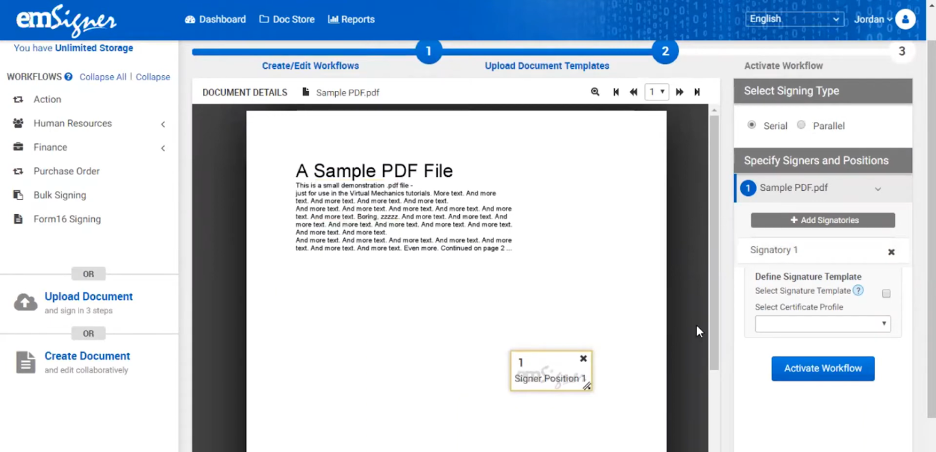
emSigner es una plataforma de firma digital que atiende a empresas que necesitan soluciones seguras y conformes para la gestión de documentos. Se utiliza principalmente en organizaciones que priorizan la seguridad y el cumplimiento normativo en sus flujos de trabajo documentales.
Por qué emSigner es una buena alternativa a PandaDoc: emSigner ofrece funciones avanzadas de verificación de identidad, lo que garantiza que los documentos sean firmados de forma segura por las personas adecuadas. Su autenticación multifactor añade una capa adicional de seguridad a los procesos documentales. El cumplimiento de la plataforma con las leyes internacionales sobre firmas electrónicas la hace adecuada para empresas que operan en sectores regulados. Con emSigner, puede confiar en que sus transacciones documentales son seguras y conformes.
Funciones e integraciones destacadas:
Las funciones incluyen flujos de trabajo personalizables que se adaptan a los procesos específicos de su equipo. Puede beneficiarse de su función de registro de auditoría, que proporciona un historial detallado de las actividades de los documentos. La plataforma también admite la firma masiva, lo que le permite firmar varios documentos a la vez.
Las integraciones incluyen Google Drive, Salesforce, Microsoft SharePoint, Dropbox, SAP SuccessFactors y más.
Pros and Cons
Pros:
- Verificación avanzada de identidad
- Cumplimiento de las leyes internacionales sobre firmas electrónicas
- Flujos de trabajo personalizables disponibles
Cons:
- La configuración inicial puede llevar tiempo
- Requiere conocimientos técnicos para la personalización

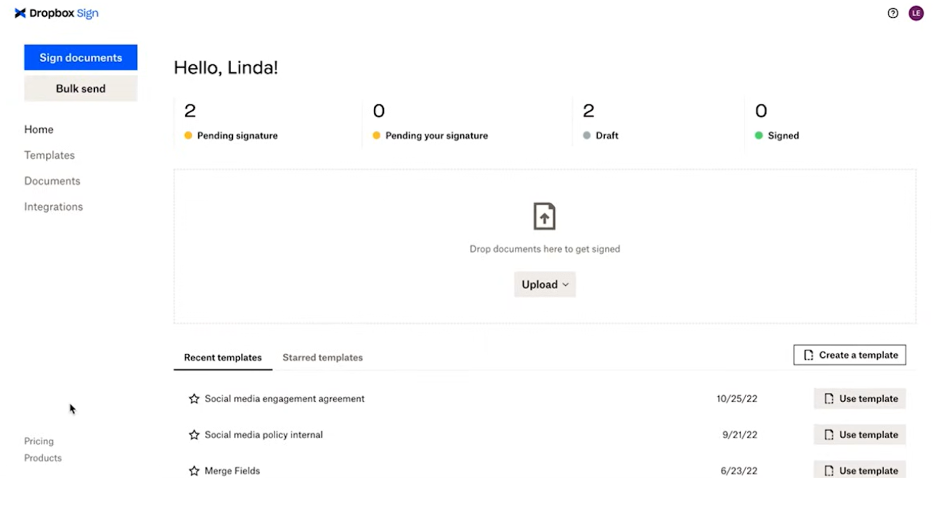
Dropbox Sign es una herramienta de firma electrónica diseñada para simplificar el proceso de firma para empresas y particulares. Es ampliamente utilizada por equipos que necesitan firmar documentos de manera eficiente desde cualquier lugar.
Por qué Dropbox Sign es una buena alternativa a PandaDoc: Dropbox Sign ofrece una interfaz optimizada para dispositivos móviles y almacenamiento basado en la nube, lo que facilita que tú y tu equipo firmen documentos desde cualquier lugar. Su diseño fácil de usar garantiza que firmar desde aplicaciones móviles sea rápido y sencillo. La navegación intuitiva de la plataforma ayuda a reducir el tiempo dedicado a gestionar los flujos de trabajo de documentos. Con Dropbox Sign, puedes mantener tu negocio en marcha incluso cuando estás fuera de la oficina.
Características e integraciones destacadas:
Características incluyen plantillas reutilizables que te ahorran tiempo al preparar documentos. La plataforma también ofrece herramientas avanzadas de gestión de equipos para organizar los flujos de trabajo de documentos de tu equipo. Se pueden activar prácticos recordatorios automáticos para que los documentos no queden olvidados.
Integraciones incluyen Google Drive, Salesforce, Microsoft Dynamics 365, Slack, HubSpot, Evernote, Microsoft OneDrive, Zapier y más.
Pros and Cons
Pros:
- Interfaz optimizada para dispositivos móviles
- Navegación sencilla para firmar rápidamente
- Recordatorios automáticos para los firmantes
Cons:
- Herramientas básicas de generación de informes
- La configuración inicial puede ser compleja

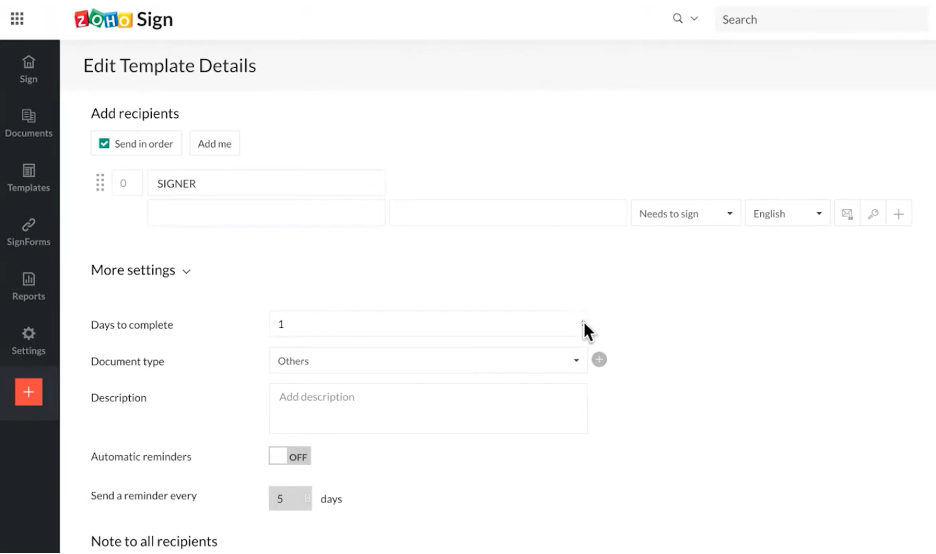
Zoho Sign es una plataforma de aplicaciones de firma digital diseñada para empresas que buscan una gestión de documentos segura y eficiente. Es especialmente popular entre los equipos que necesitan mantener altos estándares de privacidad y seguridad de los datos.
Por qué Zoho Sign es una buena alternativa a PandaDoc: Zoho Sign hace hincapié en la privacidad de los datos de los usuarios, lo que la convierte en una opción fiable para quienes se preocupan por la protección de datos. Su cifrado de extremo a extremo garantiza que tus documentos permanezcan confidenciales durante todo el proceso de firma. La plataforma también ofrece opciones avanzadas de autenticación para verificar la identidad de los firmantes. Puedes confiar en Zoho Sign para gestionar tus documentos confidenciales con cuidado, proporcionando tranquilidad a tu equipo.
Características e integraciones destacadas:
Las características incluyen plantillas de correo electrónico personalizables, lo que te permite personalizar la comunicación con tus clientes. La función de envío masivo de la plataforma te permite enviar documentos a varios destinatarios a la vez. También puedes automatizar las notificaciones de recordatorio para garantizar que la firma de los documentos se complete a tiempo.
Las integraciones incluyen Zoho CRM, Zoho People, Zoho Books, Gmail, Dropbox, Google Drive, OneDrive, Microsoft Teams, Zapier y más.
Pros and Cons
Pros:
- Cifrado de extremo a extremo disponible
- Opciones avanzadas de autenticación
- Admite el envío masivo de documentos
Cons:
- Funciones avanzadas limitadas
- Capacidades básicas de generación de informes


OneSpan Sign es una solución de firma electrónica diseñada para empresas que necesitan firmar documentos de forma segura y fiable. Se utiliza ampliamente en sectores que requieren altos estándares de seguridad, como las finanzas y la atención sanitaria.
Por qué OneSpan Sign es una buena alternativa a PandaDoc: OneSpan Sign ofrece soluciones seguras de firma electrónica que priorizan la protección de sus documentos y transacciones. Su tecnología de detección de manipulaciones garantiza que se detecte cualquier cambio no autorizado en los documentos. El cumplimiento de las normativas del sector por parte de la plataforma proporciona tranquilidad a su equipo. Con OneSpan Sign, puede gestionar sus flujos de trabajo documentales con confianza y mantener los más altos estándares de seguridad.
Características e integraciones destacadas:
Las características incluyen sólidas opciones de autenticación para verificar la identidad de los firmantes. También puede beneficiarse de su función de registro de auditoría, que proporciona un historial detallado de las actividades relacionadas con los documentos. La plataforma admite la firma presencial, lo que le permite recopilar firmas en reuniones cara a cara.
Las integraciones incluyen Salesforce, Microsoft Dynamics 365, Microsoft SharePoint, Workday, Google Workspace y más.
Pros and Cons
Pros:
- Altos estándares de seguridad
- Cumplimiento de las normativas del sector
- Admite la firma presencial
Cons:
- Mayor coste para los planes básicos
- Opciones de personalización limitadas

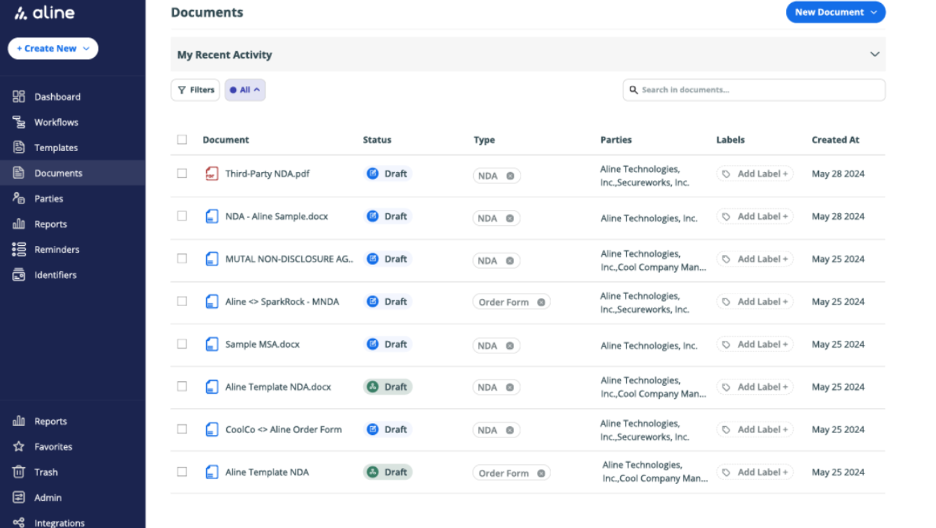
AlineSign es una herramienta de gestión de contratos digitales diseñada para equipos legales y empresariales que buscan gestionar documentos de manera eficiente. Admite la firma electrónica y automatiza los flujos de trabajo de los contratos para fomentar la productividad y garantizar que las firmas sean legalmente vinculantes.
Por qué AlineSign es una buena alternativa a PandaDoc: AlineSign proporciona flujos de trabajo de contratos integrados que agilizan la gestión de documentos para tu equipo. Cuenta con firma electrónica ilimitada, por lo que puedes procesar tantos documentos como necesites sin costes adicionales. Los registros de auditoría integrados de la plataforma y la gestión del ciclo de vida de los contratos impulsada por IA ofrecen cumplimiento y eficiencia. Con AlineSign, puedes automatizar y gestionar fácilmente todo tu proceso de contratos.
Funciones e integraciones destacadas:
Las funciones incluyen el almacenamiento automático de documentos firmados con historial de versiones, lo que facilita el acceso a contratos anteriores. La plataforma AlineSign admite informes de IA en tiempo real para el análisis de contratos, proporcionándote información sobre tus acuerdos. También puedes configurar flujos de trabajo colaborativos para gestionar eficazmente el proceso de aprobación de tu equipo.
Las integraciones incluyen Google Drive, Dropbox, Box, Microsoft OneDrive y más.
Pros and Cons
Pros:
- Capacidades ilimitadas de firma electrónica
- Registros de auditoría integrados
- Gestión de contratos impulsada por IA
Cons:
- Puede ser demasiado caro para los equipos que solo necesitan funciones básicas de firma electrónica
- Los detalles específicos de los planes de precios no están claramente indicados
Otras alternativas a PandaDoc
Estas son algunas alternativas adicionales a PandaDoc que no han entrado en mi selección, pero que merece la pena conocer:
- airSlate SignNow
Ideal para una configuración rápida
- ReadySign
Ideal para soluciones sencillas de firma electrónica
- DocuSeal
Ideal para el sellado seguro de documentos


Cómo evalúo las alternativas a PandaDoc
Divido mi evaluación en dos capas: los requisitos básicos como firmas electrónicas y flujos de aprobación, y los diferenciadores como integraciones con herramientas de gestión de proyectos y precios que distinguen las mejores opciones del resto.
Funcionalidad principal (Requisitos imprescindibles para esta lista)
Cuando selecciono herramientas para mi lista, califico cada una en una escala de 0 (no ofrece la funcionalidad) a 5 (destaca en esta área) por cada funcionalidad principal mencionada a continuación. Luego, calculo la puntuación total de la herramienta como un porcentaje. Cada herramienta necesita alcanzar una puntuación total mínima del 65% para ser considerada.
- Creación de documentos y plantillas: Verifico si cada herramienta permite crear alcances de trabajo, propuestas y órdenes de cambio a partir de plantillas reutilizables con campos dinámicos, en vez de empezar desde cero cada vez.
- Firmas electrónicas: El soporte de firmas electrónicas debe cubrir firmas de múltiples partes, autenticación de firmantes y cumplimiento de normativas como ESIGN, UETA y eIDAS.
- Flujos de aprobación: Evalúo si la plataforma permite enrutamiento configurable de varios pasos, como enviar un alcance de trabajo de cliente por legal, finanzas y un patrocinador de proyecto antes de llegar al firmante.
- Colaboración en tiempo real: Los equipos que revisan un contrato o propuesta necesitan más que comentarios asíncronos. Busco coedición en vivo, control de cambios y debates organizados con partes interesadas tanto internas como externas.
- Seguimiento y analítica de documentos: Saber que una propuesta fue abierta no es suficiente. Busco registros de actividad detallados, marcas de tiempo de vistas y datos de interacción que ayuden a los gestores de proyecto a hacer seguimiento en el momento adecuado.
- Integraciones con herramientas de gestión de proyectos: Reviso si hay conexiones nativas con plataformas como Asana, Jira, Monday y CRM comunes, para que los documentos firmados y los datos del proyecto permanezcan vinculados sin transferencias manuales.
Una vez que tengo una lista de herramientas que cumplen con estos criterios, considero qué diferencia a cada plataforma.
Factores diferenciadores (Qué distingue a los proveedores)
Así es como comparo y contrasto a los diferentes proveedores:
Características destacadas
Las tablas de precios interactivas marcan una diferencia real cuando envías propuestas de servicios con alcances variables o entregables escalonados. También busco pagos integrados, lo que permite a los gestores de proyecto cobrar anticipos o pagos por hitos directamente desde un alcance de trabajo firmado, en vez de perseguir facturas por separado. Una biblioteca de contenido con cláusulas y bloques de proyecto reutilizables es otro aspecto que valoro, ya que los equipos que arman propuestas desde cero cada vez pierden horas que no deberían.
Más allá de las funciones
La estructura de precios es muy relevante aquí. Algunas plataformas cobran por documento enviado, lo que penaliza a los equipos de alto volumen que gestionan múltiples proyectos con clientes. Evalúo si el precio escala según la cantidad de usuarios o los límites de uso. La profundidad de la API y el encaje en el ecosistema también son importantes: una herramienta con API REST y soporte para webhooks brinda al equipo posibilidad de automatizar transferencias entre contratos firmados y tableros de gestión de proyectos. También considero el ajuste por sector, como si la plataforma ofrece plantillas y flujos de trabajo adaptados a agencias, construcción o servicios profesionales.
¿Por qué buscar una alternativa a PandaDoc?
Aunque PandaDoc es una buena opción de software para flujos de trabajo de documentos empresariales, hay varios motivos por los que algunos usuarios buscan soluciones alternativas. Es posible que estés buscando una alternativa a PandaDoc porque:
- Necesitas opciones de personalización más avanzadas
- Tu equipo necesita mejores prestaciones para dispositivos móviles
- Buscas precios más competitivos
- Necesitas integración con herramientas específicas
- Tu empresa opera en regiones con asistencia limitada
- Quieres funciones de seguridad de datos mejoradas
Si alguna de estas situaciones te resulta familiar, has llegado al lugar adecuado. Mi lista incluye varias opciones que podrían adaptarse mejor a los equipos que se enfrentan a estos desafíos con PandaDoc y buscan soluciones alternativas.
Funciones clave de PandaDoc
Estas son algunas de las características clave de PandaDoc que te ayudarán a contrastar y comparar lo que ofrecen las soluciones alternativas:
- Plantillas personalizables: Creación de documentos adaptada a tu marca y tus necesidades.
- Firmas electrónicas: Firma y gestiona documentos electrónicamente de forma segura.
- Automatización de flujos de trabajo: Automatiza tareas repetitivas para mejorar la eficiencia.
- Seguimiento de documentos: Supervisa el estado y las interacciones con los documentos en tiempo real.
- Flujos de trabajo de aprobación: Configura procesos para la revisión y aprobación de documentos.
- Biblioteca de contenido: Accede a un repositorio de elementos de documentos reutilizables.
- Control de cambios: Colabora de forma segura con seguimiento de cambios y control de versiones.
- Contenido inteligente: Adapta el contenido de los documentos en función de las interacciones de los destinatarios.
- Análisis: Obtén información sobre el rendimiento y la interacción con los documentos.
- Capacidades de integración: Conecta con sistemas CRM y otras herramientas empresariales.