

Las 10 mejores alternativas a Zoom para reuniones de vídeo en 2026

Lista de las mejores alternativas a Zoom


Como gestor de proyectos, te enfrentas al desafío diario de coordinar equipos, gestionar calendarios y garantizar una comunicación eficaz. El software de videoconferencias y reuniones en línea puede ayudar a aliviar estos problemas, pero es importante encontrar las herramientas de colaboración adecuadas para tus necesidades. Es posible que estés buscando una alternativa a las reuniones de Zoom que se adapte mejor a los requisitos específicos de tu equipo, ya sea por una mayor seguridad, la integración con las herramientas existentes o una mejor experiencia de usuario.
Según mi experiencia, comprender estas necesidades es fundamental para elegir la solución adecuada. En este artículo, ofreceré una reseña imparcial de las mejores alternativas gratuitas a Zoom, centrándome en lo que hace que cada una sea especialmente adecuada para diferentes desafíos empresariales. Encontrarás información que puede ayudarte a seleccionar la mejor herramienta para tu equipo.
¿Qué es Zoom?
Zoom es una plataforma de videoconferencias y reuniones en línea que te permite conectarte virtualmente con tu equipo. Tras ganar popularidad durante la pandemia, los profesionales de diversos sectores, como la educación, la atención sanitaria y el ámbito empresarial, la utilizan habitualmente, ya que ofrece una plataforma fiable para la comunicación y la colaboración. Sus funciones, como compartir pantalla, las salas para grupos pequeños y la posibilidad de grabar reuniones, ayudan a coordinar reuniones, facilitar debates y registrar información importante. En general, Zoom ofrece una solución valiosa para mantener la comunicación y la productividad en entornos de trabajo remotos o híbridos.
Tabla comparativa de alternativas a Zoom
Esta tabla comparativa resume los detalles de precios de mis principales alternativas seleccionadas a Zoom:
| Tool | Best For | Trial Info | Price | ||
|---|---|---|---|---|---|
| 1 | Ideal para la integración con Google Workspace | Prueba gratuita disponible | Desde $9.20/usuario/mes (facturado anualmente) | Website | |
| 2 | La mejor opción para la integración con Microsoft 365 | Prueba gratuita disponible | Desde $4.00/usuario/mes (facturado anualmente) | Website | |
| 3 | Ideal para la privacidad de los usuarios y la propiedad de los datos | Prueba gratuita de 14 días | Desde $1/anfitrión/mes (facturado anualmente) | Website | |
| 4 | Ideal para conversaciones con clientes asistidas por IA | Prueba gratuita de 14 días | Desde $15/usuario/mes (facturado anualmente) | Website | |
| 5 | La mejor opción para las comunicaciones unificadas con IA para empleados | Prueba gratuita de 14 días + demostración gratuita | Desde $30/usuario/mes (facturado anualmente) | Website | |
| 6 | Ideal para reuniones externas con control de seguridad | Prueba gratuita + demostración gratuita disponibles | Desde $12/organizador/mes (facturado anualmente) | Website | |
| 7 | Ideal para seminarios web y la participación en reuniones de pequeñas empresas | Demostración gratuita disponible | Desde $27.99/usuario/mes (como parte de Intermedia Unite) | Website | |
| 8 | Ideal para juegos e interacción social | Plan gratuito disponible | Desde $2.99/usuario/mes | Website | |
| 9 | Ideal para programación en pareja y depuración | Plan gratuito disponible | Desde $20/usuario/mes | Website | |
| 10 | Ideal para videoconferencias de código abierto | Gratis para siempre | Gratis para siempre | Website |
Por qué confiar en nuestras recomendaciones de software
Nuestro equipo lleva probando y evaluando software desde 2012. Como gestores de proyectos, sabemos lo difícil —y lo importante— que es elegir el software adecuado.
Para esta guía, evaluamos las herramientas mediante pruebas prácticas e investigación independiente, puntuando las herramientas según nuestros criterios de selección. También nos basamos en la experiencia de líderes de opinión del sector y de profesionales en activo de la gestión de proyectos.
Nuestras reseñas reflejan nuestro criterio editorial humano, no un discurso de ventas.
Revisores expertos:
Reseñas de las mejores alternativas a Zoom
A continuación encontrarás mis resúmenes detallados de las mejores alternativas a Zoom que llegaron a mi lista. Mis reseñas ofrecen un análisis detallado de las funciones principales, las ventajas y desventajas, las integraciones, los límites de tiempo y los casos de uso ideales de cada herramienta para ayudarte a encontrar la mejor opción para ti.

Ideal para la integración con Google Workspace
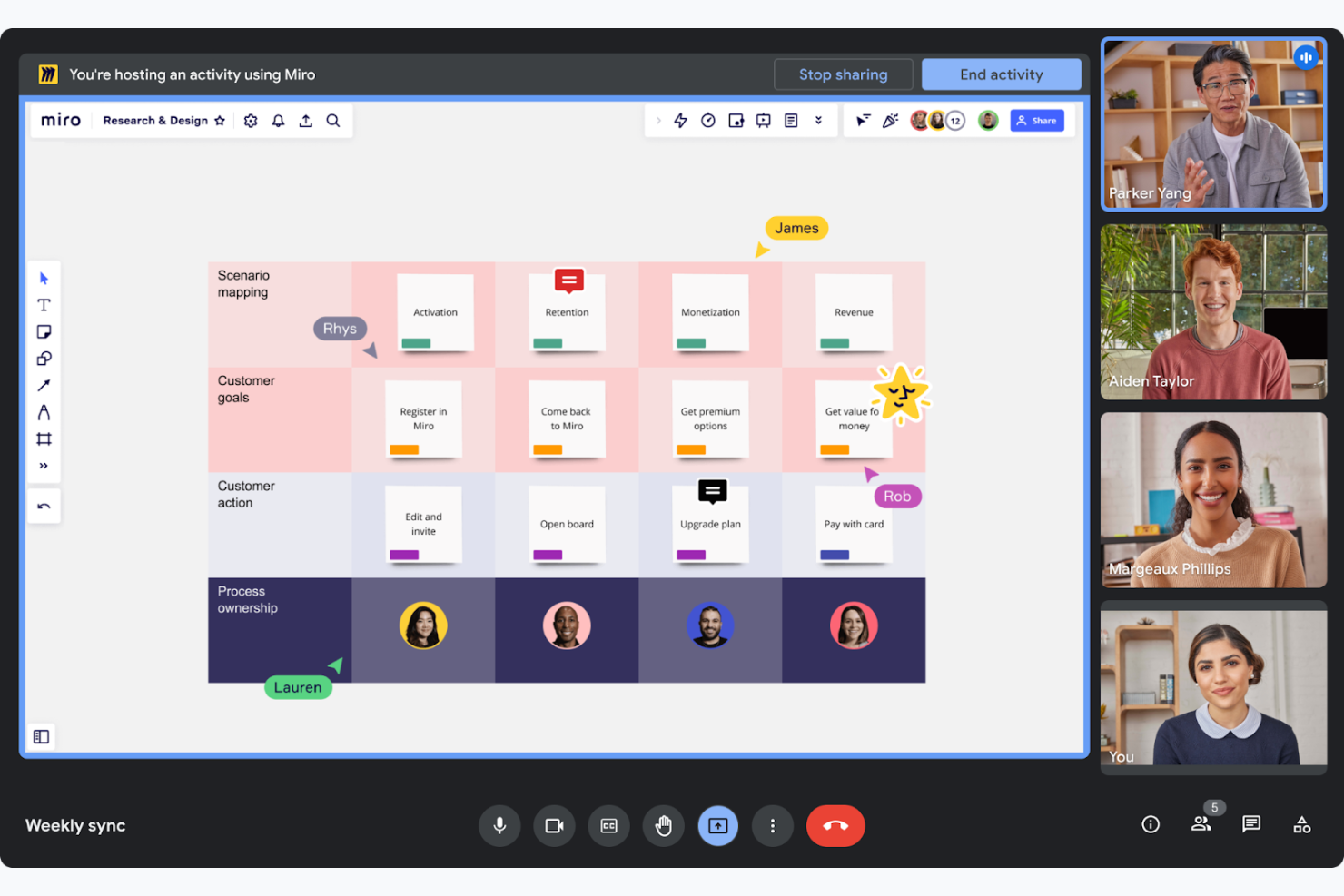
Google Meet es una herramienta de videoconferencia diseñada para facilitar las reuniones virtuales y la colaboración entre empresas e instituciones educativas. Permite a tu equipo realizar reuniones fácilmente, directamente desde sus navegadores web o dispositivos móviles.
Por qué es una buena alternativa a Zoom: Google Meet forma parte de Google Workspace, lo que te permite programar reuniones individuales o de equipo directamente desde Google Calendar y colaborar en Google Docs durante las llamadas. Esta estrecha integración coordina los flujos de trabajo de los equipos que ya utilizan el conjunto de herramientas de productividad de Google. Además, al funcionar desde el navegador, no es necesario instalar ningún software adicional, lo que lo hace accesible y práctico.
Funciones e integraciones destacadas:
Las funciones incluyen subtítulos en directo en tiempo real impulsados por la tecnología de reconocimiento de voz de Google, lo que mejora la accesibilidad. La plataforma admite hasta 250 participantes por llamada, por lo que es adecuada para reuniones grandes. También puedes grabar las reuniones y guardarlas directamente en Google Drive, lo que garantiza un acceso y una compartición sencillos.
Las integraciones incluyen Google Calendar, Google Drive, Gmail, Google Docs, Google Sheets, Google Slides, Miro y mucho más.
Pros and Cons
Pros:
- Admite reuniones grandes
- Subtítulos en tiempo real disponibles
- Programación sencilla de reuniones
Cons:
- Diseño de interfaz básico
- Problemas ocasionales de conectividad

La mejor opción para la integración con Microsoft 365
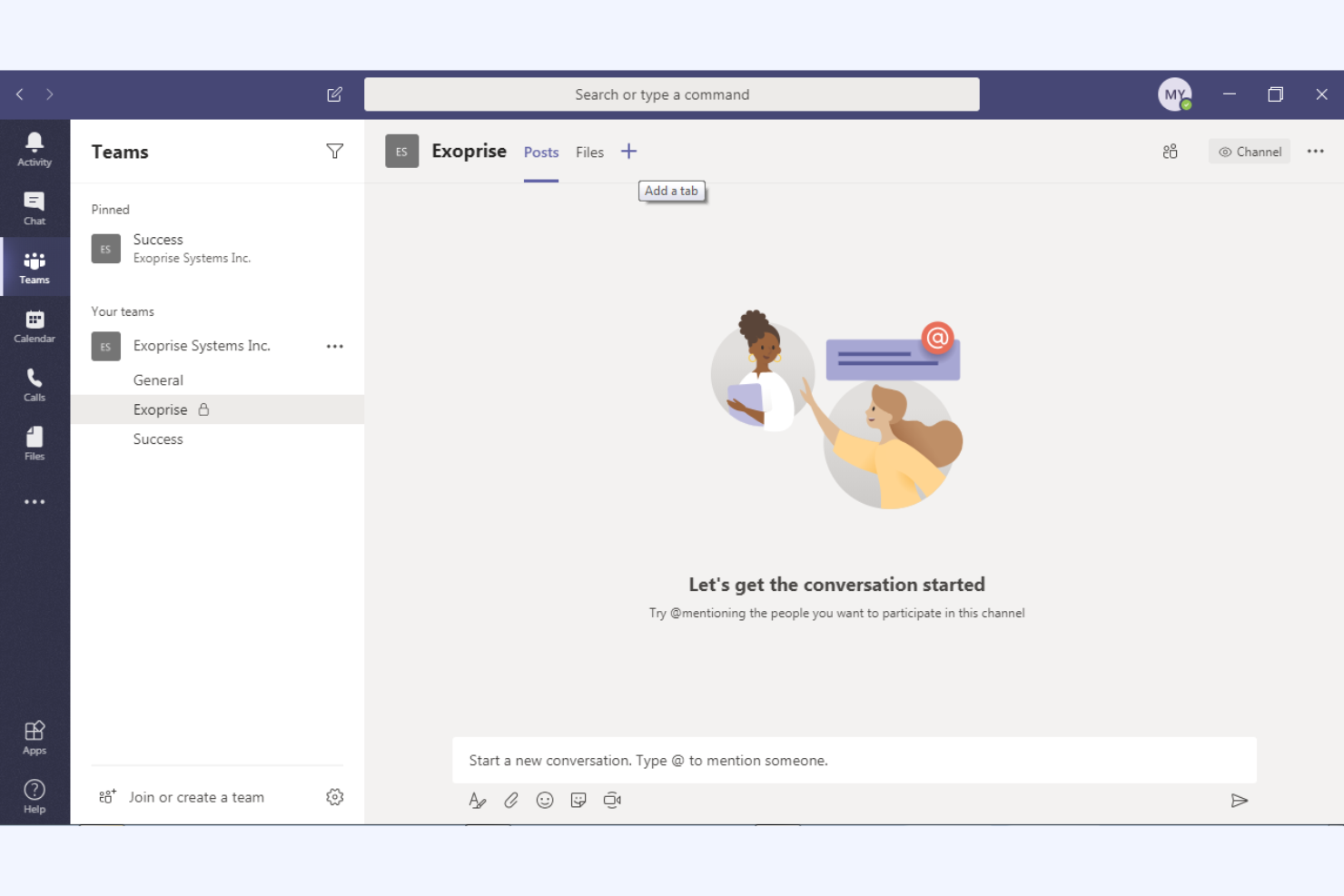
Microsoft Teams es una plataforma de colaboración que integra chat, videoconferencias y uso compartido de archivos, diseñada principalmente para usuarios empresariales y educativos. Ayuda a tu equipo a comunicarse de manera eficiente y a gestionar proyectos dentro de un espacio de trabajo unificado.
Por qué es una buena alternativa a Zoom: Microsoft Teams ofrece una integración profunda con el ecosistema de Microsoft 365, lo que mejora la productividad mediante funciones de colaboración en documentos en tiempo real y sincronización del calendario. Estas capacidades lo hacen ideal si tu organización ya utiliza productos de Microsoft. Además, sus amplias funciones de chat y canales permiten una comunicación continua del equipo y la gestión de proyectos, proporcionando una solución más completa que la plataforma de Zoom, centrada en las videoconferencias.
Características e integraciones destacadas:
Las características incluyen herramientas de gestión de tareas que permiten asignarlas y hacer un seguimiento de ellas dentro de tu equipo. La plataforma incluye una wiki integrada para documentar y compartir conocimientos, y admite eventos en directo para audiencias más grandes, lo que la hace versátil para distintas necesidades de comunicación.
Las integraciones incluyen Microsoft Outlook, SharePoint, OneDrive, Power BI, Trello, Asana, GitHub, Salesforce y más.
Pros and Cons
Pros:
- Integración profunda con Microsoft 365
- Admite grandes eventos virtuales
- Colaboración en documentos en tiempo real
Cons:
- Opciones de personalización limitadas
- Puede consumir muchos recursos

Ideal para la privacidad de los usuarios y la propiedad de los datos

Zoho Meeting es una solución de conferencias basada en la web diseñada para empresas que necesitan herramientas de reuniones en línea seguras y fiables. Está dirigida a profesionales y equipos que buscan organizar seminarios web y reuniones virtuales de manera eficiente.
Por qué es una buena alternativa a Zoom: Zoho Meeting prioriza la privacidad de los usuarios y la propiedad de los datos, lo que la convierte en una opción preferida para quienes están preocupados por la seguridad de los datos. Ofrece funciones como el cifrado de reuniones y formularios de registro personalizables, lo que ayuda a garantizar que la información de tu equipo esté protegida. La plataforma también proporciona análisis e informes detallados para los seminarios web, para que puedas hacer un seguimiento de la participación y perfeccionar tus presentaciones.
Funciones e integraciones destacadas:
Las funciones incluyen compartir pantalla, lo que te permite presentar tus ideas visualmente a los participantes. La plataforma admite encuestas y sesiones de preguntas y respuestas en seminarios web, lo que te permite involucrar a tu audiencia de manera eficaz. También puedes grabar reuniones y seminarios web, proporcionando un recurso valioso para futuras consultas y capacitación.
Las integraciones incluyen Zoho CRM, Zoho Projects, Zoho Connect, Google Calendar, Microsoft Outlook, Slack y más.
Pros and Cons
Pros:
- Enfoque en la privacidad y la seguridad de los datos
- Análisis detallados para seminarios web
- Cifrado de reuniones disponible
Cons:
- Funciones avanzadas limitadas
- Escalabilidad limitada para eventos grandes

Dialpad
Ideal para conversaciones con clientes asistidas por IA

Dialpad es una plataforma de comunicación basada en la nube que mejora la comunicación mediante información impulsada por IA. Está dirigida a empresas que buscan soluciones eficientes de voz, video y mensajería para respaldar las interacciones con clientes y equipos.
Por qué es una buena alternativa a Zoom: Las funciones impulsadas por IA de Dialpad ofrecen transcripción en tiempo real y análisis de voz, proporcionando información valiosa durante las llamadas. Esto permite que tu equipo tome decisiones fundamentadas y mejore las interacciones con los clientes. Con enrutamiento de llamadas integrado y flujos de trabajo personalizables, Dialpad facilita procesos de comunicación eficientes, lo que la convierte en una alternativa versátil al enfoque centrado en video de Zoom.
Funciones e integraciones destacadas:
Las funciones incluyen inteligencia de voz que ofrece asesoramiento de llamadas en tiempo real y análisis de sentimientos, ayudando a tu equipo a mejorar las conversaciones. La plataforma admite la grabación en la nube, el almacenamiento en la nube y la reproducción de llamadas, lo que resulta útil para la capacitación y el control de calidad. Además, Dialpad proporciona una experiencia de comunicación unificada con voz, video y mensajería en una sola aplicación.
Las integraciones incluyen Salesforce, Microsoft 365, Google Workspace, Slack, HubSpot, Zendesk, ServiceNow, Okta y más.
Pros and Cons
Pros:
- Información sobre llamadas impulsada por IA
- Transcripción en tiempo real
- Enrutamiento eficiente de llamadas
Cons:
- Compatibilidad con dispositivos
- Interrupciones ocasionales del sistema
La mejor opción para las comunicaciones unificadas con IA para empleados

RingEX es una plataforma de comunicación basada en la nube diseñada para mejorar las capacidades de comunicación de una empresa con funciones avanzadas. Ofrece soluciones confiables de voz, video y mensajería para la colaboración en equipo.
Por qué es una buena alternativa a Zoom: RingEX ofrece información y análisis impulsados por AI, lo que permite a tu equipo tomar decisiones fundamentadas durante las llamadas. La plataforma admite funciones como la grabación de llamadas y la transcripción en tiempo real, proporcionando recursos útiles para la capacitación y el control de calidad. Además, los flujos de trabajo personalizables y las sólidas herramientas de gestión de llamadas de RingEX la convierten en una opción versátil para empresas de todos los tamaños.
Funciones e integraciones destacadas:
Las funciones incluyen un enrutamiento avanzado de llamadas que garantiza que estas se dirijan a los miembros adecuados del equipo. La plataforma proporciona análisis de llamadas, lo que te ofrece información sobre los patrones de comunicación de tu equipo. También puedes utilizar videoconferencias con opciones para compartir pantalla, mejorando la colaboración durante las reuniones virtuales.
Las integraciones incluyen Microsoft 365, Google Workspace, Salesforce, Slack, Zendesk, HubSpot, Zapier, Microsoft Teams, Okta y más.
Pros and Cons
Pros:
- Análisis de llamadas impulsado por IA
- Gestión de llamadas personalizable
- Adecuado para grandes empresas
Cons:
- Configuración e interfaz de usuario complejas
- Fiabilidad inconsistente de las llamadas
Ideal para reuniones externas con control de seguridad
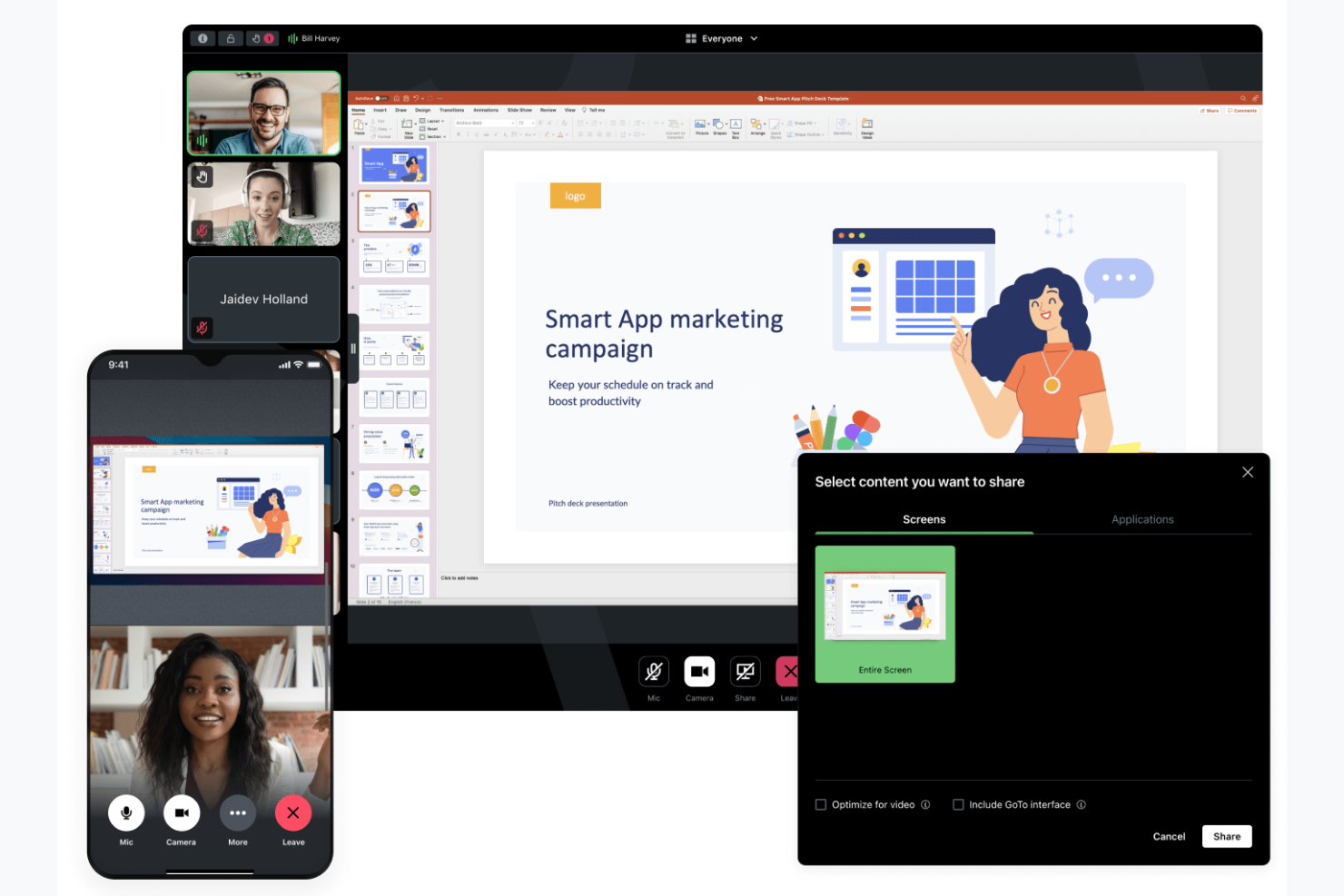
GoTo Meeting es una herramienta de videoconferencia web diseñada para empresas que necesitan una plataforma fiable para organizar reuniones virtuales. Está dirigida a profesionales de distintos sectores y ofrece funciones que favorecen una comunicación y colaboración eficientes.
Por qué es una buena alternativa a Zoom: GoTo Meeting se centra en ofrecer opciones de reuniones seguras y flexibles, con funciones de seguridad como el cifrado de reuniones y controles de administración, además de configuraciones de reuniones personalizables. Estas capacidades ayudan a mantener la privacidad de las reuniones y adaptarlas a tus necesidades. La plataforma admite videoconferencias en HD y ofrece aplicaciones móviles, lo que resulta práctico para equipos que están fuera de la oficina.
Funciones e integraciones destacadas:
Las funciones incluyen una opción de 'Llámame' que simplifica la incorporación a las reuniones al llamar directamente a los participantes, así como herramientas de dibujo que permiten anotar las pantallas compartidas para mejorar la colaboración. También puedes aprovechar las salas de reuniones personalizadas, que ofrecen un espacio constante para que se reúna tu equipo.
Las integraciones incluyen Salesforce, Google Calendar, Zapier, Zoho CRM, Zendesk, Outlook, Trello y muchas más.
Pros and Cons
Pros:
- Cifrado seguro de reuniones
- Configuraciones de reuniones flexibles
- Videoconferencias con calidad de vídeo HD
Cons:
- Interfaz anticuada en comparación con algunos competidores
- Se requieren varios pasos para unirse a un flujo de trabajo

Ideal para seminarios web y la participación en reuniones de pequeñas empresas
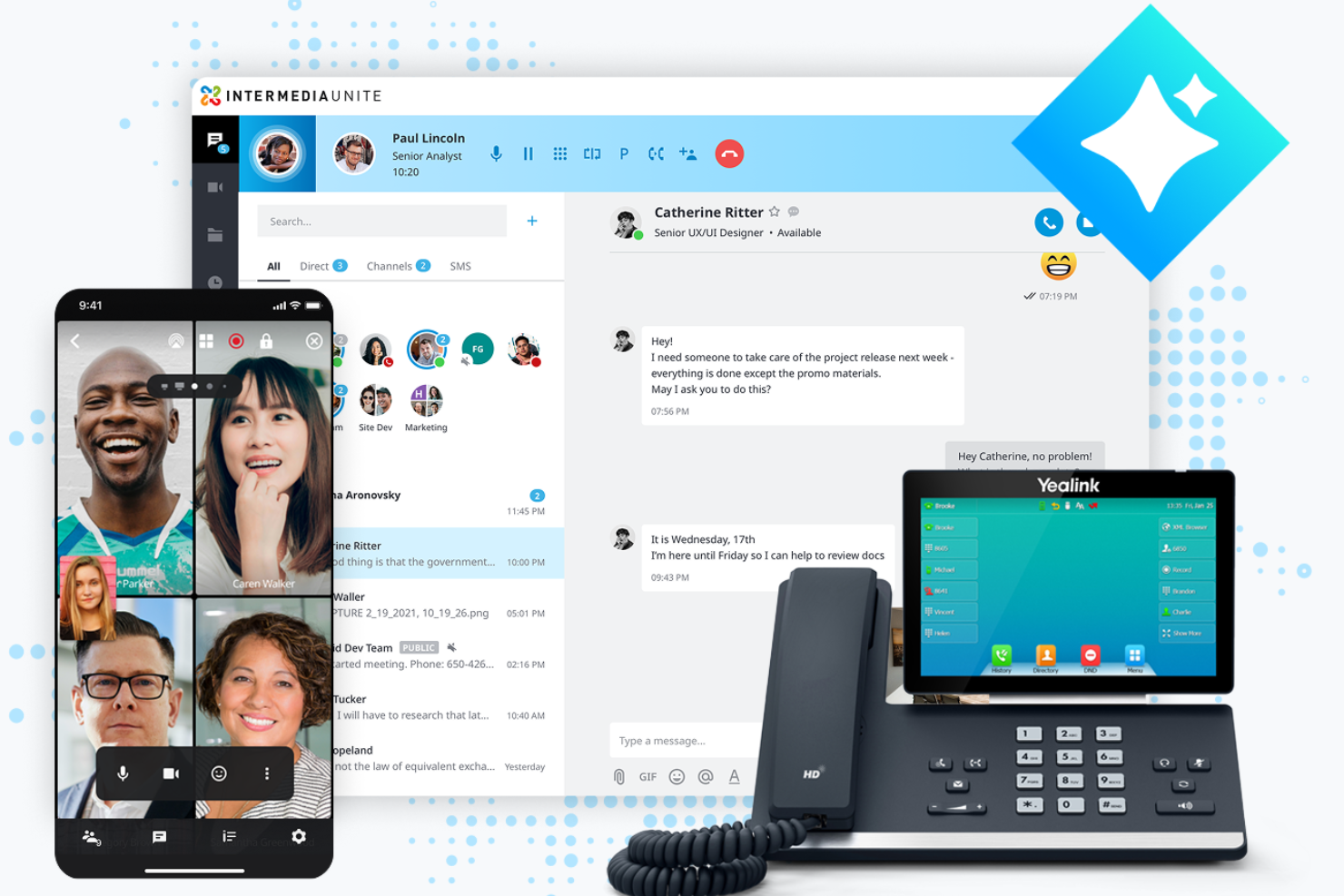
AnyMeeting es una plataforma de videoconferencias diseñada para pequeñas y medianas empresas que buscan una solución integral de comunicación. Como parte de la plataforma basada en la nube Intermedia Unite, ofrece herramientas para organizar reuniones virtuales, seminarios web y llamadas de conferencia, y facilita la colaboración y la conectividad.
Por qué es una buena alternativa a Zoom: AnyMeeting proporciona una suite de comunicación todo en uno con funciones como el alojamiento de seminarios web y la transcripción de reuniones. Estas capacidades la hacen adecuada para empresas que necesitan más que simples reuniones de video. AnyMeeting ofrece uso compartido de pantalla y diseños de reuniones personalizables, lo que permite a tu equipo adaptar las reuniones a sus necesidades específicas.
Características destacadas e integraciones:
Las características incluyen la transcripción de reuniones, que graba y transcribe automáticamente tus reuniones para facilitar su consulta. La plataforma ofrece capacidades de alojamiento de seminarios web, proporcionando herramientas para interactuar con grandes audiencias, así como diseños personalizados para mejorar la experiencia general de las reuniones.
Las integraciones incluyen Microsoft Office 365, Google Calendar, Slack, Salesforce, Zendesk y más.
Pros and Cons
Pros:
- Admite el alojamiento de seminarios web
- Transcripción de reuniones disponible
- Diseños de reuniones personalizables
Cons:
- Funciones avanzadas limitadas
- Escalabilidad limitada para empresas más grandes


Discord es una plataforma de comunicación diseñada principalmente para jugadores y comunidades sociales. Al ofrecer capacidades de chat de voz, video y texto, es ampliamente utilizada por aficionados a los videojuegos y comunidades en línea para la interacción y colaboración en tiempo real.
Por qué es una buena alternativa a Zoom: Discord ofrece canales de voz persistentes, lo que permite que tu equipo se una a las conversaciones y las abandone cuando quiera, a diferencia de las reuniones programadas de Zoom. La plataforma proporciona configuraciones de servidor y roles personalizables para gestionar los permisos de los usuarios y crear espacios de debate organizados. Además, la versión gratuita de Discord y sus funciones centradas en la comunidad, como los servidores públicos y las interfaces fáciles de usar, la hacen ideal para reuniones informales e interacciones sociales.
Funciones e integraciones destacadas:
Las funciones incluyen compartir pantalla, lo que te permite compartir tu pantalla con otras personas para jugar o trabajar de forma colaborativa, así como llamadas de video y voz. También puedes utilizar la función de mensajería directa de Discord para comunicarte en privado con otras personas o mediante llamadas de grupos pequeños.
Las integraciones incluyen Spotify, Twitch, YouTube, Reddit, Patreon, Steam, GitHub y más.
Pros and Cons
Pros:
- Canales de voz persistentes
- Configuraciones de servidor personalizables
- Funciones centradas en la comunidad
Cons:
- Cumplimiento normativo y auditoría empresariales limitados
- Límites reducidos para el tamaño de carga de archivos

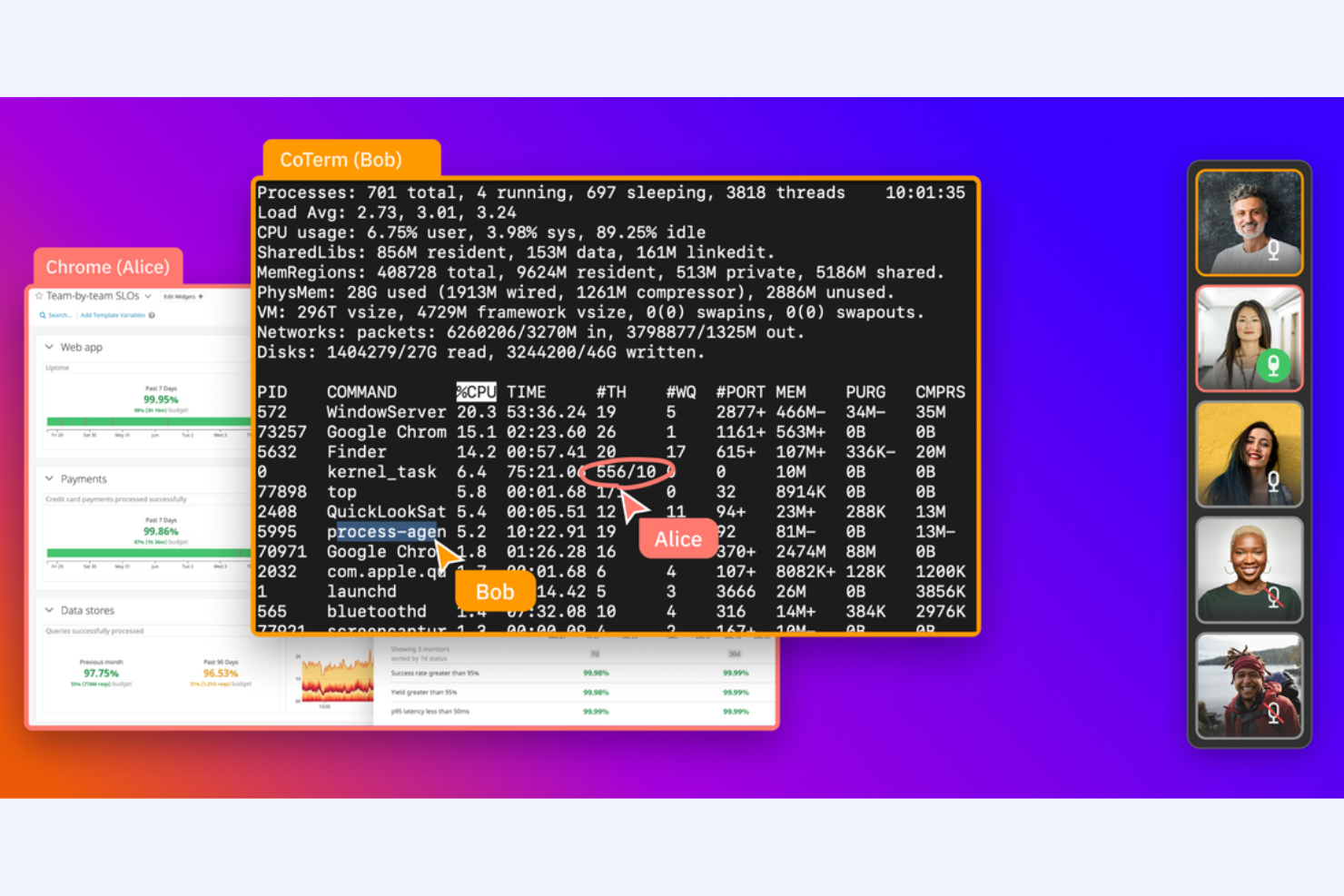
CoScreen es una herramienta para compartir pantallas dirigida a desarrolladores y equipos que requieren colaboración en tiempo real. Se utiliza para que los ingenieros de software y los equipos tecnológicos faciliten sesiones de programación en pareja y depuración.
Por qué es una buena alternativa a Zoom: CoScreen permite que varios usuarios compartan sus pantallas simultáneamente, lo que la hace ideal para la colaboración técnica. A diferencia de Zoom, que se centra en las reuniones por vídeo, CoScreen hace hincapié en la edición de código y la resolución de problemas en tiempo real. Su rendimiento de baja latencia garantiza que las interacciones de tu equipo sean fluidas y eficientes, lo que permite una colaboración eficaz en entornos de programación.
Características e integraciones destacadas:
Las características incluyen el uso compartido simultáneo de pantallas, que permite a todos los miembros de tu equipo compartir su pantalla al mismo tiempo. También puedes utilizar videollamadas de baja latencia para garantizar una comunicación fluida durante las sesiones. CoScreen admite la edición de código en tiempo real, lo que la convierte en una herramienta valiosa para los desarrolladores que trabajan juntos en proyectos.
Las integraciones incluyen Slack, GitHub, Jira, Asana, Google Calendar, Zoom, Visual Studio Code, IntelliJ IDEA y más.
Pros and Cons
Pros:
- Ideal para la programación en pareja
- Rendimiento de baja latencia
- Edición de código en tiempo real
Cons:
- Orientada a desarrolladores
- Funciones no técnicas limitadas
Jitsi es una herramienta de videoconferencias de código abierto para personas y equipos que buscan soluciones de comunicación flexibles y seguras. Proporciona una plataforma para organizar reuniones virtuales sin requerir cuentas de usuario, descargas ni un plan de pago.
Por qué es una buena alternativa a Zoom: Las reuniones de Jitsi ofrecen control sobre tus datos y tu privacidad, lo que resulta ideal si te preocupa la seguridad. Puedes personalizar y alojar tu propio servidor, asegurándote de que tus reuniones gratuitas de videoconferencia sean más seguras, y su naturaleza de código abierto significa que puedes modificar y ampliar la plataforma para adaptarla a tus necesidades específicas, a diferencia de Zoom, que es un sistema cerrado.
Características e integraciones destacadas:
Características incluyen vídeo y audio de alta calidad, lo que garantiza una comunicación clara durante reuniones más largas. También puedes utilizar la función de chat de la plataforma para comunicarte mediante texto junto con las videollamadas. Jitsi admite compartir pantalla, lo que te permite presentar información y colaborar eficazmente con tu equipo.
Integraciones varían según el alojamiento o la configuración; se pueden ampliar mediante complementos y API de código abierto
Pros and Cons
Pros:
- Flexibilidad del código abierto
- Alta privacidad de los datos
- Opción de alojamiento propio
Cons:
- Puede requerir conocimientos técnicos
- Compatibilidad limitada con reuniones grandes
Otras alternativas a Zoom
Estas son algunas alternativas adicionales a Zoom para software de videoconferencias que no llegaron a mi lista, pero que todavía merece la pena conocer:
- ON24
Ideal para seminarios web basados en datos
- TeamViewer
Ideal para asistencia remota
- Miro
Ideal para la colaboración visual dedicada


Cómo evalúo las alternativas a Zoom
Divido mi evaluación en dos niveles: requisitos básicos imprescindibles (como video HD, grabación e integraciones con herramientas de gestión de proyectos) y factores diferenciadores que distinguen a las mejores herramientas para equipos de proyectos.
Funcionalidad principal (requisitos básicos de esta lista)
Al seleccionar las herramientas para mi lista, califico cada una en una escala del 0 (no ofrece la funcionalidad) al 5 (sobresale en esta área) para cada una de las funcionalidades principales que se indican a continuación. Después, convierto la puntuación total de la herramienta en un porcentaje. Cada herramienta debe alcanzar una puntuación total mínima del 65% para ser considerada para su inclusión.
- Calidad de video y audio HD: Evalúo si la plataforma ofrece video estable y de alta definición para llamadas que van desde una rápida reunión individual hasta una revisión de sprint con más de 50 personas o una demostración para clientes.
- Compartición de pantalla y colaboración: Los equipos de proyectos trabajan constantemente con tableros, cronogramas y documentos, por lo que busco una compartición de pantalla fluida con anotaciones, control remoto y compatibilidad con varios presentadores durante las sesiones de trabajo.
- Grabación y transcripción de reuniones: Es importante capturar las decisiones de planificación de sprints y los comentarios de las partes interesadas, por lo que evalúo cada herramienta según la grabación en la nube, la precisión de la transcripción automática y la posibilidad de buscar en sesiones anteriores.
- Chat y mensajería: Además del chat durante las reuniones, compruebo que haya canales persistentes y conversaciones organizadas por hilos que mantengan organizadas las discusiones del proyecto entre reuniones.
- Integraciones con calendarios y herramientas de gestión de proyectos: Busco conexiones nativas con Google Calendar, Outlook y herramientas de gestión de proyectos como Jira, Asana o Monday, para que las reuniones se vinculen directamente a los flujos de trabajo a los que sirven de apoyo.
- Programación y gestión de reuniones: Las ceremonias recurrentes, como las reuniones diarias y las retrospectivas, necesitan una programación sencilla, por lo que evalúo los controles del anfitrión, los enlaces de reunión únicos, las salas de espera y las invitaciones automatizadas.
Una vez que tengo una lista de herramientas que cumplen estos criterios, considero qué distingue a cada plataforma.
Factores diferenciadores (lo que distingue a los proveedores)
Así es como comparo y contrasto a los distintos proveedores:
Características destacadas
Los resúmenes de reuniones generados mediante IA son un gran factor diferenciador. Busco herramientas que generen automáticamente elementos de acción y decisiones clave, para que los responsables de proyectos puedan omitir la toma manual de notas después de cada reunión diaria o retrospectiva. Las salas para grupos también son importantes cuando se organizan talleres o sesiones de planificación de sprints con varios subequipos que necesitan tiempo de trabajo en paralelo. Para los equipos distribuidos en distintas zonas horarias, también vale la pena evaluar la mensajería de video asíncrona, ya que permite a las partes interesadas grabar actualizaciones rápidas de estado en lugar de programar otra llamada en directo.
Más allá de las características
La estructura de precios es muy importante al cambiar de Zoom. Evalúo si las licencias por anfitrión tienen sentido para equipos en los que solo algunos responsables de proyectos organizan reuniones, frente a los modelos por usuario que cubren a todos. La seguridad es otro factor clave: compruebo la compatibilidad con E2EE, SSO y certificaciones de cumplimiento como SOC 2 y GDPR, especialmente para equipos que gestionan datos confidenciales de proyectos de clientes. La profundidad de las integraciones también va más allá de disponer simplemente de un conector. Analizo hasta qué punto una herramienta se vincula con el conjunto de herramientas de gestión de proyectos, por ejemplo, si una reunión se adjunta automáticamente a una incidencia de Jira o sincroniza las notas con Confluence.
¿Por qué buscar una alternativa a Zoom?
Aunque Zoom es una buena opción de software de videoconferencias y reuniones en línea, hay varios motivos por los que algunos usuarios buscan soluciones alternativas. Es posible que estés buscando una alternativa a Zoom porque…
- Necesitas funciones de seguridad más avanzadas
- Tu equipo necesita una mejor integración con las herramientas
- Te enfrentas a limitaciones en reuniones grandes
- Quieres más opciones de personalización
- Tu equipo sufre problemas frecuentes de conectividad
Si alguna de estas situaciones te resulta familiar, has llegado al lugar adecuado. Mi lista incluye varias opciones de software de videoconferencias y reuniones en línea más adecuadas para los equipos que afrontan estos desafíos con Zoom y buscan soluciones alternativas.
Características principales de Zoom
Estas son algunas de las características clave de Zoom que te ayudarán a contrastar y comparar lo que ofrecen las soluciones alternativas:
- Fondos virtuales: Cambia el fondo de tu reunión por cualquier imagen o vídeo, lo que ayuda a mantener la privacidad y reduce las distracciones.
- Salas para grupos pequeños: Divide tu reunión en llamadas de grupos más pequeños para mantener debates centrados durante talleres o actividades de equipo.
- Compartir pantalla: Comparte tu escritorio o aplicaciones específicas con tu equipo para presentar información de forma eficaz durante las reuniones.
- Grabación y transcripciones: Graba las reuniones y genera transcripciones automáticamente, proporcionando un recurso para quienes no pudieron asistir.
- Chat de la reunión: Utiliza la función de chat para enviar mensajes a los participantes, compartir archivos y mejorar la comunicación durante las reuniones.
- Encuestas y cuestionarios: Recopila comentarios o toma decisiones rápidamente mediante encuestas y cuestionarios durante la reunión, fomentando la participación activa.
- Cifrado de extremo a extremo: Garantiza la seguridad de tus reuniones mediante el cifrado, protegiendo tus datos y comunicaciones.
- Sala de espera: Controla cuándo se unen los participantes a tu reunión colocándolos en una sala de espera antes de que comience la sesión.
- Herramientas de anotación: Utiliza herramientas de anotación para resaltar o marcar el contenido compartido, mejorando la colaboración y la comprensión.
- Levantar la mano virtualmente: Permite que los participantes levanten la mano virtualmente cuando quieran hablar, lo que ayuda a gestionar reuniones numerosas de forma eficaz.