


Reseña de Lucid Visual Collaboration Suite 2026: Ventajas, Desventajas y Características



Every distributed team knows the quiet cost of misalignment; the duplicated work, the "wait, I thought we agreed on this" moments, the ideas that never quite make it out of someone's head. A good visual collaboration platform promises to close that gap, and the Lucid Visual Collaboration Suite is one of the names that keeps coming up.
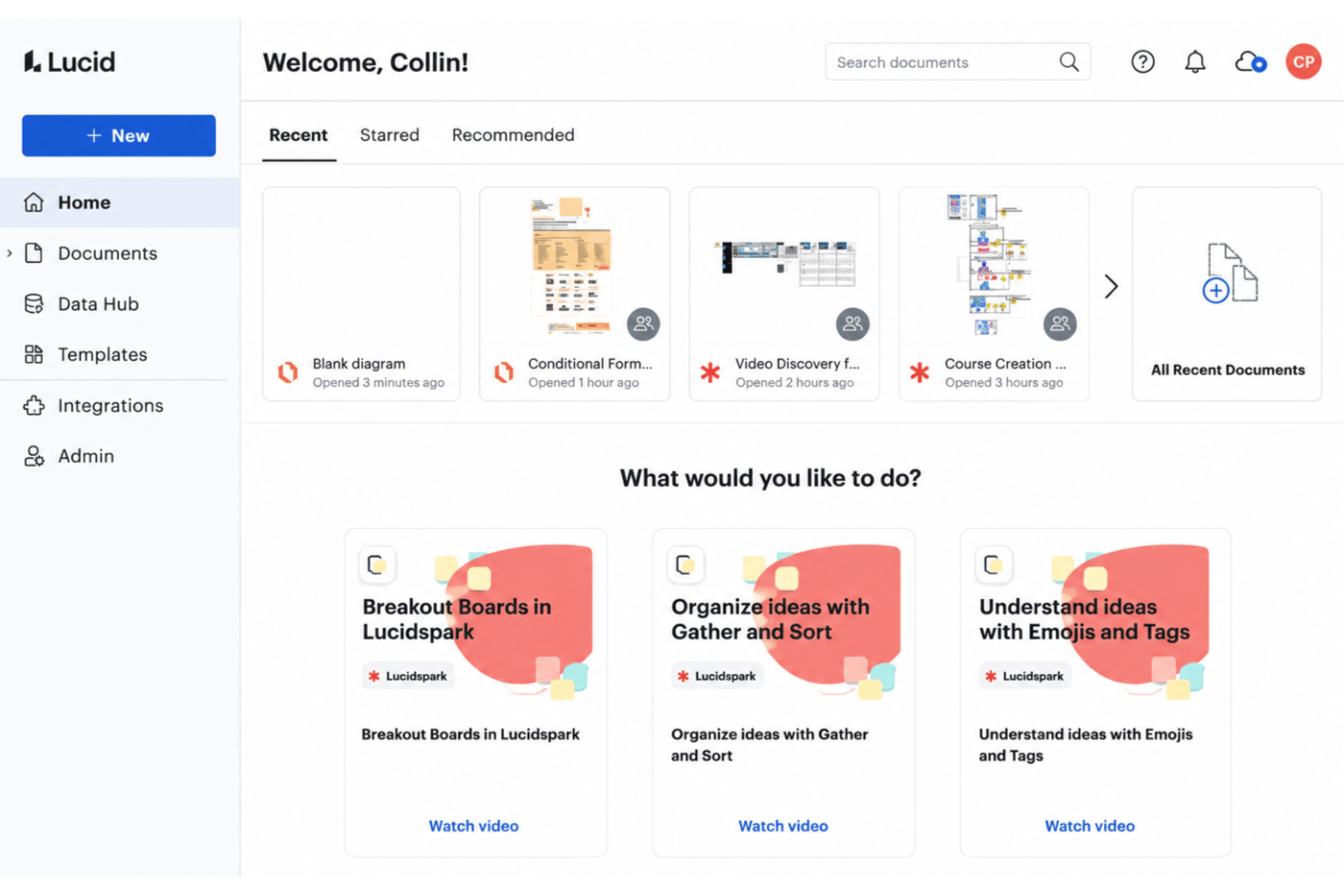
Lucid is a work acceleration and visual collaboration platform designed for teams who need fast, clear ways to map out ideas, processes, and technical systems together. The suite pairs Lucidchart, Lucid’s intelligent diagramming tool, with Lucidspark, its virtual whiteboard for brainstorming and working sessions. When shifting requirements, remote workflows, and distributed teams create project friction, Lucid helps you keep everyone aligned and moving forward
In this review, I break down Lucid’s features, use cases, strengths, trade-offs, and pricing—so you can decide if it’s the right fit for your project delivery needs.
Lucid Evaluation Summary
- From $15/month (billed annually)
- Free trial + free plan available
Por qué confiar en nuestras recomendaciones de software
Nuestro equipo lleva probando y evaluando software desde 2012. Como gestores de proyectos, sabemos lo difícil —y lo importante— que es elegir el software adecuado.
Para esta guía, evaluamos las herramientas mediante pruebas prácticas e investigación independiente, puntuando las herramientas según nuestros criterios de selección. También nos basamos en la experiencia de líderes de opinión del sector y de profesionales en activo de la gestión de proyectos.
Nuestras reseñas reflejan nuestro criterio editorial humano, no un discurso de ventas.
Revisores expertos:
Lucid Overview
I think Lucid stands out for its universal canvas which lets work flow seamlessly between Lucidspark and Lucidchart, its flexible integration options, and advanced diagramming features that make judging process flows and technical systems a breeze. While pricing trends higher and onboarding complex diagrams can require extra learning, I’d pick Lucid for large or cross-functional teams who need interactive whiteboarding, real-time collaboration, and granular permissions. In my experience, it outperforms the competition for technical mapping, though less so for those seeking lightweight, visual note-taking. If you’re comparing tools for robust team diagramming with strong support, Lucid is worth serious consideration.
pros
-
Real-time collaboration supports remote and hybrid teams well
-
Advanced diagramming tools for technical and business workflows
-
Version history enables easy rollback to previous states
cons
-
Tapping the full toolset means moving between Lucidchart and Lucidspark
-
More advanced data features are reserved for the Enterprise plan
-
Limited offline access for users without internet connection
Is Lucid Right For Your Needs?
Who Would be a Good Fit for Lucid?
Lucid works best for teams that need real-time diagramming and advanced visual collaboration across technical, product, or business roles. It’s especially valuable in industries where process mapping, architecture, or strategic planning are daily activities; software development, SaaS, consulting, education, healthcare, financial services, and even the public sector, where Lucid’s FedRAMP and IRAP credentials carry real weight. Organizations looking for flexible templates, cloud-based access, and strong admin controls will find it a solid choice.
-
Product Management Teams
Lucid enables rapid user journey mapping, roadmapping, and workflow visualization for cross-functional project work.
-
Software Engineering
UML diagrams, system architectures, and data flow mapping are easy to build and share with real-time collaboration.
-
Enterprise IT Departments
Complex process mapping, network diagrams, and documentation can be maintained at scale with admin controls and access management.
-
Consulting Firms
Facilitates collaborative client workshops, value stream mapping, and dynamic presentations for stakeholder alignment.
-
Higher Education
Offers collaborative whiteboarding for faculty and students, encouraging interactive learning and group project work.
-
Large Enterprises
Lucid's scalability, advanced security, and integration options match large organizations' governance and compliance requirements.
Who Would be a Bad Fit for Lucid?
Lucid isn’t ideal for teams that need tooling deeply specialized to a single industry, or for nonvisual workflows where collaborative diagrams aren’t central to the work. Teams that work primarily offline may not get enough value to justify the investment, and detailed UX design is better served by dedicated design tools. Organizations with restricted tech stacks or minimal need for cloud-based collaboration should look elsewhere.
-
Highly Specialized industries
Fields that demand custom symbols, advanced simulation, or industry-certified modeling will outgrow a general-purpose canvas like Lucid’s.
-
Offline-Only Teams
With limited offline functionality, Lucid requires internet access for real-time collaboration and cloud saving.
-
Budget-Constrained Nonprofits
Subscription costs and extensive features may outweigh the needs of organizations with limited budgets and simple workflows.
-
Manual Labor Operations
Teams in fields like manufacturing or on-site construction may not need advanced digital diagrams for daily operations.
-
Small Local Businesses
Businesses focused on basic workflows and non-collaborative tasks will see limited day-to-day benefit from Lucid’s advanced capabilities.
Nuestra Metodología de Revisión
Cómo probamos y puntuamos las herramientas
Llevamos años construyendo, refinando y mejorando nuestro sistema de prueba y puntuación de software. La rúbrica está diseñada para capturar los matices de la selección de software y los factores que hacen efectivo a un sistema, centrándose en los aspectos críticos del proceso de toma de decisiones.
A continuación, puedes ver exactamente cómo funciona nuestro proceso de prueba y puntuación en base a siete criterios. Esto nos permite proporcionar una evaluación imparcial del software basada en la funcionalidad principal, características destacadas, facilidad de uso, incorporación, soporte al cliente, integraciones, opiniones de clientes y valor por el dinero.
Funcionalidad principal (25% de la puntuación final)
El punto de partida de nuestra evaluación es siempre la funcionalidad principal de la herramienta. ¿Cuenta con las funciones y características básicas que un usuario esperaría ver? ¿Alguna de estas funciones principales está limitada a planes de precios superiores? Esperamos que la herramienta se mantenga a la par de las capacidades básicas de sus competidores.
Características destacadas (25% de la puntuación final)
A continuación, evaluamos las características destacadas poco comunes que van más allá de la funcionalidad principal normalmente encontrada en este tipo de herramientas. Una puntuación alta refleja funciones únicas o especializadas que hacen que el producto sea más rápido, eficiente, o aporte valor extra al usuario.
También evaluamos la facilidad de integración con otras herramientas habitualmente presentes en el ecosistema tecnológico para ampliar la funcionalidad y utilidad del software. Las herramientas que ofrecen muchas integraciones nativas, conexiones de terceros y acceso por API para integrar soluciones personalizadas obtienen la mejor puntuación.
Facilidad de uso (10% de la puntuación final)
Consideramos cuán rápido y fácil es ejecutar las tareas fundamentales usando la herramienta. El software con alta puntuación está bien diseñado, es intuitivo, ofrece aplicaciones móviles, proporciona plantillas y hace que tareas relativamente complejas parezcan sencillas.
Incorporación (10% de la puntuación final)
Sabemos lo importante que es una adopción rápida para un nuevo sistema, así que evaluamos cuán sencillo es aprender a usar la herramienta con una capacitación mínima. Analizamos cuán rápido un miembro del equipo puede configurarse y comenzar a usar la herramienta sin experiencia previa. Las soluciones mejor puntuadas indican que se requiere poco o ningún soporte.
Soporte al cliente (10% de la puntuación final)
Revisamos la rapidez y facilidad para obtener ayuda por teléfono, chat en vivo o base de conocimientos. Las empresas que ofrecen soporte en tiempo real obtienen las mejores puntuaciones, mientras que los chatbots obtienen las peores.
Opiniones de clientes (10% de la puntuación final)
Además de nuestras propias pruebas y valoraciones, consideramos la puntuación neta del promotor de clientes actuales y anteriores. Revisamos la probabilidad de que, ante la opción, quisieran elegir la herramienta de nuevo por su funcionalidad central. Un software con una puntuación alta refleja una gran satisfacción de sus usuarios actuales o pasados.
Valor por el dinero (10% de la puntuación final)
Por último, tomando en cuenta todos los criterios mencionados, comparamos el precio promedio de los planes básicos respecto a las funciones principales y el valor aportado por los otros criterios. El software que entrega más por menos recibirá una puntuación superior.
Core Features
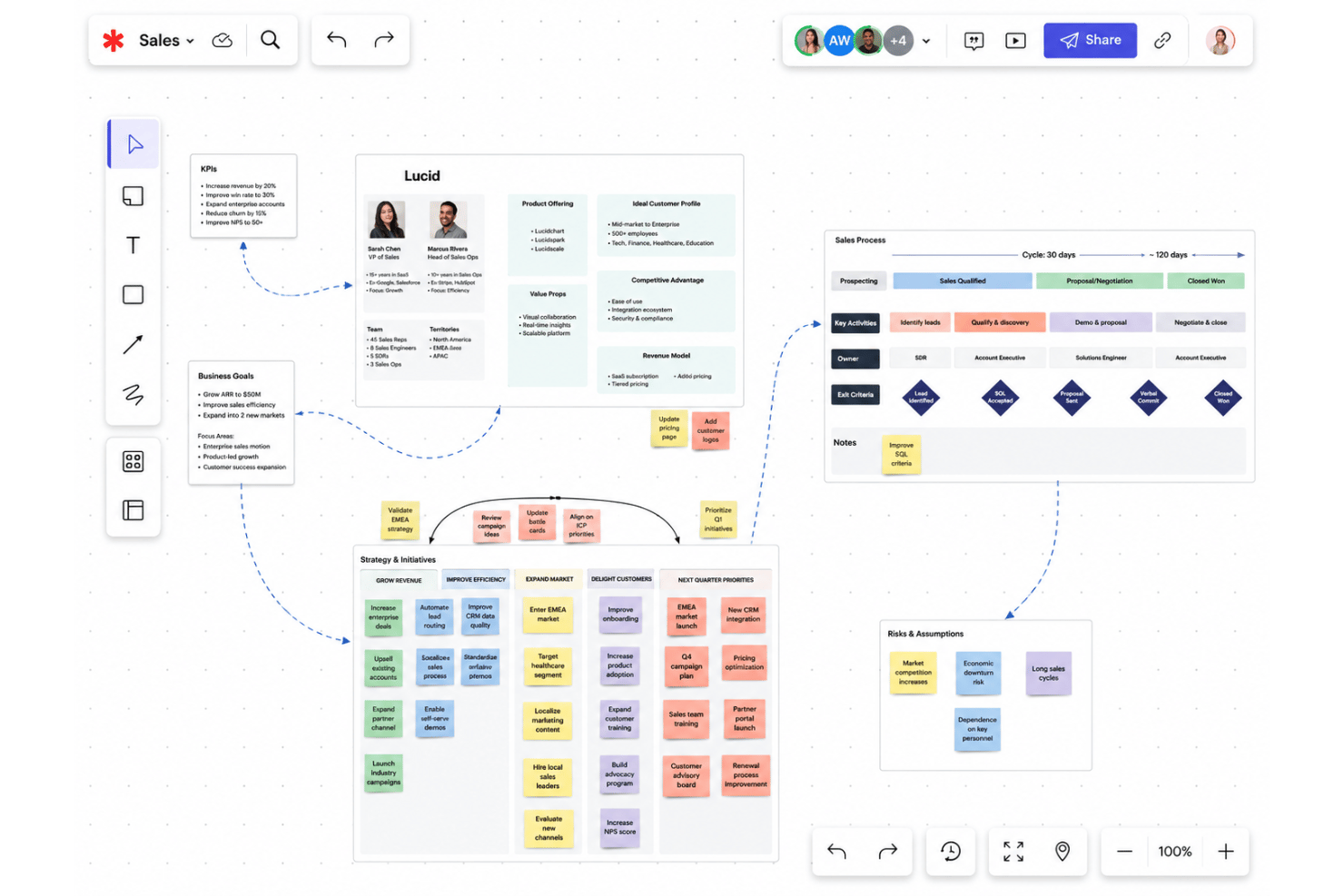
Infinite Canvas
Map processes, brainstorm, and build with no space limitations. Teams can visualize complex projects without running out of workspace.
Real-Time Collaboration
Multiple users co-create, edit, and comment simultaneously. Changes update instantly, so feedback and alignment happen live in meetings.
Shape and Template Libraries
Access a vast catalog of industry-standard shapes and prebuilt templates. Quickly start network diagrams, flowcharts, or journey maps without starting from scratch.
Version History
Track every change and restore previous diagram versions instantly. Audit trails make it easy to manage project revisions and collaboration accountability.
Conditional Formatting
Apply rules to shapes and connectors for clear visual cues. Highlight status, ownership, or metrics automatically to focus attention.
Presentation Mode
Turn working documents into clean, shareable slide decks in one click. Guide stakeholders through diagrams without exporting or leaving the platform.
Standout Features
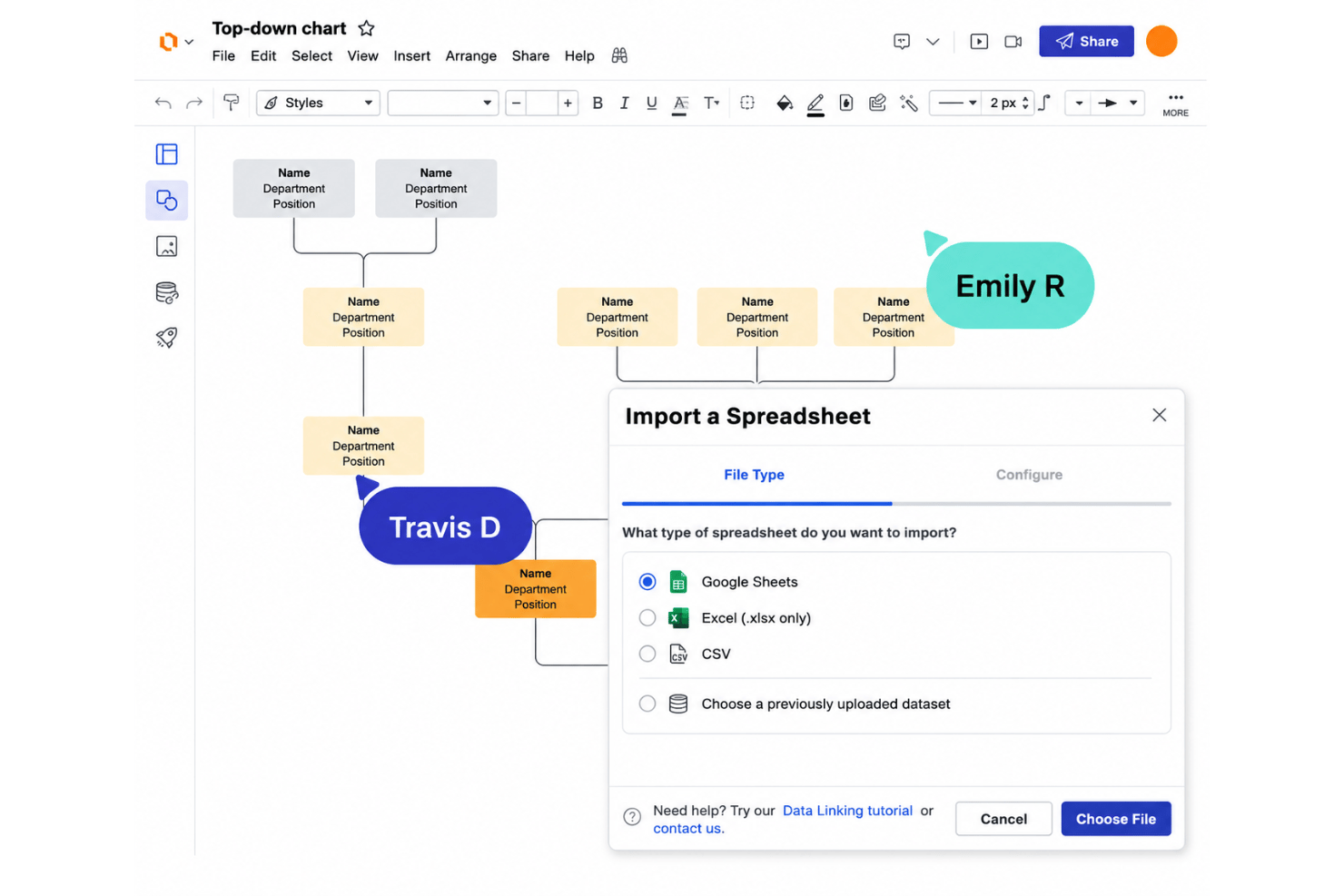
Data Linking
Connect live data from spreadsheets, Salesforce, or an HR system directly to diagrams, and generate org charts, ERDs, and account maps automatically. Google Sheets data syncs on its own, so visuals stay accurate as the source changes.
Lucid AI
Generate diagrams, boards, and documentation from AI prompts: flowcharts, ERDs, mind maps, and more, then sort and summarize ideas after a brainstorm. Speed up requirements mapping without manual shape placement or formatting.
Universal Canvas
Lucidchart and Lucidspark share one canvas, so a sticky-note brainstorm can become a polished process map without exporting or redrawing anything. It’s the glue that makes the suite feel like a single product.
Visual Activities
Participants rank, vote on, and react to ideas while Lucid aggregates the results to show where the group actually agrees—handy for retrospectives, planning sessions, and workshops.
Ease of Use
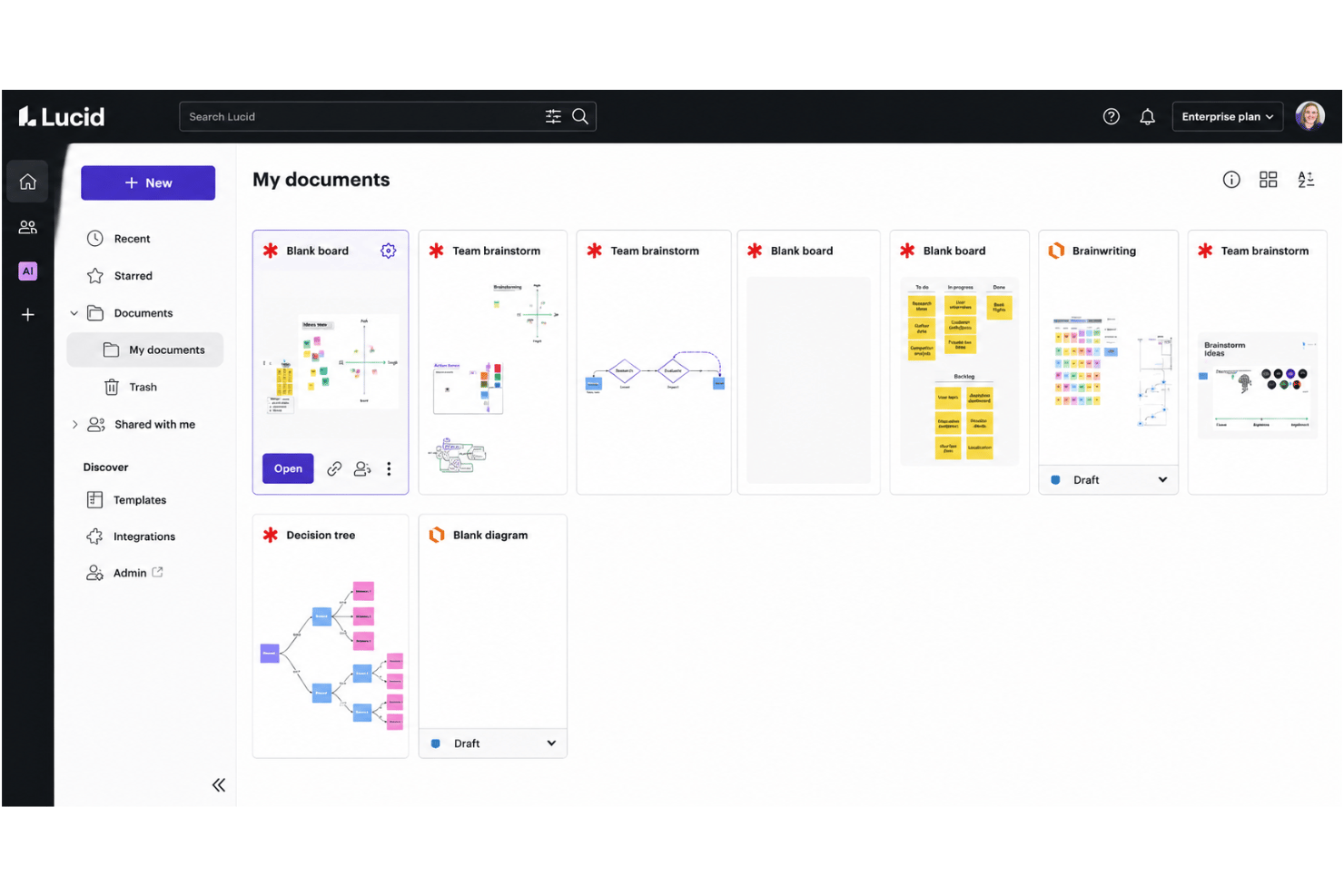
Lucid’s usability sets it apart, thanks to drag-and-drop editing, a wide array of searchable templates, and intuitive navigation that make building even complex diagrams feel approachable. Users frequently praise the fast onboarding and logical layout, though heavy authoring is best on a desktop—the mobile app is geared toward viewing diagrams and adding comments on the fly. Overall, I think most teams will find Lucid both inviting and efficient for collaborative work.
Onboarding
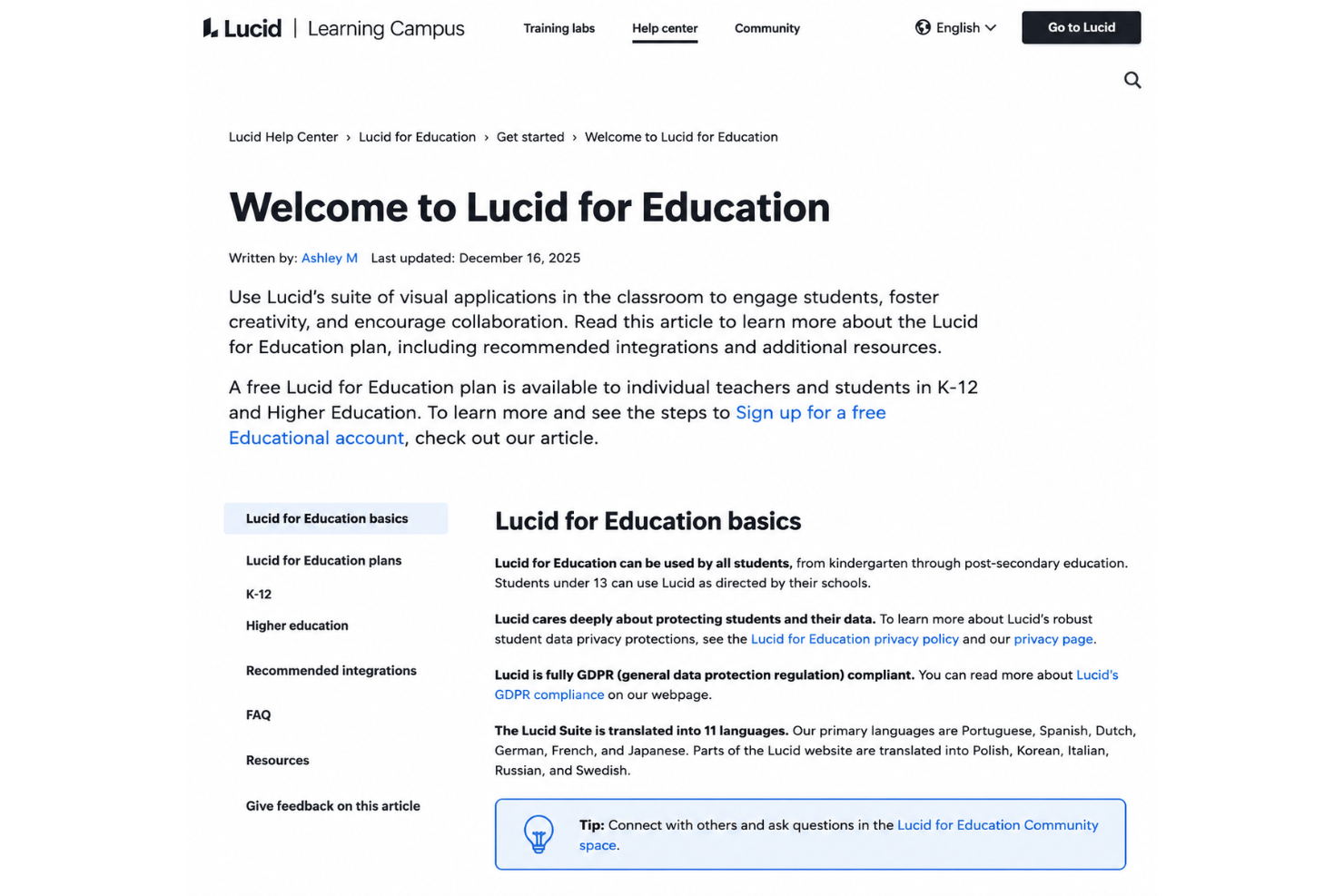
Lucid’s onboarding stands out with a guided email flow for every new user, template suggestions, and in-app tips that shorten the learning curve. New users also get a searchable help center, Lucid Training Labs for tutorials, and a vibrant user community for troubleshooting. Enterprise accounts can add professional services—including white-glove setup and a migration package for teams moving from competing tools.
Customer Support
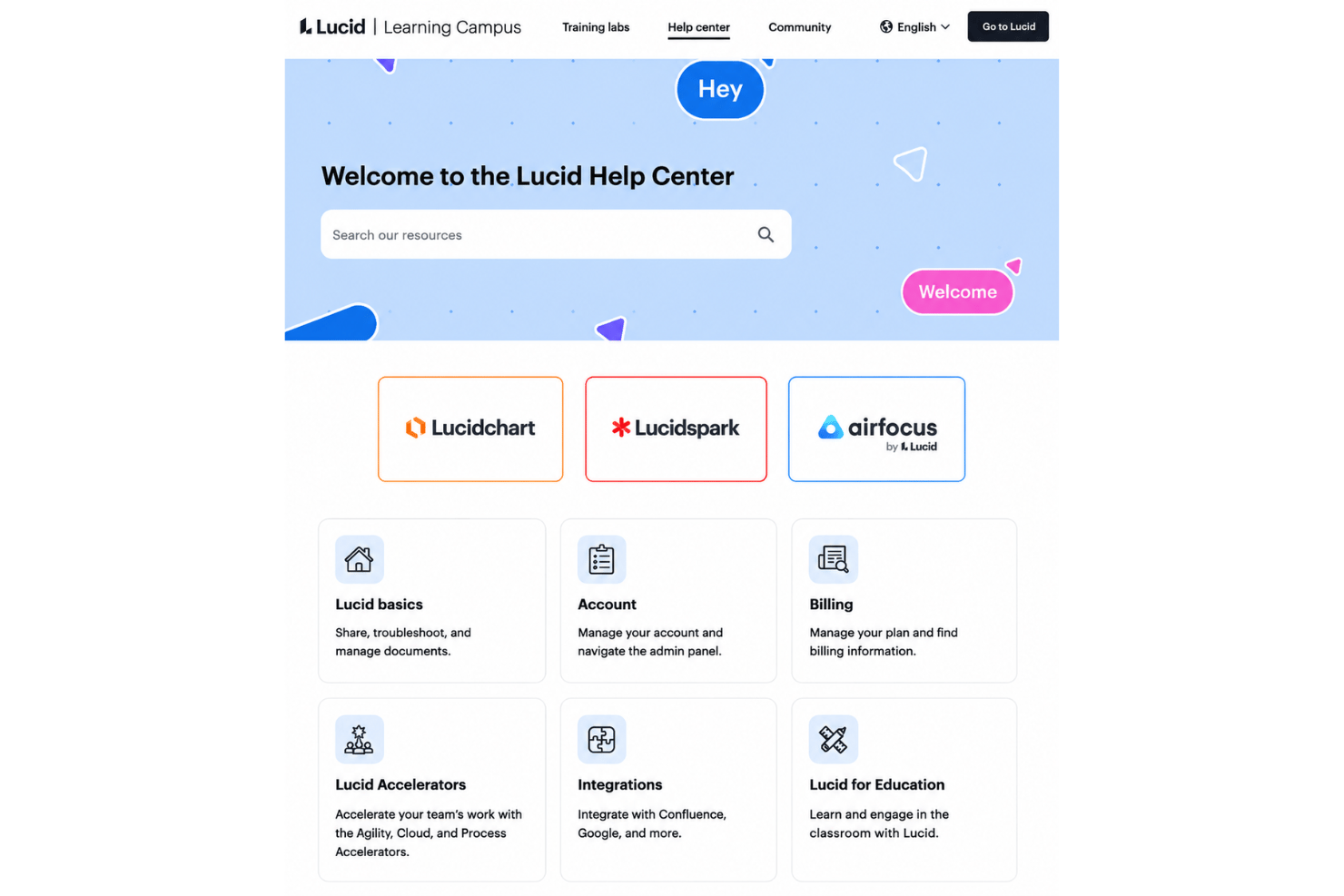
Lucid backs users with a well-organized help center, Lucid Training Labs for tutorials, and an active community for more specific questions. Most standard issues can be resolved through these self-service resources, while Enterprise customers can purchase professional services for hands-on coaching and support. In my experience, the documentation is strong enough that most teams resolve day-to-day questions without much delay.
Integrations
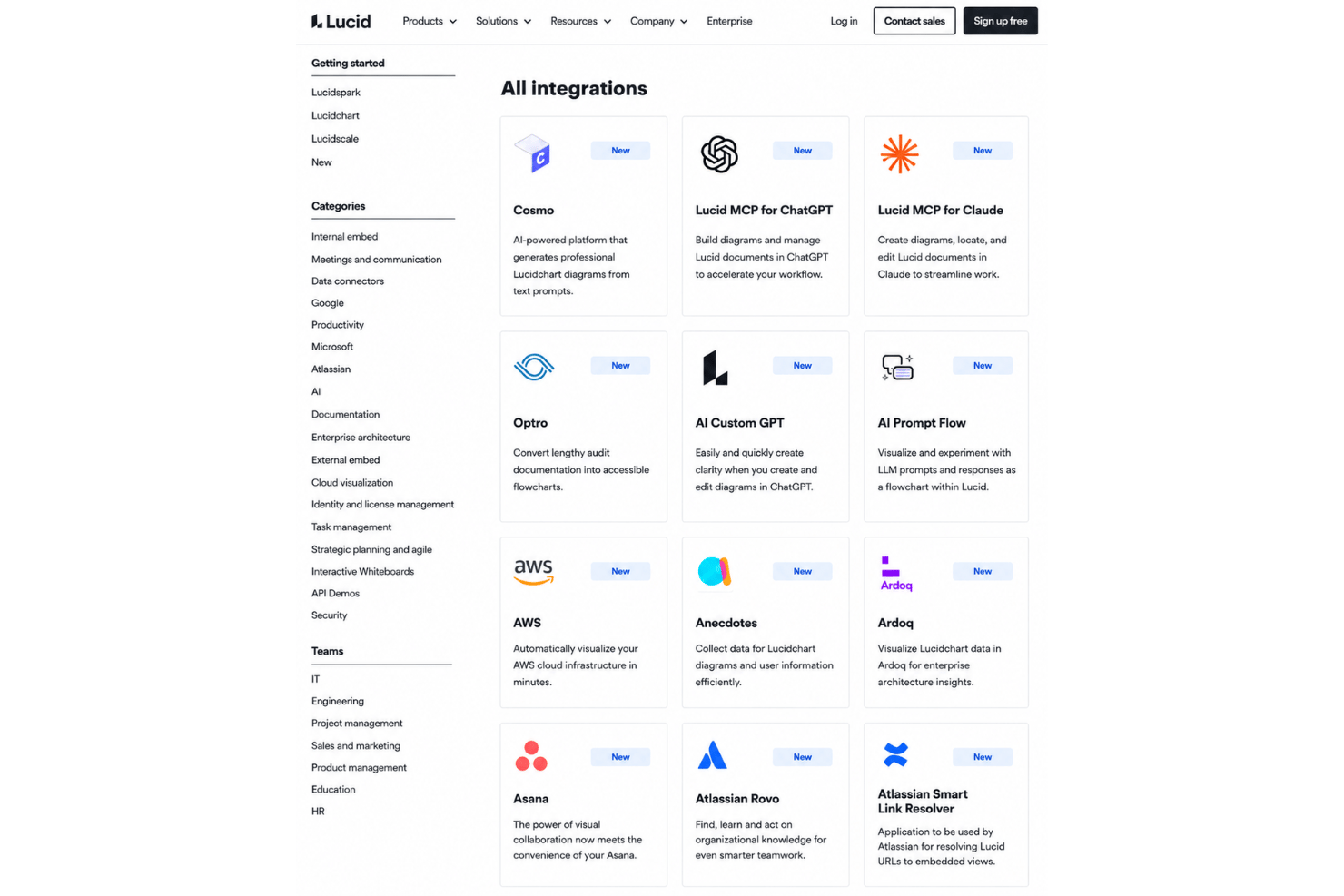
Lucid integrates with Google Workspace, Microsoft 365, Slack, Jira, Confluence, Salesforce, Ardoq, LeanIX, and AWS, among others, through its integration marketplace.
Lucid also offers a REST API, a developer platform, and an MCP server that connects Lucid to AI tools such as ChatGPT and Claude.
Value for Money
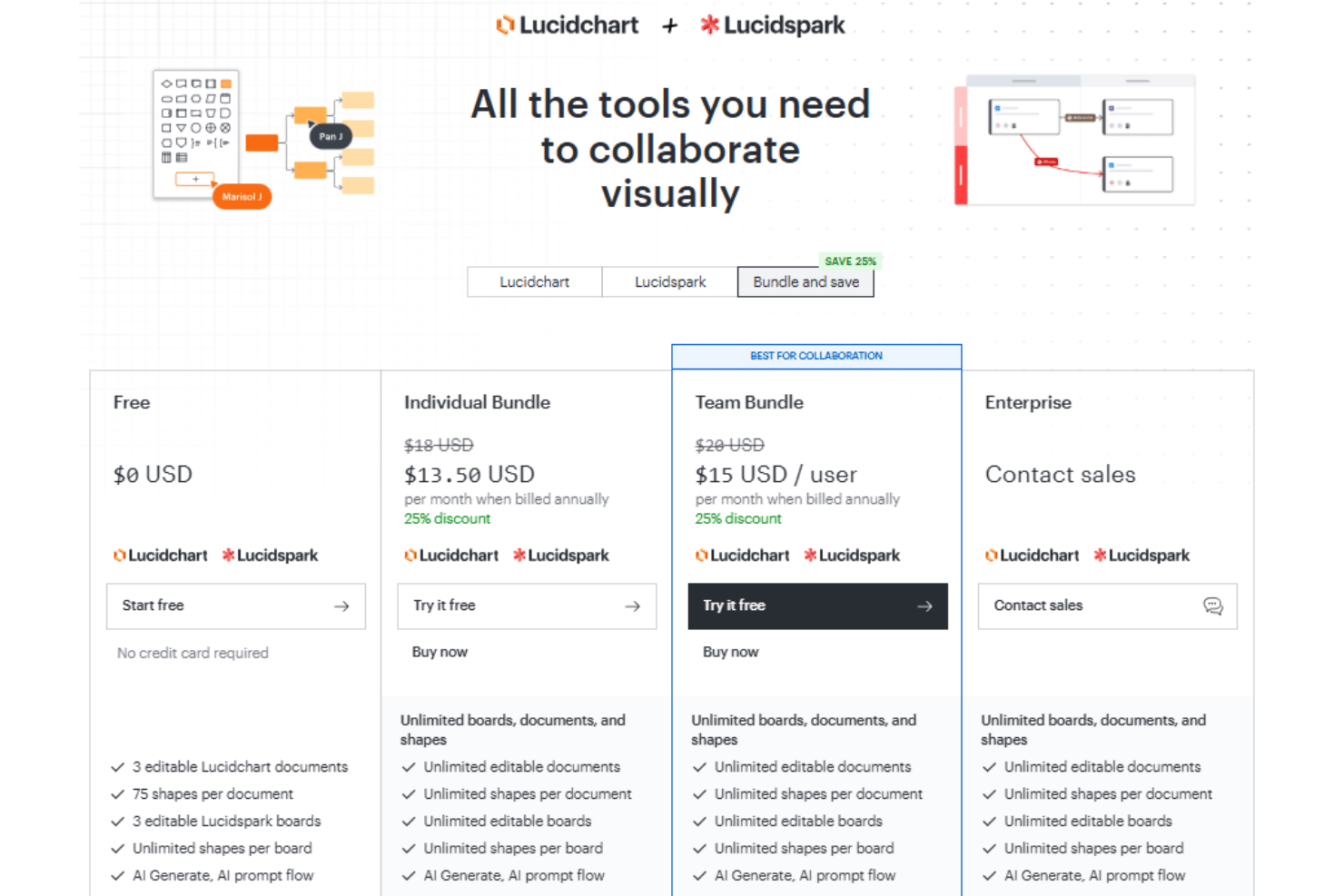
Lucid’s pricing is reasonable for the breadth of features, enterprise security, and scalability it offers. Because the suite covers everything from brainstorming to technical diagramming, many teams can also reduce costs by consolidating other tools, while larger organizations may find the advanced functionality well worth the investment.
- Free: Includes access to Lucidchart and Lucidspark, 75 shapes per document, 3 boards, and access to AI Generate.
- Individual Bundle: Adds unlimited documents, shapes, and boards.
- Team Bundle: Offers password protected publishing, admin controls, data syncing,a nd voting.
- Enterprise: Provides data overlays, Salesforce Schema import, and premium integrations.
Lucid Specs
- 2-Factor Authentication
- Access Management
- Anti-Virus
- API
- Audit Trail
- Bug Tracking
- Calendar Management
- Customer Management
- Dashboard
- Data Export
- Data Import
- Data Visualization
- Email Integration
- External Integrations
- File Sharing
- File Transfer
- Firewall
- Google Apps Integration
- Inventory Tracking
- Malware Protection
- Multi-User
- Network Device Performance Monitoring
- Network Traffic Monitoring
- Network Visualization
- Notifications
- Project Management
- Remote Access
- Risk Assessment
- SAP Integration
- Scheduling
- Software Integration
- Third-Party Plugins/Add-Ons
- Ticket Management
Lucid FAQs
How easy is it to onboard a cross-functional team to Lucid?
Can I control who has access to Lucid diagrams?
How does Lucid support real-time collaboration for distributed teams?
Is Lucid compliant with common industry security standards?
Does Lucid integrate with my project management and productivity tools?
What happens if I accidentally delete a diagram or need to restore an old version?
How scalable is Lucid for larger organizations or growing teams?
Is there a way to automate or dynamically update diagrams with external data?
What’s the difference between Lucidchart and Lucidspark?
Lucid Company Overview & History
Lucid Software is headquartered in South Jordan, Utah, with offices in Raleigh, Amsterdam, Melbourne, and Hamburg. Co-founded in 2010 by Ben Dilts and Karl Sun, it’s best known for Lucidchart and Lucidspark and now serves more than 100 million users across over 180 countries, with customers including Google, GE, and NBC Universal. Alongside the suite, Lucid offers airfocus, an AI-powered product management and roadmapping platform, and ranks as the most used work acceleration platform among the Fortune 500.
Lucid Major Milestones
- 2010: Company founded and Lucidchart launched.
- 2016: Lucidchart surpasses 10 million users worldwide.
- 2020: Lucidspark released to expand the visual collaboration suite.
- 2022: Lucid passes $100 million in annual recurring revenue.
- 2025: Lucid acquires airfocus and folds cloud visualization into the new Cloud Accelerator add-on.
- 2026: Lucid extends its AI platform with an MCP server connecting Lucid to AI tools such as ChatGPT and Claude.