2026’nın En İyi Müşteri Yönetimi Yazılımları İncelendi

10 En İyi Müşteri Yönetimi Yazılımları Kısa Listesi


Müşteri yönetimi yazılımı; müşteri bilgilerini merkezileştirerek, etkileşimleri takip ederek ve iletişimi kolaylaştırarak ekiplerin düzenli, hızlı yanıt veren ve tutarlı kalmasına yardımcı olur. E-postaları, proje güncellemelerini ve müşteri beklentilerini farklı platformlarda yönetmek zorunda kalıyorsanız doğru araç, müşteri ilişkilerinizin ne kadar sorunsuz ilerlediği konusunda büyük bir fark yaratabilir.
Uygulamalı testler ve araştırmalara dayanarak, görünürlüğü, ekip iş birliğini ve müşteri memnuniyetini gerçekten geliştiren araçları öne çıkarmak için en iyi müşteri yönetimi yazılımı platformlarını inceledim. Potansiyel müşteri takibinden ilişki yönetimine kadar bu araçlar hem küçük ekipleri hem de büyüyen işletmeleri desteklemek üzere tasarlanmıştır.
Bu kılavuzda, mevcut en iyi müşteri yönetimi yazılımlarını ve her aracın en iyi yaptığı işlere ve ihtiyaçlarınıza uygun olanı nasıl seçebileceğinize dair bilgileri bulacaksınız.
Why Trust Our Software Recommendations
Our team has been testing and reviewing software since 2012. As project managers ourselves, we know how difficult—and important—it is to choose the right software.
For this guide, we evaluated tools using hands-on testing and independent research, scoring tools using our selection criteria. We also draw on insights from industry thought leaders and practicing project management experts.
Our reviews reflect our human editorial judgment, not a sales pitch.
Expert reviewers:
Müşteri Yönetimi Yazılımları Karşılaştırma Tablosu
Bu karşılaştırma tablosu, en iyi müşteri yönetimi yazılımı seçimlerimin fiyatlandırma ayrıntılarını özetlemektedir:
| Tool | Starting Price | Website | |
|---|---|---|---|
| Best for billing tracked project time | — | $12/user/month Free plan + 14-day free trial | Website |
| Best for customizable pipelines | 4.6 out of 5 | $12/user/month 14-day free trial + free demo available | Book Demo |
| Best for shared inbox collaboration | 4.8 out of 5 | $14/user/month 30-day free trial available | Website |
| Best for an all-in-one solution | 4.8 out of 5 | $19/month 14-day free trial | Website |
| Best for law firms | 4.7 out of 5 | $49/user/month 7-day free trial | Website |
| Best for creative professionals | 4.6 out of 5 | $29/month 30-day free trial | Website |
| Best for process automation | 4.7 out of 5 | $15/user/month Not available | Website |
| Best for sales teams | 4.5 out of 5 | $14/user/month 14-day free trial | Website |
| Best for client portals | 4.8 out of 5 | $39/month Free trial + free demo available | Website |
| Best for project management | 4.4 out of 5 | $9.99/user/month Free plan + 14-day free trial + free demo available | Website |

En İyi Müşteri Yönetimi Yazılımı İncelemeleri
Aşağıda, kısa listeme giren en iyi müşteri yönetimi yazılımlarına ilişkin ayrıntılı özetlerimi bulabilirsiniz. İncelemelerim, sizin için en iyi seçeneği bulmanıza yardımcı olmak amacıyla her aracın temel özelliklerine, artılarına ve eksilerine, entegrasyonlarına ve ideal kullanım alanlarına ayrıntılı bir bakış sunuyor.

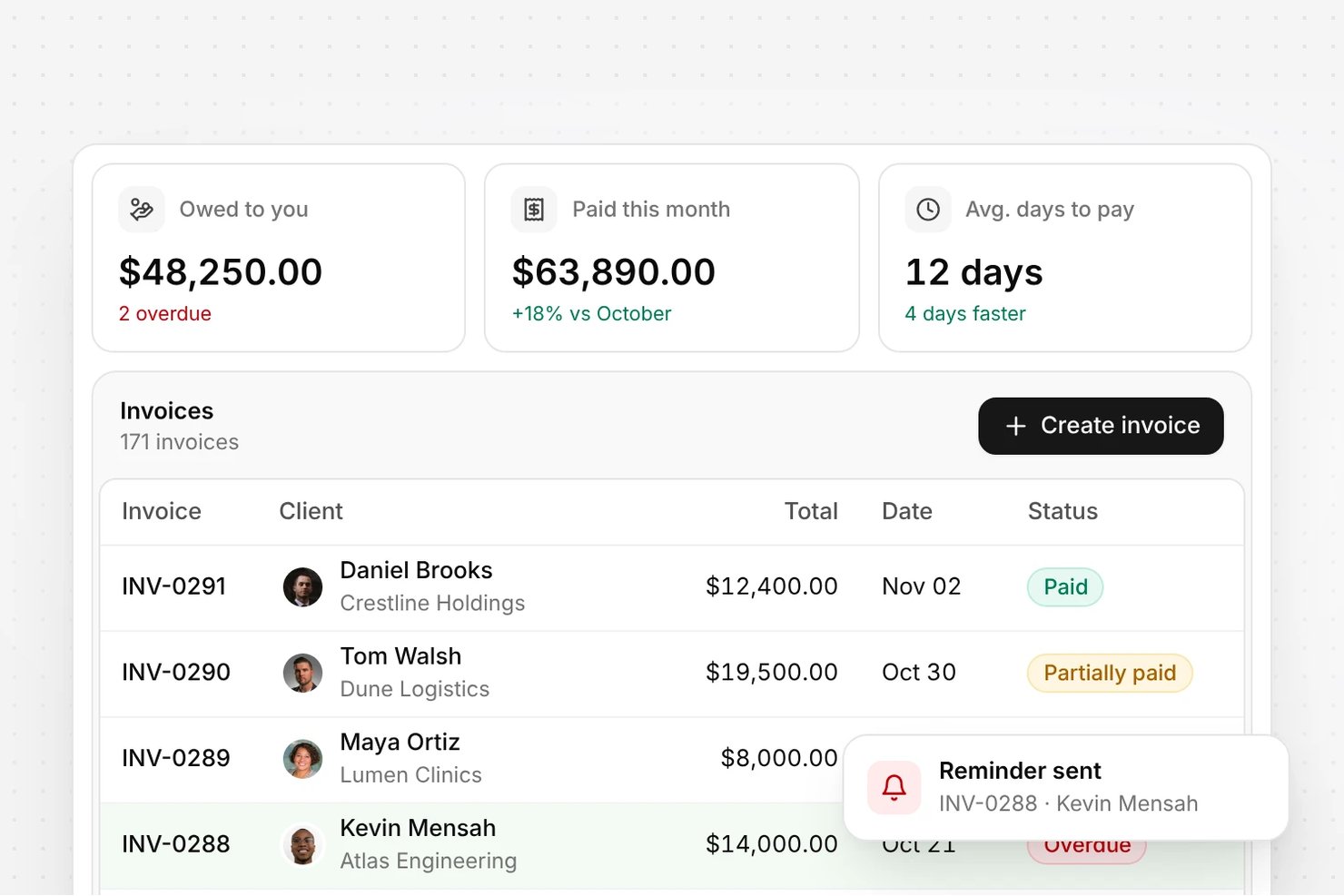
Olqan is an all-in-one business operating system that combines client management, project delivery, sales pipelines, time tracking, and invoicing in a single platform.
Who Is Olqan Best For?
Olqan is a good fit for agencies and consultancies that need to manage projects, track billable time, and invoice clients from one place.
Why I Picked Olqan
I picked Olqan as one of the best because it closes the gap between doing the work and getting paid for it. Once my team logs time against a project and task, I can generate an invoice directly from those time log entries, selecting the date range and billing details to produce an accurate client bill without rebuilding hours from scratch. The Advanced Dashboard's Client tab also shows client-wise earnings and time logs side by side, so I always know which projects are generating revenue.
Olqan Key Features
- Sales pipeline tracking: Manage leads through customizable deal stages, with deal value, probability, expected close dates, and activity history logged per opportunity.
- Client portal access: Give clients a dedicated login to view their projects, invoices, files, and communications in one place.
- Project budget vs. actuals: Compare planned budgets against real spending and analyze profitability at the project level.
- Contract templates: Search, filter, and apply pre-built contract templates that auto-populate a new contract form with client and project details.
Olqan Integrations
Olqan offers native integrations with QuickBooks, Stripe, PayPal, Square, Slack, WhatsApp, Google Calendar, Google Drive, Google Meet and Microsoft Teams, and supports webhooks.
Pros and Cons
Pros:
- Shows client earnings alongside time logs
- Builds client invoices from selected time logs
- Connects client records to project task tracking
Cons:
- No documented synced client communication timeline
Best for customizable pipelines

monday CRM is a customizable client management software designed to help you track leads, manage contacts, and oversee your entire sales pipeline. It centralizes customer data, communication, and activities in one place, making it easier to stay organized and responsive. As consultant Fred Baker notes from his own experience, “I've transitioned clients from Salesforce to Monday for simpler project tracking solutions,” highlighting how the platform can serve as an accessible alternative to more complex systems.
Why I picked monday CRM: I picked monday CRM for its focus on pipeline management, which lets you customize and manage multiple pipelines and edit stages easily. This flexibility allows you to tailor sales and communication processes to fit your unique business needs, ensuring that you can track every stage of your client interactions. Additionally, the tool offers contact and lead management features that help you organize and nurture your leads, improving your chances of converting them into clients.
Standout Features & Integrations:
Features include project tracking, which helps you keep tabs on ongoing projects and deadlines to ensure timely delivery. The tool also provides real-time dashboards that allow you to monitor client status and team performance at a glance, so you're always informed.
Integrations include NetSuite, Salesforce, HubSpot, Slack, Microsoft Dynamics CRM, Microsoft Teams, Zendesk, Jira Software Cloud, Google Sheets, Gmail, Google Drive, and Mailchimp.
Pros and Cons
Pros:
- Mobile CRM experience for on-the-go access
- Custom dashboards and client pipelines
- Automates repetitive tasks to save time
Cons:
- Limited native communication tools
- Reporting features may lack depth for some users
New Product Updates from monday CRM

monday CRM Adds Meta Conversions API Integration
monday CRM now lets you connect Meta Conversions API and sync lead status back to Meta, improving targeting and conversions via a new Meta integration automation recipe. For more information, visit monday CRM's official site.
 .
Missive
Best for shared inbox collaboration
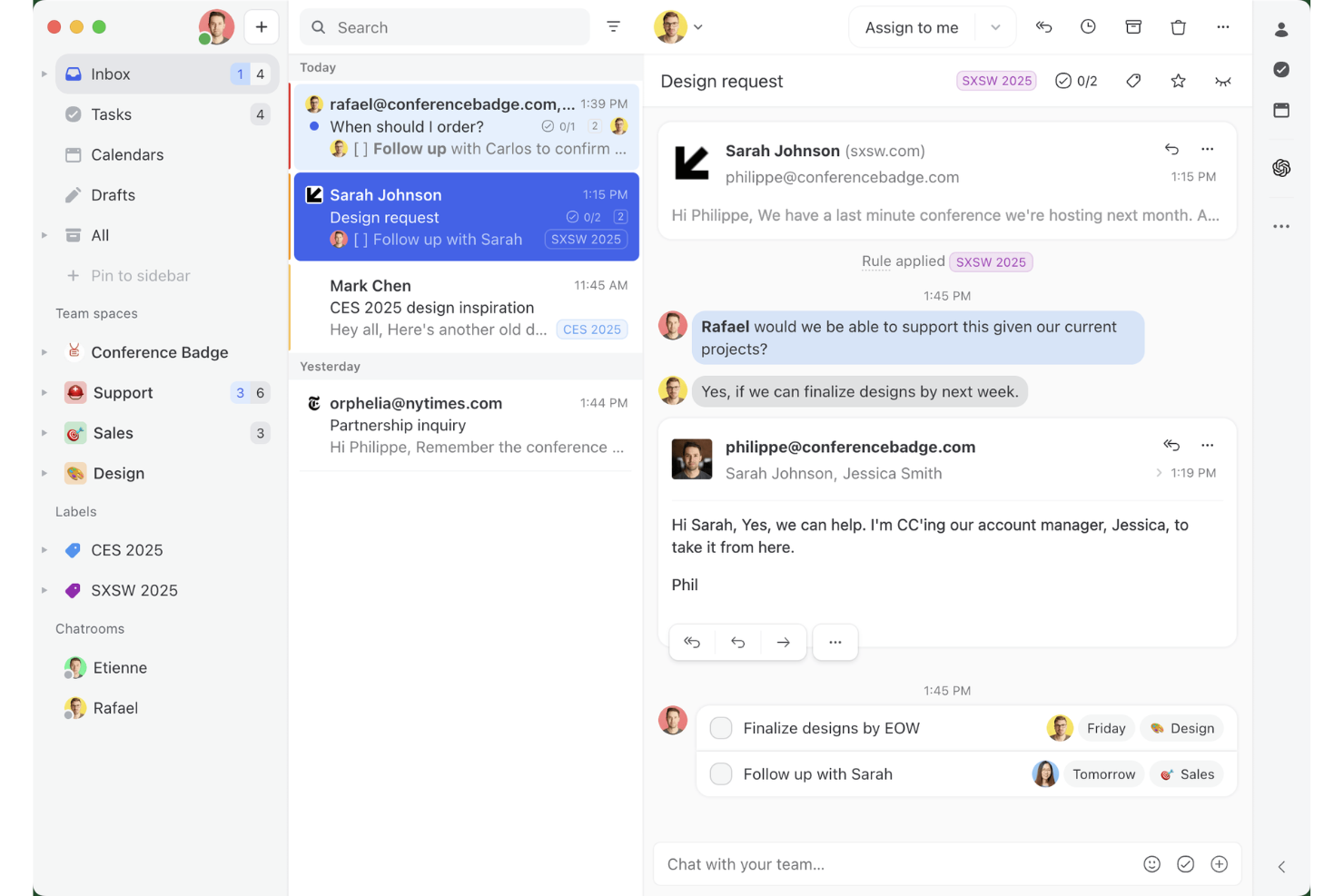
Missive is a shared inbox and team email collaboration tool that unifies email, SMS, WhatsApp, and social messaging channels into one workspace, with built-in task management, internal threads, and contact management.
Who Is Missive Best For?
Missive suits client-facing teams at agencies or service businesses that manage high volumes of multi-channel client conversations and need tighter internal coordination around those threads.
Why I Picked Missive
I've included Missive in my top picks because no other tool on this list handles shared inbox collaboration the way it does. I love that internal threads let your team talk around a client email without the client ever seeing it, and real-time collaborative drafting means two people can co-author a reply simultaneously. When a client messages across three different channels, everything lands in one workspace with a full audit trail of who touched what and when.
Missive Key Features
- Shared inbox rules engine: Automatically route, label, assign, and follow up on incoming conversations based on custom trigger conditions.
- CRM sidebar integrations: Surface client records from HubSpot, Salesforce, Pipedrive, and Close directly alongside email threadswithout switching tabs.
- Guest access for external collaborators: Invite clients or contractors into specific conversation threads at no extra seat cost.
- Multi-channel inbox consolidation: Manage email, SMS, WhatsApp, Facebook Messenger, Instagram DMs, and livechat from a single workspace.
- Missive MCP Server: Connect external AI tools (like Claude or ChatGPT) to query client management threads, check calendars, and draft replies—while keeping agent review required before sending.
Missive Integrations
Missive offers native integrations with HubSpot, Salesforce, Pipedrive, Close, Asana, ClickUp, Trello, Google Drive, Dropbox, and Shopify. It also provides an open REST API, supports Zapier, and includes its new MCP Server on Productive and Business plans (requires admin activation).
Pros and Cons
Pros:
- Real-time team drafting on every channel
- Internal threads let teams discuss client emails privately
- Unifies email, SMS, and social messages
Cons:
- Lacks billing, invoicing, and client onboarding tools
- No client portal or project dashboards
New Product Updates from Missive

Missive Adds Multi-Step Automations With Timed Rules
Missive adds time-based rule steps that let automations run through multiple stages on the same conversation. This helps teams build follow-ups and SLA escalations without creating separate rules. For more information, visit Missive’s official site.
 .

Best for an all-in-one solution

Suitedash is an all-in-one client management platform designed for businesses that need to manage projects, invoicing, and client communication in one place. It's ideal for small-to-medium-sized businesses looking for comprehensive functionality without the need for multiple tools.
Why I picked Suitedash: Suitedash combines project management, CRM, and invoicing into a single platform, making it a versatile choice for businesses. You can manage client interactions, track project progress, and handle billing seamlessly. The platform is also customizable, allowing you to tailor it to your specific business needs. Furthermore, its all-in-one approach reduces the need for multiple subscriptions, which saves you time and money.
Standout Features & Integrations:
Features include a client portal that simplifies communication and collaboration with clients. The invoicing tool allows you to create and send invoices directly from the platform, streamlining your billing process. The software’s project management features can additionally help you keep track of tasks, deadlines, and team responsibilities.
Integrations include QuickBooks, Stripe, PayPal, Zapier, Google Calendar, Braintree, WordPress, Zoom, Twilio, and Authorize.Net.
Pros and Cons
Pros:
- Reduces need for multiple tools
- Customizable features
- Versatile project tools
Cons:
- Limited advanced features
- Complex initial setup

Clio
Best for law firms
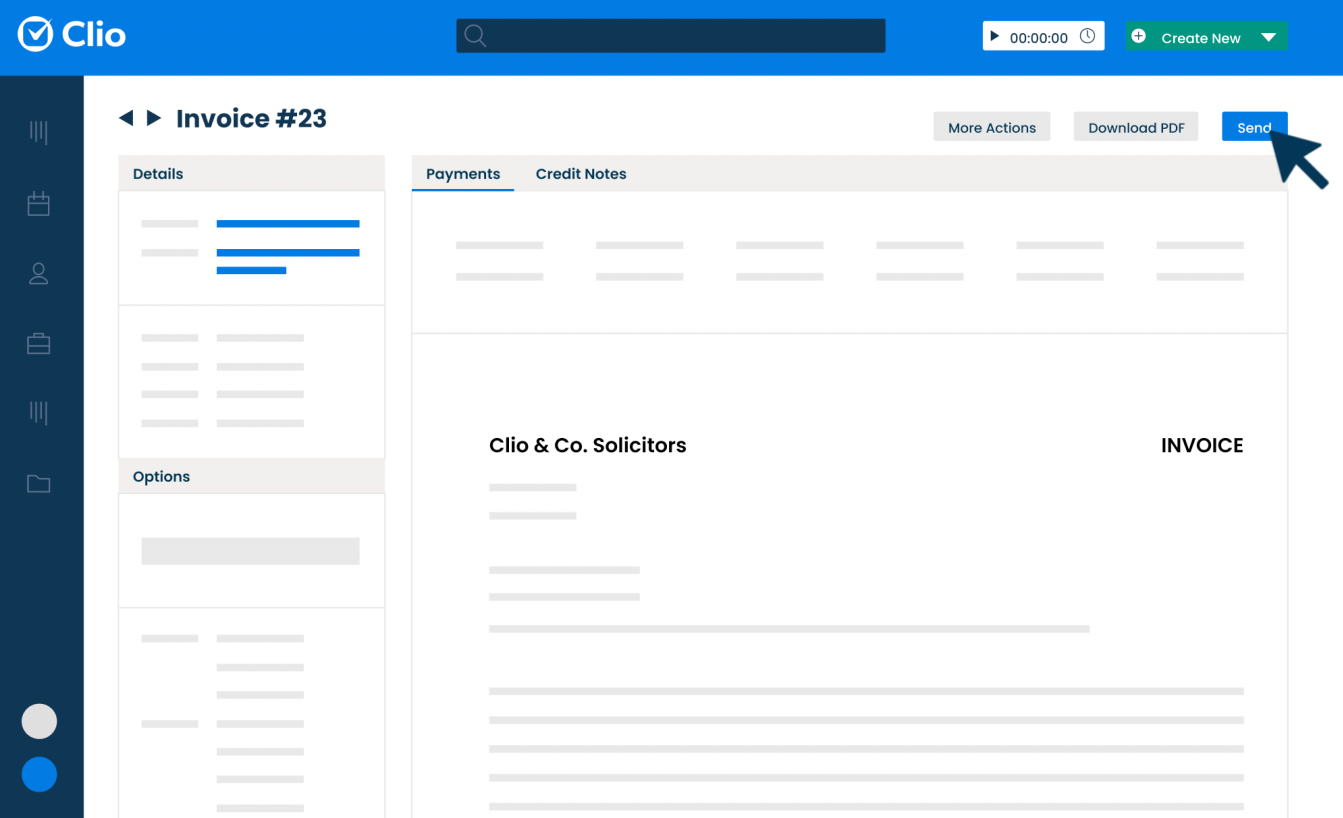
Clio is a cloud-based software platform built to support the everyday operations of legal practices. It helps professionals organize their cases, manage client communications, and handle administrative tasks like billing and scheduling. For attorneys like Mark Chatow, who has relied on Clio for more than a decade to run his practice, the platform has proven indispensable: “I've used Clio for 10+ years and they are phenomenal at anticipating what attorneys need and adding it—usually at no additional cost. From client intake to document automation to payment processing, and from smart court rule calendaring to integration with InfoTrack, Clio does it all—with a user-friendly interface and outstanding customer service.”
Why I picked Clio: Clio is made specifically for legal professionals, so everything is built around how a law office works. You can track time directly from case files, manage documents within specific matters, and send invoices that match legal billing formats. Clio Grow helps you handle client intake, while Clio Manage keeps ongoing casework organized. Furthermore, if you need to stay compliant or follow industry billing codes, the system is set up for that too.
Standout Features & Integrations:
Features include task management tools that let you assign and monitor case-related work, built-in calendars to keep track of court dates and meetings, and document automation tools so you can generate standard legal documents faster. You can also log phone calls and emails directly into client records. There’s an option to collect e-signatures through the platform as well.
Integrations include Microsoft 365, Google Workspace, QuickBooks Online, Dropbox, Zoom, Fastcase, DocuSign, LawPay, NetDocuments, and Albato.
Pros and Cons
Pros:
- Mobile app available
- Effective document management
- Strong compliance support
Cons:
- Complex for first-time users
- Can be pricey for small firms

Best for creative professionals

Honeybook is a client management platform designed for creative entrepreneurs and freelancers. It manages projects, contracts, and payments to help you focus on your craft. For small business owners like Madisen Saglibene, who has run her catering company with HoneyBook for over five years, the platform has been transformative: “HoneyBook’s evolving AI features have been a game changer…helping to keep me organized, saving time, and giving my clients the experience they deserve they honestly may not have gotten from me as a small business otherwise.”
Why I picked Honeybook: Honeybook is tailored for creative professionals, making it easy to manage the business side of your projects. You can send proposals, manage contracts, and handle invoices all in one place. Its user-friendly interface saves you time, allowing you to focus on your creative work. The automation of administrative tasks also makes it a valuable, time-saving tool for artists and freelancers.
Standout Features & Integrations:
Features include customizable templates that allow you to create branded proposals and contracts quickly. The client portal also provides a central place for your clients to view and interact with project details. Additionally, the time-tracking feature helps you keep track of billable hours and manage your time effectively.
Integrations include QuickBooks, Calendly, Zapier, Meta Leads, Pic-Time, Zoom, Prismm, and Canva.
Pros and Cons
Pros:
- Time-tracking feature
- Client portal available
- Customizable templates
Cons:
- Limited scalability for large teams
- Can be complex for beginners

Creatio
Best for process automation

Creatio is a platform that combines customer relationship tools with low-code technology to help businesses automate workflows and manage operations across departments. It’s built for teams looking to run both customer-facing and internal processes from a single system.
Why I picked Creatio: Creatio gives your team a way to automate both client interactions and behind-the-scenes workflows without writing code. You can use visual editors to set up process flows, manage pipelines, and build dashboards to track performance. The system connects customer data with tasks, approvals, and follow-ups so nothing gets missed. Its low-code studio lets you create apps to handle more complex or unique workflows. That flexibility makes it easier to manage long or layered client journeys.
Standout Features & Integrations:
Features include a dynamic case management tool that adjusts workflows based on client needs, analytics dashboards you can build with drag-and-drop tools, and a business rule designer that lets you set conditions to trigger actions. There’s also a mobile app builder so your team can create tools for field or remote work.
Integrations include OneLogin, Google Calendar, Microsoft 365, Webitel, Asterisk, Cisco Finesse, TAPI, CallWay, Infinity, and Avaya.
Pros and Cons
Pros:
- Handles both internal and client work
- Good support for layered automation
- Low-code platform for customization
Cons:
- Setup needs strong planning upfront
- Performance can slow under heavy use

Best for sales teams

Less Annoying CRM is a simple client management tool designed for small teams. It helps manage contacts, track leads, and organize tasks in a user-friendly way.
Why I picked Less Annoying CRM: Less Annoying CRM is designed with simplicity in mind, making it easy for you and your team to learn and use without needing a lot of training. You can manage contacts, schedule tasks, and keep notes all in one place. The platform also offers team permissions, so each user sees only what they need. This helps small teams stay organized without getting overwhelmed.
Standout Features & Integrations:
Features include easy contact management with a simple interface that lets you track all your leads and clients. You can customize your pipeline to fit your sales process, helping you stay organized. The calendar integration also allows you to sync tasks and appointments, keeping your schedule in one place.
Integrations include Mailchimp, Google Calendar, Outlook Calendar, Zapier, Simplii, JustCall, Calendly, Google Contacts, Nusii, and Crankwheel.
Pros and Cons
Pros:
- Customizable sales stages
- Supports goal setting
Cons:
- Limited marketing automation features
- Deal stages aren’t always flexible

Assembly
Best for client portals

Copilot is a client portal software designed for tech-enabled service businesses like accounting firms, marketing agencies, and freelancers. It focuses on secure messaging, file sharing, invoicing, and forms to enhance client experience.
The platform’s flexibility has also proven valuable outside of these traditional sectors. For example, Miguel Angel Gongora Meza, Founder & Director of Evolution Treks Peru, shared how Copilot streamlined his tourism business: “In tourism, I needed to discover something that would enable me to work with complex schedules, quick changeover, local payments and group management of guides, porters, and cooks. Copilot was a success with us since it allowed our guests a clean view of what was important while we were able to manage more complex information behind the scenes. We store PDF park permits on it, load maps of the hiking tracks, and get updates without flooding other people with notifications.”
Why I picked Copilot: Copilot is tailored for businesses needing a customizable client portal. You get features like a CRM, notification center, and automation capabilities, which help consolidate your tech stack. The platform’s white-label option also ensures you can create a branded client portal experience.
Standout Features & Integrations:
Features include a secure messaging system that keeps communication private and organized. The invoicing feature lets you manage billing directly within the portal, which reduces the need for separate tools. Automation capabilities can additionally help you save time by streamlining repetitive tasks.
Integrations include Airtable, Calendly, QuickBooks, Google Docs, Databox, ClickUp, Jotform, Notion, monday.com, and Loom.
Pros and Cons
Pros:
- Enhances client communication
- White-label options
- Customizable client portal
Cons:
- Initial configuration complexity
- Limited out-of-the-box templates

Teamwork.com
Best for project management

Teamwork.com is a project management platform built to help teams plan, track, and deliver client work. It’s used by service-based businesses to manage everything from tasks and deadlines to resources and billing. For Celina Moreno, Owner and CEO of Luna Marketing Services, Teamwork.com stood out for how it enhanced collaboration with clients: “Teamwork is a comprehensive tool: not only because of its client management capabilities, but also due to its versatility and completeness. We appreciated the fact that it allowed us to involve our clients in the projects, which made communication more streamlined and accessible for all our team members.”
Why I picked Teamwork.com: Teamwork.com is built to support project-heavy teams that work with clients on a regular basis. You can manage client projects across timelines, assign tasks, and track workloads in real time. The platform also includes budgeting tools so you can monitor billable hours and project profitability. Time tracking is also built in, which makes it easier to report on client work. Everything connects back to helping your team deliver projects on time and within budget.
Standout Features & Integrations:
Features include built-in templates that help your team launch repeatable projects faster, a client-facing dashboard so your clients can follow along with progress, and resource management tools to balance workloads. You can use portfolio views to get a big-picture look at ongoing projects. The platform also offers a built-in document editor for real-time collaboration.
Integrations include Slack, Microsoft Teams, Google Calendar, Dropbox, HubSpot, QuickBooks Online, OneDrive, Harvest, Xero, and Zapier.
Pros and Cons
Pros:
- Portfolio views help manage multiple clients
- Easy to copy and reuse project templates
- Supports large teams
Cons:
- Hard to manage recurring tasks efficiently
- Needs better bulk editing tools
Diğer Müşteri Yönetimi Yazılımları
Kısa listeme giremeyen ancak yine de göz atmaya değer bazı ek müşteri yönetimi sistemleri şunlardır:
- ActiveCampaign
For CRM and customer insights
- Insightly
For integrations
- Odoo
For lead management
- CiviCRM
For non-profits
- Lone Wolf Relationships
For real estate agents
- Less Annoying CRM
For small teams
- Salesforce CRM
For comprehensive client profiles
- Zoho CRM
For versatile client relationship management
- monday.com
For task assignment
- ClickUp
For task management integration
- Zendesk
For customer support teams


How I Evaluate Client Management Software
I evaluate client management tools in two layers: the baseline must-haves—client portals, project-linked billing, intake workflows—and the differentiators that set top picks apart.
Core Functionality (Table Stakes For This List)
When I'm selecting tools for my list, I rank each one on a scale from 0 (does not offer the functionality) to 5 (excels in this area) for each core functionality listed below. Then, I calculate the tool's total score into a percentage. Each tool needs to achieve a minimum total score of 65% to be considered for inclusion.
- Client Database & Profiles: I look for centralized client records with custom fields, tags, and activity timelines—so you can pull up a client and see every project, note, and interaction in one place.
- Project-Client Linking: Each tool should connect clients to their projects, tasks, and deliverables. I check whether you can view all active engagements for a single client from one dashboard.
- Client Portal & Collaboration: I evaluate whether clients get a dedicated space to review deliverables, leave feedback, and approve work without needing to dig through email threads.
- Communication Tracking: Tools should log emails, meetings, and messages against client records automatically. I look at whether platforms sync with Gmail or Outlook to capture conversations.
- Billing & Invoicing: I check for invoicing tied to tracked time and project milestones—like converting logged hours on a retainer project directly into an invoice for the client.
- Onboarding & Intake Workflows: Good onboarding tools let you build repeatable intake sequences with forms, welcome emails, and task triggers that kick off every time you sign a new client.
Once I have a list of tools that meet this criteria, I consider what sets each platform apart.
Differentiating Factors (What Sets Vendors Apart)
Here's how I compare and contrast different vendors:
Standout Features
White-label branding is a big differentiator—agencies that present a branded client portal build more trust than those sending generic login links. I also look for built-in e-signature and contract workflows, which let you move from proposal to signed agreement without bouncing clients to a separate tool. Automated client reporting matters just as much. The strongest tools let you schedule branded progress reports that pull live project data, saving you from manually building slide decks every week.
Beyond Features
Integrations matter more than most buyers realize—I check whether a tool connects natively with the project management and accounting platforms your team already uses, like Jira, Asana, QuickBooks, or Xero. Pricing structure is equally important. Some vendors charge per client seat, which gets expensive fast when you're managing dozens of accounts. I also evaluate industry fit, since a tool built for creative agencies often handles retainer workflows differently than one designed for consulting firms.
Müşteri Yönetimi Yazılımı Nasıl Seçilir?
Uzun özellik listeleri ve karmaşık fiyatlandırma yapıları arasında kaybolmak kolaydır. Kendinize özgü yazılım seçim sürecinizi yürütürken odağınızı korumanıza yardımcı olmak için göz önünde bulundurmanız gereken faktörleri içeren bir kontrol listesi hazırladım:
| Faktör | Dikkat Edilmesi Gerekenler |
| Ölçeklenebilirlik | Yazılımın işletmenizle birlikte büyüyebildiğinden emin olun. Ekibiniz genişledikçe daha fazla müşteriyi, kullanıcıyı ve veriyi işleyip işleyemeyeceğini değerlendirin. |
| Entegrasyonlar | Yazılımın ekibinizin hâlihazırda kullandığı e-posta platformları, takvimler ve sosyal medya gibi araçlara bağlanıp bağlanmadığını kontrol edin. |
| Özelleştirilebilirlik | Yazılımı süreçlerinize uyacak şekilde uyarlamanıza olanak tanıyan seçenekleri arayın. Bu seçenekler özel alanları, gösterge tablolarını veya iş akışlarını içerebilir. |
| Kullanım Kolaylığı | Ekibinizin yazılımı hızlıca öğrenip kullanıp kullanamayacağını değerlendirin. Kullanıcı dostu bir arayüz zamandan tasarruf sağlar ve hayal kırıklığını azaltır. |
| Bütçe | Maliyeti bütçenize göre değerlendirin. Toplam yatırımınızı etkileyebilecek gizli ücretlere veya kademeli fiyatlandırmaya dikkat edin. |
| Güvenlik Önlemleri | Müşteri bilgilerini korumak için yazılımın veri şifreleme ve kullanıcı kimlik doğrulama gibi güçlü güvenlik önlemlerine sahip olduğunu doğrulayın. |
| Destek | Müşteri desteğinin kullanılabilirliğini ve kalitesini değerlendirin. Güvenilir destek, uygulama ve sorun giderme sırasında kritik öneme sahip olabilir. |
| Özellikler | Raporlama araçları, otomasyon veya mobil erişim gibi hangi özelliklerin ekibinizin başarısı için gerekli olduğunu belirleyin ve ihtiyaçlarınızı karşıladıklarından emin olun. |
Müşteri Yönetimi Yazılımındaki Trendler
Araştırmam sırasında farklı müşteri yönetimi yazılımı sağlayıcılarından sayısız ürün güncellemesi, basın bülteni ve sürüm günlüğü derledim. Takip ettiğim yeni trendlerden bazıları şunlar:
- Yapay Zekâ Destekli İçgörüler: Yapay zekâ, müşteri verilerini analiz etmek ve trendleri tahmin etmek için kullanılıyor; bu da işletmelerin bilinçli kararlar almasına yardımcı oluyor. Bazı sağlayıcılar, müşteri ilişkilerini geliştirmek veya satış stratejilerini optimize etmek için yapay zekâ destekli öneriler sunuyor.
- Sesli Komut Özellikleri: Sesli komut, kullanıcıların yazılımları ellerini kullanmadan etkileşimli biçimde kullanmasına olanak tanıdığı için giderek daha fazla ilgi görüyor. Bu özellik, özellikle aynı anda birden fazla iş yapan veya hareket hâlindeki kullanıcılar için yararlı.
- Uzaktan İş Birliği Araçları: Uzaktan çalışma yaygınlaştıkça sanal ekip iş birliğini geliştiren araçlara olan talep artıyor. Bu nedenle paylaşılan çalışma alanları ve video konferans entegrasyonları gibi özellikler temel hâle geliyor.
- Müşteri Öz Hizmet Portalları: Artık daha fazla yazılım, müşterilerin bilgilerine erişebileceği, güncellemeler yapabileceği ve işletmelerle doğrudan iletişim kurabileceği portallar sunuyor. Bu trend, müşterilere daha fazla yetki verirken müşteri hizmetleri ekibi üyelerinin iş yükünü azaltıyor.
- Veri Görselleştirme Araçları: Görsel gösterge tabloları ve raporlama araçları, müşteri etkileşimleri ve satış verileri hakkında daha net içgörüler sunacak şekilde gelişiyor. Sağlayıcılar, sezgisel görseller aracılığıyla verileri daha erişilebilir ve eyleme dönüştürülebilir hâle getirmeye odaklanıyor.
Müşteri Yönetimi Yazılımı Nedir?
Müşteri yönetimi yazılımı, işletmelerin mevcut ve potansiyel müşterilerle etkileşimlerini takip etmesine, düzenlemesine ve optimize etmesine yardımcı olan bir araçtır.
Satış, destek ve hesap yönetimi ekipleri tarafından kullanılan bu yazılım; iletişim bilgilerini merkezileştirir, görevleri planlar ve müşteri iletişimini, müşteri katılım sürecini ve memnuniyetini geliştirmek için içgörüler sunar. Bu araçlar ilişki yönetimini kolaylaştırır, ekip verimliliğini artırır ve veriye dayalı karar alma süreçlerini destekler.
Müşteri Yönetimi Yazılımının Özellikleri
Müşteri yönetimi yazılımı seçerken aşağıdaki temel özelliklere dikkat edin:
- İletişim ve müşteri kaynak yönetimi: Etkileşimleri takip etmek ve daha iyi ilişkiler kurmak için müşteri bilgilerini düzenleyin ve saklayın.
- Görev planlama: Zamanında takip işlemlerini ve verimli iş akışı yönetimini sağlamak için görevleri planlayın ve atayın.
- Veri görselleştirme: Müşteri etkileşimleri ve satış performansı hakkında içgörüler elde etmek için görsel gösterge tablolarını kullanın.
- Müşteri öz hizmet portalları: Müşterilerin bilgilerine erişmesine ve bilgilerini güncellemesine olanak tanıyarak ekibinizin iş yükünü azaltın.
- E-posta pazarlama otomasyonu: Kişiselleştirilmiş mesajlarla müşterilere ulaşmak ve etkileşimi artırmak için e-posta kampanyalarını otomatikleştirin.
- Müşteri adayı puanlama: Müşteri adaylarını dönüşüm gerçekleştirme olasılıklarına göre önceliklendirin; böylece ekibiniz en umut vadeden fırsatlara odaklanabilir.
- Özelleştirilebilir gösterge tabloları: Arayüzünüzü benzersiz iş süreçlerinize ve tercihlerinize uyacak şekilde uyarlayın.
- Yapay zekâ destekli içgörüler: Müşteri ilişkilerini geliştirmeye yönelik eyleme geçirilebilir öneriler sunmak için yapay zekâdan yararlanarak verileri analiz edin.
- Uzaktan iş birliği araçları: Sanal iletişimi ve proje yönetimini destekleyen özelliklerle ekip çalışmasını kolaylaştırın.
Müşteri Yönetimi Yazılımındaki Yaygın Yapay Zekâ Özellikleri
Modern müşteri yönetimi yazılımları genellikle üretkenliği artırmak ve müşteri ilişkilerini geliştirmek üzere tasarlanmış yapay zekâ destekli özellikler içerir. Aranabilecek bazı yaygın yapay zekâ yetenekleri şunlardır:
- Otomatik veri girişi: Yapay zekâ; e-postaları, formları ve belgeleri tarayarak müşteri kayıtlarını otomatik olarak güncelleyebilir ve manuel veri girişi için harcadığınız zamandan tasarruf etmenizi sağlar.
- Akıllı hatırlatıcılar ve planlama: Akıllı asistanlar en uygun toplantı saatlerini önerebilir, otomatik takip hatırlatıcıları gönderebilir ve planlama çakışmalarını önlemeye yardımcı olabilir.
- Tahmine dayalı analiz: Yapay zekâ, hangi müşterilerin ilgilenilmesine ihtiyaç duyabileceğini tahmin etmek için müşteri etkileşimlerini ve davranışlarını analiz eder; böylece iletişim önceliklerinizi belirlemenize ve müşteri bağlılığını geliştirmenize yardımcı olur.
- Duygu analizi: Yapay zekâ araçları müşteri e-postalarının veya mesajlarının tonunu değerlendirebilir ve acil endişeler ya da memnuniyeti artırma fırsatları konusunda sizi uyarabilir.
- Kişiselleştirilmiş iletişim: Müşteri geçmişine ve tercihlerine göre uyarlanmış e-posta şablonları ve yanıtlar oluşturarak iletişiminizi daha ilgili ve etkili hâle getirin.
- Potansiyel müşteri puanlama: Yapay zekâ, potansiyel müşterileri değerlendirir ve dönüşüm gerçekleştirme olasılıklarına göre sıralar; böylece çabalarınızı en fazla etkiyi yaratacakları alanlara yönlendirebilirsiniz.
- Otomatik iş akışları: Müşterilerin eylemlerine veya durumlarına göre görevleri tetikleyen, ekip üyelerini görevlendiren ya da müşterileri satış huninizde ilerleten yapay zekâ destekli otomasyonlar oluşturun.
- Sohbet robotları ve sanal asistanlar: İş saatleri dışında bile müşteri sorularına anında destek ve yanıt sağlayarak yanıt verme hızını ve müşteri deneyimini geliştirin.
Müşteri Yönetimi Yazılımının Faydaları
Müşteri yönetimi yazılımını uygulamak ekibiniz ve işletmeniz için çeşitli faydalar sağlar. Yararlanmayı bekleyebileceğiniz birkaç fayda şunlardır:
- Geliştirilmiş müşteri ilişkileri: Tüm müşteri etkileşimlerini düzenli ve erişilebilir tutarak güçlü ilişkiler kurmayı ve sürdürmeyi kolaylaştırın.
- Artan verimlilik: E-posta pazarlaması ve takipler gibi tekrarlayan görevleri otomatikleştirerek daha önemli işler için zaman kazanın.
- Daha iyi karar verme: Gerçek zamanlı verilere dayalı bilinçli seçimler yapmak için veri görselleştirmeden ve yapay zekâ destekli içgörülerden yararlanın.
- Geliştirilmiş iş birliği: Uzaktan iş birliği araçları ve paylaşılan panolar, ekip üyeleriniz nerede olursa olsun birlikte etkili bir şekilde çalışmalarına yardımcı olur.
- Önceliklendirilmiş satış çalışmaları: Potansiyel müşteri puanlama, ekibinizin yüksek potansiyelli adaylara odaklanmasına yardımcı olarak dönüşüm oranlarını artırır.
- Azaltılmış iş yükü: Müşteri self servis portalları, müşterilerin kendi bilgilerini yönetmesini sağlayarak destek ekibinizin üzerindeki yükü azaltır.
- Kişiselleştirilmiş iletişim: E-posta otomasyonu, her müşteride karşılık bulan hedefli mesajlar göndermenizi sağlayarak etkileşimi artırır.
Müşteri Yönetimi Yazılımının Maliyetleri ve Fiyatlandırması
Müşteri yönetimi yazılımı seçerken mevcut çeşitli fiyatlandırma modelleri ve planları hakkında bilgi sahibi olmak gerekir. Maliyetler; özelliklere, ekip büyüklüğüne, eklentilere ve daha fazlasına bağlı olarak ücretsiz müşteri yönetimi araçlarından ayda yüzlerce dolara kadar değişir. Aşağıdaki tablo, müşteri yönetimi yazılımı çözümlerinde yaygın olarak sunulan planları, ortalama fiyatlarını ve tipik özelliklerini özetlemektedir:
Müşteri Yönetimi Yazılımı İçin Plan Karşılaştırma Tablosu
| Plan Türü | Ortalama Fiyat | Yaygın Özellikler |
| Ücretsiz Plan | $0 | Temel kişi yönetimi, sınırlı destek ve e-posta entegrasyonu. |
| Kişisel Plan | $5-$25/kullanıcı/ay | Gelişmiş kişi yönetimi, görev planlama ve temel raporlama araçları. |
| İşletme Planı | $30-$60/kullanıcı/ay | Tam CRM yetenekleri, otomasyon özellikleri ve özel panolar. |
| Kurumsal Plan | $70-$150/kullanıcı/ay | Gelişmiş analizler, yapay zekâ destekli içgörüler, geliştirilmiş güvenlik önlemleri ve premium destek. |
Müşteri Yönetimi Yazılımı SSS'leri
Müşteri yönetimi yazılımı hakkında sık sorulan bazı soruların yanıtlarını burada bulabilirsiniz:
Müşteri yönetimi yazılımı, müşteri iletişimlerini daha kolay takip etmeme nasıl yardımcı olabilir?
Müşteri yönetimi yazılımı, her müşteriye ait e-postaları, aramaları, toplantı notlarını ve diğer etkileşimleri tek bir yerde merkezileştirerek tüm geçmişi görmenizi sağlar. Bu sayede mesajları kaçırmaktan veya konuşmaları tekrarlamaktan kaçınmak kolaylaşır. Birçok platform, açılan e-postalar veya imzalanan belgeler gibi yeni etkinlikler için gerçek zamanlı bildirimler de sunar; böylece birden fazla aracı incelemenize gerek kalmadan en güncel bilgilere her zaman kolayca erişebilirsiniz.
Müşteri yönetimi yazılımına örnekler nelerdir?
Müşteri yöneticileri için popüler müşteri yönetimi yazılımı örnekleri arasında HubSpot CRM, Salesforce, Zoho CRM, Microsoft Dynamics 365 ve Less Annoying CRM bulunur. Bu araçların her biri müşteri bilgilerini düzenlemenize, etkileşimleri takip etmenize, takip işlemlerini yönetmenize ve günlük görevleri otomatikleştirmenize yardımcı olur. Bazı platformlar verimliliğinizi artırmak için raporlama, belge paylaşımı ve e-posta ile takvim uygulamalarına entegrasyon da sunar.
Müşteri yönetimi yazılımı, e-posta veya muhasebe platformları gibi hâlihazırda kullandığım araçlarla entegre olabilir mi?
Evet. Çoğu müşteri yönetimi platformu Gmail, Outlook, Slack, QuickBooks ve takvim uygulamaları gibi popüler araçlarla entegre olur. Bu entegrasyonlar iletişimleri, kişileri ve faturaları sorunsuz şekilde senkronize etmenizi sağlayarak farklı uygulamalar arasında geçiş yapma ihtiyacını azaltır. Kurulum genellikle basittir; çoğu zaman yazılımınızın ayarlarında yalnızca birkaç tıklama yapmanız yeterlidir. Böylece her gün güvendiğiniz araçlara kolayca bağlanabilirsiniz.
Müşteri yöneticileri, müşteri yönetimi yazılımında hangi özelliklere öncelik vermelidir?
Müşteri yöneticileri; merkezi kişi yönetimi, ayrıntılı etkinlik takibi, otomatik hatırlatıcılar ve güvenli belge paylaşımı özelliklerini aramalıdır. Özelleştirilebilir panolar ve güçlü raporlama, müşteri durumunu ve performansını takip etmek için değerlidir. E-posta ve takviminizle entegrasyon, zamandan tasarruf etmek ve iş akışlarını kolaylaştırmak için önemlidir. Ayrıca, görünürlüğü kaybetmeden müşteri ilişkilerini her yerden yönetebilmeniz için mobil erişim sunan platformları da değerlendirin.
Müşteri yönetimi yazılımıyla ilgili güvenlik endişeleri var mı?
Evet. Müşteri yönetimi yazılımı hassas bilgileri depoladığı için güçlü güvenlik önlemlerinin alındığından emin olmak önemlidir. Şifreleme, düzenli yedekleme ve iki faktörlü kimlik doğrulama gibi özellikleri arayın. Sektörünüze bağlı olarak satıcılara GDPR, HIPAA veya SOC 2 gibi standartlara uygunluklarını sorun. Gizli müşteri bilgilerini daha iyi korumak için kullanıcı izinleri ve veri erişimine ilişkin kurum içi protokoller de oluşturmalısınız.
Müşteri yönetimi yazılımı takip işlemleri ve son tarihler için hatırlatıcıları otomatikleştirebilir mi?
Evet. Birçok müşteri yönetimi aracı toplantılar, son tarihler ve takip işlemleri için hatırlatıcıları otomatikleştirmenize olanak tanır; böylece önemli bir iletişim fırsatını asla kaçırmazsınız. Düzenli kontroller veya proje kilometre taşları için yinelenen uyarılar ayarlayabilirsiniz. Bu otomasyon iş akışlarını düzenli tutar, manuel takip ihtiyacını azaltır ve hafızaya veya manuel planlamaya bağlı kalmadan tutarlı ve zamanında iletişim kurulmasını sağlayarak müşteri ilişkilerini güçlendirir.
Microsoft'un müşteri yönetimi yazılımı var mı?
Evet, Microsoft Dynamics 365 aracılığıyla müşteri yönetimi yazılımı sunar. Dynamics 365, müşteri ilişkileri yönetimi (CRM) ve kurumsal kaynak planlaması (ERP) araçlarını bir araya getirir. Müşteri yöneticisi olarak bunu müşteri kişilerini yönetmek, iletişimleri takip etmek, takip işlemlerini otomatikleştirmek ve raporlar oluşturmak için kullanabilirsiniz. Ayrıca iş akışınızı kolaylaştırmak için Microsoft Outlook, Teams ve diğer Microsoft 365 araçlarıyla entegre olur.