

2026’nın En İyi 10 Küçük İşletme Belge Yönetimi Yazılımı

10 En İyi Küçük İşletme Belge Yönetimi Yazılımları Kısa Listesi


Küçük işletmeler için belge yönetimi yazılımları, ekiplerin önemli dosyaları tek bir yerde düzenlemesine, depolamasına ve bunlara erişmesine yardımcı olur; böylece dağınık klasörlerin, bitmek bilmeyen e-posta eklerinin ve tutarsız sürüm yönetiminin yarattığı karmaşayı ortadan kaldırır. Doğru araçla iş akışlarınızı kolaylaştırabilir, mevzuata uygunluğu koruyabilir ve ihtiyacınız olan belgeleri ararken zaman kazanabilirsiniz.
Küçük ekipleri göz önünde bulundurarak çeşitli belge yönetimi araçlarını test edip inceledim; uygun fiyat, kullanım kolaylığı ve izinler, bulut erişimi ve aranabilirlik gibi temel özelliklere odaklandım. İster yeni başlıyor ister hızla büyüyor olun, bu liste bütçenize ve ihtiyaçlarınıza uygun bir çözüm bulmanıza yardımcı olacaktır.
Why Trust Our Software Recommendations
Our team has been testing and reviewing software since 2012. As project managers ourselves, we know how difficult—and important—it is to choose the right software.
For this guide, we evaluated tools using hands-on testing and independent research, scoring tools using our selection criteria. We also draw on insights from industry thought leaders and practicing project management experts.
Our reviews reflect our human editorial judgment, not a sales pitch.
Expert reviewers:
Küçük İşletme Belge Yönetimi Yazılımları Karşılaştırma Tablosu
Aşağıdaki tabloda, küçük işletmeler için en iyi belge yönetimi yazılımı seçimlerimin fiyatlandırma ayrıntıları karşılaştırılmaktadır.
| Tool | Starting Price | Website | |
|---|---|---|---|
| Best for easy collaboration | 4.7 out of 5 | $9.20/user/month Free plan + 14-day free trial available | Website |
| Best for open source flexibility | 4.6 out of 5 | Pricing upon request Free demo available | Website |
| Best for document workflows | 4.5 out of 5 | Pricing upon request Free demo available | Website |
| Best for enterprise security | 4.3 out of 5 | CAD$21/user/month 14-day free trial | Website |
| Best for metadata management | 4.4 out of 5 | $65/user/month Free demo available | Website |
| Best for team collaboration | 4.3 out of 5 | $3/user/month Free plan available | Website |
| Best for small teams | 4.5 out of 5 | $52/month Free plan available | Website |
| Best for document automation | 4.5 out of 5 | $19/user/month Free plan + 14-day free trial + free demo available | Website |
| Best for simple sharing | — | $9.99/person/month Free plan available | Website |
| Best for office integration | — | $1.99/month Free plan available | Website |
En İyi Küçük İşletme Belge Yönetimi Yazılımları İncelemeleri
Aşağıda, kısa listeme giren en iyi küçük işletme belge yönetimi yazılımlarına ilişkin ayrıntılı özetlerimi bulabilirsiniz. İncelemelerimde, sizin için en iyi seçeneği bulmanıza yardımcı olmak amacıyla her aracın temel özelliklerine, artılarına ve eksilerine, entegrasyonlarına ve ideal kullanım alanlarına ayrıntılı bir bakış sunuyorum.

Best for easy collaboration

Google Drive earns its spot because teams usually need to share and edit documents together without delays. When I work with small businesses, easy permission controls and the ability to comment in real time make a huge difference. I like how you can start a doc during a meeting, loop people in, and have feedback instantly—all in your browser.
If you want files, spreadsheets, and presentations organized and accessible for everyone, this is the first place I'd send you.
Google Drive’s Best For
- Small teams that need quick, cloud-based file sharing
- Businesses focused on collaborative editing and feedback
Google Drive’s Not Great For
- Organizations needing strict document retention policies
- Businesses with highly regulated industry compliance needs
What sets Google Drive apart
Google Drive is organized around letting you start work fast and involve others instantly. Unlike Dropbox, which prioritizes document storage and backup, Google Drive expects you to draft, edit, and review in a shared space, with live comments and easy file links. In practice, this works best for groups who care more about speed and collaboration than hierarchy or strict file control.
Tradeoffs with Google Drive
Google Drive optimizes for quick access and shared editing, but you lose advanced document controls, so work can get messy if you need rigorous oversight.
Pros and Cons
Pros:
- PDF annotation tools
- AI-powered search capabilities
- Customizable access permissions
- Seamless Google apps integration
- Easy real-time collaboration
Cons:
- No task management features
- Limited offline capabilities
- Requires internet connection
- Occasional syncing issues
- Limited storage options

Best for open source flexibility

LogicalDOC makes my shortlist because it delivers true open source flexibility for document management. I recommend it when you want granular control over deployment or customization, especially if your team has specific needs around workflow automation or on-premise hosting.
I like that LogicalDOC supports custom scripting for automation and granular permissions, which isn’t something you get with most small business DMS platforms.
LogicalDOC’s Best For
- IT admins or technical teams needing open source customization
- Organizations with specific requirements for workflow or integration
LogicalDOC’s Not Great For
- Non-technical users looking for simple, out-of-the-box tools
- Teams needing polished mobile apps or frequent UI updates
What sets LogicalDOC apart
LogicalDOC is built with open access and modularity in mind, making it a good choice when you want to own your deployment and tweak configurations. Unlike Google Workspace or Dropbox, it’s designed for control at the file system and process level. In practice, this works best when you prioritize customization or compliance and have resources for ongoing system management.
Tradeoffs with LogicalDOC
LogicalDOC optimizes for flexibility and control, but that often means more setup time and heavier maintenance for your internal IT team.
Pros and Cons
Pros:
- Version control features
- Automated workflows
- Advanced search options
- Open-source flexibility
- Highly customizable
Cons:
- High resource requirements
- Steep learning curve
- Limited user support
- Complex initial setup
- Requires technical expertise

DocuWare
Best for document workflows

DocuWare is on my shortlist because its document workflow automation stands out in small business environments. I see teams use DocuWare to route, review, and approve documents without constant manual nudges. The configurable workflow builder lets you map steps like invoice approvals or employee onboarding exactly how your business runs. I like how you can set custom triggers and notifications—DocuWare genuinely takes repetitive steps off your plate.
DocuWare’s Best For
- Businesses automating invoice, contract, or HR document workflows
- Teams needing reliable, rule-based review and approval processes
DocuWare’s Not Great For
- Teams that just need basic document storage
- Businesses with advanced records retention or legal archiving needs
What sets DocuWare apart
DocuWare is built around mapping out consistent, rule-driven document lifecycles. Unlike Google Workspace, which is mostly about file storage and sharing, DocuWare expects you to design workflows for every step: submission, review, sign-off, and archiving. This fits best when documents need to move through the same checks and approvals each time, without relying on ad hoc team habits.
Tradeoffs with DocuWare
DocuWare optimizes for structured, automated routing, but you lose some of the quick flexibility you get with freeform storage tools. For ad hoc uploads and casual document collaboration, the workflow design can feel like unnecessary overhead.
Pros and Cons
Pros:
- Automated document processes
- Supports electronic signatures
- Mobile app for document management
- Intelligent document indexing
- Customizable workflow templates
Cons:
- Complex customization options
- High initial setup cost
- Limited offline capabilities
- Requires technical setup
- Steep learning curve

Box
Best for enterprise security

Box is on this list because its approach to enterprise-grade security sets it apart from typical document management platforms. When I see teams with sensitive documents or compliance requirements, Box's granular permissions and audit trails handle that need. I like the way Box automates security classifications and integrates with legal holds, especially for regulated industries.
You get full control over file access and detailed activity logs, so you're not left guessing about data exposure.
Box's Best For
- Teams with strict data security or compliance needs
- Businesses handling sensitive client or legal documents
Box's Not Great For
- Small teams who don’t need advanced security features
- Companies wanting heavy workflow automation or customization
What sets Box apart
Box is built around securing and controlling every file and action, rather than just storing and sharing documents the way Google Drive does. I see it cater well to teams that need to lock down access, set granular rules for who can see or edit files, and know exactly who touched what, when. Unlike Dropbox or Google Workspace, it handles compliance and security configurations up front, which fits environments where audit trails matter more than quick collaboration.
Tradeoffs with Box
Box prioritizes enterprise-level security, but you give up a more flexible approach to workflow automation and lightweight collaboration. This means teams needing to customize their processes or automate document-driven work may feel limited.
Pros and Cons
Pros:
- External file requests
- Automated workflow options
- Detailed activity tracking
- Custom permission settings
- Strong encryption features
Cons:
- No built-in task management
- Occasional performance issues
- Limited offline access
- Requires training for new users
- Complex user interface

M-Files
Best for metadata management

M-Files is on my list because its metadata-driven approach changes how you manage and find documents. I recommend it when you’re tired of navigating messy folder structures and need to tag, organize, and retrieve files based on content, not just file names. What I appreciate is how you can search by project, client, or document type, which actually speeds up audits or information requests. It’s especially useful for small businesses that juggle a lot of different document types and compliance requirements.
M-Files’ Best For
- Businesses needing to organize documents by metadata tags
- Firms with complex compliance or audit documentation needs
M-Files’ Not Great For
- Teams that want simple, folder-based document storage
- Companies with low document search or retrieval complexity
What sets M-Files apart
M-Files organizes documents by what they are, not where they are stored. Instead of navigating nested folders like in Google Drive or Dropbox, you use metadata to tag and find files based on context—project, client, document type. This approach fits situations where you often revisit or repurpose the same content for different uses and need to locate the right file fast.
Tradeoffs with M-Files
M-Files optimizes for metadata-driven organization, but you lose the simplicity and familiarity of folder-based navigation. For teams used to traditional file structures, adjusting workflows and retraining staff becomes a necessary hurdle.
Pros and Cons
Pros:
- Strong version control
- Advanced search functionality
- Automated metadata workflows
- Precise document retrieval
- Custom metadata fields
Cons:
- Metadata management can be overwhelming
- Limited offline access
- High initial learning curve
- Requires training for users
- Complex setup process

Best for team collaboration
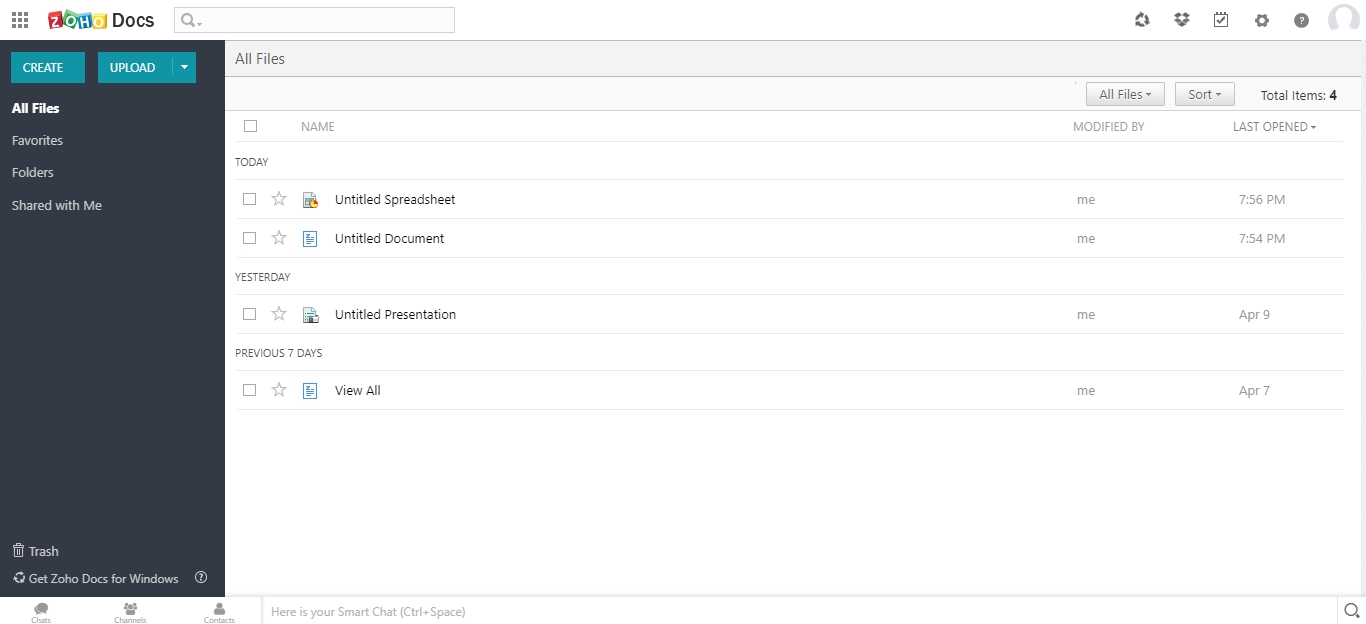
Zoho WorkDrive is on my shortlist because it’s designed for true team-centric document management. I see small teams using its Team Folders to organize, co-author, and update files in real time, which helps prevent version confusion during project work.
What I like about WorkDrive is its built-in granular permissions and unified file activity tracking. You get continuous visibility into who’s doing what, making it easier to keep work moving without bottlenecks.
Zoho WorkDrive’s Best For
- Small teams needing shared file storage and co-authoring
- Businesses that require granular access control and audit tracking
Zoho WorkDrive’s Not Great For
- Companies needing advanced workflow automation
- Teams focused on industry-specific document compliance
What sets Zoho WorkDrive apart
Zoho WorkDrive structures collaboration around shared team folders with fine-grained permissions rather than personal storage or loose file sharing, like Google Drive. In practice, this makes file management feel much more deliberate, especially for teams handling lots of client or project-specific documents.
Unlike Dropbox, which is often about quick syncing and sharing, WorkDrive encourages teams to centralize everything and tie access to roles and responsibilities. You see this work best when businesses want to keep control without lots of admin overhead.
Tradeoffs with Zoho WorkDrive
WorkDrive optimizes for organized collaboration, but limits your ability to automate complex multi-step document workflows. If your work depends on advanced automation or triggers tied to documents, you’ll likely need an outside tool.
Pros and Cons
Pros:
- Flexible permission settings
- Comprehensive version history
- Offline access capability
- Detailed activity dashboards
- Shared workspaces for projects
Cons:
- Learning curve for new users
- Basic task management features
- Requires internet for full functionality
- Occasional sync issues
- Limited third-party integrations

Folderit
Best for small teams

Folderit made my list because it’s geared toward small teams who need secure sharing and organized document control without extra complexity. I’ve set up automatic approval workflows and multi-level permissions for teams with basic compliance needs, which keeps everything simple but accountable.
What I appreciate most is how Folderit lets you automate document retention rules and assign unique access per folder or group, making it a lot easier for small businesses to manage who’s seeing and changing what.
Folderit's Best For
- Small businesses needing simple, secure document control
- Teams managing approval workflows and compliance basics
Folderit's Not Great For
- Complex organizations with advanced automation needs
- Companies that require deep integration with external systems
What sets Folderit apart
Folderit centers around simple, permission-based document management that’s accessible even for teams without IT experience. Instead of the complexity you’ll find in something like Google Workspace or SharePoint, Folderit uses a straightforward folder hierarchy and easy-to-set approval workflows. I see it work best for businesses with clear roles and low need for process customization.
Tradeoffs with Folderit
Folderit optimizes for simplicity and directness, but teams lose out on advanced automation or deep integration options. That limits how far you can scale when requirements—or system connections—get more complex.
Pros and Cons
Pros:
- Designed for small teams
- Simple approval workflows
- Detailed audit trails
- Custom metadata options
- Easy to set up
Cons:
- Requires internet access
- Minimal customization
- No mobile app
- Basic feature set
- Limited scalability
PandaDoc
Best for document automation
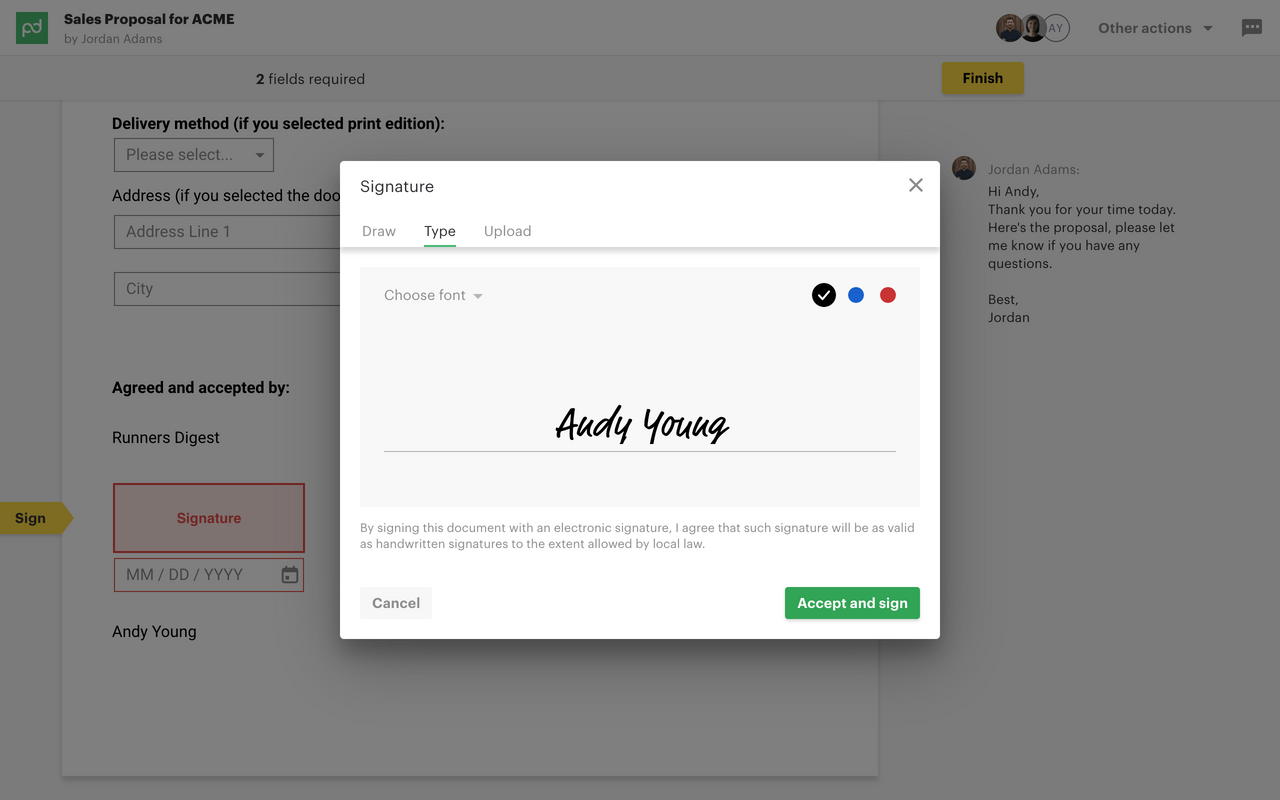
PandaDoc is here for document-heavy teams who need more than just storage. I like how you can automate contracts, proposals, and approvals with customizable templates and native e-signature. This is where PandaDoc stands out—workflow automation makes handling docs at scale practical for small businesses.
What impresses me is how easy it is to build end-to-end document flows, making collaboration for sales or HR teams fast and repeatable.
PandaDoc’s Best For
- Teams handling lots of contracts, proposals, or quotes
- Small businesses that need automated document workflows
PandaDoc’s Not Great For
- Teams looking mainly for advanced document storage or search
- Companies with heavily regulated document compliance needs
What sets PandaDoc apart
PandaDoc takes a process-first approach, with everything built around document creation, approval, and tracking in repeatable workflows. Unlike traditional cloud storage or file management tools like Google Workspace, it works best for groups that rely on sending, signing, and moving documents through steps. In practice, I see sales and operations teams getting the most value from this format.
Tradeoffs with PandaDoc
PandaDoc optimizes for document automation, but that means file storage, tagging, and advanced search options can feel limited if you treat it like a typical document repository.
Pros and Cons
Pros:
- Detailed analytics dashboard
- Built-in electronic signatures
- Real-time document tracking
- Customizable templates
- Efficient document automation
Cons:
- Occasional performance lags
- Basic customization options
- Requires internet for full use
- Learning curve for advanced features
- Limited offline functionality


Dropbox Business makes my shortlist because it removes friction from sharing files and folders, especially for small teams that need to move quickly. I see a lot of organizations adopt Dropbox when they hit a point where email attachments and drives are slowing collaboration.
What stands out for me is its link-based file sharing and granular permission controls. I like that you can send a large folder to a client or collaborator by sharing a single link, without ever worrying about email limits or who has what software.
Dropbox Business’s Best For
- Small businesses that prioritize quick, secure file sharing
- Teams collaborating with external partners or agencies
Dropbox Business’s Not Great For
- Companies needing complex document approval workflows
- Businesses with strict records retention or compliance needs
What sets Dropbox Business apart
Dropbox Business is built around making file sharing and basic collaboration as direct as possible, without piling on workflow requirements. Unlike Google Workspace, which mixes documents, chat, and editing in a single interface, Dropbox starts from the idea that files and folders are the main unit of work. In practice, this approach keeps things simple for small teams who move documents around a lot but don’t need deep integration into other business tools.
Tradeoffs with Dropbox Business
Dropbox optimizes for fast sharing and minimal process, but you give up built-in document lifecycle management. If your team needs things like formal approvals or retention policies, you’ll find those missing or basic.
Pros and Cons
Pros:
- Collect files from non-users
- File recovery options
- Secure file permissions
- Smart Sync space saving
- Easy file sharing
Cons:
- Basic collaboration tools only
- No task management features
- Requires internet connection
- Occasional sync delays
- Limited customization options


I picked Microsoft OneDrive because it’s the most seamless way to manage documents if you already use Word, Excel, and the rest of Microsoft 365. I see small businesses benefit most from how changes sync instantly across teams and devices, so files always reflect the latest edits. What I like is the file sharing, version history, and granular permissions directly in folders, all without leaving the tools you already use.
OneDrive’s Best For
- Small businesses using Microsoft 365 for daily work
- Teams that need real-time document co-editing
OneDrive’s Not Great For
- Companies avoiding Microsoft products
- Document workflows needing built-in e-signature or advanced automation
What sets OneDrive apart
OneDrive focuses on making document management feel like a natural extension of Microsoft 365 apps, not a separate system. Unlike Google Drive, which builds around browser-based collaboration, OneDrive puts files and folders right inside your desktop file explorer and Office apps. In practice, this works best when your workflow revolves around Word, Excel, and shared drives.
Tradeoffs with OneDrive
OneDrive optimizes for tight Microsoft 365 integration, but you lose advanced document process automation found in specialty DMS tools, so complex workflows can be harder to build.
Pros and Cons
Pros:
- Customizable document libraries
- Supports remote work
- Comprehensive version control
- Advanced permission settings
- Strong office suite integration
Cons:
- Limited offline access
- Requires Microsoft ecosystem
- Occasional sync delays
- Steep learning curve
- Complex setup process
Diğer Küçük İşletme Belge Yönetimi Yazılımları
İşte kısa listeme giremeyen ancak yine de göz atmaya değer bazı ek küçük işletme belge yönetimi yazılımı seçenekleri:
- ONLYOFFICE
For office suite integration
- Evernote Teams
For team note-taking
- Rubex by eFileCabinet
For compliance management
- Citrix ShareFile
For secure file sharing


How I Evaluate Small Business Document Management Software
I look at these tools in two layers: whether they handle the basics like versioned project files and permission-based sharing, then what sets the top picks apart for small teams.
Core Functionality (Table Stakes For This List)
When I'm selecting tools for my list, I rank each one on a scale from 0 (does not offer the functionality) to 5 (excels in this area) for each core functionality listed below. Then, I calculate the tool's total score into a percentage. Each tool needs to achieve a minimum total score of 65% to be considered for inclusion.
- Centralized Document Storage: I check whether the tool organizes files into structured workspaces or libraries tied to projects, not just a flat file dump where SOWs and meeting notes get buried together.
- Version Control & History: Every tool I evaluate should track document revisions automatically so your team can roll back a client proposal or contract to a prior version without file-naming chaos.
- Granular Access Permissions: I look for role-based or user-level controls that let you restrict a subcontractor to one project folder while giving your project lead full edit access across the workspace.
- Document Search & Metadata: Strong search goes beyond filenames. I evaluate whether a tool supports full-text search, tagging, and metadata filters so you can surface a specific change order from hundreds of project files.
- Collaboration & Sharing: The tool should support internal comments, external sharing links, and review or approval workflows. I check whether stakeholders outside your organization can review deliverables without needing a paid seat.
- Audit Trails & Integrations: Activity logs that show who accessed or modified a file matter for accountability. I also look at native integrations with tools like Google Workspace, Microsoft 365, Slack, and popular project management platforms.
Once I have a list of tools that meet this criteria, I consider what sets each platform apart.
Differentiating Factors (What Sets Vendors Apart)
Here's how I compare and contrast different vendors:
Standout Features
Client portals are a big differentiator. When clients can review and approve deliverables through a branded portal without needing their own license, it removes friction that slows project sign-offs. I also look for built-in e-signature support, since sending a SOW for signing inside the same platform where it's stored saves a round trip to a separate tool. For teams with field staff, mobile document capture matters too—being able to scan a signed form or site photo directly into the right project folder keeps files from living in someone's camera roll.
Beyond Features
Pricing structure matters for small teams, so I evaluate whether a tool offers a usable free or low-cost plan that doesn't gate core features like version control behind enterprise tiers. Implementation speed is another priority—I check for migration support that pulls existing files from Google Drive or Dropbox, since a five-person team rarely has bandwidth for a multi-week rollout. How well each platform connects to the project management tools your team already runs on, whether that's Asana, Trello, or Monday.com, also shapes how much real value you'll get day to day.
Küçük İşletme Belge Yönetimi Yazılımı Nasıl Seçilir?
Uzun özellik listeleri ve karmaşık fiyatlandırma yapıları arasında kaybolmak kolaydır. Kendinize özgü yazılım seçimi sürecinde ilerlerken odağınızı korumanıza yardımcı olmak için göz önünde bulundurmanız gereken faktörleri içeren bir kontrol listesi hazırladım:
| Faktör | Dikkat Edilmesi Gerekenler |
|---|---|
| Ölçeklenebilirlik | Yazılım işletmenizle birlikte büyüyebilir mi? Aracın, kapsamlı bir değişiklik yapmadan gerektiğinde daha fazla kullanıcı ve depolama alanı eklemenize olanak tanıyan kademeli planlar sunup sunmadığını değerlendirin. |
| Entegrasyonlar | Mevcut araçlarınıza bağlanabiliyor mu? Veri silolarını önlemek için CRM'niz, e-postanız ve diğer temel yazılımlarınızla entegrasyonları destekleyip desteklemediğini kontrol edin. |
| Özelleştirilebilirlik | Aracı iş akışlarınıza göre uyarlayabilir misiniz? Belirli süreçlerinize uyacak şekilde panoları, alanları ve belge şablonlarını özelleştirme seçeneklerini arayın. |
| Kullanım kolaylığı | Ekibiniz için kullanıcı dostu mu? Öğrenme eğrisi dik olan araçlardan kaçının. Eğitim süresini en aza indiren ve günlük işlemleri kolaylaştıran sezgisel arayüzleri tercih edin. |
| Uygulama ve işe alıştırma | Geçiş ne kadar sorunsuz? Ekibiniz için hızlı ve kolay bir kurulum sağlamak üzere eğitimler ve web seminerleri gibi eğitim kaynaklarının bulunabilirliğini değerlendirin. |
| Maliyet | Bütçenize uyuyor mu? Mali kısıtlarınıza uygun olduğundan emin olmak için olası gizli ücretler veya yıllık indirimler de dâhil olmak üzere fiyatlandırma planlarını karşılaştırın. |
| Güvenlik önlemleri | Belgeleriniz korunuyor mu? Hassas bilgileri güvence altına almak için aracın şifreleme, erişim denetimleri ve düzenli güvenlik güncellemeleri içerdiğini doğrulayın. |
| Uyumluluk gereksinimleri | Sektör standartlarını karşılıyor mu? Yasal sorunlardan kaçınmak için yazılımın GDPR veya HIPAA gibi sektörünüzle ilgili düzenlemelere uygun olduğundan emin olun. |
Küçük İşletme Belge Yönetimi Yazılımı Nedir?
Küçük işletmelere yönelik belge yönetimi yazılımı, şirketlerin belgeleri dijital olarak düzenlemesine, depolamasına ve paylaşmasına yardımcı olan bir araçtır. Genellikle ofis yöneticileri, idari personel ve proje ekipleri gibi profesyoneller tarafından verimliliği artırmak ve kâğıt karmaşasını azaltmak için kullanılır. Sürüm denetimi, erişim izinleri ve arama özellikleri gibi işlevler dosyaların düzenlenmesine ve veri güvenliğinin sağlanmasına yardımcı olur. Genel olarak bu araçlar, belge işlemlerini kolaylaştırarak zamandan tasarruf sağlar ve iş birliğini geliştirir.
Küçük İşletmelere Yönelik Belge Yönetimi Yazılımının Özellikleri
Küçük işletmelere yönelik belge yönetimi yazılımı seçerken aşağıdaki temel özelliklere dikkat edin:
- Belge depolama: Dijital belgeleri merkezi bir konumda güvenli bir şekilde depolayarak bunlara erişmeyi ve belgeleri yönetmeyi kolaylaştırır.
- Dosya paylaşımı: Kullanıcıların belgeleri ekip üyeleri ve dış paydaşlarla paylaşmasına olanak tanıyarak iş birliğini geliştirir.
- Sürüm denetimi: Belgelerdeki değişiklikleri izler ve düzenleme geçmişini koruyarak herkesin en güncel sürümle çalışmasını sağlar.
- Erişim izinleri: Yöneticilerin belgeleri kimlerin görüntüleyebileceğini, düzenleyebileceğini veya paylaşabileceğini denetlemesini sağlayarak ek bir güvenlik katmanı sunar.
- Arama özellikleri: Belgeleri anahtar kelimelere veya meta verilere göre hızlıca bulmak için gelişmiş arama işlevleri sunarak zamandan tasarruf sağlar.
- İş akışı otomasyonu: Onaylar ve bildirimler gibi tekrarlayan görevleri otomatikleştirerek verimliliği artırır ve manuel çalışmayı azaltır.
- Elektronik imzalar: Fiziksel imza gerektirmeden hızlı ve güvenli belge onaylarını kolaylaştırır.
- Özel meta veri alanları: Kullanıcıların belgeleri belirli özelliklere göre kategorilere ayırmasına ve etiketlemesine olanak tanıyarak düzenlemeyi ve belge bulmayı geliştirir.
- Mobil erişim: Belgelere mobil cihazlardan erişim sağlayarak hareket hâlindeyken çalışmaya olanak tanır.
- Denetim izleri: Hesap verebilirlik ve uyumluluk amacıyla tüm belge etkileşimlerinin kaydını tutar.
Küçük İşletmelere Yönelik Belge Yönetimi Yazılımının Faydaları
Küçük işletmelere yönelik belge yönetimi yazılımını uygulamak ekibiniz ve işletmeniz için çeşitli faydalar sağlar. Yararlanabileceğiniz faydalardan bazıları şunlardır:
- Artan verimlilik: Belge onayları ve bildirimler gibi rutin görevleri otomatikleştirerek daha önemli işler için zaman kazandırır.
- Gelişmiş iş birliği: Belgelerin kolayca paylaşılmasını ve eş zamanlı olarak düzenlenmesini sağlayarak ekip üyelerinin daha etkili bir şekilde birlikte çalışmasına olanak tanır.
- Geliştirilmiş güvenlik: Hassas bilgileri korumak ve belge etkileşimlerini izlemek için erişim izinleri ve denetim izleri sunar.
- Daha iyi düzen: Belgeleri düzenli ve kolay bulunabilir durumda tutmak için özel meta veri alanlarından ve arama özelliklerinden yararlanır.
- Maliyet tasarrufu: Fiziksel depolama alanı ve kâğıt ihtiyacını azaltarak işletmenizin operasyonel maliyetlerini düşürür.
- Esneklik: Belgelere mobil erişim sunarak ekibinizin her yerden çalışmasını ve üretkenliğini korumasını sağlar.
- Uyumluluk desteği: Sürüm denetimi ve ayrıntılı denetim kayıtları gibi özelliklerle sektörel düzenlemelere uyulmasına yardımcı olarak uyumsuzluk riskini azaltır.
Küçük İşletmelere Yönelik Belge Yönetimi Yazılımının Maliyetleri ve Fiyatlandırması
Küçük işletmelere yönelik belge yönetimi yazılımını seçmek, mevcut çeşitli fiyatlandırma modellerinin ve planların anlaşılmasını gerektirir. Maliyetler özelliklere, ekip büyüklüğüne, eklentilere ve diğer unsurlara göre değişir. Aşağıdaki tablo, küçük işletmelere yönelik belge yönetimi yazılımı çözümlerinde yaygın planları, bunların ortalama fiyatlarını ve genellikle sunulan özellikleri özetlemektedir:
Küçük İşletmelere Yönelik Belge Yönetimi Yazılımı Plan Karşılaştırma Tablosu
| Plan Türü | Ortalama Fiyat | Yaygın Özellikler |
| Ücretsiz Plan | $0 | Temel depolama, basit paylaşım ve sınırlı entegrasyonlar. |
| Kişisel Plan | $5-$15/kullanıcı/ay | Artırılmış depolama, temel iş birliği araçları ve erişim izinleri. |
| İşletme Planı | $15-$30/kullanıcı/ay | Gelişmiş iş birliği, iş akışı otomasyonu ve güçlendirilmiş güvenlik önlemleri. |
| Kurumsal Plan | $30-$60/kullanıcı/ay | Özel entegrasyonlar, kapsamlı analizler ve öncelikli müşteri desteği. |
Küçük İşletmelere Yönelik Belge Yönetimi Yazılımı Hakkında SSS
Küçük işletmelere yönelik belge yönetimi yazılımı hakkında sık sorulan bazı soruların yanıtları:
Belge yönetimi yazılımı güvenliği nasıl artırır?
Belge yönetimi yazılımı, belgeleri kimlerin görüntüleyebileceğine veya düzenleyebileceğine karar vermenizi sağlayan erişim denetimleri sunarak güvenliği artırır. Ayrıca, aktarım ve depolama sırasında verileri korumak için şifreleme içerir. Denetim izleri tüm etkinlikleri takip eder; böylece uyumluluk amacıyla belge erişimini ve değişikliklerini izleyebilirsiniz.
Mevcut sistemlerle entegre ederken nelere dikkat etmeliyim?
Belge yönetimi yazılımını mevcut sistemlerle entegre ederken, CRM veya e-posta platformları gibi şu anda kullandığınız araçları destekleyip desteklemediğini kontrol edin. Entegrasyonun kolaylığını ve özel geliştirme gerektirip gerektirmediğini değerlendirin. Mevcut iş akışlarınızı aksatmayacağından veya kapsamlı değişiklikler gerektirmeyeceğinden emin olun.
Belge yönetimi yazılımı uzaktan çalışmayı destekleyebilir mi?
Evet, belge yönetimi yazılımı, belgelere herhangi bir konumdan bulut üzerinden erişim sağlayarak uzaktan çalışmayı destekler. Ekibinizin gerçek zamanlı olarak iş birliği yapmasına ve dosyaları güvenli bir şekilde paylaşmasına olanak tanır. Uzaktan çalışma esnekliğini artırmak için mobil erişim ve çevrim dışı özellikler gibi işlevleri arayın.
Sektör düzenlemelerine uyumluluğu nasıl sağlayabilirim?
GDPR veya HIPAA gibi standartları destekleyen yazılımları seçerek uyumluluğu sağlayın. Denetim izleri ve güvenli veri depolama gibi özellikleri kontrol edin. Düzenli güncellemeler ve sertifikalar da değişen düzenlemelere uyumu sürdürme konusundaki kararlılığı gösterebilir.
Bu yazılımla ne tür belgeleri yönetebilirim?
PDF'ler, Word dosyaları, elektronik tablolar ve görseller dahil olmak üzere çeşitli belge türlerini yönetebilirsiniz. Bazı yazılımlar CAD çizimleri gibi özel dosyaları da destekler. Yazılımın işletmenizle ilgili belirli belge biçimlerini yönetmek için şablonlar veya araçlar sunup sunmadığını kontrol edin.
Belge yönetimi yazılımının ölçeklenebilirliğini nasıl değerlendiririm?
Yazılımın işletmenizle birlikte büyüyen kademeli planlar sunup sunmadığını değerlendirerek ölçeklenebilirliğini inceleyin. Büyük kesintiler olmadan kullanıcı ve depolama alanı eklemeyi destekleyip desteklemediğini kontrol edin. Büyüyen ihtiyaçlarınızı karşılayacak esneklik ve kaynaklar sağlayan bulut tabanlı çözümleri tercih edin.