

2026’da Küçük İşletmeler İçin En İyi 10 Süreç Yönetimi Yazılımı

Küçük İşletmeler İçin En İyi Süreç Yönetimi Yazılımları Kısa Listesi


Küçük işletmeler için süreç yönetimi yazılımı, projeleri zamanında teslim edebilmeniz ve operasyonların sorunsuz ilerlemesini sağlayabilmeniz için ekibinizin iş akışlarını düzenlemenize, otomatikleştirmenize ve takip etmenize yardımcı olur. Küçük işletmeler için en iyi süreç yönetimi yazılımını arıyorsanız muhtemelen değişen öncelikler, sınırlı kaynaklar ve karmaşıklık eklemeden herkesin uyum içinde çalışmasını sağlama gereksinimiyle uğraşıyorsunuz.
Bu kılavuzda, küçük işletmelerin ihtiyaçlarına uygun, pratik ve kendini kanıtlamış araçların yanı sıra ekibinizin büyüklüğüne, hedeflerine ve günlük zorluklarına göre doğru platformu seçmenize yardımcı olacak bilgiler bulacaksınız.
Yazılım Önerilerimize Neden Güvenebilirsiniz?
Ekibimiz 2012’den beri yazılımları test ediyor ve inceliyor. Biz de proje yöneticisi olduğumuz için doğru yazılımı seçmenin ne kadar zor ve önemli olduğunu biliyoruz.
Bu rehber için araçları uygulamalı testler ve bağımsız araştırmalarla değerlendirdik ve seçim kriterlerimize göre puanladık. Ayrıca sektörün fikir önderlerinin ve alanında çalışan proje yönetimi uzmanlarının görüşlerinden de yararlanıyoruz.
İncelemelerimiz bir satış konuşması değil, editör ekibimizin kendi değerlendirmesidir.
Uzman inceleyenler:
Karşılaştırma Tablosu: Küçük İşletmeler İçin Süreç Yönetimi Yazılımları
Bu karşılaştırma tablosu, küçük işletmeler için en iyi süreç yönetimi yazılımı seçimlerimin fiyatlandırma ayrıntılarını özetlemektedir.
| Tool | Starting Price | Website | |
|---|---|---|---|
| Best for automating app integrations | 4.7 out of 5 | $19.99/month Free plan + 14-day trial + demo available | Book Demo |
| Best for checklist-driven task automation | 4.7 out of 5 | Pricing upon request 14-day free trial; free demo available | Website |
| Best for no-code workflow automation | 4.8 out of 5 | $11/user/month 14-day free trial + free demo available | Website |
| Best for customizable workflow templates | 4.8 out of 5 | $17/user/month 14-day free trial + free demo available | Website |
| Best for building custom business apps | 4.3 out of 5 | $8/user/month Free plan + free demo + 15-day trial available | Website |
| Best for client onboarding workflows | 4.6 out of 5 | $190/month/3 seats 7-day free trial + free demo available | Website |
| Best for low-code process design | 4.3 out of 5 | $4,000/month 7-day free trial | Website |
| Best for database-driven workflow management | 4.4 out of 5 | $49/month Free trial available | Website |
| Best for tracking complex workflows | 4.3 out of 5 | $8.48/user/month Free plan available | Website |
| Best for kanban-style workflow boards | — | $5/user/month Free plan + free trial available | Website |

Küçük İşletmeler İçin En İyi Süreç Yönetimi Yazılımları İncelemeleri
Aşağıda, kısa listeme giren küçük işletmeler için en iyi süreç yönetimi yazılımlarına ilişkin ayrıntılı özetlerimi bulabilirsiniz. İncelemelerim, size en uygun seçeneği bulmanıza yardımcı olmak için her platformun özelliklerine, en iyi kullanım alanlarına ve entegrasyonlarına ayrıntılı bir bakış sunmaktadır.

Zapier
Best for automating app integrations
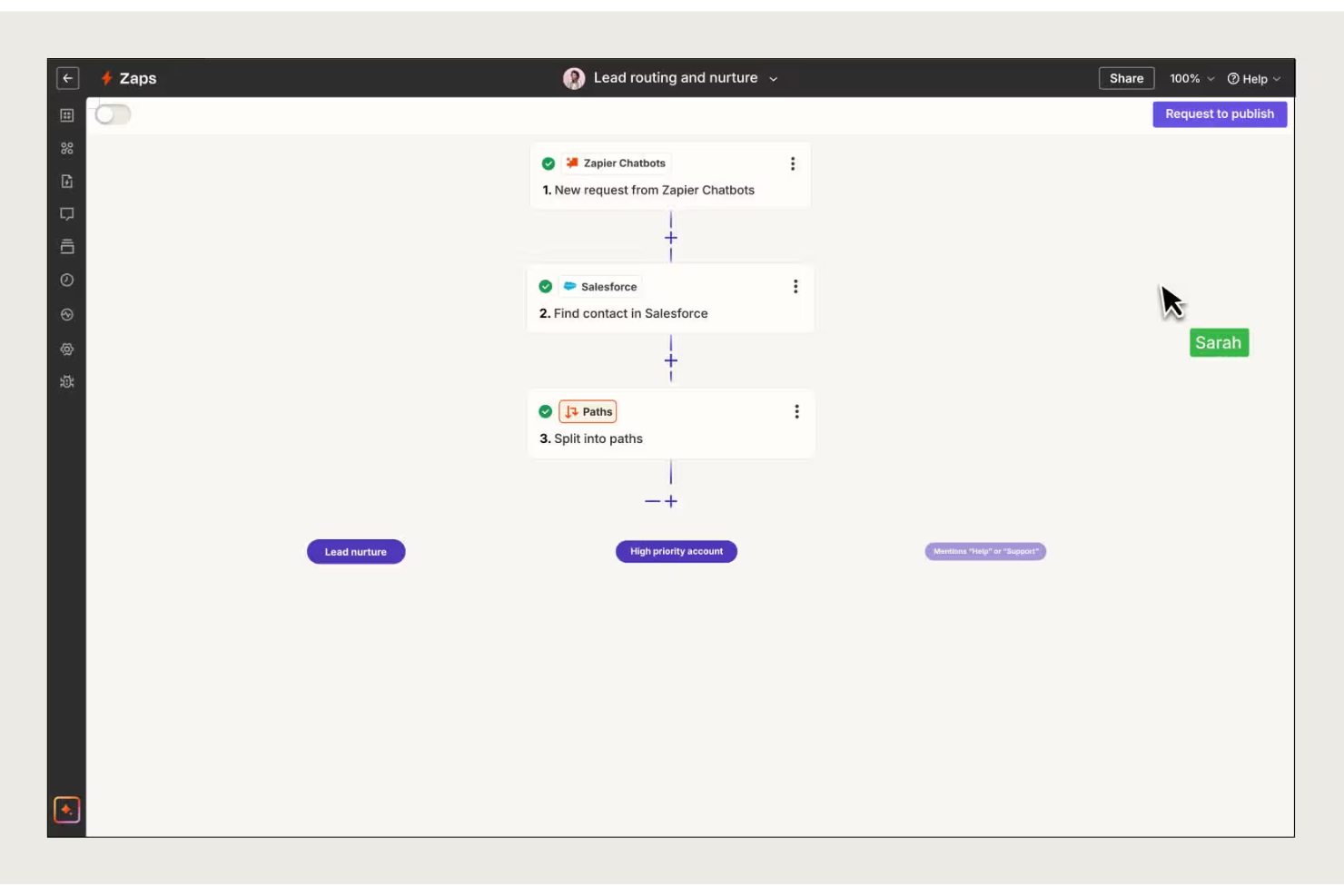
Zapier connects your favorite business apps so small teams, agencies, and service providers can automate repetitive tasks, reduce manual data entry, and keep processes running smoothly without custom code.
Who Is Zapier Best For?
Small business operations and admin teams who need to connect multiple cloud apps without developer support.
Why I Picked Zapier
I picked Zapier as one of the best because I can set up automated workflows—called Zaps—that move data between apps like QuickBooks, Slack, and Google Sheets without writing code. My team uses multi-step Zaps to trigger actions across several tools from a single event. I like that I can schedule tasks, filter data, and even add conditional logic to keep our processes running smoothly.
Zapier Key Features
- Shared folders: Organize and manage Zaps with your team in dedicated folders.
- Zap history: View detailed logs of every Zap run for troubleshooting and auditing.
- App directory: Access thousands of pre-built app connections for quick setup.
- User roles and permissions: Assign different access levels to team members for better control and business management.
Zapier Integrations
Integrations include Google Sheets, Gmail, Slack, Google Calendar, Google Drive, Notion, HubSpot, Facebook Lead Ads, Mailchimp, and Stripe.
Pros and Cons
Pros:
- Built-in filters and logic for process control
- Supports thousands of business app connections
- Automates repetitive tasks across multiple apps
Cons:
- Task limits can restrict high-volume use
- Limited error handling for failed automations

Best for checklist-driven task automation
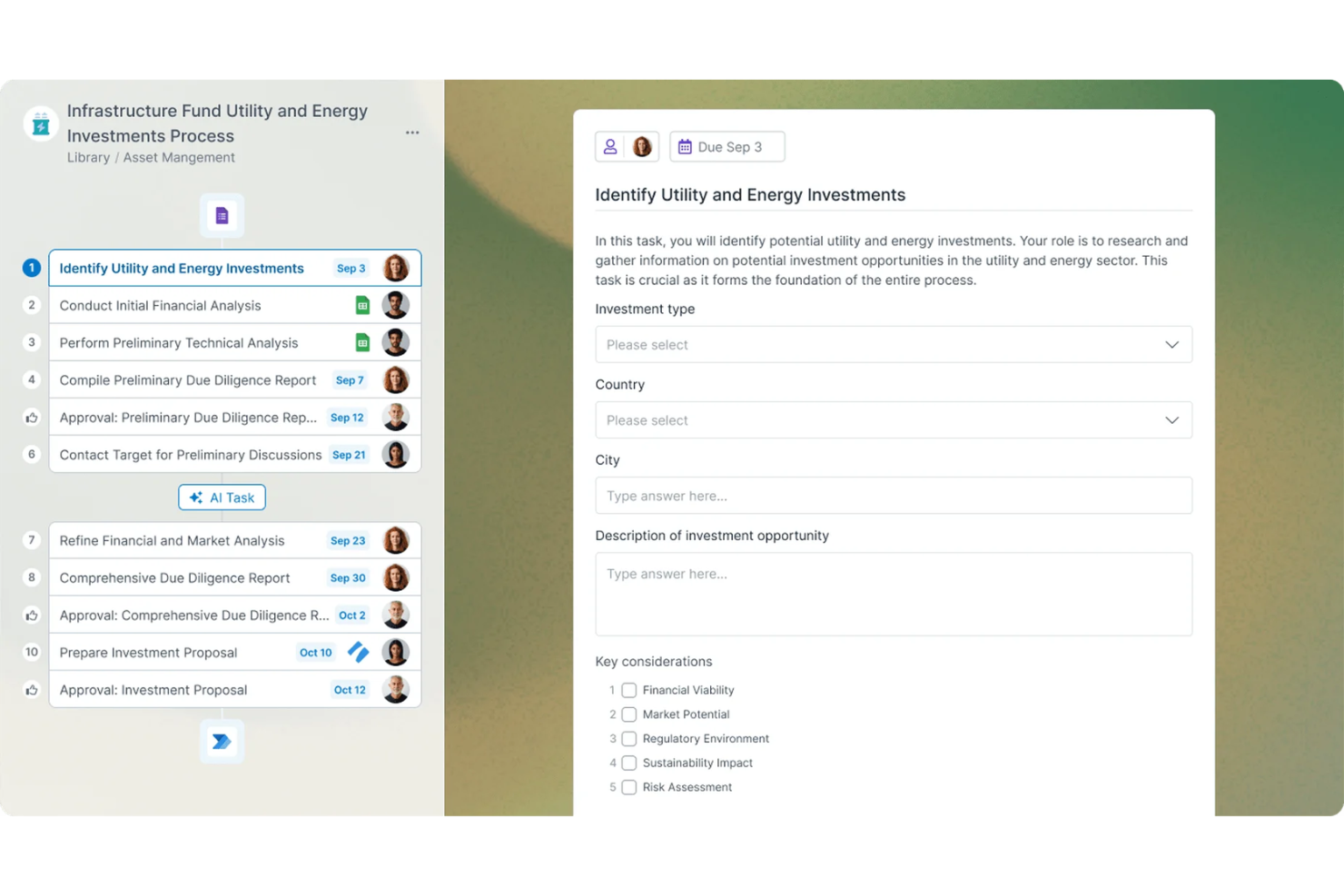
Process Street is a workflow management platform built for small businesses and teams who need to document, automate, and track recurring processes with clear, actionable checklists.
Who Is Process Street Best For?
Process Street is a strong fit for operations managers and small business teams who need structured case management to track recurring tasks.
Why I Picked Process Street
I picked Process Street as one of the best because I can build dynamic checklists that trigger automated actions when tasks are completed. I like using conditional logic to create branching workflows for different scenarios. My team relies on the approvals feature to keep stakeholders informed while keeping task sign-offs organized.
Process Street Key Features
- Task assignments: Assign checklist tasks to specific team members for accountability.
- Form fields: Collect structured data directly within checklists using customizable form fields.
- Template library: Access a library of pre-built workflow templates for common business processes.
- Audit trail: Track every action and change within a checklist for compliance and transparency.
Process Street Integrations
Integrations include Salesforce, Slack, Microsoft Teams, Google Sheets, Jira, HubSpot, Mailchimp, Stripe, and BambooHR.
Pros and Cons
Pros:
- Free guest seats for external collaborators
- Stop tasks enforce strict process order
- Conditional logic creates dynamic checklists
Cons:
- No offline access for mobile checklists
- Limited built-in complex data modeling

Cflow
Best for no-code workflow automation

Cflow is a cloud-based workflow automation platform built for small businesses and teams who want to digitize, automate, and track business processes across HR, finance, and operations without needing IT support.
Who Is Cflow Best For?
Small business operations managers who want to automate and monitor workflows without coding or IT resources.
Why I Picked Cflow
I picked Cflow as one of the best because I can automate multi-step business processes without writing a single line of code. I like that I can build custom forms, set up approval flows, and trigger notifications using a visual workflow builder. My team uses Cflow to lead our digital transformation by digitizing everything from purchase requests to leave approvals in just a few clicks.
Cflow Key Features
- Role-based access control: Set permissions for users based on their roles in the organization.
- Audit logs: Track every action and change within each workflow for compliance.
- Document management: Attach, store, and manage documents directly within workflows.
- SLA monitoring: Define and monitor service level agreements for process steps.
Cflow Integrations
Integrations include Salesforce, Slack, Trello, Dropbox, QuickBooks, HubSpot CRM, Google Drive, Microsoft Teams, Xero, and Docusign.
Pros and Cons
Pros:
- Lookup fields connect multiple internal workflows
- Automatic mobile app generation for forms
- Parallel branch routing for concurrent approvals
Cons:
- Restricted visual dashboard customization
- Steep learning curve for form editing

Flokzu
Best for customizable workflow templates
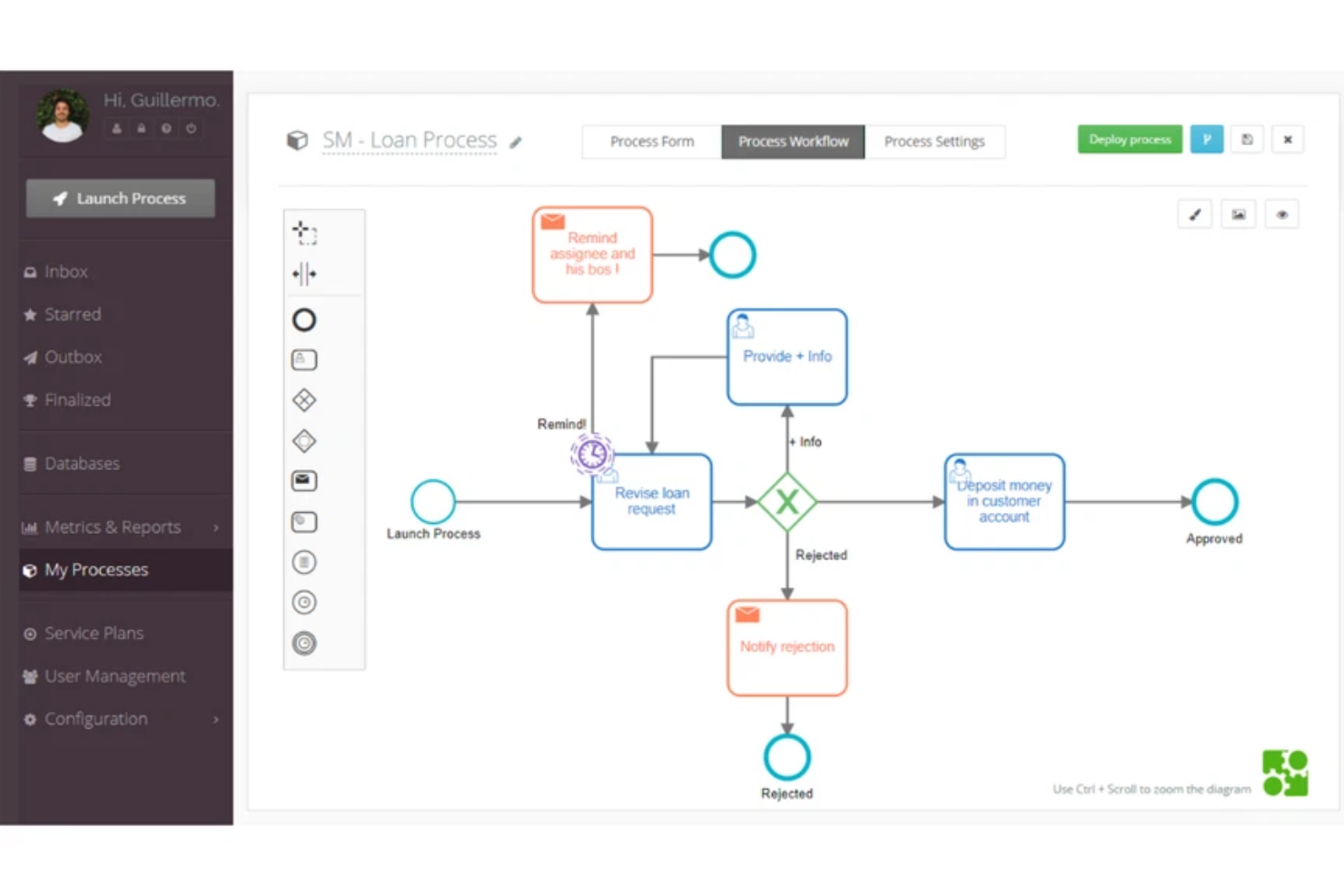
Flokzu is a cloud-based workflow automation platform designed for small businesses and teams who want to map, automate, and optimize their business processes without coding.
Who Is Flokzu Best For?
Small business operations teams who need to automate and customize internal workflows without coding.
Why I Picked Flokzu
I picked Flokzu as one of the best because I can quickly deploy customizable workflow templates for everything from invoice approvals to employee onboarding. I like that I can tweak process steps, forms, and rules without writing code. My team uses the drag-and-drop process designer to adapt workflows as our business changes.
Flokzu Key Features
- Task assignment: Assign tasks to specific users or groups for accountability.
- Document management: Store, attach, and manage documents within each workflow.
- Deadline tracking: Set deadlines and receive notifications for overdue tasks.
- Process analytics dashboard: Visualize workflow performance with built-in charts and reports.
Flokzu Integrations
Integrations include Google Sheets, Microsoft Excel, Salesforce, HubSpot, Slack, Trello, QuickBooks Online, Dropbox, and Microsoft Teams.
Pros and Cons
Pros:
- Audit trail tracks every workflow action
- AI-powered form and script generation
- BPMN 2.0 standard visual process modeling
Cons:
- Restricted reporting filters in basic tiers
- Interface sessions timeout frequently

Best for building custom business apps
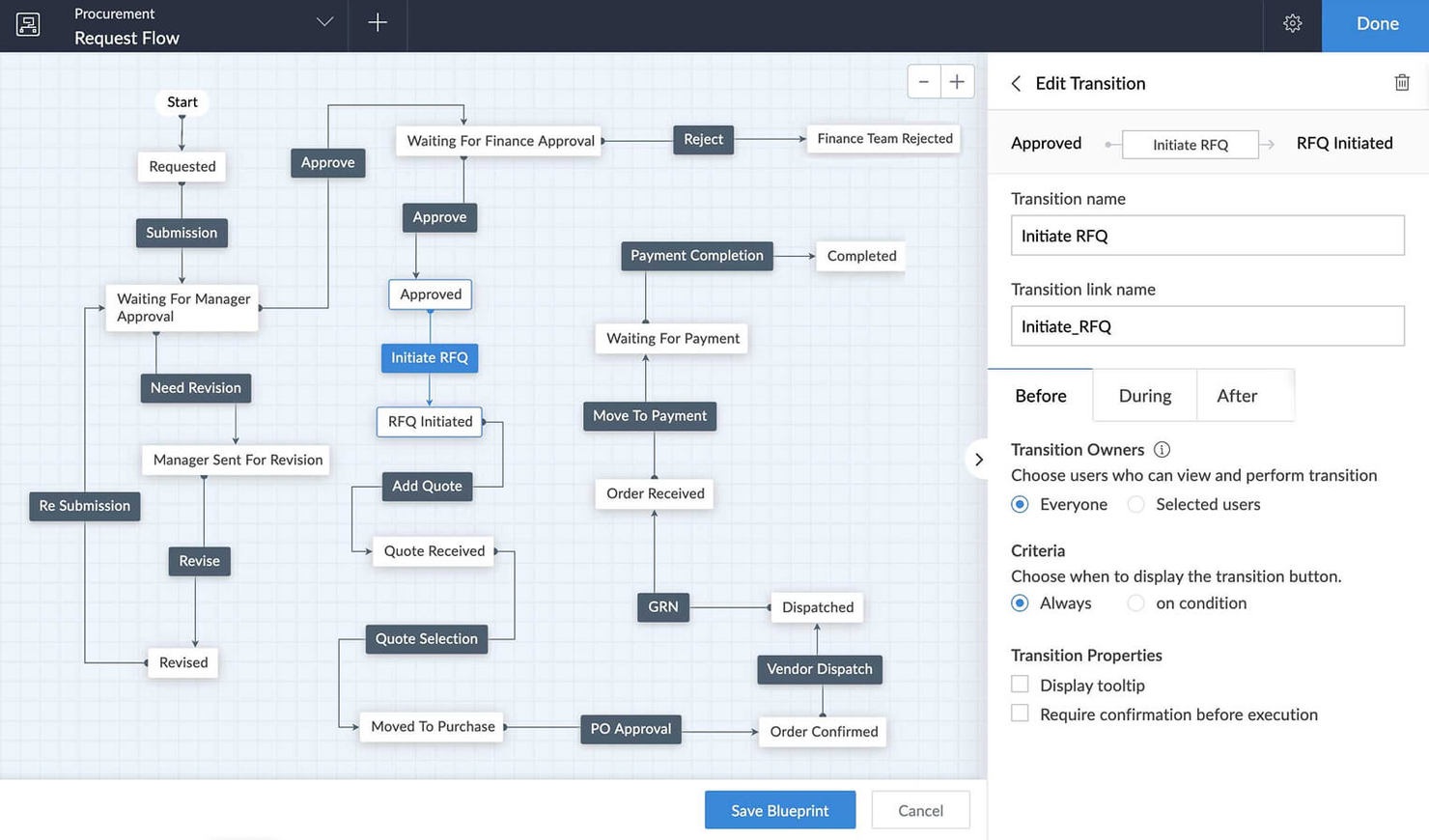
Zoho Creator is a low-code platform for small businesses and teams who want to automate processes, centralize data, and build custom workflows without relying on IT or complex coding.
Who Is Zoho Creator Best For?
Small business owners and operations managers who want to design custom apps to automate unique business processes.
Why I Picked Zoho Creator
I picked Zoho Creator as one of the best because I can quickly build custom business apps with drag-and-drop tools and prebuilt templates. I like that I can automate multi-step workflows and set up approval processes without writing code. My team uses its built-in analytics to improve operational efficiency and spot bottlenecks as we scale.
Zoho Creator Key Features
- Role-based access controls: Assign permissions to users based on their roles in your organization.
- Multi-platform deployment: Launch apps for web, iOS, and Android from a single build.
- Integration with Zoho and third-party apps: Connect workflows to Zoho CRM, Zoho Books, and other popular tools.
- Custom report builder: Design and generate reports using your app’s data to drive better decision-making through enhanced process visibility.
Zoho Creator Integrations
Integrations include Zoho CRM, Zoho Books, Zoho Projects, Zoho Desk, Zoho People, Zoho Analytics, Zoho Invoice, Zoho Inventory, Zoho Mail, and Zoho Sign.
Pros and Cons
Pros:
- Native integration with other Zoho business tools
- Built-in database for centralized business data
- Drag-and-drop app builder for custom workflows
Cons:
- User interface can feel dated to some teams
- Limited advanced workflow logic without scripting

Clustdoc
Best for client onboarding workflows
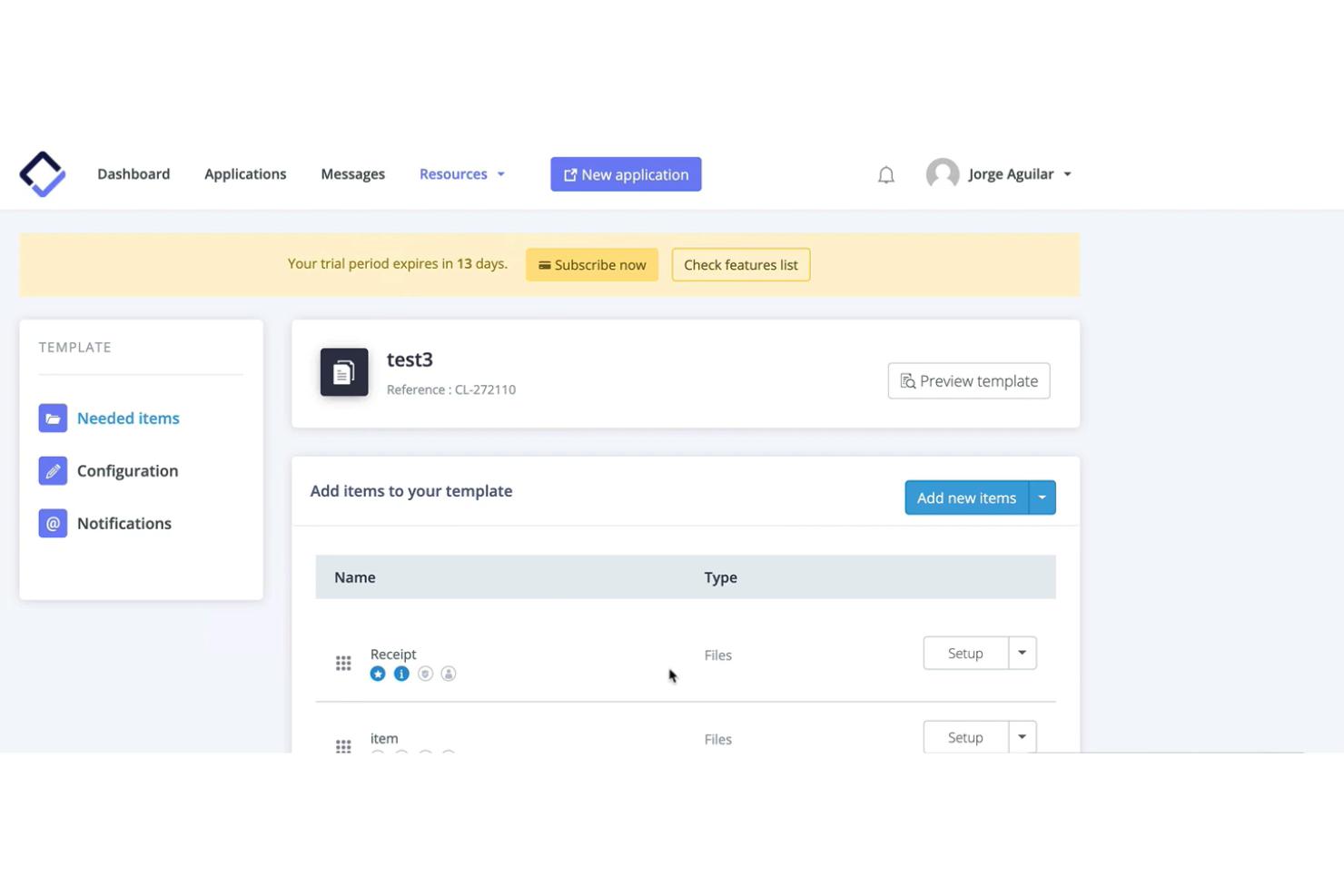
Clustdoc is a workflow automation platform designed for small businesses and professional services teams who need to collect documents, manage client submissions, and simplify onboarding or application processes.
Who Is Clustdoc Best For?
Small business teams in legal, finance, or consulting who need to automate client onboarding and document collection.
Why I Picked Clustdoc
I picked Clustdoc as one of the best because I can build step-by-step onboarding workflows with custom checklists and document requests tailored to each client. I like that my team can automate reminders and approvals, so nothing falls through the cracks. The branded client portal lets us collect forms, signatures, and payments in one place, which keeps everything organized and professional.
Clustdoc Key Features
- Conditional logic workflows: Trigger steps or requests based on client responses.
- Team collaboration tools: Assign tasks and communicate with team members inside the platform.
- Template library: Access ready-made onboarding and document collection templates.
- Audit trail tracking: Monitor every action and change made within each workflow.
Clustdoc Integrations
Native integrations include Google Drive, Dropbox, OneDrive, Docusign, Stripe, and Clustdoc also offers an API for custom integrations.
Pros and Cons
Pros:
- Conditional logic customizes onboarding steps
- Automated reminders reduce manual follow-ups
- Client portal supports secure document uploads
Cons:
- Limited custom branding options
- No built-in time tracking feature

Best for low-code process design
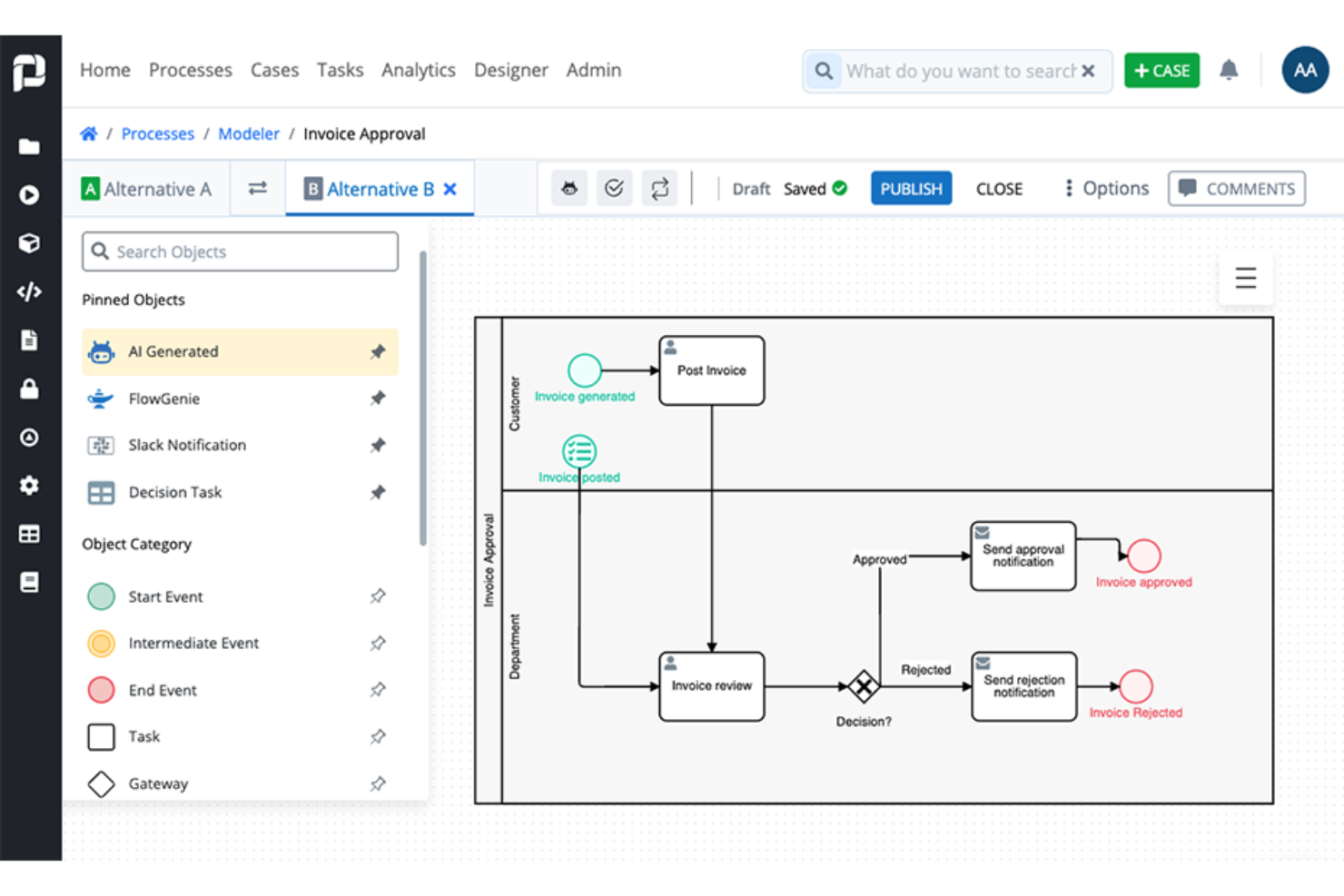
ProcessMaker is a workflow automation platform for operations teams and business analysts who need to map, automate, and optimize complex business processes without heavy IT involvement.
Who Is ProcessMaker Best For?
Mid-sized and enterprise operations teams who need to automate and manage complex, multi-step business processes.
Why I Picked ProcessMaker
I picked ProcessMaker as one of the best because I can visually design and automate complex workflows using its low-code process modeler. I like that I can set up multi-step approvals and conditional routing without heavy IT support. My team uses its drag-and-drop form builder for document processing and standardize data collection.
ProcessMaker Key Features
- Role-based access controls: Set permissions for users based on job function or department.
- Process analytics dashboard: Monitor process performance with real-time visual reports.
- Document management integration: Attach, store, and retrieve documents within workflows.
- REST API support: Connect external systems and automate data exchange.
ProcessMaker Integrations
Integrations include SAP, Salesforce, Microsoft SharePoint, Slack, Google Drive, Box, Dropbox, Oracle, and Jira.
Pros and Cons
Pros:
- Real-time process analytics and dashboards
- Strong e-signature integration
- Built-in approval routing for multi-step processes
Cons:
- Occasional delays in customer support response
- Custom scripting requires technical expertise

Knack
Best for database-driven workflow management
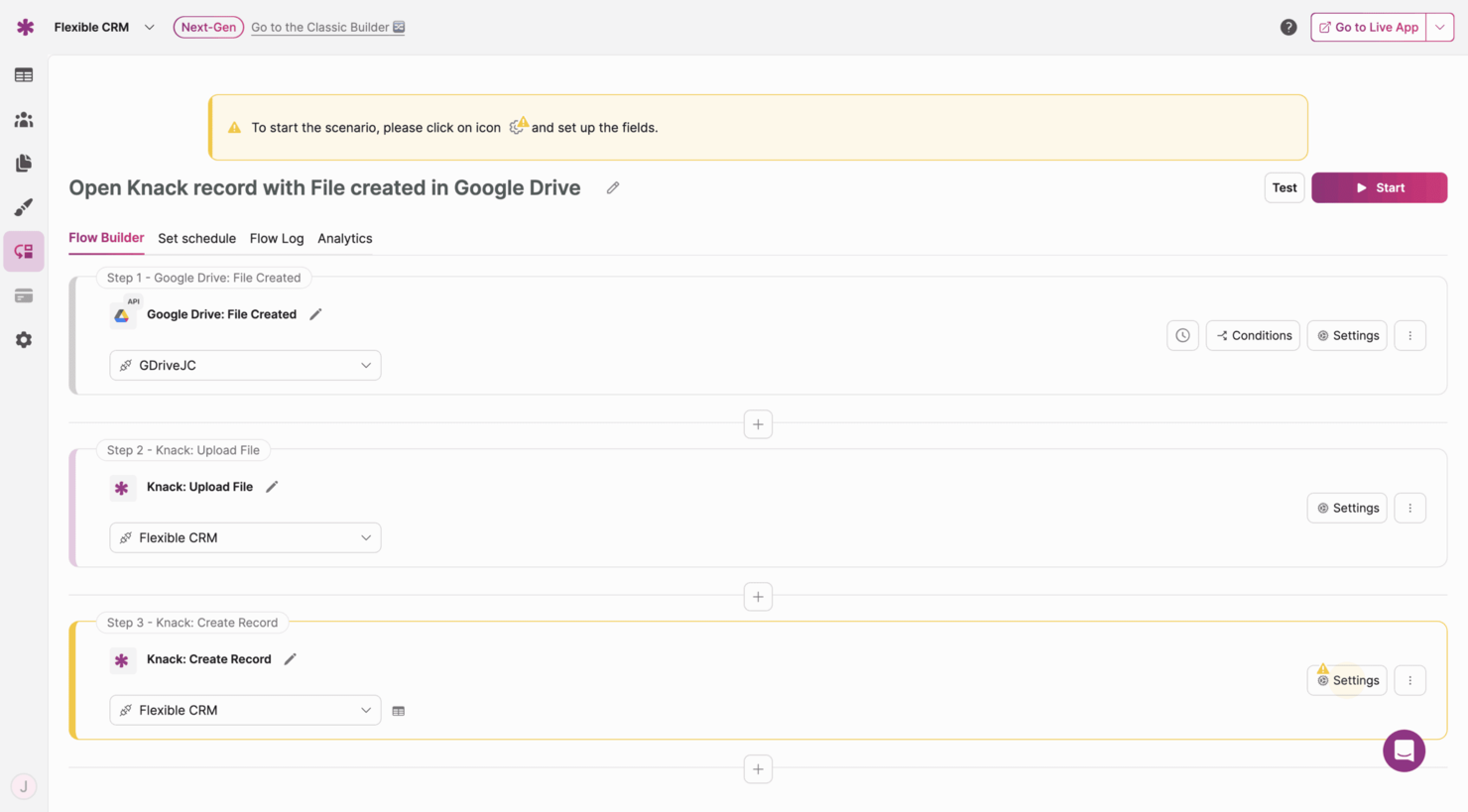
Knack gives small businesses and operations teams a way to build custom workflow apps that connect data, automate processes, and manage tasks without needing to code.
Who Is Knack Best For?
Operations managers and small business owners who need to build custom workflow solutions around their unique data and processes.
Why I Picked Knack
I picked Knack as one of the best because I can design workflow apps that connect directly to my business data, letting me automate approvals, notifications, and status changes without coding. I like that I can build custom dashboards and forms that match my team’s exact process steps. In practice, that means my team is able to manage everything from order tracking to project handoffs in one place, all driven by our own database structure.
Knack Key Features
- Role-based access controls: Set permissions for users and groups to control data visibility.
- Custom notifications: Send automated emails or alerts based on workflow triggers.
- File uploads: Allow users to attach and store documents within records.
- Calendar views: Display tasks, events, or deadlines in a visual calendar format.
Knack Integrations
Integrations include Zapier, Make, Integromat, Webhooks, Google Sheets, Mailchimp, QuickBooks, Salesforce, Slack, and Dropbox. An API is also available for custom integrations.
Pros and Cons
Pros:
- Supports file uploads within workflow records
- Database-centric architecture for relational data
- Custom database builder for unique workflows
Cons:
- Basic front-end design and styling options
- Limited native multi-step automation logic

Jira
Best for tracking complex workflows
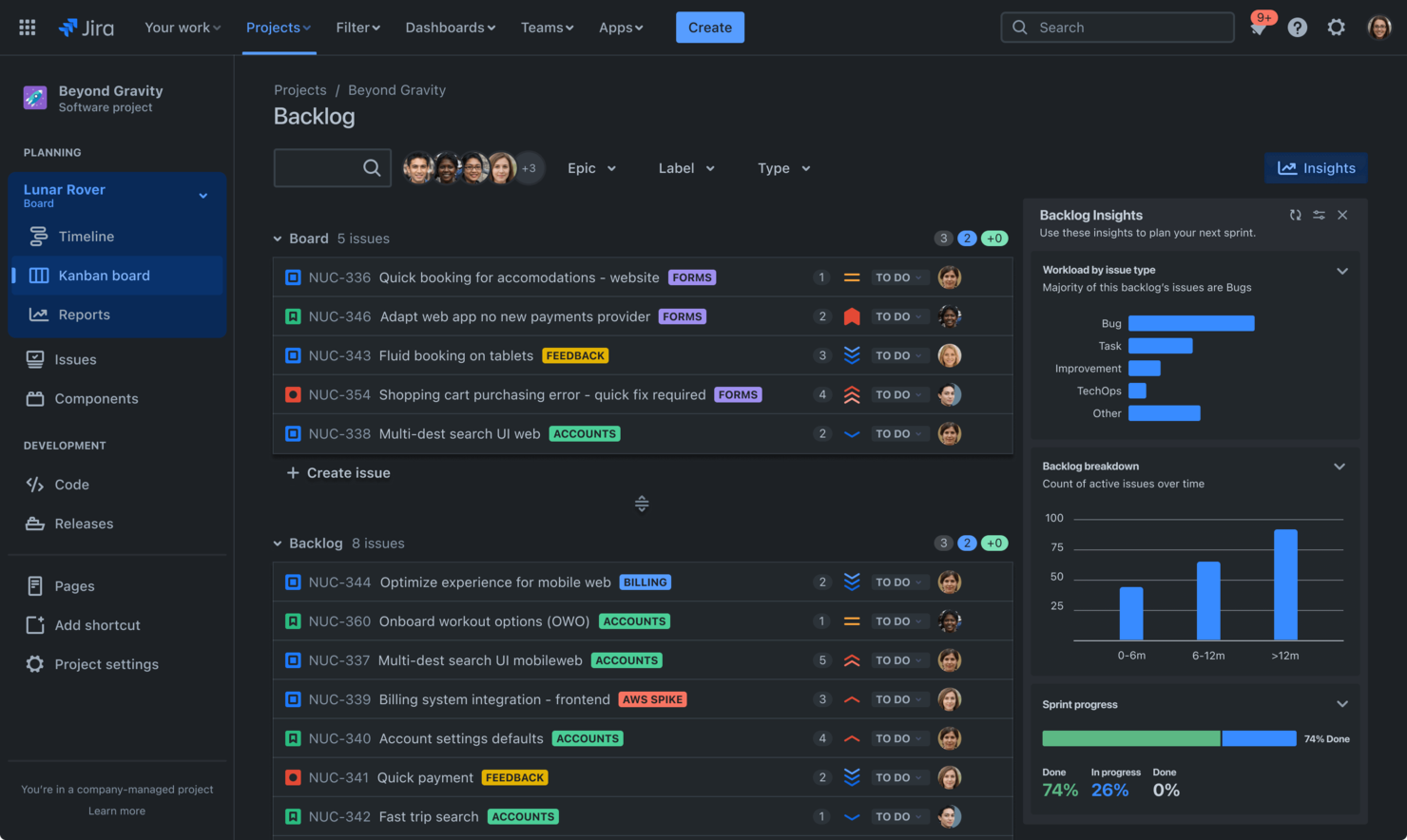
Jira is a project and workflow management platform used by software teams, product managers, and small businesses to organize tasks, track progress, and coordinate complex projects across distributed teams.
Who Is Jira Best For?
Software development teams and technical project managers in small to midsize businesses who need to coordinate complex, multi-step workflows.
Why I Picked Jira
I picked Jira as one of the best because I can map out complex, multi-step workflows using customizable boards and advanced issue types. My team uses built-in automation rules to handle recurring tasks and dependencies, which keeps our projects moving without manual follow-up. I like that I can visualize progress with detailed roadmaps and granular reporting, which helps us stay on top of shifting priorities.
Jira Key Features
- Custom fields: Add and configure fields to capture project-specific data.
- Permissions management: Control user access and actions at a granular level.
- Service desk integration: Connect support tickets directly to project workflows.
- Marketplace apps: Extend functionality with thousands of add-ons from the Atlassian Marketplace.
Jira Integrations
Integrations include Confluence, Trello, Bitbucket, Slack, Microsoft Teams, Google Drive, Zoom, Figma, GitHub, and Loom.
Pros and Cons
Pros:
- Built-in agile boards for sprint planning
- Highly customizable issue and project templates
- Advanced workflow automation for recurring processes
Cons:
- Limited support for non-technical workflows
- Time-consuming configuration for small teams

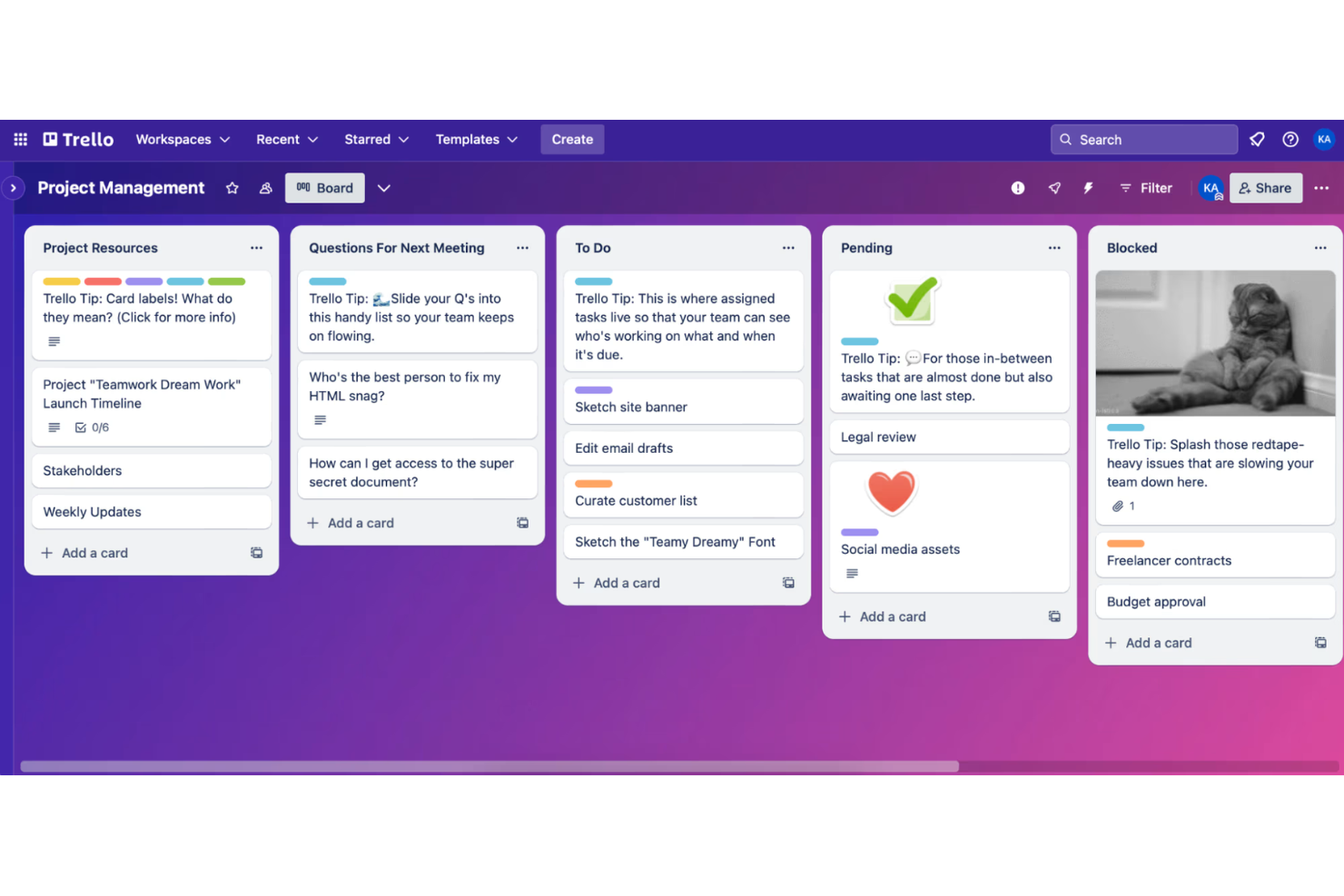
Trello gives small business teams a visual way to organize projects, manage workflows, and track progress using customizable boards, making it easy for marketing, operations, and client service teams to collaborate and stay on top of tasks.
Who Is Trello Best For?
Small business teams in marketing, operations, or client services who want a simple, visual way to manage projects and workflows.
Why I Picked Trello
I picked Trello as one of the best because I can set up kanban boards in minutes and customize lists for each stage of my team’s workflow. I like using Trello’s card system to attach files, add checklists, and assign tasks to specific team members. My team uses Power-Ups to add calendar views and automate repetitive actions right from the board.
Trello Key Features
- Butler automation: Automate card movements, due dates, and notifications with rule-based triggers.
- Board templates: Choose from a library of pre-built workflow templates for different business needs.
- Custom fields: Add dropdowns, dates, or text fields to cards for tailored data tracking.
- Activity log: Track all board and card changes in a detailed timeline.
Trello Integrations
Integrations include Slack, Google Drive, Gmail, Microsoft Teams, Jira, Dropbox, Evernote, Salesforce, and Box.
Pros and Cons
Pros:
- Board templates speed up new project setup
- Card checklists help track task subtasks
- Kanban boards make workflow stages visible
Cons:
- Card comments can get buried in busy boards
- No built-in Gantt or timeline view
Küçük İşletmeler İçin Diğer Süreç Yönetimi Yazılımları
Kısa listeme giremeyen ancak yine de göz atmaya değer küçük işletmeler için bazı ek süreç yönetimi yazılımı seçenekleri şunlardır:
- Asana
For team task coordination
- Bizagi
For visual process modeling in small teams
- Smartsheet
For spreadsheet-style process planning
- Wrike
For real-time workflow visibility
- monday AI Workspace
For customizable workspaces
- Orderry
For service business job tracking
- Pabbly Connect
For multi-app workflow connections
- UiPath
For robotic task automation
- Bitrix24
For integrated communication tools
- Nintex Process Manager
For documenting procedures


How I Evaluate Process Management Software for Small Business
I evaluate these tools in two layers: the core functionality a small team actually needs—like recurring checklists and process templates—and the differentiators that make one tool the right fit.
Core Functionality (Table Stakes For This List)
When I'm selecting tools for my list, I rank each one on a scale from 0 (does not offer the functionality) to 5 (excels in this area) for each core functionality listed below. Then, I calculate the tool's total score into a percentage. Each tool needs to achieve a minimum total score of 65% to be considered for inclusion.
- Process Mapping & Documentation: I look for visual workflow builders where you can map out a process like employee onboarding or client intake step by step, not just describe it in a text doc.
- Workflow Automation: Each tool should let you set triggers and conditions that move work forward automatically, like routing an approval to a manager when a form is submitted.
- Recurring Task & Checklist Management: I check whether you can save a process as a reusable template, so something like a monthly close or weekly reporting cycle launches with the right steps every time.
- Collaboration & Task Assignment: The tool should support role-based task assignment with comments and mentions, so team members stay aligned within the process instead of chasing updates over email.
- Progress Tracking & Reporting: Dashboards and reports that show where processes stall matter here. I evaluate whether you can spot a bottleneck, like an approval stuck for three days, at a glance.
- Integrations With Business Tools: Small teams rely on connected stacks, so I look at native integrations with tools like Google Workspace, Slack, and QuickBooks, plus support for Zapier or an open API.
Once I have a list of tools that meet the criteria, I consider what sets each platform apart.
Differentiating Factors (What Sets Vendors Apart)
Here's how I compare and contrast different vendors:
Standout Features
Conditional logic branching is a big differentiator. A tool that adjusts the next step based on a form response—like skipping a legal review when a contract falls below a set threshold—saves small teams from manually rerouting work. Embedded forms that capture structured data at kickoff are equally valuable, since they feed variables into later steps without copy-pasting between apps. I also evaluate whether a platform offers guest or client portals, so external stakeholders can submit requests or track progress without needing a paid seat.
Beyond Features
Pricing transparency matters for small teams. I check whether a vendor locks automations or templates behind enterprise tiers, since a five-person team running client onboarding workflows shouldn't need to upgrade just to add conditions. Time-to-value is another factor I weigh—pre-built templates for common processes like employee offboarding or vendor approvals help teams go live in days, not weeks. I also look at support availability on lower-tier plans, because small businesses rarely have a dedicated admin to troubleshoot configuration issues on their own.
Küçük İşletmeler İçin Süreç Yönetimi Yazılımı Nasıl Seçilir?
Uzun özellik listeleri ve karmaşık fiyatlandırma yapıları içinde kaybolmak kolaydır. Kendinize özgü yazılım seçim sürecinizi yürütürken odaklanmanızı korumanıza yardımcı olmak için göz önünde bulundurmanız gereken faktörleri içeren bir kontrol listesi hazırladık:
| Faktör | Göz Önünde Bulundurulması Gerekenler |
|---|---|
| Ölçeklenebilirlik | İşletmeniz büyüdükçe yazılım daha fazla kullanıcıyı, veriyi veya iş akışını destekleyebilecek mi? Kullanıcı sınırlarını ve yükseltme seçeneklerini kontrol edin. |
| Entegrasyonlar | Mevcut araçlarınıza (muhasebe, CRM veya e-posta gibi) yerel olarak bağlanabiliyor mu? Yalnızca üçüncü taraf bağlayıcılara güvenmekten kaçının. |
| Özelleştirilebilirlik | Ağır bir BT desteğine ihtiyaç duymadan iş akışlarını, alanları ve izinleri süreçlerinize uyacak şekilde düzenleyebilir misiniz? |
| Kullanım kolaylığı | Ekibiniz yazılımı hızlı bir şekilde benimseyecek mi, yoksa eğitim bir engel mi olacak? Sezgisel gezinme ve anlaşılır etiketler sunan çözümleri tercih edin. |
| Uygulama ve kullanıma başlama | Kurulum ne kadar sürecek ve hangi kaynaklar gerekecek? Veri aktarımı desteği, şablonlar ve kullanıma başlama yardımı hakkında bilgi alın. |
| Maliyet | Ölçeğinizi büyüttükçe fiyatlandırma kademeleri şeffaf ve öngörülebilir mi? Gizli ücretlere veya zorunlu eklentilere dikkat edin. |
| Güvenlik önlemleri | Araç, rol tabanlı erişim, veri şifreleme ve ilgili standartlara (GDPR gibi) uygunluk sunuyor mu? |
| Destek erişilebilirliği | Hangi destek kanalları sunuluyor ve hangi saatlerde kullanılabiliyor? Canlı yardıma mı yoksa kendi kendine hizmet kaynaklarına mı ihtiyaç duyacağınızı değerlendirin. |
Küçük İşletmeler İçin Süreç Yönetimi Yazılımı Nedir?
Küçük işletmeler için süreç yönetimi yazılımı, ekiplerin tekrarlanan iş akışlarını ve görevleri düzenlemesine, izlemesine ve otomatikleştirmesine yardımcı olan dijital bir araçtır. Süreç belgelerini merkezileştirir, sorumluluklar atar ve ilerlemeyi izleyerek ekiplerin manuel işleri ve hataları azaltmasını sağlar. Bu platformlar, girişimlerin ve daha küçük kuruluşların ihtiyaçlarına ve bütçelerine uyacak şekilde tasarlanmıştır; böylece günlük operasyonları yönetmek ve işletme büyüdükçe uyum sağlamak kolaylaşır.
Özellikler
Küçük işletmeler için süreç yönetimi yazılımı seçerken aşağıdaki temel özelliklere dikkat edin:
- Görev atama: Hesap verebilirliği ve ilerlemeyi sağlamak için ekip üyelerine belirli görevler atayın, son teslim tarihleri belirleyin ve tamamlanma durumunu izleyin.
- İş akışı otomasyonu: Zaman kazanmak ve manuel hataları azaltmak için onaylar veya bildirimler gibi süreçlerinizdeki tekrarlanan adımları otomatikleştirin.
- Belge yönetimi: Herkesin en güncel sürümlere ve ilgili materyallere erişebilmesi için dosyaları platform içinde depolayın, düzenleyin ve paylaşın.
- Role dayalı izinler: Hassas bilgileri korumak ve düzeni sürdürmek için iş akışlarınızın farklı bölümlerini kimlerin görüntüleyebileceğini, düzenleyebileceğini veya onaylayabileceğini kontrol edin.
- İlerleme takibi: Gerçek zamanlı denetim için görevlerin ve süreçlerin durumunu panolar, kanban panoları veya ilerleme çubuklarıyla görselleştirin.
- Özelleştirilebilir formlar: İşletmenizin ihtiyaçlarına göre uyarlanmış veri, talep veya geri bildirimleri doğrudan iş akışlarınız içinde toplamak için formlar oluşturun.
- Takvim entegrasyonu: Herkesin yaklaşan önemli kilometre taşları ve teslim edilecek işler konusunda uyumlu kalması için görevleri ve son teslim tarihlerini ekip takvimleriyle senkronize edin.
- Raporlama ve analiz: Veriye dayalı iyileştirmeleri desteklemek için iş akışı verimliliği, darboğazlar ve ekip performansı hakkında raporlar oluşturun.
- Mobil erişim: Ekibinizin süreçleri ve görevleri her yerden yönetebilmesi için yazılımı akıllı telefonlarda veya tabletlerde kullanın.
- Entegrasyon olanakları: Bilgi akışını kolaylaştırmak ve yinelenen işleri azaltmak için e-posta, CRM veya muhasebe platformları gibi diğer işletme araçlarına bağlanın.
Avantajlar
Küçük işletmeler için süreç yönetimi yazılımını uygulamak, ekibiniz ve işletmeniz için çeşitli avantajlar sağlar. Yararlanabileceğiniz avantajlardan bazıları şunlardır:
- Daha fazla görünürlük: Görevleri ve iş akışlarını gerçek zamanlı olarak izleyin; böylece nelerin devam ettiğini ve hangilerinin ilgilenilmesi gerektiğini her zaman bilirsiniz.
- Gelişmiş hesap verebilirlik: Sorumlulukları ve son teslim tarihlerini atayarak her adımdan kimin sorumlu olduğunu netleştirin ve kaçırılan görevleri azaltın.
- Daha hızlı işe alıştırma: Yeni ekip üyelerinin kısa sürede hız kazanmasına yardımcı olmak için şablonlardan, rehberli turlardan ve merkezî belgelerden yararlanın.
- Azalan manuel iş: Tekrarlanan görevleri ve onayları otomatikleştirerek ekibinizin daha yüksek değerli faaliyetlere odaklanmasını sağlayın.
- Daha iyi iş birliği: Herkesin her süreç boyunca uyumlu ve bilgili kalması için iletişimi, dosyaları ve güncellemeleri merkezileştirin.
- Bilgiye dayalı kararlar: Darboğazları belirlemek, performansı ölçmek ve iş akışlarını optimize etmek için raporlama ve analiz araçlarına erişin.
- Gelişmiş güvenlik: Role dayalı izinler ve denetim kayıtlarıyla hassas bilgilere erişimi kontrol ederek işletme verilerinizi koruyun.
Maliyetler ve Fiyatlandırma
Küçük işletmeler için süreç yönetimi yazılımı seçmek, mevcut çeşitli fiyatlandırma modellerinin ve planların anlaşılmasını gerektirir. Maliyetler özelliklere, ekip büyüklüğüne, eklentilere ve diğer unsurlara göre değişir. Aşağıdaki tablo, küçük işletmeler için süreç yönetimi yazılımı çözümlerinde yaygın planları, ortalama fiyatlarını ve genellikle dahil edilen özellikleri özetlemektedir:
Küçük İşletmeler için Süreç Yönetimi Yazılımı Plan Karşılaştırma Tablosu
| Plan Türü | Ortalama Fiyat | Yaygın Özellikler |
|---|---|---|
| Ücretsiz Plan | $0 | Temel görev yönetimi, sınırlı kullanıcı sayısı, basit iş akışı şablonları ve temel destek. |
| Kişisel Plan | $5-$15/kullanıcı/ay | Görev atama, takvim entegrasyonu, sınırlı otomasyon, dosya depolama ve e-posta bildirimleri. |
| İşletme Planı | $15-$35/kullanıcı/ay | Gelişmiş iş akışı otomasyonu, raporlama araçları, entegrasyonlar, role dayalı izinler ve mobil erişim. |
| Kurumsal Plan | $35-$60/kullanıcı/ay | Özel entegrasyonlar, geliştirilmiş güvenlik, öncelikli destek, gelişmiş analiz ve işe alıştırma desteği. |
Küçük İşletmeler için Süreç Yönetimi Yazılımı Hakkında SSS
Küçük işletmeler için süreç yönetimi yazılımı hakkında sık sorulan soruların bazı yanıtları:
İş süreçleri yönetimi yazılımı (BPM), süreç yönetimi yazılımından farklı mıdır?
Evet, iş süreçleri yönetimi yazılımı veya BPM yazılımı, süreç yönetimi aracından farklıdır:
- Süreç yönetimi yazılımı, görev koordinasyonuna ve ekip iş birliğine odaklanır. Kullanıcıların bir proje içindeki bireysel iş parçalarını düzenlemesine, atamasına ve takip etmesine yardımcı olmak üzere tasarlanmıştır.
- BPM platformu, iş akışı otomasyonuna ve sistematik optimizasyona odaklanır. Tekrarlanabilir ve yapılandırılmış, uçtan uca karmaşık süreçleri modellemek, yürütmek ve ölçmek üzere tasarlanmıştır.
Kısaca: Ekibinizin düzenli kalmasına yardımcı olmak istiyorsanız süreç yönetimi yazılımına ihtiyacınız vardır. Katı otomasyon ve veri entegrasyonu yoluyla manuel işleri ortadan kaldırmak istiyorsanız bir BPM çözümü arıyorsunuz demektir.
Küçük işletmemin süreç yönetimi yazılımına ihtiyacı olup olmadığını nasıl anlarım?
Görevleri, teslim tarihlerini veya ekip sorumluluklarını takip etmekte zorlanıyorsanız ya da manuel süreçler işinizi yavaşlatıyorsa süreç yönetimi yazılımından yararlanabileceğinizin iyi bir işaretidir. Bu araçlar, işletmeniz büyüdükçe iş akışlarını düzenlemenize ve hataları azaltmanıza yardımcı olur.
Süreç yönetimi yazılımı mevcut araçlarımla entegre olabilir mi?
Evet, küçük işletmelere yönelik süreç yönetimi yazılımlarının çoğu e-posta, takvimler, CRM ve muhasebe platformları gibi popüler araçlarla entegrasyon sunar. Hangi entegrasyonların yerel olarak kullanılabildiğini ve kullandığınız özel teknoloji yığını için üçüncü taraf bağlayıcılara ihtiyaç duyup duymayacağınızı mutlaka kontrol edin.
Süreç yönetimi yazılımını küçük bir ekip için kurmak zor mudur?
Hayır, süreç yönetimi yazılımı çözümlerinin çoğu hızlı kurulum için tasarlanmıştır ve şablonlar, ürün tanıtımları ve eğitim videoları gibi başlangıç kaynakları içerir. Genellikle BT desteği almadan başlayabilirsiniz; ancak daha gelişmiş özelleştirmeler ek zaman veya teknik yardım gerektirebilir.
Süreç yönetimi yazılımında hangi güvenlik özelliklerini aramalıyım?
Rol tabanlı izinler, veri şifreleme ve GDPR gibi standartlara uyumluluk özelliklerini arayın. Bu özellikler, hassas işletme bilgilerini korumaya ve farklı iş akışlarına kimlerin erişebileceğini veya bunları kimlerin düzenleyebileceğini kontrol etmeye yardımcı olur.
Küçük işletmeler için süreç yönetimi yazılımına ne kadar ödeme yapmayı beklemeliyim?
Fiyatlandırma değişiklik gösterir, ancak çoğu küçük işletme iş planları için kullanıcı başına aylık $5 ile $35 arasında ödeme yapar. Sınırlı özelliklere sahip ücretsiz planlar sunulurken gelişmiş güvenlik ve destek içeren kurumsal planlar daha pahalıdır. Her kademede nelerin dahil olduğunu mutlaka inceleyin.