

2026’da İncelenen En İyi 10 Yapay Zekâ Belge Kontrol Yazılımı

10 En İyi Yapay Zekâ Belge Kontrol Yazılımları Kısa Listesi


Belgeleri yönetmek, özellikle birden fazla projeyi aynı anda yürütüyorsanız, tam bir kâbusa dönüşebilir. Belgelerinizi düzenleyen, güvence altına alan ve ekibinizin erişimine sunan bir çözüme ihtiyacınız vardır. Yapay zekâ belge kontrol yazılımları tam da bu noktada devreye girer.
Geleneksel belge yönetimi araçları dosyaları depolamanıza ve paylaşmanıza yardımcı olur; ancak yapay zekâ bunu bir adım ileri taşır. Bu araçlar sürüm kontrolünü otomatikleştirmek, yinelenen dosyaları tespit etmek, temel bilgileri çıkarmak ve hatta ekibinizin bir sonraki aşamada hangi belgelere ihtiyaç duyacağını tahmin etmek için makine öğreniminden yararlanır. Kısacası yapay zekâ, belge yönetimini manuel bir angaryadan çalışma biçiminizden öğrenen akıllı bir sisteme dönüştürür.
Bu kılavuzda, günümüzde kullanılabilen en iyi yapay zekâ belge kontrol yazılımlarını inceleyecek; özelliklerine, kullanılabilirliklerine ve öne çıkan avantajlarına yakından bakacağız. Yapay zekâ destekli araçların standart seçeneklerden nasıl farklılaştığını ve hangisinin ekibinizin iş akışına en uygun olduğunu öğreneceksiniz.
Why Trust Our Software Recommendations
Our team has been testing and reviewing software since 2012. As project managers ourselves, we know how difficult—and important—it is to choose the right software.
For this guide, we evaluated tools using hands-on testing and independent research, scoring tools using our selection criteria. We also draw on insights from industry thought leaders and practicing project management experts.
Our reviews reflect our human editorial judgment, not a sales pitch.
Expert reviewers:
Yapay Zekâ Belge Kontrol Yazılımları Karşılaştırma Tablosu
Bu karşılaştırma tablosu, en iyi yapay zekâ belge kontrol yazılımı seçimlerim için fiyatlandırma ayrıntılarını özetlemektedir:
| Tool | Starting Price | Website | |
|---|---|---|---|
| Best for multilingual document search | 4.8 out of 5 | Pricing upon request Free demo available | Website |
| Best for contract management | 4.8 out of 5 | Pricing upon request Free demo available | Website |
| Best for secure document storage | 4.6 out of 5 | $73/user/month Free demo available | Website |
| Best for small to medium businesses | 4.5 out of 5 | Pricing upon request Free demo available | Website |
| Best for compliance with data regulations | 4.4 out of 5 | $65/user/month Free demo available | Website |
| Best for legal industry professionals | 4.3 out of 5 | Pricing upon request Free demo available | Website |
| Best for team collaboration | 4.3 out of 5 | $3/user/month Free plan available | Website |
| Best for scalability in enterprises | 4.7 out of 5 | $25/user/month Free demo available | Website |
| Best for IT documentation | 5.0 out of 5 | Pricing upon request Free trial + free demo available | Website |
| Best for life sciences compliance | — | Pricing upon request Free demo available | Website |
En İyi Yapay Zekâ Belge Kontrol Yazılımları İncelemeleri
Aşağıda, kısa listeme giren en iyi yapay zekâ belge kontrol yazılımlarına ilişkin ayrıntılı özetlerimi bulabilirsiniz. İncelemelerim, size en uygun seçeneği bulmanıza yardımcı olmak için her aracın temel özelliklerine, avantajlarına & dezavantajlarına, entegrasyonlarına ve ideal kullanım alanlarına ayrıntılı bir bakış sunuyor.
Doxis
Best for multilingual document search
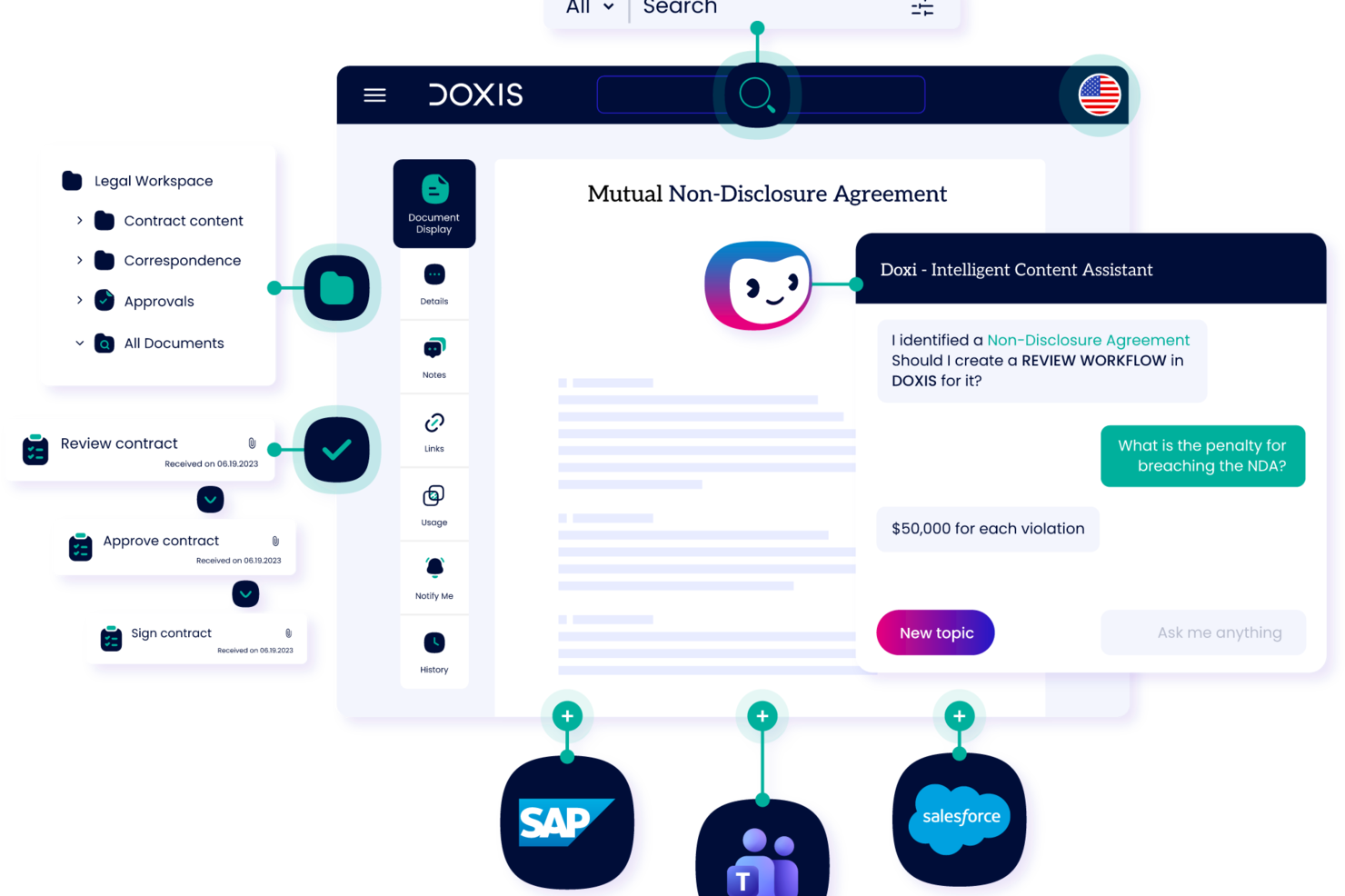
Doxis is an AI-powered enterprise content management platform that handles document capture, automated classification, metadata extraction, version control, workflow routing, and compliance-driven archiving for large organizations.
Who is Doxis Best For?
Doxis suits large enterprises in regulated industries that need centralized document control across multiple departments and systems.
Why I Picked Doxis
I picked Doxis as one of the best for multilingual document search because of how it handles cross-language retrieval at enterprise scale. The search filter lets you narrow results by language alongside document type, author, and processor, which is genuinely useful when your document library spans multiple regions and languages. On top of that, the content federation feature pulls in metadata from external sources automatically, so documents stored across different systems get surfaced in the right context, regardless of the language they're written in.
Doxis Key Features
- AI-powered document classification: Doxis AI.dp identifies and categorizes incoming documents by type, reducing manual sorting across large document volumes.
- Audit-proof archiving: Documents are stored with tamper-proof audit trails and configurable retention periods to support regulatory compliance requirements.
- Version management: Doxis tracks every document revision with a full version history, so you always know what changed, when, and by whom.
- No-code workflow configuration: Doxis Business Studio lets you build and modify document workflows and content apps without writing code.
Doxis Integrations
Doxis offers native integrations with SAP, Salesforce, and various Microsoft services, including Microsoft 365, Microsoft Teams, Microsoft Outlook, Microsoft SharePoint, and Microsoft Dynamics 365. It uses vendor-specific connectors like Doxis SmartBridge for Salesforce and certified SAP interfaces to provide deep, bidirectional integration within those environments. A REST API is also available for custom integrations. Zapier support is not documented.
Pros and Cons
Pros:
- Processes documents in multiple languages natively
- Tamper-proof archiving with retention controls
- AI classifies and routes documents automatically
Cons:
- Cloud hosting outages reported by users
- Geared toward large enterprise deployments

Juro
Best for contract management

Juro is a contract management platform tailored for legal teams and businesses looking to streamline their contract workflows. Its main users are legal professionals and operations teams who need to create, manage, and store contracts efficiently.
Why I picked Juro: It offers an intuitive interface that simplifies contract creation and management for legal teams. The platform includes features like automated contract templates and real-time collaboration, which facilitate smoother contract workflows.
Juro's in-browser editing allows your team to make quick changes without leaving the platform. Its focus on contract management makes it a go-to solution for legal departments looking to optimize their processes.
Standout features & integrations:
Features include automated contract templates that save time in document creation, in-browser editing for quick updates, and real-time collaboration to enhance teamwork on contract management.
Integrations include Salesforce, Slack, Google Drive, Microsoft 365, HubSpot, Box, Dropbox, Docusign, Zapier, and Greenhouse.
Pros and Cons
Pros:
- Real-time collaboration
- Automated contract templates
- Intuitive contract management
Cons:
- Occasional performance lags
- Limited customization options

Best for secure document storage

Laserfiche is a document management and automation platform designed for organizations that require secure storage and management of large volumes of documents. Its main users include government agencies, educational institutions, and financial services firms looking for secure and efficient document handling.
Why I picked Laserfiche: Laserfiche offers advanced security features, including encryption and access controls, which are essential for secure document storage. It also offers document automation workflows that enhance productivity by reducing manual processes.
With its comprehensive audit trail capabilities, your team can track document access and modifications. Laserfiche's focus on security makes it a reliable choice for organizations with strict data protection needs.
Standout features & integrations:
Features include a built-in audit trail system to track document changes, workflow automation to streamline repetitive tasks, and advanced search options to quickly locate documents.
Integrations include Microsoft 365, Salesforce, Docusign, SAP, SharePoint, QuickBooks, Dropbox, Google Workspace, Adobe Sign, and Box.
Pros and Cons
Pros:
- Efficient document retrieval
- Strong support for compliance
- Flexible workflow automation
Cons:
- Occasional performance issues
- Complex setup process

DocuWare
Best for small to medium businesses

DocuWare is a document management and workflow automation tool designed for small to medium-sized businesses that need efficient document handling. Its main users include administrative teams and departments that require organized document storage and retrieval.
Why I picked DocuWare: DocuWare offers streamlined document workflows that help small businesses manage their documents effectively. The platform features include electronic signatures and cloud storage, facilitating secure document management.
With its user-friendly interface, your team can quickly adapt to the system. DocuWare's focus on small to medium businesses makes it a practical choice for teams with limited resources.
Standout features & integrations:
Features include electronic signatures to streamline document approvals, cloud storage for secure and accessible document management, and workflow automation to reduce manual tasks.
Integrations include Microsoft 365, Salesforce, SAP, QuickBooks, Sage, Google Workspace, Oracle, Outlook, Dropbox, and Box.
Pros and Cons
Pros:
- Effective workflow automation
- Strong cloud storage options
- Electronic signature capabilities
Cons:
- Occasional performance lags
- Requires training for new users

M-Files
Best for compliance with data regulations

M-Files is a Document Management System (DMS) designed for businesses needing to manage compliance and secure document handling. It's particularly suited for industries like accounting, engineering, and scientific research.
Why I picked M-Files: M-Files offers AI-driven document automation and metadata-driven architecture, allowing efficient document retrieval and management. It excels in compliance with data regulations by providing robust security features and audit trails.
The platform also integrates with major platforms like Microsoft 365 and Google Workspace, ensuring your team can work within familiar environments. Its focus on compliance makes it a reliable choice for industries with strict regulatory requirements.
Standout features & integrations:
Features include automated workflows that streamline document approval processes, metadata-driven organization for easy document retrieval, and advanced security measures to protect sensitive information.
Integrations include Microsoft 365, Google Workspace, Salesforce, SAP, SharePoint, Docusign, Adobe Sign, QuickBooks, HubSpot, and Slack.
Pros and Cons
Pros:
- Metadata-driven organization
- Strong compliance support
- AI-driven document management
Cons:
- Customization can be challenging
- Requires ongoing maintenance

iManage
Best for legal industry professionals

iManage is a document and email management system designed for legal professionals who seek efficient management of documents and communications. Its main users include law firms and corporate legal departments that need secure and organized document handling.
Why I picked iManage: iManage offers specialized features for legal professionals, including document version control and email management. It offers advanced security measures, ensuring your sensitive legal documents are protected.
With its intuitive search capabilities, your team can quickly locate critical documents and emails. iManage's focus on the legal industry makes it an ideal choice for firms needing tailored document management solutions.
Standout features & integrations:
Features include document versioning to track changes, email management for organizing communications, and advanced search options to quickly locate necessary documents and emails.
Integrations include Microsoft Office, Microsoft 365, Salesforce, Adobe Acrobat, Docusign, NetDocuments, Workshare, Microsoft Teams, Outlook, and SharePoint.
Pros and Cons
Pros:
- Intuitive search capabilities
- Secure email management
- Tailored for legal professionals
Cons:
- Frequent updates needed
- Steep learning curve

Best for team collaboration

Zoho WorkDrive is a cloud-based document management system designed for businesses that need efficient document collaboration. Its primary users include small to medium-sized teams looking for a shared workspace to manage their documents.
Why I picked Zoho WorkDrive: Zoho WorkDrive offers real-time collaboration features that enhance teamwork by allowing multiple users to work on documents simultaneously. It provides a shared workspace where your team can organize, store, and access documents securely.
The tool’s advanced search functionalities make it easy to find documents quickly. With its focus on collaboration, Zoho WorkDrive is ideal for teams that need to work together efficiently and effectively.
Standout features & integrations:
Features include team folders that allow you to organize documents and control access, real-time notifications to keep your team updated, and version history to track changes and restore previous versions.
Integrations include Zoho CRM, Zoho Projects, Slack, Microsoft Teams, Zapier, Microsoft 365, Google Workspace, Trello, Dropbox, and Asana.
Pros and Cons
Pros:
- Version history tracking
- Real-time editing
- Easy document sharing
Cons:
- Basic reporting tools
- Occasional sync issues

Best for scalability in enterprises

AmpleLogic EDMS is an electronic document management system designed for large enterprises that require scalable solutions for managing extensive document workflows. It caters to industries like pharmaceuticals, manufacturing, and healthcare, providing a centralized platform for document storage and compliance management.
Why I picked AmpleLogic EDMS: AmpleLogic EDMS offers extensive scalability features that support the growing needs of large enterprises. It includes workflow automation to streamline document processes and ensure compliance with industry standards.
The software’s customizable dashboards allow your team to tailor the interface according to specific business needs. With its scalable architecture, AmpleLogic EDMS easily adapts to your expanding document management requirements.
Standout features & integrations:
Features include customizable dashboards that let you tailor the user interface, workflow automation to improve document processes, and compliance management tools to meet industry standards.
Integrations include Microsoft Office, SharePoint, SAP, Oracle, Salesforce, Google Drive, Dropbox, Box, IBM FileNet, and Docusign.
Pros and Cons
Pros:
- Efficient workflow automation
- Customizable user interface
- Highly scalable architecture
Cons:
- Customization requires IT support
- Limited mobile access

NinjaOne
Best for IT documentation
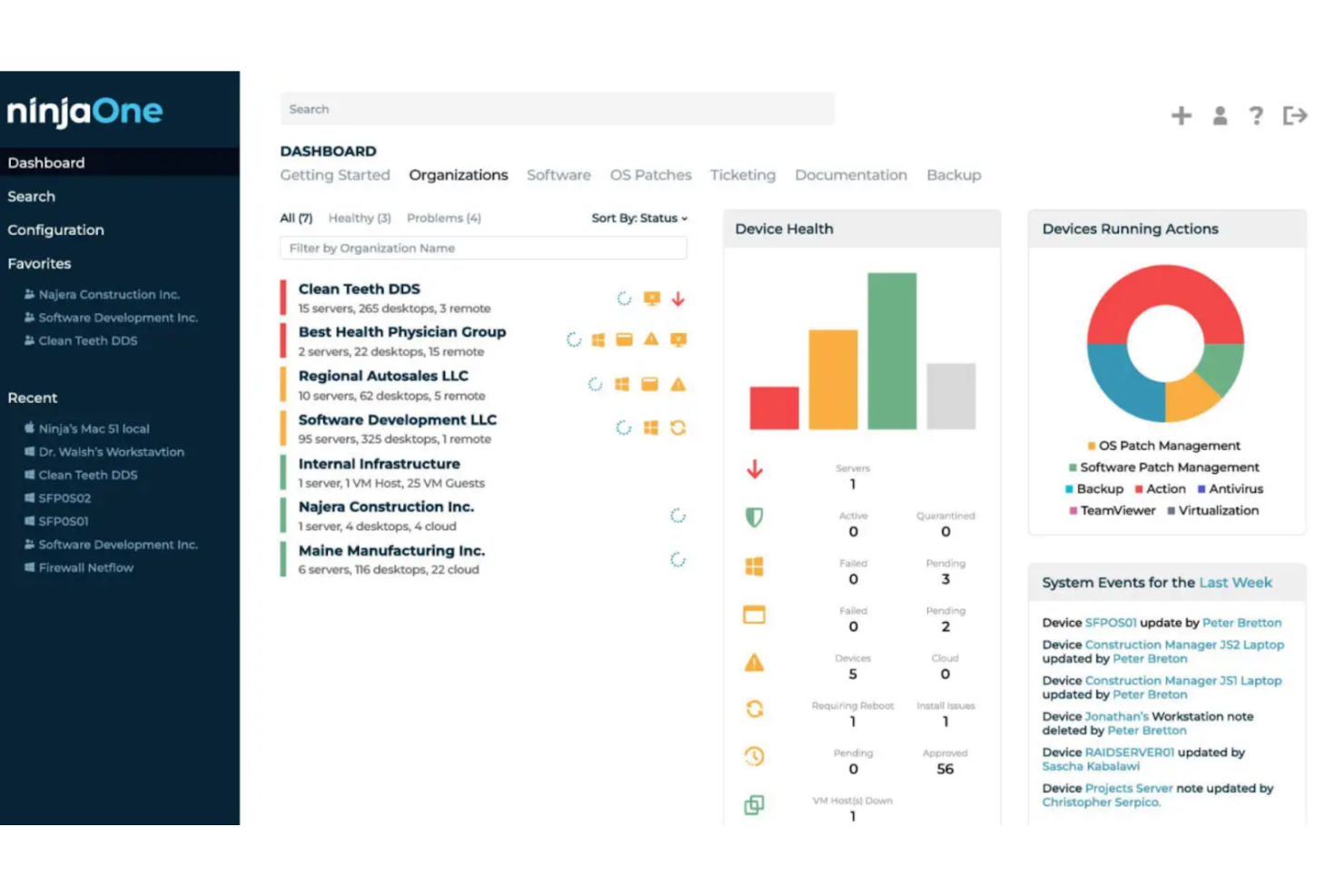
NinjaOne is an IT documentation and management platform designed for IT teams that need efficient management of their documentation and assets. Its main users include IT professionals and managed service providers who require organized documentation and streamlined IT operations.
Why I picked NinjaOne: NinjaOne offers specialized features for IT documentation, including automated asset tracking and ticketing. It includes centralized documentation storage, ensuring your team can access critical information quickly.
With its intuitive interface, your team can manage IT documentation without hassle. NinjaOne's focus on IT needs makes it a practical solution for IT departments seeking to increase efficiency.
Standout features & integrations:
Features include automated asset tracking that keeps your inventory up-to-date, centralized documentation storage for easy access, and ticketing systems to manage IT requests efficiently.
Integrations include Microsoft 365, Google Workspace, Slack, Salesforce, Zendesk, QuickBooks, Dropbox, Box, Docusign, and Adobe Sign.
Pros and Cons
Pros:
- Intuitive user interface
- Efficient ticketing system
- Automated asset tracking
Cons:
- Limited mobile access
- Learning curve for advanced features

MasterControl is a quality and document management software designed for life sciences companies needing to comply with strict regulatory standards. Its primary users include pharmaceutical, biotech, and medical device companies that require efficient document control and quality management.
Why I picked MasterControl: MasterControl provides features that help life sciences companies meet compliance requirements like FDA regulations. It includes document version control and audit trails, ensuring your team can maintain compliance.
The platform offers training management capabilities to keep your staff updated on compliance protocols. MasterControl's focus on life sciences compliance helps it stand out as a solid option for companies in regulated industries.
Standout features & integrations:
Features include document control that tracks changes and maintains compliance, audit trails that provide a clear record of document history, and training management to ensure your team is up-to-date with industry standards.
Integrations include SAP, Oracle, Salesforce, Microsoft Dynamics, Docusign, Adobe Sign, QuickBooks, SharePoint, Box, and Dropbox.
Pros and Cons
Pros:
- Requires extensive training
- Includes training management
- Strong compliance focus
Cons:
- Performance issues with large datasets
- Tailored for regulated industries
Diğer Yapay Zekâ Belge Kontrol Yazılımları
Kısa listeme giremeyen ancak yine de göz atmaya değer bazı ek yapay zekâ belge kontrol yazılımı seçenekleri şunlardır:
- eShare.ai
For AI-driven document insights
- Document360
For knowledge base creation
- Bynder
For digital asset management
- Box
For secure file storage
- Dropbox
For easy file sharing
- ComplianceQuest
For quality management compliance
- Google Workspace
For team collaboration tools
- OneDrive
For integration with Windows


How I Evaluate AI Document Control Software
Every tool on this list needs to deliver AI that actually saves time—whether that's auto-classifying submittals or surfacing the right revision in seconds, not just slapping a chatbot on a file browser. I split my evaluation into two layers: core functionality a tool must have to qualify, and differentiating factors that separate the best fit from the rest.
Core Functionality (Table Stakes For This List)
When I'm selecting tools for my list, I rank each one on a scale from 0 (does not offer the functionality) to 5 (excels in this area) for each core functionality listed below. Then, I calculate the tool's total score into a percentage. Each tool needs to achieve a minimum total score of 65% to be considered for inclusion.
- AI-Powered Document Classification: I evaluate how well the AI auto-tags and categorizes uploads—like sorting RFIs from submittals or matching drawings to project phases without manual input.
- Version Control & Audit Trail: Every revision, rollback, and stakeholder action should be logged in a traceable history that holds up during audits or dispute resolution.
- Intelligent Search & Retrieval: I check whether the search goes beyond keywords, letting users find a buried spec sheet by describing its content in plain language or scanning OCR'd files.
- Automated Approval Workflows: The tool should route documents to the right reviewers based on project stage and role, so a design package reaches the lead engineer before the client.
- Access Control & Permissions: I look at how granular the permissions model is—whether you can restrict a subcontractor to one drawing set while giving internal PMs full portfolio visibility.
- Compliance & Retention Management: Tools should enforce retention schedules, capture e-signatures, and generate export-ready compliance reports aligned with standards like ISO or SOC 2.
Once I have a list of tools that meet the criteria, I consider what sets each platform apart.
Differentiating Factors (What Sets Vendors Apart)
Here's how I compare and contrast different vendors:
Standout Features
A generative AI assistant adds real value when it can summarize a 200-page spec or answer questions about contract clauses without opening the file. I also look for predictive risk flagging—tools that alert you to missing submittals or stalled approvals before they delay a milestone. For AEC-heavy teams, drawing and BIM integration with AI-driven sheet comparison can save hours of manual redline review across revision sets.
Beyond Features
Integrations matter a lot here. I evaluate whether a tool connects natively with the PM platforms your team already uses—Procore, Primavera, Jira, or SharePoint—so documents stay linked to the right tasks and milestones. Security and compliance posture is another key factor, especially for teams handling regulated deliverables; I check for SOC 2, ISO 27001, and data residency options. I also consider how well a vendor supports implementation, since migrating thousands of legacy files demands hands-on guidance.
Yapay Zekâ Belge Kontrol Yazılımı Nasıl Seçilir?
Uzun özellik listeleri ve karmaşık fiyatlandırma yapıları arasında kaybolmak kolaydır. Kendinize özgü yazılım seçimi sürecinizi yürütürken odağınızı korumanıza yardımcı olmak için göz önünde bulundurmanız gereken faktörleri aşağıda bir kontrol listesi hâlinde bulabilirsiniz:
| Faktör | Dikkat Edilmesi Gerekenler |
|---|---|
| Ölçeklenebilirlik | Yazılım ekibinizle birlikte büyüyebilir mi? Desteklediği kullanıcı sayısını ve daha fazla kullanıcı eklemenin ne kadar kolay olduğunu göz önünde bulundurun. Genişlemeyi sınırlayan araçlardan kaçının. |
| Entegrasyonlar | Zaten kullandığınız araçlara bağlanabiliyor mu? CRM, ERP veya iş birliği platformları gibi mevcut sistemlerinizle uyumluluğunu kontrol edin. |
| Özelleştirilebilirlik | Yazılımı iş akışlarınıza uyacak şekilde uyarlayabilir misiniz? Gösterge tablolarını, alanları ve izinleri süreçlerinize uygun hâle getirebileceğiniz seçenekleri arayın. |
| Kullanım kolaylığı | Ekibiniz yazılımı kullanmaya ne kadar hızlı başlayabilir? Çok az eğitim gerektiren sezgisel arayüzleri tercih edin. Gereğinden fazla karmaşık araçlardan kaçının. |
| Uygulama ve işe alıştırma | Kurulum ne kadar sürecek? Sağlayıcının sorunsuz bir başlangıç yapmanız için destek, eğitim ve kaynaklar sunduğundan emin olun. |
| Maliyet | Bütçeniz dâhilinde mi? Fiyatlandırma planlarını, gizli ücretleri ve ödediğiniz ücretin karşılığını karşılaştırın. Yalnızca başlangıç ücretlerini değil, uzun vadeli maliyetleri de göz önünde bulundurun. |
| Güvenlik önlemleri | Verilerinizi nasıl koruyor? Şifreleme, erişim denetimleri ve veri koruma düzenlemelerine uygunluk gibi özellikleri arayın. |
| Uyumluluk gereksinimleri | Sektör standartlarını karşılıyor mu? Yazılımın GDPR veya HIPAA gibi alanınıza özgü düzenleyici gereksinimlerle uyumlu olduğunu doğrulayın. |
Yapay Zekâ Belge Kontrol Yazılımı Nedir?
Yapay zekâ belge kontrol yazılımı, yapay zekâ kullanarak belgeleri yönetmeye, depolamaya ve izlemeye yardımcı olan bir araçtır. Proje yöneticileri, hukuk ekipleri ve BT departmanları gibi profesyoneller bu araçları belgeleri verimli bir şekilde düzenlemek ve mevzuata uygunluğu sağlamak için kullanır. Otomatik iş akışları, akıllı arama ve erişim kontrolleri; düzenleme, erişim ve güvenlik konularında yardımcı olur. Bu araçlar, belge yönetimi süreçlerini iyileştirerek zamandan tasarruf sağlar ve hataları azaltır.
Yapay Zekâ Belge Kontrol Yazılımının Özellikleri
Yapay zekâ belge kontrol yazılımı seçerken aşağıdaki temel özelliklere dikkat edin:
- Belge depolama: Belgelerin kolayca erişilmesi ve yönetilmesi için güvenli ve düzenli depolama olanağı sunar.
- Sürüm kontrolü: Hataları ve karışıklığı önlemek için belge değişikliklerini izler ve düzenleme geçmişini korur.
- Erişim kontrolleri: Belgeleri kimlerin görüntüleyebileceğini veya düzenleyebileceğini kontrol etmek için izin ayarları sunarak güvenliği artırır.
- Otomatik iş akışları: Tekrarlanan görevleri otomatikleştirerek süreçleri kolaylaştırır, zamandan tasarruf sağlar ve manuel hataları azaltır.
- Akıllı arama: Anahtar kelimeleri veya meta verileri kullanarak belgeleri hızlıca bulmak için yapay zekâdan yararlanır ve verimliliği artırır.
- Denetim izleri: Mevzuata uygunluk ve hesap verebilirlik için belge erişimlerinin ve değişikliklerinin ayrıntılı kaydını tutar.
- Mevzuata uygunluk yönetimi: Belgelerin GDPR veya HIPAA gibi sektörel düzenlemeleri karşılamasını sağlayarak yasal riskleri azaltır.
- İş birliği araçları: Birden fazla kullanıcının belgeler üzerinde aynı anda çalışmasına olanak tanıyarak ekip verimliliğini artırır.
- Özelleştirilebilir panolar: Daha sezgisel ve verimli bir iş akışı için kullanıcıların arayüzlerini kişiselleştirmesine olanak tanır.
- Eğitim yönetimi: Ekiplerin mevzuata uygunluk ve en iyi uygulamalar konusundaki bilgilerini güncel tutacak kaynaklar sunar.
Yapay Zekâ Belge Kontrol Yazılımının Faydaları
Yapay zekâ belge kontrol yazılımının uygulanması, ekibiniz ve işletmeniz için çeşitli faydalar sağlar. Yararlanabileceğiniz avantajlardan bazıları şunlardır:
- Gelişmiş verimlilik: Otomatik iş akışları ve akıllı arama özellikleri belge işlemlerini hızlandırır, manuel görevleri azaltır ve verimli iş süreçleri oluşturur.
- Artırılmış güvenlik: Erişim kontrolleri ve denetim izleri hassas bilgileri korur ve düzenlemelere uygunluğu sağlar.
- Daha iyi iş birliği: Gerçek zamanlı düzenleme ve paylaşılan erişim ekip çalışmasını destekleyerek birden fazla kullanıcının sorunsuz bir şekilde birlikte çalışmasına olanak tanır.
- Hataların azaltılması: Sürüm kontrolü, belge değişikliklerini izleyip doğruluğu koruyarak hataları önler.
- Maliyet tasarrufu: Otomatikleştirilmiş süreçler ve azalan manuel hatalar, operasyonel maliyetlerin düşmesini sağlayabilir.
- Mevzuata uygunluğun güvence altına alınması: Mevzuata uygunluk yönetimi araçları, sektörel standartların karşılanmasına yardımcı olarak yasal sorun riskini azaltır.
- Artan üretkenlik: Belgelerin kolayca bulunması ve yönetilmesi, daha önemli görevler için zaman kazandırarak genel üretkenliği artırır.
Yapay Zekâ Belge Kontrol Yazılımının Maliyetleri ve Fiyatlandırması
Yapay zekâ belge kontrol yazılımı seçmek, mevcut çeşitli fiyatlandırma modellerinin ve planların anlaşılmasını gerektirir. Maliyetler özelliklere, ekip büyüklüğüne, eklentilere ve daha birçok unsura göre değişir. Örneğin, tek seferlik kurulum ve uygulama ücretleri hızla artabilir ($7,000 ile $35,000 arasında); bu nedenle olası ek ücretler hakkında sağlayıcılara soru sorduğunuzdan emin olun. Aşağıdaki tabloda, yapay zekâ belge kontrol yazılımı çözümlerinde yaygın olarak sunulan planlar, bunların ortalama fiyatları ve tipik özellikleri özetlenmektedir:
Yapay Zekâ Belge Kontrol Yazılımı İçin Plan Karşılaştırma Tablosu
| Plan Türü | Ortalama Fiyat | Yaygın Özellikler |
|---|---|---|
| Ücretsiz Plan | $0 | Temel depolama, sınırlı sayıda kullanıcı ve temel iş birliği araçları. |
| Kişisel Plan | $5-$60/kullanıcı/ay | Geliştirilmiş depolama, tek kullanıcı erişimi ve temel güvenlik özellikleri. |
| İşletme Planı | $30-$80/kullanıcı/ay | Gelişmiş iş birliği, sürüm kontrolü ve mevzuata uygunluk araçları. |
| Kurumsal Plan | $60-$250/kullanıcı/ay | Özel entegrasyonlar, gelişmiş güvenlik ve özel destek. |
AI Belge Kontrol Yazılımı SSS
AI belge kontrol yazılımı hakkında sık sorulan bazı soruların yanıtları:
AI belge yönetiminde nasıl kullanılır?
Belge yönetiminde AI, belgelerin içindeki metni analiz eder. Veri çıkarma yoluyla çeşitli alanlar arasındaki ilişkileri yakalar ve kategorilere ayırarak yapılandırılmış veriler oluşturur. Bu süreç, veri girişini otomatikleştirip manuel görevleri azaltarak ekibiniz için daha verimli içerik yönetimi sağlar.
AI belge yazılımı ne tür belgeleri işleyebilir?
Çoğu belge kontrol yazılımı, elektronik tablolar gibi yapılandırılmış verilerin yanı sıra e-postalar ve sözleşmeler de dahil olmak üzere yapılandırılmamış verileri ve formlar ile faturalar gibi yarı yapılandırılmış belgeleri işleyebilir. Bu çok yönlülük, ekibinizin çok çeşitli belirli belgeleri yönetmesine olanak tanıyarak genel verimliliği artırır.
Belge kontrol yazılımı ne kadar doğrudur?
AI ile belge okuma, belgenin türüne ve verilerin kalitesine bağlı olarak genellikle %90–99 oranında doğrudur. Faturalar gibi yapılandırılmış belgelerde insanlara yakın doğruluk elde edilirken yapılandırılmamış veya el yazısıyla yazılmış metinler daha az güvenilir olabilir. AI çözümlerini değerlendirirken bu faktörleri göz önünde bulundurmak önemlidir.
AI belge güvenliğini nasıl artırır?
AI, gelişmiş erişim kontrolleri ve izleme özellikleri sağlayarak belge güvenliğini artırır. Olağan dışı kalıpları algılayabilir ve ekibinizi olası güvenlik ihlalleri konusunda uyarabilir. Elbette, yazılım sağlayıcılarına araçlarının sektörel ve düzenleyici uyumluluk gerekliliklerini karşılayıp karşılamadığını sorduğunuzdan emin olun. Genel olarak AI araçları, hassas bilgilerin korunmasına ve veri koruma düzenlemelerine uyulmasına yardımcı olabilir.
AI belge kontrol yazılımı mevcut sistemlerle entegre olabilir mi?
Evet, AI destekli birçok belge yönetimi çözümü CRM, ERP ve iş birliği platformları gibi mevcut sistemlerle entegre olabilir. Bu entegrasyon, ekibinizin kesintisiz bir iş akışını sürdürmesine yardımcı olur ve değerli verilerin araçlar arasında paylaşılmasını sağlayarak genel verimliliği artırır.