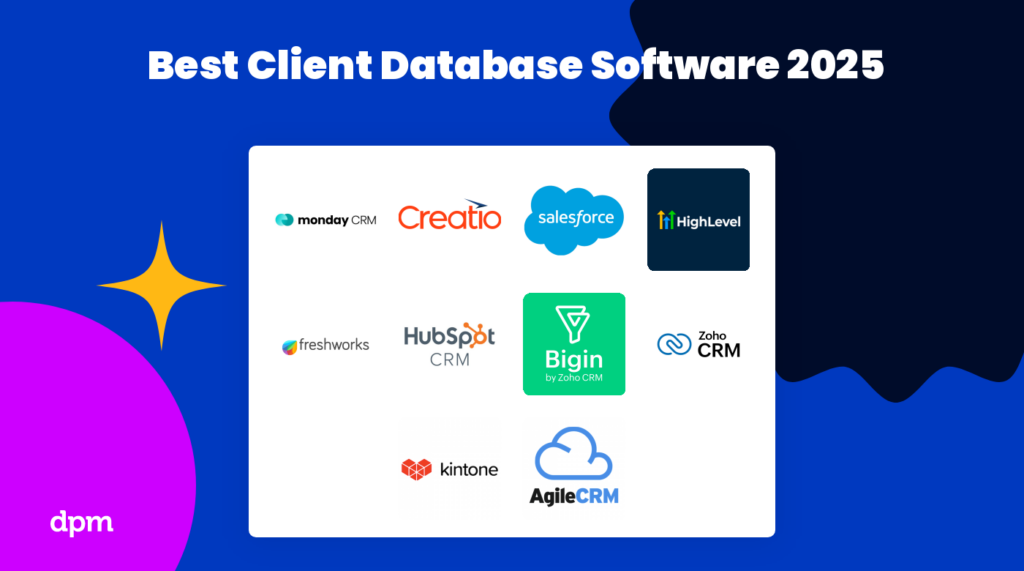
2026 İçin En İyi 10 Müşteri Veritabanı & Müşteri Veritabanı Yazılımı

10 En İyi Müşteri Veritabanı Yazılımları Kısa Listesi


Müşterilerinizle ilgili bilgileri toplamak, depolamak ve yönetmek istiyor ve bu iş için doğru araca ihtiyaç duyuyorsunuz. Ancak mevcut müşteri veritabanı yazılımlarının geniş seçenek yelpazesi, en iyisini kısa listeye almayı zorlaştırabilir. Sizi düşündüm!
Bu yazıda, çeşitli müşterileri yönetme ve birçok farklı müşteri veritabanı platformunu kullanma konusundaki kişisel deneyimimi kullanarak piyasadaki en iyi müşteri veritabanı araçları için seçtiklerimin bir listesini oluşturdum.
Why Trust Our Software Recommendations
Our team has been testing and reviewing software since 2012. As project managers ourselves, we know how difficult—and important—it is to choose the right software.
For this guide, we evaluated tools using hands-on testing and independent research, scoring tools using our selection criteria. We also draw on insights from industry thought leaders and practicing project management experts.
Our reviews reflect our human editorial judgment, not a sales pitch.
Expert reviewers:
Karşılaştırma Tablosu: Müşteri Veritabanı & Müşteri Veritabanı Yazılımları
Temel bilgileri içeren bir özet tablo: ücretsiz deneme, demolar ve fiyatlandırmayı kolayca karşılaştırın.
| Tool | Starting Price | Website | |
|---|---|---|---|
| Best for sales pipeline visibility | 4.6 out of 5 | $12/user/month 14-day free trial + free demo available | Book Demo |
| Cloud-based CRM software that helps businesses manage their sales, marketing, & customer service | 4.2 out of 5 | $25/user/month 30-day free trial | Website |
| Best client and customer database software for AI capabilities | 4.2 out of 5 | $14/user/month Free plan + 15-day free trial+ free demo available | Website |
| Best client and customer database for small business | 4.3 out of 5 | $7/user/month Free plan available | Website |
| Client database and CRM that lets your team use AI-based lead scoring, phone, email, activity capture, and more | 4.6 out of 5 | $9/user/month 21-day free trial | Website |
| Build custom client databases with a drag-and-drop app builder & workflow automations | 4.6 out of 5 | $24/user/month 30-day free trial + free demo available | Website |
| Track and close deals by capturing information from several sources including spreadsheets, LinkedIn, or even a business card | 4.7 out of 5 | Pricing upon request 15-day free trial available | Website |
| Best for maximizing conversions, boosting customer retention, and making better data-driven decisions | 4.5 out of 5 | $14/user/month 14-day free trial | Website |
| Sales and project management software with automation, data, and analytics, built right into Gmail | 4.5 out of 5 | $59/user/month Free plan + 14-day free trial available | Website |
| A cloud-based SaaS service with sales enablement, marketing automation, customer service, and more | 4.3 out of 5 | Pricing upon request Free plan available | Website |
En İyi Müşteri Veritabanı Yazılımı İncelemeleri
İşte bu ilk 10 listesinde yer alan veritabanı yazılım programlarının her birinin kısa açıklaması.
Best for sales pipeline visibility

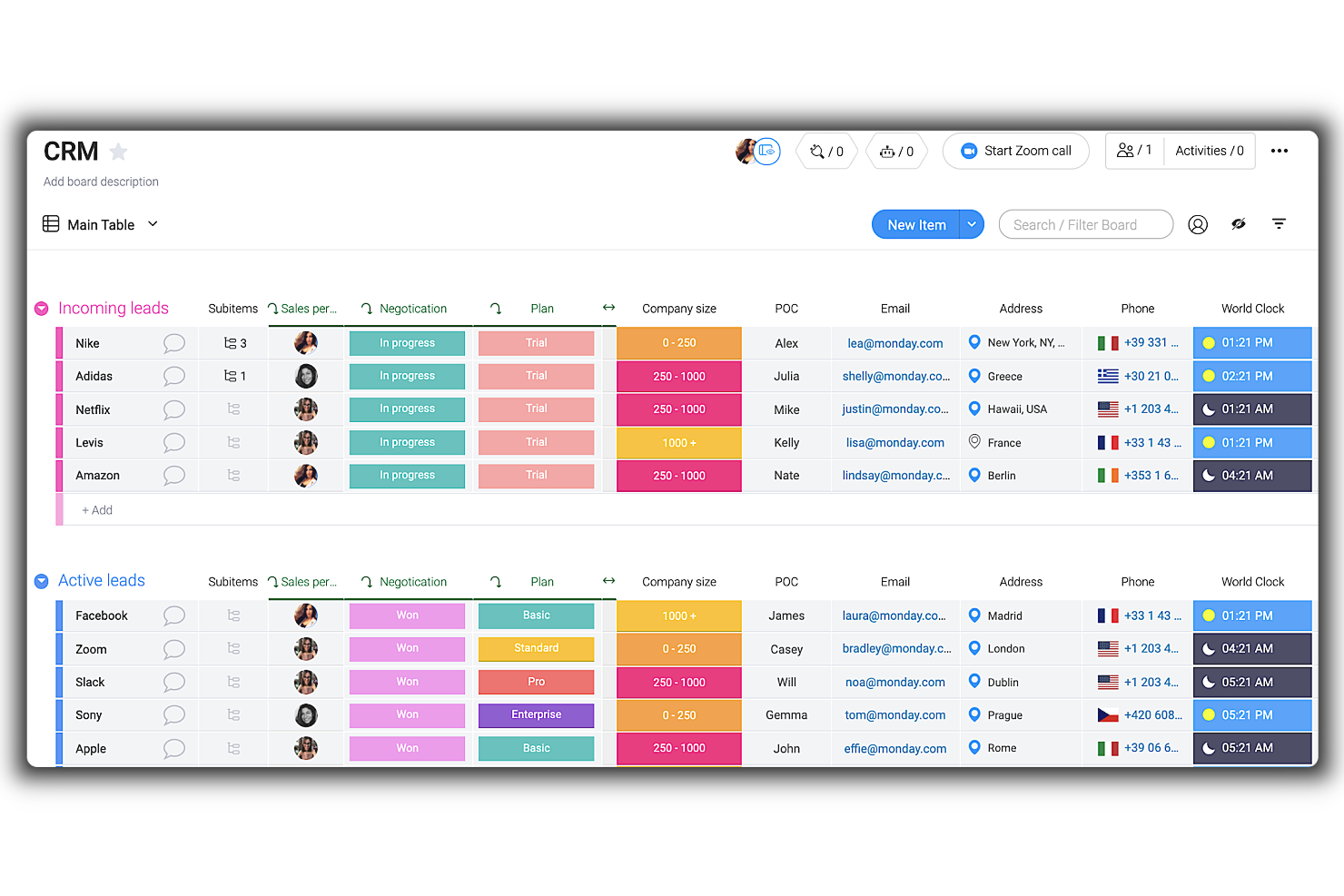
Monday sales CRM is a customizable tool designed to provide businesses with clear visibility into their sales pipeline. It centralizes client communication, automates sales processes, and offers a comprehensive overview of deals, which supports its unique selling proposition as the best tool for sales pipeline visibility.
This tool's highly customizable nature and automation capabilities are crucial for tailoring the system to specific business needs and streamlining client interactions. One thing that impressed me is the ease with which users can adapt the CRM to their workflows without requiring development resources, coupled with centralized communication channels for all client interactions.
Like many other tools, it's incorporating AI into its platform. Therefore, monday.com employs AI to assist in composing emails, drawing from past interactions and successful templates to improve communication. The CRM also offers mass email capabilities, activity management to record all customer interactions, and performance tracking through key metrics and KPIs.
Customizable dashboards, sales forecasting, goal setting, structured data organization, lead capturing, no-code automations, and visual sales pipeline management are additional features that support sales teams in managing their customer relationships and sales activities.
monday sales CRM provides integrations with a range of software tools to centralize data and automate work processes. Key integrations include communication and collaboration tools, such as Outlook, Slack, Google Drive, and Trello. Additionally, for tools not listed, users can utilize the open API to connect their preferred software to the CRM platform.
New Product Updates from monday CRM

monday CRM Adds Meta Conversions API Integration
monday CRM now lets you connect Meta Conversions API and sync lead status back to Meta, improving targeting and conversions via a new Meta integration automation recipe. For more information, visit monday CRM's official site.
 .

Cloud-based CRM software that helps businesses manage their sales, marketing, & customer service
Salesforce CRM is a cloud-based CRM system that helps businesses of all sizes improve their customer service, sales processes, and marketing campaigns. It allows users to store all their customer data in one secure location and access it from anywhere with an internet connection. This allows them to easily track customers, analyze data, create reports, manage accounts, monitor leads, and more. It includes features such as lead management, contact management, account management, report generation, and analytics. Other features include mobile access so users can access the system from any device, email integration so users can send emails directly from the system, and activity tracking which keeps track of activities such as calls and emails sent.
Salesforce enables businesses to effectively manage large amounts of data, including customer contact information and sales records. Data can be organized into custom fields, allowing users to quickly search for specific items or view summaries of data across multiple fields. Additionally, it provides powerful analytics tools that allow users to identify key trends in their data. Salesforce's segmentation feature allows businesses to group customers based on different criteria such as location, purchase history, and demographics. This makes it easier for businesses to target specific groups with tailored marketing campaigns and special offers.
Salesforce offers advanced segmentation features such as dynamic segmentation which automatically updates segments based on new customer information. As the business grows, users can add additional features or services without having to purchase additional software or hardware. Additionally, because it is cloud-based it requires no setup or maintenance costs which makes it an attractive option for businesses with limited budgets or resources. It features powerful security measures such as encryption and two-factor authentication which ensures that all customer data always remains safe and secure.
Features include sales management, marketing automation, customer service and support, collaboration, customization, mobile access, integration, analytics & reporting, and built-in data security.
Integrations include Google Workspace, Slack, Quickbooks, MailChimp, LinkedIn, Docusign, JIRA, HelloSign, Code Science, Active Campaign, and Dropbox.
New Product Updates from Salesforce CRM

Salesforce CRM Simplifies Email Sends From Contact and Lead Lists
Salesforce CRM simplifies list-based email sends by removing the need to create a Data 360 segment first. This helps teams send Contact and Lead emails faster with fewer setup steps. For more information, visit Salesforce CRM’s official site.
 .
Zoho CRM
Best client and customer database software for AI capabilities
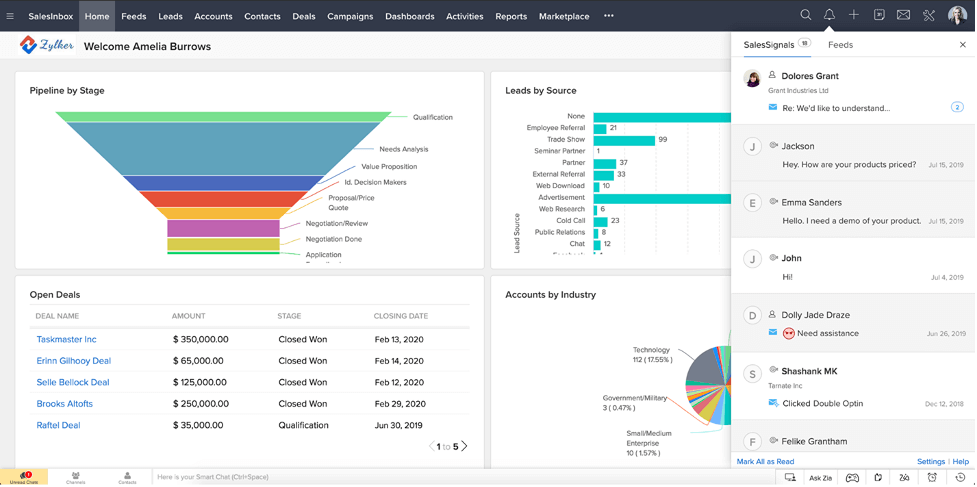
Zoho CRM is a cloud-based, easy-to-use client database management software with a simple UI and highly customizable workflows for generating, qualifying, and nurturing leads into deals and lifelong customers.
Users can track purchase history, product preference, and personal information on a timeline of activities dating back to the first interaction and lead source. The tool includes advanced filters and fields for deal stage, campaign source, email status, notes added, and even profitability percentage.
Choose from pre-built reports or dashboard templates, or create your own to visualize customer behaviour and metrics in the form of charts, KPIs, and funnels. Team members can export reports as Excel, CSV, or PDF files, embed dashboards on a website and/or make it accessible on a Slack channel.
Mobile-enabled features allow you to log prospect details on-the-go, pull up price lists and agreements, and post significant updates on your team forum or chat. Another great feature is the AI-powered sales assistant that can auto-fill empty fields in your CRM.
Zoho CRM has over 40 native integrations and 500+ third-party integrations that include Google (G Suite), Microsoft Office 365, MailChimp, RingCentral, Quickbooks, Zapier, Xero, and other popular apps.
Zoho CRM starts at $14/month with a 15-day free trial, and also offers a free version for up to 3 users.
New Product Updates from Zoho CRM

Zoho CRM Adds Workflow Automation for Subform Actions
Zoho CRM now lets you automate subform events with workflow rules, triggering actions when rows are added, edited, or deleted based on conditions. For more information, visit Zoho CRM's official site.
 .
Best client and customer database for small business
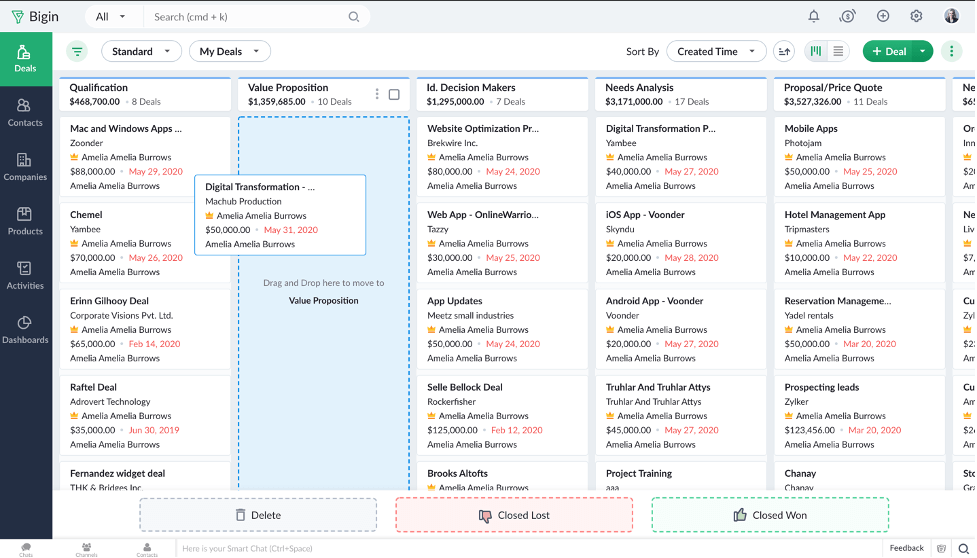
Bigin by Zoho CRM provides a client and customer database as one of its core features. The platform is a lean customer relationship management (CRM) software that caters to the needs of small businesses. It's user-friendly and intuitive, and helps you keep track of your client records, manage your client communications, and automate parts of your sales pipeline.
The software's central database keeps contact information for all your clients safely stored. You can populate the database by importing data from an existing spreadsheet, and collect new data by creating custom forms through the system. Custom fields can be configured to best reflect your company's operations and ensure you collect the right data for every client record. Should you ever need to, you can export data out of the system, too.
In addition to a client database, the software provides multi-channel communication tools to help you manage your phone, email, and social media communications with clients. You can set up workflow automations to move new prospects through your sales funnel, and track your deals through each stage with the pipeline builder. Custom reporting and an analytics dashboard are also available to help you track your performance metrics.
Paid plans start from $7/user/month, and a 14-day free trial is available.
New Product Updates from Bigin by Zoho CRM

Bigin iOS Adds Interactive WhatsApp Templates and Quick Replies
Bigin’s iOS app now supports interactive WhatsApp templates and Quick Replies, making it easier to preview and send instant messages to customers. For more information, visit Bigin by Zoho CRM's official site.
 .
Client database and CRM that lets your team use AI-based lead scoring, phone, email, activity capture, and more
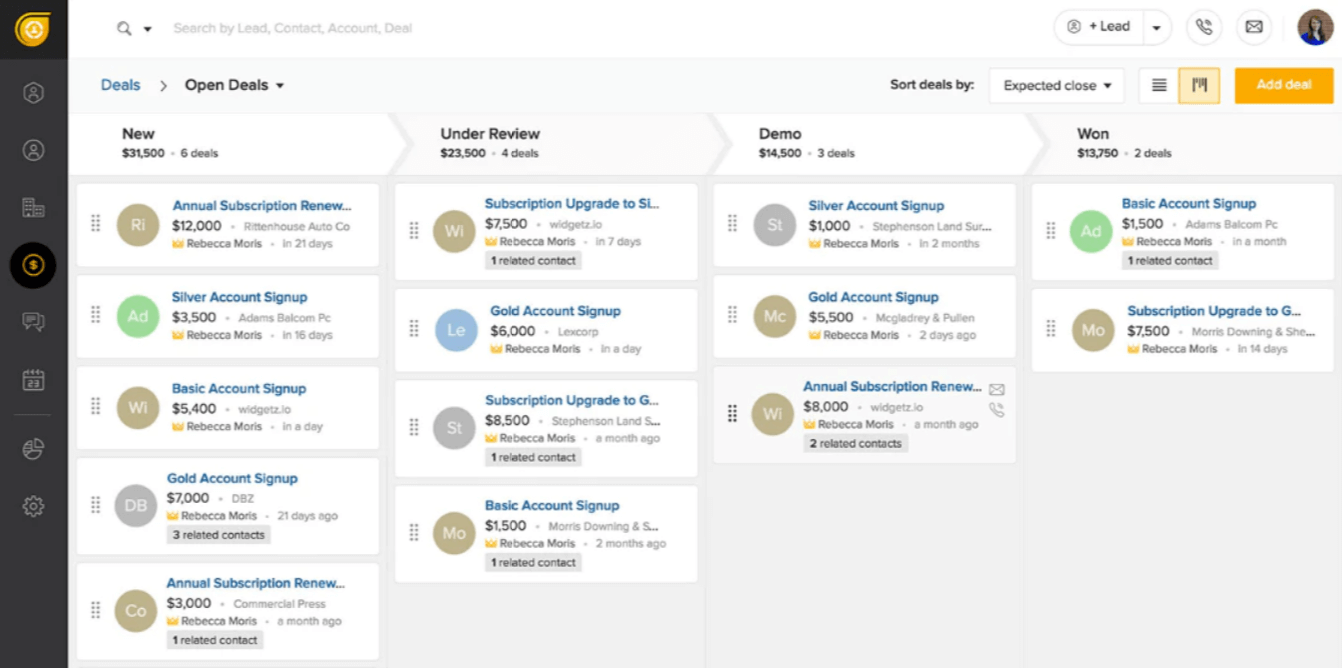
Boasting over 150,000 clients and users, Freshsales aims to simplify CRM solutions. To do so, they offer AI-based lead scoring; phone, email, activity capture; sales lead acquisition assistance; sales pipeline management; event tracking (website and app); and more.
Freshsales does email segmentation, sorting, and display-by-relevance very well. This tool categorized conversations in a way that makes them easy to retrieve and sort by customer and it also uses conversation records (text, call, chat, email) to their full potential.
Native integrations include Freshdesk, Freshchat, Freshconnect, Freshcaller, Google calendar, Mailchimp, Segment, Office 365 Calendar, Hubspot, Freshsales for Web, PieSync, Google Apps, Quickbooks, Google Contacts, Xero, and many more through Zapier. Other integrations include Calendly, Facebook, GetAccept, Clenty, Justcall, Toky, 24sessions, Integromat, Akito, Trello, Magento, and more.
Setting up and learning the software was quite time-consuming, losing them some minor points in the Usability section of the evaluation criteria. Migrating from another CRM platform, in particular, has many pain points.
Freshsales starts at $15/user/month and has a 21-day free trial.
Kintone
Build custom client databases with a drag-and-drop app builder & workflow automations

Kintone is a customizable client database tool used by teams at Volvo Trucks North America, Japan Airlines, Shiseido, and over 23,000 organizations worldwide. Their unique approach to client database tools lets you build a wide variety of customizable “apps” either from scratch, using templates or from your existing spreadsheets, for data management, business processes, and workflows. Kintone apps can be customized for project management, sales CRM, client databases and activity logs, expense reports, shared to-do lists, equipment management, product feedback, and much more.
Kintone lets you build client database apps by dragging and dropping elements that you want to see onto the page: rich text fields, date fields, drop-down menus, number fields with built-in calculations, spaces for attachments, user or group selection menus, related data from other apps, tables, and more.
Once you’ve built the app you want, you can use it to more easily manage whatever data and tasks you and your team need to track. And with custom notifications and reminders as well as detailed permissions settings, your client database solution can look and work however you want it to.
What makes Kintone particularly great for client databases is the customizability—users can tailor what information the CRM records and holds, update and change fields or entire workflows without relying on IT support, and create automated reminders to notify sales members of important deadlines.
Kintone’s built-in communication features also allow your team to discuss customers or tasks directly in the database and in topic or project-based threads. Dedicated “spaces” organize all of the information your team needs about your customers in one place, including your customer database, customer inquiries and interactions, and more.
Kintone lets you expand its capabilities with both free native plugins built by the Kintone team as well as integrations with other tools like Slack, Gmail, Google Calendar, Outlook, Tableau, Dropbox, Salesforce, HubSpot, Eventbrite, WordPress, QuickBooks, MailChimp, and many more through a paid plan with Zapier or via API integrations.
Kintone costs $24/user/month with a minimum requirement of 5 users. They offer a 30-day free trial (no credit card required) and discounted prices for nonprofits and educators. Kintone’s team also offers a free custom app build as part of the free trial process.

noCRM.io
Track and close deals by capturing information from several sources including spreadsheets, LinkedIn, or even a business card

The “No” in the software name is a cheeky representation of their dedication to functional simplicity and low-effort onboarding. Even with ease at its core, this software enables users to define lead fields, personalize with widgets, create custom sales activities, and more.
True to its name and marketing promise, NoCRM is superbly easy to use and adopt. They also offer a “NoCRM Academy” filled with video resources to help users learn the ins-and-outs of the tool. Thus, they rated quite highly in the Usability category of our evaluation criteria.
Integrations include G Suite, Quickbooks, PieSync, FreshBooks, RingCentral, Aircall, Xero, Tilkee, ActiveDEMAND, and over 750+ more through Zapier.
The only major con is the lack of email marketing campaign tools. You will need to integrate capabilities from elsewhere in order to achieve this functionality.
NoCRM.io starts at $12/user/month and has a free 15-day trial.

Best for maximizing conversions, boosting customer retention, and making better data-driven decisions

Pipedrive is a sales CRM software that helps you keep track of client and customer data effectively. It also has a visual, drag-and-drop sales pipeline to help you track leads through each stage of your sales process. The pipeline is customizable, and you can either build one from scratch or use one of the pre-built templates provided in the system.
You can add context to your client and customer records by adding notes, and the system's smart data feature gathers additional data from the web to enrich your records. This helps you keep information up to date, but can also provide you with additional contextual data you might not otherwise have had.
In addition to its sales pipeline and record keeping features, the software also has an email tool. You can connect your email account and send and receive emails right in the platform, reducing app-switching and keeping client communications centralized. Reporting and analytics tools are also included, providing you with data about your sales performance and insights into which leads are most likely to close, average deal time, and more.
Pipedrive integrates with other contact management and sales tools like Pipechat, Microsoft Teams, Trello, Slack, Zapier, and others. Plans start from $21.90 per user, per month, and a 14-day free trial is available.

Streak
Sales and project management software with automation, data, and analytics, built right into Gmail

Streak CRM integrates directly with Gmail, so users can track and manage their sales pipeline, contacts, and emails right in G Suite. You can also set reminders for easy follow-ups with tasks and clients.
You can import and export client and lead data in any format, including numbers, text, lists, checkboxes, tags, formulas, contacts, and more, making it useful for tracking and reporting on data. Streak CRM will auto-fill data such as ‘Date created’ or ‘Date of Last Email'.
Another great feature is the ability to automatically share emails, notes, and call logs with your team so you can pick up where they left off. Streak CRM offers a mobile app as well, for ease of use and access.
Streak CRM’s open API integrates with G Suite and Zapier to connect your Streak to any existing app or tool you use.
Streak CRM has a basic plan that is completely free. Paid plans cost from $15/user/month.

Agile CRM
A cloud-based SaaS service with sales enablement, marketing automation, customer service, and more

Free for up to 10 users, Agile CRM is an excellent option for small to mid-sized businesses. Features vary between free and paid plans and may include sales enablement through gamification, marketing automation, customer service, contact management, and more.
Agile CRM’s monthly subscription price is one of the lowest per-user on this list, not to mention they have a freemium version for 10 users or less. This ensured they scored top marks in the Value for Cost section of the evaluation criteria.
Integrations include Twitter, Facebook, TowerData (Rapleaf), LinkedIn, Zendesk, ClickDesk, HelpScout, LiveHelpNow, Tidio Chat, UserVoice, IMAP, Google Apps, Microsoft Exchange, Twilio, VoIP, RingCentral, Bria, Mandrill, SendGrid, Amazon SES, FreshBooks, Xero, QuickBooks, and many more. Connect additional tools using Zapier, as well.
A few cons to note are limitations/restrictions in certain automation capabilities, some cumbersome sales tracking elements, and a lack of search/sorting fields.
Agile CRM starts at $8.99/user/month and has a freemium version for up to 10 users.
Diğer Müşteri Veritabanı Yazılımı İncelemeleri
İşte ilk sıralara giremeyen ancak yine de değerlendirmenize değer birkaç araç.
- Ontraport
Store every customer click, purchase, and action throughout your campaigns and use landing pages and forms to bring people in
- Salesforce Financial Services Cloud
A robust client database system that helps you forecast sales, improve service satisfaction, task automation, and more
- GoHighLevel
For centralized agency client management
- Tray.io
A great small business database, Tray.io sports after-care programs like post-sales processing, onboarding, churn detection, etc
- Pipeline Deals
Full visibility into customer accounts pre- and post-sales to manage key deliverables, project details, milestones, and deadlines
- All Clients
A web-based database software with non-technical users in mind; includes workflows, funnels, responsive email templates, and more
- Creatio AI CRM
For no-code automation with 360-degree customer views
- Salesflare
For automated data entry
- ClickUp
Customized and searchable tables where you can build your client database and keep track of interactions.
- Copper
For teams using Google Workspace
- Insightly
Build robust pictures of your customers by unifying marketing, sales, and project delivery teams data in one system
- GreenRope
For tapping into email marketing, social media, advanced marketing automation
- Accelo
For service businesses
- Zendesk Sell
Build and log customer interactions across phone, chat, email, social media, and any other channel you use for your business
- Airtable
Part spreadsheet, part database, Airtable lets you add attachments, text notes, links to records, and even barcodes
- Maximizer
Lead, contact, and campaign management to segment and track your marketing and sales efforts with a variety of CRM features.


How I Evaluate Client Database Software for Small Business
When an agency PM jumps on a client call and needs instant context—past projects, notes, contacts—I evaluate two layers: baseline must-haves and the differentiators that set tools apart.
Core Functionality (Table Stakes For This List)
When I'm selecting tools for my list, I rank each one on a scale from 0 (does not offer the functionality) to 5 (excels in this area) for each core functionality listed below. Then, I calculate the tool's total score into a percentage. Each tool needs to achieve a minimum total score of 65% to be considered for inclusion.
- Centralized Client Records: I look for profiles that store contacts, custom fields, and project history so your team pulls up a full client snapshot in one view.
- Interaction & Communication Tracking: Each tool should log emails, calls, and meeting notes on the client timeline—not buried in a separate inbox or external app.
- Project-Client Linking: I evaluate how directly you can tie a client record to active projects and deliverables—like pulling up all open work for a retainer client.
- Document & File Management: Contracts, SOWs, and briefs should attach to client records with version tracking, so you're never searching shared drives mid-meeting.
- Client Segmentation & Filtering: I check for tags, custom fields, and saved filters that let you sort clients by project status, account type, or engagement tier.
- Small Business Accessibility: Pricing tiers, onboarding effort, and feature availability should suit teams of one to twenty without requiring enterprise-level budgets or setup.
Once I have a list of tools that meet this criteria, I consider what sets each platform apart.
Differentiating Factors (What Sets Vendors Apart)
Here's how I compare and contrast different vendors:
Standout Features
Automated workflow triggers make a real difference—when a project stage changes, the tool should fire off follow-up tasks or client notifications without manual effort. I also look for client portal access, which lets clients check project status and approve deliverables on their own instead of emailing you for updates. Reporting and client insights round things out. Dashboards that surface project profitability and engagement frequency per account help small teams prioritize where to focus.
Beyond Features
Integration support matters a lot here. I check whether a tool connects natively with project management platforms like Asana or Monday and syncs with Gmail or Outlook, since small teams can't afford to manually copy data between systems. Time-to-value is another factor I weigh—tools with CSV import, guided setup, and ready-made templates let a three-person agency get running in a day instead of a week. Pricing transparency also shapes my evaluation, especially whether core features stay accessible on entry-level plans as your team grows.
Müşteri Veritabanı Yazılımı Nasıl Seçilir?
Uzun özellik listeleri ve karmaşık fiyatlandırma yapıları arasında kaybolmak kolaydır. Kendinize özgü yazılım seçme sürecinizi yürütürken odağınızı korumanıza yardımcı olmak için göz önünde bulundurmanız gereken faktörlerin bir kontrol listesi aşağıda yer alıyor:
| Faktör | Nelere Dikkat Edilmeli? |
| Ölçeklenebilirlik | Yazılımın işletmenizle birlikte büyüyebildiğinden emin olun. Müşteri tabanınız genişledikçe artan kullanıcı sayılarını, veri depolama kapasitesini ve gelişmiş özellikleri destekleyen seçenekleri arayın. |
| Entegrasyonlar | İş akışlarını kolaylaştırmak için CRM'ler, e-posta pazarlama platformları ve faturalandırma sistemleri gibi ekibinizin hâlihazırda kullandığı araçlarla sorunsuz şekilde bağlantı kuran bir yazılım seçin. |
| Özelleştirilebilirlik | Alanları, düzenleri ve kullanıcı görünümlerini kendinize özgü müşteri takip ihtiyaçlarınıza ve raporlama tercihlerinize uyarlamanıza olanak tanıyan bir çözüm seçin. |
| Kullanım Kolaylığı | Öğrenme sürecini en aza indiren, ekibinizin müşteri verilerini hayal kırıklığına uğramadan veya kapsamlı bir eğitim almadan yönetmesini sağlayan sezgisel bir yazılım arayın. |
| Bütçe | Gereksiz özelliklere fazla harcama yapmaktan kaçınmak için olası eklentileri, kullanıcı kademelerini ve gelecekteki ölçeklendirme maliyetlerini hesaba katarak bütçenize uygun bir yazılım seçin. |
| Güvenlik Önlemleri | Hassas müşteri bilgilerini korumak için güçlü şifreleme, düzenli güvenlik güncellemeleri ve role dayalı erişim kontrolleriyle veri korumasına öncelik verin. |
| Raporlama Araçları | Müşteri verilerindeki eğilimler, etkileşim ölçümleri ve daha fazlası hakkında içgörüler oluşturmanıza olanak tanıyan kapsamlı raporlama ve analiz özellikleri sunan bir yazılım seçin. |
| Müşteri Desteği | Kurulum, sorun giderme ve devam eden sorular konusunda yardımcı olmak için erişilebilir ve hızlı yanıt veren destek seçeneklerine (ör. canlı sohbet, telefon desteği) sahip bir sağlayıcı seçin. |
2026 İçin Müşteri Veritabanı Yazılımındaki Trendler
Araştırmam sırasında farklı müşteri yönetimi yazılımı sağlayıcılarından sayısız ürün güncellemesi, basın bülteni ve sürüm günlüğü derledim. Takip ettiğim yeni trendlerden bazıları şunlar:
- Yapay Zekâ Destekli İçgörüler: Daha fazla sağlayıcı, verileri analiz etmek ve ideal etkileşim zamanlarını önermek ya da yüksek değerli müşterileri belirlemek gibi eyleme geçirilebilir içgörüler sunmak için müşteri verisi yönetim platformlarında yapay zekâ kullanıyor. Bu trend, işletmelerin daha akıllı kararlar almasına ve müşteri etkileşimlerini daha etkili bir şekilde kişiselleştirmesine yardımcı oluyor.
- Öngörücü Analiz: Öngörücü araçlar giderek daha popüler hâle geliyor ve şirketlerin geçmiş verilere dayanarak müşteri ihtiyaçlarını tahmin etmesine olanak tanıyor. Örneğin müşteri CRM çözümleri, ek satışa hazır olan veya ayrılma riski taşıyan müşterileri artık öne çıkararak ekiplerin müşterilerle proaktif bir şekilde etkileşime geçmesine yardımcı oluyor.
- Gizlilik Öncelikli Tasarım: Daha sıkı veri gizliliği yasalarıyla birlikte, veritabanı yönetim platformları özelleştirilebilir kullanıcı erişim kontrolleri ve yerleşik veri şifreleme gibi gizlilik öncelikli özelliklere giderek daha fazla odaklanıyor. Bu, kullanıcıların müşteri bilgilerini korumak için GDPR gibi düzenlemelere uymasına yardımcı oluyor.
- Duygu Analizi: Müşteri memnuniyetini etkileşimler ve geri bildirimler yoluyla değerlendirmek için duygu takibi artık çevrim içi veritabanı uygulamalarına entegre ediliyor. Bazı çevrim içi müşteri yönetimi yazılımları, e-postalardan veya sohbet mesajlarından otomatik duygu puanlaması bile sunarak işletmelerin takip iletişimlerine öncelik vermesine yardımcı oluyor.
- Ses ve Metin Tanıma: Sağlayıcılar, müşteri etkileşimlerini müşteri yönetim sistemlerinde kaydetmek için ses ve metin tanıma özellikleri ekliyor. Bu, otomatik çağrı dökümlerine ve sohbet belgelerine olanak tanıyarak işletmelerin etkileşimleri manuel olarak kaydetmeden kayıt altına almasını ve incelemesini kolaylaştırıyor.
Müşteri Veritabanı Yazılımı Nedir?
Müşteri veritabanı yazılımı, müşteriler hakkındaki bilgileri depolamak, düzenlemek ve yönetmek için kullanılan bir araçtır. Genellikle iletişim bilgilerini, etkileşim geçmişini, tercihleri ve işlemleri kaydetmeye yönelik özellikler içerir. Bu yazılım, işletmelerin müşteri bilgilerini tek bir merkezi konumda takip etmesi için yapılandırılmış bir sistem sağlar.
Müşteri veritabanı araçlarını kullanmanın faydaları arasında gelişmiş müşteri ilişkileri yönetimi, verilerin verimli bir şekilde düzenlenmesi ve etkili müşteri kabul süreçleri aracılığıyla daha iyi kişiselleştirilmiş müşteri hizmeti sunulması yer alır. Bu araçlar, müşteri bilgilerine dayalı hedefli iletişim stratejilerine olanak tanır, veriye dayalı karar almayı destekler ve satış fırsatlarının belirlenmesine yardımcı olur. Ayrıca müşteri bilgilerinin yönetimini kolaylaştırarak zaman tasarrufu sağlar ve hassas müşteri verileri için daha iyi güvenlik sunar.
Müşteri Veritabanı Yazılımının Özellikleri
Müşteri veritabanı yazılımı seçerken aşağıdaki temel özelliklere dikkat edin:
- İletişim bilgilerini düzenleme: Müşteri ayrıntılarını depolamak ve düzenlemek için merkezi bir iletişim veritabanı sağlayarak müşteri bilgilerine hızlı ve kolay erişim sunar.
- Müşteri etkileşimlerini takip etme: Müşterilerle yapılan tüm etkileşimleri kaydederek satış iletişimi yönetimi yazılımının takip iletişimlerini izlemesine ve eksiksiz bir iletişim geçmişi tutmasına olanak tanır.
- Segmentasyon: Kullanıcıların müşterileri demografik özelliklere veya satın alma davranışlarına göre gruplandırmasına olanak tanıyarak satış ve pazarlama iletişim veritabanının düzenlenmesini ve hedefli iletişimi çok daha kolay hâle getirir.
- Otomatik hatırlatıcılar: Takip iletişimleri ve görevler için hatırlatıcılar göndererek planınızı aksatmamanıza yardımcı olur.
- Belge depolama: Belgeleri tek bir yerde depolamanıza olanak tanır; bu, büyük miktarda müşteri belgesini yöneten bir müşteri yönetimi programı için kritik öneme sahiptir.
- Özelleştirilebilir alanlar: Özel alanlar oluşturarak yazılımı benzersiz ihtiyaçlarınıza uyarlamanıza olanak tanır.
- Raporlama ve analiz: Müşteri verilerindeki trendler ve performans ölçümleri hakkında değerli içgörüler sunar; bu özellik, özellikle müşteri etkileşimini izlemeye odaklanan müşteri yönetimi araçları için önemlidir.
- Veri içe/dışa aktarma: Verilerin diğer çevrim içi veritabanı çözümü seçeneklerinden aktarılmasını kolaylaştırır, mevcut araçlarla entegrasyonu sağlar ve veri silolarını önler.
- Role dayalı erişim kontrolü: Hassas müşteri verilerine erişimi kontrol etmenize olanak tanır; bu, bilgi güvenliğini sağlamak için müşteri yönetimi yazılımlarında sıklıkla bulunan bir özelliktir.
- Entegrasyon özellikleri: Yazılımı e-posta veritabanı yazılımı ve muhasebe sistemleri gibi diğer araçlara bağlayarak veritabanı oluşturma yazılımını son derece çok yönlü hâle getirir ve departmanlar arasında sorunsuz bir iş akışı sağlar.
Müşteri Veritabanı Yazılımının Faydaları
Müşteri veritabanı yazılımını uygulamak, ekibiniz ve işletmeniz için çeşitli faydalar sağlayabilir. Yararlanmayı bekleyebileceğiniz birkaç fayda şunlardır:
- Geliştirilmiş organizasyon: Tüm müşteri bilgilerini merkezi bir iletişim veri tabanında tutarak, gerektiğinde ayrıntılara, etkileşim geçmişine ve notlara kolayca erişilmesini sağlar.
- Daha iyi müşteri ilişkileri: Etkileşimleri izler ve takip hatırlatıcıları ayarlar; bu, bağlantıda kalmak ve güçlü müşteri ilişkileri kurmak için müşteri organizasyonu yazılımı kullanan işletmeler açısından faydalıdır.
- Zaman tasarrufu: Veri girişi ve takip uyarıları gibi rutin görevleri otomatikleştirerek daha değerli işler için zaman kazandırır.
- Geliştirilmiş ekip iş birliği: Birden fazla ekip üyesinin web tabanlı veri tabanı yazılımı içindeki kayıtlarına erişmesine ve bunları güncellemesine olanak tanıyarak herkesin müşteri ihtiyaçları hakkında bilgi sahibi olmasını ve aynı doğrultuda hareket etmesini sağlar.
- Veriye dayalı kararlar: Müşteri eğilimlerini ortaya çıkarmak ve daha iyi karar alma süreçlerini desteklemek için analizler ve raporlama sunar.
- Artırılmış veri güvenliği: Hassas müşteri bilgilerini depolayan bir yazılım veri tabanında veri gizliliğini korumak için gerekli olan, role dayalı erişim ve şifreleme sağlar.
- Ölçeklenebilirlik: İşletmenizle birlikte büyür ve zaman içinde daha fazla kullanıcıyı ve kişiyi destekler; bu da ihtiyaçlarına uygun en iyi iletişim veri tabanı çözümünü arayan küçük ve büyük kuruluşlar için idealdir.
Müşteri Veri Tabanı Yazılımı Maliyetleri ve Fiyatlandırması
Müşteri veri tabanı yazılımı seçmek, mevcut çeşitli fiyatlandırma modellerinin ve planların anlaşılmasını gerektirir. Maliyetler özelliklere, ekip büyüklüğüne, eklentilere ve daha fazlasına göre değişir. Aşağıdaki tablo, müşteri yönetimi yazılımlarında yaygın planları, bunların ortalama fiyatlarını ve içerdiği tipik özellikleri özetlemektedir:
Müşteri Veri Tabanı Yazılımı İçin Plan Karşılaştırma Tablosu
| Plan Türü | Ortalama Fiyat | Yaygın Özellikler |
| Ücretsiz Plan | $0 | Temel kişi depolama, sınırlı veri içe/dışa aktarma ve temel raporlama. |
| Kişisel Plan | $5-$25/kullanıcı/ay | Kişi yönetimi, etkileşim takibi, sınırlı özelleştirme ve basit analizler. |
| İşletme Planı | $30-$50/kullanıcı/ay | Gelişmiş müşteri segmentasyonu, görev otomasyonu, geliştirilmiş güvenlik, özelleştirilebilir alanlar ve ekip desteği. |
| Kurumsal Plan | $60-$100/kullanıcı/ay | Sınırsız depolama, özel entegrasyonlar, gelişmiş raporlama ve analizler, öncelikli destek ve uyumluluk özellikleri. |
Müşteri Veritabanı Yazılımı SSS
İşletme veritabanları hakkında daha fazla bilgi edinmek iyi bir başlangıç noktasıdır. Bu temel gibi görünse bile, yazılım özelliklerine geçmeden önce zihinsel kaslarınızı hazırlamak için kısa bir genel bakış faydalıdır. Başlangıç için bazı SSS’leri burada bulabilirsiniz.
Müşteri veritabanı nedir?
Farklı veritabanı yazılımı türlerinden bazıları nelerdir?
Ne tür müşteri verileri toplanabilir?
En iyi Windows veritabanı yazılımı nedir?
İletişim segmentasyonu nedir?
Veritabanı yönetiminin zorluklarından bazıları nelerdir?