

2026 İçin En İyi 10 Alt Yüklenici Proje Yönetimi Yazılımı

En İyi Alt Yüklenici Proje Yönetimi Yazılımları Kısa Listesi


Alt yüklenicileri yönetmek, özellikle kaçırılan teslim tarihleri, net olmayan sorumluluklar ve dağınık güncellemeler projeleri yolunda tutmayı zorlaştırdığında karmaşık hale gelebilir.
Alt yüklenici proje yönetimi yazılımı size daha fazla kontrol sağlayabilir. Sürekli takip gerektiren yazışmalara güvenmeden zaman çizelgelerini, görevleri ve iletişimi kontrol altında tutmanıza yardımcı olur.
Bu makalede, test ettiğim en iyi alt yüklenici proje yönetimi araçlarını inceleyeceğim. Her birinin neyi iyi yaptığını, iş akışınıza nasıl uyduğunu ve hangi konularda yetersiz kalabileceğini göreceksiniz. Böylece kendinize özgü ihtiyaçlarınız için en iyi yazılımı bulabilirsiniz.
Why Trust Our Software Recommendations
Our team has been testing and reviewing software since 2012. As project managers ourselves, we know how difficult—and important—it is to choose the right software.
For this guide, we evaluated tools using hands-on testing and independent research, scoring tools using our selection criteria. We also draw on insights from industry thought leaders and practicing project management experts.
Our reviews reflect our human editorial judgment, not a sales pitch.
Expert reviewers:
Alt Yüklenici Proje Yönetimi Yazılımı Karşılaştırma Tablosu
En iyi alt yüklenici proje yönetimi yazılımı seçimlerimin fiyatlandırma ayrıntılarını incelemek için bu karşılaştırma tablosunu kullanın.
Score legend (out of 5)
- Excellent 4.5–5
- Good 4–4.4
- Average 3–3.9
- Below average 2–2.9
- Poor 1–1.9
| Tool | Starting Price | Website | |||||||
|---|---|---|---|---|---|---|---|---|---|
| Best for end-to-end construction collaboration | 3.5 out of 5 | 3 | 4 | 4 | 3 | 3 | 4 | Pricing upon request 14-day free trial for Procore Estimating + free demo available | Website |
| Best for flat-rate subcontractor oversight | 3.5 out of 5 | 3 | 4 | 4 | 4 | 3 | 3 | $49/month 30-day free trial + free demo available | Website |
| Best for trade contractor job costing | 3.3 out of 5 | 3 | 4 | 2 | 3 | 4 | 4 | $149/month Free trial + free demo available | Website |
| Best for GC-led cost and change tracking | 3.2 out of 5 | 4 | 4 | 2 | 3 | 3 | 3 | $100/user/month Not available | Website |
| Best for GC-to-sub payment workflows | 3.2 out of 5 | 4 | 3 | 2 | 2 | 4 | 4 | $100/user/month Free demo available | Website |
| Best for BIM-linked construction workflows | 3.5 out of 5 | 4 | 3 | 2 | 4 | 4 | 4 | Pricing upon request Free demo available | Website |
| Best for free sub portals with bid-to-order tools | 3.2 out of 5 | 3 | 4 | 4 | 2 | 3 | 3 | $199/month Free demo available | Website |
| Best for bid-to-contract sub coordination | 3.2 out of 5 | 3 | 3 | 4 | 2 | 3 | 4 | $399/month Free demo available | Website |
| Best for enterprise-level sub payment tracking | 3.2 out of 5 | 3 | 2 | 4 | 3 | 4 | 3 | Pricing upon request Free demo available | Website |
| Best for GC-to-sub billing and contract access | 3.2 out of 5 | 3 | 4 | 4 | 2 | 3 | 3 | Pricing upon request Free demo available | Website |
En İyi Alt Yüklenici Proje Yönetimi Yazılımı İncelemeleri
Bu listedeki her yazılım hakkındaki ayrıntılı görüşlerim burada yer alıyor; neleri en iyi yaptıkları ve hangi konularda zorlandıkları da dahil.

Procore
Best for end-to-end construction collaboration

Procore is a construction management platform that connects general contractors, subcontractors, and owners through bid management, scheduling, document control, subcontractor invoicing, compliance tracking, and field reporting tools.
Who Is Procore Best For?
Procore suits general contractors and subcontractors managing complex, multi-stakeholder construction projects who need a single platform to handle bids, contracts, schedules, and payments.
Why I Picked Procore
Procore earns its spot on my shortlist because no other tool connects every stage of subcontractor work—from bid invitations to lien waiver generation—inside a single platform. I love how the bid-to-contract workflow lets you compare subcontractor submissions side by side by cost code, then convert a winning bid directly into a committed subcontract without re-entering data. Procore Pay's automatic lien waiver generation is another standout: once an invoice is submitted, the applicable waivers are created from your project's default template and routed to the subcontractor for signature automatically.
Procore Key Features
- Compliance template assignment: Set bond, insurance, and payroll-record requirements at the commitment or invoice level with configurable expiration notifications.
- Side-by-side bid comparison: Review and compare subcontractor submissions by cost code to identify gaps and outliers before awarding work.
- Commitment change order tiers: Configure one-, two-, or three-tier approval workflows for change orders, with approved changes reflected in Committed Costs.
- Site Diary collaborator entries: Subcontractors can submit daily construction reports, working hours, quantities, and photos directly from web, iOS, or Android.
Procore Integrations
Procore documents 500+ integrations and apps overall, including marketplace integrations with Microsoft Project, Oracle Primavera P6, Smartsheet, Sage, DocuSign, Unanet, and GoFormz. An Open API and BIM viewer SDK support custom integrations.
Pros and Cons
Pros:
- Mobile reports keep office teams informed
- Shared project records improve field coordination
- Side-by-side bids simplify subcontractor selection
Cons:
- Schedule coordination can frustrate external teams
- Subcontractor participation often requires training

Best for flat-rate subcontractor oversight
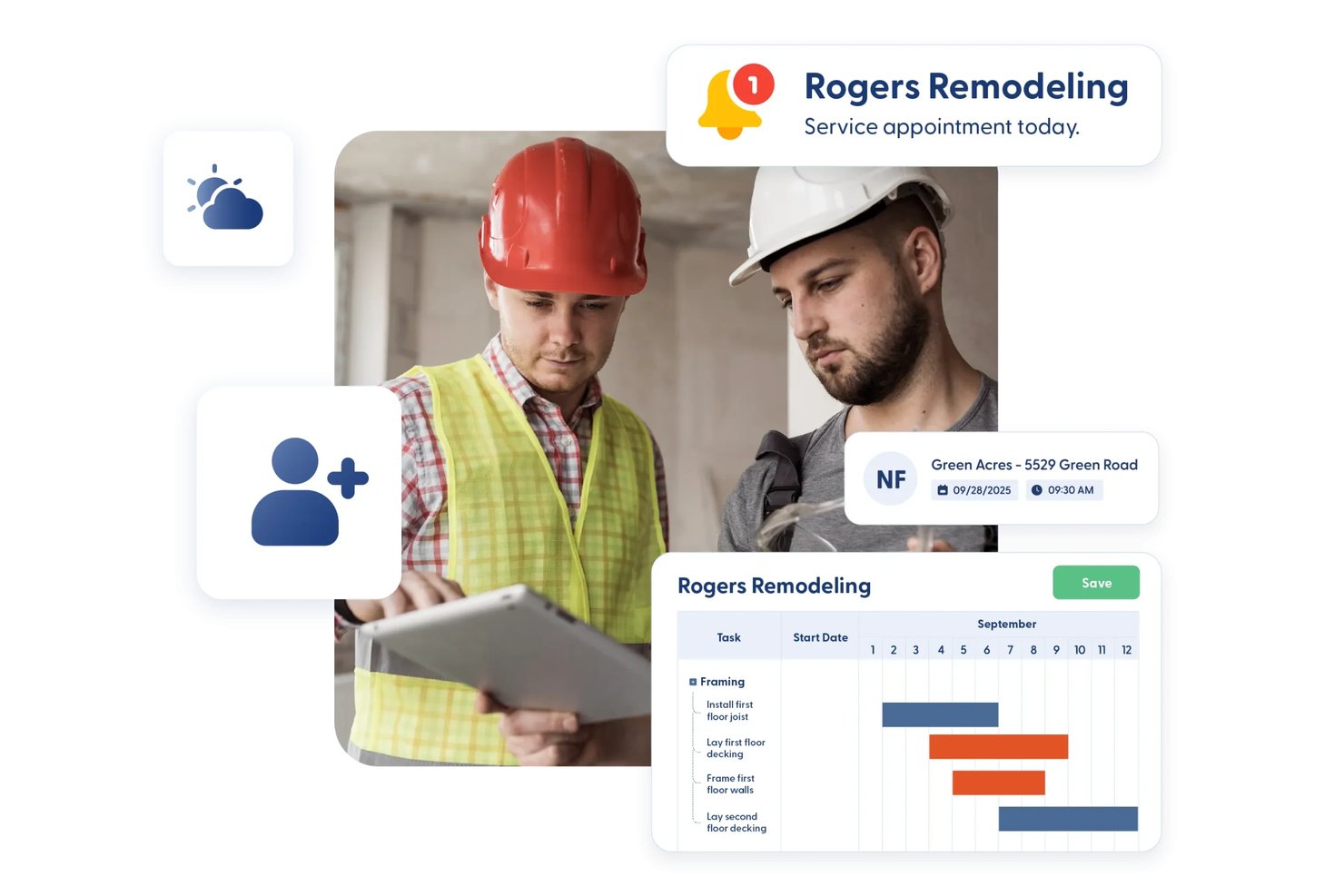
Contractor Foreman is a construction management platform that covers subcontractor scheduling, bid and contract management, compliance document tracking, change orders, and payment oversight across unlimited projects.
Who Is Contractor Foreman Best For?
Contractor Foreman is a strong fit for small-to-mid-sized general contractors who need to manage subcontractor bids, contracts, compliance, and payments under one flat company-wide price.
Why I Picked Contractor Foreman
I picked Contractor Foreman as one of the best because its flat company-wide pricing means you're not paying more as your subcontractor roster grows. I like how the Sub-Contracts module tracks committed costs, billed-to-date, and remaining amounts per subcontractor, so you always know where a contract stands without digging through spreadsheets. The 60-day certificate expiry widget in the Directory also makes it easy to catch lapsing insurance before it becomes a compliance problem on-site.
Contractor Foreman Key Features
- Bid management: Send bid invitations to subcontractors, track responses, compare bids side by side, and convert the winning bid directly into a subcontract.
- Gantt chart scheduling: Build project schedules with critical-path tracking, baseline comparisons, and multi-assignee task support across contractors and employees.
- Lien waiver generation: Create lien waiver templates using merge fields tied to subcontract, project, and contractor data, then download or email the completed PDF.
- QuickBooks sync: Automatically push bills generated from subcontracts to QuickBooks Online or Desktop once the integration is configured.
Contractor Foreman Integrations
Contractor Foreman connects with 50+ systems, including QuickBooks Online, QuickBooks Desktop, Xero, Google Calendar, Outlook Calendar, Microsoft Project, Gusto, Stripe, and CompanyCam. It also supports Zapier.
Pros and Cons
Pros:
- Email contract approvals avoid requiring sub accounts
- 60-day alerts flag expiring subcontractor certificates
- Reviewers praise schedules keeping field teams informed
Cons:
- Menus make subcontractor workflows difficult to locate
- Mobile app can lag behind desktop capabilities

Knowify
Best for trade contractor job costing
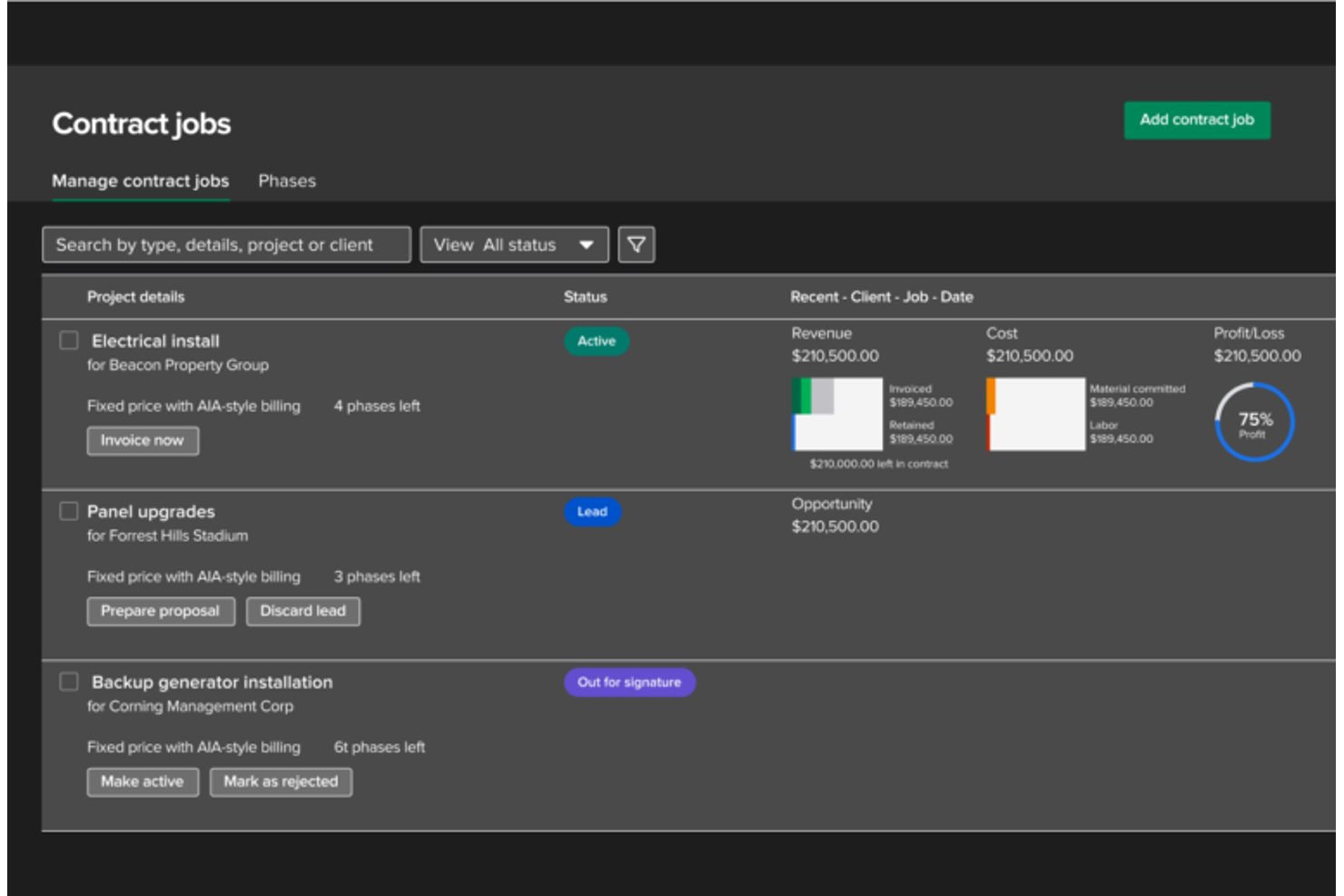
Knowify is a construction project management platform built for trade contractors that combines job costing, subcontractor management, scheduling, invoicing, and compliance document tracking.
Who Is Knowify Best For?
Knowify is a strong fit for trade contractors and specialty subcontractors who need tight job costing and QuickBooks-connected financial tracking across every project phase.
Why I Picked Knowify
I picked Knowify as one of the best because it treats job costing as a first-class feature, not an afterthought. Every bill, subcontractor expense, and change order gets logged against a specific phase and cost category, so you always know exactly where your budget stands on active jobs. I also like that subcontract costs track against purchase orders with approval-authority workflows, which keeps spend accountable without requiring a finance team to babysit every transaction.
Knowify Key Features
- Coordination Hub: Centralizes RFIs, submittals, change orders, and daily logs across all contract jobs in one project view.
- Compliance document storage: Stores subcontractor licenses and insurance certificates with expiration dates and flags missing documents before project inclusion.
- Phase dependencies: Links project phases so that budgeted team members are automatically notified when a predecessor phase triggers.
- AIA pay applications: Generates G702 and G703 pay applications with schedules of values, retainage tracking, and change-order reconciliation.
Knowify Integrations
Knowify has seven documented native integrations, including QuickBooks Online, QuickBooks Desktop, Intuit Enterprise Suite, QuickBooks Time, QuickBooks Online Payroll, QuickBooks Payments, and CompanyCam. It also offers an MCP connector for Claude and ChatGPT, plus Zapier.
Pros and Cons
Pros:
- Keeps RFIs and project documents together
- Links change orders to budgets and billing
- Tracks subcontractor bills against project budgets
Cons:
- Field time entry can glitch or frustrate
- Gantt dependencies can feel clunky
Best for GC-led cost and change tracking
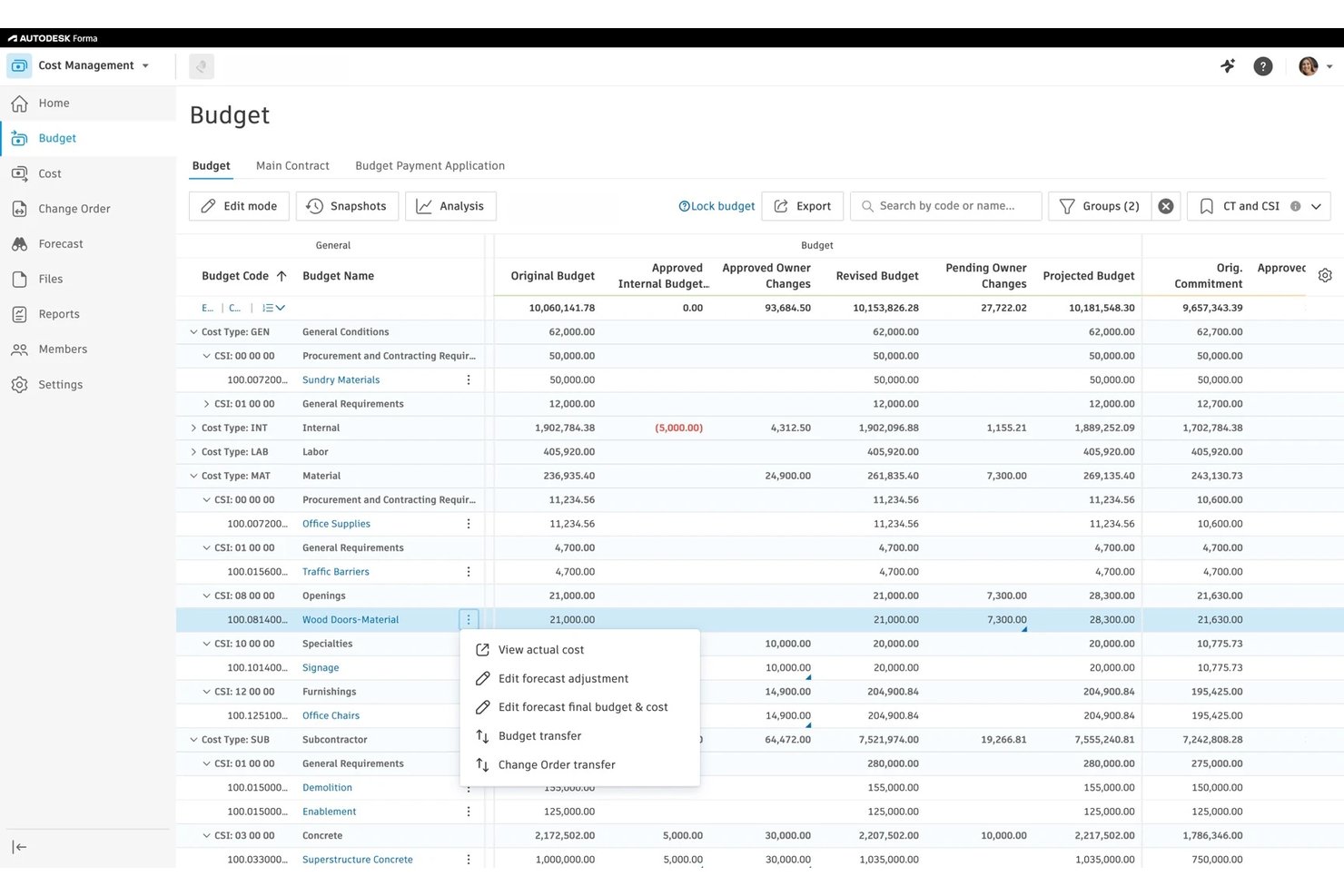
Autodesk Forma Build is a construction project management platform that covers cost management, contract administration, change order tracking, subcontractor scheduling, compliance documentation, and payment applications across office and field teams.
Who Is Autodesk Forma Build Best For?
Forma Build is built for general contractors who need to manage cost, contracts, change orders, and subcontractor payments from a single platform.
Why I Picked Autodesk Forma Build
I picked Autodesk Forma Build as one of the best because it gives GCs a single place to manage subcontractor change orders and costs without losing track of either. When a sub responds to a change order, the scope, cost-item changes, and response due date are all visible in one view, and the collaborative PCO workflow lets suppliers generate and respond to potential change orders directly. I also like that compliance requirements can block a contract from being sent until insurance documents are in order, which keeps cost commitments and compliance tied together.
Autodesk Forma Build Key Features
- Schedule import and version comparison: Import schedules from Primavera P6, Microsoft Project, or Asta Powerproject and compare up to five versions side by side.
- Look-ahead work planning: Filter workplans to one-, two-, or three-week windows in swim-lane or list view to keep trade commitments visible.
- TradeTapp compliance conditions: Block contract issuance automatically when a supplier's risk status, qualification, or insurance program doesn't meet configured criteria.
- Foreign currency cost tracking: Manage supplier contracts, change orders, and payment applications in foreign currencies, with automatic conversion and exchange-rate gain/loss reporting.
Autodesk Forma Build Integrations
Autodesk Forma Build has native integrations with TradeTapp, Forma Data Management, Forma Construction Connect, and Autodesk accounting workflows. Marketplace integrations include Agave and GCPay, while APIs and webhooks support custom connections.
Pros and Cons
Pros:
- Shared drawings and files support GC coordination
- Look-ahead plans expose trade commitments and handoffs
- Subcontractors can review scoped change orders
Cons:
- Subcontractor access depends on assigned subscriptions
- Field crews report limited mobile workflow coverage

PlanGrid
Best for GC-to-sub payment workflows

Forma Build (formerly PlanGrid) is Autodesk's construction project management platform that covers cost management, contract administration, change orders, payment applications, RFIs, field execution, and schedule coordination across office and field teams.
Who Is PlanGrid Best For?
Forma Build works well for general contractors who need to manage subcontractor payment applications, change orders, and project communication from a single platform.
Why I Picked PlanGrid
I've included Forma Build (formerly PlanGrid) in my top picks because its GCPay integration makes GC-to-sub payment workflows genuinely functional. Subcontractors submit payment applications and compliance docs through GCPay, while approved costs sync back into Forma Build's budget overview automatically. I also like that supplier change orders connect directly to budget line items, so GCs can see cost impact before approving.
PlanGrid Key Features
- RFI creation and routing: Create RFIs using configurable forms, assign up to 10 reviewers, and link RFIs to files, tasks, schedules, and potential change orders.
- Work planning: Build three-to-six-week look-ahead plans with trade commitments and plan-reliability metrics connected to the master schedule.
- Quality and safety inspections: Use inspection forms to capture evidence, flag non-conforming work, and track safety observations through resolution.
- Construction IQ risk analysis: Analyze project data with machine learning to identify and prioritize risks across design, quality, safety, and project controls.
Forma Build Integrations
Forma Build offers 400+ integrations through Autodesk’s AECO technology partner ecosystem, including GCPay, P6, Microsoft Project, ASTA, QuickBooks Online, Sage Intacct Construction, Xero, and CMiC. Its API supports custom connections.
Pros and Cons
Pros:
- Change orders expose budget impacts before approval
- Field crews can capture site updates offline
- Drawings and RFIs stay accessible together
Cons:
- Compliance documents lack expiry reminders
- Mobile app lag frustrates field-heavy teams


Forma Build is a construction project management platform by Autodesk that covers cost management, compliance tracking, change orders, payment applications, RFIs, and field workflows in one connected system.
Who Is Autodesk Construction Cloud Best For?
Forma Build is a strong fit for general contractors and construction project owners who manage complex, document-heavy builds and need BIM-linked workflows connecting the office and the field.
Why I Picked Autodesk Construction Cloud
I picked Forma Build as one of the best because its BIM-linked workflows are what set it apart from generic project management tools. When a GC issues an RFI or logs a change order, that item connects directly to the model, the budget, and the submittal log, so subcontractors aren't chasing context across disconnected systems. I also like that compliance document tracking can block a contract from being sent until insurance certificates and required documents are uploaded and unexpired.
Autodesk Construction Cloud Key Features
- Payment application workflows: Route supplier and owner pay apps through configurable multi-step approval workflows with assignable reviewers and response deadlines.
- Look-ahead scheduling: Build 3–6 week work plans that capture trade commitments, measure plan reliability, and link directly to the master schedule.
- Accounting system sync: Connect cost data to ERP systems like Sage 300, Viewpoint Vista, CMiC, and QuickBooks through the Agave integration layer.
- Construction IQ safety tracking: Review counts and types of safety issues assigned to each subcontractor over a selected time period using machine learning analysis.
Autodesk Construction Cloud Integrations
The AECO Technology Partner Ecosystem lists 400+ marketplace integrations, including Agave, Acumatica, Airtable, and Asana. Agave connects Forma Build with Sage 300, Viewpoint Vista, CMiC, Sage Intacct, and QuickBooks; webhooks support custom integrations.
Pros and Cons
Pros:
- Compliance rules flag missing or expired documents
- Centralized documents reduce spreadsheet RFI tracking
- BIM-linked RFIs preserve model context
Cons:
- Mobile syncing can lag on large projects
- External collaborators need Build licences

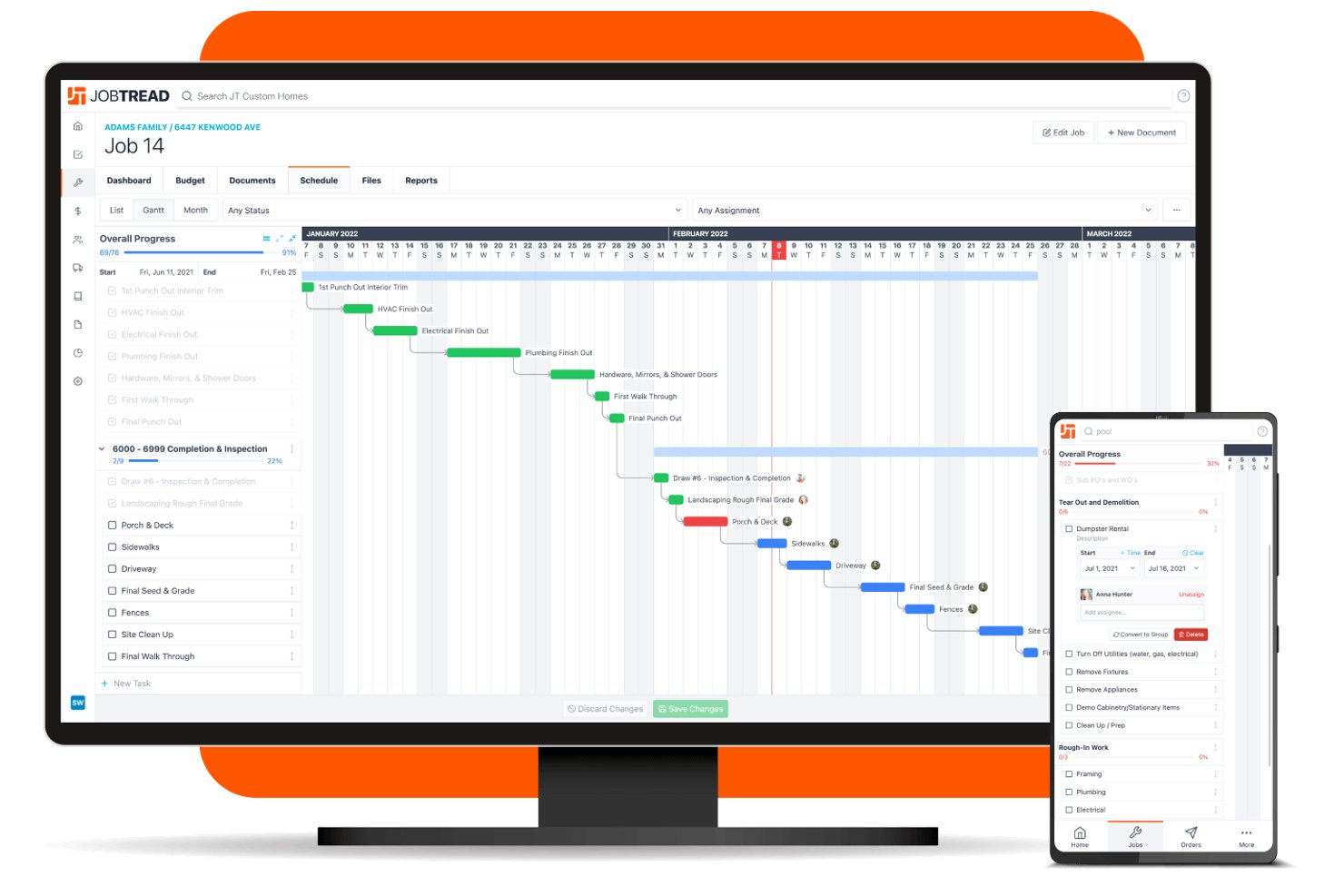
JobTread is construction management software built for general and specialty contractors, covering estimating, subcontractor bid requests, scheduling, job costing, and vendor portals.
Who Is JobTread Best For?
JobTread suits general contractors and specialty trade contractors who want to bring subcontractors into the bid-to-order process without charging them for portal access.
Why I Picked JobTread
I picked JobTread as one of the best because its free subcontractor portals remove the friction that usually slows down the bid-to-order process. Subs receive a unique emailed link, review scope and attachments, enter quantities, upload supporting files, and sign off electronically, without ever creating an account. I also like that once a bid is accepted, I can convert it directly into a vendor order and track it against the job budget, keeping the financial trail intact from first quote to final bill.
JobTread Key Features
- Organization-wide scheduling views: See all tasks across jobs, vendors, and customer accounts in List, Gantt, Month, Week, Day, and Availability views with custom filters.
- Retainage tracking: Set a default retainage percentage at the organization level, adjust it per job, and release withheld amounts with a dedicated retainage-release bill.
- QuickBooks Online sync: Push finalized invoices and bills to QBO, sync document status and payments, and map JobTread cost codes to QBO Products/Services.
- Custom forms builder: Create forms to collect information from employees, customers, subcontractors, and vendors directly within the platform.
JobTread Integrations
JobTread offers integrations with QuickBooks Online, HoundDog, and Zapier. QuickBooks Online syncs invoices, bills, payments, expenses, and cost-code mappings, while the Open API supports custom integrations.
Pros and Cons
Pros:
- Shared schedules track assigned subcontractor tasks
- Bid submissions convert directly into vendor orders
- Free portals reduce subcontractor onboarding friction
Cons:
- Commercial teams report missing RFI workflows
- Subcontractor payments remain a reported gap


CoConstruct is a construction management platform built for residential builders that covers project scheduling, bid management, subcontractor coordination, change orders, and job-level communication.
Who Is CoConstruct Best For?
CoConstruct is a strong fit for residential builders and custom home builders who need to manage the full bid-to-contract cycle with their subcontractors in one place.
Why I Picked CoConstruct
I picked CoConstruct as one of the best because its bid-to-contract workflow is purpose-built for residential builders who coordinate heavily with subs. I love how bid packages can include scopes, attachments, deadlines and automated reminders, with subs able to respond directly by email without needing an active portal account. Trade agreements are sent for electronic approval and version history is retained automatically, so you always have a clear record of what was agreed before work begins.
CoConstruct Key Features
- Subcontractor portal access: Invite subs to a dedicated portal where they can view permitted schedules, files, RFIs, daily logs, and project communications at no cost to them.
- Daily log sharing: Create daily logs with notes, photos, weather data, and attachments, then share them with subs and trigger read-receipt notifications.
- Change order to invoice conversion: Convert approved change orders directly into client invoices, keeping financial records connected across the project lifecycle.
- Compliance document storage: Store subcontractor certifications and insurance documents with expiration dates and reminder options directly within each sub's profile.
CoConstruct Integrations
CoConstruct offers marketplace integrations with QuickBooks, Sage Intacct, Xero, Google Calendar, Outlook, and iCal for accounting and schedule coordination. It also provides an API for custom integrations.
Pros and Cons
Pros:
- Daily logs centralize subcontractor updates and files
- Schedule visibility helps teams spot delays earlier
- Bid packages turn subcontractor quotes into agreements
Cons:
- Compliance records lack documented scheduling blocks
- Subcontractor task permissions remain inconsistently documented
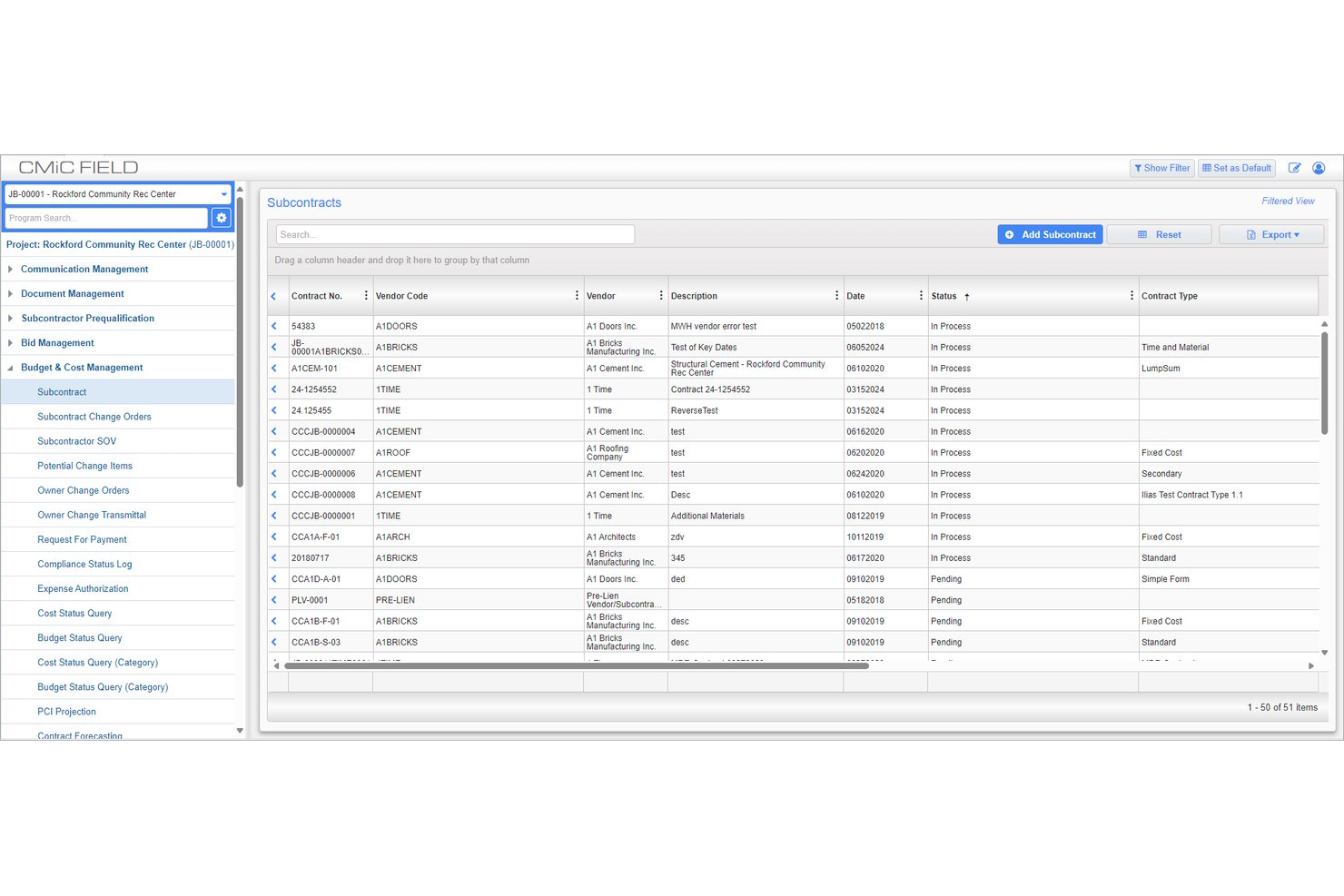
CMiC is a construction ERP that unifies financials and project management, covering subcontract bidding, bid leveling, change orders, payment tracking, and compliance monitoring across trades.
Who Is CMiC Best For?
CMiC suits large general contractors who need subcontractor payment tracking woven directly into their project financials and accounting workflows.
Why I Picked CMiC
I picked CMiC as one of the best because its subcontractor payment tracking is built directly into its financial core, not bolted on as an afterthought. Payment requests flow through a schedule-of-values structure that tracks prior billings and retainage in the same record, and Project Controls ties subcontract values to job costing, forecasting, and billing simultaneously. I've found that kind of tight financial integration is genuinely rare at the enterprise level, where disconnected systems cause the most damage.
CMiC Key Features
- Subcontractor prequalification filtering: Filter bidder invitations by location, CSI codes, prequalification parameters, and other classifications before sending bid packages.
- Bid leveling: View bid responses side by side to compare submissions and identify discrepancies across subcontractors.
- Compliance code tracking: Add, remove, or update compliance codes on subcontract records, with a read-only status indicator tied to set compliance dates.
- NEXUS AI agents: Run AI-enabled task agents across modules for cost-code maintenance, purchase-order matching, and financial reconciliation.
CMiC Integrations
CMiC offers native integrations with Autodesk, Bluebeam, DocuSign, Microsoft Office, and PlanGrid, plus marketplace integrations with Procore, Autodesk ProEst, Oracle Textura, and GCPay. Its Open API and public web services support custom integrations.
Pros and Cons
Pros:
- Prequalification filters bidders by trade and location
- Payment requests track retainage against prior billings
- Reviewers praise connected accounting and project costs
Cons:
- Teams report lengthy training and rollout effort
- Dates lack task dependencies or conflict flags

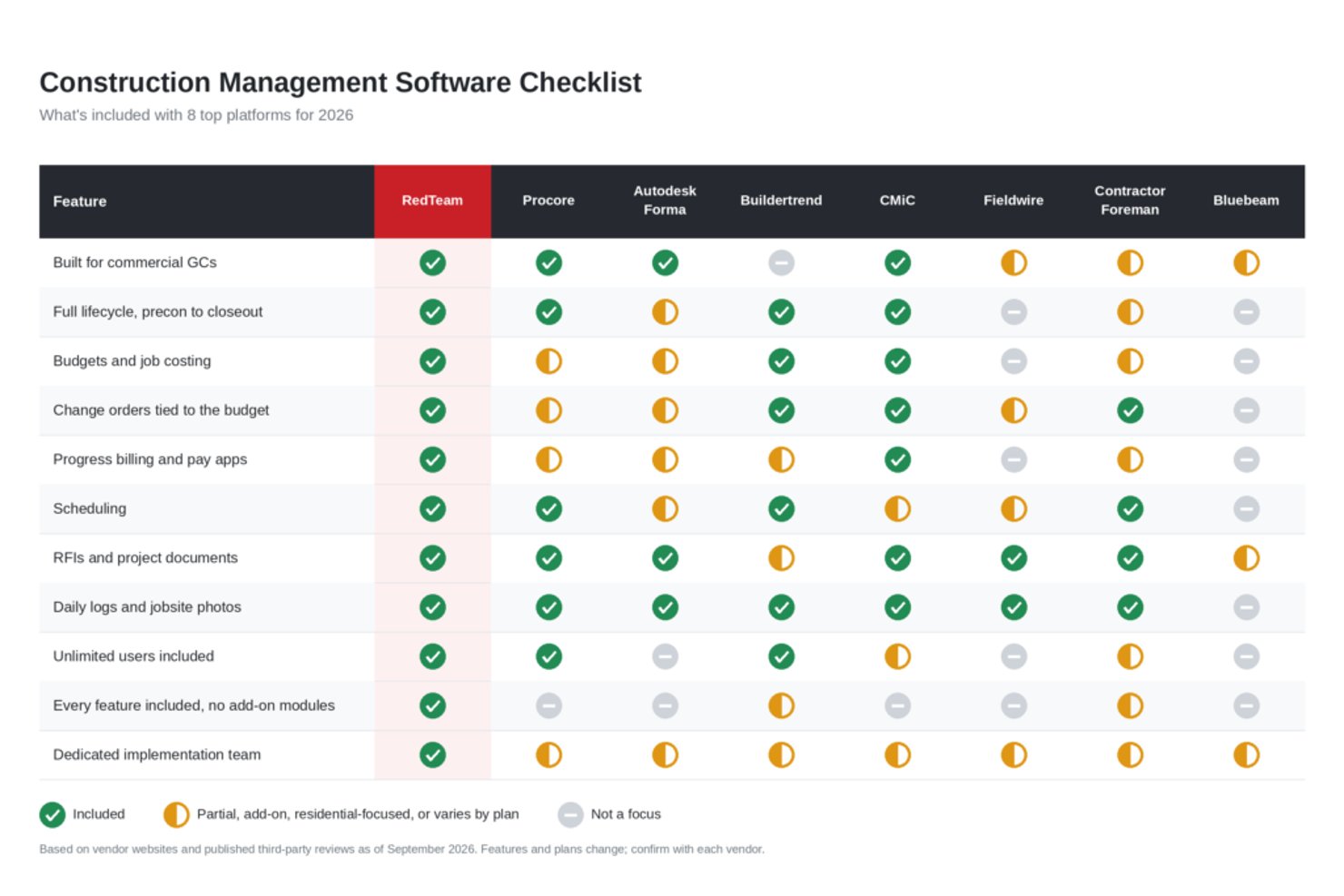
RedTeam is a construction project management platform built for commercial general contractors, covering preconstruction estimating, bid and contract management, subcontractor collaboration, job costing, and field reporting.
Who Is RedTeam Best For?
RedTeam is a strong fit for commercial general contractors who need to manage the full arc from bid invitation to subcontractor billing inside one platform.
Why I Picked RedTeam
I picked RedTeam as one of the best because the GC-to-sub billing workflow is genuinely one of the tightest I've seen. Through TeamPlayer, subcontractors can log in, view their executed contract, and submit AIA-style progress billing with Schedule of Values lines and retainage directly to the GC. I also like that lien-waiver status and open lien-law documents surface automatically on the vendor payment notification, keeping payment and compliance visibility in one place.
RedTeam Key Features
- Bid leveling: Compare vendor quotes side by side, then award a bid package to one vendor or split it across multiple vendors.
- Gantt scheduling with external stakeholder access: Assign and track tasks for project teams that include subcontractors, who can view updates and receive push notifications.
- Credential status tracking: View the compliance status of contract-required credentials, including insurance and W-9 documents, categorized as current, expiring, expired, or not on file.
- Mobile field reporting via Fieldlens: Document jobsite progress from a mobile device, with offline capability that syncs when connectivity is restored.
RedTeam Integrations
RedTeam documents integrations with QuickBooks Online, Sage Intacct, Sage 100 Contractor, Acumatica, and Fieldlens. Accounting integrations may cost extra, and API availability isn’t documented.
Pros and Cons
Pros:
- Job-cost visibility connects work and billing
- Bid-to-contract workflows earn positive reviews
- Subcontractors can follow shared schedules
Cons:
- Credential tracking lacks renewal alerts
- Vendor access requires GC-side setup
Diğer Alt Yüklenici Proje Yönetimi Yazılımları
Aşağıda, en iyi listeye giremeyen ancak kesinlikle göz atmaya değer ek alt yüklenici proje yönetimi yazılımlarının bir listesini bulabilirsiniz.
- Jonas Premier
For construction accounting-led sub payments
- TRUE
For subcontractor job costing
- ClickUp
For configurable subcontractor task tracking
- Buildertrend
For home-building project workflows
- Oracle Aconex
For cross-org document audit trails


How I Evaluate Subcontractor Project Management Software
I split my evaluation into three parts, weighting most how tools schedule subcontractor tasks and share current plans, RFIs, and updates. Next, I look for features like rolling look-ahead schedules. Finally, I consider onboarding, support, and pricing for teams with many external subs.
Core Functionality (Table Stakes For This List)
When I'm selecting tools for my list, I score each one on a scale from 0 (does not offer the functionality) to 5 (excels in this area) for each core functionality listed below. I then convert the total into a percentage to help assess each tool's overall fit, with extra weight on any functionalities I’ve deemed essential.
- Subcontractor Scheduling (Essential): I look for dated, assigned trade tasks that show dependencies and updates, such as whether one crew’s delay affects the next handoff.
- Communication Hub (Essential): I check whether teams can find project documents, RFIs, and updates by job and subcontractor instead of chasing information across channels.
- Compliance Tracking: I assess how teams store insurance, licenses, and certifications, track expiry dates, and flag renewals before a subcontractor’s work begins.
- Bid And Contract Management: I look for a clear path to solicit and compare trade bids, record approvals, and link the selected scope to a contract.
- Change Order Tracking: I check whether scope, cost, and schedule changes have approval steps and stay visible in project records after approval.
- Payment And Invoice Tracking: I evaluate whether invoices and payment applications are tied to contracted budgets, with status visible to the people handling approvals.
Once I have a list of tools that meet the criteria, I consider what sets each platform apart.
Differentiating Factors (What Sets Vendors Apart)
Here's how I compare and contrast different vendors:
Standout Features
I check whether a platform automates lien waiver collection tied to each pay app, since chasing conditional and unconditional waivers manually across dozens of subs delays every payment cycle. Subcontractor prequalification scoring also matters—I evaluate how a tool ranks subs on safety, financials, and past performance before you even open a bid. Rolling look-ahead scheduling is another separator: I look for three-week views that map trade sequencing so a drywall crew isn't mobilizing before framing is signed off.
Beyond Features
I check how easily subs can actually adopt the platform—if field crews need a full license and desktop training just to submit a daily log, uptake drops fast. Free or limited-access portals with a mobile-first design make a real difference when you're onboarding dozens of trades. I also evaluate how each tool connects to existing accounting software like Sage or QuickBooks, because pay app and retention data that doesn't sync means someone in the office is double-entering every invoice. Finally, I look at how proactively a platform flags expiring insurance certificates or missing compliance documents before a sub mobilizes to site.
Alt Yüklenici Proje Yönetimi Yazılımı Nasıl Seçilir?
Uzun özellik listeleri ve karmaşık fiyatlandırma yapılarına kendinizi kaptırmanız kolaydır. Kendinize özgü yazılım seçimi sürecinizi yürütürken odağınızı korumanıza yardımcı olmak için aklınızda bulundurmanız gereken faktörlerin kontrol listesi aşağıdadır:
| Faktör | Dikkat Edilmesi Gerekenler |
| Ölçeklenebilirlik | İşletmeniz büyüdükçe aracın daha fazla alt yükleniciyi, projeyi veya ekip üyesini yavaşlamadan ya da maliyetli bir yükseltme gerektirmeden yönetebildiğinden emin olun. |
| Entegrasyonlar | Ekibinizin yinelenen işleri yönetmek zorunda kalmaması için muhasebe, planlama veya belge depolama gibi mevcut sistemlerinize bağlanan araçları arayın. |
| Özelleştirilebilirlik | Görev listelerini, iş akışlarını veya alt yüklenici izinlerini ekibinizin gerçekte çalışma biçimine uyacak şekilde özelleştirebilmelisiniz. |
| Kullanım Kolaylığı | Ekibinizin ve alt yüklenicilerinizin hızlıca kullanmaya başlayabileceği bir yazılım seçin. Sade bir arayüz ve mantıklı bir düzen büyük fark yaratır. |
| Bütçe | Her fiyatlandırma kademesine nelerin dahil olduğuna bakın. Dosya paylaşımı veya kullanıcı erişimi gibi temel özellikler için ekstra ücret alan araçlardan kaçının. |
| Güvenlik Önlemleri | Özellikle hassas belgeleri alt yüklenicilerle paylaşırken aracın proje verilerini şifreleme, erişim denetimleri ve güvenli oturum açma özellikleriyle koruduğundan emin olun. |
| Mobil Erişim | Alt yüklenicileriniz sahada çalışıyorsa, güncellemelerin gerçek zamanlı olarak yapılabilmesi için bir uygulama veya mobil cihazlara uyumlu erişim isteyeceksiniz. |
| Raporlama Araçları | Yerleşik veya özel raporlarla alt yüklenici performansını, teslim tarihlerini ve iş maliyetlerini izlemenize yardımcı olan bir sistem seçin. |
İster genel bir alt yüklenici yönetimi çözümüne ister çatı kaplama proje yönetimi yazılımı gibi niş bir araca ihtiyacınız olsun, doğru özelliklere öncelik vermek verimliliği, uyumluluğu ve sorunsuz proje yürütümünü sağlayacaktır.
2025'te Alt Yüklenici Proje Yönetimi Yazılımı Trendleri
Araştırmam sırasında farklı alt yüklenici proje yönetimi yazılımı sağlayıcılarının sayısız ürün güncellemesini, basın bültenini ve sürüm kaydını inceledim. Takip ettiğim yeni ortaya çıkan trendlerden bazıları şunlar:
- Alt Yüklenici Performans Analizleri: Bazı araçlar artık alt yüklenici bazında görev tamamlama oranları ve gecikmeler gibi verileri izliyor. Bu, proje yöneticilerinin kalıpları fark etmesine ve gelecekteki işe alımlarla ilgili daha iyi kararlar vermesine yardımcı oluyor.
- Alt Yüklenici Self Servis Portalları: Daha fazla araç artık alt yüklenicilerin giriş yapabildiği, görevleri görüntüleyebildiği, güncellemeler gönderebildiği ve belgeleri yükleyebildiği portallar sunuyor. Bu, karşılıklı iletişimi azaltıyor ve alt yüklenicilere işleri üzerinde daha fazla kontrol sağlıyor.
- Yerleşik Uyumluluk Takibi: Sağlayıcılar, sigorta sertifikalarını, güvenlik kontrol listelerini ve diğer uyumluluk belgelerini takip etmeye yardımcı olan araçlar ekliyor. Bu, proje yöneticilerinin denetime hazır kalmasına ve maliyetli gecikmelerden kaçınmasına yardımcı oluyor.
- Ayrıntılı İzin Ayarları: Araçlar artık alt yüklenicilerin neleri görüntüleyebileceğini veya düzenleyebileceğini sınırlamak için daha ayrıntılı kullanıcı rolleri sunuyor. Bu, ekiplerin hassas bilgileri gizli tutmasına ve alt yüklenicilere işlerini yapmaları için gereken erişimi sağlamasına yardımcı olabilir.
- Görsel Planlama Arayüzleri: Gantt tarzı zaman çizelgeleri ve sürükle-bırak planlama araçları daha yaygın hale geliyor; çünkü bunlar, zaman çizelgeleri değiştiğinde iş atamayı ve tarihleri düzenlemeyi kolaylaştırabiliyor.
Alt Yüklenici Proje Yönetimi Yazılımı Nedir?
Alt yüklenici proje yönetimi yazılımı, ekiplerin farklı işler ve projelerdeki alt yüklenicileri yönetmesine yardımcı olan bir araç türüdür. Genellikle inşaat, saha hizmetleri ve dış iş gücüne dayanan diğer sektörlerdeki proje yöneticileri tarafından kullanılır.
Görev atama, ilerleme takibi ve uyumluluk özellikleri; alt yüklenicilerin programa uymasına, düzenli kalmasına ve gereklilikleri karşılamasına yardımcı olur.
Genel olarak bu araçlar, proje yöneticilerinin güncelleme peşinde zaman kaybetmeden alt yüklenicilere verilen işlerin kontrolünü ellerinde tutmasına yardımcı olur.
Alt Yüklenici Proje Yönetimi Yazılımının Özellikleri
Alt yüklenici proje yönetimi yazılımı seçerken aşağıdaki temel özelliklere dikkat edin:
- Görev atama: Sorumlulukların net olması için her alt yükleniciye belirli görevler atamanıza ve bunları takip etmenize olanak tanır.
- İlerleme takibi: Gecikmeleri erkenden fark edebilmeniz için çalışmalar tamamlandıkça bunları izlemenize yardımcı olur.
- Belge paylaşımı: Çizimleri, sözleşmeleri ve diğer dosyaları doğrudan alt yüklenicilerle yüklemenize ve paylaşmanıza olanak tanır.
- Uyumluluk yönetimi: Denetime hazır kalmanıza yardımcı olmak için sigorta, sertifika ve diğer belgeleri takip eder.
- Planlama araçları: Zaman çizelgelerini planlamanıza, çalışma günleri atamanıza ve koşullar değiştiğinde programları düzenlemenize yardımcı olur.
- Kullanıcı izinleri: Alt yüklenicilerin araç içinde neleri görebileceğini veya düzenleyebileceğini kontrol etmenize olanak tanır.
- İletişim merkezi: Görüşmelerin kaybolmaması için mesajları, güncellemeleri ve notları tek bir yerde tutar.
- Zaman takibi: İş gücü maliyetlerini daha doğru takip edebilmeniz için alt yüklenicilerin çalıştıkları saatleri kaydetmesine olanak tanır.
- Fatura yönetimi: Tamamlanan işe göre alt yüklenici faturalarını incelemenize ve onaylamanıza yardımcı olur.
- Performans raporlama: Alt yüklenici performansını değerlendirmenize yardımcı olmak için zamanında tamamlama ve görev doğruluğu gibi ölçümleri gösterir.
Alt Yüklenici Proje Yönetimi Yazılımının Faydaları
Alt yüklenici proje yönetimi yazılımını uygulamak, ekibiniz ve işletmeniz için çeşitli faydalar sağlayabilir. Yararlanabileceğiniz birkaç fayda şunlardır:
- Daha az gecikme: Yerleşik planlama ve ilerleme takibi, sorunları erkenden fark etmenize ve işleri planlandığı gibi sürdürmenize yardımcı olur.
- Daha az karmaşa: Görev atamaları ve belge paylaşımı, kimsenin neden sorumlu olduğunu ve önemli bilgilerin nerede bulunacağını netleştirir.
- Daha iyi iletişim: Merkezi mesajlaşma ve güncelleme araçları, uzun e-posta yazışmalarına gerek kalmadan herkesi gelişmelerden haberdar eder.
- Daha iyi mevzuat uyumu: Sigorta ve lisansları takip etmeye yönelik özellikler, düzenli kalmanıza ve cezalardan kaçınmanıza yardımcı olur.
- Daha hızlı onaylar: Zaman takibi ve faturalandırma araçları, işleri doğrulamayı ve ödemeleri hızlı bir şekilde işleme almayı kolaylaştırır.
- Daha bilinçli kararlar: Raporlama araçları, yeniden kimlerle çalışabileceğinizi seçebilmeniz için taşeron performansına ilişkin veriler sunar.
- Daha kolay devir teslimler: İzin ayarları ve etkinlik günlükleri, proje sorumluları işin ortasında değişse bile ekibinizin taşeronları yönetmesine yardımcı olur.
Taşeron Proje Yönetimi Yazılımının Maliyetleri ve Fiyatlandırması
Taşeron proje yönetimi yazılımını seçmek, mevcut çeşitli fiyatlandırma modellerini ve planları anlamayı gerektirir. Maliyetler özelliklere, ekip büyüklüğüne, eklentilere ve diğer unsurlara göre değişir. Aşağıdaki tablo, taşeron proje yönetimi yazılımı çözümlerinde yaygın olarak sunulan planları, ortalama fiyatlarını ve genellikle dahil edilen özellikleri özetlemektedir:
| Plan Türü | Ortalama Fiyat | Yaygın Özellikler |
| Ücretsiz | $0 | Görev atamaları, temel raporlama, sınırlı depolama |
| Temel | $10 - $35/kullanıcı/ay | Proje planlama, zaman takibi, belge yönetimi |
| Standart | $35 - $75/kullanıcı/ay | Özel iş akışları, gelişmiş raporlama, entegrasyonlar |
| Üst düzey | $75 - $150/kullanıcı/ay | Kaynak yönetimi, finans araçları, öncelikli destek |
Taşeron Proje Yönetimi Yazılımı Hakkında Sık Sorulan Sorular
Sizin için ele almak istediğim sık sorulan birkaç soru burada.
Taşeron proje yönetimi yazılımı verimliliği nasıl artırır?
Bu yazılım, ana yüklenici ile taşeronlar arasındaki iletişimi kolaylaştırır, belgeleri merkezileştirir ve iş akışlarını otomatikleştirir. Gerçek zamanlı güncellemeler sağlayıp iş birliğini kolaylaştırarak gidip gelen e-postalara ve toplantılara duyulan ihtiyacı azaltır; böylece zamandan tasarruf sağlar ve hata veya iletişim sorunları olasılığını düşürür.
Taşeron proje yönetimi yazılımı diğer sistemlerle entegre edilebilir mi?
Evet, birçok taşeron proje yönetimi aracı muhasebe, CRM ve ERP sistemleri gibi diğer yazılım sistemleriyle entegre olacak şekilde tasarlanmıştır. Bu entegrasyon özelliği, sorunsuz veri aktarımına ve bir projenin tüm yönlerini yönetmek için bütünleşik bir yaklaşıma olanak tanır.
Taşeron proje yönetimi yazılımı her büyüklükteki işletme için uygun mudur?
Taşeron proje yönetimi yazılımı ölçeklenebilirdir ve her büyüklükteki işletmeye fayda sağlayabilir. Küçük işletmeler bu yazılımdan birkaç taşeronu yönetmek için yararlanabilirken, daha büyük işletmeler çeşitli konumlardaki birden fazla projeyi ve ekibi koordine edebilir. Ayrıca, bütçeniz kısıtlı olan küçük bir işletmeyseniz, ücretsiz inşaat proje yönetimi yazılımı da bazı taşeron yönetimi özellikleri sunar.
Taşeron proje yönetimi yazılımı ne kadar güvenlidir?
Güvenlik, taşeron proje yönetimi yazılımı sağlayıcıları için en önemli önceliklerden biridir. Çoğu sağlayıcı, hassas proje bilgilerini korumak için veri şifreleme, güvenli veri merkezleri ve düzenli güvenlik denetimleri gibi güçlü güvenlik önlemleri sunar. Ancak belirli yazılımın güvenlik politikalarını inceleyerek şirketinizin standartlarını karşıladığından emin olmanız önemlidir.
Taşeron proje yönetimi yazılımını uygulamak için hangi eğitim gereksinimleri vardır?
Yazılımın karmaşıklığı değişebilir; ancak sağlayıcılar genellikle ekiplerin hızlı ve verimli bir şekilde uyum sağlamasına yardımcı olmak için çevrim içi eğitim oturumları, ayrıntılı belgeler ve müşteri desteği sunar.
Taşeron proje yönetimi yazılımı ne sıklıkla güncellenir?
Taşeron yazılımı sağlayıcıları, yeni özellikler sunmak, mevcut işlevleri geliştirmek ve hataları düzeltmek için ürünlerini sık sık günceller. Güncellemeler, sağlayıcıya bağlı olarak haftalık veya üç aylık aralıklarla yayınlanabilir.