

Os 10 melhores softwares de portal de clientes analisados em 2026

Lista restrita do melhor software de portal do cliente


Gerir projetos e relações com clientes pode ser desafiante, pois poderá ter de conciliar prazos, comunicação e segurança dos dados. É aqui que entra o software de portal do cliente — ajuda a simplificar a comunicação, melhorar a colaboração e manter tudo organizado.
Testei e analisei várias soluções de portal do cliente para ajudar a encontrar a opção certa para a sua empresa. Conheço o panorama da gestão de projetos e concentro-me em análises imparciais e bem fundamentadas.
Neste artigo, ficará a conhecer as minhas principais escolhas de software de portal do cliente. Destacarei as suas funcionalidades, vantagens e possíveis desvantagens para o ajudar a tomar uma decisão informada. Vamos encontrar a melhor solução para a sua equipa.
Why Trust Our Software Recommendations
Our team has been testing and reviewing software since 2012. As project managers ourselves, we know how difficult—and important—it is to choose the right software.
For this guide, we evaluated tools using hands-on testing and independent research, scoring tools using our selection criteria. We also draw on insights from industry thought leaders and practicing project management experts.
Our reviews reflect our human editorial judgment, not a sales pitch.
Expert reviewers:
Tabela comparativa: software de portal do cliente
Esta tabela comparativa resume os detalhes de preços das minhas principais escolhas de software de portal do cliente.
| Tool | Best For | Trial Info | Price | ||
|---|---|---|---|---|---|
| 1 | Best for milestone-driven client approvals | 14-day free trial | From €5.50/active project/month (minimum 15 projects) | Website | |
| 2 | Best for secure file sharing | 10-day free trial | From $11/user/month | Website | |
| 3 | Best for customer onboarding | Free plan + free demo available | From $350/month (billed annually) | Website | |
| 4 | Best for all-in-one service business tools | 14-day free trial | From $19/month | Website | |
| 5 | Best for no-code solutions | Free plan + free demo available | From $19/month (billed annually) | Website | |
| 6 | Best for database management | Free 14-day trial + free demo available | From $32/month (billed annually) | Website | |
| 7 | Best for finance professionals | Free demo + free trial available | From $55/user/month (billed annually) | Website | |
| 8 | Best for WordPress integration | Free demo available | From $25 (single-site license) | Website | |
| 9 | Best for team collaboration | Free plan + free demo + free trial available | From $37/month (billed annually) | Website | |
| 10 | Best for creative agencies | Free plan + free demo + free 14-day trial available | From $29/user/month (billed annually) | Website |
Análise do melhor software de portal do cliente
Apresentamos abaixo os meus resumos detalhados do melhor software de portal do cliente que integrou a minha lista restrita. As minhas análises oferecem uma visão detalhada das principais funcionalidades, vantagens e desvantagens, integrações e casos de utilização ideais de cada ferramenta, para o ajudar a encontrar a melhor opção para si.

Ziggu
Best for milestone-driven client approvals
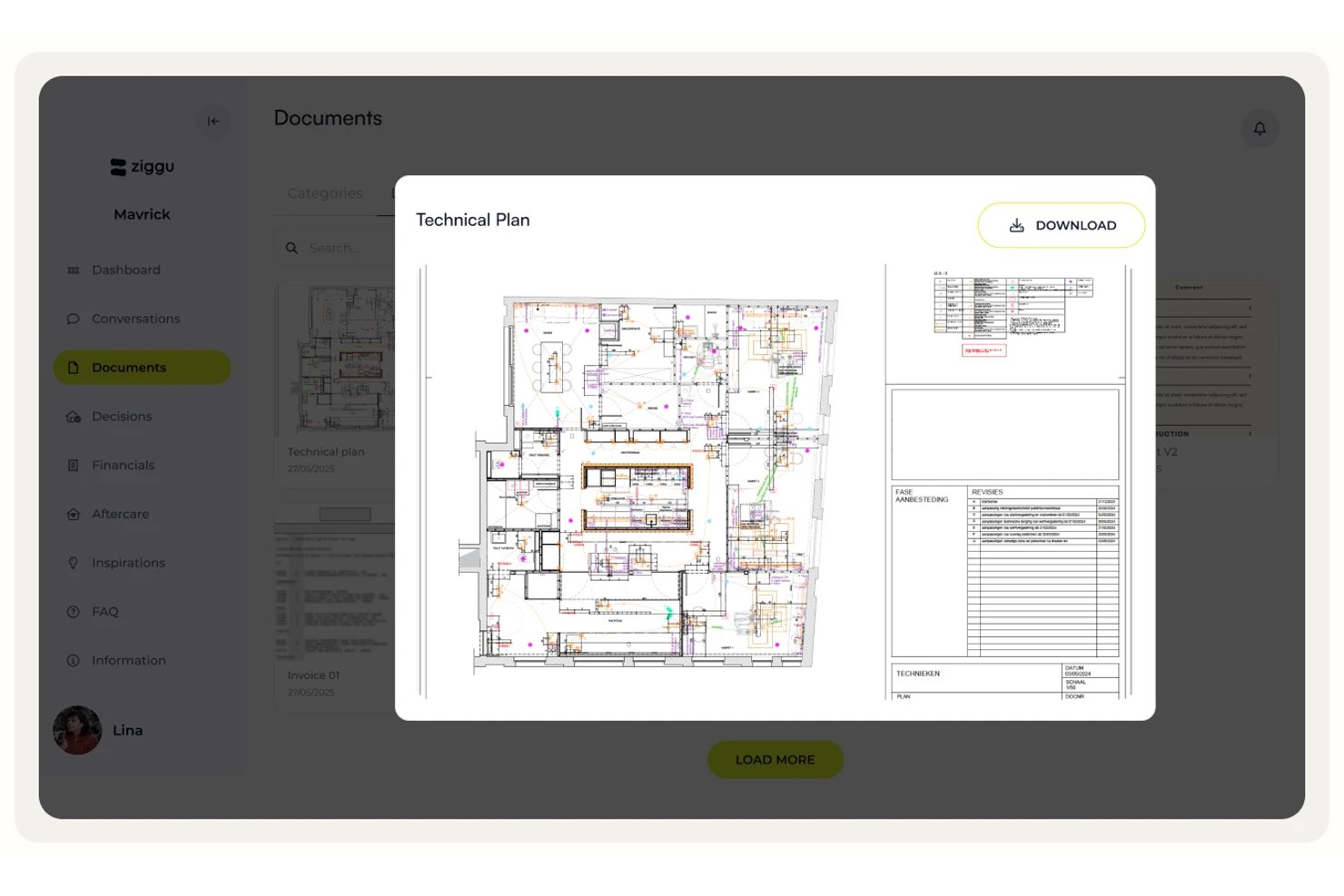
Ziggu is a client portal platform built around milestone-based project delivery, offering white-labeled client portals, structured approval workflows, centralized document sharing, and client-facing communication tools.
Who Is Ziggu Best For?
Ziggu is a strong fit for project-based businesses in construction, property development, and creative agencies that need structured milestone approvals and a branded client experience.
Why I Picked Ziggu
Ziggu earns its spot on my shortlist because of how seriously it treats client approvals as a formal, traceable process rather than an afterthought. The Decisions & Approvals feature lets clients digitally sign off on proposals directly in the portal, with every approval logged by name, date, and timestamp. That audit trail matters when a client disputes a finish choice three months into a build. Automated reminders for outstanding decisions mean my team isn't chasing sign-offs over email.
Ziggu Key Features
- White-label portal branding: Apply your logo, colors, and brand name across the client portal, notification emails, and mobile PWA app.
- Client intake forms: Collect client input, run intake questionnaires, and track satisfaction scores with automated reminders at set project stages.
- Centralized project inbox: Organize all client, partner, and team conversations by project and topic in one place, with assignable threads and internal notes.
- Self-serve FAQ library: Give clients a searchable knowledge base within the portal so they can find answers without contacting your team.
Ziggu Integrations
Ziggu offers integrations with SharePoint, Google Drive, Dropbox, Salesforce, HubSpot, Microsoft Dynamics 365, Exact Online, Power BI, and Archisnapper. Its public REST API supports custom integrations.
Pros and Cons
Pros:
- ISO 27001/27017/27018 certified data security
- White-label branding for portals and emails
- Built-in milestone approvals with audit trail
Cons:
- No Zapier or Make automation integration
- No native time tracking or billable hours

Clinked
Best for secure file sharing
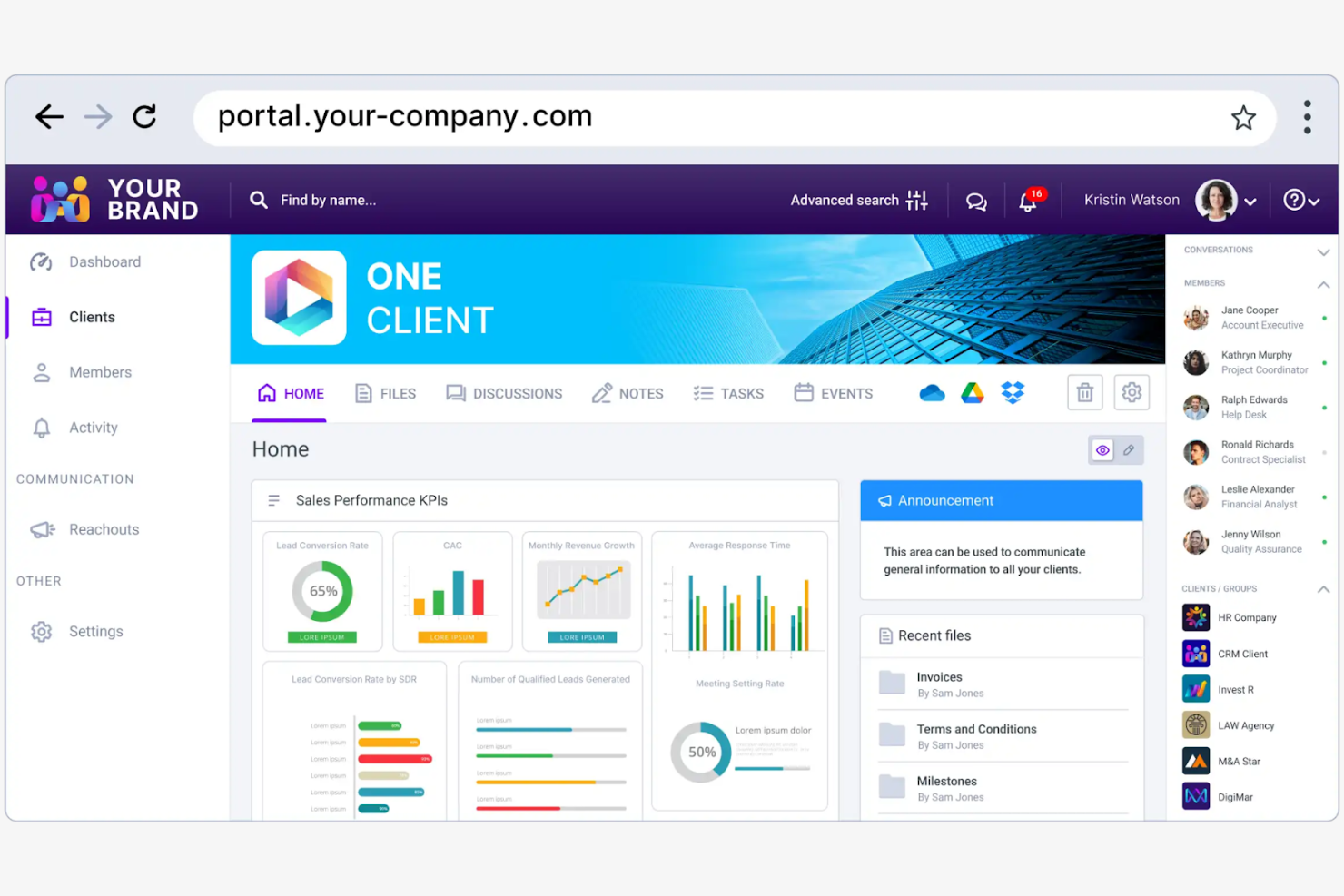
Clinked is a client portal software designed for businesses that need secure collaboration and file sharing. Its main users include teams in the finance, legal, and consulting industries who require secure communication channels and document management.
Why I picked Clinked: It provides a secure client portal environment for file sharing. You can create custom client portals to improve collaboration and maintain brand consistency. The platform's focus on security helps protect sensitive information. Clinked's ability to integrate with your existing systems makes it a flexible choice for teams with specific needs.
Standout Features and Integrations:
Features include encrypted data storage that keeps your files secure and protected. You can also use its task management features to keep your projects organized and on track.
Integrations include Google Workspace, Microsoft OneDrive, Power BI, DocuSign, and more.
Pros and Cons
Pros:
- Provides structured workspaces for each client
- Supports granular permission controls
- Offers encrypted data storage
Cons:
- Limited advanced project management features
- Limited search functionality

Dock
Best for customer onboarding
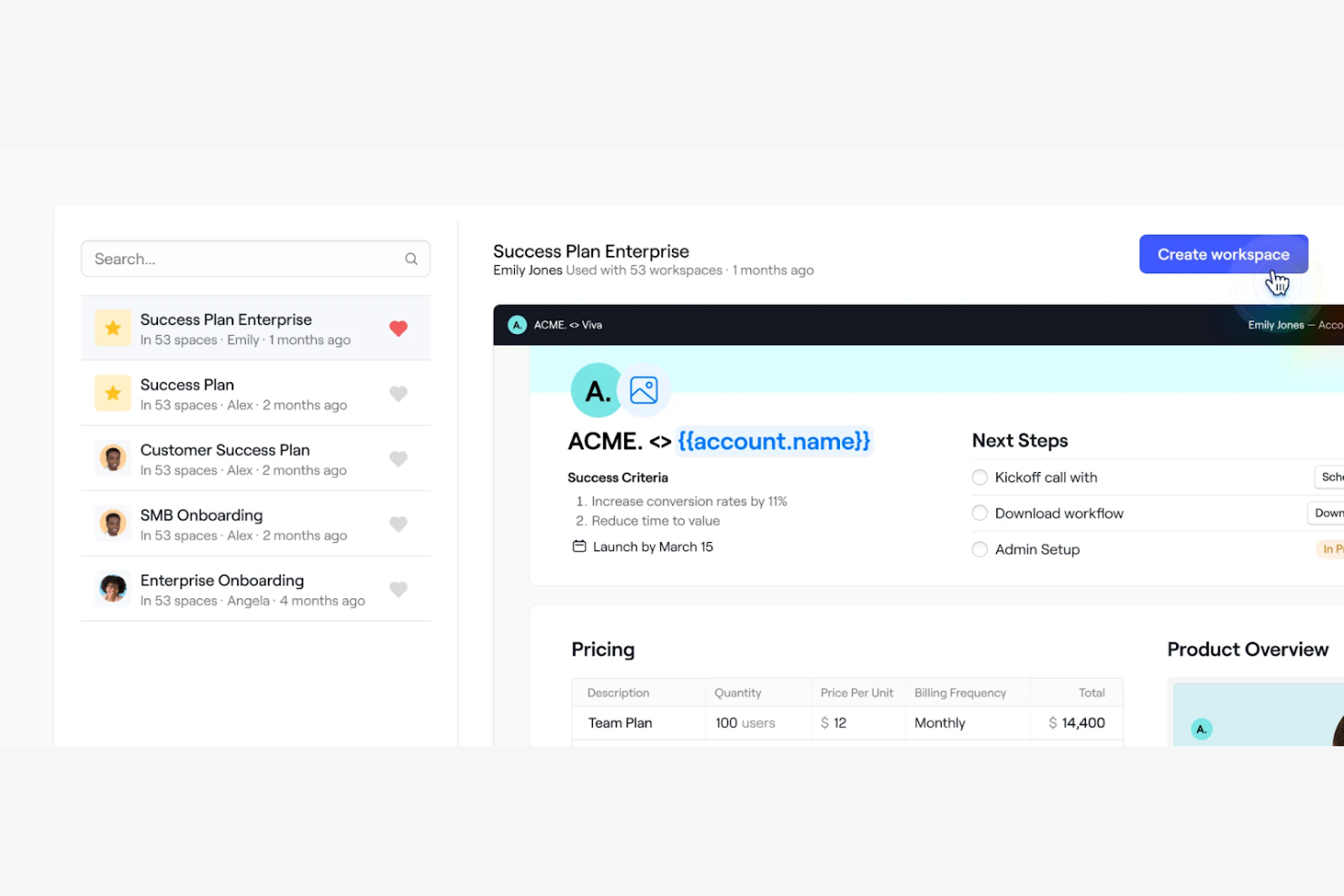
Dock is a client portal software designed for teams focused on improving customer onboarding and engagement. It offers tools for project management, client collaboration, and document sharing.
Why I picked Dock: Its focus on customer onboarding simplifies the process of bringing new clients on board. You can create personalized onboarding experiences with features such as custom client portals and automated task lists. Dock's document sharing and feedback tools support clear communication between your team and clients. The ability to tailor the onboarding process to fit specific client needs makes it a valuable tool for creating positive customer experiences.
Standout Features and Integrations:
Features include customization tools that allow you to create a unique experience for each client. The platform offers workflow automation tools that help you keep projects on track and prevent anything from falling through the cracks. You can also embed feedback systems into your workspace to gather client input and make necessary adjustments in one location.
Integrations include Slack, Google Drive, Dropbox, HubSpot, Salesforce, and more.
Pros and Cons
Pros:
- Rich content embedding support
- Customizable portal layouts
- Strong engagement analytics
Cons:
- Advanced modules may require technical expertise
- Some features are limited to higher-tier plans

Best for all-in-one service business tools

SuiteDash is an all-in-one business software designed for small to medium-sized businesses that offers tools for managing client relationships, automating workflows, and refining operations. It serves various business functions, such as CRM, project management, billing, and client communications.
Why I picked SuiteDash: It provides a unique unlimited pricing model, allowing you to add unlimited team members, clients, or projects without increasing costs. Features such as a customizable customer portal and automated CRM set it apart, offering flexibility and efficiency. SuiteDash's white-label options mean your team can maintain brand consistency while using its tool suite. The platform also includes a learning management platform, making it versatile for different industries.
Standout Features and Integrations:
Features include automated client onboarding, secure file storage and sharing, and dynamic document generation. You can also access appointment booking tools integrated with Google Calendar and project management features to organize tasks. SuiteDash's email marketing capabilities help track campaign performance, which can improve your marketing efforts.
Integrations include QuickBooks, Stripe, PayPal, Google Calendar, Zoom, and more.
Pros and Cons
Pros:
- Integrates multiple business functions
- Wide range of white-label options
- Unlimited team members and clients
Cons:
- Initial setup can be complex
- Users may feel limited to SuiteDash's ecosystem

Softr
Best for no-code solutions
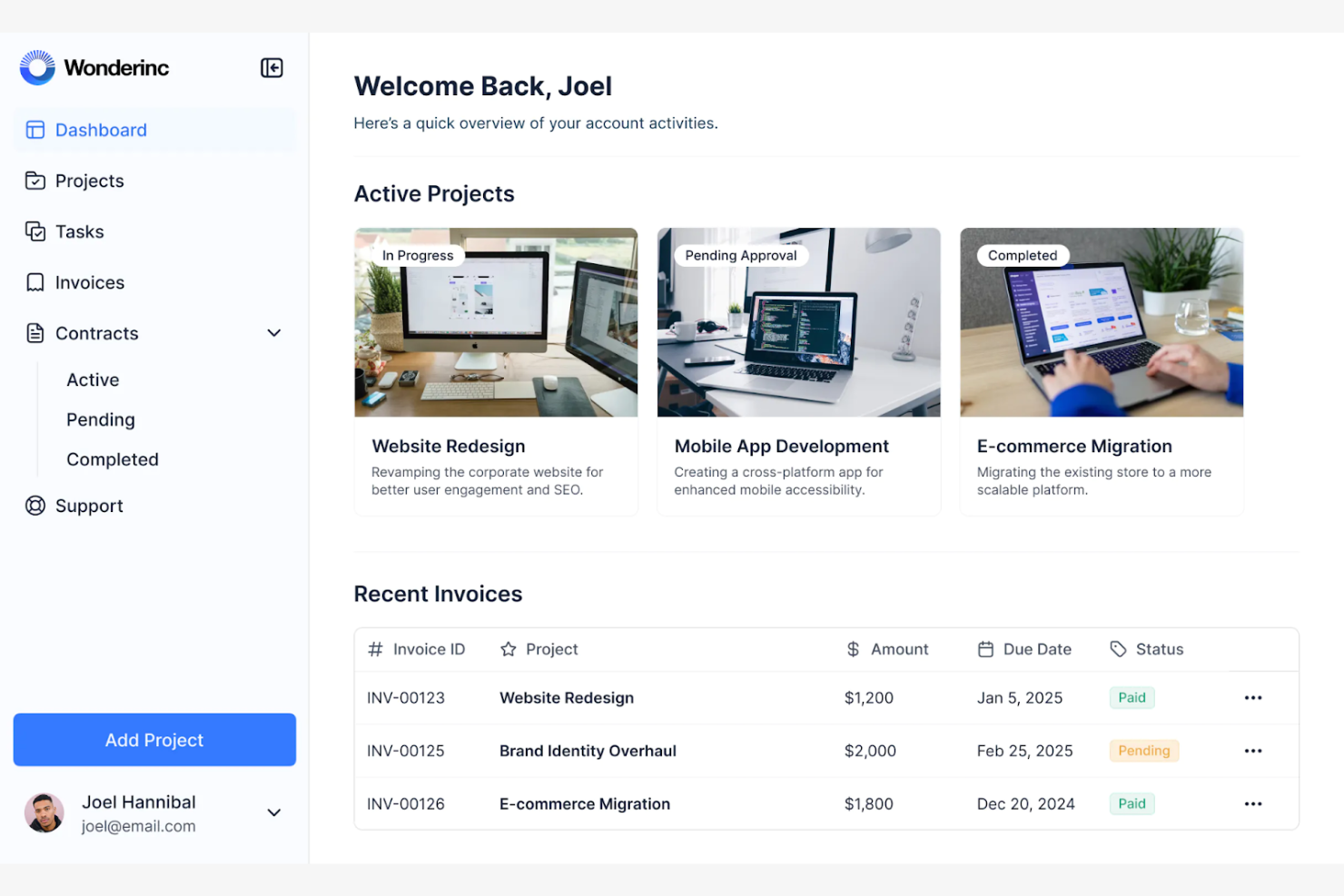
Softr is a no-code platform designed for businesses looking to create custom client portals and web applications without coding expertise. It primarily serves small to midsize companies and entrepreneurs wanting to build tailored solutions for their clients.
Why I picked Softr: It offers an intuitive drag-and-drop interface, making it simple for your team to create client portals without technical skills. You can customize layouts and features to fit your business needs, which can improve the client experience. Softr's ability to integrate with Airtable for data management adds flexibility to your projects. The platform's focus on no-code development allows you to quickly adapt to changing business requirements.
Standout Features and Integrations:
Features include pre-built templates that help you get started quickly, saving you time in the design process. You can also utilize the membership management features to control access and permissions for your clients.
Integrations include PayPal, Google Analytics, Mailchimp, and more.
Pros and Cons
Pros:
- Supports mobile-friendly portals
- Connects to multiple data sources
- Allows dynamic, personalized client views
Cons:
- Template-driven design
- Heavy reliance on external data tools

FuseBase
Best for database management
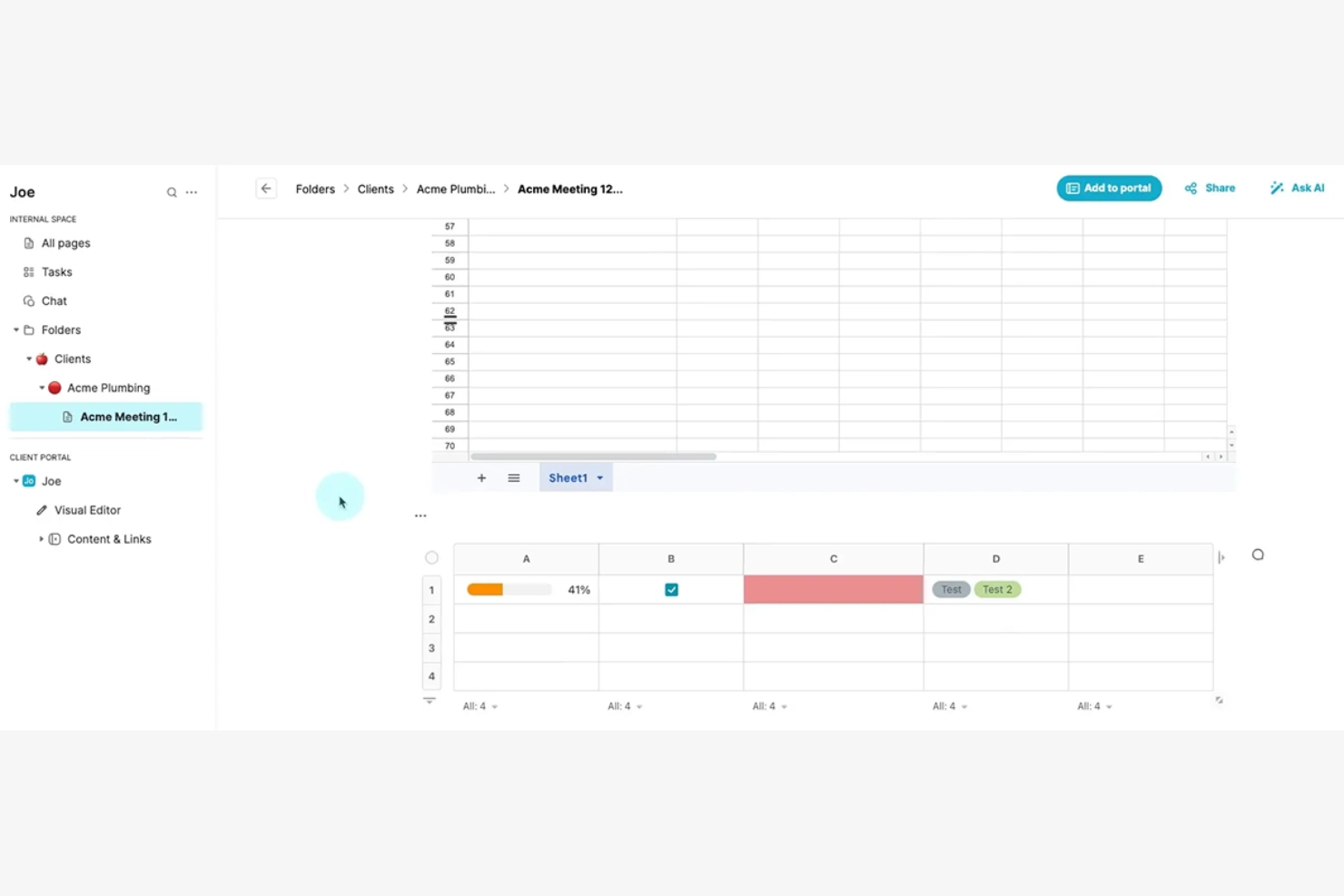
FuseBase is a client portal software designed for businesses that require efficient database management and secure data handling. It targets industries that need advanced data organization and client access control, such as finance and health care.
Why I picked FuseBase: It excels in database management, allowing you to manage large datasets and maintain data integrity with ease. The platform's focus on security and compliance makes it suitable for handling sensitive information. FuseBase also offers tools for real-time data collaboration, which can help facilitate strong teamwork and increase productivity.
Standout Features and Integrations:
Features include customizable data schemas that allow you to structure your data according to your business needs. You can also use the platform's secure access controls to protect sensitive information and maintain compliance with industry standards.
Integrations include Slack, Google Drive, Calendly, Airtable, and more.
Pros and Cons
Pros:
- Structured knowledge bases inside the portal
- Built-in CRM, eSignatures, and surveys
- Advanced database management
Cons:
- Limited for non-database tasks
- Performance may vary with larger workspaces

Best for finance professionals
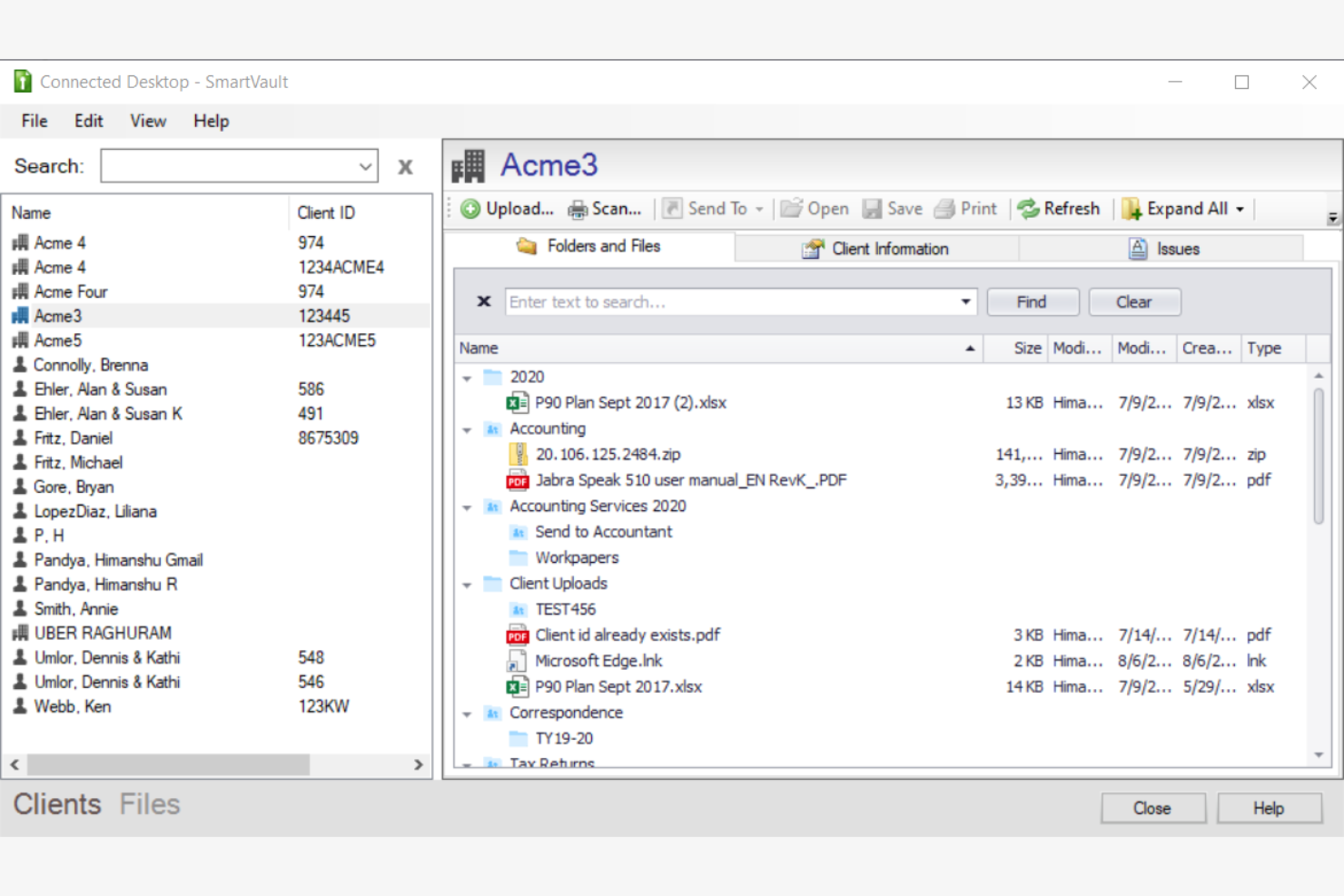
SmartVault is a client portal software focused on secure document storage and management, primarily serving accounting professionals and small businesses. It offers tools for file sharing, secure access, and compliance management.
Why I picked SmartVault: Its emphasis on document management helps keep your files organized and accessible. With bank-level encryption and audit logs, your team can maintain compliance with industry regulations. SmartVault's secure file sharing and access controls are designed to provide peace of mind when handling sensitive information. Its integration with popular accounting software makes it a valuable asset for professionals in finance.
Standout Features and Integrations:
Features include audit logs for tracking document access and maintaining compliance.
Integrations include QuickBooks, Xero, FreshBooks, Intuit ProSeries, DocuSign, and more.
Pros and Cons
Pros:
- Purpose-built for accounting and compliance-heavy firms
- Deep integrations with accounting ecosystems
- Advanced document collection tools
Cons:
- Less suitable for non-financial industries
- Document-centric design may feel restrictive
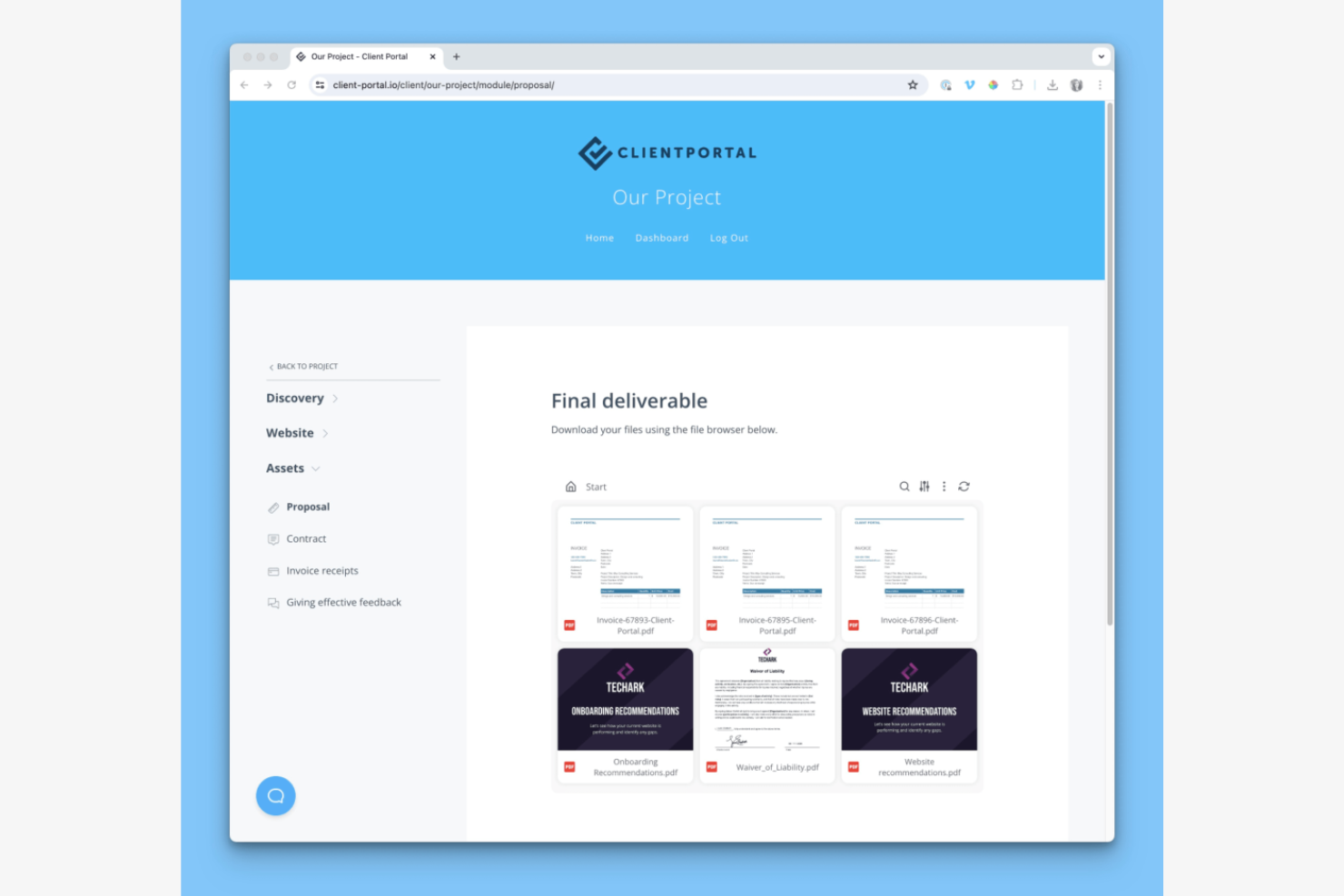
Client Portal is a WordPress plugin designed for freelancers and small agencies. It provides tools for project management and client collaboration and helps users manage projects, share files, and communicate with clients directly through their WordPress sites.
Why I picked Client Portal: It's a strong fit for WordPress users seeking a simple way to manage client interactions. The plugin integrates with existing WordPress themes and allows you to create branded client portals. Features such as project tracking and file sharing help improve the user experience, as you do not have to leave the WordPress environment. The ability to customize the portal to match your brand makes it especially appealing for small teams.
Standout Features and Integrations:
Features include project templates that help you organize tasks and deadlines. You can use its drag-and-drop interface to arrange project components and client information. The built-in file-sharing system allows your team to exchange documents and updates.
Integrations include QuickBooks, Zoho, Zapier, and more.
Pros and Cons
Pros:
- Drag-and-drop interface
- Transparent one-time pricing
- Strong WordPress integration
Cons:
- Lacks advanced project management features
- Limited to WordPress users


Zendo is an all-in-one client portal software aimed at agencies, providing tools for service selling, invoicing, and client communication. Its main users include web designers, developers, and marketers who need to manage client interactions and simplify business processes.
Why I picked Zendo: It supports team collaboration by offering real-time chat and automated payment collection, which are important for project coordination. You can create customizable service catalogs and workflows, making it flexible for various business needs. The platform's ability to impersonate clients for requests can help you improve your understanding of client needs and service delivery. With support for multiple payment methods, Zendo provides smooth transactions for your clients.
Standout Features and Integrations:
Features include real-time chat for direct communication and quick issue resolution. You can also automate payment collection, simplifying financial transactions for your team.
Integrations are not publicly listed.
Pros and Cons
Pros:
- Detailed client profiles with history and files
- Automated quoting, invoicing, and payment collection
- Real-time chat for quick communication
Cons:
- Limited enterprise-grade support
- Some features may require configuration and initial setup


Kitchen.co is a client portal software tailored for web designers and creative agencies, helping them manage client projects and communications. It offers tools for project management, invoicing, and client collaboration.
Why I picked Kitchen.co: It's designed specifically for creative professionals, with features such as customizable templates. The platform can help simplify project workflows and improve brand representation. Kitchen.co's resources are designed to empower users to create engaging online experiences, making it a good fit for those in the creative industry.
Standout Features and Integrations:
Features include project folder automation upon contract signing, a content collection system, and customizable client portals. You can also benefit from its educational resources and community support. Kitchen.co's focus on brand representation can help your internal teams manage their projects.
Integrations include Squarespace, Stripe, PayPal, Google Drive, Dropbox, and more.
Pros and Cons
Pros:
- Intuitive, low-friction interface
- Supports project folder automation
- Tailored for creative professionals
Cons:
- Its folder-based structure may feel restrictive
- Mainly focused on web design
Outro software de portal do cliente
Eis algumas opções adicionais de software de portal do cliente que não integraram a minha lista restrita, mas que vale a pena consultar:


How I Evaluate Client Portal Software
I evaluate these tools in two layers—what's required to give clients a real external workspace with secure access, and what separates a basic portal from one project managers actually trust.
Core Functionality (Table Stakes For This List)
When I'm selecting tools for my list, I rank each one on a scale from 0 (does not offer the functionality) to 5 (excels in this area) for each core functionality listed below. Then, I calculate the tool's total score into a percentage. Each tool needs to achieve a minimum total score of 65% to be considered for inclusion.
- Client-Facing Portal Access: I check whether clients get a dedicated login environment rather than just a shared link, and whether the portal can be branded to match your agency or firm's identity.
- Secure Document Sharing: The tool should support permission-based file exchange with version control, so clients can upload contracts or review SOWs without resorting to email attachments.
- Project Visibility & Tracking: I look for client-friendly views of milestones, timelines, and deliverable status that give clients enough context to track progress without exposing internal task-level detail.
- Client Communication Tools: Centralized messaging or threaded comments tied to specific tasks and deliverables matter here, replacing scattered email chains with in-context conversations.
- Approvals & Feedback Workflows: I evaluate whether clients can formally approve deliverables, request revisions, or sign off on milestones directly within the portal instead of through ad hoc messages.
- Granular Permissions & Access Control: Role-based permissions should let you control exactly what each client contact sees per project, folder, or document, especially when managing multiple client accounts.
Once I have a list of tools that meet this criteria, I consider what sets each platform apart.
Differentiating Factors (What Sets Vendors Apart)
Here's how I compare and contrast different vendors:
Standout Features
White-label branding matters when your clients log into a portal carrying your logo and custom domain—it builds trust and keeps your firm front and center. I also look for integrated billing and invoicing, which lets you tie payments to project milestones instead of bouncing between the portal and a separate accounting tool. Client intake forms are another separator, letting you collect project briefs and onboarding details before work begins to cut down on the back-and-forth that delays kickoff.
Beyond Features
I evaluate how well each portal connects to your existing stack—native integrations with tools like Jira, Asana, or HubSpot mean less manual syncing between your internal workflows and what clients see. Security also weighs heavily, especially when clients share contracts or sensitive deliverables; I check for SOC 2 compliance, encryption standards, and SSO support. Pricing structure matters too, since some tools charge per client portal while others charge per internal user, and the right model depends on whether you manage five clients or fifty.
Como escolher software de portal do cliente
É fácil perder-se em listas extensas de funcionalidades e estruturas de preços complexas. Para o ajudar a manter-se concentrado enquanto percorre o seu processo específico de seleção de software, eis uma lista de verificação dos fatores a ter em conta:
| Fator | O que considerar |
|---|---|
| Escalabilidade | A ferramenta acompanhará o crescimento da sua equipa? Considere os limites de utilizadores, o armazenamento de dados e a possibilidade de adicionar funcionalidades. Procure sinais de flexibilidade para acomodar o crescimento futuro sem custos adicionais. |
| Integrações | Estabelece ligação com as ferramentas que já utiliza? Verifique a compatibilidade com o seu CRM, e-mail e software de gestão de projetos. Evite ferramentas que exijam a introdução manual de dados entre sistemas. |
| Personalização | Pode adaptar a ferramenta aos seus processos? Confirme se permite personalizar a marca, ajustar fluxos de trabalho e criar experiências de utilizador personalizadas. Procure flexibilidade no design e nas definições dos utilizadores. |
| Facilidade de utilização | A ferramenta é intuitiva para todos os utilizadores? Procure uma interface simples, com uma navegação clara. Evite sistemas complexos que exijam formação extensiva. |
| Implementação e integração inicial | Com que rapidez pode começar? Avalie a disponibilidade de recursos de formação, a facilidade de configuração e o tempo necessário para a adoção completa. Considere se existe apoio do fornecedor durante a integração inicial. |
| Custo | Os preços estão de acordo com o seu orçamento? Compare o custo total, incluindo taxas ocultas ou custos adicionais por funcionalidades extra. Procure modelos de preços que se adequem ao seu plano financeiro. |
| Medidas de segurança | Como protege a ferramenta os seus dados? Verifique as normas de encriptação, os controlos de acesso e a conformidade com regulamentos como o RGPD ou a HIPAA. Dê prioridade a ferramentas com medidas de segurança robustas. |
O que é um software de portal do cliente?
Um software de portal do cliente é uma plataforma digital que permite às empresas partilhar informações e colaborar com os seus clientes online de forma segura. Profissionais como gestores de projetos, contabilistas e consultores utilizam estas ferramentas para melhorar a comunicação e gerir as relações com os clientes. As funcionalidades de partilha segura de ficheiros, comunicação com clientes e gestão de tarefas ajudam a organizar projetos e a manter a transparência. Estas ferramentas podem aumentar a satisfação dos clientes ao disponibilizarem um centro centralizado e acessível para todas as interações.
Funcionalidades
Ao selecionar um software de portal do cliente, esteja atento às seguintes funcionalidades principais:
- Partilha segura de ficheiros: Permite aos utilizadores partilhar documentos de forma segura, garantindo a proteção e a confidencialidade dos dados.
- Comunicação com clientes: Facilita o envio de mensagens diretas e atualizações, melhorando a interação e os tempos de resposta.
- Gestão de tarefas: Ajuda a organizar e acompanhar as tarefas dos projetos, mantendo os prazos sob controlo e as responsabilidades claras.
- Portais de cliente personalizáveis: Permitem às empresas adaptar o aspeto e a funcionalidade do portal às suas marcas e fluxos de trabalho.
- Relatórios automatizados: Gera relatórios automaticamente, poupando tempo e fornecendo aos clientes atualizações atempadas.
- Capacidades de integração: Estabelecem ligação com outras ferramentas, como software de CRM e de contabilidade, para garantir um fluxo de dados contínuo.
- Controlo de acesso: Fornece diferentes níveis de acesso aos utilizadores, protegendo informações sensíveis e mantendo a privacidade.
- Colaboração em tempo real: Permite que equipas e clientes trabalhem em conjunto em simultâneo, melhorando a produtividade e a tomada de decisões.
- Automatização de fluxos de trabalho: Executa tarefas repetitivas, permitindo que as equipas se concentrem em atividades mais estratégicas.
- Análises e informações: Fornece análise de dados para acompanhar o desempenho e tomar decisões fundamentadas.
Vantagens
A implementação de um software de portal do cliente proporciona várias vantagens à sua equipa e à sua empresa. Eis algumas das que pode esperar:
- Comunicação melhorada: As mensagens diretas e as atualizações apoiam as interações entre a sua equipa e os clientes, reduzindo os mal-entendidos.
- Poupança de tempo: Os relatórios automatizados e a automatização dos fluxos de trabalho reduzem as tarefas manuais, libertando tempo para trabalhos mais importantes.
- Segurança avançada: A partilha segura de ficheiros e o controlo de acesso protegem as informações sensíveis, mantendo a privacidade e a conformidade.
- Maior transparência: Os clientes podem aceder a atualizações e relatórios em tempo real, criando confiança e mantendo-se informados.
- Melhor organização: As funcionalidades de gestão de tarefas ajudam a manter os projetos no caminho certo, garantindo que todos conhecem as suas responsabilidades.
- Personalização: Os portais personalizáveis permitem adaptar a experiência do cliente à sua marca e aos seus processos empresariais.
- Informações baseadas em dados: As análises e informações fornecem dados valiosos para ajudar a tomar decisões fundamentadas e melhorar o desempenho.
Custos e preços
A seleção de um software de portal do cliente requer uma compreensão dos vários modelos de preços e planos disponíveis. Os custos variam consoante as funcionalidades, o tamanho da equipa, os complementos, entre outros fatores. A tabela abaixo resume os planos comuns, os seus preços médios e as funcionalidades normalmente incluídas nas soluções de software de portal do cliente:
Tabela de comparação de planos de software de portal do cliente
| Tipo de plano | Preço médio | Funcionalidades comuns |
|---|---|---|
| Plano gratuito | $0 | Partilha básica de ficheiros, armazenamento limitado e ferramentas básicas de comunicação. |
| Plano pessoal | $6-$35/utilizador/mês | Partilha segura de ficheiros, gestão básica de tarefas e comunicação com clientes. |
| Plano empresarial | $30-$200/utilizador/mês | Partilha avançada de ficheiros, portais personalizáveis e automatização de fluxos de trabalho. |
| Plano empresarial de grande escala | $300-$2000/utilizador/mês | Segurança robusta, integrações personalizadas e análise avançada. |
Perguntas frequentes sobre software de portal do cliente
\u003cspan style=\u0022font-weight: 400\u0022\u003eEis algumas respostas a perguntas frequentes sobre software de portal do cliente:\u003c/span\u003e
Qual é o principal objetivo do software de portal do cliente?
\u003cspan style=\u0022font-weight: 400\u0022\u003eO principal objetivo do software de portal do cliente é disponibilizar uma plataforma segura para as empresas interagirem e colaborarem com os seus clientes. Permite a partilha de ficheiros, a comunicação e a gestão de projetos e clientes num local centralizado. A sua equipa pode utilizá-lo para melhorar a comunicação com os clientes, o acompanhamento de projetos e a segurança dos dados. Ao utilizar um portal do cliente, pode oferecer aos clientes uma experiência personalizada, simplificar processos e criar relações mais sólidas.\u003c/span\u003e
O software de portal do cliente pode integrar-se com outras ferramentas?
\u003cspan style=\u0022font-weight: 400\u0022\u003eSim, a maioria dos softwares de portal do cliente pode integrar-se com outras ferramentas. Embora as capacidades de integração variem, permitem estabelecer ligação a sistemas de gestão de relações com clientes (CRM), ferramentas de gestão de projetos e software de contabilidade. Isto facilita um fluxo de dados contínuo e reduz a introdução manual de dados. Consulte as opções de integração do software para confirmar se este se liga aos seus sistemas existentes. As integrações podem poupar tempo e aumentar a produtividade, tornando o fluxo de trabalho da sua equipa mais eficiente.\u003c/span\u003e
Quão seguro é o software de portal do cliente?
\u003cspan style=\u0022font-weight: 400\u0022\u003eO software de portal do cliente foi concebido para ser seguro, com funcionalidades como encriptação e controlos de acesso. As medidas de segurança variam, pelo que é importante escolher um software que cumpra as normas do setor, como o RGPD ou a HIPAA, quando aplicável. Procure funcionalidades como a autenticação de dois fatores e os registos de auditoria para manter os dados da sua empresa e dos seus clientes seguros. Confirmar a segurança ajuda a proteger as informações sensíveis dos seus clientes e a manter a confiança.\u003c/span\u003e
O software de portal do cliente é adequado para pequenas empresas?
\u003cspan style=\u0022font-weight: 400\u0022\u003eSim, o software de portal do cliente é adequado para pequenas empresas. Muitos fornecedores oferecem planos escaláveis que respondem às necessidades de empresas de todas as dimensões. As pequenas empresas podem beneficiar de uma melhor comunicação com os clientes, organização e gestão de dados. Ao selecionar o software, considere o seu orçamento, as funcionalidades de que necessita e o grau de integração com as ferramentas que utiliza atualmente. Investir num software de portal do cliente pode melhorar as operações da sua empresa e as relações com os clientes.\u003c/span\u003e