

Os 10 Melhores Softwares de Gestão de Clientes com IA Analisados em 2026

10 Lista restrita do melhor software de gestão de clientes com IA


Gerir clientes pode ser uma dor de cabeça. Tem de conciliar prazos, comunicação e uma quantidade interminável de dados. É fácil sentir-se sobrecarregado. É aí que entra o software de gestão de clientes com IA. Ajuda-o a manter-se organizado e a melhorar as interações com os clientes.
Dediquei algum tempo a testar e analisar várias ferramentas para encontrar a opção mais adequada para si. O meu objetivo é oferecer-lhe uma lista imparcial e bem fundamentada das melhores opções. Destacarei funcionalidades, vantagens e desvantagens, para que possa tomar uma decisão informada.
Neste artigo, encontrará soluções adaptadas a diferentes necessidades e dimensões de equipas. Quer tenha uma pequena empresa emergente ou uma grande empresa, há aqui algo para si. Vamos descobrir a ferramenta certa para a sua equipa.
Why Trust Our Software Recommendations
Our team has been testing and reviewing software since 2012. As project managers ourselves, we know how difficult—and important—it is to choose the right software.
For this guide, we evaluated tools using hands-on testing and independent research, scoring tools using our selection criteria. We also draw on insights from industry thought leaders and practicing project management experts.
Our reviews reflect our human editorial judgment, not a sales pitch.
Expert reviewers:
Tabela de comparação de software de gestão de clientes com IA
Esta tabela de comparação resume os detalhes de preços das minhas principais escolhas de software de gestão de clientes com IA:
| Tool | Best For | Trial Info | Price | ||
|---|---|---|---|---|---|
|
1
|
Best for automating email campaigns |
Free trial available |
From $37.6/month | Website | |
|
2
|
Best for low-code customization |
Not available |
From $15/user/month | Website | |
|
3
|
Best for omnichannel customer support |
Free demo available |
Pricing upon request | Website | |
|
4
|
Best for proactive relationship management |
Free demo available |
From $1,500/user/year | Website | |
|
5
|
Best for sales pipeline management |
14-day free trial |
From $14/user/month (billed annually) | Website | |
|
6
|
Best for enterprise scalability |
30-day free trial |
From $25/user/month | Website | |
|
7
|
Best for lead generation and outreach |
Free plan available |
From $49/user/month (billed annually) | Website | |
|
8
|
Best for AI-driven sales insights |
Free demo available |
Pricing upon request | Website | |
|
9
|
Best for visual project management |
Free plan + 14-day free trial + free demo available |
From $9/user/month (billed annually) | Website | |
|
10
|
Best for small teams and startups |
Free plan + 14-day free trial available |
From $35/user/month (billed annually) | Website |

Avaliações do melhor software de gestão de clientes com IA
Abaixo encontram-se os meus resumos detalhados do melhor software de gestão de clientes com IA que integrou a minha lista restrita. As minhas avaliações apresentam uma análise detalhada das principais funcionalidades, vantagens & desvantagens, integrações e casos de utilização ideais de cada ferramenta, para o ajudar a encontrar a melhor opção para si.

Best for automating email campaigns
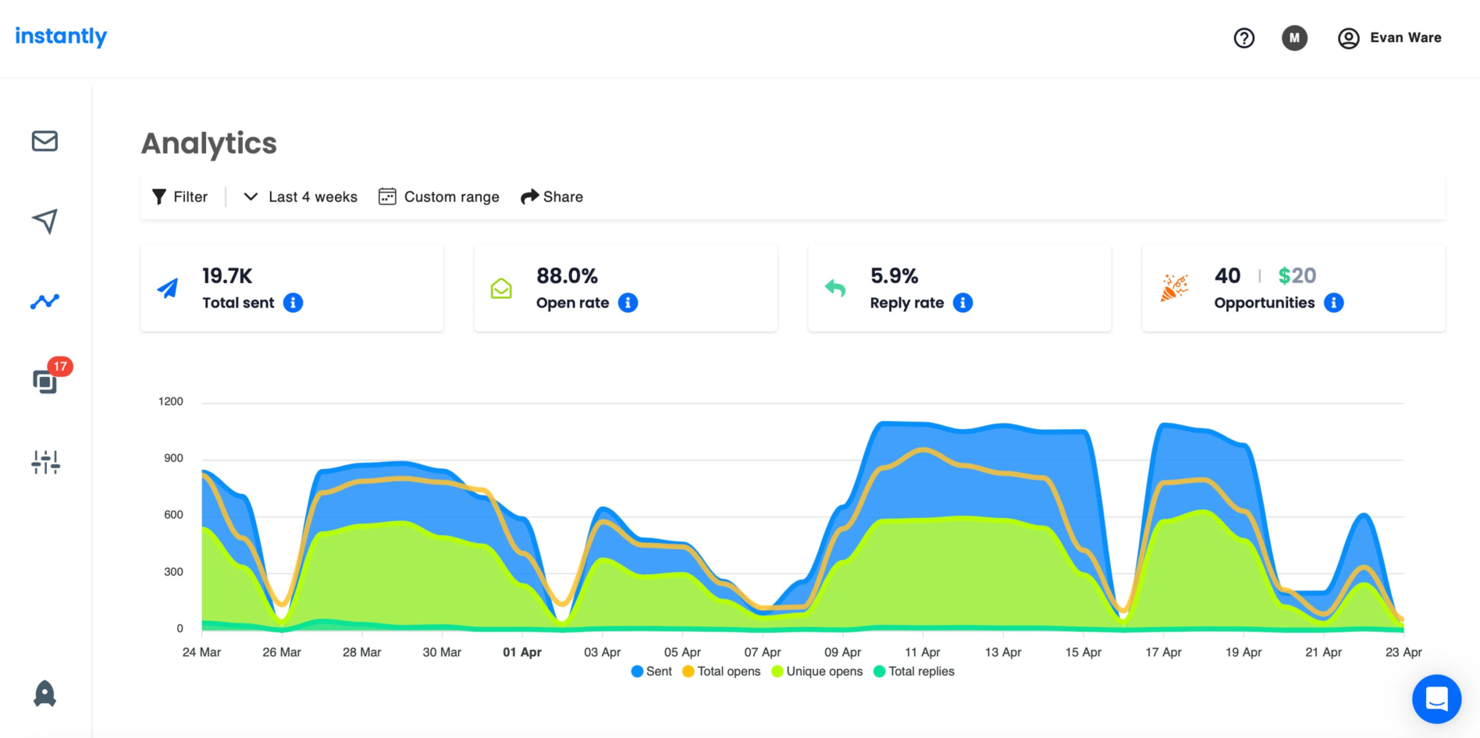
Instantly is an email automation platform designed for marketing teams and small businesses wanting to enhance their outreach efforts. It focuses on automating email campaigns and managing large-scale email distributions to improve engagement and conversion rates.
Why I picked Instantly: Instantly offers detailed email automation capabilities, making it an ideal choice for businesses seeking to scale their email marketing efforts. Its USP is the ability to automate and personalize email sequences with ease.
The tool features A/B testing and detailed analytics to help you optimize your campaigns. With Instantly, you can manage multiple email accounts and track performance in real-time.
Standout features & integrations:
Features include advanced email scheduling to ensure timely delivery, real-time analytics for tracking campaign performance, and A/B testing to refine your outreach strategies. These features help you optimize email campaigns for better results. Instantly also offers customizable templates to streamline your email creation process.
Integrations include Salesforce, HubSpot, Mailchimp, Zapier, Google Workspace, Microsoft Outlook, Slack, LinkedIn, ActiveCampaign, and Pipedrive.
Pros and Cons
Pros:
- Customizable email templates
- Real-time performance tracking
- Effective email automation
Cons:
- Requires ongoing monitoring
- Occasional deliverability issues

Creatio
Best for low-code customization
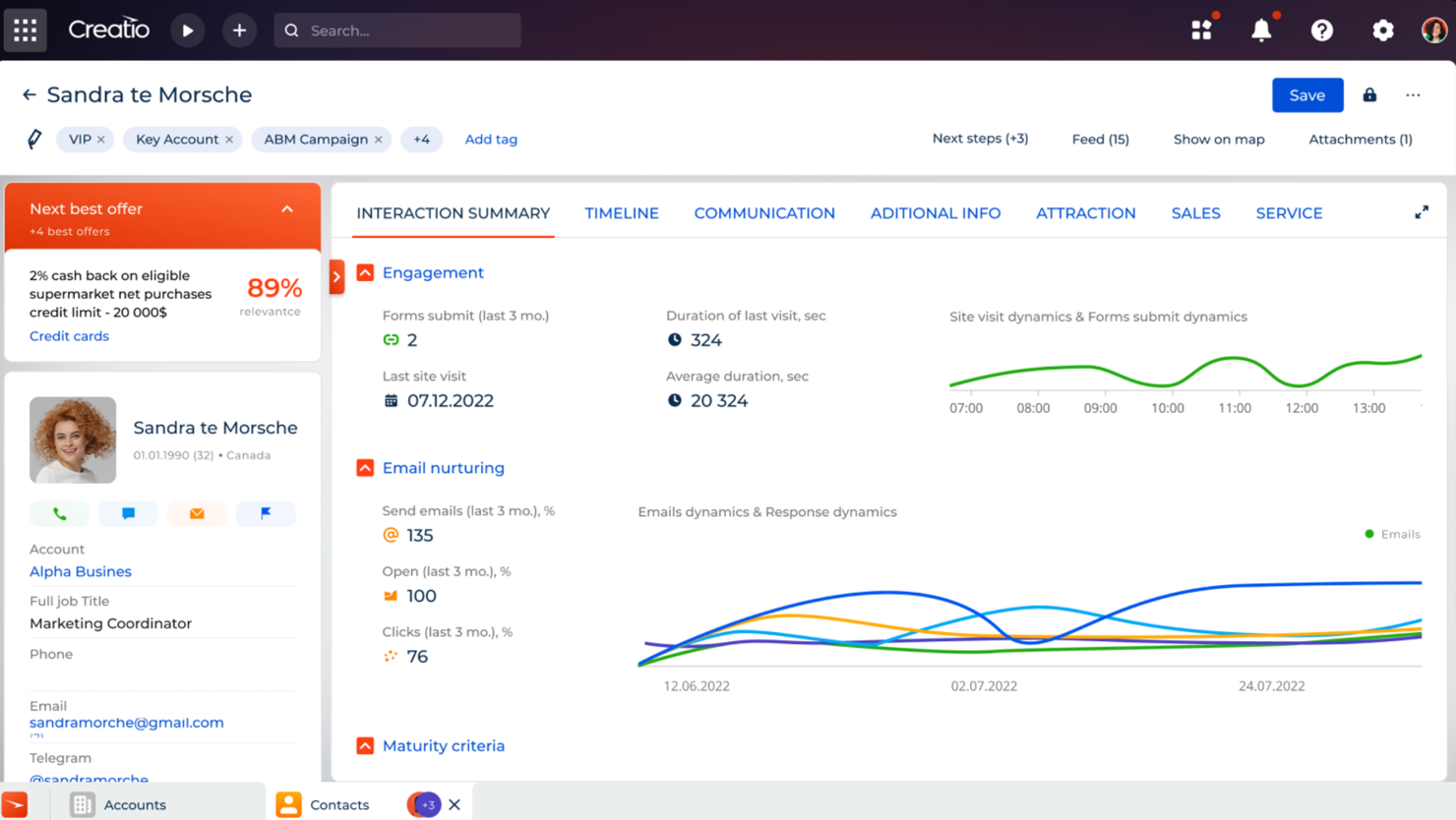
Creatio is a low-code platform designed for businesses looking to automate workflows and customer interactions. It's popular among companies that need customizable solutions for sales, marketing, and service processes.
Why I picked Creatio: Creatio offers a low-code environment that allows you to tailor applications easily without deep technical knowledge. Its USP lies in its customization capabilities, making it ideal for businesses needing specific solutions.
The platform includes features like drag-and-drop editing, process automation, and AI-driven insights. These functionalities contribute to its standout ability to adapt to unique business requirements.
Standout features & integrations:
Features include a drag-and-drop process designer, AI-driven recommendations, and end-to-end workflow automation. These features help you create and modify applications quickly, making it flexible for various business needs. Creatio's AI capabilities enhance decision-making by providing actionable insights.
Integrations include Microsoft 365, Google Workspace, Mailchimp, Twilio, QuickBooks, Zendesk, HubSpot, Slack, DocuSign, and Salesforce.
Pros and Cons
Pros:
- Detailed business process management
- Advanced lead tracking
- Effective CRM handling
Cons:
- Difficulties with version updates
- Occasional minor bugs

Kustomer
Best for omnichannel customer support
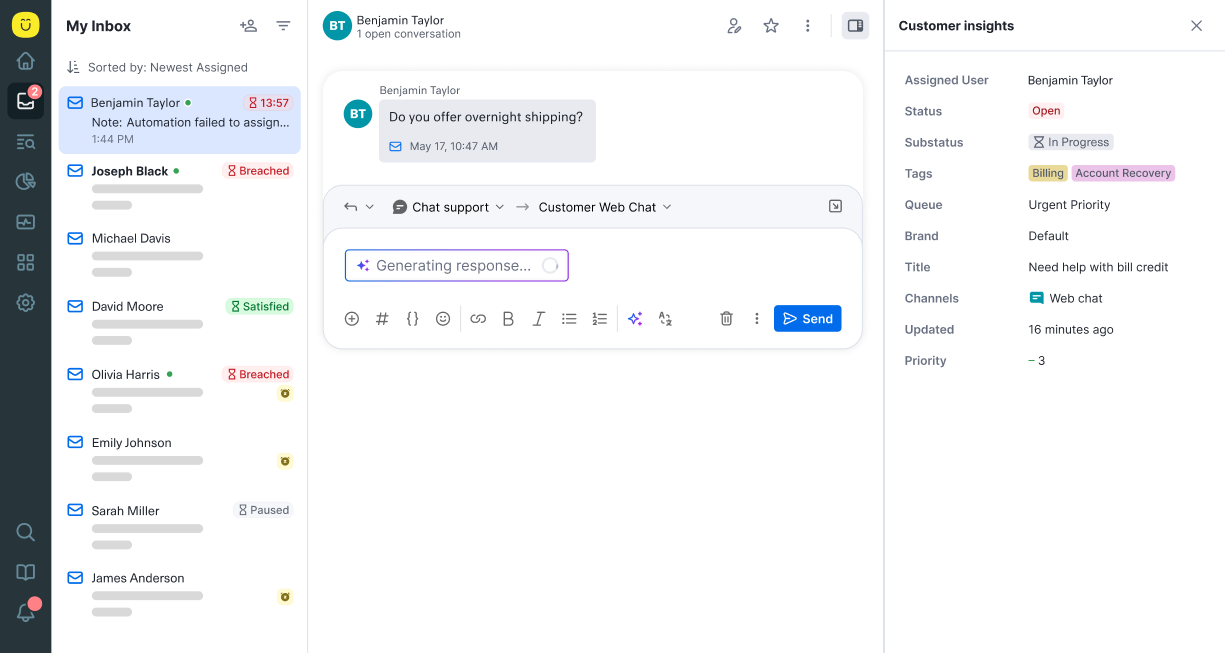
Kustomer is a customer service platform aimed at businesses needing to manage customer interactions across multiple channels. It helps teams deliver personalized support by consolidating customer data and communication in one place.
Why I picked Kustomer: Kustomer excels in providing omnichannel support, allowing your team to handle customer interactions seamlessly across various platforms. Its USP is the ability to integrate multiple communication channels into a single timeline.
This feature ensures your team can deliver consistent and personalized responses. With Kustomer, you can improve customer satisfaction by having a complete view of each customer's history and preferences.
Standout features & integrations:
Features include a unified customer timeline to track interactions, automated workflows to streamline tasks, and AI-driven insights to improve decision-making. These features help your team work efficiently and focus on customer satisfaction. Kustomer also offers customizable dashboards to tailor your support operations.
Integrations include Salesforce, Slack, Shopify, Magento, Zapier, Mailchimp, Jira, Microsoft Teams, Talkdesk, and Aircall.
Pros and Cons
Pros:
- Customizable support dashboards
- Effective omnichannel management
- Detailed customer timelines
Cons:
- Requires ongoing maintenance
- Setup can be time-consuming

Spiro
Best for proactive relationship management
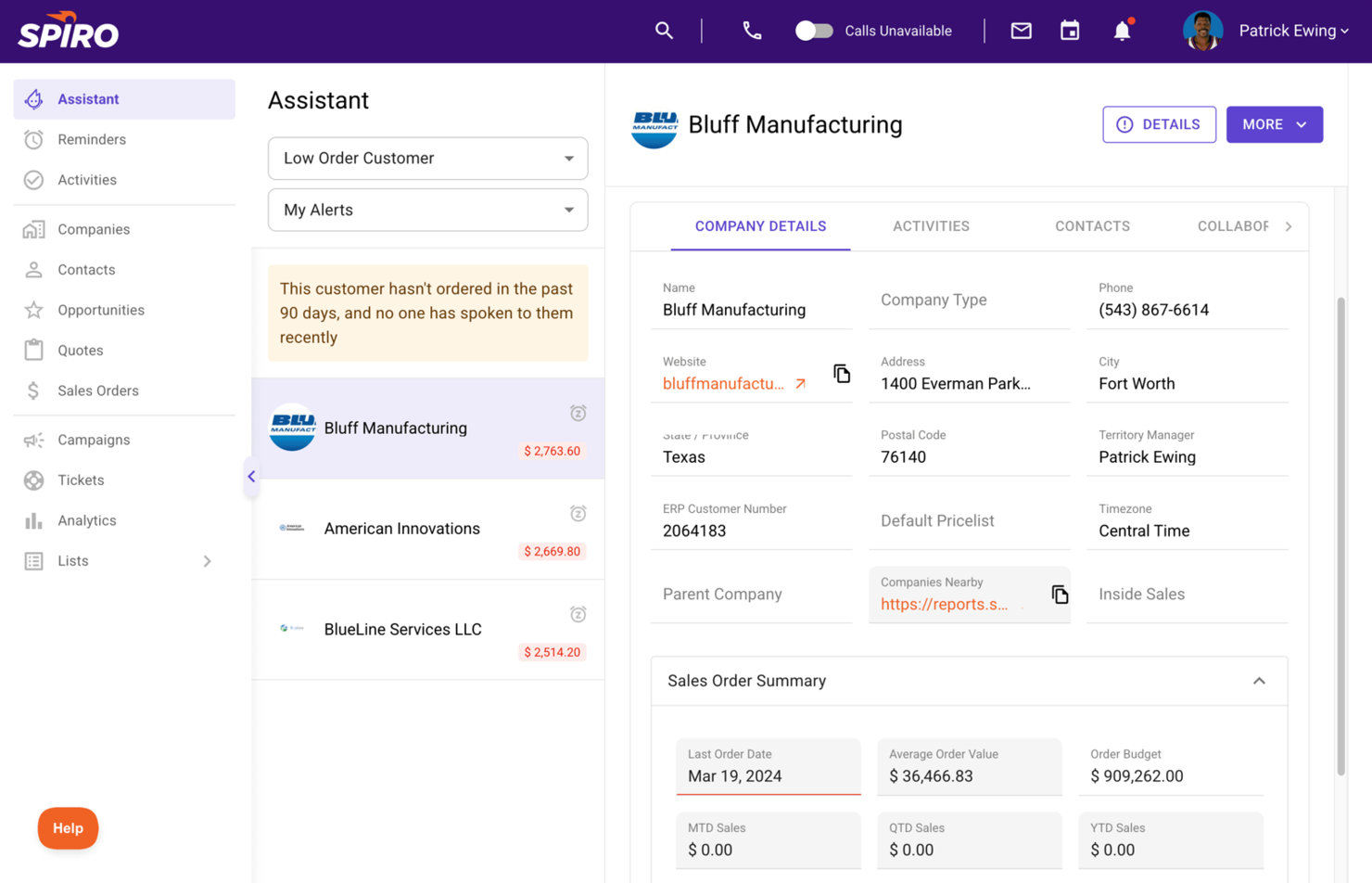
Spiro is a proactive relationship management platform designed for sales teams looking to enhance customer interactions and sales processes. It helps users automate data entry, manage pipelines, and gain insights into sales activities to improve productivity.
Why I picked Spiro: Spiro focuses on proactive relationship management, offering features like automatic data capture and proactive recommendations. Its USP is the ability to anticipate your needs and provide actionable insights without manual input.
The tool's AI-driven sales assistant helps you prioritize tasks and follow-ups. With Spiro, your team can reduce administrative work and concentrate on closing deals.
Standout features & integrations:
Features include real-time sales insights to keep you informed, task automation to minimize manual entry, and pipeline visibility to track your sales progress. These features help your team stay organized and focused on high-value activities. Spiro.ai also offers customizable dashboards to tailor your view of sales data.
Integrations include Salesforce, HubSpot, Microsoft Dynamics 365, Slack, Gmail, Outlook, QuickBooks, Xero, LinkedIn, and Mailchimp.
Pros and Cons
Pros:
- Real-time sales insights
- Automatic data entry
- Proactive sales recommendations
Cons:
- Requires training for full benefits
- Limited customization options

Best for sales pipeline management
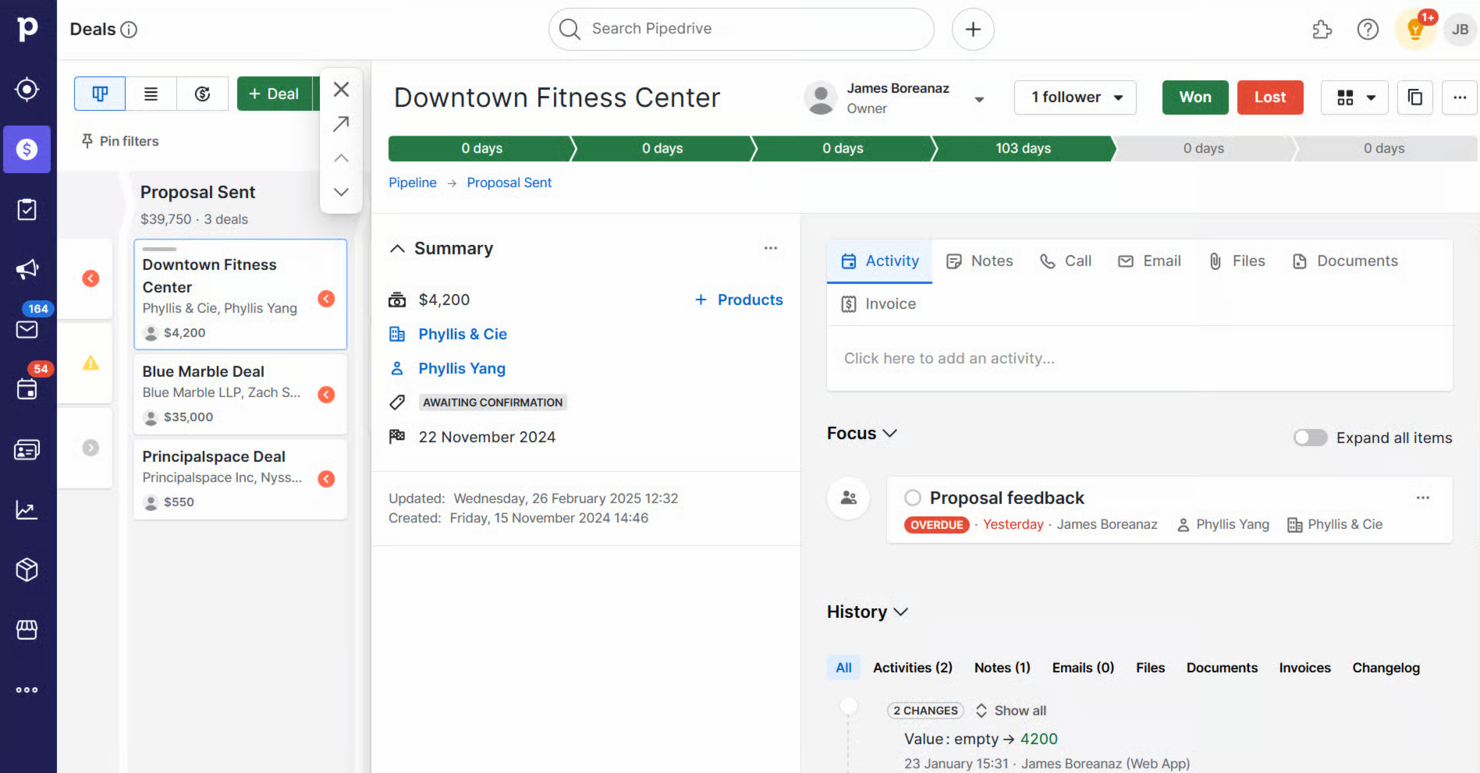
Pipedrive is a sales CRM tool designed for sales teams who need to manage their sales pipelines effectively. It helps users track leads, automate repetitive tasks, and visualize the sales process to improve conversion rates.
Why I picked Pipedrive: Pipedrive is tailored for sales pipeline management, offering features such as a visual sales pipeline and customizable stages. Its USP lies in its intuitive interface that helps your team focus on sales activities.
The software features automation tools to automate manual tasks and utilize forecasting capabilities to predict sales outcomes. With Pipedrive, you can streamline your sales process and close deals more efficiently.
Standout features & integrations:
Features include advanced reporting to analyze sales performance, goal setting to keep your team motivated, and email tracking to monitor client interactions. These features ensure your team can focus on selling while keeping track of important metrics. Pipedrive also offers a mobile app to manage sales on the go.
Integrations include Slack, Mailchimp, Trello, Zapier, Google Workspace, Microsoft Outlook, HubSpot, QuickBooks, Xero, and Asana.
Pros and Cons
Pros:
- Customizable sales stages
- Mobile app for on-the-go access
- Strong forecasting abilities
Cons:
- Occasional sync issues
- May require setup assistance

Best for enterprise scalability
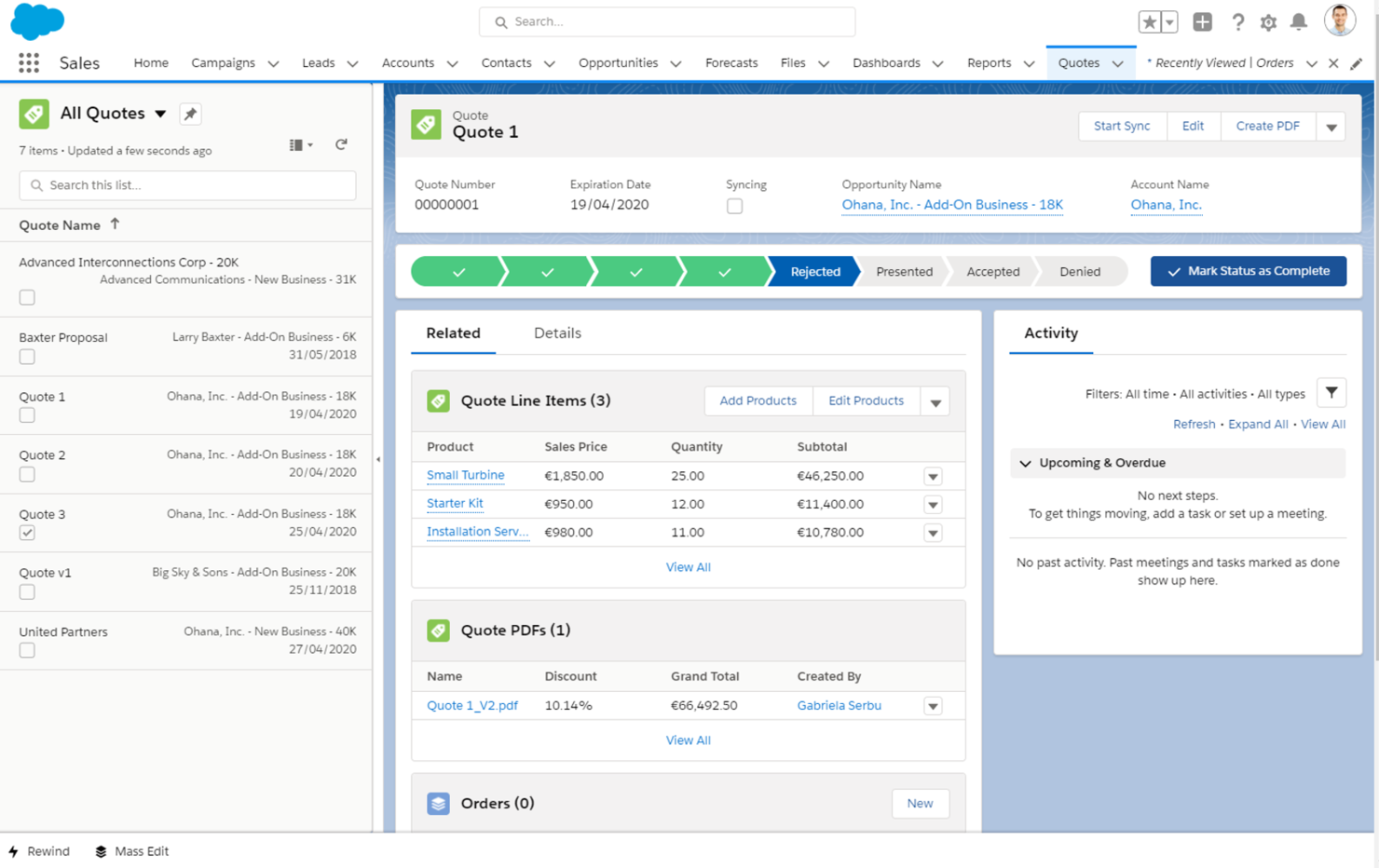
Salesforce is a cloud-based CRM platform designed for enterprises looking to manage customer relationships and business operations at scale. It serves large organizations with tools for sales, customer service, marketing, and analytics.
Why I picked Salesforce: Salesforce offers vast scalability options, making it suitable for enterprises with complex needs. Its USP is its ability to grow with your business, providing features like customizable dashboards and advanced reporting.
The software's AppExchange offers a wide range of extensions to enhance functionality. With Salesforce, your team can efficiently manage customer interactions and data across various departments.
Standout features & integrations:
Features include customizable dashboards to visualize key metrics, AI-driven analytics for better decision-making, and automation tools to simplify repetitive tasks. These features help your team focus on strategic activities. Salesforce's advanced reporting tools provide insights into customer behavior and business performance.
Integrations include Microsoft Outlook, Google Workspace, Slack, Mailchimp, QuickBooks, LinkedIn, Dropbox, Docusign, HubSpot, and Zendesk.
Pros and Cons
Pros:
- Advanced reporting capabilities
- Strong community support
- Extensive app marketplace
Cons:
- Requires dedicated admin resources
- Frequent updates require adjustments

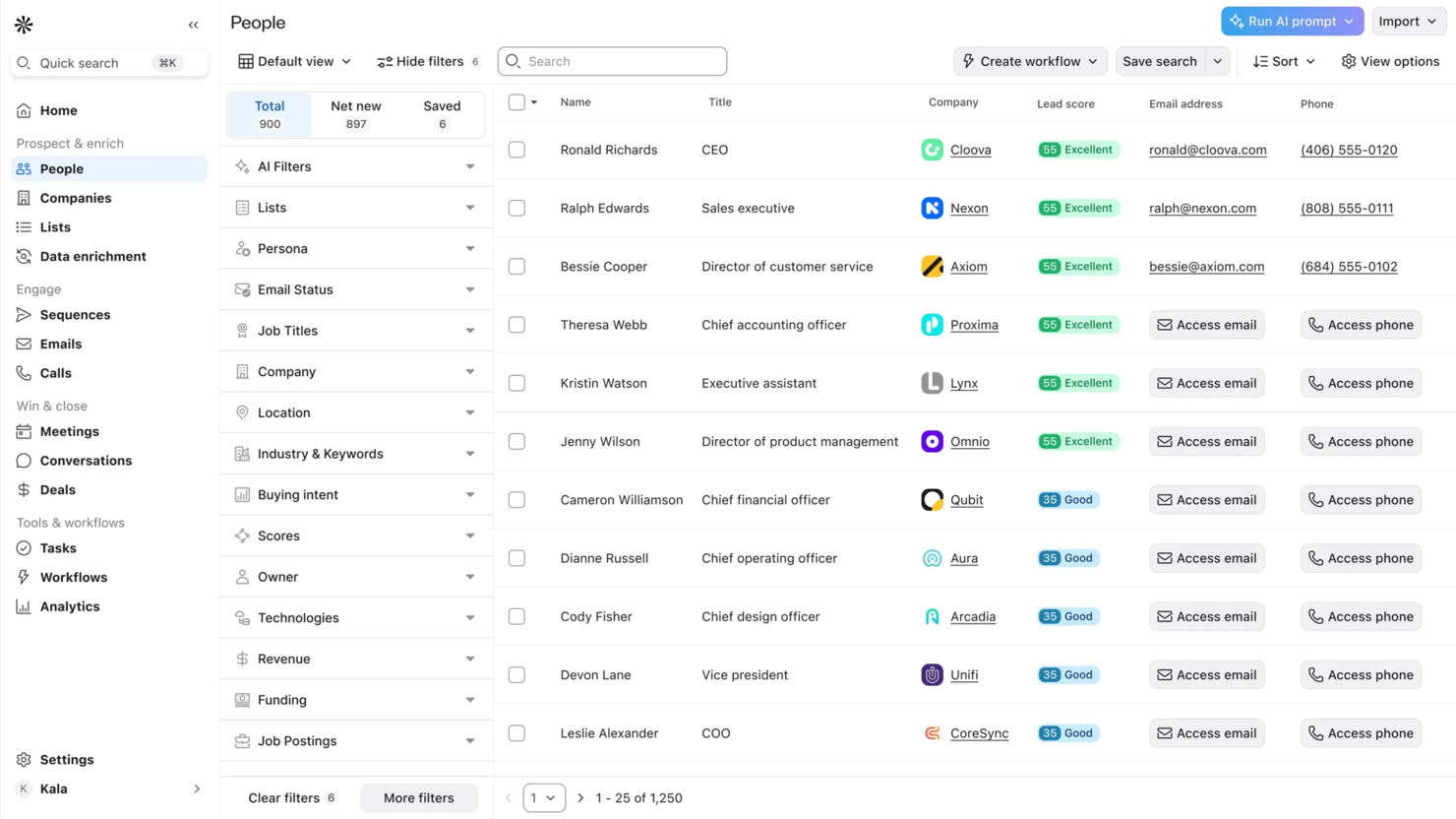
Apollo is an AI-driven platform tailored for B2B sales professionals, focusing on lead generation and multichannel outreach. It serves sales teams by automating prospecting, enriching data, and facilitating communication to boost sales efficiency.
Why I picked Apollo: Apollo excels in lead generation with its extensive database of over 200 million contacts. Its Pipeline Builder and multichannel outreach tools make it easy to manage prospects and automate follow-ups.
The platform's AI assistants help you personalize interactions and improve engagement. Apollo's data enrichment ensures that your team always has accurate and up-to-date information.
Standout features & integrations:
Features include a call assistant to streamline communication, a meeting scheduler to optimize your calendar, and a Chrome extension for enhanced functionality. These features ensure your team can maintain productive and efficient sales processes. Apollo also offers automated follow-ups to keep prospects engaged.
Integrations include Salesforce, HubSpot, Gmail, Outlook, Slack, Microsoft Teams, Google Calendar, Zapier, LinkedIn, and QuickBooks.
Pros and Cons
Pros:
- Versatile multichannel outreach
- Effective AI assistants
- Large contact database
Cons:
- Some data may need verification
- Learning curve for new users

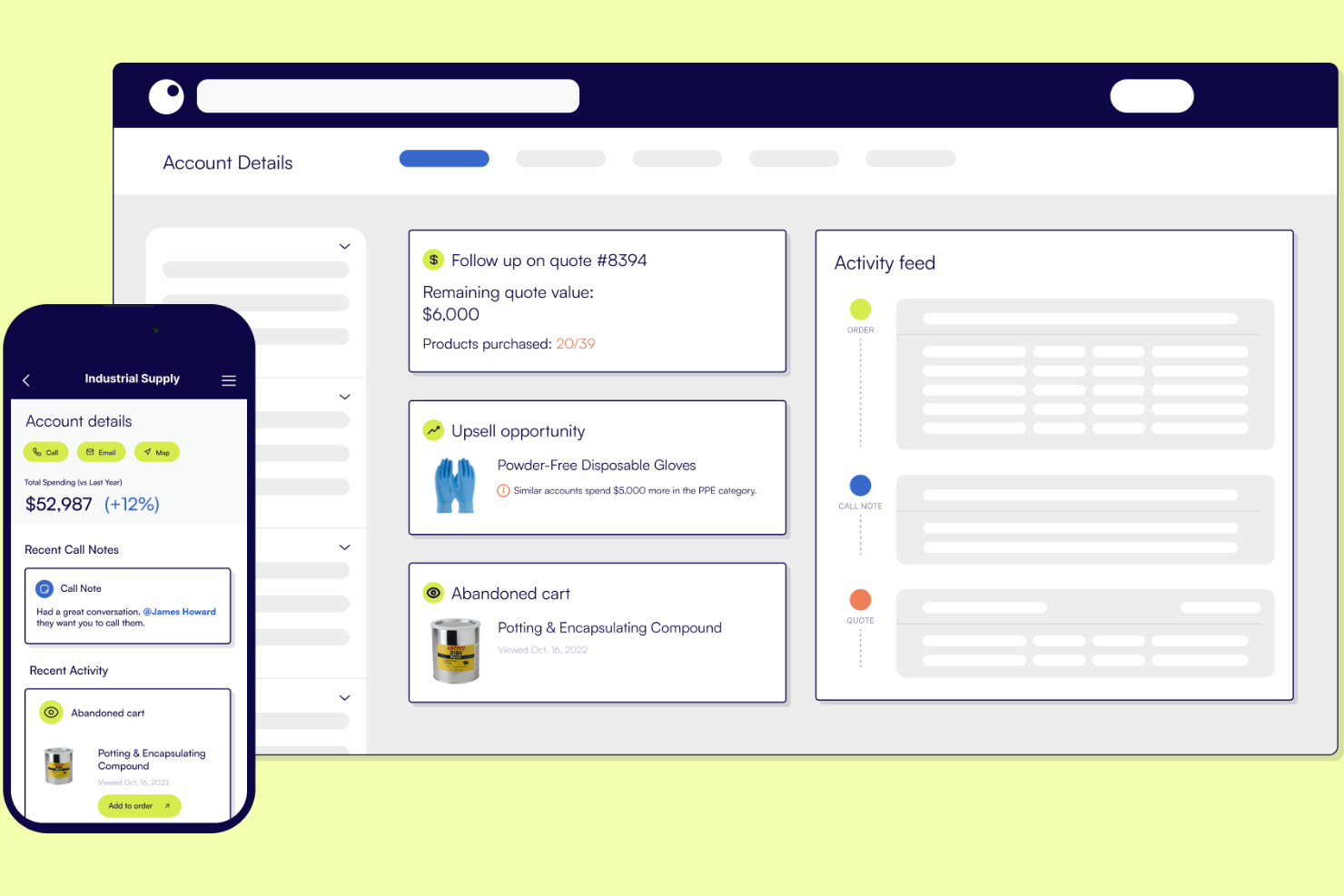
Proton is an AI-powered CRM specifically designed for distribution sales teams looking to enhance their sales processes and efficiency. It focuses on providing actionable insights and improving sales accountability, allowing teams to increase their sales and improve customer interactions.
Why I picked Proton: Proton's USP lies in its AI-driven insights that help sales teams identify opportunities and make informed decisions. The platform continuously analyzes data to provide actionable recommendations to your team.
Its focus on distribution sales makes it a specialized tool for targeting this sector. Proton also offers SOC 2 Type II compliance, ensuring your data is secure.
Standout features & integrations:
Features include real-time data analysis to identify sales opportunities, AI-driven recommendations to guide your sales strategy, and automated data capture to reduce manual entry. These features ensure your team can focus on strategic sales activities. Proton also provides customizable dashboards to tailor insights to your team's needs.
Integrations include Salesforce, Microsoft Dynamics 365, HubSpot, Gmail, Outlook, QuickBooks, Xero, LinkedIn, Slack, and Mailchimp.
Pros and Cons
Pros:
- SOC 2 Type II compliance
- Real-time data analysis
- AI-driven sales insights
Cons:
- May need customization for full benefits
- Limited to distribution sales focus
Best for visual project management
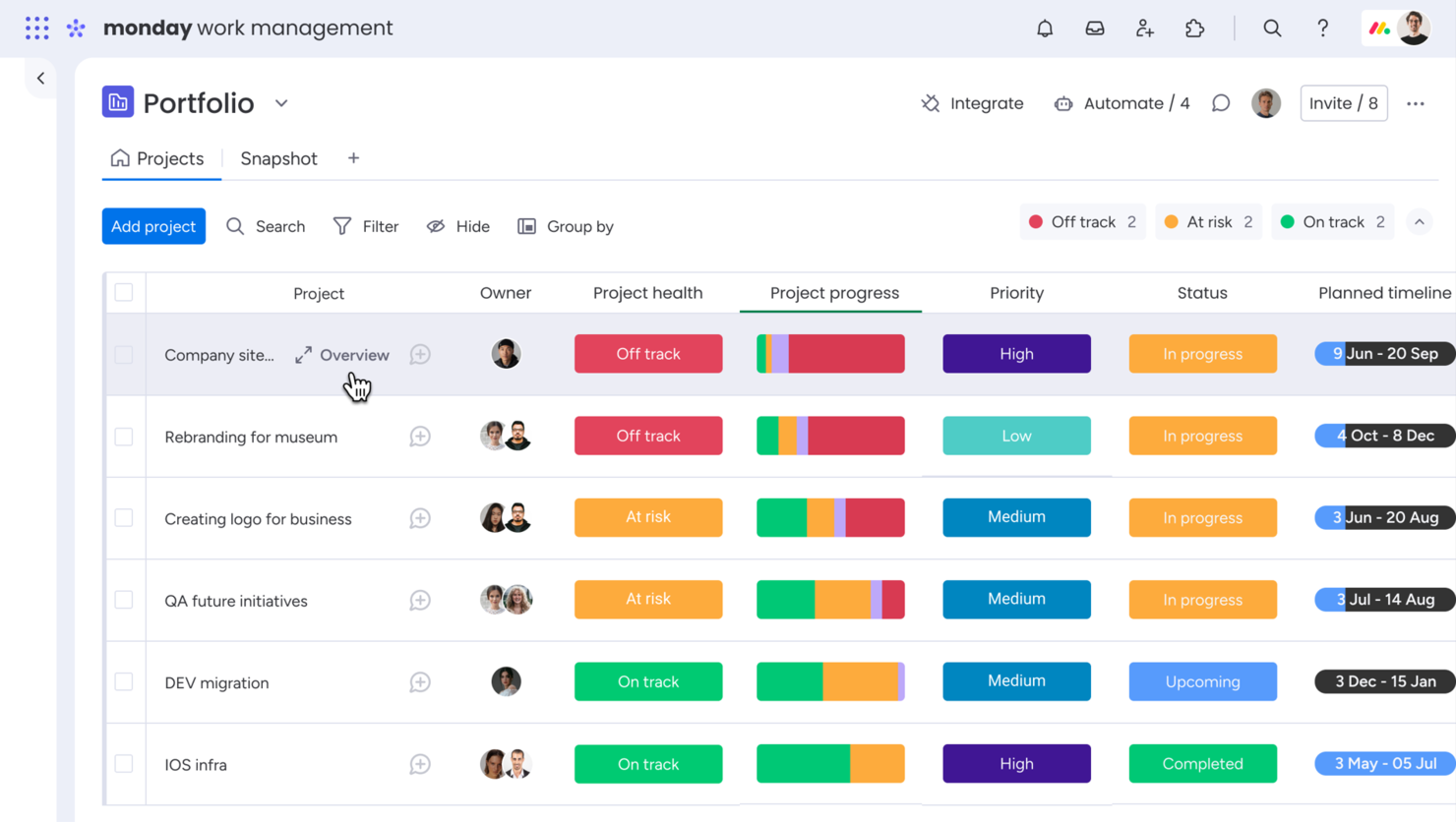
monday.com is a work operating system that caters to teams of all sizes, enabling them to manage projects and workflows visually. It provides tools for task management, team collaboration, and project tracking, making it a valuable solution for organizations that need a flexible project management system.
Why I picked monday.com: Monday.com excels in visual project management, offering customizable boards that help your team organize tasks and projects. Its USP is the intuitive drag-and-drop interface that simplifies project tracking.
The platform offers a range of templates to help you get started quickly, tailored to meet team-specific needs. With monday.com, you can easily visualize workflows and improve team collaboration.
Standout features & integrations:
Features include time tracking to monitor project progress, automation to reduce manual tasks, and customizable templates for different use cases. These features ensure your team stays on track and manages time effectively. monday.com's visual dashboards provide a clear overview of project status.
Integrations include Slack, Google Drive, Microsoft Teams, Outlook, Zoom, Dropbox, HubSpot, Trello, Asana, and Zendesk.
Pros and Cons
Pros:
- Easy drag-and-drop interface
- Visual workflow management
- Wide range of templates
Cons:
- Complexity in advanced automation
- Occasional lag with large data sets
New Product Updates from monday AI Workspace
monday AI Workspace Adds Human Approval Routing
monday AI Workspace adds a human-in-the-loop approval block to AI Workflows, sending approval requests and routing workflow paths based on responses. For more information, visit monday AI Workspace's official site.

Attio
Best for small teams and startups
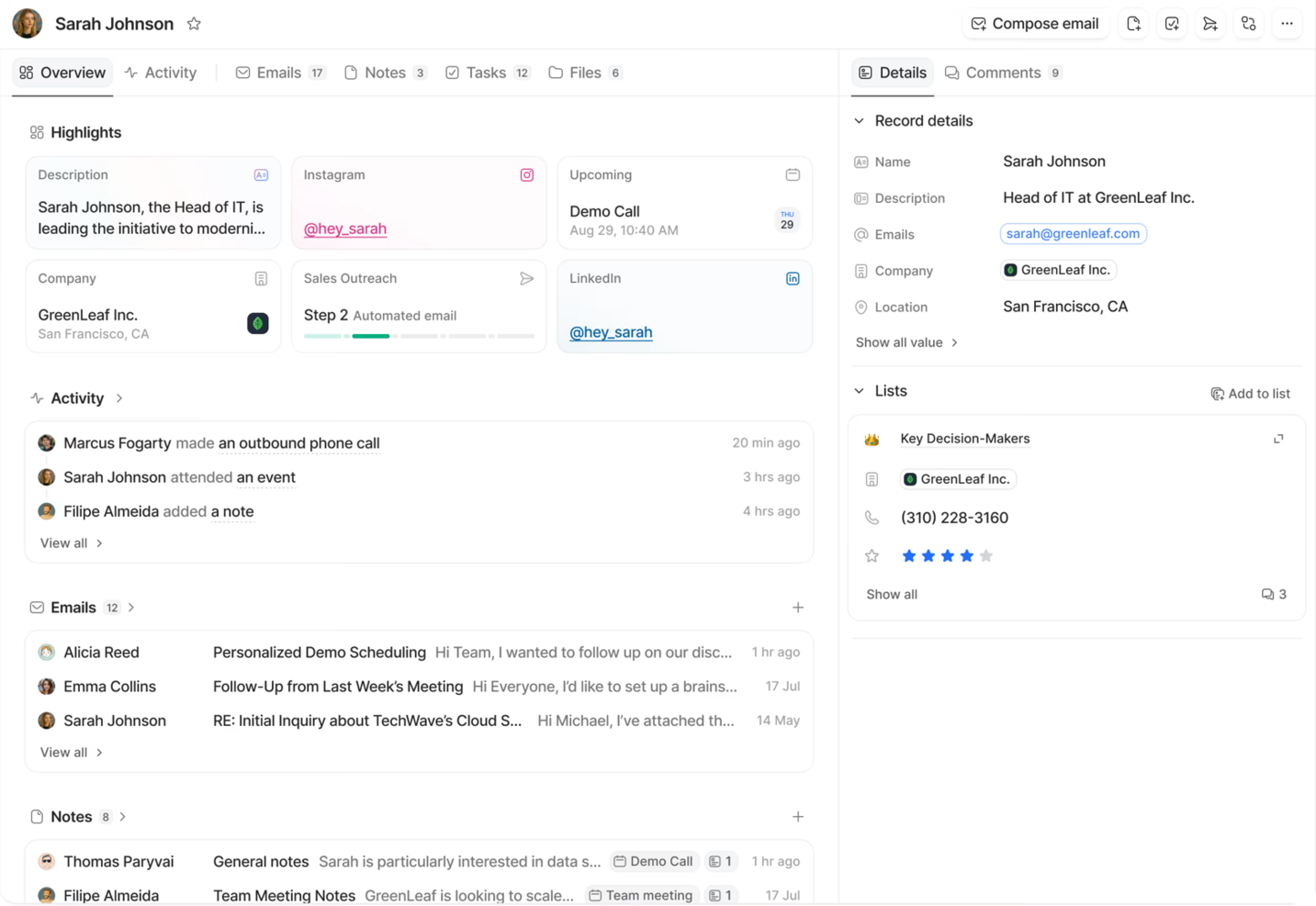
Attio is a CRM platform designed for small teams and startups looking to enhance their client relationship management. It focuses on data management, workflow customization, and pipeline tracking to meet the needs of growing businesses.
Why I picked Attio: Attio offers an intuitive interface tailored for small teams, making it easy to manage client data without technical complexity. Its USP is the focus on startups, providing features like customizable workflows and advanced filtering.
These features help you organize and analyze client information efficiently. The platform's pipeline tracking ensures you can oversee your sales process with ease.
Standout features & integrations:
Features include intelligent automation for complex processes, real-time data synchronization, and customizable workflows. These features help your team maintain an organized and accurate database. Attio's reporting tools offer detailed insights into your client interactions.
Integrations include Gmail, Outlook, Slack, HubSpot, Salesforce, Zapier, Google Calendar, Microsoft Teams, QuickBooks, and LinkedIn.
Pros and Cons
Pros:
- Quick setup process
- Customizable workflows
- Efficient data management
Cons:
- Occasional sync delays
- Some integrations may be missing
New Product Updates from Attio
Attio Redesigns Record Pages with Table-Style Relationship Tabs
Attio introduces redesigned record pages with table-style relationship tabs and expanded record drawer views. These updates simplify data management and record navigation. For more information, visit Attio’s official site.
 .
Outro software de gestão de clientes com IA
Eis algumas opções adicionais de software de gestão de clientes com IA que não entraram na minha lista restrita, mas que ainda assim vale a pena conhecer:
-
Relevance AI
For data-driven customer insights
-
MiClient
For proposal management automation


How I Evaluate AI Client Management Software
I look for tools where AI does more than label a feature—it should actually draft client updates, flag at-risk accounts, or automate intake workflows without constant hand-holding. From there, I split my evaluation into core functionality every tool needs to qualify and differentiating factors that separate the best fits from the rest.
Core Functionality (Table Stakes For This List)
When I'm selecting tools for my list, I rank each one on a scale from 0 (does not offer the functionality) to 5 (excels in this area) for each core functionality listed below. Then, I calculate the tool's total score into a percentage. Each tool needs to achieve a minimum total score of 65% to be considered for inclusion.
- AI-Powered Client Communication: I check whether the tool can draft status updates, summarize meeting notes, or generate client emails using AI rather than requiring manual writing from scratch.
- Centralized Client Records: Each tool should maintain unified client profiles that pull together contacts, documents, and interaction history so teams aren't digging through separate systems.
- AI Insights & Predictions: I look for AI that surfaces actionable signals like at-risk accounts or engagement drops, not just charts that relabel standard reporting as "intelligent."
- Project-Client Linkage: The platform should tie client records directly to tasks, milestones, and deliverables so account managers can see project health without switching tools.
- Automated Workflows: I evaluate how well the tool handles repeatable client processes like onboarding sequences, approval routing, and follow-up triggers with minimal manual setup.
- Client Reporting Dashboards: Reporting should go beyond raw data—I look for AI-generated summaries and client-facing views that save teams from building slide decks every week.
Once I have a list of tools that meet the criteria, I consider what sets each platform apart.
Differentiating Factors (What Sets Vendors Apart)
Here's how I compare and contrast different vendors:
Standout Features
AI meeting intelligence is a major differentiator—tools that auto-transcribe client calls and extract action items save hours of post-meeting admin. I also evaluate predictive health scoring, where AI flags accounts showing disengagement signals before a renewal conversation catches you off guard. White-label client portals matter for agencies that want branded dashboards clients can log into for real-time project visibility without extra back-and-forth.
Beyond Features
Integration depth matters—I check whether a tool syncs bidirectionally with CRMs like Salesforce or HubSpot and PM platforms like Jira or Asana, since client data living in silos defeats the purpose. AI model transparency is another factor I weigh, especially whether vendors let you control data usage and customize AI tone per client. I also evaluate pricing structure, because per-seat models can punish growing agencies while per-client pricing often scales better for services teams managing dozens of accounts.
Como escolher software de gestão de clientes com IA
É fácil perder-se em listas extensas de funcionalidades e estruturas de preços complexas. Para o ajudar a manter o foco enquanto percorre o seu processo específico de seleção de software, apresentamos uma lista de verificação dos fatores a ter em conta:
| Fator | O que considerar |
|---|---|
| Escalabilidade | O software pode crescer com a sua empresa? Verifique se suporta um aumento do número de clientes e de utilizadores sem sacrificar o desempenho ou a facilidade de utilização. |
| Integrações | Estabelece ligação às suas ferramentas existentes? Certifique-se de que permite a integração com o seu CRM, e-mail e outras aplicações empresariais essenciais. |
| Personalização | Pode adaptar o software às suas necessidades? Procure opções para modificar painéis, fluxos de trabalho e definições sem exigir um apoio informático extensivo. |
| Facilidade de utilização | A sua equipa considerá-lo-á intuitivo? Teste a interface e a navegação quanto à sua simplicidade, para garantir uma adoção rápida por parte dos utilizadores. |
| Implementação e integração inicial | Quanto tempo demora a começar? Avalie o tempo e os recursos necessários para a configuração, a migração de dados e a formação. |
| Custo | Enquadra-se no seu orçamento? Compare os planos de preços e procure taxas ocultas. Considere o valor proporcionado em relação ao custo. |
| Medidas de segurança | Os seus dados e as informações dos clientes estão protegidos? Verifique a existência de encriptação, controlos de acesso e conformidade com normas do setor, como o GDPR ou a HIPAA. |
O que é o software de gestão de clientes com IA?
O software de gestão de clientes com IA é uma ferramenta concebida para ajudar as empresas a gerir as relações e as interações com os clientes de forma mais eficiente, utilizando inteligência artificial. Os profissionais de vendas, as equipas de apoio ao cliente e os gestores de contas utilizam normalmente estas ferramentas para melhorar a comunicação com os clientes e a prestação de serviços.
A introdução automatizada de dados, a análise preditiva e as funcionalidades de comunicação personalizada facilitam a organização das informações dos clientes, a previsão das necessidades dos clientes e a oferta de experiências adaptadas. Estas ferramentas proporcionam um valor significativo ao pouparem tempo, reduzirem os erros e melhorarem a satisfação dos clientes.
Funcionalidades
Ao selecionar um software de gestão de clientes com IA, esteja atento às seguintes funcionalidades principais:
- Introdução automatizada de dados: Elimina a introdução manual ao recolher e organizar automaticamente as informações dos clientes, poupando tempo e reduzindo os erros.
- Análise preditiva: Analisa os dados para prever as necessidades e os comportamentos dos clientes, ajudando as equipas a tomar decisões informadas.
- Comunicação personalizada: Adapta as mensagens e as interações com base nos dados dos clientes, melhorando o envolvimento e a satisfação.
- Painéis personalizáveis: Permitem aos utilizadores modificar a interface para apresentar métricas e informações relevantes, melhorando a facilidade de utilização.
- Suporte omnicanal: Integra vários canais de comunicação numa única plataforma, garantindo interações consistentes com os clientes.
- Informações baseadas em IA: Fornece recomendações práticas com base na análise de dados, orientando os utilizadores na otimização das relações com os clientes.
- Capacidades de integração: Estabelece ligação a outras ferramentas empresariais, como sistemas de CRM e de e-mail, garantindo um fluxo de dados contínuo.
- Automação de tarefas: Automatiza tarefas de rotina e acompanhamentos, libertando tempo para atividades de maior valor.
- Medidas de segurança: Protege os dados dos clientes através de encriptação e controlos de acesso, garantindo a conformidade com os regulamentos relativos aos dados.
- Análise de dados em tempo real: Oferece informações atualizadas sobre as interações com os clientes, permitindo respostas e ajustes atempados.
Benefícios
A implementação de um software de gestão de clientes com IA proporciona vários benefícios à sua equipa e à sua empresa. Eis alguns dos benefícios que pode esperar:
- Maior eficiência: Automatiza as tarefas de rotina e a introdução de dados, permitindo que a sua equipa se concentre em atividades estratégicas.
- Tomada de decisões melhorada: Oferece análise preditiva e informações baseadas em IA, ajudando a sua equipa a tomar decisões informadas com base nos dados.
- Melhor envolvimento dos clientes: Proporciona comunicação personalizada e suporte omnicanal, garantindo interações adaptadas que aumentam a satisfação.
- Maior precisão dos dados: Reduz os erros através da recolha automatizada de dados, garantindo que as informações dos seus clientes estão sempre atualizadas.
- Segurança reforçada: Garante a proteção dos dados dos clientes através de encriptação e funcionalidades de conformidade, proporcionando-lhe tranquilidade quanto à segurança dos dados.
- Integração contínua: Estabelece ligação às ferramentas existentes, permitindo um fluxo de dados e uma colaboração eficientes entre plataformas.
- Capacidade de resposta em tempo real: Fornece análise de dados em tempo real, permitindo ajustes rápidos e respostas atempadas às necessidades dos clientes.
Custos e preços
A seleção de software de gestão de clientes com IA requer uma compreensão dos vários modelos de preços e planos disponíveis. Os custos variam consoante as funcionalidades, o tamanho da equipa, os complementos e outros fatores. A tabela abaixo resume os planos comuns, os seus preços médios e as funcionalidades normalmente incluídas nas soluções de software de gestão de clientes com IA:
Tabela de comparação de planos de software de gestão de clientes com IA
| Tipo de plano | Preço médio | Funcionalidades comuns |
|---|---|---|
| Plano gratuito | $0 | Gestão básica de contactos, armazenamento de dados limitado e suporte padrão. |
| Plano pessoal | $5-$25/utilizador/mês | Monitorização de dados melhorada, relatórios básicos e integrações de e-mail. |
| Plano empresarial | $30-$60/utilizador/mês | Análises avançadas, automatização de fluxos de trabalho e painéis personalizáveis. |
| Plano empresarial de grande dimensão | $70-$150/utilizador/mês | Funcionalidades de segurança abrangentes, acesso à API, suporte premium e integrações personalizadas. |
Perguntas frequentes sobre software de gestão de clientes com IA
Eis algumas respostas a perguntas frequentes sobre software de gestão de clientes com IA: