

As 10 melhores opções de software gratuito de gestão de clientes recomendadas para 2026

Lista restrita do melhor software gratuito de gestão de clientes


O software gratuito de gestão de clientes dá à sua equipa acesso a ferramentas essenciais para acompanhar contactos, gerir interações com clientes e organizar funis de vendas — sem custos iniciais elevados. Se está à procura de soluções gratuitas, é provável que esteja a equilibrar orçamentos apertados com a necessidade de manter os dados dos clientes organizados e acessíveis a toda a equipa.
Escolher o software gratuito de gestão de clientes adequado pode ajudá-lo a automatizar tarefas, melhorar a visibilidade e apoiar a colaboração. Nesta lista, encontrará opções de confiança que oferecem planos ou períodos de teste gratuitos, para poder comparar funcionalidades e escolher a opção mais adequada ao seu fluxo de trabalho.
Why Trust Our Software Recommendations
Our team has been testing and reviewing software since 2012. As project managers ourselves, we know how difficult—and important—it is to choose the right software.
For this guide, we evaluated tools using hands-on testing and independent research, scoring tools using our selection criteria. We also draw on insights from industry thought leaders and practicing project management experts.
Our reviews reflect our human editorial judgment, not a sales pitch.
Expert reviewers:
Tabela comparativa de software gratuito de gestão de clientes
Eis os custos base de cada uma das ferramentas que entraram na minha lista restrita:
| Tool | Best For | Trial Info | Price | ||
|---|---|---|---|---|---|
| 1 | Best for project tracking features | Free plan + 7-day free trial + free demo available | From $12/user/month | Website | |
| 2 | Best for simple contact organization | Free plan + 14-day free trial available | From $22/user/month | Website | |
| 3 | Best for all-in-one client tools | Free plan + demo available | Pricing upon request | Website | |
| 4 | Best for open-source customization | 30-day free trial | From $15/user/month | Website | |
| 5 | Best for integrated email campaigns | 15-day free trial + free demo available | From $12/user/month (billed annually) | Website | |
| 6 | Best with extensive app integrations | 30-day free trial | From $25/user/month | Website | |
| 7 | Best with built-in telephony features | Free plan + 15-day free trial + free demo available | From $49/organization/month (billed annually) | Website | |
| 8 | Best with marketing automation included | Free plan available | From $8.99/user/month | Website | |
| 9 | Best for unlimited data storage | Free plan available | From $10/month | Website | |
| 10 | Best for unlimited user access | 28-day free trial + free plan available | From $20/seat/month | Website |
Avaliações do melhor software gratuito de gestão de clientes
Abaixo encontrará os meus resumos detalhados do software gratuito de gestão de clientes que entrou na minha lista restrita. As minhas avaliações apresentam uma análise detalhada das funcionalidades, dos melhores casos de utilização e das integrações de cada plataforma, para o ajudar a encontrar a melhor opção para a sua equipa.

Flowlu
Best for project tracking features
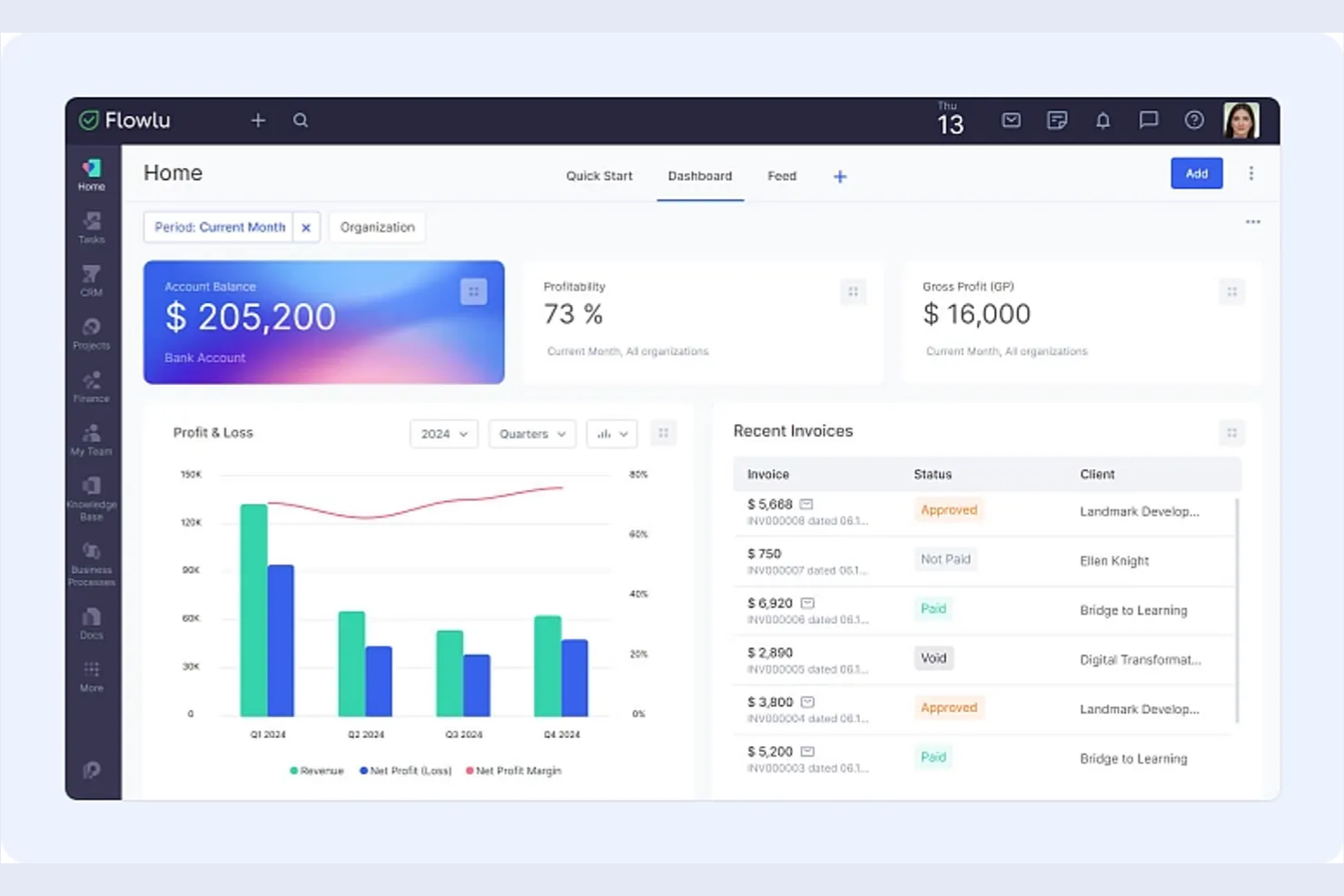
If you’re looking for a client management platform with built-in project tracking, Flowlu is worth a look. It’s designed for teams that need to manage client relationships alongside tasks, projects, and workflows in one place. Flowlu can help agencies, consultancies, and service businesses keep client work organized from first contact through project delivery.
Why I Picked Flowlu
What sets Flowlu apart for me is how deeply it integrates project tracking with client management. I see this as a strong fit for teams that need to manage client communications, tasks, and project milestones all in one place. Flowlu’s project workspace lets you assign tasks, set deadlines, and track progress for each client, while also keeping all related files and discussions organized. This level of project visibility is especially useful for agencies and service businesses juggling multiple client projects at once.
Flowlu Key Features
Some other features that stand out for teams considering Flowlu as a free client management solution include:
- Client Portal: Give clients access to their own dashboard for project updates, invoices, and communication.
- Invoicing and Payments: Generate invoices, track payments, and manage billing directly within the platform.
- Knowledge Base: Build and share internal or client-facing knowledge bases to centralize important information.
- Time Tracking: Log billable and non-billable hours for tasks and projects to monitor team productivity.
Flowlu Integrations
Integrations include Gmail, Microsoft Outlook, Google Drive, Dropbox, OneDrive, Twilio, Stripe, PayPal, Mailchimp, and Slack.
What's Free?
Flowlu offers a free-forever plan for up to 2 users. The free plan includes unlimited projects and contacts but limits storage to 1 GB and restricts access to advanced features like automation and custom fields.
Pros and Cons
Pros:
- Invoicing and payment tracking included
- Unlimited projects and contacts on free plan
- Built-in client portal for external collaboration
Cons:
- No native integration with QuickBooks
- Free plan limits storage to 1 GB

Best for simple contact organization
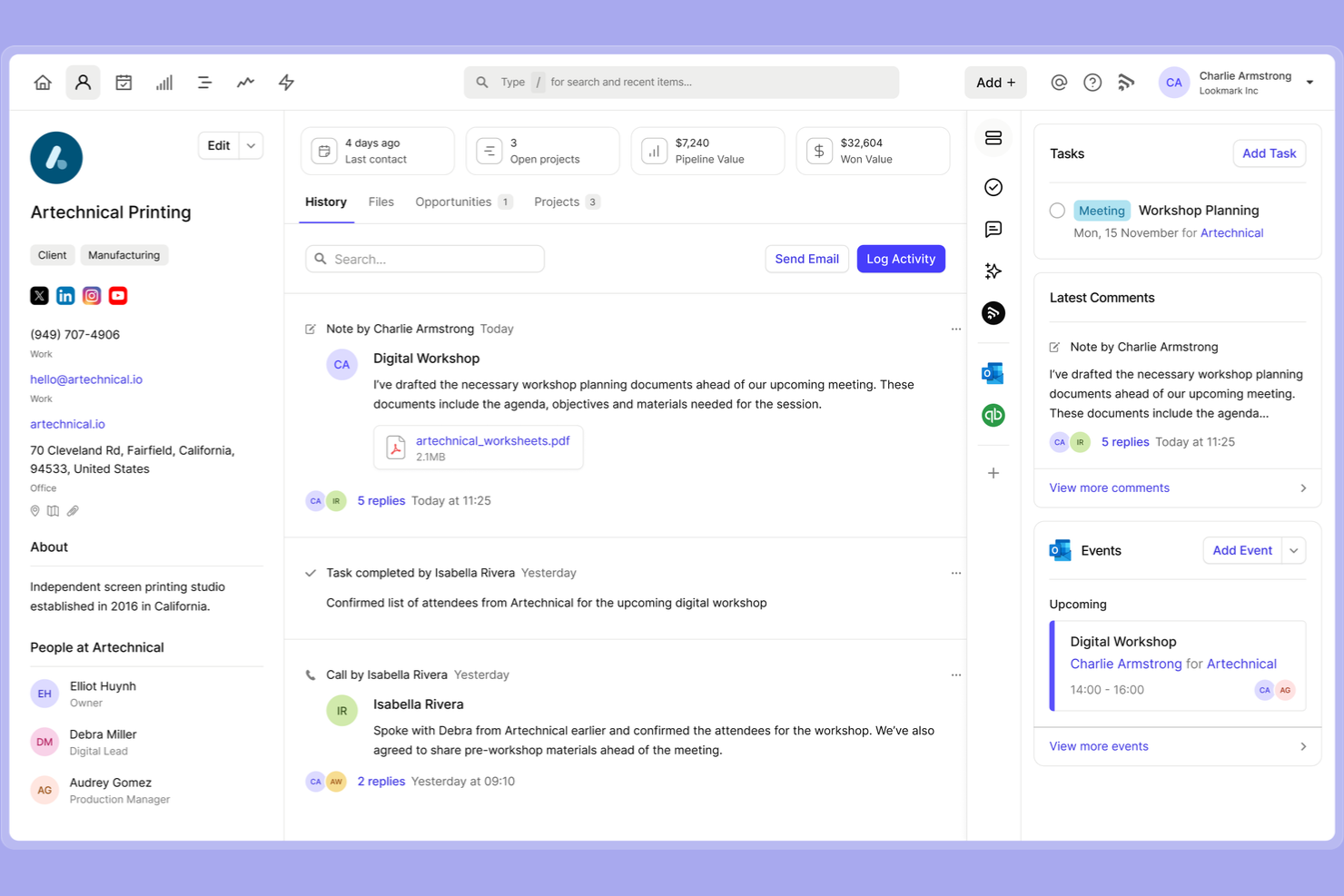
Capsule CRM is designed for teams and professionals who want a straightforward way to organize contacts and manage relationships. If you’re looking for a tool that keeps client information tidy without extra complexity, Capsule CRM is a strong fit. It’s especially useful for small businesses that need simple contact tracking and task management in one place.
Why I Picked Capsule CRM
What drew me to Capsule CRM is how it keeps contact organization simple and focused, which is exactly what many small teams and solo professionals need from free client management software. Capsule CRM lets you store detailed contact profiles, categorize clients with tags, and link notes, emails, and tasks directly to each contact. I like that you can quickly search and filter your database to find the right client or company without digging through cluttered menus. For anyone who wants a no-fuss way to keep client information organized and accessible, Capsule CRM’s approach stands out.
Capsule CRM Key Features
Some other features in Capsule CRM that support free client management include:
- Sales pipeline board: Visualize and track opportunities through customizable sales stages.
- Task reminders: Set follow-up reminders and deadlines for client-related tasks.
- Email history tracking: Automatically link email conversations to contact records.
- Mobile app: Access and update client information from iOS and Android devices.
Capsule CRM Integrations
Integrations include Gmail, Outlook, Xero, QuickBooks Online, Mailchimp, Transpond, Google Calendar, LinkedIn (via Add to CRM), Zendesk, and FreshBooks.
What's Free?
Capsule CRM offers a free-forever plan for up to 2 users and 250 contacts. The free plan includes basic contact management, sales pipeline, and task tracking, but limits custom fields, integrations, and reporting features.
Pros and Cons
Pros:
- Task management is built into contact records
- Contact history includes emails and notes
- Free plan supports up to 250 contacts
Cons:
- No workflow automation on free plan
- Free plan limited to 2 users

Best for all-in-one client tools
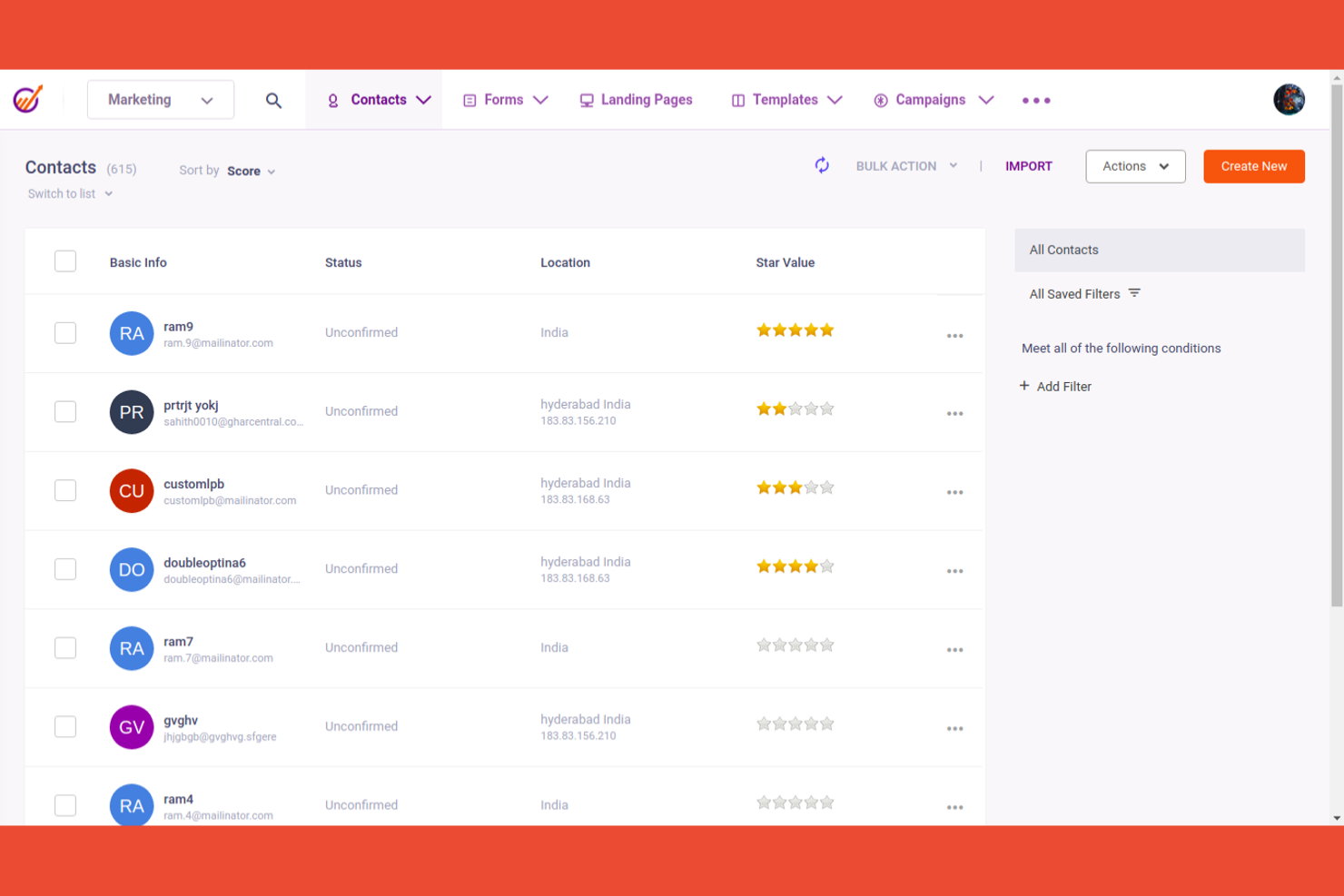
If you’re searching for a free client management platform that combines marketing, sales, and support tools, EngageBay is worth considering. It’s designed for small businesses and agencies that want to manage the entire client lifecycle in one place. EngageBay helps unify contact management, email marketing, ticketing, and deal tracking without switching between multiple apps.
Why I Picked EngageBay
What drew me to EngageBay is how it brings together marketing, sales, and support tools in a single platform. I see this as especially useful for small teams that want to manage client relationships, run email campaigns, and handle support tickets without juggling multiple systems. EngageBay’s contact management, deal pipeline, and built-in helpdesk all work together, so you can track every client interaction from first touch to ongoing support. This all-in-one approach makes it easier to keep client data and communications organized as your business grows.
EngageBay Key Features
Some other features that make EngageBay useful for client management include:
- Appointment Scheduling: Book meetings directly with clients using a built-in calendar tool.
- Landing Page Builder: Create and publish landing pages to capture new leads.
- Live Chat Widget: Add a live chat option to your website for real-time client support.
- Task Management: Assign, track, and organize tasks for your team within the platform.
EngageBay Integrations
Integrations include Shopify, Mailchimp, Xero, QuickBooks, Stripe, Slack, Zoom, Google Calendar, Outlook, and LinkedIn.
What's Free?
EngageBay offers a free-forever plan with unlimited users and contacts. The free plan limits you to 500 emails per day, 1,000 branded emails per month, and restricts access to advanced features like marketing automation and custom reporting.
Pros and Cons
Pros:
- Email sequences available on the free plan
- Built-in landing page and form builder
- Free plan includes marketing, sales, and support tools
Cons:
- Automation features are restricted to paid plans
- Free plan limited to 500 emails per day

EspoCRM
Best for open-source customization
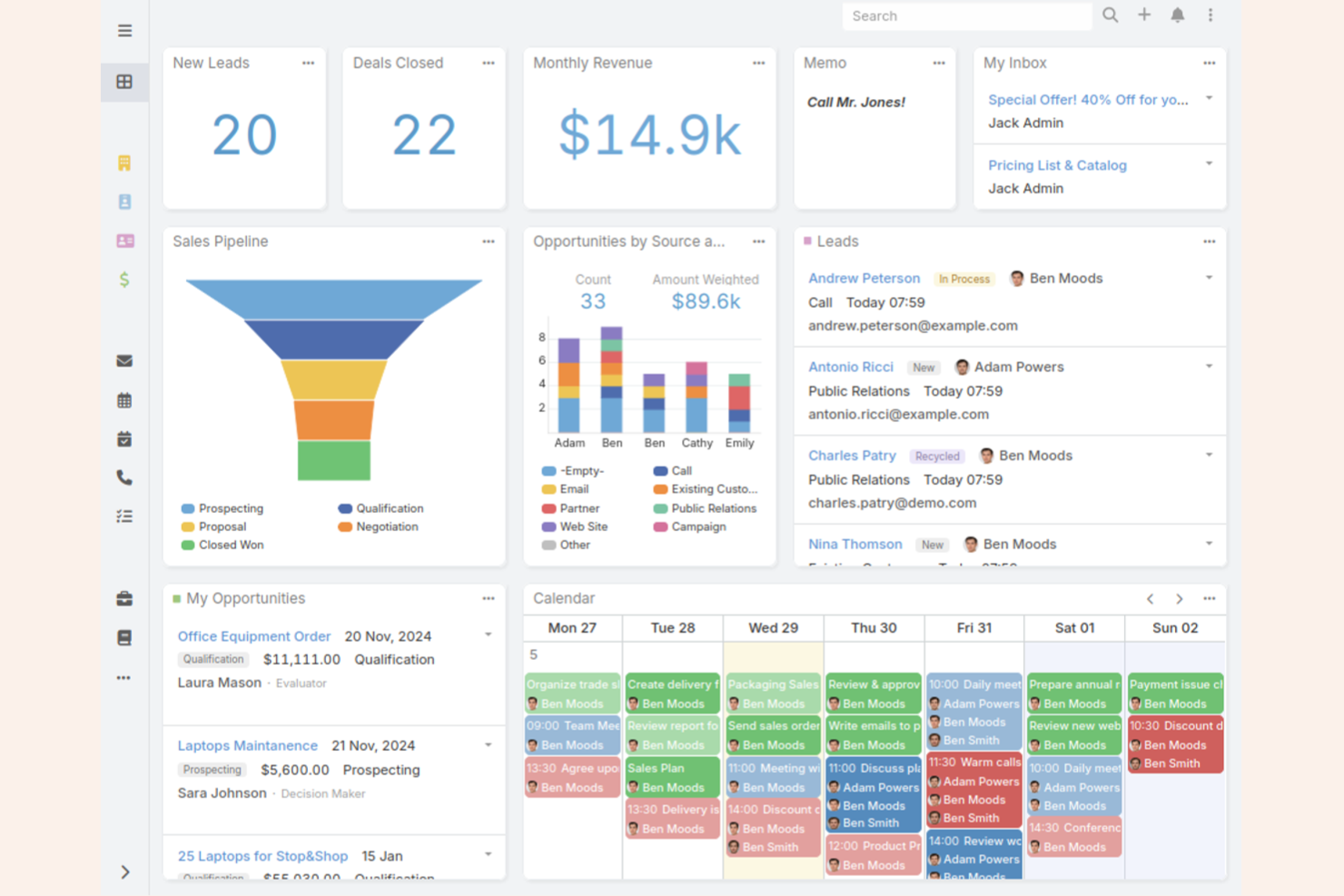
If you want full control over your client management software, EspoCRM stands out for its open-source approach. It’s a strong fit for teams with technical resources who want to customize workflows, modules, and data structures. EspoCRM helps businesses tailor their CRM to unique processes without being locked into a vendor’s limitations.
Why I Picked EspoCRM
What drew me to EspoCRM is its open-source foundation, which gives you the freedom to fully customize your client management system. You can modify data models, create custom entities, and build unique workflows to match your team’s exact needs. This level of flexibility is rare among free client management software, especially for organizations with specific or evolving requirements. If you want to adapt your CRM as your business grows or changes, EspoCRM’s open-source customization makes it a strong choice.
EspoCRM Key Features
Some other features in EspoCRM that support free client management include:
- Email integration: Connects with your email provider to send, receive, and log client communications directly in the CRM.
- Calendar and scheduling: Let you manage meetings, calls, and tasks with built-in calendar tools.
- Role-based access control: Allows you to set permissions and restrict access to sensitive client data by user role.
- Sales automation: Supports lead assignment, opportunity tracking, and automated follow-ups to help manage your sales pipeline.
EspoCRM Integrations
Integrations include 3CX, Twilio, Asterisk, Starface, Binotel, Zoom, Outlook, Google, Mailchimp, and Stripe.
What's Free?
EspoCRM offers a free-forever open-source version that you can self-host with no user or record limits. Some advanced features and official cloud hosting are only available in paid plans.
Pros and Cons
Pros:
- No user or record limits on free version
- Self-hosting option for data control
- Open-source code allows full backend access
Cons:
- Limited out-of-the-box reporting features
- Lacks native integration with Slack or Teams

Vtiger
Best for integrated email campaigns

If you’re looking for a free client management solution with built-in email campaign tools, Vtiger is worth a look. It’s designed for teams that want to manage contacts and launch email campaigns from one place without juggling multiple platforms. Vtiger can help small businesses and sales teams keep client communications organized and automate outreach.
Why I Picked Vtiger
What stands out about Vtiger is how it brings integrated email campaign tools directly into its free CRM platform. You can create, send, and track email campaigns without leaving the system, which is rare among free client management software. I picked Vtiger because it lets you manage contacts and automate follow-ups in the same place, making it easier to keep client communications organized. This approach is especially useful for small teams that want to nurture leads and clients without relying on separate marketing tools.
Vtiger Key Features
Some other features in Vtiger that support free client management include:
- Contact management: Store, organize, and segment client information in a centralized database.
- Deal tracking: Monitor sales opportunities and stages with a visual pipeline.
- Task and activity management: Assign, schedule, and track tasks and meetings for your team.
- Document storage: Upload and manage client-related files directly within the CRM.
Vtiger Integrations
Integrations include Google Workspace, Microsoft Teams, WhatsApp, Gmail, Microsoft Outlook, Mailchimp, QuickBooks, Xero, Stripe, and Zoom Meetings.
What's Free?
Vtiger offers a free-forever plan for up to 10 users. The free plan includes basic CRM features, email campaigns, and contact management, but limits advanced automation, reporting, and some integrations.
Pros and Cons
Pros:
- Free plan includes unlimited users and records
- Visual sales pipeline for deal management
- Built-in email campaign and tracking tools
Cons:
- Mobile app features are restricted on free plan
- Free plan lacks advanced workflow automation

Best with extensive app integrations
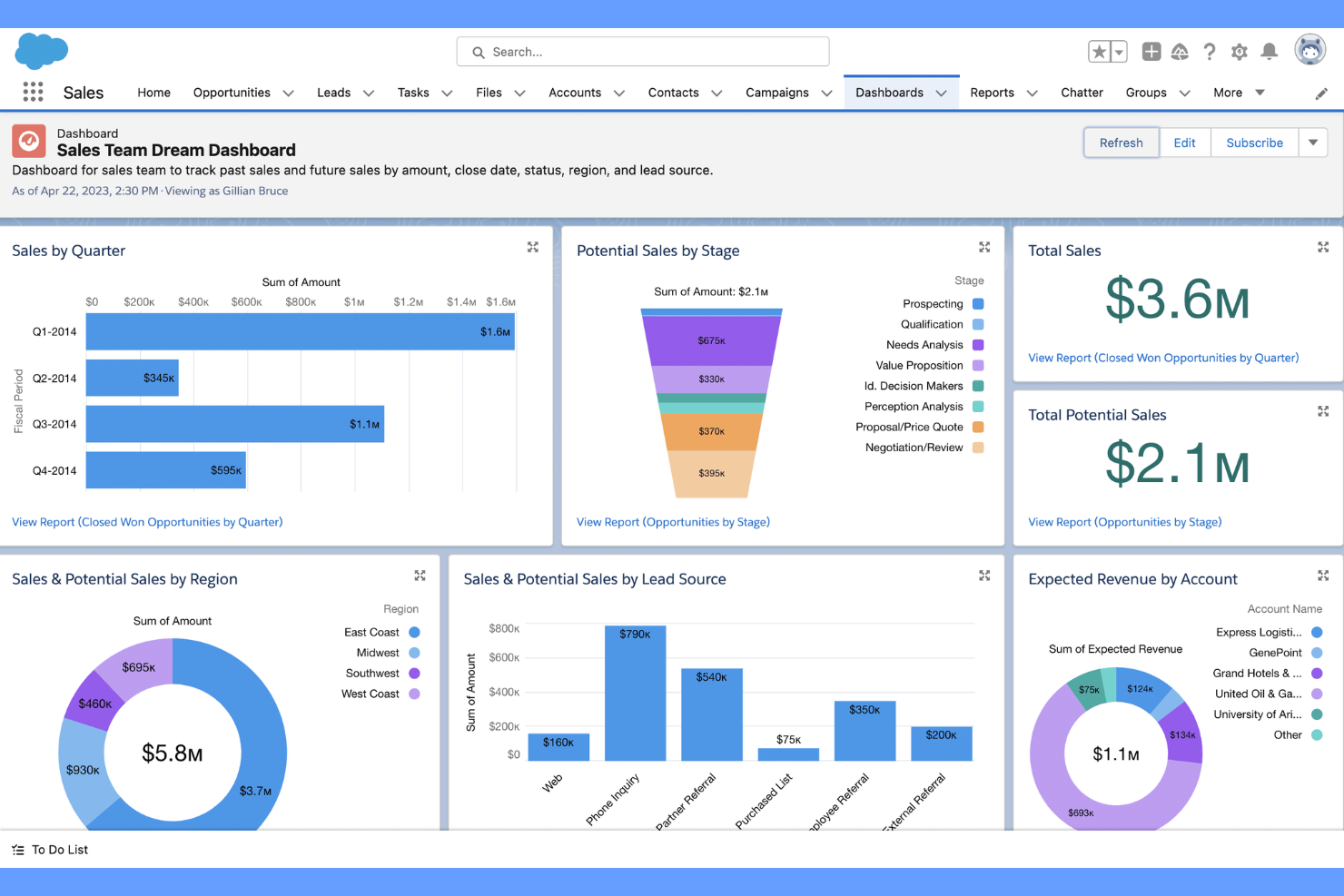
Salesforce is a cloud-based CRM platform built for teams that need advanced customization and integration options. It’s a strong fit for businesses that want to connect client management with a wide range of third-party apps and workflows. If you’re looking for a solution that can adapt to complex processes and scale with your organization, Salesforce stands out for its flexibility and ecosystem.
Why I Picked Salesforce
What makes Salesforce a strong choice for client management is its unmatched ability to connect with a huge range of third-party apps and services. I picked Salesforce because its AppExchange marketplace lets you add tools for marketing, support, analytics, and more, all within the same platform. This means you can tailor your CRM to fit your team’s exact workflow, whether you need to sync with accounting software, automate lead capture, or integrate with communication tools. For teams that want a client management solution that grows and adapts as their tech stack evolves, Salesforce’s integration ecosystem is hard to match.
Salesforce Key Features
Some other features that make Salesforce useful for client management include:
- Customizable Dashboards: Build visual dashboards to track sales, support, and client activity in real time.
- Workflow Automation: Set up automated rules for lead assignment, follow-ups, and approvals.
- Case Management: Manage client support requests and track resolution progress within the CRM.
- Mobile App: Access client records, tasks, and notifications from anywhere using the Salesforce mobile app.
Salesforce Integrations
Integrations include Outlook, Gmail, Slack, QuickBooks, Mailchimp, HubSpot, Docusign, Dropbox, LinkedIn, and Google Drive.
What's Free?
Salesforce offers a 30-day free trial with access to core CRM features. The free trial is limited in duration and does not include a free-forever plan; user and integration limits may apply during the trial period.
Pros and Cons
Pros:
- Case management for client support tracking
- Custom dashboards for tracking client activity
- AppExchange offers thousands of integration options
Cons:
- Limited email sends on entry-level plans
- No free-forever plan available
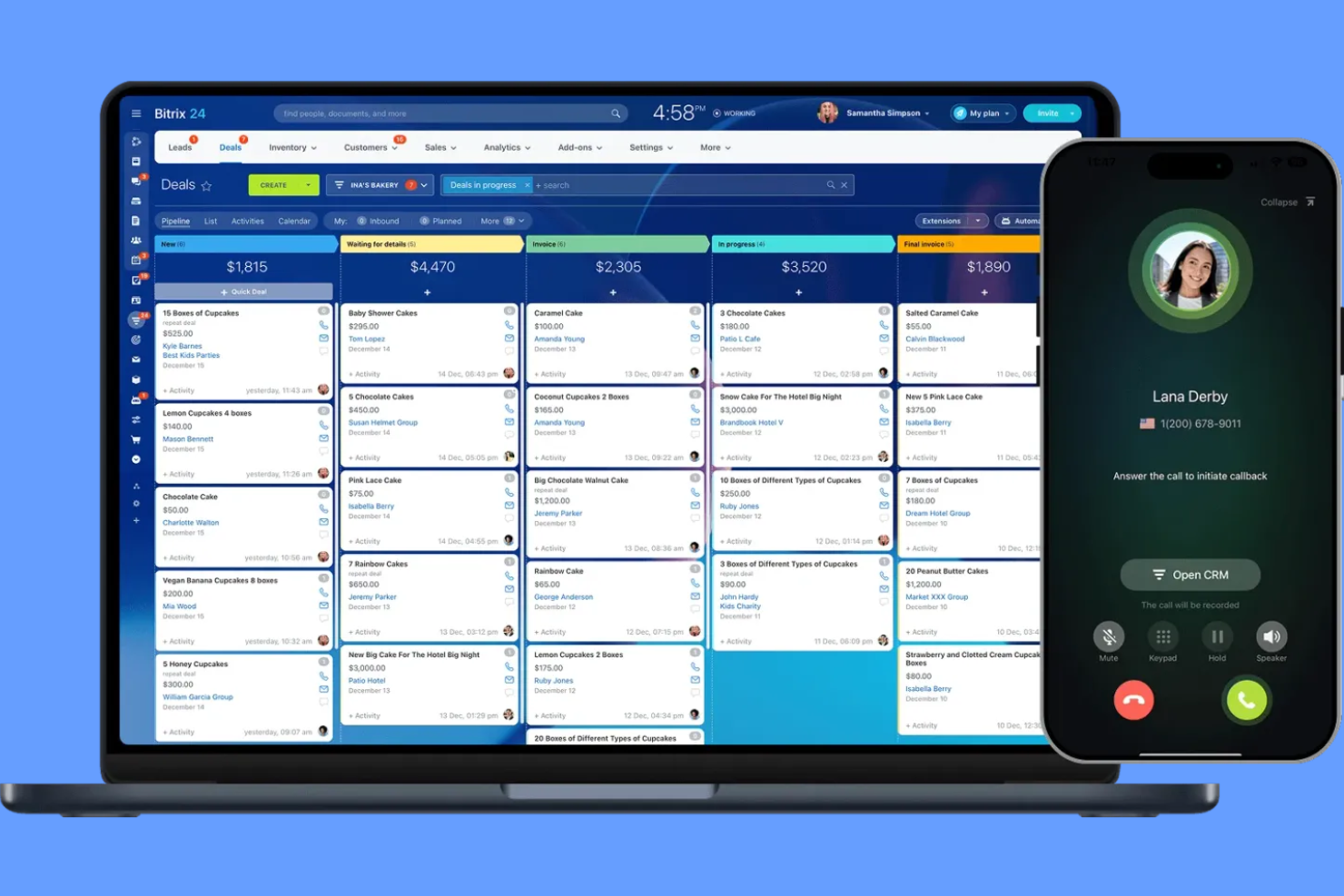
If your team needs free client management software with built-in telephony, Bitrix24 is worth a look. It’s designed for businesses that want to manage calls, contacts, and communications from one platform. Bitrix24 helps teams centralize client interactions, making it easier to track conversations and follow up without switching tools.
Why I Picked Bitrix24
What sets Bitrix24 apart in the free client management software space is its built-in telephony features. You can make and receive calls directly from the CRM, log call details automatically, and even record conversations for future reference. I picked Bitrix24 because these telephony tools are included on the free plan, which is rare among client management platforms. For teams that rely on phone communication with clients, having telephony fully integrated with contact records and activity tracking makes Bitrix24 a strong fit.
Bitrix24 Key Features
Some other features in Bitrix24 that support free client management include:
- Task and project management: Assign tasks, set deadlines, and track progress for client-related work.
- Document management: Store, share, and collaborate on client files within the platform.
- Live chat widget: Add a chat widget to your website to capture and respond to client inquiries in real time.
- Sales pipeline visualization: Use customizable pipelines to track deals and client status from lead to close.
Bitrix24 Integrations
Integrations include Gmail, Outlook, WhatsApp, Facebook Messenger, Instagram, Twilio, Shopify, Mailchimp, Slack, and Dropbox. Bitrix24 also offers an API for custom integrations.
What's Free?
Bitrix24 offers a free-forever plan for unlimited users. The free plan includes core CRM features, telephony, task management, and live chat, but limits storage to 5 GB and restricts access to advanced automation, reporting, and some integrations.
Pros and Cons
Pros:
- Includes live chat and web form tools
- Unlimited contacts and deals on free plan
- Built-in telephony for calls and call logging
Cons:
- Telephony features may require paid credits
- Free plan limited to 5 GB storage

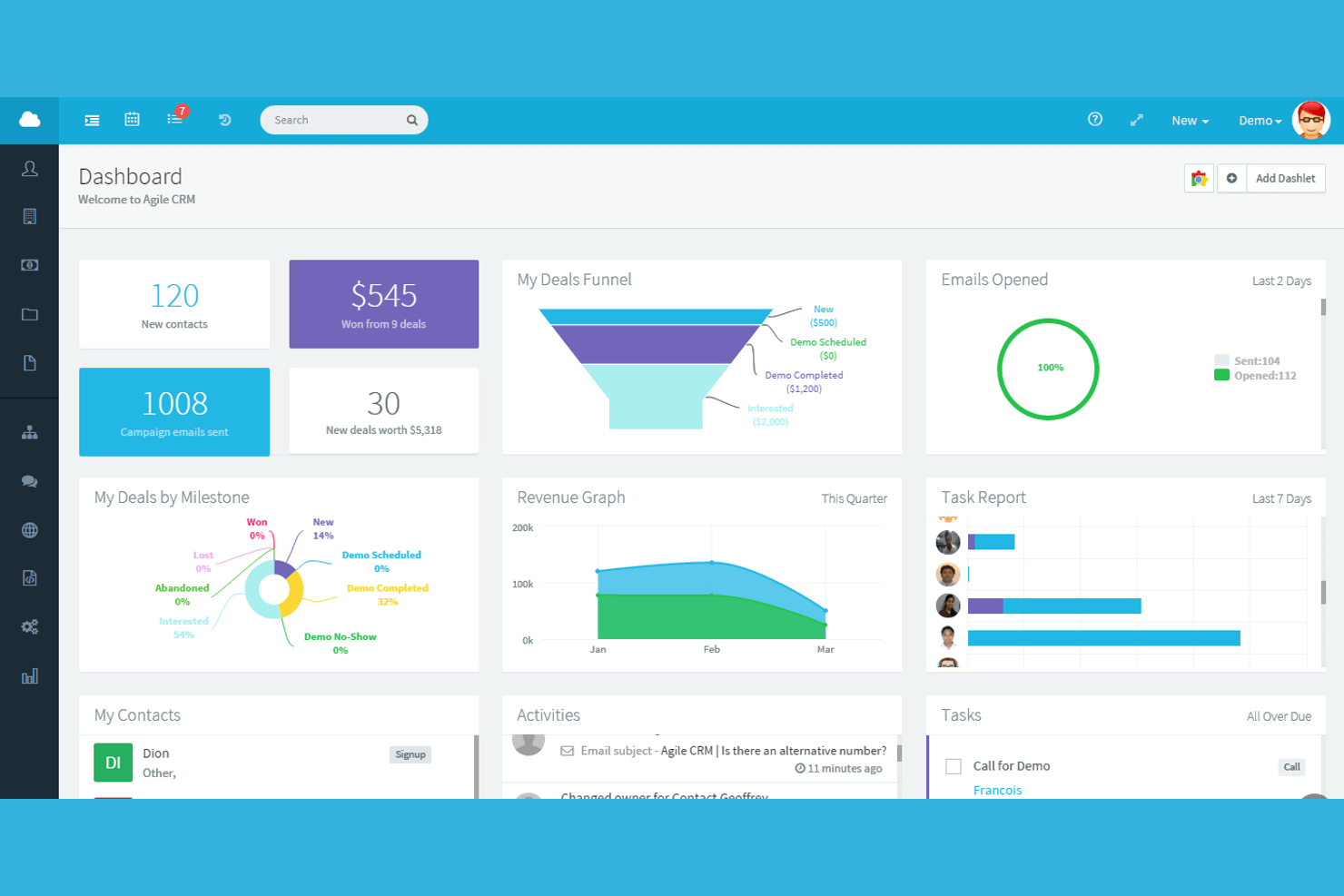
Agile CRM brings marketing automation features into a free client management platform, making it a strong choice for small businesses and startups that want to combine sales and marketing in one place. If you need to manage contacts while also running email campaigns and tracking web engagement, Agile CRM covers both. It’s especially useful for teams looking to automate repetitive marketing tasks alongside their client management workflows.
Why I Picked Agile CRM
What sets Agile CRM apart for me is how it brings marketing automation directly into its free client management platform. I see this as a big advantage for small teams that want to manage contacts and automate email campaigns, web forms, and follow-up sequences without juggling multiple tools. Agile CRM’s free plan includes marketing automation workflows and campaign tracking, which isn’t common among free CRM options. For anyone who wants to nurture leads and manage client relationships in one place, Agile CRM’s automation features make it a strong fit.
Agile CRM Key Features
Some other features in Agile CRM that support free client management include:
- Contact timeline: View a chronological history of every interaction with each contact.
- Deal tracking: Organize and monitor sales opportunities through customizable stages.
- Appointment scheduling: Allow clients to book meetings directly through integrated calendar links.
- Mobile app: Access and update client information from iOS and Android devices.
Agile CRM Integrations
Integrations include Google Apps, LinkedIn, Facebook, Twitter, Mailchimp, Shopify, Stripe, QuickBooks, Zendesk, and Twilio.
What's Free?
Agile CRM offers a free-forever plan for up to 10 users. The free plan includes contact management, lead scoring, appointment scheduling, and basic marketing automation, but limits advanced features, like custom reports and workflow automation.
Pros and Cons
Pros:
- Appointment scheduling is available on free plan
- Email tracking and templates are included
- Free plan includes basic marketing automation
Cons:
- Workflow automation is capped at one trigger
- Free plan limited to 10 users


FreeCRM is a client management platform designed for teams that need unlimited data storage without extra costs. It’s a strong fit for businesses handling large volumes of contacts, notes, and communications that don’t want to worry about hitting storage limits. If your work involves managing extensive client records or long-term relationship histories, FreeCRM helps you keep everything organized in one place.
Why I Picked FreeCRM
What drew me to FreeCRM is its promise of unlimited data storage on the free plan, which is rare among client management tools. For teams that manage thousands of contacts, detailed notes, and long communication histories, hitting storage caps can be a real barrier. FreeCRM lets you store unlimited records, emails, and files without forcing an upgrade. This makes it a practical choice for businesses that need to keep extensive client information accessible and organized over time.
FreeCRM Key Features
Some other features that stand out for teams considering FreeCRM as a free client management solution include:
- Task management: Assign, track, and update tasks for yourself or your team directly within the platform.
- Calendar integration: Sync your appointments and meetings with built-in calendar tools.
- Email integration: Send, receive, and log emails from within the CRM interface.
- Document storage: Upload and organize files and documents related to your contacts and deals.
FreeCRM Integrations
Integrations include Google, WhatsApp for Business, QuickBooks, Facebook, Twitter/X, Docusign, Amazon Web Services, Android, Apple iOS, and Microsoft Entra.
What's Free?
FreeCRM offers a free-forever plan for up to 100 users. The free plan includes unlimited data storage but limits advanced features like workflow automation and premium support.
Pros and Cons
Pros:
- Free plan supports up to 100 users
- Email integration with logging and tracking
- Unlimited storage for contacts and documents
Cons:
- Limited automation features on free plan
- Outdated user interface and navigation

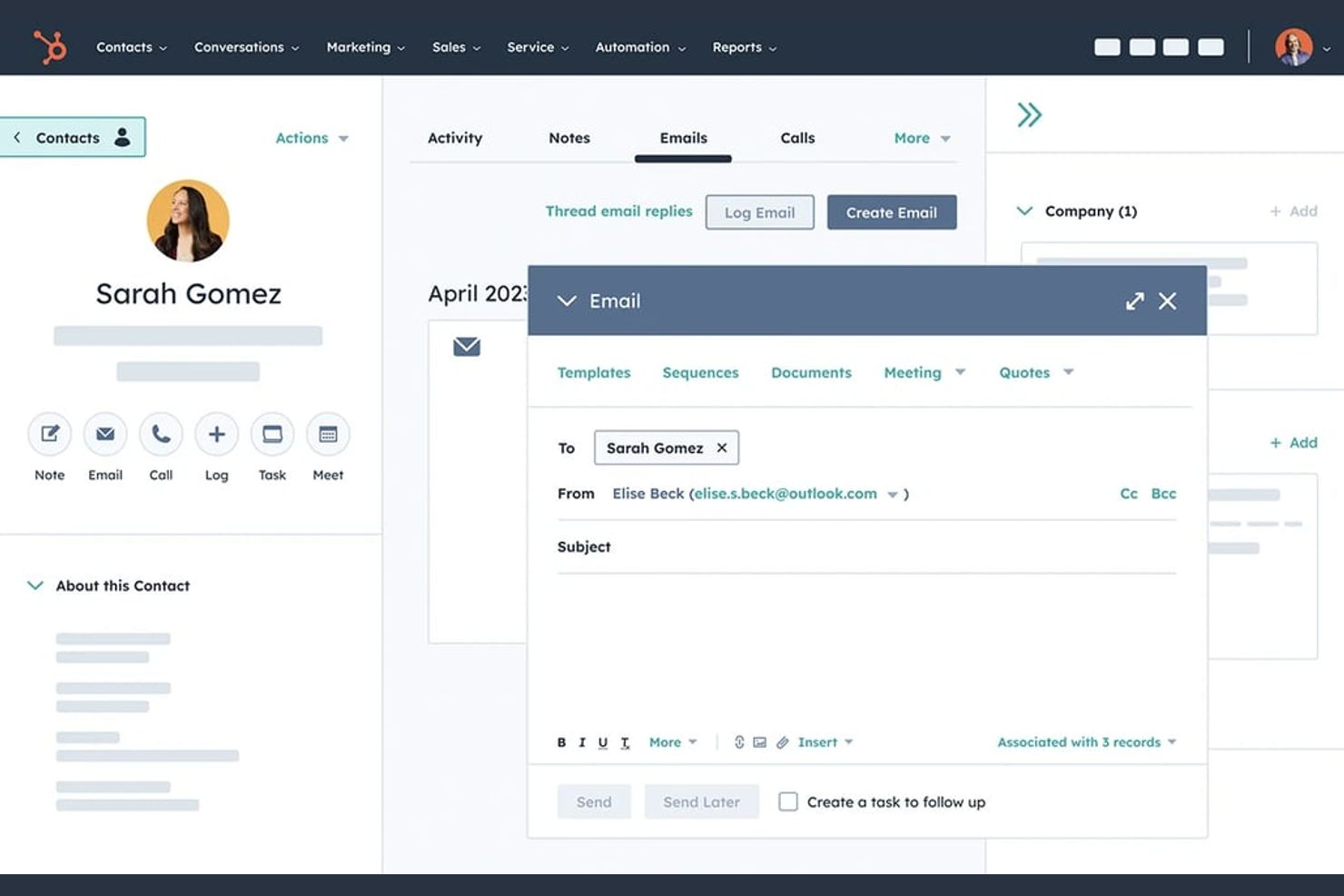
If your team needs a client management platform with no user limits, HubSpot CRM is worth a look. It’s designed for growing businesses that want to give everyone access to contact records, deal tracking, and activity timelines. The free plan makes it easy for distributed teams to collaborate without worrying about hitting a cap on users.
Why I Picked HubSpot CRM
I chose HubSpot CRM because it’s one of the few free client management platforms that truly allows unlimited users on its free plan. This makes it a strong fit for teams that need everyone—regardless of size or department—to access and update client records. The platform’s shared contact database and collaborative deal pipelines help keep everyone on the same page. I also like that activity tracking is available to all users, so you don’t have to worry about information silos as your team grows.
HubSpot CRM Key Features
Some other features in HubSpot CRM that stand out for client management include:
- Email Tracking: Track when contacts open emails and click links directly from the CRM.
- Meeting Scheduling: Share a personalized booking link so clients can schedule meetings with your team.
- Task Management: Assign and monitor tasks for yourself or teammates within each client record.
- Document Sharing: Store and send sales documents from a central library, with tracking for client engagement.
HubSpot CRM Integrations
Integrations include Gmail, Google Calendar, Outlook, HubSpot for WordPress, Outlook Calendar, Meta Ads, Zoom, Microsoft Teams, Slack, and Salesforce.
What's Free?
HubSpot CRM offers a free-forever plan with unlimited users. Some features, like workflow automation and advanced reporting, are only available on paid plans, and there are limits on the number of contacts and some integrations.
Pros and Cons
Pros:
- Extensive integration options with popular tools
- Meeting scheduler included at no cost
- Unlimited users on the free plan
Cons:
- Workflow automation is not included for free
- Free plan lacks advanced reporting features
Outro software gratuito de gestão de clientes
Eis algumas opções adicionais de software gratuito de gestão de clientes que não entraram na minha lista restrita, mas que vale a pena conhecer:
- Zoho CRM
For workflow automation tools
- Bigin by Zoho CRM
For managing sales pipelines
- Mailchimp
For managing client communications
- Streak
For Gmail-based client tracking
- Freshsales
For AI-powered contact scoring
- OnePageCRM
For action-focused task lists
- Teamgate
For sales lead tracking
- SuiteCRM
For unlimited custom modules
- eWay-CRM
With Outlook integration
- monday.com
For customizable workflows
- Pipedrive
For visual deal management
- CiviCRM
For nonprofit organizations


How I Evaluate Free Client Management Software
I evaluate these tools in two layers: the baseline capabilities a tool must cover—like storing client records, tracking deliverables, and sharing updates—and the differentiators that set one apart.
Core Functionality (Table Stakes For This List)
When I'm selecting tools for my list, I rank each one on a scale from 0 (does not offer the functionality) to 5 (excels in this area) for each core functionality listed below. Then, I calculate the tool's total score into a percentage. Each tool needs to achieve a minimum total score of 65% to be considered for inclusion.
- Free Plan Availability: I check whether the tool offers a true free tier that supports ongoing client management work—not just a 14-day trial that cuts you off mid-project.
- Client Database & Contacts: A solid contact hub matters. I look for the ability to store client profiles with custom fields, tags, and notes beyond just a name and email.
- Project & Task Tracking: I evaluate whether you can tie tasks and deadlines directly to client accounts, so a retainer deliverable or campaign milestone stays linked to its owner.
- Client Communication Logging: I look for activity timelines, email threads, or note histories attached to each client record so handoffs between team members don't lose context.
- Client Portal or External Sharing: Tools like monday.com and HubSpot handle this differently, but I check for some form of guest access, shared links, or a portal where clients can view progress.
- File & Document Management: Attaching SOWs, briefs, and feedback docs to the right client or project record keeps things findable. I look for uploads tied to records, not just a generic drive.
Once I have a list of tools that meet this criteria, I consider what sets each platform apart.
Differentiating Factors (What Sets Vendors Apart)
Here's how I compare and contrast different vendors:
Standout Features
Built-in time tracking is a big differentiator—especially for agency coordinators who manage multiple retainers and need logged hours tied directly to client records. Workflow automations also matter here. Tools that let you auto-assign onboarding tasks or trigger follow-up reminders when a project status changes save hours of manual work each week. I also evaluate reporting and client dashboards. Being able to pull a profitability snapshot per client or share a live status view beats compiling updates in a spreadsheet.
Beyond Features
Free plan limits vary wildly, so I look at how many users and client records a tool supports before it nudges you toward a paid tier. Integration coverage matters just as much—if the tool doesn't connect to your email, calendar, and invoicing apps, you'll end up toggling between tabs. I also consider who each tool is really built for. A freelancer managing five clients has different needs than a 10-person agency juggling 30 accounts, and the right fit depends on project volume as much as feature depth.
Como escolher software gratuito de gestão de clientes
É fácil ficar atolado em listas extensas de funcionalidades e estruturas de preços complexas. Para o ajudar a manter o foco enquanto analisa o seu processo específico de seleção de software, eis uma lista de verificação dos fatores a ter em conta:
| Fator | O que considerar |
|---|---|
| Escalabilidade | O software suportará a sua base de clientes à medida que esta cresce? Verifique os limites de utilizadores, dados e fluxos de trabalho no plano gratuito. |
| Integrações | Permite a ligação às ferramentas que já utiliza (e-mail, calendário, contabilidade)? Confirme a existência de integrações nativas, não apenas de API ou Zapier. |
| Personalização | Pode adaptar campos, funis ou fluxos de trabalho para corresponderem ao processo da sua equipa? Procure opções de arrastar e largar ou modelos. |
| Facilidade de utilização | A sua equipa irá adotá-lo rapidamente? Teste a clareza da interface e verifique se as tarefas comuns são fáceis de concluir. |
| Implementação e integração inicial | Quanto tempo será necessário para começar a trabalhar? Avalie as opções de importação de dados, os recursos de formação e o apoio à migração. |
| Custo | O que acontece depois do plano gratuito? Analise os preços de atualização, os limites de utilizadores e quaisquer custos ocultos associados ao crescimento. |
| Medidas de segurança | A ferramenta disponibiliza encriptação, permissões de utilizador e cópias de segurança dos dados? Certifique-se de que cumpre as normas de segurança da sua organização. |
| Disponibilidade do apoio | Que canais de apoio estão disponíveis no plano gratuito? Verifique se existem chat em direto, e-mail ou fóruns da comunidade, bem como os tempos de resposta habituais. |
O que é software gratuito de gestão de clientes?
O software gratuito de gestão de clientes é um tipo de sistema CRM que ajuda as empresas a gerir dados de clientes, acompanhar interações e organizar o processo de vendas sem exigir uma subscrição paga. Estas ferramentas de CRM foram concebidas para apoiar a gestão das relações com os clientes, centralizando contactos, acompanhando atividades e melhorando a visibilidade ao longo do ciclo de vendas.
Muitas plataformas posicionam-se como um CRM simples ou como a melhor opção de CRM gratuito, oferecendo funcionalidades essenciais de CRM, como geração de potenciais clientes, acompanhamento de negócios e gestão de tarefas. Algumas soluções incluem também funcionalidades de IA ou um assistente de IA para ajudar a automatizar tarefas, analisar dados dos clientes e apoiar as equipas enquanto trabalham para fechar negócios de forma mais eficiente.
Funcionalidades do software gratuito de gestão de clientes
Vamos analisar as funcionalidades normalmente encontradas no software de gestão de clientes e quais são geralmente incluídas nos planos gratuitos e nos planos pagos.
Funcionalidades normalmente gratuitas do software de gestão de clientes
- Gestão de contactos: Armazene, organize e atualize dados dos clientes, como nomes, endereços de e-mail, números de telefone e informações da empresa, numa base de dados pesquisável.
- Acompanhamento de atividades: Registe chamadas, e-mails, reuniões e notas para manter um histórico de todas as interações com os clientes, facilitando a consulta.
- Gestão de tarefas: Atribua, agende e acompanhe tarefas relacionadas com o acompanhamento de clientes, reuniões ou marcos de projetos dentro da plataforma.
- Relatórios básicos: Gere relatórios simples sobre a atividade dos clientes, os funis de vendas ou a conclusão de tarefas para monitorizar o progresso e o desempenho.
- Visualização do funil: Consulte e gira funis de vendas ou de projetos através de quadros ou listas visuais para acompanhar o estado dos clientes e os passos seguintes.
- Integração de e-mail: Ligue a sua conta de e-mail para enviar, receber e registar comunicações com clientes diretamente a partir do software.
- Lembretes e notificações: Configure alertas para tarefas, reuniões ou acompanhamentos futuros, garantindo que nada fica esquecido.
- Controlos de acesso dos utilizadores: Gira permissões básicas para controlar quem pode consultar ou editar informações dos clientes dentro da sua equipa.
Funcionalidades normalmente pagas do software de gestão de clientes
- Automatização avançada: Automatize fluxos de trabalho repetitivos, como a atribuição de potenciais clientes, o envio de e-mails de acompanhamento ou a criação de tarefas com base em acionadores e regras.
- Relatórios e análises personalizados: Crie relatórios e painéis detalhados e personalizáveis para analisar dados dos clientes, tendências e o desempenho da equipa.
- Integração com aplicações de terceiros: Ligue-se a uma maior variedade de ferramentas empresariais, como plataformas de contabilidade, marketing ou apoio ao cliente, para garantir um fluxo de dados contínuo.
- Permissões baseadas em funções: Defina controlos de acesso detalhados para diferentes membros da equipa ou departamentos, garantindo que os dados sensíveis só estão disponíveis para os utilizadores adequados.
- Campanhas de e-mail em massa: Envie e-mails em massa personalizados para segmentos de clientes, acompanhe as taxas de abertura e gira o desempenho das campanhas dentro da plataforma.
- Aplicação móvel com acesso offline: Utilize uma aplicação móvel dedicada que lhe permite aceder e atualizar dados dos clientes mesmo sem ligação à Internet.
- Campos e esquemas personalizados: Adapte a estrutura da base de dados adicionando campos, esquemas ou módulos personalizados para responder aos seus processos empresariais específicos.
- Acesso à API: Utilize ferramentas para programadores e APIs para criar integrações personalizadas ou automatizar a sincronização de dados com outros sistemas.
- Apoio prioritário ao cliente: Beneficie de tempos de resposta mais rápidos, gestores de conta dedicados ou canais de apoio premium para resolução de problemas e integração inicial.
- Cópia de segurança e recuperação de dados: Beneficie de funcionalidades avançadas de proteção de dados, incluindo cópias de segurança automáticas e opções de recuperação em caso de perda de dados.
Benefícios do software gratuito de gestão de clientes
A implementação de software gratuito de gestão de clientes oferece vários benefícios à sua equipa e à sua empresa. Eis alguns dos benefícios que pode esperar:
- Informações centralizadas dos clientes: Mantenha todos os dados de contacto, notas e histórico de atividade dos clientes num único local acessível, reduzindo o acompanhamento manual e os silos de dados.
- Melhor organização das tarefas: Utilize a gestão de tarefas e os lembretes integrados para garantir que nunca perde acompanhamentos nem compromissos com os clientes.
- Poupança de custos: Aceda a funcionalidades essenciais de gestão de clientes sem precisar de uma subscrição paga, facilitando o início das pequenas equipas.
- Colaboração melhorada da equipa: Partilhe registos de clientes, atribua tarefas e acompanhe o progresso em conjunto, promovendo uma melhor comunicação e responsabilização.
- Integração fácil com as ferramentas existentes: Ligue o e-mail, o calendário e outras aplicações empresariais básicas para simplificar os fluxos de trabalho e reduzir a introdução duplicada de dados.
- Base escalável: Comece com funcionalidades básicas e atualize para capacidades avançadas à medida que a sua base de clientes e as necessidades da sua empresa crescem.
- Integração rápida: Beneficie de interfaces fáceis de utilizar, modelos e recursos de formação que ajudam a sua equipa a começar a trabalhar com um período de inatividade mínimo.
Custos e preços do software de gestão de clientes
Compreendo que chegou a este artigo à procura das melhores opções de software de gestão de clientes disponíveis gratuitamente. No entanto, uma vez que os planos gratuitos oferecem apenas funcionalidades limitadas, é bastante provável que precise de atualizar o seu plano no futuro.
A tabela abaixo resume os planos comuns, os respetivos preços médios e as funcionalidades normalmente incluídas no software de gestão de clientes:
Tabela de comparação de planos de software de gestão de clientes
| Tipo de plano | Preço médio | Funcionalidades comuns |
|---|---|---|
| Plano gratuito | $0 | Gestão básica de contactos, acompanhamento de atividades, gestão de tarefas, relatórios limitados e integrações básicas. |
| Plano pessoal | $5-$15/utilizador/mês | Todas as funcionalidades gratuitas, integração de e-mail, funis personalizáveis, automação simples e armazenamento ampliado. |
| Plano empresarial | $20-$40/utilizador/mês | Automação avançada, relatórios personalizados, integrações de terceiros, permissões baseadas em funções e acesso à aplicação móvel. |
| Plano para empresas | $50-$100/utilizador/mês | Todas as funcionalidades empresariais, acesso à API, segurança avançada, suporte prioritário, módulos personalizados e cópia de segurança dos dados. |
Perguntas frequentes sobre software gratuito de gestão de clientes
Eis algumas respostas a perguntas frequentes sobre software gratuito de gestão de clientes:
Existem custos ocultos no software gratuito de gestão de clientes?
Não, a maioria dos planos de software gratuito de gestão de clientes não tem custos ocultos, mas poderá encontrar limitações relativamente ao número de utilizadores, ao armazenamento ou às funcionalidades. Consulte sempre a página de preços do fornecedor para compreender os fatores que desencadeiam uma atualização e quaisquer potenciais custos de complementos ou integrações.
Posso migrar os meus dados se ultrapassar o plano gratuito?
Sim, a maioria das plataformas permite exportar os seus dados ou atualizar para um plano pago sem perder informações. Verifique as opções de exportação de dados e confirme que a ferramenta escolhida permite uma migração fácil para níveis superiores ou para outros sistemas.
Quão seguro é o software gratuito de gestão de clientes?
A segurança varia consoante o fornecedor, mas a maioria das plataformas conceituadas oferece proteções básicas, como encriptação e permissões de utilizador, mesmo nos planos gratuitos. No caso de dados sensíveis, consulte a documentação de segurança do fornecedor e avalie se as proteções avançadas estão disponíveis apenas nos níveis pagos.
Que limitações devo esperar do software gratuito de gestão de clientes?
Os planos gratuitos limitam frequentemente o número de utilizadores, contactos, o armazenamento ou as integrações que pode utilizar. As funcionalidades avançadas, como a automação, os relatórios personalizados ou o suporte prioritário, estão normalmente reservadas aos planos pagos. Por isso, avalie se o nível gratuito satisfaz as suas necessidades atuais e a curto prazo.
Posso utilizar software gratuito de gestão de clientes para uma equipa distribuída ou remota?
Sim, muitas ferramentas gratuitas de gestão de clientes são baseadas na nuvem e acessíveis a partir de qualquer lugar com ligação à Internet. No entanto, verifique se as funcionalidades de colaboração, o acesso móvel ou as permissões de utilizador estão incluídos no plano gratuito para apoiar o fluxo de trabalho da sua equipa.