

Beoordeling van Taskade AI-projectmanagementsoftware voor 2026



Taskade is a project management software that combines task management, docs, mind maps, and real-time collaboration in a single AI-native workspace. I'd consider it if your team needs a flexible, all-in-one tool without the configuration overhead of something like ClickUp, particularly if you want AI woven into how you plan and organize work from the start, rather than added on top of an existing workflow.
Taskade Evaluation Summary
- From $20/month
- Free plan available
Waarom u onze softwareaanbevelingen kunt vertrouwen
Ons team test en beoordeelt software sinds 2012. Als projectmanagers weten we zelf hoe moeilijk — en belangrijk — het is om de juiste software te kiezen.
Voor deze gids hebben we tools geëvalueerd met behulp van praktijktests en onafhankelijk onderzoek, waarbij we tools beoordeelden aan de hand van onze selectiecriteria. We putten ook uit inzichten van vooraanstaande experts uit de branche en praktiserende projectmanagementprofessionals.
Onze reviews weerspiegelen ons menselijke redactionele oordeel, geen verkooppraatje.
Deskundige beoordelaars:
Taskade Overview
In my opinion, Taskade is a solid pick if you want a lightweight, AI-based project management platform that combines task tracking, real-time collaboration, and AI assistance in one place. It’s quicker to get into than heavier tools like ClickUp or Asana, especially if your projects lean more creative or loosely structured. The AI features—like smart task generation and writing help—add a useful layer, but they’re not essential for everyone and still feel a bit early-stage compared to more focused AI tools.
Compared to the competition, Taskade stands out with its speed and simplicity but falls short in reporting, permissions control, and deep project customization. I’d recommend it for small to mid-sized teams who value flexibility and fast collaboration over traditional Gantt charts or complex workflows.

pros
-
Real-time collaboration keeps your team in sync effortlessly
-
Intuitive design makes task organization straightforward for everyone
-
Flexible project views adapt to your team's workflow needs
cons
-
Some users find the customization options limited for complex projects
-
The learning curve for mastering all features can be steep for new users
-
Occasional technical glitches might disrupt your team's workflow
-

Smartsheet
Visit WebsiteThis rating combines scores from multiple user review sites to reflect overall customer sentiment about the product.4.4 -
Celoxis
Visit WebsiteThis rating combines scores from multiple user review sites to reflect overall customer sentiment about the product.4.5 -
Accelo
Visit WebsiteThis rating combines scores from multiple user review sites to reflect overall customer sentiment about the product.4.4





Our Review Methodology
How We Test & Score Tools
We’ve spent years building, refining, and improving our software testing and scoring system. The rubric is designed to capture the nuances of software selection and what makes a tool effective, focusing on critical aspects of the decision-making process.
Below, you can see exactly how our testing and scoring works across seven criteria. It allows us to provide an unbiased evaluation of the software based on core functionality, standout features, ease of use, onboarding, customer support, integrations, customer reviews, and value for money.
Core Functionality (25% of final scoring)
The starting point of our evaluation is always the core functionality of the tool. Does it have the basic features and functions that a user would expect to see? Are any of those core features locked to higher-tiered pricing plans? At its core, we expect a tool to stand up against the baseline capabilities of its competitors.
Standout Features (25% of final scoring)
Next, we evaluate uncommon standout features that go above and beyond the core functionality typically found in tools of its kind. A high score reflects specialized or unique features that make the product faster, more efficient, or offer additional value to the user.
We also evaluate how easy it is to integrate with other tools typically found in the tech stack to expand the functionality and utility of the software. Tools offering plentiful native integrations, 3rd party connections, and API access to build custom integrations score best.
Ease of Use (10% of final scoring)
We consider how quick and easy it is to execute the tasks defined in the core functionality using the tool. High scoring software is well designed, intuitive to use, offers mobile apps, provides templates, and makes relatively complex tasks seem simple.
Onboarding (10% of final scoring)
We know how important rapid team adoption is for a new platform, so we evaluate how easy it is to learn and use a tool with minimal training. We evaluate how quickly a team member can get set up and start using the tool with no experience. High scoring solutions indicate little or no support is required.
Customer Support (10% of final scoring)
We review how quick and easy it is to get unstuck and find help by phone, live chat, or knowledge base. Tools and companies that provide real-time support score best, while chatbots score worst.
Customer Reviews (10% of final scoring)
Beyond our own testing and evaluation, we consider the net promoter score from current and past customers. We review their likelihood, given the option, to choose the tool again for the core functionality. A high scoring software reflects a high net promoter score from current or past customers.
Value for Money (10% of final scoring)
Lastly, in consideration of all the other criteria, we review the average price of entry level plans against the core features and consider the value of the other evaluation criteria. Software that delivers more, for less, will score higher.
Core Features
Task management: Taskade provides a platform to create, assign, and monitor tasks and subtasks efficiently. Its intuitive interface allows users to prioritize and categorize tasks into task lists, making it easy to keep track of project progress.
Collaboration tools: Taskade excels in facilitating real-time communication and collaboration among team members. The platform supports video calls, chat, real-time notifications, and document sharing to ensure efficient teamwork.
Automation: Taskade leverages AI automation for repetitive tasks, freeing up time for more strategic planning. This feature allows teams to set up automated workflows that trigger based on specific conditions.
Project tracking: Taskade offers strong project-tracking tools that help monitor timelines and deliverables. Users can visualize project progress through Gantt charts and Kanban boards that make it easier to manage deadlines.
Resource management: Taskade provides AI agents to help you allocate and manage resources across various projects. This functionality helps ensure that team members are optimally utilized and project needs are met efficiently.
Sync with Google Calendar: Taskade integrates with Google Calendar to automatically sync project due dates and task schedules. Users can easily view and manage their project timelines alongside personal or team calendars to ensure alignment and reduce scheduling conflicts.
Ease of Use
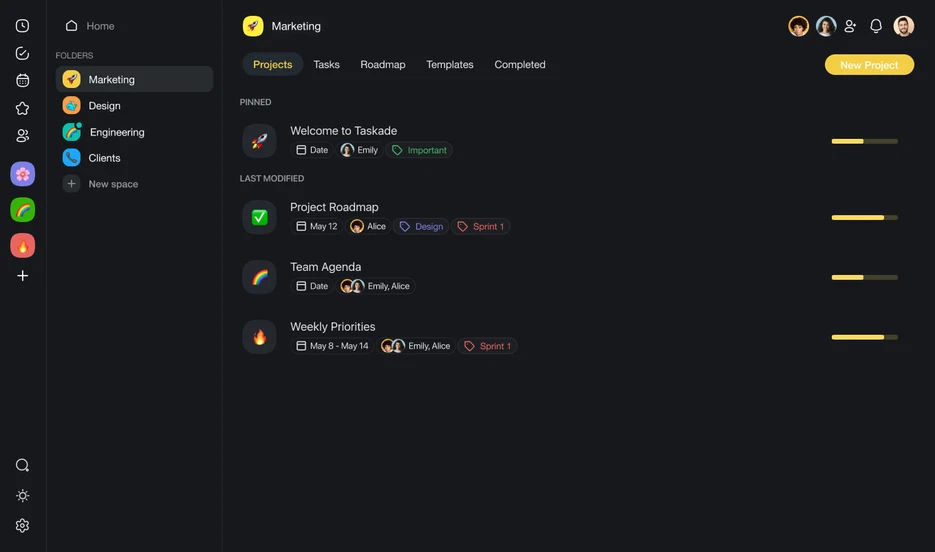
Taskade is generally easy to use compared to other project management software with artificial intelligence. Its intuitive design and user-friendly interface make navigation straightforward, allowing teams to quickly adapt and begin managing projects. Users also praise Taskade's clean and uncluttered layout, which simplifies task creation and organization.
Taskade’s mobile app and available templates further enhance its accessibility, making it a suitable choice for teams seeking a simple yet effective tool.

Taskade Specs
- API
- Calendar Management
- Collaboration Support
- Dashboards
- Data Export
- Data Import
- External Integrations
- File Sharing
- Gantt Charts
- Kanban Boards
- Mobile App
- Multi-User
- Notifications
- Prioritization
- Project Management
- Status Notifications
- Task Scheduling/Tracking
- Time Management

Veelgestelde vragen over Taskade
Hoe gaat Taskade om met gegevensbeveiliging?
Taskade neemt gegevensbeveiliging serieus en houdt zich aan beveiligingspraktijken die voldoen aan de branchenormen om de informatie van je team te beschermen. Taskade biedt ook naleving van regelgeving voor gegevensbescherming om ervoor te zorgen dat je gegevens zorgvuldig worden behandeld. Het platform past daarnaast versleuteling toe, zowel tijdens de overdracht als in rust. Regelmatige beveiligingsaudits en updates helpen een veilige omgeving voor je projecten te behouden.
Kan Taskade samenwerking tussen teams op afstand ondersteunen?
Ja, Taskade is ontworpen om samenwerking voor teams op afstand te faciliteren. Dankzij de realtimefuncties kunnen jij en je team tegelijkertijd samenwerken, ongeacht jullie locatie. Je kunt chatten, bestanden delen en taken beheren binnen één platform, zodat iedereen op één lijn blijft en productief werkt. Dankzij de gemakkelijke toegang tot Taskade op verschillende apparaten kan je team bovendien verbonden blijven, zelfs wanneer jullie niet op kantoor zijn.
Welke sectoren hebben het meeste baat bij het gebruik van Taskade?
Creatieve bureaus, startups en teams op afstand hebben bijzonder veel baat bij Taskade vanwege de flexibiliteit en realtimefuncties voor samenwerking. De visuele interface van het platform is ideaal voor teams die effectief moeten brainstormen en ideeën moeten organiseren, bijvoorbeeld voor het maken van content. Sectoren die sterk afhankelijk zijn van communicatie en snel taakbeheer zullen de gestroomlijnde werkprocessen van Taskade ook waarderen.
In hoeverre kunnen de werkprocessen in Taskade worden aangepast?
Taskade biedt verschillende aanpassingsmogelijkheden om werkprocessen af te stemmen op de behoeften van je team. Je kunt aangepaste sjablonen maken en projectweergaven aanpassen aan je voorkeuren. De flexibiliteit van Taskade is echter mogelijk niet toereikend voor de zeer complexe aanpassingen die sommige sectoren nodig hebben. Voor de meeste teams zijn de opties van Taskade echter voldoende om efficiënte werkprocessen te creëren.
Is er ondersteuning voor mobiele apparaten?
Ja, Taskade biedt mobiele apps voor zowel iOS- als Android-apparaten. Zo kun je onderweg taken beheren en met je team samenwerken. Deze mobiele apps bieden essentiële functies waarmee je productief blijft, zelfs wanneer je niet achter je computer zit. De mobiele interface van Taskade is gebruiksvriendelijk en eenvoudig te navigeren.
Ondersteunt Taskade offline werken?
Taskade werkt voornamelijk online en vereist een internetverbinding om toegang te krijgen tot realtimefuncties voor samenwerking. Je kunt eerder geladen taken en projecten echter offline bekijken. Offline gemaakte wijzigingen worden gesynchroniseerd zodra je weer online bent. Hoewel Taskade niet volledig offline kan worden gebruikt, zorgt het ervoor dat je indien nodig toegang houdt tot kritieke informatie.
Hoe faciliteert Taskade teamcommunicatie?
Taskade bevat ingebouwde chat- en commentaarfuncties om communicatie relevant en gericht op taken te houden. Je kunt specifieke taken rechtstreeks binnen het platform bespreken, waardoor er minder behoefte is aan externe communicatietools. Zo blijven alle projectgerelateerde gesprekken op één plek en blijft iedereen op de hoogte en afgestemd op de projectdoelstellingen.
Overzicht & geschiedenis van Taskade
Taskade, Inc. is een particulier softwarebedrijf dat in 2017 is opgericht door John Xie, Dionis Liore en Stan Chang. Taskade is gevestigd in San Francisco en richt zich op AI-gestuurd taak- en projectmanagement. Het bedrijf biedt gebruikers een platform om samen te werken, zich te organiseren en werkprocessen te stroomlijnen. Taskade staat bekend om zijn eenvoudige, intuïtieve interface, waarin taakbeheer, mindmapping en realtime samenwerkingstools worden geïntegreerd in één allesomvattende oplossing.
Het bedrijf is wereldwijd actief met een verspreid team en bedient individuen, teams en organisaties in uiteenlopende sectoren. Taskade biedt op maat gemaakte AI-hulpmiddelen voor taakbeheer en projectmanagement op ondernemingsniveau.
Belangrijkste mijlpalen van Taskade
- 2017: Opgericht door John Xie (CEO), Dionis Loire (CPO) en Stan Chang (CTO) in San Francisco, Californië.
- 2021: Een vernieuwde Taskade V4 geïntroduceerd en tweerichtingssynchronisatie met Google Agenda gelanceerd.
- 2022: Een Zapier-integratie uitgerold en nieuwe projectweergaven geïntroduceerd, waaronder een vernieuwde Actieweergave en een volledig nieuwe Agenda-werkstroom.
- 2023: Taskade AI voor mobiel gelanceerd, waarmee door ChatGPT aangestuurde productiviteitsfuncties naar iOS- en Android-apparaten werden gebracht.
- 2024: Belangrijke mijlpalen bereikt, waaronder de creatie van 500.000 AI-agenten, 1,5 miljoen automatiseringsuitvoeringen, de verwerking van 112 miljard AI-tokens en de voltooiing van 17 miljoen taken.
Wat is de volgende stap?
Wil je contact leggen met andere digitale projectmanagers om bronnen en beste praktijken te delen? Word lid van onze community en krijg toegang tot meer dan 100 sjablonen, voorbeelden en uitgewerkte cases, en kom in Slack in contact met honderden andere digitale projectmanagers.