



Monday.Com versus ClickUp: Beoordelingen & Vergelijking voor 2026



monday.com biedt een flexibel platform om de workflows en samenwerking van uw team te stroomlijnen. ClickUp biedt een uitgebreide reeks tools om uw productiviteit en projecttracking te verbeteren. Hoewel beide krachtige oplossingen voor projectbeheer zijn, blinkt monday.com uit in aanpassingsmogelijkheden, terwijl ClickUp indruk maakt met zijn uitgebreide functies. In dit artikel vindt u een gedetailleerde vergelijking van de tools, hun functies, voor- en nadelen, prijzen en meer, zodat u de ideale software voor projectbeheer voor uw behoeften kunt selecteren.
monday AI Workspace vs. ClickUp: An Overview
monday AI Workspace

ClickUp
Waarom u onze softwareaanbevelingen kunt vertrouwen
Ons team test en beoordeelt software sinds 2012. Als projectmanagers weten we zelf hoe moeilijk — en belangrijk — het is om de juiste software te kiezen.
Voor deze gids hebben we tools geëvalueerd met behulp van praktijktests en onafhankelijk onderzoek, waarbij we tools beoordeelden aan de hand van onze selectiecriteria. We putten ook uit inzichten van vooraanstaande experts uit de branche en praktiserende projectmanagementprofessionals.
Onze reviews weerspiegelen ons menselijke redactionele oordeel, geen verkooppraatje.
Deskundige beoordelaars:
monday AI Workspace vs. ClickUp Pricing Comparison
| monday AI Workspace | ClickUp | |
|---|---|---|
| Free Trial | Free plan available | Free plan + free demo available |
| Pricing | From $9/user/month (billed annually) | From $7/user/month (billed annually) |
Prijzen en verborgen kosten van monday.com versus ClickUp
De prijzen van monday.com werken volgens een getrapt abonnementsmodel, waarbij per gebruiker wordt betaald en mogelijk extra kosten gelden voor premiumfuncties en meer opslagruimte. De prijzen van ClickUp volgen ook een getrapte aanpak, met een gratis abonnement met beperkingen en betaalde abonnementen die uitgebreidere functionaliteit en integraties bieden. Om de tool met de juiste prijs voor uw behoeften te kiezen, beoordeelt u welke functies uw team nodig heeft en houdt u rekening met de schaalbaarheid van elk prijsplan naarmate uw projecten en team groeien.
monday AI Workspace vs. ClickUp Feature Comparison
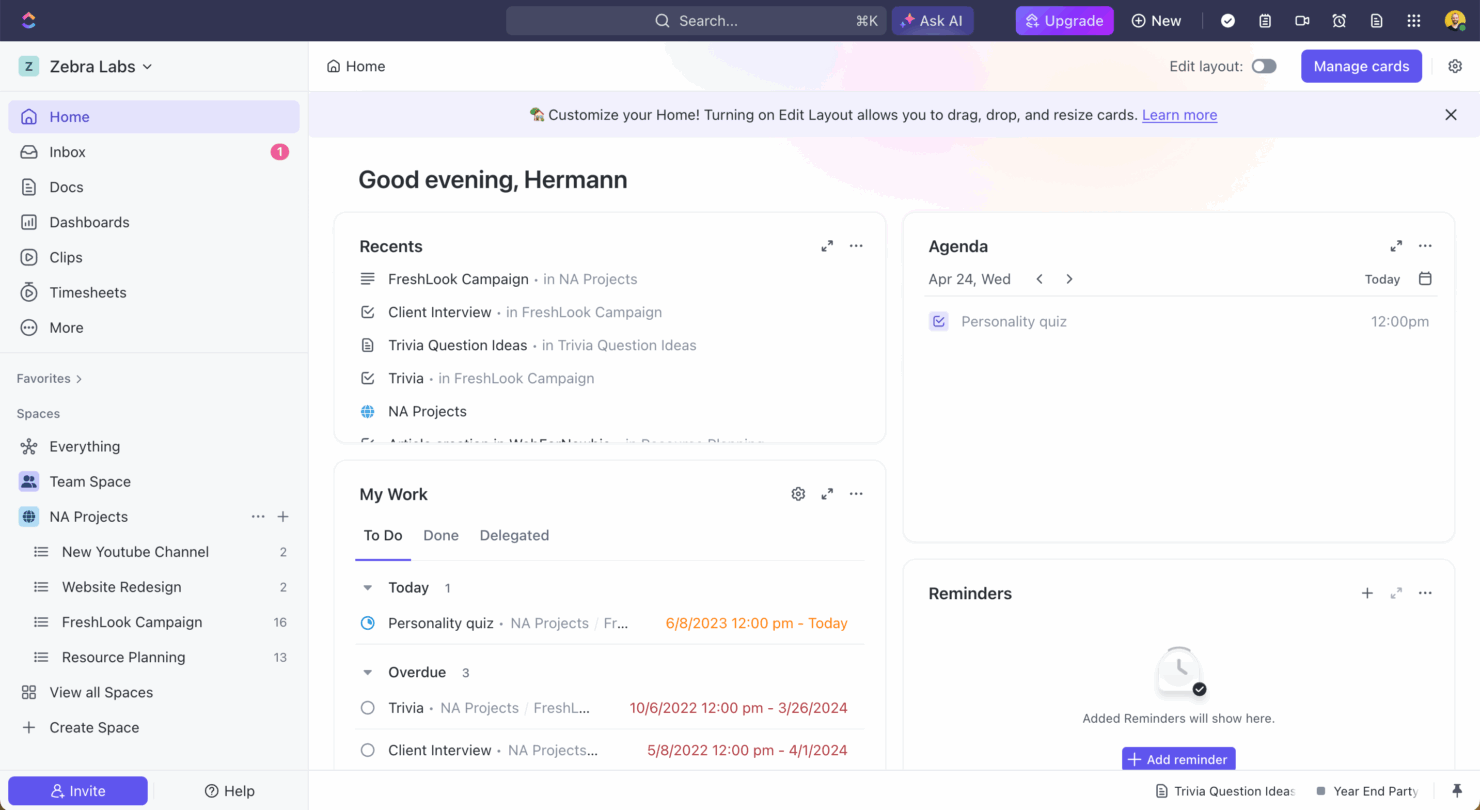
Met de automatiseringen van monday.com kunt u workflows instellen die tijd besparen door taakstatussen automatisch bij te werken en teamleden op de hoogte te stellen. Dit is vooral handig bij snel veranderende marketingprojecten. Het taakbeheer van ClickUp blinkt uit dankzij gedetailleerde taakkaarten en opties voor bulkbewerking, waardoor het ideaal is voor softwareontwikkelingsteams die complexe taakhiërarchieën efficiënt moeten beheren. Terwijl monday.com projectworkflows stroomlijnt met automatisering, biedt ClickUp robuust taakbeheer voor ingewikkelde projectstructuren.
| monday AI Workspace | ClickUp | |
|---|---|---|
| API | ||
| Batch Permissions & Access | ||
| Budgeting | ||
| Calendar Management | ||
| Collaboration Support | ||
| Contact Management | ||
| Contact Sharing | ||
| Customer Management | ||
| Dashboard | ||
| Dashboards | ||
| Data Export | ||
| Data Import | ||
| Data Visualization | ||
| Dependency Tracking | ||
| Document Sharing | ||
| Expense Tracking | ||
| External Integrations | ||
| File Sharing | ||
| Gantt Charts | ||
| Kanban Boards | ||
| Multi-User | ||
| Notifications | ||
| Project Management | ||
| Resource Management | ||
| Scheduling | ||
| Task Scheduling/Tracking | ||
| Third-Party Plugins/Add-Ons | ||
| Time Management | ||
| Travel Management | ||
| Workflow Management |
Integraties van monday.com versus ClickUp
| Integratie | monday.com | ClickUp |
|---|---|---|
| ✅ | ❌ | |
| HubSpot | ✅ | ✅ |
| Miro | ✅ | ❌ |
| Slack | ✅ | ✅ |
| Google Agenda | ✅ | ✅ |
| Zoom | ✅ | ✅ |
| Microsoft Teams | ❌ | ✅ |
| Figma | ❌ | ✅ |
| API | ✅ | ✅ |
| Zapier | ✅ | ✅ |
Met de integratie van monday.com met LinkedIn kunt u taken op sociale media automatiseren, waardoor het perfect is voor marketingteams die meerdere campagnes efficiënt moeten beheren. De integratie van ClickUp met Microsoft Teams is ideaal voor teams die afhankelijk zijn van realtime communicatie en samenwerking. Zo zijn updates en interacties naadloos mogelijk zonder het platform voor projectbeheer te verlaten. Terwijl monday.com uitblinkt in ondersteuning van marketingautomatisering, verbetert ClickUp de communicatie binnen teams dankzij de uitgebreide integratiemogelijkheden.
Beveiliging, naleving & betrouwbaarheid van monday.com versus ClickUp
| Factor | monday.com | ClickUp |
|---|---|---|
| Gegevensprivacy | monday.com voldoet aan de AVG en biedt gegevensversleuteling om gebruikersinformatie te beschermen. | ClickUp biedt gegevensversleuteling en volgt de AVG-normen voor gegevensprivacy. |
| Naleving van regelgeving | monday.com is ISO 27001-gecertificeerd en zorgt daarmee voor naleving van internationale beveiligingsnormen. | ClickUp voldoet aan SOC 2 Type II, wat de toewijding aan beveiligingscontroles aantoont. |
| Betrouwbaarheid van de beschikbaarheid | monday.com garandeert 99.9% beschikbaarheid, ondersteund door robuuste infrastructuur en monitoring. | ClickUp biedt 99.99% beschikbaarheid, wat een hoge beschikbaarheid en betrouwbaarheid voor gebruikers garandeert. |
monday.com en ClickUp bieden beide robuuste beveiligings- en nalevingsfuncties, maar hun certificeringen en garanties voor beschikbaarheid verschillen enigszins. Om de juiste tool te kiezen, beoordeelt u welke nalevingscertificeringen aansluiten bij de vereisten van uw sector en houdt u rekening met het belang van betrouwbare beschikbaarheid voor de workflow van uw team.
monday.com vs. ClickUp Gebruiksgemak
| Factor | monday.com | ClickUp |
|---|---|---|
| Gebruikersinterface | monday.com biedt een visueel intuïtieve interface met functies voor slepen en neerzetten, zodat deze eenvoudig kan worden aangepast. | ClickUp biedt een flexibele interface met talrijke aanpassingsmogelijkheden, die overweldigend kunnen zijn voor nieuwe gebruikers. |
| Onboardingervaring | monday.com biedt begeleide tutorials en sjablonen om nieuwe gebruikers snel op weg te helpen. | ClickUp biedt uitgebreide documentatie en videotutorials, maar de leercurve kan steil zijn vanwege de vele functies. |
| Ondersteuning | monday.com heeft responsieve klantenondersteuning met opties voor livechat en e-mail. | ClickUp biedt 24/7 ondersteuning, maar voornamelijk via e-mail, waardoor directe hulp mogelijk vertraging oploopt. |
monday.com is dankzij de overzichtelijke interface en snelle onboarding eenvoudiger te navigeren, waardoor het ideaal is voor teams die eenvoud zoeken. ClickUp biedt weliswaar veel functies, maar kan door de complexiteit lastig zijn. Daar staat tegenover dat het uitgebreide aanpassingsmogelijkheden biedt voor gebruikers die bereid zijn tijd te investeren in het leren werken ermee.
monday AI Workspace vs ClickUp: Pros & Cons
monday AI Workspace
- The interface is easy to use, with simple drag and drop timeline and charting mechanics.
- You can create forms that live within your project as a view.
- There is a long list of supported integrations
- The Gantt view isn't useful for building a project.
- Recurring tasks are considered automations and limited to higher tier plans.
- There is a steep learning curve for beginners.
ClickUp
- Extensive task management features keep your projects organized and on track
- Real-time collaboration makes team communication more effective
- Built-in automations reduce manual work and speed up your workflow
- Users often find the learning curve steep due to its rich feature set
- Some users report occasional performance lags when managing large projects
- Mobile app can be less intuitive than the desktop version
Best Use Cases for monday AI Workspace and ClickUp
monday AI Workspace
- Creative departments With features like collaborative docs and a proofing screen, creative teams can improve feedback loops and increase delivery speeds.
- Marketing teams Its customizable dashboards and automation features let you track campaigns and workflows efficiently.
- Content creation monday.com's file management and commenting capabilities let teams manage media files and improve collaboration.
- Event planners The platform’s timeline views and easy collaboration features make managing multiple events straightforward.
- Product development You can track progress and updates across teams to maintain alignment and meet deadlines.
- Remote teams With collaborative features and real-time updates, remote teams can maintain productivity and communication effortlessly.
ClickUp
- Creative agencies ClickUp's customizable dashboards and task automation features can help you manage client projects, track feedback and revisions, and keep creative teams aligned.
- Tech startups ClickUp supports agile development with sprints and real-time collaboration features that can help teams iterate quickly.
- Marketing teams You can streamline campaign planning and execution using ClickUp’s task dependencies and timelines.
- Remote teams ClickUp's real-time updates and collaboration tools keep everyone on the same page, no matter where they are.
- Product managers ClickUp’s roadmaps and goal-tracking features help you align development with business objectives.
- Freelancers You can track your tasks and deadlines efficiently with ClickUp’s simple task and time management tools.
Wie moet monday.com gebruiken en wie ClickUp?
Naar mijn mening is monday.com perfect voor teams die op zoek zijn naar een gebruiksvriendelijk platform met eenvoudige onboarding en visueel taakbeheer, vooral in creatieve sectoren zoals marketing of design. ClickUp is daarentegen zeer geschikt voor technisch onderlegde teams in softwareontwikkeling of IT die behoefte hebben aan uitgebreide aanpassingsmogelijkheden en een uitgebreide functieset. Als je team eenvoud en een snelle installatie belangrijk vindt, kies dan voor monday.com. Als je echter geavanceerde functies nodig hebt en een steilere leercurve geen probleem vindt, is ClickUp de juiste keuze.
Differences Between monday AI Workspace and ClickUp
| monday AI Workspace | ClickUp | |
|---|---|---|
| Automation | monday.com allows you to automate routine tasks with customizable triggers. | ClickUp provides powerful automation tools, but they require more setup time. |
| Integrations | monday.com supports integrations with tools like LinkedIn and Miro. | ClickUp integrates well with Microsoft Teams and Figma, offering different options. |
| Onboarding | monday.com has guided tutorials and templates for a quick start. | ClickUp requires more time to learn due to its vast feature set and documentation. |
| Pricing | monday.com uses a tiered pricing model based on user count and features. | ClickUp offers a tiered model with a free plan, but charges for advanced features. |
| User Interface | monday.com offers a simple, drag-and-drop interface that's easy to navigate. | ClickUp provides a more complex interface with extensive customization options. |
| Visit monday AI WorkspaceOpens new window | Visit ClickUpOpens new window |
Similarities Between monday AI Workspace and ClickUp
| Collaboration | Each platform provides tools for team collaboration, such as file sharing and real-time updates, to keep your team aligned. |
|---|---|
| Customizable Workflows | monday.com and ClickUp let you create custom workflows to suit your team's unique processes, enhancing productivity and efficiency. |
| Data Visualization | Both tools provide data visualization features, such as dashboards and charts, to help you make informed decisions based on project data. |
| Integrations | Both solutions support a wide range of integrations with popular apps like Slack and Google Calendar, enhancing their functionality. |
| Task Management | Both monday.com and ClickUp offer robust task management features, allowing you to assign tasks, set deadlines, and track progress effectively. |
| Visit monday AI WorkspaceOpens new window Visit ClickUpOpens new window | |