


Beoordeling van Microsoft Planner: voordelen, nadelen, functies & prijzen



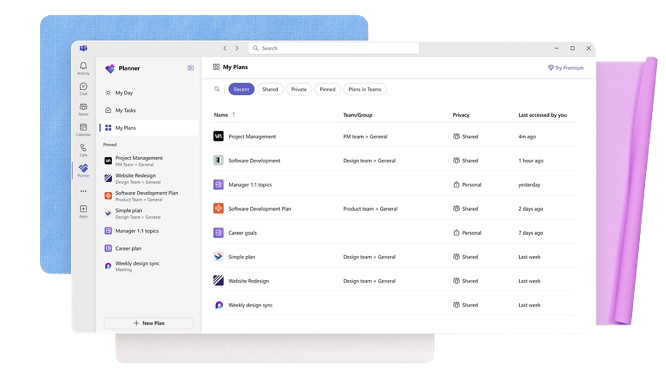
Microsoft Planner is a project management software built directly into Microsoft 365, designed for teams that need to organize tasks, assign work, and track progress across projects. I'd consider it over something like Trello if your team is already working in Teams, Outlook, and SharePoint—Planner connects natively to all of them, so there's no separate tool to adopt or integrate.
Microsoft Planner Evaluation Summary
- From $10/user/month (billed annually)
- Free trial available
Waarom u onze softwareaanbevelingen kunt vertrouwen
Ons team test en beoordeelt software sinds 2012. Als projectmanagers weten we zelf hoe moeilijk — en belangrijk — het is om de juiste software te kiezen.
Voor deze gids hebben we tools geëvalueerd met behulp van praktijktests en onafhankelijk onderzoek, waarbij we tools beoordeelden aan de hand van onze selectiecriteria. We putten ook uit inzichten van vooraanstaande experts uit de branche en praktiserende projectmanagementprofessionals.
Onze reviews weerspiegelen ons menselijke redactionele oordeel, geen verkooppraatje.
Deskundige beoordelaars:
Microsoft Planner Overview
Microsoft Planner is a task management software designed to simplify project tracking and collaboration. It suits teams within businesses already using Microsoft 365, such as marketing departments coordinating campaigns or IT teams managing tech projects. Microsoft Planner provides value by integrating seamlessly with existing Microsoft tools, enhancing your team's ability to stay organized and efficient.
In this article, you'll find insights into Microsoft Planner's features, pros and cons, use cases, and pricing. Whether you're a seasoned project manager or new to the role, you'll discover how this tool can align with your team's goals.
pros
-
You can easily assign and track tasks within your team.
-
Its integration with Microsoft 365 enhances team collaboration
-
The simple, user-friendly interface makes task management straightforward.
cons
-
It lacks advanced customization options for complex projects.
-
The reporting features are not as robust as some competitors.
-
It may not accommodate larger teams needing detailed task dependencies.
-

Celoxis
Visit WebsiteThis rating combines scores from multiple user review sites to reflect overall customer sentiment about the product.4.5 -
Smartsheet
Visit WebsiteThis rating combines scores from multiple user review sites to reflect overall customer sentiment about the product.4.5 -
Accelo
Visit WebsiteThis rating combines scores from multiple user review sites to reflect overall customer sentiment about the product.4.4





Core Features
Unified Task Management: Manage all your tasks, to-do lists, plans, and projects across Microsoft 365 apps in one place
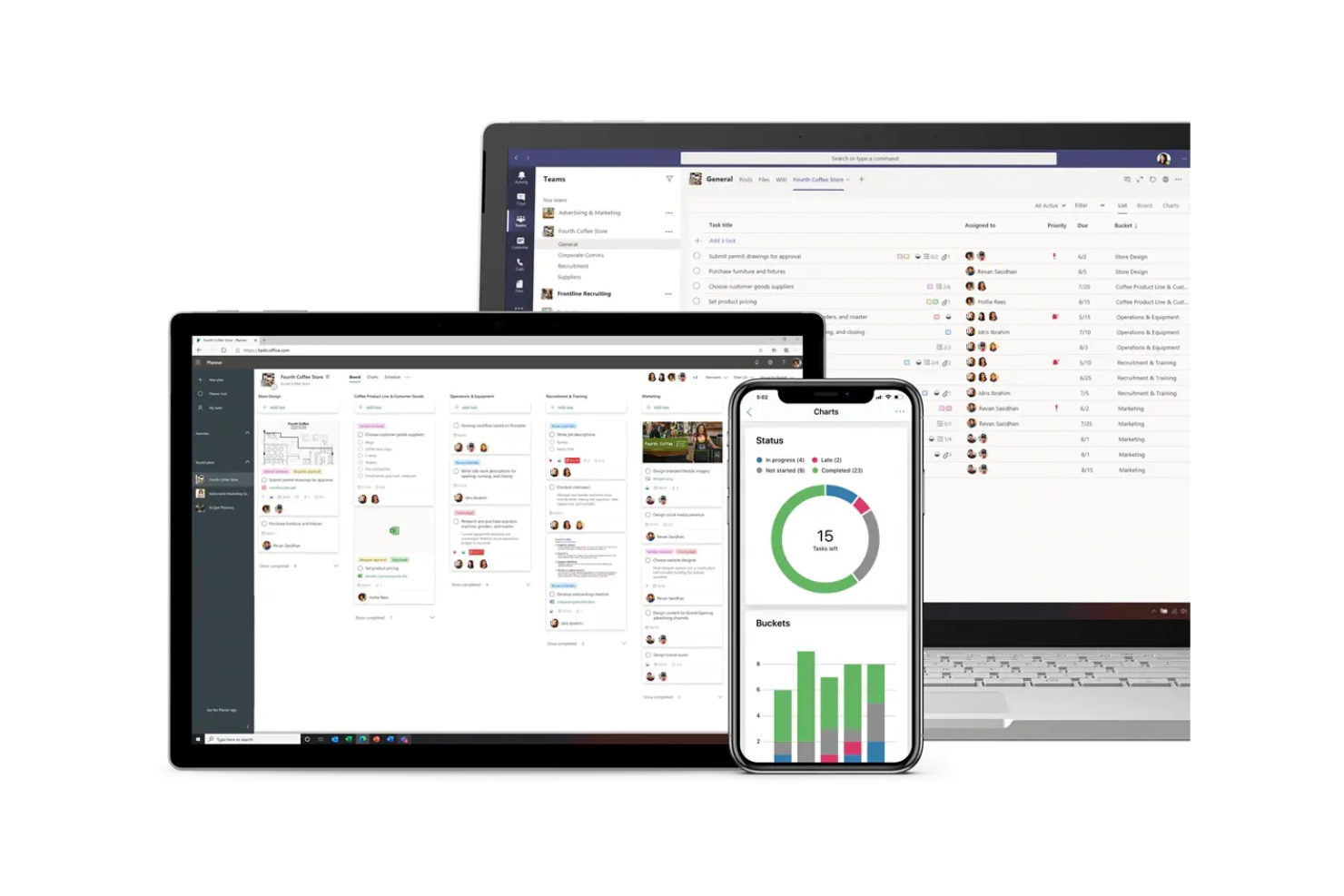
Task Tracking: Track task status in real-time with visual boards, helping you keep projects on schedule and identify bottlenecks quickly.
Task History and Conversations: Maintain a history of task changes and facilitate team communication through task-specific conversations.
Collaboration: Assign tasks, share files, comment, and tag teammates to keep work moving. Real-time updates and Teams integration help your team stay connected and on track.
Customizable Templates: Start projects quickly with customizable templates tailored for various departments like marketing, sales, IT, and HR.
Goal Setting and Alignment: Define and align project goals at various organizational levels to ensure strategic objectives are met.

Ease of Use
Microsoft Planner is easy to use, with an intuitive interface and simple navigation. You can assign tasks, track progress, and update statuses with minimal training. Its visual task boards make organizing work straightforward, helping teams stay focused.
Compared to other tools, its simplicity and integration with Microsoft 365 make it a convenient way to manage workflows and improve collaboration.
Microsoft Planner Specs
- A/B Testing
- API
- Collaboration Support
- Custom Data Forms
- Dashboard
- Dashboards
- Data Export
- Data Import
- Developer Tools
- External Integrations
- Feedback Management
- Gantt Charts
- Google Apps Integration
- Multi-User
- Notifications
- Prioritization
- Product Catalog
- Release Management
- Reports
- Resource Management
- Review Monitoring
- Roadmapping
- Scheduling
- Task Scheduling/Tracking
Alternatives to Microsoft Planner




Microsoft Planner FAQs
How does Microsoft Planner handle task assignments?
Can I use Microsoft Planner offline?
How secure is Microsoft Planner for sensitive data?
How can I customize task views in Microsoft Planner?
Does Microsoft Planner support notifications and alerts?
Can I integrate Microsoft Planner with other Microsoft apps?
Is Microsoft Planner suitable for agile project management?
How does Microsoft Planner manage task dependencies?
Wat volgt er nu?
Wil je contact leggen met andere digitale projectmanagers om hulpmiddelen en beste werkwijzen te delen? Word lid van onze community en krijg toegang tot meer dan 100 sjablonen, voorbeelden en praktijkvoorbeelden, en kom via Slack in contact met honderden andere digitale projectmanagers.