

De 10 beste programvarene med åpen kildekode for tankekart i 2026

Kortliste over den beste programvaren for tankekartlegging med åpen kildekode


Programvare for tankekartlegging med åpen kildekode gir deg gratis og fleksible verktøy for å organisere ideer visuelt ved hjelp av redigerbare diagrammer som kan deles. Hvis du ser etter måter å kartlegge prosjekter på, idémyldre med teamet ditt eller holde informasjon tilgjengelig på tvers av plattformer, trenger du løsninger som lar deg tilpasse, samarbeide og beholde kontrollen. Denne veiledningen presenterer den beste programvaren for tankekartlegging med åpen kildekode for 2026, med fokus på funksjoner og bruksområder som faktisk hjelper deg med å håndtere kompleksitet og kommunisere tydelig, slik at du kan velge riktig verktøy for deg.
Why Trust Our Software Recommendations
Our team has been testing and reviewing software since 2012. As project managers ourselves, we know how difficult—and important—it is to choose the right software.
For this guide, we evaluated tools using hands-on testing and independent research, scoring tools using our selection criteria. We also draw on insights from industry thought leaders and practicing project management experts.
Our reviews reflect our human editorial judgment, not a sales pitch.
Expert reviewers:
Sammenligningstabell for programvare for tankekartlegging med åpen kildekode
Denne sammenligningstabellen oppsummerer prisdetaljene for mine beste utvalg av programvare for tankekartlegging med åpen kildekode:
| Tool | Best For | Trial Info | Price | ||
|---|---|---|---|---|---|
| 1 | Best for exporting to multiple formats | Free forever | Free forever | Website | |
| 2 | Best for hand-drawn style diagrams | 14-day free trial + free plan available | From $6/user/month (billed annually) | Website | |
| 3 | Best for integration with popular apps | Free plan available | Free to use | Website | |
| 4 | Best for browser-based team collaboration | Free forever | Free forever | Website | |
| 5 | Best for complex information structuring | Free forever | Free forever | Website | |
| 6 | Best for academic research organization | Free forever | Free forever | Website | |
| 7 | Best for customizable visualizations | Free forever | Free forever | Website | |
| 8 | Best for linking notes dynamically | Free forever | Free forever | Website | |
| 9 | Best for offline desktop simplicity | Free forever | Free forever | Website | |
| 10 | Best for minimal interface enthusiasts | Free forever | Free forever | Website |
Anmeldelser av den beste programvaren for tankekartlegging med åpen kildekode
Nedenfor finner du mine detaljerte sammendrag av den beste programvaren for tankekartlegging med åpen kildekode, som kan fungere som kraftige alternativer til proprietære løsninger som MindManager, og som kom med på kortlisten min. Anmeldelsene mine gir et detaljert innblikk i funksjonene, de beste bruksområdene og mulighetene til hvert verktøy, slik at du kan finne det beste for deg.


FreeMind is an open source mind mapping solution for creating structured diagrams, capturing ideas, and organizing information visually with flexible formatting, note-taking, and node management features.
Who Is FreeMind Best For?
Individual users or small teams who need a free desktop mind mapping tool for organizing information across different fields, docs, or projects.
Why I Picked FreeMind
I picked FreeMind as one of the best because it makes exporting maps to multiple formats easy. I can quickly generate mind maps, then export them as HTML, PDF, SVG, or even OpenOffice documents. This flexibility fits my workflow when sharing diagrams with stakeholders.
FreeMind Key Features
- Node folding: Collapse and expand topics to keep large maps or complex flowcharts manageable.
- Attribute management: Add custom properties and metadata to nodes for better organization.
- Scripting support: Use built-in scripting to automate and customize map actions.
- File export options: Convert mind maps into formats like HTML, PDF, SVG, or OpenOffice documents for easier sharing.
FreeMind Integrations
FreeMind does not offer integrations, but provides third-party plugins with Confluence, Clojure, LaTeXMath, WSL, and WikiWhirl. Custom plugins can be written.
Pros and Cons
Pros:
- Supports complex, deeply nested map structures
- Runs smoothly on low-spec computers
- Exports mind maps in many formats
Cons:
- No real-time collaboration features
- Dated user interface design
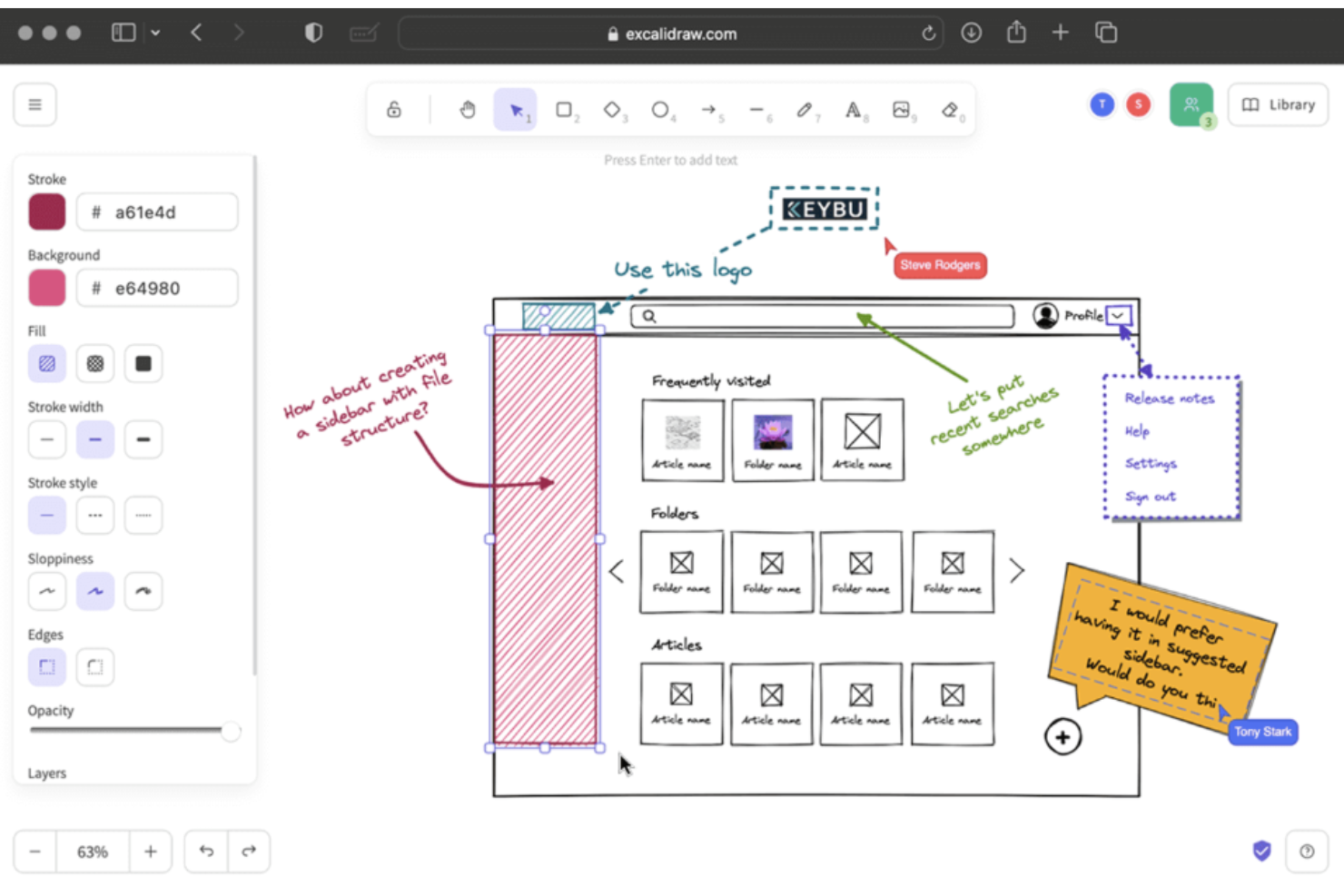
Excalidraw is an open source diagramming and visual collaboration platform known for its hand-drawn canvas, quick shape tools, and support for real-time co-editing of diagrams.
Who Is Excalidraw Best For?
Excalidraw is a great choice for design teams and educators who want to sketch ideas visually and collaborate in a flexible, hand-drawn digital workspace.
Why I Picked Excalidraw
I picked Excalidraw as one of the best because I use its hand-drawn style sketching to map ideas quickly, group concepts visually, and illustrate workflows. Its infinite canvas and real-time editing let my team brainstorm and organize thoughts with informal, expressive diagrams.
Excalidraw Key Features
- Export options: Save diagrams as PNG, SVG, or clipboard content.
- Layer management: Organize shapes and drawings on separate layers.
- Third-party libraries: Extend functionality with custom libraries and templates.
- Real-time collaboration: Work simultaneously with team members on the same canvas via shareable links.
Excalidraw Integrations
Excalidraw integrates with Confluence, Jira, Notion, and Slite. Excalidraw offers an API for custom integrations.
Pros and Cons
Pros:
- Collaborative editing for group brainstorming
- Infinite canvas supports large mind maps
- Sketches look hand-drawn for ideation
Cons:
- Lacks built-in file history features
- No built-in structure for node linking

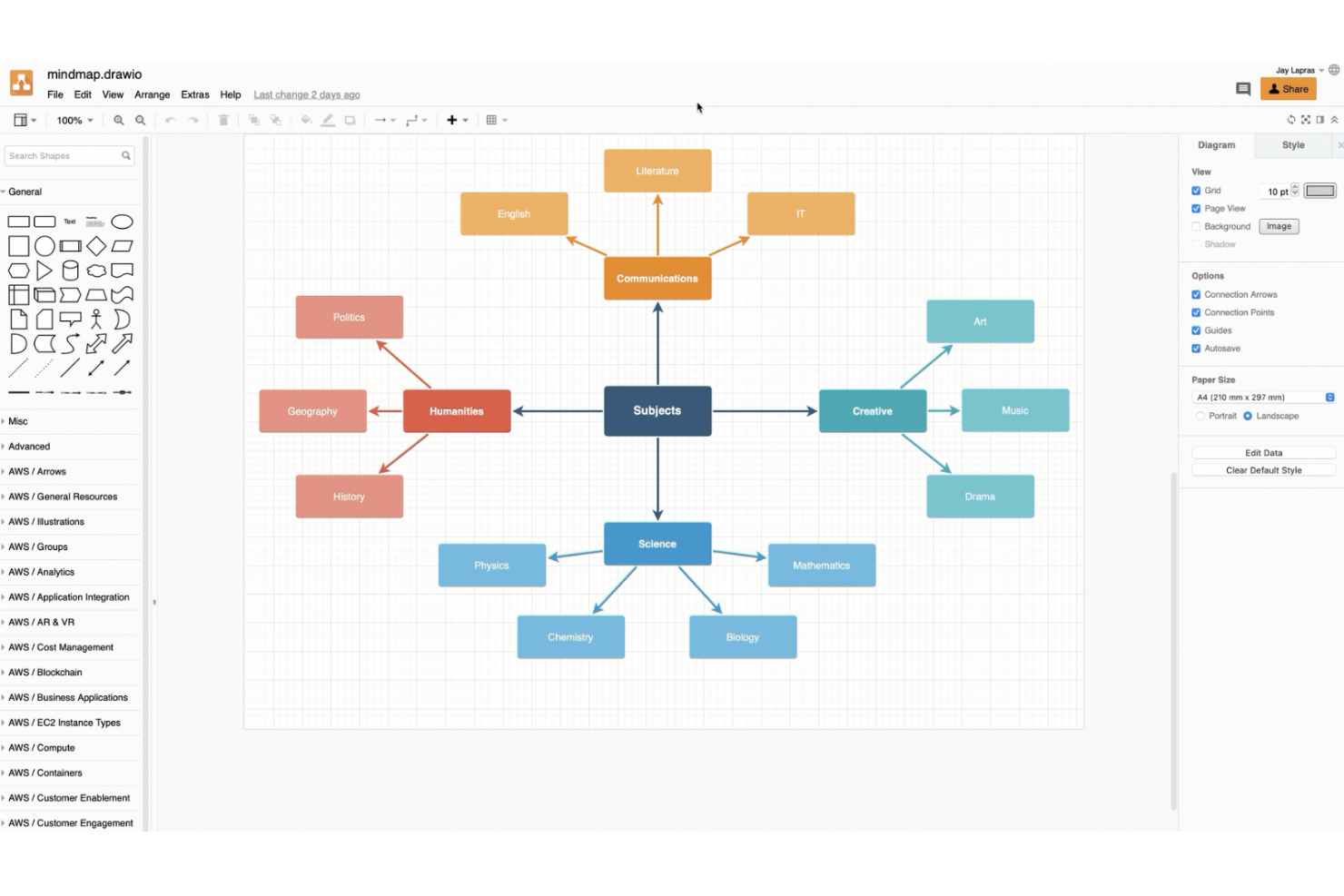
draw.io is a diagramming and mind mapping software that lets users create, edit, and organize mind maps with drag-and-drop tools, shape libraries, and real-time collaboration options.
Who Is draw.io Best For?
draw.io is a strong choice for product, engineering, and IT teams that need to create mind maps and diagrams inside tools like Confluence, Jira, or Google Workspace.
Why I Picked draw.io
I picked draw.io because I can launch it directly from tools like Confluence and Jira, then save, open, and update mind maps without leaving those apps. I like that teams can collaborate in real time and export diagrams to Google Drive or Microsoft OneDrive.
draw.io Key Features
- Shape libraries: Access a wide range of predefined shapes and icons for diagrams, useful for planning campaigns across social media.
- Version history: Review and restore earlier versions of your diagrams easily.
- Custom templates: Start new projects quickly using reusable diagram templates for web pages or applications.
- Offline mode: Create and edit diagrams locally in your browser or desktop app without requiring an internet connection.
draw.io Integrations
draw.io offers native integrations with Confluence, Jira, Google Workspace, Notion, Nextcloud, Microsoft OneDrive, Dropbox, and more. It provides an API for custom integrations.
Pros and Cons
Pros:
- Works offline without software installation
- Exports mind maps in many file formats
- Full-featured diagramming in the browser and desktop
Cons:
- No task management or workflow tools
- Lacks dedicated mind mapping shortcuts

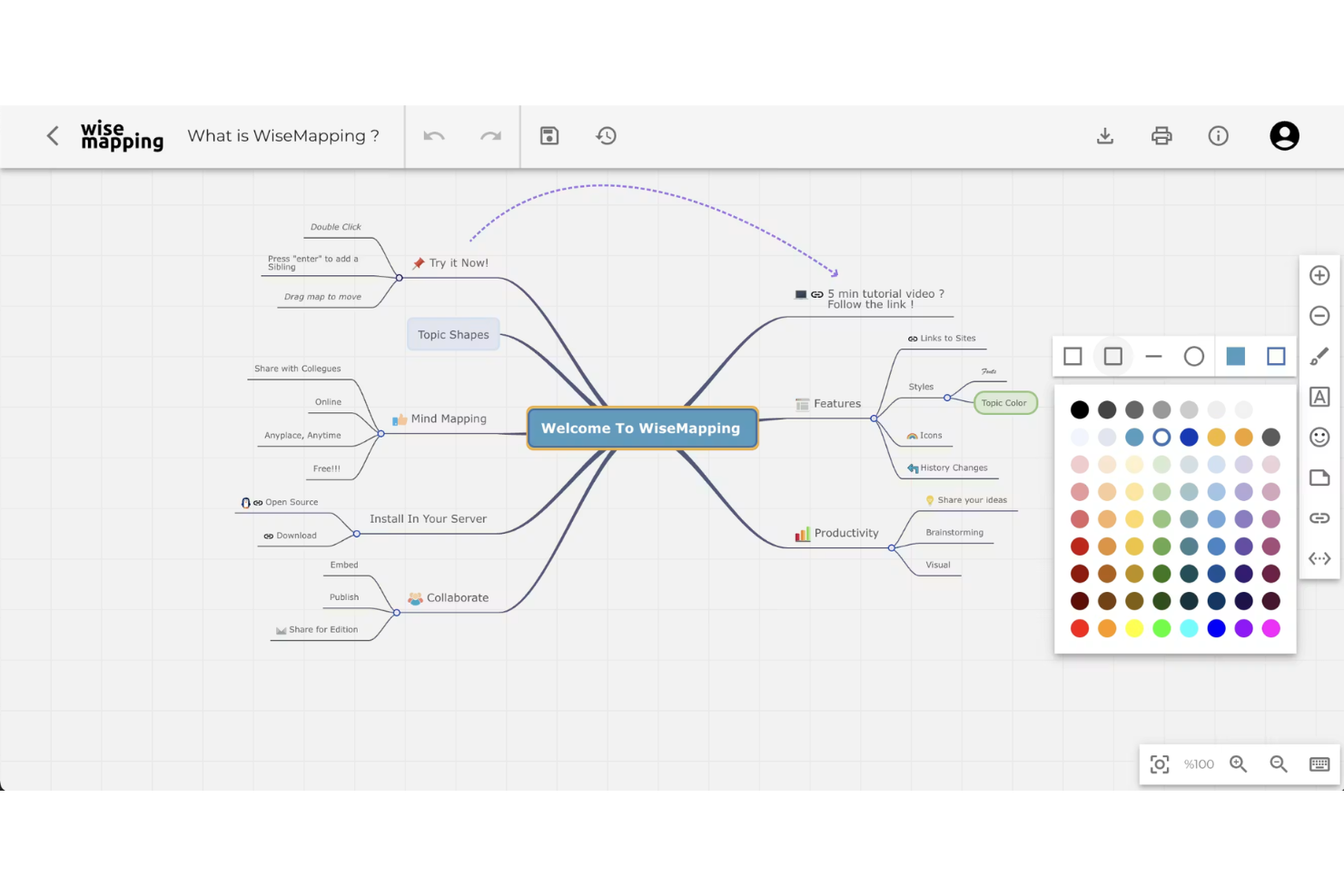
WiseMapping is a web-based, open source mind mapping tool where teams can create, edit, and organize visual mind maps collaboratively in real time.
Who Is WiseMapping Best For?
WiseMapping is a fit for distributed teams and educators who want a cloud-based platform to collaborate on mind maps using only a browser.
Why I Picked WiseMapping
I picked WiseMapping because I can invite colleagues to co-edit maps in a shared browser session, leave map-specific comments, and publish mind maps using a public link for quick feedback or knowledge sharing.
WiseMapping Key Features
- Open-source licensing: Download, host, and customize WiseMapping under its open source license, using mind map templates.
- Drag-and-drop map editing: Move nodes, branches, and topics around intuitively within the browser workspace designed for online mind mapping.
- Password-protected maps: Restrict map access to specific users using passwords before exporting to platforms like PowerPoint.
- Real-time map collaboration: Invite team members to co-edit mind maps simultaneously and share feedback directly in browser sessions.
WiseMapping Integrations
WiseMapping offers user authentication integrations and native embedding. A REST API is available for custom integrations.
Pros and Cons
Pros:
- Supports exporting maps in multiple formats
- Browser-based platform with real-time editing
- Freely downloadable for on-premise use
Cons:
- No built-in task or project management features
- Only basic customization for map themes

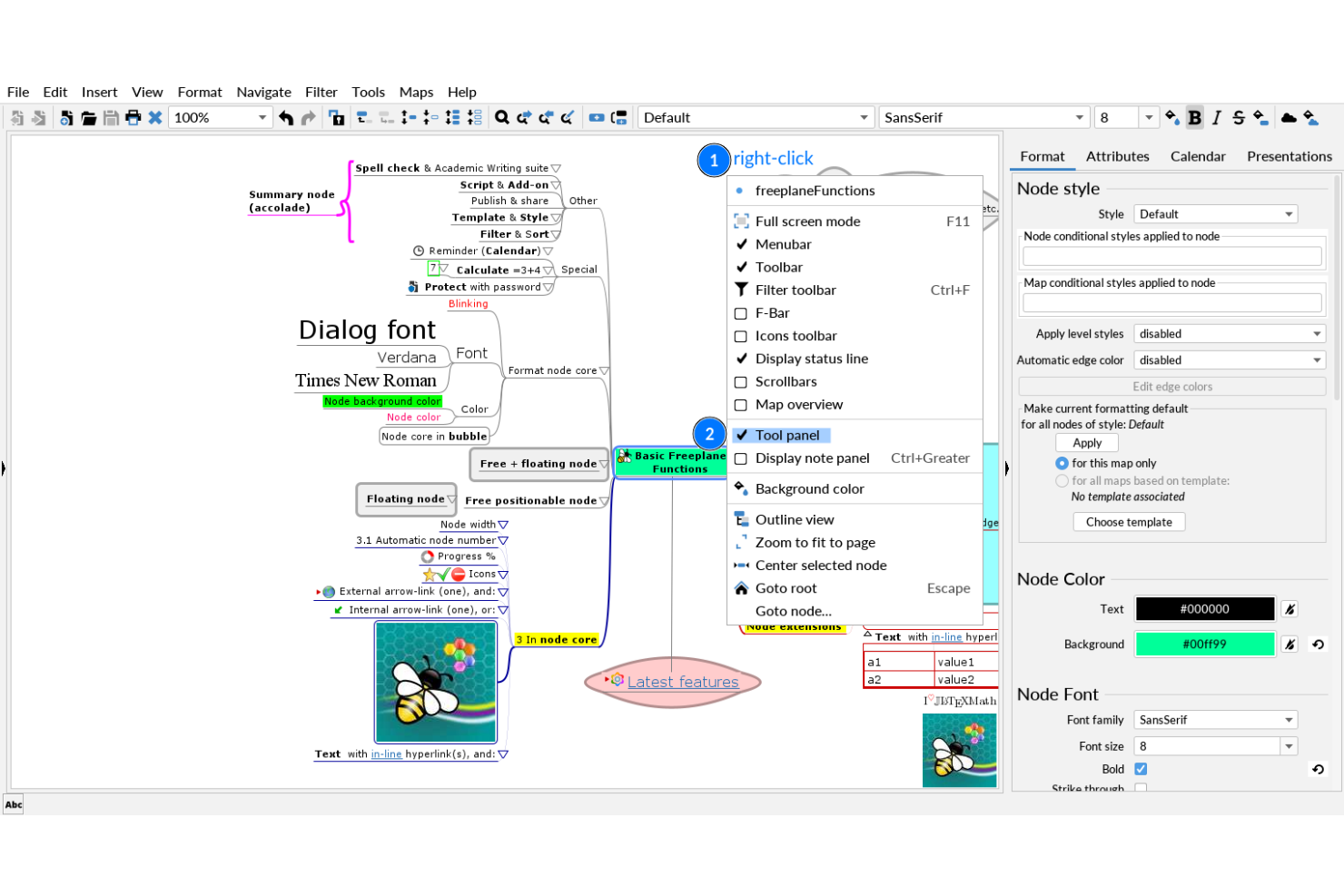
Freeplane is a free mind mapping and knowledge management software that lets you build complex maps, manage metadata, and customize structures for organizing advanced information workflows.
Who Is Freeplane Best For?
Freeplane suits researchers, academics, and information architects who need to build, analyze, or manage highly structured knowledge maps.
Why I Picked Freeplane
I picked Freeplane as one of my top choices because I can design large, deeply hierarchical mind maps and easily assign metadata or conditional styles to nodes. I like that I can create filtered views and automate relationships, which supports complex information structuring.
Freeplane Key Features
- Map encryption: Protect specific nodes or entire maps with password-based encryption, with source code often accessible on platforms like GitHub.
- Add-on support: Extend functionality with a range of downloadable plugins and scripts.
- Task management tools: Add reminders, priorities, and progress icons to nodes that are frequently built on Java.
- Conditional node styling: Automatically change node colors, borders, and fonts based on custom rules or hierarchical levels.
Freeplane Integrations
FreeMind does not offer integrations, but provides third-party plugins with MapInsight, Navigation, Jumper, Bookmarks, SmartLocker, and more. Custom plugins can be written.
Pros and Cons
Pros:
- Supports scripting and automation via add-ons
- Allows node-level encryption and password protection
- Handles massive and deeply nested mind maps
Cons:
- Dated interface compared to modern alternatives
- Lacks real-time web-based collaboration

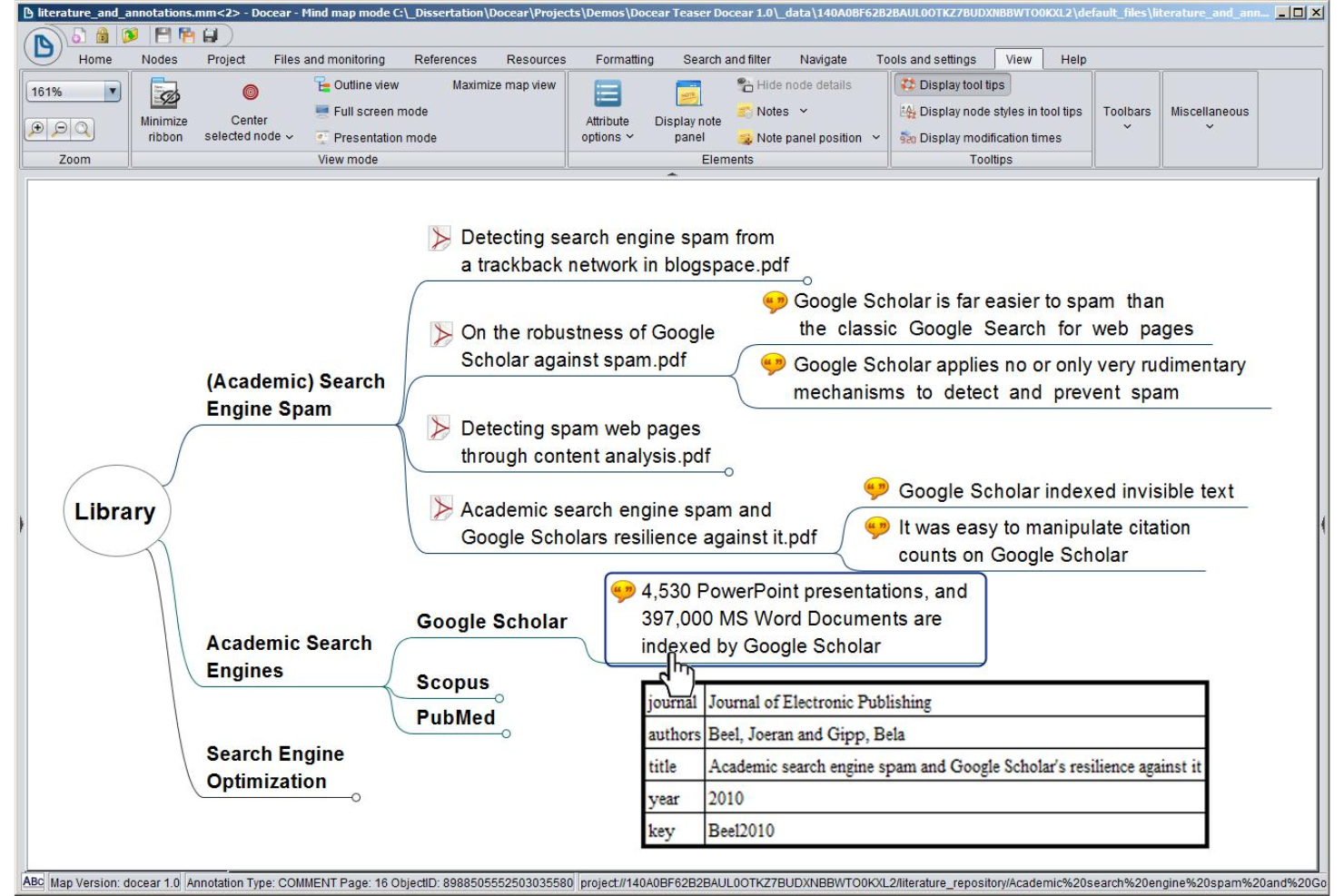
Docear is an open-source mind mapping tool designed for academic users, combining reference management, PDF annotation, and knowledge organization in a single workspace.
Who Is Docear Best For?
Academic researchers, students, and scholars organizing literature, annotations, and citations in a unified workspace.
Why I Picked Docear
I picked Docear as one of my top open-source picks because it combines mind mapping with reference and PDF management for academic writing. I use it to organize papers, annotate PDFs, and connect literature reviews directly to my research outlines.
Docear Key Features
- Hierarchical mind map editor: Create multi-level mind maps to visualize complex research topics on desktop or mac OS/Android.
- Workspace organization: Manage projects with folders for drafts, annotations, and mind maps centered around a core theme.
- BibTeX integration: Import and manage bibliographies for academic referencing.
- PDF annotation extraction: Automatically import highlighted text and comments from your PDF documents directly into your mind map nodes.
Docear Integrations
Docear offers built-in integrations with Notion and JabRef.
Pros and Cons
Pros:
- Advanced reference and citation management
- Direct PDF annotation and management features
- Academic-focused mind mapping tools and layout
Cons:
- No collaboration or cloud sync features
- Outdated user interface and documentation


VUE is an open-source mind mapping platform developed by Tufts University that lets you create, organize, and customize visual knowledge maps, manage multimedia resources, and structure data-rich presentations.
Who Is VUE Best For?
Educators, students, and researchers who need to create customized, interactive visualizations for presentations or academic projects.
Why I Picked VUE
I picked VUE as one of my top open-source mind mapping tools because I can fully customize node shapes, connections, and map layouts for complex visualizations. I use its metadata tagging and layered presentation mode to manage and present nuanced information.
VUE Key Features
- Resource linking: Attach documents, images, and URLs directly to your mind map nodes.
- Export options: Export maps to formats like PDF, SVG, and image files.
- Concept mapping: Build complex associations with labeled, directional connections.
- Presentation mode: Transition mind maps into interactive, pathway-driven slideshows to walk through complex visual structures.
VUE Integrations
Native integrations are not publicly listed.
Pros and Cons
Pros:
- Presentation mode for interactive knowledge maps
- Supports multimedia resource attachment to nodes
- Flexible node and edge visual customization
Cons:
- Lacks real-time collaboration features
- Legacy interface with limited updates
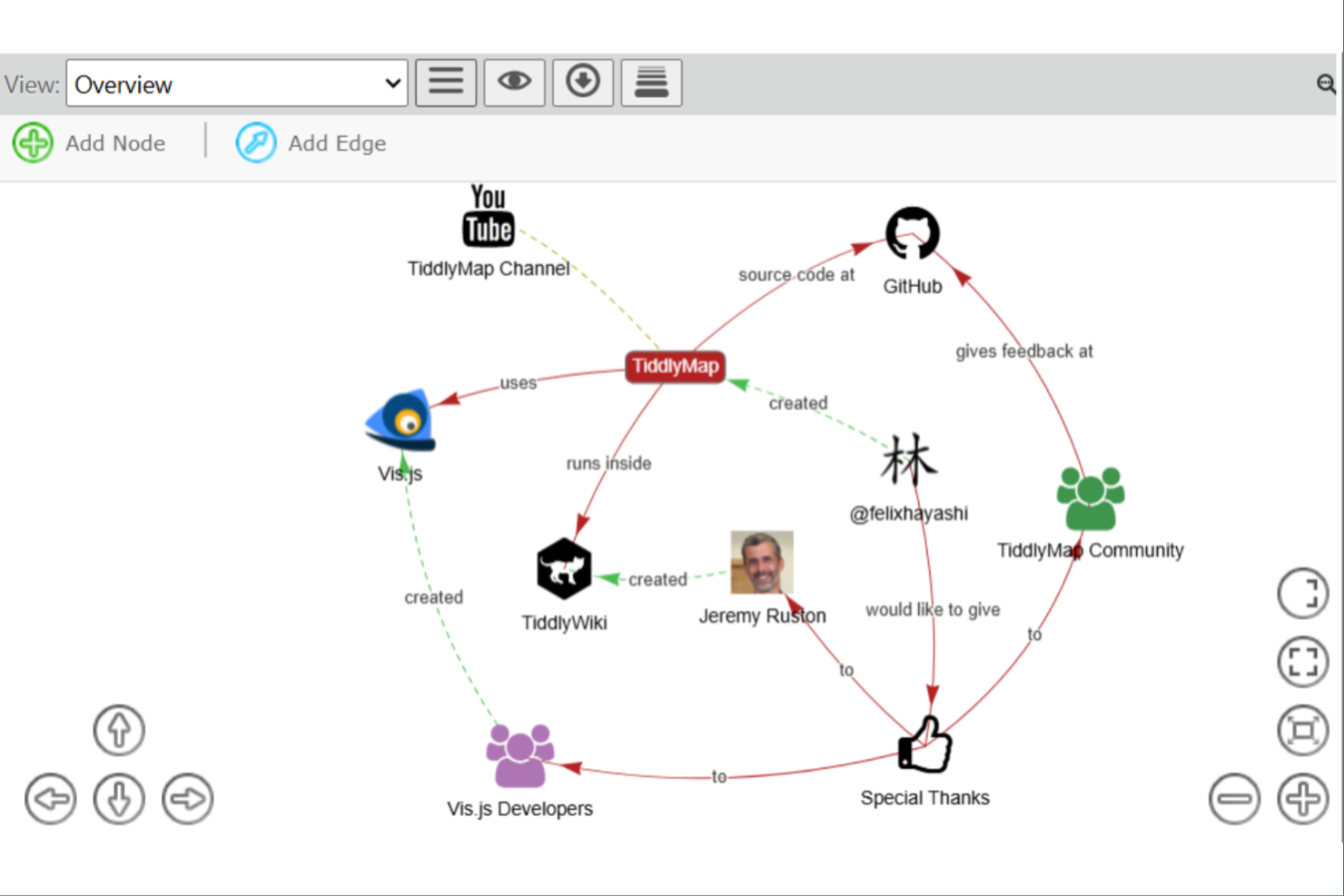
TiddlyMap is an open-source mind mapping and note-linking tool built on TiddlyWiki that lets you visualize relationships between your notes, create interactive maps, and manage ideas in a wiki-style environment.
Who Is TiddlyMap Best For?
TiddlyMap is a great fit for individual researchers, personal knowledge management enthusiasts, or educators looking to map notes and concepts dynamically.
Why I Picked TiddlyMap
I picked TiddlyMap as one of the best because I can map and link notes visually inside TiddlyWiki, updating connections instantly when content changes. I use its dynamic graph view to explore and edit relationships as my knowledge base grows and adapts.
TiddlyMap Key Features
- Custom node styling: Apply distinct colors and shapes to nodes for visual organization.
- Metadata tagging: Tag notes with metadata and format text with syntax like markdown for enhanced search and categorization.
- Multiple map layouts: Choose from force-directed, hierarchical, or custom layouts for maps.
- Interactive graph navigation: Click and drag nodes to reorganize structures dynamically and explore connections directly within your wiki.
TiddlyMap Integrations
TiddlyMap supports integrations via its plugin system and TiddlyWiki’s API for custom integrations.
Pros and Cons
Pros:
- Customizable appearance for nodes and edges
- Visual links embedded directly in TiddlyWiki
- Graph visualization updates with note changes
Cons:
- Steep learning curve for configuration
- No real-time collaboration features
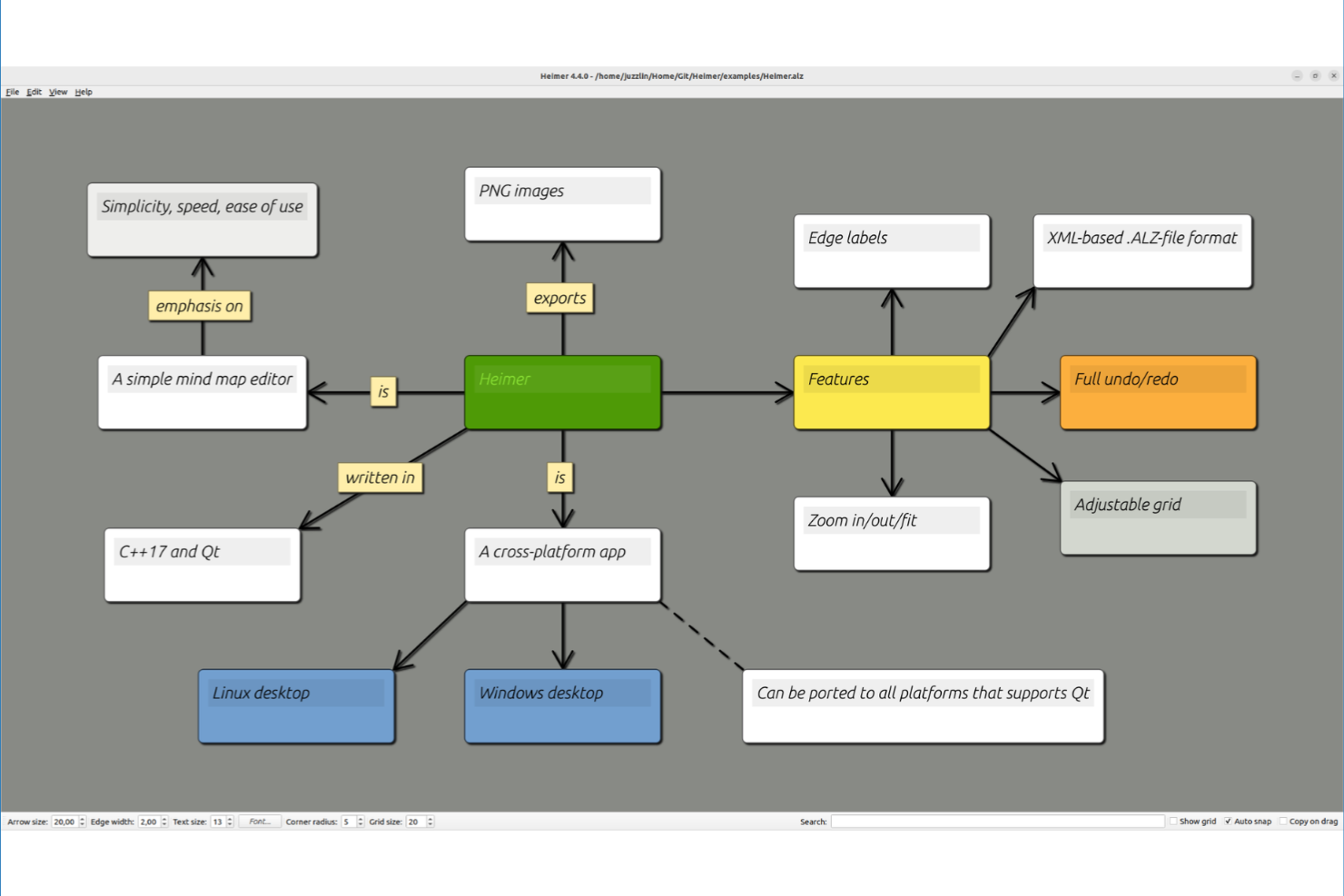
Heimer is an open-source mind mapping software for desktop users that lets you create, edit, and organize node-based diagrams entirely offline, with a minimal interface and straightforward layout tools.
Who Is Heimer Best For?
Heimer is ideal for individuals or small teams who need a straightforward, offline mind mapping tool for Linux or Windows desktops.
Why I Picked Heimer
I picked Heimer because I want a minimal, open-source mind mapping tool that runs fully offline on a desktop. I like that I can quickly add nodes, connect ideas without distractions, and save work in .hei or export as SVG for sharing or archiving.
Heimer Key Features
- Drag-and-drop editing: Rearrange nodes and connections on the canvas with simple mouse actions.
- Zoom and pan controls: Navigate large diagrams smoothly with built-in zoom and pan options.
- Export as PNG or PDF: Save your mind maps as image or document files for easy sharing or printing.
- Offline file support: Store and work on mind maps locally using native .hei or vector .svg file formats without needing an internet connection.
Heimer Integrations
Heimer doesn't have any native integrations.
Pros and Cons
Pros:
- Minimalist interface for distraction-free mapping
- Lightweight app with fast performance
- Fully offline, no internet required
Cons:
- Limited export formats beyond SVG and PNG
- No collaborative or real-time editing


My Mind is an open-source mind mapping tool that lets you build, edit, and save visual diagrams in your browser with a highly simplified interface and basic export options.
Who Is My Mind Best For?
My Mind suits individual users or small teams who want a distraction-free, browser-based mind mapping tool without complex features.
Why I Picked My Mind
I picked My Mind because I want a web-based mind mapping tool that gives me a clutter-free canvas and quick keyboard-centric editing. I like that I can run it locally or remotely from a browser, add nodes with single keystrokes, and export maps as PNG or JSON.
My Mind Key Features
- Color-coded branches: Set custom colors for each mind map branch for easy visual organization.
- Undo and redo controls: Instantly reverse or restore actions while editing maps.
- Resizable canvas: Adjust the canvas size to suit maps of varying complexity.
- Keyboard-centric shortcuts: Create, edit, and navigate map nodes rapidly using quick single-keystroke commands.
My Mind Integrations
My Mind doesn't have any native integrations.
Pros and Cons
Pros:
- Focused on fast keyboard commands
- Open source and self-hostable by design
- Completely runs in the browser or offline
Cons:
- Limited styling and formatting customization
- Lacks built-in cloud storage integration
Annen programvare for tankekartlegging med åpen kildekode
Her er noen flere alternativer for programvare for tankekartlegging med åpen kildekode som ikke kom med på kortlisten min, men som likevel er verdt å ta en titt på:


How I Evaluate Open Source Mind Mapping Software
I split my evaluation into baseline requirements—like a true node-based canvas and OSI licensing—then differentiators that matter when teams need to self-host or map project scope together.
Core Functionality (Table Stakes For This List)
When I'm selecting tools for my list, I rank each one on a scale from 0 (does not offer the functionality) to 5 (excels in this area) for each core functionality listed below. Then, I calculate the tool's total score into a percentage. Each tool needs to achieve a minimum total score of 65% to be considered for inclusion.
- Open-Source Licensing: I check that each tool carries a recognized OSI-approved license like GPL, MIT, or Apache, with source code publicly accessible in a repository.
- Node-Based Mind Mapping: The core canvas needs to support hierarchical branching where you can add, edit, and rearrange parent-child nodes visually on a map.
- Self-Hosting or Local Install: I look for tools that run on your own infrastructure or desktop, so project data stays where your team controls it.
- Project-Relevant Node Data: Nodes should hold more than just text. I evaluate whether you can attach notes, links, or task-level metadata like due dates to branches.
- Import/Export Formats: Moving maps between tools matters. I check for support of common formats like FreeMind .mm, OPML, PNG, PDF, and Markdown.
- Collaboration or Sharing: Whether it's real-time co-editing on a self-hosted server or straightforward file sharing, teams need a way to work on the same map together.
Once I have a list of tools that meet the criteria, I consider what sets each platform apart.
Differentiating Factors (What Sets Vendors Apart)
Here's how I compare and contrast different vendors:
Standout Features
A plugin ecosystem is a big differentiator. Tools like Freeplane let you extend functionality through community scripts and add-ons, so you can tailor maps to match specific sprint or WBS workflows. I also evaluate whether a tool connects to platforms like Jira or Trello, so map branches can feed directly into your backlog. Task and Kanban views matter too—being able to switch a brainstormed scope map into an actionable board saves your team from duplicating work across tools.
Beyond Features
Community health is one of the first things I check. A project with regular commits and an active issue tracker—like Freeplane or Docear—signals that bugs get patched and the tool won't quietly go abandoned. Licensing also matters more than people expect. A GPL license has different implications for commercial use than MIT or Apache, so I evaluate which license fits your organization's policies. For teams handling sensitive project data, I look at whether self-hosted deployments support access controls and local-only storage.
Slik velger du programvare for tankekartlegging med åpen kildekode
Det er lett å gå seg vill i lange funksjonslister og kompliserte prisstrukturer. For å hjelpe deg med å holde fokus mens du går gjennom den unike prosessen din for valg av programvare, får du her en sjekkliste over faktorer du bør ha i tankene:
| Faktor | Hva du bør vurdere |
|---|---|
| Skalerbarhet | Vil verktøyet håndtere større og mer komplekse kart etter hvert som behovene dine øker? Kan det støtte flere brukere eller prosjekter? |
| Integrasjoner | Kan verktøyet kobles til lagringsløsningene, dokumentasjonssystemene eller produktivitetsappene du foretrekker? Er det nødvendig med manuelle løsninger? |
| Tilpasningsmuligheter | Kan du tilpasse kartoppsett, nodstrukturer og visuelle temaer til teamets foretrukne stil og arbeidsprosess? |
| Brukervennlighet | Hvor intuitivt er det for nye brukere å opprette og navigere i kart? Kan ikke-tekniske teammedlemmer bruke det på en trygg måte? |
| Implementering og opplæring | Finnes det tydelige veiledninger, migreringsalternativer eller maler som hjelper teamet ditt raskt i gang uten behov for ekstra oppfølging? |
| Kostnad | Hva er de faktiske kostnadene ved å drifte, vedlikeholde eller utvide verktøyet på lang sikt? Finnes det betalte tillegg eller krav til server? |
| Sikkerhetstiltak | Lar programvaren deg holde tankekart private og sikre, særlig når den driftes på egen server eller lokalt? |
| Tilgjengelig brukerstøtte | Har du tilgang til et aktivt brukerfellesskap, utviklerstøtte eller dokumentasjon når du står fast eller trenger oppdateringer? |
Hva er programvare for tankekartlegging med åpen kildekode?
Programvare for tankekartlegging med åpen kildekode er digitale verktøy som lar deg organisere informasjon, ideer eller arbeidsflyter visuelt ved hjelp av diagrammer med noder og forbindelser, og der kildekoden er fritt tilgjengelig slik at alle kan bruke, endre og distribuere den. Disse verktøyene støtter idémyldring, planlegging og samarbeid, og lar brukerne ha full kontroll over dataene sine, tilpasse funksjoner og drifte programvaren på egne systemer hvis ønskelig.
Funksjoner
Når du velger programvare med åpen kildekode for tankekart, bør du se etter følgende viktige funksjoner:
- Oppretting og redigering av noder: Legg enkelt til, slett og omorganiser noder eller grener, slik at du kan organisere tanker og ideer visuelt etter hvert som de oppstår.
- Alternativer for eksport og import: Støtte for eksport av kart til formater som PDF, PNG eller XML, samt import av eksisterende data, gjør det enkelt å dele og arkivere.
- Samarbeidsverktøy: Funksjoner for deling og samarbeid i sanntid eller asynkront lar flere brukere bidra til det samme tankekartet.
- Tastatursnarveier: Få tilgang til kjernefunksjoner og kommandoer gjennom tastaturstyrte arbeidsflyter, noe som gjør oppretting og redigering av kart raskere.
- Mallbibliotek: Innebygde kartmaler hjelper deg raskt i gang med vanlige prosjekter, fra møteagendaer til prosjektplanlegging eller idémyldring.
- Tilpassbar utforming: Endre farger, former, skrifttyper og oppsett, slik at du kan tilpasse kart til ulike målgrupper eller visuelle preferanser.
- Søk og filtrering: Innebygd søk og filtrering lar deg raskt finne bestemte noder eller emner i store og komplekse kart.
- Revisjonshistorikk: Spor og tilbakestill endringer med et revisjonsspor eller en versjonshistorikk, noe som gir trygghet ved samarbeid eller redigering av store kart.
- Frakoblet tilgang: Muligheten til å kjøre programvaren lokalt eller uten nett sikrer fortsatt tilgang uten behov for internettforbindelse.
- Mulighet for egenhosting: Vær vert for verktøyet kostnadsfritt på din egen server for bedre kontroll over data, ytelse eller sikkerhet, basert på organisasjonens behov.
Fordeler
Implementering av programvare med åpen kildekode for tankekart gir flere fordeler for teamet og virksomheten din. Her er noen av fordelene du kan se frem til:
- Full kontroll over data: Vær vert for programvaren på egne servere eller enheter, slik at du ivaretar personvern og sikkerhet for alle tankekartene dine.
- Fleksibel tilpasning: Endre funksjoner, arbeidsflyter og utseende slik at de passer til din spesifikke arbeidsmåte eller samsvarer med merkevarens visuelle identitet.
- Ingen leverandørbinding: Bruk og flytt dataene dine fritt uten å være avhengig av proprietære filformater eller begrensende lisensiering.
- Samarbeidsdrevet innovasjon: Samarbeid med bidragsytere og utviklere over hele verden for å forbedre funksjoner, rette feil eller tilpasse verktøyet til nye bruksområder.
- Kostnadsbesparelser: Unngå gjentakende lisensavgifter eller begrensende betalingsnivåer ved å bruke verktøy som er fritt tilgjengelige for enkeltpersoner og organisasjoner.
- Bred interoperabilitet: Eksporter og importer kart i vanlige formater, koble til ulike verktøy og integrer programvaren i det bredere arbeidsøkosystemet ditt.
- Transparent utvikling: Gjennomgå, revider og stol på kildekoden, med visshet om at sikkerhetsoppdateringer og feilrettinger kan verifiseres av fagmiljøet eller implementeres direkte.
Kostnader og priser
Valg av programvare med åpen kildekode for tankekart krever en forståelse av de ulike prismodellene og abonnementene som er tilgjengelige. Kostnadene varierer basert på funksjoner, teamstørrelse, tillegg og mer. Tabellen nedenfor oppsummerer vanlige abonnementer, gjennomsnittsprisene deres og typiske funksjoner som er inkludert i programvareløsninger med åpen kildekode for tankekart:
Sammenligningstabell for abonnementer for programvare med åpen kildekode for tankekart
| Abonnementstype | Gjennomsnittspris | Vanlige funksjoner |
|---|---|---|
| Gratisabonnement | $0 | Tilgang til grunnleggende verktøy for tankekart, enkle eksportalternativer, mulighet for egenhosting og støtte fra fellesskapet. |
| Personlig abonnement | $5-$10/bruker/måned | Flere tilpasningsmuligheter, flere eksportformater, frakoblet tilgang og forbedret dokumentasjon eller veiledninger. |
| Bedriftsabonnement | $10-$20/bruker/måned | Samarbeidsverktøy, funksjoner for teamadministrasjon, prioritert støtte og sikre datakontroller. |
| Foretaksabonnement | $20-$40/bruker/måned | Avansert sikkerhet, integrasjonsmuligheter, dedikert hosting, revisjonslogger og kontroller for oppstart eller administrasjon. |
Vanlige spørsmål om programvare med åpen kildekode for tankekart
Her er noen svar på vanlige spørsmål om programvare med åpen kildekode for tankekart:
Kan jeg integrere programvare med åpen kildekode for tankekart med andre verktøy?
Ja, mange verktøy med åpen kildekode for tankekart tilbyr integrasjonsalternativer gjennom programtillegg, API-er eller standardiserte eksportformater som XML eller CSV. Se dokumentasjonen for informasjon om integrasjon med plattformer for skylagring, prosjektstyring eller kommunikasjon.
Fungerer verktøy med åpen kildekode for tankekart uten nettforbindelse?
Ja, det meste av programvaren med åpen kildekode for tankekart kan installeres og brukes uten nettforbindelse, enten som en skrivebordsapp eller på en server du drifter selv. Dette oppsettet er nyttig hvis teamet ditt trenger tilgang uten å være avhengig av en internettforbindelse.
Hva bør jeg se etter i programvare med åpen kildekode for tankekart til bruk i team?
Se etter funksjoner for samarbeid, brukeradministrasjon, tilgangskontroller og eksportalternativer. Sørg for at verktøyet støtter redigering i sanntid hvis teamet ditt trenger å arbeide sammen direkte.
Hvor vanskelig er det å migrere fra et kommersielt verktøy for tankekart?
Migreringen avhenger av hvilke importformater som støttes. Mange verktøy med åpen kildekode for tankekart støtter populære formater eller tilbyr trinnvise veiledninger som hjelper deg med å overføre de eksisterende kartene dine.
Er det tilgjengelig brukerstøtte for programvare med åpen kildekode for tankekart?
Ja, brukerstøtte er vanligvis tilgjengelig gjennom brukerfora, dokumentasjon og brukerveiledninger. Noen prosjekter tilbyr betalt brukerstøtte eller rådgivning hvis du trenger garanterte svartider eller avansert feilsøking.