

10 programmer for forretningsregelmotorer valgt ut for 2026

Programvare for forretningsregelmotorer – kortliste


Programvare for forretningsregelmotorer lar deg definere, administrere og automatisere beslutningslogikk på tvers av systemene dine uten å hardkode regler. Hvis du leter etter den beste programvaren for forretningsregelmotorer, ønsker du sannsynligvis å forbedre hvordan teamet ditt håndterer kompleks logikk, tilpasser seg endrede krav og opprettholder konsekvente prosesser etter hvert som virksomheten vokser. Med så mange tilgjengelige alternativer kan det være vanskelig å vite hvilken plattform som passer til dine tekniske behov, integrasjonskrav og arbeidsflytpreferanser. Denne listen hjelper deg med å sammenligne de beste løsningene, forstå styrkene deres og velge riktig verktøy for å støtte målene dine innen automatisering og samsvar.
Why Trust Our Software Recommendations
Our team has been testing and reviewing software since 2012. As project managers ourselves, we know how difficult—and important—it is to choose the right software.
For this guide, we evaluated tools using hands-on testing and independent research, scoring tools using our selection criteria. We also draw on insights from industry thought leaders and practicing project management experts.
Our reviews reflect our human editorial judgment, not a sales pitch.
Expert reviewers:
Sammenligningstabell for programvare for forretningsregelmotorer
Denne sammenligningstabellen oppsummerer prisopplysningene for mine beste utvalg av programvare for forretningsregelmotorer:
| Tool | Best For | Trial Info | Price | ||
|---|---|---|---|---|---|
| 1 | Best for audit workflow integration | Not available | Pricing upon request | Website | |
| 2 | Best for large-scale enterprise automation | Free demo + free trial available | Pricing upon request | Website | |
| 3 | Best for spreadsheet-style rule editing | 30-day free trial + free plan + free demo available | From $291/month (billed annually) | Website | |
| 4 | Best for rapid rule deployment | Free demo available | Pricing upon request | Website | |
| 5 | Best for no-code rule configuration | Free demo available | Pricing upon request | Website | |
| 6 | Best for workflow-driven rule execution | Not available | Pricing upon request | Website | |
| 7 | Best for cloud-native rule management | Free plan + free demo available | From €50/month | Website | |
| 8 | Best for visual decision modeling | Free trial + free demo available | Pricing upon request | Website | |
| 9 | Best for integration with legacy systems | Free trial available | Pricing upon request | Website | |
| 10 | Best for open-source flexibility | Not available | From $5,460/license | Website |
Anmeldelser av programvare for forretningsregelmotorer
Nedenfor finner du mine detaljerte sammendrag av programvaren for forretningsregelmotorer som kom med på kortlisten min. Anmeldelsene mine gir et detaljert innblikk i funksjonene, de beste bruksområdene og integrasjonene til hver plattform, slik at du kan finne den beste løsningen for deg.

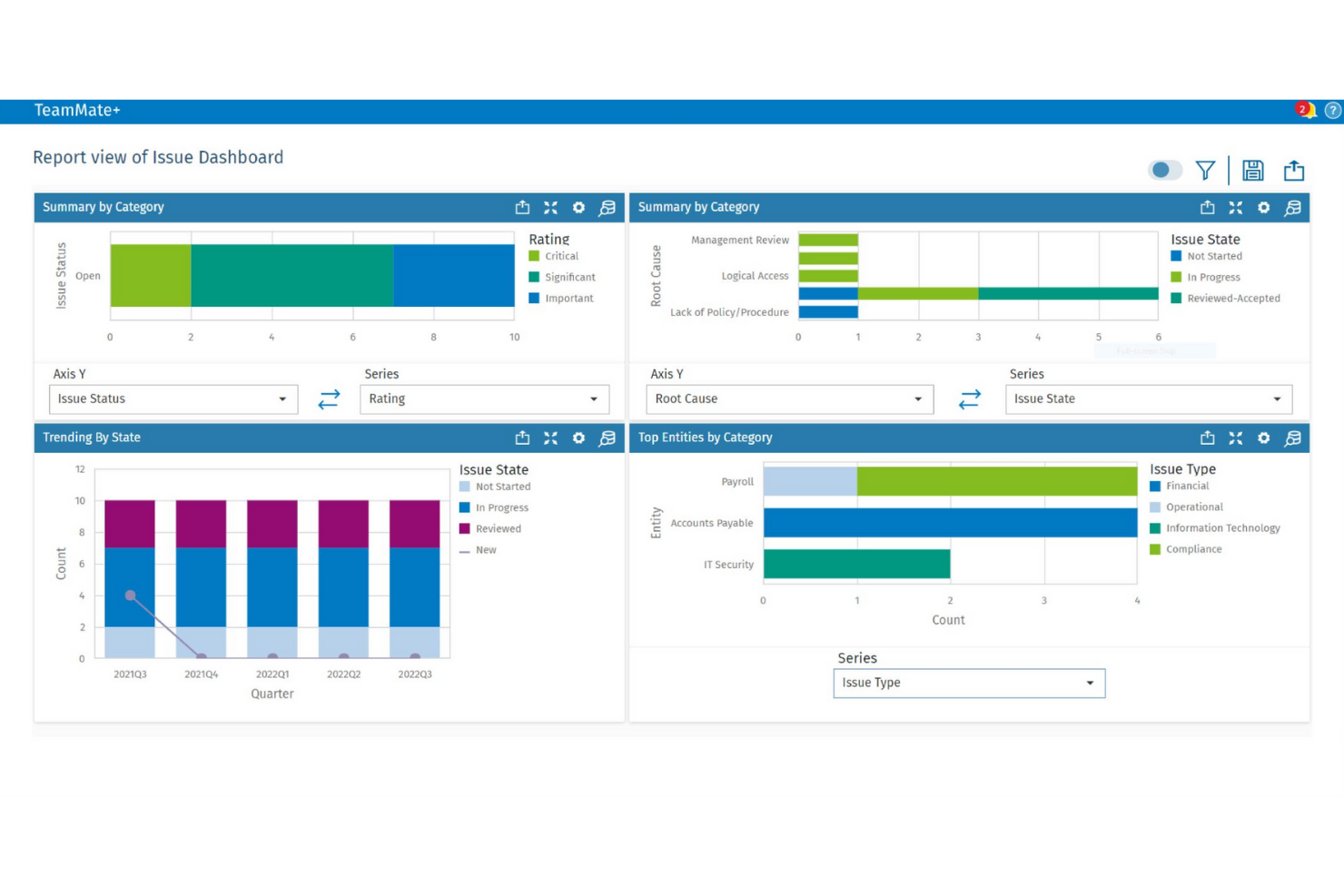
TeamMate is designed for audit teams that need to embed business rules directly into their audit workflows. It’s especially useful for internal audit departments in large organizations that want to automate risk assessments, approvals, and documentation processes. By integrating business rules with audit planning and execution, TeamMate+ helps teams maintain consistency and compliance across complex audit cycles.
Why I Picked TeamMate
What sets TeamMate apart is its focus on embedding business rules directly into audit workflows. This approach allows audit teams to automate risk scoring, approvals, and escalation processes as part of their day-to-day work. I picked TeamMate because it supports configurable rule sets that adapt to different audit types and regulatory requirements. Its ability to link business logic with audit planning and execution makes it a strong fit for organizations that need to maintain audit consistency and compliance.
TeamMate Key Features
I also found several other features that support business rules management in audit environments:
- Automated Task Assignment: Assign audit tasks based on predefined rules and team member roles.
- Customizable Templates: Create and reuse audit templates that include embedded business logic.
- Real-Time Dashboards: Monitor audit progress and rule-triggered events through interactive dashboards.
- Document Version Control: Track changes and maintain a full history of audit documentation updates.
TeamMate Integrations
Native integrations are not currently listed. However, an API is available for custom integrations.
Pros and Cons
Pros:
- Tracks rule-triggered actions in audit logs
- Supports granular permissions for rule management
- Audit workflows include embedded business rules logic
Cons:
- Interface updates can disrupt saved workflows
- Reporting customization options are restricted

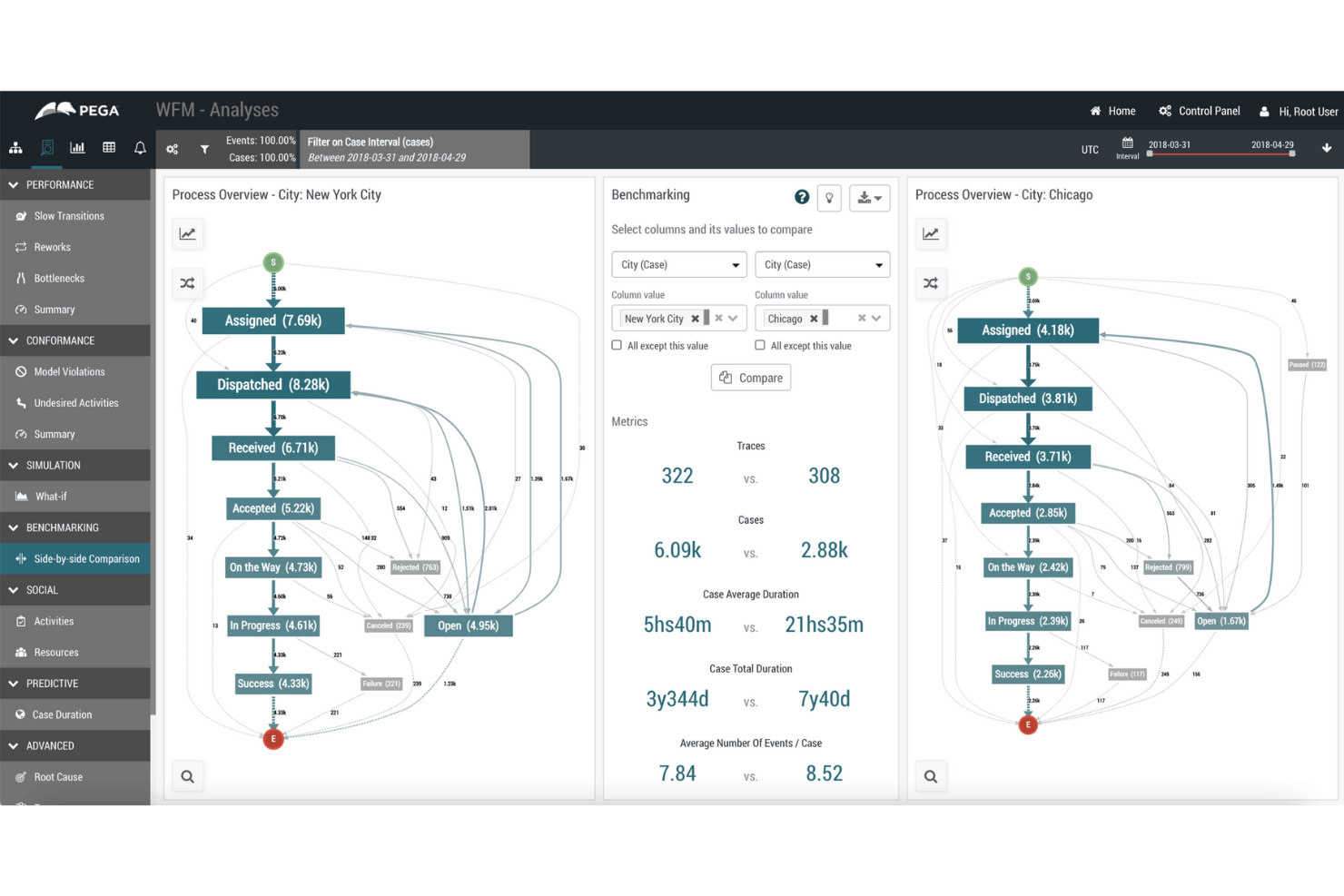
Pega’s business rules engine is built for organizations managing complex, high-volume processes across multiple departments or regions. It’s especially relevant for large enterprises in finance, insurance, and government that need to automate decision-making at scale. With Pega, teams can centralize, update, and audit business logic while supporting advanced workflow automation and compliance requirements.
Why I Picked Pega
For organizations that need to automate business rules at scale, Pega stands out with its ability to handle complex, enterprise-wide logic. The platform supports centralized rule management, so teams can update and govern decision logic across multiple business units from a single location. I appreciate that Pega includes advanced audit and compliance tracking, which is essential for regulated industries. Its support for dynamic, event-driven workflows also makes it a strong choice for enterprises with high transaction volumes and evolving requirements.
Pega Key Features
Some other features that make Pega a strong option for business rules management include:
- Visual Rule Designer: Build and modify rules using a drag-and-drop interface without writing code.
- Decision Table Support: Define and manage complex decision logic using spreadsheet-like tables.
- Real-Time Analytics Integration: Connect rules to real-time data streams for adaptive decision-making.
- Case Management Tools: Link business rules directly to case workflows for end-to-end process automation.
Pega Integrations
Integrations include REST APIs, SOAP APIs, enterprise systems connectors, cloud platform support, legacy system integration tooling, and more.
Pros and Cons
Pros:
- Scalable for high-volume transaction environments
- Supports complex, multi-step workflow automation
- Centralizes business rules for global enterprises
Cons:
- Upgrades can be resource-intensive for IT teams
- Requires specialized expertise for advanced configuration

Best for spreadsheet-style rule editing
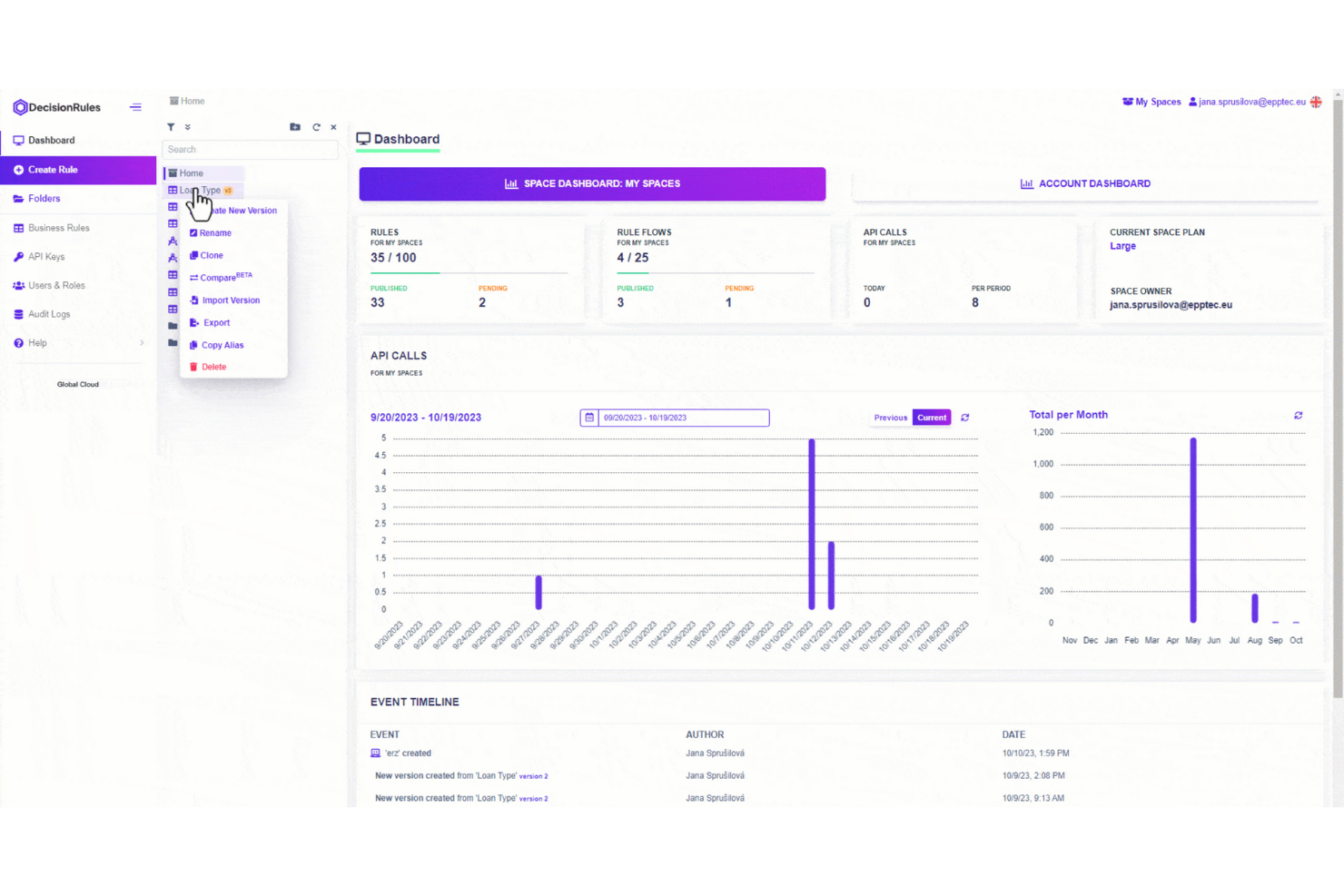
DecisionRules stands out for teams that want to manage business rules in a familiar, spreadsheet-like interface. It’s a strong fit for operations, finance, or product managers who need to build, test, and update rules without coding. The tool helps you translate complex decision logic into editable tables, making rule management accessible and transparent for non-technical users.
Why I Picked DecisionRules
Unlike many business rules engines, DecisionRules uses a spreadsheet-style editor that makes rule creation and updates feel intuitive for anyone familiar with Excel or Google Sheets. This approach is especially helpful for teams that want to manage complex logic without writing code or relying on IT. I picked DecisionRules because it lets you define, test, and deploy rules directly in table formats, so you can visualize and adjust logic in real time. The tool also supports bulk editing and versioning, which helps teams keep track of changes and collaborate on rule management.
DecisionRules Key Features
Some other features that make DecisionRules stand out include:
- API Integration: Connect rules directly to your applications using REST API endpoints.
- Rule Chaining: Link multiple rules together to handle complex decision logic.
- Built-In Testing Environment: Test rules with sample data before deploying them live.
- Audit Logs: Track all changes and rule executions for compliance and troubleshooting.
DecisionRules Integrations
Integrations include Salesforce, Jira, Excel, Google Sheets, AWS, Azure, Power BI, Tableau, Datadog, Anthropic, and more.
Pros and Cons
Pros:
- Rule chaining handles complex decision logic
- Built-in rule testing environment for validation
- Spreadsheet-style editor supports non-technical users
Cons:
- Limited support for advanced scripting languages
- No on-premises deployment option available

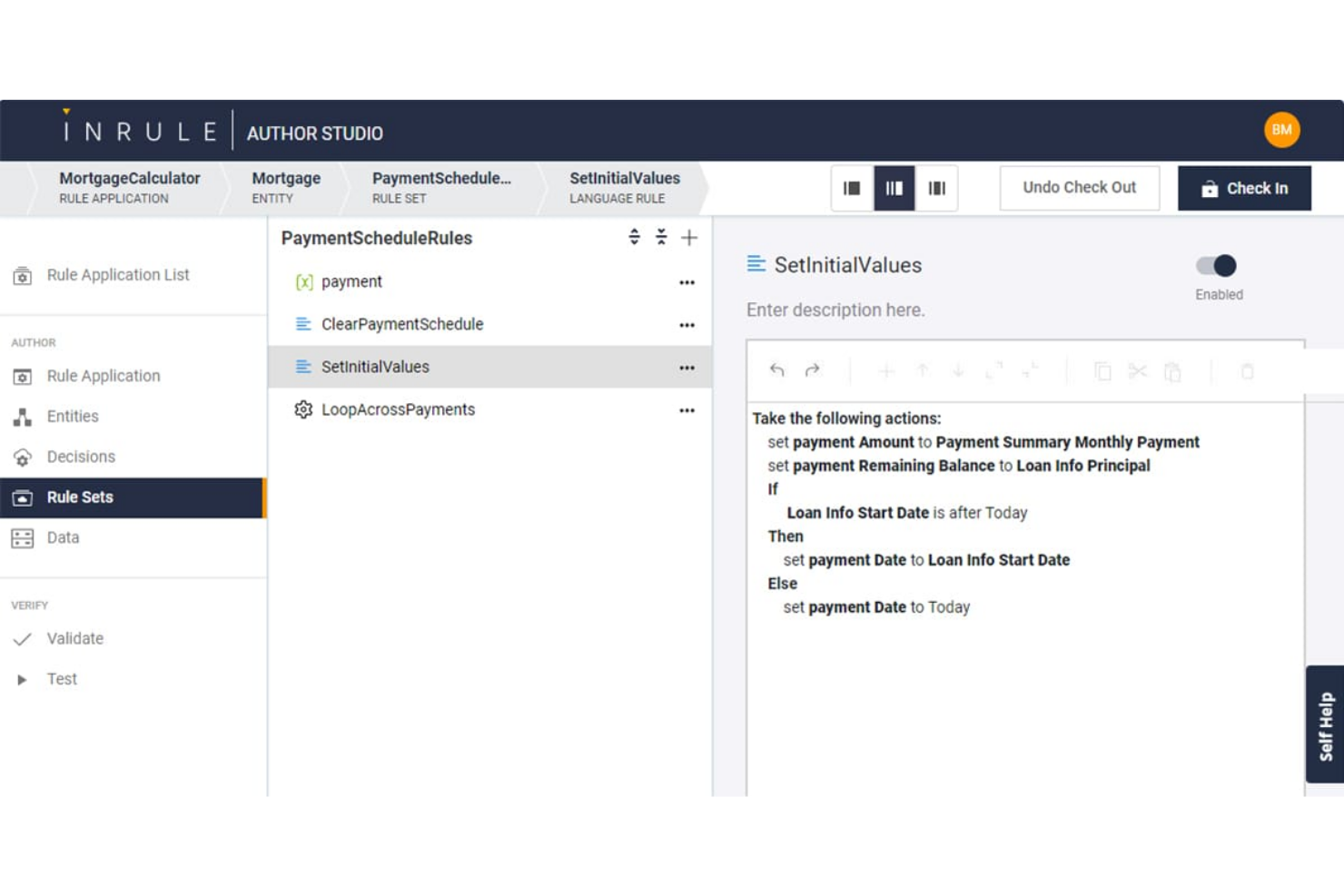
InRule is built for teams that need to deploy and update business rules quickly without heavy developer involvement. It’s a strong fit for enterprises in finance, insurance, and healthcare that require frequent rule changes to keep up with regulations or market shifts. With its low-code interface and real-time rule editing, InRule helps organizations respond rapidly to evolving business logic needs.
Why I Picked InRule
Rapid rule deployment is where InRule really shines for business rules engine software. The platform lets users author, test, and deploy rules in real time, so you can respond to business changes without waiting on development cycles. I picked InRule because its low-code environment allows both technical and non-technical users to update rules directly in production. Its simulation and impact analysis tools also help teams validate rule changes before they go live, reducing risk and speeding up decision-making.
InRule Key Features
Some other features that make InRule stand out for business rules management include:
- Decision Tables: Build and manage complex decision logic using spreadsheet-like tables.
- Natural Language Authoring: Write and edit rules in plain language for easier collaboration.
- Version Control: Track, compare, and roll back rule changes as needed.
- REST API Support: Connect InRule to other systems and trigger rules through API calls.
InRule Integrations
Integrations include Salesforce, Microsoft Dynamics, Snowflake, and APIs for custom integrations.
Pros and Cons
Pros:
- Natural language authoring for business users
- Decision tables support complex rule logic
- Real-time rule deployment without code changes
Cons:
- Advanced analytics features are not built-in
- On-premises deployment requires additional setup

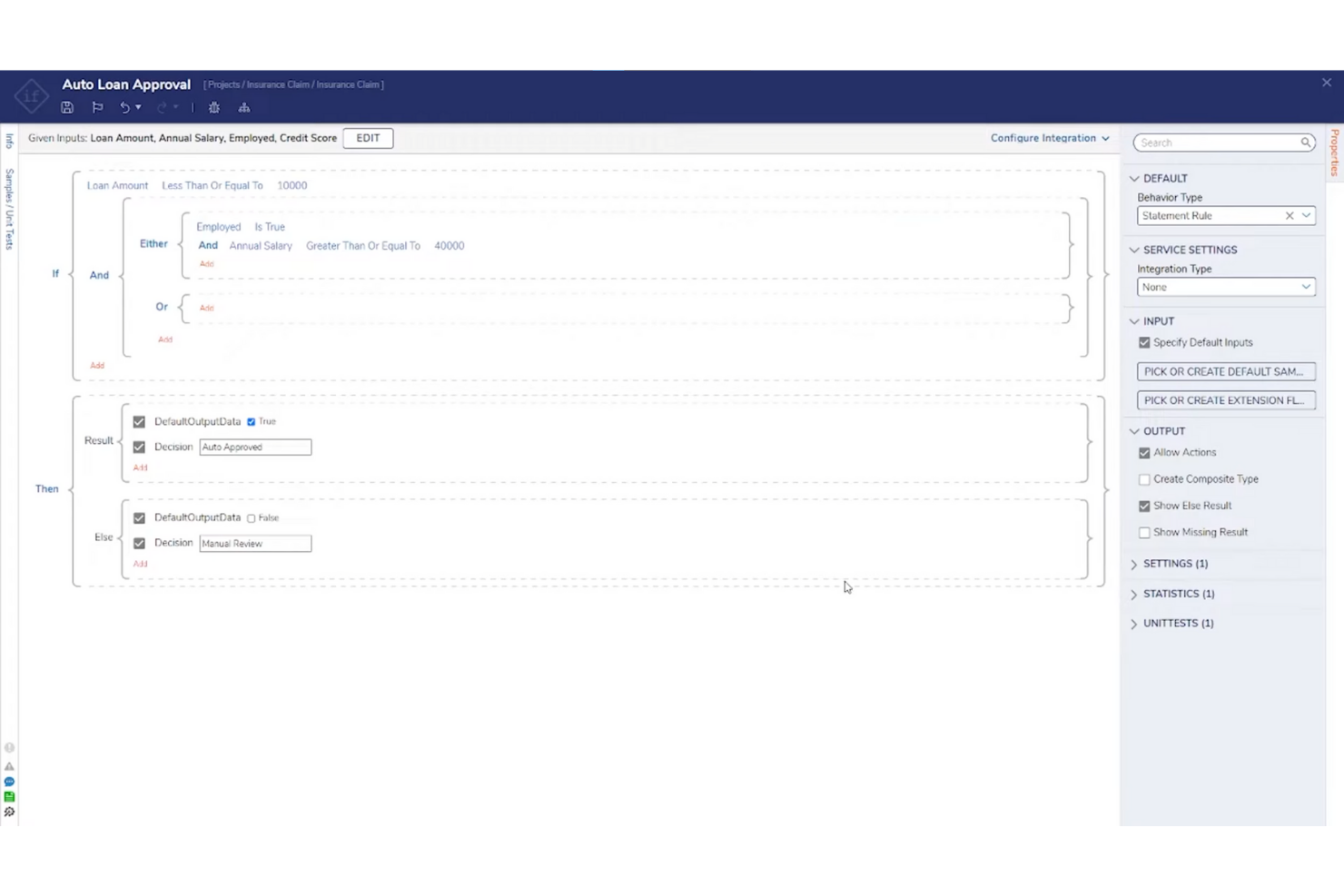
Decisions is designed for teams that want to configure and automate business rules without writing code. It’s a strong fit for operations managers, compliance teams, and business analysts who need to adapt processes quickly as requirements shift. The platform’s no-code interface helps you build, test, and deploy rules directly, reducing reliance on IT and speeding up change cycles.
Why I Picked Decisions
What drew me to Decisions is its focus on no-code rule configuration, which is especially useful for teams that want to empower business users to manage logic directly. The platform offers a drag-and-drop rule designer and visual workflow builder, so you can create and update rules without programming knowledge. I picked Decisions because it supports real-time testing and validation, letting you see the impact of changes before deploying them. This approach helps organizations respond quickly to new requirements and reduces bottlenecks that often come with IT-driven rule management.
Decisions Key Features
Some other features that stood out to me include:
- Business Metrics Tracking: Monitor rule outcomes and performance with built-in analytics tools.
- Version Control: Manage rule changes and roll back to previous versions as needed.
- Audit Logging: Track all rule modifications and user actions for compliance.
- Rule Scheduling: Set rules to activate or expire automatically based on date or event triggers.
Decisions Integrations
Integrations include Microsoft Dynamics, Salesforce, SAP, Oracle, AWS, Azure, Google Cloud, Slack, ServiceNow, Twilio, and more.
Pros and Cons
Pros:
- Real-time rule testing previews logic outcomes
- Built-in version control manages rule updates
- Drag-and-drop designer supports rapid rule changes
Cons:
- User interface can feel dated in places
- Complex workflows may require vendor support


FlowWright is designed for teams that need to embed business rules directly into automated workflows. It’s especially useful for organizations in manufacturing, logistics, or operations where process automation and rule execution must work hand in hand. By combining workflow automation with a built-in rules engine, FlowWright helps you manage complex decision logic as part of your end-to-end business processes.
Why I Picked FlowWright
What sets FlowWright apart is its ability to tightly couple business rules with workflow automation, making it a strong choice for workflow-driven rule execution. The platform lets you design, execute, and manage rules as part of larger process flows, so decision logic is always in sync with operational steps. I picked FlowWright because it offers a visual workflow designer that integrates rule evaluation directly into process diagrams. This approach helps teams automate complex, multi-step processes where rules and workflows need to interact smoothly.
FlowWright Key Features
In addition to its workflow-driven approach, FlowWright offers several other features worth noting:
- Rule Versioning: Maintain and manage multiple versions of business rules for audit and rollback purposes.
- Custom Scripting Support: Incorporate C# scripts directly into rules for advanced logic.
- Email Notification Triggers: Set up automated email alerts based on rule outcomes.
- Role-Based Access Control: Define user permissions for rule creation, editing, and execution.
FlowWright Integrations
Integrations include OneDrive, Slack, Google Drive, Microsoft Azure, and more.
Pros and Cons
Pros:
- Enterprise-grade architecture
- Shared decision table logic
- Flexible graphical rule creation
Cons:
- Limited mobile-focused UI support
- Advanced testing requires developer skills

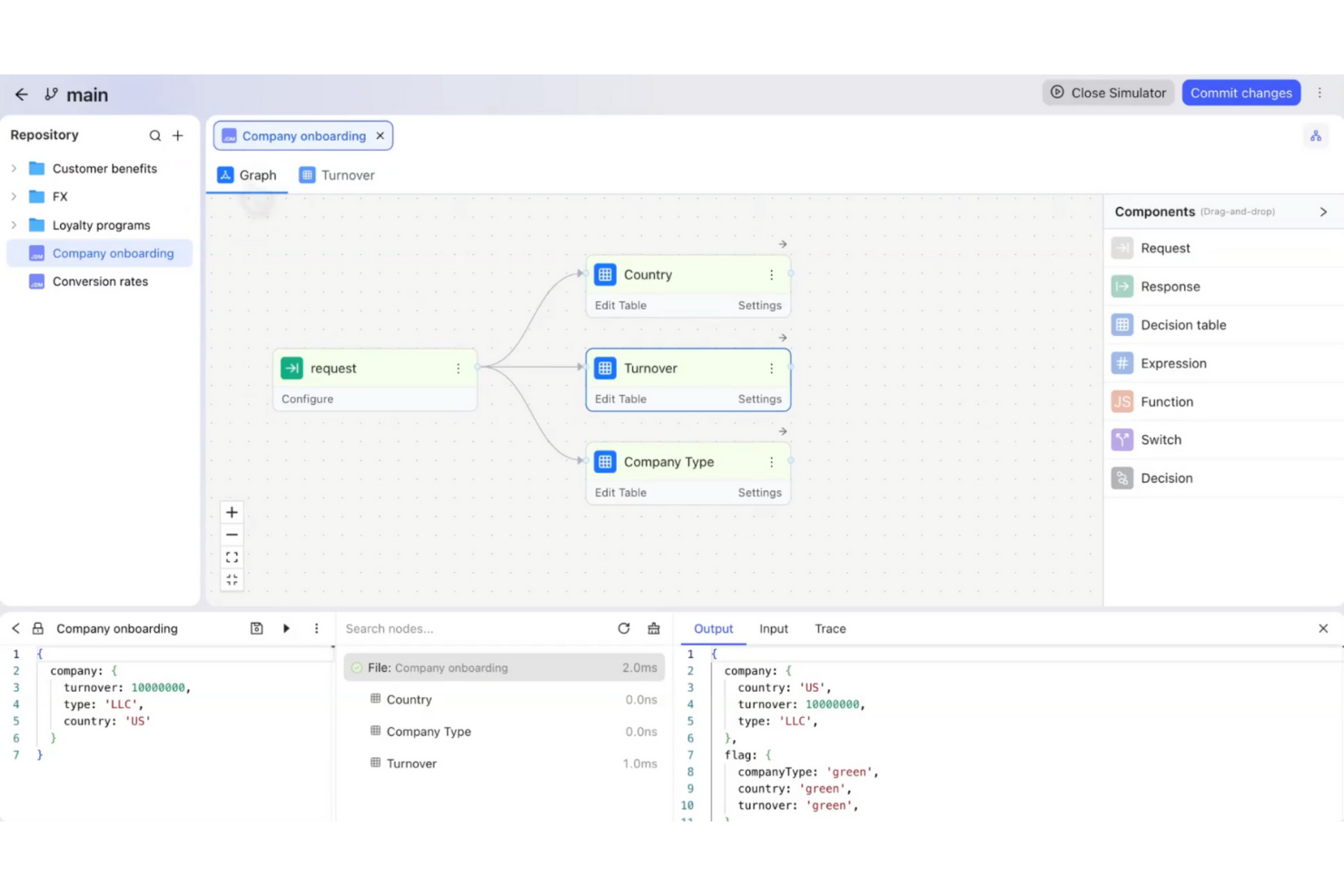
GoRules is a cloud-native business rules engine designed for teams that need flexible, API-driven rule management. It’s a strong fit for SaaS providers, fintechs, and digital businesses looking to centralize and automate decision logic without heavy infrastructure. If you want to update rules quickly and keep your systems agile, GoRules offers a modern approach to rule deployment and governance.
Why I Picked GoRules
I chose GoRules because it’s built specifically for cloud-native rule management, which is a priority for teams running distributed or API-first applications. The platform lets you define, test, and deploy rules directly through a web interface or via REST API, making it easy to integrate with modern cloud architectures. I like that GoRules supports versioning and audit trails for every rule change, so you can track updates and maintain compliance. Its real-time rule execution and centralized management help teams keep business logic consistent across multiple environments.
GoRules Key Features
Some other features that make GoRules stand out for business rules automation include:
- Rule Simulation: Test new or updated rules in a sandbox environment before deploying them to production.
- Role-Based Access Control: Assign permissions and manage user roles to control who can view, edit, or deploy rules.
- JSON Logic Support: Author and manage rules using JSON logic, making it easy to work with structured data.
- Webhook Integration: Trigger external workflows or notifications automatically when specific rules are executed.
GoRules Integrations
Integrations include Azure AD, Okta, and any OpenID Connect provider for SSO, as well as native SDKs for Rust, Node.js, Python, Go, Java, Kotlin, and Swift.
Pros and Cons
Pros:
- Supports JSON logic for flexible rule authoring
- Real-time rule execution via REST API
- Cloud-native deployment with multi-cloud support
Cons:
- Smaller community compared to legacy vendors
- No visual rule builder for non-technical users

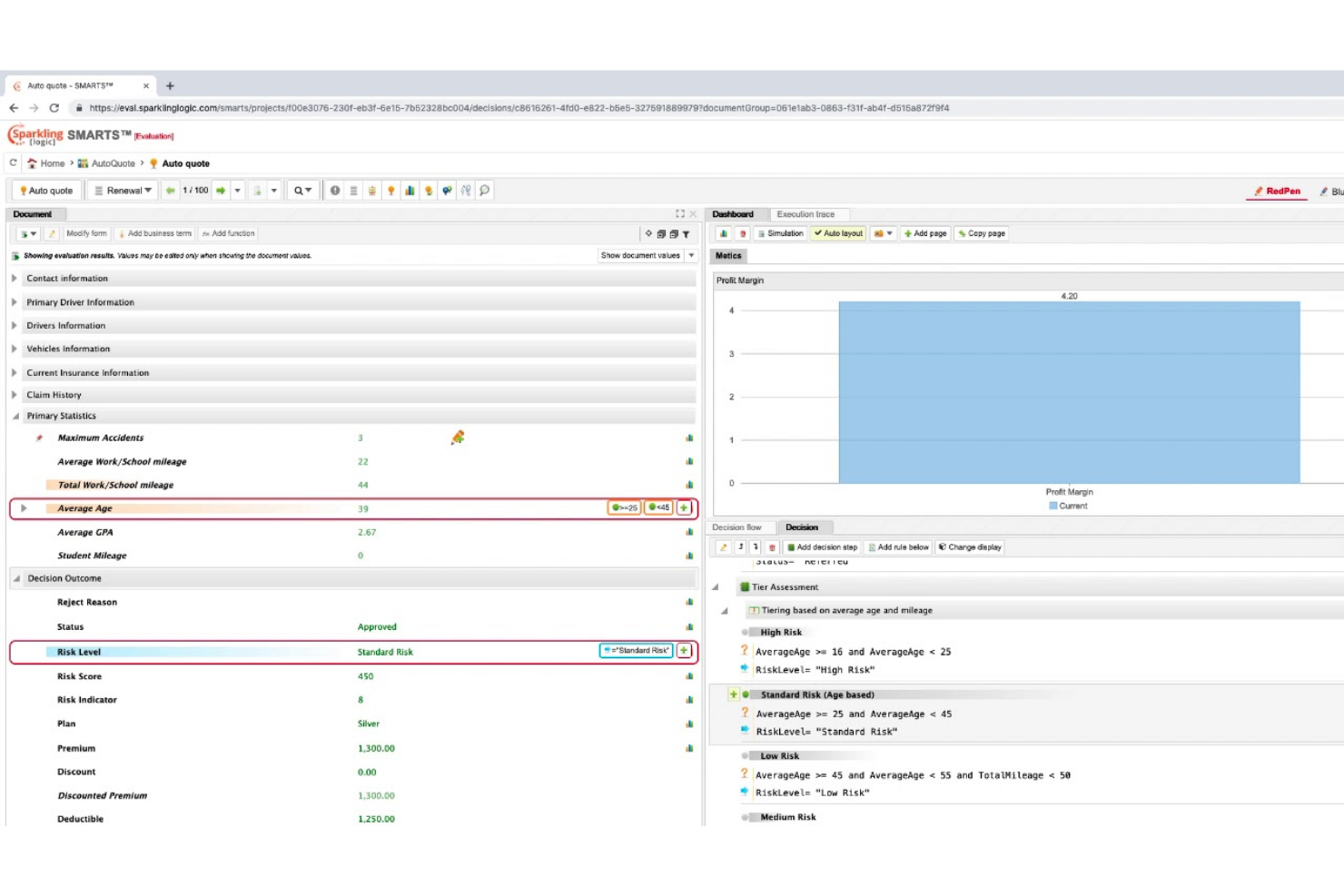
Sparkling Logic offers a visual approach to decision modeling that appeals to teams managing complex business logic. It’s especially useful for analysts and product owners who want to map, test, and optimize rules using flowcharts and decision tables. The platform helps you visualize dependencies and outcomes, making it easier to align stakeholders and adapt rules as requirements change.
Why I Picked Sparkling Logic
What sets Sparkling Logic apart is its focus on visual decision modeling, which is especially valuable for teams that need to map out and communicate complex business logic. The platform lets you build and manage rules using flowcharts and decision tables, so you can see how decisions connect and evolve. I picked Sparkling Logic because it supports real-time rule testing and simulation, helping you validate outcomes before deploying changes. This visual approach makes it easier to collaborate with stakeholders and adapt rules as business needs shift.
Sparkling Logic Key Features
In addition to its visual modeling capabilities, I also found these features worth noting:
- RedPen Rule Authoring: Create and edit rules using a guided, form-based interface.
- Automated Rule Discovery: Analyze historical data to suggest new rules automatically.
- Decision Analytics Dashboard: Monitor rule performance and outcomes with built-in analytics.
- Role-Based Access Control: Assign permissions and manage user roles for secure collaboration.
Sparkling Logic Integrations
Native integrations are not currently listed.
Pros and Cons
Pros:
- Automated rule discovery suggests new decision logic
- RedPen authoring guides non-technical rule creation
- Visual rule modeling supports complex logic mapping
Cons:
- Limited community support and user forums
- Documentation lacks detailed implementation examples

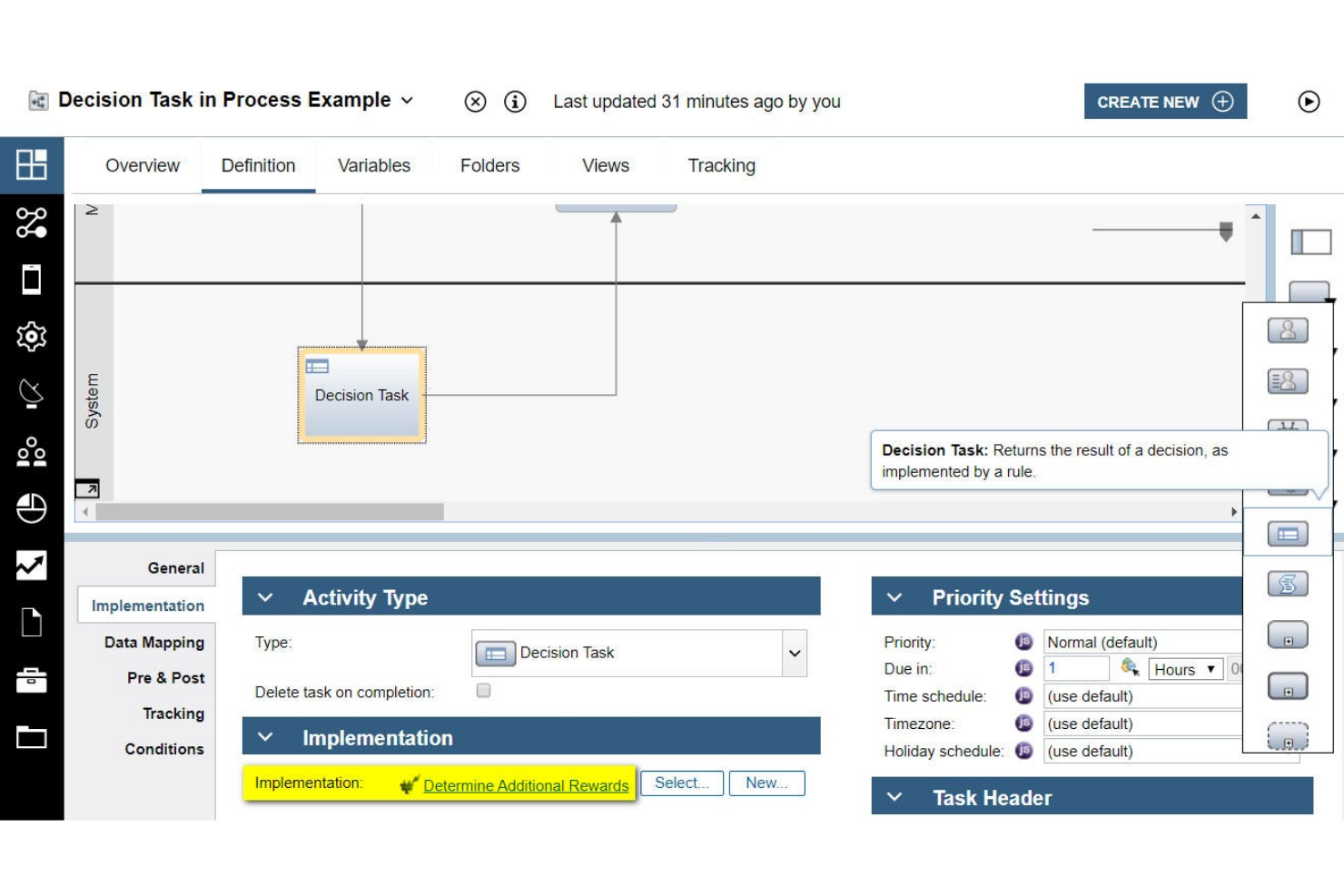
IBM Operational Decision Manager’s business rules management system is built for organizations that need to modernize decision automation while maintaining deep integration with legacy systems. It’s especially relevant for enterprises in finance, insurance, and government that rely on mainframes or older infrastructure. The platform helps you centralize, update, and govern complex business logic without disrupting existing operations.
Why I Picked IBM Operational Decision Manager
What sets IBM Operational Decision Manager apart is its strong focus on supporting legacy system integration, which is a major concern for large enterprises with established infrastructure. The platform offers tools for connecting business rules directly to mainframes and older databases, so you can automate decisions without overhauling your existing tech stack. I picked IBM Operational Decision Manager because it provides centralized rule management and governance features that help maintain consistency across distributed systems. This makes it a practical choice for organizations that need to modernize decision logic while keeping legacy operations running smoothly.
IBM Operational Decision Manager Key Features
Some other features that caught my attention include:
- Decision Modeling Notation (DMN) Support: Create and manage decision models using industry-standard DMN diagrams.
- Role-Based Access Control: Assign permissions and manage user roles for rule editing and deployment.
- Simulation and Testing Tools: Run simulations to validate rule changes before production deployment.
- Automated Rule Deployment: Deploy updated rules to multiple environments with automated workflows.
IBM Operational Decision Manager Integrations
Native integrations are not currently listed.
Pros and Cons
Pros:
- Includes simulation and rule testing tools
- Offers DMN and decision table modeling
- Supports mainframe and legacy system integration
Cons:
- Limited out-of-the-box rule templates
- Cloud and on-prem features differ
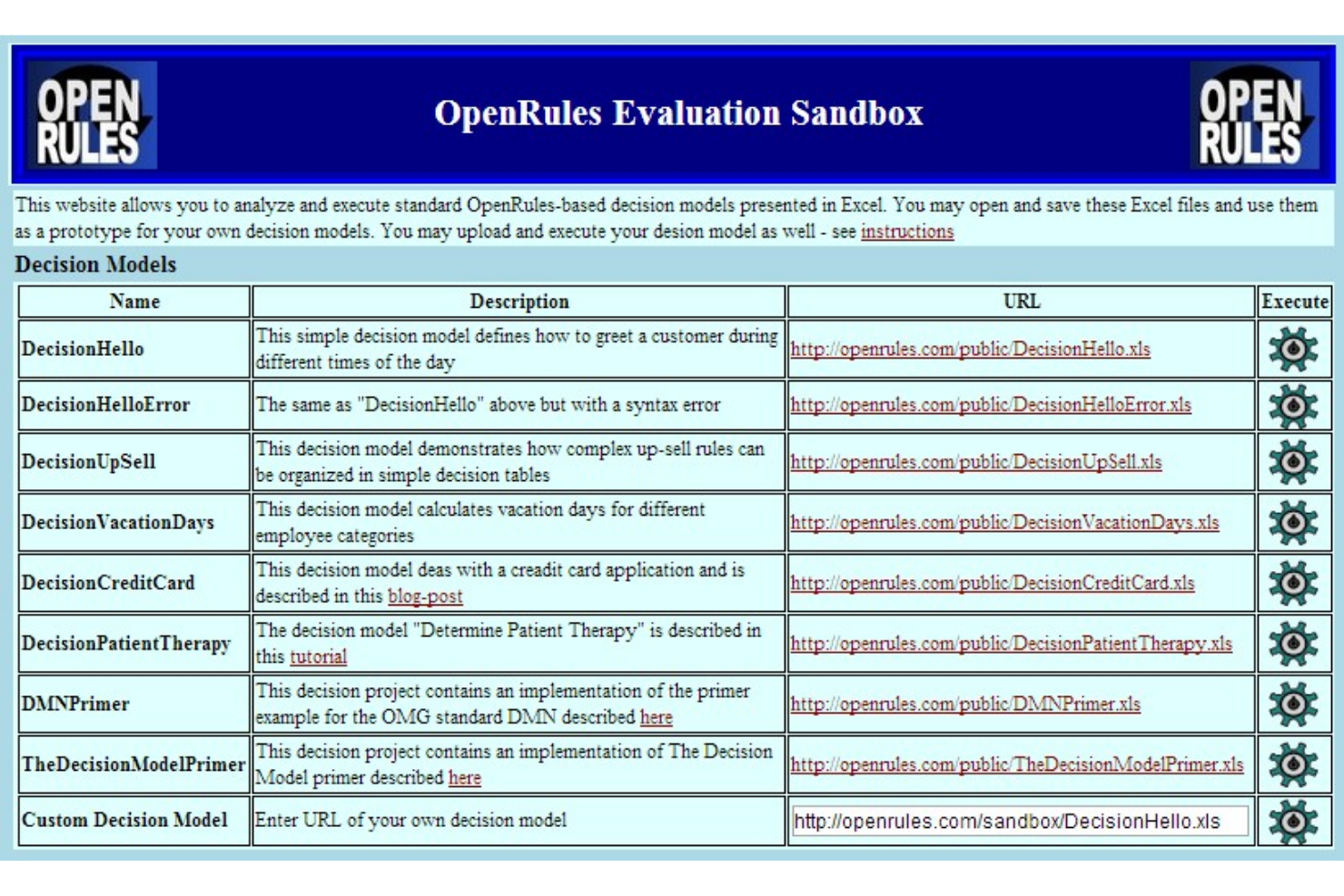
OpenRules stands out for teams that want full control over their business rules engine and prefer open-source solutions. It’s a strong fit for developers and IT teams in regulated industries who need to customize, audit, and extend rule logic without vendor lock-in. The platform helps you build, test, and deploy decision models using familiar tools like Excel and Java.
Why I Picked OpenRules
OpenRules offers a level of open-source flexibility that’s hard to find in other business rules engines. You can modify, extend, and audit the source code, which is especially valuable for organizations with strict compliance or customization needs. I picked OpenRules because it lets teams define rules in Excel or Java, making it accessible for both technical and non-technical users. This approach supports transparency and control, which are key for teams that want to avoid vendor lock-in and tailor their decision logic.
OpenRules Key Features
Some other features worth highlighting include:
- Decision Model and Notation (DMN) Support: Build and execute decision models using DMN standards for consistency and clarity.
- RESTful API Integration: Connect rule services to external applications through RESTful endpoints.
- Rule Testing Framework: Validate and test business rules with built-in testing tools before deployment.
- Deployment to Cloud Platforms: Deploy rule engines to cloud environments like AWS and Azure for scalability.
OpenRules Integrations
Native integrations are not currently listed.
Pros and Cons
Pros:
- Offers a REST API for external integrations
- Supports DMN and Excel-based rule modeling
- Fully open-source with a transparent codebase
Cons:
- User interface is primarily code and spreadsheet-based
- Limited vendor-provided technical support options
Annen programvare for forretningsregelmotorer
Her er noen flere alternativer innen programvare for forretningsregelmotorer som ikke kom med på kortlisten min, men som likevel er verdt å sjekke ut:
- Progress Corticon
For complex decision automation
- SAS
For analytics-driven rule creation
- Knack
For custom database-driven rule logic
- Flowable
For BPMN-based rule automation


How I Evaluate Business Rules Engine Software
I look at two layers: the baseline capabilities a tool must have—like a visual rule editor and real-time execution—and the differentiators that set the best options apart for PMO teams.
Core Functionality (Table Stakes For This List)
When I'm selecting tools for my list, I rank each one on a scale from 0 (does not offer the functionality) to 5 (excels in this area) for each core functionality listed below. Then, I calculate the tool's total score into a percentage. Each tool needs to achieve a minimum total score of 65% to be considered for inclusion.
- Rule Authoring Interface: I evaluate whether business users can create and modify rules through a visual builder or natural language forms rather than relying on developers to hardcode logic.
- Conditional Logic Engine: The engine should handle decision tables, nested if-then-else chains, and Boolean operators—like routing approvals based on project budget, risk tier, and team capacity.
- Rule Execution & Runtime: I check whether rules fire in real-time against live triggers (e.g., a status change in Jira) or only run in scheduled batches, and how each tool handles throughput at scale.
- Rule Versioning & Governance: Audit trails and rollback matter when PMO teams manage dozens of active rules. I look for version history, role-based permissions, and lifecycle approval workflows.
- API & System Integration: A rules engine only adds value if it connects to your existing stack. I evaluate REST/SOAP API coverage and native connectors to PM platforms, ERPs, and iPaaS tools.
- Testing & Simulation Tools: Before pushing a rule live, you need a sandbox. I look for what-if simulation, sample data testing, and regression checks so a misconfigured rule doesn't derail active projects.
Once I have a list of tools that meet the criteria, I consider what sets each platform apart.
Differentiating Factors (What Sets Vendors Apart)
Here's how I compare and contrast different vendors:
Standout Features
Pre-built rule templates can shave days off deployment—I look for libraries that include PM-specific patterns like escalation triggers or SLA breach alerts. Analytics dashboards also matter. I want to see which rules fire most often, where bottlenecks form, and how rule changes affect project outcomes over time. Collaborative rule management is another separator. When PMO leads and IT need to co-author rules, tools with commenting, approval workflows, and shared ownership make cross-functional coordination far smoother.
Beyond Features
Integration ecosystem depth is one of the first things I check—a rules engine that doesn't connect to your Jira instance or ERP is shelf-ware waiting to happen. Compliance certifications like SOC 2 Type II and ISO 27001 also carry real weight, especially when rules govern resource allocation or budget approvals with sensitive data. I evaluate licensing models closely too, since per-execution pricing can spiral fast when you're running hundreds of automated checks across a large project portfolio.
Slik velger du programvare for forretningsregelmotorer
Det er lett å gå seg vill i lange funksjonslister og komplekse prisstrukturer. For å hjelpe deg med å holde fokus mens du arbeider deg gjennom din unike prosess for programvarevalg, får du her en sjekkliste over faktorer du bør ha i bakhodet:
| Faktor | Hva du bør vurdere |
|---|---|
| Skalerbarhet | Vil verktøyet håndtere dagens og forventede regelvolumer, antall brukere og transaksjonsbelastning? Be leverandørene om eksempler fra virkeligheten på skalering. |
| Integrasjoner | Kan programvaren kobles direkte til kjernesystemene dine (ERP, CRM, databaser)? Se etter ferdigbygde koblinger og API-muligheter. |
| Tilpasningsmuligheter | Kan du tilpasse regellogikk, arbeidsflyter og resultater til forretningsprosessene dine uten omfattende involvering fra IT? |
| Brukervennlighet | Vil forretningsbrukere kunne opprette, teste og oppdatere regler selvstendig, eller må IT involveres ved hver endring? |
| Implementering og innføring | Hvilke ressurser, hvilken opplæring og hvilken støtte til migrering tilbyr leverandøren? Spør om tidsplaner for innføring og nødvendig intern innsats. |
| Kostnad | Er prisnivåene transparente og forutsigbare etter hvert som bruken øker? Vær oppmerksom på skjulte gebyrer knyttet til brukere, transaksjoner eller integrasjoner. |
| Sikkerhetstiltak | Støtter verktøyet organisasjonens krav til databeskyttelse, tilgangskontroll og revisjon? Be om dokumentasjon på sertifiseringer. |
| Samsvarskrav | Støtter plattformen bransjespesifikke regelverk (som HIPAA, GDPR eller SOX) som er relevante for virksomheten din? |
Hva er programvare for forretningsregelmotorer?
Programvare for forretningsregelmotorer, ofte kalt et BRMS (business rules management system), er et verktøy som lar organisasjoner definere, administrere og automatisere beslutningslogikk separat fra programkoden. Disse plattformene hjelper team med å opprette, oppdatere og revidere regler – for eksempel kvalifiseringskontroller, godkjenninger eller krav til samsvar – uten å være avhengige av utviklere. Ved å sentralisere regeladministrasjonen kan virksomheter effektivisere driften, støtte forretningsprosessadministrasjon og muliggjøre brukstilfeller som svindeloppdagelse og dynamisk prissetting, særlig innen finansielle tjenester og finansinstitusjoner. Med et brukervennlig grensesnitt og sømløs integrasjon på tvers av systemer hjelper disse verktøyene organisasjoner med å reagere raskt på endringer, samtidig som de opprettholder konsistens og åpenhet i beslutningsprosessen.
Funksjoner
Når du velger programvare for forretningsregelmotorer, bør du se etter følgende viktige funksjoner:
- Grensesnitt for oppretting av regler: Tilbyr et visuelt eller tekstbasert miljø for å opprette, redigere og organisere forretningsregler uten å skrive programkode.
- Versjonskontroll for regler: Sporer endringer i regler over tid, slik at brukere kan gjennomgå, tilbakestille eller revidere tidligere versjoner etter hvert som virksomhetens behov utvikler seg.
- Testing og simulering av regler: Lar brukere validere regellogikk og resultater ved hjelp av eksempeldata før endringer distribueres til produksjonssystemer.
- Batchbehandling: Behandler store datamengder eller transaksjoner gjennom definerte regler i én enkelt operasjon, og støtter automatisering av beslutninger med høy gjennomstrømning.
- Oppdagelse av konflikter og mangler: Identifiserer overlappende, motstridende eller manglende regler for å bidra til logisk konsistens og unngå feil i automatiserte beslutninger.
- Rollebasert tilgangskontroll: Begrenser tillatelser for oppretting, redigering og distribusjon av regler basert på brukerroller, og støtter krav til styring og samsvar.
- Integrasjonskoblinger: Muliggjør direkte tilkoblinger til databaser, applikasjoner og andre systemer, slik at regler kan få tilgang til sanntidsdata og utløse etterfølgende handlinger.
- Revisjonslogging: Registrerer alle regelendringer, kjøringer og brukerhandlinger, og gir en åpen historikk for samsvar og feilsøking.
- Distribusjonsadministrasjon: Støtter publisering, oppdatering og tilbakerulling av regler på tvers av ulike miljøer (for eksempel utvikling, testing og produksjon).
- Overvåking og rapportering: Tilbyr dashbord og rapporter for å spore måltall for regelkjøringer, feil og forretningsresultater med tanke på løpende optimalisering.
Fordeler
Implementering av programvare for forretningsregelmotorer gir flere fordeler for teamet og virksomheten din. Her er noen av fordelene du kan se frem til:
- Raskere regelendringer: Forretningsbrukere kan oppdatere beslutningslogikk direkte gjennom et visuelt grensesnitt, noe som reduserer avhengigheten av utviklere og gir raskere respons på nye krav.
- Konsekvente beslutninger: Sentralisert regeladministrasjon sikrer at automatiserte beslutninger følger den samme logikken på tvers av alle systemer og prosesser.
- Forbedret etterprøvbarhet: Innebygd versjonskontroll, revisjonslogger og rapporteringsfunksjoner gjør det enkelt å spore endringer og dokumentere samsvar med interne og eksterne standarder.
- Redusert operasjonell risiko: Verktøy for oppdagelse av konflikter og mangler bidrar til å forhindre motstridende eller manglende regler, og minimerer feil i automatiserte prosesser.
- Større smidighet: Team kan raskt tilpasse seg regelverksendringer eller endrede forretningsprioriteringer ved å oppdatere regler uten å distribuere programkode på nytt.
- Forbedret samarbeid: Rollebaserte tilgangskontroller og tydelig regeldokumentasjon støtter samarbeid mellom forretnings-, samsvars- og IT-team.
- Skalerbar automatisering: Batchbehandling og integrasjonskoblinger gjør det mulig for organisasjoner å automatisere komplekse beslutninger med stort volum etter hvert som de vokser.
Kostnader og priser
Valg av programvare for forretningsregelmotorer krever en forståelse av de ulike prismodellene og abonnementene som er tilgjengelige. Kostnadene varierer basert på funksjoner, teamstørrelse, tillegg og mer. Tabellen nedenfor oppsummerer vanlige abonnementer, gjennomsnittsprisene deres og typiske funksjoner som er inkludert i programvareløsninger for forretningsregelmotorer:
Sammenligningstabell for abonnementer for programvare for forretningsregelmotorer
| Abonnementstype | Gjennomsnittlig pris | Vanlige funksjoner |
|---|---|---|
| Gratisabonnement | $0 | Grunnleggende regeloppretting, begrenset antall regelkjøringer, tilgang for én bruker og brukerstøtte fra fellesskapet. |
| Personlig abonnement | $50–$300/bruker/måned | Visuell regelredigering, grunnleggende integrasjoner, regelversjonering og brukerstøtte på e-post. |
| Bedriftsabonnement | $300–$1000+/bruker/måned | Samarbeid for flere brukere, avanserte integrasjoner, satsvis behandling, revisjonslogging og rollebasert tilgang. |
| Virksomhetsabonnement | $1000–$4000+/bruker/måned | Tilpassede integrasjoner, dedikert onboarding, verktøy for samsvar, førsteklasses brukerstøtte og avansert sikkerhet. |
Vanlige spørsmål om programvare for forretningsregelmotorer
Her er noen svar på vanlige spørsmål om programvare for forretningsregelmotorer:
Kan programvare for forretningsregelmotorer brukes av ikke-tekniske brukere?
Ja, det meste av programvaren for forretningsregelmotorer er utformet med visuelle redigeringsverktøy og grensesnitt uten kode, slik at forretningsanalytikere og andre ikke-tekniske brukere kan opprette, endre og teste regler uten å skrive kode. Dette hjelper team med å reagere raskt på endrede krav uten å måtte vente på tilgjengelige utviklerressurser.
Hvordan integreres programvare for forretningsregelmotorer med eksisterende systemer?
Programvare for forretningsregelmotorer tilbyr vanligvis integrasjonskoblinger, API-er eller webhook-er for tilkobling til databaser, CRM-systemer, ERP-systemer og andre forretningsapplikasjoner. Når du vurderer ulike alternativer, bør du sjekke om verktøyet har innebygd støtte for kjernesystemene dine, eller om det vil være nødvendig med tilpasset integrasjonsarbeid.
Hva er de største utfordringene ved implementering av programvare for forretningsregelmotorer?
Vanlige utfordringer omfatter migrering av eksisterende regler fra eldre systemer, tilpasning av regellogikken til forretningsprosessene og å sikre at alle interessenter forstår hvordan den nye plattformen skal brukes. Planlegging av opplæring, dokumentasjon og trinnvis utrulling kan bidra til å håndtere disse problemene.
Hvordan støtter forretningsregelmotorer krav til samsvar og revisjon?
Programvare for forretningsregelmotorer tilbyr revisjonslogger, regelversjonering og detaljert rapportering for å spore endringer og regelkjøringer. Disse funksjonene hjelper organisasjoner med å dokumentere samsvar med interne retningslinjer og eksterne forskrifter ved å opprettholde en oversiktlig logg over automatiserte beslutninger.
Er det mulig å teste regler før de settes i produksjon?
Ja, de fleste programvarer for forretningsregelmotorer har funksjoner for regeltesting og simulering. Disse gjør det mulig for brukere å validere regellogikk og resultater ved hjelp av eksempeldata, noe som reduserer risikoen for feil eller utilsiktede konsekvenser når reglene tas i bruk.