

10 beste programmer for fakturagodkjenning i 2026

Kortliste over programvare for fakturagodkjenning


Programvare for fakturagodkjenning automatiserer gjennomgang, videresending og godkjenning av fakturaer før betaling, slik at teamet ditt kan kontrollere utgiftene og redusere manuelle feil. Hvis du leter etter den beste programvaren for fakturagodkjenning, står du sannsynligvis overfor utfordringer med langsomme godkjenninger, tapte fakturaer eller mangler i etterlevelsen som setter prosjektene og leverandørforholdene dine i fare. Denne listen hjelper deg med å sammenligne ledende løsninger, forstå hvilke funksjoner som er viktigst for arbeidsflyten din, og velge en plattform som passer teamets behov – slik at du kan holde prosjektene i gang og opprettholde nøyaktigheten i økonomien.
Hvorfor du kan stole på våre programvareanbefalinger
Teamet vårt har testet og anmeldt programvare siden 2012. Vi er selv prosjektledere, så vi vet hvor vanskelig og hvor viktig det er å velge riktig programvare.
I denne guiden har vi vurdert verktøyene gjennom praktisk testing og uavhengig research og gitt dem poeng ut fra våre utvelgelseskriterier. Vi bygger også på innsikt fra ledende eksperter i bransjen og erfarne prosjektledere.
Anmeldelsene våre bygger på vår egen redaksjonelle vurdering. De er ikke et salgsargument.
Ekspertanmeldere:
Sammenligningstabell for programvare for fakturagodkjenning
Denne sammenligningstabellen oppsummerer prisopplysningene for mine beste utvalg av programvare for fakturagodkjenning:
| Tool | Best For | Trial Info | Price | ||
|---|---|---|---|---|---|
| 1 | Best for collaborative invoice communication | Free demo available | Pricing upon request | Website | |
| 2 | Best for invoice approvals across legal entities | Free demo available | From $499/month (billed annually) | Website | |
| 3 | Best for global payment compliance | Free demo available | From $249/month | Website | |
| 4 | Best for rapid cloud-based deployment | Demo available upon request | From £129 | Website | |
| 5 | Best for high-volume invoice processing | Free demo available | Pricing upon request | Website | |
| 6 | Best for procurement workflow integration | Free trial + free demo available | From $225/user/month (billed annually) | Website | |
| 7 | Best for secure financial data storage | Free demo available | Pricing upon request | Website | |
| 8 | Best with AI-powered exception handling | Free demo available | Pricing upon request | Website | |
| 9 | Best with document management integration | Free demo available | Pricing upon request | Website | |
| 10 | Best for mid-sized finance teams | Free demo available | Pricing upon request | Website |
Anmeldelser av programvare for fakturagodkjenning
Nedenfor finner du mine detaljerte sammendrag av programvaren for fakturagodkjenning som kom med på kortlisten. Anmeldelsene mine gir et detaljert innblikk i funksjonene, de beste bruksområdene og integrasjonene til hver programvare, slik at du kan finne den som passer best for deg.

Stampli
Best for collaborative invoice communication

Stampli puts collaborative invoice communication at the center of its platform, making it a strong fit for teams that need to resolve invoice questions quickly. The tool appeals to finance departments and AP teams that deal with frequent back-and-forth between approvers, vendors, and stakeholders. By centralizing conversations and documentation on each invoice, Stampli helps teams reduce delays and confusion during the approval process.
Why I Picked Stampli
What sets Stampli apart is its focus on making invoice communication transparent and actionable for everyone involved. The platform attaches conversations, questions, and supporting documents directly to each invoice, so nothing gets lost in email threads or side chats. I picked Stampli because its collaborative approach helps teams resolve approval issues faster and keeps all stakeholders in the loop. For organizations where invoice questions and clarifications are frequent, Stampli’s communication tools make the approval process much smoother.
Stampli Key Features
In addition to its collaborative communication tools, Stampli offers several other features for invoice approval:
- AI-powered data capture: The platform uses AI to extract invoice details and reduce manual entry.
- Custom approval workflows: Teams can configure multi-level approval paths to match internal policies.
- Audit trail tracking: Every action on an invoice is logged for compliance and transparency.
- Vendor portal: Vendors can submit invoices and track payment status directly through Stampli.
Stampli Integrations
Integrations include NetSuite, Sage Intacct, QuickBooks, Microsoft Dynamics, SAP, and Infor.
Pros and Cons
Pros:
- No changes to existing ERP
- Smart AI coding assistant
- Fast ERP integration rollout
Cons:
- Search function can be slow
- Requires active team training

Precoro
Best for invoice approvals across legal entities
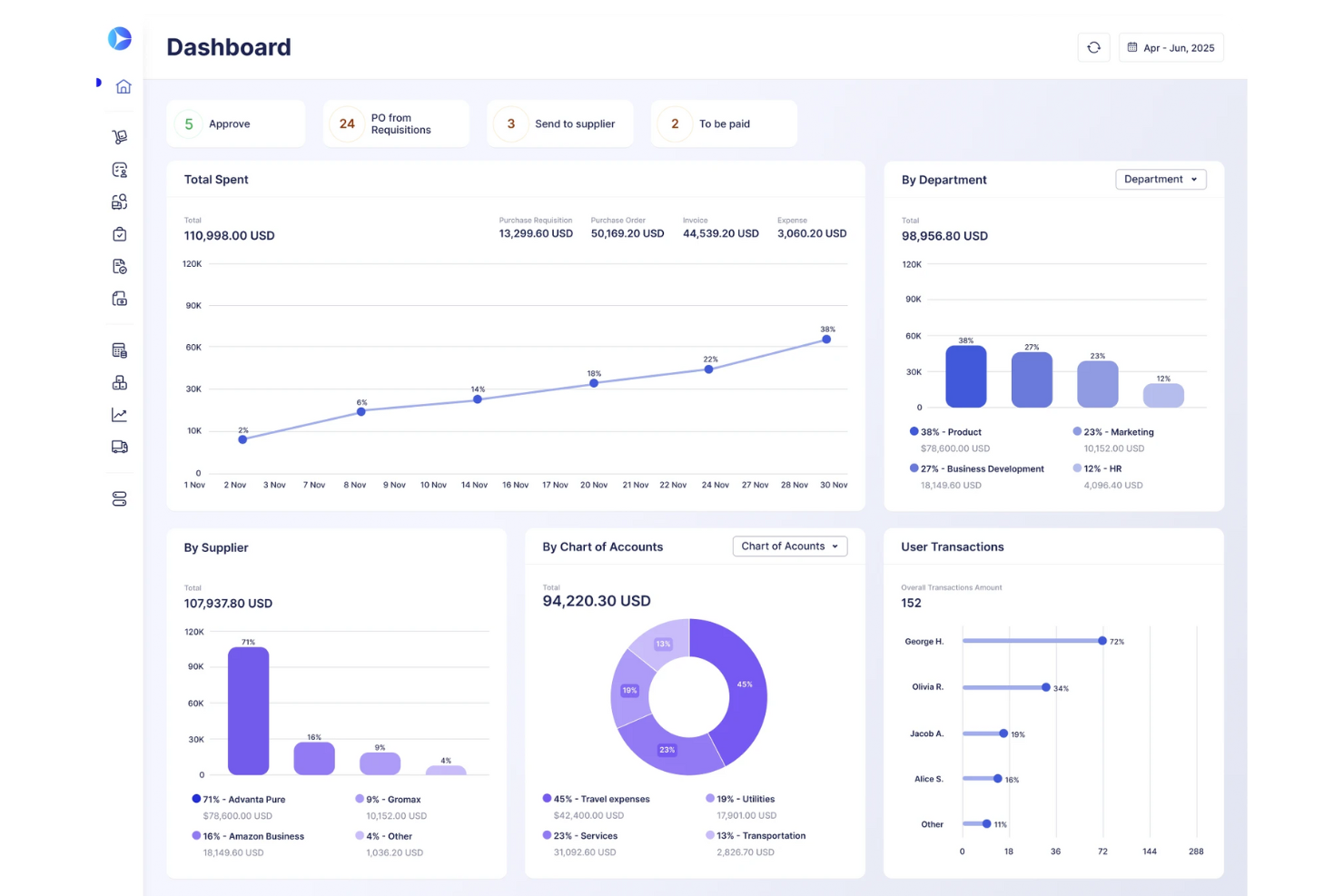
Precoro is a procurement and accounts payable platform that centralizes purchase requisitions, purchase orders, invoice capture, multi-step approval workflows, PO matching, and supplier management.
Who Is Precoro Best For?
Precoro is a strong fit for mid-sized companies managing procurement and AP across multiple business entities or subsidiaries.
Why I Picked Precoro
I picked Precoro as one of the best because it handles invoice approvals across multiple legal entities without forcing you to rebuild workflows from scratch for each one. Every entity shares the same configurable approval logic, so a holding company managing several subsidiaries can enforce consistent spend controls and PO matching across all of them from a single account. I also like that suppliers can submit invoices directly through the Supplier Portal, where invoices that exceed PO totals or contain unmatched line items are automatically flagged and routed for review.
Precoro Key Features
- Budget limit enforcement: Blocks users from proceeding when a required spend amount exceeds the available budget, with automatic approver notifications when overruns are permitted.
- Custom approval reports: Generates reports that include approver names, step completion timestamps, pending steps, and responsible parties, with filtering and export options.
- Mobile invoice approvals: Lets approvers review, approve, or reject invoices and access related documents directly from the iOS or Android app.
- Multi-currency document support: Processes procurement documents in 300 major currencies across purchase orders, invoices, and receipts.
Precoro Integrations
Precoro offers dozens of native integrations, including NetSuite, QuickBooks Online, Xero, BILL, Slack, Microsoft Teams, and Power BI. It also provides an API and SFTP connector for custom integrations.
Pros and Cons
Pros:
- Supplier submissions flag purchase-order mismatches for review
- Invoice recognition cuts repetitive data entry
- Configurable invoice routing clarifies approval ownership
Cons:
- Mobile workflows feel less polished than desktop
- Approval delays lack automatic escalation
New Product Updates from Precoro

Precoro Expands PunchOut Orders With Shipping and Amazon Status
Precoro expands PunchOut workflows with dedicated shipping addresses, automatic PR cancellation, and Amazon Business order status. These updates help teams keep PunchOut orders consistent and reduce manual follow-up. For more information, visit Precoro’s official site.
 .

Tipalti
Best for global payment compliance
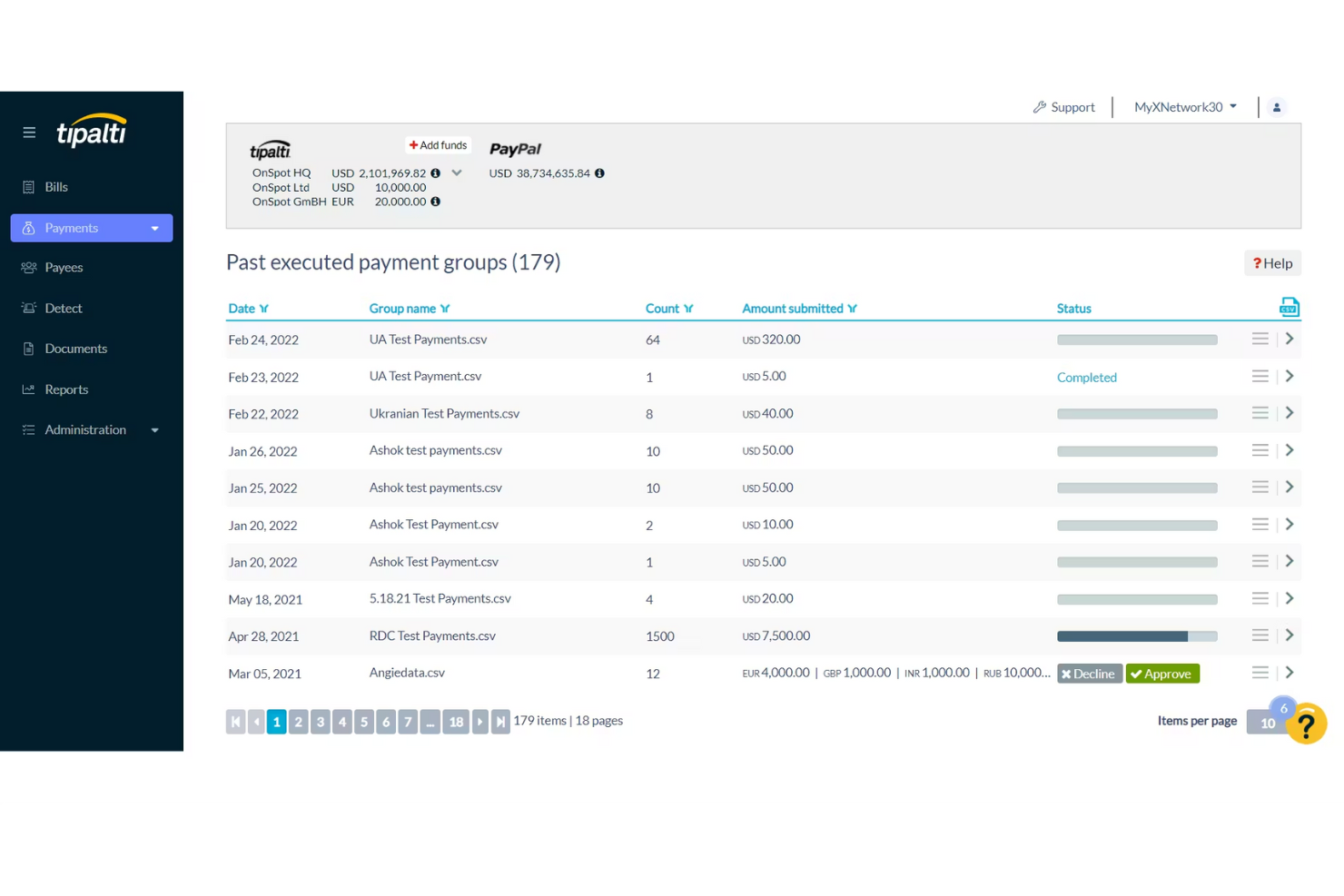
For finance teams handling international payments and compliance, Tipalti offers a specialized solution. It’s designed for organizations that need to manage invoice approvals while meeting complex global tax and regulatory requirements. Tipalti helps you automate approvals and payment processes across multiple countries, reducing the risk of compliance errors.
Why I Picked Tipalti
Tipalti stands out for teams that need to manage invoice approvals while staying compliant with global payment regulations. The platform automates tax form collection and validation, which helps reduce the risk of errors and penalties when paying vendors in different countries. I picked Tipalti because it also screens payees against international watchlists and supports multi-currency payments, making it easier to handle cross-border transactions. These features are especially important for businesses operating internationally or working with a diverse supplier base.
Tipalti Key Features
Some other features that make Tipalti useful for invoice approval include:
- Automated invoice capture: Extracts invoice data automatically to reduce manual entry.
- Customizable approval workflows: Lets you set up multi-step approval processes tailored to your organization’s needs.
- Supplier portal: Provides vendors with a self-service portal to submit invoices and track payment status.
- Real-time payment status tracking: Allows your team to monitor payment progress and resolve issues quickly.
Tipalti Integrations
Integrations include NetSuite, Sage Intacct, QuickBooks, Xero, Microsoft Dynamics, and Workday.
Pros and Cons
Pros:
- Massive ERP integration list
- Reduces payment error rates
- Automates vendor onboarding
Cons:
- Support can be inconsistent
- High monthly minimum fees
Yooz
Best for rapid cloud-based deployment
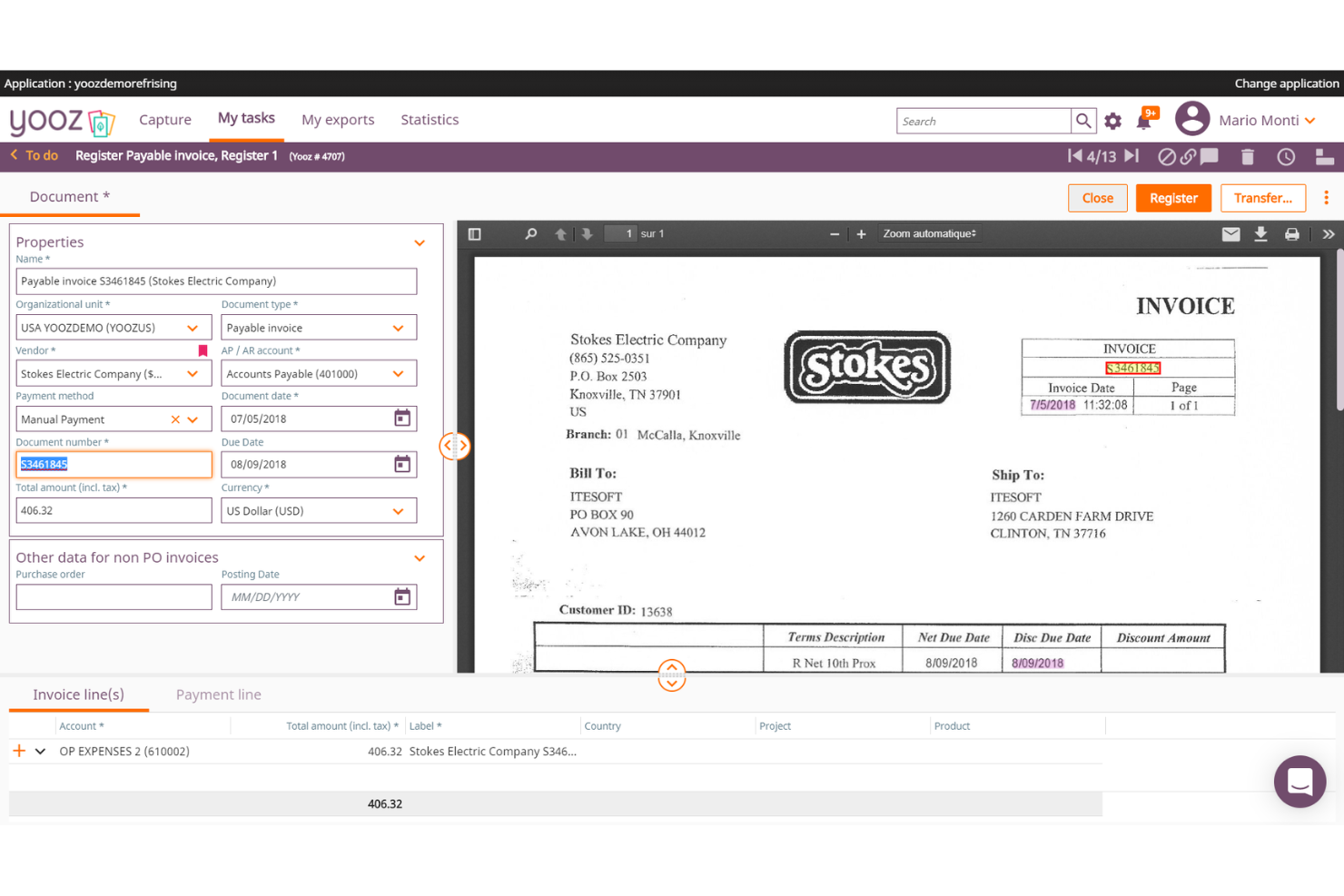
If your team needs to get up and running with invoice approval software quickly, Yooz is built for rapid cloud-based deployment. It’s a strong fit for finance teams in growing businesses that want to automate invoice capture, approval, and payment without a lengthy setup. Yooz helps you digitize accounts payable processes with minimal IT involvement.
Why I Picked Yooz
Yooz caught my attention because it’s designed for teams that need to deploy invoice approval workflows without waiting weeks or months. Its cloud-based platform lets you automate invoice capture and approval routing almost immediately after setup, which is ideal for businesses with limited IT resources or urgent process needs. I picked Yooz for its ability to digitize accounts payable quickly, using features like real-time invoice scanning and configurable approval paths. This makes it a strong choice for organizations that want to modernize their invoice processes with minimal disruption.
Yooz Key Features
Some other features that make Yooz appealing for invoice approval include:
- Mobile approval app: Lets users review and approve invoices from their smartphones.
- Duplicate invoice detection: Flags potential duplicate invoices before they enter the approval workflow.
- Audit trail reporting: Tracks every action taken on each invoice for compliance and transparency.
- Purchase order matching: Automatically matches invoices to purchase orders and receipts to reduce manual checks.
Yooz Integrations
Integrations include Sage, QuickBooks, Microsoft Dynamics, SAP, and Oracle NetSuite.
Pros and Cons
Pros:
- Easy drag-and-drop workflows
- Real-time GL account coding
- Extremely strong AI extraction
Cons:
- Exporting data can be clunky
- UI takes time to master
Best for high-volume invoice processing

AvidXchange is built for finance teams that need to process and approve large volumes of invoices quickly and accurately. It’s especially useful for organizations in industries like real estate, construction, and utilities where invoice volume and complexity can overwhelm manual processes. If your business faces bottlenecks or errors with high-volume invoice workflows, AvidXchange offers automation and tracking features designed to keep approvals moving at scale.
Why I Picked AvidXchange
For organizations that handle thousands of invoices each month, AvidXchange stands out for its ability to automate high-volume invoice processing from capture to approval. The platform uses intelligent data capture to extract invoice details and route them through customizable approval workflows, which helps reduce manual entry and errors. I appreciate that AvidXchange also provides real-time tracking and status updates for every invoice, so finance teams can monitor progress and address bottlenecks quickly. These features make it a strong choice for businesses that need to keep large-scale invoice approvals accurate and on schedule.
AvidXchange Key Features
In addition to its automation for high-volume invoice processing, AvidXchange offers several other features that support invoice approval workflows:
- Vendor portal: Vendors can submit invoices and check payment status directly through a dedicated portal.
- Custom approval hierarchies: Set up multi-level approval chains tailored to your organization’s structure.
- Audit-ready reporting: Generate detailed reports that track invoice history and approval actions for compliance.
- Payment scheduling: Schedule payments to vendors directly from the platform, reducing the need for manual intervention.
AvidXchange Integrations
Integrations include QuickBooks, NetSuite, Sage, Microsoft Dynamics, MRI Software, and RealPage.
Pros and Cons
Pros:
- Strong supplier network access
- Paperless invoice conversion
- Automates B2B payment routing
Cons:
- Support response can be slow
- Hard to customize workflows

Best for procurement workflow integration
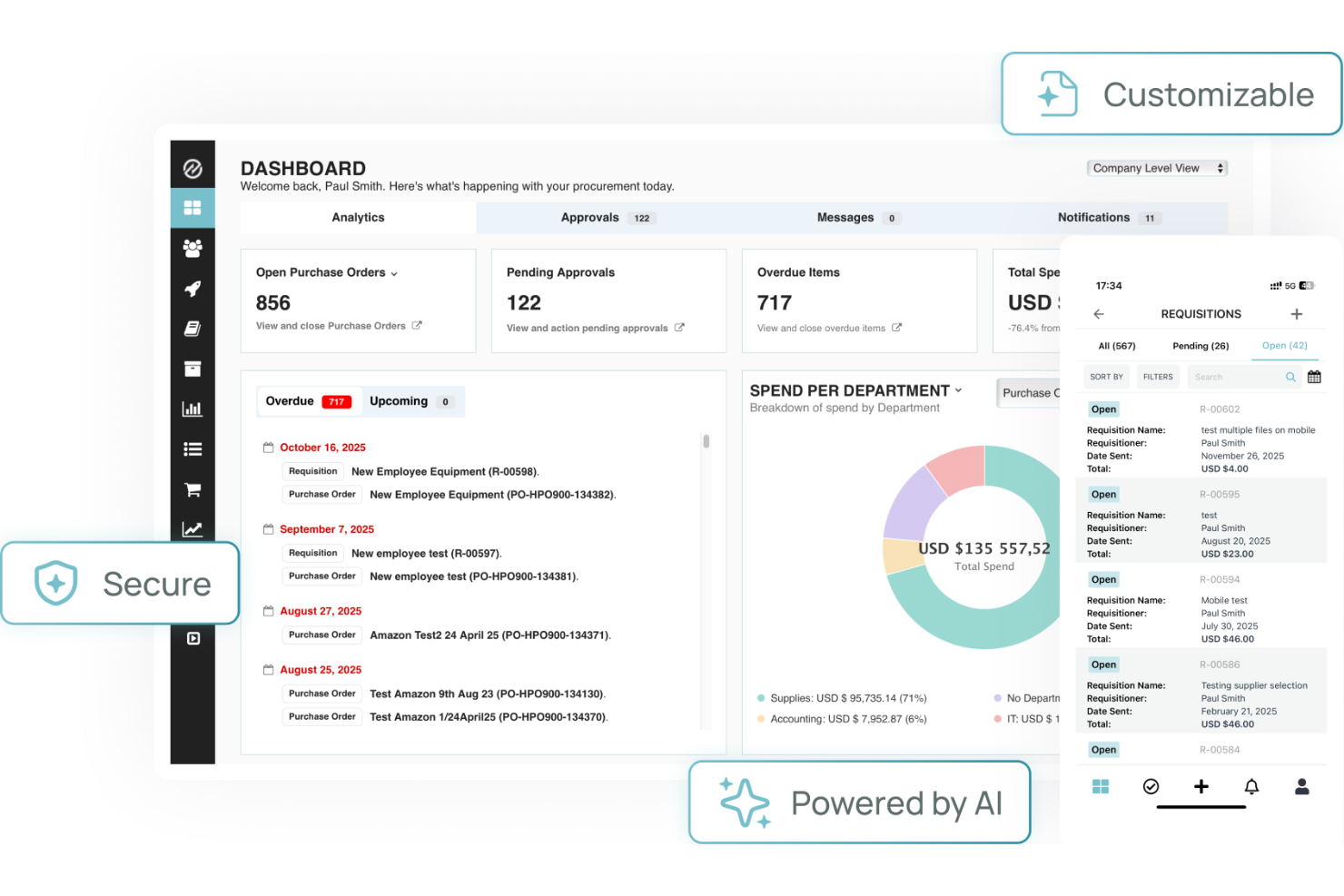
Tradogram stands out for teams that need invoice approval tightly connected to procurement workflows. It’s designed for businesses that want to manage purchasing, contracts, and approvals in one place, making it especially useful for procurement and finance professionals. By linking invoice approvals directly to purchase orders and budgets, Tradogram helps reduce mismatches and manual tracking across the procurement process.
Why I Picked Tradogram
Tradogram’s ability to connect invoice approvals directly to procurement workflows makes it a strong choice for organizations with complex purchasing needs. The platform links invoices to purchase orders, contracts, and budgets, so you can track every approval step in context. I picked Tradogram because it helps teams enforce procurement policies and reduce errors by tying invoice approvals to the original purchasing process. For businesses that want to keep procurement and finance tightly aligned, Tradogram’s workflow integration stands out.
Tradogram Key Features
Some other features that make Tradogram useful for invoice approval include:
- Customizable approval hierarchies: Set up multi-level approval chains to match your organization’s structure.
- Document management: Attach and store supporting documents directly with each invoice.
- Spend analytics dashboard: Monitor and analyze spending patterns across suppliers and departments.
- Supplier management tools: Track supplier performance and maintain a centralized supplier database.
Tradogram Integrations
Integrations include QuickBooks, Xero, Sage, NetSuite, and Microsoft Dynamics.
Pros and Cons
Pros:
- Customizable approval limits
- Good inventory tracking sync
- Easy to adopt across teams
Cons:
- Support is email focused
- Limited accounting sync tools
SoftCo
Best for secure financial data storage
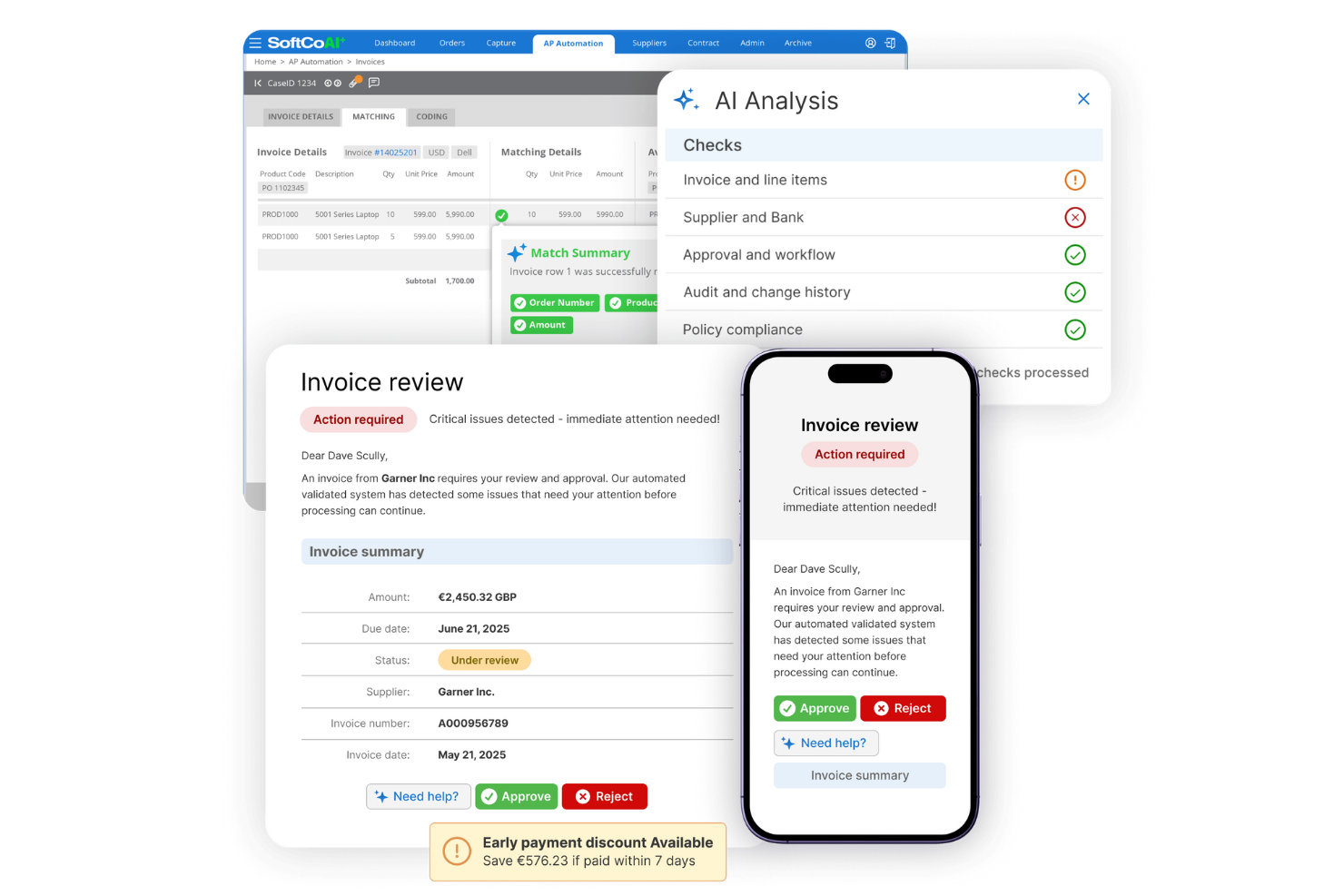
SoftCo is designed to provide AP automation for finance teams that need to prioritize secure storage and management of sensitive financial documents. It’s especially relevant for organizations in regulated industries where compliance and data protection are non-negotiable. With SoftCo, you can optimize your AP process while ensuring all financial data is encrypted and securely archived.
Why I Picked SoftCo
Security is a top concern for many finance teams handling sensitive invoice data, which is why I picked SoftCo for this shortlist. SoftCo offers encrypted document storage and strict access controls, making it a strong choice for organizations with compliance requirements or those operating in highly regulated sectors. The platform also provides automated audit trails, so every action on an invoice is tracked and securely logged. These features help ensure that financial data stays protected throughout the entire invoice approval process.
SoftCo Key Features
In addition to its security-focused capabilities, SoftCo offers several other features for invoice approval:
- Automated invoice capture: Extracts data from invoices using OCR to reduce manual entry.
- Configurable approval workflows: Lets you design multi-level approval paths to match your organization’s policies.
- Supplier portal: Provides vendors with a secure space to submit invoices and track payment status.
- ERP system integration: Connects directly with leading ERP platforms to sync invoice and payment data.
SoftCo Integrations
Integrations include Microsoft Dynamics, SAP, Oracle, NetSuite, and Sage.
Pros and Cons
Pros:
- Automates recurring invoices
- Great vendor management UI
- Strong compliance standards
Cons:
- Mobile app is very basic
- Needs dedicated IT resources

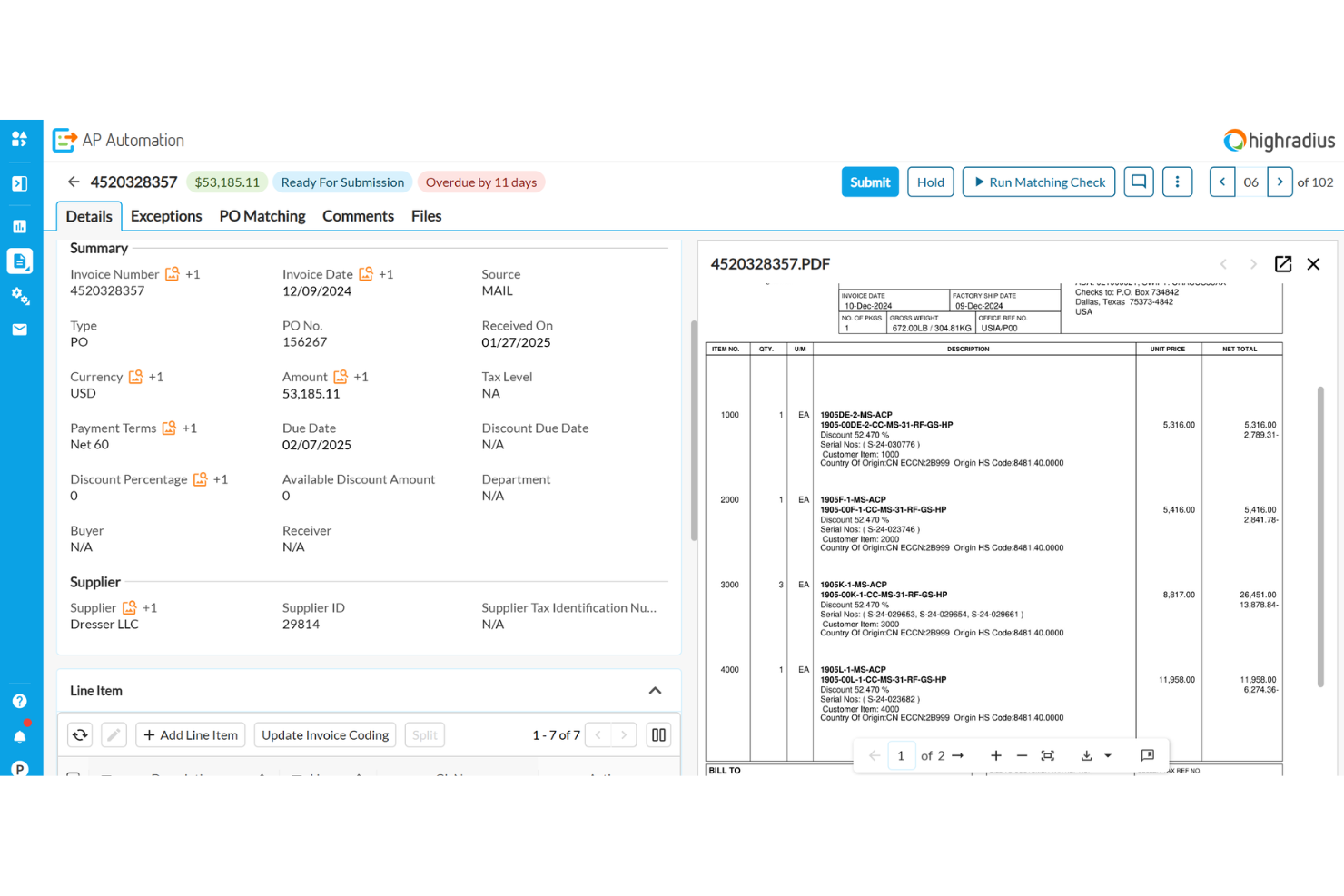
HighRadius uses AI to help finance teams resolve invoice exceptions and approval bottlenecks faster. It’s a strong fit for enterprises and shared services centers that deal with complex, high-volume invoice workflows and frequent exceptions. If your business struggles with manual exception handling or delayed approvals, HighRadius brings automation and intelligence to speed up resolution and keep processes moving.
Why I Picked HighRadius
What sets HighRadius apart is its use of AI to automatically identify and resolve exceptions in invoice approval workflows. The platform analyzes invoice data and flags discrepancies or missing information, then suggests next steps or routes issues to the right approver. I picked HighRadius because its exception management dashboard gives finance teams real-time visibility into bottlenecks and unresolved items. This focus on AI-powered exception handling makes it a strong choice for organizations that need to reduce manual intervention and keep invoice approvals on track.
HighRadius Key Features
In addition to its AI-driven exception handling, HighRadius offers several other features that support invoice approval processes:
- Automated invoice capture: The system extracts invoice data from emails and scanned documents without manual entry.
- Custom workflow design: Configure multi-step approval workflows to match your organization’s policies.
- Role-based access controls: Set permissions for users based on their responsibilities in the approval process.
- Audit trail tracking: Maintain a detailed log of all invoice actions and approvals for compliance and review.
HighRadius Integrations
Integrations include SAP, Oracle, NetSuite, Microsoft Dynamics, Workday, and JD Edwards.
Pros and Cons
Pros:
- Predictive cash flow insights
- Great exception handling rules
- Massive enterprise scalability
Cons:
- Implementation takes months
- Requires heavy IT involvement
Quadient
Best with document management integration
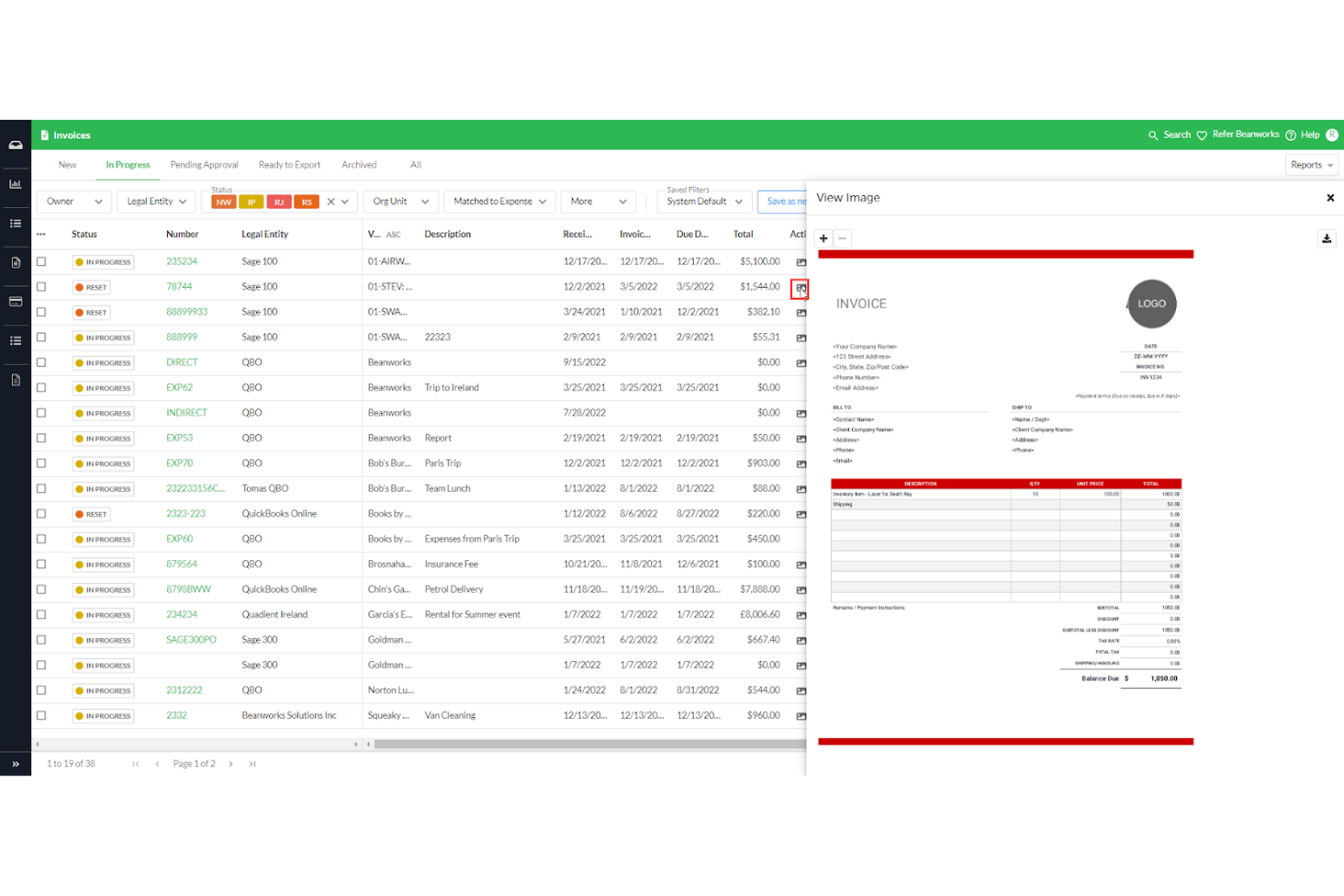
For teams that need invoice approval tightly connected to document management, Quadient offers a specialized solution. It’s designed for organizations that handle large volumes of documents and require seamless integration between approval workflows and document storage. With its focus on document management integration, Quadient helps you keep invoice records organized and accessible throughout the approval process.
Why I Picked Quadient
Quadient stands out for teams that need invoice approval workflows directly connected to document management systems. Its ability to link invoices with supporting documents and maintain a centralized repository makes it a strong fit for organizations with strict record-keeping or compliance needs. I picked Quadient because it lets you manage, retrieve, and audit invoice documents without leaving the approval platform. This integration helps reduce manual document handling and ensures all invoice-related files stay organized and accessible.
Quadient Key Features
Some other features that caught my attention include:
- Automated workflow routing: Route invoices to the right approvers based on custom rules.
- Digital signature support: Capture and store electronic signatures for invoice approvals.
- Real-time status tracking: Monitor the progress of each invoice through the approval process.
- Customizable approval templates: Set up and reuse approval templates tailored to your organization’s needs.
Quadient Integrations
Integrations include Microsoft SharePoint, Salesforce, Microsoft Dynamics 365, SAP, Oracle, DocuSign, Adobe Sign, Box, Dropbox, and Google Drive.
Pros and Cons
Pros:
- Automated duplicate catches
- Strong Sage and Xero sync
- Centralized invoice dashboard
Cons:
- Search filters are cumbersome
- Expense module is quite basic

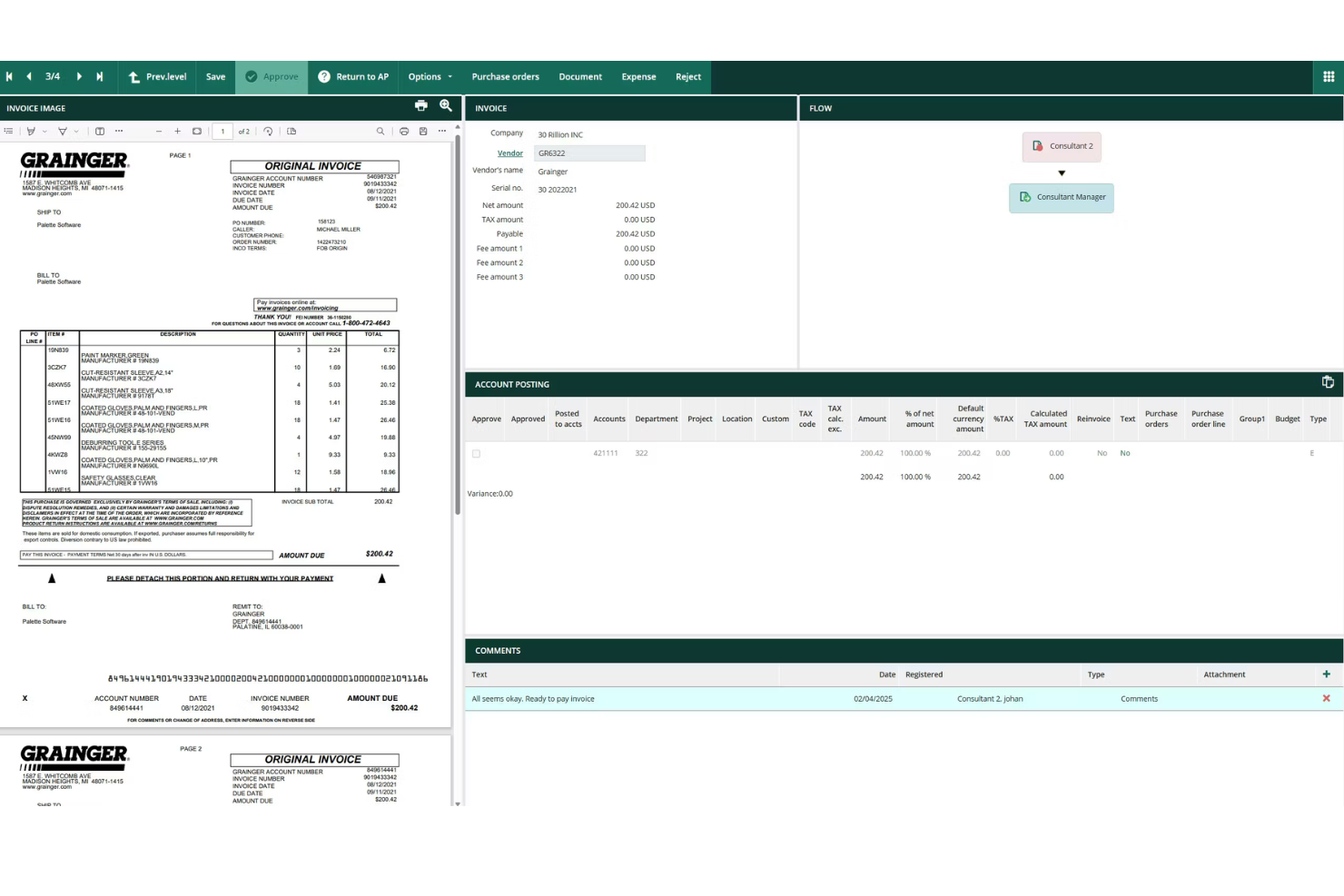
Rillion is designed for mid-sized finance teams that need to manage invoice approvals without adding complexity. The platform offers automated approval workflows and customizable controls that help teams handle growing invoice volumes and distributed approvers. If your organization is outgrowing manual processes but doesn’t need enterprise-level overhead, Rillion provides a focused solution for scaling up invoice management.
Why I Picked Rillion
Rillion stands out for mid-sized finance teams that need structure without the overhead of enterprise systems. The platform offers automated invoice capture and approval routing, which helps teams manage increasing invoice volumes as they grow. I picked Rillion because its customizable approval workflows let you match your organization’s policies and adapt as your team changes. For finance teams that want to move beyond manual processes but don’t need a complex solution, Rillion provides the right balance of automation and control.
Rillion Key Features
Some other features that make Rillion useful for invoice approval include:
- Mobile approvals: Approvers can review and approve invoices directly from their mobile devices.
- Duplicate invoice detection: The system flags potential duplicate invoices before they enter the approval workflow.
- Automated reminders: Rillion sends notifications to approvers when invoices are pending action.
- Document archiving: All invoices and related documents are stored securely for future reference and audits.
Rillion Integrations
Integrations include Microsoft Dynamics, SAP Business One, NetSuite, Monitor ERP, and Visma.
Pros and Cons
Pros:
- Intuitive user dashboard
- Easy PO matching capabilities
- Fast implementation timeline
Cons:
- Limited complex custom routing
- Lacks deep global compliance
Annen programvare for fakturagodkjenning
Her er noen flere alternativer for programvare for fakturagodkjenning som ikke kom med på kortlisten, men som likevel er verdt å undersøke:
- Approval Max
For audit-ready approval trails
- ApprovalSoft
For customizable approval routing
- Procurify
For managing multi-location approvals
- cloudsquid
With real-time budget tracking
- Esker
For AI-driven data capture
- ProcureDesk
For multi-level approval routing
- Concur
With travel and expense integration


How I Evaluate Invoice Approval Software
I split my evaluation into two layers: the baseline a tool must have to make the list, and the differentiators that set the best options apart for project-driven teams approving contractor invoices.
Core Functionality (Table Stakes For This List)
When I'm selecting tools for my list, I rank each one on a scale from 0 (does not offer the functionality) to 5 (excels in this area) for each core functionality listed below. Then, I calculate the tool's total score into a percentage. Each tool needs to achieve a minimum total score of 65% to be considered for inclusion.
- Configurable Approval Workflows: I check whether routing rules can flex around real project needs—like splitting a high-value subcontractor invoice through both a project manager and a finance director before release.
- Invoice Capture & Digitization: Whether a tool uses OCR or AI to pull line-item data from uploaded or emailed invoices matters, especially when your team processes dozens of contractor invoices weekly.
- PO & Budget Matching: I evaluate how each platform handles matching invoices against purchase orders, receipts, or project budgets—and whether it flags discrepancies like over-billing before an approver even sees the invoice.
- Project Cost Allocation: The ability to split a single invoice across multiple projects, tasks, or cost codes is something I look for, since shared vendor costs across workstreams are common in agency and consulting environments.
- Audit Trail & Compliance Logs: Every approval, rejection, edit, and comment should be timestamped and tied to a named user—I look for logs that are exportable and detailed enough to satisfy internal audits or client billing disputes.
- Accounting/ERP Integration: I evaluate native connections to platforms like QuickBooks, Xero, NetSuite, or Sage, and check whether syncs run in both directions so approved invoices flow into your books without manual re-entry.
Once I have a list of tools that meet this criteria, I consider what sets each platform apart.
Differentiating Factors (What Sets Vendors Apart)
Here's how I compare and contrast different vendors:
Standout Features
AI anomaly detection is a big differentiator—I look for tools that catch duplicate invoices or off-contract pricing before they reach an approver's queue. Real-time budget dashboards also matter, especially when you need to see how pending approvals affect project burn rates mid-sprint. Mobile approval apps round things out for teams where project managers are frequently on-site or traveling and can't afford to hold up payment cycles.
Beyond Features
Integration ecosystem matters a lot here—I check whether a tool connects natively with project management platforms like Jira, Asana, or Procore, since approvals without project context slow everything down. I also evaluate industry fit, particularly whether the platform supports project-based cost structures like cost codes or WIP reporting. Pricing transparency is another factor I weigh, especially whether a vendor charges per approver seat, invoice volume, or entity, since that directly affects scalability as your project portfolio grows.
Slik velger du programvare for fakturagodkjenning
Det er lett å gå seg vill i lange funksjonslister og komplekse prisstrukturer. For å hjelpe deg med å holde fokus mens du går gjennom den unike prosessen for programvarevalg, har vi laget en sjekkliste over faktorer du bør ha i tankene:
| Faktor | Hva du bør vurdere |
|---|---|
| Skalerbarhet | Vil programvaren håndtere dagens og fremtidens fakturavolum? Spør om brukerbegrensninger, utvidelse av arbeidsflyter og støtte for flere enheter. |
| Integrasjoner | Kan den kobles direkte til ERP-, regnskaps- eller innkjøpssystemene dine? Se etter direkte integrasjoner, ikke bare API-muligheter. |
| Tilpasningsmuligheter | Kan du tilpasse godkjenningsarbeidsflyter, brukerroller og varsler slik at de samsvarer med retningslinjene dine? Unngå rigide systemer som tvinger deg til å endre prosessene. |
| Brukervennlighet | Vil teamet ditt ta det raskt i bruk? Se etter tydelig navigasjon, minimalt behov for opplæring og en logisk godkjenningsflyt. |
| Implementering og oppstart | Hvor lang tid vil oppsettet ta, og hvilke ressurser kreves? Spør om støtte ved migrering, opplæring og typiske tidsrammer for produksjonssetting. |
| Kostnad | Er prisnivåene transparente og forutsigbare? Vurder de totale eierkostnadene, inkludert oppsett, brukerstøtte og eventuelle gebyrer per faktura. |
| Sikkerhetstiltak | Tilbyr verktøyet kryptering, tilgangskontroller og revisjonslogger? Bekreft at det oppfyller standardene dine for databeskyttelse og etterlevelse. |
| Krav til etterlevelse | Vil programvaren hjelpe deg med å oppfylle bransje- eller regionspesifikke krav? Se etter funksjoner som støtter revisjonsspor, oppbevaring og rapportering. |
Hva er programvare for fakturagodkjenning?
Programvare for fakturagodkjenning er et digitalt verktøy som legger til rette for automatisert fakturagodkjenning ved å videresende, gjennomgå og godkjenne fakturaer for betaling i en organisasjon. Den sentraliserer fakturadata, håndhever godkjenningsarbeidsflyter og opprettholder revisjonsspor for å støtte samsvar og åpenhet. Økonomiteam bruker disse systemene til å redusere manuelle feil, fremskynde godkjenninger og sikre at bare validerte fakturaer blir betalt.
Funksjoner i programvare for fakturagodkjenning
Når du velger programvare for fakturagodkjenning, bør du se etter følgende viktige funksjoner:
- Automatisert fakturainnhenting: Skanner og digitaliserer innkommende fakturaer og henter ut viktige datafelt for å redusere manuell registrering og feil.
- Tilpassede godkjenningsarbeidsflyter: Lar deg utforme og håndheve godkjenningsprosesser i flere trinn som samsvarer med organisasjonens retningslinjer og hierarki.
- Tilgangskontroller basert på roller: Begrenser brukertillatelser slik at bare autoriserte teammedlemmer kan vise, redigere eller godkjenne fakturaer.
- Revisjonsspor: Registrerer alle handlinger som utføres på en faktura, og gir en detaljert historikk for samsvar og ansvarlighet.
- Sporing av fakturastatus: Viser oppdateringer i sanntid om hvor hver faktura befinner seg i godkjenningsprosessen, slik at team kan unngå flaskehalser.
- Integrasjoner med ERP- og regnskapssystemer: Kobler seg direkte til de eksisterende økonomisystemene dine for å synkronisere fakturadata og betalingsstatus.
- Leverandørportaler: Gir leverandører en sikker måte å sende inn fakturaer på, kontrollere fremdriften i godkjenningen og kommunisere med teamet ditt.
- Gjenkjenning av duplikatfakturaer: Merker mulige duplikate innsendinger for å forhindre dobbeltbetalinger og redusere risikoen for svindel.
- Dokumentlagring: Lagrer fakturaer og relaterte dokumenter i et sentralisert, søkbart arkiv for enkel gjenfinning og revisjonsberedskap.
Fordeler med programvare for fakturagodkjenning
Implementering av programvare for fakturagodkjenning gir flere fordeler for teamet og virksomheten din. Her er noen av fordelene du kan se frem til:
- Raskere godkjenninger: Automatiserte arbeidsflyter og statussporing i sanntid hjelper fakturaer med å bevege seg raskt gjennom hvert godkjenningstrinn.
- Bedre samsvar: Revisjonsspor og tilgangskontroller basert på roller støtter overholdelse av interne retningslinjer og regulatoriske krav.
- Færre manuelle feil: Automatisert fakturainnhenting og gjenkjenning av duplikater minimerer feil ved datainnsamling og forhindrer dobbeltbetalinger.
- Bedre oversikt: Sentraliserte dashbord og dokumentlagring gir økonomiteam en tydelig oversikt over fakturastatus og historikk.
- Bedre leverandørforhold: Leverandørportaler og verktøy for åpen kommunikasjon holder leverandørene informert og reduserer betalingstvister.
- Bedre sikkerhet: Kryptert lagring og tilgangskontroller beskytter sensitive økonomiske data mot uautorisert tilgang.
- Enklere integrasjon: Direkte tilkoblinger til ERP- og regnskapssystemer sikrer at fakturadata forblir nøyaktige og oppdaterte på tvers av plattformer.
Kostnader og priser for programvare for fakturagodkjenning
Valg av programvare for fakturagodkjenning krever en forståelse av de ulike prismodellene og tilgjengelige abonnementene. Kostnadene varierer basert på funksjoner, teamstørrelse, tillegg og mer. Tabellen nedenfor oppsummerer vanlige abonnementer, gjennomsnittsprisene deres og typiske funksjoner som er inkludert i programvareløsninger for fakturagodkjenning:
Sammenligningstabell for abonnementer på programvare for fakturagodkjenning
| Abonnementstype | Gjennomsnittspris | Vanlige funksjoner |
|---|---|---|
| Gratisabonnement | $0 | Grunnleggende fakturainnhenting, begrensede godkjenningsarbeidsflyter, tilgang for én bruker og grunnleggende rapportering. |
| Personlig abonnement | $15-$49/bruker/måned | Støtte for flere brukere, standard godkjenningsarbeidsflyter, dokumentlagring og e-postvarsler. |
| Bedriftsabonnement | $150-$899/måned | Avansert tilpasning av arbeidsflyter, ERP-integrasjoner, revisjonsspor, leverandørportaler og prioritert brukerstøtte. |
| Virksomhetsabonnement | $1000+/bruker/måned | Tilpassede integrasjoner, avansert sikkerhet, samsvarsverktøy, dedikert kontoadministrasjon og SLA-støttet brukerstøtte. |
Vanlige spørsmål om programvare for fakturagodkjenning
Her er noen svar på vanlige spørsmål om programvare for fakturagodkjenning:
Hvordan integreres programvare for fakturagodkjenning med eksisterende regnskapssystemer?
Det meste av programvaren for fakturagodkjenning kobles til regnskaps- eller ERP-systemer gjennom direkte integrasjoner eller API-er. Dette gjør det mulig å synkronisere fakturadata, betalingsstatus og leverandørinformasjon automatisk, noe som reduserer manuell registrering og holder regnskapsopplysningene oppdatert.
Kan programvare for fakturagodkjenning håndtere godkjenninger på flere nivåer eller basert på betingelser?
Ja, de fleste løsninger støtter godkjenningsflyter på flere nivåer og basert på betingelser. Du kan sette opp regler basert på fakturabeløp, avdeling eller prosjekt, slik at de rette personene vurderer og godkjenner hver faktura før betaling.
Hvilke sikkerhetstiltak bør jeg se etter i programvare for fakturagodkjenning?
Se etter funksjoner som datakryptering, rollebasert tilgangskontroll og detaljerte revisjonsspor. Disse sikkerhetstiltakene bidrar til å beskytte sensitiv økonomisk informasjon og støtter overholdelse av interne og eksterne bestemmelser.
Hvor lang tid tar det å implementere programvare for fakturagodkjenning?
Implementeringstiden varierer, men de fleste skybaserte løsninger kan settes opp i løpet av noen dager til noen uker. Faktorer som datamigrering, tilpasning av arbeidsflyter og opplæring av brukere kan påvirke den totale tidsrammen.
Er det mulig å godkjenne fakturaer fra en mobil enhet?
Ja, mange plattformer for fakturagodkjenning tilbyr mobilapper eller responsive nettgrensesnitt. Dette gjør det mulig for brukere å vurdere, godkjenne eller avvise fakturaer mens de er på farten, noe som kan bidra til å forhindre flaskehalser i godkjenningsprosessen.