



Trello vs. Zoho Projects: Confronto Esperto & Recensioni 2026



Trello offre un approccio semplice all'organizzazione dei progetti con bacheche e schede intuitive, mentre Zoho Projects mette a disposizione una suite completa per la gestione di flussi di lavoro complessi. La semplicità di Trello è diversa dalle robuste capacità di Zoho Projects, quindi la scelta dipende dalle esigenze del tuo team.
In questo articolo troverai un confronto dettagliato di questi strumenti, incluse funzionalità, vantaggi e svantaggi, prezzi e altro ancora, per aiutarti a decidere quale software di project management si adatta meglio al tuo lavoro.
Trello vs. Zoho Projects: An Overview
Trello

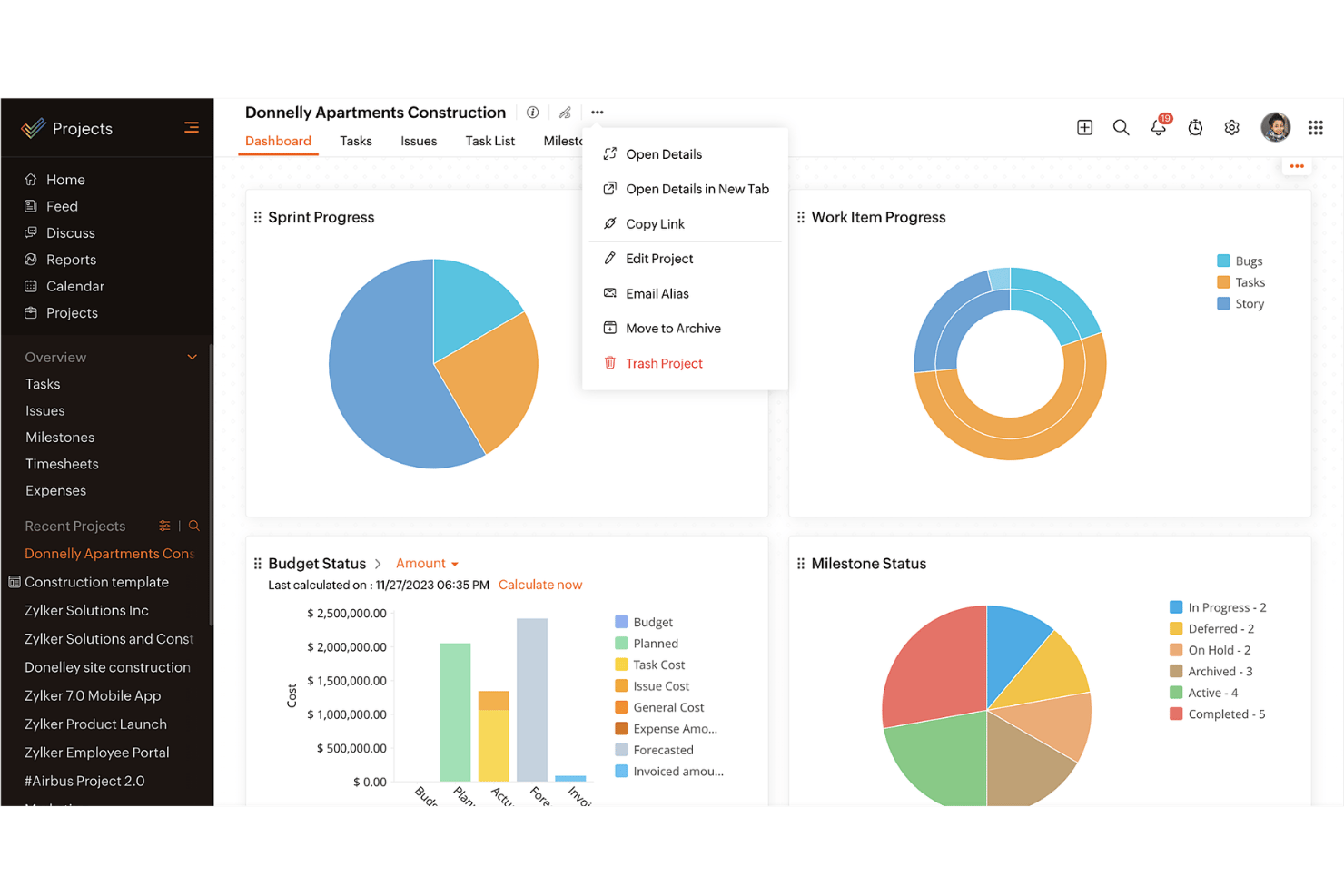
Zoho Projects
Perché fidarsi dei nostri consigli sui software
Il nostro team testa e recensisce software dal 2012. In quanto project manager noi stessi, sappiamo quanto sia difficile — e importante — scegliere il software giusto.
Per questa guida, abbiamo valutato gli strumenti attraverso test pratici e ricerche indipendenti, assegnando un punteggio agli strumenti in base ai nostri criteri di selezione. Ci basiamo inoltre sulle competenze di leader di pensiero del settore e di professionisti attivi nella gestione dei progetti.
Le nostre recensioni riflettono il nostro giudizio editoriale umano, non un discorso di vendita.
Revisori esperti:
Trello vs. Zoho Projects Pricing Comparison
| Trello | Zoho Projects | |
|---|---|---|
| Free Trial | 14-day free trial | Free plan + 15-day free trial available |
| Pricing | From $5/user/month (billed annually) | Pricing upon request |
Il prezzo di Trello si basa su un modello a livelli, con piani gratuiti e a pagamento e possibili costi aggiuntivi per power-up e integrazioni. Il prezzo di Zoho Projects segue un modello di abbonamento con diversi livelli e l'utente potrebbe affrontare costi aggiuntivi per funzionalità avanzate o maggiore spazio di archiviazione.
Per selezionare lo strumento con il prezzo giusto per le tue esigenze, valuta le necessità del tuo team e il possibile utilizzo, considerando sia i bisogni attuali che futuri, per vedere quale piano si allinea alla tua crescita prevista e alle richieste di funzionalità.
Trello vs. Zoho Projects Feature Comparison
Trello utilizza bacheche Kanban per aiutare i team a visualizzare e gestire le attività, rendendolo ideale per monitorare progetti in corso e responsabilità individuali. Zoho Projects offre diagrammi di Gantt per pianificare e monitorare le tempistiche, strumenti particolarmente utili per progetti complessi con calendari dettagliati e traguardi.
Trello punta sulla semplicità, mentre Zoho Projects offre un approccio più strutturato al project management.
| Trello | Zoho Projects | |
|---|---|---|
| API | ||
| Batch Permissions & Access | ||
| Budgeting | ||
| Calendar Management | ||
| Collaboration Support | ||
| Contact Management | ||
| Contact Sharing | ||
| Customer Management | ||
| Dashboard | ||
| Dashboards | ||
| Data Export | ||
| Data Import | ||
| Data Visualization | ||
| Dependency Tracking | ||
| Document Sharing | ||
| Expense Tracking | ||
| External Integrations | ||
| File Sharing | ||
| Gantt Charts | ||
| Kanban Boards | ||
| Multi-User | ||
| Notifications | ||
| Project Management | ||
| Resource Management | ||
| Scheduling | ||
| Task Scheduling/Tracking | ||
| Third-Party Plugins/Add-Ons | ||
| Time Management | ||
| Travel Management | ||
| Workflow Management |
Integrazioni Trello vs. Zoho Projects
| Integrazione | Trello | Zoho Projects |
| Slack | ✅ | ❌ |
| Google Drive | ✅ | ✅ |
| Dropbox | ✅ | ✅ |
| Microsoft Teams | ✅ | ❌ |
| Outlook | ✅ | ❌ |
| Salesforce | ❌ | ✅ |
| QuickBooks | ❌ | ✅ |
| GitHub | ✅ | ❌ |
| API | ✅ | ✅ |
| Zapier | ✅ | ❌ |
Trello si integra con Slack per inviare aggiornamenti sulle attività direttamente all'app di messaggistica, rendendolo ideale per i team dinamici che si affidano a comunicazioni rapide. Zoho Projects si integra con Salesforce, aiutando i team di vendita ad allineare la gestione dei progetti con i dati sulla relazione con i clienti e a mantenere un flusso di lavoro fluido tra i dipartimenti.
Trello supporta una collaborazione focalizzata sulle attività, mentre Zoho Projects collega le attività di progetto a sistemi aziendali più ampi per operazioni più integrate.
Sicurezza, Conformità & Affidabilità di Trello vs. Zoho Projects
| Fattore | Trello | Zoho Projects |
| Crittografia dei dati | Trello utilizza la crittografia TLS per proteggere i dati in transito e a riposo. | Zoho Projects impiega la crittografia AES-256 per la protezione dei dati. |
| Conformità | Trello è conforme alle normative GDPR e CCPA per la privacy dei dati. | Zoho Projects rispetta GDPR, CCPA e offre la certificazione ISO 27001. |
| Garanzia di disponibilità | Trello promette un uptime del 99,9% con monitoraggio continuo | Zoho Projects offre uptime del 99,9% SLA con stato del sistema in tempo reale. |
| Controllo degli accessi | Trello consente permessi personalizzabili e l'autenticazione a due fattori | Zoho Projects fornisce controllo accessi basato sui ruoli e autenticazione a due fattori |
Trello e Zoho Projects offrono entrambi solide funzionalità di sicurezza, ma Zoho Projects include una gamma più ampia di certificazioni di conformità. Quando si valuta la sicurezza e la conformità, considera fattori come gli standard di crittografia, la copertura delle certificazioni e le garanzie di disponibilità per assicurarti che i dati dei tuoi progetti restino sicuri e sempre accessibili.
Trello vs. Zoho Projects Facilità d'Uso
| Fattore | Trello | Zoho Projects |
| Interfaccia utente | L'interfaccia drag-and-drop di Trello è intuitiva e rende semplice la gestione delle attività. | Zoho Projects offre un'interfaccia più complessa con una varietà di visualizzazioni e funzionalità. |
| Esperienza di onboarding | Trello offre un'esperienza di onboarding diretta con una configurazione minima richiesta. | Zoho Projects propone tutorial dettagliati e guide alla configurazione per i nuovi utenti. |
| Configurazione | Trello richiede una configurazione minima, consentendo la creazione immediata di progetti. | Zoho Projects necessita di più configurazioni per adattare il software alle proprie esigenze. |
| Supporto | Trello offre supporto online e un centro assistenza completo. | Zoho Projects fornisce supporto 24/7 e una documentazione approfondita. |
Trello è più facile da usare per una gestione rapida delle attività grazie alla sua interfaccia semplice, ma può risultare limitato per esigenze di progetto più complesse. Zoho Projects può essere impegnativo all'inizio a causa della sua complessità, ma eccelle nell'offrire funzionalità dettagliate e un forte supporto per una gestione completa dei progetti.
Trello vs Zoho Projects: Pros & Cons
Trello
- You can easily visualize your tasks with Trello's board and card layout.
- It's simple to use, making it accessible for team members of all skill levels.
- Trello adapts to your team's workflow, offering flexibility in task management.
- Trello lacks advanced reporting features you might find in more complex tools.
- You can't create intricate task dependencies, which may limit complex project planning.
- Trello's simplicity might not suit large teams with detailed project management needs.
Zoho Projects
- Task dependencies are highly visual and easy to set up.
- Built-in time tracking integrates smoothly with billing features.
- Customizable project templates support repeatable workflows.
- Reporting customization can be limited for advanced needs.
- Mobile app notifications do not always sync in real time.
- Gantt chart drag-and-drop can feel sluggish with large projects.
Best Use Cases for Trello and Zoho Projects
Trello
- Creative Agencies Trello's visual task management makes it easy for you to track projects, ideas, and client feedback.
- Startups The flexibility Trello offers helps your team adapt quickly as you grow and change.
- Marketing Teams You can easily plan campaigns and track progress with Trello's board system.
- Design Departments Trello's simple interface allows you to manage design projects and revisions efficiently.
- Freelancers You can organize your tasks and deadlines without getting overwhelmed by complex features
- Product Development Trello's adaptability helps your team streamline workflows and manage product roadmaps effectively.
Zoho Projects
- Small Agencies Kanban boards, time tracking, and client billing streamline project delivery and reporting for agency teams.
- IT Departments Issue tracking, blueprint automations, and strong permission controls provide what IT teams need for complex internal projects.
- Consulting Firms Time sheets, detailed reports, and project-level billing help consultants keep track of client hours and invoicing.
- Remote Teams Robust collaboration tools, document sharing, and project forums help distributed users stay connected.
- Marketing Teams Reusable templates, task dependencies, and timeline tracking make repeated campaigns run smoothly and transparently.
- Construction Projects Gantt charts, milestones, and resource allocation features support the scheduling needs of construction and field project managers.
Chi dovrebbe usare Trello e chi dovrebbe usare Zoho Projects?
Trello è ideale per piccoli team o singoli individui che hanno bisogno di uno strumento semplice e facile da usare per organizzare le attività, specialmente in ambiti creativi o startup. Zoho Projects è più adatto a team o organizzazioni di grandi dimensioni che gestiscono progetti complessi che richiedono un monitoraggio dettagliato, report e collaborazione.
Se il tuo team dà valore a velocità e semplicità, Trello è un'ottima scelta. Per i team che necessitano di una soluzione di project management più avanzata con pianificazione strutturata, Zoho Projects è più indicato.
Differences Between Trello and Zoho Projects
| Trello | Zoho Projects | |
|---|---|---|
| Automation | Trello provides basic automation through its Butler feature. | Zoho Projects offers advanced automation tools for complex workflows. |
| Core Features | Trello focuses on task management with boards and cards | Zoho Projects includes comprehensive project management features like Gantt charts. |
| Integrations | Trello integrates well with communication tools like Slack and Teams. | Zoho Projects integrates with business tools like Salesforce and QuickBooks. |
| Pricing | Trello uses a tiered pricing model with free and paid plans. | Zoho Projects follows a subscription model with various tiers and add-ons |
| User Interface | Trello offers a simple, card-based Kanban board that's easy to navigate. | Zoho Projects has a more complex interface with multiple views and options. |
| Read Trello ReviewOpens new window | Read Zoho Projects ReviewOpens new window |
Similarities Between Trello and Zoho Projects
| Cloud-Based | Trello and Zoho Projects are cloud-based, allowing you to access your projects from anywhere with an internet connection. |
|---|---|
| Collaboration | Both tools support team collaboration, with Trello enabling comments on cards and Zoho Projects offering discussion forums. |
| Integrations | Both integrate with third-party apps to enhance functionality, with Trello focusing on tools like Slack and Zoho Projects on business software like QuickBooks. |
| Mobile Usability | Both provide mobile apps, letting you manage your projects and tasks on the go, where you’re using Trello’s app or Zoho Project’s app. |
| Task Management | Both Trello and Zoho Projects allow you to manage tasks efficiently, with Trello using boards and Zoho Projects offering task lists and milestones. |
| Read Trello ReviewOpens new window Read Zoho Projects ReviewOpens new window | |