



Trello vs. Jira: Confronto e Recensioni degli Esperti per il 2026



Trello offre una piattaforma flessibile e intuitiva per gestire le attività e i progetti del tuo team. Rispetto a Trello, Jira propone soluzioni robuste pensate per i team di sviluppo software.
La differenza principale risiede nella semplicità e nell’approccio visivo di Trello, mentre Jira si distingue per la complessità e il monitoraggio dettagliato. In questo articolo troverai un confronto dettagliato tra gli strumenti, le loro funzionalità, vantaggi e svantaggi, prezzi e altro ancora per aiutarti a scegliere il miglior software di project management per le tue esigenze.
Trello vs. Jira: An Overview
Trello




Jira

Perché fidarsi dei nostri consigli sui software
Il nostro team testa e recensisce software dal 2012. In quanto project manager noi stessi, sappiamo quanto sia difficile — e importante — scegliere il software giusto.
Per questa guida, abbiamo valutato gli strumenti attraverso test pratici e ricerche indipendenti, assegnando un punteggio agli strumenti in base ai nostri criteri di selezione. Ci basiamo inoltre sulle competenze di leader di pensiero del settore e di professionisti attivi nella gestione dei progetti.
Le nostre recensioni riflettono il nostro giudizio editoriale umano, non un discorso di vendita.
Revisori esperti:
Trello vs. Jira Pricing Comparison
| Trello | Jira | |
|---|---|---|
| Free Trial | 14-day free trial | Free plan + 14-day free trial available |
| Pricing | From $5/user/month (billed annually) | From $7.91/user/month |
Prezzi di Trello vs. Jira & Costi Nascosti
Il modello di prezzi di Trello offre un piano gratuito con opzioni a pagamento per funzionalità aggiuntive; tuttavia, gli utenti possono sostenere dei costi per integrazioni o power-up. Al contrario, la struttura di prezzo di Jira è suddivisa in fasce in base al numero di utenti e offre funzionalità avanzate nei piani di fascia superiore, con possibili costi extra per alcuni plugin o spazio di archiviazione.
Per scegliere il piano più adatto, i project manager dovrebbero valutare la dimensione del team, le funzionalità necessarie e le integrazioni richieste, assicurandosi di comprendere realmente ciò che ogni fascia di prezzo include per evitare spese impreviste.
Trello vs. Jira Feature Comparison
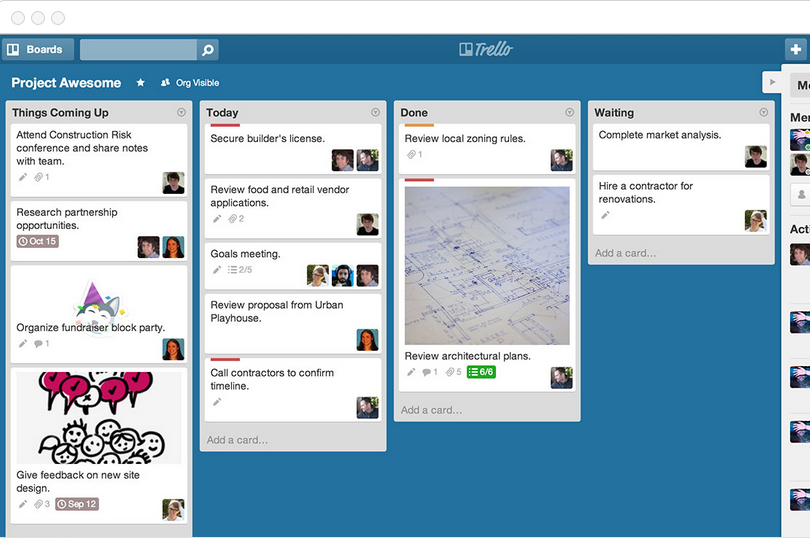
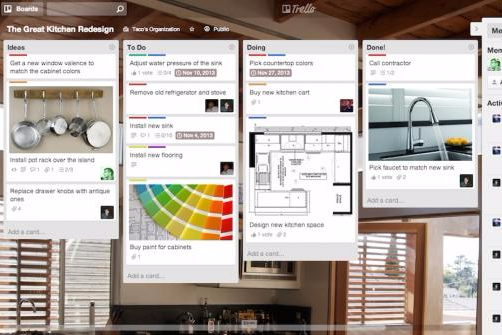
Le bacheche Kanban drag-and-drop di Trello ti permettono di visualizzare le attività a colpo d’occhio, rendendole ideali per la gestione del flusso di lavoro quotidiano nella pianificazione delle campagne di un team marketing. Al contrario, la gestione avanzata delle attività e i flussi di lavoro personalizzabili di Jira sono perfetti per i team di sviluppo software che devono monitorare bug e gestire sprint in modo efficiente.
Mentre Trello semplifica la visualizzazione delle attività, Jira offre un monitoraggio dettagliato dei progetti complessi, fornendo ciascuno vantaggi unici in base alle esigenze specifiche del team.
| Trello | Jira | |
|---|---|---|
| API | ||
| Calendar Management | ||
| Collaboration Support | ||
| Dashboards | ||
| Data Export | ||
| Data Import | ||
| External Integrations | ||
| File Sharing | ||
| Gantt Charts | ||
| Kanban Boards | ||
| Multi-User | ||
| Notifications | ||
| Project Management | ||
| Task Scheduling/Tracking | ||
| Time Management |
Trello vs. Jira Core Integrations
| Integrazione | Trello | Jira |
|---|---|---|
| Slack | ✅ | ✅ |
| Google Drive | ✅ | ✅ |
| Microsoft Teams | ✅ | ✅ |
| GitHub | ❌ | ✅ |
| Figma | ❌ | ✅ |
| Miro | ✅ | ✅ |
| Adobe XD | ❌ | ✅ |
| Confluence | ❌ | ✅ |
| API | ✅ | ✅ |
| Zapier | ✅ | ✅ |
L’integrazione di Trello con Slack ti permette di condividere rapidamente aggiornamenti e mantenere il team sincronizzato, risultando ideale per i team marketing che lavorano in modo dinamico. D’altra parte, l’integrazione di Jira con GitHub è perfetta per i team di sviluppo che hanno bisogno di tenere traccia delle modifiche al codice insieme alle attività di progetto.
Mentre Trello migliora la comunicazione del team, Jira garantisce una collaborazione fluida tra sviluppo e gestione dei progetti.
Trello vs. Jira Sicurezza, Conformità & Affidabilità
| Fattore | Trello | Jira |
|---|---|---|
| Privacy dei dati | Utilizza la crittografia TLS per proteggere i dati in transito e fornisce SSO per una maggiore sicurezza. | Offre crittografia dei dati sia in transito che a riposo, con permessi utente avanzati. |
| Conformità normativa | È conforme a GDPR e CCPA, garantendo la protezione dei dati degli utenti. | È conforme a GDPR, CCPA e SOC2, offrendo certificazioni di conformità estese. |
| Affidabilità uptime | Vanta un SLA di uptime del 99,9%, supportato da sistemi di monitoraggio in tempo reale. | Offre un Service Level Agreement (SLA) di uptime del 99,9% con solidi protocolli di disaster recovery. |
Jira offre certificazioni di conformità più complete rispetto a Trello. Quando valuti sicurezza e conformità, considera le esigenze normative specifiche del tuo team e dai priorità agli strumenti che rispondono a questi requisiti, assicurandoti che il fornitore offra documentazione trasparente e supporto.
Trello vs. Jira Facilità d'Uso
| Fattore | Trello | Jira |
|---|---|---|
| Interfaccia utente | Presenta un'interfaccia intuitiva, con funzione drag-and-drop, facile da navigare anche per i nuovi utenti. | Interfaccia ricca di funzionalità, ma può risultare opprimente per i principianti a causa della sua complessità. |
| Esperienza di onboarding | Offre un onboarding rapido con tutorial semplici e un processo di configurazione user-friendly. | Fornisce guide dettagliate per l'onboarding, ma la configurazione può essere complessa per chi è nuovo agli strumenti di project management. |
| Personalizzazione | Permette una facile personalizzazione di bacheche e schede per adattarsi a diversi flussi di lavoro. | Offre ampie opzioni di personalizzazione, ma richiede più tempo per essere configurato in modo efficace. |
La semplicità di Trello permette di iniziare e gestire le attività con una formazione minima, rendendolo ideale per i team che cercano una gestione dei progetti semplice e diretta. Al contrario, le numerose funzionalità di Jira offrono maggiore profondità ma possono essere impegnative per chi non ha familiarità con strutture di project management complesse, rendendolo più adatto a team con competenze tecniche.
Trello vs Jira: Pros & Cons
Trello
- You can easily visualize your tasks with Trello's board and card layout.
- It's simple to use, making it accessible for team members of all skill levels.
- Trello adapts to your team's workflow, offering flexibility in task management.
- Trello lacks advanced reporting features you might find in more complex tools.
- You can't create intricate task dependencies, which may limit complex project planning.
- Trello's simplicity might not suit large teams with detailed project management needs.
Jira
- Agile workflow management supports Scrum and Kanban and can improve your teams' productivity.
- Automation rules are easy to set up, which helps your team speed up their work.
- Custom filters can be created and accessed quickly, which improves your team's efficiency.
- Field names can be confusing, which might slow down your team's workflow.
- The interface can be too crowded in Scrum projects, which can make it hard for your team to navigate.
- There's a lack of resource management capabilities, which could limit your team's planning.
Best Use Cases for Trello and Jira
Trello
- Creative Agencies Trello's visual task management makes it easy for you to track projects, ideas, and client feedback.
- Startups The flexibility Trello offers helps your team adapt quickly as you grow and change.
- Marketing Teams You can easily plan campaigns and track progress with Trello's board system.
- Design Departments Trello's simple interface allows you to manage design projects and revisions efficiently.
- Freelancers You can organize your tasks and deadlines without getting overwhelmed by complex features
- Product Development Trello's adaptability helps your team streamline workflows and manage product roadmaps effectively.
Jira
- Software development Jira’s agile tools like Scrum and Kanban boards make it perfect for managing software projects.
- IT departments Its issue tracking capabilities help your team efficiently handle technical support and bug fixes.
- Tech startups Jira offers customization capabilities that allow your team to scale and adapt as your projects grow.
- Agile teams Sprint planning and backlog management features keep your agile processes organized and effective.
- Large enterprises Jira’s automation rules can streamline your complex workflows and improve team productivity.
- Project managers Its reporting and analytics provide insights that help you make informed decisions quickly.
Chi dovrebbe usare Trello e Jira?
Secondo me, Trello è l’ideale per piccoli team e professionisti creativi che necessitano di un approccio semplice e visivo alla gestione di attività e progetti. È perfetto per team di marketing, freelance e per chiunque apprezzi facilità d’uso ed economicità.
D’altra parte, credo che Jira sia più adatto a team di sviluppo software o a organizzazioni di grandi dimensioni che richiedono un monitoraggio dettagliato, funzionalità avanzate e integrazioni robuste. Se il tuo team necessita una gestione dei progetti completa con particolare attenzione ai flussi di lavoro tecnici, la profondità di Jira lo rende la scelta giusta.
Differences Between Trello and Jira
| Trello | Jira | |
|---|---|---|
| Automation | Integrates with tools like Zapier for basic automation. | Has built-in automation for complex workflows and processes. |
| Customization | Enable easy customization of boards and cards for diverse workflows. | Offers extensive customization but requires more time to set up. |
| Integrations | Supports integrations with popular apps like Slack and Google Drive. | Integrates with developer tools like GitHub and Confluence. |
| Pricing | Has a free tier with optional paid features for more functionality. | Offers tiered pricing based on user numbers and feature access. |
| User Interface | Offers a simple, drag-and-drop Kanban board that's easy to use. | Provides a detailed interface with advanced project tracking features. |
| Read Trello ReviewOpens new window | Read Jira ReviewOpens new window |
Similarities Between Trello and Jira
| Cloud-Based Access | They are cloud-based, allowing your team to access projects from anywhere. Trello emphasizes ease of use, while Jira focuses on robust security. |
|---|---|
| Collaboration | The platforms offer collaboration features, such as comments and file sharing, with Trello focusing on simplicity and Jira providing more structured communication. |
| Integrations | Each supports numerous integrations to enhance functionality, though Trello integrates seamlessly with popular apps, while Jira connects deeply with development tools. |
| Mobile Usability | Both have mobile apps for managing projects on the go, with Trello's app being straightforward and Jira's offering more advanced features. |
| Task Management | Trello and Jira enable you to create, assign, and track tasks, but Trello uses visual boards while Jira offers detailed task breakdowns. |
| Read Trello ReviewOpens new window Read Jira ReviewOpens new window | |