



Trello vs. Basecamp: Confronto e Recensioni degli Esperti per il 2026



Trello offre un approccio visualmente intuitivo alla gestione delle attività, mentre Basecamp si concentra sulla comunicazione del team attraverso una piattaforma collaborativa centralizzata. Trello enfatizza l'organizzazione visuale delle attività, mentre Basecamp punta sull'ottimizzazione delle discussioni di gruppo, delle agende e della condivisione dei file.
In questo articolo troverai un confronto dettagliato tra gli strumenti, incluse le loro funzionalità, vantaggi e svantaggi, e prezzi, per aiutarti a scegliere il software di project management ideale per il tuo team.
Trello vs. Basecamp: An Overview
Trello

Basecamp
Perché fidarsi dei nostri consigli sui software
Il nostro team testa e recensisce software dal 2012. In quanto project manager noi stessi, sappiamo quanto sia difficile — e importante — scegliere il software giusto.
Per questa guida, abbiamo valutato gli strumenti attraverso test pratici e ricerche indipendenti, assegnando un punteggio agli strumenti in base ai nostri criteri di selezione. Ci basiamo inoltre sulle competenze di leader di pensiero del settore e di professionisti attivi nella gestione dei progetti.
Le nostre recensioni riflettono il nostro giudizio editoriale umano, non un discorso di vendita.
Revisori esperti:
Trello vs. Basecamp Pricing Comparison
| Trello | Basecamp | |
|---|---|---|
| Free Trial | 14-day free trial | 30-day free trial + free demo available |
| Pricing | From $5/user/month (billed annually) | From $25/month (billed annually) |
I prezzi di Trello prevedono una struttura a livelli, con una versione gratuita e piani a pagamento che sbloccano funzionalità aggiuntive, ma gli utenti potrebbero incontrare costi extra per integrazioni e power-up.
I prezzi di Basecamp sono semplici, con un canone mensile fisso per utenti illimitati, ma possono sorgere costi aggiuntivi da integrazioni di terze parti.
Per scegliere lo strumento adatto, valuta le funzionalità specifiche di cui hai bisogno e considera come il costo potrebbe aumentare con la crescita del tuo team.
Trello vs. Basecamp Feature Comparison
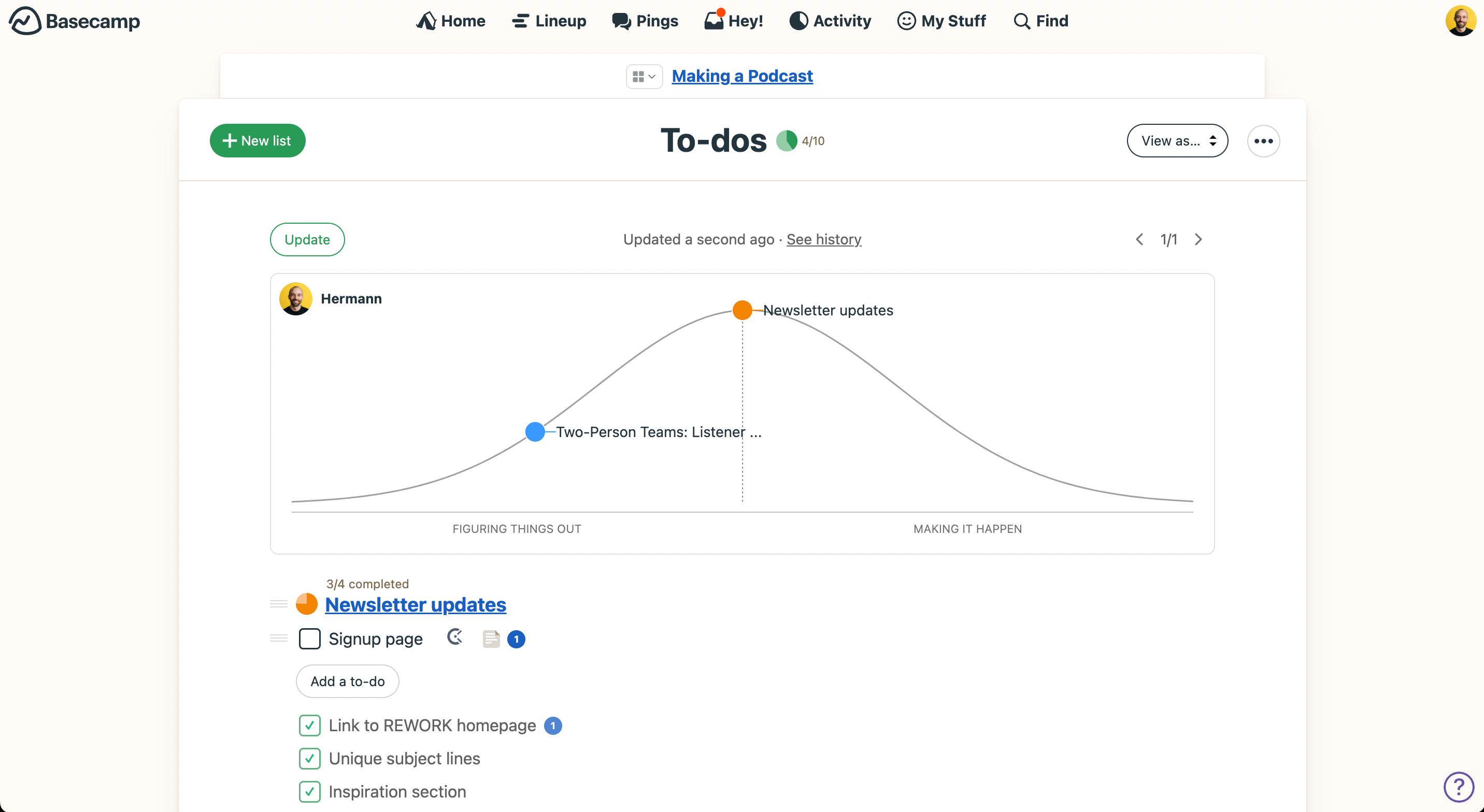
Le bacheche Kanban di Trello rendono semplice visualizzare i flussi di lavoro e gestire le attività, offrendo una chiara panoramica dello stato del progetto. Le liste di cose da fare di Basecamp aiutano a organizzare i compiti all’interno dei progetti, fornendo un modo semplice per monitorare i progressi e mantenere tutti allineati.
Trello eccelle nella gestione visuale delle attività, mentre Basecamp è più efficace per centralizzare e organizzare la comunicazione del team.
| Trello | Basecamp | |
|---|---|---|
| API | ||
| Batch Permissions & Access | ||
| Budgeting | ||
| Calendar Management | ||
| Collaboration Support | ||
| Contact Management | ||
| Contact Sharing | ||
| Customer Management | ||
| Dashboard | ||
| Dashboards | ||
| Data Export | ||
| Data Import | ||
| Data Visualization | ||
| Dependency Tracking | ||
| Document Sharing | ||
| Expense Tracking | ||
| External Integrations | ||
| File Sharing | ||
| Gantt Charts | ||
| Kanban Boards | ||
| Multi-User | ||
| Notifications | ||
| Project Management | ||
| Resource Management | ||
| Scheduling | ||
| Task Scheduling/Tracking | ||
| Third-Party Plugins/Add-Ons | ||
| Time Management | ||
| Travel Management | ||
| Workflow Management |
Trello vs. Basecamp Integrazioni
| Integrazione | Trello | Basecamp |
| Slack | ✅ | ✅ |
| Google Drive | ✅ | ❌ |
| Microsoft Teams | ✅ | ❌ |
| Asana | ✅ | ❌ |
| Dropbox | ✅ | ✅ |
| Miro | ❌ | ✅ |
| Salesforce | ✅ | ✅ |
| Zoom | ✅ | ✅ |
| API | ✅ | ✅ |
| Zapier | ✅ | ✅ |
Trello si integra con Slack per offrire aggiornamenti istantanei sulle attività, aiutando i team a rimanere coordinati in tempo reale. Basecamp si connette con Miro per supportare il brainstorming visuale, rendendo la collaborazione sulle idee più efficace.
Trello eccelle nelle notifiche in tempo reale, mentre Basecamp punta a migliorare il lavoro di squadra visuale, rispondendo a esigenze di collaborazione differenti.
Trello vs. Basecamp Sicurezza, Conformità & Affidabilità
| Fattore | Trello | Basecamp |
| Crittografia dei dati | Trello utilizza la crittografia AES-256-bit per i dati a riposo per garantire la sicurezza. | Basecamp cripta i dati sia a riposo che in transito utilizzando AES-256 |
| Conformità normativa | Trello è conforme al GDPR e offre strumenti per la gestione e cancellazione dei dati. | Basecamp è conforme al GDPR e fornisce funzionalità di controllo dei dati. |
| Affidabilità operativa | Trello garantisce una disponibilità del 99,9% grazie a una solida infrastruttura server. | Basecamp mantiene una disponibilità costante con sistemi ridondanti |
Sia Trello che Basecamp pongono grande enfasi su sicurezza e conformità, ma Trello offre controlli di gestione dei dati più dettagliati. Per determinare quale strumento sia più adatto al tuo team, valuta i loro standard di crittografia, certificazioni di conformità e garanzie di uptime in base alle tue specifiche esigenze di sicurezza.
Confronto tra la Facilità d'Uso di Trello e Basecamp
| Fattore | Trello | Basecamp |
| Interfaccia utente | Trello offre una bacheca visiva in stile Kanban che rende la gestione delle attività intuitiva. | Basecamp propone un’interfaccia semplice basata su testo, per una navigazione facile. |
| Esperienza di onboarding | L’onboarding di Trello è rapido, con tutorial interattivi e modelli preimpostati. | Basecamp presenta una configurazione guidata con suggerimenti utili per i nuovi utenti. |
| Assistenza | Trello mette a disposizione numerose risorse online e forum della community. | Basecamp offre assistenza diretta e un centro assistenza completo. |
L’interfaccia visiva di Trello permette di monitorare le attività a colpo d’occhio, sebbene la vasta gamma di funzionalità possa risultare inizialmente complessa per i nuovi utenti. Basecamp è più semplice da navigare, ma manca degli elementi visivi che facilitano la gestione di progetti più articolati.
Trello vs Basecamp: Pros & Cons
Trello
- You can easily visualize your tasks with Trello's board and card layout.
- It's simple to use, making it accessible for team members of all skill levels.
- Trello adapts to your team's workflow, offering flexibility in task management.
- Trello lacks advanced reporting features you might find in more complex tools.
- You can't create intricate task dependencies, which may limit complex project planning.
- Trello's simplicity might not suit large teams with detailed project management needs.
Basecamp
- With automatic check-ins, you can keep everyone updated without lengthy meetings.
- Basecamp's message board keeps your team communication clear and organized.
- You can easily get your team onboard with its intuitive interface.
- The tool is missing a built-in time tracking feature for tasks.
- Basecamp's simplicity might not meet the needs of complex project workflows.
- You might find the lack of advanced reporting tools limiting.
Best Use Cases for Trello and Basecamp
Trello
- Creative Agencies Trello's visual task management makes it easy for you to track projects, ideas, and client feedback.
- Startups The flexibility Trello offers helps your team adapt quickly as you grow and change.
- Marketing Teams You can easily plan campaigns and track progress with Trello's board system.
- Design Departments Trello's simple interface allows you to manage design projects and revisions efficiently.
- Freelancers You can organize your tasks and deadlines without getting overwhelmed by complex features
- Product Development Trello's adaptability helps your team streamline workflows and manage product roadmaps effectively.
Basecamp
- Small businesses You'll benefit from Basecamp's straightforward design and ease of use, which are ideal for managing projects without the complexity of more robust software.
- Creative agencies Its visual communication tools and message boards support creative brainstorming and project discussions.
- Remote teams Basecamp's centralized platform keeps remote team members connected and aligned on tasks and goals.
- Startups Quick onboarding and straightforward features help startups get organized fast without a learning curve.
- Non-profits Basecamp allows non-profit teams to focus on their mission by simplifying project tracking and communication.
- Freelancers Freelancers can manage their client projects efficiently with Basecamp’s task management and client communication tools.
Chi dovrebbe usare Trello e chi dovrebbe usare Basecamp?
Trello è particolarmente indicato per team creativi e singoli utenti che preferiscono gestire le attività in modo visivo e con una gestione progetti flessibile. Funziona molto bene per startup di piccole dimensioni o liberi professionisti che cercano un metodo semplice e intuitivo per organizzare il lavoro.
Basecamp, invece, si adatta meglio a team più numerosi o organizzazioni che necessitano di uno spazio centralizzato per comunicazione e collaborazione. Se cerchi uno strumento diretto che permetta a tutti di lavorare in maniera coordinata senza complicazioni, Basecamp è una scelta valida.
Differences Between Trello and Basecamp
| Trello | Basecamp | |
|---|---|---|
| Integrations | Trello offers extensive integration options with tools like Slack and Google Drive. | Basecamp integrates with fewer tools, focusing on internal collaboration. |
| Onboarding | Trello provides quick onboarding with interactive tutorials. | Basecamp offers a guided setup with helpful tips for new users. |
| Pricing | Trello uses a tiered pricing model with free and paid plans | Basecamp has a flat monthly fee for unlimited users. |
| Task Management | Trello excels in visual task organization with cards and boards. | Basecamp focuses on list-based task organization and team collaboration |
| User Interface | Trello uses a visual Kanban board that’s intuitive for task management. | Basecamp offers a text-based interface that’s straightforward to navigate. |
| Read Trello ReviewOpens new window | Read Basecamp ReviewOpens new window |
Similarities Between Trello and Basecamp
| Cloud-Based Access | Both platforms are cloud-based, allowing you to access your projects from anywhere, whether you’re using the Trello app or Basecamp online. |
|---|---|
| Collaboration | Both Trello and Basecamp offer features for team collaboration, like “shared” in Trello and “group chat” in Basecamp, to keep your team connected. |
| Customization | Both allow you to customize your workflows, Trello with power-ups, and Basecamp with customizable project templates |
| Mobile Apps | Both Trello and Basecamp provide mobile apps to help you manage your projects on the go, keeping your team productive from any location. |
| Task Management | You can assign tasks to team members in both Trello and Basecamp. Trello uses card assignment, while Basecamp uses to-do lists. |
| Read Trello ReviewOpens new window Read Basecamp ReviewOpens new window | |