

Recensione del Software di Gestione Progetti Redmine per il 2026



Redmine is an open-source web based project management tool built around issue tracking, project wikis, and time logging. It's a strong fit for development teams that need granular control over their workflows without committing to a commercial platform. I'd consider it over Jira if your team wants the flexibility of a self-hosted setup and a lower total cost of ownership, without giving up core issue tracking and project planning functionality.
Redmine Evaluation Summary
- Free forever plan
Perché puoi fidarti di noi
Testiamo e recensiamo software di project management dal 2012. Come project manager, sappiamo quanto sia fondamentale (e difficile) fare la scelta giusta quando si seleziona un software. Investiamo molte risorse nella ricerca per aiutare la nostra audience a scegliere meglio. Abbiamo testato più di 2.000 strumenti per diversi casi d’uso e scritto oltre 1.000 recensioni dettagliate. Scopri come restiamo trasparenti & la nostra metodologia di recensione del software.
Redmine Overview
In my opinion, Redmine is a solid pick if you're after a no-frills project management tool that’s flexible and budget-friendly. It’s open-source, so you can shape it to fit your workflows, but that also means you’ll need some technical chops—or someone on your team who does. It covers task tracking, time logging, Gantt charts, and basic issue management well enough, but don’t expect a modern interface or polished UX. Compared to slicker tools like ClickUp or Asana, Redmine looks dated and can feel clunky.
It doesn’t hold your hand during onboarding, either. That said, if you care more about configurability than hand-holding and you’re comfortable digging around under the hood, Redmine’s worth considering, especially for dev-heavy teams or organizations that want full control over their setup without a monthly subscription.

pros
-
You can customize Redmine to fit your team's specific workflow.
-
It's open-source and provides flexibility and control over your projects.
-
Redmine supports multiple projects and teams under one roof efficiently.
cons
-
The interface can feel outdated compared to newer tools.
-
You might find the initial setup process a bit challenging.
-
It lacks some advanced features found in other project management software.
-

Celoxis
Visit WebsiteThis rating combines scores from multiple user review sites to reflect overall customer sentiment about the product.4.5 -
Smartsheet
Visit WebsiteThis rating combines scores from multiple user review sites to reflect overall customer sentiment about the product.4.5 -
Accelo
Visit WebsiteThis rating combines scores from multiple user review sites to reflect overall customer sentiment about the product.4.4





La nostra metodologia di recensione
Come testiamo e valutiamo gli strumenti
Abbiamo passato anni a costruire, perfezionare e migliorare il nostro sistema di test e valutazione dei software. Il nostro schema è progettato per cogliere tutte le sfumature della scelta di un software e ciò che rende uno strumento efficace, ponendo l’accento sugli aspetti critici del processo decisionale. Qui sotto puoi vedere esattamente come funziona il nostro test e la nostra valutazione su sette criteri. Questo ci consente di offrire una valutazione imparziale del software basata su funzionalità fondamentali, caratteristiche distintive, facilità d’uso, onboarding, assistenza clienti, integrazioni, recensioni dei clienti e rapporto qualità-prezzo.
Funzionalità principali (25% della valutazione finale)
Il punto di partenza della nostra valutazione è sempre la funzionalità principale dello strumento. Ha le funzioni e le caratteristiche di base che un utente si aspetterebbe di trovare? Alcune di queste funzionalità sono limitate ai piani premium? In sostanza, ci aspettiamo che uno strumento sia all’altezza delle capacità di base dei suoi concorrenti.
Caratteristiche distintive (25% della valutazione finale)
Successivamente valutiamo le funzioni distintive, non comuni, che vanno oltre la semplice funzionalità di base normalmente presente in strumenti simili. Un punteggio elevato riflette funzionalità specializzate o uniche che rendono il prodotto più rapido, efficiente o che offrono un valore aggiunto all’utente. Valutiamo anche la facilità d’integrazione con altri strumenti comunemente presenti nel tech stack per ampliare la funzionalità e l’utilità del software. Gli strumenti che offrono molte integrazioni native, connessioni di terze parti e accesso API per creare integrazioni personalizzate ottengono il punteggio più alto.
Facilità d’uso (10% della valutazione finale)
Consideriamo quanto sia semplice e rapido eseguire le attività definite dalla funzionalità principale tramite lo strumento. Gli strumenti con un punteggio elevato sono ben progettati, intuitivi, offrono app mobili, propongono modelli e rendono semplici anche le attività più complesse.
Onboarding (10% della valutazione finale)
Sappiamo quanto sia importante che il team adotti rapidamente una nuova piattaforma, quindi valutiamo quanto sia facile imparare e utilizzare uno strumento con poca formazione. Valutiamo quanto velocemente un membro del team possa iniziare a utilizzare lo strumento senza esperienza. Le soluzioni con un punteggio alto indicano che è richiesto poco o nessun supporto.
Supporto clienti (10% della valutazione finale)
Recensiamo la rapidità e semplicità nel trovare aiuto tramite telefono, chat live o knowledge base. Gli strumenti e le aziende che forniscono supporto in tempo reale ottengono i punteggi migliori, mentre i chatbot i più bassi.
Recensioni dei clienti (10% della valutazione finale)
Oltre ai nostri test e valutazioni, consideriamo il net promoter score dei clienti attuali e passati. Valutiamo la loro probabilità, qualora fosse possibile, di scegliere nuovamente lo strumento per le sue funzionalità di base. Un software con un punteggio elevato riflette un alto net promoter score da clienti attuali o passati.
Rapporto qualità-prezzo (10% della valutazione finale)
Infine, prendendo in considerazione tutti gli altri criteri, analizziamo il prezzo medio dei piani base confrontandolo con le funzionalità principali e valutando il valore degli altri criteri. I software che offrono di più, spendendo meno, ottengono punteggi più alti.
Core Features
Issue Tracking: You can efficiently track and manage tasks, bugs, and project updates with Redmine's issue tracking system. It keeps your team informed and aligned on project progress.
Time Tracking: Redmine lets you log time spent on tasks, so you can manage your team's workload and project timelines. This is crucial for billing and performance evaluation.
Gantt Charts: Visualize your project timelines and dependencies with Redmine's Gantt charts. They help you plan and adjust project schedules easily.
Customizable Workflow: You can tailor Redmine's workflow to fit your team's specific processes. This flexibility helps you make sure the way you’re managing projects aligns with your unique needs.
Project Wiki: Redmine offers a built-in wiki for each project, which allows your team to document and share important information. It's a central hub for project knowledge and collaboration.
File Management: Upload, organize, and share files across your projects to keep important documents and assets in one place.
Ease of Use
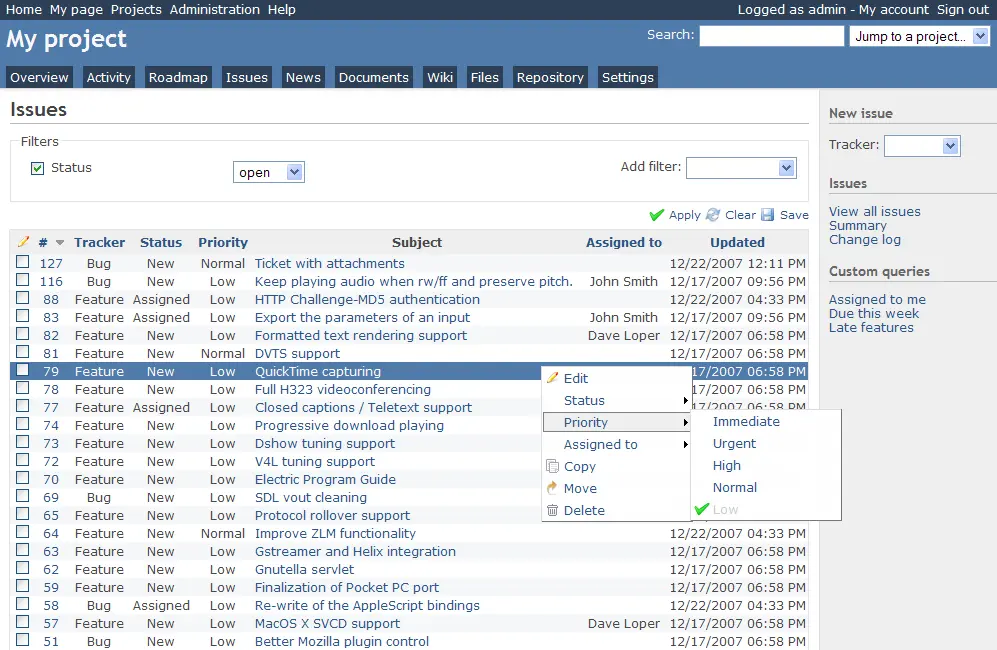
Redmine’s interface may feel outdated and can take time to get used to. Its setup process is also somewhat complex, which might slow down initial adoption.
However, once you get past the learning curve, its customization options and extensive features provide an effective way to manage projects. For tech-savvy teams that prioritize flexibility over simplicity, Redmine is a highly capable solution.
Redmine Specs
- API
- Bug Tracking
- Data Export
- Data Import
- External Integrations
- Multi-App
- Multi-Site
- Multi-User
- Notifications
- Project Management
Alternatives to Redmine


Redmine FAQs
How does Redmine handle data security and compliance?
Can Redmine support agile project management?
Is there a mobile app for Redmine?
How customizable is Redmine?
What kind of support is available for Redmine users?
Can I manage multiple projects with Redmine?
How does Redmine handle task dependencies?
What kind of reporting tools does Redmine offer?
Cosa succede dopo?
Vuoi entrare in contatto con altri project manager digitali per condividere risorse e migliori pratiche? Unisciti alla nostra community di membri e ottieni l'accesso a oltre 100 modelli, esempi e template, e connettiti con centinaia di altri project manager digitali su Slack.