

I 10 migliori strumenti a codice aperto per la gestione dei requisiti recensiti nel 2026

Elenco dei migliori strumenti open source per la gestione dei requisiti


La gestione dei requisiti di progetto può essere un grattacapo per qualsiasi project manager. Devi destreggiarti tra un'infinità di attività, mantenere soddisfatti gli stakeholder e assicurarti che il tuo team resti sulla buona strada. Gli strumenti open source per la gestione dei requisiti possono contribuire a ridurre questo stress organizzando e monitorando le esigenze del tuo progetto senza costi elevati.
Nella mia esperienza, questi strumenti offrono flessibilità e possibilità di personalizzazione, risultando quindi adatti a settori e team di dimensioni diverse. Ho testato e recensito in modo indipendente le migliori opzioni open source per offrirti una panoramica imparziale di ciò che è disponibile.
In questo articolo troverai le mie migliori proposte, ciascuna con funzionalità uniche per soddisfare le esigenze specifiche del tuo team. Scopriamo insieme qual è lo strumento giusto per semplificare il processo di gestione del tuo progetto.
Perché fidarsi dei nostri consigli sui software
Il nostro team testa e recensisce software dal 2012. In quanto project manager noi stessi, sappiamo quanto sia difficile — e importante — scegliere il software giusto.
Per questa guida, abbiamo valutato gli strumenti attraverso test pratici e ricerche indipendenti, assegnando un punteggio agli strumenti in base ai nostri criteri di selezione. Ci basiamo inoltre sulle competenze di leader di pensiero del settore e di professionisti attivi nella gestione dei progetti.
Le nostre recensioni riflettono il nostro giudizio editoriale umano, non un discorso di vendita.
Revisori esperti:
Tabella comparativa degli strumenti open source per la gestione dei requisiti
Questa tabella comparativa riassume i dettagli dei prezzi delle mie migliori selezioni di strumenti open source per la gestione dei requisiti:
| Tool | Best For | Trial Info | Price | ||
|---|---|---|---|---|---|
| 1 | Ideale per team di sviluppo | Edizione community open-source gratuita + demo gratuita (tutte le funzionalità) disponibile | Da $39.9 (fatturato annualmente) | Website | |
| 2 | Ideale per piccoli team Agile | Demo gratuita disponibile | Piano gratuito per sempre | Website | |
| 3 | Ideale per esigenze minimaliste | Demo gratuita disponibile | Prezzi su richiesta | Website | |
| 4 | Ideale per approfondimenti guidati dall’IA | A pagamento | Gratuito e open-source | Website | |
| 5 | Ideale per il supporto ai plugin | Demo gratuita disponibile | Prezzo su richiesta | Website | |
| 6 | Ideale per requisiti basati su testo | Demo gratuita disponibile | Gratis | Website | |
| 7 | Ideale per progetti basati su documenti | Prova gratuita disponibile | Da $520/utente/mese (fatturato annualmente) | Website | |
| 8 | Ideale per sistemi complessi | Prova gratuita di 30 giorni disponibile | Prezzi su richiesta | Website | |
| 9 | Ideale per utenti Azure DevOps | Prova gratuita di 30 giorni disponibile | Prezzo su richiesta | Website | |
| 10 | Ideale per soluzioni di progetto modulari | Prova gratuita + piano gratuito disponibili | Da $24.90/utente/mese (fatturazione annuale) | Website |
Recensioni dei migliori strumenti open source per la gestione dei requisiti
Di seguito sono riportati i miei riepiloghi dettagliati dei migliori strumenti open source per la gestione dei requisiti entrati nel mio elenco. Le mie recensioni offrono un’analisi dettagliata delle funzionalità principali, dei pro e dei contro, delle integrazioni e dei casi d’uso ideali di ciascuno strumento, per aiutarti a trovare quello più adatto a te.

ZenTao
Ideale per team di sviluppo
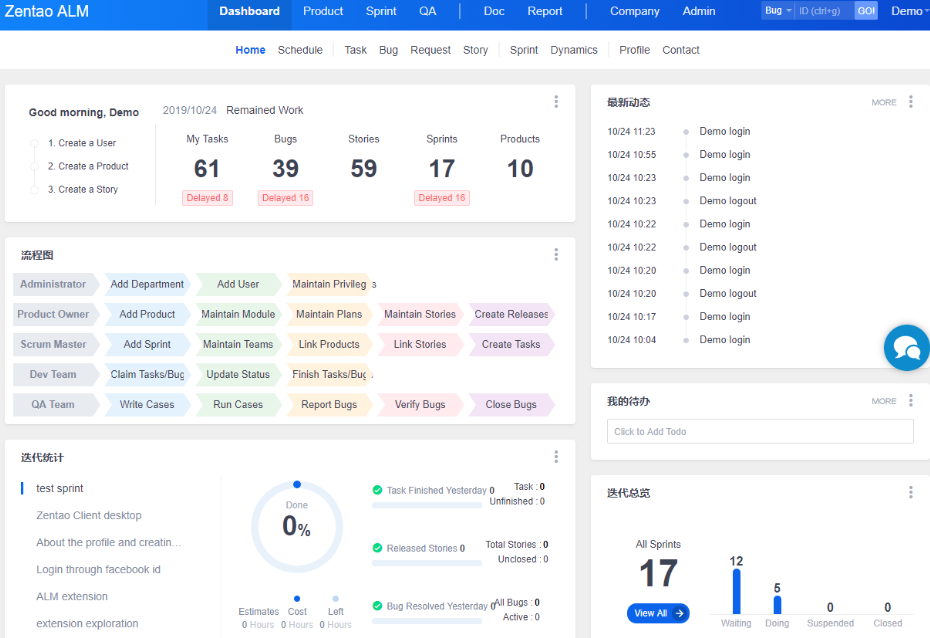
ZenTao merita un posto qui perché il suo approccio alla gestione dei requisiti è nativamente pensato per i team di sviluppo che necessitano della tracciabilità dalle user story fino alla consegna. Quando vedo team di prodotto e ingegneria che hanno bisogno di collegare requisiti, attività, bug e casi di test in un unico ambiente, questa piattaforma funziona davvero.
Quello che apprezzo di più è come ZenTao integra i requisiti nella pianificazione degli sprint e nel QA, così la tracciabilità dei cambiamenti e il passaggio di consegne non vengono mai isolati.
Ideale per
- Team di sviluppo che gestiscono insieme requisiti, attività e bug
- Team Agile che necessitano di tracciabilità dai requisiti al testing
Meno indicato per
- Team non tecnici o stakeholder aziendali che gestiscono i requisiti
- Organizzazioni che desiderano una gestione dei requisiti semplice e minimalista
Cosa distingue ZenTao
ZenTao è strutturato attorno a flussi di lavoro che rispecchiano ciò di cui i team di prodotto, sviluppo e QA hanno bisogno nei progetti software. Diversamente da qualcosa di ampiamente personalizzabile come ClickUp, ZenTao si aspetta che tu colleghi requisiti, attività, bug e test in modo dettagliato fin dal primo giorno. Questo approccio funziona meglio quando dai valore alla tracciabilità e vuoi un processo di sviluppo che mantenga i requisiti strettamente collegati alla consegna.
Compromessi con ZenTao
Testando questo strumento, ho scoperto che ZenTao ottimizza il collegamento tra requisiti e consegna del software, ma questa complessità aggiunge lavoro ai team che cercano solo un elenco di requisiti semplice.
Pros and Cons
Pros:
- Piattaforma open-source personalizzabile
- Gestione dei test integrata
- Kanban board per un flusso di lavoro visivo
Cons:
- Richiede configurazione tecnica
- Reportistica avanzata limitata


OSRMT si distingue per me quando piccoli team Agile cercano una gestione dei requisiti open-source senza l'eccessivo carico delle suite più grandi. L'ho scelto perché copre le esigenze fondamentali come la raccolta dei requisiti, il collegamento ai casi di test e la reportistica di base, tutto senza complicazioni aggiuntive.
Quello che apprezzo di OSRMT è come mantiene snello il processo, permettendo di tracciare i requisiti restando concentrati sulla reale consegna. La sua natura open-source garantisce inoltre accessibilità anche ai team con budget limitati.
Migliori utilizzi di OSRMT
- Piccoli team Agile o accademici che raccolgono requisiti semplici
- Organizzazioni che desiderano uno strumento RM open-source e leggero
OSRMT non è ideale per
- Imprese che necessitano di reportistica avanzata o integrazioni
- Settori regolamentati che richiedono funzionalità complesse di tracciabilità
Cosa rende OSRMT diverso
OSRMT si concentra nel rendere la tracciabilità dei requisiti e dei test accessibile ai team piccoli che vogliono trasparenza senza una configurazione estesa. A differenza di Jira o degli strumenti orientati alle aziende, che richiedono di personalizzare tutto, OSRMT mantiene il processo lineare. Questo significa che ho potuto iniziare immediatamente a documentare i requisiti e pianificare i test senza dover apprendere un ambiente complesso.
Compromessi con OSRMT
OSRMT ottimizza la semplicità, ma si rinuncia a integrazioni profonde o automazione avanzata. Se si fa affidamento sulla sincronizzazione dei requisiti tra più sistemi, questa mancanza può rallentare la collaborazione su larga scala.
Pros and Cons
Pros:
- Flussi di lavoro personalizzabili
- Supporta diversi sistemi di database
- Interfaccia facile da usare
Cons:
- Richiede configurazione tecnica
- Documentazione limitata

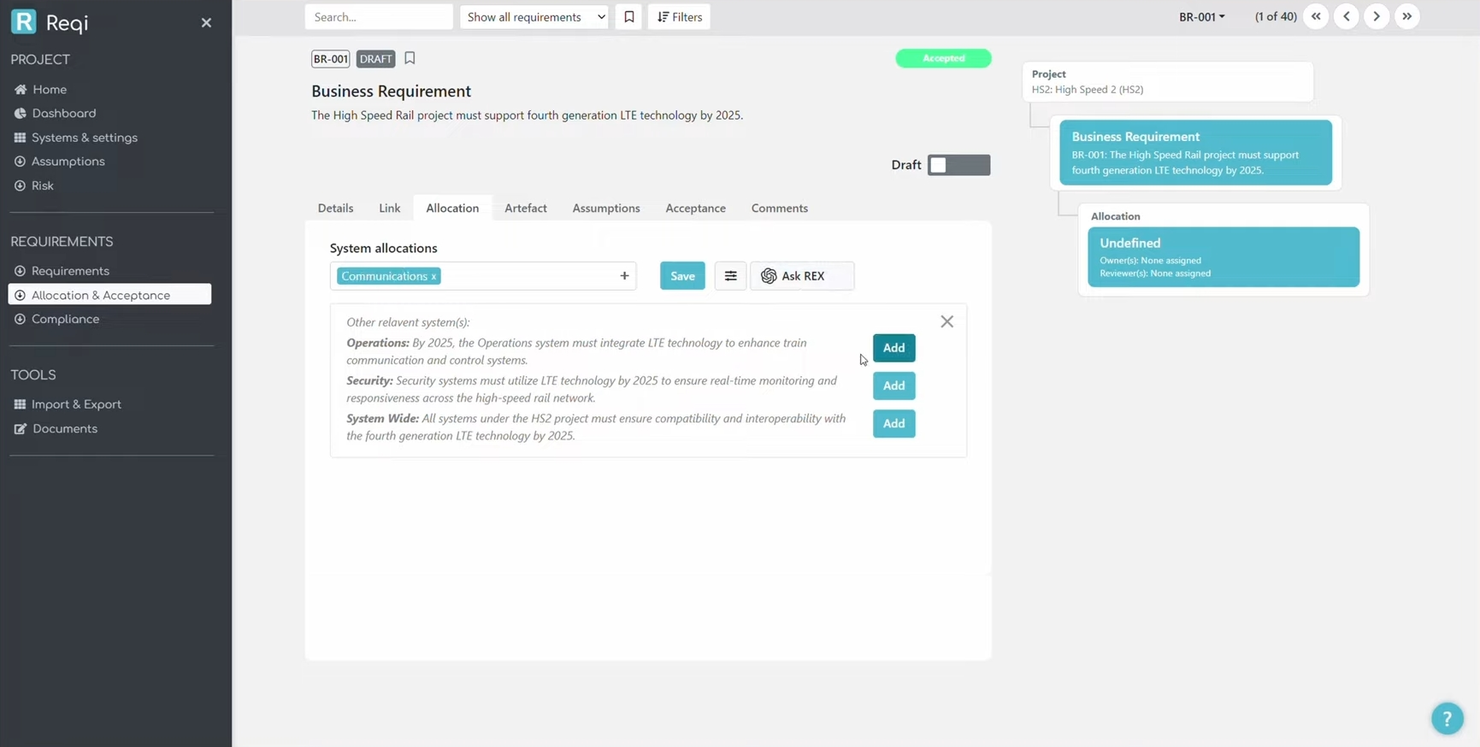
Reqi entra nella mia lista dei preferiti perché riduce la gestione dei requisiti all’essenziale: scrivere e monitorare i requisiti con il minimo di distrazioni possibile. Quando ho bisogno di qualcosa che non travolga piccoli team di prodotto o collaboratori singoli, questa è la mia scelta.
Apprezzo il modo in cui Reqi resta concentrato sulle esigenze principali, permettendoti di creare, organizzare e dare priorità ai requisiti senza fronzoli o confusione.
Ideale per
- Piccoli team di prodotto o collaboratori singoli con esigenze semplici
- Progetti focalizzati sul tracciamento e la priorizzazione base dei requisiti
Non ideale per
- Grandi aziende che gestiscono requisiti complessi e tracciabilità
- Team che necessitano di reportistica avanzata, integrazioni o conformità normativa
Cosa rende Reqi diverso
Reqi mantiene la gestione dei requisiti semplice. Invece di incorporare i requisiti all'interno di un sistema completo di gestione del lavoro come Jira, si concentra sull'aiutarti a raccogliere, organizzare e consultare gli elementi di requisito senza processi non necessari—ad esempio, registrare e collegare direttamente i requisiti senza dover prima configurare tipi di ticket, workflow o board.Compromessi di Reqi
Reqi punta su semplicità e concentrazione, il che significa che perdi automazione avanzata del flusso di lavoro, tracciabilità dei requisiti e ricco supporto per le integrazioni. Se hai bisogno di qualcosa in più rispetto alle funzioni base, ne raggiungi presto i limiti.
Pros and Cons
Pros:
- Configurazione veloce
- Design minimalista
- Prestazioni rapide
Cons:
- Opzioni di personalizzazione limitate
- Potrebbe non essere adatto a progetti complessi

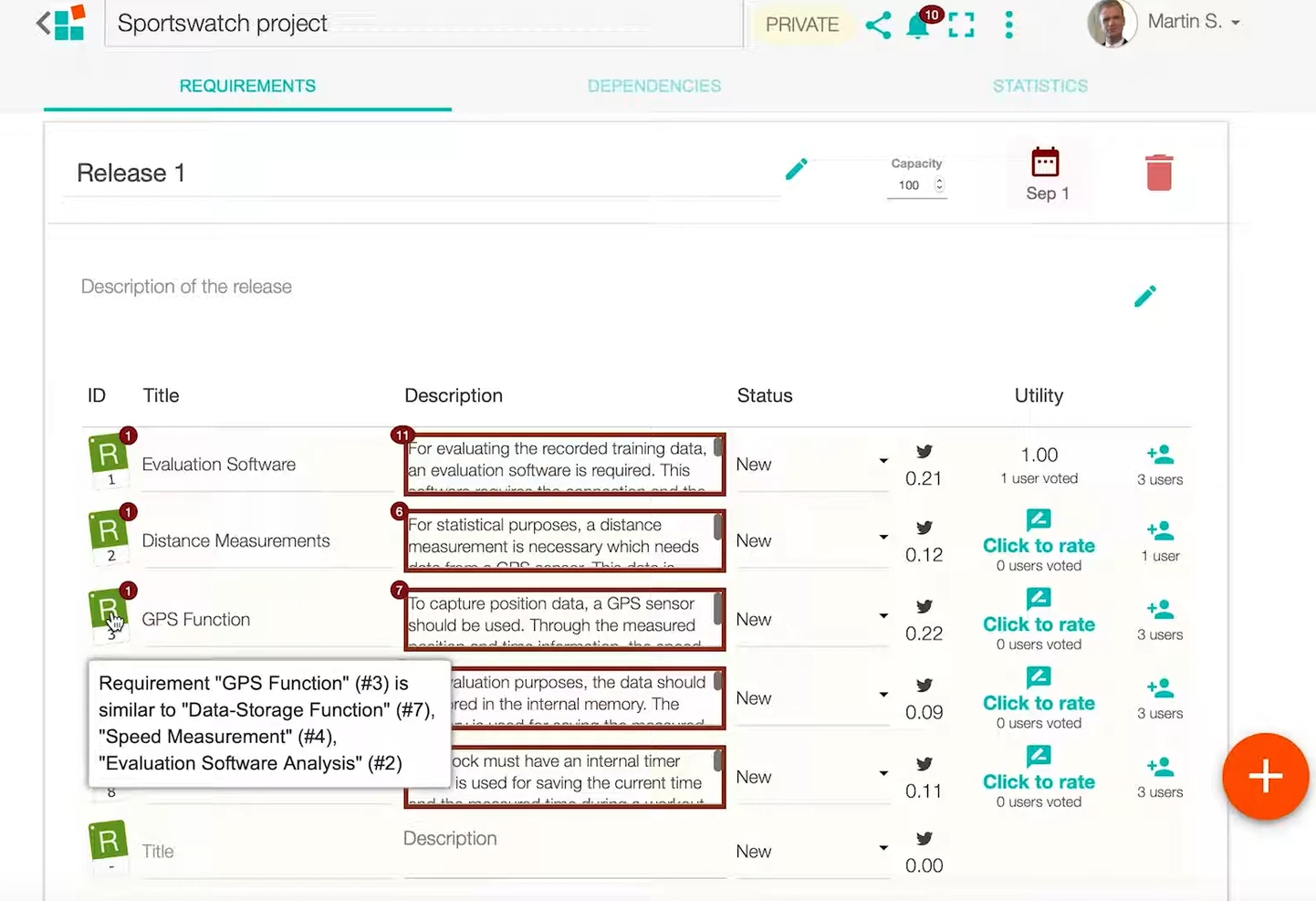
OpenReq si distingue per i team di gestione dei requisiti che vogliono sfruttare l'IA per individuare tendenze, potenziali problemi e spunti attuabili da set complessi di requisiti. Quando lo valuto, noto quanto rapidamente evidenzi requisiti sovrapposti o in conflitto e preveda lo sforzo necessario sulla base dei dati storici dei progetti.
Apprezzo il modo in cui OpenReq applica il clustering assistito da intelligenza artificiale e le raccomandazioni per tagliare il sovraccarico informativo nei grandi team tecnologici distribuiti.
Quando OpenReq è la scelta migliore
- Team di gestione dei requisiti che desiderano analisi e clustering assistiti dall'IA
- Grandi organizzazioni tecnologiche che gestiscono requisiti complessi e distribuiti
Quando OpenReq non è l'ideale
- Gruppi che necessitano di un tracciamento semplice e leggero dei requisiti
- Team senza risorse tecniche per supportare il deployment open-source
Cosa distingue OpenReq
OpenReq è costruito sull'utilizzo dell'intelligenza artificiale per dare senso a set di requisiti ampi e distribuiti. A differenza di strumenti come Polarion o DOORS Next che puntano maggiormente sulla tracciabilità e imposizione di processi, OpenReq fa emergere sovrapposizioni, dipendenze e rischi tramite l'analisi automatizzata. La piattaforma si aspetta che i team lavorino in modo collaborativo, sfruttando i suggerimenti dell'IA per risolvere conflitti nei requisiti e ricorrenti schemi.
Questo funziona al meglio quando si desidera un supporto più intelligente per gestire requisiti confusi e con molte parti interessate, senza dover esaminare tutto manualmente.
Compromessi con OpenReq
Poiché OpenReq è ottimizzato per le intuizioni guidate dall'IA, si rinuncia a parte della rigidità dei processi e ai controlli di tracciabilità stringenti che si avrebbero con strumenti di requisiti più strutturati e orientati alla conformità. Per i team che necessitano di un'applicazione rigorosa dei processi, ciò significa un ulteriore onere per adattarsi a tali standard.
Pros and Cons
Pros:
- Filtro automatico del rumore
- Supporta il ragionamento sui requisiti
- Favorisce il riutilizzo dei requisiti
Cons:
- Richiede una configurazione iniziale
- Curva di apprendimento per i nuovi utenti


Redmine RE Plugin si distingue per la gestione dei requisiti open source grazie al suo solido ecosistema di plugin. L'ho utilizzato quando i team desiderano personalizzare i flussi di lavoro dei requisiti senza vincolarsi a una piattaforma chiusa. Apprezzo il modo in cui è possibile estendere le sue funzionalità di base, come la tracciabilità dei requisiti e i campi personalizzati, aggiungendo nuovi plugin man mano che le esigenze evolvono.
Funziona al meglio quando si dispone di competenze tecniche interne e si ha la necessità di adattare il processo nel tempo.
Redmine RE Plugin è l'ideale per
- Team con competenze tecniche che desiderano flussi di lavoro personalizzati
- Organizzazioni che valorizzano l'estensione dei requisiti tramite i plugin
Redmine RE Plugin non è indicato per
- Gruppi che necessitano di un'esperienza utente curata o pronta all'uso
- Team senza amministratori interni o supporto per la configurazione
Cosa distingue Redmine RE Plugin
Redmine RE Plugin prevede che i team costruiscano una gestione dei requisiti su misura tramite l'estensione della solida base di Redmine, invece di utilizzare un flusso di lavoro preimpostato. A differenza di Jira, che vincola a tipi di ticket e schermate più delimitate, questo plugin permette di creare campi e flussi di lavoro personalizzati per i requisiti e di integrare altri plugin man mano che il processo cresce.
Se devi adattare i requisiti di progetto nel tempo, trovo che questa sia la soluzione ideale quando si possiedono competenze interne e si cerca vera flessibilità.
Compromessi con Redmine RE Plugin
Ottimizzando la flessibilità tramite i plugin, lo strumento sacrifica funzionalità di gestione dei requisiti pronte all'uso e un'interfaccia curata. Si dedica più tempo alla configurazione e meno all'operatività immediata.
Pros and Cons
Pros:
- Ottime funzionalità di tracciamento bug
- Supporto per campi personalizzati
- Personalizzazione dei flussi di lavoro disponibile
Cons:
- La configurazione iniziale può essere complessa e richiede competenze tecniche
- Potrebbero essere necessari plugin aggiuntivi poiché ha una funzionalità autonoma limitata


rmToo entra nella mia selezione per la gestione dei requisiti in testo semplice, ideale per i team che preferiscono specifiche flessibili e controllate tramite versionamento. Quando gestisco i requisiti per progetti software che già utilizzano git, vedo i team trarre vantaggio dalla possibilità di rmToo di archiviare, versionare e tracciare i requisiti direttamente insieme al codice sorgente.
Quello che apprezzo è come rmToo generi documentazione direttamente dai file di testo e offra una gestione avanzata delle dipendenze, una caratteristica rara da trovare in altre opzioni open-source.
Ideale per
- Team di ingegneria che gestiscono requisiti in file di testo semplice
- Team di sviluppo che integrano i requisiti con git o repository di codice
Non adatto a
- Utenti non tecnici che desiderano un'interfaccia grafica
- Organizzazioni che necessitano di dashboard di tracciabilità integrate o reportistica avanzata
Cosa distingue rmToo
rmToo si distingue perché tratta i requisiti esattamente come il codice, usando testo semplice e controllo versione. Invece di vincolarti a un'interfaccia personalizzata come Jira, ti permette di scrivere le specifiche nei file e di gestirle tramite i flussi di lavoro git già esistenti. In pratica, risulta ideale per processi guidati da sviluppatori o team che già tracciano tutto nei repository.
Compromessi di rmToo
rmToo punta tutto su flessibilità e flussi di lavoro basati su testo, ma si rinuncia a dashboard visive e funzionalità di collaborazione diretta. Questo comporta una difficoltà per i colleghi meno tecnici nel monitorare o comprendere facilmente le modifiche.
Pros and Cons
Pros:
- Supporta requisiti in testo semplice
- Integrazione facile con il controllo versione
- Personalizzabile con script
Cons:
- Richiede competenze tecniche
- Interfaccia grafica limitata

ReqView
Ideale per progetti basati su documenti

ReqView è nella mia lista perché è uno dei migliori strumenti che ho testato per i progetti di requisiti basati su documenti, rendendolo una buona scelta per i team che lavorano molto con documenti strutturati. Vedo molti team usare ReqView per acquisire, strutturare e revisionare requisiti complessi in modo che la tracciabilità resti chiara dall'inizio alla fine. Ciò che mi piace è che permette di modellare gerarchie di requisiti e collegare documenti senza mai perdere il contesto, rendendo le revisioni molto più rapide.
Ideale per
- Team che gestiscono i requisiti tramite strutture documentali dettagliate
- Progetti che richiedono una tracciabilità granulare e revisioni dei documenti
Non adatto per
- Team che necessitano di modellazione visuale come diagrammi o wireframe
- Organizzazioni focalizzate sulla gestione di backlog e sprint agili
Cosa distingue ReqView
ReqView organizza i requisiti come documenti strutturati, risultando ideale se i tuoi flussi di lavoro ruotano già attorno a specifiche rigide e verificabili. A differenza di Jira (che tratta i punti come ticket e elementi di backlog), ReqView mantiene ogni modifica, relazione e revisione all'interno di documenti collegati, versionati e tracciabili da un unico posto.
Questo è ottimo per i team che lavorano con conformità, contratti o revisioni approfondite degli stakeholder.
Compromessi di ReqView
ReqView è ottimizzato per il lavoro basato su documenti, quindi si perdono la pianificazione visuale della roadmap e le board agili. Se il tuo team pianifica a sprint o fa affidamento su un backlog visuale, noterai che questo flusso di lavoro risulta frammentato.
Pros and Cons
Pros:
- Design incentrato sul documento
- Supporta il controllo di versione
- Facili opzioni di esportazione
Cons:
- Opzioni di personalizzazione limitate
- Nessuna collaborazione in tempo reale


Jama Software è nella mia shortlist specificamente per i team che gestiscono prodotti o sistemi altamente complessi che richiedono un elevato livello di tracciabilità dei requisiti. Apprezzo la possibilità di costruire relazioni di tracciamento tra requisiti, rischio e dati di test lungo l'intero ciclo di vita del prodotto.
Consiglio questo strumento quando è necessario mappare, analizzare e validare i requisiti in ambienti regolamentati, safety-critical o in rapido cambiamento. Le sue visualizzazioni di tracciabilità in tempo reale evidenziano rapidamente lacune e dipendenze: una risorsa fondamentale quando non ci si può permettere di perdere il contesto neanche di una specifica.
Ideale per
- Team che gestiscono sistemi e prodotti complessi e regolamentati
- Organizzazioni che necessitano di tracciabilità tra requisiti, rischi e test
Non adatto a
- Team piccoli con flussi di lavoro sui requisiti semplici
- Utenti che cercano strumenti per requisiti leggeri e open source
Cosa distingue Jama Software
Jama Software è progettato con tracciabilità e conformità come elementi centrali. A differenza di strumenti più semplici come monday.com o Trello, Jama prevede che tu mappi i requisiti verso rischi, test e artefatti di validazione attraverso l’intero sistema. Nella pratica questo funziona al meglio quando quei collegamenti sono davvero essenziali—come nell’ingegneria safety-critical, nell’aerospaziale o nello sviluppo di hardware regolamentati.
Durante i test, ho notato una differenza tangibile non appena ho costruito una vista di tracciamento o eseguito un'analisi d'impatto. La piattaforma offre il tipo di collegamenti incrociati e tracciabilità di audit che Jira o le alternative open source non offrono di default.
Compromessi di Jama Software
Jama dà priorità alla tracciabilità e ai processi strutturati, il che significa che setup, adozione e manutenzione continua richiedono più tempo e risorse rispetto ai sistemi sviluppati per velocità o semplicità. I team che non necessitano di questo livello di rigore finiranno per spendere tempo in processi che non li aiutano a consegnare più rapidamente.
Pros and Cons
Pros:
- Opzioni di tracciabilità avanzate
- Supporta la conformità regolamentare
- Gestione di requisiti di progetto complessi
Cons:
- Curva di apprendimento ripida
- Richiede un'implementazione approfondita

Ideale per utenti Azure DevOps

Modern Requirements ha senso se hai già investito in Azure DevOps e vuoi ampliare le sue funzionalità di gestione dei requisiti. Lo consiglio quando i team hanno bisogno di tracciabilità integrata e gestione dei cambiamenti direttamente nei loro processi DevOps esistenti. Ciò che apprezzo particolarmente è la possibilità di creare requisiti dinamici direttamente in Azure Boards, collegando elementi di lavoro, modifiche, test e revisioni in modo che nulla venga trascurato.
I team che devono rispettare esigenze normative o audit troveranno la tracciabilità end-to-end particolarmente utile.
Modern Requirements è ideale per
- Team integrati negli ambienti Azure DevOps
- Organizzazioni che necessitano di una forte tracciabilità e audit dei requisiti
Modern Requirements non è ideale per
- Team che cercano strumenti di gestione requisiti open source o autonomi
- Utenti che non utilizzano Azure DevOps o piattaforme Microsoft
Cosa distingue Modern Requirements
Modern Requirements è progettato per i team che desiderano la gestione dei requisiti direttamente all'interno di Azure DevOps, non come elemento aggiuntivo. Invece di usare uno strumento esterno o sincronizzare dati, lavori completamente dentro i board e le pipeline esistenti. Rispetto, ad esempio, a Jira che gestisce i requisiti come ticket di base o campi personalizzati, Modern Requirements punta su un processo tracciabile e conforme agli standard sviluppato insieme agli elementi di lavoro Azure.
Compromessi di Modern Requirements
La totale integrazione con Azure DevOps implica una perdita di flessibilità e accesso indipendente, quindi chiunque sia esterno a questi flussi di lavoro non avrà un modo pratico per partecipare.
Pros and Cons
Pros:
- Integrazione con Azure DevOps
- Ampia matrice di tracciabilità
- Supporta l'analisi d'impatto
Cons:
- Limitato agli utenti Azure DevOps
- Complesso per utenti non tecnici


Odoo si distingue perché consente di combinare la gestione di progetti, requisiti e documenti in un'unica piattaforma modulare. Lo consiglio quando i team hanno bisogno di estendere i flussi di lavoro dei requisiti in dashboard personalizzate, approvazioni e automazioni tra app. Ciò che ho apprezzato di questo strumento è la possibilità di integrare il monitoraggio dei requisiti in operazioni più ampie di ERP, CRM o help desk, man mano che crescono le esigenze aziendali.
Ottieni una flessibilità adatta ai team che costruiscono sistemi complessi e vogliono gestire i requisiti insieme al lavoro correlato, tutto configurabile in un unico ecosistema.
Odoo è ideale per
- Team che necessitano di gestione modulare e integrata di requisiti e progetti
- Organizzazioni con flussi di lavoro personalizzati su diverse funzioni aziendali
Odoo non è ideale per
- Team che cercano uno strumento per la gestione dei requisiti leggero e indipendente
- Utenti che desiderano modelli di requisiti pronti all’uso
Cosa distingue Odoo
Odoo si distingue per la possibilità di costruire flussi di lavoro sui requisiti su un sistema modulare, così puoi combinare la gestione dei requisiti con il monitoraggio dei progetti, il controllo dei documenti o persino il CRM all’interno di un’unica piattaforma. A differenza di Jira, dove la gestione dei requisiti esiste principalmente all’interno di un tracker di issue, Odoo ti spinge a trattare i requisiti come parte di processi aziendali più ampi. Ho visto che questo funziona meglio quando hai bisogno che i dati fluiscano tra requisiti, attività e altre parti del business senza uscire dalla piattaforma.
Compromessi con Odoo
Odoo punta su personalizzazione e ampiezza d’uso, ma questa flessibilità significa che passerai più tempo a configurare i moduli e meno con funzionalità specifiche di gestione dei requisiti già pronte. Alcune attività specialistiche sui requisiti risultano più manuali rispetto a strumenti progettati solo per i requisiti.
Altri strumenti open source per la gestione dei requisiti
Ecco alcune ulteriori opzioni di strumenti open source per la gestione dei requisiti che non sono entrate nel mio elenco, ma che vale comunque la pena prendere in considerazione:
- SnipeIT
Ideale per la gestione degli asset IT


Come valuto gli strumenti open source per la gestione dei requisiti
Valuto ciascuno strumento su due livelli: criteri di base come la tracciabilità e i baseline versionati, e fattori differenzianti che indicano quali strumenti sono adatti a flussi di lavoro ingegneristici regolamentati o agili.
Funzionalità di base (Requisiti indispensabili per questa lista)
Quando seleziono gli strumenti per la mia lista, valuto ciascuno su una scala da 0 (non offre la funzionalità) a 5 (eccelle in quest'area) per ogni funzionalità di base elencata di seguito. Successivamente, calcolo il punteggio totale dello strumento in percentuale. Ogni strumento deve raggiungere un punteggio totale minimo del 65% per essere considerato.
- Licenza Open Source: Verifico la presenza di una licenza riconosciuta e approvata dall'OSI, un repository pubblico accessibile e la possibilità di ospitare autonomamente e modificare il codice secondo le esigenze della propria organizzazione.
- Redazione e organizzazione dei requisiti: La creazione strutturata dei requisiti con attributi, gerarchie e tipi personalizzati è fondamentale: elenchi piatti non bastano quando si gestiscono centinaia di specifiche su più sottosistemi.
- Copertura della tracciabilità: Cerco il collegamento bidirezionale dai bisogni degli stakeholder fino ai casi di test, in modo che una singola modifica ad un requisito evidenzi ogni artefatto che viene coinvolto.
- Controllo di versione e gestione dei baseline: La capacità di creare snapshot dei baseline, confrontare versioni fianco a fianco e tracciare chi ha modificato cosa è essenziale per audit e revisioni di traguardi.
- Collaborazione e flussi di revisione: I team di ingegneria distribuiti hanno bisogno di accessi basati sui ruoli, commenti in linea e flussi di approvazione—soprattutto quando più revisori devono approvare specifiche critiche per la sicurezza.
- Integrazioni e opzioni di esportazione: Valuto la disponibilità di API, l’interoperabilità con ReqIF o CSV e i connettori con strumenti come Jira o GitLab, che la maggior parte dei team di ingegneria usa quotidianamente.
Una volta stilata la lista degli strumenti che soddisfano questi criteri, considero cosa distingue ciascuna piattaforma.
Fattori differenzianti (Cosa distingue i fornitori)
Ecco come confronto e metto in risalto i vari fornitori:
Caratteristiche distintive
L’interoperabilità ReqIF è un importante fattore distintivo. I team che scambiano specifiche con fornitori dell'automotive o dell'aerospaziale necessitano di importazione ed esportazione round-trip che conservino attributi e struttura dei collegamenti. Valuto anche il rilevamento dei link sospetti e l’analisi d’impatto, che segnalano ogni caso di test a valle o artefatto di progetto quando un requisito cambia durante uno sprint. Per i team di ingegneria che gestiscono specifiche insieme al codice, l’archiviazione basata su Markdown e compatibile con Git rende le revisioni e le fusioni più naturali, invece di imporre un flusso di lavoro separato.
Oltre le funzionalità
La salute della community ha un peso rilevante. Osservo la frequenza dei commit, i tempi di risposta ai problemi e la diversità dei collaboratori, poiché un repository stagnante significa che dovrai correggere le vulnerabilità da solo. L’idoneità alla regolamentazione è altrettanto importante: i team che sviluppano dispositivi medici o avionica necessitano di tracce di audit e firme elettroniche in linea con standard come IEC 62304 o DO-178C. Valuto anche il costo totale di proprietà, poiché l’onere di hosting, backup e aggiornamento di strumenti self-hosted può facilmente superare il costo di una soluzione proprietaria se vengono sottovalutati i bisogni infrastrutturali.
Come scegliere uno strumento open source per la gestione dei requisiti
È facile perdersi in lunghi elenchi di funzionalità e strutture di prezzo complesse. Per aiutarti a rimanere concentrato mentre affronti il tuo specifico processo di selezione del software, ecco una lista di fattori da tenere a mente:
| Fattore | Cosa considerare |
|---|---|
| Scalabilità | Lo strumento può crescere insieme alla tua squadra? Valuta se supporta un aumento degli utenti e progetti complessi senza compromettere le prestazioni. Cerca opzioni che offrano prezzi a livelli o un'infrastruttura scalabile. |
| Integrazioni | Funziona con i software che già utilizzi? Verifica la compatibilità con gli strumenti che la tua squadra usa già, come Jira o GitHub. L'assenza di integrazioni può portare a flussi di lavoro inefficienti. |
| Personalizzazione | Può essere adattato alle tue esigenze? Valuta se lo strumento consente di modificare flussi di lavoro, campi e report. La mancanza di flessibilità potrebbe ostacolare l'efficienza e l'adattabilità della tua squadra. |
| Semplicità d'uso | L'interfaccia è intuitiva? Assicurati che lo strumento sia facile da usare per ridurre al minimo i tempi di formazione. Le interfacce complicate possono causare frustrazione e una minore adozione da parte della squadra. |
| Implementazione e inserimento | Quanto è agevole la transizione? Cerca strumenti con processi di inserimento chiari, inclusi tutorial e assistenza. Una configurazione difficoltosa può ritardare le tempistiche del progetto e demotivare gli utenti. |
| Costo | Rientra nel tuo budget? Confronta i piani tariffari con le funzionalità offerte. Considera i costi nascosti, come la manutenzione o le tariffe aggiuntive per gli utenti, che potrebbero incidere sul budget. |
| Misure di sicurezza | Quanto sono sicuri i tuoi dati? Verifica la presenza di funzionalità come la crittografia dei dati e le autorizzazioni degli utenti. Misure di sicurezza insufficienti possono causare violazioni dei dati e problemi di conformità. |
Cosa sono gli strumenti a codice sorgente aperto per la gestione dei requisiti?
Gli strumenti a codice sorgente aperto per la gestione dei requisiti aiutano le squadre a raccogliere, organizzare e monitorare i requisiti di progetto durante l'intero ciclo di vita dello sviluppo. Poiché il codice sorgente è accessibile pubblicamente, le organizzazioni possono personalizzare ed estendere questi strumenti per supportare le proprie pratiche di ingegneria dei requisiti, i flussi di lavoro di ingegneria dei sistemi o moduli di progetto specifici.
Queste piattaforme supportano attività come la raccolta dei requisiti, la documentazione dei requisiti e la tracciabilità dei requisiti, offrendo ai responsabili di progetto, agli analisti aziendali e agli sviluppatori un controllo maggiore sull'evoluzione dei requisiti. Funzionalità come il controllo delle versioni, le capacità di gestione delle modifiche e la documentazione integrata aiutano le squadre a mantenere l'allineamento, riesaminare le linee di base e convalidare le decisioni di progetto. Molti strumenti supportano anche l'automazione per ridurre l'impegno manuale e migliorare la precisione durante l'intero processo di sviluppo del software.
Nel complesso, gli strumenti a codice sorgente aperto per i requisiti rafforzano la gestione del ciclo di vita offrendo una visibilità chiara sulle esigenze del progetto e aiutando le squadre a raggiungere risultati che soddisfino sia gli obiettivi tecnici sia quelli aziendali.
Funzionalità
Quando selezioni strumenti a codice sorgente aperto per la gestione dei requisiti, presta attenzione alle seguenti funzionalità principali:
- Tracciabilità: monitora i requisiti durante l'intero ciclo di vita del progetto per garantire che siano tutti soddisfatti e allineati agli obiettivi del progetto.
- Controllo delle versioni: gestisce le modifiche ai requisiti, consentendo alle squadre di visualizzare le revisioni e conservare i dati storici.
- Strumenti di collaborazione: facilitano la comunicazione e la collaborazione della squadra, assicurando che tutti siano informati e allineati.
- Flussi di lavoro personalizzabili: consentono alle squadre di adattare lo strumento a processi specifici e alle esigenze del progetto, migliorando l'efficienza.
- Funzionalità di integrazione: si collegano ai sistemi software esistenti per creare un flusso di lavoro coerente ed evitare silos di dati.
- Misure di sicurezza: proteggono i dati sensibili del progetto con funzionalità come la crittografia e le autorizzazioni degli utenti, garantendo la conformità.
- Analisi dell'impatto: valuta gli effetti delle modifiche sul progetto, aiutando le squadre a prendere decisioni consapevoli.
- Modellazione dei requisiti: visualizza dipendenze e strutture complesse, agevolando la pianificazione e la gestione del progetto.
- Funzionalità di reportistica: fornisce informazioni sull'avanzamento del progetto e sullo stato dei requisiti, supportando un processo decisionale consapevole.
Vantaggi
L'implementazione di strumenti a codice sorgente aperto per la gestione dei requisiti offre diversi vantaggi alla tua squadra e alla tua azienda. Eccone alcuni:
- Migliore organizzazione: mantiene tutti i requisiti in un unico posto, rendendo più facile per la squadra accedervi e gestirli.
- Collaborazione migliorata: facilita la comunicazione tra i membri della squadra, assicurando che tutti siano sulla stessa lunghezza d'onda.
- Convenienza economica: offre un'opzione conveniente senza costi di licenza, consentendo di destinare le risorse altrove.
- Flessibilità nella personalizzazione: si adatta alle esigenze specifiche del progetto grazie a funzionalità personalizzabili, aumentando l'efficienza della squadra.
- Maggiore tracciabilità: monitora le modifiche e collega i requisiti agli obiettivi del progetto, aiutandoti a mantenere l'allineamento.
- Decisioni migliori: offre informazioni e strumenti di analisi per aiutare la squadra a compiere scelte consapevoli.
- Sicurezza dei dati: protegge le informazioni sensibili con funzionalità come la crittografia e le autorizzazioni degli utenti, garantendo la conformità.
Costi e prezzi
La scelta di strumenti open source per la gestione dei requisiti richiede una conoscenza dei vari modelli di prezzo e dei piani disponibili. I costi variano in base alle funzionalità, alle dimensioni del team, ai componenti aggiuntivi e ad altro ancora. La tabella seguente riassume i piani più comuni, i relativi prezzi medi e le funzionalità tipicamente incluse nelle soluzioni open source per la gestione dei requisiti:
Tabella comparativa dei piani per gli strumenti open source di gestione dei requisiti
| Tipo di piano | Prezzo medio | Funzionalità comuni |
|---|---|---|
| Piano gratuito | $0 | Monitoraggio di base dei requisiti, personalizzazione limitata e supporto della comunità. |
| Piano personale | $10-$58/utente/mese | Monitoraggio dei requisiti, integrazioni di base, controllo delle versioni e supporto via e-mail. |
| Piano aziendale | $30-$83/utente/mese | Report avanzati, integrazioni migliorate, strumenti di collaborazione e supporto tramite chat. |
| Piano aziendale | $60-$200/utente/mese | Personalizzazione completa, supporto dedicato, funzionalità per la conformità e analisi avanzate. |
Domande frequenti sugli strumenti open source di gestione dei requisiti
Ecco alcune risposte alle domande comuni sugli strumenti open source di gestione dei requisiti:
In che modo gli strumenti open source di gestione dei requisiti gestiscono il controllo delle versioni?
La maggior parte degli strumenti open source include un controllo delle versioni integrato o consente di collegarsi a sistemi esterni come Git. È possibile monitorare le modifiche ai requisiti, vedere chi ha apportato gli aggiornamenti e ripristinare le versioni precedenti, se necessario. Alcuni strumenti offrono funzionalità di confronto visivo o registri dettagliati delle modifiche, che aiutano a mantenere il team allineato mentre le esigenze del progetto cambiano.
Quali pratiche di sicurezza devo seguire quando utilizzo un software open source per la gestione dei requisiti?
È necessario mantenere lo strumento aggiornato con le patch di sicurezza più recenti e limitare l’accesso amministrativo ai membri fidati del team. Esegui regolarmente il backup dei dati dei requisiti e utilizza password solide e uniche per tutti gli account. Se lo strumento supporta la crittografia, abilitala sia per l’archiviazione sia per il trasferimento dei dati, così da proteggere le informazioni sensibili del progetto.
Come posso gestire l'accesso e le autorizzazioni degli stakeholder negli strumenti open source di gestione dei requisiti?
Puoi configurare ruoli o gruppi utente separati per i membri del team, i clienti e gli altri stakeholder. La maggior parte degli strumenti consente di controllare chi può visualizzare, modificare o approvare i requisiti, aiutando a evitare modifiche accidentali e a mantenere il progetto in linea con gli obiettivi. Esamina regolarmente le autorizzazioni man mano che il team cresce o cambiano le responsabilità.