

22 strumenti di automazione con l’IA scelti per il 2026

Elenco ristretto degli strumenti di automazione basati sull'IA


Gli strumenti di automazione basati sull'IA sono piattaforme software che utilizzano l'intelligenza artificiale per automatizzare le attività ripetitive, gestire i flussi di lavoro e coordinare le attività dei progetti tra i team. Se stai cercando i migliori strumenti di automazione basati sull'IA, probabilmente vuoi ridurre il lavoro manuale, migliorare la visibilità sui progetti e stare al passo con le priorità in continua evoluzione.
Con così tante opzioni disponibili, è difficile sapere quali strumenti siano realmente adatti alle esigenze del tuo team e si integrino con i processi esistenti. Questo elenco ti aiuterà a confrontare rapidamente le soluzioni principali, a comprenderne le caratteristiche distintive e a scegliere la piattaforma giusta per sostenere i tuoi obiettivi di gestione dei progetti nel 2026.
Perché fidarsi dei nostri consigli sui software
Il nostro team testa e recensisce software dal 2012. In quanto project manager noi stessi, sappiamo quanto sia difficile — e importante — scegliere il software giusto.
Per questa guida, abbiamo valutato gli strumenti attraverso test pratici e ricerche indipendenti, assegnando un punteggio agli strumenti in base ai nostri criteri di selezione. Ci basiamo inoltre sulle competenze di leader di pensiero del settore e di professionisti attivi nella gestione dei progetti.
Le nostre recensioni riflettono il nostro giudizio editoriale umano, non un discorso di vendita.
Revisori esperti:
Tabella comparativa degli strumenti di automazione basati sull'IA
Questa tabella comparativa riassume i dettagli dei prezzi relativi alla mia selezione dei migliori strumenti di automazione basati sull’IA.
| Tool | Best For | Trial Info | Price | ||
|---|---|---|---|---|---|
| 1 | Ideale per i flussi di lavoro creativi e di marketing | Demo gratuita disponibile | Prezzi su richiesta | Website | |
| 2 | Ideale per l'orchestrazione di flussi di lavoro IA | Demo gratuita disponibile | Prezzo su richiesta | Website | |
| 3 | Ideale per la pianificazione assistita da Copilot in Microsoft 365 | Prova gratuita disponibile | Da $10/utente/mese (fatturazione annuale) | Website | |
| 4 | Ideale per flussi di lavoro strutturati con intelligenza artificiale su dati relazionali | Piano gratuito disponibile | Da $20/utente/mese (fatturato annualmente) | Website | |
| 5 | Ideale per una leggera automazione in stile IA sulle bacheche Kanban | Piano gratuito disponibile | Da $5/utente/mese (fatturazione annuale) | Website | |
| 6 | Ideale per la gestione del servizio clienti potenziata dall'IA | Prova gratuita di 30 giorni + demo gratuita disponibile | Da $9.99/utente/mese (fatturazione annuale) | Website | |
| 7 | Ideale per l’esecuzione agile guidata dall’AI | Prova gratuita di 7 giorni | Da $7.91/utente/mese | Website | |
| 8 | Ideale per unificare con l'AI attività, documenti e conoscenza in un unico spazio | Piano gratuito + prova gratuita di 14 giorni + demo gratuita disponibile | Da $7/utente/mese (fatturazione annuale) | Website | |
| 9 | Ideale per documenti e database alimentati da IA | Piano gratuito + demo gratuita disponibile | Da $10/membro/mese (fatturato annualmente) | Website | |
| 10 | Ideale per l'orchestrazione dei flussi di lavoro assistita dall'IA | Piano gratuito disponibile | Da $10.99/utente/mese (fatturato annualmente) | Website |

Recensioni degli strumenti di automazione basati sull'IA
Di seguito trovi i miei riepiloghi dettagliati degli strumenti di automazione basati sull’IA inclusi nel mio elenco ristretto. Le mie recensioni offrono un’analisi approfondita delle caratteristiche, dei migliori casi d’uso e delle integrazioni di ciascuna piattaforma, per aiutarti a trovare quella più adatta a te.

Ideale per i flussi di lavoro creativi e di marketing
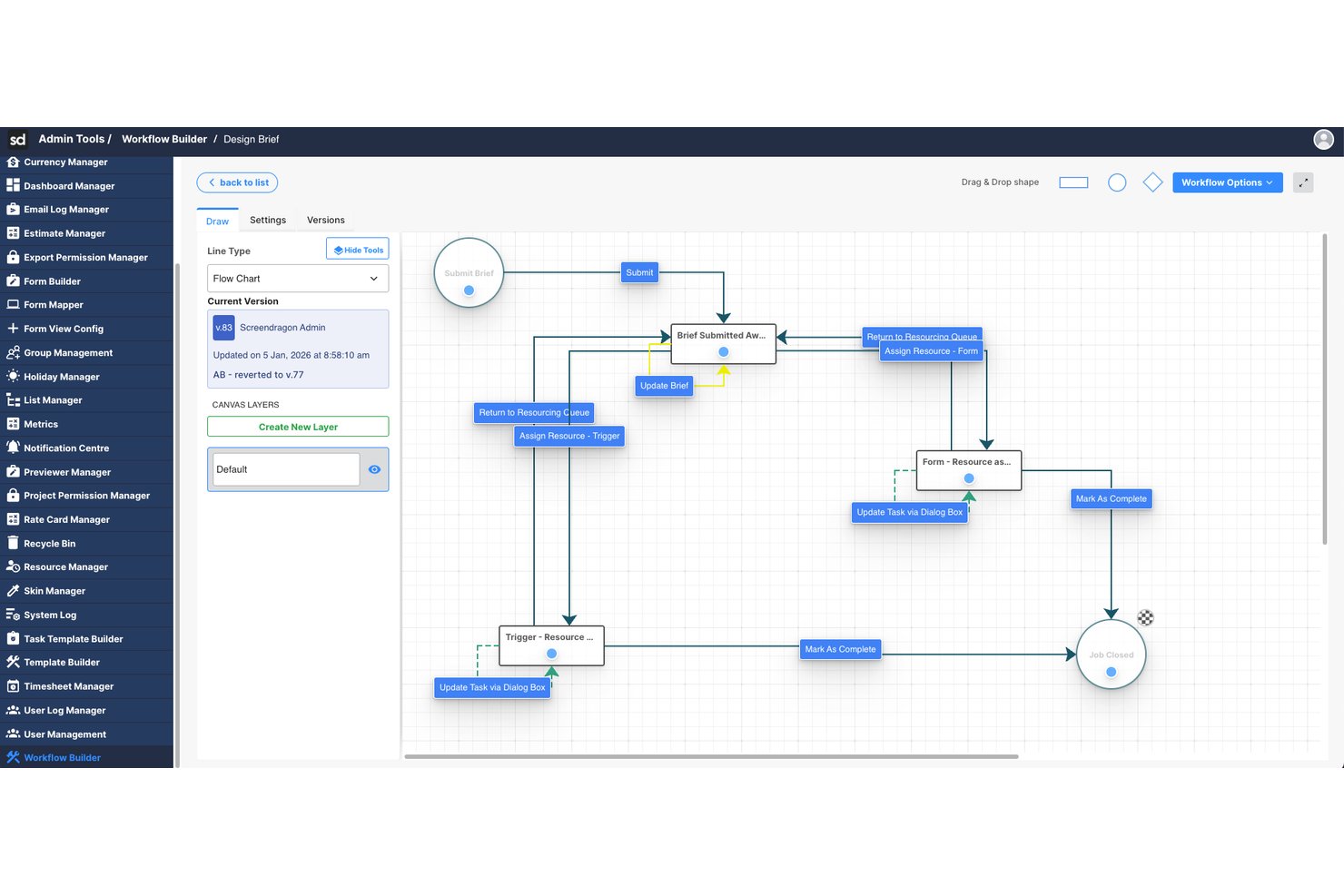
Screendragon è una piattaforma aziendale per la gestione del lavoro che utilizza agenti IA e l'automazione dei flussi di lavoro senza codice per orchestrare le attività creative e di marketing, incluse approvazioni, gestione delle risorse ed esecuzione dei progetti.
Per chi è più adatto Screendragon?
Screendragon è particolarmente adatto ai team di marketing aziendali e alle agenzie creative che gestiscono flussi di lavoro ad alto volume e con più parti interessate tra diversi reparti o unità aziendali globali.
Perché ho scelto Screendragon
Screendragon si è guadagnato un posto nella mia lista ristretta grazie al modo profondo in cui l'IA è integrata nel processo di produzione creativa. Apprezzo in particolare l'AI Hub, che consente al mio team di implementare agenti IA soggetti a controlli di governance direttamente nei flussi di lavoro di marketing attivi. In pratica, ciò significa che la generazione dei brief, le revisioni di conformità e la localizzazione dei testi in linea con il brand avvengono automaticamente, senza che nessuno debba inseguire approvazioni o formattare manualmente i documenti.
Funzionalità principali di Screendragon
- Generatore di flussi di lavoro senza codice: Crea e personalizza flussi di lavoro di marketing in più fasi senza scrivere codice.
- Moduli dinamici: Crea moduli di raccolta dati personalizzati che attivano l'instradamento e le approvazioni automatiche.
- Gestione integrata delle risorse: Assegna, pianifica e bilancia i team tra progetti creativi complessi.
- Autorizzazioni granulari e governance: Imposta controlli dettagliati degli accessi degli utenti per proteggere dati e flussi di lavoro tra regioni o reparti.
Integrazioni di Screendragon
Screendragon offre integrazioni native con HubSpot, Microsoft Power BI, Ziflow, Brandfolder, Workato e Smartsheet. È disponibile un'API per le integrazioni personalizzate.
Pros and Cons
Pros:
- Automatizza flussi di lavoro complessi per le approvazioni creative
- Controlli di governance integrati per le azioni basate sull'IA
- Gestione efficace delle risorse tra portafogli di grandi dimensioni
Cons:
- Adatto principalmente ai team di marketing e creativi
- La personalizzazione dei report è limitata per gli utenti avanzati
New Product Updates from Screendragon
Screendragon Unveils New AI Hub
Screendragon introduced AI Hub, a new capability that lets teams build and manage AI agents directly within workflows. The update helps marketing teams automate tasks, maintain governance controls, and scale AI-driven operations more efficiently. For more information, visit Screendragon's official site.

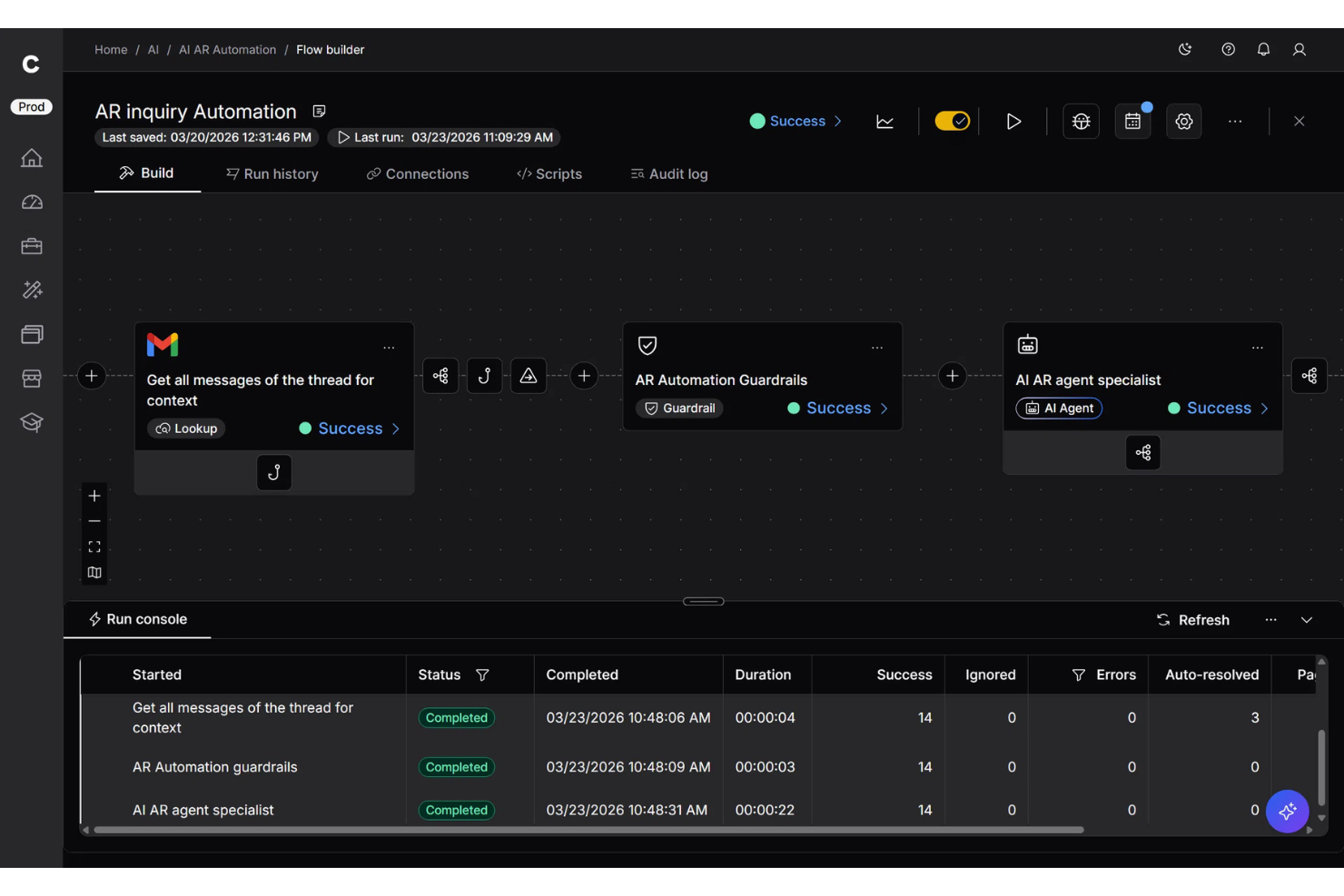
Celigo è una piattaforma di automazione potenziata dall'intelligenza artificiale pensata per i team che devono collegare sistemi scollegati e ridurre il lavoro manuale attraverso processi aziendali complessi. Aiuta team IT, operativi e aziendali ad automatizzare flussi di lavoro, sincronizzare dati tra applicazioni cloud e on-premise e gestire le integrazioni su larga scala. Il suo punto di forza è la combinazione di strumenti di integrazione low-code con automazione assistita dall'IA per una gestione più efficiente di processi trasversali ai sistemi.
Per chi è ideale Celigo?
Celigo è adatto a team IT e responsabili operativi di medie e grandi aziende che hanno la necessità di automatizzare e connettere molteplici applicazioni aziendali.
Perché ho scelto Celigo
Ho scelto Celigo perché offre al tuo team gli strumenti per orchestrare flussi di lavoro guidati dall'IA su molteplici sistemi aziendali da un'unica piattaforma. Puoi utilizzare i suoi connettori preconfigurati e l'editor low-code per collegare app come Salesforce, NetSuite e Shopify senza partire da zero. Mi piace anche che Celigo supporti agenti IA e automazione dei flussi di lavoro, aiutando a ridurre i passaggi manuali e a mantenere il flusso dei dati tra i sistemi. Questo lo rende ideale se il tuo team deve gestire processi complessi su una software stack in crescita.
Funzionalità principali di Celigo
Altre funzionalità di Celigo utili ai team che gestiscono automazioni guidate dall'IA tra sistemi aziendali connessi includono:
- Editor di integrazione guidato dall’IA: Utilizza suggerimenti basati su IA per aiutare il tuo team a costruire e personalizzare le integrazioni in modo più efficiente
- Dashboard di gestione errori: Offre un punto centrale per monitorare, diagnosticare e risolvere problemi di integrazione
- Controlli di accesso basati sui ruoli: Permette di impostare permessi utente per gestire integrazioni in sicurezza tra i team
- Log di audit: Monitora l’attività dei flussi di lavoro e le modifiche di sistema per una migliore visibilità e troubleshooting
Integrazioni Celigo
Le integrazioni includono NetSuite, Salesforce, Shopify, SAP, Snowflake, HubSpot, Jira, Slack, QuickBooks e Google Sheets.
Pros and Cons
Pros:
- I connettori preconfigurati velocizzano l'automazione tra i sistemi aziendali più comuni
- I dashboard degli errori aiutano i team a individuare e risolvere più rapidamente i flussi non riusciti
- Flussi pianificati e on-demand supportano esigenze di automazione flessibili
Cons:
- La mappatura personalizzata dei campi può essere difficile con logiche più complesse
- I messaggi di errore potrebbero essere più descrittivi durante la risoluzione dei problemi
New Product Updates from Celigo
Celigo Expands Microsoft Entra Authentication for SQL Connectors
Celigo’s Azure Synapse and MS SQL connectors now support Microsoft Entra service principal authentication via client secrets and certificates, so you can connect securely without relying on SQL credentials. For more information, visit Celigo’s official site.
 .
.
Ideale per la pianificazione assistita da Copilot in Microsoft 365
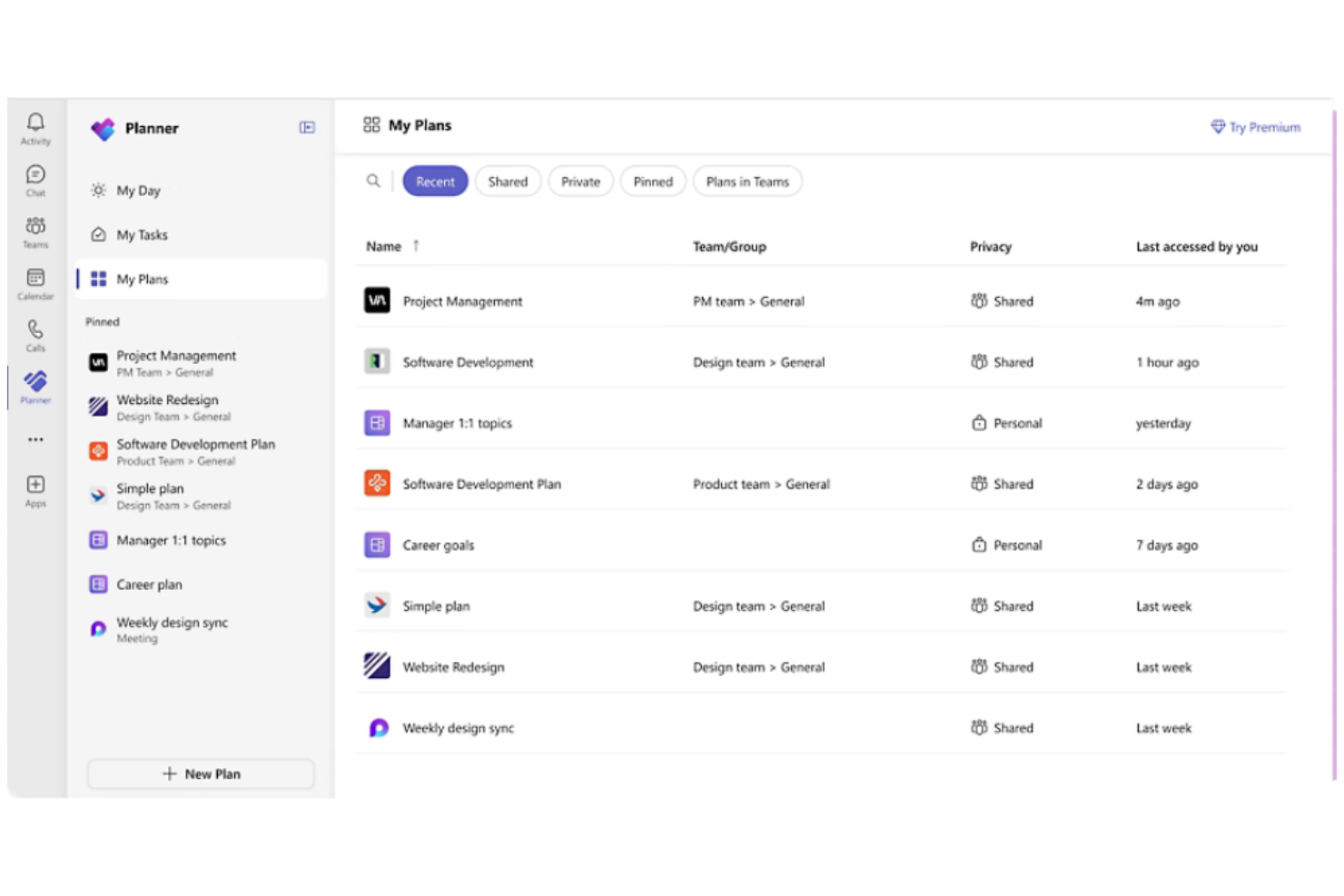
Se il tuo team utilizza già Microsoft 365, Microsoft Planner offre un modo per automatizzare la gestione delle attività direttamente all’interno dei flussi di lavoro esistenti. È pensato per le organizzazioni che desiderano collegare la pianificazione dei progetti, la condivisione di file e la comunicazione tra Outlook, Teams e OneDrive. L’integrazione di Planner con Microsoft Copilot porta suggerimenti di attività basati sull’IA e aggiornamenti automatici per aiutare i team a mantenere i progetti in carreggiata.
Perché ho scelto Microsoft Planner
Poiché Microsoft Planner è integrato nell’ecosistema Microsoft 365, è una scelta naturale per i team che vogliono automatizzare le attività di progetto senza uscire dagli strumenti familiari.
La sua integrazione con Microsoft Copilot permette di utilizzare l’IA per generare elenchi di attività, assegnare compiti e ricevere aggiornamenti automatici sui progetti direttamente all’interno di Teams o Outlook. Apprezzo il fatto che Planner si sincronizzi automaticamente con le altre app di Microsoft 365, così file, conversazioni e scadenze rimangono collegati in tutto lo spazio di lavoro. Per le organizzazioni che già usano Microsoft 365, le funzionalità di automazione guidate dall’IA di Planner aiutano a centralizzare e semplificare la gestione dei progetti.
Funzionalità
Altre funzionalità che rendono Microsoft Planner utile per l’automazione e il monitoraggio dei progetti includono:
- Raggruppamenti di attività: Organizza le attività in colonne personalizzabili per le diverse fasi o categorie di progetto.
- Promemoria scadenze: Invia automaticamente notifiche ai membri del team man mano che si avvicinano le scadenze.
- Monitoraggio dell’avanzamento: Visualizza lo stato delle attività con grafici e dashboard integrati.
- Supporto allegati: Aggiungi file e documenti direttamente alle attività per un facile riferimento.
Integrazioni
Le integrazioni includono Microsoft Teams, Outlook, OneDrive, SharePoint, Microsoft To Do, Microsoft Loop, Viva Goals, Power Automate, Microsoft Project ed Excel.
Pros and Cons
Pros:
- Copilot genera suggerimenti automatici sulle attività
- Gli aggiornamenti delle attività si sincronizzano tra le app di Microsoft 365
- Power Automate consente l’automazione avanzata dei flussi di lavoro
Cons:
- Nessuna approvazione dei processi basata su IA disponibile
- Automazione limitata all’ecosistema Microsoft

Airtable
Ideale per flussi di lavoro strutturati con intelligenza artificiale su dati relazionali
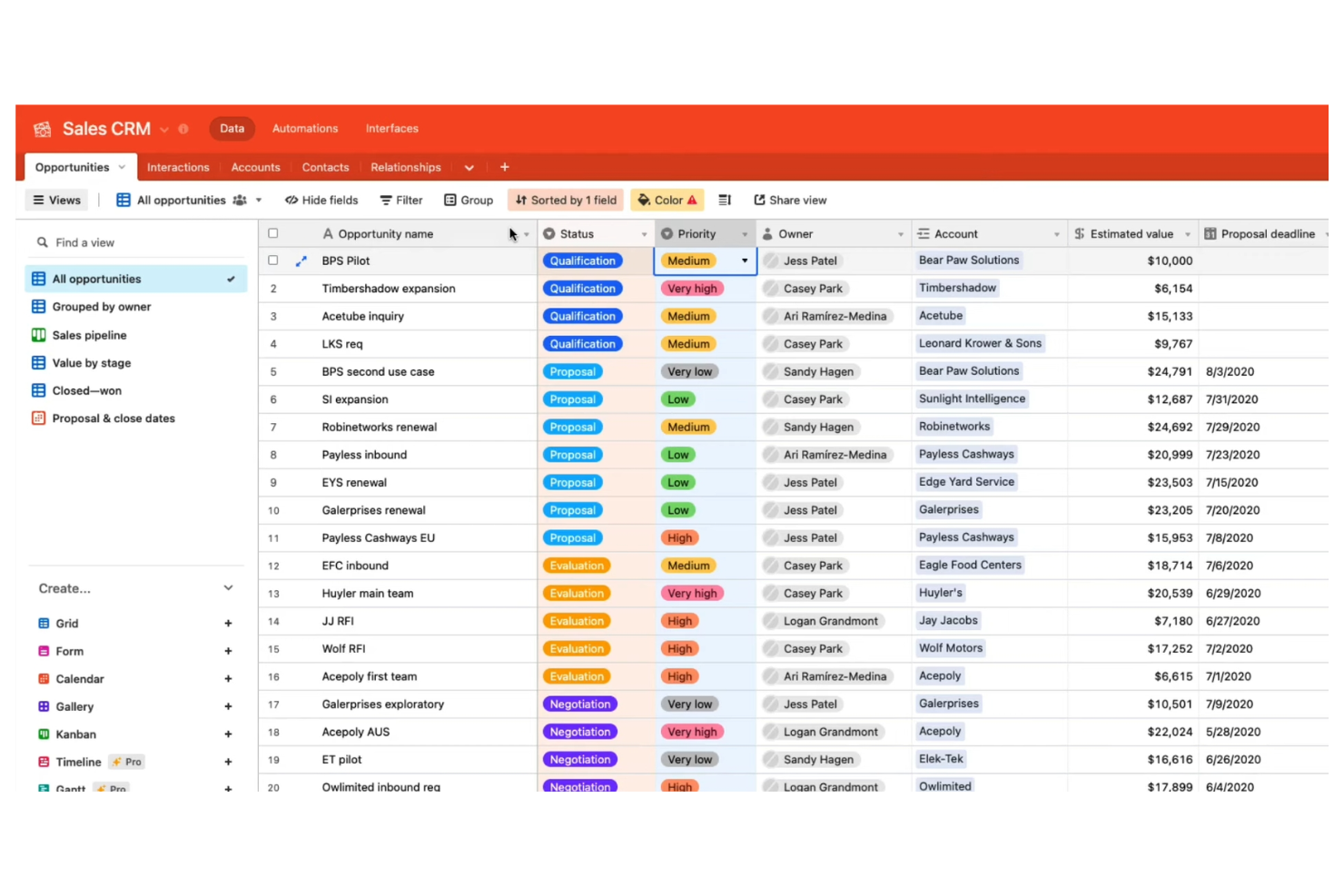
Airtable si distingue per i team che necessitano di automatizzare flussi di lavoro basati su dati complessi e relazionali. È particolarmente adatto a product manager, team di marketing e responsabili operativi che desiderano collegare database, attivare azioni e gestire progetti in un ambiente altamente personalizzabile. Le funzionalità di automazione di Airtable ti permettono di costruire flussi di lavoro guidati dalla logica che aggiornano i record, inviano notifiche e si integrano con altri strumenti—tutto attraverso un'interfaccia database flessibile.
Perché ho scelto Airtable
Ciò che distingue Airtable è l'approccio basato sul database per il monitoraggio dei progetti, particolarmente prezioso per i team che gestiscono dati complessi e interconnessi. Puoi progettare tabelle personalizzate con record collegati e poi utilizzare l'automazione integrata per attivare azioni come l'aggiornamento di campi, l'invio di notifiche o la creazione di attività in base ai cambiamenti nei tuoi dati.
Apprezzo come il costruttore di automazione di Airtable consenta di configurare flussi di lavoro multi-step che rispondono a condizioni specifiche all'interno del database. Per i project manager che necessitano di un controllo dettagliato sui dati e sull'automazione dei processi, Airtable offre una soluzione flessibile e scalabile.
Funzionalità
Altre funzionalità che rendono Airtable utile per l'automazione e la gestione dei progetti includono:
- Progettazione Interfacce: Crea dashboard personalizzati e interfacce visive per i tuoi dati senza programmare.
- Tipo di campo AI: Aggiungi campi con intelligenza artificiale per generare riepiloghi, categorizzare dati o estrarre insight direttamente nelle tue tabelle.
- Sincronizzazione: Sincronizza automaticamente i dati tra diversi database Airtable o con fonti esterne.
- Cronologia delle revisioni: Tieni traccia delle modifiche ai record e ripristina le versioni precedenti quando necessario.
Integrazioni
Le integrazioni includono Google Drive, Salesforce, Slack, Jira, Zendesk, Box, Dropbox, GitHub, Gmail e ChatGPT.
Pros and Cons
Pros:
- I campi AI generano riepiloghi e categorizzano i dati
- Le automazioni attivano flussi di lavoro multi-step in risposta ai cambiamenti
- Il Progettazione Interfacce crea dashboard personalizzati per le automazioni
Cons:
- Le esecuzioni di automazione sono limitate per workspace
- Le funzionalità AI richiedono piani di livello superiore

Trello
Ideale per una leggera automazione in stile IA sulle bacheche Kanban

Trello porta l'automazione potenziata dall'IA sulle bacheche di progetto in stile kanban, risultando ideale per i team che desiderano una gestione visiva delle attività con una configurazione minima. È particolarmente utile per i team di marketing, prodotto e operations che hanno bisogno di automatizzare azioni ripetitive sulle schede e mantenere i flussi di lavoro dinamici. Con l'automazione integrata per l'ordinamento delle schede, i promemoria delle scadenze e i trigger basati su regole, Trello aiuta i team a gestire i progetti senza aggiornamenti manuali delle bacheche.
Perché ho scelto Trello
Per i team che si affidano alle bacheche di progetto in stile kanban, Trello si distingue per l'integrazione dell'automazione direttamente all'interno del suo flusso di lavoro visuale. Il suo strumento di automazione integrato, Butler, consente di impostare regole che spostano le schede, assegnano attività o inviano promemoria in base all'attività sulla bacheca. Mi piace il fatto che sia possibile automatizzare azioni ricorrenti, come ordinare le schede per data di scadenza o etichettare gli elementi quando raggiungono determinate colonne. Queste funzionalità rendono Trello una scelta valida per chi desidera aggiungere automazione guidata dall'IA a una bacheca kanban senza complessità aggiuntiva.
Funzionalità
Altre funzionalità di Trello che supportano l'automazione e la gestione dei progetti includono:
- Modelli di Schede Personalizzati: Crea modelli riutilizzabili per attività o flussi di lavoro ricorrenti.
- Calendar Power-Up: Visualizza le schede con scadenze in una vista calendario per una migliore pianificazione.
- Checklist Avanzate: Aggiungi checklist con elementi assegnabili e date di scadenza alle singole schede.
- Automazione Invecchiamento Schede: Evidenzia automaticamente o attenua le schede che non sono state aggiornate entro un periodo prestabilito.
Integrazioni
Le integrazioni includono Slack, Jira, Miro, GitLab, Dropbox, Evernote, Pipedrive, Egnyte, Testmo e Pastel.
Pros and Cons
Pros:
- Butler automatizza lo spostamento delle schede e le notifiche
- I trigger basati su regole automatizzano azioni ripetitive nella bacheca
- L’IA può suggerire date di scadenza per le attività
Cons:
- L’automazione IA è limitata alle azioni a livello di bacheca
- Nessuna IA nativa per la sintesi dei documenti

Ideale per la gestione del servizio clienti potenziata dall'IA

Se il tuo team gestisce progetti per i clienti e ha bisogno di automazione per garantire trasparenza, Teamwork.com merita una valutazione. Agenzie e fornitori di servizi lo utilizzano per automatizzare le comunicazioni con i clienti, le approvazioni e la fatturazione, mantenendo i dati di progetto accessibili sia agli stakeholder interni che a quelli esterni. Le sue funzionalità rivolte ai clienti e l'automazione dei flussi di lavoro aiutano i team a ridurre gli aggiornamenti manuali e mantenere i clienti costantemente informati senza sforzi aggiuntivi.
Perché ho scelto Teamwork.com
A differenza di molte piattaforme di gestione progetti, Teamwork.com è progettato mettendo la collaborazione e la visibilità del cliente al centro. L'ho scelto perché le sue funzionalità di automazione—come gli aggiornamenti automatici sullo stato del cliente e i flussi di lavoro per le approvazioni—aiutano agenzie e team di servizio a tenere informati i clienti senza necessità di follow-up manuali.
La piattaforma supporta anche la fatturazione automatizzata e il monitoraggio del tempo, così puoi collegare direttamente l'avanzamento del progetto alle fatture dei clienti. Queste caratteristiche rendono Teamwork.com una scelta solida per i team che hanno bisogno di automatizzare sia i processi interni che le interazioni verso i clienti.
Funzionalità
Altre funzionalità che rendono Teamwork.com utile per i team di progetto includono:
- Trigger di automazione delle attività: Imposta regole per assegnare, aggiornare o spostare automaticamente le attività in base all'avanzamento del progetto.
- Modelli di progetto: Crea e riutilizza modelli di progetto per automatizzare l'impostazione di progetti ricorrenti per i clienti.
- Pianificatore del carico di lavoro: Visualizza e bilancia la capacità del team con una pianificazione drag-and-drop.
- Chat integrata: Comunica con i membri del team e i clienti direttamente nella piattaforma grazie alla chat integrata.
Integrazioni
Le integrazioni includono Slack, Microsoft Office, Harvest, Xero, HubSpot, Google Drive, Dropbox, QuickBooks, ChatGPT e Stripe.
Pros and Cons
Pros:
- Automatizza aggiornamenti di stato e promemoria per i clienti
- Supporta flussi di lavoro automatizzati per fatture e pagamenti
- I trigger delle attività possono assegnare o eseguire escalation dei compiti
Cons:
- Manca un'IA integrata per la trascrizione dei meeting
- Nessuna funzione di sintesi dei documenti basata su IA

Jira
Ideale per l’esecuzione agile guidata dall’AI
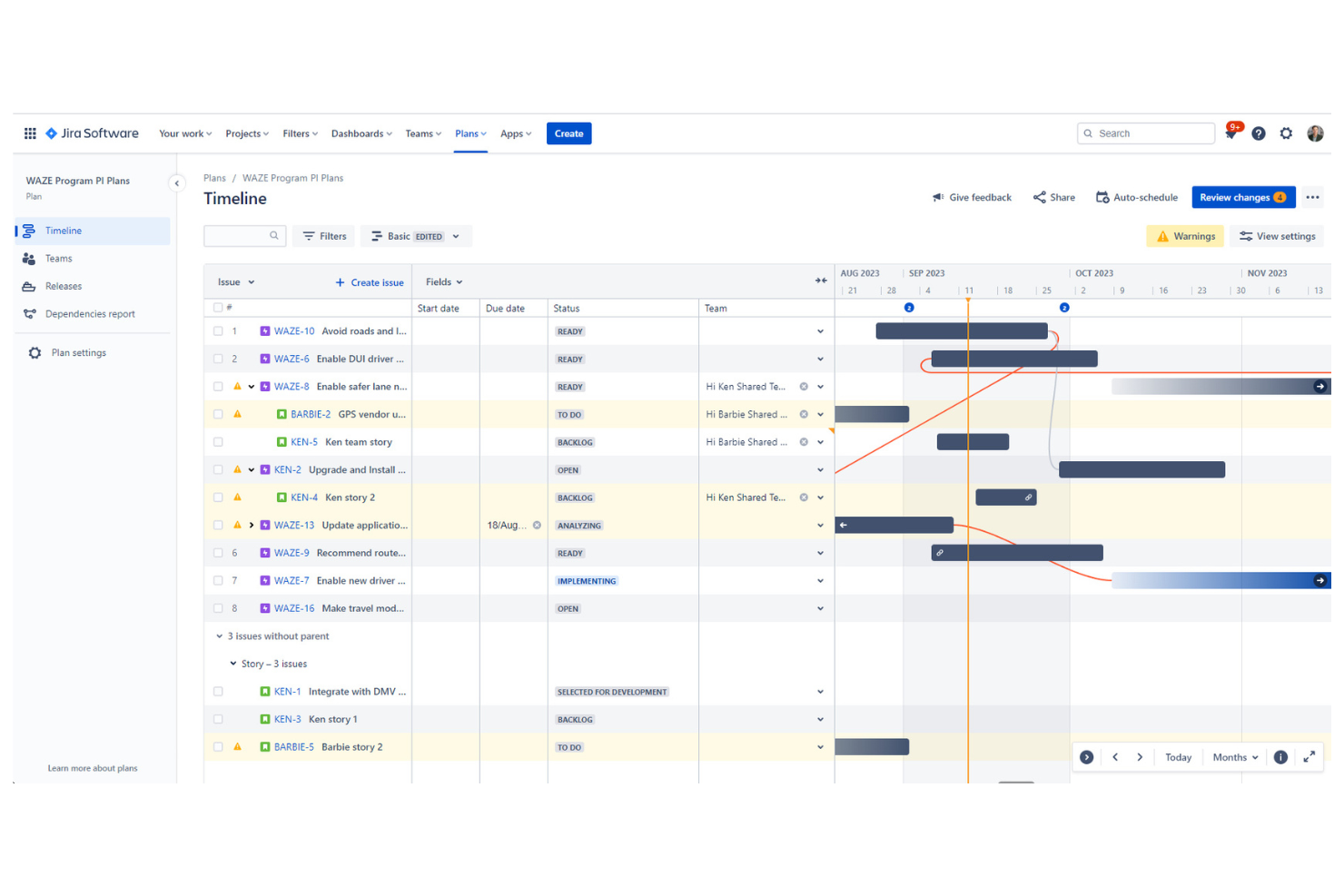
Jira è progettato appositamente per i team che gestiscono progetti agili e cicli di sprint, soprattutto nello sviluppo software e nell’IT. È indicato per project manager e scrum master che necessitano di automazione per la gestione del backlog, la pianificazione degli sprint e il monitoraggio del lavoro nei team distribuiti. Grazie alle funzionalità AI integrate per la valutazione delle segnalazioni e l'automazione dei workflow, Jira aiuta i team a dare priorità ai compiti e a far avanzare i progetti senza interventi manuali.
Perché ho scelto Jira
Per la pianificazione agile degli sprint, Jira offre funzionalità di automazione che supportano direttamente i team di sviluppo dinamici. Il triage delle segnalazioni basato su AI aiuta a dare priorità e assegnare i compiti in base all’urgenza e al carico di lavoro, fondamentale per mantenere gli sprint in carreggiata. Apprezzo il fatto che le regole di automazione di Jira possano aggiornare gli stati, inviare notifiche e spostare le segnalazioni tra le board senza necessità di interventi manuali.
Queste capacità rendono Jira una scelta solida per i team che vogliono automatizzare le attività ripetitive di gestione degli sprint e concentrarsi sulla creazione di valore.
Funzionalità
Altre funzionalità di Jira che supportano l’automazione e i flussi di lavoro agili includono:
- Designer di workflow personalizzati: Crea e modifica i workflow con strumenti drag-and-drop per adattarli ai processi del tuo team.
- Roadmap avanzate: Visualizza le tempistiche dei progetti, le dipendenze e l’allocazione delle risorse su più team.
- Azioni massive sulle segnalazioni: Aggiorna, sposta o assegna più segnalazioni contemporaneamente tramite operazioni in batch.
- Libreria di template per l’automazione: Accedi a template di automazione predefiniti per scenari comuni di gestione agile e di progetto.
Integrazioni
Le integrazioni includono Slack, Microsoft Teams, Google Drive, Figma, Zoom, GitHub, Salesforce, Miro, QMetry e Google Docs.
Pros and Cons
Pros:
- L’AI valuta e assegna automaticamente le segnalazioni in arrivo
- Le regole di automazione supportano flussi di lavoro sprint multi-step
- Le azioni massive automatizzano la gestione ripetitiva del backlog
Cons:
- Nessuna AI nativa per l’automazione della revisione del codice
- La configurazione dell’automazione dei workflow può richiedere privilegi amministrativi

ClickUp
Ideale per unificare con l'AI attività, documenti e conoscenza in un unico spazio

ClickUp riunisce attività, documenti, obiettivi e automazione in un unico spazio di lavoro, rendendolo una scelta ideale per i team che desiderano consolidare i propri strumenti. I responsabili delle operazioni e i project manager possono utilizzare ClickUp per automatizzare processi ripetitivi, centralizzare la comunicazione di progetto e gestire tutto, dagli sprint alla documentazione. La sua struttura flessibile e le funzionalità AI integrate aiutano i team a ridurre i cambi di contesto e a mantenere tutto il lavoro in un unico posto.
Perché ho scelto ClickUp
Per i team che vogliono portare tutto il proprio lavoro in un unico luogo, ClickUp si distingue per il suo spazio di lavoro 'tutto in uno'. La piattaforma combina gestione delle attività, collaborazione sui documenti e automazione con intelligenza artificiale in un unico ambiente, così non devi destreggiarti tra più strumenti.
Mi piace che le funzionalità AI di ClickUp possano generare riassunti, automatizzare aggiornamenti di routine e assistere nella creazione di contenuti direttamente nei flussi di lavoro. Questo approccio unificato aiuta project manager e responsabili delle operazioni a mantenere tutto organizzato e automatizzare i processi senza uscire dalla piattaforma.
Funzionalità
Altre funzionalità di ClickUp che supportano l'automazione e la gestione dello spazio di lavoro includono:
- Builder di automazioni personalizzate: Imposta automazioni a più passaggi utilizzando trigger, condizioni e azioni su misura per i tuoi flussi di lavoro.
- Whiteboards: Visualizza idee, mappa i processi e collega gli elementi delle whiteboard direttamente alle attività.
- Monitoraggio degli obiettivi: Imposta, monitora e aggiorna i progressi sugli obiettivi con aggiornamenti automatici di stato.
- Vista carico di lavoro: Monitora la capacità del team e l'allocazione delle attività con una dashboard visiva del carico di lavoro.
Integrazioni
Le integrazioni includono Slack, GitHub, GitLab, HubSpot, Google Drive, Outlook, Figma, Zoom, Microsoft Teams e Dropbox.
Pros and Cons
Pros:
- Le whiteboard sono collegate direttamente alle attività automatizzate
- Il builder di automazioni personalizzate supporta logiche complesse
- L'AI può riscrivere o espandere le descrizioni delle attività
Cons:
- I suggerimenti AI a volte non tengono conto del contesto specifico del progetto
- Nessuna AI nativa per analisi di immagini o file

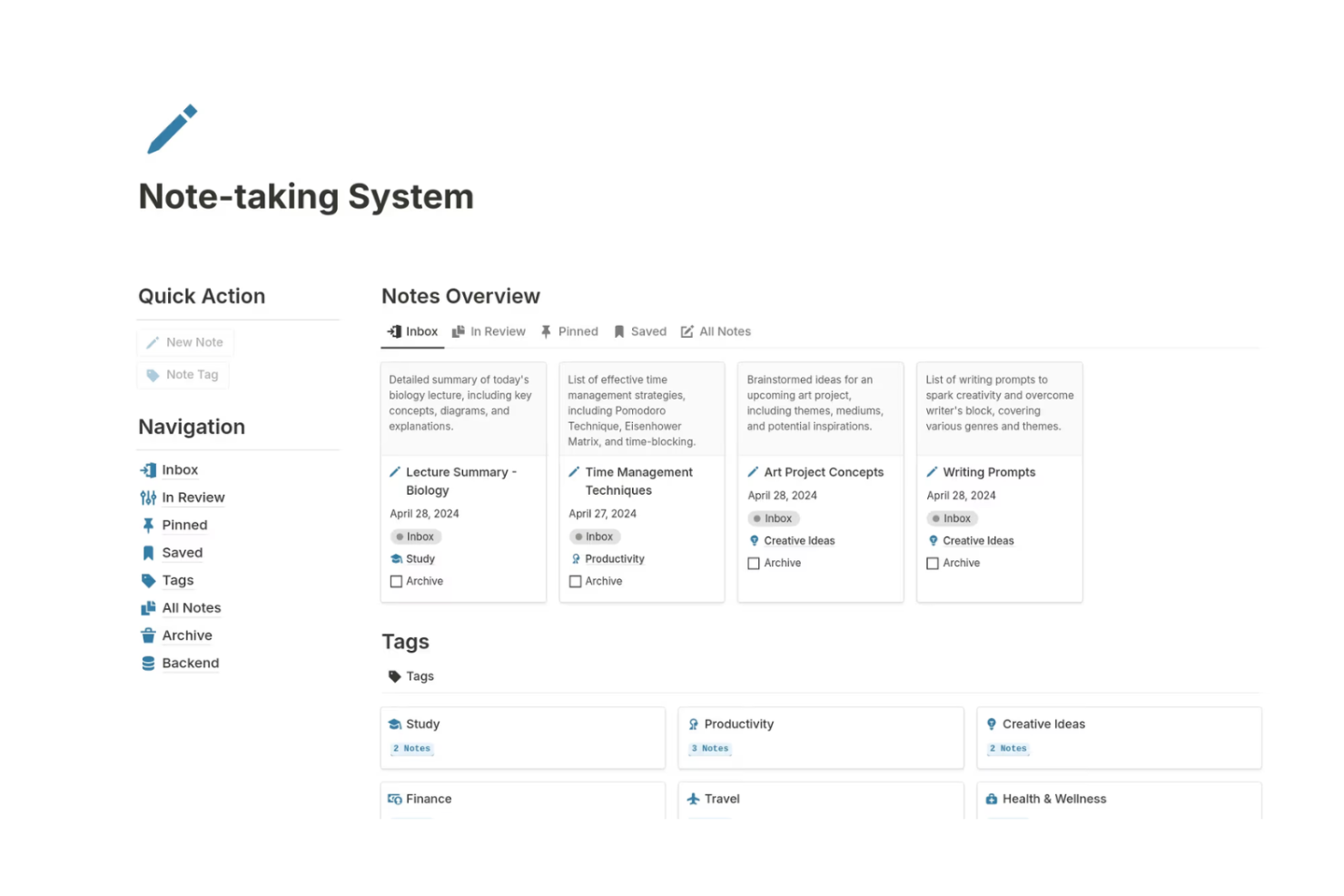
Notion riunisce la presa di appunti, la gestione dei progetti e l'automazione alimentata dall’IA in un unico spazio di lavoro. È particolarmente utile per team di prodotto, creatori di contenuti e startup che desiderano collegare note delle riunioni, compiti e documentazione con funzionalità IA come auto-riassunto e suggerimenti intelligenti sui compiti. I database flessibili di Notion e i blocchi IA aiutano i team ad automatizzare i lavori di routine mantenendo tutto organizzato in un unico posto.
Perché ho scelto Notion
Notion si distingue per i team che vogliono unire appunti, attività di progetto e automazione IA in un unico spazio di lavoro. I suoi blocchi IA permettono di generare riepiloghi, stendere contenuti e automatizzare compiti documentali ripetitivi direttamente nelle note e nelle bacheche di progetto.
Mi piace come si possano collegare i database, così che note di riunione, compiti e cronologie di progetto si aggiornino insieme, rendendo più semplice mantenere le informazioni connesse e operative. Per i team che vogliono automatizzare la gestione della conoscenza e il tracciamento delle attività senza dover cambiare strumento, Notion offre una soluzione unificata e flessibile.
Funzionalità
Altre funzionalità che rendono Notion prezioso per automazione e gestione progetti includono:
- Modelli personalizzati: Crea e riutilizza modelli per flussi di lavoro o documentazione ricorrenti.
- Accesso API: Collega Notion ad altri strumenti e automatizza i flussi di dati tramite la sua API pubblica.
- Permessi e condivisione: Imposta controlli di accesso dettagliati per pagine, database e workspace.
- Cronologia delle versioni: Rivedi e ripristina versioni precedenti di ogni pagina o database.
Integrazioni
Le integrazioni comprendono Slack, Jira, GitHub, Asana, Google Drive, Figma, Trello, GitLab, Typeform e Webex.
Pros and Cons
Pros:
- L’autocompilazione IA genera contenuti per i documenti di progetto
- Modelli personalizzati supportano flussi di lavoro automatizzati e ripetibili
- Le menzioni di pagina permettono il collegamento automatico delle attività
Cons:
- Le azioni di automazione in blocco non sono supportate nativamente
- Attivatori di automazione nativi limitati rispetto ai concorrenti
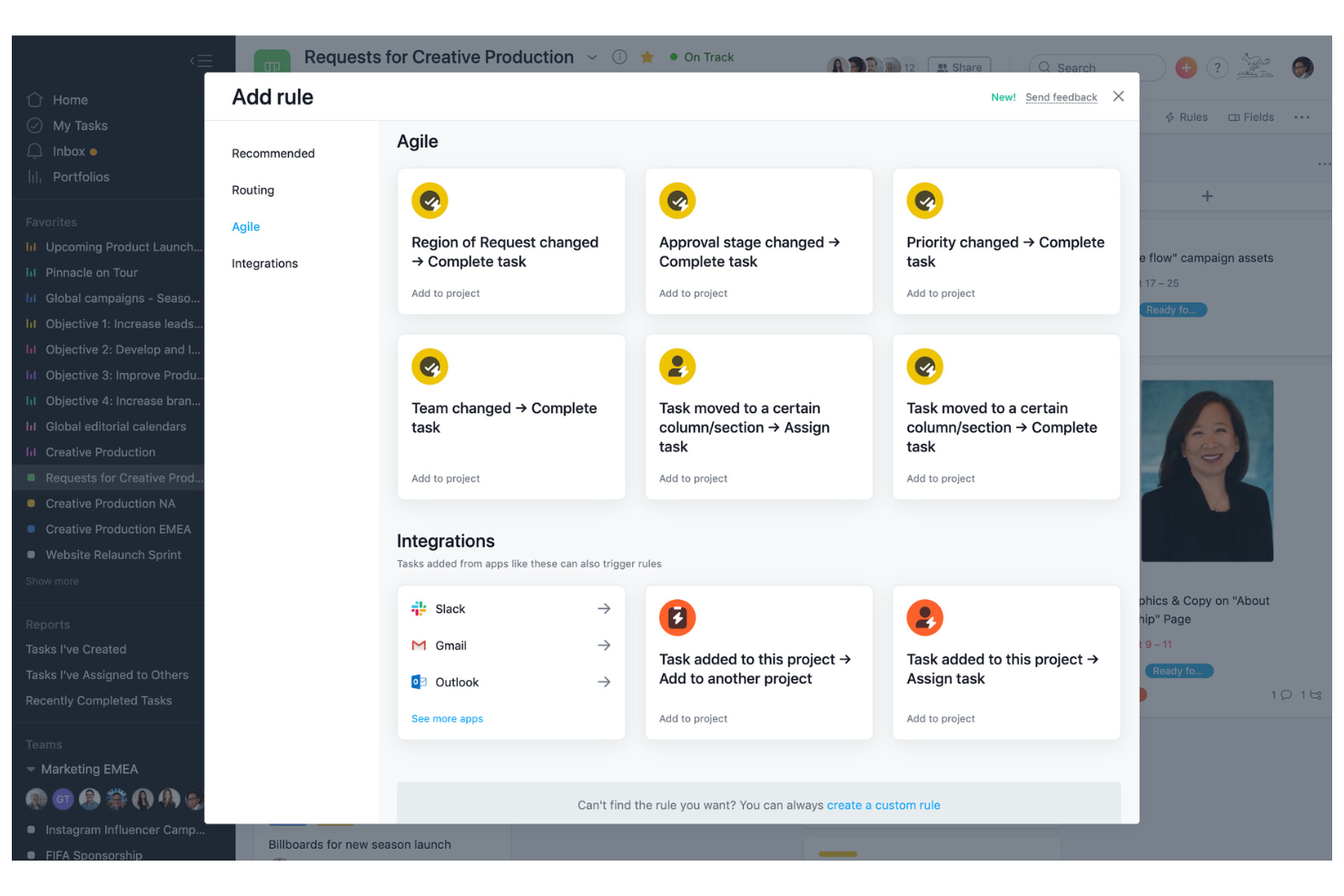
Asana offre una piattaforma progettata per l'automazione flessibile dei flussi di lavoro e la personalizzazione dettagliata dei processi, con funzionalità di intelligenza artificiale che aiutano i team a gestire questi flussi con meno supervisione manuale. I project manager e i team interfunzionali la utilizzano per automatizzare l'assegnazione delle attività, le approvazioni e gli aggiornamenti di stato, mentre Asana AI può redigere aggiornamenti sullo stato dei progetti e sintetizzare il lavoro così da facilitare l'individuazione di blocchi e prossimi passi. La sua automazione basata su regole riduce il coordinamento manuale e mantiene in movimento i progetti complessi.
Perché ho scelto Asana
Ho scelto Asana per la sua forte attenzione alla personalizzazione dei flussi di lavoro, fondamentale per i team che desiderano automatizzare processi unici, e per il suo crescente livello di assistenza tramite IA che trasforma le attività del progetto in aggiornamenti chiari e attuabili. Il generatore di regole di Asana consente di configurare trigger automatici per assegnazioni di compiti, cambi di stato e notifiche in base alle esigenze del progetto.
Apprezzo inoltre che Asana AI possa generare aggiornamenti intelligenti sullo stato e mettere in evidenza le principali modifiche tramite riepiloghi, aiutando a ridurre il tempo speso a rincorrere aggiornamenti tra gli stakeholder. Unite a modelli personalizzati e automazione dei flussi di lavoro in più fasi, queste capacità permettono ai team di ridurre il lavoro manuale e mantenere i progetti in linea con i processi desiderati.
Funzionalità
Altre funzionalità di Asana che supportano l'automazione e la gestione dei progetti includono:
- Vista Sequenza Temporale: Visualizza le tempistiche e le dipendenze di progetto con un'interfaccia Gantt drag-and-drop.
- Gestione del carico di lavoro: Monitora la capacità del team e bilancia le assegnazioni per evitare il sovraccarico dei membri.
- Tracciamento delle tappe fondamentali: Segna le tappe chiave del progetto per tenere traccia dei progressi e evidenziare le scadenze importanti.
- Automazione moduli: Raccogli e instrada automaticamente le richieste o gli input di progetto utilizzando moduli personalizzabili.
Integrazioni
Le integrazioni includono Slack, Google Drive, Microsoft Teams, Salesforce, Tableau, Jira, Zoom, Dropbox, GitHub e Outlook.
Pros and Cons
Pros:
- Automazione basata su regole per attività ricorrenti
- Modelli personalizzati per esigenze di workflow uniche
- Sequenza temporale visiva per monitorare le dipendenze
Cons:
- Suggerimenti basati su IA limitati per l'ottimizzazione dei processi
- L'automazione dei flussi di lavoro è limitata solo al livello di progetto
Altri strumenti di automazione basati sull'IA
Ecco alcune altre opzioni di strumenti di automazione basati sull’IA che non sono state incluse nel mio elenco ristretto, ma che vale comunque la pena prendere in considerazione:
- Smartsheet
Ideale per il lavoro su progetti in stile foglio di calcolo potenziati dall'IA
- Wrike
Migliore per flussi di lavoro inter-team alimentati dall'IA
- Zoho Projects
Ideale per la gestione del tempo e delle consegne di progetto assistita dall'IA
- monday.com
Ideale per il monitoraggio visivo del lavoro potenziato dall'AI
- cloudsquid
Ideale per flussi di lavoro su documenti finanziari


Come Valuto gli Strumenti di Automazione AI
Ogni strumento qui presente si guadagna il posto offrendo un reale valore tramite l’AI—creando piani, segnalando rischi o riequilibrando i carichi di lavoro senza intervento manuale. Valuto su due livelli: la funzionalità di base necessaria per entrare nell’elenco e i fattori distintivi che differenziano una soluzione dall’altra.
Funzionalità di Base (Requisiti Fondamentali per Questo Elenco)
Quando seleziono gli strumenti per il mio elenco, assegno a ciascuno un punteggio da 0 (la funzionalità non è presente) a 5 (eccelle in quest’area) per ogni funzionalità di base elencata di seguito. Successivamente, calcolo il punteggio totale dello strumento come percentuale. Ogni strumento deve raggiungere un punteggio minimo totale del 65% per essere preso in considerazione.
- Automazione dei flussi di lavoro con AI: Cerco strumenti in cui l’AI avvii e gestisca flussi di lavoro multistep—ad esempio escalazione automatica di attività in ritardo o instradamento delle approvazioni quando cambia l’ambito di uno sprint.
- Gestione intelligente delle attività: Ogni strumento dovrebbe usare l’AI per creare, assegnare e riprioritizzare attività in base al contesto del progetto, capacità del team e interdipendenze.
- Generazione di contenuti di progetto: Valuto se l’AI può redigere veri artefatti del progetto come report di stato, briefing di kickoff o riepiloghi degli sprint, partendo dai dati esistenti.
- Analisi predittiva e previsione: Gli strumenti ottengono punteggi più alti se l’AI segnala rischi di consegna o prevede lacune di risorse prima che diventino ostacoli.
- Interfaccia in linguaggio naturale: Verifico se gli utenti possono interrogare i dati di progetto o creare automazioni scrivendo richieste in linguaggio naturale invece di navigare tra menu complessi.
- Integrazioni e sincronizzazione dati: Lo strumento dovrebbe connettersi con piattaforme PM, di comunicazione e di sviluppo diffuse per scambiare dati su tutto lo stack.
Dopo aver individuato gli strumenti che rispondono a questi criteri, considero cosa rende ogni piattaforma unica.
Fattori Distintivi (Cosa Differenzia i Fornitori)
Ecco come confronto e metto a paragone i diversi fornitori:
Funzionalità Uniche
Agenti AI autonomi sono un elemento distintivo importante—cerco strumenti in cui l’AI può pianificare ed eseguire in autonomia una sequenza di attività, come generare automaticamente una timeline progettuale dopo il kickoff senza necessità di intervento umano. Apprezzo molto anche l’intelligenza per le riunioni, soprattutto quando estrae automaticamente i punti d’azione dalle call registrate e li sincronizza nella bacheca attività. Valuto inoltre l’AI per l’ottimizzazione delle risorse, che suggerisce aggiustamenti nell’organico e segnala rischi di burnout a livello di portfolio prima che i manager notino il problema.
Oltre le Funzionalità
La fiducia e la governance dell’AI sono fattori cruciali quando le automazioni intervengono su dati di progetto reali. Valuto se uno strumento consente ai manager di revisionare e approvare le decisioni dell’AI prima dell’esecuzione—come l’approvazione di una modifica consigliata all’ambito prima che venga riorganizzato uno sprint. La privacy dei dati è strettamente collegata: controllo certificazioni enterprise e policy chiare su se i dati dei clienti vengono usati per addestrare modelli condivisi. Considero infine il tempo di attivazione, valutando se la piattaforma offre una configurazione guidata, ricette di automazione predefinite e supporto all’onboarding per permettere ai team di iniziare a lavorare in pochi giorni, non mesi.
Come scegliere uno strumento di automazione basato sull'IA
È facile perdersi in lunghi elenchi di funzionalità e strutture tariffarie complesse. Per aiutarti a rimanere concentrato mentre affronti il tuo specifico processo di selezione del software, ecco un elenco di fattori da tenere a mente:
| Fattore | Cosa considerare |
|---|---|
| Scalabilità | Lo strumento sarà in grado di gestire la crescita del tuo team e l'aumento delle esigenze di automazione nel tempo? Verifica i limiti relativi a utenti, flussi di lavoro e dati. |
| Integrazioni | Lo strumento si connette nativamente ai sistemi esistenti (CRM, ERP, chat, archiviazione dei file)? Elenca le integrazioni indispensabili prima di creare il tuo elenco ristretto. |
| Personalizzazione | Puoi adattare le regole di automazione, i flussi di lavoro e le notifiche ai processi del tuo team? Evita gli strumenti che impongono modelli rigidi. |
| Facilità d'uso | Il tuo team adotterà rapidamente lo strumento o sarà necessaria una formazione approfondita? Cerca una navigazione chiara e un numero minimo di passaggi di configurazione. |
| Implementazione e avviamento | Quanto tempo sarà necessario per iniziare a utilizzarlo? Informati sul supporto alla migrazione, sulle risorse per l'avviamento e sui tempi tipici per ottenere valore per team simili. |
| Costo | I livelli di prezzo sono trasparenti e prevedibili durante la crescita? Fai attenzione ai costi nascosti, agli addebiti per automazione o ai componenti aggiuntivi obbligatori. |
| Misure di sicurezza | Lo strumento offre crittografia, controlli degli accessi e conformità agli standard del tuo settore? Verifica la localizzazione dei dati e la registrazione degli audit, se necessario. |
| Disponibilità dell'assistenza | Avrai accesso a un aiuto tempestivo in caso di problemi? Verifica la disponibilità di chat dal vivo, assistenza telefonica e garanzie sui tempi di risposta, soprattutto se le automazioni sono fondamentali per l'attività. |
Cosa sono gli strumenti di automazione basati sull'IA?
Gli strumenti di automazione basati sull'IA sono piattaforme software che utilizzano l'intelligenza artificiale per automatizzare attività ripetitive, flussi di lavoro e processi decisionali nelle operazioni aziendali. Questi strumenti aiutano i team a ridurre il lavoro manuale, migliorare la precisione e ottenere informazioni utili applicando l'apprendimento automatico, l'elaborazione del linguaggio naturale o l'analisi predittiva.
I project manager, i team IT e i responsabili aziendali utilizzano gli strumenti di automazione basati sull'IA per semplificare i processi, aumentare l'efficienza e supportare il processo decisionale basato sui dati in ambienti dinamici.
Funzionalità
Quando valuti una piattaforma di automazione basata sull'IA, cerca strumenti che combinino la configurazione senza codice con modelli di IA intelligenti per supportare processi aziendali reali su larga scala. Il sistema giusto dovrebbe semplificare la progettazione, l'automazione e il miglioramento dei flussi di lavoro senza richiedere competenze tecniche.
- Creazione di flussi di lavoro: uno strumento per creare flussi di lavoro senza codice consente di progettare, visualizzare e gestire processi articolati in più fasi utilizzando strumenti con trascinamento o una logica basata su regole. Questo semplifica la distribuzione di agenti di IA che gestiscono le fasi ripetitive e mantengono automaticamente il lavoro in corso.
- Assegnazione delle attività: assegna automaticamente o manualmente le attività a membri specifici del team o a gruppi in base alle esigenze del progetto. I modelli di IA possono aiutare a stabilire le priorità delle assegnazioni in base al carico di lavoro o alle scadenze, garantendo un migliore coordinamento.
- Notifiche e avvisi: invia aggiornamenti in tempo reale sulle modifiche alle attività, sulle scadenze o sull'avanzamento dei flussi di lavoro tramite e-mail, messaggi nell'app o notifiche push. Gli agenti di IA possono attivare avvisi quando vengono rilevati schemi di rischio o ritardi.
- Controllo degli accessi basato sui ruoli: imposta le autorizzazioni e limita l'accesso ai dati o alle azioni sensibili in base ai ruoli degli utenti. Questo supporta un'automazione sicura tra i reparti e protegge i processi aziendali critici.
- Registri di controllo: monitora e registra tutte le azioni degli utenti e le modifiche ai flussi di lavoro, creando uno storico trasparente per la conformità e la risoluzione dei problemi.
- Hub per le integrazioni: collega altri strumenti e piattaforme aziendali, consentendo ai dati di fluire tra i sistemi e riducendo l'inserimento manuale dei dati. Una piattaforma di automazione efficace garantisce che i flussi di lavoro si estendano oltre una singola app.
- Dashboard dei report: visualizza in tempo reale le metriche delle prestazioni, i tassi di completamento delle attività e i colli di bottiglia dei processi. Nei sistemi più avanzati, l'IA genera riepiloghi e informazioni utili dai tuoi dati per evidenziare tendenze e rischi emergenti.
- Libreria di modelli: accedi a modelli predefiniti per flussi di lavoro e attività, personalizzabili e riutilizzabili per i processi ricorrenti, contribuendo a ridurre i tempi di configurazione e ad abbreviare la curva di apprendimento.
- Visualizzazione calendario: visualizza attività, scadenze e traguardi del progetto in un calendario visivo per semplificare la programmazione e la pianificazione.
- Accesso da dispositivi mobili: gestisci i flussi di lavoro, approva le attività e ricevi notifiche da qualsiasi dispositivo, supportando i team da remoto e il processo decisionale in mobilità.
Vantaggi
L'adozione di strumenti di automazione basati sull'IA può migliorare significativamente il modo in cui la tua organizzazione gestisce il lavoro e realizza i processi aziendali.
- Riduzione del carico di lavoro manuale: gli agenti di IA automatizzano le attività ripetitive e i flussi di lavoro basati su regole, consentendo al tuo team di concentrarsi su iniziative strategiche e di maggior valore.
- Maggiore precisione: i processi automatizzati applicano ogni volta una logica coerente, riducendo gli errori umani e migliorando l'affidabilità dei dati di alta qualità tra i sistemi.
- Consegna più rapida dei progetti: l'instradamento automatizzato delle attività, le notifiche e i trigger dei flussi di lavoro mantengono i progetti in avanzamento senza ritardi superflui, fornendo risultati operativi in meno tempo.
- Migliore allocazione delle risorse: i modelli di IA analizzano i dati sul carico di lavoro e le tempistiche dei progetti per supportare previsioni e pianificazioni del carico di lavoro più efficaci.
- Maggiore visibilità: le dashboard in tempo reale, i registri di controllo e le informazioni generate dall'IA forniscono chiarezza sullo stato del progetto, sulle lacune nelle prestazioni e sui rischi operativi.
- Conformità più solida: i controlli degli accessi basati sui ruoli e le tracce di controllo aiutano a far rispettare le politiche di governance e i requisiti normativi.
- Operazioni scalabili: con la crescita dell'organizzazione, una piattaforma di automazione flessibile si adatta all'aumento dei carichi di lavoro, ai flussi di lavoro più complessi e all'evoluzione dei processi aziendali senza aggiungere attriti operativi.
Costi e prezzi
La scelta degli strumenti di automazione basati sull'IA richiede la comprensione dei vari modelli e piani tariffari disponibili. I costi variano in base alle funzionalità, alle dimensioni del team, agli extra e ad altri fattori. La tabella seguente riassume i piani più comuni, i relativi prezzi medi e le funzionalità tipicamente incluse nelle soluzioni di strumenti di automazione basati sull'IA:
Tabella di confronto dei piani per gli strumenti di automazione basati sull'IA
| Tipo di piano | Prezzo medio | Funzionalità comuni |
|---|---|---|
| Piano gratuito | $0 | Automazione di base dei flussi di lavoro, integrazioni limitate, accesso per un singolo utente e assistenza della community. |
| Piano personale | $5-$15/utente/mese | Flussi di lavoro composti da più passaggi, reportistica di base, notifiche via email e opzioni di personalizzazione limitate. |
| Piano aziendale | $20-$40/utente/mese | Automazione avanzata, strumenti di collaborazione per i team, hub per le integrazioni, registri di controllo e assistenza prioritaria. |
| Piano aziendale | $400+ per utente/mese (varia ampiamente) | Flussi di lavoro personalizzati, sicurezza avanzata, onboarding dedicato, funzionalità per la conformità e assistenza premium. |
Domande frequenti sugli strumenti di automazione basati sull'IA
Ecco alcune risposte alle domande comuni sugli strumenti di automazione basati sull’IA:
In che modo gli strumenti di automazione basati sull'IA si differenziano dai software di automazione tradizionali?
Gli strumenti di automazione basati sull’IA utilizzano l’apprendimento automatico e l’analisi dei dati per prendere decisioni, adattare i flussi di lavoro e fornire suggerimenti, mentre i software di automazione tradizionali si basano su regole fisse e sulla configurazione manuale. Ciò consente agli strumenti basati sull’IA di gestire processi più complessi e dinamici e di migliorare nel tempo imparando dai dati.
Gli strumenti di automazione basati sull'IA possono integrarsi con i sistemi legacy?
Sì, molti strumenti di automazione basati sull’IA offrono opzioni di integrazione per i sistemi legacy tramite API, middleware o connettori personalizzati. Prima di scegliere uno strumento, verifica che supporti il tuo stack software esistente e se l’integrazione richiederà ulteriore sviluppo o servizi di terze parti.
Quali aspetti di sicurezza devo considerare quando utilizzo strumenti di automazione basati sull'IA?
Dovresti cercare funzionalità come la crittografia dei dati, i controlli degli accessi, i registri di controllo e le certificazioni di conformità. Assicurati che lo strumento sia in linea con le politiche sulla privacy dei dati della tua organizzazione e con le normative del settore, e chiedi ai fornitori informazioni sulle loro pratiche di risposta agli incidenti e di residenza dei dati.
Quanto tempo occorre per implementare uno strumento di automazione basato sull'IA?
Il tempo di implementazione varia in base alla complessità dei tuoi flussi di lavoro e al livello di personalizzazione richiesto. Le configurazioni semplici possono richiedere alcuni giorni, mentre le integrazioni e l’onboarding più complessi possono richiedere diverse settimane. Chiedi ai fornitori quali sono i tempi tipici e quali risorse di onboarding sono disponibili.
Gli strumenti di automazione basati sull'IA prevedono costi nascosti?
Sì, alcuni strumenti possono applicare costi aggiuntivi per le integrazioni premium, le funzionalità avanzate o limiti di utilizzo più elevati. Esamina sempre i dettagli dei prezzi, chiedi informazioni sui costi dei componenti aggiuntivi e chiarisci cosa è incluso in ciascun piano prima di prendere una decisione.
Qual è il prossimo passo:
Se stai cercando informazioni sugli strumenti di automazione basati sull'IA, contatta gratuitamente un consulente di SoftwareSelect per ricevere consigli.
Compili un modulo e partecipi a una breve conversazione durante la quale il consulente approfondirà le tue esigenze specifiche. In seguito riceverai una selezione ristretta di software da esaminare. Ti assisteranno anche durante l'intero processo di acquisto, comprese le trattative sul prezzo.