

I 10 migliori software open source per basi di conoscenza nel 2026

10 Selezione di software a codice aperto per basi di conoscenza


Il software a codice aperto per basi di conoscenza è un tipo di software per la gestione della conoscenza che aiuta i team a creare una soluzione flessibile e personalizzabile per la base di conoscenza, senza vincoli nei confronti di un fornitore. Questi strumenti consentono di creare un archivio centralizzato per la documentazione, facilitando l'organizzazione e la condivisione delle informazioni all'interno dell'organizzazione.
Supportano sia le risorse esterne autonome sia una base di conoscenza interna per i dipendenti, aiutando il team di assistenza e il servizio di assistenza tecnica a gestire la risoluzione dei problemi in modo più efficiente. Molte piattaforme sono inoltre facili da usare, rendendo semplice per i team contribuire, aggiornare e mantenere i contenuti man mano che il centro di conoscenza cresce.
In questa guida troverai le migliori piattaforme a codice aperto per creare, gestire e collaborare alla documentazione, così potrai scegliere quella più adatta al flusso di lavoro, all'insieme di tecnologie e ai piani di crescita del tuo team.
Perché fidarsi dei nostri consigli sui software
Il nostro team testa e recensisce software dal 2012. In quanto project manager noi stessi, sappiamo quanto sia difficile — e importante — scegliere il software giusto.
Per questa guida, abbiamo valutato gli strumenti attraverso test pratici e ricerche indipendenti, assegnando un punteggio agli strumenti in base ai nostri criteri di selezione. Ci basiamo inoltre sulle competenze di leader di pensiero del settore e di professionisti attivi nella gestione dei progetti.
Le nostre recensioni riflettono il nostro giudizio editoriale umano, non un discorso di vendita.
Revisori esperti:
Tabella comparativa dei software a codice aperto per basi di conoscenza
Questa tabella comparativa riassume i dettagli sui prezzi dei migliori software a codice aperto per basi di conoscenza che ho selezionato:
| Tool | Best For | Trial Info | Price | ||
|---|---|---|---|---|---|
| 1 | Ideale per la collaborazione su contenuti strutturati | Demo gratuita disponibile | Prezzo su richiesta | Website | |
| 2 | Ideale per workflow documentali e archiviazione | Demo gratuita + piano gratuito disponibile | Prezzo su richiesta | Website | |
| 3 | Ideale per una documentazione di team pulita | Prova gratuita di 30 giorni + piano gratuito disponibile | Da $4/utente/mese (fatturato annualmente) | Website | |
| 4 | Ideale per documentazione in stile libro | Demo gratuita disponibile | Piano gratuito per sempre | Website | |
| 5 | Ideale per interfacce wiki moderne | Gratuito | Gratuito | Website | |
| 6 | Ideale per wiki altamente personalizzabili | Gratuito, open source | Gratuito | Website | |
| 7 | Ideale per la documentazione senza database | Gratuito, open-source | Gratuito da usare | Website | |
| 8 | Ideale per documenti markdown leggeri | Prova gratuita disponibile | Da $3.5/utente/mese (fatturato annualmente) | Website | |
| 9 | Ideale per sistemi di FAQ multilingue | Gratuito, open source | Gratuito | Website | |
| 10 | Ideale per wiki e gestione documentale | Gratis per i primi cinque utenti | Da $9/utente/anno | Website |
Recensioni dei software a codice aperto per basi di conoscenza
Di seguito trovi le mie sintesi dettagliate dei software a codice aperto per basi di conoscenza inclusi nella mia selezione. Le mie recensioni offrono una panoramica dettagliata delle funzionalità, dei casi d’uso migliori e delle integrazioni di ciascuna piattaforma, per aiutarti a trovare quella più adatta alle tue esigenze.

XWiki
Ideale per la collaborazione su contenuti strutturati

XWiki è una piattaforma wiki aziendale open source per la creazione di basi di conoscenza strutturate, che supporta un'organizzazione avanzata dei contenuti, la modifica collaborativa e applicazioni personalizzabili basate sui dati.
A chi è più adatto XWiki?
Grandi organizzazioni o aziende che necessitano di una base di conoscenza personalizzabile e strutturata per documentazione complessa e collaborazione.
Perché ho scelto XWiki
Ho scelto XWiki come uno dei migliori perché apprezzo come il suo supporto ai dati strutturati permetta al mio team di creare moduli e applicazioni personalizzate direttamente all'interno del nostro wiki. Utilizzo i suoi modelli di pagina avanzati e le funzionalità di scripting per creare documentazione dinamica che si adatta ai nostri flussi di lavoro. La possibilità di gestire gerarchie e metadati complessi lo rende particolarmente adatto a basi di conoscenza aziendali su larga scala.
Caratteristiche principali di XWiki
- Controllo delle versioni: Traccia e confronta le modifiche su tutte le pagine wiki.
- Gestione dei diritti: Imposta permessi granulari per utenti e gruppi.
- Editor WYSIWYG: Modifica visualmente i contenuti senza dover scrivere codice.
- Gestione degli allegati: Carica, organizza e gestisci file all'interno del wiki.
Integrazioni XWiki
Le integrazioni native non sono attualmente elencate. XWiki supporta integrazioni tramite la sua API RESTful e webhook per connessioni personalizzate.
Pros and Cons
Pros:
- Dati strutturati e scripting per personalizzazione avanzata
- Sistema di plugin esteso per funzionalità aggiuntive del wiki
- Gestisce bene progetti di documentazione su larga scala
Cons:
- Configurazione complessa per funzionalità avanzate e integrazioni
- Problemi occasionali di compatibilità e aggiornamento dei plugin

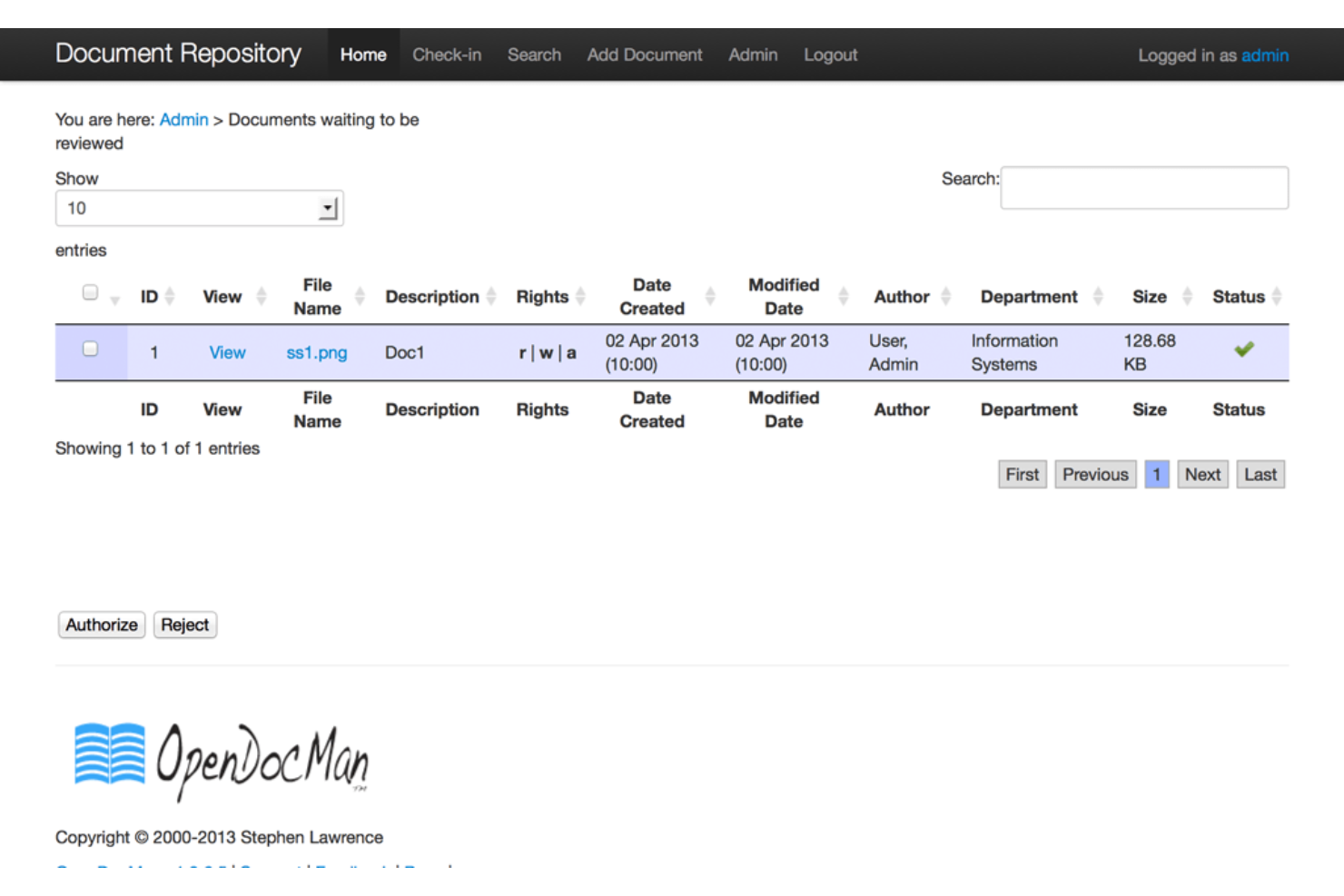
OpenDocMan è un sistema di gestione documentale open source progettato per organizzare, archiviare e controllare l'accesso a file e documentazione con funzionalità di workflow e conformità.
A chi è consigliato OpenDocMan?
Team orientati alla conformità in settori regolamentati che necessitano di un controllo dettagliato sui documenti e workflow di approvazione.
Perché ho scelto OpenDocMan
Ho scelto OpenDocMan tra i migliori perché ho bisogno di un sistema che imponga flussi di lavoro per l'approvazione dei documenti e controlli di accesso granulari—funzionalità essenziali per team orientati alla conformità. Mi piace che il mio team possa impostare campi personalizzati di metadati e automatizzare i cicli di revisione dei documenti. In pratica, questo significa che possiamo monitorare lo stato dei documenti e assicurarci che solo gli utenti autorizzati abbiano accesso ai file sensibili.
Funzionalità principali di OpenDocMan
- Interfaccia web: Accedi e gestisci i documenti tramite qualsiasi browser web moderno.
- Versionamento automatico dei file: Tiene automaticamente traccia e archivia le versioni precedenti dei documenti caricati.
- Ricerca dei documenti: Cerca i documenti tramite parole chiave, metadati o proprietà del file.
- Gestione dei gruppi di utenti: Assegna gli utenti a gruppi per una gestione semplificata di permessi e accessi.
Integrazioni OpenDocMan
Le integrazioni native attualmente non sono elencate. È disponibile un'API per integrazioni personalizzate.
Pros and Cons
Pros:
- Workflow di approvazione dei documenti integrato
- Campi metadati personalizzati per l'organizzazione dei documenti
- Interfaccia web per accesso remoto
Cons:
- Le prestazioni di ricerca calano con archivi di grandi dimensioni
- La navigazione tra le cartelle può risultare ingombrante su larga scala


Outline è una piattaforma open source di knowledge base per team che offre modifica collaborativa, supporto markdown, organizzazione strutturata dei documenti e ricerca in tempo reale.
Per chi è più adatto Outline?
Team e startup che desiderano una knowledge base open source veloce e moderna con modifica collaborativa.
Perché ho scelto Outline
Ho scelto Outline tra i migliori perché apprezzo la rapidità con cui il mio team può avviare una knowledge base moderna e open source con editing collaborativo in tempo reale. Utilizzo il suo editor basato su markdown e le raccolte nidificate per mantenere la nostra documentazione organizzata e facilmente aggiornabile. L’interfaccia veloce e reattiva permette al mio team di cercare e navigare tra grandi knowledge base senza rallentamenti.
Funzionalità principali di Outline
- Permessi di accesso: Controlla chi può visualizzare, modificare o condividere i documenti a livello granulare.
- Cronologia delle revisioni: Tieni traccia e ripristina versioni precedenti di qualsiasi documento.
- Condivisione pubblica: Pubblica documenti o raccolte selezionate tramite un link pubblico.
- Integrazione con Slack: Collega Outline a Slack per notifiche e condivisione rapida dei documenti.
Integrazioni di Outline
Outline offre integrazioni native con Slack, Google Workspace, Alfred, Figma, Airtable e Zapier. È disponibile un'API per integrazioni personalizzate.
Pros and Cons
Pros:
- Editing collaborativo in tempo reale per i team
- Editor basato su Markdown con formattazione avanzata
- Raccolte nidificate per documentazione strutturata
Cons:
- Nessuno strumento di migrazione integrato per dati legacy
- Meno opzioni di formattazione avanzata rispetto ad alcuni concorrenti

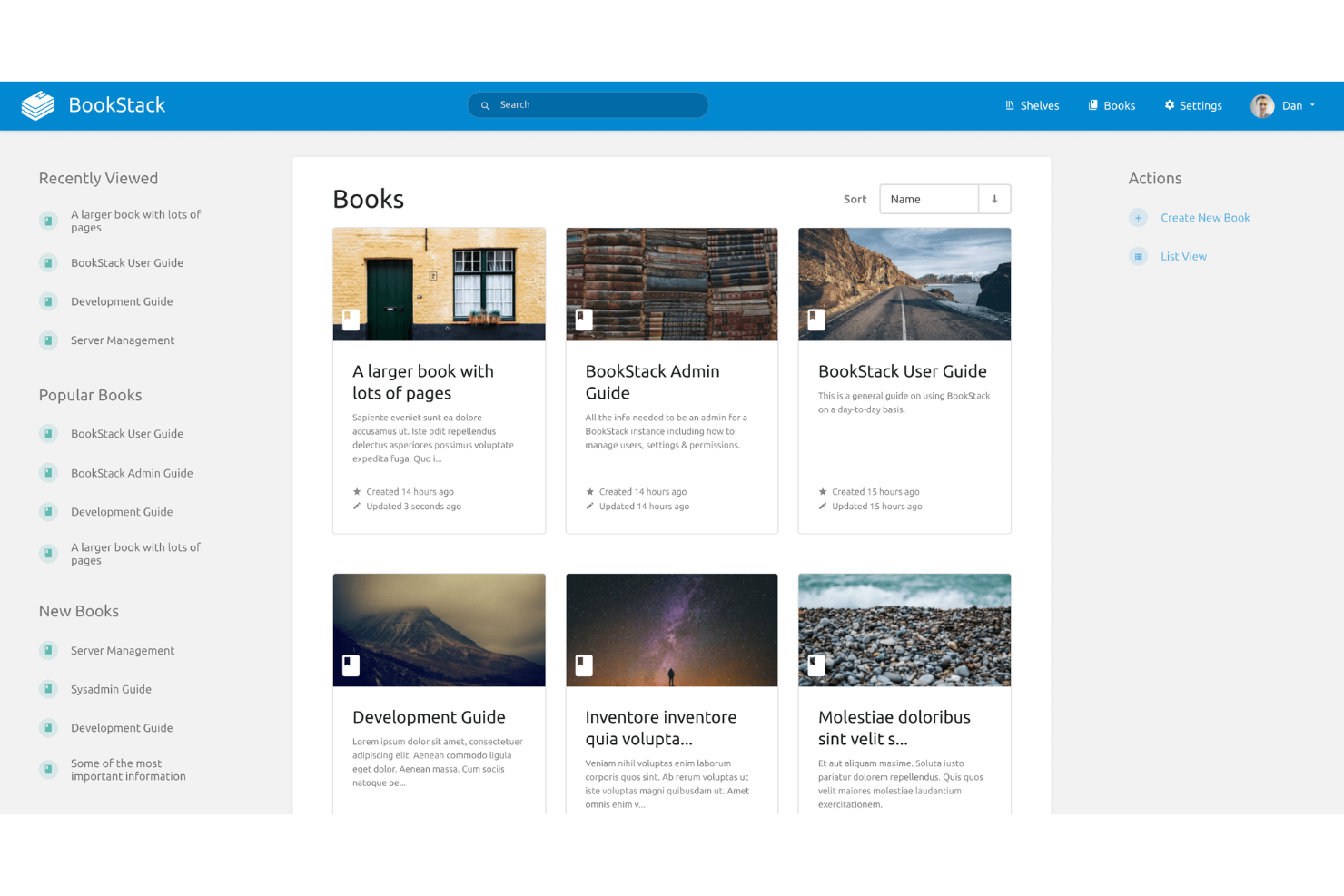
BookStack è una piattaforma open source per la gestione della conoscenza che organizza i contenuti in libri, capitoli e pagine, offrendo un approccio strutturato alla documentazione e ai wiki interni.
Per chi è ideale BookStack?
Team piccoli e medi che desiderano un sistema di documentazione semplice, in stile libro, per la condivisione della conoscenza interna.
Perché ho scelto BookStack
Ho scelto BookStack tra i migliori perché la sua struttura di documentazione ispirata ai libri permette al mio team di organizzare i contenuti in libri, capitoli e pagine per una gerarchia chiara. Mi piace il modo in cui l'editor WYSIWYG rende la formattazione semplice e le autorizzazioni basate sui ruoli ci aiutano a gestire gli accessi tra gruppi diversi. Quando abbiamo bisogno di collegare argomenti correlati, la funzione di collegamento tra libri mantiene tutto connesso.
Funzionalità principali di BookStack
- Supporto Markdown: Scrivi ed edita pagine utilizzando la sintassi markdown per una formattazione rapida.
- Cronologia delle revisioni: Monitora e ripristina versioni precedenti di qualsiasi pagina o capitolo.
- Temi personalizzabili: Modifica l'aspetto e la veste grafica della knowledge base con opzioni di tema.
- Supporto multilingue: Crea e gestisci contenuti in più lingue per team globali.
Integrazioni di BookStack
BookStack offre integrazioni di autenticazione native con LDAP, Active Directory, SAML e provider di login social come Google e GitHub. È disponibile anche una REST API per integrazioni personalizzate.
Pros and Cons
Pros:
- Gerarchia in stile libro organizza chiaramente la documentazione
- Editor WYSIWYG e markdown entrambi disponibili
- Permessi basati sui ruoli per un controllo granulare degli accessi
Cons:
- Nessun supporto integrato per l'incorporamento di contenuti multimediali
- Manca di funzionalità avanzate di analisi o reportistica


Wiki.js è una piattaforma open source per basi di conoscenza che consente di creare, gestire e organizzare la documentazione con un'architettura modulare, molteplici opzioni di editor e ampie integrazioni per l'autenticazione e l'archiviazione.
A chi è più adatto Wiki.js?
Team tecnici e organizzazioni che necessitano di una piattaforma di documentazione personalizzabile ed estensibile, con opzioni avanzate per l'autenticazione e l'archiviazione.
Perché ho scelto Wiki.js
Ho scelto Wiki.js come una delle opzioni migliori perché la sua architettura modulare mi consente di attivare solo le funzionalità necessarie al mio team, mantenendo la nostra base di conoscenza snella e mirata. Mi piace il fatto che supporti diversi editor, inclusi quelli Markdown e visuali, così i collaboratori possono lavorare secondo il loro stile preferito. L'estensibilità offerta dalle integrazioni e dai provider di autenticazione mi permette di adattare Wiki.js ad ambienti tecnici complessi.
Funzionalità principali di Wiki.js
- Controllo granulare degli accessi: Imposta le autorizzazioni a livello di pagina, gruppo o utente.
- Supporto multilingue: Gestisci e visualizza i contenuti in più lingue.
- Motore di ricerca integrato: Trova rapidamente pagine e file nella tua base di conoscenza.
- Versionamento dei contenuti: Tieni traccia, confronta e ripristina le versioni precedenti di qualsiasi pagina.
Integrazioni di Wiki.js
Wiki.js offre integrazioni native con GitHub, Google Cloud, Azure, Dropbox, Algolia e AWS, oltre a fornire un'API per le integrazioni personalizzate.
Pros and Cons
Pros:
- Il sistema modulare consente di attivare solo le funzionalità necessarie
- Supporta diversi provider di autenticazione immediatamente
- Sono disponibili sia editor Markdown sia visuali
Cons:
- La ricerca può essere lenta nei wiki di grandi dimensioni
- Manca il supporto integrato per l'incorporamento di contenuti multimediali

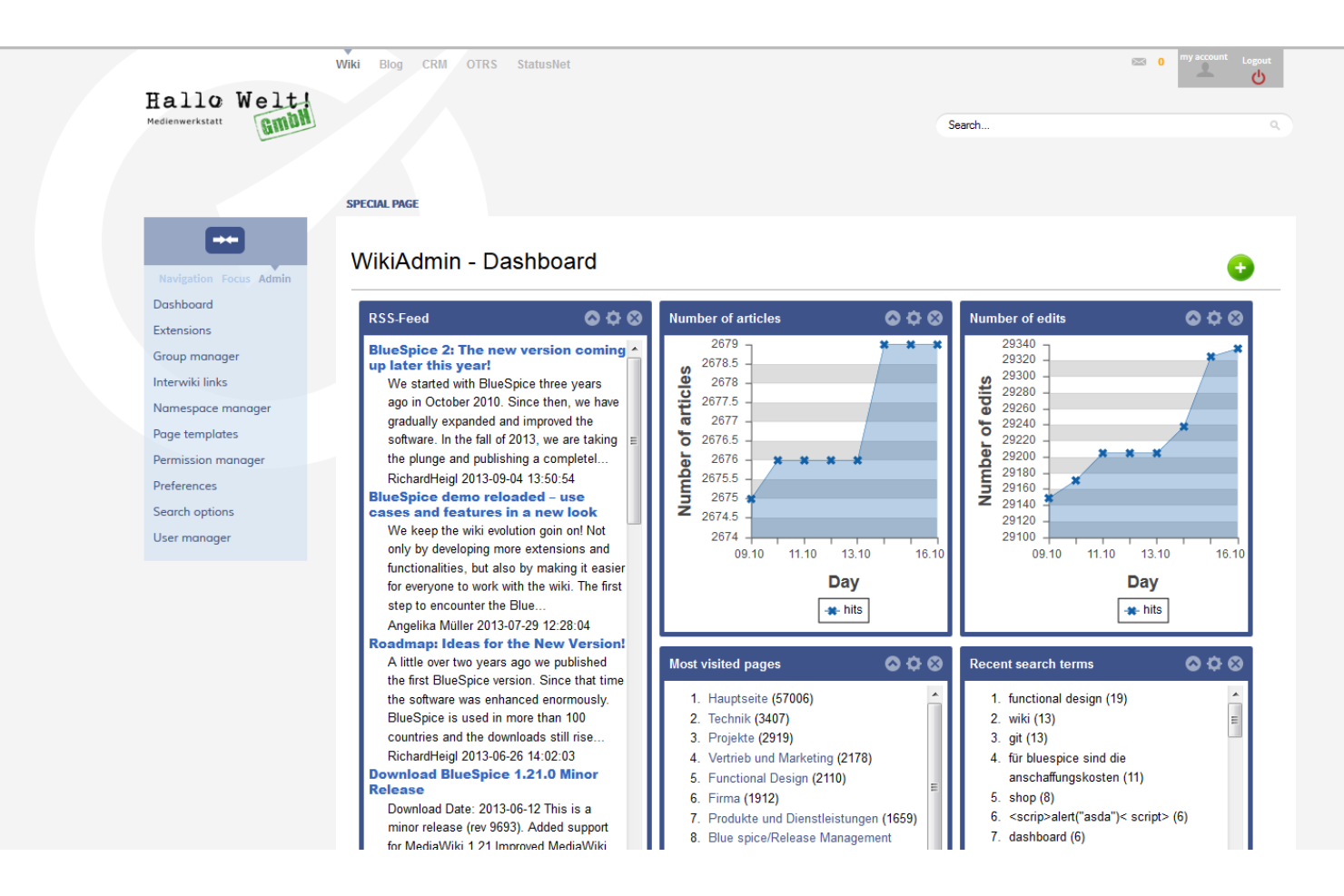
MediaWiki è una piattaforma wiki open source progettata per l'editing collaborativo, il controllo delle versioni e la gestione dei contenuti su larga scala, con un sistema di estensioni flessibile e supporto per strutture documentali complesse.
A Chi È Rivolto MediaWiki?
Grandi organizzazioni e comunità che gestiscono documentazione estesa e collaborativa o basi di conoscenza.
Perché Ho Scelto MediaWiki
Ho scelto MediaWiki tra i migliori perché è il motore open source dietro Wikipedia, il che significa che il mio team può gestire progetti di documentazione su larga scala, multiutente, con una comprovata scalabilità. Mi piace come il sistema di estensioni ci permetta di aggiungere funzionalità per citazioni, template e strutturazione avanzata dei contenuti. In pratica, questo significa che siamo in grado di costruire basi di conoscenza complesse e interconnesse che supportano storici dettagliati delle revisioni e l'editing collaborativo su larga scala.
Funzionalità Principali di MediaWiki
- Namespace: Organizza i contenuti in aree separate e logiche per diversi tipi di pagine.
- Gestione dei diritti utente: Assegna permessi granulari a utenti e gruppi per la modifica e l'amministrazione.
- Watchlist: Tieni traccia delle modifiche alle pagine selezionate per una supervisione e collaborazione più facile.
- Accesso API: Integra strumenti esterni e automatizza attività utilizzando una API web.
Integrazioni di MediaWiki
Le integrazioni native non sono attualmente elencate. MediaWiki supporta integrazioni tramite la sua API e centinaia di estensioni sviluppate dalla comunità per connettersi con strumenti come LDAP, Google Analytics e Slack.
Pros and Cons
Pros:
- Elevata personalizzazione grazie all'ampio supporto alle estensioni
- Gestisce molto bene grandi progetti di documentazione
- Solido controllo delle versioni e storico delle revisioni
Cons:
- Interfaccia predefinita datata rispetto agli strumenti moderni
- Nessun editor WYSIWYG integrato di default

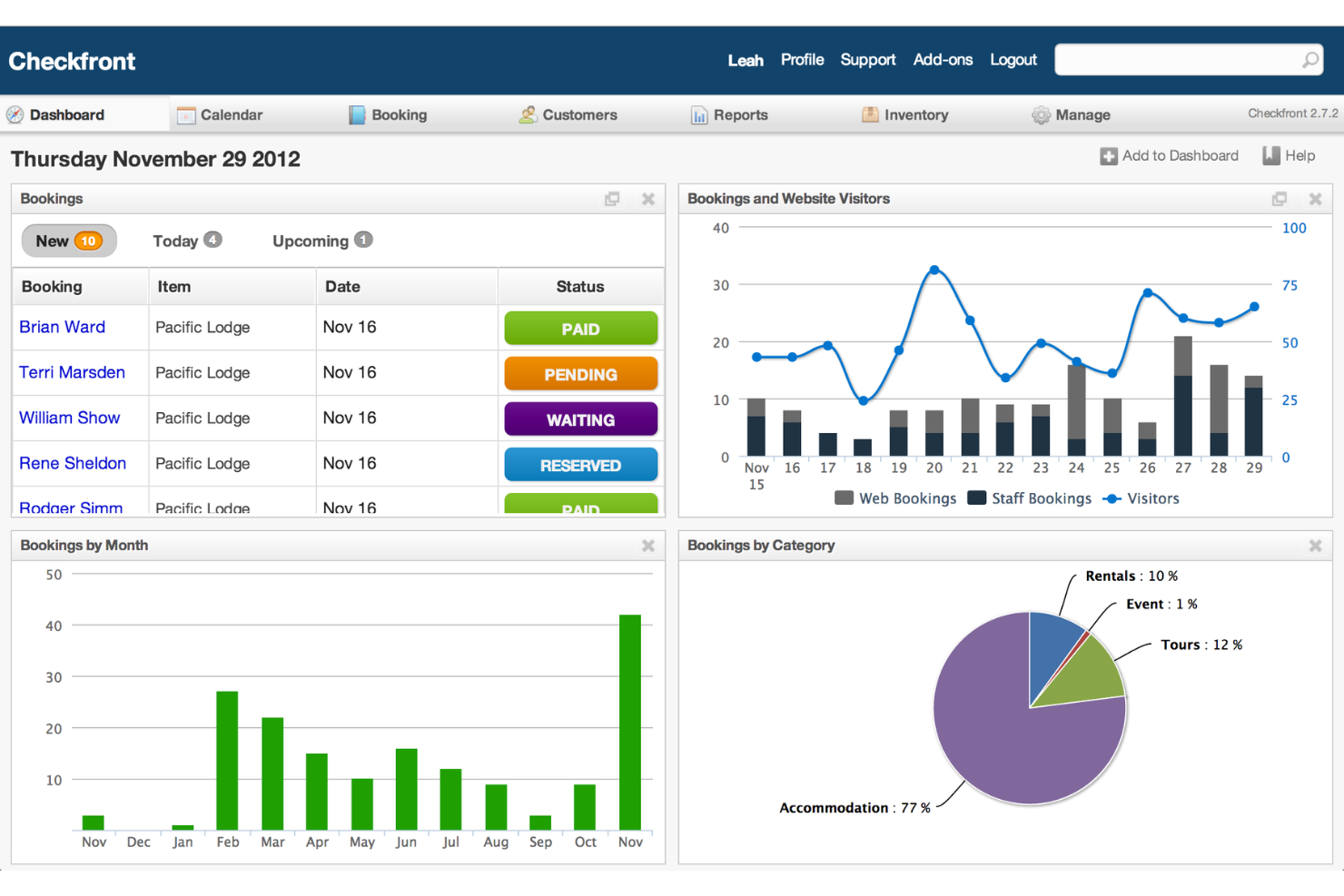
DokuWiki è un software wiki open source progettato per creare e gestire documentazione strutturata, offrendo archiviazione in testo semplice, una sintassi facile e un sistema di plugin per ampliare le funzionalità.
Per chi è ideale DokuWiki?
Team o organizzazioni di piccole e medie dimensioni che necessitano di un wiki leggero, basato su file, per documentazione interna.
Perché ho scelto DokuWiki
Ho scelto DokuWiki tra i migliori perché mi piace il fatto che l'archiviazione in file di testo semplice significa che non serve mai un database, rendendo configurazione e backup semplici. Il mio team utilizza il suo sistema di plugin flessibile per aggiungere funzionalità come il controllo degli accessi e i dati strutturati, così possiamo adattare il nostro wiki alle esigenze specifiche di documentazione. Apprezzo anche la gestione integrata delle versioni delle pagine, che ci permette di tracciare ogni cambiamento senza configurazioni aggiuntive.
Funzionalità principali di DokuWiki
- Liste di controllo degli accessi: Imposta permessi dettagliati per utenti e gruppi.
- Gestore media: Carica e organizza immagini e file all'interno del wiki.
- Ricerca full-text: Trova rapidamente contenuti in tutte le pagine wiki.
- Sistema di template: Personalizza l'aspetto grafico con temi diversi.
Integrazioni di DokuWiki
Attualmente non sono elencate integrazioni native. DokuWiki supporta integrazioni tramite il suo sistema di plugin e mette a disposizione un'API per integrazioni personalizzate.
Pros and Cons
Pros:
- Il sistema di plugin aggiunge funzionalità avanzate al wiki
- Non richiede un database per l'installazione
- Gestisce bene progetti di documentazione estesi
Cons:
- Integrazioni native limitate con altri strumenti
- Configurazione manuale necessaria per l'incorporamento di file multimediali

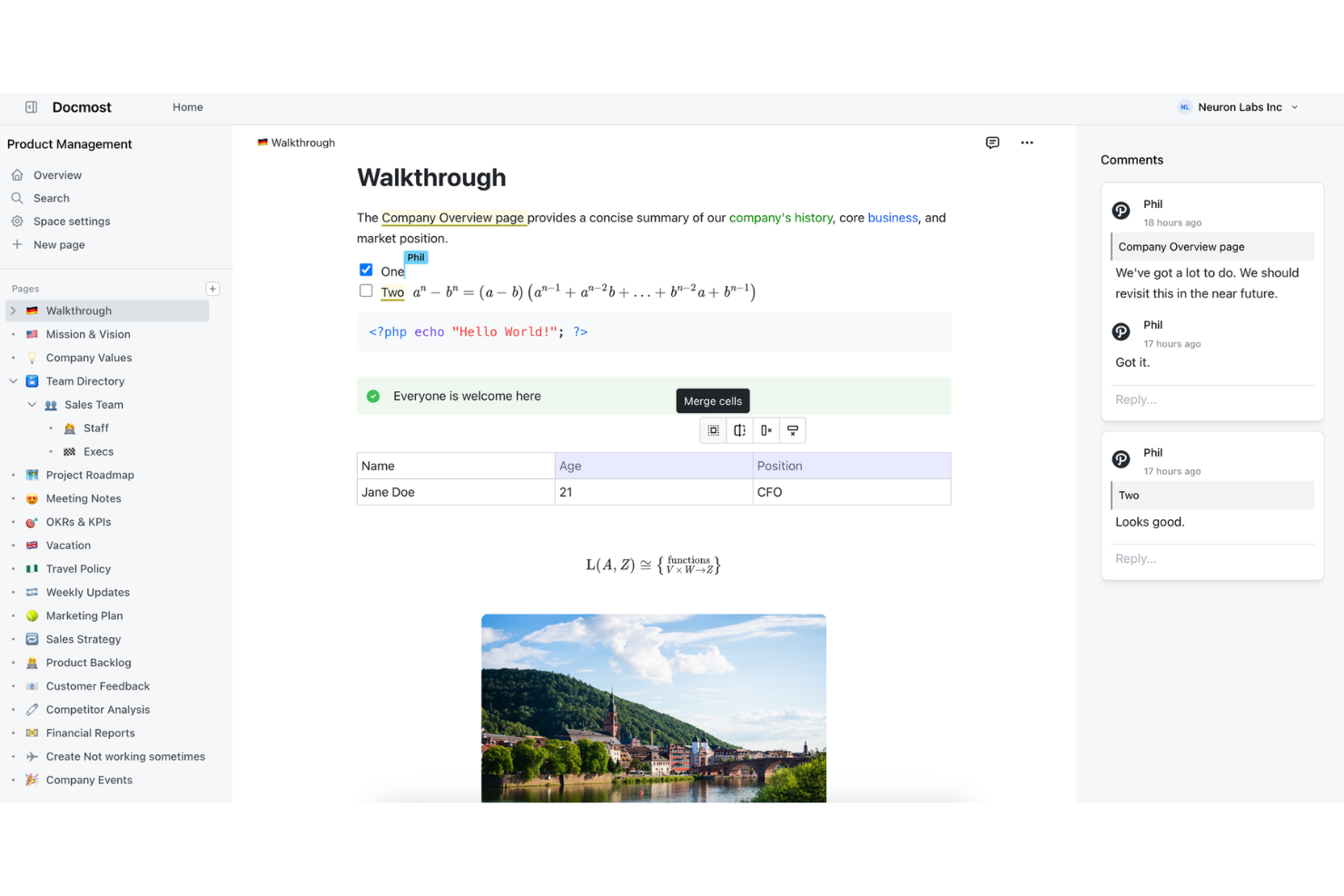
Docmost è una piattaforma di knowledge base alimentata dall’IA per team che unisce creazione di documenti, ricerca intelligente e modifica collaborativa in un unico spazio di lavoro.
Per chi è Docmost?
Team e organizzazioni che desiderano una knowledge base alimentata dall’IA per centralizzare la documentazione interna e supportare la collaborazione.
Perché ho scelto Docmost
Ho scelto Docmost tra i migliori perché mi piace come la sua ricerca intelligente e i suggerimenti sui documenti, grazie all’IA, aiutino il mio team a trovare le informazioni rilevanti istantaneamente. Uso il suo editor collaborativo e le funzioni di organizzazione intelligente per mantenere aggiornata la nostra documentazione interna. L’assistente IA facilita la generazione e la revisione dei contenuti direttamente nell’ambiente di lavoro.
Funzionalità principali di Docmost
- Cronologia delle versioni: Traccia e ripristina versioni precedenti dei documenti in qualsiasi momento.
- Permessi basati sui ruoli: Imposta controlli di accesso dettagliati per utenti e gruppi.
- Template personalizzati: Crea e riutilizza modelli di documento per un formato uniforme.
- Importazione massiva: Importa più documenti contemporaneamente da tipi di file supportati.
Integrazioni di Docmost
Docmost offre integrazioni native con Loom, Typeform, Miro, Airtable, Figma, oltre a una REST API e il supporto per la connettività con IA e strumenti esterni tramite il Model Context Protocol (MCP).
Pros and Cons
Pros:
- Suggerimenti sui contenuti per la documentazione grazie all’IA
- Self-hosted con architettura orientata alla privacy
- Ricerca locale istantanea su tutti i documenti
Cons:
- Strumenti di analisi o report sui dati di utilizzo minimi
- Le opzioni di personalizzazione dell’interfaccia sono molto limitate


phpMyFAQ è un software open source per FAQ e knowledge base che permette di creare, organizzare e pubblicare contenuti strutturati di domande e risposte con supporto multilingue, permessi utente e versionamento dei contenuti.
Per chi è più adatto phpMyFAQ?
Organizzazioni di piccole e medie dimensioni che necessitano di una FAQ o knowledge base strutturata e multilingue.
Perché ho scelto phpMyFAQ
Ho scelto phpMyFAQ tra i migliori perché è open source e progettato specificamente per la gestione strutturata delle FAQ. Mi piace poter organizzare i contenuti in categorie, utilizzare il supporto multilingue integrato e gestire i permessi utente per la modifica e la pubblicazione. Il mio team utilizza la cronologia delle revisioni per tracciare le modifiche e mantenere accuratezza in tutta la knowledge base.
Funzionalità principali di phpMyFAQ
- Gestione allegati: Carica e gestisci file insieme alle voci delle FAQ.
- Sistema di feedback degli utenti: Raccogli valutazioni e commenti degli utenti sugli articoli.
- Supporto LDAP e Active Directory: Integra l'autenticazione con le directory utente aziendali.
- Strumenti di backup e ripristino: Esporta e importa l'intera knowledge base per il disaster recovery.
Integrazioni di phpMyFAQ
phpMyFAQ offre supporto nativo per MySQL, MariaDB, PostgreSQL, Microsoft SQL Server, SQLite, Elasticsearch, OpenSearch e autenticazione LDAP/Active Directory.
Pros and Cons
Pros:
- Supporto multilingue per team globali
- Organizzazione delle FAQ per categorie
- Autenticazione LDAP e Active Directory
Cons:
- Manca la funzionalità di modifica collaborativa in tempo reale
- L'interfaccia di amministrazione si basa su uno stile PHP tradizionale
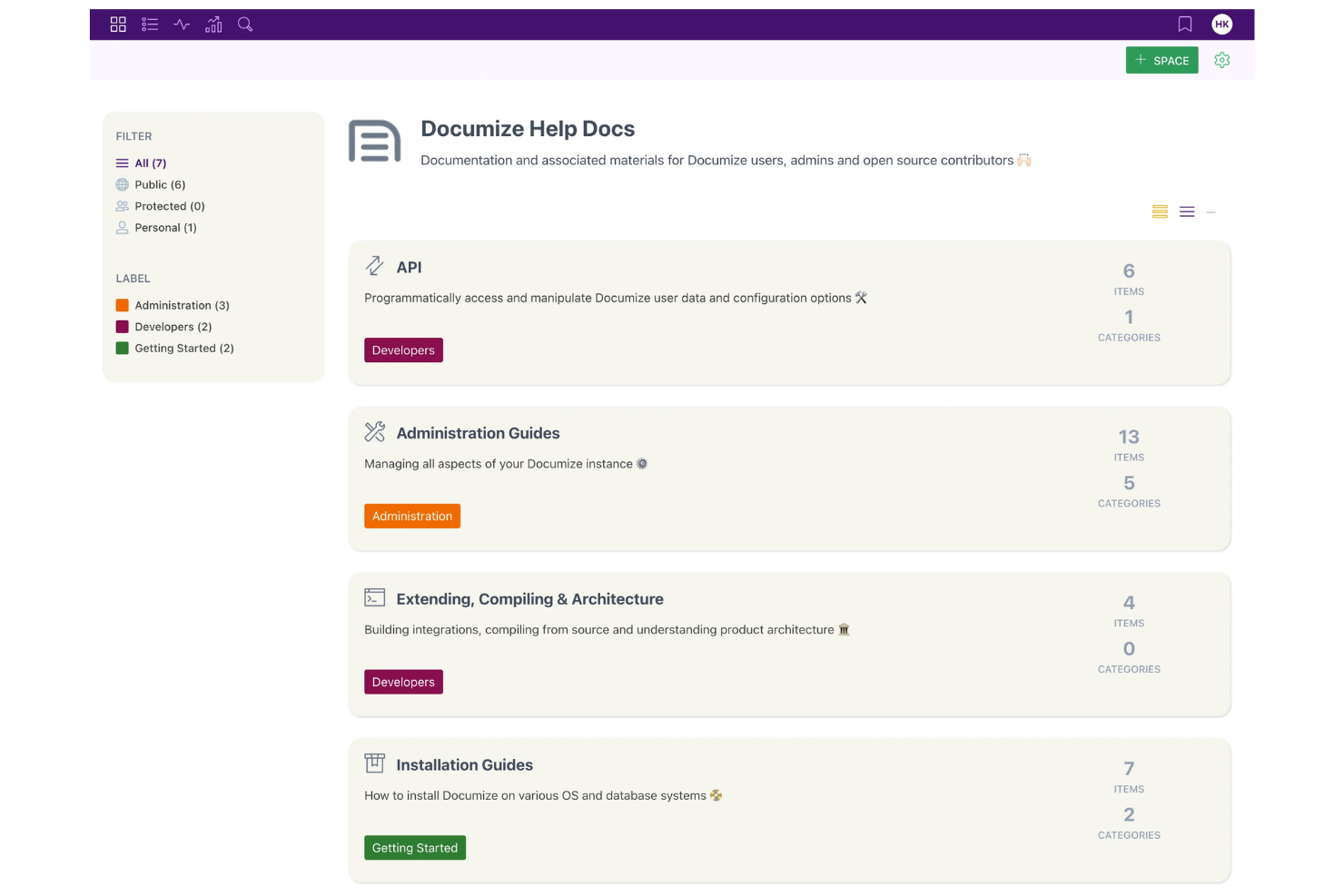
Documize è una piattaforma open source per la gestione della conoscenza che consente ai team di organizzare, redigere e gestire documentazione interna, guide tecniche e contenuti collaborativi in un unico spazio di lavoro.
Per chi è Documize?
Team IT e dipartimenti tecnici di organizzazioni di medie dimensioni che necessitano di un hub documentale centralizzato e open source.
Perché ho scelto Documize
Ho scelto Documize tra i migliori perché apprezzo come unisce la flessibilità dell'open source a uno spazio di lavoro strutturato per la documentazione tecnica. Il mio team utilizza il sistema di 'Spazi' e 'Pagine' per organizzare documenti interni e guide tecniche. Mi affido anche ai suoi permessi granulati per gestire l'accesso tra i vari dipartimenti.
Funzionalità principali di Documize
- Editor Markdown: Crea e formatta la documentazione utilizzando la sintassi markdown.
- Versionamento dei documenti: Tieni traccia delle modifiche e ripristina versioni precedenti dei documenti.
- REST API: Integra Documize con altri strumenti e flussi di lavoro.
- Ricerca full-text: Trova rapidamente i contenuti tra tutti gli spazi e le pagine.
Integrazioni Documize
Documize offre autenticazione nativa e integrazioni per directory con LDAP, Active Directory, Keycloak, ed è compatibile con provider di identità come Auth0. È disponibile una REST API per integrazioni personalizzate.
Pros and Cons
Pros:
- Molteplici modalità di documentazione in un'unica piattaforma
- Automazione dei flussi di lavoro e approvazioni personalizzabili
- Supporto per spazi sia pubblici che privati
Cons:
- Bug occasionali interrompono il flusso di modifica dei documenti
- Utilizzo di risorse maggiore su grandi implementazioni
Altri software a codice aperto per basi di conoscenza
Ecco alcune opzioni aggiuntive di software a codice aperto per basi di conoscenza che non sono entrate nella mia selezione, ma che vale comunque la pena valutare:
- Docusaurus
Ideale per siti di documentazione per sviluppatori
- Raneto
Ideale per knowledge base semplici in markdown
- TiddlyWiki
Ideale per la gestione personale delle conoscenze


Come Valuto i Software di Knowledge Base Open Source
Valuto gli strumenti su due livelli: una soglia minima che devono superare—autoinstallazione, licenza open, documentazione sotto controllo di versione—e dei fattori differenzianti come l'integrazione con strumenti di project management e la flessibilità nel deployment.
Funzionalità Fondamentali (Requisiti Minimi per Questa Lista)
Quando seleziono gli strumenti per la mia lista, valuto ognuno su una scala da 0 (la funzionalità non è presente) a 5 (eccelle in quest'area) per ogni funzionalità chiave elencata di seguito. Poi, calcolo il punteggio totale dello strumento e lo converto in percentuale. Ogni strumento deve ottenere un punteggio totale minimo del 65% per essere considerato.
- Licenza Open Source: Verifico che il progetto abbia una licenza approvata dall'OSI e che il codice sorgente sia pubblicamente disponibile—strumenti come BookStack (MIT) e Wiki.js (AGPL) rendono facile la conferma nei loro repository.
- Opzioni di Deploy Autoinstallate: Che si tratti di un'immagine Docker, di una Helm chart Kubernetes o di un'installazione manuale, cerco percorsi ufficiali e ben documentati per far girare la piattaforma sulla propria infrastruttura.
- Organizzazione Strutturata dei Contenuti: I team di progetto accumulano molta documentazione in fretta, quindi valuto come ogni strumento gestisce pagine nidificate, spazi, categorie e tagging per tenere runbook e SOP organizzati logicamente.
- Modifica Collaborativa & Versionamento: Cerco uno storico delle revisioni con possibilità di rollback e visualizzazione delle differenze—funzionalità importanti quando più collaboratori aggiornano contemporaneamente un articolo "lezioni apprese" o una retrospettiva di sprint.
- Ricerca Full-Text: Trovare quella guida alla migrazione sepolta sotto mesi di note sprint è uno scenario reale, quindi valuto la qualità della ricerca, inclusi filtri, ranking di rilevanza e anteprima dei contenuti nei risultati.
- Controllo degli Accessi & Permessi: Permessi granulari basati su ruoli a livello di spazio o pagina sono ciò che cerco, insieme al supporto per la gestione dei gruppi così da rispecchiare la struttura del team di progetto nello strumento.
Una volta che ho una lista di strumenti che rispondono ai requisiti, considero cosa distingue ogni piattaforma.
Fattori Differenzianti (Cosa Distingue i Vendor)
Ecco come confronto e metto a paragone i diversi vendor:
Funzionalità Distintive
Una API ben documentata con supporto ai webhook è una delle prime cose che valuto, perché determina se puoi automatizzare la creazione di documentazione dagli eventi di sprint o inviare aggiornamenti su Slack. La presenza di strumenti di diagrammazione integrati è un altro elemento distintivo—strumenti come Outline e Wiki.js supportano embedding di Mermaid, che consentono di mappare i flussi di lavoro del progetto senza uscire dall'editor. Integrazioni native con piattaforme come Jira o GitHub sono importanti se vuoi che i riferimenti agli issue restino collegati alle pagine della knowledge base pertinenti.
Oltre le Funzionalità
Lo stato di salute della community è un segnale importante che valuto—uno storico di commit attivi, release regolari e forum reattivi indicano se il progetto sarà ancora mantenuto quando il tuo team dipenderà da esso tra due anni. Anche il costo totale di proprietà merita attenzione, perché un tool "gratuito" può diventare costoso una volta considerata l'infrastruttura server e il tempo DevOps necessario agli aggiornamenti. Infine, la sicurezza completa la mia valutazione; cerco supporto per SSO e LDAP, cifratura a riposo e audit logging, specialmente per i team che gestiscono dati sensibili di delivery.
Come scegliere un software a codice aperto per basi di conoscenza
È facile perdersi in lunghi elenchi di funzionalità e strutture tariffarie complesse. Per aiutarti a rimanere concentrato mentre affronti il tuo specifico processo di selezione del software, ecco un elenco di fattori da tenere a mente:
| Fattore | Cosa valutare |
| Scalabilità | Il software sarà in grado di gestire la crescita prevista di utenti, documenti e team senza problemi di prestazioni? |
| Integrazioni | Si connette in modo nativo o tramite API agli strumenti esistenti, come i sistemi di autenticazione o le piattaforme di collaborazione? |
| Personalizzazione | Puoi adattare flussi di lavoro, autorizzazioni e struttura dei contenuti ai processi e alla terminologia della tua organizzazione? |
| Facilità d'uso | Il tuo team adotterà rapidamente lo strumento oppure l'interfaccia e la navigazione rallenteranno il lavoro quotidiano? |
| Implementazione e inserimento | Quanto tempo e quali competenze tecniche saranno necessari per implementare il software, migrare i contenuti e formare gli utenti? Sono disponibili guide o strumenti di migrazione? |
| Costo | Quali sono i costi effettivi, inclusi i servizi di hosting, l'assistenza e i componenti aggiuntivi? Esistono spese nascoste o limitazioni di licenza? |
| Misure di sicurezza | Il software supporta la crittografia, i controlli degli accessi e i registri di controllo per proteggere le informazioni sensibili e soddisfare i requisiti di conformità? |
| Disponibilità dell'assistenza | Esistono una comunità attiva, documentazione o assistenza a pagamento per aiutare a risolvere i problemi e rispondere alle domande quando si presentano? |
Che cos'è un software a codice aperto per basi di conoscenza?
Il software a codice sorgente aperto per basi di conoscenza è uno strumento di gestione della conoscenza che consente alle organizzazioni di creare, gestire e condividere la documentazione utilizzando codice liberamente disponibile. Queste piattaforme supportano la collaborazione tra i team interni e aiutano i membri dei team a creare e gestire articoli della base di conoscenza in un sistema flessibile.
Vengono spesso utilizzate sia dai team delle piccole imprese sia dalle grandi organizzazioni che necessitano di una personalizzazione di livello aziendale. Grazie al supporto per i flussi di lavoro, il controllo delle versioni e le integrazioni con strumenti di gestione dei progetti, aiutano a semplificare i processi di documentazione adattandosi alle esigenze specifiche.
Molte soluzioni sono disponibili come SaaS o come opzioni installabili autonomamente, offrendo ai team la flessibilità di scegliere la base di conoscenza più adatta alla propria configurazione e migliorando al contempo l'esperienza dell'utente e l'esperienza complessiva del cliente, spesso con una curva di apprendimento gestibile.
Funzionalità
Quando scegli il software a codice sorgente aperto per basi di conoscenza, presta attenzione alle seguenti funzionalità chiave:
- Controllo delle versioni dei documenti: tiene traccia delle modifiche apportate agli articoli o ai documenti, consentendo agli utenti di visualizzare, confrontare e ripristinare le versioni precedenti secondo necessità.
- Autorizzazioni basate sui ruoli: consente agli amministratori di assegnare diversi livelli di accesso a utenti o gruppi, garantendo che le informazioni sensibili siano disponibili solo alle persone autorizzate.
- Ricerca a testo integrale: permette agli utenti di trovare rapidamente articoli o documenti pertinenti effettuando ricerche in tutti i contenuti, inclusi titoli, testo del corpo e metadati.
- Modelli personalizzabili: offre modelli predefiniti o modificabili per una formattazione coerente degli articoli e una creazione più rapida dei contenuti.
- Modifica collaborativa: consente a più utenti di modificare e commentare simultaneamente i documenti, supportando il lavoro di squadra e i riscontri in tempo reale.
- Flussi di lavoro per l'approvazione: automatizza il processo di revisione e pubblicazione, garantendo che i contenuti vengano verificati prima di essere pubblicati.
- Accesso API: offre punti di integrazione per collegare la base di conoscenza ad altri strumenti o automatizzare le attività di gestione dei contenuti.
- Supporto multilingue: supporta la creazione e la gestione di contenuti in più lingue per team o destinatari internazionali.
- Analisi e reportistica: fornisce informazioni sull'utilizzo dei contenuti, sulle tendenze di ricerca e sul coinvolgimento degli utenti per contribuire a migliorare la qualità della documentazione.
- Campi di metadati personalizzati: consente agli utenti di contrassegnare e categorizzare i documenti con attributi personalizzati per una migliore organizzazione e un filtraggio avanzato.
Vantaggi
L'implementazione di un software a codice sorgente aperto per basi di conoscenza offre diversi vantaggi al tuo team e alla tua azienda. Eccone alcuni:
- Controllo completo sui dati: decidi dove e come vengono archiviate le tue conoscenze, con la possibilità di ospitare autonomamente il software e gestire le impostazioni di sicurezza.
- Flussi di lavoro personalizzabili: adatta la piattaforma ai processi del tuo team, dall'approvazione degli articoli alle autorizzazioni degli utenti, sfruttando la flessibilità del codice sorgente aperto.
- Risparmio sui costi: evita costosi canoni di licenza e riduci il costo totale di proprietà utilizzando soluzioni a codice sorgente aperto gratuite o a basso costo.
- Miglioramenti guidati dalla comunità: usufruisci di miglioramenti continui, correzioni di bug e nuove funzionalità fornite da una comunità globale di sviluppatori.
- Flessibilità di integrazione: collega la tua base di conoscenza ad altri strumenti e sistemi utilizzando API o integrazioni personalizzate, supportando esigenze aziendali specifiche.
- Trasparenza e verificabilità: l'accesso al codice sorgente consente revisioni approfondite della sicurezza e la conformità agli standard interni o normativi.
- Scalabilità per la crescita: amplia facilmente la tua base di conoscenza con la crescita dell'organizzazione, senza preoccuparti di fasce di prezzo restrittive o limiti al numero di utenti.
Costi e prezzi
La scelta di un software a codice sorgente aperto per basi di conoscenza richiede la comprensione dei vari modelli e piani tariffari disponibili. I costi variano in base alle funzionalità, alle dimensioni del team, ai componenti aggiuntivi e ad altri fattori. La tabella seguente riassume i piani più comuni, i relativi prezzi medi e le funzionalità tipicamente incluse nelle soluzioni software a codice sorgente aperto per basi di conoscenza:
Tabella di confronto dei piani
| Tipo di piano | Prezzo medio | Funzionalità comuni |
| Piano gratuito | $0 | Accesso alle funzionalità principali, gestione di base degli utenti, supporto della comunità e codice sorgente aperto. |
| Piano personale | $5–$15/utente/mese | Tutte le funzionalità gratuite, personalizzazione migliorata, integrazioni limitate e supporto via e-mail. |
| Piano aziendale | $15–$30/utente/mese | Tutte le funzionalità del piano personale, autorizzazioni avanzate, automazione dei flussi di lavoro, analisi e supporto prioritario. |
| Piano aziendale | $30–$60/utente/mese | Tutte le funzionalità aziendali, accesso singolo, registri di audit, inserimento dedicato e supporto di livello superiore. |
Domande frequenti sul software per basi di conoscenza a codice aperto
Ecco alcune risposte alle domande comuni sul software per basi di conoscenza a codice aperto:
Posso ospitare autonomamente il software per basi di conoscenza a codice aperto?
Sì, la maggior parte dei software può essere ospitata autonomamente sui propri server o su un’infrastruttura cloud. Questo offre il pieno controllo sulla sicurezza dei dati, sulla conformità e sulla personalizzazione, ma significa anche che sarai responsabile della manutenzione e degli aggiornamenti.
Quanto è difficile migrare la documentazione esistente in una base di conoscenza a codice aperto?
La difficoltà della migrazione dipende dal sistema attuale e dagli strumenti di importazione disponibili. Molte piattaforme a codice aperto offrono opzioni di importazione basate su CSV, HTML o API, ma una formattazione complessa o grandi volumi di dati possono richiedere script personalizzati o modifiche manuali.
Quale tipo di supporto è disponibile per il software per basi di conoscenza a codice aperto?
Il supporto proviene generalmente dai forum della comunità, dalla documentazione e talvolta da piani di supporto a pagamento. Alcuni progetti dispongono di comunità di utenti attive e guide dettagliate, mentre altri possono richiedere una maggiore autonomia o il ricorso a consulenti di terze parti.
Gli strumenti per basi di conoscenza a codice aperto sono sufficientemente sicuri per le informazioni sensibili?
Sì, gli strumenti a codice aperto possono essere sicuri se configurati correttamente. Cerca funzionalità come autorizzazioni basate sui ruoli, crittografia e registri di audit e assicurati di mantenere aggiornata l’installazione per risolvere le vulnerabilità di sicurezza.
Posso personalizzare l'aspetto e lo stile della mia base di conoscenza a codice aperto?
Sì, la maggior parte dei software per basi di conoscenza a codice aperto consente di personalizzare temi, disposizioni e identità visiva. Spesso è possibile modificare i modelli, i CSS e persino il codice principale per adattarli allo stile e ai requisiti della propria organizzazione.