

10 software di simulazione dei processi aziendali per il 2026

10 Elenco ristretto dei software di simulazione dei processi aziendali


Il software di simulazione dei processi aziendali consente di modellare, testare e analizzare i flussi di lavoro prima di apportare modifiche nel mondo reale, aiutando il tuo gruppo a ridurre i rischi e a migliorare il processo decisionale. Se stai cercando lo strumento giusto, probabilmente devi affrontare requisiti in continua evoluzione, dipendenze complesse e la pressione di ottenere risultati prevedibili. La piattaforma di simulazione giusta può aiutarti a visualizzare i colli di bottiglia dei processi, sperimentare diversi scenari e allineare le parti interessate su miglioramenti basati sui dati.
In questo elenco troverai un confronto dei migliori software di simulazione dei processi aziendali per il 2026, con informazioni sulle funzionalità, sui casi d'uso e sugli aspetti che rendono ogni opzione adatta alle diverse esigenze dei progetti.
Perché fidarsi dei nostri consigli sui software
Il nostro team testa e recensisce software dal 2012. In quanto project manager noi stessi, sappiamo quanto sia difficile — e importante — scegliere il software giusto.
Per questa guida, abbiamo valutato gli strumenti attraverso test pratici e ricerche indipendenti, assegnando un punteggio agli strumenti in base ai nostri criteri di selezione. Ci basiamo inoltre sulle competenze di leader di pensiero del settore e di professionisti attivi nella gestione dei progetti.
Le nostre recensioni riflettono il nostro giudizio editoriale umano, non un discorso di vendita.
Revisori esperti:
Tabella comparativa dei software di simulazione dei processi aziendali
La tabella seguente confronta i dettagli sui prezzi delle mie migliori selezioni di software per la simulazione dei processi aziendali.
| Tool | Best For | Trial Info | Price | ||
|---|---|---|---|---|---|
| 1 | Ideale per settori ad alta intensità di processo | Prova gratuita disponibile | Prezzo su richiesta | Website | |
| 2 | Ideale per la mappatura e l'analisi visuale dei processi | Demo gratuita disponibile | Prezzo su richiesta | Website | |
| 3 | Ideale per la rapida sperimentazione degli scenari | Demo gratuita disponibile | Prezzo su richiesta | Website | |
| 4 | Ideale per la modellazione di processi basata su browser | Gratis | Gratis | Website | |
| 5 | Ideale per modellare flussi di lavoro complessi e multi-metodo | Demo gratuita disponibile | Prezzi su richiesta | Website | |
| 6 | Ideale per simulazioni interattive in tempo reale | Non disponibile | Da $4,995 (fatturato annualmente) | Website | |
| 7 | Ideale per la modellazione di processi aziendali su larga scala | Demo gratuita disponibile | Prezzo su richiesta | Website | |
| 8 | Ideale per modelli di processo quick-start | Prova gratuita disponibile | Da $79.95/mese (fatturazione annuale) | Website | |
| 9 | Ideale per l'integrazione con i sistemi produttivi | Prova gratuita di 30 giorni disponibile | Prezzo su richiesta | Website | |
| 10 | Ideale per la visualizzazione 3D dei flussi di lavoro | Piano gratuito disponibile | Prezzo su richiesta | Website |
Recensioni dei software di simulazione dei processi aziendali
Di seguito sono riportati i miei riepiloghi dettagliati dei software di simulazione dei processi aziendali inclusi nel mio elenco ristretto. Le mie recensioni offrono una panoramica dettagliata delle funzionalità, dei migliori casi d’uso e delle integrazioni di ciascuna piattaforma, per aiutarti a trovare quella più adatta al tuo gruppo.

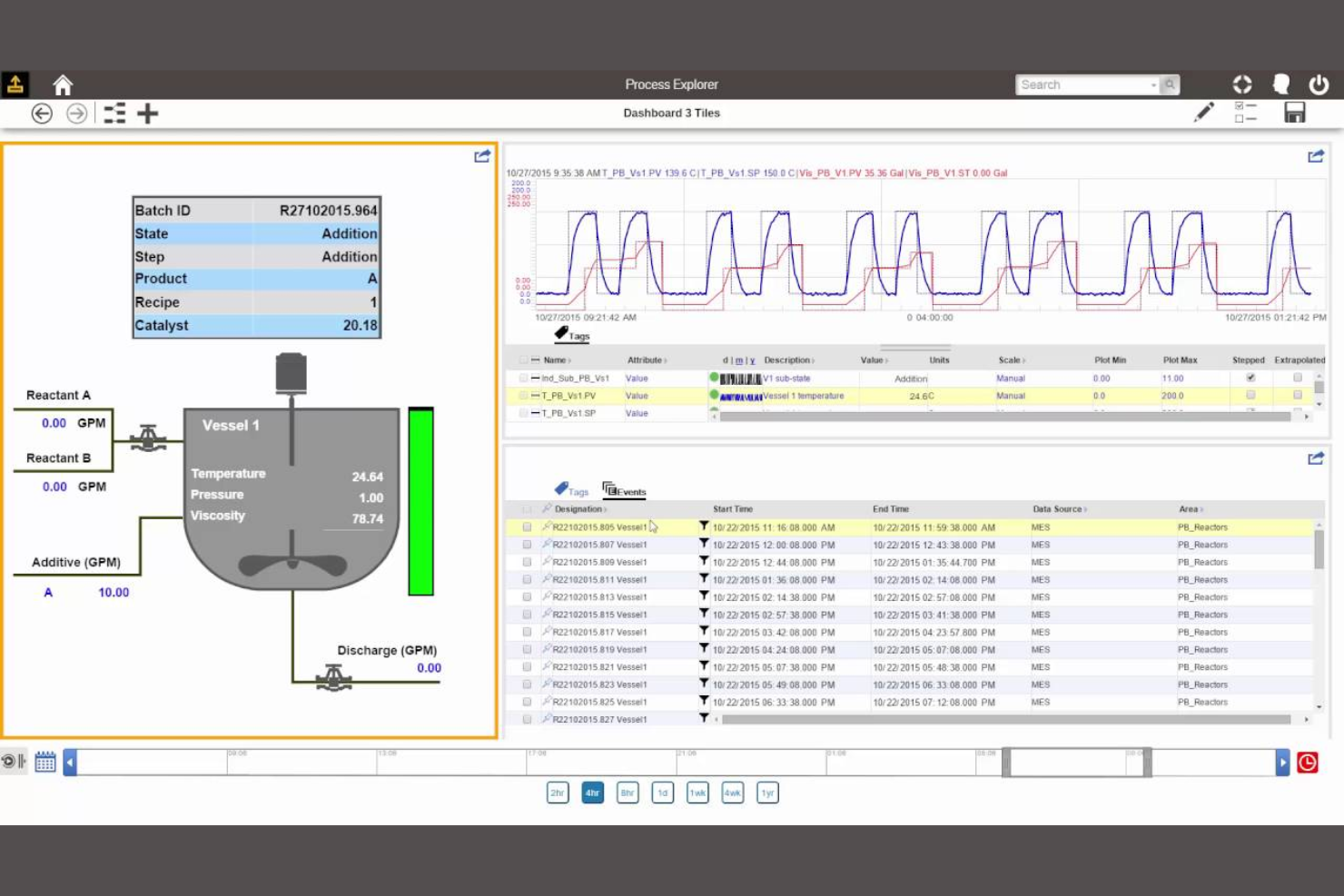
AspenTech è progettato per organizzazioni nei settori ad alta intensità di processo come chimica, petrolio e gas, e farmaceutica che necessitano di capacità avanzate di simulazione. La piattaforma supporta la modellazione complessa, l’ottimizzazione e la creazione di digital twin per operazioni continue su larga scala. I suoi strumenti specializzati aiutano ingegneri e responsabili di processo ad analizzare, prevedere e migliorare l’efficienza produttiva in contesti altamente regolamentati e tecnici.
Perché ho scelto AspenTech
AspenTech si distingue per i team che lavorano in settori ad alta intensità di processo e che richiedono strumenti di simulazione altamente specializzati. Ho scelto AspenTech perché offre una modellazione avanzata per processi continui, compresi reazioni chimiche, bilanci energetici e prestazioni degli impianti. Le capacità di digital twin della piattaforma permettono di rispecchiare le operazioni reali per analisi predittive e ottimizzazione. Il suo focus sul supporto di flussi di lavoro industriali complessi e su larga scala lo rende particolarmente adatto a ingegneri e responsabili di processo nei settori petrolio e gas, chimico e farmaceutico.
Principali Caratteristiche di AspenTech
Altre funzionalità che rendono AspenTech prezioso per i team di simulazione di processo includono:
- Analisi Economica Integrata: Valuta i cambiamenti di processo con strumenti integrati di stima dei costi e impatto economico.
- Ampie Librerie di Apparecchiature: Accedi a una vasta gamma di apparecchiature pre-modellate per una rappresentazione accurata dei processi.
- Analisi della Sicurezza di Processo: Simula e valuta scenari di sicurezza per supportare la conformità e la gestione del rischio.
- Strumenti di Connettività dei Dati: Importa ed esporta dati di processo da varie fonti per la calibrazione e la validazione dei modelli.
Integrazioni di AspenTech
Le integrazioni includono connettività nativa OPC/OPC UA e MQTT, sistemi plant historian e SAP ERP.
Pros and Cons
Pros:
- Modellazione termodinamica avanzata per l’industria di processo
- Supporto per digital twin per ottimizzazione in tempo reale
- Strumenti integrati per l’analisi della sicurezza e dei rischi di processo
Cons:
- Requisiti di sistema elevati per la piena funzionalità
- Destinato principalmente a operazioni industriali su larga scala

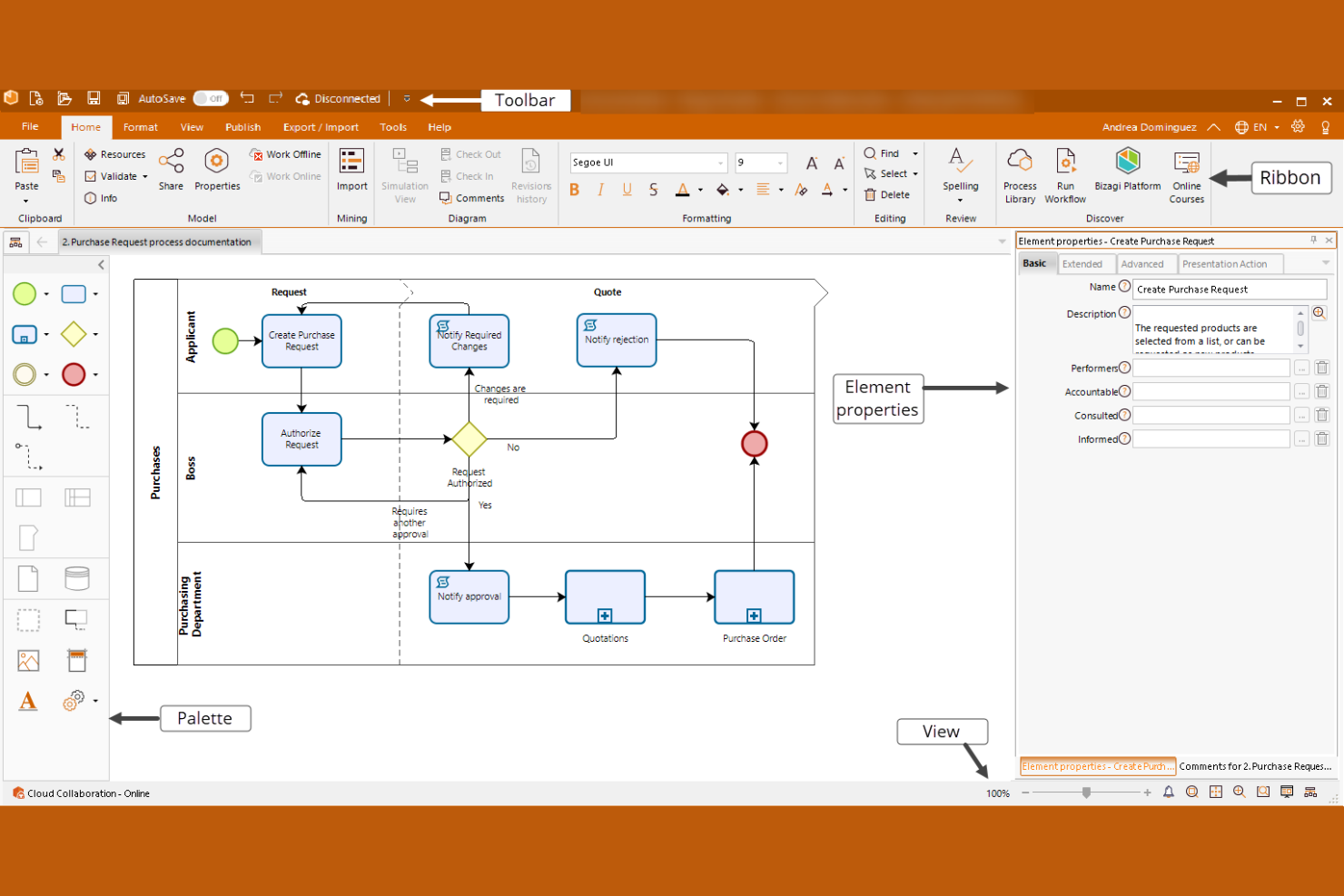
Bizagi si distingue per i team che necessitano di una mappatura dettagliata dei processi visuali insieme alla simulazione. È particolarmente indicato per analisti aziendali e specialisti del miglioramento dei processi che desiderano progettare, analizzare e ottimizzare i flussi di lavoro con diagrammi chiari e interattivi. Gli strumenti di modellazione visuale della piattaforma aiutano a individuare i colli di bottiglia e a testare le modifiche ai processi prima dell'implementazione.
Perché ho scelto Bizagi
Ciò che rende Bizagi una scelta vincente per la simulazione dei processi aziendali è il suo focus sulla mappatura visuale dei processi e sull'analisi. La piattaforma permette di costruire diagrammi di processo dettagliati e interattivi utilizzando gli standard BPMN, il che aiuta i team a comunicare e affinare chiaramente i flussi di lavoro. Apprezzo la possibilità di simulare le modifiche ai processi direttamente all'interno di questi modelli visivi per vedere l'impatto di varie variabili e allocazioni di risorse. Questo approccio è particolarmente utile per le organizzazioni che devono analizzare processi complessi e presentare i risultati sia a soggetti tecnici che non tecnici.
Funzionalità principali di Bizagi
Altre funzionalità che rendono Bizagi interessante per i team di simulazione dei processi includono:
- Animazione dei processi: Visualizza i flussi di processo in movimento per comprendere meglio i tempi e l'utilizzo delle risorse.
- Confronto degli scenari: Esegui e confronta più scenari di processo affiancati all'interno dello stesso modello.
- Reportistica personalizzata: Genera report personalizzati sulle prestazioni dei processi e sui risultati delle simulazioni.
- Strumenti di collaborazione: Condividi i modelli e raccogli feedback dagli stakeholder direttamente sulla piattaforma.
Integrazioni Bizagi
Le integrazioni includono SharePoint, Alfresco, SAP, Oracle, Microsoft Dynamics, Salesforce, DocuSign e altro. Bizagi offre anche un'API aperta per integrazioni personalizzate.
Pros and Cons
Pros:
- Esporta i modelli di processo in formato BPMN XML
- Supporta l'animazione dei processi per la riproduzione delle simulazioni
- Permette il confronto degli scenari all'interno di un unico modello
Cons:
- La simulazione è limitata alla modellazione di eventi discreti
- Non include funzionalità di process mining integrate


Simul8 è progettato per i team che hanno bisogno di testare e confrontare rapidamente più scenari di processo. È particolarmente utile per responsabili delle operazioni, analisti e consulenti che desiderano prendere decisioni rapide e basate sui dati in ambito manifatturiero, sanitario o nei servizi. Gli strumenti per la rapida sperimentazione degli scenari della piattaforma ti aiutano a visualizzare i cambiamenti di processo e a comprenderne l'impatto prima di impegnare risorse.
Perché ho scelto Simul8
Ciò che mi ha colpito di Simul8 è la rapidità con cui puoi costruire, modificare ed eseguire simulazioni di processo per testare diversi scenari. L'interfaccia drag-and-drop e il motore di risultati istantanei permettono di sperimentare cambiamenti nei processi e vedere i risultati in tempo reale, ideale per i team che devono prendere decisioni velocemente. Apprezzo il fatto che si possano gestire più scenari affiancati e confrontare i risultati senza dover ricostruire il modello da zero. Questa attenzione alla sperimentazione rapida degli scenari rende Simul8 particolarmente adatto alle organizzazioni che hanno bisogno di valutare rapidamente e con sicurezza le opzioni di processo.
Caratteristiche principali di Simul8
Oltre agli strumenti per la rapida sperimentazione degli scenari, Simul8 offre altre funzionalità degne di nota:
- Integrazione con Excel: Importa ed esporta dati direttamente fra Simul8 e Microsoft Excel per una gestione semplificata dei dati.
- Pianificazione delle risorse: Assegna e gestisci le risorse all'interno delle simulazioni per riflettere vincoli reali.
- Visual Logic personalizzato: Usa scripting integrato per aggiungere regole e comportamenti personalizzati ai modelli di processo.
- Accesso web: Crea ed esegui simulazioni da qualsiasi browser senza installare software desktop.
Integrazioni di Simul8
Le integrazioni includono Microsoft Excel, Google Sheets, connessioni SQL/database, supporto per scripting R e interfacce di automazione COM/OLE.
Pros and Cons
Pros:
- Esegue simulazioni direttamente nel browser web
- Importa ed esporta dati grazie all'integrazione con Excel
- Supporta scripting personalizzato con Visual Logic
Cons:
- Limita la visualizzazione 3D a grafica di base
- Richiede licenze separate per desktop e web

Ideale per la modellazione di processi basata su browser
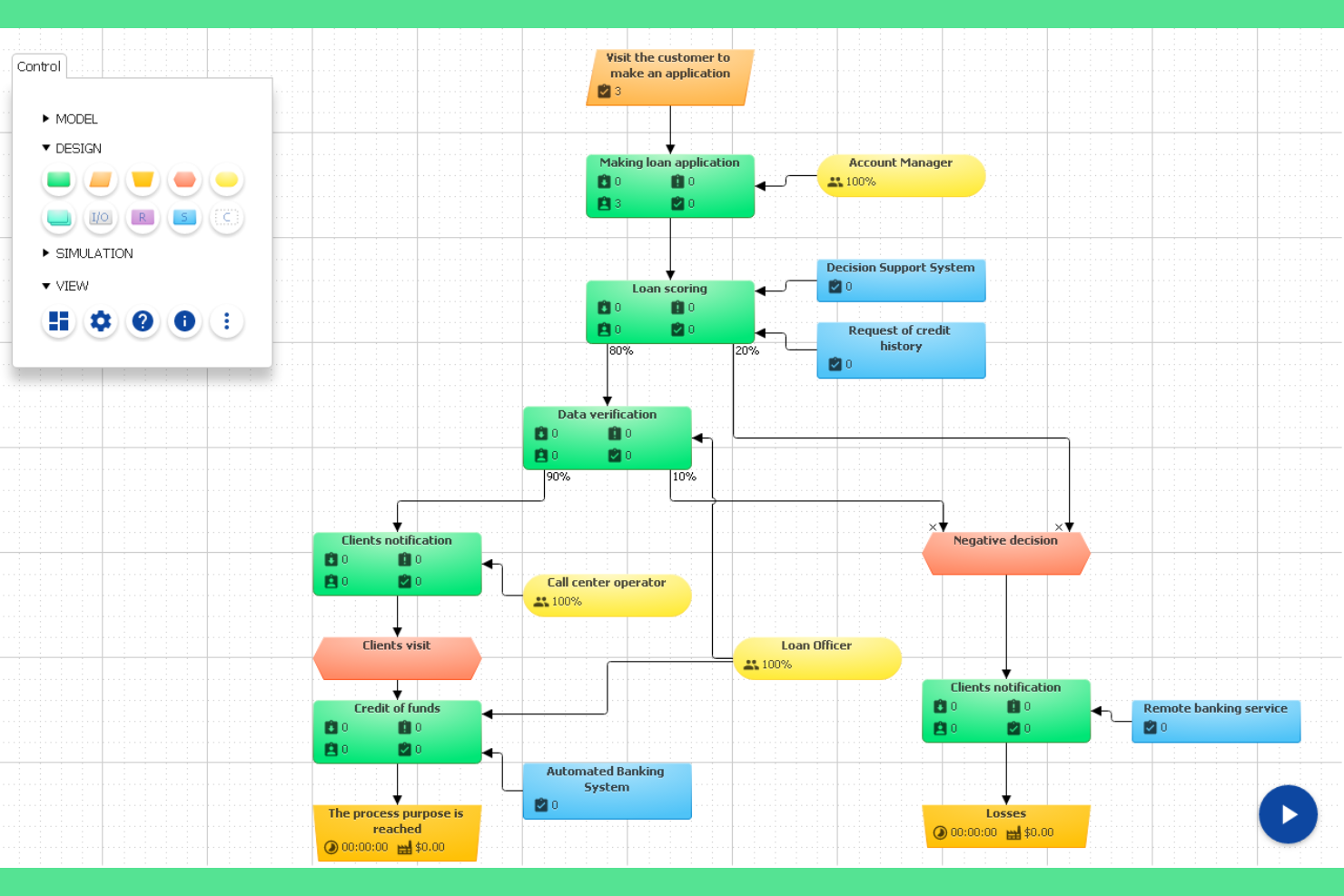
BP Simulator offre un approccio alla modellazione e simulazione dei processi basato su browser, rendendolo accessibile da qualsiasi dispositivo senza installazione. È una scelta pratica per team distribuiti, formatori o consulenti che hanno bisogno di creare, testare e condividere rapidamente modelli di processo online. Il design web-based della piattaforma elimina le barriere per gli utenti che vogliono collaborare o sperimentare modifiche ai processi in tempo reale.
Perché ho scelto BP Simulator
Per i team che vogliono evitare download e installazioni di software, la modellazione dei processi basata su browser di BP Simulator si distingue. La piattaforma consente di creare, modificare e simulare diagrammi di processo completamente online, il che è particolarmente utile per team remoti o organizzazioni con policy IT restrittive. Mi piace che si possano condividere i modelli istantaneamente con i collaboratori ed eseguire simulazioni direttamente nel browser per visualizzare i flussi di processo e i risultati. Questo rende BP Simulator un'opzione pratica per chiunque dia valore all'accessibilità e alla collaborazione in tempo reale nel lavoro di simulazione dei processi.
Caratteristiche principali di BP Simulator
Oltre alla sua modellazione basata su browser, ho trovato degne di nota anche queste funzionalità:
- Editor di diagrammi drag-and-drop: Costruisci e modifica diagrammi di processo grazie a un'interfaccia drag-and-drop intuitiva.
- Assegnazione delle risorse: Assegna risorse a specifici passaggi del processo per simulare la distribuzione del carico di lavoro.
- Dashboard delle metriche di processo: Visualizza i risultati della simulazione e i principali indicatori di performance in una dashboard visiva.
- Esporta in immagine o PDF: Salva e condividi i modelli di processo esportando i diagrammi come file immagine o PDF.
Integrazioni di BP Simulator
Le integrazioni native non sono attualmente elencate.
Pros and Cons
Pros:
- Funziona interamente in un browser web
- Permette di esportare i modelli come immagini o PDF
- Supporta l'assegnazione delle risorse nelle simulazioni
Cons:
- La simulazione è limitata a flussi di processo di base
- Nessun controllo delle versioni per i modelli di processo
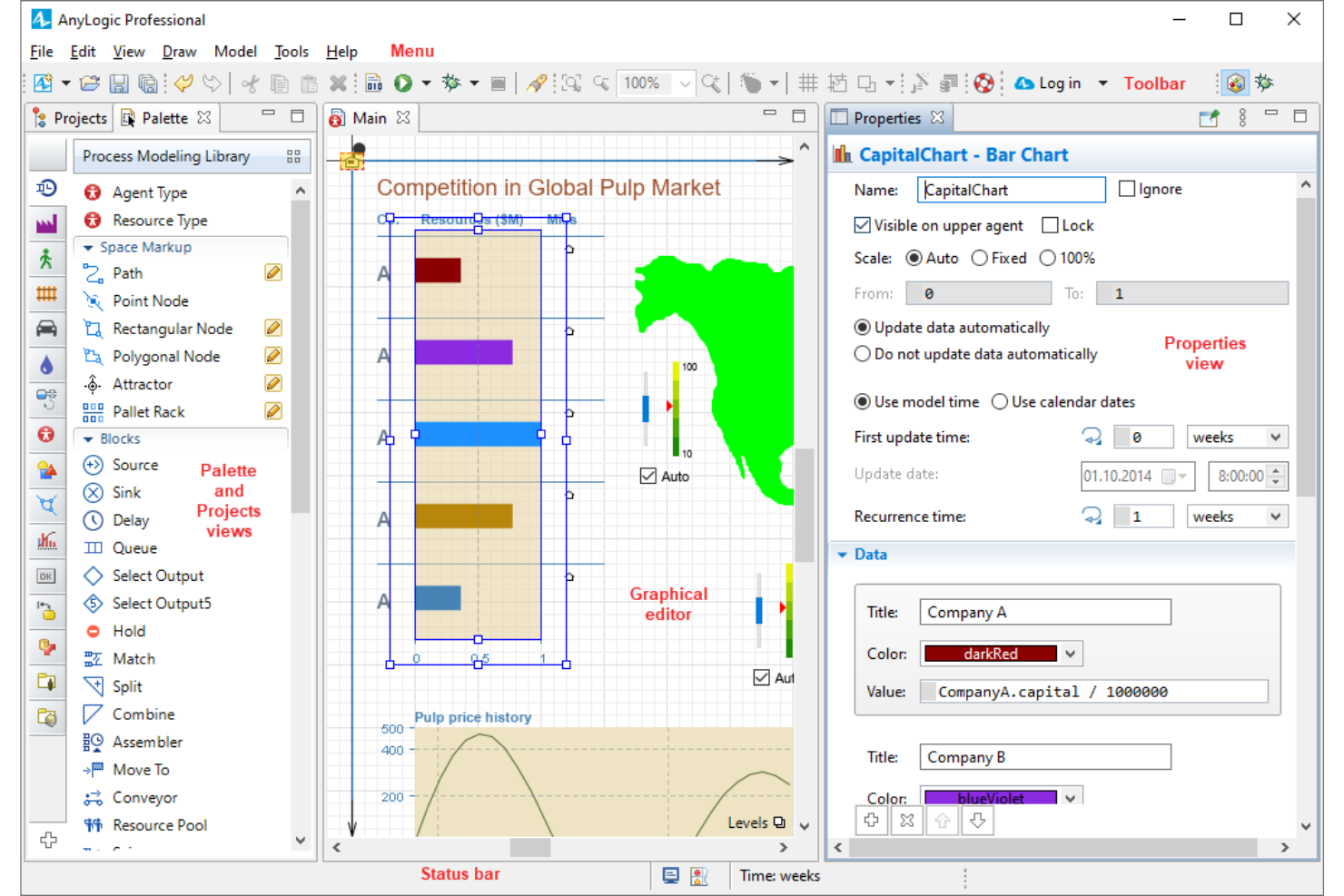
AnyLogic offre una piattaforma di simulazione flessibile per i team che hanno bisogno di modellare processi aziendali complessi e multi-metodo. È particolarmente indicata per organizzazioni nei settori della logistica, manifatturiero o dei servizi che desiderano combinare la modellazione ad eventi discreti, basata su agenti e dinamica dei sistemi in un unico ambiente. Usala per sperimentare flussi di lavoro intricati, testare scenari e visualizzare come i cambiamenti influiscono sulle tue operazioni prima di prendere decisioni nel mondo reale.
Perché ho scelto AnyLogic
Ho scelto AnyLogic perché è una delle poche piattaforme che ti permette di combinare la modellazione ad eventi discreti, basata su agenti e la dinamica dei sistemi in una singola simulazione. Questo approccio multi-metodo è particolarmente utile per i team che affrontano processi aziendali complessi e stratificati, impossibili da rappresentare con un solo stile di modellazione. Mi piace che si possano costruire modelli ibridi capaci di riflettere le interazioni reali tra persone, attrezzature e flussi di lavoro. La possibilità di visualizzare e sperimentare con questi sistemi interconnessi rende AnyLogic una scelta valida per le organizzazioni con esigenze di simulazione avanzate.
Funzionalità principali di AnyLogic
Altre funzionalità di AnyLogic che spiccano per i team di simulazione dei processi aziendali includono:
- Simulazione su cloud: Esegui e condividi modelli nel cloud per favorire collaborazione e accesso remoto.
- Strumenti di animazione dei processi: Visualizza i flussi dei processi e i movimenti delle risorse grazie alle capacità di animazione integrate.
- Confronto tra scenari: Imposta e confronta più scenari fianco a fianco per valutare diversi cambiamenti nei processi.
- Dashboard personalizzabili: Crea dashboard interattive per monitorare in tempo reale i risultati della simulazione e i principali indicatori di performance.
Integrazioni AnyLogic
Le integrazioni includono Excel, AnyLogic Cloud, Python, Java e fornitori di mappe GIS. AnyLogic offre anche un'API aperta per integrazioni personalizzate.
Pros and Cons
Pros:
- Offre simulazione e condivisione basate su cloud
- Include animazione 3D avanzata per i modelli
- Consente il confronto di scenari all'interno di un unico progetto
Cons:
- Richiede programmazione Java per i modelli avanzati
- Costo superiore rispetto ad altre piattaforme di simulazione
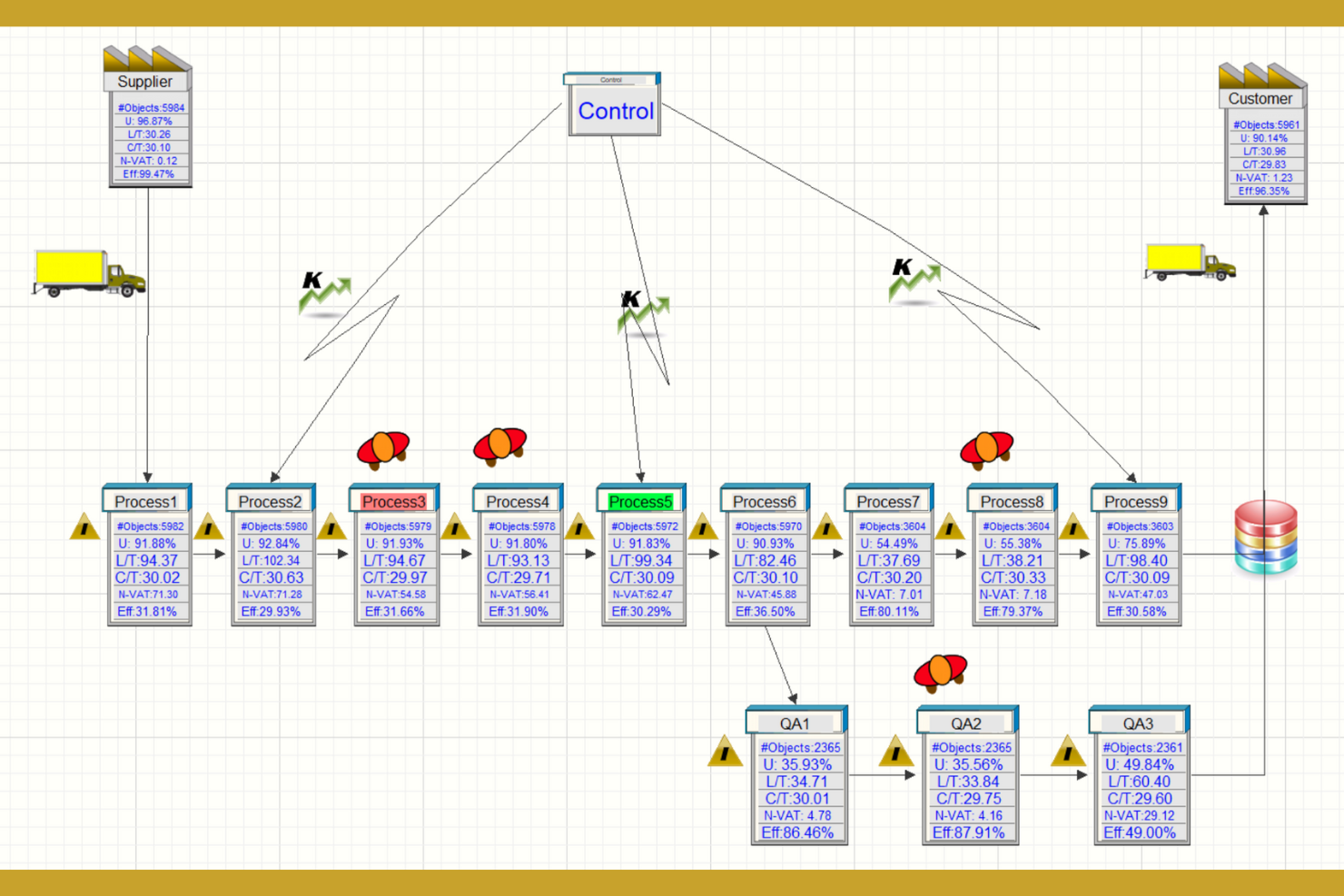
Simcad offre simulazione in tempo reale e interattiva ai team di miglioramento dei processi che hanno bisogno di visualizzare e regolare i flussi di lavoro in modo dinamico. È particolarmente utile per professionisti di produzione, logistica e sanità che desiderano testare modifiche ai processi e vedere l’impatto immediato senza scrivere codice. Il modellamento dinamico e l’integrazione dei dati in tempo reale aiutano a individuare colli di bottiglia e ottimizzare le operazioni man mano che gli scenari si sviluppano.
Perché ho scelto Simcad
Ciò che distingue Simcad è il suo motore di simulazione interattivo e in tempo reale, particolarmente prezioso per i team che devono vedere subito gli effetti dei cambiamenti nei processi. La piattaforma permette di modificare i flussi di lavoro e visualizzarne istantaneamente l’impatto, facilitando la sperimentazione di diversi scenari. Apprezzo la possibilità di integrare dati dal vivo, così puoi modellare i processi utilizzando dati operativi reali per simulazioni più accurate. Questo approccio è ideale per le organizzazioni che vogliono ottimizzare dinamicamente i processi e rispondere velocemente ai cambiamenti nei bisogni aziendali.
Caratteristiche principali di Simcad
Altre funzionalità che rendono Simcad unico includono:
- Strumenti di visualizzazione 3D: Crea e interagisci con modelli 3D dettagliati dei tuoi processi e delle strutture.
- Modellazione basata sui vincoli: Definisci e simula vincoli di processo per individuare colli di bottiglia e inefficienze.
- Confronto automatico degli scenari: Esegui e confronta più scenari di processo fianco a fianco sulla piattaforma.
- Motore di reportistica personalizzata: Genera report personalizzati con i risultati delle simulazioni e analisi dei processi.
Integrazioni di Simcad
Le integrazioni includono Microsoft Excel, Microsoft Access, connessioni a database e importazione di file Visio per la mappatura dei flussi di valore.
Pros and Cons
Pros:
- Aggiornamenti di simulazione in tempo reale con dati dal vivo
- Confronto automatico degli scenari all’interno della piattaforma
- Motore di reportistica personalizzato per analisi di simulazione
Cons:
- Richiede applicazione desktop Windows
- Documentazione online limitata per le funzionalità avanzate
Ideale per la modellazione di processi aziendali su larga scala
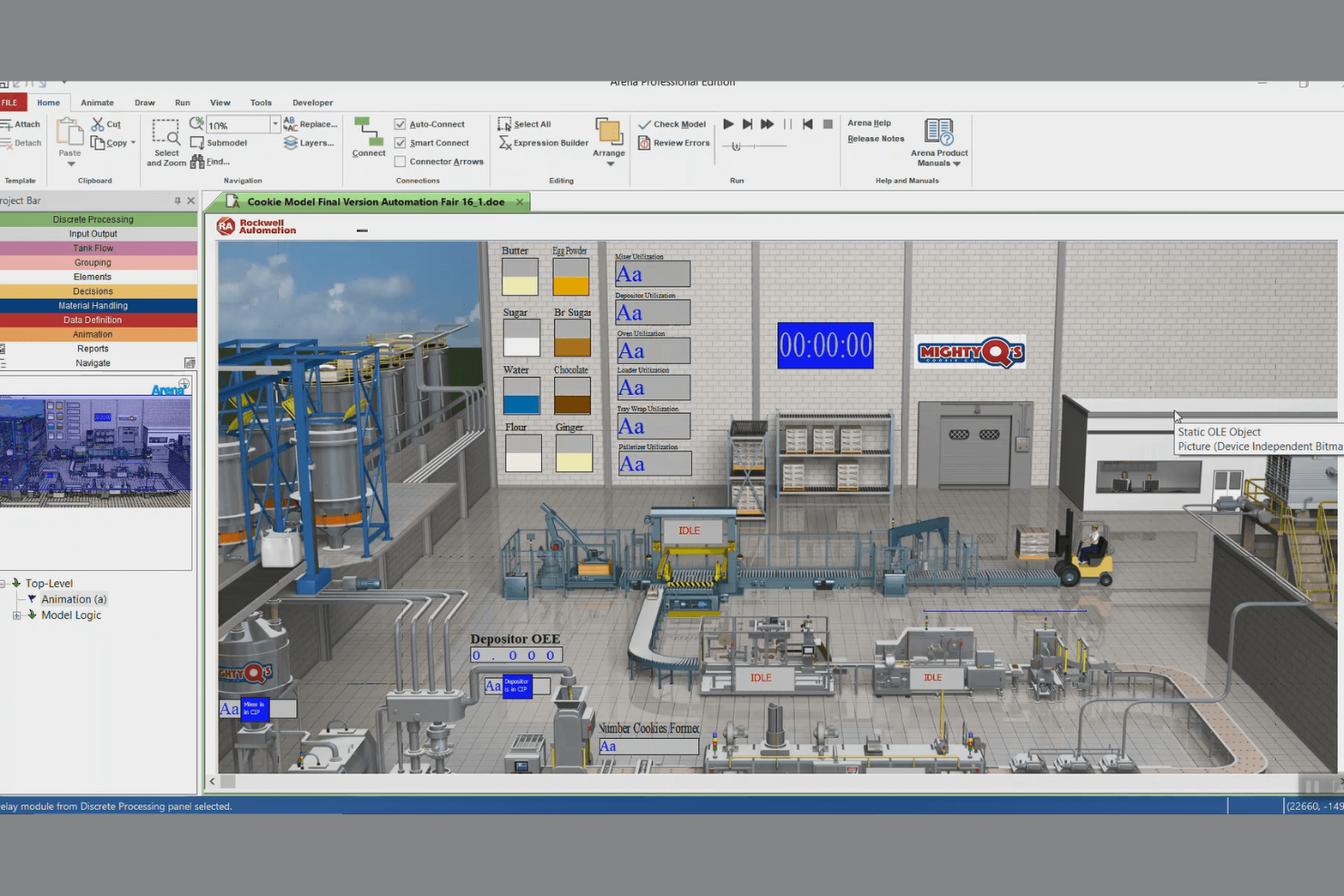
Arena Simulation Software è progettato per organizzazioni che necessitano di modellare e ottimizzare processi aziendali complessi e su larga scala, distribuiti tra più reparti o stabilimenti. È particolarmente indicato per operazioni aziendali di grandi dimensioni, analisti della supply chain e ingegneri di processo che devono simulare flussi di lavoro ad alto volume e testare modifiche prima dell’implementazione. La capacità della piattaforma di gestire logiche di processo articolate e grandi volumi di dati aiuta i team a identificare colli di bottiglia e prevedere risultati in ambienti aziendali particolarmente esigenti.
Perché ho scelto Arena Simulation Software
Per i team che gestiscono operazioni su scala enterprise, Arena Simulation Software si distingue per la sua capacità di modellare processi aziendali altamente complessi e interconnessi. La piattaforma consente una mappatura dettagliata dei processi e può gestire grandi quantità di dati, caratteristica essenziale per organizzazioni con più reparti o strutture. Ho scelto Arena perché offre strumenti avanzati di analisi degli scenari che permettono di testare e confrontare diverse strategie prima di implementarle nel mondo reale. La sua flessibilità nella simulazione di flussi di lavoro articolati lo rende una scelta solida per le aziende che devono prevedere risultati e ottimizzare le prestazioni su larga scala.
Funzionalità principali di Arena Simulation Software
Altre funzionalità che rendono Arena Simulation Software interessante includono:
- Interfaccia di modellazione basata su diagrammi di flusso: Crea e visualizza modelli di processo utilizzando un sistema drag-and-drop a diagrammi di flusso.
- Strumenti di animazione e visualizzazione: Realizza simulazioni animate per aiutare gli stakeholder a comprendere i flussi dei processi.
- Ampia libreria di template predefiniti: Accedi a una vasta gamma di modelli specifici per settore per creare modelli più rapidamente.
- Importazione/esportazione dati personalizzabile: Importa ed esporta dati da fogli di calcolo e database per supportare un’analisi dettagliata.
Integrazioni di Arena Simulation Software
Le integrazioni includono Microsoft Excel, Microsoft Access, Visual Basic for Applications (VBA) e controlli ActiveX per funzionalità estese e automazione.
Pros and Cons
Pros:
- Gestisce modelli di processo ad alto volume e su scala enterprise
- Supporta la simulazione ad eventi discreti e continua
- Include template specifici per settore per una modellazione rapida
Cons:
- Considerevoli risorse richieste per simulazioni di grandi dimensioni
- Funzionalità cloud o accessibili via web limitate
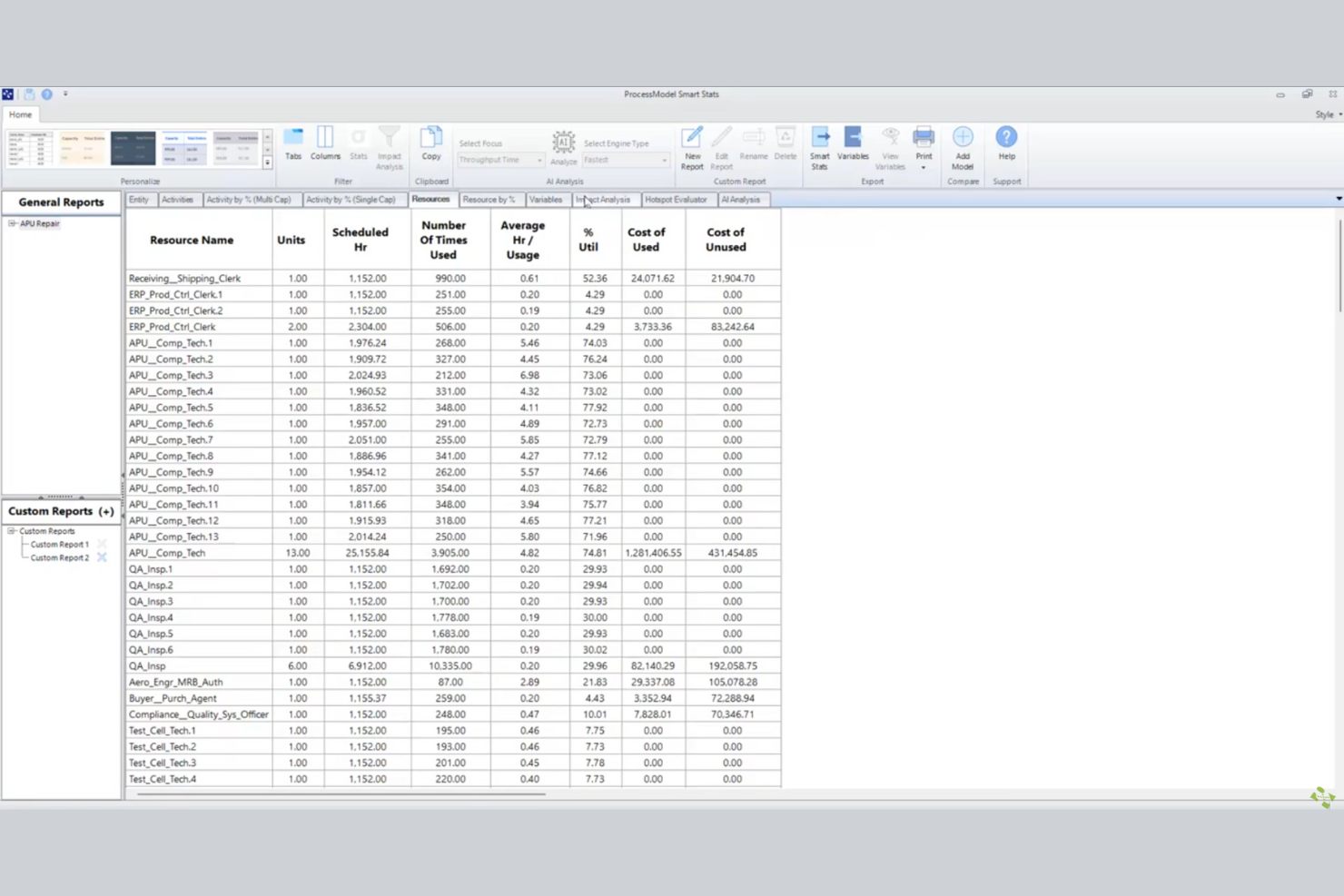
ProcessModel offre un modo rapido per i team di iniziare a modellare e simulare processi aziendali utilizzando una libreria di modelli preconfezionati. È particolarmente utile per project manager, analisti e team operativi che hanno bisogno di visualizzare, testare e migliorare rapidamente i flussi di lavoro senza dover costruire modelli da zero. L'approccio del tool, basato su modelli pronti all'uso, aiuta le organizzazioni ad accelerare il miglioramento dei processi e il processo decisionale.
Perché ho scelto ProcessModel
Ciò che distingue ProcessModel è la sua attenzione nell'aiutare i team a iniziare rapidamente con la simulazione dei processi. La piattaforma offre un'ampia selezione di modelli di processo predefiniti, permettendo di iniziare subito la modellazione senza spendere ore nella configurazione. Ho scelto ProcessModel perché il suo approccio basato sui modelli è ideale per le organizzazioni che devono prototipare, testare e perfezionare rapidamente i processi aziendali. La possibilità di personalizzare questi modelli offre ai team sia velocità sia flessibilità nei loro progetti di miglioramento dei processi.
Caratteristiche principali di ProcessModel
Oltre ai modelli pronti all'uso, ho trovato anche queste funzionalità degne di nota:
- Strumenti di confronto scenari: Esegui e confronta più scenari di processo fianco a fianco per valutare approcci diversi.
- Analisi dell'utilizzo delle risorse: Traccia e analizza come le risorse vengono allocate e utilizzate nei modelli di processo.
- Individuazione dei colli di bottiglia: Rileva automaticamente e metti in evidenza i colli di bottiglia nei flussi di lavoro simulati.
- Report personalizzabili: Genera report dettagliati e personalizzabili da condividere con gli stakeholder sui risultati delle simulazioni.
Integrazioni di ProcessModel
Le integrazioni includono Microsoft Excel per importare dati ed esportare i risultati delle simulazioni.
Pros and Cons
Pros:
- Ampia libreria di modelli di processo specifici per settore
- Strumenti di confronto scenari per decisioni rapide
- Identificazione dei colli di bottiglia integrata nei flussi di processo
Cons:
- Supporto limitato per la visualizzazione 3D o animata
- Nessuna funzione di collaborazione o multiutente integrata


Siemens Tecnomatix offre una suite di strumenti di simulazione dei processi progettata per i produttori che devono connettere la pianificazione digitale ai sistemi produttivi reali. La piattaforma è particolarmente utile per i team dell'automotive, dell'elettronica e dell'ingegneria industriale che desiderano ottimizzare i flussi di lavoro e convalidare i processi produttivi prima dell'implementazione. La sua integrazione con i sistemi di esecuzione della produzione e le piattaforme di automazione aiuta i team a colmare il divario tra modelli virtuali e operazioni di fabbrica.
Perché ho scelto Siemens Tecnomatix
Ciò che distingue Siemens Tecnomatix è la sua profonda integrazione con i sistemi produttivi, fondamentale per i team che mirano a simulare e ottimizzare i processi produttivi in ambienti reali. Ho scelto Tecnomatix perché collega direttamente i modelli di processo digitali ai sistemi di esecuzione della produzione e alle piattaforme di automazione, consentendo di convalidare e perfezionare i flussi di lavoro prima della messa in opera. Il supporto alla messa in servizio virtuale della piattaforma permette di testare la logica di automazione e il comportamento delle apparecchiature in un ambiente digitale, riducendo rischi e tempi di fermo. La sua capacità di sincronizzare la simulazione dei processi con i dati reali della produzione lo rende una scelta solida per i produttori che devono colmare il divario tra pianificazione ed esecuzione.
Caratteristiche principali di Siemens Tecnomatix
Altre funzionalità che rendono Siemens Tecnomatix prezioso per i team di simulazione dei processi includono:
- Modellazione layout fabbrica 3D: Progetta e visualizza layout di fabbrica dettagliati in un ambiente virtuale.
- Strumenti di analisi ergonomica: Valuta i fattori umani e la sicurezza dei lavoratori all'interno dei flussi di lavoro simulati.
- Simulazione del flusso di materiali: Modella e analizza il movimento dei materiali lungo le linee di produzione.
- Monitoraggio dell'utilizzo delle risorse: Monitora e ottimizza l'uso di macchinari, personale e altre risorse durante la pianificazione dei processi.
Integrazioni di Siemens Tecnomatix
Le integrazioni native non sono attualmente elencate.
Pros and Cons
Pros:
- Si integra nativamente con Teamcenter e NX
- Supporta la modellazione 3D di fabbriche e processi
- Offre simulazione avanzata dell'ergonomia e dei fattori umani
Cons:
- Richiede hardware significativo per prestazioni ottimali
- Si concentra principalmente sulle esigenze del settore manifatturiero


FlexSim si distingue per i team che hanno bisogno di visualizzare e analizzare flussi di lavoro complessi in un ambiente 3D realistico. È particolarmente utile per ingegneri di produzione, responsabili delle operazioni e specialisti del miglioramento dei processi che vogliono vedere come si svilupperanno i cambiamenti prima di attuarli nel mondo reale. Le dettagliate funzionalità di modellazione 3D e animazione della piattaforma aiutano gli utenti a individuare i colli di bottiglia e testare le modifiche ai processi con chiarezza.
Perché ho scelto FlexSim
Ciò che rende FlexSim una scelta valida per la simulazione dei processi aziendali sono le sue avanzate capacità di visualizzazione 3D, che consentono di vedere ogni dettaglio del flusso di lavoro in azione. Ho scelto FlexSim perché permette agli utenti di costruire modelli altamente realistici con oggetti drag-and-drop e flussi di processo animati, rendendo più facile individuare inefficienze e testare miglioramenti in modo visivo. Il supporto della piattaforma per oggetti 3D personalizzati e animazioni in tempo reale aiuta i team a comunicare i cambiamenti di processo agli stakeholder meno esperti di diagrammi tecnici. Per chiunque abbia bisogno di validare modifiche ai processi prima di implementarle, l'approccio visivo di FlexSim offre un chiaro vantaggio.
Funzionalità principali di FlexSim
Oltre alle sue forti capacità di visualizzazione 3D, FlexSim offre diverse altre funzionalità che supportano i team di simulazione dei processi:
- Strumenti di analisi statistica: Esegui esperimenti e analizza i risultati delle simulazioni con report statistici integrati.
- Modulo flusso di processo: Progetta e gestisci flussi di lavoro guidati dalla logica tramite un'interfaccia visiva drag-and-drop.
- Pianificazione delle risorse: Assegna e monitora risorse come macchinari, personale e materiali all'interno dei tuoi modelli di simulazione.
- Confronto scenari: Confronta più scenari di processo fianco a fianco per valutare l'impatto delle diverse modifiche.
Integrazioni FlexSim
Le integrazioni native attualmente non sono elencate.
Pros and Cons
Pros:
- Il modeling drag-and-drop accelera la creazione degli scenari
- Gli strumenti statistici integrati supportano un'analisi dettagliata
- Il confronto tra scenari aiuta a validare le modifiche ai processi
Cons:
- Documentazione pubblica limitata per scripting avanzato
- Il supporto a MacOS non è disponibile nativamente
Altri software di simulazione dei processi aziendali
Ecco alcune opzioni aggiuntive di software per la simulazione dei processi aziendali che non sono state incluse nel mio elenco ristretto, ma che vale comunque la pena valutare:
- BigBear.ai
Ideale per l’ottimizzazione dei processi basata sull’IA
- iGrafx Process360 Live
Ideale per la modellazione della conformità normativa
- Camunda
Ideale per l'automazione dei flussi di lavoro open-source


Come Valuto il Software di Simulazione dei Processi Aziendali
Divido ogni valutazione in due livelli: la base che uno strumento deve superare—come la simulazione a eventi discreti e il confronto tra scenari per i colli di bottiglia delle risorse—e i fattori differenzianti che rendono uno strumento più adatto ad alcuni team rispetto ad altri.
Funzionalità di Base (Requisiti Minimi per questa Lista)
Quando seleziono gli strumenti per la mia lista, valuto ciascuno su una scala da 0 (non offre la funzionalità) a 5 (eccelle in quest'area) per ogni funzionalità base indicata di seguito. Poi, calcolo il punteggio totale dello strumento in percentuale. Ogni strumento deve raggiungere un punteggio minimo totale del 65% per poter essere incluso.
- Modelizzazione e Mappatura dei Processi: Verifico se uno strumento supporta la notazione standard come BPMN 2.0, swimlane, e componenti di modello riutilizzabili per documentare i flussi di lavoro tra i team.
- Motore di Simulazione a Eventi Discreti: Il motore di simulazione è fondamentale—valuto se gestisce distribuzioni di probabilità, trigger di eventi e simulazioni temporali oltre ai calcoli statici.
- Analisi degli Scenari & What-If: Cerco il confronto affiancato degli scenari rispetto a indicatori chiave come costo e tempo di ciclo, non solo la possibilità di duplicare e modificare manualmente un modello.
- Modellazione di Risorse & Capacità: Ogni strumento dovrebbe permettere di definire pool di risorse con reali vincoli come calendari dei turni, competenze, costi e limiti di disponibilità tra i progetti.
- Metriche di Prestazione & Analisi: I risultati devono andare oltre i log grezzi—valuto se lo strumento mostra un’analisi dei colli di bottiglia, i tassi di utilizzo e il throughput in dashboard chiare.
- Importazione Dati & Integrazione: Esamino come ogni strumento acquisisce dati esterni, sia tramite caricamento CSV, connessioni API a piattaforme PM o sincronizzazione con strumenti di process mining.
Una volta che ho una lista di strumenti che soddisfano i criteri, considero cosa distingue ciascuna piattaforma.
Fattori Differenzianti (Cosa Distingue i Fornitori)
Ecco come confronto i diversi fornitori:
Funzionalità Distintive
La simulazione Monte Carlo è un fattore fortemente differenziante—cerco strumenti che eseguono migliaia di iterazioni in modo da poter quantificare il rischio di pianificazione con veri intervalli di confidenza, non solo stime puntuali. L’integrazione con il process mining è anch’essa importante perché la generazione automatica dei modelli dai veri log degli eventi elimina le ipotesi. Le funzionalità di "digital twin" spingono oltre, sincronizzando i dati di progetto in tempo reale nella simulazione, permettendo ai PMO di validare continuamente le previsioni rispetto a ciò che accade realmente.
Oltre le Funzionalità
Valuto con attenzione l’ecosistema di integrazione di ogni strumento—se non si collega alle piattaforme PM e agli strumenti BI già in uso dal tuo team, i risultati della simulazione rimangono isolati. Il livello di difficoltà di apprendimento conta altrettanto, soprattutto per i PMO dove non tutti hanno esperienza di simulazione. Cerco modelli di esempio documentati, template e programmi di formazione forniti dal produttore che aiutino i project manager meno tecnici a diventare subito operativi. Controllo anche la scalabilità: uno strumento deve gestire modelli a livello di portafoglio con migliaia di attività senza bloccarsi durante grandi simulazioni Monte Carlo.
Come scegliere il software di simulazione dei processi aziendali
È facile perdersi in lunghi elenchi di funzionalità e strutture tariffarie complesse. Per aiutarti a rimanere concentrato mentre affronti il tuo esclusivo processo di selezione del software, ecco una lista di fattori da tenere a mente:
| Fattore | Considerazioni |
| Scalabilità | Il software sarà in grado di gestire il volume dei tuoi processi con la crescita dell'organizzazione? Considera i limiti degli utenti, la complessità dei processi e le esigenze di espansione future. |
| Integrazioni | Lo strumento si collega nativamente ai sistemi esistenti (ERP, CRM, gestione documentale)? Verifica la disponibilità di integrazioni dirette, non solo dell'accesso tramite API. |
| Personalizzazione | Puoi adattare i modelli dei processi, i cruscotti e i report alla terminologia e ai flussi di lavoro della tua organizzazione? Evita gli strumenti rigidi che limitano la flessibilità dei processi. |
| Facilità d'uso | Il tuo gruppo adotterà rapidamente lo strumento? Cerca una navigazione intuitiva, una documentazione chiara e requisiti di formazione minimi. |
| Implementazione e avvio | Quanto tempo occorrerà per iniziare a utilizzarlo? Valuta la disponibilità di assistenza per la migrazione, risorse per l'avvio e modelli preconfigurati. |
| Costo | I livelli di prezzo sono trasparenti e prevedibili? Tieni conto delle licenze utente, dei componenti aggiuntivi e dei potenziali costi per l'utilizzo eccedente. |
| Misure di sicurezza | Il software soddisfa gli standard di protezione dei dati della tua organizzazione? Cerca crittografia, controlli degli accessi e certificazioni di conformità. |
| Requisiti di conformità | Lo strumento è in grado di supportare le esigenze normative del tuo settore? Verifica il supporto per registri di controllo, documentazione e quadri normativi pertinenti al tuo settore. |
Che cos'è il software di simulazione dei processi aziendali?
Il software di simulazione dei processi aziendali è uno strumento digitale utilizzato nella gestione dei processi aziendali (BPM) per modellare, visualizzare e testare i flussi di lavoro in un ambiente virtuale. I team lo utilizzano per l'analisi aziendale, la mappatura dei processi con standard come BPMN 2.0 e l'esecuzione di simulazioni per valutare diversi scenari. Questi strumenti forniscono informazioni basate sui dati provenienti da dati in tempo reale, aiutando le organizzazioni a prendere decisioni informate, migliorare l'efficienza operativa e ridurre i tempi di attesa o le carenze di risorse, come quelle relative al personale. Grazie a funzionalità come l'analisi avanzata e il test dei processi dall'inizio alla fine, i team possono creare una roadmap chiara per il miglioramento e convalidare le modifiche attraverso metodi simili a un approccio basato su casi di studio.
Funzionalità del software di simulazione dei processi aziendali
Quando scegli un software di simulazione dei processi aziendali, presta attenzione alle seguenti funzionalità chiave:
- Modellazione dei processi: crea rappresentazioni visive dei flussi di lavoro utilizzando strumenti di trascinamento, consentendo ai team di mappare ogni passaggio e punto decisionale di un processo.
- Motore di simulazione: esegui scenari virtuali per testare l'impatto delle modifiche a risorse, tempistiche o regole sui risultati dei processi prima di apportare modifiche nel mondo reale.
- Analisi degli scenari: confronta affiancate più varianti dei processi per valutare l'impatto di strategie o configurazioni diverse.
- Supporto BPMN: utilizza gli standard del Modello e della notazione dei processi aziendali (BPMN) per garantire che i modelli siano chiari, coerenti e facilmente condivisibili tra i team.
- Strumenti di collaborazione: consenti a più utenti di lavorare insieme sui modelli dei processi, lasciare commenti e tenere traccia delle modifiche in tempo reale.
- Reportistica e analisi: genera report dettagliati e dashboard che evidenziano le metriche delle prestazioni dei processi, i colli di bottiglia e le opportunità di miglioramento.
- Controllo delle versioni: mantieni uno storico delle modifiche ai modelli dei processi, consentendo agli utenti di ripristinare versioni precedenti o sottoporre a verifica le modifiche nel tempo.
- Esportazione e documentazione: esporta i modelli dei processi e i risultati delle simulazioni in vari formati per la condivisione, la conformità o la formazione.
- Controlli degli accessi: imposta le autorizzazioni per utenti o gruppi diversi, per garantire che le informazioni sensibili sui processi siano disponibili solo ai membri del team autorizzati.
Vantaggi del software di simulazione dei processi aziendali
L'implementazione di un software di simulazione dei processi aziendali offre diversi vantaggi al tuo team e alla tua azienda. Eccone alcuni:
- Riduzione dei rischi operativi: testa le modifiche ai processi in un ambiente virtuale per identificare e affrontare potenziali problemi prima che incidano sulle operazioni reali.
- Maggiore efficienza dei processi: utilizza le funzionalità di simulazione e analisi per individuare i colli di bottiglia e ottimizzare i flussi di lavoro, ottenendo prestazioni migliori.
- Processo decisionale basato sui dati: sfrutta gli strumenti di analisi degli scenari e di reportistica per valutare l'impatto di strategie diverse sulla base di dati concreti.
- Migliore conformità normativa: mantieni tracce di audit, documentazione e modelli di conformità per soddisfare gli standard di settore e i requisiti normativi.
- Onboarding e collaborazione più rapidi: consenti ai team di lavorare insieme sui modelli dei processi e di accedere a una documentazione chiara, accelerando la formazione e l'allineamento.
- Maggiore scalabilità: adatta i modelli dei processi e le simulazioni alla crescita dell'organizzazione, assicurandoti che i flussi di lavoro rimangano efficaci a qualsiasi livello.
- Risparmio sui costi: evita errori costosi e investimenti non necessari convalidando le modifiche ai processi prima dell'implementazione.
Costi e prezzi del software di simulazione dei processi aziendali
La scelta di un software di simulazione dei processi aziendali richiede la comprensione dei vari modelli di prezzo e dei piani disponibili. I costi variano in base alle funzionalità, alle dimensioni del team, ai componenti aggiuntivi e ad altri fattori. La tabella seguente riassume i piani più comuni, i relativi prezzi medi e le funzionalità generalmente incluse nelle soluzioni software di simulazione dei processi aziendali:
Tabella di confronto dei piani per il software di simulazione dei processi aziendali
| Tipo di piano | Prezzo medio | Funzionalità comuni |
| Piano gratuito | $0 | Modellazione di base dei processi, simulazioni limitate, accesso per un singolo utente e assistenza della comunità. |
| Piano personale | $10-$50/utente/mese | Modellazione individuale dei processi, reportistica di base, opzioni di esportazione limitate e assistenza via e-mail. |
| Piano aziendale | $50-$150/utente/mese | Collaborazione tra squadre, strumenti avanzati di simulazione, supporto BPMN, cruscotti analitici e autorizzazioni basate sui ruoli. |
| Piano per grandi aziende | $150+/utente/mese | Integrazioni personalizzate, funzionalità per la conformità normativa, gestione dedicata dell'account, sicurezza avanzata e assistenza SLA. |
Domande frequenti sul software di simulazione dei processi aziendali
Ecco alcune risposte alle domande comuni sul software di simulazione dei processi aziendali:
In che modo il software di simulazione dei processi aziendali differisce dagli strumenti di automazione dei flussi di lavoro?
Il software di simulazione dei processi aziendali consente di modellare e testare i processi in un ambiente virtuale prima di apportare modifiche, mentre gli strumenti di automazione dei flussi di lavoro si concentrano sull’esecuzione e sull’automazione delle attività in tempo reale. La simulazione aiuta a prevedere i risultati e a ottimizzare i processi senza interrompere le operazioni in corso.
Il software di simulazione dei processi aziendali è in grado di gestire flussi di lavoro complessi che coinvolgono più reparti?
Sì, la maggior parte dei software di simulazione dei processi aziendali supporta la modellazione e la simulazione di flussi di lavoro che coinvolgono più reparti o unità aziendali. Per gestire la complessità, cerca strumenti con funzionalità avanzate di mappatura, collaborazione interfunzionale e analisi degli scenari.
Quali dati mi servono per eseguire simulazioni accurate dei processi?
Ti servono informazioni dettagliate sui flussi di lavoro attuali, incluse le fasi dei processi, l’allocazione delle risorse, i tempi e le regole decisionali. Dati di input accurati garantiscono che le simulazioni riflettano le condizioni del mondo reale e producano risultati affidabili per l’analisi.
È possibile integrare il software di simulazione dei processi aziendali con altri sistemi aziendali?
Sì, molte soluzioni offrono integrazioni con sistemi ERP, CRM e di gestione documentale. Verifica la disponibilità di integrazioni native o dell’accesso tramite API per collegare lo strumento di simulazione al tuo insieme di tecnologie esistente e semplificare la condivisione dei dati.
Quanto tempo richiede l'implementazione del software di simulazione dei processi aziendali?
I tempi di implementazione variano in base allo strumento e alle dimensioni dell’organizzazione, ma la maggior parte delle squadre può prevedere un periodo di configurazione da alcuni giorni a diverse settimane. Tra i fattori da considerare ci sono la migrazione dei dati, la formazione degli utenti e la complessità della mappatura dei processi. Cerca fornitori che offrano risorse e assistenza per l’avvio.