

I 10 migliori software di stima HVAC recensiti nel 2026

Selezione dei migliori software per la stima dei costi HVAC


Gestire progetti HVAC può essere difficile. Bisogna rispettare scadenze ravvicinate, gestire calcoli complessi e affrontare costi imprevisti. Capisco perfettamente. Ecco perché ho esaminato i migliori software per la stima dei costi HVAC, per aiutarti ad affrontare queste sfide.
Questi strumenti possono semplificare le stime dei tuoi progetti, rendendo più semplice il tuo lavoro e liberando il tuo tempo. In questo articolo condividerò le mie scelte migliori, concentrandomi sugli aspetti che distinguono ciascuna soluzione.
Che tu gestisca progetti di piccole dimensioni o contratti di grandi dimensioni, troverai qui ciò che ti serve. Scopriamo insieme le soluzioni che possono fare la differenza per te e il tuo team.
Perché fidarsi dei nostri consigli sui software
Il nostro team testa e recensisce software dal 2012. In quanto project manager noi stessi, sappiamo quanto sia difficile — e importante — scegliere il software giusto.
Per questa guida, abbiamo valutato gli strumenti attraverso test pratici e ricerche indipendenti, assegnando un punteggio agli strumenti in base ai nostri criteri di selezione. Ci basiamo inoltre sulle competenze di leader di pensiero del settore e di professionisti attivi nella gestione dei progetti.
Le nostre recensioni riflettono il nostro giudizio editoriale umano, non un discorso di vendita.
Revisori esperti:
Tabella comparativa dei software per la stima dei costi HVAC
Questa tabella comparativa riassume i dettagli sui prezzi delle mie migliori selezioni di software per la stima dei costi HVAC.
| Tool | Best For | Trial Info | Price | ||
|---|---|---|---|---|---|
| 1 | Ideale per computi su cloud con accesso al team | Demo gratuita + prova gratuita disponibile | Da $2.599/utente/anno | Website | |
| 2 | Ideale per la gestione HVAC tutto-in-uno | Demo gratuita disponibile | Prezzo su richiesta | Website | |
| 3 | Ideale per assegnazione lavori e fatturazione dai preventivi | Demo gratuita disponibile | Prezzo su richiesta | Website | |
| 4 | Ideale per computi metrici digitali con gruppi personalizzati | Prova gratuita di 14 giorni disponibile | A partire da $2,000/anno | Website | |
| 5 | Ideale per dettagli su manodopera e raccordi per la lamiera | Demo gratuita disponibile | Prezzo su richiesta | Website | |
| 6 | Ideale per flussi di lavoro dettagliati di preventivazione canalizzazioni | Demo gratuita disponibile | Da $250/mese | Website | |
| 7 | Ideale per la preventivazione e il calcolo dei costi orientati alla fabbricazione | Non disponibile | Prezzo su richiesta | Website | |
| 8 | Ideale per preventivi rapidi per piccoli appaltatori | Piano gratuito + demo gratuita disponibile | Da $54/mese (fatturato annualmente) | Website | |
| 9 | Ideale per la tariffazione a prezzo fisso durante le chiamate di assistenza | Demo gratuita disponibile | A partire da $99/tecnico/mese | Website | |
| 10 | Ideale per collegare le stime alla contabilità di progetto | Demo gratuita disponibile | Prezzi su richiesta | Website |
Recensione dei migliori software per la stima dei costi HVAC
Di seguito trovi le mie sintesi dettagliate dei migliori software per la stima dei costi HVAC inclusi nella mia selezione. Le mie recensioni offrono un’analisi approfondita delle funzionalità principali, dei vantaggi e degli svantaggi, delle integrazioni e dei casi d’uso ideali di ogni strumento, per aiutarti a trovare quello più adatto a te.

STACK
Ideale per computi su cloud con accesso al team

STACK è un software di stima e computo HVAC basato su cloud, pensato per gli appaltatori che desiderano accelerare il processo di offerta. Aiuta gli appaltatori a eseguire rapidamente i computi e a creare stime dettagliate per aumentare la redditività dei progetti.
Perché ho scelto STACK: La sua natura basata su cloud garantisce che il tuo team rimanga sempre allineato. L'architettura aperta della piattaforma può integrarsi con altri sistemi, rendendola altamente adattabile.
Funzionalità principali e integrazioni:
Le funzionalità includono il computo e il conteggio delle quantità e dei materiali su cloud, permettendo di gestire i computi e mantenere tutti sulla stessa pagina. Offre anche stime dei costi dettagliate e proposte, consentendo di regolare i costi e creare proposte personalizzate con il proprio marchio. Le funzionalità di collaborazione in tempo reale assicurano che il team rimanga connesso con opzioni di markup, callout e condivisione.
Le integrazioni includono Procore, QuickBooks, Velixo, Sage Intacct e altro ancora.
Pros and Cons
Pros:
- Regolazioni dettagliate dei costi
- Funzionalità di collaborazione su cloud
- Architettura aperta per integrazioni
Cons:
- Configurazione iniziale complessa
- Il caricamento di blueprint di grandi dimensioni richiede tempo

Ideale per la gestione HVAC tutto-in-uno

ServiceTitan è un software di preventivazione HVAC basato su cloud, pensato per imprese che operano nei settori residenziale e commerciale, in particolare negli ambiti HVAC, idraulico ed elettrico. È focalizzato sulla gestione dei progetti, la gestione delle relazioni con i clienti e sull'elaborazione di preventivi accurati per i lavori.
Perché ho scelto ServiceTitan: È ideale per i professionisti che desiderano una soluzione completa per la gestione dell’attività HVAC. Permette di realizzare proposte digitali professionali, automatizzare l’aggiornamento dei prezzi e generare offerte precise per i tuoi lavori HVAC. Integra inoltre funzioni di pianificazione, invio incarichi e fatturazione, risultando uno strumento unificato per i professionisti. Questo software versatile è adatto sia per progetti residenziali che commerciali.
Caratteristiche e integrazioni principali:
Caratteristiche includono calcoli precisi dei costi di manodopera e materiali, creazione di preventivi digitali e accesso tramite app mobile per i tecnici. Un catalogo prezzi digitale consente una gestione efficiente dei costi dei materiali. Tiene anche traccia delle prestazioni dei tecnici con schede valutative per monitorare la qualità del servizio.
Integrazioni includono Sage Intacct, BlueVine, MindCloud e altri.
Pros and Cons
Pros:
- Fornisce strumenti di gestione progetti
- Offre modelli di app mobile
- Aggiorna automaticamente i listini prezzi
Cons:
- Il prezzo personalizzato può variare
- Accesso offline limitato


Service Fusion è una piattaforma di gestione dei servizi sul campo che aiuta le squadre a gestire i lavori dalla preventivazione iniziale fino al pagamento. Riunisce preventivi, pianificazione e fatturazione in un unico sistema, così che il lavoro resti collegato in ogni fase. Il software è progettato per supportare le operazioni quotidiane dei team di servizi.
Perché ho scelto Service Fusion: Service Fusion permette di creare preventivi che si collegano direttamente alla programmazione dei lavori e alla fatturazione, evitando che le informazioni si perdano man mano che il lavoro procede. Una volta approvato un preventivo, si può trasformare in una commessa e assegnare immediatamente la squadra senza dover reinserire i dettagli. I tecnici possono visualizzare tutte le informazioni necessarie sul campo. Al termine del lavoro, le fatture vengono generate con gli stessi dati utilizzati nel preventivo. Questo flusso aiuta il team a rimanere organizzato dalla prima offerta al pagamento finale.
Funzionalità e integrazioni principali:
Funzionalità includono la creazione di preventivi che si convertono in lavori, strumenti integrati per l’assegnazione delle attività e fatturazione collegata ai servizi completati. È possibile monitorare lo stato dei lavori in ogni fase, dal preventivo alla programmazione. Il team può anche gestire i dati dei clienti e la cronologia degli interventi in un unico posto.
Integrazioni includono QuickBooks, PaySimple e altri.
Pros and Cons
Pros:
- Flusso di lavoro chiaro dal preventivo alla fattura
- Favorisce la comunicazione tra ufficio e tecnici sul campo
- Supporta la gestione completa dei lavori
Cons:
- Opzioni limitate per preventivi complessi
- I flussi di lavoro personalizzati sono limitati

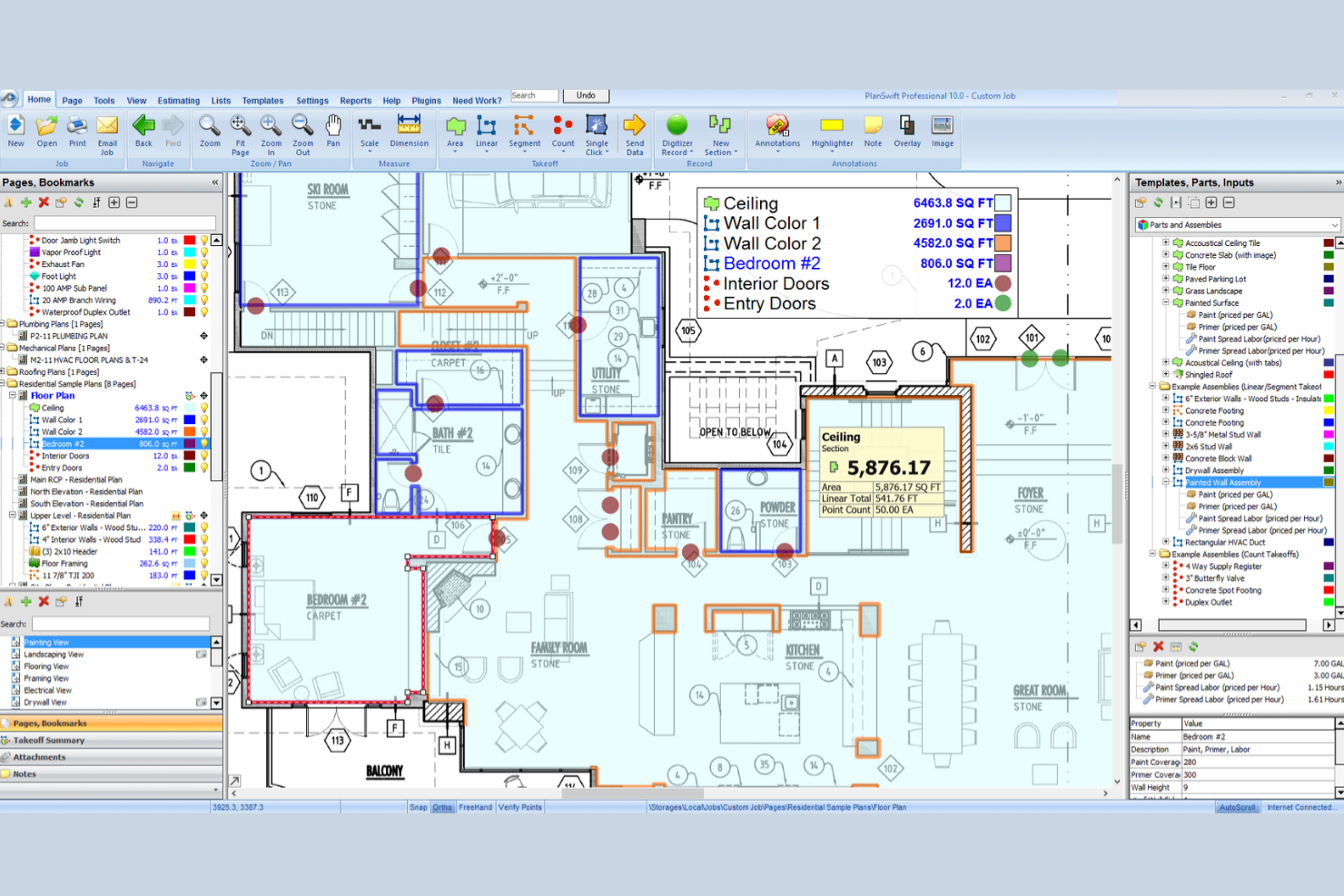
PlanSwift è un software di preventivazione HVAC progettato per i professionisti del settore, pensato per migliorare il processo di stima dei costi. Fornisce computi metrici e liste dettagliate dei materiali, che aiutano a calcolare in modo efficiente costi e volumi dei sistemi HVAC.
Perché ho scelto PlanSwift: Si distingue per la precisione nell’esecuzione di computi metrici HVAC, offrendo funzionalità come la tracciatura digitale delle planimetrie e la creazione di elenchi materiali personalizzati. Il software consente inoltre stime accurate per riscaldamento e raffrescamento, ideali anche per impianti complessi.
Caratteristiche principali e integrazioni:
Le funzionalità includono computi metrici, elenchi dei materiali e la possibilità di tracciare la disposizione delle stanze. È possibile stimare rapidamente canalizzazioni e integrare componenti aggiuntivi come serrande e isolamento. Dispone inoltre di uno strumento di conteggio punto-e-clicca che rileva elementi come pompe e comandi, aggiungendoli direttamente all’elenco dei materiali per calcoli precisi.
Le integrazioni includono Microsoft Excel, Sage e altre ancora.
Pros and Cons
Pros:
- Procedura di computo
- Liste materiali personalizzabili
- Strumento di conteggio punto-e-clicca
Cons:
- Richiede il caricamento di planimetrie digitali
- Nessuna funzione CRM integrata


QuoteSoft è un software di preventivazione e computo metrico pensato per lavori meccanici e di lattoneria. Supporta i flussi di lavoro dalla rilevazione delle quantità, fino alla preparazione finale dei preventivi.
Perché ho scelto QuoteSoft: Hai un controllo estremamente dettagliato su manodopera e logiche di assemblaggio, aspetto fondamentale quando il tuo lavoro comprende strutture complesse in lamiera. Puoi applicare tariffe orarie, tolleranze per raccordi e regole di fabbricazione direttamente agli elementi computati. Puoi suddividere il lavoro per raccordi, giunzioni e collegamenti anziché affidarti a insiemi generici, riducendo le ipotesi quando le offerte si basano su assunzioni di fabbricazione precise.
Caratteristiche principali e integrazioni:
Caratteristiche includono tabelle integrate di calcolo della manodopera che applicano automaticamente le ore mentre misuri, database personalizzabili per materiali e raccordi, e strumenti di computo a video direttamente collegati alla logica di preventivazione. Puoi modificare le assunzioni sulla manodopera senza rifare il computo metrico. Il tuo team può anche riutilizzare insiemi salvati per mantenere coerenza nei preventivi di più lavori.
Integrazioni non sono elencate pubblicamente.
Pros and Cons
Pros:
- Logica dettagliata della manodopera per lavorazioni di fabbricazione
- Controllo elevato delle ipotesi sui raccordi
- Gestisce strutture complesse di condotti
Cons:
- Impostazione iniziale lunga prima del primo preventivo
- Meno flessibile per preventivi rapidi approssimativi


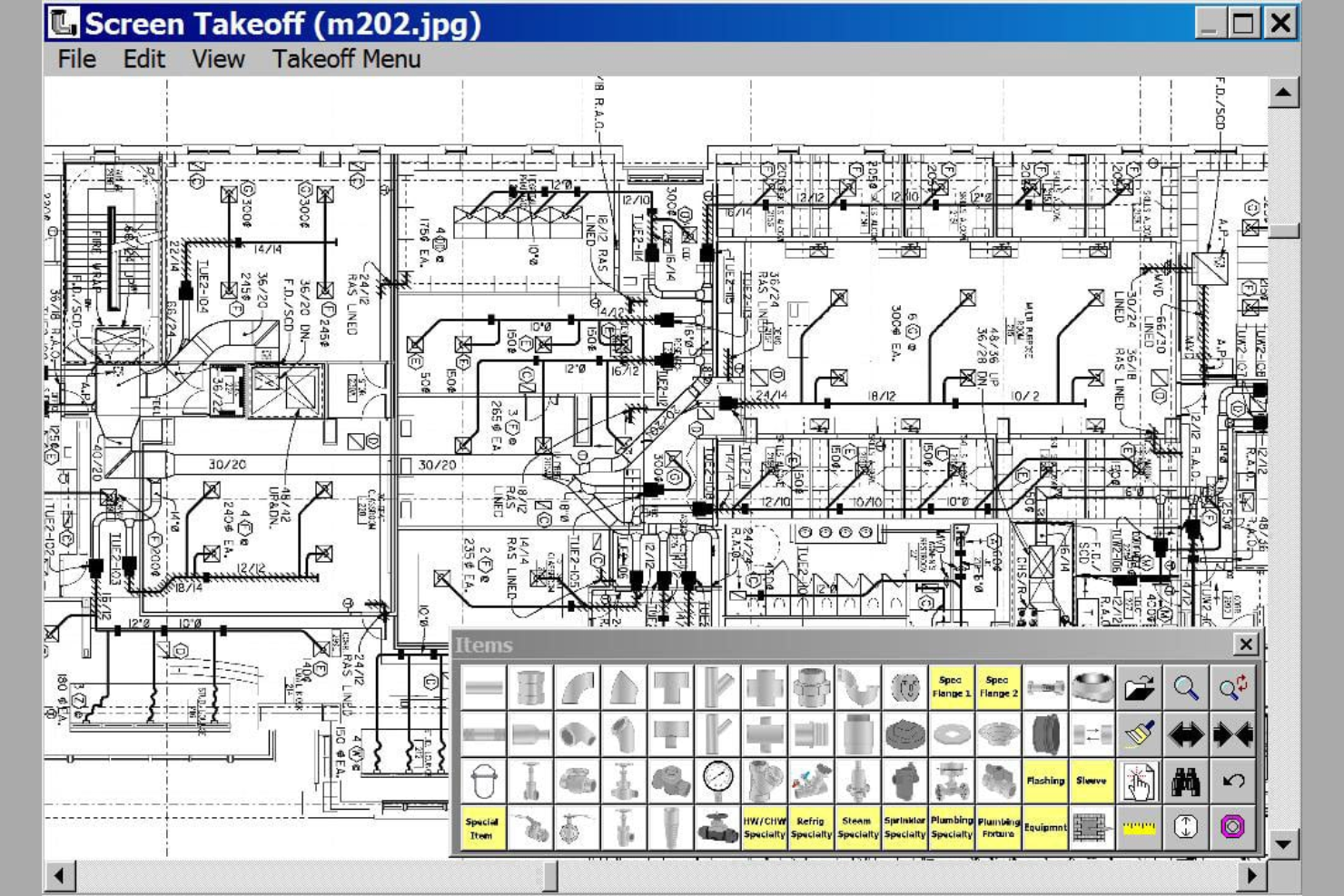
FastDUCT è un software di preventivazione HVAC progettato per imprese di installazione di canalizzazioni industriali e commerciali. È specializzato nel fornire stime dei costi rapide e accurate per canalizzazioni e sistemi HVAC.
Perché ho scelto FastDUCT: È ideale per creare preventivi precisi per canalizzazioni nella tua azienda HVAC. Puoi personalizzare le specifiche per soddisfare le esigenze specifiche di ogni lavoro. Funzioni come i modelli di lavoro e la facile conversione tra i prezzi delle canalizzazioni possono aumentare la produttività.
Funzionalità e integrazioni di rilievo:
Le funzionalità includono un catalogo prezzi HVAC con oltre 250.000 articoli e un digitalizzatore a schermo per planimetrie digitali. Supporta vari formati CAD e offre grafica ad alta risoluzione per analisi dettagliate. Il software consente inoltre gruppi di elementi scalabili e codici di costo personalizzabili per preventivi precisi.
Le integrazioni includono Microsoft Excel, FastPIPE e molto altro.
Pros and Cons
Pros:
- Vasto catalogo prezzi
- Digitalizzatore a schermo
- Supporta diversi formati CAD
Cons:
- Limitato a HVAC e canalizzazioni
- Compatibilità limitata con formati non Autodesk

Fablink
Ideale per la preventivazione e il calcolo dei costi orientati alla fabbricazione
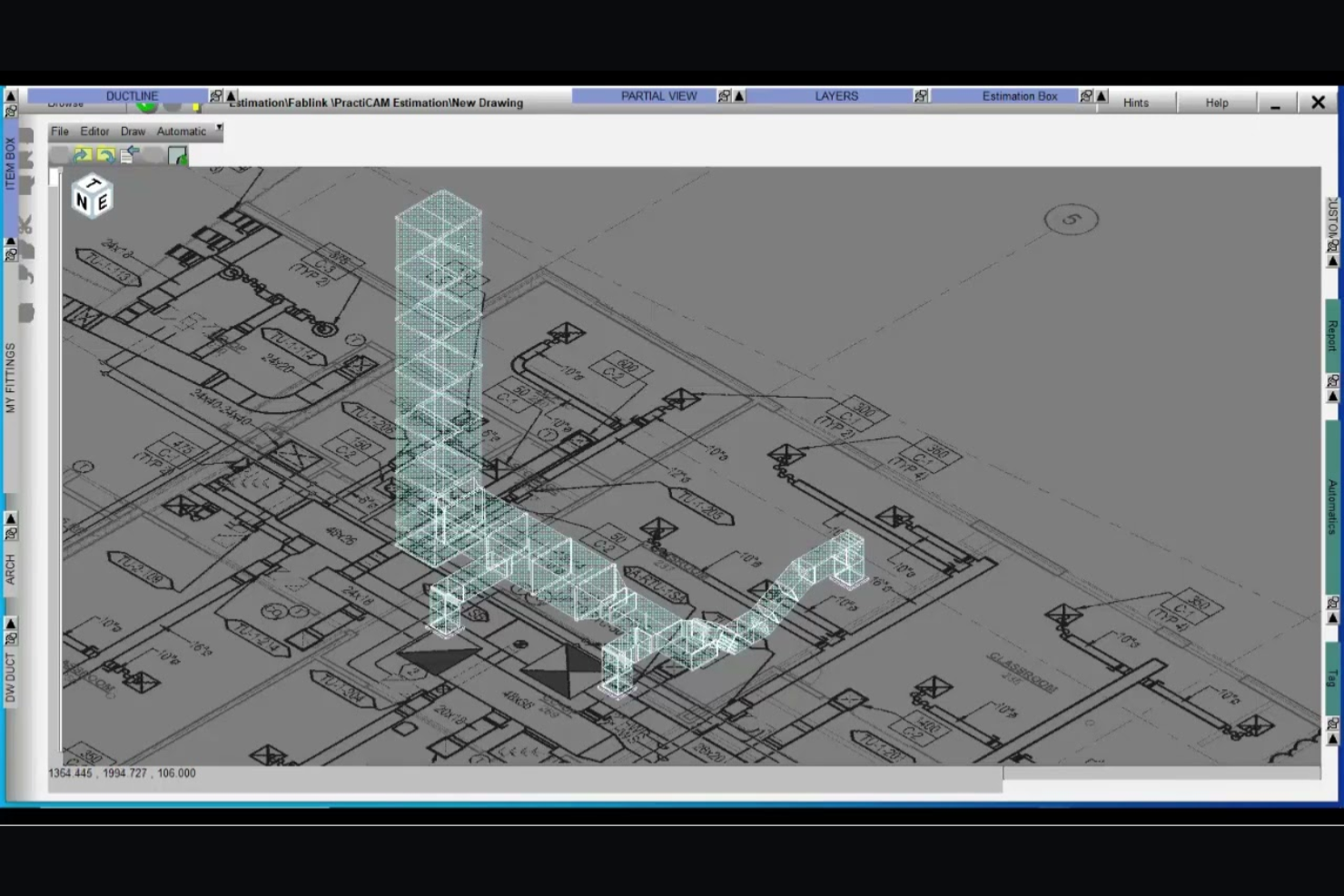
Fablink è un software di preventivazione HVAC progettato per i professionisti della lamiera e delle installazioni HVAC. Aiuta i contraenti a semplificare il processo di stima, offrendo opzioni sia stand-alone che integrate su piattaforme Windows e AutoCAD.
Perché ho scelto Fablink: Si distingue per la preventivazione integrata di HVAC e lamiera. Puoi convertire rapidamente i preventivi in modelli 2D o 3D prima di finalizzare i tuoi progetti. Il database centralizzato dei prezzi del software garantisce aggiornamenti rapidi, facilitando il mantenimento dei preventivi aggiornati.
Funzionalità principali e integrazioni:
Le funzionalità includono la condivisione dei dati tra sistemi, mantenendo il team sempre allineato. Puoi monitorare materiali e accessori in modo efficiente per evitare discrepanze. Il software offre inoltre ricarichi automatici e preventivi in tempo reale per proiezioni precise.
Le integrazioni includono AutoCAD, MetaLab e altro ancora.
Pros and Cons
Pros:
- Converte i preventivi in modelli 3D
- Database prezzi centralizzato
- Capacità di preventivazione in tempo reale
Cons:
- Limitato a Windows e AutoCAD
- Dipende dall'ecosistema FabLink

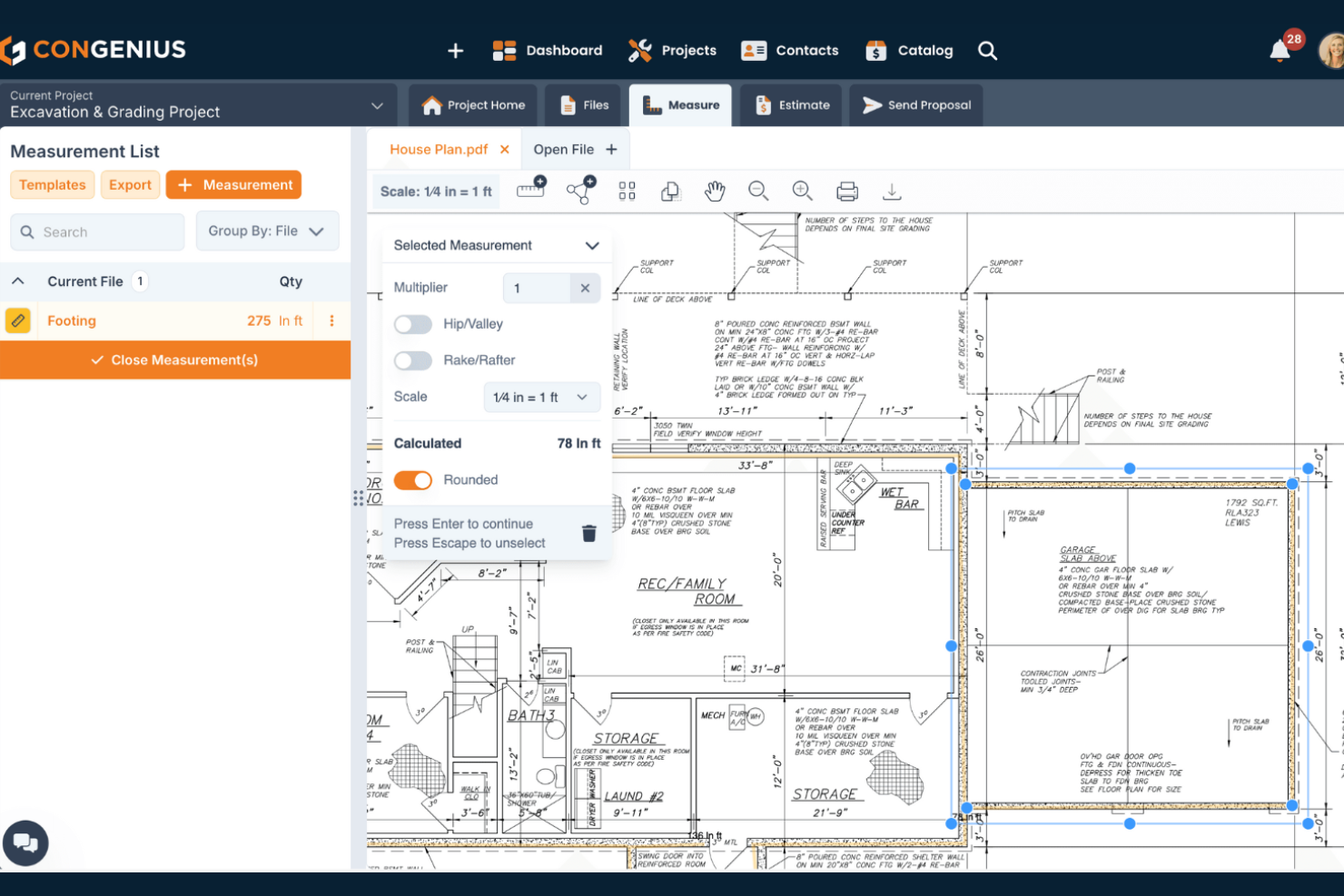
ConGenius è una piattaforma basata su cloud che aiuta gli appaltatori a creare preventivi di lavoro e proposte di progetto con meno passaggi manuali. Lo strumento supporta insieme le funzioni di vendita e di stima, così il tuo team può mantenere prezzi e offerte dei lavori in un unico posto.
Perché ho scelto ConGenius: Consente di organizzare le voci di costo, assemblare unità di lavoro comunemente utilizzate e misurare da planimetrie digitali, evitando di dover gestire diversi fogli di calcolo o documenti. È possibile creare e riutilizzare cataloghi di articoli e assemblaggi per ridurre il tempo necessario nella creazione dei preventivi. Puoi anche creare e personalizzare proposte che includono opzioni di firma elettronica, aiutandoti ad aumentare i tassi di successo.
Caratteristiche distintive e integrazioni:
Le funzionalità includono strumenti di misurazione digitale che permettono di contare le quantità direttamente dalle planimetrie, accesso a dati sui costi e cataloghi di articoli pre-caricati e la generazione personalizzabile di preventivi e proposte che collegano i rilievi ai prezzi. Sono presenti anche strumenti di gestione dei file e organizzazione dei contatti in stile CRM, che permettono di tenere tutte le informazioni sui lavori e sui clienti in un unico posto.
Le integrazioni non sono elencate pubblicamente.
Pros and Cons
Pros:
- Permette di misurare i rilievi da planimetrie digitali
- Funzionalità di firma elettronica
- Organizza i contatti e i dettagli dei lavori
Cons:
- Non dispone di uno strumento di ricerca testuale pdf integrato
- Mancano funzionalità avanzate di gestione progetti

Ideale per la tariffazione a prezzo fisso durante le chiamate di assistenza

The New Flat Rate è una piattaforma di listino prezzi a tariffa fissa creata per aiutare i team di assistenza a presentare prezzi coerenti mentre sono sul campo. Si basa su listini digitali a cui i tecnici possono accedere durante gli interventi per creare e presentare opzioni rapidamente.
Perché ho scelto The New Flat Rate: The New Flat Rate ti offre un listino prezzi a tariffa fissa pronto all'uso su cui i tecnici possono contare durante gli interventi di assistenza. Puoi presentare ai clienti opzioni di prezzo chiare invece di calcolare i costi dopo la visita. Questo mantiene i prezzi coerenti tra i vari interventi e riduce le dispute sui prezzi. Gli aggiornamenti dei prezzi in tempo reale garantiscono che i tecnici non lavorino con numeri obsoleti. Questa soluzione ti aiuta a concentrarti sulla chiusura dei lavori mentre sei ancora sul posto.
Caratteristiche e integrazioni principali:
Le caratteristiche includono listini digitali a tariffa fissa accessibili da dispositivi mobili, strumenti integrati per la presentazione dei prezzi durante le chiamate di assistenza e la possibilità di modificare attività e descrizioni per adattarle alle tue modalità operative. Puoi organizzare i servizi in modo che i tecnici trovino rapidamente l'opzione giusta durante una visita.
Le integrazioni includono ServiceTitan, Housecall Pro, iWallet e altro ancora.
Pros and Cons
Pros:
- App mobile disponibile
- Crea preventivi durante le visite di assistenza
- Supporta menu di servizi standardizzati
Cons:
- Meno flessibile per lavori personalizzati
- Richiede una regolare manutenzione del listino

Wendes è una piattaforma per la gestione dei cantieri e la contabilità progettata per collegare le stime ai dati finanziari e di progetto. Il sistema supporta il monitoraggio completo delle commesse dal preventivo al completamento.
Perché ho scelto Wendes: Wendes integra analisi dei costi di commessa, contabilità e controllo dei progetti, consentendo di mantenere le stime collegate ai costi effettivi man mano che i lavori avanzano. È possibile creare stime che confluiscono direttamente nei budget e nel monitoraggio dei costi senza dover reinserire i dati. Durante lo sviluppo dei cantieri, il team può confrontare le stime con i costi effettivi nello stesso sistema, aiutandoti a individuare tempestivamente eventuali discrepanze invece di attendere la chiusura dei lavori. Potrai mantenere allineati manodopera, materiali e costi generali dal preventivo alla fatturazione, soluzione ideale per le squadre che desiderano un controllo più efficace dei costi sui progetti.
Funzionalità principali e integrazioni:
Le funzionalità includono dati di stima del lavoro collegati direttamente alle strutture dei costi di commessa, monitoraggio in tempo reale dei costi rispetto alle stime iniziali e report finanziari che riflettono l'andamento del progetto. Il tuo team può anche consultare la cronologia dei costi per migliorare le stime future.
Le integrazioni non sono pubblicamente elencate.
Pros and Cons
Pros:
- Collega stime e costi
- Supporta il monitoraggio a lungo termine dei progetti
- Contabilità per commesse multiple
Cons:
- Richiede conoscenze contabili
- Non ideale per preventivi rapidi
Altri software per la stima dei costi HVAC
Ecco alcune altre opzioni di software per la stima dei costi HVAC che non sono state incluse nella mia selezione, ma che vale comunque la pena prendere in considerazione:
- SAMPro Enterprise
Ideale per la determinazione dei costi a livello aziendale
- Beam AI
Ideale per computi assistiti da IA
- Jobber
Ideale per stime semplici legate alla gestione dei lavori


Come valuto i software di preventivazione HVAC
Divido la mia valutazione in due livelli: la base che uno strumento deve avere—come il computo metrico dei condotti e la stima dei costi della manodopera—e i fattori differenzianti che separano i migliori dagli altri per gli appaltatori meccanici.
Funzionalità principali (requisiti minimi per questa lista)
Quando seleziono gli strumenti per la mia lista, assegno a ciascuno un punteggio da 0 (non offre la funzionalità) a 5 (eccelle in questo ambito) per ogni funzionalità principale elencata di seguito. Poi calcolo il punteggio totale dello strumento in percentuale. Ogni software deve raggiungere un punteggio totale minimo del 55% per essere considerato.
- Strumenti di computo metrico HVAC: Verifico che il software consenta la misurazione digitale di condotti, tubazioni e raccordi dai disegni di progetto, invece di affidarsi solo a computi basati su forme generiche.
- Database di costi HVAC: Prezzi pre-caricati di materiali e attrezzature sono fondamentali, quindi cerco librerie con articoli specifici per HVAC come UTA, cassette VAV e diffusori aggiornabili dai team.
- Preventivazione basata su assemblaggi: Gli assemblaggi riutilizzabili consentono di risparmiare ore su offerte ripetitive. Valuto se sia possibile creare gruppi di componenti come una unità rooftop con base, collegamento ai condotti e controlli.
- Calcolo delle ore di manodopera: Ogni strumento dovrebbe applicare tassi di produttività specifici per HVAC per attività come posa di condotto spiralato o brasatura rame, invece che moltiplicatori orari generici.
- Generazione di offerte e proposte: Esamino come ogni software formatta i documenti finali, dai dettagli per sistema o piano, fino a proposte professionali pronte per il giorno d'offerta al GC.
- Consegna alla gestione progetto: I dati di preventivazione non dovrebbero finire con l'aggiudicazione del contratto. Valuto come ciascun software trasferisca i dati d'offerta verso flussi di lavoro di gestione progetti, contabilità o prefabbricazione.
Una volta che ho una lista di strumenti che soddisfano i criteri, considero cosa distingue ciascuna piattaforma dalle altre.
Fattori differenzianti (cosa distingue i fornitori)
Ecco come confronto i diversi fornitori:
Caratteristiche illese
L'integrazione con la fabbricazione è un vero fattore distintivo. Cerco strumenti che mandino i dati del computo direttamente nei sistemi di produzione, così il lavoro di preventivazione arriva senza interruzioni all'officina. Anche la collaborazione in cloud è importante, soprattutto quando più preventivatori devono dividere un'offerta commerciale di grandi dimensioni. Valuto anche le analisi delle offerte, dove il software traccia lo storico vittorie/sconfitte e le tendenze di margine per aiutare a perfezionare i prezzi per i progetti futuri.
Oltre le funzionalità
Valuto quanto ogni software sia adatto a diverse dimensioni aziendali. Una piccola impresa residenziale di due persone ha esigenze molto diverse rispetto a una società meccanica commerciale con 50 preventivatori. Anche l'ecosistema di integrazioni è rilevante—verifico se lo strumento si collega a piattaforme di contabilità per costruzioni come Sage 300 CRE o Viewpoint e a software di gestione progetto come Procore. La specializzazione nel settore è fondamentale. Fornitori con una forte focalizzazione HVAC tendono a offrire cataloghi dei produttori più completi, supporto tecnico più mirato e un onboarding più rapido per i preventivatori meccanici.
Come scegliere un software per la stima dei costi HVAC
È facile perdersi in lunghi elenchi di funzionalità e strutture tariffarie complesse. Per aiutarti a rimanere concentrato mentre affronti il tuo processo unico di selezione del software, ecco un elenco dei fattori da tenere a mente:
| Fattore | Cosa considerare |
|---|---|
| Scalabilità | Il software può crescere insieme alla tua attività? Verifica se è in grado di gestire un numero maggiore di progetti o utenti senza problemi. Cerca soluzioni che offrano prezzi a livelli. |
| Integrazioni | Si collega agli strumenti che già utilizzi? Verifica la compatibilità con il software di contabilità o i sistemi di gestione dei progetti che usi già. |
| Personalizzazione | Puoi adattarlo ai tuoi processi? Cerca opzioni per modificare modelli, report e flussi di lavoro in base alle tue esigenze. |
| Semplicità d'uso | È facile da imparare per il tuo team? Valuta l'interfaccia utente e verifica la disponibilità di risorse formative che possano accelerare il processo di adozione. |
| Implementazione e avviamento | Quanto velocemente puoi iniziare? Considera il tempo e le risorse necessari per integrare il software nella configurazione attuale. |
| Costo | Rientra nel tuo budget? Confronta il prezzo con le funzionalità offerte e valuta se garantisce un buon rapporto qualità-prezzo. Fai attenzione ai costi nascosti o ai contratti a lungo termine. |
| Misure di sicurezza | Protegge i tuoi dati? Assicurati che sia conforme agli standard di settore per la protezione dei dati e che offra controlli sicuri per l'accesso degli utenti. |
| Disponibilità dell'assistenza | Puoi ricevere aiuto quando ne hai bisogno? Verifica se il fornitore offre assistenza 24 ore su 24, 7 giorni su 7, chat dal vivo o una base di conoscenza dettagliata per la risoluzione dei problemi. |
Che cos'è il software di preventivazione HVAC?
Il software di preventivazione HVAC è uno strumento che aiuta appaltatori e tecnici a calcolare i costi dei progetti di riscaldamento, ventilazione e climatizzazione. Questi strumenti vengono generalmente utilizzati dai professionisti HVAC, inclusi project manager e responsabili dei preventivi, per migliorare l'accuratezza e l'efficienza nella preparazione di offerte e proposte. Le funzionalità di stima dei costi, gestione dei progetti e integrazione aiutano a organizzare i dati, gestire le risorse e semplificare il flusso di lavoro. Nel complesso, questi strumenti fanno risparmiare tempo e riducono gli errori, rendendo più fluide la pianificazione e l'esecuzione dei progetti.
Funzionalità
Quando selezioni un software di preventivazione HVAC, presta attenzione alle seguenti funzionalità chiave:
- Stima dei costi: aiuta a calcolare con precisione i costi del progetto, risparmiando tempo e riducendo gli errori.
- Gestione dei progetti: organizza le attività e le pianificazioni per garantire che i progetti procedano senza intoppi e nei tempi previsti.
- Funzionalità di integrazione: si connette ad altri strumenti, come i software di contabilità, per un flusso di lavoro fluido.
- Accesso da dispositivi mobili: consente ai team sul campo di inserire dati e accedere alle informazioni ovunque si trovino.
- Modelli personalizzabili: permettono agli utenti di adattare report e preventivi alle esigenze della propria azienda.
- Collaborazione in tempo reale: consente ai membri del team di lavorare insieme e condividere immediatamente gli aggiornamenti.
- Analisi dei dati: fornisce informazioni sulle prestazioni del progetto e aiuta nel processo decisionale.
- Misure di sicurezza: proteggono i dati sensibili mediante solidi controlli degli accessi e misure di conformità.
Vantaggi
L'implementazione di un software di preventivazione HVAC offre diversi vantaggi al tuo team e alla tua azienda. Eccone alcuni che puoi aspettarti:
- Risparmio di tempo: i calcoli e i processi automatizzati liberano tempo da dedicare ad altre attività.
- Accuratezza: la riduzione degli errori nei preventivi porta a offerte di progetto più affidabili.
- Migliore collaborazione: la comunicazione in tempo reale tra i membri del team mantiene tutti aggiornati.
- Migliore processo decisionale: analisi dettagliate dei dati aiutano a prendere decisioni informate sui progetti e sulle risorse.
- Controllo dei costi: il monitoraggio delle spese e dei budget aiuta a prevenire le spese eccessive.
- Scalabilità: il software si adatta alle esigenze aziendali in crescita, consentendo l'espansione e l'aumento del carico di progetti.
Costi e prezzi
La scelta di un software di preventivazione HVAC richiede la comprensione dei diversi modelli e piani tariffari disponibili. I costi variano in base alle funzionalità, alle dimensioni del team, ai componenti aggiuntivi e ad altri fattori. La tabella seguente riassume i piani più comuni, i relativi prezzi medi e le funzionalità tipicamente incluse nelle soluzioni software di preventivazione HVAC:
Tabella comparativa dei piani per il software di preventivazione HVAC
| Tipo di piano | Prezzo medio | Funzionalità comuni |
|---|---|---|
| Piano gratuito | $0 | Strumenti di preventivazione di base, supporto limitato e accesso alla community. |
| Piano personale | $20-$55/utente/mese | Funzionalità avanzate di preventivazione, accesso da dispositivi mobili e supporto via e-mail. |
| Piano aziendale | $65-$100/utente/mese | Strumenti di collaborazione del team, opzioni di integrazione e supporto prioritario. |
| Piano aziendale avanzato | $150-$3000+/utente/mese | Soluzioni personalizzabili, gestione dedicata dell'account e analisi avanzate. |
Domande frequenti sul software per la preventivazione HVAC
Ecco alcune risposte alle domande più comuni sul software per la preventivazione HVAC:
Qual è la differenza tra il software per la preventivazione HVAC e il software generico per la preventivazione?
Il software per la preventivazione HVAC è progettato appositamente per il settore HVAC e si concentra sui progetti di riscaldamento, ventilazione e climatizzazione. Offre funzionalità come la stima delle condutture e i calcoli dei carichi, che il software generico per la preventivazione potrebbe non includere. Questa specializzazione aiuta i professionisti HVAC a semplificare i processi di preventivazione e a migliorare la precisione. Se operi nel settore HVAC, utilizzare un software specifico per il settore può farti risparmiare tempo e ridurre gli errori rispetto all’utilizzo di uno strumento generico.
In che modo il software per la preventivazione HVAC semplifica i flussi di lavoro dei progetti?
Il software per la preventivazione HVAC automatizza i calcoli manuali, organizza le offerte e ti aiuta a tenere traccia delle revisioni in un unico posto. In questo modo risparmi tempo, riduci gli errori e puoi aggiornare più facilmente i preventivi quando cambiano le specifiche del progetto. Digitalizzando il flusso di lavoro, puoi rispondere più rapidamente ai clienti, tenere sotto controllo le apparecchiature HVAC e aumentare l’efficienza del tuo team.
Il software per la preventivazione HVAC può integrarsi con altri strumenti aziendali?
Sì, la maggior parte dei software per la preventivazione HVAC può integrarsi con altri strumenti aziendali, come software di contabilità, sistemi CRM e piattaforme di gestione dei progetti. Prima dell’acquisto, verifica che il software supporti le integrazioni specifiche di cui hai bisogno, per assicurarti che sia compatibile con gli strumenti che già utilizzi.
Quanto sono precise le stime generate dal software per la preventivazione HVAC?
Le stime del software HVAC sono molto precise se utilizzi database dei prezzi aggiornati e inserisci specifiche di progetto accurate. Molti strumenti si collegano ai costi aggiornati dei materiali, riducendo al minimo le sorprese durante l’approvvigionamento. Aggiorna regolarmente i dati sui costi per ottenere i risultati migliori.
Quanto è sicuro il software per la preventivazione HVAC?
La maggior parte delle soluzioni software per la preventivazione HVAC dà priorità alla sicurezza e offre funzionalità come la crittografia dei dati, l’accesso sicuro degli utenti e backup regolari. È essenziale verificare che il software sia conforme agli standard di settore per la protezione dei dati. Dovresti inoltre cercare funzionalità come l’autenticazione a due fattori, per aggiungere un ulteriore livello di sicurezza ai dati del tuo team.
È disponibile una formazione per i nuovi utenti del software per la preventivazione HVAC?
Sì, molti fornitori offrono risorse formative come video tutorial, webinar e guide per l’utente, per aiutare i nuovi utenti a iniziare. Alcuni possono anche offrire sessioni personalizzate di onboarding. Sfruttare queste risorse può aiutare il tuo team a imparare più rapidamente a utilizzare il software, garantendo una transizione più fluida e una migliore adozione in tutta l’organizzazione.