

10 software per motori di regole aziendali selezionati per il 2026

Elenco ristretto di software per motori di regole aziendali


Il software per motori di regole aziendali consente di definire, gestire e automatizzare la logica decisionale nei diversi sistemi senza codificare le regole direttamente nel codice. Se stai cercando il miglior software per motori di regole aziendali, probabilmente vuoi migliorare il modo in cui il tuo team gestisce la logica complessa, si adatta ai requisiti in continua evoluzione e mantiene coerenti i processi mentre la tua azienda cresce. Con così tante opzioni disponibili, è difficile capire quale piattaforma sia più adatta alle tue esigenze tecniche, ai requisiti di integrazione e alle preferenze relative ai flussi di lavoro. Questo elenco ti aiuterà a confrontare le migliori soluzioni, comprenderne i punti di forza e scegliere lo strumento giusto per supportare i tuoi obiettivi di automazione e conformità.
Perché fidarsi dei nostri consigli sui software
Il nostro team testa e recensisce software dal 2012. In quanto project manager noi stessi, sappiamo quanto sia difficile — e importante — scegliere il software giusto.
Per questa guida, abbiamo valutato gli strumenti attraverso test pratici e ricerche indipendenti, assegnando un punteggio agli strumenti in base ai nostri criteri di selezione. Ci basiamo inoltre sulle competenze di leader di pensiero del settore e di professionisti attivi nella gestione dei progetti.
Le nostre recensioni riflettono il nostro giudizio editoriale umano, non un discorso di vendita.
Revisori esperti:
Tabella comparativa dei software per motori di regole aziendali
Questa tabella comparativa riassume i dettagli sui prezzi delle mie migliori selezioni di software per motori di regole aziendali:
| Tool | Best For | Trial Info | Price | ||
|---|---|---|---|---|---|
| 1 | Ideale per l'integrazione dei flussi di lavoro di audit | Non disponibile | Prezzo su richiesta | Website | |
| 2 | Ideale per automazione aziendale su larga scala | Demo gratuita + prova gratuita disponibile | Prezzi su richiesta | Website | |
| 3 | Ideale per l'editing di regole in stile foglio di calcolo | Prova gratuita di 30 giorni + piano gratuito + demo gratuita disponibile | Da $291/mese (fatturazione annuale) | Website | |
| 4 | Ideale per implementazioni rapide delle regole | Demo gratuita disponibile | Prezzi su richiesta | Website | |
| 5 | Ideale per la configurazione di regole senza codice | Demo gratuita disponibile | Prezzo su richiesta | Website | |
| 6 | Ideale per l'esecuzione di regole guidata dai workflow | Non disponibile | Prezzo su richiesta | Website | |
| 7 | Ideale per la gestione delle regole cloud-native | Piano gratuito + demo gratuita disponibile | Da €50/mese | Website | |
| 8 | Ideale per la modellazione visiva delle decisioni | Prova gratuita + demo gratuita disponibile | Prezzo su richiesta | Website | |
| 9 | Ideale per l'integrazione con sistemi legacy | Versione di prova gratuita disponibile | Prezzo su richiesta | Website | |
| 10 | Ideale per la flessibilità open-source | Non disponibile | Da $5,460/licenza | Website |
Recensioni dei software per motori di regole aziendali
Di seguito trovi le mie descrizioni dettagliate dei software per motori di regole aziendali inclusi nel mio elenco ristretto. Le mie recensioni offrono una panoramica approfondita delle funzionalità, dei migliori casi d’uso e delle integrazioni di ciascuna piattaforma, per aiutarti a trovare quella più adatta alle tue esigenze.

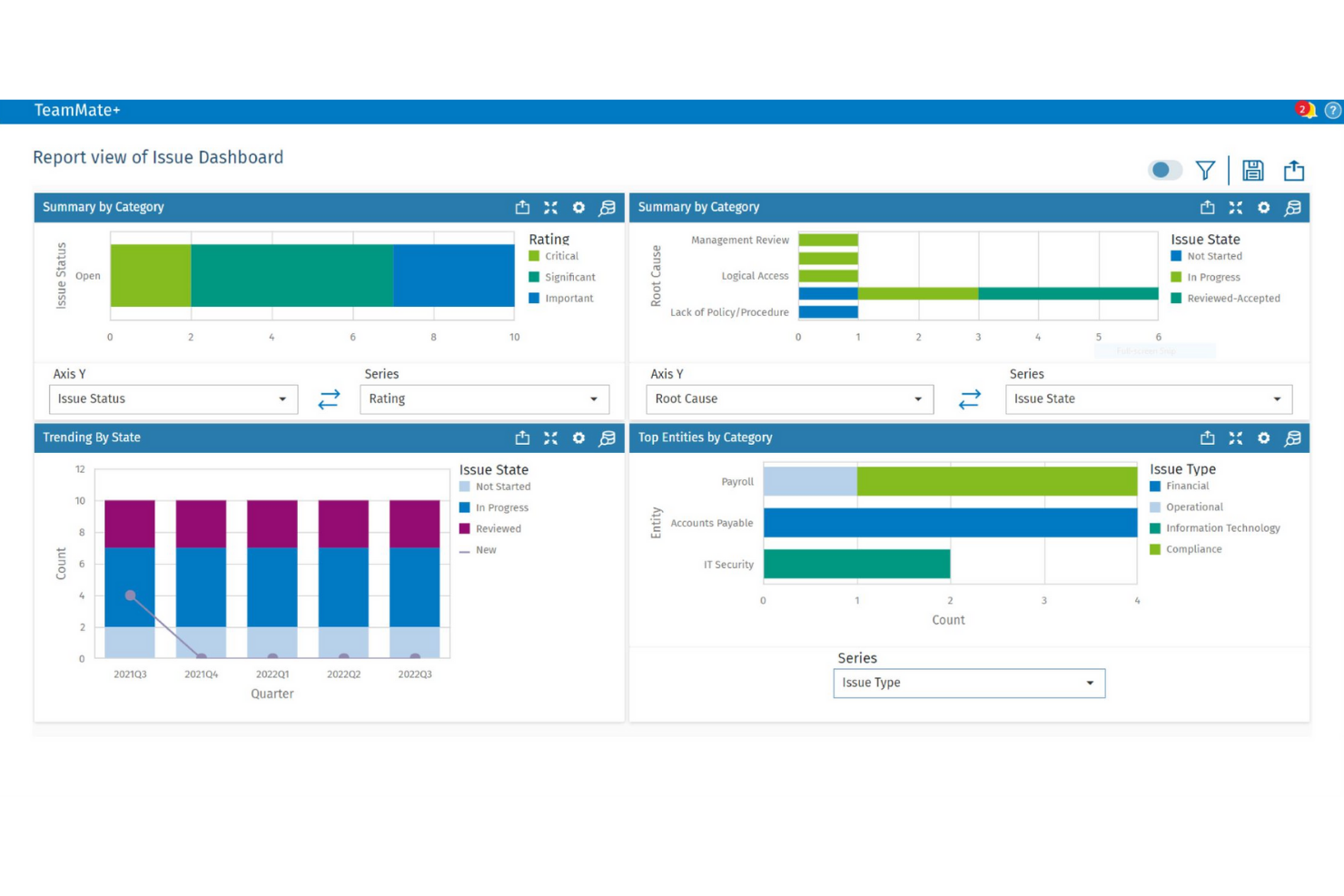
TeamMate è progettato per i team di audit che necessitano di integrare regole aziendali direttamente nei propri flussi di lavoro di audit. È particolarmente utile per i dipartimenti di audit interno nelle grandi organizzazioni che desiderano automatizzare le valutazioni dei rischi, le approvazioni e i processi di documentazione. Integrando le regole aziendali con la pianificazione e l'esecuzione dell'audit, TeamMate+ aiuta i team a mantenere coerenza e conformità durante cicli di audit complessi.
Perché ho scelto TeamMate
Ciò che distingue TeamMate è la sua attenzione all'integrazione delle regole aziendali direttamente nei flussi di lavoro di audit. Questo approccio consente ai team di audit di automatizzare la valutazione dei rischi, le approvazioni e i processi di escalation come parte delle attività quotidiane. Ho scelto TeamMate perché supporta set di regole configurabili che si adattano a diversi tipi di audit e requisiti normativi. La sua capacità di collegare la logica aziendale alla pianificazione e all'esecuzione dell'audit lo rende ideale per le organizzazioni che devono mantenere coerenza e conformità durante gli audit.
Funzionalità Principali di TeamMate
Ho trovato anche diverse altre funzionalità a supporto della gestione delle regole aziendali negli ambienti di audit:
- Assegnazione automatica delle attività: Assegna le attività di audit in base a regole predefinite e ai ruoli dei membri del team.
- Modelli personalizzabili: Crea e riutilizza modelli di audit che includono la logica aziendale incorporata.
- Dashboard in tempo reale: Monitora l'avanzamento degli audit e gli eventi attivati da regole tramite dashboard interattivi.
- Controllo versione dei documenti: Tieni traccia delle modifiche e mantieni una cronologia completa degli aggiornamenti della documentazione di audit.
Integrazioni di TeamMate
Le integrazioni native non sono attualmente elencate. Tuttavia, è disponibile un'API per integrazioni personalizzate.
Pros and Cons
Pros:
- I flussi di lavoro di audit includono logica delle regole aziendali integrata
- Supporta permessi granulari per la gestione delle regole
- Traccia le azioni attivate da regole nei log di audit
Cons:
- Le opzioni di personalizzazione dei report sono limitate
- Gli aggiornamenti dell'interfaccia possono interrompere i flussi di lavoro salvati


Il motore di regole aziendali di Pega è pensato per organizzazioni che gestiscono processi complessi e ad alto volume tra più dipartimenti o regioni. È particolarmente rilevante per grandi imprese nei settori finanziario, assicurativo e della pubblica amministrazione che devono automatizzare le decisioni su larga scala. Con Pega, i team possono centralizzare, aggiornare e verificare la logica aziendale, supportando al contempo automazione avanzata dei flussi di lavoro e requisiti di conformità.
Perché ho scelto Pega
Per le organizzazioni che hanno bisogno di automatizzare le regole aziendali su ampia scala, Pega si distingue per la sua capacità di gestire logiche complesse a livello aziendale. La piattaforma sostiene la gestione centralizzata delle regole, così i team possono aggiornare e governare la logica decisionale di più unità operative da un'unica posizione. Apprezzo che Pega includa controlli avanzati di audit e tracciamento della conformità, fondamentali per settori regolamentati. Il supporto a flussi di lavoro dinamici e guidati da eventi la rende inoltre una scelta solida per le aziende con grandi volumi di transazioni e requisiti in continuo cambiamento.
Funzionalità principali di Pega
Altre caratteristiche che rendono Pega una valida opzione per la gestione delle regole aziendali includono:
- Designer visivo delle regole: Crea e modifica regole tramite un'interfaccia drag-and-drop senza scrivere codice.
- Supporto alle tabelle decisionali: Definisci e gestisci logiche decisionali complesse usando tabelle simili a fogli di calcolo.
- Integrazione con analisi in tempo reale: Collega le regole a flussi di dati in tempo reale per decisioni adattive.
- Strumenti di gestione dei casi: Collega regole aziendali direttamente ai flussi di lavoro dei casi per automatizzare i processi end-to-end.
Integrazioni di Pega
Le integrazioni includono API REST, API SOAP, connettori per sistemi aziendali, supporto a piattaforme cloud, strumenti di integrazione con sistemi legacy e altro ancora.
Pros and Cons
Pros:
- Centralizza le regole aziendali per imprese globali
- Supporta automazione di flussi di lavoro complessi e a più fasi
- Scalabile per ambienti con grandi volumi di transazioni
Cons:
- Richiede competenze specialistiche per configurazioni avanzate
- Gli upgrade possono richiedere molte risorse ai team IT

Ideale per l'editing di regole in stile foglio di calcolo
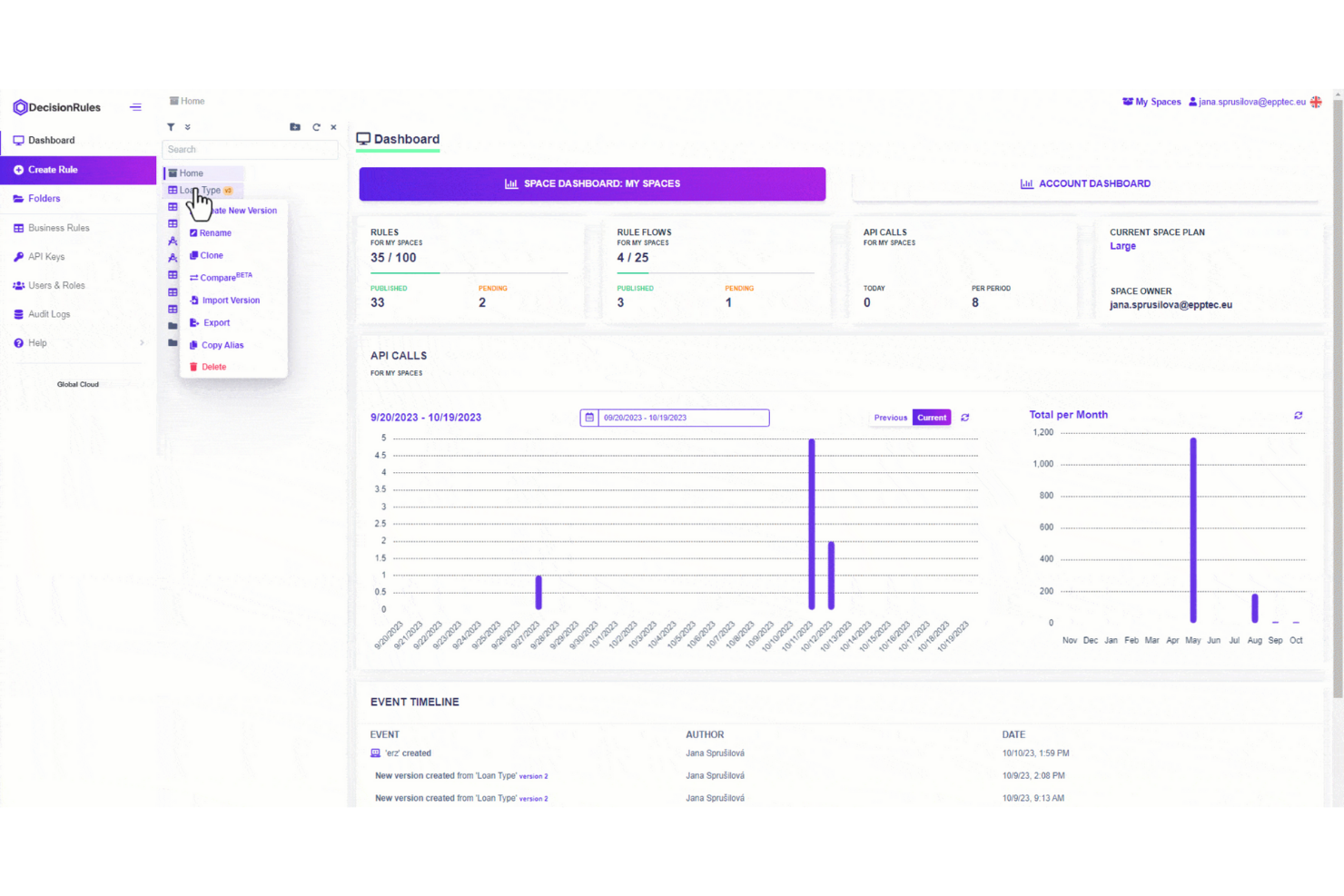
DecisionRules si distingue per i team che desiderano gestire le regole aziendali in un'interfaccia familiare simile a un foglio di calcolo. È particolarmente adatto alle operazioni, ai responsabili finanziari o di prodotto che hanno bisogno di creare, testare e aggiornare le regole senza programmare. Lo strumento ti aiuta a tradurre logiche decisionali complesse in tabelle modificabili, rendendo la gestione delle regole accessibile e trasparente anche agli utenti non tecnici.
Perché ho scelto DecisionRules
A differenza di molti motori di regole aziendali, DecisionRules utilizza un editor in stile foglio di calcolo che rende la creazione e l'aggiornamento delle regole intuitivi per chi ha familiarità con Excel o Google Sheets. Questo approccio è particolarmente utile per i team che vogliono gestire logiche complesse senza scrivere codice o dipendere dall'IT. Ho scelto DecisionRules perché permette di definire, testare e implementare le regole direttamente in formato tabellare, così puoi visualizzare e modificare la logica in tempo reale. Lo strumento supporta anche la modifica in blocco e il versioning, che aiutano i team a tenere traccia delle modifiche e collaborare sulla gestione delle regole.
Caratteristiche principali di DecisionRules
Altre funzionalità che rendono DecisionRules unico includono:
- Integrazione API: Connetti direttamente le regole alle tue applicazioni tramite endpoint REST API.
- Collegamento di regole: Collega più regole per gestire logiche decisionali complesse.
- Ambiente di test integrato: Testa le regole con dati di esempio prima della messa in produzione.
- Log di audit: Tieni traccia di tutte le modifiche e le esecuzioni delle regole per conformità e risoluzione dei problemi.
Integrazioni DecisionRules
Le integrazioni includono Salesforce, Jira, Excel, Google Sheets, AWS, Azure, Power BI, Tableau, Datadog, Anthropic e molto altro.
Pros and Cons
Pros:
- Editor in stile foglio di calcolo adatto a utenti non tecnici
- Ambiente di test integrato per la validazione delle regole
- Il collegamento di regole gestisce logiche decisionali complesse
Cons:
- Non è disponibile un'opzione di deployment on-premises
- Supporto limitato per linguaggi di scripting avanzati

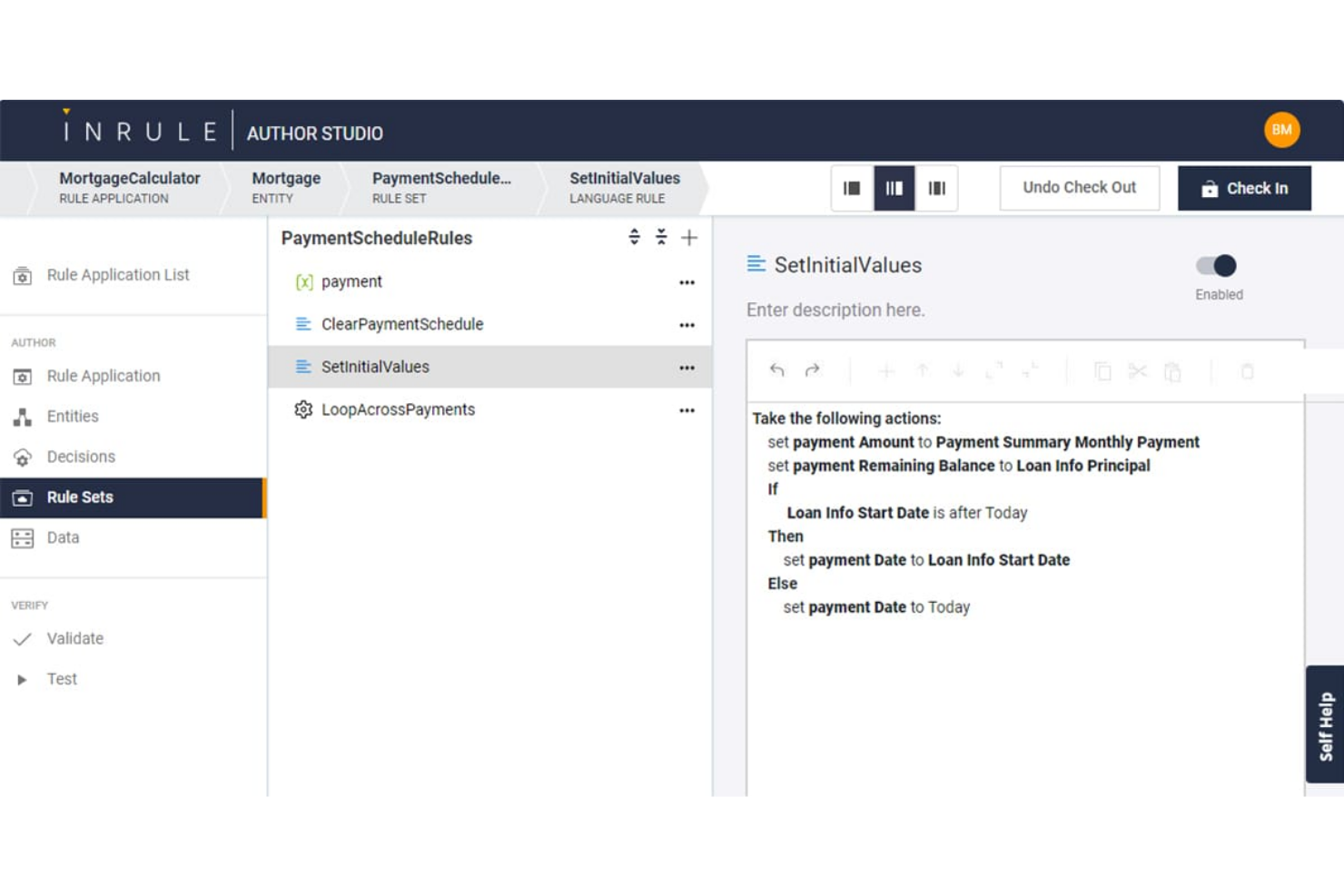
InRule è progettato per i team che hanno bisogno di implementare e aggiornare rapidamente le regole aziendali senza un pesante coinvolgimento degli sviluppatori. È particolarmente indicato per le aziende nei settori finanziario, assicurativo e sanitario che necessitano di frequenti modifiche alle regole per adeguarsi a normative o cambiamenti di mercato. Grazie alla sua interfaccia low-code e alla modifica delle regole in tempo reale, InRule aiuta le organizzazioni a rispondere velocemente alle esigenze in continua evoluzione della logica aziendale.
Perché ho scelto InRule
L’implementazione rapida delle regole è il vero punto di forza di InRule tra i software di business rules engine. La piattaforma consente agli utenti di creare, testare e implementare le regole in tempo reale, così puoi rispondere ai cambiamenti del business senza attendere i cicli di sviluppo. Ho scelto InRule perché il suo ambiente low-code permette sia agli utenti tecnici sia a quelli non tecnici di aggiornare direttamente le regole in produzione. Gli strumenti di simulazione e di analisi dell’impatto aiutano inoltre i team a validare le modifiche prima della messa in produzione, riducendo i rischi e accelerando il processo decisionale.
Caratteristiche principali di InRule
Altre caratteristiche che rendono InRule una soluzione di spicco per la gestione delle regole aziendali includono:
- Tabelle decisionali: crea e gestisci logiche decisionali complesse tramite tabelle simili a fogli di calcolo.
- Authoring in linguaggio naturale: scrivi e modifica regole in linguaggio semplice per una collaborazione più agevole.
- Controllo delle versioni: traccia, confronta e ripristina le modifiche alle regole secondo necessità.
- Supporto API REST: collega InRule ad altri sistemi e attiva le regole tramite chiamate API.
Integrazioni InRule
Le integrazioni includono Salesforce, Microsoft Dynamics, Snowflake e API per integrazioni personalizzate.
Pros and Cons
Pros:
- Implementazione delle regole in tempo reale senza modifiche al codice
- Le tabelle decisionali supportano logiche complesse
- Authoring in linguaggio naturale per utenti business
Cons:
- La distribuzione on-premises richiede una configurazione aggiuntiva
- Non dispone di funzionalità avanzate di analisi integrate


Decisions è progettato per team che desiderano configurare e automatizzare regole aziendali senza scrivere codice. È particolarmente indicato per responsabili delle operazioni, team di conformità e analisti aziendali che devono adattare rapidamente i processi quando cambiano i requisiti. L’interfaccia no-code della piattaforma consente di creare, testare e implementare direttamente le regole, riducendo la dipendenza dall’IT e velocizzando i cicli di cambiamento.
Perché ho scelto Decisions
Ciò che mi ha colpito di Decisions è la sua attenzione alla configurazione delle regole senza codice, particolarmente utile per i team che vogliono permettere agli utenti aziendali di gestire direttamente la logica. La piattaforma offre un progettista delle regole drag-and-drop e un costruttore di workflow visivi, permettendo di creare e aggiornare regole senza conoscenze di programmazione. Ho scelto Decisions perché supporta test e validazione in tempo reale, consentendo di vedere l’impatto delle modifiche prima della pubblicazione. Questo approccio aiuta le organizzazioni a rispondere rapidamente ai nuovi requisiti e riduce i colli di bottiglia tipici della gestione delle regole da parte dell’IT.
Funzionalità principali di Decisions
Altre funzionalità che mi hanno colpito includono:
- Monitoraggio delle metriche aziendali: Monitora i risultati delle regole e le prestazioni con strumenti di analisi integrati.
- Controllo delle versioni: Gestisci le modifiche alle regole e ripristina versioni precedenti quando necessario.
- Registrazione delle attività: Tieni traccia di tutte le modifiche alle regole e delle azioni degli utenti per la conformità.
- Pianificazione delle regole: Imposta regole affinché si attivino o scadano automaticamente in base alla data o a eventi specifici.
Integrazioni di Decisions
Le integrazioni includono Microsoft Dynamics, Salesforce, SAP, Oracle, AWS, Azure, Google Cloud, Slack, ServiceNow, Twilio e altro ancora.
Pros and Cons
Pros:
- Designer drag-and-drop per modifiche rapide alle regole
- Controllo delle versioni integrato per la gestione delle modifiche alle regole
- Test delle regole in tempo reale con anteprima dei risultati
Cons:
- I workflow complessi possono richiedere il supporto del fornitore
- L’interfaccia utente può sembrare datata in alcune parti


FlowWright è progettato per i team che hanno bisogno di integrare direttamente le regole aziendali nei flussi di lavoro automatizzati. È particolarmente utile per le organizzazioni nei settori della produzione, della logistica o delle operazioni, dove l'automazione dei processi e l'esecuzione delle regole devono lavorare in stretta collaborazione. Combinando l'automazione dei flussi di lavoro con un motore di regole integrato, FlowWright ti aiuta a gestire logiche decisionali complesse come parte integrante dei tuoi processi aziendali end-to-end.
Perché ho scelto FlowWright
Ciò che distingue FlowWright è la sua capacità di unire in modo stretto regole aziendali e automazione dei flussi di lavoro, rendendolo una scelta solida per l'esecuzione di regole guidata dai workflow. La piattaforma consente di progettare, eseguire e gestire regole come parte di flussi di processo più ampi, così la logica decisionale è sempre in sintonia con i passaggi operativi. Ho scelto FlowWright perché offre un designer visuale di workflow che integra la valutazione delle regole direttamente nei diagrammi di processo. Questo approccio aiuta i team ad automatizzare processi complessi e multi-step in cui regole e flussi di lavoro devono interagire senza problemi.
Funzionalità principali di FlowWright
Oltre all'approccio guidato dai workflow, FlowWright offre diverse altre funzionalità degne di nota:
- Versionamento delle regole: Mantieni e gestisci più versioni delle regole aziendali per fini di audit e rollback.
- Supporto per scripting personalizzato: Integra script C# direttamente nelle regole per una logica avanzata.
- Trigger per notifiche email: Imposta avvisi email automatici basati sugli esiti delle regole.
- Controllo accessi basato sui ruoli: Definisci i permessi utente per la creazione, la modifica e l'esecuzione delle regole.
Integrazioni di FlowWright
Le integrazioni includono OneDrive, Slack, Google Drive, Microsoft Azure e altro ancora.
Pros and Cons
Pros:
- Creazione flessibile e grafica delle regole
- Logica decisionale condivisa tramite tabelle decisionali
- Architettura a livello enterprise
Cons:
- Il test avanzato richiede competenze di sviluppo
- Supporto UI mobile limitato


GoRules è un motore di gestione delle regole aziendali cloud-native progettato per i team che necessitano di una gestione delle regole flessibile e guidata da API. È particolarmente adatto a fornitori SaaS, fintech e aziende digitali che desiderano centralizzare e automatizzare la logica decisionale senza un'infrastruttura pesante. Se vuoi aggiornare rapidamente le regole e mantenere agili i tuoi sistemi, GoRules offre un approccio moderno al deployment e alla governance delle regole.
Perché ho scelto GoRules
Ho scelto GoRules perché è costruito specificamente per la gestione delle regole cloud-native, che è una priorità per i team che gestiscono applicazioni distribuite o API-first. La piattaforma ti consente di definire, testare e distribuire regole direttamente tramite un'interfaccia web o tramite REST API, rendendo facile l'integrazione con architetture cloud moderne. Mi piace che GoRules supporti il versionamento e le tracce di audit per ogni modifica alle regole, così puoi monitorare gli aggiornamenti e mantenere la conformità. La sua esecuzione delle regole in tempo reale e la gestione centralizzata aiutano i team a mantenere la logica aziendale coerente su diversi ambienti.
Funzionalità principali di GoRules
Altre funzionalità che rendono GoRules una scelta eccellente per l'automazione delle regole aziendali includono:
- Simulazione delle Regole: Testa nuove regole o regole aggiornate in un ambiente sandbox prima di distribuirle in produzione.
- Controllo degli Accessi Basato sui Ruoli: Assegna permessi e gestisci i ruoli utente per controllare chi può visualizzare, modificare o distribuire le regole.
- Supporto a JSON Logic: Crea e gestisci regole utilizzando la logica JSON, facilitando il lavoro con dati strutturati.
- Integrazione Webhook: Attiva automaticamente workflow esterni o notifiche quando vengono eseguite specifiche regole.
Integrazioni GoRules
Le integrazioni includono Azure AD, Okta e qualsiasi provider OpenID Connect per SSO, così come SDK nativi per Rust, Node.js, Python, Go, Java, Kotlin e Swift.
Pros and Cons
Pros:
- Deployment cloud-native con supporto multi-cloud
- Esecuzione delle regole in tempo reale tramite REST API
- Supporta la logica JSON per una creazione flessibile delle regole
Cons:
- Nessun builder visuale delle regole per utenti non tecnici
- Comunità più piccola rispetto ai fornitori storici

Sparkling Logic offre un approccio visivo alla modellazione delle decisioni che risulta particolarmente attraente per i team che gestiscono una logica aziendale complessa. È particolarmente utile per analisti e responsabili di prodotto che desiderano mappare, testare e ottimizzare le regole tramite diagrammi di flusso e tabelle decisionali. La piattaforma aiuta a visualizzare dipendenze ed esiti, rendendo più facile allineare gli stakeholder e adattare le regole man mano che cambiano i requisiti.
Perché ho scelto Sparkling Logic
Ciò che distingue Sparkling Logic è il suo focus sulla modellazione visiva delle decisioni, particolarmente preziosa per i team che devono mappare e comunicare una logica aziendale complessa. La piattaforma consente di costruire e gestire le regole tramite diagrammi di flusso e tabelle decisionali, così puoi vedere come le decisioni si collegano e si evolvono. Ho scelto Sparkling Logic perché supporta test e simulazioni delle regole in tempo reale, aiutandoti a validare i risultati prima di implementare modifiche. Questo approccio visivo facilita la collaborazione con gli stakeholder e l’adattamento delle regole in base ai cambiamenti di business.
Funzionalità principali di Sparkling Logic
Oltre alle sue capacità di modellazione visiva, ho trovato queste funzionalità particolarmente rilevanti:
- RedPen per la creazione delle regole: Crea e modifica regole tramite un’interfaccia guidata basata su moduli.
- Scoperta automatica delle regole: Analizza i dati storici per suggerire automaticamente nuove regole.
- Dashboard di analisi decisionale: Monitora le prestazioni delle regole e i risultati grazie ad analisi integrate.
- Controllo degli accessi basato sui ruoli: Assegna permessi e gestisci i ruoli degli utenti per una collaborazione sicura.
Integrazioni di Sparkling Logic
Le integrazioni native al momento non sono elencate.
Pros and Cons
Pros:
- La modellazione visiva delle regole supporta la mappatura di logiche complesse
- La funzione RedPen guida la creazione di regole da parte di utenti non tecnici
- La scoperta automatica delle regole suggerisce nuova logica decisionale
Cons:
- La documentazione non fornisce esempi dettagliati di implementazione
- Supporto della community e forum utenti limitati


Il sistema di gestione delle regole aziendali di IBM Operational Decision Manager è progettato per le organizzazioni che devono modernizzare l'automazione decisionale mantenendo una profonda integrazione con i sistemi legacy. È particolarmente rilevante per aziende nei settori finanziario, assicurativo e governativo che si affidano a mainframe o infrastrutture datate. La piattaforma consente di centralizzare, aggiornare e gestire la logica aziendale complessa senza interrompere le operazioni esistenti.
Perché ho scelto IBM Operational Decision Manager
Ciò che distingue IBM Operational Decision Manager è il suo forte focus sul supporto per l'integrazione con sistemi legacy, una delle principali preoccupazioni per le grandi aziende con infrastrutture consolidate. La piattaforma offre strumenti per collegare le regole aziendali direttamente a mainframe e database obsoleti, consentendo di automatizzare le decisioni senza dover rivoluzionare tutto lo stack tecnologico. Ho scelto IBM Operational Decision Manager perché fornisce funzionalità di gestione centralizzata delle regole e di governance che aiutano a mantenere la coerenza tra i sistemi distribuiti. Questo lo rende una scelta pratica per le organizzazioni che devono modernizzare la logica decisionale mantenendo operative senza interruzioni le attività legacy.
Funzionalità principali di IBM Operational Decision Manager
Altre funzionalità che mi hanno colpito includono:
- Supporto a Decision Modeling Notation (DMN): Crea e gestisci modelli decisionali utilizzando diagrammi DMN standard di settore.
- Controllo degli accessi basato sui ruoli: Assegna permessi e gestisci i ruoli utente per la modifica e la distribuzione delle regole.
- Strumenti di simulazione e test: Esegui simulazioni per validare le modifiche alle regole prima della distribuzione in produzione.
- Distribuzione automatica delle regole: Distribuisci regole aggiornate su più ambienti attraverso flussi di lavoro automatizzati.
Integrazioni di IBM Operational Decision Manager
Le integrazioni native non sono attualmente elencate.
Pros and Cons
Pros:
- Supporta l'integrazione con mainframe e sistemi legacy
- Offre modellazione DMN e tramite tabelle decisionali
- Include strumenti di simulazione e test delle regole
Cons:
- Le funzionalità cloud e on-premises differiscono
- Template di regole predefinite limitati

OpenRules si distingue per i team che desiderano il pieno controllo sul proprio motore di regole aziendali e preferiscono soluzioni open-source. È particolarmente adatto per sviluppatori e team IT in settori regolamentati che devono personalizzare, verificare e ampliare la logica delle regole senza vincoli imposti dal fornitore. La piattaforma ti aiuta a costruire, testare e distribuire modelli decisionali utilizzando strumenti familiari come Excel e Java.
Perché ho scelto OpenRules
OpenRules offre un livello di flessibilità open-source difficile da trovare in altri motori di regole aziendali. Puoi modificare, estendere e verificare il codice sorgente, caratteristica particolarmente preziosa per le organizzazioni con esigenze rigorose di conformità o personalizzazione. Ho scelto OpenRules perché consente ai team di definire le regole in Excel o Java, rendendolo accessibile sia agli utenti tecnici che a quelli non tecnici. Questo approccio favorisce trasparenza e controllo, elementi chiave per i team che vogliono evitare vincoli con il fornitore e personalizzare la propria logica decisionale.
Funzionalità principali di OpenRules
Altre funzionalità da evidenziare includono:
- Supporto a Decision Model and Notation (DMN): Crea ed esegui modelli decisionali utilizzando standard DMN per coerenza e chiarezza.
- Integrazione API RESTful: Collega i servizi di regole ad applicazioni esterne tramite endpoint RESTful.
- Framework di test delle regole: Valida e testa le regole aziendali con strumenti di test integrati prima della distribuzione.
- Distribuzione su piattaforme cloud: Distribuisci i motori di regole su ambienti cloud come AWS e Azure per una maggiore scalabilità.
Integrazioni di OpenRules
Al momento, le integrazioni native non sono elencate.
Pros and Cons
Pros:
- Completamente open-source con base di codice trasparente
- Supporta la modellazione di regole basate su DMN ed Excel
- Offre una REST API per integrazioni esterne
Cons:
- Opzioni limitate di supporto tecnico fornite dal venditore
- L'interfaccia utente è principalmente basata su codice e fogli di calcolo
Altri software per motori di regole aziendali
Ecco alcune opzioni aggiuntive di software per motori di regole aziendali che non sono entrate nel mio elenco ristretto, ma che vale comunque la pena valutare:
- Progress Corticon
Ideale per l'automazione di decisioni complesse
- SAS
Ideale per la creazione di regole guidate dall’analisi dei dati
- Flowable
Ideale per l'automazione delle regole basata su BPMN


Come Valuto i Software Business Rules Engine
Valuto due livelli: le capacità di base che uno strumento deve avere—come un editor visivo delle regole e l’esecuzione in tempo reale—e i fattori di differenziazione che distinguono le migliori opzioni per i team PMO.
Funzionalità Core (Requisiti Minimi Per Questa Lista)
Quando seleziono gli strumenti per la mia lista, valuto ciascuno su una scala da 0 (non offre la funzionalità) a 5 (eccelle in quest’area) per ogni funzionalità core riportata sotto. Poi, calcolo il punteggio totale dello strumento come percentuale. Ogni strumento deve raggiungere un punteggio totale minimo del 65% per essere preso in considerazione per l’inclusione.
- Interfaccia di Creazione Regole: Valuto se gli utenti business possono creare e modificare regole tramite un builder visivo o moduli in linguaggio naturale invece di affidarsi agli sviluppatori per codificare la logica.
- Motore di Logica Condizionale: Il motore dovrebbe gestire tabelle decisionali, catene nidificate if-then-else e operatori booleani—come l’instradamento di approvazioni in base al budget di progetto, livello di rischio e capacità del team.
- Esecuzione & Runtime delle Regole: Verifico se le regole vengono attivate in tempo reale a partire da trigger live (es: un cambio di stato in Jira) o solo in batch pianificati, e come ogni strumento gestisce all’aumentare della scala.
- Versionamento & Governance delle Regole: Audit trail e rollback sono fondamentali quando i team PMO gestiscono decine di regole attive. Cerco cronologia delle versioni, permessi basati sui ruoli e workflow di approvazione sul ciclo di vita.
- API & Integrazione di Sistema: Un rules engine ha valore soltanto se si collega all’infrastruttura esistente. Valuto la copertura API REST/SOAP e la disponibilità di connettori nativi per piattaforme PM, ERP e strumenti iPaaS.
- Strumenti di Test & Simulazione: Prima di pubblicare una regola, serve un ambiente di test. Ricerco simulazioni what-if, test con dati di esempio e check di regressione così che una regola configurata male non metta a rischio i progetti attivi.
Quando ho una lista di strumenti che rispondono ai criteri, considero cosa distingue ogni piattaforma.
Fattori di Differenziazione (Cosa Distingue i Fornitori)
Ecco come confronto i diversi fornitori:
Funzionalità Particolari
Template di regole preconfigurate possono far risparmiare giorni sul deployment—valuto librerie che includano schemi specifici PM come trigger di escalation o allerte di violazione SLA. Anche le dashboard analitiche sono importanti. Voglio vedere quali regole vengono attivate più spesso, dove si formano colli di bottiglia e come le variazioni nelle regole influenzano i risultati dei progetti nel tempo. La gestione collaborativa delle regole è un altro elemento di distinzione. Quando i responsabili PMO e IT devono co-redigere regole, gli strumenti con funzioni di commenti, workflow di approvazione e gestione condivisa facilitano molto la collaborazione interfunzionale.
Oltre le Funzionalità
La profondità dell’ecosistema di integrazione è uno dei primi aspetti che verifico—un rules engine che non si connette alla tua istanza Jira o ERP è destinato a restare inutilizzato. Anche le certificazioni di compliance come SOC 2 Type II e ISO 27001 hanno una vera importanza, specie quando le regole governano allocazione risorse o approvazioni di budget con dati sensibili. Analizzo inoltre con attenzione i modelli di licenza, poiché una tariffazione per esecuzione può diventare rapidamente onerosa se si eseguono centinaia di controlli automatici su un ampio portafoglio di progetti.
Come scegliere il software per motori di regole aziendali
È facile perdersi in lunghi elenchi di funzionalità e strutture tariffarie complesse. Per aiutarti a rimanere concentrato mentre affronti il tuo processo di selezione del software, ecco un elenco dei fattori da tenere presenti:
| Fattore | Cosa considerare |
|---|---|
| Scalabilità | Lo strumento sarà in grado di gestire il volume attuale e previsto di regole, il numero di utenti e il carico di transazioni? Chiedi ai fornitori esempi reali di scalabilità. |
| Integrazioni | Il software si collega nativamente ai tuoi sistemi principali (ERP, CRM, database)? Verifica la disponibilità di connettori preconfigurati e opzioni API. |
| Personalizzazione | Puoi adattare la logica delle regole, i flussi di lavoro e gli output ai tuoi processi aziendali senza un coinvolgimento significativo del reparto IT? |
| Semplicità d'uso | Gli utenti aziendali potranno creare, testare e aggiornare le regole autonomamente oppure il reparto IT dovrà intervenire per ogni modifica? |
| Implementazione e avvio | Quali risorse, formazione e supporto alla migrazione fornisce il fornitore? Informati sulle tempistiche di avvio e sull'impegno interno richiesto. |
| Costo | I livelli tariffari sono trasparenti e prevedibili man mano che aumenta l'utilizzo? Fai attenzione ai costi nascosti legati a utenti, transazioni o integrazioni. |
| Misure di sicurezza | Lo strumento supporta i requisiti della tua organizzazione in materia di protezione dei dati, controllo degli accessi e audit? Richiedi la documentazione relativa alle certificazioni. |
| Requisiti di conformità | La piattaforma supporta le normative specifiche del settore (come HIPAA, GDPR o SOX) pertinenti per la tua azienda? |
Che cos'è il software per motori di regole aziendali?
Il software per motori di regole aziendali, spesso indicato come BRMS (sistema di gestione delle regole aziendali), è uno strumento che consente alle organizzazioni di definire, gestire e automatizzare la logica decisionale separatamente dal codice dell'applicazione. Queste piattaforme aiutano i team a creare, aggiornare e verificare le regole, come i controlli di idoneità, le approvazioni o i requisiti di conformità, senza dipendere dagli sviluppatori. Centralizzando la gestione delle regole, le aziende possono semplificare le operazioni, supportare la gestione dei processi aziendali e abilitare casi d'uso come il rilevamento delle frodi e la determinazione dinamica dei prezzi, soprattutto nei servizi finanziari e negli istituti finanziari. Grazie a un'interfaccia intuitiva e a un'integrazione fluida tra i sistemi, questi strumenti aiutano le organizzazioni a reagire rapidamente ai cambiamenti, mantenendo al contempo coerenza e trasparenza nel processo decisionale.
Funzionalità
Quando selezioni un software per motori di regole aziendali, presta attenzione alle seguenti funzionalità chiave:
- Interfaccia per la creazione delle regole: offre un ambiente visivo o basato su testo per creare, modificare e organizzare le regole aziendali senza scrivere codice applicativo.
- Versionamento delle regole: tiene traccia delle modifiche alle regole nel tempo, consentendo agli utenti di esaminare, ripristinare o verificare le versioni precedenti man mano che evolvono le esigenze aziendali.
- Test e simulazione delle regole: consente agli utenti di convalidare la logica e i risultati delle regole utilizzando dati di esempio prima di distribuire le modifiche nei sistemi di produzione.
- Elaborazione batch: elabora grandi volumi di dati o transazioni attraverso regole definite in un'unica operazione, supportando l'automazione decisionale ad alta produttività.
- Rilevamento di conflitti e lacune: identifica regole sovrapposte, contraddittorie o mancanti per aiutare a mantenere la coerenza logica ed evitare errori nelle decisioni automatizzate.
- Controllo degli accessi basato sui ruoli: limita le autorizzazioni per la creazione, la modifica e la distribuzione delle regole in base ai ruoli degli utenti, supportando i requisiti di governance e conformità.
- Connettori di integrazione: consentono connessioni dirette a database, applicazioni e altri sistemi, permettendo alle regole di accedere ai dati in tempo reale e attivare azioni successive.
- Registrazione degli audit: registra tutte le modifiche alle regole, le esecuzioni e le azioni degli utenti, fornendo una cronologia trasparente per la conformità e la risoluzione dei problemi.
- Gestione della distribuzione: supporta la pubblicazione, l'aggiornamento e il ripristino delle regole in diversi ambienti, come sviluppo, test e produzione.
- Monitoraggio e reportistica: offre pannelli di controllo e report per monitorare le metriche di esecuzione delle regole, gli errori e i risultati aziendali ai fini dell'ottimizzazione continua.
Vantaggi
L'implementazione di un software per motori di regole aziendali offre diversi vantaggi al tuo team e alla tua azienda. Ecco alcuni dei benefici che puoi aspettarti:
- Modifiche più rapide alle regole: gli utenti aziendali possono aggiornare direttamente la logica decisionale tramite un'interfaccia visiva, riducendo la dipendenza dagli sviluppatori e accelerando la risposta ai nuovi requisiti.
- Processo decisionale coerente: la gestione centralizzata delle regole garantisce che le decisioni automatizzate seguano la stessa logica in tutti i sistemi e processi.
- Maggiore verificabilità: le funzionalità integrate di versionamento, registrazione degli audit e reportistica semplificano il monitoraggio delle modifiche e la dimostrazione della conformità agli standard interni ed esterni.
- Riduzione del rischio operativo: gli strumenti di rilevamento dei conflitti e delle lacune aiutano a prevenire regole contraddittorie o mancanti, riducendo al minimo gli errori nei processi automatizzati.
- Maggiore agilità: i team possono adattarsi rapidamente ai cambiamenti normativi o all'evoluzione delle priorità aziendali aggiornando le regole senza ridistribuire il codice dell'applicazione.
- Collaborazione migliorata: i controlli degli accessi basati sui ruoli e una documentazione chiara delle regole favoriscono la collaborazione tra i team aziendali, di conformità e IT.
- Automazione scalabile: l'elaborazione batch e i connettori di integrazione consentono alle organizzazioni di automatizzare decisioni complesse e ad alto volume man mano che crescono.
Costi e prezzi
La scelta di un software per motori di regole aziendali richiede la comprensione dei vari modelli e piani tariffari disponibili. I costi variano in base alle funzionalità, alle dimensioni del team, ai componenti aggiuntivi e ad altri fattori. La tabella seguente riassume i piani più comuni, i relativi prezzi medi e le funzionalità tipicamente incluse nelle soluzioni software per motori di regole aziendali:
Tabella di confronto dei piani per il software per motori di regole aziendali
| Tipo di piano | Prezzo medio | Funzionalità comuni |
|---|---|---|
| Piano gratuito | $0 | Creazione di regole di base, esecuzioni limitate delle regole, accesso per singolo utente e supporto della comunità. |
| Piano personale | $50–$300/utente/mese | Editor visivo delle regole, integrazioni di base, controllo delle versioni delle regole e supporto via e-mail. |
| Piano aziendale | $300–$1000+/utente/mese | Collaborazione tra più utenti, integrazioni avanzate, elaborazione in lotti, registrazione degli audit e accesso basato sui ruoli. |
| Piano aziendale | $1000–$4000+/utente/mese | Integrazioni personalizzate, assistenza dedicata all'avvio, strumenti per la conformità, supporto premium e sicurezza avanzata. |
Domande frequenti sul software per motori di regole aziendali
Ecco alcune risposte alle domande frequenti sul software per motori di regole aziendali:
Il software per motori di regole aziendali può essere utilizzato da utenti non tecnici?
Sì, la maggior parte dei software per motori di regole aziendali è progettata con editor visivi e interfacce senza codice, così gli analisti aziendali e altri utenti non tecnici possono creare, modificare e testare le regole senza scrivere codice. Questo aiuta i team a rispondere rapidamente ai requisiti in evoluzione senza dover attendere le risorse degli sviluppatori.
Come si integra il software per motori di regole aziendali con i sistemi esistenti?
Il software per motori di regole aziendali offre generalmente connettori di integrazione, API o webhook per collegarsi a database, CRM, ERP e altre applicazioni aziendali. Quando valuti le opzioni, verifica se lo strumento supporta nativamente i tuoi sistemi principali o se sarà necessario sviluppare un’integrazione personalizzata.
Quali sono le principali difficoltà nell'implementazione del software per motori di regole aziendali?
Tra le difficoltà più comuni vi sono la migrazione delle regole esistenti dai sistemi preesistenti, l’allineamento della logica delle regole con i processi aziendali e la necessità di garantire che tutte le parti interessate comprendano come utilizzare la nuova piattaforma. Pianificare formazione, documentazione e implementazioni graduali può aiutare ad affrontare questi problemi.
In che modo i motori di regole aziendali supportano i requisiti di conformità e audit?
Il software per motori di regole aziendali fornisce registri di audit, controllo delle versioni delle regole e report dettagliati per monitorare le modifiche e le esecuzioni delle regole. Queste funzionalità aiutano le organizzazioni a dimostrare la conformità alle politiche interne e alle normative esterne, mantenendo un registro trasparente delle decisioni automatizzate.
È possibile testare le regole prima di implementarle in produzione?
Sì, la maggior parte dei software per motori di regole aziendali include funzionalità di test e simulazione delle regole. Queste consentono agli utenti di convalidare la logica e i risultati delle regole utilizzando dati di esempio, riducendo il rischio di errori o conseguenze indesiderate quando le regole vengono attivate.