

I 10 migliori software gratuiti per firme elettroniche recensiti nel 2026

10 Elenco dei migliori software gratuiti per la firma elettronica


Gestire i progetti significa destreggiarsi tra infinite pratiche burocratiche, scadenze e approvazioni. È un vero mal di testa, lo so. Ma puoi semplificare le cose con un software gratuito per la firma elettronica. Riduce gli scambi avanti e indietro, fa risparmiare tempo e mantiene tutto organizzato.
In base alla mia esperienza, trovare lo strumento giusto è fondamentale. Ecco perché ho testato e recensito in modo indipendente le migliori opzioni gratuite per la firma elettronica. Sono qui per offrirti una panoramica imparziale di ciò che funziona meglio per il tuo team.
Scoprirai quale software soddisfa le tue esigenze, che si tratti di gestire contratti, approvazioni o collaborazione tra team. Questo articolo ti guiderà attraverso le mie scelte migliori, aiutandoti a scegliere lo strumento più adatto ai tuoi progetti.
Perché fidarsi dei nostri consigli sui software
Il nostro team testa e recensisce software dal 2012. In quanto project manager noi stessi, sappiamo quanto sia difficile — e importante — scegliere il software giusto.
Per questa guida, abbiamo valutato gli strumenti attraverso test pratici e ricerche indipendenti, assegnando un punteggio agli strumenti in base ai nostri criteri di selezione. Ci basiamo inoltre sulle competenze di leader di pensiero del settore e di professionisti attivi nella gestione dei progetti.
Le nostre recensioni riflettono il nostro giudizio editoriale umano, non un discorso di vendita.
Revisori esperti:
Tabella comparativa dei software gratuiti per la firma elettronica
\u003cspan style=\u0022font-weight: 400\u0022\u003eQuesta tabella comparativa riassume i dettagli dei prezzi delle mie migliori selezioni di software gratuiti per la firma elettronica.\u003c/span\u003e
| Tool | Best For | Trial Info | Price | ||
|---|---|---|---|---|---|
| 1 | Ideale per piccoli team | Piano gratuito disponibile | Da $10/mittente/mese (fatturato annualmente) | Website | |
| 2 | Ideale per startup | Piano gratuito disponibile | Da $10/utente/mese (fatturato annualmente) | Website | |
| 3 | Ideale per la conformità globale sicura | Piano gratuito disponibile | Da $10/utente/mese | Website | |
| 4 | Ideale per l'integrazione PDF | Piano gratuito disponibile | Da $14.99/mese (fatturato annualmente) | Website | |
| 5 | Ideale per i team di vendita | Prova gratuita di 14 giorni + demo disponibile | Da $19/postazione/mese (fatturato annualmente) | Website | |
| 6 | Ideale per l'integrazione con i moduli | Piano gratuito disponibile | Da $34/mese (fatturato annualmente) | Website | |
| 7 | Ideale per utenti dell'ecosistema Zoho | Piano gratuito + prova gratuita di 14 giorni + demo disponibile | Da $10/utente/mese | Website | |
| 8 | Ideale per firmare rapidamente i documenti | Prova gratuita disponibile | Da $120/utente/anno | Website | |
| 9 | Ideale per la privacy dei dati | Piano gratuito disponibile | Da $20/utente/mese | Website | |
| 10 | Ideale per gli appassionati dell'open-source | Piano gratuito disponibile | Da $9.99/mese (fatturazione annuale) | Website |
Recensioni dei migliori software gratuiti per la firma elettronica
\u003cspan style=\u0022font-weight: 400\u0022\u003eDi seguito trovi i miei riepiloghi dettagliati dei migliori software gratuiti per la firma elettronica inclusi nel mio elenco. Le mie recensioni offrono uno sguardo approfondito alle funzionalità principali, ai pro e ai contro, alle integrazioni e ai casi d’uso ideali di ogni strumento, per aiutarti a trovare quello più adatto a te.\u003c/span\u003e

Signwell
Ideale per piccoli team
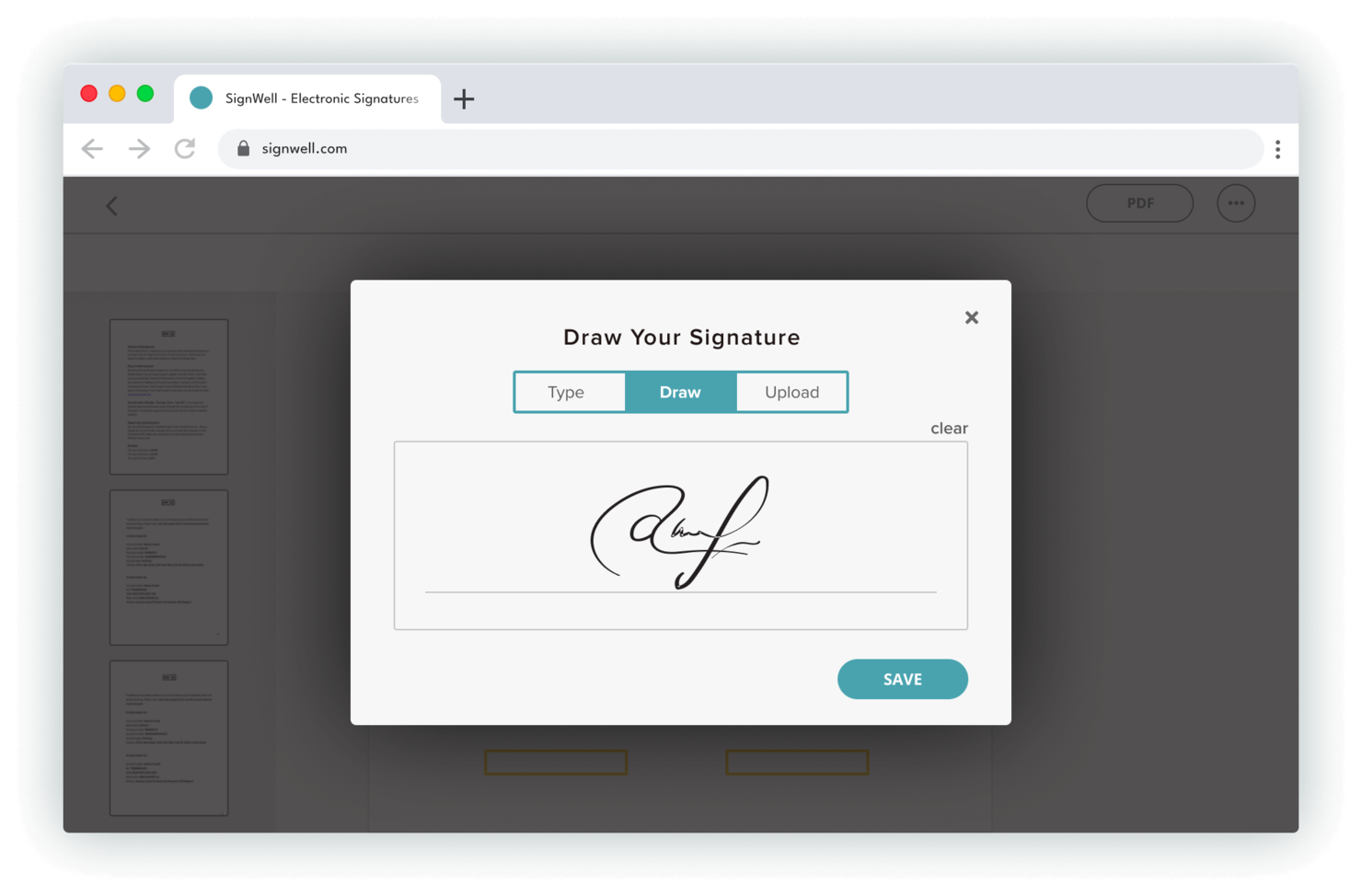
SignWell è uno strumento di firma elettronica progettato per soddisfare le esigenze dei piccoli team che desiderano gestire la firma dei documenti in modo efficiente. Supporta funzioni aziendali chiave come la gestione dei contratti e i flussi di lavoro di approvazione.
Perché ho scelto SignWell: SignWell si rivolge ai piccoli team grazie alla sua interfaccia facile da usare e alle funzionalità di gestione dei documenti semplici e immediate. Offre modelli illimitati, consentendo al tuo team di risparmiare tempo nelle attività ripetitive. La funzione di audit trail garantisce trasparenza e responsabilità, aspetti fondamentali per i piccoli team che devono monitorare lo stato dei documenti. Inoltre, il sistema di promemoria e notifiche di SignWell assicura che nulla venga trascurato.
Funzionalità e integrazioni utili
Funzionalità includono una dashboard intuitiva che semplifica il monitoraggio dei documenti. Puoi impostare date di scadenza sui documenti, aiutando così il team a rispettare le scadenze prefissate. Il software consente anche la firma in presenza, rendendolo versatile per diversi scenari di firma.
Integrazioni includono Zapier, Google Drive, Dropbox, OneDrive, Box, Slack, Salesforce, HubSpot, Trello e Asana.
Cosa è gratuito? SignWell offre un piano gratuito per sempre con un limite di tre documenti al mese e funzionalità base di firma elettronica.
Pros and Cons
Pros:
- Creazione illimitata di modelli
- Interfaccia semplice
- Sistema di notifiche efficace
Cons:
- Opzioni di personalizzazione basilari
- Nessuna app mobile
- Limitato ai piccoli team

BoldSign
Ideale per startup
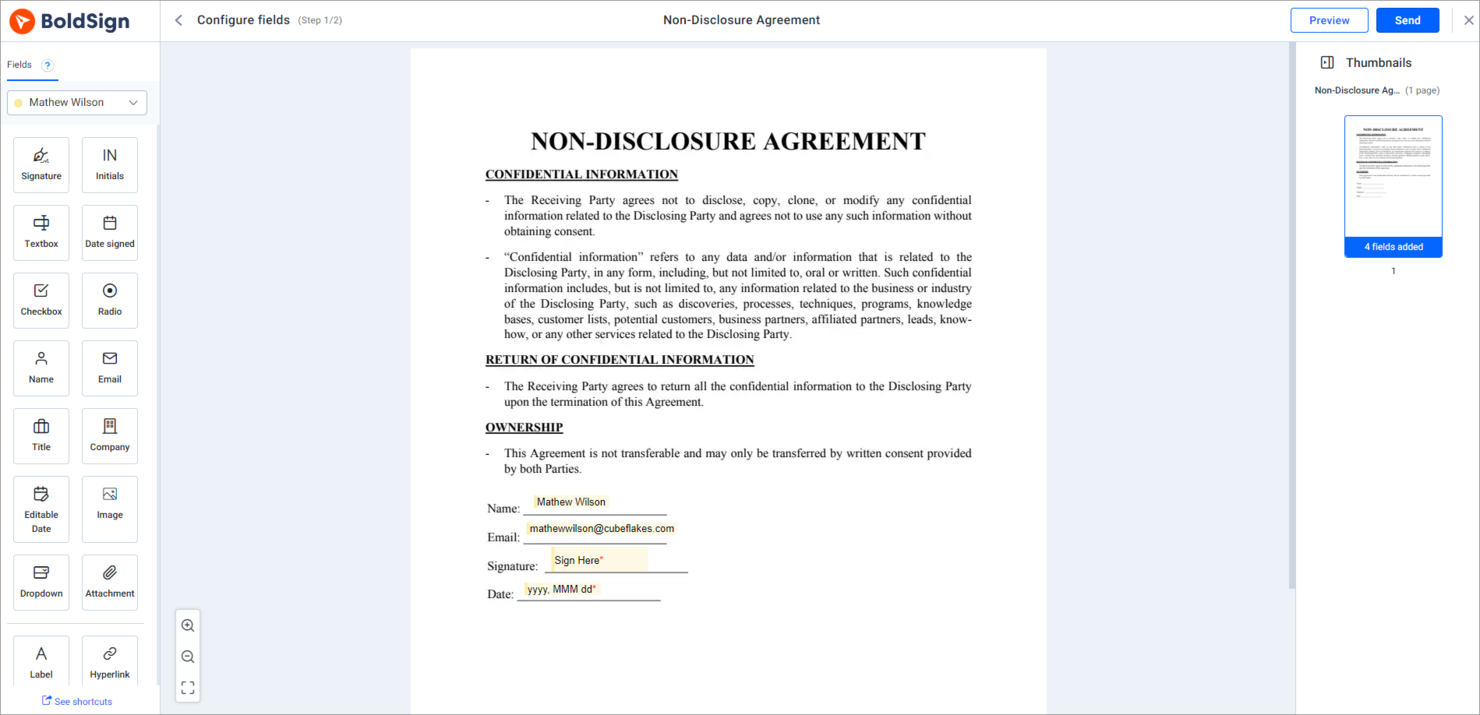
BoldSign è uno strumento di firma elettronica pensato per le startup che necessitano di gestire e firmare documenti in modo efficiente. Aiuta le aziende a semplificare i processi di gestione di contratti e accordi grazie a un'interfaccia intuitiva.
Perché ho scelto BoldSign: BoldSign è ideale per le startup, offrendo funzionalità pensate per le aziende in crescita. Mette a disposizione modelli illimitati, perfetti per chi deve gestire diversi tipi di documenti. Lo strumento offre anche notifiche in tempo reale, così il tuo team resta sempre aggiornato sullo stato dei documenti. Con una particolare attenzione alla sicurezza, BoldSign cripta i tuoi documenti per proteggere le informazioni sensibili.
Funzionalità e integrazioni principali
Funzionalità includono un editor di documenti drag-and-drop che semplifica la creazione. Puoi impostare promemoria automatici per mantenere il team al passo con le scadenze. La piattaforma supporta anche l'invio massivo, permettendoti di spedire più documenti contemporaneamente e risparmiando tempo.
Integrazioni comprendono Zapier, Salesforce, Google Drive, Dropbox, Box, Slack, Microsoft 365, HubSpot, QuickBooks e Stripe.
Cosa è gratuito? BoldSign offre un piano gratuito per sempre con spazio di archiviazione documenti illimitato e personalizzazione del marchio, ma limita il numero di firme elettroniche a 10 al mese.
Pros and Cons
Pros:
- Uso illimitato dei modelli
- Invio massivo di documenti
- Sistema di promemoria automatici
Cons:
- Complessità nella configurazione iniziale
- Aggiornamenti software occasionali
- Opzioni di assistenza clienti di base
Docusign
Ideale per la conformità globale sicura

Docusign è uno strumento di firma elettronica ampiamente utilizzato dalle aziende di vari settori. Aiuta gli utenti a gestire contratti, accordi e firme di documenti in modo efficiente.
Perché ho scelto Docusign: Docusign è conosciuto per la sua conformità globale sicura, il che lo rende ideale per le aziende che devono rispettare le normative internazionali. Lo strumento offre solide misure di sicurezza, tra cui crittografia e registri di controllo, per garantire che i tuoi documenti siano al sicuro. Offre inoltre accesso mobile, permettendo a te e al tuo team di firmare documenti ovunque vi troviate. Con Docusign, puoi avere la certezza che i tuoi documenti firmati abbiano validità legale in diverse giurisdizioni.
Funzionalità e integrazioni principali
Funzionalità includono opzioni avanzate di autenticazione che rafforzano la sicurezza dei documenti. Lo strumento fornisce registri di controllo dettagliati, assicurando la completa visibilità sul ciclo di vita del documento. Permette anche l'invio massivo, facilitando la gestione di grandi volumi di documenti per il tuo team.
Integrazioni includono Salesforce, Microsoft 365, Google Workspace, SAP, Oracle, Workday, Slack, Zoom, Dropbox e Box.
Cosa offre gratuitamente? Docusign offre un piano gratuito che permette firme illimitate ma è limitato a un solo utente e tre richieste di firma al mese.
Pros and Cons
Pros:
- Crittografia sicura dei documenti
- Solide funzionalità di audit trail
- Invio massivo dei documenti
- Conformità legale internazionale
Cons:
- Configurazione iniziale complessa
- Opzioni di personalizzazione limitate
- Curva di apprendimento per i nuovi utenti

Ideale per l'integrazione PDF
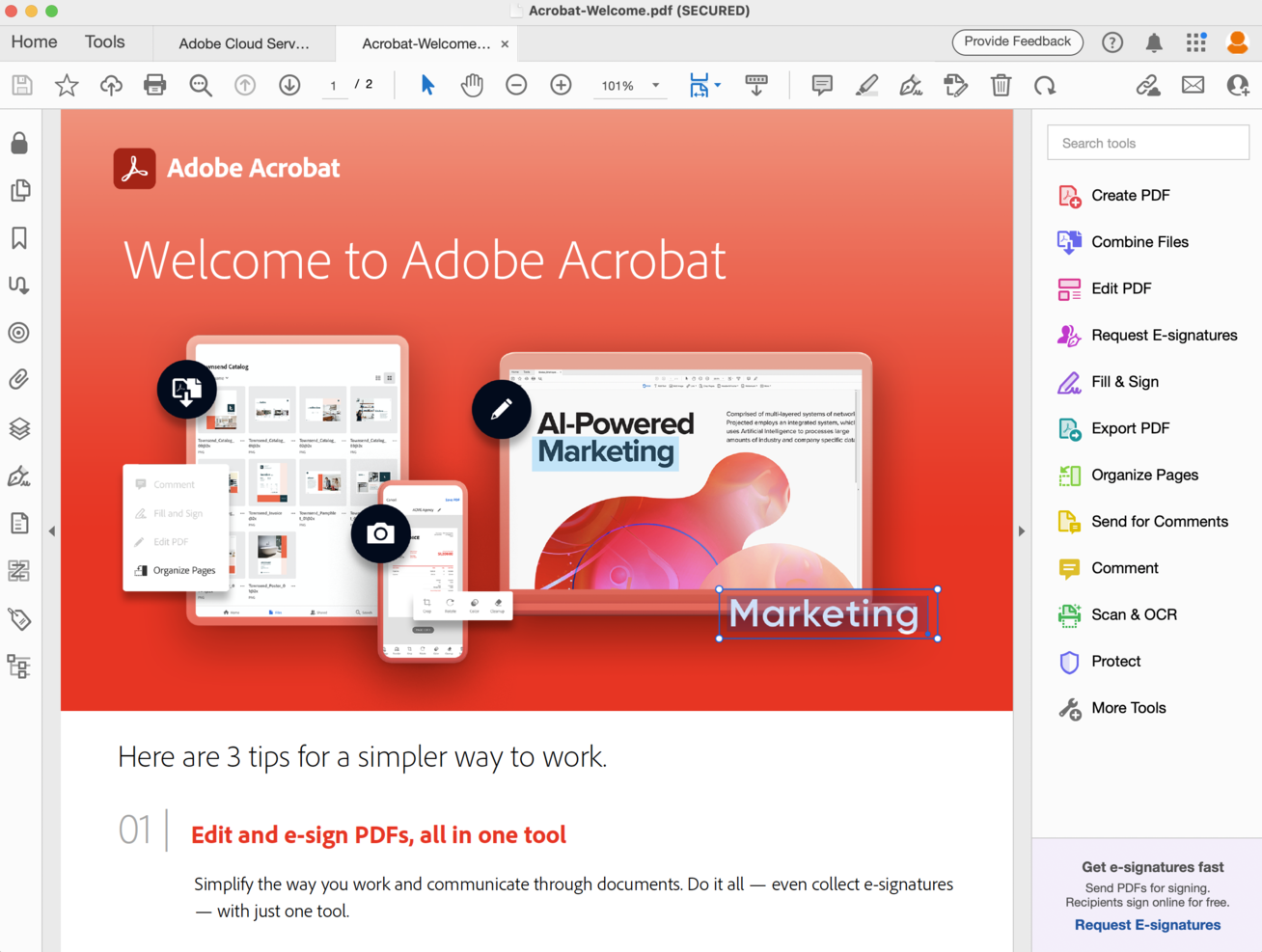
Adobe Acrobat Reader è uno strumento versatile utilizzato principalmente da professionisti che devono visualizzare, modificare e firmare documenti PDF. È apprezzato per la sua capacità di gestire un'ampia gamma di attività legate ai documenti in modo fluido.
Perché ho scelto Adobe Acrobat Reader: Adobe Acrobat Reader eccelle nell'integrazione dei PDF, offrendo un'esperienza coerente per la gestione dei file PDF. Il software consente di visualizzare, annotare e firmare PDF, rendendolo perfetto per flussi di lavoro che richiedono molta documentazione. Supporta anche la compilazione e l'invio di moduli direttamente all'interno del PDF. Questo garantisce che il tuo team possa gestire i documenti in modo efficiente senza dover passare tra diversi strumenti.
Funzionalità principali e integrazioni
Funzionalità includono strumenti di annotazione che ti permettono di aggiungere commenti e note direttamente sui PDF. La funzione compila e firma rende semplice completare e firmare moduli senza stamparli. Puoi anche utilizzare il software per convertire i PDF in altri formati, come Word o Excel, per una modifica più flessibile.
Integrazioni includono Microsoft 365, Google Workspace, Dropbox, Box, Salesforce, SharePoint, OneDrive, Workday, Slack e SAP.
Cosa è gratuito? Adobe Acrobat Reader offre un piano gratuito permanente con funzionalità base di visualizzazione, commento e firma dei PDF, ma mancano le funzionalità avanzate di modifica.
Pros and Cons
Pros:
- Potenti capacità di modifica dei PDF
- Funzione di firma digitale affidabile
- Compilazione dei moduli semplice
Cons:
- Richiede aggiornamenti frequenti
- Può essere esoso di risorse
- Funzionalità gratuite limitate
PandaDoc
Ideale per i team di vendita
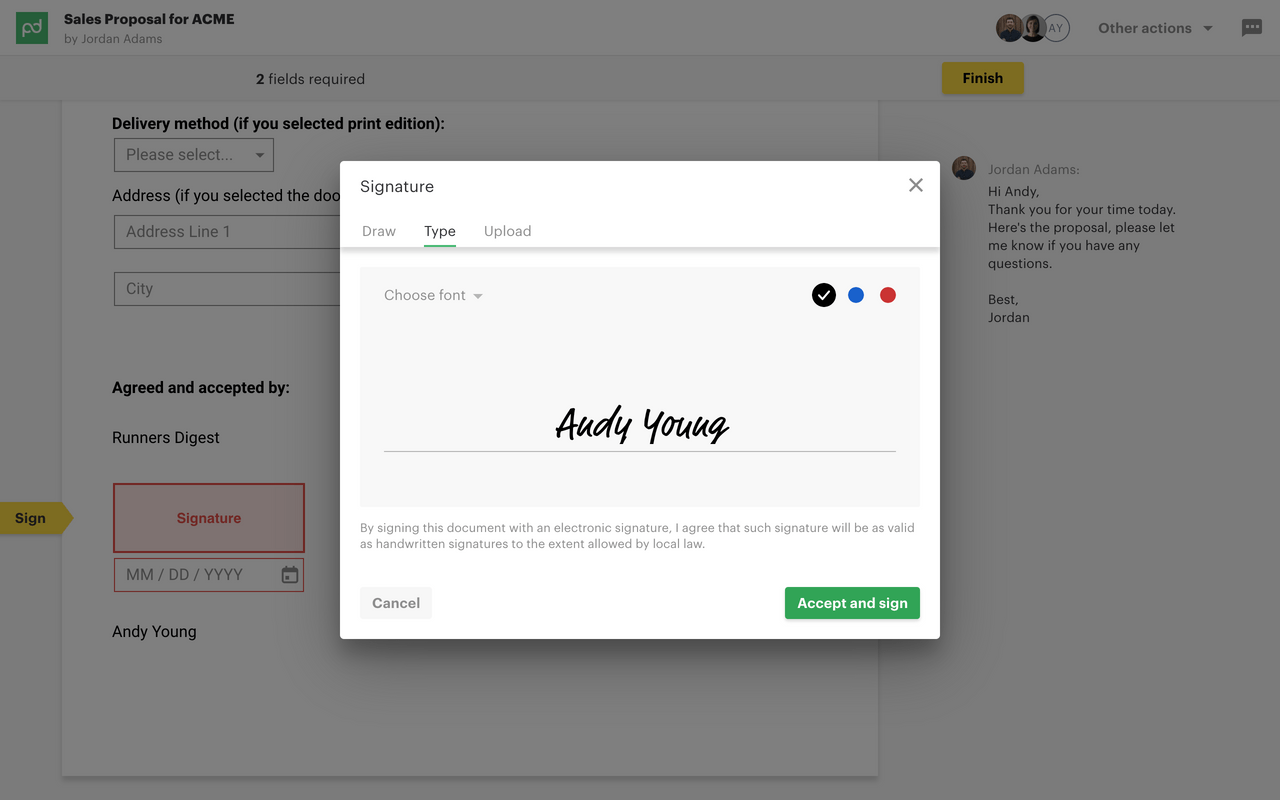
Pandadoc è uno strumento di gestione dei documenti progettato principalmente per i team di vendita, per creare, inviare e tracciare i documenti in modo efficiente. Supporta diverse funzioni aziendali, tra cui la creazione di proposte e le firme elettroniche.
Perché ho scelto Pandadoc: Pandadoc è pensato per i team di vendita, offrendo funzionalità come l'automazione dei documenti e l'analisi dei dati per rendere più efficiente il processo di vendita. Mette a disposizione modelli personalizzabili che rendono rapida e facile la creazione delle proposte. La funzionalità di tracciamento in tempo reale aiuta il team a vedere quando un documento viene aperto o firmato, cosa fondamentale per i follow-up tempestivi. Inoltre, consente di raccogliere pagamenti direttamente tramite i documenti, rendendolo uno strumento completo per la chiusura delle trattative.
Funzionalità e integrazioni di spicco
Funzionalità includono un generatore di documenti drag-and-drop che semplifica il processo di creazione. Il software offre una libreria di modelli pre-progettati per farti risparmiare tempo. Fornisce inoltre analisi dettagliate, offrendoti informazioni su come i destinatari interagiscono con i tuoi documenti.
Integrazioni includono Salesforce, HubSpot, Pipedrive, Zoho CRM, Stripe, PayPal, QuickBooks, Zapier, Google Drive e Dropbox.
Cosa è gratuito? Pandadoc offre un piano gratuito per sempre con funzionalità base di creazione documenti e possibilità di firme elettroniche, ma limita alcune funzioni e integrazioni avanzate.
Pros and Cons
Pros:
- Automazione documentale efficiente
- Tracciamento documenti in tempo reale
- Modelli personalizzabili
Cons:
- Accesso offline limitato
- Può risultare complesso per i principianti
- Occasionali rallentamenti delle prestazioni


Jotform Sign è uno strumento di firma elettronica progettato per i team che desiderano integrare e-firme nei loro flussi di lavoro esistenti basati su moduli. Aiuta gli utenti a raccogliere firme e gestire i documenti in modo efficiente.
Perché ho scelto Jotform Sign: Jotform Sign eccelle nell'integrazione con i moduli, rendendolo una scelta ideale per i team che già utilizzano Jotform. Permette di aggiungere facilmente campi per le firme ai propri moduli, consentendo una firma dei documenti rapida e intuitiva. La piattaforma offre un'interfaccia drag-and-drop che semplifica la personalizzazione dei moduli secondo le proprie esigenze. Inoltre, Jotform Sign fornisce promemoria automatici per garantire il completamento tempestivo dei documenti.
Caratteristiche e integrazioni principali
Caratteristiche includono un costruttore di moduli personalizzabile che consente di progettare moduli secondo le proprie necessità specifiche. Il software offre un archivio documenti sicuro, garantendo la protezione dei file. È inoltre possibile monitorare lo stato dei documenti in tempo reale, offrendo piena visibilità sul processo di firma.
Integrazioni includono Google Drive, Dropbox, Box, Slack, Salesforce, HubSpot, PayPal, Stripe, Zapier e Microsoft 365.
Cosa è gratuito? Jotform Sign offre un piano gratuito per sempre con accesso a modelli di moduli e spazio di archiviazione illimitato, ma limita il numero di documenti firmati a 100 al mese.
Pros and Cons
Pros:
- Integrazione modulare senza problemi
- Promemoria automatici
- Costruttore di moduli personalizzabile
Cons:
- Curva di apprendimento più ripida
- Può richiedere molte risorse
- Nessun accesso offline

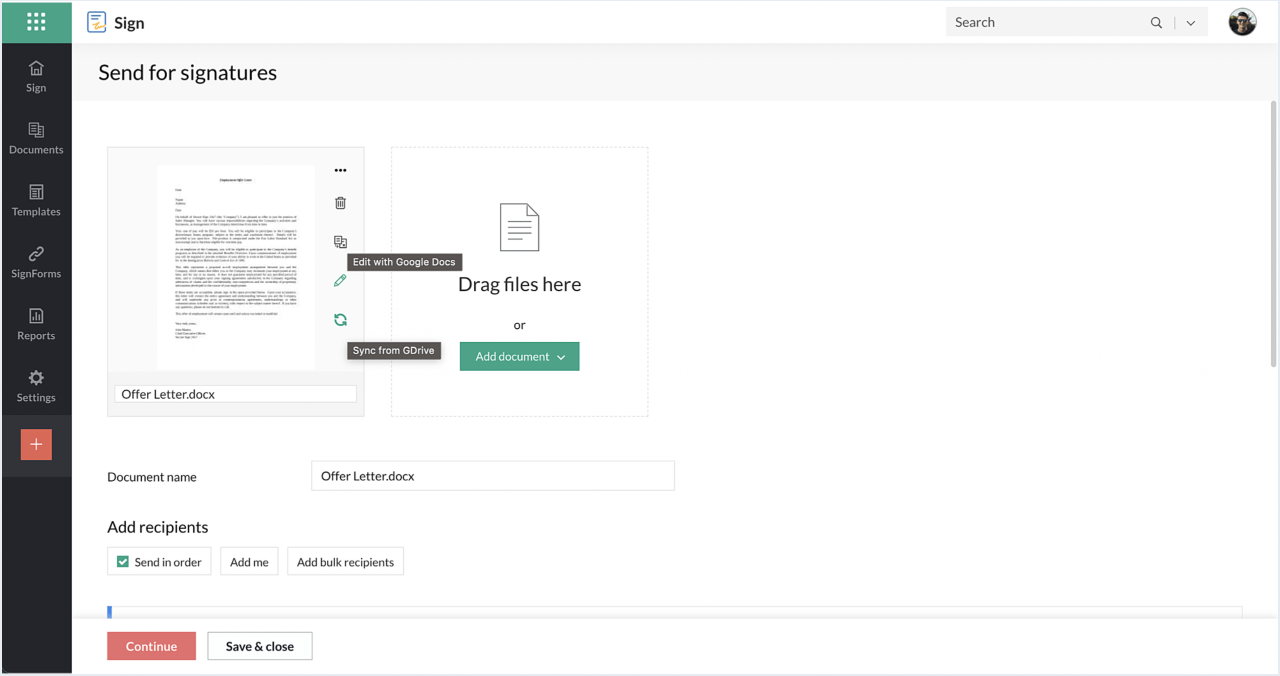
Zoho Sign è uno strumento di firma elettronica progettato per le aziende che fanno parte dell'ecosistema Zoho. Permette agli utenti di gestire le firme e i flussi di lavoro dei documenti in modo efficiente all'interno delle applicazioni Zoho già utilizzate.
Perché ho scelto Zoho Sign: Zoho Sign offre flussi di lavoro automatizzati, permettendo al tuo team di gestire la firma dei documenti con un intervento manuale minimo. Lo strumento fornisce robuste misure di sicurezza, inclusi la crittografia e le tracce di controllo, per proteggere i tuoi documenti. Inoltre, Zoho Sign supporta capacità multilingue, utili per team che operano in contesti linguistici diversificati.
Funzionalità e integrazioni principali
Funzionalità includono una dashboard intuitiva dove puoi monitorare lo stato dei documenti in tempo reale. Il software permette di personalizzare i modelli email, garantendo comunicazioni coerenti con i tuoi clienti. È anche possibile impostare documenti ricorrenti per processi che richiedono firme frequenti.
Integrazioni includono Zoho CRM, Zoho Books, Zoho People, Zoho Projects, Zoho Invoice, Zoho Creator, Dropbox, Google Drive, OneDrive e Box.
Cosa è gratuito? Zoho Sign offre un piano gratuito per sempre con firme illimitate sui documenti e accesso da mobile, ma limita il numero di utenti a cinque.
Pros and Cons
Pros:
- Integrazione fluida con Zoho
- Supporto multilingue
- Flussi di lavoro automatizzati
- Modelli email personalizzabili
Cons:
- Funzionalità limitate al di fuori di Zoho
- Curva di apprendimento per chi non usa Zoho
- Funzionalità mobile di base


Foxit è uno strumento per la gestione dei PDF e la firma elettronica, ideale per gli utenti che necessitano di funzionalità di firma dei documenti rapide ed efficienti. Offre ad aziende e privati funzioni come la modifica dei PDF e la firma elettronica.
Perché ho scelto Foxit: Foxit è noto per la firma rapida dei documenti, una caratteristica fondamentale per gli utenti che devono elaborare i documenti velocemente. Il software offre un'interfaccia intuitiva che accelera il processo di firma, rendendolo accessibile a tutti i membri del team. Grazie agli strumenti avanzati di modifica dei PDF, è possibile modificare i documenti prima di inviarli per la firma. Inoltre, Foxit garantisce la sicurezza dei documenti grazie alle funzionalità di crittografia.
Funzionalità e integrazioni principali
Le funzionalità includono l'elaborazione in batch, che consente di gestire più documenti contemporaneamente, facendoti risparmiare tempo. Il software offre inoltre strumenti di annotazione per aggiungere commenti e note ai PDF. È possibile convertire i documenti in diversi formati, come Word o Excel, per un utilizzo più versatile.
Le integrazioni includono Microsoft Office, Google Drive, Dropbox, Box, OneDrive, SharePoint, Evernote, Salesforce, Slack e Gmail.
Cosa è gratuito? Foxit offre una prova gratuita con funzionalità limitate e una restrizione sul numero di documenti che è possibile inviare per la firma.
Pros and Cons
Pros:
- Elaborazione rapida dei documenti
- Strumenti avanzati di modifica dei PDF
- Funzionalità di elaborazione in batch
Cons:
- Funzionalità mobili limitate
- Può richiedere molte risorse
- Opzioni di assistenza clienti di base

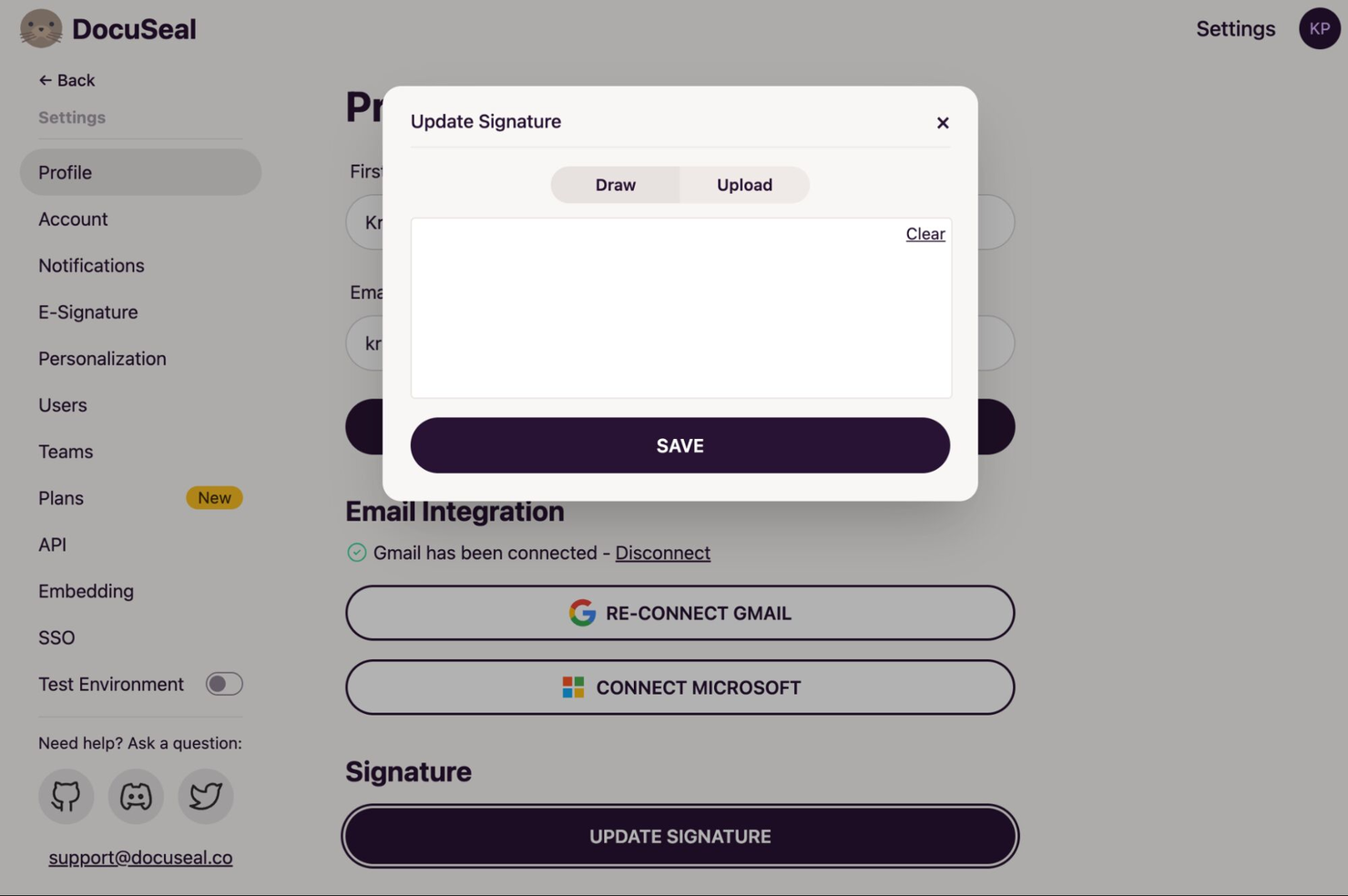
DocuSeal è uno strumento di firma elettronica progettato per gli utenti che danno priorità alla privacy dei dati nei loro processi di gestione documentale. Serve aziende e privati offrendo firme sicure ed efficienti e gestione dei documenti.
Perché ho scelto DocuSeal: DocuSeal offre solide funzionalità di tutela della privacy, rendendolo ideale per chi ha a cuore la riservatezza. Lo strumento cripta tutti i documenti, garantendo che le informazioni sensibili restino protette. Fornisce inoltre registri di audit dettagliati, così il tuo team può tracciare chi ha avuto accesso o ha firmato ciascun documento. Inoltre, DocuSeal offre impostazioni di sicurezza personalizzabili, permettendoti di controllare i permessi di accesso all'interno della tua organizzazione.
Caratteristiche distintive & Integrazioni
Caratteristiche includono un editor di documenti intuitivo che semplifica la creazione e la personalizzazione dei file. Puoi impostare date di scadenza sui documenti per aumentare la sicurezza limitando l’accesso nel tempo. Il software supporta anche la firma in presenza, offrendo flessibilità per diversi scenari di firma.
Integrazioni includono Dropbox, Google Drive, Box, OneDrive, Slack, Salesforce, HubSpot, Microsoft 365, Zapier e QuickBooks.
Cosa è gratis? DocuSeal offre un piano gratuito per sempre con sicurezza tramite crittografia e funzionalità di firma elettronica di base, senza limiti al numero di documenti.
Pros and Cons
Pros:
- Impostazioni di sicurezza personalizzabili
- Registri di audit dettagliati
- Supporto firma in presenza
Cons:
- Interfaccia utente di base
- Configurazione iniziale complessa
- Può richiedere conoscenze tecniche

OpenSign
Ideale per gli appassionati dell'open-source
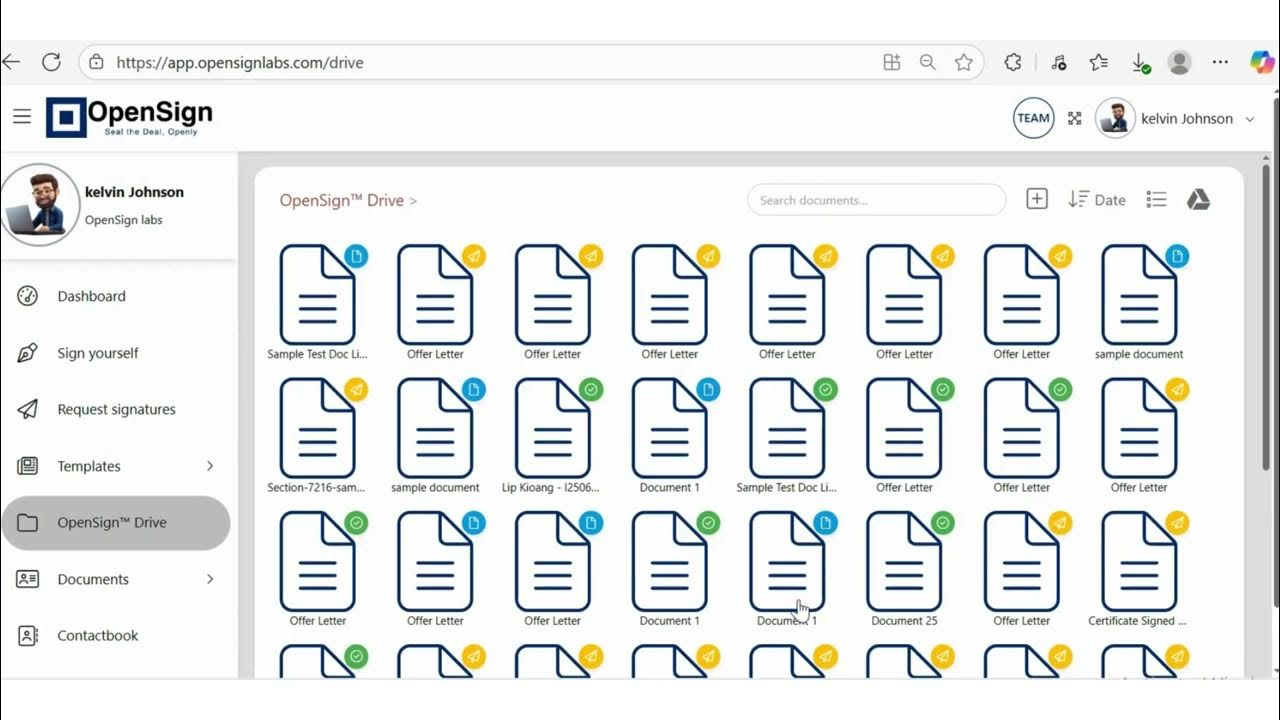
OpenSign è uno strumento open-source per la firma elettronica, pensato per chi preferisce soluzioni software personalizzabili e trasparenti. Offre funzioni essenziali per le aziende come la firma e l'archiviazione dei documenti, rendendolo una risorsa preziosa per i team che danno priorità alla tecnologia open-source.
Perché ho scelto OpenSign: OpenSign è perfetto per gli appassionati dell'open-source, offrendo completa trasparenza e flessibilità nelle sue operazioni. Lo strumento consente firme gratuite illimitate, ideale per team con esigenze di firma ad alto volume. Supporta inoltre la collaborazione, permettendo a più utenti di partecipare al processo di firma senza costi aggiuntivi. Inoltre, OpenSign include la certificazione gratuita per ogni documento firmato, garantendo conformità e sicurezza.
Funzionalità e integrazioni principali
Funzionalità includono un sistema sicuro di archiviazione dei documenti chiamato OpenSign Drive, dove è possibile organizzare e proteggere i propri file. La piattaforma offre anche certificati di completamento dettagliati per ogni documento firmato, fornendo registri di accesso per una sicurezza aggiuntiva. È possibile invitare e collaborare con altri senza costi aggiuntivi, rendendolo una soluzione economicamente vantaggiosa per i team.
Integrazioni includono GitHub, Discord e altre piattaforme open-source.
Cosa è gratuito? OpenSign offre un piano gratuito per sempre con firme elettroniche e archiviazione documenti illimitate, senza restrizioni sul numero di collaboratori.
Pros and Cons
Pros:
- Firme gratuite illimitate
- Flessibilità open-source
- Certificazione documenti gratuita
Cons:
- Potrebbe richiedere conoscenze tecniche
- Nessuna app mobile disponibile
- Opzioni di assistenza clienti limitate
Altri software gratuiti per la firma elettronica
\u003cspan style=\u0022font-weight: 400\u0022\u003eEcco alcune ulteriori opzioni di software gratuiti per la firma elettronica che non sono entrate nel mio elenco, ma che vale comunque la pena prendere in considerazione:\u003c/span\u003e
- Xodo Sign
Ideale per l'uso su più piattaforme
- SignFree
Ideale per uso personale senza costi
- RabbitSign
Ideale per una configurazione rapida


Come valuto i software gratuiti per firme elettroniche
Valuto questi strumenti su due livelli: la base che ogni software deve soddisfare per essere raccomandato per la firma di SOW o ordini di modifica, e i fattori che distinguono le opzioni migliori dal resto.
Funzionalità di base (requisiti minimi per questa lista)
Quando seleziono gli strumenti per la mia lista, assegno a ciascuno un punteggio da 0 (non offre la funzionalità) a 5 (eccelle in questa area) per ogni funzionalità di base indicata di seguito. Successivamente, converto il punteggio totale ottenuto in percentuale. Ogni strumento deve raggiungere un punteggio totale minimo del 65% per essere considerato per l'inclusione.
- Firme elettroniche legalmente vincolanti: controllo che la piattaforma sia conforme alle principali normative su firme elettroniche come ESIGN, UETA ed eIDAS affinché SOW e contratti con i fornitori abbiano validità legale in tutte le giurisdizioni.
- Piano gratuito reale: lo strumento deve offrire un vero piano gratuito, non solo una prova di 14 giorni. Cerco piani che permettano di inviare e completare un numero di richieste di firma sufficiente a coprire i normali cicli di progetto.
- Caricamento e preparazione dei documenti: Caricare un PDF o DOCX e posizionare campi firma, data e iniziali deve essere un'operazione semplice. Valuto la fluidità di utilizzo del costruttore drag-and-drop dei campi.
- Workflow di firma multi-partecipante: La maggior parte dei documenti di progetto richiede più di un firmatario. Cerco la possibilità di invio sequenziale e parallelo, in modo da poter inviare un ordine di modifica prima a un cliente e poi al responsabile, nell'ordine corretto.
- Audit trail e registri: Ogni documento completato deve essere accompagnato da un registro di audit verificabile che includa timbri temporali, identità dei firmatari e indirizzi IP. Questo è importante in caso di controversie su modifiche di ambito approvate.
- Monitoraggio dello stato della firma: Valuto quanto sia semplice controllare quali documenti sono in attesa, firmati o rifiutati per più progetti attivi da una sola dashboard.
Una volta ottenuta una lista di strumenti che soddisfano questi criteri, considero i fattori che distinguono ciascuna piattaforma.
Fattori di differenziazione (Cosa distingue i fornitori)
Ecco come confronto e metto a contrasto i diversi fornitori:
Funzionalità distintive
I modelli riutilizzabili fanno davvero la differenza quando si invia lo stesso NDA o una struttura di SOW in diversi progetti. Cerco strumenti che consentano di salvare e riutilizzare questi documenti senza dover ricostruire i campi ogni volta. Le integrazioni native con strumenti di project management come Jira, Asana o Monday.com sono importanti perché mantengono le richieste di firma legate ai workflow esistenti. Per i team con personale sul campo o stakeholder remoti, valuto anche l’esperienza di firma da mobile per garantire che i documenti siano facili da completare su qualsiasi dispositivo.
Oltre le funzionalità
La trasparenza del piano gratuito è fondamentale. Controllo che i limiti mensili sui documenti, sui firmatari e le condizioni che portano all’upgrade siano dichiarate chiaramente, così da non avere sorprese durante il progetto. Un altro fattore chiave è la sicurezza, in particolare gli standard di crittografia e le possibilità di autenticazione del firmatario per accordi sensibili con i fornitori. Considero anche la scalabilità: i portafogli di progetto variano nel tempo, e i migliori strumenti gratuiti offrono una transizione chiara ai piani a pagamento senza costringere a cambiare piattaforma quando aumentano i volumi dei documenti.
Come scegliere un software gratuito per la firma elettronica
È facile perdersi in lunghi elenchi di funzionalità e strutture tariffarie complesse. Per aiutarti a rimanere concentrato mentre affronti il tuo processo di selezione del software, unico per le tue esigenze, ecco un elenco dei fattori da tenere a mente:
| Fattore | Cosa considerare |
|---|---|
| Scalabilità | Il software crescerà insieme al tuo team? Verifica se supporta volumi crescenti di documenti e utenti senza costi o limitazioni aggiuntivi. |
| Integrazioni | Funziona con gli strumenti che già utilizzi? Verifica la compatibilità con CRM, archiviazione cloud e app per la produttività, per garantire un flusso di lavoro senza interruzioni. |
| Personalizzazione | Puoi adattarlo al tuo marchio? Cerca opzioni per personalizzare modelli, e-mail e identità visiva in linea con quella della tua azienda. |
| Facilità d'uso | L'interfaccia è intuitiva? Assicurati che i membri del team possano navigare e utilizzare il software senza una formazione approfondita né frustrazioni. |
| Implementazione e onboarding | Quanto è facile iniziare? Valuta la disponibilità di risorse come tutorial, assistenza e modelli per facilitare una configurazione rapida. |
| Costo | Qual è il costo totale di proprietà? Confronta le funzionalità gratuite e quelle a pagamento e valuta se la struttura tariffaria rientra nel tuo budget a lungo termine. |
| Misure di sicurezza | I tuoi documenti sono protetti? Cerca la crittografia, la conformità alle normative sulla protezione dei dati e i registri di controllo per proteggere le informazioni sensibili. |
| Requisiti di conformità | Soddisfa le normative specifiche del settore? Assicurati che il software sia conforme agli standard legali pertinenti per la tua attività, come HIPAA o GDPR, per evitare problemi legali. |
Che cos'è un software gratuito per la firma elettronica?
Il software gratuito per la firma elettronica è uno strumento digitale che consente agli utenti di firmare i documenti elettronicamente senza costi. Professionisti come project manager, team di vendita e consulenti legali utilizzano questi strumenti per risparmiare tempo e ridurre l'uso della carta. Funzionalità come il monitoraggio dei documenti, i registri di controllo e l'archiviazione sicura aiutano a gestire gli accordi in modo efficiente. Nel complesso, questi strumenti offrono un modo pratico ed ecologico per gestire la firma dei documenti.
Funzionalità del software gratuito per la firma elettronica
Quando selezioni un software gratuito per la firma elettronica, presta attenzione alle seguenti funzionalità principali:
- Firme elettroniche: consentono agli utenti di firmare i documenti digitalmente, risparmiando tempo e riducendo l'uso della carta.
- Monitoraggio dei documenti: consente agli utenti di monitorare lo stato dei documenti e sapere quando vengono visualizzati o firmati.
- Registri di controllo: forniscono un registro di tutte le azioni eseguite su un documento, garantendo trasparenza e responsabilità.
- Archiviazione sicura: offre uno spazio sicuro per archiviare i documenti firmati, proteggendo le informazioni sensibili dagli accessi non autorizzati.
- Modelli personalizzabili: consentono agli utenti di creare e riutilizzare i layout dei documenti, risparmiando tempo nelle attività ripetitive.
- Invio in blocco: consente di inviare più documenti contemporaneamente, una funzione utile per gestire transazioni ad alto volume.
- Funzionalità di integrazione: si collega ad altri strumenti come i sistemi CRM e l'archiviazione nel cloud, garantendo un flusso di lavoro fluido.
- Supporto multilingue: supporta team diversificati consentendo di firmare i documenti in varie lingue.
- Promemoria automatici: invia notifiche per le azioni in sospeso, garantendo il completamento tempestivo dei processi documentali.
- Firma in presenza: offre la flessibilità di raccogliere firme elettronicamente durante gli incontri faccia a faccia.
Vantaggi del software gratuito per la firma elettronica
L'implementazione di un software gratuito per la firma elettronica offre diversi vantaggi al tuo team e alla tua azienda. Eccone alcuni:
- Risparmio di tempo: le firme digitali riducono il tempo dedicato alla firma manuale e alla gestione dei documenti.
- Efficienza dei costi: elimina la necessità di carta, stampa e spese postali, riducendo i costi operativi.
- Maggiore sicurezza: funzionalità come la crittografia e i registri di controllo proteggono le informazioni sensibili e garantiscono la conformità.
- Flusso di lavoro migliorato: l'integrazione con gli strumenti esistenti contribuisce a mantenere un processo documentale fluido ed efficiente.
- Impatto ambientale: riduce l'uso della carta, contribuendo a pratiche aziendali ecocompatibili.
- Accessibilità globale: il supporto multilingue e la firma online consentono ai team di operare oltre confine senza difficoltà.
- Aumento della produttività: i promemoria automatici e l'invio in blocco liberano tempo per attività a maggior valore aggiunto.
Costi e prezzi del software gratuito per la firma elettronica
La scelta di un software gratuito per la firma elettronica richiede la comprensione dei diversi modelli di prezzo e dei piani disponibili. I costi variano in base alle funzionalità, alle dimensioni del team, ai componenti aggiuntivi e ad altri fattori. La tabella seguente riassume i piani più comuni, i relativi prezzi medi e le funzionalità tipicamente incluse nelle soluzioni software gratuite per la firma elettronica:
Tabella di confronto dei piani per il software gratuito per la firma elettronica
| Tipo di piano | Prezzo medio | Funzionalità comuni |
|---|---|---|
| Piano gratuito | $0 | Firme elettroniche di base, spazio di archiviazione dei documenti limitato e funzionalità di sicurezza di base. |
| Piano personale | $5-$15/utente/mese | Spazio di archiviazione dei documenti ampliato, registri di controllo e assistenza prioritaria. |
| Piano aziendale | $20-$40/utente/mese | Invio in blocco, personalizzazione del marchio e integrazione con le applicazioni aziendali. |
| Piano aziendale avanzato | $50-$100/utente/mese | Funzionalità di sicurezza avanzate, account manager dedicato e inserimento e formazione personalizzati. |
Domande frequenti sul software gratuito per la firma elettronica
Ecco alcune risposte alle domande comuni sul software gratuito per la firma elettronica:
Posso utilizzare un software gratuito per la firma elettronica per i documenti legali?
Sì, puoi utilizzare un software gratuito per la firma elettronica per i documenti legali, ma assicurati che il software sia conforme a normative come ESIGN e UETA negli Stati Uniti. Queste normative garantiscono che le firme elettroniche siano giuridicamente vincolanti. Verifica che il software fornisca registri di controllo e crittografia per proteggere i tuoi documenti.
Quanto è sicuro un software gratuito per la firma elettronica?
Un software gratuito per la firma elettronica può essere sicuro se offre funzionalità come crittografia, protezione tramite password e registri di controllo. Dovresti verificare che il fornitore sia conforme agli standard e alle normative di sicurezza. Leggi sempre le recensioni e controlla la presenza di eventuali certificazioni di sicurezza prima di scegliere uno strumento.
Quali documenti posso firmare con un software gratuito per la firma elettronica?
Con un software gratuito per la firma elettronica puoi firmare vari documenti, come contratti, accordi e moduli. La maggior parte degli strumenti supporta formati di file comuni come PDF, documenti Word e fogli Excel. Assicurati che il software scelto supporti i tipi di documento specifici che devi gestire.
Ci sono limiti al numero di documenti che posso firmare?
Molti strumenti gratuiti per la firma elettronica impongono limiti al numero di documenti che puoi firmare ogni mese. Questi limiti variano, quindi consulta i termini del fornitore per conoscere eventuali restrizioni. Se le tue esigenze superano il piano gratuito, potresti valutare l’upgrade a un piano a pagamento per avere maggiore flessibilità.
Devo installare un software per utilizzare gli strumenti gratuiti per la firma elettronica?
La maggior parte degli strumenti gratuiti per la firma elettronica è basata sul web, quindi non è necessario installare software sul dispositivo. Puoi accedervi tramite un browser web. Tuttavia, alcuni fornitori offrono app per desktop o dispositivi mobili per una maggiore praticità; nella scelta, considera quindi le tue preferenze relative al flusso di lavoro.
Posso integrare un software gratuito per la firma elettronica con altri strumenti?
Sì, molte soluzioni gratuite per la firma elettronica offrono integrazioni con altri strumenti, come sistemi CRM, archiviazione cloud e app per la produttività. Controlla le funzionalità di integrazione del software per assicurarti che sia compatibile con il tuo attuale ecosistema tecnologico. Un’integrazione fluida può migliorare il tuo flusso di lavoro e la tua produttività.