

I 10 migliori software di gestione dei processi per le piccole imprese nel 2026

Elenco dei migliori software di gestione dei processi per piccole imprese


Il software di gestione dei processi per piccole imprese ti aiuta a organizzare, automatizzare e monitorare i flussi di lavoro del tuo team, così puoi consegnare i progetti in tempo e mantenere le operazioni efficienti. Se stai cercando il miglior software di gestione dei processi per piccole imprese, probabilmente devi gestire priorità variabili, risorse limitate e la necessità di mantenere tutti allineati, senza aggiungere complessità.
In questa guida troverai strumenti pratici e collaudati, adatti alle esigenze delle piccole imprese, insieme ad approfondimenti che ti aiuteranno a scegliere la piattaforma giusta per le dimensioni, gli obiettivi e le sfide quotidiane del tuo team.
Perché fidarsi dei nostri consigli sui software
Il nostro team testa e recensisce software dal 2012. In quanto project manager noi stessi, sappiamo quanto sia difficile — e importante — scegliere il software giusto.
Per questa guida, abbiamo valutato gli strumenti attraverso test pratici e ricerche indipendenti, assegnando un punteggio agli strumenti in base ai nostri criteri di selezione. Ci basiamo inoltre sulle competenze di leader di pensiero del settore e di professionisti attivi nella gestione dei progetti.
Le nostre recensioni riflettono il nostro giudizio editoriale umano, non un discorso di vendita.
Revisori esperti:
Tabella comparativa: software di gestione dei processi per piccole imprese
Questa tabella comparativa riassume i dettagli sui prezzi delle mie migliori selezioni di software di gestione dei processi per piccole imprese.
| Tool | Best For | Trial Info | Price | ||
|---|---|---|---|---|---|
| 1 | Ideale per automatizzare le integrazioni tra app | Piano gratuito disponibile | Da $19,99/mese (fatturazione annuale) | Website | |
| 2 | Ideale per modelli di flusso di lavoro personalizzabili | Prova gratuita di 14 giorni + demo gratuita disponibile | Da $17/utente/mese (fatturato annualmente) | Website | |
| 3 | Ideale per l'automazione dei workflow senza codice | Prova gratuita di 14 giorni + demo gratuita disponibile | Da $11/utente/mese (fatturato annualmente) | Website | |
| 4 | Ideale per l'automazione delle attività basata su checklist | Demo gratuita disponibile | Prezzi su richiesta | Website | |
| 5 | Ideale per la creazione di app aziendali personalizzate | Prova gratuita di 15 giorni + demo gratuita disponibile | Da $8/utente/mese (fatturato annualmente) | Website | |
| 6 | Ideale per flussi di onboarding dei clienti | Prova gratuita di 7 giorni + demo gratuita disponibile | Da $190/mese/3 utenti | Website | |
| 7 | Ideale per la progettazione di processi a basso codice | Demo gratuita disponibile | Prezzi su richiesta | Website | |
| 8 | Ideale per la gestione dei workflow basati su database | Prova gratuita di 14 giorni disponibile | A partire da $49/mese (fatturazione annuale) | Website | |
| 9 | Ideale per bacheche kanban dei flussi di lavoro | Piano gratuito disponibile | Da $5/utente/mese (fatturazione annuale) | Website | |
| 10 | Ideale per il coordinamento delle attività di team | Disponibile piano gratuito | Da $10.99/utente/mese (fatturato annualmente) | Website |

Recensioni dei migliori software di gestione dei processi per piccole imprese
Di seguito sono riportati i miei riepiloghi dettagliati dei migliori software di gestione dei processi per piccole imprese inclusi nel mio elenco. Le mie recensioni offrono uno sguardo approfondito sulle funzionalità, sui principali casi d’uso e sulle integrazioni di ogni piattaforma, per aiutarti a trovare quella più adatta a te.

Zapier
Ideale per automatizzare le integrazioni tra app

Zapier collega le tue app aziendali preferite, così piccoli team, agenzie e fornitori di servizi possono automatizzare le attività ripetitive, ridurre l'inserimento manuale dei dati e mantenere i processi fluidi senza bisogno di codice personalizzato.
Per chi è indicato Zapier?
Per team operativi e amministrativi di piccole imprese che hanno bisogno di collegare più app cloud senza il supporto di sviluppatori.
Perché ho scelto Zapier
Ho scelto Zapier tra i migliori perché posso configurare flussi di lavoro automatizzati—chiamati Zaps—che trasferiscono dati tra app come QuickBooks, Slack e Google Sheets senza scrivere codice. Il mio team utilizza Zaps multi-step per attivare azioni su diversi strumenti a partire da un solo evento. Mi piace poter programmare attività, filtrare dati e persino aggiungere logica condizionale per mantenere i nostri processi sempre efficienti.
Funzionalità principali di Zapier
- Cartelle condivise: organizza e gestisci gli Zaps con il tuo team in cartelle dedicate.
- Storico degli Zaps: visualizza log dettagliati di ogni esecuzione per risoluzione problemi e audit.
- Directory delle app: accedi a migliaia di connessioni predefinite per una configurazione rapida.
- Ruoli e permessi utente: assegna diversi livelli di accesso ai membri del team per un migliore controllo e gestione aziendale.
Integrazioni di Zapier
Le integrazioni includono Google Sheets, Gmail, Slack, Google Calendar, Google Drive, Notion, HubSpot, Facebook Lead Ads, Mailchimp e Stripe.
Pros and Cons
Pros:
- Automatizza attività ripetitive fra più applicazioni
- Supporta migliaia di connessioni tra app aziendali
- Filtri e logica integrati per il controllo dei processi
Cons:
- Gestione degli errori limitata per le automazioni non riuscite
- I limiti sui task possono limitare l'uso ad alto volume

Flokzu
Ideale per modelli di flusso di lavoro personalizzabili

Flokzu è una piattaforma cloud di automazione dei flussi di lavoro progettata per le piccole imprese e i team che desiderano mappare, automatizzare e ottimizzare i propri processi aziendali senza scrivere codice.
A chi è più adatto Flokzu?
Team operativi di piccole imprese che hanno bisogno di automatizzare e personalizzare i flussi di lavoro interni senza programmazione.
Perché ho scelto Flokzu
Ho scelto Flokzu tra i migliori perché posso implementare rapidamente modelli di flusso di lavoro personalizzabili per tutto, dall'approvazione delle fatture all'onboarding dei dipendenti. Apprezzo il fatto di poter modificare i passaggi dei processi, i moduli e le regole senza scrivere codice. Il mio team utilizza il designer di processi drag-and-drop per adattare i flussi di lavoro mentre la nostra attività cambia.
Caratteristiche principali di Flokzu
- Assegnazione dei compiti: Assegna compiti a utenti o gruppi specifici per garantire la responsabilità.
- Gestione dei documenti: Archivia, allega e gestisci i documenti all'interno di ogni flusso di lavoro.
- Monitoraggio delle scadenze: Imposta le scadenze e ricevi notifiche per i compiti in ritardo.
- Dashboard di analisi dei processi: Visualizza le prestazioni dei flussi di lavoro con grafici e report integrati.
Integrazioni di Flokzu
Le integrazioni includono Google Sheets, Microsoft Excel, Salesforce, HubSpot, Slack, Trello, QuickBooks Online, Dropbox e Microsoft Teams.
Pros and Cons
Pros:
- Modellazione visiva dei processi conforme allo standard BPMN 2.0
- Generazione di moduli e script potenziata da AI
- La traccia di audit registra ogni azione del flusso di lavoro
Cons:
- Le sessioni dell'interfaccia scadono frequentemente
- Filtri di reportistica limitati nei piani base

Cflow
Ideale per l'automazione dei workflow senza codice
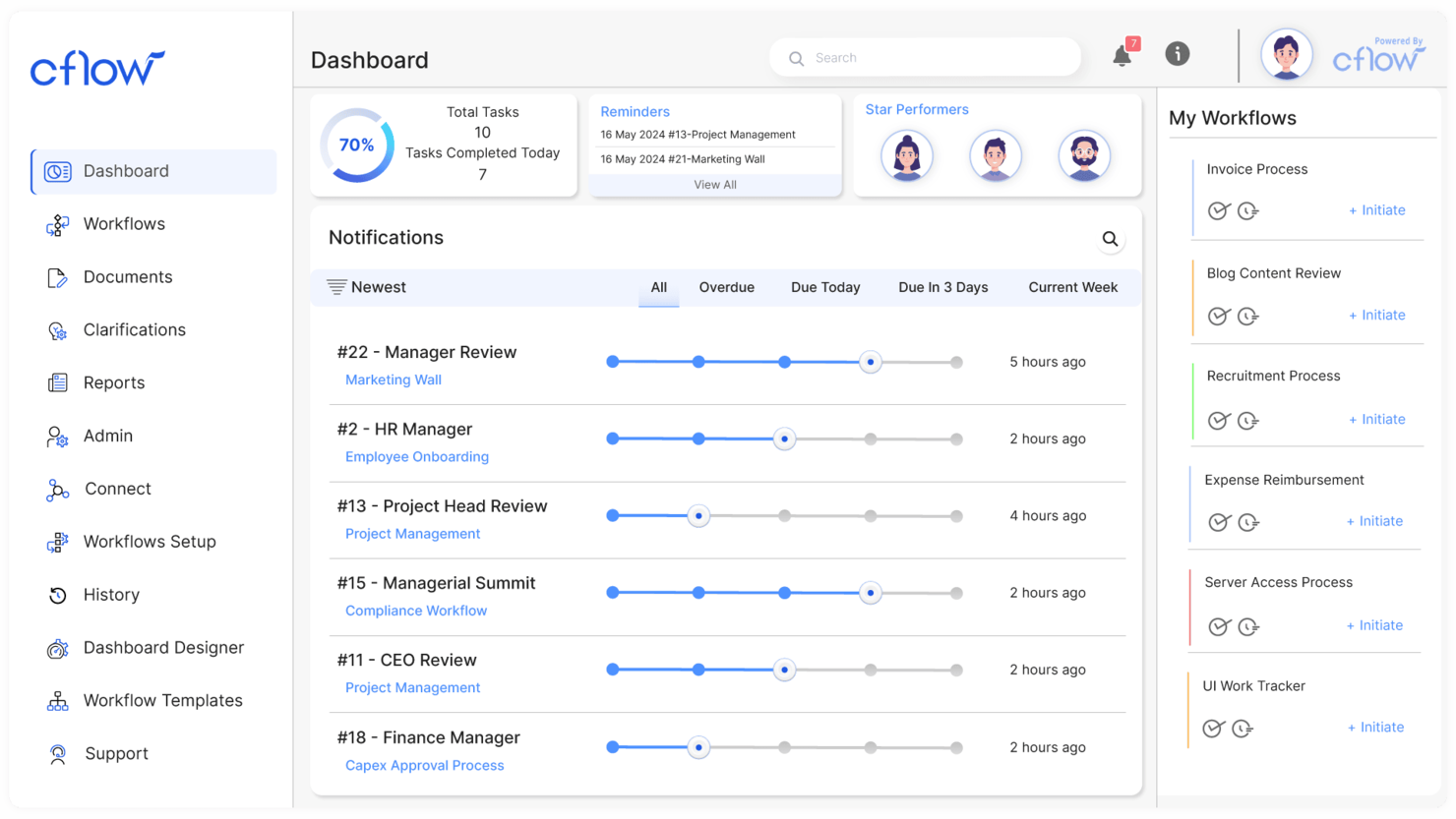
Cflow è una piattaforma cloud di automazione dei flussi di lavoro progettata per piccole imprese e team che desiderano digitalizzare, automatizzare e monitorare i processi aziendali nei settori HR, finanza e operazioni senza bisogno di supporto IT.
A chi è più adatto Cflow?
Responsabili delle operazioni di piccole imprese che vogliono automatizzare e monitorare i flussi di lavoro senza codifica o risorse IT.
Perché ho scelto Cflow
Ho scelto Cflow tra i migliori perché mi permette di automatizzare processi aziendali complessi senza scrivere una sola riga di codice. Mi piace il fatto di poter creare moduli personalizzati, impostare flussi di approvazione e attivare notifiche utilizzando un costruttore visuale di workflow. Il mio team utilizza Cflow per guidare la nostra trasformazione digitale digitalizzando tutto, dalle richieste di acquisto alle approvazioni di permessi, con pochi clic.
Caratteristiche principali di Cflow
- Controllo degli accessi basato sui ruoli: Definisci i permessi degli utenti in base ai loro ruoli nell'organizzazione.
- Log di audit: Monitora ogni azione e modifica all'interno di ciascun flusso di lavoro ai fini della conformità.
- Gestione documentale: Allegare, archiviare e gestire documenti direttamente nei flussi di lavoro.
- Monitoraggio SLA: Definisci e controlla gli accordi sui livelli di servizio per le varie fasi dei processi.
Integrazioni di Cflow
Le integrazioni includono Salesforce, Slack, Trello, Dropbox, QuickBooks, HubSpot CRM, Google Drive, Microsoft Teams, Xero e Docusign.
Pros and Cons
Pros:
- Instradamento su rami paralleli per approvazioni simultanee
- Generazione automatica di app mobile per i moduli
- I campi di ricerca collegano più workflow interni
Cons:
- Curva di apprendimento ripida per la modifica dei moduli
- Personalizzazione limitata della dashboard visuale

Ideale per l'automazione delle attività basata su checklist
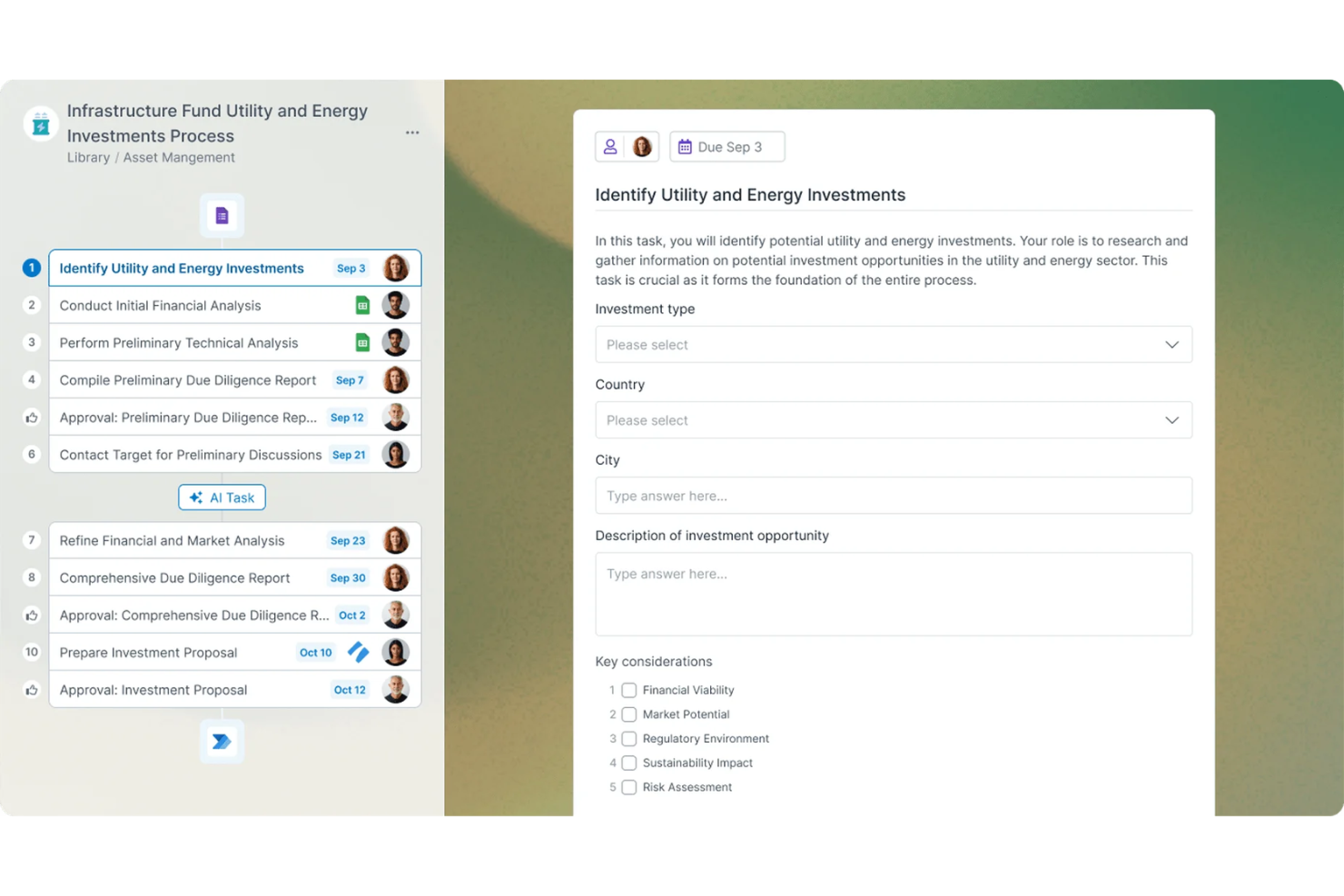
Process Street è una piattaforma di gestione dei flussi di lavoro progettata per piccole imprese e team che devono documentare, automatizzare e monitorare processi ricorrenti con checklist chiare e operative.
Per chi è più adatto Process Street?
Process Street è particolarmente adatto ai responsabili operativi e ai team di piccole imprese che hanno bisogno di una gestione strutturata dei casi per monitorare le attività ricorrenti.
Perché ho scelto Process Street
Ho scelto Process Street come una delle soluzioni migliori perché posso creare checklist dinamiche che attivano azioni automatizzate al completamento delle attività. Mi piace usare la logica condizionale per creare flussi di lavoro ramificati per scenari diversi. Il mio team si affida alla funzionalità di approvazione per tenere informati gli stakeholder e organizzare le conferme delle attività.
Funzionalità principali di Process Street
- Assegnazione delle attività: Assegna le attività delle checklist a membri specifici del team per garantire la responsabilità.
- Campi modulo: Raccogli dati strutturati direttamente nelle checklist usando campi modulo personalizzabili.
- Libreria di modelli: Accedi a una libreria di modelli di flussi di lavoro predefiniti per i processi aziendali più comuni.
- Registro di controllo: Monitora ogni azione e modifica all'interno di una checklist per garantire conformità e trasparenza.
Integrazioni di Process Street
Le integrazioni includono Salesforce, Slack, Microsoft Teams, Google Sheets, Jira, HubSpot, Mailchimp, Stripe e BambooHR.
Pros and Cons
Pros:
- La logica condizionale crea checklist dinamiche
- Le attività di blocco impongono un ordine rigoroso dei processi
- Posti gratuiti per ospiti e collaboratori esterni
Cons:
- Funzionalità integrate limitate per la modellazione di dati complessi
- Nessun accesso offline per le checklist mobili

Ideale per la creazione di app aziendali personalizzate

Zoho Creator è una piattaforma low-code per piccole imprese e team che desiderano automatizzare i processi, centralizzare i dati e creare flussi di lavoro personalizzati senza dover dipendere dall'IT o da una programmazione complessa.
A chi è più adatto Zoho Creator?
Proprietari di piccole imprese e responsabili delle operazioni che vogliono progettare app personalizzate per automatizzare processi aziendali unici.
Perché ho scelto Zoho Creator
Ho scelto Zoho Creator tra i migliori perché posso creare rapidamente app aziendali personalizzate con strumenti drag-and-drop e modelli preimpostati. Mi piace poter automatizzare flussi di lavoro multi-step e impostare processi di approvazione senza scrivere codice. Il mio team utilizza l'analisi integrata per migliorare l'efficienza operativa e individuare i colli di bottiglia mentre cresciamo.
Funzionalità principali di Zoho Creator
- Controlli di accesso basati sui ruoli: Assegna permessi agli utenti in base ai loro ruoli nella tua organizzazione.
- Distribuzione multipiattaforma: Lancia app per web, iOS e Android da una singola build.
- Integrazione con app Zoho e di terze parti: Collega i flussi di lavoro a Zoho CRM, Zoho Books e altri strumenti popolari.
- Generatore di report personalizzati: Progetta e genera report utilizzando i dati della tua app per prendere decisioni migliori attraverso una maggiore visibilità sui processi.
Integrazioni Zoho Creator
Le integrazioni includono Zoho CRM, Zoho Books, Zoho Projects, Zoho Desk, Zoho People, Zoho Analytics, Zoho Invoice, Zoho Inventory, Zoho Mail e Zoho Sign.
Pros and Cons
Pros:
- Costruttore di app drag-and-drop per workflow personalizzati
- Database integrato per dati aziendali centralizzati
- Integrazione nativa con altri strumenti aziendali Zoho
Cons:
- Logica avanzata dei workflow limitata senza scripting
- L'interfaccia utente può sembrare datata a certi team

Clustdoc
Ideale per flussi di onboarding dei clienti

Clustdoc è una piattaforma di automazione dei flussi di lavoro progettata per piccole imprese e team di servizi professionali che necessitano di raccogliere documenti, gestire le comunicazioni dei clienti e semplificare i processi di onboarding o di candidatura.
Per chi è più indicato Clustdoc?
Team di piccole imprese nei settori legale, finanziario o della consulenza che necessitano di automatizzare l'onboarding del cliente e la raccolta dei documenti.
Perché ho scelto Clustdoc
Ho scelto Clustdoc tra i migliori perché posso creare flussi di onboarding passo dopo passo con checklist personalizzate e richieste di documenti su misura per ogni cliente. Mi piace il fatto che il mio team possa automatizzare promemoria e approvazioni, quindi nulla va perso. Il portale clienti brandizzato ci permette di raccogliere moduli, firme e pagamenti in un unico posto, mantenendo tutto organizzato e professionale.
Funzionalità principali di Clustdoc
- Flussi di lavoro con logica condizionale: Attiva passaggi o richieste in base alle risposte del cliente.
- Strumenti di collaborazione per il team: Assegna compiti e comunica con i membri del team all'interno della piattaforma.
- Libreria di modelli: Accedi a modelli pronti per l'onboarding e la raccolta dei documenti.
- Tracciamento del registro delle attività: Monitora ogni azione e modifica all'interno di ciascun flusso di lavoro.
Integrazioni Clustdoc
Le integrazioni native includono Google Drive, Dropbox, OneDrive, Docusign, Stripe, e Clustdoc offre anche un'API per integrazioni personalizzate.
Pros and Cons
Pros:
- Il portale clienti permette caricamento sicuro dei documenti
- I promemoria automatici riducono il lavoro manuale di follow-up
- La logica condizionale personalizza i passi di onboarding
Cons:
- Nessuna funzione integrata di monitoraggio del tempo
- Opzioni di personalizzazione del brand limitate

Ideale per la progettazione di processi a basso codice

ProcessMaker è una piattaforma di automazione dei flussi di lavoro per i team operativi e gli analisti aziendali che devono mappare, automatizzare e ottimizzare processi aziendali complessi senza un forte coinvolgimento del reparto IT.
Per chi è più adatto ProcessMaker?
Team operativi di medie e grandi aziende che devono automatizzare e gestire processi aziendali complessi e articolati in più fasi.
Perché ho scelto ProcessMaker
Ho scelto ProcessMaker come una delle soluzioni migliori perché posso progettare visivamente e automatizzare flussi di lavoro complessi utilizzando il suo modellatore di processi a basso codice. Apprezzo la possibilità di configurare approvazioni in più fasi e instradamenti condizionali senza un forte supporto IT. Il mio team utilizza il suo generatore di moduli con funzionalità di trascinamento per l'elaborazione dei documenti e la standardizzazione della raccolta dei dati.
Caratteristiche principali di ProcessMaker
- Controlli degli accessi basati sui ruoli: Imposta le autorizzazioni per gli utenti in base alla funzione lavorativa o al reparto.
- Dashboard di analisi dei processi: Monitora le prestazioni dei processi con report visivi in tempo reale.
- Integrazione con la gestione dei documenti: Allega, archivia e recupera documenti all'interno dei flussi di lavoro.
- Supporto per API REST: Collega sistemi esterni e automatizza lo scambio di dati.
Integrazioni di ProcessMaker
Le integrazioni includono SAP, Salesforce, Microsoft SharePoint, Slack, Google Drive, Box, Dropbox, Oracle e Jira.
Pros and Cons
Pros:
- Instradamento integrato delle approvazioni per processi in più fasi
- Solida integrazione per la firma elettronica
- Analisi e dashboard dei processi in tempo reale
Cons:
- La personalizzazione tramite script richiede competenze tecniche
- Occasionalmente si verificano ritardi nelle risposte dell'assistenza clienti

Knack
Ideale per la gestione dei workflow basati su database

Knack offre alle piccole imprese e ai team operativi la possibilità di creare applicazioni di workflow personalizzate che collegano dati, automatizzano processi e gestiscono attività senza bisogno di programmare.
A chi è più adatto Knack?
Responsabili operativi e titolari di piccole imprese che hanno bisogno di creare soluzioni di workflow personalizzate in base ai loro dati e processi specifici.
Perché ho scelto Knack
Ho scelto Knack tra i migliori perché posso progettare app di workflow che si collegano direttamente ai dati aziendali, permettendomi di automatizzare approvazioni, notifiche e cambi di stato senza codice. Mi piace poter creare dashboard e moduli personalizzati che rispecchiano perfettamente le fasi operative del mio team. In pratica, questo significa che il mio team può gestire tutto, dal monitoraggio degli ordini ai passaggi di progetto, in un unico luogo, tutto sostenuto dalla nostra struttura di database.
Funzionalità principali di Knack
- Controllo degli accessi basato sui ruoli: imposta i permessi per utenti e gruppi per gestire la visibilità dei dati.
- Notifiche personalizzate: invia email o avvisi automatici in base ai trigger di workflow.
- Caricamento di file: consenti agli utenti di allegare e archiviare documenti all'interno dei record.
- Visualizzazione calendario: visualizza attività, eventi o scadenze in un calendario.
Integrazioni Knack
Le integrazioni includono Zapier, Make, Integromat, Webhooks, Google Sheets, Mailchimp, QuickBooks, Salesforce, Slack e Dropbox. È disponibile anche una API per integrazioni personalizzate.
Pros and Cons
Pros:
- Costruttore di database personalizzati per workflow unici
- Architettura incentrata sul database per dati relazionali
- Supporta il caricamento di file nei record di workflow
Cons:
- Logica di automazione multi-step nativa limitata
- Opzioni di design e styling del front-end di base


Trello offre ai team delle piccole imprese un modo visivo per organizzare i progetti, gestire i flussi di lavoro e monitorare i progressi utilizzando bacheche personalizzabili, facilitando la collaborazione tra i reparti marketing, operativi e di assistenza clienti e il controllo delle attività.
Per chi è più adatto Trello?
Team di piccole imprese nei settori marketing, operativo o servizio clienti che desiderano un modo semplice e visivo per gestire progetti e flussi di lavoro.
Perché ho scelto Trello
Ho scelto Trello come uno dei migliori perché posso configurare bacheche kanban in pochi minuti e personalizzare le liste per ogni fase del flusso di lavoro del mio team. Mi piace usare il sistema di schede di Trello per allegare file, aggiungere checklist e assegnare attività a membri specifici del team. Il mio team utilizza i Power-Ups per aggiungere visualizzazioni del calendario e automatizzare azioni ripetitive direttamente dalla bacheca.
Caratteristiche principali di Trello
- Automazione Butler: Automatizza spostamenti di schede, scadenze e notifiche con attivatori basati su regole.
- Modelli di bacheca: Scegli da una libreria di modelli di flusso di lavoro già pronti per diverse esigenze aziendali.
- Campi personalizzati: Aggiungi menu a discesa, date o campi di testo alle schede per un monitoraggio dati su misura.
- Registro attività: Monitora tutte le modifiche alle bacheche e alle schede in una timeline dettagliata.
Integrazioni di Trello
Le integrazioni includono Slack, Google Drive, Gmail, Microsoft Teams, Jira, Dropbox, Evernote, Salesforce e Box.
Pros and Cons
Pros:
- Le bacheche kanban rendono visibili le fasi del flusso di lavoro
- Le checklist nelle schede aiutano a monitorare i sotto-task
- I modelli di bacheca velocizzano l'avvio di nuovi progetti
Cons:
- Nessuna visualizzazione Gantt o timeline integrata
- I commenti nelle schede possono perdersi in bacheche trafficate


Asana è una piattaforma di gestione dei flussi di lavoro che aiuta i team delle piccole imprese a organizzare i progetti, assegnare le attività e monitorare l’avanzamento in ambito marketing, operations e attività con i clienti in un unico posto.
Per Chi È Ideale Asana?
Responsabili di progetto e manager di team in piccole e medie imprese che hanno bisogno di coordinare attività e scadenze su più progetti.
Perché Ho Scelto Asana
Ho scelto Asana come uno dei migliori perché posso assegnare compiti, impostare dipendenze e visualizzare le tempistiche dei progetti grazie alle visualizzazioni a cronologia e a bacheca. Il mio team usa Asana per coordinare iniziative di marketing e lanci di prodotto, mantenendo tutti allineati su scadenze e deliverable. Apprezzo la possibilità di automatizzare le attività di routine e impostare regole personalizzate per ridurre i follow-up manuali.
Funzionalità Chiave di Asana
- Moduli: Raccogli e indirizza le richieste di lavoro direttamente nei progetti.
- Traguardi: Segna i punti chiave nei progetti per monitorarne i progressi.
- Gestione del carico di lavoro: Visualizza la capacità del team e bilancia le assegnazioni.
- Modelli di progetto: Avvia nuovi flussi di lavoro rapidamente grazie a modelli predefiniti.
Integrazioni di Asana
Le integrazioni includono Slack, Google Drive, Microsoft Teams, Salesforce, Dropbox, Zoom, Jira Cloud, Outlook, HubSpot e Zapier.
Pros and Cons
Pros:
- La vista cronologia aiuta a visualizzare le tempistiche dei progetti
- Le dipendenze tra attività impediscono il mancato passaggio di consegne
- I traguardi aiutano a monitorare i progressi verso gli obiettivi principali
Cons:
- I controlli di accesso per gli ospiti sono basilari
- Le sotto-attività possono essere difficili da gestire su larga scala
Altri software di gestione dei processi per piccole imprese
Ecco alcune opzioni aggiuntive di software di gestione dei processi per piccole imprese che non sono state incluse nel mio elenco, ma che vale comunque la pena prendere in considerazione:
- Bizagi
Ideale per la modellazione visiva dei processi nei piccoli team
- Jira
Ideale per il monitoraggio di flussi di lavoro complessi
- Nintex Process Manager
Ideale per documentare le procedure


Come Valuto il Software di Gestione dei Processi per le Piccole Imprese
Valuto questi strumenti su due livelli: la funzionalità di base di cui un piccolo team ha realmente bisogno—come checklist ricorrenti e modelli di processo—e gli elementi differenzianti che rendono uno strumento quello giusto.
Funzionalità di Base (Requisiti Fondamentali per Questa Lista)
Quando seleziono gli strumenti per la mia lista, valuto ciascuno di essi su una scala da 0 (non offre la funzionalità) a 5 (eccelle in quest'area) per ogni funzionalità di base elencata di seguito. Poi calcolo il punteggio totale dello strumento come percentuale. Ogni strumento deve raggiungere un punteggio minimo totale del 65% per essere considerato idoneo all'inclusione.
- Mappatura e Documentazione dei Processi: Cerco costruttori di workflow visuali in cui puoi mappare un processo come l'onboarding dei dipendenti o l'accoglienza dei clienti passo dopo passo, non solo descriverlo in un documento di testo.
- Automazione dei Workflow: Ogni strumento dovrebbe consentire di impostare trigger e condizioni che fanno avanzare il lavoro automaticamente, ad esempio indirizzando un'approvazione a un responsabile quando viene inviato un modulo.
- Gestione di Attività Ricorrenti e Checklist: Verifico se è possibile salvare un processo come modello riutilizzabile, così che qualcosa come una chiusura mensile o un ciclo di reportistica settimanale parta sempre con i passaggi giusti.
- Collaborazione e Assegnazione delle Attività: Lo strumento dovrebbe supportare l'assegnazione delle attività in base ai ruoli con commenti e menzioni, così i membri del team rimangono allineati all'interno del processo invece che rincorrere aggiornamenti tramite email.
- Monitoraggio dei Progressi e Reportistica: Dashboard e report che mostrano dove i processi si bloccano sono fondamentali in questo ambito. Valuto se è possibile individuare a colpo d'occhio un collo di bottiglia, come un'approvazione bloccata da tre giorni.
- Integrazioni con Strumenti Aziendali: I piccoli team si affidano a stack integrati, quindi guardo alle integrazioni native con strumenti come Google Workspace, Slack e QuickBooks, oltre al supporto per Zapier o un'API aperta.
Una volta che ho un elenco di strumenti che soddisfano i criteri, considero cosa distingue ogni piattaforma.
Fattori Differenzianti (Cosa Distingue i Fornitori)
Ecco come confronto e metto a confronto i diversi fornitori:
Caratteristiche Distintive
Il branching logico condizionale è un grande elemento di differenziazione. Uno strumento che adatta il prossimo passaggio in base alla risposta di un modulo—come saltare una revisione legale quando un contratto è inferiore a una certa soglia—fa risparmiare ai piccoli team il dover smistare manualmente il lavoro. Anche i moduli integrati che raccolgono dati strutturati all'avvio sono preziosi, poiché alimentano variabili nelle fasi successive senza dover copiare e incollare tra applicazioni. Valuto anche se una piattaforma offre portali per ospiti o clienti, così gli stakeholder esterni possono inviare richieste o monitorare l'avanzamento senza bisogno di un posto a pagamento.
Oltre le Caratteristiche
La trasparenza dei prezzi è importante per le piccole squadre. Controllo se un fornitore limita automazioni o modelli ai livelli enterprise, poiché un team di cinque persone che gestisce workflow di onboarding dei clienti non dovrebbe dover passare a un piano superiore solo per aggiungere condizioni. Il tempo necessario per ottenere valore è un altro fattore che considero—i modelli predefiniti per processi comuni come offboarding dei dipendenti o approvazioni di fornitori aiutano il team a essere operativo in pochi giorni, non settimane. Guardo anche alla disponibilità del supporto nei piani di fascia bassa, perché le piccole imprese difficilmente hanno un amministratore dedicato per risolvere da soli i problemi di configurazione.
Come scegliere il software di gestione dei processi per piccole imprese
È facile perdersi in lunghi elenchi di funzionalità e strutture tariffarie complesse. Per aiutarti a rimanere concentrato mentre porti avanti il tuo processo di selezione del software, unico per le tue esigenze, ecco un elenco dei fattori da tenere presenti:
| Fattore | Cosa considerare |
|---|---|
| Scalabilità | Il software sarà in grado di gestire più utenti, dati o flussi di lavoro man mano che la tua impresa cresce? Verifica i limiti degli utenti e le modalità di aggiornamento. |
| Integrazioni | Si collega nativamente agli strumenti che già utilizzi, come contabilità, CRM o posta elettronica? Evita di affidarti esclusivamente a connettori di terze parti. |
| Personalizzazione | Puoi adattare flussi di lavoro, campi e autorizzazioni ai tuoi processi senza un forte coinvolgimento del reparto IT? |
| Facilità d'uso | Il tuo team lo adotterà rapidamente o la formazione rappresenterà un ostacolo? Cerca una navigazione intuitiva e descrizioni chiare. |
| Implementazione e avvio | Quanto tempo richiederà la configurazione e quali risorse saranno necessarie? Informati sul supporto alla migrazione, sui modelli e sull'assistenza per l'avvio. |
| Costo | I livelli di prezzo sono trasparenti e prevedibili con la crescita dell'attività? Fai attenzione ai costi nascosti o ai componenti aggiuntivi obbligatori. |
| Misure di sicurezza | Lo strumento offre accesso basato sui ruoli, crittografia dei dati e conformità agli standard pertinenti, come il GDPR? |
| Disponibilità dell'assistenza | Quali canali di assistenza sono disponibili e in quali orari? Valuta se avrai bisogno di supporto dal vivo o di risorse autonome. |
Che cos'è il software di gestione dei processi per piccole imprese?
Il software di gestione dei processi per le piccole imprese è uno strumento digitale che aiuta i team a organizzare, monitorare e automatizzare flussi di lavoro e attività ricorrenti. Centralizza la documentazione dei processi, assegna le responsabilità e monitora i progressi, così i team possono ridurre il lavoro manuale e gli errori. Queste piattaforme sono progettate per adattarsi alle esigenze e ai budget delle startup e delle organizzazioni più piccole, semplificando la gestione delle operazioni quotidiane e l'adattamento alla crescita dell'azienda.
Funzionalità
Quando scegli un software di gestione dei processi per piccole imprese, presta attenzione alle seguenti funzionalità chiave:
- Assegnazione delle attività: assegna attività specifiche ai membri del team, stabilisci scadenze e monitora il completamento per garantire responsabilità e progressi.
- Automazione dei flussi di lavoro: automatizza le fasi ripetitive dei processi, come approvazioni o notifiche, per risparmiare tempo e ridurre gli errori manuali.
- Gestione dei documenti: archivia, organizza e condividi i file all'interno della piattaforma, così tutti hanno accesso alle versioni più recenti e ai materiali correlati.
- Autorizzazioni basate sui ruoli: controlla chi può visualizzare, modificare o approvare diverse parti dei flussi di lavoro per proteggere le informazioni sensibili e mantenere l'ordine.
- Monitoraggio dei progressi: visualizza lo stato delle attività e dei processi con dashboard, bacheche kanban o barre di avanzamento per una supervisione in tempo reale.
- Moduli personalizzabili: crea moduli per raccogliere dati, richieste o feedback direttamente all'interno dei flussi di lavoro, adattandoli alle esigenze della tua azienda.
- Integrazione con il calendario: sincronizza attività e scadenze con i calendari del team per mantenere tutti allineati sulle prossime tappe e sui risultati da consegnare.
- Report e analisi: genera report sull'efficienza dei flussi di lavoro, sui colli di bottiglia e sulle prestazioni del team per supportare miglioramenti basati sui dati.
- Accesso da dispositivi mobili: usa il software su smartphone o tablet, così il tuo team può gestire processi e attività da qualsiasi luogo.
- Funzionalità di integrazione: collega altri strumenti aziendali, come piattaforme di posta elettronica, CRM o contabilità, per semplificare il flusso delle informazioni e ridurre il lavoro duplicato.
Vantaggi
L'implementazione di un software di gestione dei processi per piccole imprese offre diversi vantaggi al tuo team e alla tua azienda. Ecco alcuni dei vantaggi che puoi aspettarti:
- Maggiore visibilità: monitora attività e flussi di lavoro in tempo reale, così sai sempre cosa è in corso e cosa richiede attenzione.
- Maggiore responsabilità: assegna responsabilità e scadenze, rendendo chiaro chi è responsabile di ogni fase e riducendo le attività non completate.
- Inserimento più rapido: usa modelli, tour guidati e documentazione centralizzata per aiutare i nuovi membri del team a diventare operativi rapidamente.
- Riduzione del lavoro manuale: automatizza attività e approvazioni ripetitive, consentendo al team di concentrarsi su attività a maggior valore.
- Collaborazione migliore: centralizza comunicazioni, file e aggiornamenti, così tutti rimangono allineati e informati durante ogni processo.
- Decisioni consapevoli: accedi agli strumenti di reportistica e analisi per identificare i colli di bottiglia, misurare le prestazioni e ottimizzare i flussi di lavoro.
- Maggiore sicurezza: controlla l'accesso alle informazioni sensibili con autorizzazioni basate sui ruoli e registri di controllo, proteggendo i dati aziendali.
Costi e prezzi
La scelta di un software di gestione dei processi per piccole imprese richiede la comprensione dei vari modelli e piani tariffari disponibili. I costi variano in base alle funzionalità, alle dimensioni del team, ai componenti aggiuntivi e ad altri fattori. La tabella seguente riassume i piani più comuni, i relativi prezzi medi e le funzionalità generalmente incluse nelle soluzioni software di gestione dei processi per piccole imprese:
Tabella comparativa dei piani per il software di gestione dei processi per piccole imprese
| Tipo di piano | Prezzo medio | Funzionalità comuni |
|---|---|---|
| Piano gratuito | $0 | Gestione di base delle attività, utenti limitati, modelli di flusso di lavoro semplici e assistenza di base. |
| Piano personale | $5-$15/utente/mese | Assegnazione delle attività, integrazione con il calendario, automazione limitata, archiviazione dei file e notifiche tramite posta elettronica. |
| Piano aziendale | $15-$35/utente/mese | Automazione avanzata dei flussi di lavoro, strumenti di reportistica, integrazioni, autorizzazioni basate sui ruoli e accesso da dispositivi mobili. |
| Piano aziendale avanzato | $35-$60/utente/mese | Integrazioni personalizzate, sicurezza avanzata, assistenza prioritaria, analisi avanzate e supporto per l'inserimento. |
Software di gestione dei processi per le piccole imprese: domande frequenti
Ecco alcune risposte alle domande comuni sul software di gestione dei processi per le piccole imprese:
Il software di gestione dei processi aziendali (BPM) è diverso dal software di gestione dei processi?
Sì, un software di gestione dei processi aziendali o software BPM differisce da uno strumento di gestione dei processi:
- Il software di gestione dei processi si concentra sul coordinamento delle attività e sulla collaborazione del team. È progettato per aiutare gli utenti a organizzare, assegnare e monitorare le singole attività all’interno di un progetto.
- Una piattaforma BPM si concentra sull’automazione dei flussi di lavoro e sull’ottimizzazione sistemica. È progettata per modellare, eseguire e misurare processi complessi dall’inizio alla fine, ripetibili e strutturati.
In breve: Se vuoi aiutare il tuo team a rimanere organizzato, hai bisogno di un software di gestione dei processi. Se vuoi eliminare il lavoro manuale attraverso un’automazione rigorosa e l’integrazione dei dati, stai cercando una soluzione BPM.
Come faccio a sapere se la mia piccola impresa ha bisogno di un software di gestione dei processi?
Se fai fatica a tenere traccia delle attività, delle scadenze o delle responsabilità del team, oppure se i processi manuali ti rallentano, è un buon segnale che potresti trarre vantaggio da un software di gestione dei processi. Questi strumenti aiutano a organizzare i flussi di lavoro e a ridurre gli errori man mano che la tua attività cresce.
Il software di gestione dei processi può integrarsi con gli strumenti che già utilizzo?
Sì, la maggior parte dei software di gestione dei processi per le piccole imprese offre integrazioni con strumenti diffusi come email, calendari, CRM e piattaforme di contabilità. Verifica sempre quali integrazioni sono disponibili nativamente e se per il tuo insieme di strumenti specifico avrai bisogno di connettori di terze parti.
Il software di gestione dei processi è difficile da configurare per un team di piccole dimensioni?
No, la maggior parte delle soluzioni software per la gestione dei processi è progettata per una configurazione rapida e include risorse per l’avvio, come modelli, panoramiche del prodotto e video di formazione. Di solito puoi iniziare senza il supporto del reparto IT, ma le personalizzazioni più avanzate potrebbero richiedere tempo aggiuntivo o assistenza tecnica.
Quali funzionalità di sicurezza dovrei cercare in un software di gestione dei processi?
Cerca autorizzazioni basate sui ruoli, crittografia dei dati e conformità a standard come il GDPR. Queste funzionalità aiutano a proteggere le informazioni aziendali sensibili e a controllare chi può accedere o modificare i diversi flussi di lavoro.
Quanto dovrei aspettarmi di pagare per un software di gestione dei processi per le piccole imprese?
I prezzi variano, ma la maggior parte delle piccole imprese paga tra $5 e $35 per utente al mese per i piani aziendali. Sono disponibili piani gratuiti con funzionalità limitate, mentre i piani aziendali con sicurezza e assistenza avanzate costano di più. Controlla sempre cosa è incluso in ogni livello.