

I 10 migliori software per la gestione delle decisioni del 2026

Elenco dei migliori software per la gestione delle decisioni


Il software per la gestione delle decisioni aiuta il tuo team ad automatizzare, monitorare e ottimizzare le regole aziendali e la logica decisionale all’interno di flussi di lavoro complessi. Se stai cercando il miglior software per la gestione delle decisioni, probabilmente devi ridurre gli errori manuali, tenere il passo con requisiti in continua evoluzione e garantire decisioni coerenti e verificabili su larga scala. Questo elenco offre un confronto chiaro, curato da esperti, tra le principali piattaforme, così puoi identificare rapidamente gli strumenti più adatti alle tue esigenze tecniche, ai requisiti normativi e alle priorità di integrazione. Usa questa guida per orientarti tra le numerose opzioni e fare una scelta consapevole e sicura per il tuo prossimo progetto.
Perché fidarsi dei nostri consigli sui software
Il nostro team testa e recensisce software dal 2012. In quanto project manager noi stessi, sappiamo quanto sia difficile — e importante — scegliere il software giusto.
Per questa guida, abbiamo valutato gli strumenti attraverso test pratici e ricerche indipendenti, assegnando un punteggio agli strumenti in base ai nostri criteri di selezione. Ci basiamo inoltre sulle competenze di leader di pensiero del settore e di professionisti attivi nella gestione dei progetti.
Le nostre recensioni riflettono il nostro giudizio editoriale umano, non un discorso di vendita.
Revisori esperti:
Tabella di confronto: software per la gestione delle decisioni
Questa tabella di confronto riassume i dettagli sui prezzi delle mie migliori selezioni di software per la gestione delle decisioni.
| Tool | Best For | Trial Info | Price | ||
|---|---|---|---|---|---|
| 1 | Ideale per la sinergia tra automazione robotica dei processi | Prova gratuita di 60 giorni + demo gratuita disponibile | A partire da $25/mese | Website | |
| 2 | Ideale per l'integrazione nei processi di audit | Non disponibile | Prezzo su richiesta | Website | |
| 3 | Ideale per l’esecuzione decisionale in tempo reale | Demo gratuita disponibile | Prezzo su richiesta | Website | |
| 4 | Ideale per la configurazione di regole senza codice | Demo gratuita disponibile | Prezzo su richiesta | Website | |
| 5 | Ideale per l'analisi decisionale multicriterio | Prova gratuita di 15 giorni + demo gratuita disponibile | Prezzi su richiesta | Website | |
| 6 | Ideale per l'automazione dei flussi di lavoro assicurativi | Demo gratuita disponibile | Prezzo su richiesta | Website | |
| 7 | Ideale per la creazione di regole complesse | Prova gratuita disponibile | Prezzo su richiesta | Website | |
| 8 | Ideale per il monitoraggio della conformità normativa | Demo gratuita disponibile | Prezzo su richiesta | Website | |
| 9 | Ideale per l'elaborazione di transazioni ad alto volume | Demo gratuita disponibile | Prezzo su richiesta | Website | |
| 10 | Ideale per la gestione delle regole cloud-native | Piano gratuito + demo gratuita disponibili | Da €50/mese | Website |
Recensioni dei software per la gestione delle decisioni
Di seguito trovi le mie sintesi dettagliate dei software per la gestione delle decisioni inclusi nel mio elenco ristretto. Le mie recensioni offrono una panoramica approfondita delle funzionalità, dei migliori casi d’uso e delle integrazioni di ogni piattaforma, per aiutarti a trovare quella più adatta a te.

UiPath
Ideale per la sinergia tra automazione robotica dei processi

UIPath unisce intelligenza dei processi e automazione per i team che desiderano collegare la gestione delle decisioni alla robotic process automation. È una scelta ideale per responsabili delle operazioni, analisti aziendali e team IT che vogliono analizzare, ottimizzare e automatizzare flussi di lavoro complessi utilizzando dati in tempo reale. Combinando il process mining con i trigger di automazione, UIPath aiuta a individuare i punti decisionali e ad automatizzare le azioni all'interno dei processi aziendali.
Perché ho scelto UIPath
Ciò che distingue UIPath nella gestione delle decisioni è il modo in cui collega l'intelligenza dei processi con la robotic process automation in un'unica piattaforma decisionale. Ho scelto UIPath perché ti consente di mappare i processi aziendali, identificare i punti decisionali e poi automatizzare queste decisioni tramite bot. La funzionalità di process mining scopre colli di bottiglia e inefficienze, mentre i trigger di automazione permettono di agire sulle intuizioni senza intervento manuale. Questa sinergia è particolarmente preziosa per i team che vogliono passare dall'analisi dei processi direttamente all'esecuzione automatizzata.
Funzionalità chiave di UIPath
Altre funzionalità che rendono UIPath prezioso per la gestione delle decisioni includono:
- Editor di regole aziendali: Crea e gestisci la logica decisionale attraverso un'interfaccia visiva.
- Template di automazione predefiniti: Accedi a una libreria di modelli per processi aziendali comuni.
- Dashboard di analisi in tempo reale: Monitora le prestazioni dei processi e gli esiti dell'automazione in tempo reale.
- Permessi basati sui ruoli: Controlla l'accesso all'automazione e alla logica decisionale in base ai ruoli utente.
Integrazioni UIPath
Le integrazioni includono SAP, Microsoft, Salesforce, ServiceNow, Oracle, Workday, Google Workspace, Amazon Web Services, Jira e altro ancora.
Pros and Cons
Pros:
- Editor visivo di regole aziendali per la logica decisionale
- Il process mining evidenzia opportunità di automazione
- Ampie integrazioni native con piattaforme enterprise
Cons:
- Configurazione complessa per automazioni multi-dipartimentali
- Funzionalità offline limitate per la gestione dei processi


Se il tuo team ha bisogno di incorporare logiche decisionali direttamente nei flussi di lavoro di audit, TeamMate offre un motore di regole aziendali progettato per i professionisti dell’audit e della conformità. È particolarmente rilevante per i dipartimenti di revisione interna nelle grandi organizzazioni che desiderano automatizzare valutazioni dei rischi, rilievi e azioni di follow-up. Integrando la gestione delle regole con l’automazione dei processi di audit, TeamMate aiuta i team a far rispettare standard coerenti e a rispondere rapidamente ai cambiamenti normativi.
Perché ho scelto TeamMate
Per i team che devono collegare logiche decisionali direttamente ai processi di audit, TeamMate si distingue con il suo motore di regole aziendali su misura per i flussi di lavoro di audit. Ho scelto TeamMate perché consente di automatizzare il punteggio del rischio, l’assegnazione dei rilievi e i passaggi di escalation all’interno della stessa piattaforma in cui vengono gestiti gli audit. Il motore di regole dello strumento è progettato per attivare azioni in base ai dati di audit, così puoi mantenere standard coerenti e rispondere in tempo reale ai requisiti di conformità. Questo rende TeamMate particolarmente adatto ai team di audit e conformità che desiderano integrare la gestione delle decisioni nelle attività quotidiane.
Principali funzionalità di TeamMate
Altre funzionalità che rendono TeamMate utile per la gestione delle decisioni includono:
- Modelli di regole personalizzati: Crea e riutilizza modelli per scenari di audit e punti decisionali comuni.
- Controlli di accesso basati sui ruoli: Assegna permessi agli utenti in base alle loro responsabilità nel processo di audit.
- Notifiche automatiche: Invia avvisi ai membri del team quando vengono soddisfatte specifiche condizioni delle regole.
- Tracciamento delle modifiche: Monitora e registra tutte le modifiche alle regole aziendali per garantire la tracciabilità.
Integrazioni di TeamMate
Le integrazioni non sono pubblicamente disponibili.
Pros and Cons
Pros:
- Motore di regole integrato per flussi di lavoro specifici dell’audit
- Notifiche automatiche per eventi attivati dalle regole
- Modelli di regole personalizzati per scenari di audit ricorrenti
Cons:
- Dà priorità all’audit rispetto alla logica decisionale
- Funzionalità limitate del motore di regole

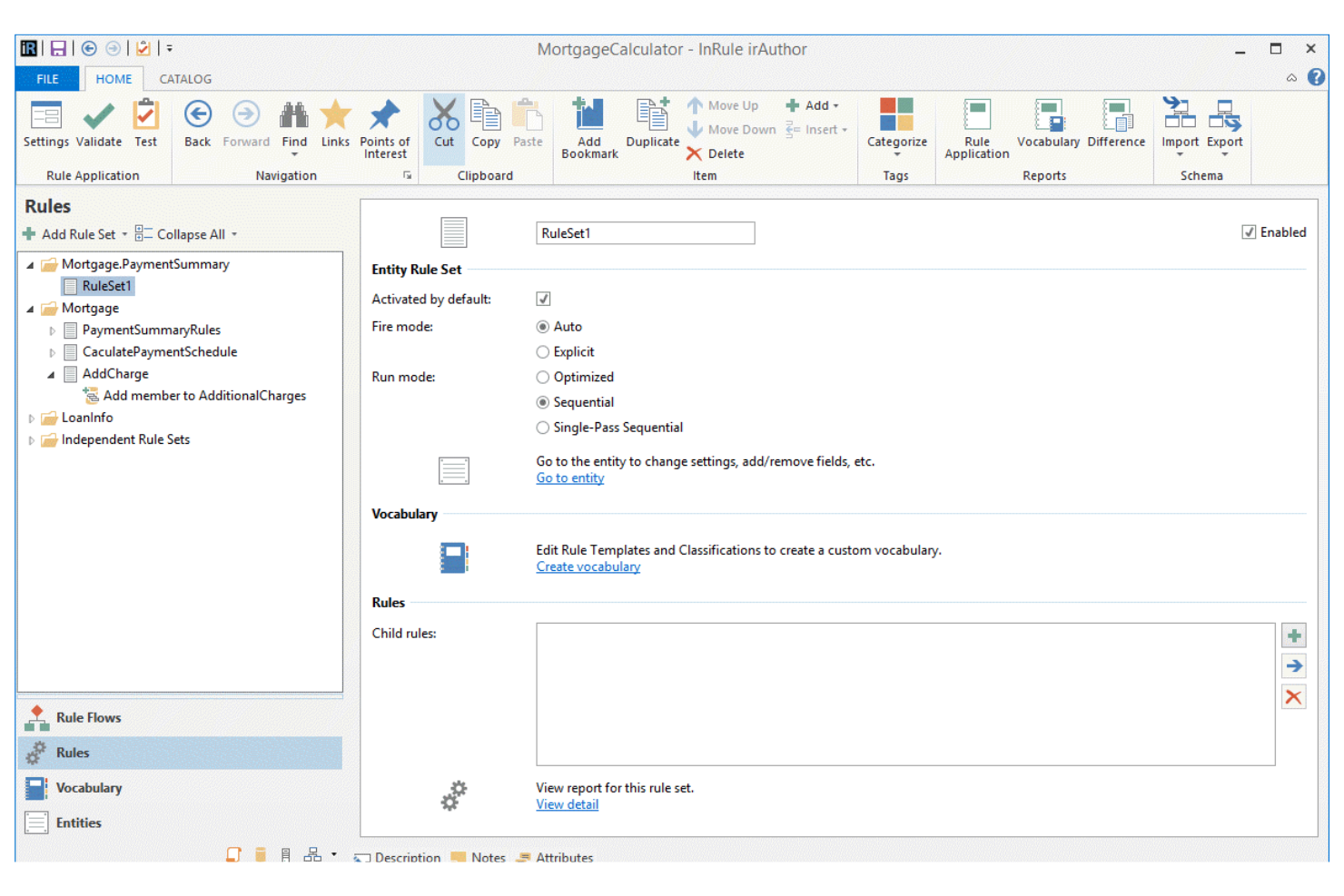
Quando il tuo team ha bisogno di automatizzare decisioni complesse in modo istantaneo, InRule offre esecuzione decisionale in tempo reale per ambienti ad alto volume. È una soluzione ideale per i servizi finanziari, le assicurazioni e i team operativi che richiedono un'applicazione rapida e coerente delle regole attraverso i canali digitali. L'approccio unico della piattaforma al processing in tempo reale ti aiuta a rendere operativa la logica aziendale e ad adattarti ai cambiamenti delle esigenze senza modifiche al codice.
Perché ho scelto InRule
L’esecuzione decisionale in tempo reale è essenziale per le organizzazioni che devono automatizzare processi critici senza ritardi, ed è proprio qui che InRule eccelle. Ho scelto InRule perché consente di scrivere, testare e implementare regole aziendali che vengono eseguite istantaneamente man mano che i dati scorrono nei sistemi. Il motore di automazione delle decisioni della piattaforma supporta logiche complesse e si integra direttamente nei flussi di lavoro operativi, così puoi adattarti rapidamente a nuovi requisiti. Questo lo rende particolarmente prezioso in settori come la finanza e le assicurazioni, dove decisioni rapide e coerenti sono fondamentali per la conformità normativa e le interazioni con i clienti.
Caratteristiche principali di InRule
Altre caratteristiche che i team di gestione delle decisioni possono trovare utili includono:
- Interfaccia visiva per la creazione delle regole: crea e modifica la logica decisionale tramite un editor drag-and-drop.
- Controllo delle versioni sulle regole: traccia le modifiche e gestisci più versioni delle regole aziendali nel tempo.
- Ambiente di test automatizzato: esegui simulazioni e valida i risultati delle regole prima della distribuzione.
- Controlli di accesso basati sui ruoli: assegna permessi e gestisci l’accesso degli utenti alla logica decisionale sensibile.
Integrazioni di InRule
Le integrazioni includono Salesforce, SAP, Microsoft Dynamics, Snowflake e altri.
Pros and Cons
Pros:
- Esecuzione delle regole in tempo reale per decisioni istantanee
- Ambiente di test automatizzato per la validazione delle regole
- Supporta l’integrazione con Salesforce e SAP
Cons:
- Richiede una configurazione tecnica per integrazioni complesse
- Il supporto mobile non è completamente sviluppato

Decisions si distingue per i team che vogliono configurare regole aziendali e flussi di lavoro senza scrivere codice. È particolarmente adatto a responsabili delle operazioni, della conformità e dell’IT che devono permettere a chi non è sviluppatore di automatizzare rapidamente le decisioni. Se la tua organizzazione dà valore alla flessibilità e alla rapida iterazione nella gestione delle regole, Decisions è progettato per soddisfare queste esigenze.
Perché ho scelto Decisions
Per i team che desiderano costruire e aggiornare regole aziendali senza dipendere dagli sviluppatori, Decisions offre un vero ambiente no-code. Ho scelto Decisions perché il suo progettista visivo di regole permette agli utenti di trascinare e rilasciare componenti logici, rendendo la configurazione delle regole accessibile anche a personale non tecnico. La piattaforma include inoltre strumenti di automazione dei flussi di lavoro che consentono di mappare e automatizzare processi a più fasi direttamente nell’interfaccia. Questo approccio aiuta le organizzazioni a rispondere rapidamente ai cambiamenti e consente agli utenti aziendali di assumere il controllo della logica decisionale.
Caratteristiche principali di Decisions
Oltre alla configurazione di regole senza codice, Decisions offre diverse altre funzionalità che supportano i team di gestione decisionale:
- Dashboard di metriche aziendali: Monitora in tempo reale le prestazioni delle regole e i risultati dei flussi di lavoro.
- Progettista di moduli integrato: Crea moduli personalizzati per raccogliere e validare dati all’interno dei processi automatizzati.
- Strumenti di test e simulazione delle regole: Testa le regole aziendali con dati di esempio prima di implementare le modifiche.
- Controlli di accesso basati sui ruoli: Imposta permessi dettagliati per utenti e gruppi che gestiscono regole e flussi di lavoro.
Integrazioni di Decisions
Le integrazioni includono Salesforce, HubSpot, DocuSign, Microsoft Teams, Slack, Amazon S3, Azure, Oracle, SAP e altro ancora.
Pros and Cons
Pros:
- Costruttore visivo di flussi di lavoro che supporta logiche complesse
- Strumenti di test integrati per la validazione delle regole
- Designer di moduli drag-and-drop incluso
Cons:
- Template predefiniti specifici per settore limitati
- La distribuzione on-premises richiede configurazioni aggiuntive

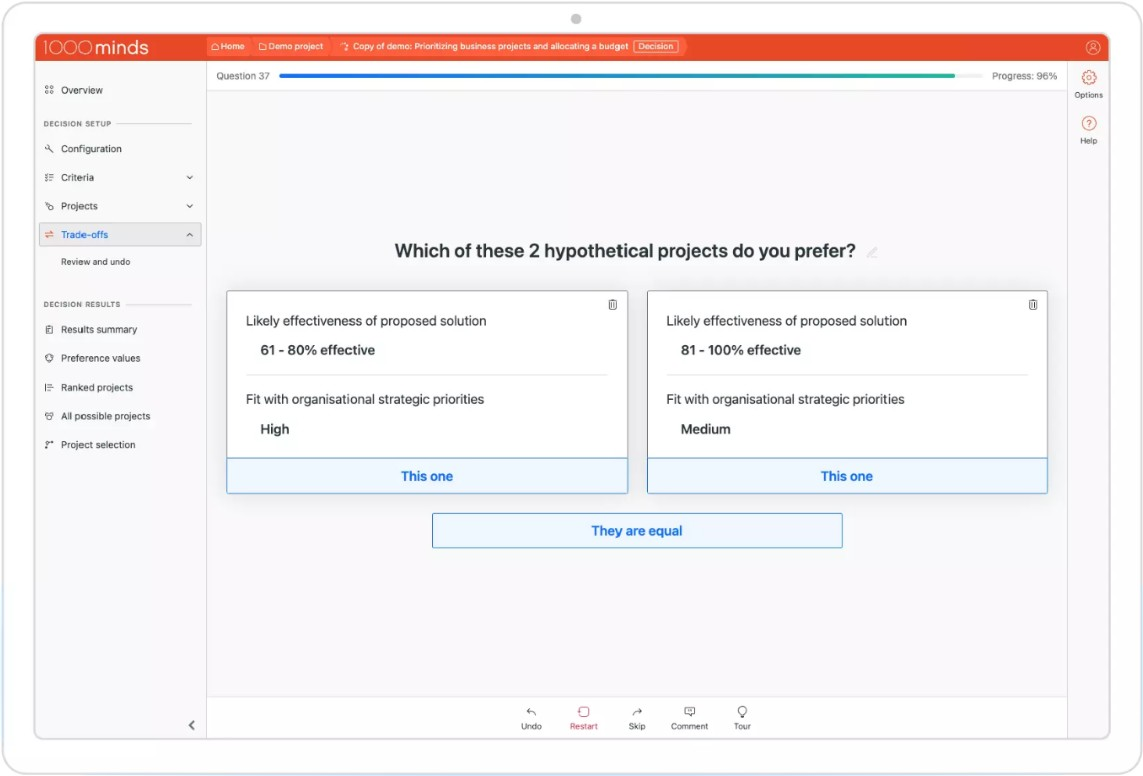
Se hai bisogno di prendere decisioni complesse che coinvolgono diversi criteri, 1000minds offre un approccio strutturato per team e organizzazioni. È particolarmente utile per professionisti nei settori delle politiche pubbliche, della sanità, della ricerca e degli acquisti che devono bilanciare in modo trasparente priorità contrastanti. Il punto di forza unico dello strumento è il suo algoritmo brevettato per l'analisi decisionale multicriterio, che ti aiuta a quantificare le preferenze e giustificare le scelte attraverso decisioni chiare e basate sui dati.
Perché ho scelto 1000minds
Per i team che devono valutare più fattori nelle loro decisioni, 1000minds si distingue per le sue capacità di analisi decisionale multicriterio. Ho scelto 1000minds perché utilizza un algoritmo brevettato che ti supporta nel classificare e prioritizzare sistematicamente le opzioni in base ai tuoi criteri e preferenze specifici. Lo strumento ti guida attraverso confronti a coppie, facilitando la chiarificazione dei compromessi e la documentazione delle motivazioni dietro ogni scelta. Questo approccio risulta particolarmente prezioso quando trasparenza e giustificabilità sono fondamentali, come nello sviluppo di politiche, nell'assegnazione di finanziamenti o negli acquisti.
Funzionalità principali di 1000minds
Oltre alle sue capacità di analisi decisionale, ho trovato utili anche queste funzionalità:
- Strumenti per decisioni di gruppo: Collabora con più stakeholder e aggrega i contributi per prendere decisioni collettive.
- Ponderazione personalizzabile dei criteri: Regola l'importanza di ogni criterio per rispecchiare le priorità della tua organizzazione.
- Analisi di scenario: Modella e confronta diversi scenari decisionali per valutare come cambiano i risultati.
- Audit trail e reportistica: Monitora i processi decisionali e genera report dettagliati per garantire trasparenza e documentazione.
Integrazioni di 1000minds
Le integrazioni non sono pubblicamente disponibili.
Pros and Cons
Pros:
- Algoritmo brevettato per analisi multicriterio
- Audit trail trasparente per la documentazione delle decisioni
- Ponderazione personalizzabile dei criteri decisionali
Cons:
- Automazione limitata per processi decisionali ricorrenti
- Manca di strumenti di visualizzazione avanzata

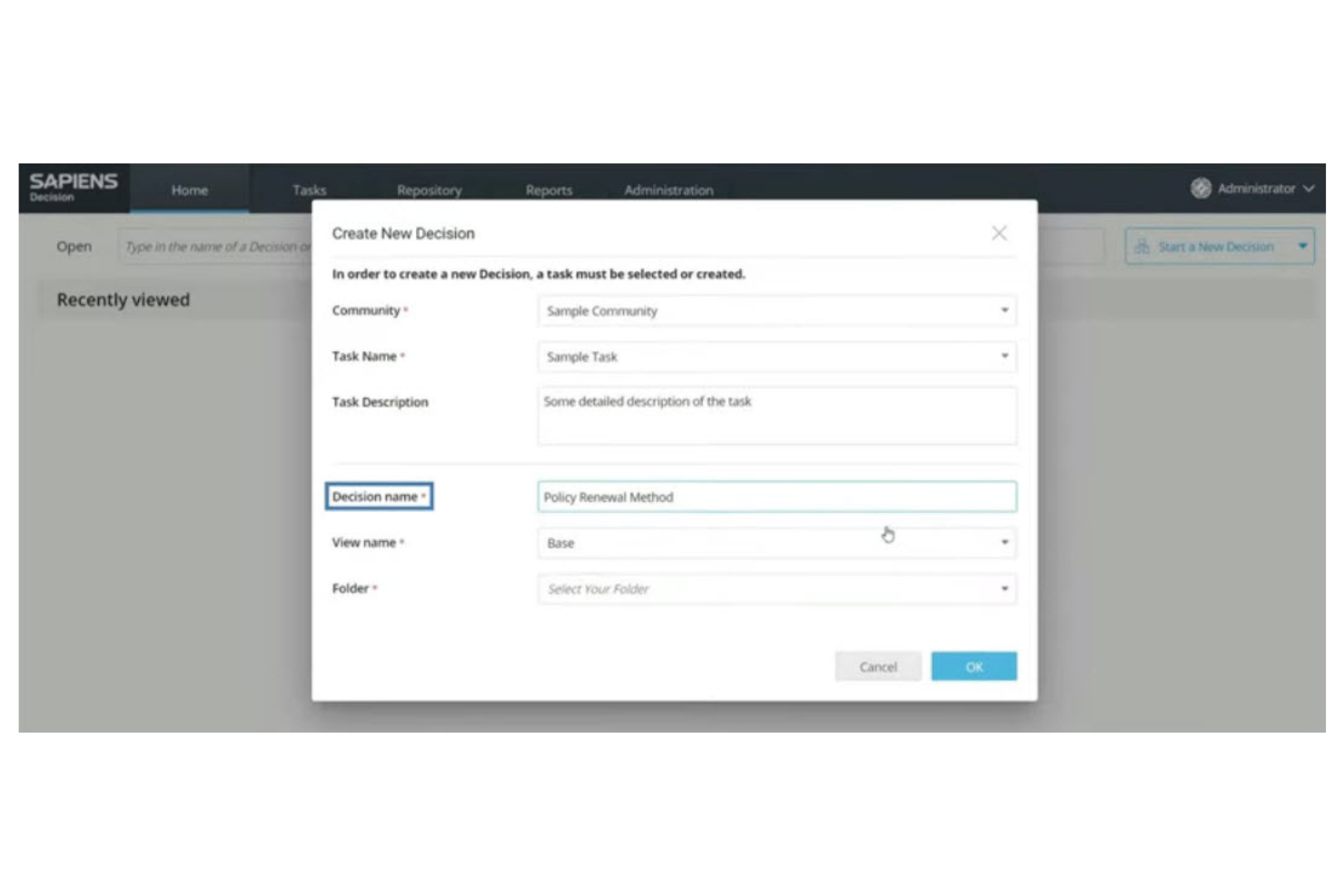
Sapiens offre una piattaforma di gestione delle decisioni progettata specificamente per fornitori di assicurazioni e organizzazioni di servizi finanziari. Aiuta i team ad automatizzare i processi di sottoscrizione, gestione dei sinistri e delle polizze, mantenendo la conformità alle normative del settore. Se la tua azienda ha bisogno di gestire logiche assicurative complesse e ottimizzare i processi decisionali, Sapiens risponde direttamente a queste esigenze.
Perché ho scelto Sapiens
Per i team assicurativi, Sapiens si distingue perché è costruito appositamente per automatizzare e gestire flussi di lavoro assicurativi complessi. Ho scelto Sapiens per la sua capacità di gestire la logica decisionale di sottoscrizione e sinistri grazie a regole aziendali configurabili e monitoraggio in tempo reale delle decisioni. La piattaforma supporta anche la conformità normativa permettendo di aggiornare le regole quando le normative cambiano, senza interrompere le operazioni in corso. Queste caratteristiche rendono Sapiens una soluzione ideale per le organizzazioni che necessitano di automatizzare processi decisionali di importanza critica e specifici del settore.
Caratteristiche principali di Sapiens
Altre funzionalità che i team di gestione delle decisioni possono trovare utili in Sapiens includono:
- Modellazione visiva delle regole: Crea e modifica la logica decisionale con un'interfaccia drag-and-drop per aggiornamenti più rapidi e una collaborazione più semplice.
- Gestione della tracciabilità delle revisioni: Monitora ogni modifica alle regole e ogni esito delle decisioni per la conformità e la revisione interna.
- Integrazione con i sistemi assicurativi principali: Collega direttamente piattaforme di gestione polizze, sinistri e fatturazione per automatizzare i processi end-to-end.
- Test di scenario: Simula modifiche alle regole e flussi decisionali prima di rilasciarli in ambienti di produzione.
Integrazioni di Sapiens
Le integrazioni non sono disponibili pubblicamente.
Pros and Cons
Pros:
- Progettato per l'automazione decisionale specifica per il settore assicurativo
- Offre un solido tracciamento di audit e conformità
- Consente test di scenario prima del rilascio
Cons:
- Si concentra principalmente sul settore assicurativo
- L'interfaccia può sembrare datata

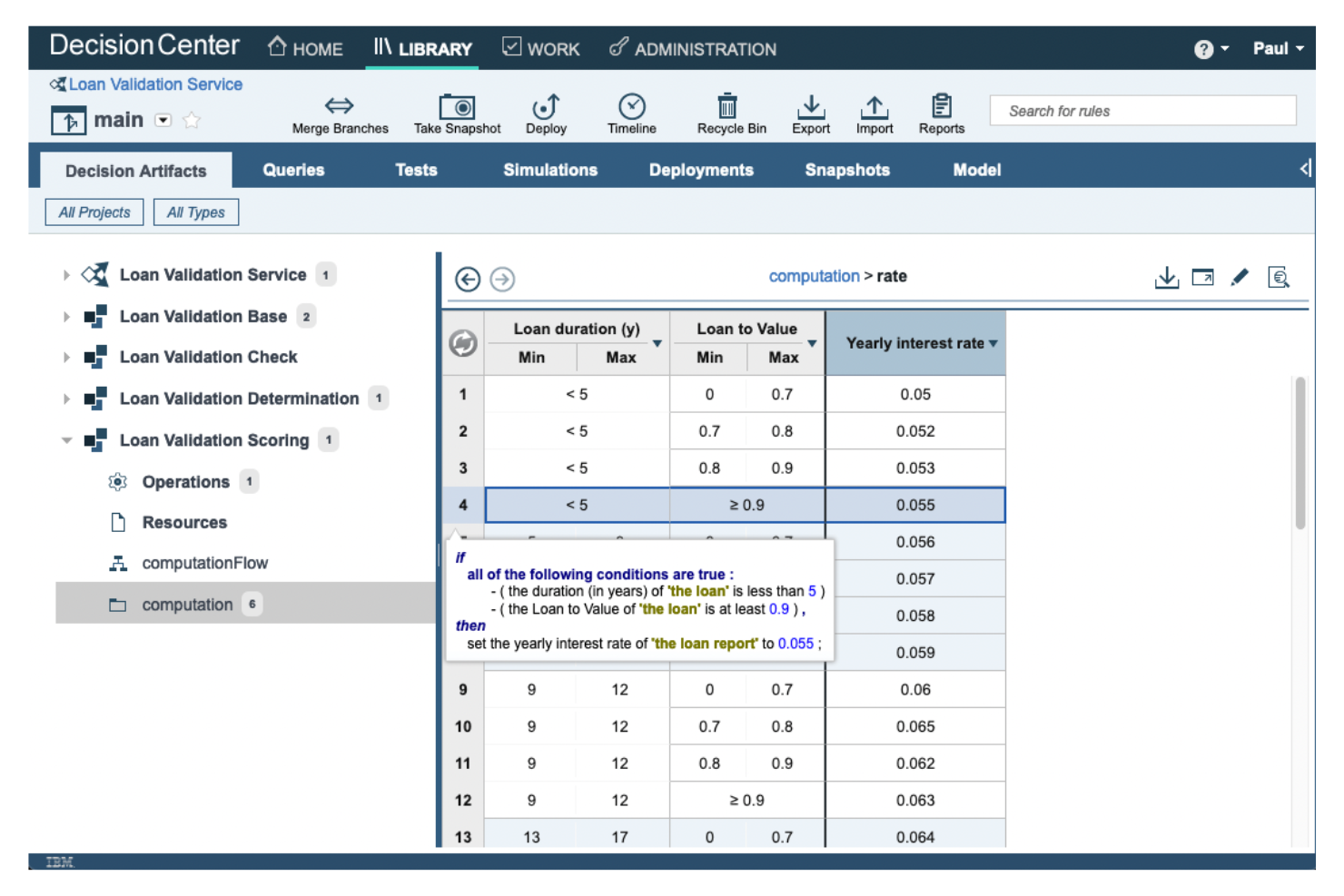
IBM Operational Decision Manager (ODM) è progettato per le organizzazioni che necessitano di creare, gestire e automatizzare regole aziendali altamente complesse su larga scala. È particolarmente utile per le imprese nei settori finanziario, assicurativo e retail che richiedono una modellazione avanzata delle regole e l'esecuzione di decisioni in tempo reale. Se il tuo team ha bisogno di un controllo dettagliato sulla logica decisionale e della possibilità di aggiornare le regole senza modifiche al codice, IBM ODM risponde direttamente a queste esigenze.
Perché ho scelto IBM ODM
Quando la creazione di regole complesse è una priorità, IBM ODM offre un livello di controllo e flessibilità difficile da eguagliare. Ho scelto IBM ODM perché consente ai team di definire, testare e implementare regole aziendali articolate utilizzando un editor visivo delle regole e tabelle decisionali. Inoltre, lo strumento supporta la gestione delle versioni e la simulazione, permettendo di sperimentare in sicurezza le modifiche prima di renderle operative. Per le organizzazioni che devono gestire migliaia di regole e adattarsi rapidamente ai cambiamenti normativi o di business, IBM ODM fornisce la profondità e la struttura necessarie.
Funzionalità chiave di IBM ODM
Altre funzionalità di IBM ODM che i team di gestione delle decisioni potrebbero trovare utili includono:
- Supporto API REST: Collega i servizi decisionali ad applicazioni e sistemi esterni utilizzando API RESTful standard.
- Controllo degli accessi basato sui ruoli: Assegna permessi e gestisci i ruoli degli utenti per controllare chi può visualizzare, modificare o implementare le regole.
- Strumenti di distribuzione automatizzata: Trasferisci la logica decisionale dagli ambienti di sviluppo a quelli di produzione con strumenti integrati di automazione della distribuzione.
- Elaborazione degli eventi aziendali: Rileva e rispondi agli eventi aziendali in tempo reale utilizzando funzionalità integrate di gestione degli eventi.
Integrazioni IBM ODM
Le integrazioni includono IBM Cloud Pak for Business Automation, IBM Automation Decision Services, IBM WatsonX Orchestrate e altro ancora.
Pros and Cons
Pros:
- Editor visivo delle regole che supporta logiche complesse
- Simulazione integrata per il test delle regole
- Solido controllo delle versioni per le modifiche alle regole
Cons:
- Sono necessarie competenze specialistiche per le funzionalità avanzate
- La documentazione può essere difficile da consultare


Kingland è progettato appositamente per le organizzazioni che hanno bisogno di tracciare, gestire e documentare le decisioni relative alla conformità normativa in ambienti complessi. È particolarmente rilevante per i servizi finanziari, le assicurazioni e altri settori altamente regolamentati dove le tracce di audit e l'applicazione delle policy sono imprescindibili. Se il tuo team deve affrontare requisiti di conformità in evoluzione e necessita di un sistema per centralizzare e automatizzare i flussi di lavoro relativi alla compliance, Kingland affronta direttamente queste sfide.
Perché ho scelto Kingland
Per i team che devono stare al passo con i cambiamenti normativi, Kingland si distingue per la sua attenzione al monitoraggio della conformità all'interno della gestione delle decisioni. Ho scelto Kingland perché offre monitoraggio automatico delle policy e tracce di audit dettagliate, elementi essenziali per le organizzazioni che affrontano aggiornamenti normativi frequenti. La piattaforma offre anche flussi di lavoro configurabili che aiutano a garantire che ogni decisione di conformità sia documentata e verificabile. Se la tua attività opera in un settore altamente regolamentato, queste funzionalità rendono Kingland una soluzione ideale per gestire gli obblighi di conformità.
Caratteristiche principali di Kingland
Ho trovato anche altre funzionalità in Kingland che supportano i team di gestione delle decisioni:
- Controlli di accesso basati sui ruoli: Impostazione di permessi granulari per gli utenti in base alle loro responsabilità e necessità di conformità.
- Notifiche automatiche: Invio di avvisi per modifiche alle policy, scadenze di revisione o eccezioni di conformità.
- Tracciamento della provenienza dei dati: Traccia l'origine e il percorso dei dati di conformità durante il processo decisionale.
- Strumenti di reportistica personalizzabili: Creazione ed esportazione di report su conformità e decisioni, adattati ai requisiti normativi.
Integrazioni di Kingland
Le integrazioni includono Kingland Entity Management e un’API per integrazioni personalizzate.
Pros and Cons
Pros:
- Il monitoraggio delle variazioni normative è integrato
- Modelli di reportistica sulla compliance personalizzabili
- Avvisi automatici per aggiornamenti delle policy
Cons:
- Poche integrazioni native con strumenti esterni
- I tempi di risposta dell'assistenza possono essere incostanti


FICO Blaze Advisor è progettato per le organizzazioni che devono automatizzare e gestire processi decisionali complessi e ad alto volume. È particolarmente utile per istituti finanziari, compagnie assicurative e imprese che gestiscono transazioni su larga scala dove velocità e precisione sono essenziali. Se il vostro team ha la necessità di implementare regole aziendali su vasta scala e adattarsi rapidamente a politiche in continuo cambiamento, Blaze Advisor risponde direttamente a queste esigenze.
Perché ho scelto FICO Blaze Advisor
Quando la gestione di grandi volumi di transazioni è una priorità, FICO Blaze Advisor offre un approccio specializzato per il decision management. Ho scelto Blaze Advisor perché supporta la scrittura e la distribuzione di regole aziendali complesse, fondamentale per le organizzazioni che processano migliaia o milioni di transazioni quotidianamente. Il motore di esecuzione delle decisioni in tempo reale dello strumento garantisce che le decisioni automatizzate siano rapide e coerenti anche sotto carichi elevati. Per i team che devono aggiornare rapidamente le regole in risposta a requisiti aziendali o normativi in evoluzione, la gestione centralizzata delle regole di Blaze Advisor rappresenta un forte vantaggio.
Caratteristiche principali di FICO Blaze Advisor
Altre funzionalità di FICO Blaze Advisor a supporto dei team di decision management includono:
- Strumenti grafici per la modellazione delle regole: Crea e visualizza la logica decisionale tramite un’interfaccia drag-and-drop.
- Controllo delle versioni per le regole aziendali: Traccia le modifiche e mantieni versioni storiche di tutti i set di regole.
- Ambiente di simulazione e test: Testa la logica decisionale con dati di esempio prima della messa in produzione.
- Supporto multilingue: Redigi e gestisci le regole aziendali in più lingue per i team globali.
Integrazioni di FICO Blaze Advisor
Le integrazioni non sono disponibili pubblicamente.
Pros and Cons
Pros:
- Gestisce milioni di transazioni al giorno
- Offre strumenti grafici per la modellazione delle regole
- Include ambienti di simulazione e test
Cons:
- Richiede formazione specializzata per la scrittura delle regole
- Documentazione limitata per le funzionalità avanzate


GoRules è pensato per i team che desiderano gestire le regole di business in un ambiente cloud-native. È particolarmente utile per i fornitori SaaS, le aziende fintech e le piattaforme digitali che necessitano di una gestione delle regole scalabile e guidata da API. Se vuoi centralizzare e automatizzare la logica decisionale in sistemi distribuiti, GoRules offre un approccio moderno pensato per le operazioni cloud-first.
Perché ho scelto GoRules
Ciò che distingue GoRules è il suo focus sulla gestione delle regole cloud-native, fondamentale per le organizzazioni che lavorano in ambienti distribuiti e guidati da API. Ho scelto GoRules perché consente di distribuire, aggiornare e gestire le regole di business direttamente tramite una interfaccia web, con aggiornamenti subito disponibili tramite REST API. La piattaforma supporta anche il controllo delle versioni delle regole, permettendo di tracciare le modifiche e annullare gli aggiornamenti quando necessario. Questo rende GoRules una scelta solida per i team che devono mantenere agilità e affidabilità in ecosistemi digitali in rapida evoluzione.
Funzionalità principali di GoRules
Altre funzionalità che rendono GoRules interessante per i team di gestione decisionale includono:
- Editor di regole con evidenziazione della sintassi: Scrivi e revisiona le regole con indicatori visivi chiari per logica ed errori.
- Log di audit: Tieni traccia di ogni modifica alle regole e azione utente per conformità e trasparenza.
- Supporto multi-ambiente: Gestisci e testa le regole su ambienti di sviluppo, staging e produzione.
- Trigger tramite webhook: Avvia automaticamente workflow esterni o notifiche al momento dell'esecuzione delle regole.
Integrazioni GoRules
Le integrazioni comprendono Azure AD, Okta e qualunque provider OpenID Connect. È disponibile una API per integrazioni personalizzate.
Pros and Cons
Pros:
- Distribuzione cloud-native
- Supporto multi-ambiente per test sicuri
- I log di audit forniscono tracciabilità per la conformità
Cons:
- Nessuna dashboard integrata di analisi o reportistica
- Risorse di supporto della community minime
Altri software per la gestione delle decisioni
Ecco alcune opzioni aggiuntive di software per la gestione delle decisioni che non sono state incluse nel mio elenco ristretto, ma che vale comunque la pena prendere in considerazione:
- SAS Intelligent Decisioning
Ideale per l'integrazione di analisi avanzate
- Aera Decision Cloud
Ideale per l'automazione autonoma delle decisioni
- Cloverpop
Ideale per i flussi di lavoro collaborativi in team


Come valuto il software di gestione delle decisioni
Che un PMO stia registrando decisioni RAID o automatizzando approvazioni di cambiamento, valuto gli strumenti su due livelli: funzionalità indispensabili e i fattori che distinguono le migliori opzioni.
Funzionalità di base (requisiti fondamentali per questa lista)
Quando seleziono gli strumenti per la mia lista, valuto ciascuno su una scala da 0 (non offre la funzionalità) a 5 (eccelle in questo ambito) per ogni funzionalità di base elencata qui sotto. Poi calcolo il punteggio totale dello strumento in percentuale. Ogni strumento deve raggiungere un punteggio totale minimo del 65% per essere considerato per l'inclusione.
- Archivio e registro delle decisioni: verifico se le decisioni risiedono in un registro dedicato e ricercabile, con campi per la motivazione, il responsabile e lo stato—and non sono sepolte nei thread dei commenti o nelle pagine wiki.
- Flusso di lavoro per le decisioni e approvazioni: ogni strumento dovrebbe supportare la canalizzazione strutturata delle proposte e delle approvazioni, come l'escalation di una modifica all’ambito attraverso una revisione PMO prima che arrivi a un comitato direttivo.
- Valutazione basata su criteri: cerco punteggi ponderati o classifiche rispetto a criteri definiti, in modo che i team possano confrontare short list di fornitori o opzioni tecnologiche con un metodo coerente e trasparente.
- Automazione di regole di business e logica: la piattaforma dovrebbe permettere di definire regole decisionali riutilizzabili—per esempio, indirizzare automaticamente le decisioni che impattano sul budget sopra una certa soglia a un manager di portafoglio per l’approvazione.
- Tracciabilità e collegamenti: le decisioni devono collegarsi agli artefatti che influenzano. Valuto se è possibile collegare una decisione "go/no-go" ai relativi rischi, attività e milestone con dipendenze visibili.
- Audit trail e reporting: cerco una cronologia completa delle modifiche su ogni registro decisionale, abbinata a dashboard o report che evidenziano schemi come colli di bottiglia nelle approvazioni o tempi di ciclo delle decisioni.
Una volta che ho una lista di strumenti che soddisfano i criteri, considero cosa distingue ogni piattaforma.
Fattori differenzianti (cosa distingue i fornitori)
Ecco come confronto tra loro i diversi fornitori:
Funzionalità distintive
La modellazione di scenari è un grande fattore distintivo—cerco strumenti che permettono di regolare variabili come budget o tempistiche e vedere le diverse opzioni prima di una votazione in comitato. Anche il voto dei portatori di interesse e la collaborazione asincrona sono importanti, soprattutto quando gli approvatori si trovano in fusi orari diversi e non possono partecipare a una chiamata dal vivo. Valuto inoltre se una piattaforma include modelli di decisione preconfigurati per situazioni tipiche di progetto, come richieste di cambio o risposte a rischi, il che evita ai PMO di dover costruire framework di governance da zero.
Oltre le funzionalità
Valuto quanto bene ogni strumento si integri con le piattaforme di gestione progetti e PPM che il team già utilizza—una sincronizzazione bidirezionale con Jira o Smartsheet è molto più utile di una semplice esportazione CSV. Anche conformità e tracciabilità incidono molto, poiché settori regolamentati come pharma o edilizia necessitano di registri immutabili e controlli di accesso basati sui ruoli. Infine, considero la struttura dei prezzi, in particolare se il fornitore offre licenze solo per visualizzatori o stakeholder, così che gli approvatori occasionali non incrementino il costo per utente man mano che il PMO si espande tra i programmi.
Come scegliere un software per la gestione delle decisioni
È facile perdersi in lunghi elenchi di funzionalità e strutture tariffarie complesse. Per aiutarti a mantenere la concentrazione mentre affronti il tuo specifico processo di selezione del software, ecco un elenco dei fattori da tenere presenti:
| Fattore | Cosa considerare |
|---|---|
| Scalabilità | Il software sarà in grado di gestire i volumi di decisioni attuali e previsti man mano che la tua azienda cresce? Informati sui limiti delle transazioni e sulle prestazioni su larga scala. |
| Integrazioni | Lo strumento si collega nativamente ai sistemi esistenti (CRM, ERP e altre fonti di dati)? Verifica la disponibilità di connettori predefiniti e opzioni API. |
| Personalizzazione | Puoi adattare regole, flussi di lavoro e interfacce ai processi specifici della tua organizzazione senza un forte coinvolgimento del reparto IT? |
| Facilità d’uso | Gli utenti aziendali potranno creare e aggiornare le regole oppure saranno necessarie competenze tecniche per le modifiche continuative? |
| Implementazione e avvio | Quanto tempo occorre per iniziare a utilizzare il software? Cerca percorsi di migrazione chiari, risorse per la formazione e assistenza durante la distribuzione. |
| Costo | I livelli di prezzo sono trasparenti e prevedibili? Considera il costo totale di proprietà, inclusi configurazione, assistenza e futura espansione. |
| Misure di sicurezza | La piattaforma soddisfa i tuoi standard di protezione dei dati? Informati su crittografia, controlli degli accessi e registri di audit. |
| Requisiti di conformità | Il software ti aiuterà a rispettare le normative del settore (come GDPR, HIPAA o SOX)? Verifica la presenza di funzionalità di conformità integrate e supporto per gli audit. |
Che cos’è un software per la gestione delle decisioni?
Il software di gestione delle decisioni è una piattaforma digitale che automatizza, gestisce e monitora la logica delle decisioni aziendali attraverso processi e sistemi. Questi strumenti consentono di definire regole, criteri e modelli che guidano decisioni coerenti e verificabili in tempo reale. I team utilizzano il software di gestione delle decisioni per ridurre l'intervento manuale, adattarsi rapidamente ai requisiti in evoluzione e garantire la conformità agli standard interni ed esterni.
Funzionalità
Quando selezioni un software di gestione delle decisioni, presta attenzione alle seguenti funzionalità chiave:
- Interfaccia per la creazione delle regole: consente agli utenti di creare, modificare e organizzare le regole aziendali utilizzando editor visivi o strumenti di scripting, semplificando la gestione di logiche complesse senza richiedere competenze tecniche avanzate.
- Controllo delle versioni: tiene traccia nel tempo delle modifiche alla logica decisionale, permettendo ai team di ripristinare le versioni precedenti e mantenere una chiara traccia di controllo degli aggiornamenti.
- Motore di esecuzione in tempo reale: elabora le decisioni istantaneamente mentre i dati attraversano i sistemi, supportando le operazioni aziendali sensibili alle tempistiche e riducendo l'intervento manuale.
- Integrazione con i flussi di lavoro: collega direttamente la logica decisionale ai processi aziendali, garantendo che le decisioni automatizzate vengano attivate nei punti corretti all'interno dei flussi di lavoro.
- Registrazione degli audit: registra ogni decisione presa dal sistema, inclusi input, output e percorsi delle regole, per supportare la conformità e la risoluzione dei problemi.
- Controlli degli accessi basati sui ruoli: limita chi può visualizzare, modificare o distribuire la logica decisionale, aiutando le organizzazioni a gestire le regole sensibili e a mantenere la governance.
- Strumenti di test e simulazione: consentono agli utenti di convalidare le regole e i flussi decisionali prima della distribuzione, eseguendo scenari di test e verificando i risultati.
- Reportistica e analisi: fornisce dashboard e report che riepilogano l'attività decisionale, l'utilizzo delle regole e le tendenze, aiutando i team a monitorare le prestazioni e identificare le aree di miglioramento.
Funzionalità AI comuni del software di gestione delle decisioni
Oltre alle funzionalità standard del software di gestione delle decisioni elencate sopra, molte di queste soluzioni stanno integrando l'AI con funzionalità come:
- Analisi predittiva: utilizza modelli di apprendimento automatico per prevedere i risultati sulla base dei dati storici, aiutando i team ad anticipare le tendenze e prendere decisioni proattive.
- Ottimizzazione automatizzata delle decisioni: perfeziona continuamente la logica decisionale analizzando i risultati e modificando le regole o i parametri per migliorare nel tempo i risultati aziendali.
- Elaborazione del linguaggio naturale: consente agli utenti di definire o interrogare la logica decisionale utilizzando il linguaggio quotidiano, semplificando l'interazione degli stakeholder non tecnici con il sistema.
- Rilevamento delle anomalie: identifica schemi insoliti o valori anomali nei dati decisionali, avvisando i team di potenziali rischi o opportunità che potrebbero richiedere attenzione.
- Apprendimento adattivo: consente al sistema di apprendere dai nuovi dati e dai feedback degli utenti, aggiornando automaticamente i modelli decisionali per mantenerli allineati alle condizioni aziendali in evoluzione.
Vantaggi
L'implementazione di un software di gestione delle decisioni offre diversi vantaggi al tuo team e alla tua azienda. Eccone alcuni:
- Logica decisionale coerente: l'esecuzione automatizzata delle regole garantisce che le decisioni vengano prese sempre nello stesso modo, riducendo errori e pregiudizi.
- Tempi di risposta più rapidi: l'elaborazione in tempo reale e l'integrazione con i flussi di lavoro consentono al tuo team di agire istantaneamente sui dati e sugli eventi.
- Conformità migliorata: la registrazione degli audit e il controllo delle versioni facilitano il monitoraggio, la revisione e la dimostrazione del rispetto delle politiche interne e delle normative esterne.
- Maggiore agilità: gli strumenti visivi per la creazione e il test delle regole consentono di aggiornare rapidamente la logica decisionale quando cambiano le esigenze aziendali, senza un forte coinvolgimento dell'IT.
- Maggiore trasparenza: le funzionalità di reportistica e analisi offrono una visibilità chiara su come e perché vengono prese le decisioni all'interno dell'organizzazione.
- Riduzione del carico di lavoro manuale: l'automazione delle decisioni di routine permette al tuo team di concentrarsi su attività di maggiore valore e iniziative strategiche.
- Operazioni scalabili: la capacità di gestire volumi crescenti di decisioni e di integrarsi con i sistemi principali sostiene la crescita aziendale senza sacrificare il controllo.
Costi & prezzi
La scelta di un software di gestione delle decisioni richiede la comprensione dei vari modelli e piani tariffari disponibili. I costi variano in base alle funzionalità, alle dimensioni del team, ai componenti aggiuntivi e ad altri fattori. La tabella seguente riepiloga i piani più comuni, i relativi prezzi medi e le funzionalità tipicamente incluse nelle soluzioni software di gestione delle decisioni:
Tabella di confronto dei piani per il software di gestione delle decisioni
| Tipo di piano | Prezzo medio | Funzionalità comuni |
|---|---|---|
| Piano gratuito | $0 | Creazione di regole di base, integrazioni limitate, accesso per un singolo utente e assistenza della comunità. |
| Piano personale | $20–$50/utente/mese | Creazione di regole di base, integrazioni limitate, accesso per un singolo utente e assistenza della comunità. |
| Piano aziendale | $50–$150/utente/mese | Accesso per più utenti, integrazioni avanzate, controllo delle versioni, strumenti di reportistica e autorizzazioni basate sui ruoli. |
| Piano per grandi aziende | $150–$400+/utente/mese | Integrazioni personalizzate, sicurezza avanzata, strumenti per la conformità, assistenza dedicata e supporto all'inserimento. |
Domande frequenti sul software di gestione delle decisioni
Ecco alcune risposte alle domande frequenti sul software di gestione delle decisioni:
In che modo il software di gestione delle decisioni si differenzia dagli strumenti di gestione dei processi aziendali?
Il software di gestione delle decisioni si concentra sull’automazione e sulla gestione della logica decisionale, come regole e criteri, mentre gli strumenti di gestione dei processi aziendali coordinano interi flussi di lavoro. Spesso si utilizzano entrambi insieme: la gestione delle decisioni si occupa del “cosa” e del “come” delle decisioni, mentre la gestione dei processi si occupa del “quando” e del “chi”.
Gli utenti non tecnici possono gestire le regole nel software di gestione delle decisioni?
Sì, molte piattaforme offrono editor di regole visivi e interfacce guidate progettate per gli utenti aziendali. Ciò consente al personale non tecnico di creare, aggiornare e testare le regole senza scrivere codice, anche se la logica complessa può comunque richiedere il supporto dell’IT.
Quali tipi di integrazione dovrei cercare nel software di gestione delle decisioni?
Cerca integrazioni con i tuoi sistemi principali, come CRM, ERP, data warehouse e piattaforme di automazione dei flussi di lavoro. L’accesso tramite API è importante per le connessioni personalizzate, mentre i connettori predefiniti possono accelerare la distribuzione e ridurre il carico di lavoro dell’IT.
Come posso garantire la conformità utilizzando il software di gestione delle decisioni?
Scegli un software con registri di audit, controllo delle versioni e controlli degli accessi basati sui ruoli. Queste funzionalità aiutano a tenere traccia delle modifiche, monitorare l’attività decisionale e dimostrare la conformità a normative come il GDPR o l’HIPAA.
Quali sono le difficoltà più comuni durante l'implementazione?
Le difficoltà più comuni includono la migrazione delle regole esistenti, l’integrazione con i sistemi legacy e la formazione degli utenti sulle nuove interfacce. Pianificare la mappatura dei dati, coinvolgere tempestivamente gli stakeholder e sfruttare le risorse di inserimento del fornitore può contribuire a rendere più agevole la transizione.