

I 10 migliori software per l’approvazione delle fatture del 2026

Elenco ristretto dei software per l'approvazione delle fatture


Il software per l'approvazione delle fatture automatizza la revisione, l'instradamento e l'autorizzazione delle fatture prima del pagamento, aiutando il tuo team a controllare la spesa e a ridurre gli errori manuali. Se stai cercando il miglior software per l'approvazione delle fatture, probabilmente stai affrontando problemi legati ad approvazioni lente, fatture smarrite o lacune nella conformità che mettono a rischio i tuoi progetti e i rapporti con i fornitori. Questo elenco ti aiuterà a confrontare le soluzioni principali, a capire quali funzionalità sono più importanti per il tuo flusso di lavoro e a scegliere una piattaforma adatta alle esigenze del tuo team, così potrai mantenere i progetti in movimento e garantire l'accuratezza finanziaria.
Perché fidarsi dei nostri consigli sui software
Il nostro team testa e recensisce software dal 2012. In quanto project manager noi stessi, sappiamo quanto sia difficile — e importante — scegliere il software giusto.
Per questa guida, abbiamo valutato gli strumenti attraverso test pratici e ricerche indipendenti, assegnando un punteggio agli strumenti in base ai nostri criteri di selezione. Ci basiamo inoltre sulle competenze di leader di pensiero del settore e di professionisti attivi nella gestione dei progetti.
Le nostre recensioni riflettono il nostro giudizio editoriale umano, non un discorso di vendita.
Revisori esperti:
Tabella di confronto dei software per l'approvazione delle fatture
Questa tabella di confronto riassume i dettagli sui prezzi delle mie migliori selezioni di software per l’approvazione delle fatture:
| Tool | Best For | Trial Info | Price | ||
|---|---|---|---|---|---|
| 1 | Ideale per la comunicazione collaborativa sulle fatture | Demo gratuita disponibile | Prezzi su richiesta | Website | |
| 2 | Ideale per la conformità ai pagamenti globali | Demo gratuita disponibile | Da $99/mese | Website | |
| 3 | Ideale per un’implementazione rapida su cloud | Demo disponibile su richiesta | Da £129 | Website | |
| 4 | Ideale per l'elaborazione di grandi volumi di fatture | Demo gratuita disponibile | Prezzo su richiesta | Website | |
| 5 | Ideale per l'integrazione dei flussi di lavoro di approvvigionamento | Prova gratuita + demo gratuita disponibile | Da $225/utente/mese (fatturazione annuale) | Website | |
| 6 | Ideale per l'archiviazione sicura di dati finanziari | Demo gratuita disponibile | Prezzo su richiesta | Website | |
| 7 | Ideale per la gestione delle eccezioni con IA | Demo gratuita disponibile | Prezzi su richiesta | Website | |
| 8 | Ideale per integrazione nella gestione documentale | Prova gratuita + demo gratuita disponibili | Da $225/utente/mese (fatturazione annuale) | Website | |
| 9 | Ideale per team finanziari di medie dimensioni | Demo gratuita disponibile | Prezzo su richiesta | Website | |
| 10 | Ideale per tracce di approvazione pronte per l'audit | Prova gratuita di 14 giorni + demo gratuita disponibile | Da $49.50/mese | Website |
Recensioni dei software per l'approvazione delle fatture
Di seguito sono riportati i miei riepiloghi dettagliati dei software per l’approvazione delle fatture inclusi nel mio elenco ristretto. Le mie recensioni offrono uno sguardo approfondito alle funzionalità, ai migliori casi d’uso e alle integrazioni di ciascun software, per aiutarti a trovare quello più adatto a te.

Stampli
Ideale per la comunicazione collaborativa sulle fatture
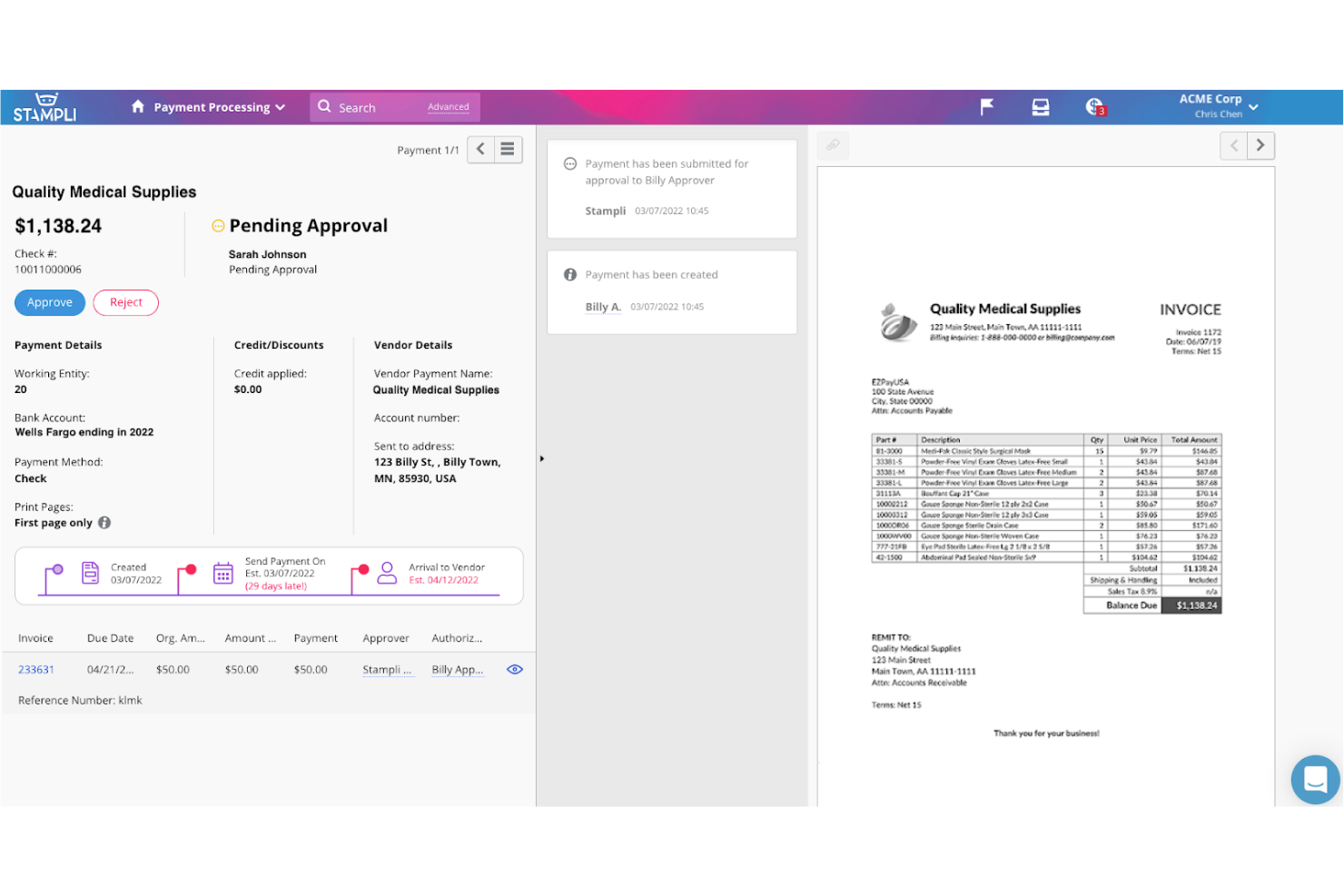
Stampli pone la comunicazione collaborativa sulle fatture al centro della sua piattaforma, rendendola particolarmente adatta ai team che devono risolvere rapidamente i dubbi sulle fatture. Lo strumento è pensato per i reparti finanziari e i team di contabilità fornitori che gestiscono frequenti scambi tra approvatori, fornitori e parti interessate. Centralizzando conversazioni e documentazione su ogni fattura, Stampli aiuta i team a ridurre ritardi e confusione durante il processo di approvazione.
Perché ho scelto Stampli
Ciò che distingue Stampli è la sua attenzione a rendere la comunicazione sulle fatture trasparente e concreta per tutti i soggetti coinvolti. La piattaforma associa conversazioni, domande e documenti di supporto direttamente a ogni fattura, così nulla viene perso nelle conversazioni via e-mail o nelle chat separate. Ho scelto Stampli perché il suo approccio collaborativo aiuta i team a risolvere più rapidamente i problemi di approvazione e mantiene tutte le parti interessate aggiornate. Per le organizzazioni in cui le domande e i chiarimenti sulle fatture sono frequenti, gli strumenti di comunicazione di Stampli rendono il processo di approvazione molto più fluido.
Funzionalità principali di Stampli
Oltre agli strumenti di comunicazione collaborativa, Stampli offre diverse altre funzionalità per l'approvazione delle fatture:
- Acquisizione dei dati basata sull'IA: La piattaforma utilizza l'IA per estrarre i dettagli delle fatture e ridurre l'inserimento manuale.
- Flussi di approvazione personalizzati: I team possono configurare percorsi di approvazione multilivello in linea con le politiche interne.
- Monitoraggio della traccia di audit: Ogni azione su una fattura viene registrata per garantire conformità e trasparenza.
- Portale per i fornitori: I fornitori possono inviare fatture e monitorare direttamente lo stato dei pagamenti tramite Stampli.
Integrazioni di Stampli
Le integrazioni includono NetSuite, Sage Intacct, QuickBooks, Microsoft Dynamics, SAP e Infor.
Pros and Cons
Pros:
- Implementazione rapida dell'integrazione ERP
- Assistente intelligente di codifica basato sull'IA
- Nessuna modifica all'ERP esistente
Cons:
- Richiede una formazione attiva del team
- La funzione di ricerca può essere lenta

Tipalti
Ideale per la conformità ai pagamenti globali
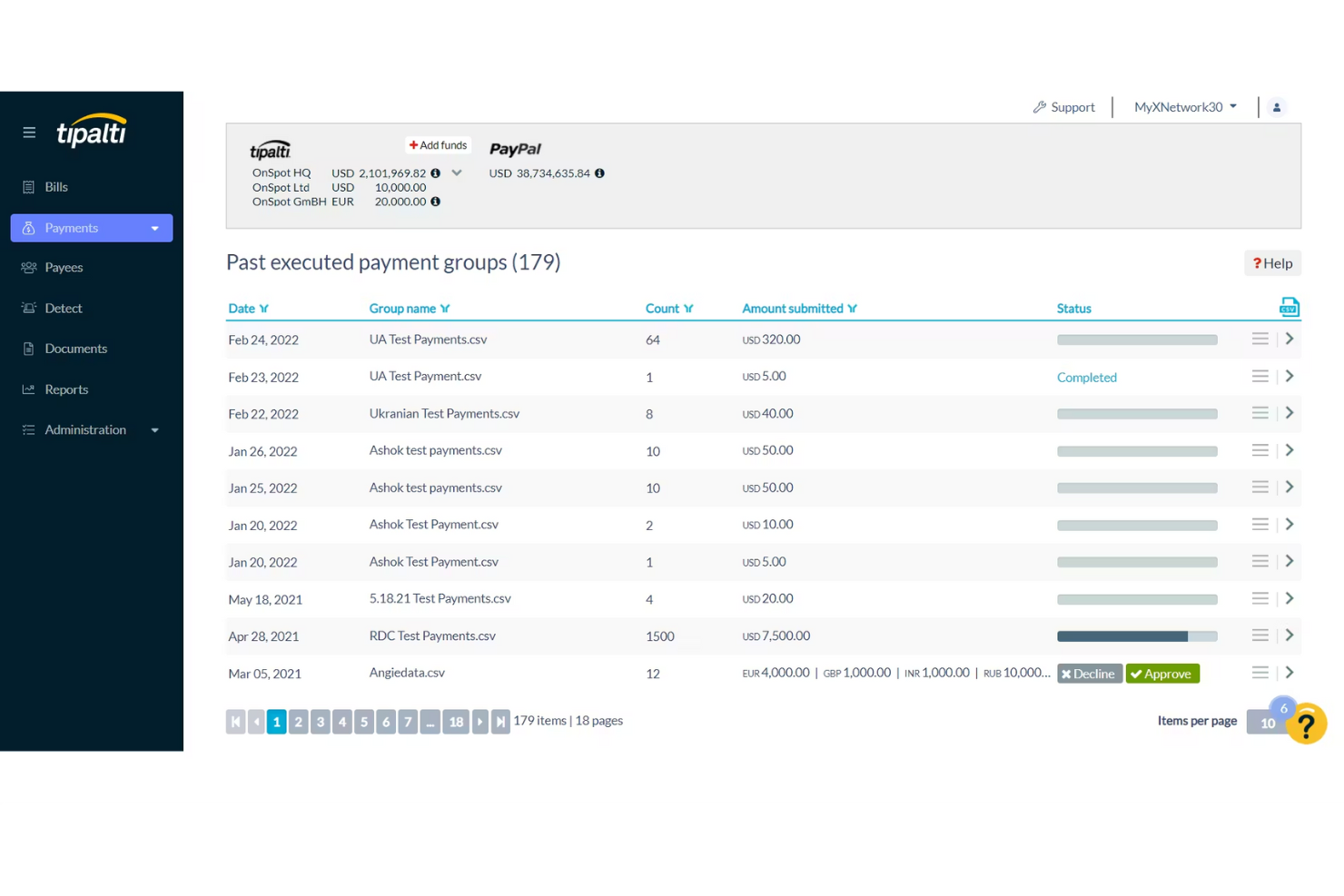
Per i team finanziari che gestiscono pagamenti internazionali e conformità, Tipalti offre una soluzione specializzata. È progettato per le organizzazioni che devono gestire l'approvazione delle fatture rispettando requisiti fiscali e normativi globali complessi. Tipalti ti aiuta ad automatizzare le approvazioni e i processi di pagamento in diversi paesi, riducendo il rischio di errori di conformità.
Perché ho scelto Tipalti
Tipalti si distingue per i team che devono gestire l'approvazione delle fatture restando conformi alle normative sui pagamenti globali. La piattaforma automatizza la raccolta e la convalida dei moduli fiscali, il che aiuta a ridurre il rischio di errori e sanzioni durante i pagamenti a fornitori in paesi diversi. Ho scelto Tipalti perché esegue anche il controllo dei beneficiari sulle liste di controllo internazionali e supporta pagamenti in più valute, rendendo più semplice la gestione delle transazioni transfrontaliere. Queste funzionalità sono particolarmente importanti per le aziende che operano a livello internazionale o lavorano con una base fornitori diversificata.
Caratteristiche principali di Tipalti
Altre caratteristiche che rendono Tipalti utile per l'approvazione delle fatture includono:
- Acquisizione automatica delle fatture: Estrae automaticamente i dati delle fatture per ridurre l'inserimento manuale.
- Flussi di approvazione personalizzabili: Ti consente di impostare processi di approvazione a più livelli, adattabili alle esigenze della tua organizzazione.
- Portale fornitori: Offre ai fornitori un portale self-service per inviare fatture e monitorare lo stato dei pagamenti.
- Monitoraggio dello stato dei pagamenti in tempo reale: Consente al tuo team di seguire l'avanzamento dei pagamenti e risolvere rapidamente eventuali problemi.
Integrazioni Tipalti
Le integrazioni includono NetSuite, Sage Intacct, QuickBooks, Xero, Microsoft Dynamics e Workday.
Pros and Cons
Pros:
- Automatizza l'onboarding dei fornitori
- Riduce i tassi di errore nei pagamenti
- Ampio elenco di integrazioni ERP
Cons:
- Alti minimi mensili
- L'assistenza può essere incostante
Yooz
Ideale per un’implementazione rapida su cloud
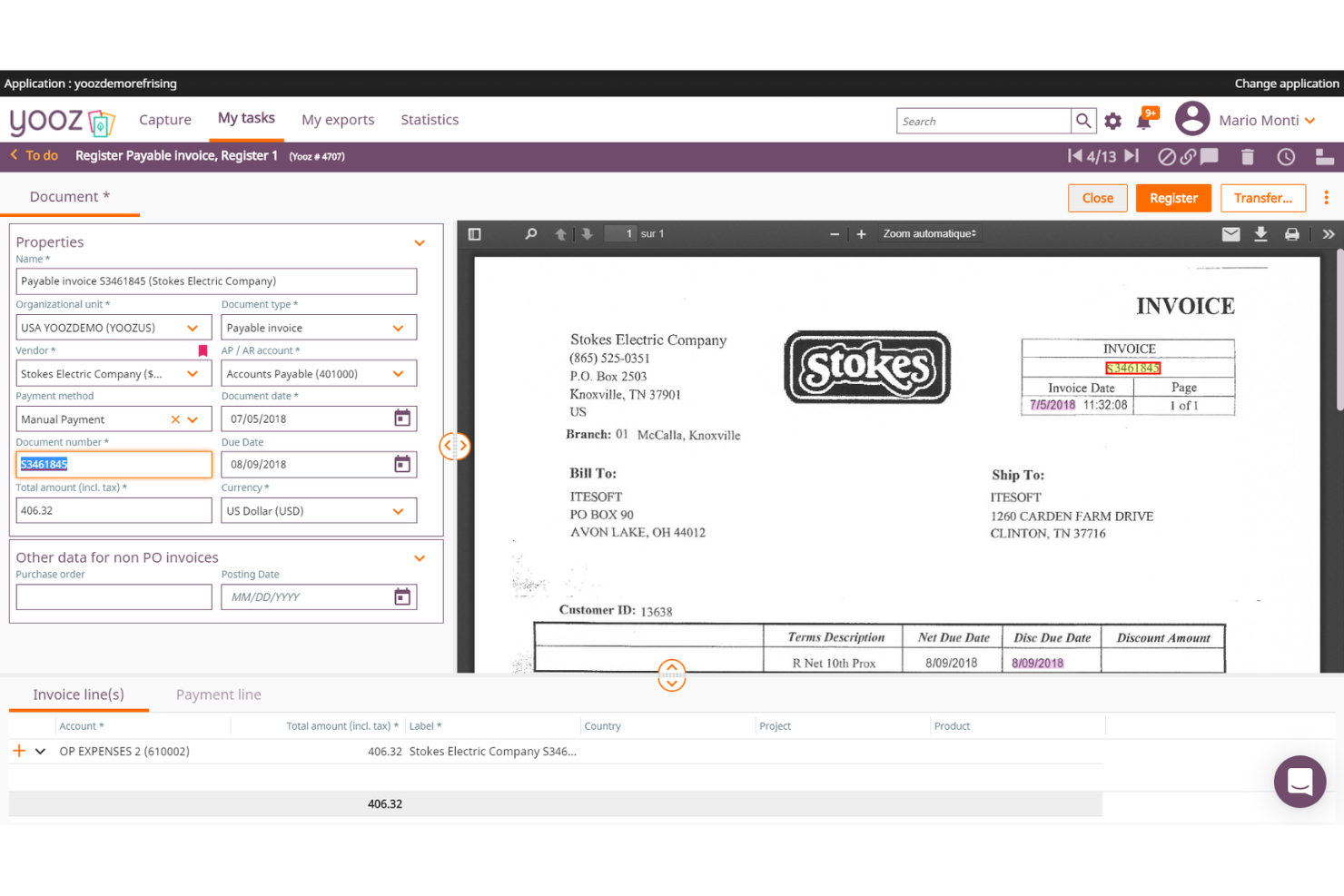
Se il tuo team ha bisogno di avviare rapidamente un software di approvazione delle fatture, Yooz è progettato per un'implementazione rapida basata su cloud. È una scelta ideale per i team finanziari di aziende in crescita che vogliono automatizzare la registrazione, l'approvazione e il pagamento delle fatture senza una configurazione lunga. Yooz ti aiuta a digitalizzare i processi di contabilità fornitori con il minimo coinvolgimento dell’IT.
Perché ho scelto Yooz
Yooz ha attirato la mia attenzione perché è progettato per i team che devono implementare flussi di lavoro di approvazione delle fatture senza aspettare settimane o mesi. La sua piattaforma cloud permette di automatizzare la registrazione delle fatture e l'instradamento per l'approvazione quasi immediatamente dopo la configurazione, ideale per aziende con risorse IT limitate o esigenze urgenti di processo. Ho scelto Yooz per la sua capacità di digitalizzare la contabilità fornitori rapidamente, grazie a funzioni come la scansione in tempo reale delle fatture e i percorsi di approvazione configurabili. Questo lo rende una forte scelta per le organizzazioni che vogliono modernizzare i processi di gestione delle fatture con un impatto minimo.
Funzionalità principali di Yooz
Altre funzionalità che rendono Yooz interessante per l'approvazione delle fatture includono:
- App mobile per approvazione: permette agli utenti di revisionare e approvare le fatture dai loro smartphone.
- Rilevamento fatture duplicate: segnala possibili fatture duplicate prima che entrino nel flusso di approvazione.
- Report dei log di controllo: traccia ogni azione intrapresa su ciascuna fattura per conformità e trasparenza.
- Abbinamento ordini d'acquisto: abbina automaticamente le fatture agli ordini d'acquisto e alle ricevute per ridurre i controlli manuali.
Integrazioni di Yooz
Le integrazioni includono Sage, QuickBooks, Microsoft Dynamics, SAP e Oracle NetSuite.
Pros and Cons
Pros:
- Estrazione AI estremamente potente
- Codifica contabile in tempo reale
- Flussi di lavoro semplici con drag-and-drop
Cons:
- L’interfaccia utente richiede tempo per essere padroneggiata
- L'esportazione dei dati può essere macchinosa
Ideale per l'elaborazione di grandi volumi di fatture
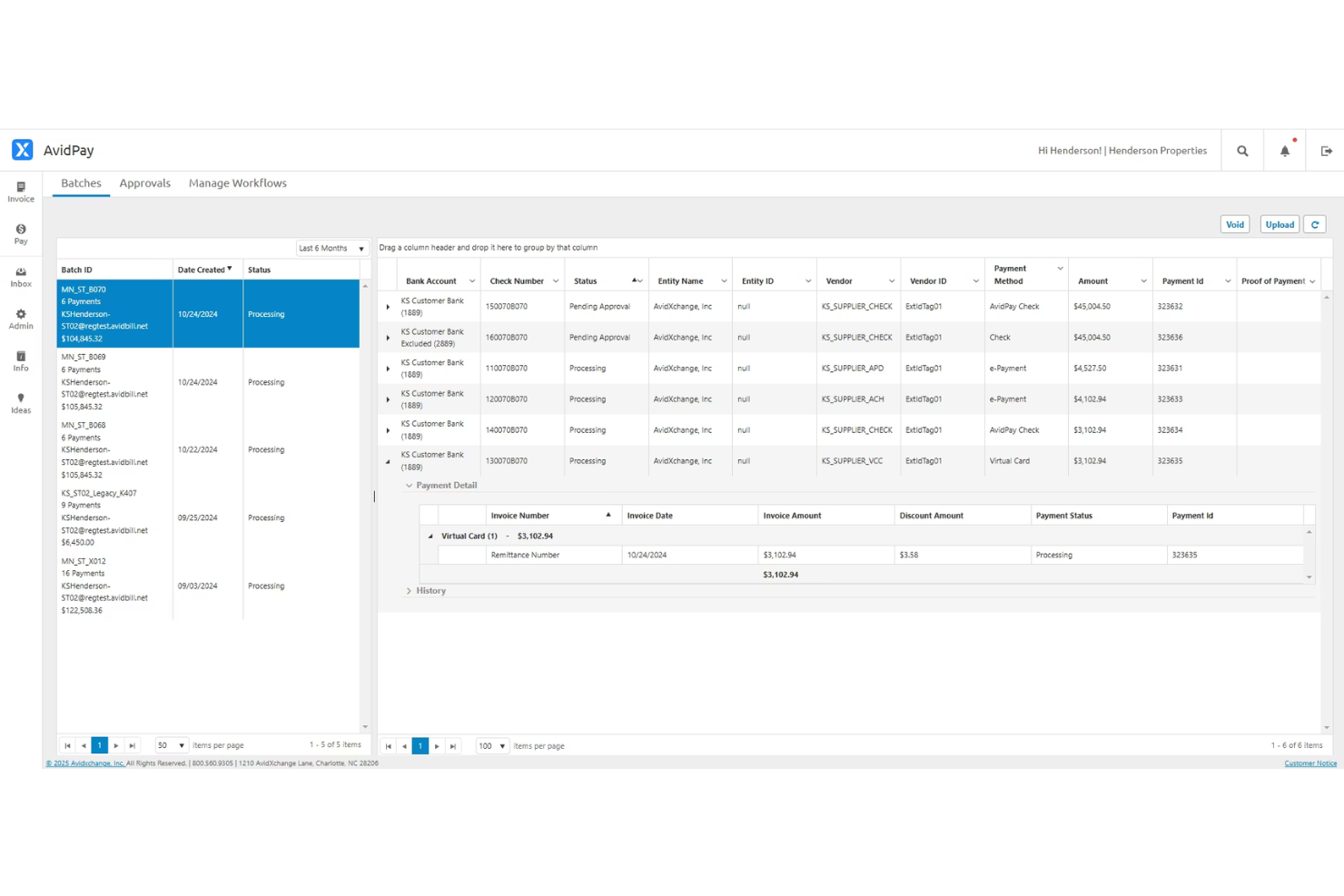
AvidXchange è pensato per i team finanziari che devono elaborare e approvare grandi volumi di fatture in modo rapido e accurato. È particolarmente utile per le organizzazioni che operano in settori come immobiliare, costruzioni e utilities, dove la quantità e la complessità delle fatture possono mettere in crisi i processi manuali. Se la tua azienda si trova ad affrontare colli di bottiglia o errori nei flussi di lavoro ad alto volume di fatture, AvidXchange offre funzionalità di automazione e tracciamento progettate per mantenere i processi di approvazione efficienti su larga scala.
Perché ho scelto AvidXchange
Per le organizzazioni che gestiscono migliaia di fatture ogni mese, AvidXchange si distingue per la sua capacità di automatizzare la gestione di grandi volumi di fatture dalla ricezione all'approvazione. La piattaforma utilizza una raccolta intelligente dei dati per estrarre i dettagli delle fatture e indirizzarli tramite flussi di approvazione personalizzabili, contribuendo a ridurre l'inserimento manuale e gli errori. Apprezzo il fatto che AvidXchange fornisca anche tracciamento in tempo reale e aggiornamenti sullo stato per ogni fattura, così i team finanziari possono monitorare l'avanzamento e risolvere rapidamente eventuali blocchi. Queste funzionalità lo rendono una scelta valida per le aziende che hanno bisogno di mantenere l'approvazione delle fatture su larga scala precisa e puntuale.
Caratteristiche principali di AvidXchange
Oltre all'automazione per la gestione di grandi volumi di fatture, AvidXchange offre anche diverse altre funzionalità a supporto dei flussi di lavoro di approvazione delle fatture:
- Portale fornitori: I fornitori possono inviare le fatture e verificare lo stato dei pagamenti direttamente tramite un portale dedicato.
- Gerarchie di approvazione personalizzate: Imposta catene di approvazione multilivello adattate alla struttura della tua organizzazione.
- Reportistica pronta per audit: Genera report dettagliati che tengono traccia della cronologia delle fatture e delle azioni di approvazione per la conformità.
- Programmazione dei pagamenti: Pianifica i pagamenti ai fornitori direttamente dalla piattaforma, riducendo la necessità di intervento manuale.
Integrazioni di AvidXchange
Le integrazioni includono QuickBooks, NetSuite, Sage, Microsoft Dynamics, MRI Software e RealPage.
Pros and Cons
Pros:
- Automatizza l'instradamento dei pagamenti B2B
- Conversione delle fatture in digitale
- Ampio accesso alla rete dei fornitori
Cons:
- Difficile personalizzare i flussi di lavoro
- Le risposte dell'assistenza possono essere lente

Ideale per l'integrazione dei flussi di lavoro di approvvigionamento
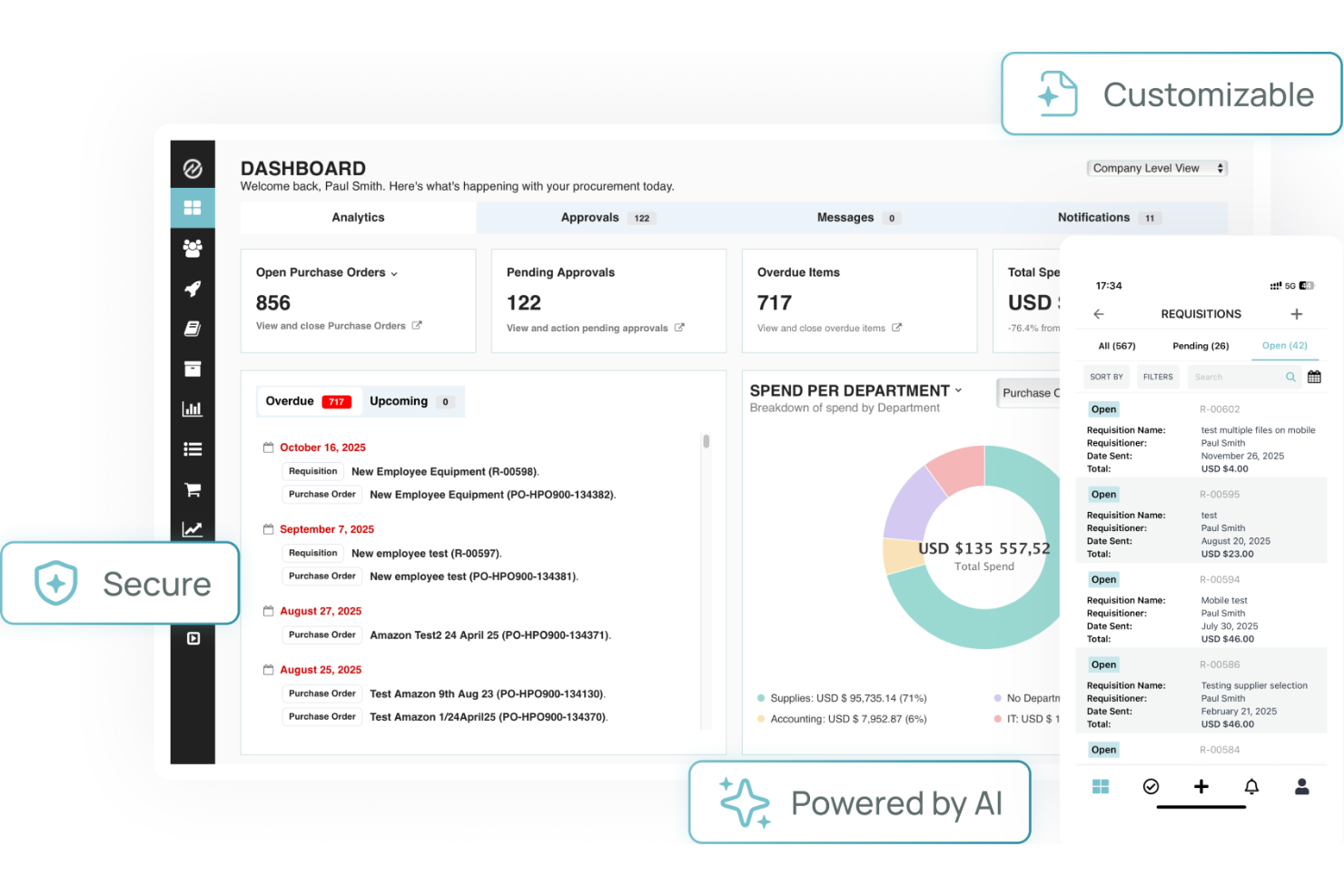
Tradogram si distingue per i team che necessitano di un'approvazione delle fatture strettamente collegata ai flussi di lavoro dell'approvvigionamento. È progettato per le aziende che desiderano gestire acquisti, contratti e approvazioni in un unico posto, rendendolo particolarmente utile per i professionisti dell'approvvigionamento e della finanza. Collegando direttamente le approvazioni delle fatture agli ordini di acquisto e ai budget, Tradogram aiuta a ridurre incongruenze e il monitoraggio manuale lungo tutto il processo di approvvigionamento.
Perché ho scelto Tradogram
La capacità di Tradogram di collegare le approvazioni delle fatture direttamente ai flussi di lavoro dell'approvvigionamento lo rende una scelta solida per le organizzazioni con esigenze di acquisto complesse. La piattaforma collega le fatture a ordini di acquisto, contratti e budget, permettendo di monitorare ogni fase dell'approvazione nel contesto. Ho scelto Tradogram perché aiuta i team a far rispettare le politiche di approvvigionamento e ridurre gli errori collegando le approvazioni delle fatture al processo di acquisto originale. Per le aziende che desiderano un forte allineamento tra approvvigionamento e finanza, l'integrazione dei flussi di lavoro di Tradogram si distingue.
Caratteristiche principali di Tradogram
Altre funzionalità che rendono Tradogram utile per l'approvazione delle fatture includono:
- Gerarchie di approvazione personalizzabili: configura catene di approvazione multilivello in base alla struttura della tua organizzazione.
- Gestione documentale: allega e archivia i documenti di supporto direttamente con ogni fattura.
- Dashboard di analisi della spesa: monitora e analizza i modelli di spesa tra fornitori e reparti.
- Strumenti di gestione fornitori: monitora le prestazioni dei fornitori e mantieni un database centralizzato dei fornitori.
Integrazioni di Tradogram
Le integrazioni includono QuickBooks, Xero, Sage, NetSuite e Microsoft Dynamics.
Pros and Cons
Pros:
- Facile da adottare nei team
- Buona sincronizzazione del tracciamento inventario
- Limiti di approvazione personalizzabili
Cons:
- Strumenti di sincronizzazione contabile limitati
- L'assistenza è focalizzata sull'email
SoftCo
Ideale per l'archiviazione sicura di dati finanziari

SoftCo è progettato per offrire l'automazione dell'AP ai team finanziari che devono dare priorità all'archiviazione sicura e alla gestione di documenti finanziari sensibili. È particolarmente rilevante per le organizzazioni che operano in settori regolamentati, dove conformità e protezione dei dati sono imprescindibili. Con SoftCo, puoi ottimizzare il processo AP garantendo che tutti i dati finanziari siano crittografati e archiviati in modo sicuro.
Perché ho scelto SoftCo
La sicurezza è una delle principali preoccupazioni per molti team finanziari che gestiscono dati sensibili delle fatture, motivo per cui ho scelto SoftCo per questa lista. SoftCo offre archiviazione documentale crittografata e controlli di accesso rigorosi, rendendolo una scelta solida per le organizzazioni con esigenze di conformità o che operano in settori altamente regolamentati. La piattaforma offre inoltre tracciabilità automatica delle revisioni, quindi ogni azione su una fattura viene monitorata e registrata in modo sicuro. Queste funzionalità aiutano a garantire che i dati finanziari rimangano protetti durante tutto il processo di approvazione delle fatture.
Funzionalità principali di SoftCo
Oltre alle capacità focalizzate sulla sicurezza, SoftCo offre diverse altre funzionalità per l'approvazione delle fatture:
- Acquisizione automatica delle fatture: Estrae i dati dalle fatture tramite OCR per ridurre l'inserimento manuale.
- Flussi di approvazione configurabili: Ti consente di creare percorsi di approvazione multilivello in linea con le politiche aziendali.
- Portale fornitori: Fornisce ai fornitori uno spazio sicuro per inviare le fatture e monitorare lo stato dei pagamenti.
- Integrazione con sistemi ERP: Si collega direttamente alle principali piattaforme ERP per sincronizzare dati di fatture e pagamenti.
Integrazioni SoftCo
Le integrazioni includono Microsoft Dynamics, SAP, Oracle, NetSuite e Sage.
Pros and Cons
Pros:
- Elevati standard di conformità
- Ottima interfaccia per la gestione dei fornitori
- Automatizza le fatture ricorrenti
Cons:
- Richiede risorse IT dedicate
- L'app mobile è molto basilare


HighRadius utilizza l'IA per aiutare i team finanziari a risolvere più velocemente le eccezioni sulle fatture e i colli di bottiglia delle approvazioni. È particolarmente adatto per le aziende e i centri di servizi condivisi che gestiscono flussi di lavoro relativi alle fatture complessi, di grande volume e frequenti eccezioni. Se la tua azienda fatica con la gestione manuale delle eccezioni o approvazioni ritardate, HighRadius porta automazione e intelligenza per velocizzare la risoluzione e mantenere il flusso dei processi.
Perché ho scelto HighRadius
Ciò che distingue HighRadius è l'uso dell'IA per identificare e risolvere automaticamente le eccezioni nei flussi di lavoro di approvazione delle fatture. La piattaforma analizza i dati delle fatture e segnala discrepanze o informazioni mancanti, suggerendo i passi successivi o indirizzando i problemi al responsabile giusto. Ho scelto HighRadius perché il suo cruscotto di gestione delle eccezioni offre ai team finanziari visibilità in tempo reale su colli di bottiglia e attività irrisolte. Questo focus sulla gestione delle eccezioni alimentata dall'IA lo rende una scelta valida per le organizzazioni che devono ridurre l'intervento manuale e mantenere in carreggiata l'approvazione delle fatture.
Funzionalità principali di HighRadius
Oltre alla gestione delle eccezioni basata sull'IA, HighRadius offre diverse altre funzionalità che supportano i processi di approvazione delle fatture:
- Acquisizione automatica delle fatture: Il sistema estrae i dati delle fatture dalle e-mail e dai documenti scannerizzati senza necessità di inserimento manuale.
- Progettazione personalizzata dei flussi di lavoro: Configura flussi di approvazione a più step per adattarli alle politiche della tua organizzazione.
- Controlli di accesso basati sui ruoli: Imposta le autorizzazioni per gli utenti in base alle loro responsabilità nel processo di approvazione.
- Tracciamento del registro di controllo: Mantieni un log dettagliato di tutte le azioni e approvazioni delle fatture per fini di conformità e revisione.
Integrazioni di HighRadius
Le integrazioni includono SAP, Oracle, NetSuite, Microsoft Dynamics, Workday e JD Edwards.
Pros and Cons
Pros:
- Scalabilità immensa per le aziende
- Ottime regole di gestione delle eccezioni
- Previsioni di flussi di cassa prevedibili
Cons:
- Richiede un forte coinvolgimento IT
- L'implementazione richiede mesi
Quadient
Ideale per integrazione nella gestione documentale
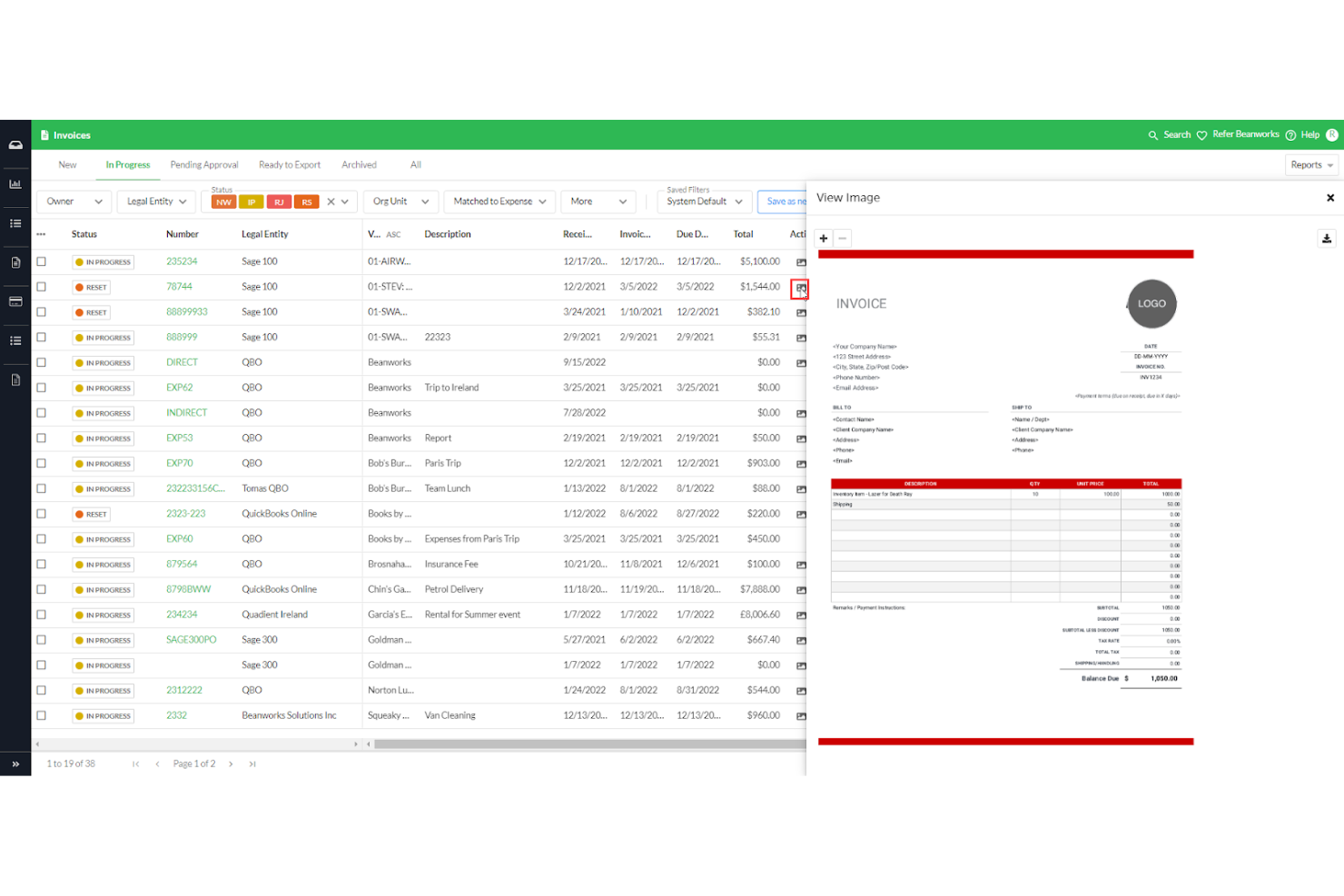
Per i team che necessitano di un'approvazione delle fatture strettamente collegata alla gestione documentale, Quadient offre una soluzione specializzata. È progettato per le organizzazioni che gestiscono grandi volumi di documenti e richiedono una perfetta integrazione tra i flussi di approvazione e l'archiviazione dei documenti. Con il suo focus sull'integrazione della gestione documentale, Quadient ti aiuta a mantenere i registri delle fatture organizzati e accessibili durante tutto il processo di approvazione.
Perché ho scelto Quadient
Quadient si distingue per i team che hanno bisogno di flussi di approvazione delle fatture direttamente collegati ai sistemi di gestione documentale. La sua capacità di collegare le fatture ai documenti di supporto e di mantenere un archivio centralizzato lo rende particolarmente adatto alle organizzazioni con rigorose esigenze di conservazione o conformità. Ho scelto Quadient perché ti consente di gestire, recuperare e verificare i documenti delle fatture senza uscire dalla piattaforma di approvazione. Questa integrazione aiuta a ridurre la gestione manuale dei documenti e garantisce che tutti i file relativi alle fatture restino organizzati e facilmente accessibili.
Funzionalità principali di Quadient
Altre funzionalità che hanno attirato la mia attenzione includono:
- Instradamento automatico dei flussi di lavoro: Instrada le fatture agli approvatori giusti in base a regole personalizzate.
- Supporto per la firma digitale: Acquisisce e archivia firme elettroniche per l'approvazione delle fatture.
- Monitoraggio dello stato in tempo reale: Tieni sotto controllo l'avanzamento di ogni fattura durante il processo di approvazione.
- Modelli di approvazione personalizzabili: Configura e riutilizza modelli di approvazione su misura per le esigenze della tua organizzazione.
Integrazioni Quadient
Le integrazioni includono Microsoft SharePoint, Salesforce, Microsoft Dynamics 365, SAP, Oracle, DocuSign, Adobe Sign, Box, Dropbox e Google Drive.
Pros and Cons
Pros:
- Dashboard delle fatture centralizzato
- Sincronizzazione avanzata con Sage e Xero
- Rilevamento automatico dei duplicati
Cons:
- Il modulo spese è piuttosto basilare
- I filtri di ricerca sono poco pratici


Rillion è pensato per team finanziari di medie dimensioni che devono gestire l'approvazione delle fatture senza aggiungere complessità. La piattaforma offre flussi di lavoro di approvazione automatizzati e controlli personalizzabili che aiutano i team a gestire volumi crescenti di fatture e approvatori distribuiti. Se la tua organizzazione sta superando i processi manuali ma non necessita delle complessità a livello enterprise, Rillion fornisce una soluzione mirata per scalare la gestione delle fatture.
Perché ho scelto Rillion
Rillion si distingue per i team finanziari di medie dimensioni che hanno bisogno di struttura senza gli oneri dei sistemi enterprise. La piattaforma offre acquisizione automatica delle fatture e instradamento per l'approvazione, che consente ai team di gestire un volume crescente di fatture man mano che si sviluppano. Ho scelto Rillion perché i suoi flussi di lavoro di approvazione personalizzabili ti permettono di allinearti alle policy della tua organizzazione e adattarti ai cambiamenti del team. Per i team finanziari che vogliono andare oltre i processi manuali ma non hanno bisogno di una soluzione complessa, Rillion rappresenta il giusto equilibrio tra automazione e controllo.
Caratteristiche principali di Rillion
Altre funzionalità che rendono Rillion utile per l'approvazione delle fatture includono:
- Approvazioni da mobile: Gli approvatori possono rivedere e approvare le fatture direttamente dai propri dispositivi mobili.
- Rilevamento di fatture duplicate: Il sistema segnala potenziali fatture duplicate prima che entrino nel flusso di approvazione.
- Promemoria automatici: Rillion invia notifiche agli approvatori quando sono presenti fatture in attesa di azione.
- Archiviazione dei documenti: Tutte le fatture e i documenti correlati vengono archiviati in modo sicuro per consultazioni future e audit.
Integrazioni Rillion
Le integrazioni includono Microsoft Dynamics, SAP Business One, NetSuite, Monitor ERP e Visma.
Pros and Cons
Pros:
- Implementazione rapida
- Facile abbinamento degli ordini d'acquisto
- Dashboard utente intuitiva
Cons:
- Mancano funzioni avanzate di conformità globale
- Instradamento personalizzato complesso limitato
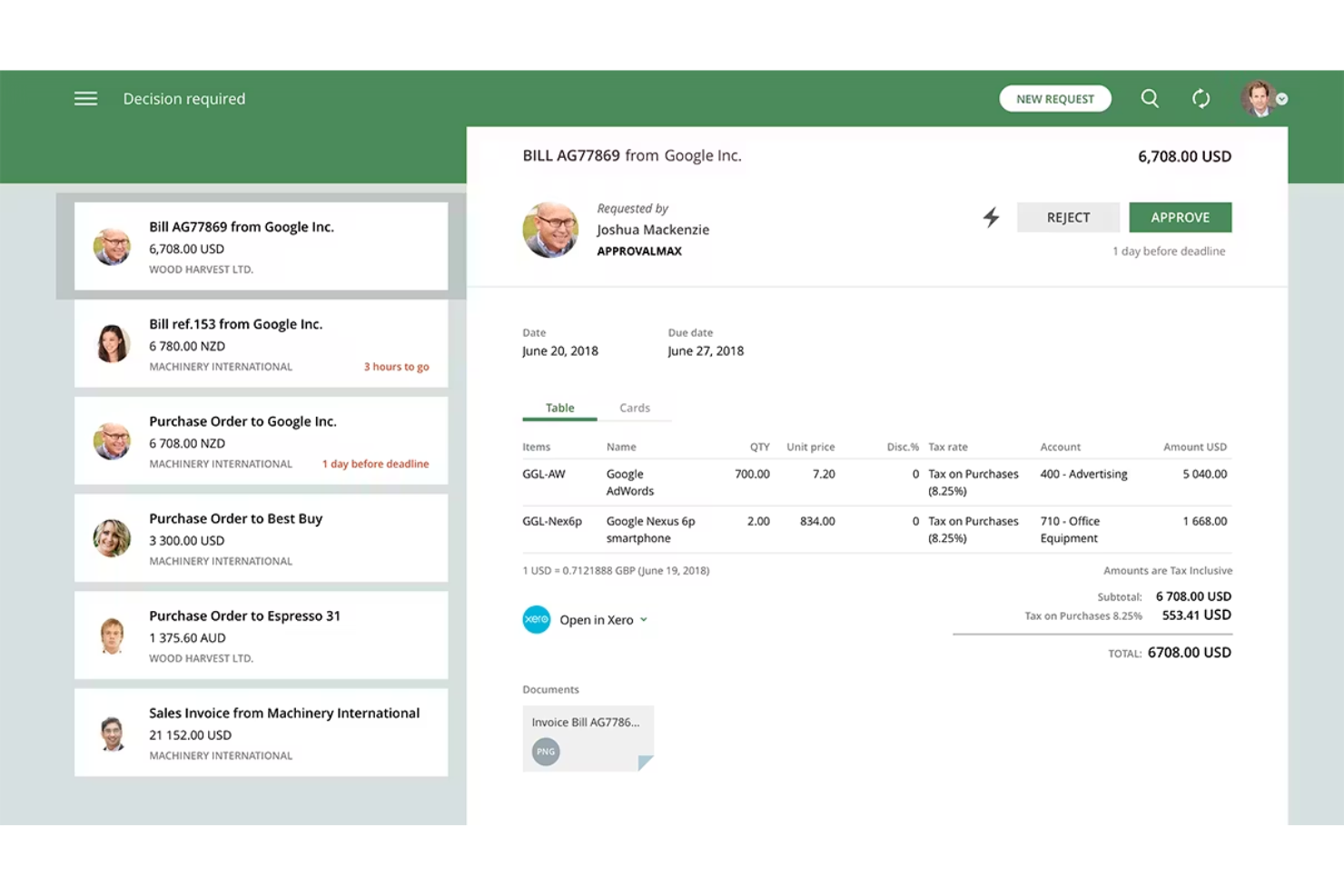
Se il tuo team necessita di tracce dettagliate e pronte per l'audit sui flussi di approvazione delle fatture, Approval Max è progettato proprio per questo scopo. È particolarmente utile per i team finanziari e le organizzazioni che devono rispettare rigorosi requisiti di conformità o audit. Con Approval Max puoi automatizzare workflow di approvazione a più livelli e mantenere un registro chiaro e a prova di manomissione di ogni decisione.
Perché ho scelto Approval Max
Ciò che distingue Approval Max è il suo focus nella creazione di tracciamenti di approvazione pronti per l'audit per ogni fattura. La piattaforma registra automaticamente ogni fase di approvazione, indicando chi ha approvato cosa e quando, aspetto essenziale per le organizzazioni con stringenti necessità di audit o conformità. Ho scelto Approval Max perché consente di configurare workflow di approvazione multi-livello e garantisce che ogni azione sia tracciabile e a prova di manomissione. Questo livello di trasparenza e controllo è particolarmente prezioso per team finanziari che devono dimostrare la conformità durante gli audit.
Caratteristiche principali di Approval Max
Altre funzionalità che rendono Approval Max utile includono:
- Integrazione con Xero e QuickBooks Online: Connessione diretta con le principali piattaforme di contabilità per una gestione senza interruzioni delle fatture.
- Matrice di approvazione personalizzata: Permette di definire regole di approvazione in base all'importo della fattura, al dipartimento o ad altri criteri.
- App mobile per le approvazioni: Consente agli utenti di visionare e approvare le fatture direttamente dai dispositivi mobili.
- Notifiche e promemoria automatizzati: Invia avvisi agli approvatori per mantenere attivo il flusso di lavoro delle fatture.
Integrazioni di Approval Max
Le integrazioni includono Xero, QuickBooks Online, Dext, Oracle NetSuite e Cin7.
Pros and Cons
Pros:
- Conformità rigorosa pronta per l'audit
- Perfetta integrazione con Xero e QBO
- Flussi di approvazione complessi a più livelli
Cons:
- Nessun sistema di pagamento nativo
- La logica di configurazione può essere complessa
Altri software per l'approvazione delle fatture
Ecco alcune opzioni aggiuntive di software per l’approvazione delle fatture che non sono state incluse nel mio elenco ristretto, ma che vale comunque la pena prendere in considerazione:
- ApprovalSoft
Ideale per la gestione personalizzabile dei flussi di approvazione
- Procurify
Ideale per la gestione delle approvazioni su più sedi
- cloudsquid
Il migliore per il monitoraggio del budget in tempo reale


Come Valuto i Software per l'Approvazione delle Fatture
Divido la mia valutazione su due livelli: la base che uno strumento deve avere per essere incluso nella lista, e i fattori che differenziano le migliori opzioni per i team orientati ai progetti che devono approvare fatture di fornitori.
Funzionalità di Base (Requisiti Fondamentali per questa Lista)
Quando seleziono gli strumenti per la mia lista, valuto ciascuno su una scala da 0 (non offre la funzionalità) a 5 (eccelle in quest'area) per ogni funzionalità di base elencata di seguito. Poi, calcolo il punteggio totale dello strumento in percentuale. Ogni strumento deve raggiungere un punteggio minimo totale del 65% per essere considerato per l'inclusione.
- Workflow di Approvazione Configurabili: Verifico se le regole di instradamento possono adattarsi alle vere esigenze progettuali—ad esempio, se una fattura di subappaltatore di alto valore può passare sia dal project manager sia dal direttore finanziario prima del rilascio.
- Acquisizione e Digitalizzazione delle Fatture: È importante sapere se uno strumento utilizza OCR o AI per estrarre i dati delle singole voci dalle fatture caricate o inviate via email, soprattutto quando il team processa decine di fatture di fornitori a settimana.
- Abbinamento PO & Budget: Valuto come ogni piattaforma gestisce la corrispondenza delle fatture con ordini di acquisto, ricevute o budget di progetto—e se segnala discrepanze come sovra-fatturazione prima che l'approvatore visualizzi la fattura.
- Allocazione dei Costi di Progetto: Cerco la possibilità di suddividere una singola fattura su più progetti, attività o codici di costo, visto che la condivisione di costi tra vari flussi di lavoro è comune negli ambienti di agenzia e consulenza.
- Registro delle Revisioni e Conformità: Ogni approvazione, rifiuto, modifica e commento dovrebbe essere registrato con data e ora e associato a un utente identificato—cerco log esportabili e abbastanza dettagliati da soddisfare audit interni o controversie di fatturazione con i clienti.
- Integrazione con Contabilità/ERP: Valuto collegamenti nativi con piattaforme come QuickBooks, Xero, NetSuite o Sage, e verifico se la sincronizzazione è bidirezionale così che le fatture approvate confluiscano automaticamente nei libri contabili senza reinserimenti manuali.
Una volta che ho una lista di strumenti che soddisfano questi criteri, considero ciò che li distingue l'uno dall'altro.
Fattori Differenzianti (Cosa Distingue i Fornitori)
Ecco come confronto e metto a confronto i diversi fornitori:
Funzionalità Distintive
Il rilevamento di anomalie tramite AI è una grande differenza: cerco strumenti che intercettano fatture duplicate o prezzi fuori contratto prima che arrivino nella coda dell'approvatore. Anche i cruscotti in tempo reale dei budget sono importanti, soprattutto quando è necessario vedere come le approvazioni in attesa incidono sui consumi di progetto durante l'avanzamento. Le app mobili per l'approvazione completano il quadro per i team dove i project manager sono spesso in cantiere o in viaggio e non possono permettersi di rallentare i cicli di pagamento.
Oltre le Funzionalità
L'ecosistema di integrazioni conta molto: verifico se uno strumento si collega nativamente con piattaforme di gestione progetti come Jira, Asana o Procore, dato che le approvazioni senza contesto di progetto rallentano tutto. Valuto anche l'adeguatezza per il settore, in particolare se la piattaforma supporta strutture di costo basate su progetto come i codici di costo o la rendicontazione dei lavori in corso (WIP). La trasparenza dei prezzi è un altro fattore che considero, soprattutto se un fornitore applica un costo per ogni approvatore, volume di fatture o entità, dato che ciò influisce direttamente sulla scalabilità con la crescita del portafoglio progetti.
Come scegliere il software per l'approvazione delle fatture
È facile perdersi in lunghi elenchi di funzionalità e strutture tariffarie complesse. Per aiutarti a rimanere concentrato mentre affronti il tuo particolare processo di selezione del software, ecco un elenco dei fattori da tenere presenti:
| Fattore | Cosa considerare |
|---|---|
| Scalabilità | Il software sarà in grado di gestire il volume attuale e futuro delle tue fatture? Informati sui limiti degli utenti, sull'espansione dei flussi di lavoro e sul supporto per più entità. |
| Integrazioni | Si collega nativamente al tuo sistema ERP, contabile o di approvvigionamento? Verifica la presenza di integrazioni dirette, non solo di opzioni API. |
| Personalizzazione | Puoi adattare i flussi di approvazione, i ruoli degli utenti e le notifiche alle tue politiche? Evita i sistemi rigidi che impongono modifiche ai processi. |
| Facilità d'uso | Il tuo team lo adotterà rapidamente? Cerca una navigazione chiara, esigenze formative minime e un flusso di approvazione logico. |
| Implementazione e avvio | Quanto tempo richiederà la configurazione e quali risorse saranno necessarie? Informati sul supporto alla migrazione, sulla formazione e sulle tempistiche tipiche per l'avvio. |
| Costo | I livelli tariffari sono trasparenti e prevedibili? Considera il costo totale di proprietà, inclusi configurazione, assistenza ed eventuali commissioni per fattura. |
| Misure di sicurezza | Lo strumento offre crittografia, controlli degli accessi e registri di audit? Verifica che soddisfi i tuoi standard di protezione dei dati e conformità. |
| Requisiti di conformità | Il software ti aiuterà a rispettare le normative del settore o regionali? Cerca funzionalità che supportino tracce di audit, conservazione dei dati e reportistica. |
Che cos'è il software per l'approvazione delle fatture?
Il software per l'approvazione delle fatture è uno strumento digitale che facilita l'approvazione automatizzata delle fatture, instradandole, esaminandole e autorizzandone il pagamento all'interno di un'organizzazione. Centralizza i dati delle fatture, applica i flussi di approvazione e conserva tracce di audit per supportare la conformità e la trasparenza. I team finanziari utilizzano questi sistemi per ridurre gli errori manuali, velocizzare le approvazioni e garantire che vengano pagate solo le fatture convalidate.
Funzionalità del software per l'approvazione delle fatture
Quando scegli il software per l'approvazione delle fatture, presta attenzione alle seguenti funzionalità chiave:
- Acquisizione automatizzata delle fatture: analizza e digitalizza le fatture in arrivo, estraendo i campi dati principali per ridurre l'inserimento manuale e gli errori.
- Flussi di approvazione personalizzati: consente di progettare e applicare processi di approvazione in più fasi, in linea con le politiche e la gerarchia della tua organizzazione.
- Controlli degli accessi basati sui ruoli: limita le autorizzazioni degli utenti, così solo i membri del team autorizzati possono visualizzare, modificare o approvare le fatture.
- Tracce di audit: registra ogni azione eseguita su una fattura, fornendo una cronologia dettagliata per la conformità e la responsabilità.
- Monitoraggio dello stato delle fatture: mostra aggiornamenti in tempo reale sulla posizione di ciascuna fattura nel processo di approvazione, aiutando i team a evitare colli di bottiglia.
- Integrazioni con ERP e sistemi contabili: si collega direttamente ai sistemi finanziari esistenti per sincronizzare i dati delle fatture e lo stato dei pagamenti.
- Portali per i fornitori: offre ai fornitori un modo sicuro per inviare le fatture, verificare l'avanzamento dell'approvazione e comunicare con il tuo team.
- Rilevamento delle fatture duplicate: segnala i potenziali invii duplicati per prevenire doppi pagamenti e ridurre il rischio di frode.
- Archiviazione dei documenti: conserva le fatture e i documenti correlati in un archivio centralizzato e consultabile, per facilitarne il recupero e la preparazione agli audit.
Vantaggi del software per l'approvazione delle fatture
L'implementazione di un software per l'approvazione delle fatture offre diversi vantaggi al tuo team e alla tua azienda. Ecco alcuni dei benefici che puoi aspettarti:
- Approvazioni più rapide: i flussi automatizzati e il monitoraggio dello stato in tempo reale aiutano le fatture a passare rapidamente attraverso ogni fase di approvazione.
- Conformità migliorata: le tracce di audit e i controlli degli accessi basati sui ruoli supportano il rispetto delle politiche interne e dei requisiti normativi.
- Riduzione degli errori manuali: l'acquisizione automatizzata delle fatture e il rilevamento dei duplicati riducono al minimo gli errori di inserimento dei dati e prevengono i doppi pagamenti.
- Maggiore visibilità: i pannelli di controllo centralizzati e l'archiviazione dei documenti offrono ai team finanziari una visione chiara dello stato e della cronologia delle fatture.
- Rapporti migliori con i fornitori: i portali per i fornitori e gli strumenti di comunicazione trasparenti mantengono i fornitori informati e riducono le controversie sui pagamenti.
- Maggiore sicurezza: l'archiviazione crittografata e i controlli degli accessi proteggono i dati finanziari sensibili dagli accessi non autorizzati.
- Integrazione più semplice: i collegamenti diretti ai sistemi ERP e contabili garantiscono che i dati delle fatture rimangano accurati e aggiornati su tutte le piattaforme.
Costi e prezzi del software per l'approvazione delle fatture
La scelta di un software per l'approvazione delle fatture richiede la comprensione dei diversi modelli e piani tariffari disponibili. I costi variano in base alle funzionalità, alle dimensioni del team, agli elementi aggiuntivi e ad altri fattori. La tabella seguente riassume i piani comuni, i relativi prezzi medi e le funzionalità generalmente incluse nelle soluzioni software per l'approvazione delle fatture:
Tabella comparativa dei piani per il software di approvazione delle fatture
| Tipo di piano | Prezzo medio | Funzionalità comuni |
|---|---|---|
| Piano gratuito | $0 | Acquisizione di base delle fatture, flussi di approvazione limitati, accesso per un singolo utente e reportistica di base. |
| Piano personale | $15-$49/utente/mese | Supporto per più utenti, flussi di approvazione standard, archiviazione dei documenti e notifiche via e-mail. |
| Piano aziendale | $150-$899/mese | Personalizzazione avanzata dei flussi di lavoro, integrazioni ERP, tracce di audit, portali per i fornitori e supporto prioritario. |
| Piano per grandi aziende | $1000+/utente/mese | Integrazioni personalizzate, sicurezza avanzata, strumenti per la conformità, gestione dedicata dell'account e supporto garantito da SLA. |
Domande frequenti sul software per l'approvazione delle fatture
Ecco alcune risposte alle domande comuni sul software per l’approvazione delle fatture:
In che modo il software per l'approvazione delle fatture si integra con i sistemi contabili esistenti?
La maggior parte dei software per l’approvazione delle fatture si collega ai sistemi contabili o ERP tramite integrazioni dirette o API. Ciò consente di sincronizzare automaticamente i dati delle fatture, lo stato dei pagamenti e le informazioni sui fornitori, riducendo l’inserimento manuale e mantenendo aggiornati i registri finanziari.
Il software per l'approvazione delle fatture può gestire approvazioni multilivello o condizionali?
Sì, la maggior parte delle soluzioni supporta flussi di lavoro di approvazione multilivello e condizionali. È possibile impostare regole basate sull’importo della fattura, sul reparto o sul progetto, assicurando che le persone giuste esaminino e autorizzino ogni fattura prima del pagamento.
Quali misure di sicurezza dovrei cercare in un software per l'approvazione delle fatture?
Cerca funzionalità come la crittografia dei dati, i controlli degli accessi basati sui ruoli e registri di controllo dettagliati. Queste misure di sicurezza aiutano a proteggere le informazioni finanziarie sensibili e a garantire la conformità alle normative interne ed esterne.
Quanto tempo occorre per implementare un software per l'approvazione delle fatture?
I tempi di implementazione variano, ma la maggior parte delle soluzioni basate sul cloud può essere configurata in pochi giorni o in alcune settimane. Fattori come la migrazione dei dati, la personalizzazione dei flussi di lavoro e la formazione degli utenti possono influire sulla durata complessiva.
È possibile approvare le fatture da un dispositivo mobile?
Sì, molte piattaforme per l’approvazione delle fatture offrono app mobili o interfacce web responsive. Ciò consente agli utenti di esaminare, approvare o rifiutare le fatture ovunque si trovino, contribuendo a prevenire i rallentamenti nel processo di approvazione.