

Le 10 migliori alternative a Webex per le videoconferenze nel 2026

Elenco delle migliori alternative a Webex


Le migliori alternative a Webex combinano una qualità video affidabile, una collaborazione semplice e integrazioni flessibili, così il tuo team può lavorare nel modo più adatto alle proprie esigenze. Se stai cercando alternative a Webex, probabilmente vuoi un software per videoconferenze più facile da usare, compatibile con il tuo stack attuale o in grado di gestire riunioni ed eventi in modo più fluido. In questo elenco troverai le piattaforme di cui mi fido per ogni esigenza, dalle riunioni quotidiane all'organizzazione di webinar, così potrai evitare tentativi ed errori e scegliere lo strumento giusto per il tuo team.
Che cos'è Webex?
Webex è una piattaforma per videoconferenze e collaborazione sviluppata da Cisco, che consente ai team di organizzare riunioni virtuali, webinar e sessioni di formazione. Offre la condivisione dello schermo, la chat, la registrazione sul cloud e integrazioni con i più diffusi strumenti di produttività. Webex viene utilizzato da aziende di ogni dimensione per gestire riunioni da remoto, supportare il lavoro ibrido e collegare team distribuiti tramite funzionalità audio, video e interattive.
Tabella comparativa delle alternative a Webex
Questa tabella comparativa riassume i dettagli sui prezzi delle migliori alternative a Webex che ho selezionato:
| Tool | Best For | Trial Info | Price | ||
|---|---|---|---|---|---|
| 1 | Ideale per webinar di marketing interattivi | Prova gratuita di 14 giorni + demo gratuita disponibile | A partire da $45/organizzatore/mese (con fatturazione annuale) | Website | |
| 2 | Ideale per le organizzazioni che utilizzano Google Workspace | Prova gratuita disponibile | A partire da $9.20/utente/mese (con fatturazione annuale) | Website | |
| 3 | Ideale per flussi di lavoro automatizzati degli eventi | Prova gratuita + demo gratuita disponibili | A partire da $3/partecipante | Website | |
| 4 | Ideale con l'integrazione delle app Microsoft 365 | Prova gratuita disponibile | A partire da $4.00/utente/mese (con fatturazione annuale) | Website | |
| 5 | Ideale per eventi virtuali incentrati sul coinvolgimento | Demo gratuita disponibile | Prezzi su richiesta | Website | |
| 6 | Ideale per l'affidabilità dei webinar su larga scala | Prova gratuita + demo gratuita disponibili | A partire da $59/mese (con fatturazione annuale) | Website | |
| 7 | Ideale per strumenti flessibili di coinvolgimento durante i webinar | Prova gratuita e demo gratuita disponibili | Da $37/mese (con fatturazione annuale) | Website | |
| 8 | Ideale per riunioni virtuali personalizzabili | Demo gratuita disponibile | A partire da $190/organizzatore (fatturato annualmente) | Website | |
| 9 | Ideale per trasmissioni web dal vivo e analisi | Prova gratuita di 14 giorni | A partire da $39/mese (con fatturazione annuale) | Website | |
| 10 | La migliore soluzione completa per webinar, serie di webinar e summit | Demo gratuita disponibile | Prezzi su richiesta | Website |
Perché fidarsi dei nostri consigli sui software
Il nostro team testa e recensisce software dal 2012. In quanto project manager noi stessi, sappiamo quanto sia difficile — e importante — scegliere il software giusto.
Per questa guida, abbiamo valutato gli strumenti attraverso test pratici e ricerche indipendenti, assegnando un punteggio agli strumenti in base ai nostri criteri di selezione. Ci basiamo inoltre sulle competenze di leader di pensiero del settore e di professionisti attivi nella gestione dei progetti.
Le nostre recensioni riflettono il nostro giudizio editoriale umano, non un discorso di vendita.
Revisori esperti:
Recensioni delle migliori alternative a Webex
Di seguito trovi le mie analisi dettagliate delle migliori alternative a Webex incluse nel mio elenco. Le mie recensioni offrono uno sguardo approfondito sulle funzionalità, le integrazioni e i casi d’uso più adatti di ciascuna piattaforma per videoconferenze, per aiutarti a trovare quella migliore per te.

Demio
Ideale per webinar di marketing interattivi

Demio è una piattaforma per webinar che combina l'automazione del marketing con esperienze interattive, progettata per professionisti del marketing e team focalizzati sul coinvolgimento dei partecipanti. Se desideri organizzare webinar che generano lead o coltivare i prospect in tempo reale, Demio ti offre gli strumenti per stimolare la partecipazione del pubblico.
Per chi è più adatto Demio?
Team di marketing e vendite di aziende SaaS che danno priorità al coinvolgimento del pubblico e alla coltivazione dei lead attraverso eventi dal vivo.
Perché Demio è una buona alternativa a Webex
Ho scelto Demio perché è progettato specificamente per mantenere il pubblico attivo durante le sessioni dal vivo, non semplicemente presente. I sondaggi, i materiali distribuiti e le azioni in evidenza mi permettono di guidare i partecipanti verso un passaggio successivo specifico, come prenotare una chiamata o scaricare una risorsa, senza lasciare l'evento. Mi affido anche alla serie di eventi automatizzati di Demio, con cui posso pianificare una sequenza di webinar e lasciare che la piattaforma gestisca promemoria e follow-up. Per i team guidati dal marketing che organizzano demo di prodotto o webinar per lo sviluppo della pipeline, è difficile trovare una combinazione migliore di strumenti per il coinvolgimento durante la sessione e automazione post-evento.
Funzionalità principali di Demio
- Partecipante in evidenza: Porta singoli partecipanti sul palco durante una sessione dal vivo, così possono parlare ed essere visti da tutto il pubblico.
- Registrazione e riproduzione della sessione: Registra automaticamente gli eventi dal vivo e li rende disponibili per la visualizzazione su richiesta al termine della sessione.
- Tag delle domande e risposte: Contrassegna specifici messaggi della chat come domande per organizzarli e metterli in evidenza in vista di risposte dedicate.
- Sfondi virtuali personalizzati: Carica sfondi con il logo o gli elementi visivi del tuo marchio per mantenere un aspetto coerente tra le sessioni.
Integrazioni di Demio
Demio offre integrazioni native con HubSpot, Mailchimp, ActiveCampaign, ConvertKit, Drip, Marketo, Ontraport, AWeber, Keap e Zapier. È disponibile un'API per le integrazioni personalizzate.
Pros and Cons
Pros:
- I sondaggi interattivi e i materiali distribuiti favoriscono il coinvolgimento dei partecipanti
- Le serie di webinar automatizzate aiutano a gestire gli eventi di marketing
- I tag delle domande e risposte facilitano l'organizzazione delle domande del pubblico
Cons:
- Meno strumenti di collaborazione durante la sessione rispetto ai concorrenti
- I controlli dell'organizzatore offrono una granularità limitata

Ideale per le organizzazioni che utilizzano Google Workspace

Se hai bisogno di una soluzione di videoconferenza basata sul browser che funzioni nativamente con Google Workspace, vale la pena prendere in considerazione Google Meet. Molti team remoti e ibridi lo utilizzano per programmare, partecipare e gestire riunioni sicure senza download o plug-in.
Per chi è più adatto Google Meet?
I team che si affidano a Google Workspace e desiderano riunioni video sicure basate sul browser senza installare software aggiuntivo.
Perché Google Meet è una buona alternativa a Webex
Ho scelto Google Meet perché è l'unico strumento di videoconferenza che il mio team può avviare direttamente da una scheda del browser: niente download, niente plug-in e nessuna complicazione nella configurazione. Questo da solo fa la differenza quando ospiti invitati esterni che non dispongono di un'infrastruttura IT aziendale. Mi affido anche al suo collegamento diretto con Google Calendar, che consente di generare automaticamente i link delle riunioni quando programmo un evento. Per i team che lavorano già in Google Workspace, Meet elimina il lavoro aggiuntivo legato alla gestione di una piattaforma per riunioni separata.
Funzionalità principali di Google Meet
- Sottotitoli in tempo reale: Genera automaticamente sottotitoli in tempo reale durante le riunioni per migliorare l'accessibilità.
- Stanze per sottogruppi: Divide le riunioni in sessioni più piccole per discussioni di gruppo mirate.
- Registrazione delle riunioni: Registra e archivia le videochiamate con trascrizione automatica nel cloud.
- Cancellazione del rumore: Filtra i rumori di sottofondo durante le chiamate utilizzando l'elaborazione audio basata sull'intelligenza artificiale.
Integrazioni di Google Meet
Google Meet offre integrazioni native nell'ecosistema Google Workspace, tra cui Gmail, Google Calendar, Google Drive, Google Chat e Google Slides. È disponibile un'API per le integrazioni personalizzate.
Pros and Cons
Pros:
- L'accesso intuitivo dal browser riduce le complicazioni nella configurazione
- I link di Google Calendar semplificano la programmazione delle videoconferenze
- I sottotitoli in tempo reale migliorano l'accessibilità durante le videoconferenze
Cons:
- I controlli delle riunioni sono meno completi rispetto ad alcuni concorrenti
- Gli organizzatori devono disporre di account Google per avviare le riunioni

Ideale per flussi di lavoro automatizzati degli eventi

Livestorm è una piattaforma di coinvolgimento video basata sul browser, pensata per i team di marketing, la formazione dei clienti e gli organizzatori di eventi che desiderano automazione e integrazioni al centro del proprio flusso di lavoro. È particolarmente adatta per organizzare webinar, dimostrazioni di prodotto dal vivo ed eventi con più sessioni senza richiedere il download di software.
Per chi è più adatto Livestorm?
I team di marketing e gestione del successo dei clienti delle aziende SaaS che hanno bisogno di una piattaforma basata sul browser per webinar, onboarding ed eventi virtuali automatizzati.
Perché Livestorm è una buona alternativa a Webex
Ho scelto Livestorm soprattutto per il modo in cui gestisce l'intero ciclo di vita dell'evento senza richiedere ai partecipanti di scaricare nulla. Il semplice accesso tramite browser elimina un significativo ostacolo, soprattutto per il pubblico esterno, come potenziali clienti e clienti, che non installerà un'app desktop solo per partecipare alla tua dimostrazione. Trovo particolarmente utile il livello di automazione degli eventi di Livestorm: puoi configurare sequenze di email, repliche su richiesta e flussi di registrazione affinché funzionino autonomamente, così il mio team non deve gestire manualmente ogni punto di contatto. Utilizzo anche la funzione di registrazione per più sessioni quando organizzo una serie di eventi, consentendo ai partecipanti di registrarsi una sola volta e accedere a tutte le sessioni senza reinserire ogni volta i propri dati.
Funzionalità principali di Livestorm
- Riutilizzo dei contenuti tramite IA: Estrae una trascrizione dal tuo evento dal vivo e genera contenuti formattati per canali diversi.
- Ritrasmissione: Trasmette simultaneamente il tuo evento su piattaforme come LinkedIn, YouTube e X in Full HD.
- Sottotitoli dal vivo: Trascrive automaticamente i contenuti pronunciati in tempo reale per rendere le sessioni più accessibili.
- Invio dei certificati: Invia automaticamente i certificati di partecipazione ai partecipanti che hanno preso parte alla sessione.
Integrazioni di Livestorm
Livestorm offre integrazioni native con Salesforce, HubSpot, Slack, Google Analytics, Intercom, Miro, Mailchimp, Microsoft Teams e Google Sheets. Si connette a Zapier e mette a disposizione un'API per integrazioni personalizzate.
Pros and Cons
Pros:
- L'accesso tramite browser offre ai partecipanti un'esperienza intuitiva
- I flussi di lavoro automatizzati supportano le comunicazioni video ricorrenti
- La registrazione per più sessioni funziona bene per le serie di eventi
Cons:
- Gli strumenti per le sessioni separate sono limitati
- Il numero di partecipanti è limitato in base al livello di prezzo

Ideale con l'integrazione delle app Microsoft 365

Se gestisci un team che si affida a Microsoft 365, Microsoft Teams ti offre un unico spazio di lavoro per chattare, partecipare a riunioni e condividere file direttamente all'interno del tuo flusso di lavoro esistente. Ritengo che sia una scelta eccellente per le organizzazioni che desiderano una comunicazione unificata e una collaborazione in tempo reale senza dover passare da uno strumento all'altro.
Per chi è più indicato Microsoft Teams?
Organizzazioni di medie e grandi dimensioni che utilizzano Microsoft 365 per i flussi di lavoro quotidiani e la comunicazione tra reparti.
Perché Microsoft Teams è una buona alternativa a Webex
Ho scelto Microsoft Teams perché integra le riunioni direttamente nello stesso ambiente in cui il mio team scrive documenti, modifica fogli di calcolo e gestisce progetti, senza bisogno di passare da un contesto all'altro. Una funzione su cui faccio molto affidamento sono i canali, che mi permettono di organizzare le conversazioni per progetto o argomento, così i resoconti delle riunioni, i file condivisi e i thread delle chat restano tutti nello stesso posto. Apprezzo anche la modalità Insieme, che riunisce tutti in uno spazio virtuale condiviso durante le chiamate e rende davvero meno faticose le riunioni più lunghe. Per i team che utilizzano già Microsoft 365, Teams elimina l'attrito causato dal passaggio tra diversi strumenti per portare a termine il lavoro.
Funzionalità principali di Microsoft Teams
- Sottotitoli in tempo reale: Genera automaticamente i sottotitoli in tempo reale durante le riunioni per garantire l'accessibilità.
- Stanze per sottogruppi: Dividi le riunioni in sessioni più piccole per discussioni di gruppo mirate.
- Registrazione delle riunioni: Registra e archivia le videochiamate con trascrizione automatica nel cloud.
- Lavagna: Collabora visivamente durante le riunioni utilizzando una lavagna digitale condivisa.
Integrazioni di Microsoft Teams
Microsoft Teams offre integrazioni native nell'ecosistema Microsoft, tra cui Microsoft 365 e Azure. Offre inoltre integrazioni native con Trello, Salesforce, Asana, ServiceNow, Jira, GitHub e Zoom. È disponibile un'API per le integrazioni personalizzate.
Pros and Cons
Pros:
- Combina comunicazione aziendale, riunioni e condivisione di file
- I canali mantengono organizzate le discussioni sulla gestione dei progetti
- Funziona bene per i team che utilizzano già Microsoft 365
Cons:
- Le impostazioni delle notifiche possono essere difficili da gestire
- La ricerca potrebbe non trovare le chat più vecchie o i file condivisi

ON24
Ideale per eventi virtuali incentrati sul coinvolgimento

ON24 è pensato per i team di marketing, generazione della domanda ed eventi che devono realizzare webinar in grado di raccogliere informazioni approfondite sul pubblico. Se la tua organizzazione desidera combinare eventi interattivi dal vivo con analisi potenti per generare lead e monitorare il coinvolgimento, ON24 merita un'attenta valutazione.
Per chi è più indicato ON24?
I team di marketing di aziende B2B di medie e grandi dimensioni che organizzano webinar ed eventi digitali interattivi per alimentare la pipeline e misurare il coinvolgimento del pubblico.
Perché ON24 è una buona alternativa a Webex
Ho scelto ON24 perché considera i webinar come un motore per la generazione della domanda, non semplicemente come un formato per le riunioni. L'hub per il coinvolgimento del pubblico consente ai partecipanti di interagire tramite sondaggi, domande e risposte, elenchi di risorse e inviti all'azione, tutto all'interno della stessa sessione, fornendo al mio team dati comportamentali concreti su ogni partecipante. Apprezzo in particolare il punteggio di coinvolgimento di ON24, che registra esattamente il modo in cui ogni partecipante ha interagito con i contenuti, permettendomi di dare priorità alle attività successive sulla base di segnali reali di interesse. Per i team di marketing B2B che organizzano eventi focalizzati sulla pipeline, questo livello di intelligence sul pubblico è qualcosa che Webex semplicemente non offre.
Funzionalità principali di ON24
- Motore di contenuti generati dall'AI: converte automaticamente le presentazioni dei webinar in trascrizioni, e-book, articoli di blog e clip video con i momenti salienti dopo ogni evento.
- Traduzione multilingue integrata: traduce i contenuti dei webinar in tempo reale, consentendo di raggiungere il pubblico internazionale senza strumenti separati.
- Centro dei contenuti: crea centri di risorse su richiesta personalizzati con il tuo marchio, che organizzano e rendono disponibili le registrazioni dei webinar e gli elementi multimediali per coltivare il pubblico nel tempo.
- Pagine di destinazione personalizzabili: crea e pubblica direttamente nella piattaforma pagine per la registrazione agli eventi e pagine di contenuto, con controlli integrati per la segmentazione e la personalizzazione del pubblico.
Integrazioni di ON24
ON24 offre integrazioni native con Salesforce, Marketo, HubSpot, Eloqua, Microsoft Dynamics 365, Pardot, Slack, SAP, LinkedIn e Oracle Marketing Cloud, oltre a fornire un'API per integrazioni personalizzate.
Pros and Cons
Pros:
- Il punteggio di coinvolgimento aiuta a dare priorità al follow-up commerciale
- I centri dei contenuti estendono il valore dei webinar anche dopo gli eventi
- I widget interattivi favoriscono la partecipazione del pubblico e il monitoraggio dei lead
Cons:
- Non è progettato per videoconferenze di piccoli team
- Le opzioni di disposizione per i video dal vivo sono relativamente limitate

Ideale per l'affidabilità dei webinar su larga scala

GoTo Webinar è progettato per ospitare eventi online su larga scala e webinar interattivi. È particolarmente adatto ai team di marketing, alle organizzazioni che si occupano di formazione e agli educatori che necessitano di funzionalità di trasmissione affidabili e scalabili, combinate con strumenti per il coinvolgimento dei partecipanti.
A chi è più adatto GoTo Webinar?
Professionisti del marketing e formatori di organizzazioni di medie e grandi dimensioni che devono ospitare webinar interattivi per un vasto pubblico.
Perché GoTo Webinar è una buona alternativa a Webex
Ho scelto GoTo Webinar in particolare per il modo in cui gestisce i controlli degli eventi dal vivo e le analisi successive all'evento. Quando organizzo un webinar di grandi dimensioni, posso usare la Modalità pratica per provare l'intera sessione prima della diretta: non ho trovato questa funzione implementata in modo altrettanto efficace in Webex. Le analisi vanno oltre un semplice rapporto sulle presenze: posso misurare il coinvolgimento del pubblico attraverso le risposte ai sondaggi, l'attività nelle sessioni di domande e risposte e le metriche relative all'attenzione, quindi trasferire questi dati direttamente in Salesforce o HubSpot. Per i team che gestiscono programmi di generazione della domanda o di formazione, è difficile replicare altrove questo reporting a circuito chiuso tra l'attività del webinar e i record del CRM.
Funzionalità principali di GoTo Webinar
- Pagine di registrazione personalizzate: Crea moduli di registrazione e pagine di destinazione con il tuo marchio, raccogliendo i dati dei potenziali clienti prima dell'evento.
- Eventi simulati dal vivo: Preregistra la sessione e programmala per la trasmissione a un'ora prestabilita, con domande e risposte e sondaggi dal vivo eseguiti contemporaneamente.
- Flussi di lavoro e-mail automatizzati: Invia automaticamente agli iscritti inviti, conferme e promemoria personalizzabili.
- Sale per sottogruppi: Dividi le sessioni numerose in discussioni di gruppo più piccole durante un webinar dal vivo.
Integrazioni di GoTo Webinar
GoTo Webinar offre integrazioni native con Salesforce, HubSpot, Marketo, Zapier e Slack. È disponibile un'API per le integrazioni personalizzate.
Pros and Cons
Pros:
- La modalità pratica aiuta i team a preparare sessioni di webinar numerose
- Le analisi del pubblico favoriscono un follow-up più efficace degli eventi
- Gli strumenti di registrazione funzionano bene per le conferenze web strutturate
Cons:
- Gli strumenti di collaborazione durante la sessione sono limitati
- La capacità dei partecipanti dipende dai limiti del piano selezionato

Ideale per strumenti flessibili di coinvolgimento durante i webinar
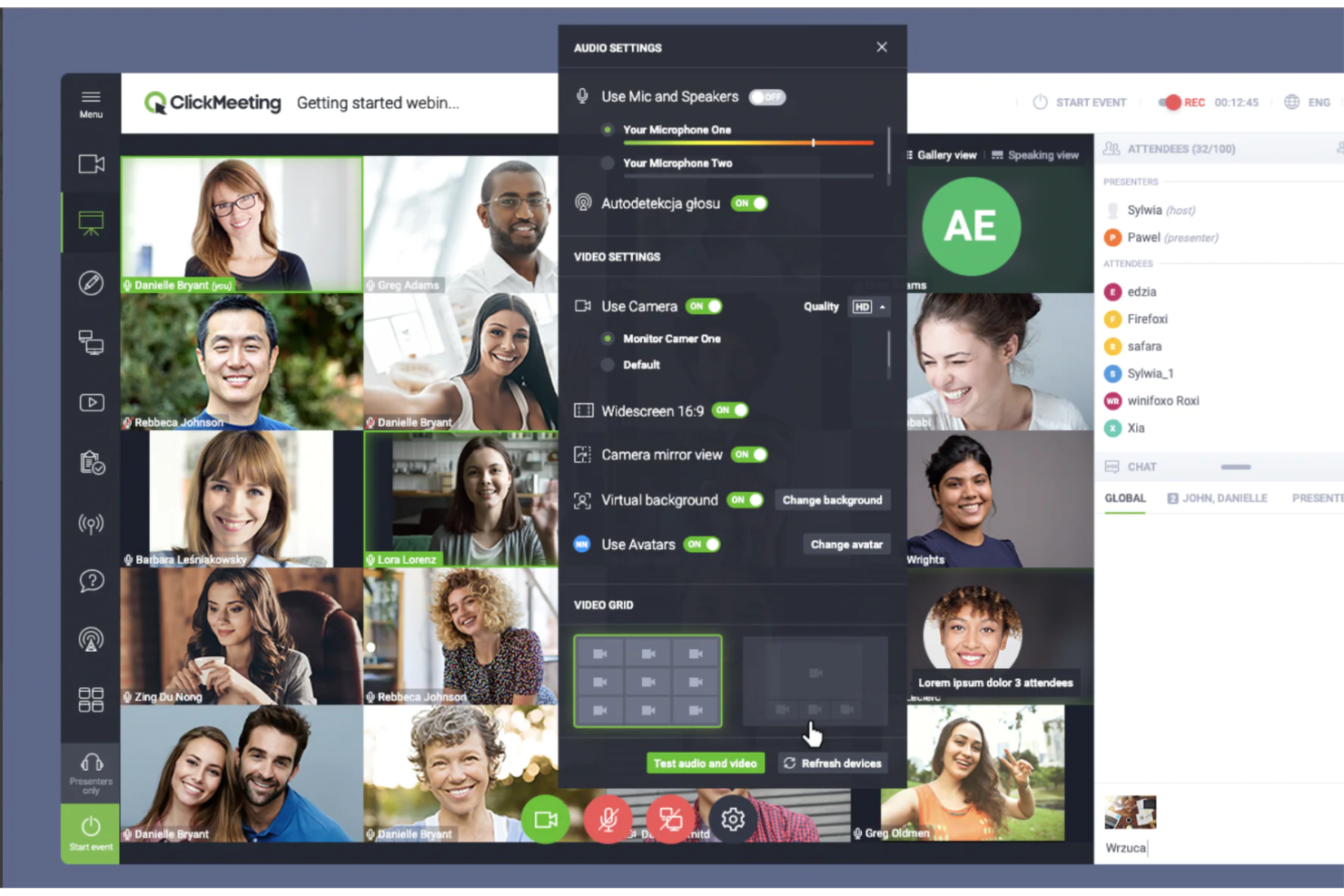
ClickMeeting è pensato per le organizzazioni che devono gestire webinar coinvolgenti, eventi virtuali e riunioni online di grandi dimensioni senza complicazioni tecniche. Ritengo che i team alla ricerca di controlli basati sul browser, funzionalità interattive per i partecipanti ed esperienze di presentazione curate troveranno in ClickMeeting una valida alternativa a Webex.
A chi è più adatto ClickMeeting?
I team di marketing e i reparti di formazione che organizzano webinar con il proprio marchio o eventi virtuali su larga scala.
Perché ClickMeeting è una valida alternativa a Webex
Ho scelto ClickMeeting perché offre ai team un controllo concreto sul modo in cui il loro marchio viene presentato in ogni fase di un webinar. Gli strumenti per personalizzare il marchio consentono di applicare il logo, i colori del marchio e le immagini di sfondo alle pagine di registrazione, alle pagine del profilo e alla sala dell'evento. Apprezzo anche il pulsante di invito all'azione personalizzabile, che permette di promuovere un'offerta con il proprio marchio o reindirizzare direttamente a una pagina di destinazione in qualsiasi momento durante la sessione. Per i team che organizzano eventi rivolti ai clienti o dimostrazioni di prodotto, questo livello di cura nella presentazione è qualcosa che Webex semplicemente non offre immediatamente.
Funzionalità principali di ClickMeeting
- Stanze per gruppi: Suddividi fino a 800 partecipanti in un massimo di 20 stanze separate, con controlli per spostare i partecipanti tra le stanze e gestire l'accesso al microfono.
- Webinar automatizzati: Pianifica sessioni webinar preregistrate da eseguire automaticamente, comprese le e-mail di follow-up e i messaggi di ringraziamento automatici.
- Trasmissione simultanea: Trasmetti il tuo evento in diretta contemporaneamente sulle piattaforme di social media direttamente dalla sala dell'evento.
- Webinar su richiesta: Rendi disponibili le sessioni registrate per la riproduzione, così i partecipanti possono accedere ai contenuti dopo la fine dell'evento in diretta.
Integrazioni di ClickMeeting
ClickMeeting offre integrazioni native con Moodle, PayPal, HubSpot, Google Calendar, Slack, LinkedIn, Facebook, YouTube, Dropbox e Zapier. È disponibile un'API per le integrazioni personalizzate.
Pros and Cons
Pros:
- Personalizzazione del marchio per tutti i punti di contatto con i partecipanti
- Sondaggi e questionari integrati per favorire il coinvolgimento
- Fino a 5.000 partecipanti per sessione
Cons:
- Nessuna applicazione desktop o mobile scaricabile
- Nessuna funzionalità per le stanze separate

Ideale per riunioni virtuali personalizzabili

Adobe Connect si distingue per i team che necessitano di webinar ricchi e altamente interattivi o di aule virtuali con un controllo avanzato sui contenuti e sui layout. È una scelta solida per formatori, educatori e aziende che organizzano sessioni online immersive, che vanno oltre le semplici riunioni video.
Per chi è più adatto Adobe Connect?
Formatori, educatori e organizzazioni che gestiscono aule virtuali o workshop online interattivi.
Perché Adobe Connect è una buona alternativa a Webex
Ho scelto Adobe Connect per il livello di controllo che offre sull’esperienza della sessione. Il generatore di layout personalizzati consente di disporre riquadri—chat, sondaggi, video, lavagne, file—esattamente come si desidera, facendo sì che ogni sessione sembri progettata appositamente anziché generica. Apprezzo in particolare le sale virtuali persistenti, che conservano layout e contenuti tra una sessione e l’altra, facendo risparmiare tempo prezioso nella configurazione dei programmi di formazione ricorrenti. Per i team che organizzano sessioni strutturate di apprendimento o certificazione, questo livello di personalizzazione è difficile da eguagliare.
Funzionalità principali di Adobe Connect
- Punteggio del coinvolgimento in tempo reale: Monitora un punteggio di coinvolgimento dal vivo durante le sessioni per individuare i partecipanti disinteressati e apportare modifiche al volo.
- Webinar dal vivo simulati: Esegui sessioni preregistrate che combinano video curati e interattività dal vivo, ampliando la gestione dei webinar senza richiedere ulteriore impegno da parte del relatore.
- Analisi post-sessione: Accedi a report dettagliati sul coinvolgimento dei partecipanti, sulle presenze e sulle prestazioni dei contenuti dopo ogni sessione.
- Automazione prima e dopo l’evento: Automatizza inviti personalizzati con il tuo marchio, promemoria e sondaggi post-sessione senza necessità di interventi manuali successivi.
Integrazioni di Adobe Connect
Adobe Connect offre integrazioni native con Salesforce, Moodle e Sistemi di gestione dell’apprendimento che supportano AICC e SCORM, oltre a fornire un’API per integrazioni personalizzate.
Pros and Cons
Pros:
- Le sale persistenti conservano i layout per le sessioni ricorrenti
- I riquadri personalizzati supportano la progettazione di aule virtuali interattive
- Il supporto SCORM è adatto alle videoconferenze web incentrate sulla formazione
Cons:
- L’interfaccia può sembrare datata agli utenti moderni
- La qualità video può essere inferiore a quella dei principali concorrenti
Ideale per trasmissioni web dal vivo e analisi

WebinarJam è progettato per aziende e professionisti del marketing che organizzano grandi eventi dal vivo e webinar interattivi. Se hai bisogno di una gestione avanzata dei partecipanti, di solidi strumenti per il coinvolgimento del pubblico e di opzioni di trasmissione flessibili, questa piattaforma si distingue tra le soluzioni di videoconferenza.
Per chi è più indicato WebinarJam?
Team di marketing e piccole aziende che organizzano webinar interattivi ad alta partecipazione.
Perché WebinarJam è una buona alternativa a Webex
Ho scelto WebinarJam per i team che organizzano eventi dal vivo su larga scala, in cui contano sia le dimensioni del pubblico sia il coinvolgimento in tempo reale. La piattaforma supporta fino a 5.000 partecipanti dal vivo, collocandosi in una categoria diversa rispetto alla maggior parte degli strumenti di videoconferenza. Apprezzo molto le funzionalità integrate di automazione del marketing, come le notifiche automatiche via email e SMS collegate direttamente al comportamento dei partecipanti prima, durante e dopo un webinar. Anche la funzione del pulsante antipanico è qualcosa che ho utilizzato concretamente: sposta istantaneamente la sessione in una nuova stanza se si verifica un problema tecnico durante la trasmissione, rivelandosi un vero salvavita durante gli eventi dal vivo più importanti.
Funzionalità principali di WebinarJam
- Sondaggi e questionari dal vivo: Raccogli le risposte del pubblico in tempo reale durante una sessione per guidare la conversazione o ottenere feedback.
- Inserimento di video: Passa dalla presentazione dal vivo a clip video preregistrate in qualsiasi momento durante una trasmissione.
- Lavagna visualizzata sullo schermo: Disegna, aggiungi annotazioni ed elementi visivi direttamente sullo schermo durante la presentazione.
- Annunci permanenti: Fissa i messaggi importanti nella stanza del webinar in modo che rimangano visibili a tutti i partecipanti per tutta la sessione.
Integrazioni di WebinarJam
WebinarJam offre integrazioni native con Mailchimp, Infusionsoft, ActiveCampaign, AWeber, GetResponse, Kartra, Twilio e Zapier; è inoltre disponibile un'API per integrazioni personalizzate.
Pros and Cons
Pros:
- L'elevata capacità di partecipanti supporta videoconferenze ad alta partecipazione
- I promemoria via SMS contribuiscono ad aumentare la partecipazione agli eventi dal vivo
- Il pulsante antipanico consente di ripristinare la sessione in caso di problemi tecnici
Cons:
- Le stanze separate non sono supportate
- Durante le trasmissioni più grandi possono verificarsi ritardi nello streaming

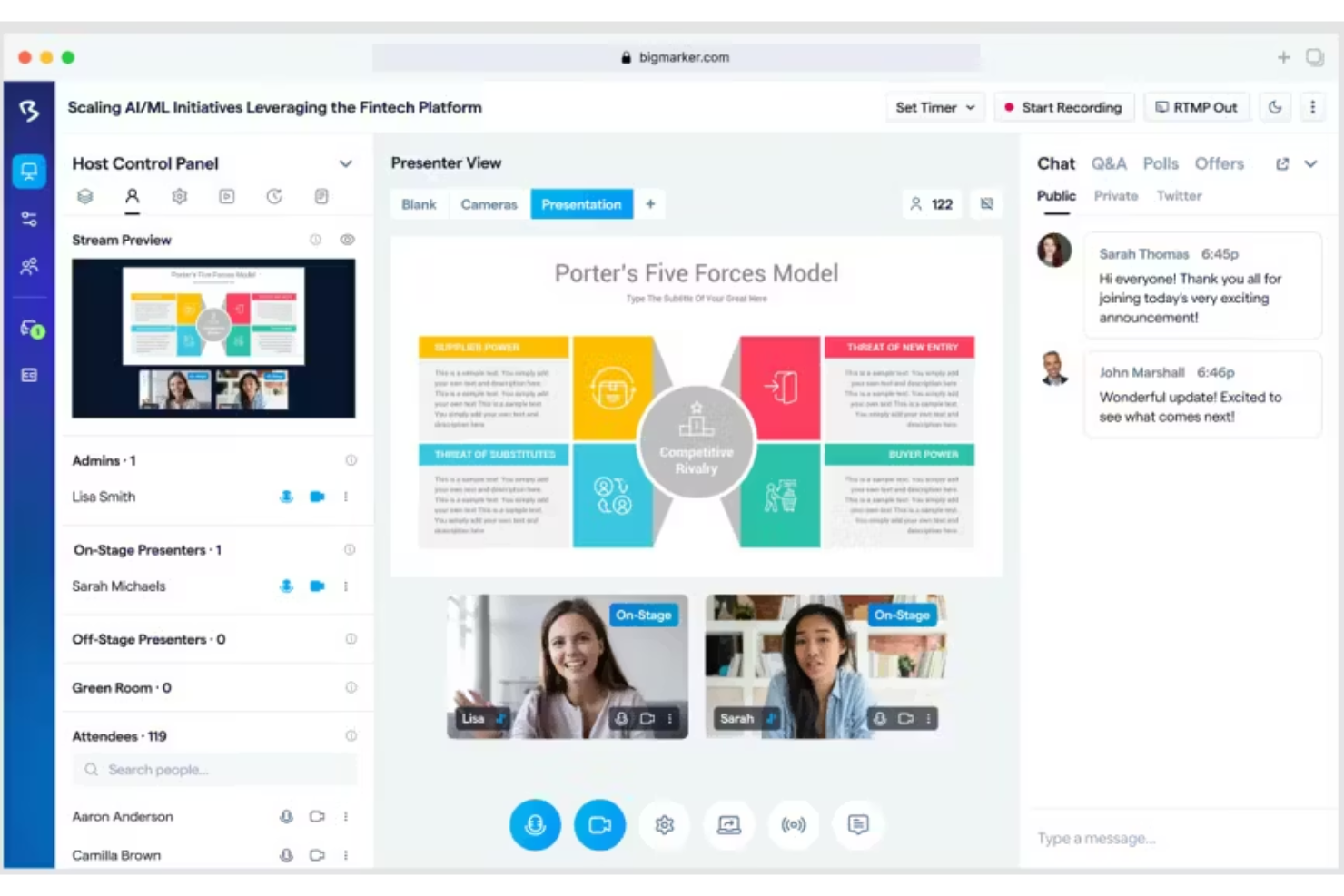
Se vuoi creare webinar o esperienze per eventi virtuali interattivi e personalizzati con il tuo marchio, BigMarker è progettato per te. La piattaforma è particolarmente interessante per i team di marketing, eventi e formazione che vogliono creare esperienze video coinvolgenti e personalizzabili, capaci di mantenere il pubblico coinvolto.
Per chi è più adatto BigMarker?
Team di marketing o eventi di medie e grandi dimensioni che creano webinar, conferenze ed eventi virtuali interattivi e personalizzati con il proprio marchio.
Perché BigMarker è una buona alternativa a Webex
Ho scelto BigMarker in particolare per i team che considerano gli eventi una parte fondamentale dell’esperienza del proprio marchio, non solo un canale di comunicazione. Mentre Webex si concentra su riunioni e chiamate, BigMarker mi permette di creare ambienti virtuali completamente personalizzati, dalle pagine di registrazione alla sala virtuale vera e propria, mantenendo ovunque il mio logo, i miei colori e il mio layout. Apprezzo soprattutto la funzione di webcast simulato, che mi consente di trasmettere contenuti preregistrati come se fossero dal vivo, così il mio team può concentrarsi interamente sull’interazione con il pubblico durante la sessione. Per i team di marketing che gestiscono programmi di webinar ad alto volume, questa combinazione di controllo del marchio e flessibilità produttiva è qualcosa che Webex semplicemente non è progettato per offrire.
Funzionalità principali di BigMarker
- Domande e risposte con votazione del pubblico: I partecipanti inviano domande che gli altri possono votare, portando in cima quelle più pertinenti durante le sessioni dal vivo
- Vendita integrata dei biglietti: Vendi l’accesso a pagamento ai webinar o alle registrazioni on demand direttamente tramite la piattaforma utilizzando PayPal
- Sondaggi e quiz: Crea sondaggi e quiz dal vivo durante le sessioni per raccogliere il feedback del pubblico e verificare la comprensione in tempo reale
- Canale on demand: Ospita un canale personalizzato con il tuo marchio in cui vengono archiviate tutte le registrazioni dei webinar, accessibili agli abbonati dopo l’evento
Integrazioni di BigMarker
BigMarker offre integrazioni native con Salesforce, HubSpot, Marketo, Mailchimp e Zapier, oltre a fornire un’API per integrazioni personalizzate.
Pros and Cons
Pros:
- Gli ambienti virtuali personalizzati supportano esperienze evento curate e professionali
- I webcast simulati aiutano a scalare le presentazioni ripetute
- La votazione del pubblico mantiene le sessioni di domande e risposte più focalizzate
Cons:
- Non è ideale per semplici riunioni interne
- I controlli del layout video dal vivo possono sembrare limitati
Altre alternative a Webex
Ecco alcune alternative aggiuntive a Webex che non sono state incluse nel mio elenco, ma che vale comunque la pena prendere in considerazione:
- RingCentral Webinar
Ideale con video, messaggistica e telefonia
- Zoom
Ideale per videoconferenze HD e webinar
- StreamYard
Ideale per lo streaming live semplice basato su browser


Come valuto le alternative a Webex
Divido la mia valutazione in requisiti di base — video HD affidabile, chat persistente e integrazioni con strumenti di gestione dei progetti — e fattori distintivi che separano le vere alternative a Webex.
Funzionalità fondamentali (requisiti minimi per questo elenco)
Quando seleziono gli strumenti per il mio elenco, assegno a ciascuno un punteggio su una scala da 0 (non offre la funzionalità) a 5 (eccelle in quest'area) per ogni funzionalità fondamentale indicata di seguito. Quindi, calcolo il punteggio totale dello strumento trasformandolo in una percentuale. Ogni strumento deve raggiungere un punteggio totale minimo del 65% per essere preso in considerazione.
- Qualità delle videoconferenze: valuto se la piattaforma offre video di gruppo stabili e ad alta definizione per riunioni come gli incontri quotidiani di allineamento e le revisioni dei cicli di lavoro con più di 10 partecipanti.
- Condivisione dello schermo e collaborazione: la condivisione dello schermo in tempo reale con annotazioni e lavagna virtuale è importante quando si illustrano i piani evolutivi alle parti interessate o si esaminano bozze di progettazione durante una chiamata.
- Chat e messaggistica: cerco canali e discussioni persistenti che mantengano attive le conversazioni sul progetto tra una riunione e l'altra, non semplici finestre di chat temporanee durante le riunioni.
- Registrazione delle riunioni e trascrizioni: una buona alternativa a Webex dovrebbe consentire di registrare le sessioni e generare trascrizioni ricercabili, così i membri della squadra assenti possono recuperare le decisioni principali.
- Integrazioni con calendario e strumenti di gestione dei progetti: verifico la presenza di connessioni native a strumenti come Jira, Asana e Monday, oltre a Google Calendar e Outlook, in modo che le riunioni rimangano collegate al flusso di lavoro di consegna.
- Capacità scalabile delle riunioni: che si tratti di un incontro quotidiano di allineamento con cinque persone o di una riunione plenaria con 200 partecipanti, la piattaforma dovrebbe supportare la tua gamma di dimensioni delle riunioni senza obbligarti a passare a un piano superiore.
Dopo aver ottenuto un elenco di strumenti che soddisfano questi criteri, valuto ciò che distingue ciascuna piattaforma.
Fattori distintivi (ciò che differenzia i fornitori)
Ecco come confronto i diversi fornitori:
Funzionalità di spicco
Gli assistenti IA per le riunioni rappresentano un importante fattore distintivo. Cerco strumenti che acquisiscano automaticamente le attività da svolgere e generino riepiloghi che i responsabili di progetto possano inserire direttamente negli elenchi delle attività dei cicli di lavoro. Anche la messaggistica video asincrona è importante per le squadre distribuite che gestiscono più fusi orari: registrare un breve aggiornamento è meglio che programmare un'altra chiamata. Valuto inoltre la gestione integrata delle attività, in cui i risultati delle riunioni si trasformano in attività assegnate senza dover passare a uno strumento separato.
Oltre le funzionalità
La struttura dei prezzi è importante. Valuto se una piattaforma addebita i costi per organizzatore o per utente, poiché le squadre di progetto aumentano o diminuiscono di dimensioni a seconda dell'incarico. La sicurezza è un'altra considerazione fondamentale: la crittografia dall'inizio alla fine e certificazioni come SOC 2 e GDPR entrano in gioco quando le riunioni con i clienti riguardano risultati sensibili. Verifico inoltre l'accesso multipiattaforma, in particolare se le parti interessate esterne possono partecipare alle chiamate senza scaricare un'applicazione.
Perché cercare un'alternativa a Webex?
Sebbene Webex sia una buona scelta per le videoconferenze, ci sono diversi motivi per cui alcuni utenti cercano soluzioni alternative. Potresti essere alla ricerca di un'alternativa a Webex perché…
- Hai bisogno di esperienze per eventi completamente personalizzate o con il tuo marchio
- Desideri analisi più approfondite sul coinvolgimento e il monitoraggio dei contatti
- Il tuo team si affida a integrazioni non supportate da Webex
- Organizzi webinar su larga scala o eventi ibridi
- Hai bisogno di spazi virtuali per riunioni permanenti
- Riscontri problemi di prestazioni in determinate aree geografiche
Se ti riconosci in una di queste situazioni, sei nel posto giusto. Il mio elenco include diverse opzioni di software per videoconferenze più adatte ai team che affrontano queste difficoltà con Webex e cercano soluzioni alternative.
Funzionalità principali di Webex
Ecco alcune delle funzionalità principali di Webex, che ti aiuteranno a mettere a confronto ciò che offrono le soluzioni alternative:
- Videoconferenze audio e video in HD: Organizza riunioni in tempo reale con video nitidi e audio chiaro, supportando sia piccoli incontri di squadra sia grandi eventi aziendali.
- Condivisione dello schermo: Presenta diapositive, documenti o applicazioni condividendo l'intero schermo o finestre specifiche durante una riunione.
- Sale riunioni secondarie: Dividi i partecipanti in gruppi più piccoli per workshop, sessioni di brainstorming o discussioni private all'interno di una riunione più ampia.
- Registrazione delle riunioni: Registra video, audio e trascrizioni delle chat delle tue sessioni per consultazione, formazione o esigenze normative.
- Chat durante la riunione: Invia messaggi diretti o di gruppo ai partecipanti per domande in tempo reale, collaborazione o condivisione di link mentre la riunione è in corso.
- Strumenti per la lavagna digitale: Collabora visivamente disegnando, aggiungendo annotazioni o facendo brainstorming insieme su una lavagna digitale interattiva condivisa.
- Integrazioni con il calendario: Pianifica, avvia e gestisci le riunioni Webex direttamente da Google Calendar o Microsoft Outlook.
- Sondaggi e domande e risposte in tempo reale: Raccogli il feedback dei partecipanti, conduci sondaggi dal vivo o organizza sessioni strutturate di domande e risposte per favorire il coinvolgimento.
- Sfondi virtuali e rimozione dei rumori: Utilizza sfondi personalizzati o effetti di sfocatura e filtra i suoni di disturbo per mantenere una presentazione professionale.
- Accesso da dispositivi mobili e multipiattaforma: Partecipa, organizza o gestisci riunioni da iPhone, Android, Mac, Windows o browser web per la massima flessibilità.