

10 alternative a Looker Studio per i dashboard di dati nel 2026

Elenco delle migliori alternative a Looker Studio


Se gestisci progetti, conosci la pressione legata alla necessità di prendere decisioni basate sui dati. In queste situazioni difficili, Looker Studio potrebbe non soddisfare sempre le tue esigenze, soprattutto se hai a che fare con requisiti specifici del settore o hai bisogno di una migliore integrazione con gli strumenti esistenti.
Nella mia esperienza, il giusto software di analisi aziendale come servizio (SaaS BI) può semplificare il tuo lavoro offrendo soluzioni personalizzate. Si tratta di trovare ciò che funziona meglio per te e per il tuo team.
In questo articolo condividerò le mie migliori alternative a Looker Studio. Ho testato e recensito ciascuna di esse per aiutarti a trovare uno strumento in linea con le esigenze della tua azienda. Otterrai informazioni sulle funzionalità, sulla facilità d'uso e sui vantaggi distintivi, rendendo più semplice la tua decisione.
Che cos'è Looker Studio?
Looker Studio è uno strumento di analisi aziendale che aiuta le organizzazioni a trasformare i dati in informazioni utili. Viene generalmente utilizzato da analisti dei dati, responsabili aziendali e professionisti IT che devono analizzare grandi insiemi di dati e prendere decisioni informate. Tu e il tuo team potete trarre vantaggio dalle sue funzionalità di visualizzazione dei dati, dashboard collaborative e analisi in tempo reale, che aiutano a prendere decisioni basate sui dati e a migliorare la collaborazione. Nel complesso, Looker Studio offre una preziosa piattaforma BI per trasformare dati complessi e potenti in informazioni chiare e utili.
Tabella comparativa delle alternative a Looker Studio
Questa tabella comparativa riassume i dettagli dei prezzi delle mie migliori alternative a Looker Studio.
| Tool | Best For | Trial Info | Price | ||
|---|---|---|---|---|---|
| 1 | Ideale per controlli di governance dei dati flessibili | Piano gratuito disponibile | Da $29/mese | Website | |
| 2 | Ideale per lo storytelling visivo | Piano gratuito disponibile | A partire da $15/utente/mese (fatturato annualmente) | Website | |
| 3 | Ideale per l’integrazione dei dati potenziata dall’IA | Prova gratuita di 30 giorni + demo gratuita disponibile | Da $300/mese (fatturato annualmente) | Website | |
| 4 | Ideale per la pianificazione aziendale | Demo gratuita disponibile | Prezzo su richiesta | Website | |
| 5 | Ideale per l'integrazione con Microsoft | Piano gratuito disponibile | Da £10.80/utente/mese (fatturazione annuale) | Website | |
| 6 | Ideale per la flessibilità open-source | Piano gratuito disponibile | Da $100/mese (fatturato mensilmente) + $6/utente/mese | Website | |
| 7 | Ideale per analytics integrato | Piano gratuito disponibile | Prezzo su richiesta | Website | |
| 8 | Ideale per insight guidati dall’IA | Prova gratuita di 14 giorni + demo gratuita disponibile | A partire da $25/utente/mese (fatturazione annuale) | Website | |
| 9 | Ideale per dashboard interattivi abilitati all'AI | Prova gratuita di 30 giorni + demo gratuita disponibile | Prezzo su richiesta | Website | |
| 10 | Ideale per soluzioni no-code | Prova gratuita disponibile | Prezzo su richiesta | Website |
Perché fidarsi dei nostri consigli sui software
Il nostro team testa e recensisce software dal 2012. In quanto project manager noi stessi, sappiamo quanto sia difficile — e importante — scegliere il software giusto.
Per questa guida, abbiamo valutato gli strumenti attraverso test pratici e ricerche indipendenti, assegnando un punteggio agli strumenti in base ai nostri criteri di selezione. Ci basiamo inoltre sulle competenze di leader di pensiero del settore e di professionisti attivi nella gestione dei progetti.
Le nostre recensioni riflettono il nostro giudizio editoriale umano, non un discorso di vendita.
Revisori esperti:
Recensioni delle migliori alternative a Looker Studio
Di seguito trovi i miei riepiloghi dettagliati delle migliori alternative a Looker Studio incluse nel mio elenco. Le mie recensioni offrono una panoramica dettagliata delle funzionalità principali, dei pro e dei contro, delle integrazioni native e dei casi d’uso ideali di ogni strumento, per aiutarti a trovare quello più adatto a te.
Signara
Ideale per controlli di governance dei dati flessibili
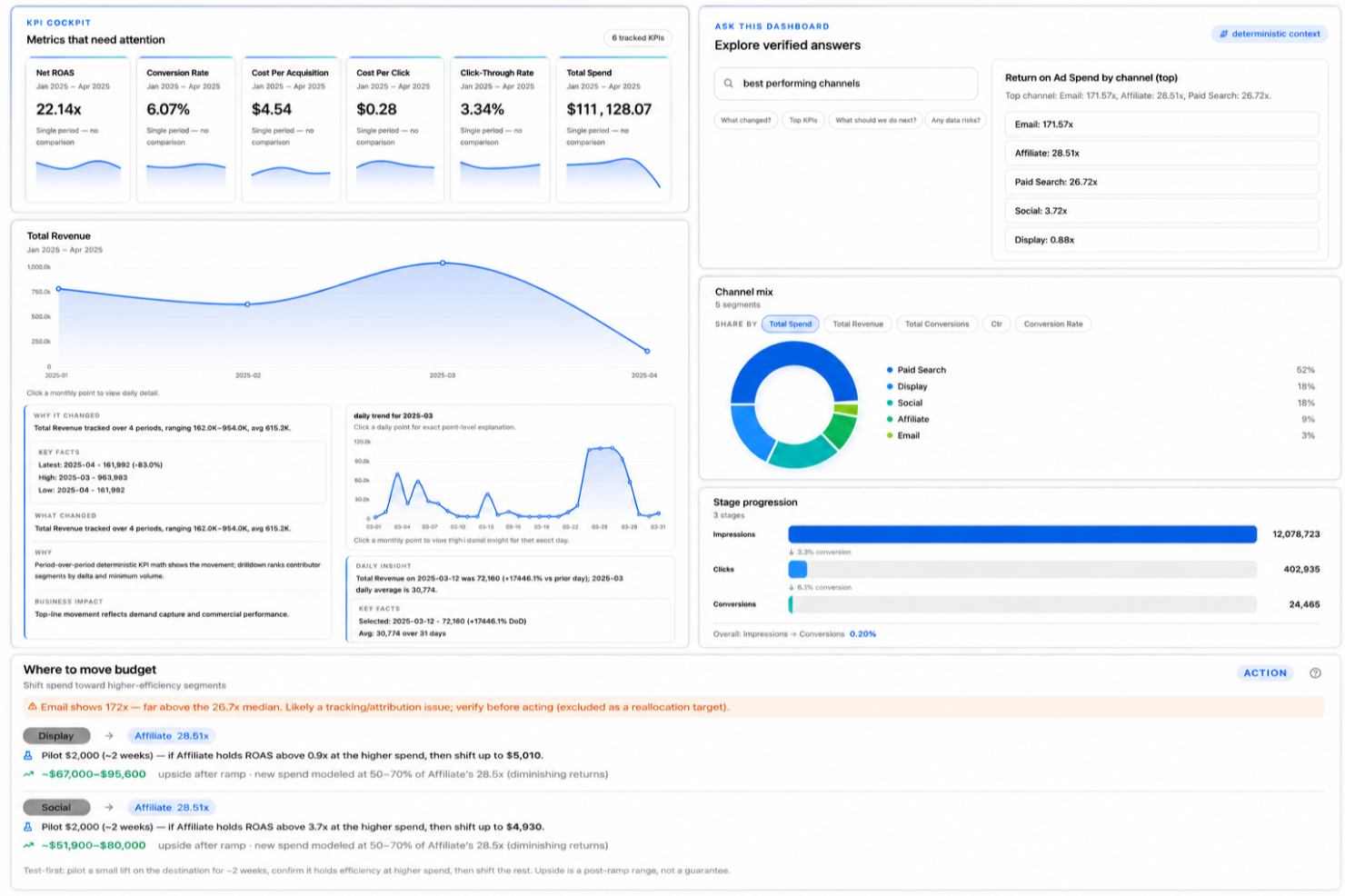
Signara è una piattaforma di analisi automatizzata alimentata dall'IA per team di marketing che genera dashboard, report sui KPI, analisi guidate dall'IA, approfondimenti e raccomandazioni utilizzando un motore di calcolo deterministico collegato a fonti come HubSpot, BigQuery, Snowflake e Google Sheets.
Per chi è ideale Signara?
Signara è adatta a team di marketing e agenzie che necessitano di report automatizzati da più fonti di dati senza dover creare report manualmente.
Perché ho scelto Signara
Ho incluso Signara nella mia selezione per l'attenzione che dedica alla governance dei dati senza richiedere configurazioni complesse. I dati aziendali grezzi non vengono mai archiviati lato server. Sono elaborati in memoria solo per generare il report e poi eliminati, il che significa che non restano esposti dopo la fine della sessione. Mi piace anche che i dati dell'account siano isolati a livello di infrastruttura, così non è possibile alcun accesso tra tenant. Per i team che necessitano di tracciabilità, ogni KPI è collegato a una formula deterministica e bloccata, mai a una stima dell'IA.
Caratteristiche principali di Signara
- Query sui dati in sola lettura: Signara si collega alle fonti dati con accesso in sola lettura, così lo strumento non può mai modificare o sovrascrivere i dataset di origine.
- Approfondimenti e raccomandazioni generate dall'IA: Signara individua variazioni nei KPI, evidenzia tendenze e suggerisce azioni in base ai dati collegati.
- Analisi 'chiedi alla dashboard': Gli utenti possono porre domande sui dati della dashboard in linguaggio naturale e ricevere risposte senza dover creare report personalizzati.
- Mapping dello schema e rilevamento dei campi: Quando colleghi una fonte dati, Signara mappa automaticamente lo schema e identifica i campi rilevanti, eliminando la necessità di configurazioni manuali.
Integrazioni di Signara
Le integrazioni includono HubSpot, Excel, Google Sheets, Snowflake, BigQuery, PostgreSQL, Databricks e MySQL.
Pros and Cons
Pros:
- Le narrazioni IA spiegano in automatico il cambiamento dei KPI
- L’analisi dei driver individua variazioni sulle metriche
- Report automatizzati senza configurazione dell'analista
Cons:
- Connettori nativi limitati alle fonti dati principali
- Nessuna personalizzazione di grafici o visualizzazioni

Tableau
Ideale per lo storytelling visivo

Tableau è uno strumento di visualizzazione dei dati progettato per la business intelligence e l’analisi dei dati. Gli analisti e i professionisti aziendali lo utilizzano principalmente per creare dashboard interattive e condivisibili.
Perché Tableau è una valida alternativa a Looker Studio: Tableau eccelle nello storytelling visivo, rendendolo ideale per chi deve presentare i dati in modo coinvolgente. Puoi anche esplorare dinamicamente i dati e scoprire rapidamente nuove informazioni. L’attenzione di Tableau per il design intuitivo ti aiuta a comunicare efficacemente la storia dei tuoi dati.
Funzionalità principali e integrazioni:
Le funzionalità includono un’interfaccia drag-and-drop che semplifica il processo di creazione delle visualizzazioni. Inoltre, gli strumenti di analisi in tempo reale di Tableau consentono al tuo team di ricavare approfondimenti non appena i dati sono disponibili. Hai anche dashboard interattive che permettono agli utenti di esplorare i dati e ottenere informazioni in tempo reale.
Le integrazioni comprendono Salesforce, Google Analytics, Microsoft Excel, Amazon Redshift, Google BigQuery, Microsoft SQL Server, Oracle, SAP HANA, Dropbox, Box e molti altri.
Pros and Cons
Pros:
- Funzionalità avanzate di visualizzazione
- Interfaccia drag-and-drop intuitiva
- Capacità di storytelling coinvolgente
Cons:
- Modellazione dei dati debole
- Processo di preparazione dei dati complesso

Qlik
Ideale per l’integrazione dei dati potenziata dall’IA

Qlik è una piattaforma di analisi dei dati progettata per creare visualizzazioni e dashboard interattive. Gli utenti aziendali e i team di dati la utilizzano per esplorare e analizzare i dati.
Perché Qlik è una valida alternativa a Looker Studio: Qlik offre forti capacità di integrazione dei dati, rendendolo ideale per i team che necessitano di collegare più fonti di dati. È anche possibile costruire dashboard personalizzati che aiutano a scoprire informazioni utili. Le funzionalità analitiche basate sull’intelligenza artificiale della piattaforma supportano sia l’analisi guidata che quella self-service.
Caratteristiche principali e integrazioni:
Le funzionalità includono un motore dati associativo che aiuta a vedere le connessioni tra i dati. Inoltre, le sue analisi self-service permettono al tuo team di prendere decisioni basate sui dati senza dover dipendere dall’IT. La piattaforma supporta sia il deployment in cloud che on-premises, offrendo flessibilità alle esigenze aziendali.
Le integrazioni comprendono Microsoft Office e altro ancora.
Pros and Cons
Pros:
- Supporta analisi self-service
- Opzioni di deployment flessibili
- Dashboard personalizzabili
Cons:
- Linguaggio di scripting specifico per la preparazione dei dati
- Estensioni fragili

Ideale per la pianificazione aziendale

SAP Analytics Cloud (SAC) è una soluzione cloud di nuova generazione che unifica business intelligence, analytics aumentati e pianificazione collaborativa in un'unica interfaccia. A differenza degli strumenti tradizionali che mostrano solo il passato, SAC è progettato per aiutare i team di leadership a modellare il futuro attraverso scenari integrati 'what-if' e previsioni finanziarie.
Perché SAP Analytics Cloud è una buona alternativa a Looker Studio: SAC va oltre i semplici dashboard, permettendo agli utenti di agire sui dati—consentendo ai team di svolgere attività di budgeting, forecasting e modellazione predittiva direttamente all'interno dei propri report. È lo standard d'eccellenza per le organizzazioni che necessitano di una 'single source of truth' su tutti i loro dati SAP e non-SAP.
Funzionalità e integrazioni distintive:
Le funzionalità includono Integrated Planning & Analysis (xP&A), che consente di combinare pianificazione finanziaria, operativa e HR per creare budget aziendali unificati. Le sue capacità di Augmented Analytics utilizzano 'Smart Discovery' e 'Smart Predict' per identificare automaticamente i principali driver di business e prevedere le tendenze future tramite machine learning. Inoltre, la Live Data Connection consente di collegarsi direttamente a SAP S/4HANA, BW/4HANA e Datasphere senza spostare i dati, garantendo sicurezza e conformità in tempo reale.
Le integrazioni includono S/4HANA, SuccessFactors, Ariba, Google BigQuery, Salesforce, Snowflake, Microsoft Outlook, OData e altri ancora.
Pros and Cons
Pros:
- Strumenti AI integrati che non richiedono formazione
- Sicurezza tramite connessione live
- Integra completamente BI e pianificazione finanziaria
Cons:
- Rallentamenti delle prestazioni
- Vincolo all'ecosistema SAP
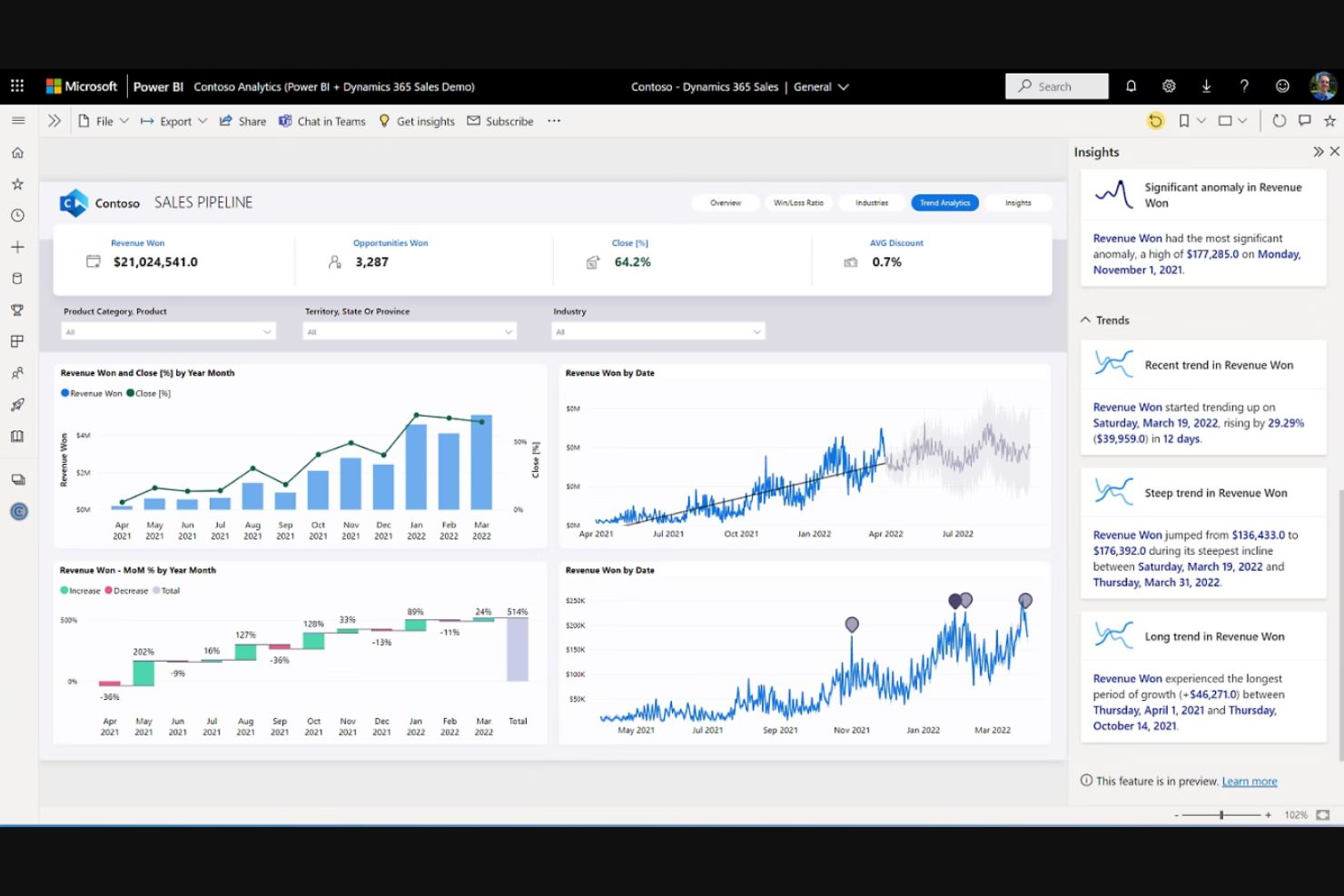
Microsoft Power BI è un servizio di analisi aziendale che offre visualizzazioni interattive e funzionalità di business intelligence. Viene utilizzato principalmente da analisti aziendali e professionisti IT per creare dashboard, grafici e report.
Perché Microsoft Power BI è una valida alternativa a Looker Studio: L'integrazione di Microsoft Power BI con i prodotti Microsoft lo rende ideale per i team che già utilizzano servizi Microsoft. Puoi collegarlo facilmente a varie fonti di dati, inclusi i fogli di calcolo, e condividere informazioni all'interno della tua organizzazione. Questo lo rende una scelta adatta sia per grandi che per piccole aziende che cercano una soluzione dati familiare e integrata.
Funzionalità e integrazioni principali:
Le funzionalità includono strumenti di visualizzazione dei dati che aiutano a creare report dettagliati. Inoltre, le analisi in tempo reale permettono al tuo team di accedere a dati aggiornati. L'interfaccia intuitiva facilita anche l'adozione e l'utilizzo da parte dei membri del team.
Le integrazioni includono Microsoft Dynamics 365, SharePoint, Google Analytics, GitHub e altre ancora.
Pros and Cons
Pros:
- Integrazione semplice con l'ecosistema Microsoft
- Analisi dei dati in tempo reale
- Ampia connettività alle fonti dati
Cons:
- Dipendenza da Windows
- Interattività delle tabelle rigida

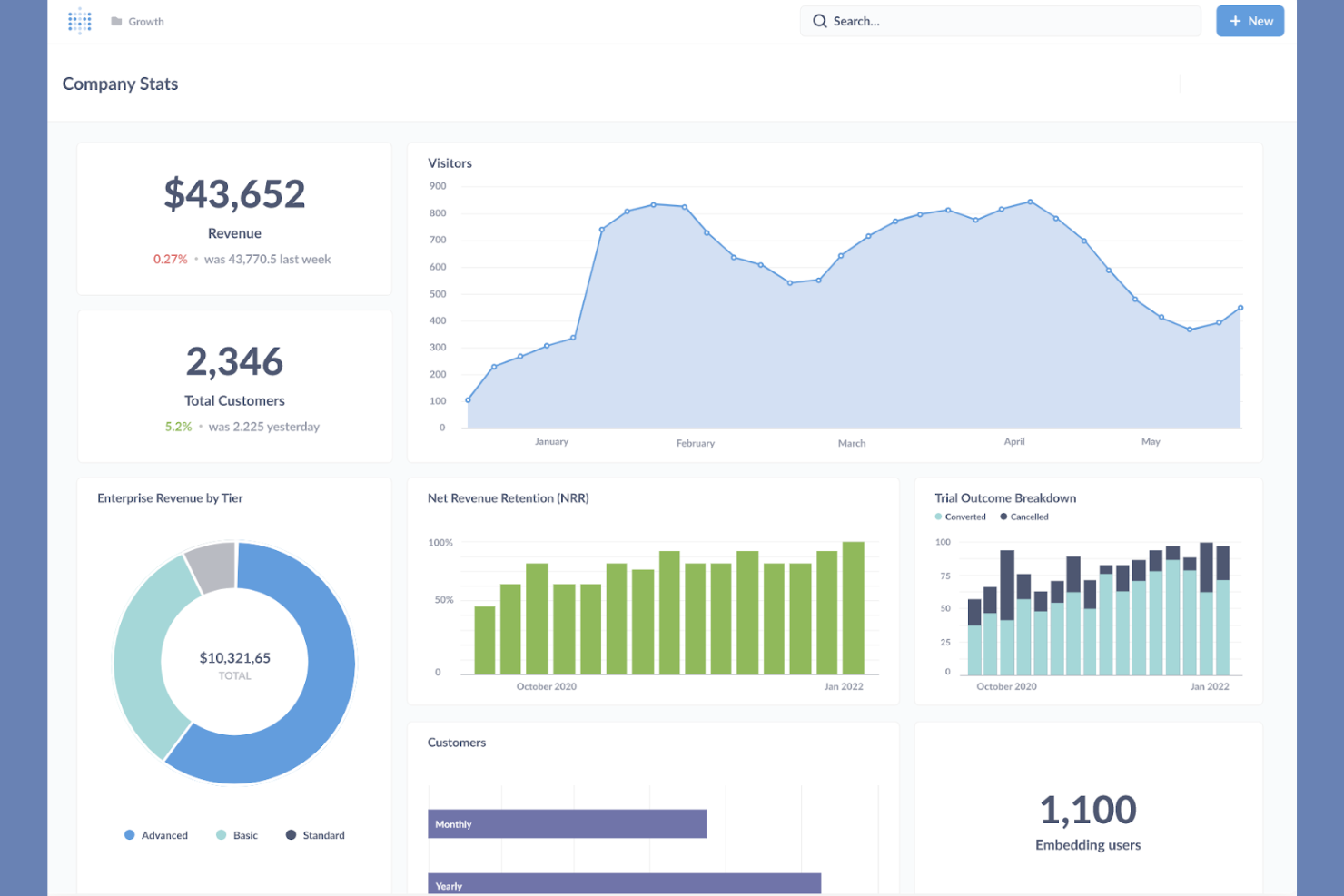
Metabase è uno strumento di business intelligence open-source progettato per un'analisi dei dati e una visualizzazione semplici. Analisti dei dati, startup e aziende utilizzano Metabase per creare report e dashboard senza la necessità di una programmazione complessa.
Perché Metabase è una valida alternativa a Looker Studio: Metabase offre la flessibilità dell'open-source, ideale per i team che cercano soluzioni personalizzabili. La sua interfaccia intuitiva consente di creare query e visualizzazioni, e puoi configurare dashboard per condividere approfondimenti in tutta l'organizzazione. La piattaforma supporta analisi self-service, permettendo al tuo team di esplorare i dati in modo indipendente.
Caratteristiche Distintive e Integrazioni:
Le caratteristiche includono layout personalizzati delle dashboard che ti permettono di adattare la presentazione dei dati alle tue esigenze. Inoltre, il costruttore di query ti aiuta a porre domande sui dati senza conoscere SQL. Metabase può anche programmare e condividere report tramite email o Slack per aiutare il tuo team a rimanere aggiornato sulle ultime informazioni.
Le integrazioni includono MySQL, DuckDB, Databricks, Google BigQuery e molto altro.
Pros and Cons
Pros:
- Flessibilità open-source
- Interfaccia intuitiva
- Supporta l'analisi self-service
Cons:
- Governance enterprise debole
- Nessun ESL integrato


Sisense è un software di business intelligence specializzato in analisi e visualizzazione dei dati. Viene utilizzato da analisti di dati e sviluppatori per creare dashboard e report interattivi.
Perché Sisense è una valida alternativa a Looker Studio: Sisense offre solide funzionalità di analytics integrato, permettendo di incorporare l’analisi dati nelle tue applicazioni. La piattaforma supporta una modellazione dati complessa e offre flessibilità nell’implementazione. Queste caratteristiche la rendono adatta alle aziende che desiderano potenziare le loro applicazioni con analytics.
Funzionalità distintive e integrazioni:
Le funzionalità includono la tecnologia In-Chip che accelera l’elaborazione dei dati. Inoltre, gli avanzati strumenti di modellazione dati consentono al tuo team di gestire in modo efficiente set di dati complessi. La piattaforma supporta anche formati di implementazione in cloud, on-premises e ibridi.
Le integrazioni includono Google Maps, Microsoft Excel e altri.
Pros and Cons
Pros:
- Analytics integrato avanzato
- Elaborazione dati rapida
- Opzioni di implementazione flessibili
Cons:
- Non è uno strumento 'plug-and-play'
- Documentazione carente

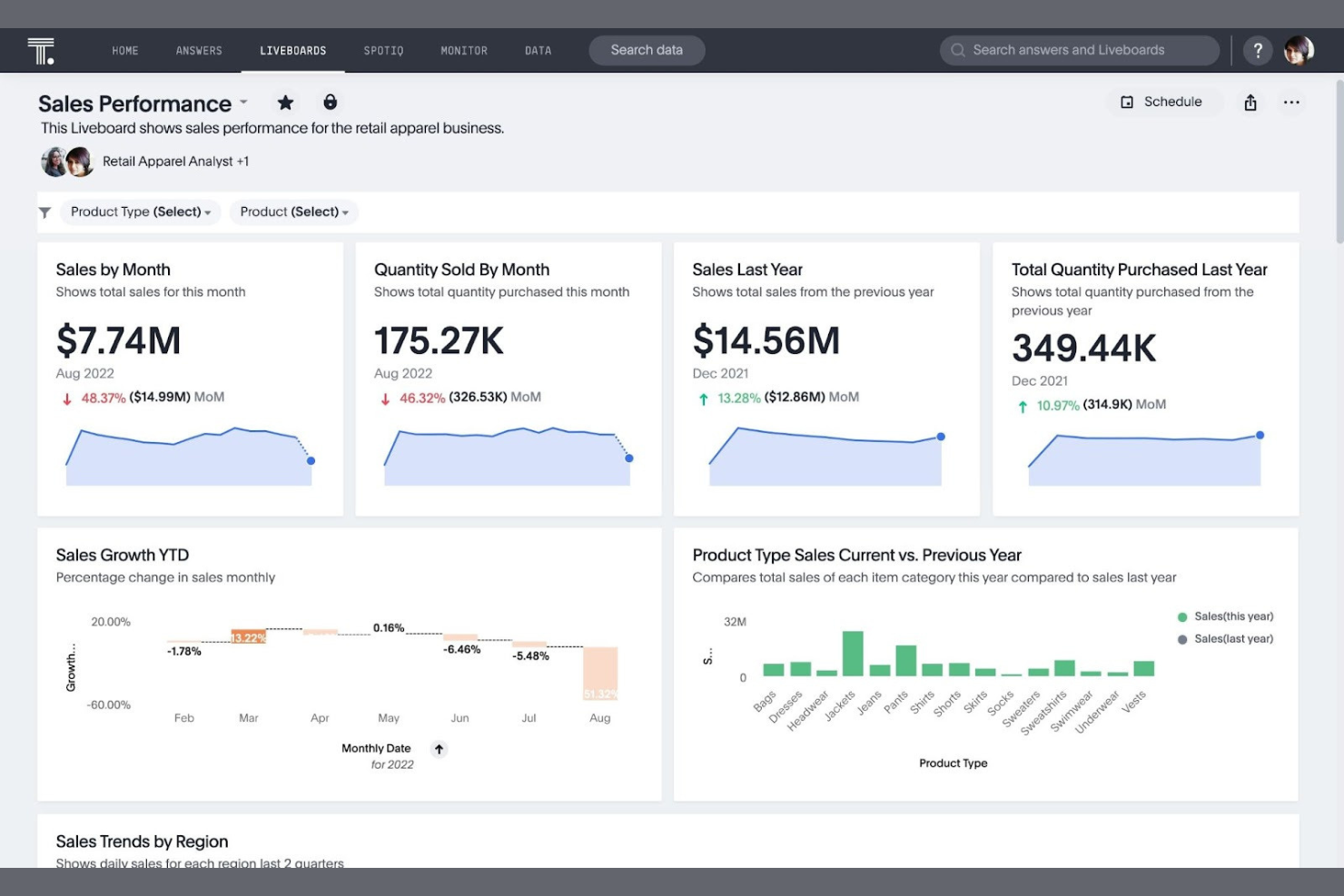
ThoughtSpot è una piattaforma di analisi progettata per eseguire ricerche e fornire approfondimenti su grandi insiemi di dati. Data analyst e professionisti del business che necessitano di accesso rapido agli insight dei dati utilizzano questo software.
Perché ThoughtSpot è una valida alternativa a Looker Studio: Gli insight basati sull’intelligenza artificiale di ThoughtSpot lo rendono ideale per i team che desiderano sfruttare analisi avanzate. Inoltre, è possibile scoprire insight senza necessità di competenze tecniche approfondite e l’interfaccia facile da usare della piattaforma supporta l’esplorazione e la visualizzazione dei dati in modo intuitivo.
Caratteristiche principali e integrazioni:
Caratteristiche includono una funzionalità di ricerca in linguaggio naturale che permette al tuo team di interrogare i dati in modo intuitivo. Sono inoltre disponibili insight automatizzati che aiutano a scoprire trend e anomalie. L’architettura scalabile della piattaforma supporta enormi quantità di dati e query complesse.
Integrazioni includono Google Cloud, VitaraCharts, Snowflake, Fivetran e altre ancora.
Pros and Cons
Pros:
- Insight guidati dall’IA
- Ricerca in linguaggio naturale
- Architettura conveniente e scalabile
Cons:
- Progettato per la ricerca, non per il design dei layout
- Richiede una configurazione complessa


Yellowfin è una piattaforma di business intelligence e analisi che offre strumenti di visualizzazione e trasformazione dei dati. I professionisti aziendali e gli analisti dei dati la utilizzano per individuare insight azionabili dai propri dati.
Perché Yellowfin è una valida alternativa a Looker Studio: Yellowfin si concentra su dashboard interattivi con funzionalità AI, aiutando il tuo team a individuare e agire rapidamente sugli insight. La flessibilità della piattaforma supporta una vasta gamma di esigenze e casi d'uso aziendali.
Funzionalità e integrazioni eccezionali:
Le funzionalità includono capacità di narrazione che ti permettono di costruire storie attorno ai tuoi dati. Yellowfin offre anche strumenti di collaborazione che permettono al tuo team di discutere gli insight direttamente all’interno della piattaforma.
Le integrazioni includono Salesforce, Google Analytics e altro ancora.
Pros and Cons
Pros:
- Dashboard interattivi
- Capacità di narrazione
- Strumenti di collaborazione
Cons:
- La creazione o modifica di report complessi su dispositivi mobili può essere difficile
- Difficoltà nell'elaborazione di dashboard complesse e multilivello


Grow è una piattaforma di business intelligence che aiuta i team a visualizzare i dati e monitorare le metriche di performance. Le piccole e medie imprese utilizzano questo strumento per prendere decisioni basate sui dati.
Perché Grow è una valida alternativa a Looker Studio: Grow offre flussi di lavoro senza codice, rendendolo ideale per i team che desiderano creare dashboard senza competenze di programmazione. La sua interfaccia intuitiva consente inoltre di costruire e personalizzare dashboard in modo efficiente.
Funzionalità principali e integrazioni:
Le funzionalità includono il monitoraggio dei dati in tempo reale che aiuta il tuo team a rimanere aggiornato con le ultime metriche. L'interfaccia drag-and-drop semplifica la creazione e la personalizzazione delle dashboard. Le sue capacità di data blending consentono di combinare dati provenienti da più fonti per una visione olistica.
Le integrazioni includono HubSpot, Google Sheets, QuickBooks, Salesforce, Shopify, Zendesk e altri.
Pros and Cons
Pros:
- Soluzioni senza codice
- Monitoraggio dei dati in tempo reale
- Capacità di data blending
Cons:
- Tipi di metriche limitati
- La pulizia complessa può comunque richiedere SQL
Altre alternative a Looker Studio
Ecco alcune alternative aggiuntive a Looker Studio che non sono state incluse nel mio elenco, ma che vale comunque la pena prendere in considerazione:
- Zoho Analytics
Ideale per BI e analisi end-to-end
- KNIME
Ideale per l'analisi open-source
- Jaspersoft
Ideale per la reportistica incorporata


Come valuto le alternative a Looker Studio
Divido la mia valutazione in due livelli: i connettori di base e le funzionalità di creazione di dashboard che uno strumento deve gestire per lavorare con i dati di Jira o Asana, e i fattori distintivi che differenziano le migliori opzioni per i team PMO.
Funzionalità principali (indispensabili per questo elenco)
Quando seleziono gli strumenti da includere nel mio elenco, assegno a ciascuno un punteggio su una scala da 0 (non offre la funzionalità) a 5 (eccelle in quest'area) per ogni funzionalità principale indicata di seguito. Poi converto il punteggio totale dello strumento in una percentuale. Ogni strumento deve raggiungere un punteggio totale minimo del 65% per essere preso in considerazione.
- Connettori per dati PM provenienti da più fonti: verifico se uno strumento si connette in modo nativo a piattaforme come Jira, Asana, monday.com e Smartsheet, oltre che a database e fogli di calcolo.
- Creazione di dashboard interattive: ogni strumento deve disporre di un generatore con funzionalità di trascinamento, filtri incrociati e livelli di dettaglio, così che i responsabili PMO possano esplorare autonomamente i dati degli sprint o lo stato del budget.
- Visualizzazioni e grafici personalizzati: oltre ai grafici a barre e a linee, cerco visualizzazioni pertinenti alla gestione dei progetti, come grafici dell'avanzamento residuo, viste della sequenza temporale, mappe di calore e schede di valutazione KPI.
- Combinazione e trasformazione dei dati: unire i dati sulla velocità di Jira con i piani delle risorse di Smartsheet in un'unica vista è importante, quindi valuto la capacità di ogni strumento di combinare i dati e calcolare valori tra diverse fonti.
- Condivisione, pianificazione e incorporamento: valuto quanto sia facile condividere dashboard aggiornate in tempo reale con le parti interessate tramite e-mail pianificate, link con autorizzazioni o viste incorporate in uno spazio di lavoro per la gestione dei progetti.
- Dati in tempo reale / aggiornabili: i dati obsoleti compromettono la fiducia delle parti interessate, quindi valuto se ogni strumento supporta connessioni in tempo reale o aggiornamenti pianificati frequenti per mantenere aggiornate le metriche dei progetti.
Una volta ottenuto un elenco di strumenti che soddisfano questi criteri, considero ciò che distingue ogni piattaforma.
Fattori distintivi (ciò che differenzia i fornitori)
Ecco come confronto i diversi fornitori:
Funzionalità di rilievo
I modelli predefiniti per la gestione dei progetti sono molto importanti in questo caso. Quando uno strumento include dashboard già pronte per gli sprint di Jira o i carichi di lavoro di Asana, il team PMO può iniziare a creare report in poche ore invece di partire da zero. Valuto anche le aggregazioni trasversali ai portafogli. I responsabili di programma che supervisionano più flussi di distribuzione hanno bisogno di metriche ponderate che si aggreghino verso l'alto tra team e unità aziendali. La scrittura bidirezionale nei sistemi è un'altra funzionalità che cerco, poiché aggiornare lo stato di un'attività direttamente da una dashboard evita di dover passare dal livello di analisi dei dati allo strumento di gestione dei progetti.
Oltre le funzionalità
La struttura dei prezzi è uno dei primi aspetti che valuto. Alcuni strumenti applicano un costo per utente con diritti di modifica, offrendo al contempo accesso gratuito agli utenti con diritti di visualizzazione; questo è utile per i team PMO che devono consentire a decine di parti interessate di consultare le dashboard, ma hanno bisogno soltanto di poche persone per crearle. Anche la rapidità di implementazione è importante. Verifico se un fornitore offre risorse di avviamento specifiche per la gestione dei progetti e una curva di apprendimento adatta ai responsabili di progetto non tecnici. Per i team aziendali, la governance è un fattore distintivo fondamentale. La sicurezza a livello di riga, l'SSO e la registrazione dei controlli determinano se uno strumento è in grado di gestire dati riservati dei programmi tra diverse unità aziendali.
Perché cercare un'alternativa a Looker Studio?
Sebbene Looker Studio sia un valido strumento di analisi aziendale, esistono diversi motivi per cui alcuni utenti cercano soluzioni alternative. Potresti voler cercare un'alternativa a Looker Studio per i seguenti motivi:
- Hai bisogno di opzioni migliori per la visualizzazione dei dati
- Il tuo team richiede un'integrazione più fluida con gli strumenti esistenti
- Stai cercando piani tariffari più convenienti
- La tua organizzazione richiede una maggiore privacy dei dati
- Hai bisogno di uno strumento che supporti insiemi di dati più grandi
- Il tuo team desidera una migliore accessibilità da dispositivi mobili
Se ti riconosci in una di queste situazioni, sei nel posto giusto. Il mio elenco contiene diverse opzioni di strumenti BI più adatte ai team che affrontano queste difficoltà con Looker Studio e cercano soluzioni alternative.
Funzionalità principali di Looker Studio
Ecco alcune delle principali funzionalità di Looker Studio che ti aiutano a mettere a confronto ciò che offrono le soluzioni alternative:
- Interfaccia intuitiva: Un design intuitivo con funzionalità di trascinamento consente al tuo team di creare rapidamente report.
- Modelli di report: I modelli personalizzabili ti permettono di visualizzare i dati in base alle tue esigenze specifiche.
- Connettori di dati: Oltre 800 connettori ti consentono di integrare facilmente diverse origini dati senza scrivere codice.
- Accesso all'API: L'automazione e la gestione tramite API ti consentono di gestire le risorse all'interno di Google Workspace o Cloud Identity.
- Incorporamento dei report: Incorporare i report nelle pagine web o nelle intranet aiuta a migliorare la condivisione e la collaborazione all'interno della tua organizzazione.
- Aggiornamento dei dati in tempo reale: Mantieni aggiornati i tuoi pannelli di controllo e i tuoi report grazie all'aggiornamento automatico.
- Metriche personalizzate: Crea metriche specifiche per soddisfare le esigenze di reportistica del tuo team.
- Campi calcolati: Ottieni nuovi dati creando campi a partire da quelli esistenti senza modificare i dati di origine.
- Combinazione dei dati: Combina dati provenienti da origini diverse per fornire una visione dettagliata delle metriche aziendali.
- Pannelli di controllo interattivi: Interagisci con i tuoi dati tramite elementi interattivi che ti consentono di applicare filtri per ottenere informazioni più approfondite.