

10 alternative a Gravity Forms per i moduli WordPress nel 2026

Migliori alternative a Gravity Forms: elenco


Una valida alternativa a Gravity Forms offre una creazione flessibile dei moduli, un'integrazione affidabile con WordPress e funzionalità che eguagliano o superano quelle offerte da Gravity Forms. Se stai cercando un plugin per moduli WordPress diverso, probabilmente stai affrontando limitazioni relative al prezzo, alla personalizzazione o a funzionalità specifiche che non si adattano perfettamente al tuo flusso di lavoro.
Questo elenco ti aiuterà a confrontare le migliori alternative a Gravity Forms per il 2026, così potrai trovare uno strumento in linea con i requisiti del tuo progetto, che supporti i processi del tuo team e mantenga i tuoi moduli operativi senza problemi con l'evolversi delle tue esigenze.
Che cos'è Gravity Forms?
Gravity Forms è un plugin per WordPress che consente di creare moduli personalizzati per il tuo sito web utilizzando un editor visivo con funzionalità di trascinamento. Supporta un'ampia gamma di tipi di moduli, tra cui moduli di contatto, sondaggi e moduli di pagamento.
I responsabili di progetto e gli amministratori dei siti utilizzano Gravity Forms per raccogliere dati, automatizzare i flussi di lavoro e integrare strumenti di terze parti direttamente dalla bacheca di WordPress. La sua flessibilità e la libreria di estensioni lo rendono una scelta popolare per molti team.
Riepilogo delle migliori alternative a Gravity Forms
Questa tabella comparativa riassume i dettagli sui prezzi delle mie migliori alternative a Gravity Forms, per aiutarti a trovare quella più adatta al tuo budget e alle esigenze della tua attività.
| Tool | Best For | Trial Info | Price | ||
|---|---|---|---|---|---|
| 1 | Il migliore per la selezione di template predefiniti | Piano gratuito disponibile | Da $49.50/anno (fatturati annualmente) | Website | |
| 2 | Ideale per esperienze di moduli conversazionali | Piano gratuito disponibile | Da $99/anno (fatturato annualmente) | Website | |
| 3 | Ideale per campi di calcolo avanzati | Piano gratuito disponibile | A partire da $39.50/anno (con fatturazione annuale) | Website | |
| 4 | Ideale per la personalizzazione drag-and-drop | Disponibile piano gratuito | Da $59,40/anno (fatturato annualmente) | Website | |
| 5 | Il migliore con integrazioni marketing integrate | Piano gratuito disponibile | Da $55/anno (fatturato annualmente) | Website | |
| 6 | Ideale per la creazione di moduli multi-step | Piano gratuito disponibile | Gratuito da scaricare (plugin wordpress) | Website | |
| 7 | Ideale per quiz e sondaggi interattivi | Disponibile un piano gratuito | Da $36/anno (fatturato annualmente) | Website | |
| 8 | Ideale per layout di moduli multi-colonna | Disponibile piano gratuito | Da $49/anno (fatturazione annuale) | Website | |
| 9 | Ideale per funzionalità avanzate per sviluppatori | Demo gratuita disponibile | Da $59/anno (fatturato annualmente) | Website | |
| 10 | Ideale per supporto di contenuti dinamici | Piano gratuito disponibile | Da $49/anno (fatturato annualmente) | Website |
Perché fidarsi dei nostri consigli sui software
Il nostro team testa e recensisce software dal 2012. In quanto project manager noi stessi, sappiamo quanto sia difficile — e importante — scegliere il software giusto.
Per questa guida, abbiamo valutato gli strumenti attraverso test pratici e ricerche indipendenti, assegnando un punteggio agli strumenti in base ai nostri criteri di selezione. Ci basiamo inoltre sulle competenze di leader di pensiero del settore e di professionisti attivi nella gestione dei progetti.
Le nostre recensioni riflettono il nostro giudizio editoriale umano, non un discorso di vendita.
Revisori esperti:
Recensioni delle migliori alternative a Gravity Forms
Di seguito trovi i miei riepiloghi dettagliati delle alternative a Gravity Forms inserite nel mio elenco. Le mie recensioni offrono un’analisi approfondita delle funzionalità, delle integrazioni e dei casi d’uso migliori di ogni strumento, per aiutarti a trovare quello più adatto a te.

WPForms
Il migliore per la selezione di template predefiniti

Per i team che vogliono lanciare moduli rapidamente, WPForms offre una delle più grandi librerie di template predefiniti tra i plugin per moduli di WordPress. È una soluzione ideale per marketer, piccole imprese e proprietari di siti che hanno la necessità di pubblicare moduli di contatto, sondaggi o moduli di pagamento con il minimo sforzo. WPForms si distingue da Gravity Forms perché permette di iniziare con un modello precompilato per quasi qualsiasi esigenza, evitando così di costruire i moduli da zero.
Perché WPForms è una valida alternativa a Gravity Forms
Se vuoi pubblicare moduli senza creare tutto da zero, WPForms merita attenzione. La sua ampia libreria di template copre tutto, dalle registrazioni di eventi ai moduli di pagamento, per cui puoi avviare nuovi moduli in pochi minuti. Ho scelto WPForms perché puoi sfogliare, visualizzare in anteprima e inserire i template direttamente dall'editor, rendendo facile trovare un punto di partenza per quasi ogni flusso di lavoro. Le funzioni di ricerca e filtro dei modelli aiutano anche a individuare rapidamente le opzioni più adatte al tuo caso specifico.
Funzionalità principali di WPForms
Altre funzionalità di WPForms lo rendono una scelta flessibile per i siti WordPress:
- Builder drag-and-drop: Crea e riordina i campi del modulo in modo visuale, senza scrivere codice.
- Logica condizionale: Mostra o nascondi i campi in base alle risposte degli utenti per creare moduli dinamici.
- Gestione delle voci: Visualizza, cerca e gestisci tutte le risposte ai moduli direttamente dalla bacheca di WordPress.
- Protezione antispam: Utilizza strumenti integrati come reCAPTCHA e CAPTCHA personalizzato per ridurre le risposte indesiderate.
Integrazioni WPForms
Le integrazioni includono PayPal, Stripe, Square, Authorize.Net, Mailchimp, HubSpot, Salesforce, ActiveCampaign, Brevo e Google Sheets.
Pros and Cons
Pros:
- Disponibile una versione lite gratuita
- Codice veloce e leggero
- Ottima sincronizzazione con le email marketing
Cons:
- Nessuna opzione di licenza a vita
- Gestione delle risposte basilare

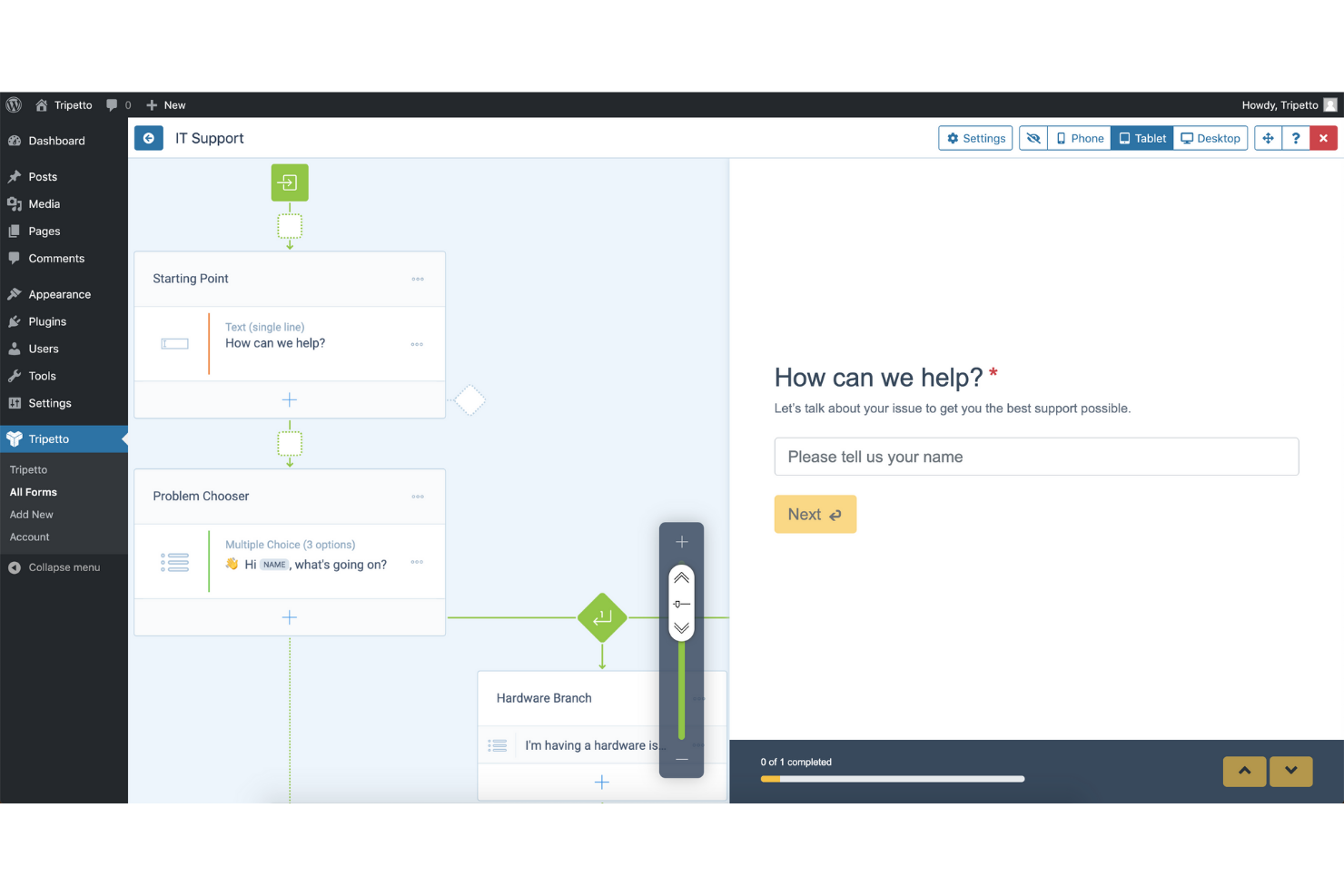
Se desideri creare moduli che sembrino più una conversazione che un questionario, Tripetto è pensato proprio per questa esperienza. Questo plugin è ideale per marketer, educatori e fornitori di servizi che vogliono aumentare il coinvolgimento e i tassi di completamento con moduli interattivi basati su logica. Tripetto si distingue da Gravity Forms offrendo diagrammi di flusso visivi e interfacce in stile chat che guidano l’utente passo dopo passo.
Perché Tripetto è una valida alternativa a Gravity Forms
A differenza dei tradizionali plugin per moduli, Tripetto ti permette di creare form conversazionali che risultano più come interazioni guidate che semplici sondaggi statici. Il generatore visivo a diagrammi di flusso consente di progettare con facilità logiche ramificate e percorsi di domande personalizzati. Apprezzo come Tripetto offra più modalità di visualizzazione per i moduli, inclusi chat, classico e scorrimento automatico, così da adattare l’esperienza al tuo pubblico. Queste funzionalità rendono Tripetto una valida alternativa a Gravity Forms per chiunque sia focalizzato su coinvolgimento e esperienza utente.
Funzionalità principali di Tripetto
Altre funzionalità di Tripetto completano l’offerta per gli utenti WordPress:
- Temi dei moduli personalizzabili: Scegli tra diversi temi di design per adattare il modulo al branding del tuo sito.
- Salvataggio delle risposte in tempo reale: Salva automaticamente i progressi degli utenti mentre compilano i moduli.
- Calcoli avanzati: Aggiungi campi di calcolo per quiz, prezzi o punteggi.
- Protezione antispam: Utilizza strumenti antispam integrati come reCAPTCHA e Akismet.
Integrazioni di Tripetto
Al momento non sono elencate integrazioni native.
Pros and Cons
Pros:
- Alti tassi di completamento
- Modalità unica faccia a faccia
- Nessun salvataggio dati su server esterni
Cons:
- Costoso per più siti
- Meno integrazioni WP avanzate


Se hai bisogno di creare moduli che gestiscano calcoli complessi, Formidable Forms è lo strumento ideale. È particolarmente utile per agenzie, educatori e aziende che desiderano creare calcolatori, moduli per preventivi o applicazioni basate sui dati su WordPress. A differenza di Gravity Forms, Formidable Forms offre campi di calcolo avanzati e opzioni per le formule che consentono di creare moduli interattivi per qualsiasi esigenza, dai calcolatori per mutui agli stimatori d'ordine.
Perché Formidable Forms è una valida alternativa a Gravity Forms
Per chiunque abbia bisogno di moduli che vadano oltre la semplice raccolta di dati, Formidable Forms si distingue per le sue avanzate capacità di calcolo. Puoi creare moduli che eseguono calcoli in tempo reale, utilizzano formule complesse e fanno persino riferimento ai valori di altri campi o inserimenti. Ho scelto Formidable Forms perché consente di creare calcolatori interattivi per preventivi, prezzi o applicazioni personalizzate direttamente all'interno di WordPress. Le opzioni dei campi di calcolo sono molto più flessibili rispetto a quelle disponibili in Gravity Forms, rendendolo una scelta eccellente per i flussi di lavoro basati sui dati.
Caratteristiche principali di Formidable Forms
Oltre ai campi di calcolo avanzati, Formidable Forms offre diverse altre potenti funzionalità per migliorare la tua esperienza nella creazione di moduli:
- Creazione tramite trascinamento: Crea e personalizza facilmente i moduli con un'interfaccia intuitiva basata sul trascinamento, senza bisogno di competenze di programmazione.
- Logica condizionale: Mostra o nascondi campi, sezioni o intere pagine in base ai dati immessi dall'utente per creare moduli dinamici e personalizzati.
- Moduli multipagina: Suddividi i moduli lunghi in più pagine per migliorare l'esperienza dell'utente e aumentare i tassi di completamento dei moduli.
- Modelli di modulo: Accedi a una varietà di modelli di modulo predefiniti per iniziare rapidamente a creare i tipi di modulo più comuni senza partire da zero.
Integrazioni di Formidable Forms
Le integrazioni includono WooCommerce, Salesforce, ActiveCampaign, HubSpot, Mailchimp, Zapier, Twilio, Stripe, PayPal e Authorize.Net.
Pros and Cons
Pros:
- Moduli multipagina complessi
- Personalizzatore visivo dei moduli integrato
- Ideale per creare applicazioni web
Cons:
- L'interfaccia appare molto tecnica
- Costo elevato per le funzionalità avanzate

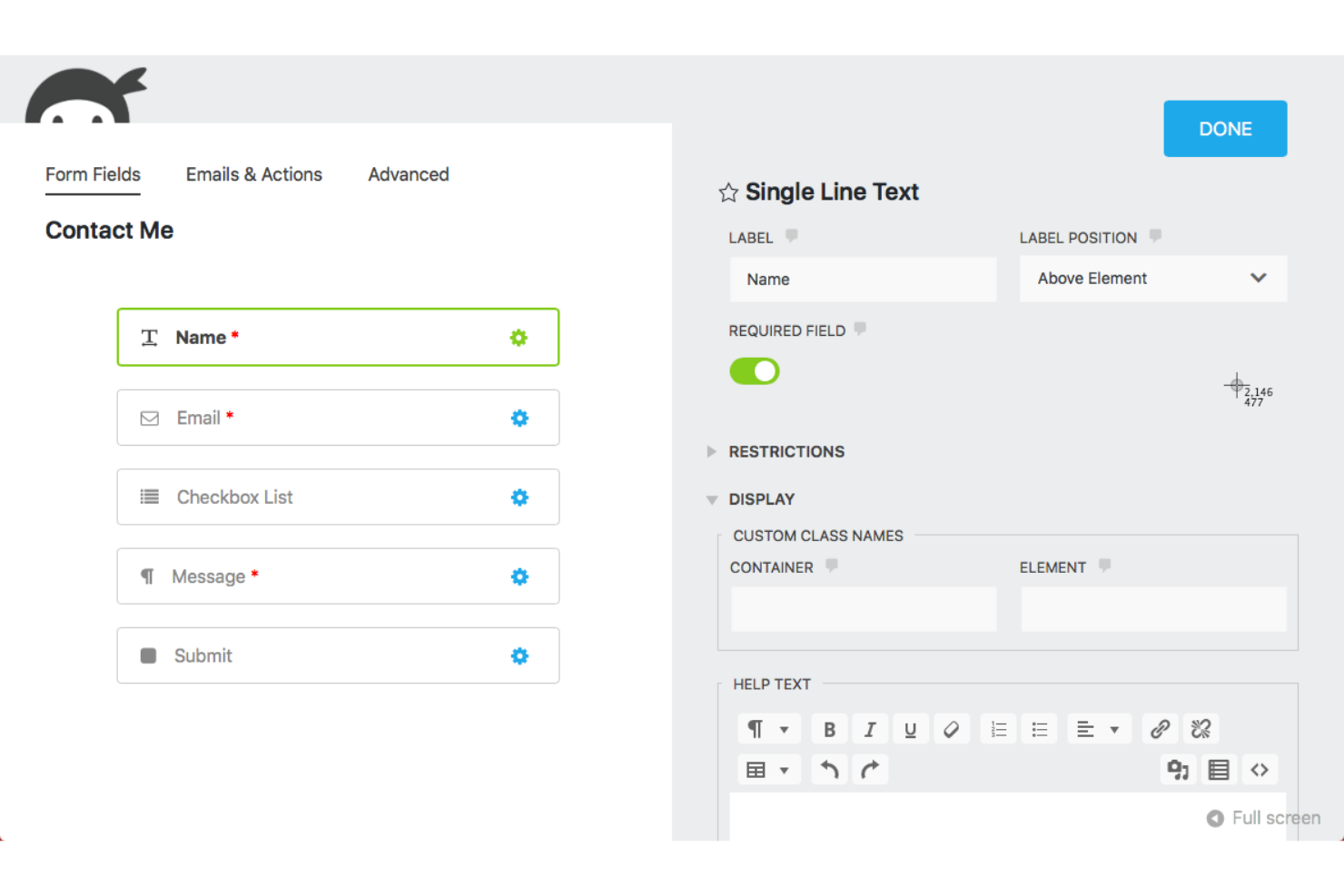
Se desideri un plugin per moduli WordPress con una vera esperienza drag-and-drop, Ninja Forms si distingue. È una scelta ideale per i team che devono creare e personalizzare moduli rapidamente senza toccare il codice. Agenzie e proprietari di siti che danno priorità a layout flessibili e gestione semplice dei campi spesso scelgono Ninja Forms rispetto a Gravity Forms per il suo editor intuitivo e i componenti aggiuntivi modulari.
Perché Ninja Forms è una valida alternativa a Gravity Forms
Ninja Forms è una scelta valida se desideri maggiore controllo sul layout dei moduli e sul posizionamento dei campi. Il suo editor drag-and-drop ti permette di costruire moduli complessi in modo visivo, spostando campi e sezioni esattamente dove vuoi. Ho scelto Ninja Forms per la sua capacità di consentire agli utenti di creare layout a più colonne e gruppi di campi riutilizzabili senza codice personalizzato. Il sistema modulare di componenti aggiuntivi ti permette inoltre di estendere le funzionalità man mano che crescono le tue esigenze, rendendolo un'opzione flessibile per i siti WordPress.
Funzionalità principali di Ninja Forms
Altre funzionalità di Ninja Forms lo rendono una scelta versatile per gli utenti WordPress:
- Logica condizionale: Mostra o nascondi campi, sezioni o intere pagine in base alle risposte degli utenti per creare moduli dinamici.
- Caricamento file: Consenti agli utenti di allegare file direttamente tramite i tuoi moduli, con restrizioni personalizzabili su tipo e dimensione dei file.
- Protezione antispam: Strumenti antispam integrati come Google reCAPTCHA e l'integrazione con Akismet aiutano a ridurre invii indesiderati.
- Notifiche email: Imposta avvisi email automatici sia per gli utenti che per gli amministratori alla ricezione di un modulo inviato.
Integrazioni di Ninja Forms
Le integrazioni includono Mailchimp, HubSpot, Salesforce, Zoho CRM, Pipedrive, Slack, Trello, Google Sheets, PayPal e Stripe.
Pros and Cons
Pros:
- Acquisto add-on a la carte
- Struttura pensata per sviluppatori
- Integrazione perfetta con WP
Cons:
- La logica complessa può risultare instabile
- La personalizzazione dello stile richiede un'estensione a pagamento

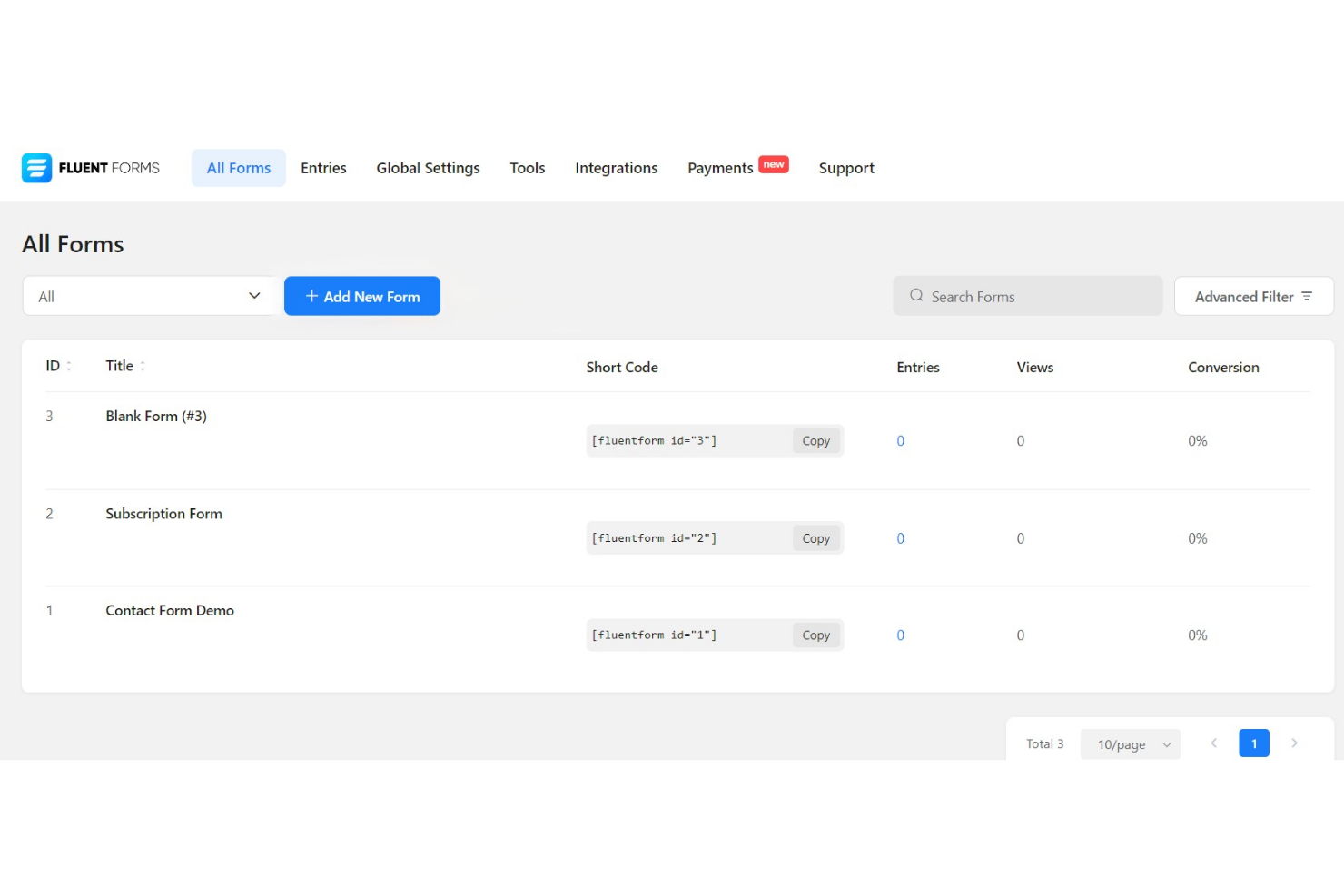
Se cerchi un plugin per moduli WordPress con strumenti di marketing integrati, Fluent Forms merita davvero attenzione. È una soluzione ideale per marketer, agenzie e piccole imprese che desiderano automatizzare la raccolta di lead e collegare i moduli direttamente a piattaforme email e CRM. Fluent Forms si distingue da Gravity Forms offrendo un’ampia gamma di integrazioni marketing native senza la necessità di aggiungere componenti aggiuntivi extra.
Perché Fluent Forms è una valida alternativa a Gravity Forms
A differenza di molti plugin per moduli WordPress, Fluent Forms offre una vasta gamma di integrazioni marketing incluse già nella versione base. Puoi collegare i moduli direttamente a strumenti di email marketing, CRM e piattaforme di automazione senza dover ricorrere a componenti aggiuntivi di terze parti. Ho scelto Fluent Forms perché permette di automatizzare la raccolta di lead e le attività di follow-up direttamente dal pannello di WordPress. Questo lo rende particolarmente utile per marketer e piccole imprese che vogliono ottimizzare i processi di marketing senza installare plugin aggiuntivi.
Funzionalità principali di Fluent Forms
Altre funzionalità di Fluent Forms lo rendono una scelta flessibile per gli utenti WordPress:
- Editor drag-and-drop: Crea e personalizza moduli in modo visuale senza scrivere codice.
- Logica condizionale: Mostra o nascondi campi, sezioni o intere pagine in base alle risposte degli utenti.
- Moduli a più step: Suddividi moduli lunghi in più pagine per migliorarne la compilazione.
- Gestione delle risposte: Visualizza, filtra ed esporta gli invii dei moduli direttamente dalla bacheca di WordPress.
Integrazioni Fluent Forms
Le integrazioni includono Mailchimp, HubSpot, Salesforce, Google Sheets, Dropbox, Trello, Notion, Amazon S3, Authorize.net e WPML.
Pros and Cons
Pros:
- Opzione pagamento una tantum
- Moduli conversazionali inclusi
- Generazione PDF integrata
Cons:
- Minore supporto degli sviluppatori di terze parti
- I calcoli avanzati sono complessi

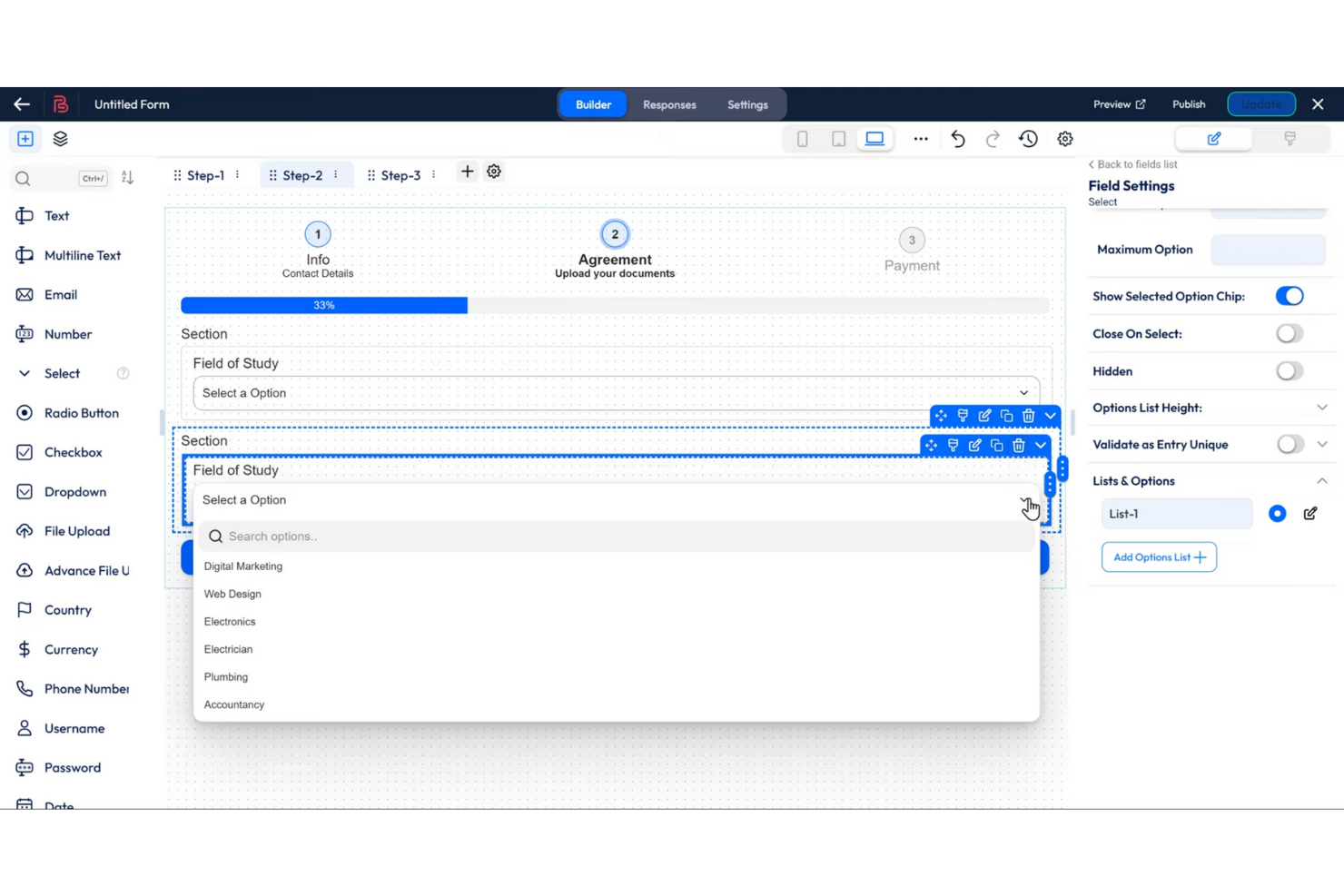
Se il tuo team ha bisogno di creare moduli complessi e multi-step su WordPress, Bit Form è progettato proprio per questo scopo. È particolarmente utile per agenzie, educatori e aziende che desiderano guidare gli utenti attraverso workflow dettagliati o sondaggi. Bit Form si distingue da Gravity Forms offrendo un costruttore visivo di moduli multi-step con logica delle pagine flessibile e indicatori di avanzamento integrati.
Perché Bit Form è una valida alternativa a Gravity Forms
Per i team concentrati sulla creazione di moduli multi-step, Bit Form offre un costruttore visivo dedicato che rende il processo semplice. Puoi aggiungere più pagine, configurare la logica condizionale tra i passaggi e mostrare barre di avanzamento per guidare gli utenti attraverso moduli più lunghi.
Ho scelto Bit Form perché ti dà un controllo dettagliato su ogni fase, permettendoti di personalizzare l'esperienza utente per sondaggi, registrazioni o percorsi di onboarding. Questo approccio è particolarmente utile se hai bisogno di raccogliere informazioni dettagliate in più fasi anziché tutte in una volta.
Funzionalità principali di Bit Form
Altre funzionalità di Bit Form lo rendono un'opzione versatile per gli utenti WordPress:
- Editor drag-and-drop: Organizza e personalizza i campi del modulo visivamente senza codice.
- Supporto Webhook: Invia i dati del modulo ad app o servizi esterni in tempo reale.
- Strumenti antispam integrati: Usa honeypot e reCAPTCHA per ridurre le invii di spam.
- Notifiche email personalizzate: Configura email automatiche attivate dall'invio del modulo.
Integrazioni di Bit Form
Le integrazioni native al momento non sono elencate.
Pros and Cons
Pros:
- Buone integrazioni integrate
- Logica condizionale inclusa
- Caricamento dei file tramite drag-and-drop
Cons:
- Meno tutorial di terze parti
- Può essere leggermente instabile


Se desideri aggiungere quiz interattivi, sondaggi o calcolatrici al tuo sito WordPress, Forminator è pensato per questo. È una scelta ideale per marketer, educatori e creatori di contenuti che vogliono aumentare il coinvolgimento o raccogliere feedback in modo creativo. A differenza di Gravity Forms, Forminator include strumenti integrati per creare quiz e sondaggi dinamici senza componenti aggiuntivi.
Perché Forminator è una valida alternativa a Gravity Forms
Quando quiz e sondaggi interattivi sono una priorità, Forminator offre moduli integrati che rendono queste funzionalità facili da avviare. Puoi creare quiz in stile BuzzFeed, test di conoscenza e sondaggi coinvolgenti direttamente dalla dashboard senza bisogno di ulteriori plugin. Apprezzo che Forminator includa anche moduli calcolatrice, permettendo di creare calcolatrici personalizzate per preventivi o generazione di contatti. Questa attenzione ai contenuti interattivi lo distingue da Gravity Forms, che richiede componenti aggiuntivi o sviluppo personalizzato per funzionalità simili.
Funzionalità principali di Forminator
Altre caratteristiche di Forminator lo rendono una scelta flessibile per i siti WordPress:
- Editor di moduli drag-and-drop: Crea e personalizza i moduli visivamente senza scrivere codice.
- Campo per il caricamento file: Permetti agli utenti di allegare file direttamente tramite i tuoi moduli.
- Protezione antispam: Usa Google reCAPTCHA e campi honeypot per ridurre gli invii indesiderati.
- Notifiche email personalizzate: Imposta email automatiche per amministratori e utenti dopo l'invio dei moduli.
Integrazioni di Forminator
Le integrazioni includono Mailchimp, HubSpot, ActiveCampaign, Google Sheets, Slack, Trello, AWeber, Campaign Monitor, Mailjet e MailerLite.
Pros and Cons
Pros:
- Funzionalità gratuite eccezionali
- Integrazioni di pagamento integrate
- Interfaccia moderna e pulita
Cons:
- Il supporto richiede un piano a pagamento
- La personalizzazione avanzata dello stile è complessa

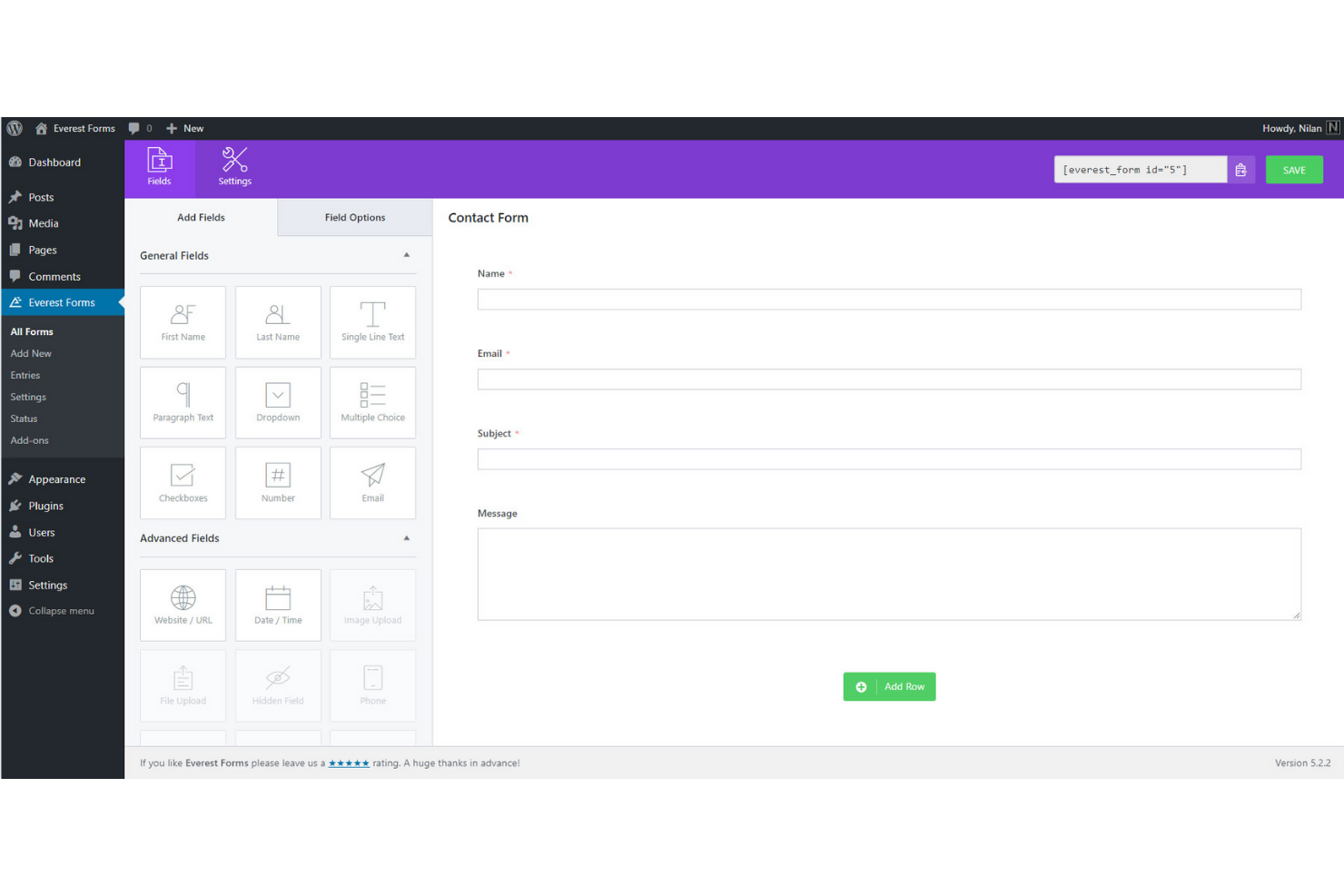
Progettare moduli complessi e multi-colonna su WordPress è molto più semplice con Everest Forms. Questo plugin è una scelta solida per agenzie, enti non profit e aziende che necessitano di layout flessibili per registrazioni, candidature o sondaggi. A differenza di Gravity Forms, Everest Forms ti permette di creare avanzati design multi-colonna con un builder visivo e modelli preimpostati, così puoi adattare la struttura del tuo sito senza codice personalizzato.
Perché Everest Forms è una valida alternativa a Gravity Forms
Se hai bisogno di layout avanzati multi-colonna per i tuoi moduli WordPress, Everest Forms è pensato proprio per questo scopo. Il builder drag-and-drop ti consente di aggiungere, ridimensionare e riordinare le colonne visivamente, così puoi creare moduli complessi senza scrivere una riga di codice. Apprezzo la possibilità di usare modelli di colonne pre-progettati per velocizzare il processo, specialmente per moduli multi-step o domande dettagliate. Questa attenzione alla flessibilità del layout rende Everest Forms una valida alternativa a Gravity Forms, che richiede una configurazione più manuale per design simili.
Caratteristiche principali di Everest Forms
Altre funzionalità di Everest Forms completano le sue capacità per gli utenti WordPress:
- Gestione delle iscrizioni ai moduli: Visualizza, filtra ed esporta tutte le iscrizioni ai moduli dalla dashboard di WordPress.
- Protezione antispam: Utilizza Google reCAPTCHA e token antispam personalizzati per ridurre le invii indesiderati.
- Notifiche email: Imposta avvisi email automatici per amministratori e utenti dopo l'invio dei moduli.
- Campo upload file: Consenti agli utenti di allegare documenti o immagini direttamente tramite i tuoi moduli.
Integrazioni di Everest Forms
Le integrazioni includono Mailchimp, ActiveCampaign, HubSpot, Salesforce, PayPal Standard, Stripe, Google Sheets, Slack, Trello e WooCommerce.
Pros and Cons
Pros:
- Builder drag-and-drop facile
- Interfaccia pulita e intuitiva
- Ottima versione gratuita offerta
Cons:
- Piani di fascia alta costosi
- Libreria di modelli più piccola

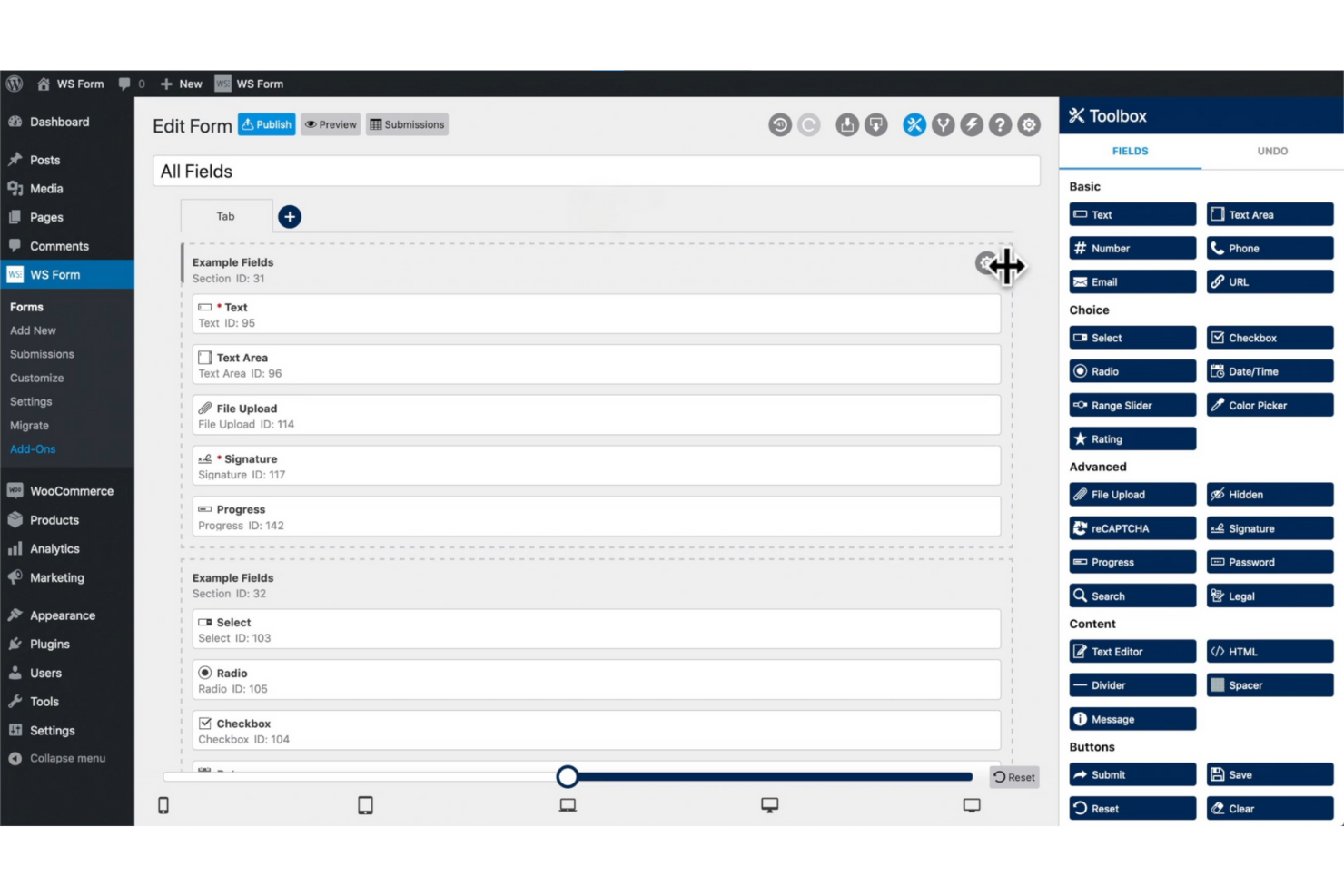
Per i team che necessitano di personalizzazione avanzata e controllo da parte degli sviluppatori, WS Form offre un approccio unico ai moduli WordPress. Questo plugin è pensato per agenzie, freelancer e utenti tecnici che desiderano utilizzare codice personalizzato, hook e strumenti di debug nei loro flussi di lavoro sui moduli. Diversamente da Gravity Forms, WS Form include una console sviluppatore integrata, pieno supporto REST API e controlli dei campi dettagliati per progetti complessi.
Perché WS Form è una valida alternativa a Gravity Forms
Per gli sviluppatori che vogliono maggiore controllo sui moduli WordPress, WS Form si distingue per la sua flessibilità tecnica. La console sviluppatore integrata permette di effettuare il debug dei moduli in tempo reale e testare gli invii senza lasciare la bacheca di WordPress. Apprezzo il fatto che WS Form offra il pieno supporto REST API, così puoi collegare i moduli a flussi di lavoro personalizzati o app esterne. Queste funzionalità orientate agli sviluppatori lo rendono una forte alternativa a Gravity Forms per i team che richiedono personalizzazione avanzata e controllo diretto.
Funzionalità principali di WS Form
Altre funzionalità di WS Form ne espandono le capacità per utenti tecnici e agenzie:
- Costruttore di logica condizionale: crea moduli dinamici che mostrano o nascondono i campi in base all'input dell'utente.
- Moduli multi-pagina: suddividi moduli lunghi in più pagine con indicatori di progresso.
- Strumenti per l'accessibilità: garantisci che i moduli soddisfino gli standard di accessibilità WCAG e ADA.
- Calcoli integrati: aggiungi campi calcolati per preventivi, moduli d'ordine o punteggi personalizzati.
Integrazioni di WS Form
Le integrazioni includono Mailchimp, HubSpot, Salesforce, Google Sheets, Slack, Dropbox, PayPal, Stripe, WooCommerce e Zendesk.
Pros and Cons
Pros:
- Popolamento dinamico dei dati
- Sincronizzazione avanzata con ACF e Meta Box
- Eccellente design responsive
Cons:
- Eccessivo per utenti base
- Selezione di template ridotta


Se hai bisogno di moduli che interagiscono con contenuti dinamici sul tuo sito WordPress, JetFormBuilder è stato creato proprio per questo scopo. Questo plugin è particolarmente adatto ad agenzie, aziende basate sui contenuti e sviluppatori di siti che lavorano con tipi di post personalizzati, profili utente o elenchi. JetFormBuilder si distingue da Gravity Forms permettendoti di creare moduli che visualizzano, aggiornano o creano contenuti dinamici direttamente dal front-end.
Perché JetFormBuilder è una valida alternativa a Gravity Forms
JetFormBuilder è una scelta eccellente se hai bisogno di moduli che lavorano con contenuti dinamici sul tuo sito WordPress. Il plugin ti consente di creare moduli che possono aggiungere, modificare o visualizzare tipi di post personalizzati e dati utente direttamente dal front-end. Mi piace il fatto che puoi utilizzare logica condizionale e popolazione dinamica dei campi per personalizzare i moduli in base al contesto di ciascun utente. Queste funzionalità rendono JetFormBuilder un'alternativa pratica a Gravity Forms per chiunque voglia realizzare siti WordPress interattivi e orientati ai contenuti.
Funzionalità principali di JetFormBuilder
Altre funzionalità di JetFormBuilder completano la sua dotazione per chi costruisce siti WordPress:
- Editor drag-and-drop per moduli: Crea moduli visivamente tramite un editor a blocchi all'interno di WordPress.
- Campi calcolati: Aggiungi campi che eseguono calcoli in tempo reale in base ai dati inseriti dall'utente.
- Notifiche email: Imposta avvisi email automatici per l'invio dei moduli.
- Protezione antispam: Usa strumenti integrati come reCAPTCHA per ridurre le iscrizioni spam.
Integrazioni JetFormBuilder
Le integrazioni includono MailPoet, ConvertKit, MailerLite, Moosend, HubSpot, PayPal, WooCommerce e Stripe.
Pros and Cons
Pros:
- Integrazione profonda con Crocoblock
- Ottimo per directory complesse
- Funziona perfettamente con Gutenberg
Cons:
- L’interfaccia utente è molto tecnica
- Eccessivo per siti semplici
Altre alternative a Gravity Forms
Ecco alcune ulteriori alternative a Gravity Forms che non sono state inserite nel mio elenco, ma che vale comunque la pena prendere in considerazione:
- Contact Form 7
Ideale per la personalizzazione semplice basata su codice
- AR Forms
Il migliore con dashboard di analisi integrata
- weForms
Ideale per il rapido dispiegamento di moduli


Come Valuto le Alternative a Gravity Forms
Valuto gli strumenti su due livelli: le funzionalità essenziali come la logica condizionale e le integrazioni con i software di gestione progetti che trasformano un modulo di richiesta cliente in un'attività di progetto reale, e i fattori differenzianti che fanno emergere le migliori opzioni.
Funzionalità Principali (Requisiti Minimi per Questa Lista)
Quando seleziono gli strumenti per la mia lista, ne valuto ciascuno su una scala da 0 (non offre la funzionalità) a 5 (eccelle in quest'area) per ciascuna caratteristica fondamentale elencata qui sotto. Poi, calcolo il punteggio totale dello strumento in percentuale. Ogni strumento deve raggiungere un punteggio totale minimo del 65% per essere considerato nell'elenco.
- Builder moduli drag-and-drop: Esamino la varietà di tipi di campo e le opzioni di layout disponibili, come la possibilità di costruire un modulo creativo multi-pagina con sezioni per consegne, tempistiche e budget.
- Logica Condizionale: Sono importanti le regole di ramificazione e visualizzazione/nascondimento di ciascun strumento—ad esempio, instradare un modulo di richiesta modifica verso diversi campi di approvazione a seconda della fase di progetto selezionata dal compilatore.
- Workflow & Integrazioni: Valuto come le sottomissioni si connettono agli strumenti di gestione progetti (PM) e collaborazione, verificando se un modulo completato in Typeform o Jotform può inviare direttamente un'attività in Asana o Trello.
- Distribuzione Multi-Canale: Lo strumento dovrebbe permettere di incorporare i moduli nei portali di progetto, condivisione tramite link diretto o lancio come pop-up—senza costringere all’uso esclusivo di WordPress come fa Gravity Forms.
- Notifiche & Gestione delle Sottomissioni: Verifico la presenza di avvisi email personalizzabili, una dashboard leggibile e filtrabile delle risposte e opzioni di esportazione così che i project manager possano monitorare e gestire le richieste in arrivo in un unico luogo.
- Caricamento File & Pagamenti: È essenziale supportare il caricamento di allegati come file di design o SOW, oltre alla riscossione dei pagamenti tramite gateway come Stripe o PayPal per i moduli di fatturazione destinati ai clienti.
Una volta che ho una lista di strumenti che soddisfano questi criteri, considero ciò che distingue ogni piattaforma.
Fattori Differenzianti (Cosa Distingue i Vendor)
Ecco come confronto le diverse soluzioni:
Funzionalità Distintive
I workflow di approvazione sono un grande elemento distintivo—cerco strumenti che permettano a un modulo di intake di progetto di innescare una catena di revisione a più fasi senza dover ricorrere ad una piattaforma separata per gestire le approvazioni. Conta anche la personalizzazione white-label per le agenzie che inviano moduli ai clienti esterni i quali si aspettano un'esperienza raffinata e brandizzata. Valuto inoltre la profondità dell’analisi dati, come il monitoraggio dell’abbandono che mostra dove i compilatori lasciano un modulo creativo particolarmente lungo, aiutando i PM a ottimizzare i moduli nel tempo.
Oltre le Funzionalità
Osservo attentamente la struttura dei prezzi—alcune piattaforme fanno pagare per modulo, altre per sottomissione, e il modello giusto dipende se il tuo team gestisce pochi moduli ad alto volume o dozzine di moduli più piccoli per diversi clienti. La flessibilità nella distribuzione è altrettanto importante, soprattutto per i team che incorporano moduli in wiki Confluence, pagine Notion o portali di progetto autonomi. Verifico infine la collaborazione e la gestione utenti, cercando permessi basati sui ruoli che consentano ai coordinatori di gestire le sottomissioni mantenendo però l’editing dei moduli riservato ai PM.
Perché cercare un'alternativa a Gravity Forms?
Sebbene Gravity Forms sia una buona scelta tra i plugin per moduli WordPress, esistono diversi motivi per cui alcuni utenti cercano soluzioni alternative. Potresti cercare un'alternativa a Gravity Forms perché…
- Vuoi moduli più coinvolgenti dal punto di vista visivo o conversazionali
- Hai bisogno dell'elaborazione dei pagamenti integrata senza dover aggiungere estensioni
- Hai bisogno di integrazioni native con specifici strumenti di marketing
- Cerchi un piano gratuito con moduli illimitati
- Hai bisogno di un processo di configurazione iniziale più semplice per gli utenti non tecnici
- Vuoi una logica dei moduli o opzioni di ramificazione più flessibili
Se ti riconosci in una di queste situazioni, sei nel posto giusto. Il mio elenco include diverse opzioni di plugin per moduli WordPress più adatte ai team che affrontano queste difficoltà con Gravity Forms e cercano soluzioni alternative.
Caratteristiche principali di Gravity Forms
Ecco alcune delle caratteristiche principali di Gravity Forms, per aiutarti a mettere a confronto ciò che offrono le soluzioni alternative:
- Generatore di moduli con trascinamento
- Logica condizionale per campi modulo dinamici
- Moduli multipagina con indicatori di avanzamento
- Campi per il caricamento di file da allegare
- Protezione antispam integrata con reCAPTCHA
- Notifiche via e-mail e risposte automatiche
- Integrazione con i principali gateway di pagamento
- Moduli di registrazione e accesso degli utenti
- Ampia raccolta di componenti aggiuntivi per le integrazioni
- Gestione dettagliata degli invii e opzioni di esportazione