

10 migliori alternative a GitBook per la documentazione nel 2026

Alternative a GitBook - Selezione


Una valida alternativa a GitBook offre al tuo team strumenti flessibili per la documentazione, collaborazione in tempo reale e una facile integrazione con i flussi di lavoro esistenti. Se stai cercando alternative a GitBook, probabilmente stai riscontrando dei limiti in termini di personalizzazione, collaborazione o scalabilità della documentazione con la crescita dei tuoi progetti. La soluzione all-in-one giusta può aiutarti a gestire la documentazione dei progetti, la documentazione tecnica, le basi di conoscenza o i riferimenti alle API senza gli ostacoli che hai incontrato in GitBook.
In questo elenco troverai opzioni adatte a team di dimensioni diverse, stack tecnologici differenti ed esigenze specifiche, sia che tu voglia un'interfaccia più semplice con una curva di apprendimento più breve, sia che ti servano funzionalità di documentazione più avanzate in linea con il tuo flusso di lavoro e gli obiettivi del progetto.
Che cos'è GitBook?
GitBook è una piattaforma software per la documentazione che aiuta i team a creare, organizzare e condividere conoscenze in un formato strutturato e basato sul web. Supporta la modifica collaborativa, il controllo delle versioni e l'integrazione con strumenti come GitHub. I team utilizzano GitBook per gestire la documentazione tecnica, le wiki interne e le guide dei prodotti. La sua interfaccia intuitiva e il supporto per Markdown lo rendono accessibile sia agli utenti tecnici sia a quelli non tecnici che devono mantenere una documentazione aggiornata e consultabile.
Tabella di confronto delle alternative a GitBook
Questa tabella di confronto riassume i dettagli sui prezzi delle principali alternative a GitBook che ho selezionato.
| Tool | Best For | Trial Info | Price | ||
|---|---|---|---|---|---|
| 1 | Ideale per la creazione di documentazione multilingue | Prova gratuita di 14 giorni + demo gratuita disponibile | Prezzi su richiesta | Website | |
| 2 | Ideale per collaborazione di team veloce e in tempo reale | Prova gratuita di 14 giorni + piano gratuito disponibile | Da $6/utente/mese (fatturato annualmente) | Website | |
| 3 | Ideale per combinare documenti con la gestione dei progetti | Piano gratuito + demo gratuita disponibile | Da $10/membro/mese (fatturazione annuale) | Website | |
| 4 | Ideale per documentazione API e per sviluppatori | Prova gratuita di 14 giorni disponibile | Da $80/mese | Website | |
| 5 | Ideale per progettare e documentare API | Piano gratuito + prova gratuita di 14 giorni disponibile | Da $44/mese (fatturato annualmente) | Website | |
| 6 | Ideale per la condivisione di conoscenza su scala aziendale | Prova gratuita di 7 giorni + piano gratuito disponibile | A partire da $5.42/utente/mese | Website | |
| 7 | Ideale per la documentazione open source auto-ospitata | Demo gratuita disponibile | Piano gratuito per sempre | Website | |
| 8 | Ideale per documentazione leggera e basata su file | Gratuito, open-source | Gratuito | Website | |
| 9 | Ideale per pubblicare documentazione tecnica dai repository di codice | Prova gratuita di 30 giorni disponibile | Da $150/mese | Website | |
| 10 | Ideale per siti documentali personalizzati basati su React | Open source gratuito + demo gratuita disponibile | Gratuito | Website |
Perché fidarsi dei nostri consigli sui software
Il nostro team testa e recensisce software dal 2012. In quanto project manager noi stessi, sappiamo quanto sia difficile — e importante — scegliere il software giusto.
Per questa guida, abbiamo valutato gli strumenti attraverso test pratici e ricerche indipendenti, assegnando un punteggio agli strumenti in base ai nostri criteri di selezione. Ci basiamo inoltre sulle competenze di leader di pensiero del settore e di professionisti attivi nella gestione dei progetti.
Le nostre recensioni riflettono il nostro giudizio editoriale umano, non un discorso di vendita.
Revisori esperti:
Recensioni delle alternative a GitBook
Di seguito trovi i miei riepiloghi dettagliati delle alternative a GitBook incluse nella mia selezione. Le mie recensioni offrono uno sguardo approfondito sulle funzionalità, sui casi d’uso migliori e sulle integrazioni di ciascuna piattaforma, per aiutarti a trovare quella più adatta al tuo team.

Ideale per la creazione di documentazione multilingue
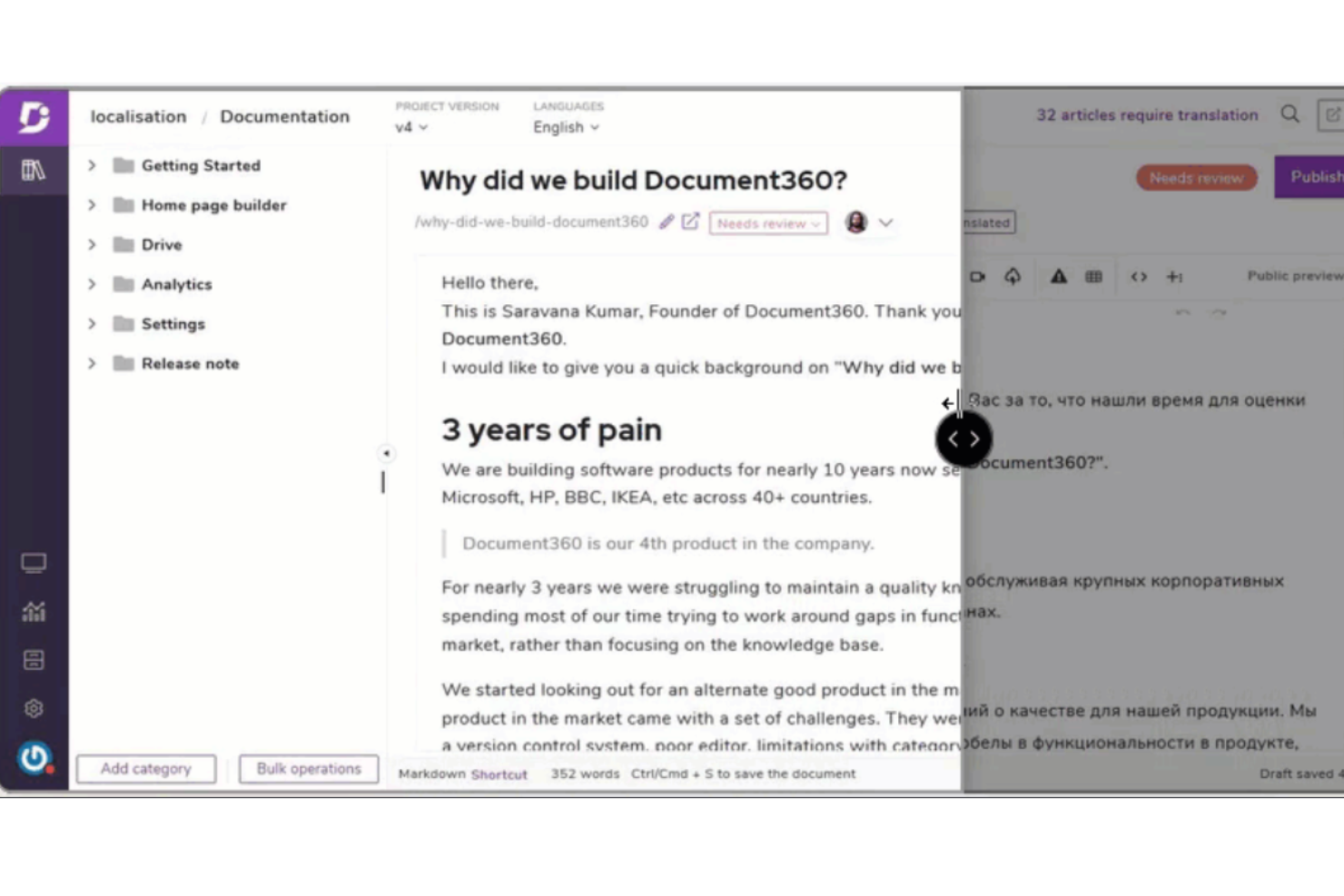
Document360 è una piattaforma di knowledge base progettata per i team che necessitano di una documentazione di prodotto o di processo organizzata, facilmente accessibile e ben strutturata. Se stai cercando un’alternativa a GitBook con opzioni di gestione dei contenuti e personalizzazione più avanzate, Document360 merita sicuramente attenzione.
Per chi è ideale Document360?
Ideale per team di prodotto globali e technical writer che devono gestire documentazione multilingue su larga scala.
Perché Document360 è una buona alternativa a GitBook
Ho scelto Document360 per la documentazione multilingue perché gestisce i flussi di lavoro di traduzione direttamente all’interno della piattaforma: nessuna esportazione, nessun bisogno di strumenti di localizzazione di terze parti. Quando il mio team aggiunge una nuova versione linguistica di un articolo, Document360 la collega all’originale in modo che la cronologia delle versioni rimanga intatta in tutte le lingue. Apprezzo anche i controlli di pubblicazione per lingua, che ci permettono di pubblicare la versione inglese mentre la traduzione francese è ancora in revisione. Per i team di prodotto globali che pubblicano documenti in più regioni, questo tipo di flusso di lavoro strutturato per la localizzazione è qualcosa che GitBook non offre con la stessa profondità.
Funzionalità principali di Document360
- Ricerca potenziata dall’AI: Fornisce risultati di ricerca contestuali e basati sull’intento su tutta la knowledge base.
- Dominio e branding personalizzati: Configura un portale di documentazione con marchio e dominio personale e stile personalizzato.
- Analisi a livello di articolo: Monitora il coinvolgimento dei lettori, le query di ricerca e le prestazioni degli articoli tramite una dashboard integrata.
- Ruoli collaborativi nel team: Assegna ruoli di autore, editor e revisore con permessi basati sui ruoli tra i diversi progetti.
Integrazioni di Document360
Document360 offre integrazioni native con Slack, Microsoft Teams, Zendesk, Freshdesk, Intercom, Google Drive, Disqus, Olark e Segment. È disponibile anche un’API per integrazioni personalizzate.
Pros and Cons
Pros:
- Strutturazione avanzata delle categorie per documentazioni di grandi dimensioni
- Editor sia Markdown che WYSIWYG
- Flusso di lavoro per la localizzazione integrato per le traduzioni
Cons:
- Personalizzazione dei template articolo limitata
- Nessuno strumento integrato per diagrammi o flowchart
New Product Updates from Document360

Document360 Adds Drive and Eddy AI Workflow Updates
Document360 adds Drive file renaming, Eddy AI email ticket notifications, and Drive image support in AI Capture. These updates simplify file management, support escalation, and visual content editing. For more information, visit Document360’s official site.
 .
.
Nuclino
Ideale per collaborazione di team veloce e in tempo reale

Nuclino è progettato per team che necessitano di collaborare su documentazione e basi di conoscenza in tempo reale. È particolarmente utile per startup dinamiche, team di prodotto e gruppi distribuiti che desiderano aggiornamenti istantanei e un'esperienza di modifica leggera. A differenza di GitBook, Nuclino punta su velocità e semplicità, rendendo facile mantenere tutti aggiornati senza configurazioni complesse.
Perché Nuclino è una valida alternativa a GitBook
Per i team che hanno bisogno di muoversi rapidamente e collaborare in tempo reale, Nuclino offre un approccio unico alla documentazione. L'ho scelto come alternativa a GitBook perché ogni modifica appare istantaneamente per tutti gli utenti, quindi non ci sono ritardi o dubbi sull'ultima versione. Il suo workspace unificato permette di organizzare documenti, wiki e note di progetto con ricerca e collegamento istantanei. Questo rende Nuclino una scelta solida per i gruppi che danno priorità alla velocità e alla collaborazione live sopra ogni altra cosa.
Funzionalità principali di Nuclino
Altre funzionalità di Nuclino aiutano i team a gestire e strutturare la documentazione in modo più efficiente:
- Vista grafico: Visualizza le relazioni tra pagine e argomenti in un grafico interattivo.
- Modifica Markdown: Formatta i contenuti rapidamente usando la sintassi markdown per garantire coerenza tra i documenti.
- Cronologia delle versioni: Consulta e ripristina versioni precedenti di qualsiasi documento per monitorare le modifiche nel tempo.
- Controlli di accesso: Imposta i permessi per workspace, team e singole pagine per gestire visibilità e diritti di modifica.
Integrazioni di Nuclino
Le integrazioni includono Slack, Google Drive, Microsoft Teams, GitHub, GitLab, Jira, Zoom, Google Calendar, Dropbox e altri.
Pros and Cons
Pros:
- Modifica in tempo reale sincronizzata istantaneamente per tutti gli utenti
- Supporto Markdown per una formattazione rapida e coerente
- Interfaccia minimalista che riduce le distrazioni durante la modifica
Cons:
- Nessuna funzionalità per siti di documentazione pubblici
- Nessuna autorizzazione granulare per le singole pagine

Notion
Ideale per combinare documenti con la gestione dei progetti

Notion riunisce documentazione, gestione dei progetti e collaborazione del team in un unico spazio di lavoro. È una soluzione ideale per team tecnologici, startup e gruppi interdisciplinari che vogliono gestire documenti, attività e knowledge base fianco a fianco. Se hai bisogno di un'organizzazione flessibile e di modifica in tempo reale oltre ciò che offre GitBook, Notion si distingue grazie alle sue pagine personalizzabili, database integrati e un ecosistema in crescita di integrazioni ed estensioni.
Perché Notion è una valida alternativa a GitBook
Notion si distingue per i team che desiderano gestire documentazione e attività di progetto in un unico posto. L'ho scelto come alternativa a GitBook perché consente di creare documenti, wiki e bacheche di attività tutto nello stesso spazio di lavoro. La funzione database permette di collegare direttamente la documentazione alle attività di progetto, facilitando la connessione di tutte le informazioni. Questo approccio è particolarmente utile per i team che devono tenere traccia dei progressi e consultare la documentazione senza cambiare strumento.
Funzionalità principali di Notion
Altre funzionalità di Notion lo rendono una scelta flessibile per la gestione della documentazione e della conoscenza:
- Supporto Markdown: Puoi scrivere e formattare la documentazione usando la sintassi markdown per uno stile rapido e coerente.
- Cronologia delle versioni delle pagine: Tieni traccia delle modifiche e ripristina versioni precedenti di qualsiasi pagina per mantenere la documentazione accurata.
- Permessi e controllo degli accessi: Imposta permessi granulari per pagine e database per controllare chi può visualizzare o modificare i contenuti.
- Galleria dei modelli: Accedi a una libreria di modelli predefiniti per wiki, note riunioni e documentazione di prodotto per velocizzare l'avvio.
Integrazioni Notion
Le integrazioni includono Slack, Google Drive, Trello, Asana, GitHub, Zoom, Figma, Typeform, Intercom, Salesforce e altro ancora.
Pros and Cons
Pros:
- Combina documenti, wiki e bacheche di progetto
- Modifica collaborativa in tempo reale per i team
- Incorporamento di contenuti multimediali per immagini e file
Cons:
- L'esportazione dei contenuti in altri formati è basilare
- Nessun confronto delle versioni integrato per le pagine
Archbee
Ideale per documentazione API e per sviluppatori
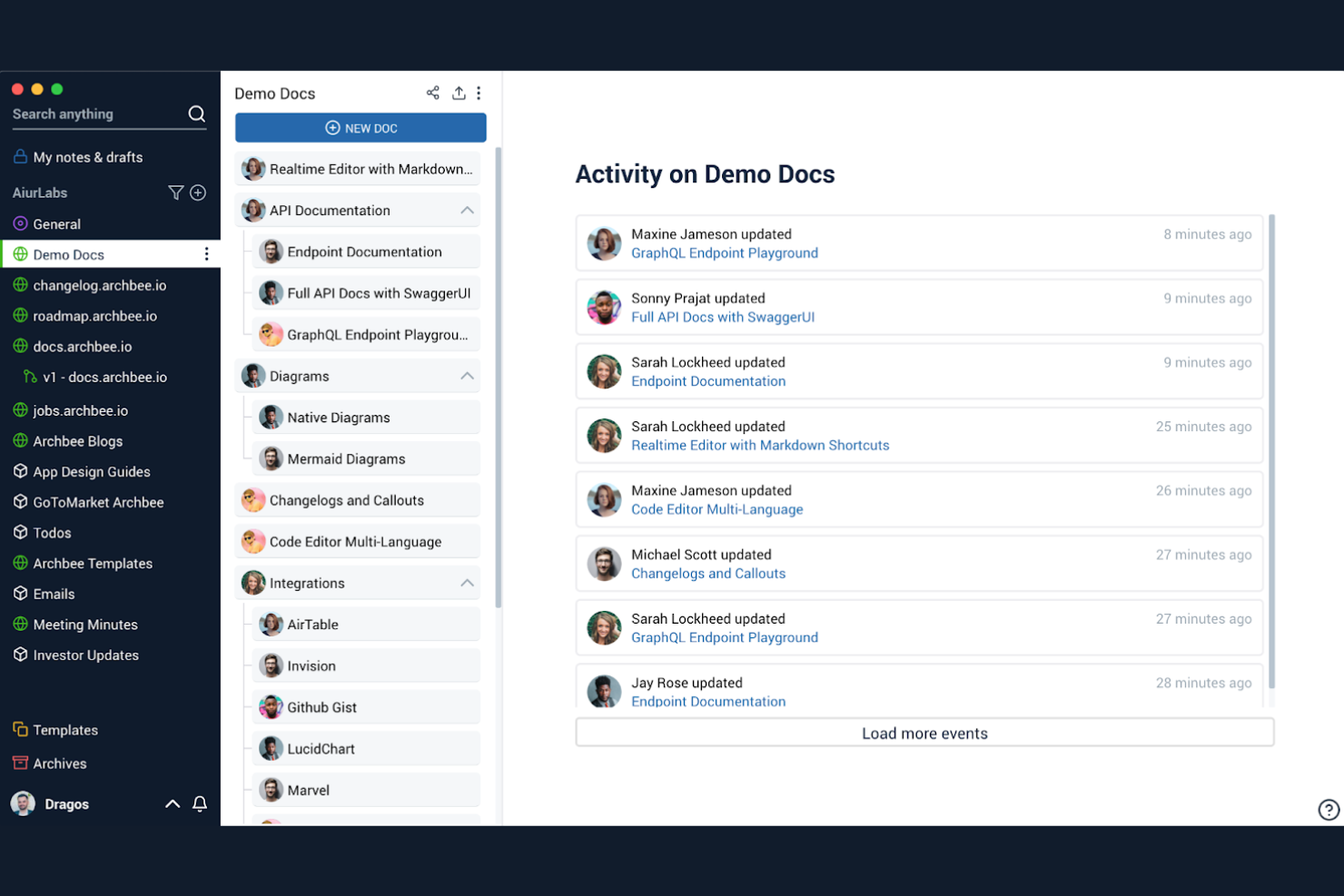
Quando hai bisogno di una piattaforma di documentazione pensata per i team tecnici, Archbee si distingue per la sua attenzione alla documentazione delle API e degli sviluppatori. È particolarmente adatto ad aziende SaaS, team di ingegneria e responsabili di prodotto che devono pubblicare riferimenti API interattivi ed esempi di codice insieme alla conoscenza interna. A differenza di GitBook, Archbee offre strumenti integrati per l'esplorazione delle API e widget avanzati focalizzati sugli sviluppatori, che rendono la documentazione tecnica più interattiva e utile.
Perché Archbee è una valida alternativa a GitBook
Se il tuo team deve documentare API o flussi di lavoro per sviluppatori, Archbee offre strumenti specializzati che GitBook non propone. Ho scelto Archbee perché permette di incorporare riferimenti API interattivi direttamente nei documenti, facilitando agli sviluppatori l'esplorazione degli endpoint e il test delle richieste. La piattaforma supporta anche blocchi di codice con evidenziazione della sintassi ed esempi di codice live, che sono essenziali per la documentazione tecnica. Queste funzionalità rendono Archbee una scelta solida per i team che vogliono costruire e condividere documentazione rivolta agli sviluppatori.
Funzionalità principali di Archbee
Altre funzionalità di Archbee aiutano i team tecnici a gestire e pubblicare la documentazione in modo più efficace:
- Supporto per domini personalizzati: Pubblica la documentazione sotto il tuo dominio personalizzato per un aspetto più professionale.
- Strumenti di collaborazione per il team: Assegna ruoli, menziona colleghi e commenta direttamente all'interno dei documenti per coordinare il lavoro.
- Modelli di documento: Utilizza modelli predefiniti per standardizzare la nuova documentazione e velocizzare la creazione di contenuti.
- Dashboard di analytics: Monitora le visualizzazioni delle pagine e il coinvolgimento degli utenti grazie alle analytics integrate per la tua documentazione.
Integrazioni Archbee
Le integrazioni includono GitHub, GitLab, Bitbucket, Slack, Google Drive, Jira, Confluence, Notion, Trello e altro ancora.
Pros and Cons
Pros:
- Explorer API interattivo per testare gli endpoint in tempo reale
- Analytics dei documenti per tracciare il coinvolgimento dei lettori
- Modelli predefiniti per tipi di documentazione tecnica
Cons:
- A volte l'editor è lento con documenti di grandi dimensioni
- La funzione di ricerca può non trovare contenuti annidati

Ideale per progettare e documentare API
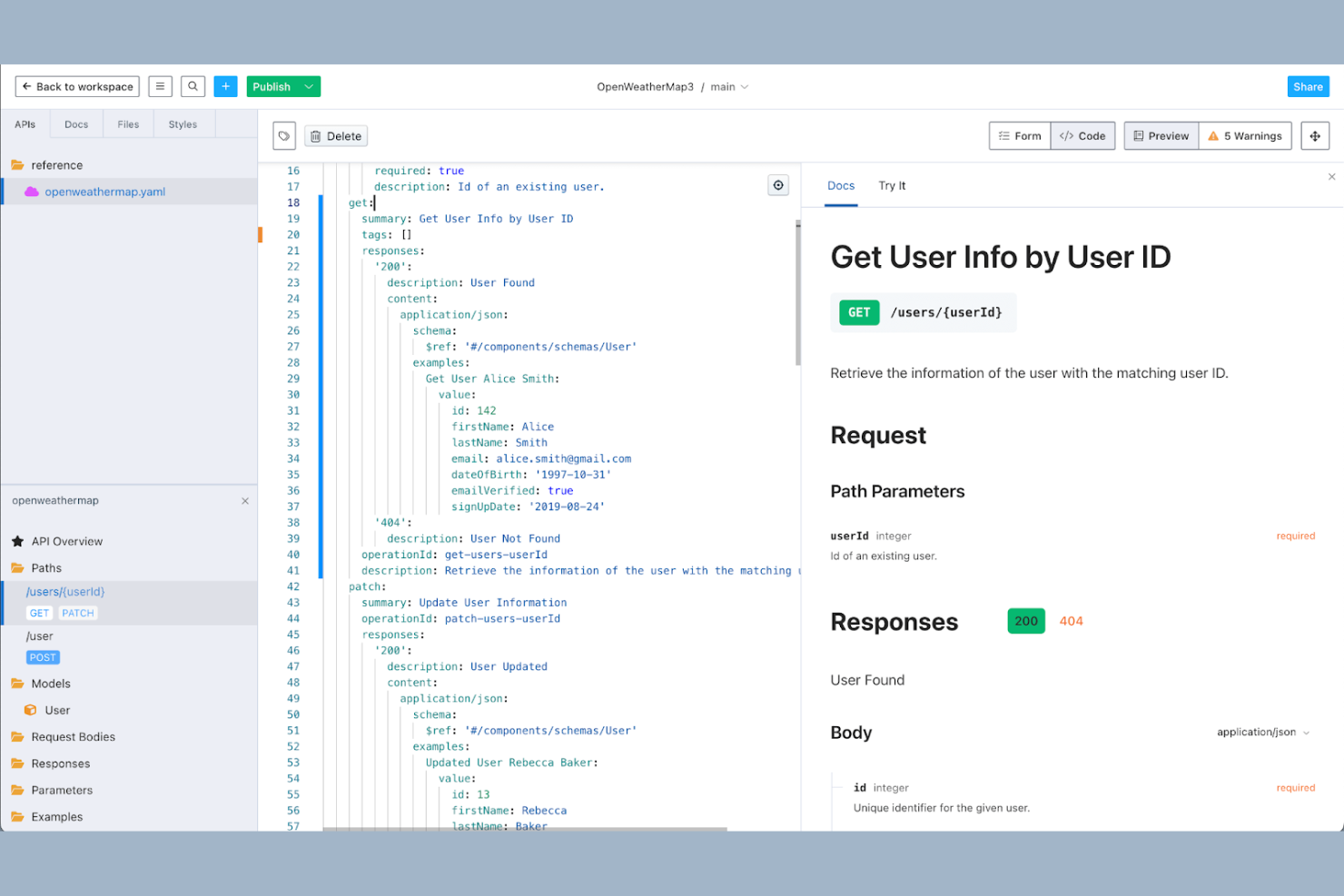
I progettisti di API e i team di sviluppatori che devono creare, gestire e documentare API possono trovare Stoplight particolarmente utile. La piattaforma si distingue per i suoi strumenti visuali di modellazione delle API e il supporto avanzato per la specifica OpenAPI, rendendo più semplice progettare e documentare API complesse in modo collaborativo. A differenza di GitBook, Stoplight è progettato appositamente per i flussi di lavoro legati alle API, offrendo funzionalità che aiutano i team a standardizzare, simulare e pubblicare la documentazione delle API da un'unica area di lavoro.
Perché Stoplight è una valida alternativa a GitBook
Per i team focalizzati sulla progettazione e documentazione delle API, Stoplight offre una suite di strumenti specializzati che va oltre ciò che offre GitBook. Ho scelto Stoplight perché combina la modellazione visiva delle API con la generazione immediata della documentazione, rendendo più facile mantenere le API documentate in modo accurato e aggiornato. La piattaforma supporta la simulazione degli endpoint e la validazione delle definizioni OpenAPI, aiutando i team a testare e perfezionare le API prima del lancio. Se la tua priorità principale è gestire l'intero ciclo di vita delle API all'interno del workflow di documentazione, Stoplight propone funzionalità specificamente progettate per questa esigenza.
Funzionalità principali di Stoplight
Altre funzionalità di Stoplight aiutano i team a gestire e pubblicare la documentazione delle API in modo più efficiente:
- Integrazione con il controllo versione: Collega i tuoi progetti API ai repository Git per il tracciamento delle modifiche e la collaborazione.
- Temi personalizzati per la documentazione: Applica branding e temi personalizzati alla documentazione API pubblicata.
- Controlli di accesso basati sui ruoli: Imposta i permessi per la modifica, la visualizzazione e la pubblicazione della documentazione per tutto il team.
- Componenti riutilizzabili per la progettazione API: Crea e gestisci modelli condivisi, parametri e risposte per assicurare coerenza tra diverse API.
Integrazioni di Stoplight
Le integrazioni includono GitHub, GitLab, Bitbucket, Azure DevOps, CircleCI e altri.
Pros and Cons
Pros:
- Mocking integrato per il test degli endpoint API
- Integrazione con controllo versione tramite repository Git
- Componenti riutilizzabili per progettazione API coerente
Cons:
- Le opzioni di esportazione della documentazione sono limitate
- Nessun supporto integrato per documentazione non API

Ideale per la condivisione di conoscenza su scala aziendale
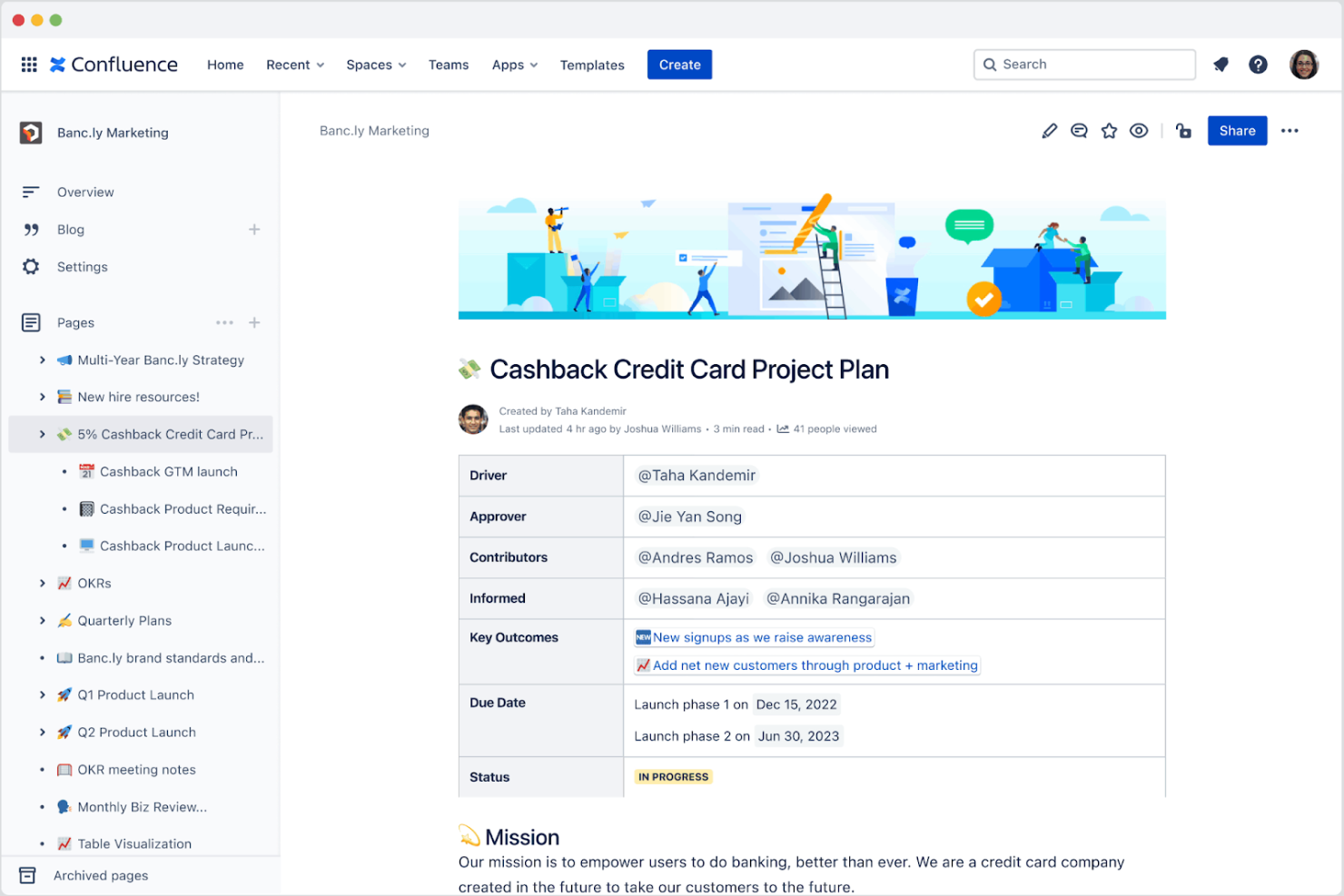
Se la tua organizzazione ha bisogno di una piattaforma di documentazione che possa scalare tra dipartimenti e team, Confluence è progettato per la condivisione della conoscenza a livello aziendale. È particolarmente indicato per team IT, HR e delle operazioni aziendali che devono organizzare, collaborare e mettere in sicurezza grandi volumi di contenuti interni. A differenza di GitBook, Confluence offre permessi dettagliati, gerarchie avanzate delle pagine e una profonda integrazione con gli strumenti Atlassian per supportare flussi di lavoro complessi.
Perché Confluence è una buona alternativa a GitBook
Per le organizzazioni che devono gestire la conoscenza su larga scala, Confluence offre funzionalità progettate per la collaborazione e il controllo aziendale. Apprezzo il modo in cui i permessi dettagliati consentono di gestire l'accesso per diversi team, dipartimenti o anche singoli utenti. Il sistema avanzato di gerarchia delle pagine rende facile organizzare migliaia di documenti in modo logico e sicuro. Se cerchi una soluzione di documentazione in grado di gestire ambienti complessi e multi-team, Confluence porta struttura e governance che GitBook non offre.
Funzionalità chiave di Confluence
Altre funzionalità di Confluence aiutano i team a creare, gestire e collaborare sulla documentazione su larga scala:
- Libreria di modelli: Accedi a un'ampia gamma di modelli predefiniti per note riunione, piani di progetto e pagine di documentazione.
- Commenti inline: Aggiungi commenti direttamente sulle pagine per facilitare feedback e discussioni senza uscire dal documento.
- Analisi delle pagine: Monitora le visualizzazioni delle pagine e le metriche di coinvolgimento per capire come viene utilizzato il contenuto.
- Macro: Incorpora contenuti dinamici come liste di attività, calendari e issue Jira direttamente nelle pagine di documentazione.
Integrazioni di Confluence
Le integrazioni includono Jira Software, Trello, Slack, Microsoft Teams, Google Drive, Dropbox, Bitbucket, Zoom, Salesforce, GitHub e altro ancora.
Pros and Cons
Pros:
- Integrazione profonda con Jira per il monitoraggio dei progetti
- I commenti inline favoriscono discussioni strutturate tra i team
- Le analisi delle pagine forniscono informazioni sull'engagement dei contenuti
Cons:
- L'esportazione in PDF o Word può avere problemi di formattazione
- Condivisione pubblica limitata senza configurazioni aggiuntive


Per i team che desiderano il pieno controllo sul proprio ambiente di documentazione, BookStack offre una piattaforma open source, auto-ospitata. È una scelta valida per i dipartimenti IT, i redattori tecnici e le organizzazioni orientate alla privacy che devono gestire contenuti sensibili o proprietari sulla propria infrastruttura. A differenza di GitBook, BookStack ti offre accesso diretto ai tuoi dati, opzioni di personalizzazione flessibili e la possibilità di adattare le autorizzazioni alle esigenze della tua organizzazione.
Perché BookStack è una valida alternativa a GitBook
Se cerchi una piattaforma di documentazione su cui avere il pieno controllo e che puoi ospitare autonomamente, BookStack si distingue come una solida alternativa a GitBook. Ho scelto BookStack perché è open source e progettato appositamente per l'auto-ospitamento, dandoti la proprietà diretta dei tuoi dati e della tua infrastruttura. Il suo sistema di autorizzazioni basato sui ruoli ti permette di gestire gli accessi a tutti i livelli, dai libri alle singole pagine. Per le organizzazioni con esigenze rigorose di sicurezza o conformità, il modello auto-ospitato di BookStack e il codice sorgente trasparente offrono una flessibilità che GitBook non può eguagliare.
Funzionalità principali di BookStack
Altre funzionalità di BookStack aiutano i team a organizzare e mantenere la loro documentazione in modo più efficiente:
- Editor WYSIWYG: Crea e modifica i contenuti utilizzando un editor visuale che supporta una formattazione avanzata.
- Annidamento dei contenuti: Struttura la documentazione con libri, capitoli e pagine per una gerarchia chiara.
- Cronologia delle revisioni: Tieni traccia e ripristina le versioni precedenti di qualsiasi pagina o capitolo.
- Supporto multilingue: Offri documentazione in più lingue per team internazionali.
Integrazioni BookStack
Le integrazioni native al momento non sono indicate.
Pros and Cons
Pros:
- Completamente open source, senza vincoli del fornitore
- L'auto-ospitamento garantisce la massima privacy dei dati
- Organizzazione gerarchica tra libri, capitoli e pagine
Cons:
- Richiede configurazione e manutenzione manuale del server
- La condivisione pubblica richiede ulteriori passaggi di configurazione

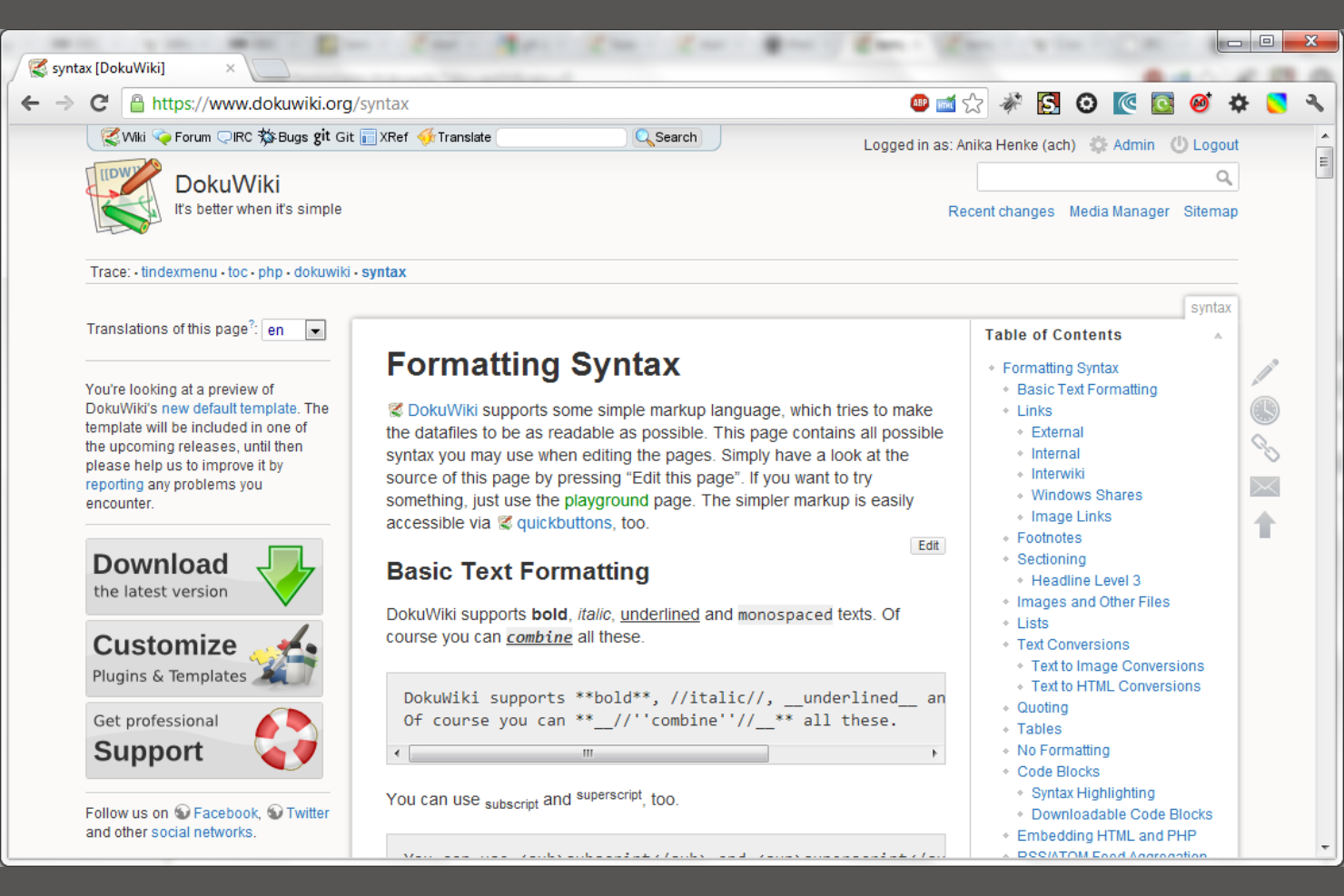
DokuWiki è una piattaforma di documentazione basata su file che non richiede un database, rendendola particolarmente interessante per i team IT e le piccole imprese alla ricerca di una soluzione leggera e a bassa manutenzione. È ideale per organizzazioni che desiderano mantenere la documentazione semplice, portatile e facile da eseguire il backup. A differenza di GitBook, DokuWiki memorizza tutto in file di testo semplice, così puoi gestire e migrare i tuoi contenuti senza dipendenze complesse.
Perché DokuWiki è una valida alternativa a GitBook
Per i team che cercano uno strumento di documentazione senza la complessità di un database, DokuWiki offre un approccio unico. Ho scelto DokuWiki perché salva tutti i contenuti in file di testo semplice, rendendo backup e migrazioni semplici e trasparenti. I suoi requisiti minimi per il server ti permettono di farlo funzionare su quasi qualsiasi ambiente di hosting, anche condiviso. Se valorizzi la portabilità e vuoi evitare infrastrutture complesse, il design basato su file di DokuWiki è un'alternativa pratica a GitBook.
Funzionalità principali di DokuWiki
Altre funzionalità di DokuWiki aiutano i team a gestire e presentare la loro documentazione in modo più efficace:
- Liste di Controllo degli Accessi: Imposta permessi granulari per utenti e gruppi per controllare chi può visualizzare o modificare specifiche pagine.
- Gestore Media: Carica, organizza e incorpora immagini e file direttamente all'interno della tua documentazione.
- Sistema di Plugin: Espandi la funzionalità principale con una vasta gamma di plugin sviluppati dalla community.
- Controllo delle Versioni: Traccia automaticamente le modifiche e consente agli utenti di visualizzare o ripristinare versioni precedenti delle pagine.
Integrazioni DokuWiki
Le integrazioni native al momento non sono elencate.
Pros and Cons
Pros:
- Nessun database richiesto per l'installazione o l'utilizzo
- Controllo accessi integrato per la gestione degli utenti
- Prestazioni rapide anche con grandi raccolte di documentazione
Cons:
- Interfaccia predefinita datata rispetto agli strumenti moderni
- Supporto limitato per la modifica collaborativa in tempo reale

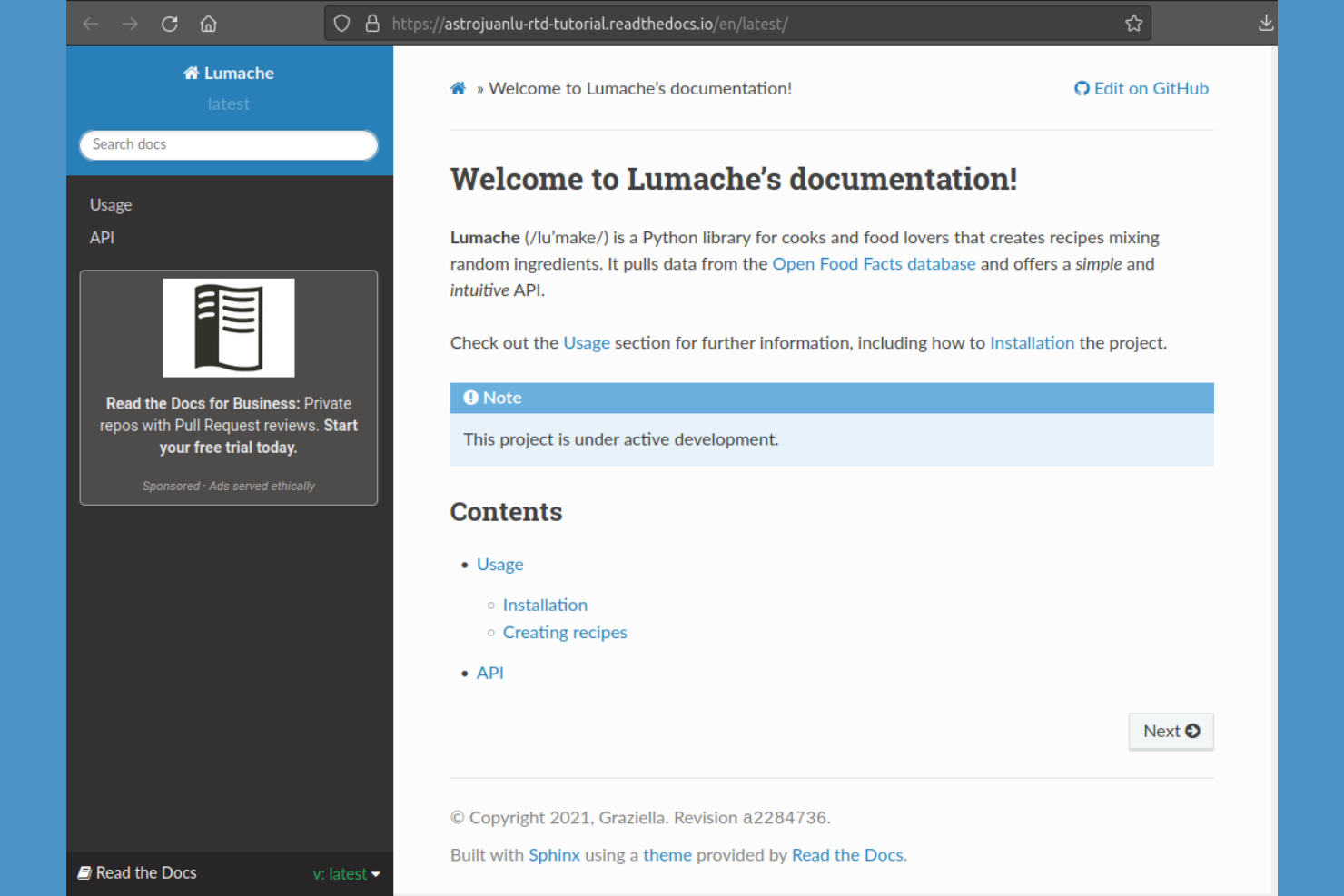
Se hai bisogno di pubblicare documentazione tecnica direttamente dai tuoi repository di codice, Read the Docs è stato creato appositamente per questo flusso di lavoro. È una soluzione ideale per i team di sviluppo software e i progetti open-source che desiderano automatizzare la creazione e l’aggiornamento della documentazione da GitHub, GitLab o Bitbucket. A differenza di GitBook, Read the Docs gestisce la documentazione versionata e si integra perfettamente con la tua pipeline CI/CD per una consegna continua della documentazione.
Perché Read the Docs è una valida alternativa a GitBook
Quando il tuo team deve pubblicare documentazione tecnica direttamente dai repository di codice, Read the Docs è stato progettato per questo tipo di workflow. Ho scelto Read the Docs perché crea e ospita automaticamente la documentazione da GitHub, GitLab o Bitbucket, mantenendo i tuoi documenti sincronizzati con il codice. Supporta inoltre la documentazione versionata, così puoi mantenere documenti separati per ogni release o branch. Per i team che vogliono automatizzare la pubblicazione della documentazione come parte del processo di sviluppo, Read the Docs offre un workflow strettamente integrato con il moderno controllo versioni.
Funzionalità principali di Read the Docs
Altre funzionalità di Read the Docs aiutano i team a gestire e distribuire la documentazione in modo più efficiente:
- Domini personalizzati: Assegna un nome a dominio personalizzato al tuo sito di documentazione per un branding coerente.
- Funzionalità di ricerca: Abilita la ricerca full-text su tutta la documentazione pubblicata.
- Supporto webhook: Attiva la creazione della documentazione automaticamente tramite eventi o servizi esterni.
- Esportazione PDF ed ePub: Genera versioni scaricabili della documentazione in formato PDF ed ePub.
Integrazioni di Read the Docs
Le integrazioni includono GitHub, Bitbucket, GitLab e l’API di Read the Docs per integrazioni personalizzate.
Pros and Cons
Pros:
- Hosting gratuito per progetti open-source
- Opzioni integrate di esportazione PDF ed ePub
- Compatibilità con i generatori di documentazione Sphinx e MkDocs
Cons:
- Temi personalizzati richiedono competenze avanzate di configurazione
- L’hosting di progetti privati richiede un piano a pagamento

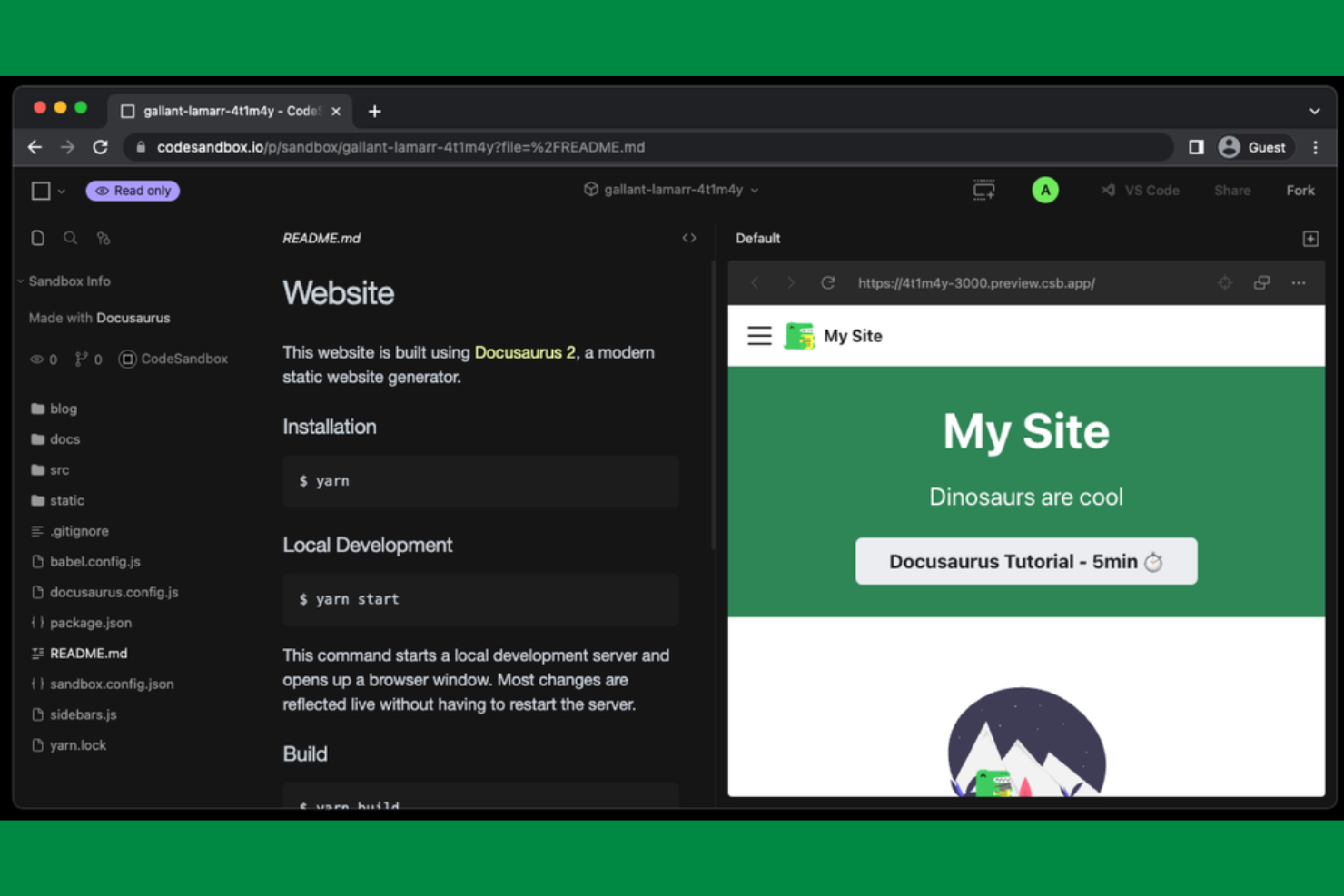
Per i team che desiderano avere il pieno controllo sull’aspetto e la personalizzazione del proprio sito di documentazione, Docusaurus offre un framework basato su React pensato proprio per la personalizzazione. È particolarmente apprezzato da team di ingegneri e da chi scrive documentazione tecnica che vogliono creare siti documentali ricchi di funzionalità e in linea con il proprio brand, sfruttando strumenti di sviluppo web moderni. A differenza di GitBook, Docusaurus consente di estendere e modificare ogni aspetto del proprio sito documentale tramite componenti React e plugin personalizzati.
Perché Docusaurus è una valida alternativa a GitBook
Se hai bisogno di un sito di documentazione che rispecchi il tuo brand e le tue esigenze tecniche, Docusaurus offre il pieno controllo grazie alla sua architettura basata su React. Mi piace che si possano creare layout personalizzati, aggiungere componenti interattivi e utilizzare i propri plugin React per estendere le funzionalità. Il sistema di temi permette di perfezionare ogni dettaglio visivo, dalla navigazione ai blocchi di codice. Per chi desidera un sito di documentazione che sia davvero un'estensione del proprio prodotto, Docusaurus offre una flessibilità che GitBook non può eguagliare.
Funzionalità principali di Docusaurus
Alcune altre funzionalità di Docusaurus aiutano i team a gestire e pubblicare la documentazione tecnica in modo più efficiente:
- Supporto Markdown: Scrivi e organizza la documentazione tramite file Markdown per una modifica rapida e il controllo delle versioni.
- Documentazione versionata: Gestisci più versioni della documentazione per supportare diversi rilasci di prodotto.
- Ricerca integrata: Aggiungi una barra di ricerca al sito per consentire agli utenti di trovare rapidamente i contenuti rilevanti.
- Internazionalizzazione (i18n): Crea e gestisci documentazione in più lingue per team internazionali.
Integrazioni Docusaurus
Le integrazioni native non sono attualmente elencate.
Pros and Cons
Pros:
- Contenuti basati su Markdown per modifiche rapide
- Generazione di siti statici integrata per un hosting veloce
- Open source con un'attiva comunità di contributori
Cons:
- Richiede conoscenze di React e Node.js per il deployment
- Funzionalità di analisi integrate o tracciamento utenti limitate
Altre alternative a GitBook
Ecco alcune ulteriori alternative a GitBook che non sono entrate nella mia selezione, ma che vale comunque la pena prendere in considerazione:
- Mintlify
Ideale per la generazione automatica della documentazione
- Postman
Ideale per integrare la documentazione API con i flussi di lavoro di test
- Featurebase
Ideale per raccogliere e organizzare i feedback degli utenti


Come valuto le alternative a GitBook
Valuto le alternative a GitBook su due livelli: le funzionalità di base che uno strumento deve offrire, come la co-modifica in tempo reale, la cronologia delle versioni e i controlli di accesso, e gli elementi distintivi che lo rendono adatto ai team tecnici di progetto.
Funzionalità principali (requisiti fondamentali per questo elenco)
Quando seleziono gli strumenti per il mio elenco, assegno a ciascuno un punteggio su una scala da 0 (non offre la funzionalità) a 5 (eccelle in questo ambito) per ogni funzionalità principale indicata di seguito. Poi calcolo il punteggio totale dello strumento sotto forma di percentuale. Ogni strumento deve raggiungere un punteggio totale minimo del 65% per essere preso in considerazione.
- Modifica collaborativa dei documenti: cerco funzionalità di co-scrittura in tempo reale che consentano a più responsabili di progetto e ingegneri di commentare le specifiche, suggerire modifiche e taggare i revisori senza conflitti tra versioni.
- Struttura gerarchica della conoscenza: ogni strumento dovrebbe supportare pagine e spazi nidificati, così che i team possano organizzare guide operative, documenti degli sprint e wiki di progetto in strutture logiche.
- Cronologia e controllo delle versioni: tenere traccia di chi ha modificato un documento dei requisiti prima di un rilascio è importante, quindi verifico se i team possono visualizzare le differenze, ripristinare le pagine e risalire alle modifiche.
- Pubblicazione e controlli di accesso: le autorizzazioni granulari sono importanti: valuto se sia possibile limitare la modifica ai responsabili, consentendo al contempo ai portatori di interesse o ai clienti di accedere in sola lettura a pagine specifiche.
- Ricerca e individuazione: la ricerca a testo completo in tutti gli spazi di lavoro è fondamentale per trovare quel singolo riferimento API o registro delle decisioni sepolto tre livelli più in profondità in uno spazio di progetto.
- Integrazioni e contenuti incorporati: valuto le connessioni native con strumenti come Jira, GitHub, Slack e Figma, oltre alla possibilità di incorporare blocchi di codice, diagrammi o dati aggiornati in tempo reale direttamente nei documenti.
Una volta ottenuto un elenco di strumenti che soddisfano questi criteri, considero ciò che distingue ciascuna piattaforma.
Fattori distintivi (ciò che differenzia i fornitori)
Ecco come confronto i diversi fornitori:
Funzionalità di spicco
La sincronizzazione con Git è un importante elemento distintivo per i team con una forte componente ingegneristica. Cerco la sincronizzazione bidirezionale con GitHub o GitLab, in modo che la documentazione rimanga aggiornata insieme al codice. Vale la pena valutare anche le funzionalità di scrittura basate sull'IA, soprattutto negli strumenti in grado di riassumere lunghi registri delle decisioni o redigere note di rilascio a partire dai contenuti esistenti. Verifico inoltre la presenza di analisi dei contenuti che segnalino le pagine obsolete, poiché i wiki di progetto tendono a diventare rapidamente obsoleti una volta concluso un lancio.
Oltre le funzionalità
Il supporto alla migrazione è una delle prime cose che valuto. Passare da GitBook significa trasferire potenzialmente centinaia di pagine nidificate, quindi verifico se una piattaforma offre l'importazione diretta da GitBook, Confluence o file Markdown. Anche la sicurezza è importante, soprattutto per i team che gestiscono documenti sull'architettura interna o specifiche precedenti al lancio. Cerco la conformità SOC 2, SSO/SAML e i registri di audit. Vale la pena verificare anche la trasparenza dei prezzi, poiché alcuni strumenti applicano costi per ogni redattore, mentre altri penalizzano l'aggiunta di ospiti con accesso in sola lettura.
Perché cercare un'alternativa a GitBook?
Sebbene GitBook sia una buona scelta per la documentazione software, esistono diversi motivi per cui alcuni utenti cercano soluzioni alternative. Potresti essere alla ricerca di un'alternativa a GitBook perché…
- Hai bisogno di funzionalità avanzate per la documentazione delle API
- Il tuo team richiede controlli granulari degli accessi
- Vuoi maggiori possibilità di personalizzazione del branding
- Hai bisogno di un supporto migliore per grandi raccolte di documentazione
- Il tuo flusso di lavoro dipende da integrazioni che GitBook non offre
- Hai bisogno di opzioni per la modifica offline o l'esportazione
Se ti riconosci in una di queste situazioni, sei nel posto giusto. Il mio elenco contiene diverse opzioni software per la documentazione più adatte ai team che affrontano queste difficoltà con GitBook e sono alla ricerca di soluzioni alternative.
Funzionalità principali di GitBook
Ecco alcune delle funzionalità principali di GitBook, per aiutarti a confrontare ciò che offrono le soluzioni alternative:
- Modifica collaborativa con aggiornamenti in tempo reale
- Gerarchia e navigazione strutturate dei documenti
- Creazione di contenuti basata su Markdown
- Cronologia delle versioni e monitoraggio delle modifiche
- Spazi di documentazione pubblici e privati
- Supporto per domini personalizzati per la documentazione pubblicata
- Funzionalità di ricerca in tutta la documentazione
- Blocchi di contenuto e contenuti multimediali incorporabili
- Gestione dei ruoli e delle autorizzazioni degli utenti
- Integrazione con GitHub per la sincronizzazione dei contenuti