

Le 10 migliori alternative a Docusign recensite nel 2026

Elenco delle migliori alternative a Docusign


La gestione dei contratti e delle approvazioni è parte integrante del mantenimento del ritmo dei progetti, ma dover sollecitare le firme e monitorare lo stato dei documenti può rallentare tutto. Se DocuSign non è la soluzione più adatta al tuo team, a causa dei prezzi, delle integrazioni o dei limiti del flusso di lavoro, esistono molte alternative valide da prendere in considerazione.
In base alla mia esperienza nel testare le piattaforme per la firma elettronica, le opzioni migliori fanno molto più che raccogliere firme. Supportano una collaborazione più fluida, tracciati di audit più chiari, tempi di completamento più rapidi e meno colli di bottiglia quando i documenti devono essere esaminati, approvati e finalizzati. Ho esaminato sia le alternative gratuite a DocuSign sia i concorrenti a pagamento per aiutarti a confrontare le opzioni migliori.
In questo articolo ti presenterò i principali concorrenti di DocuSign, evidenziando i punti di forza di ogni strumento e il modo in cui le sue funzionalità supportano i flussi di lavoro reali dei progetti. Troviamo la soluzione più adatta al tuo team.
Che cos'è Docusign?
Docusign è un software per la gestione dei documenti e la firma elettronica che ti aiuta a gestire gli accordi elettronici in modo efficiente. Viene comunemente utilizzato dai professionisti del settore legale, immobiliare e finanziario come strumento rapido e sicuro per firmare i documenti.
Funzionalità come la firma da remoto, il monitoraggio in tempo reale e la conformità agli standard legali semplificano i flussi di lavoro e garantiscono la sicurezza.
Tabella comparativa delle alternative a Docusign
Questa tabella comparativa mette in evidenza i dettagli sui prezzi delle migliori alternative a Docusign da me selezionate.
| Tool | Best For | Trial Info | Price | ||
|---|---|---|---|---|---|
| 1 | Ideale per l'integrazione con QuickBooks Online | Piano gratuito disponibile | A partire da $10/mittente/mese (fatturato annualmente) | Website | |
| 2 | Ideale per la conformità legale e i modelli | Prova gratuita disponibile | A partire da $20/mese; i piani API partono da $49/mese | Website | |
| 3 | Ideale per la gestione dei contratti basata sull'intelligenza artificiale | Demo gratuita disponibile | Prezzi su richiesta | Website | |
| 4 | Ideale per flussi di lavoro di firma elettronica semplici e a basso costo | Prova gratuita disponibile | A partire da $4/mese | Website | |
| 5 | Ideale per l'automazione dei documenti nei flussi di lavoro CRM | Prova gratuita di 14 giorni + piano gratuito + demo gratuita disponibile | A partire da $19/utente/mese (con fatturazione annuale) | Website | |
| 6 | Ideale per l'integrazione con Dropbox | Prova gratuita disponibile | A partire da $9.99/utente/mese (con fatturazione annuale) | Website | |
| 7 | Ideale per le firme elettroniche nei settori regolamentati | Piano gratuito + prova gratuita di 14 giorni + demo disponibile | A partire da $10/utente/mese | Website | |
| 8 | Ideale per la verifica dell'identità di livello aziendale | Demo gratuita disponibile | Prezzi su richiesta | Website | |
| 9 | Ideale per la sicurezza garantita dalla crittografia completa da punto a punto | Piano gratuito + prova gratuita di 30 giorni + demo disponibile | Da $10/utente/mese | Website | |
| 10 | Ideale per firme elettroniche con codice sorgente aperto e ospitate autonomamente | Piano gratuito disponibile | A partire da $9.99/mese (con fatturazione annuale) | Website |
Perché fidarsi dei nostri consigli sui software
Il nostro team testa e recensisce software dal 2012. In quanto project manager noi stessi, sappiamo quanto sia difficile — e importante — scegliere il software giusto.
Per questa guida, abbiamo valutato gli strumenti attraverso test pratici e ricerche indipendenti, assegnando un punteggio agli strumenti in base ai nostri criteri di selezione. Ci basiamo inoltre sulle competenze di leader di pensiero del settore e di professionisti attivi nella gestione dei progetti.
Le nostre recensioni riflettono il nostro giudizio editoriale umano, non un discorso di vendita.
Revisori esperti:
Recensioni delle migliori alternative a Docusign
Di seguito trovi le mie sintesi dettagliate delle migliori alternative a Docusign incluse nel mio elenco. Le mie recensioni offrono una panoramica dettagliata delle funzionalità principali, dei pro e dei contro, delle integrazioni e dei casi d’uso ideali di ogni strumento, per aiutarti a trovare quello più adatto a te.

Signwell
Ideale per l'integrazione con QuickBooks Online
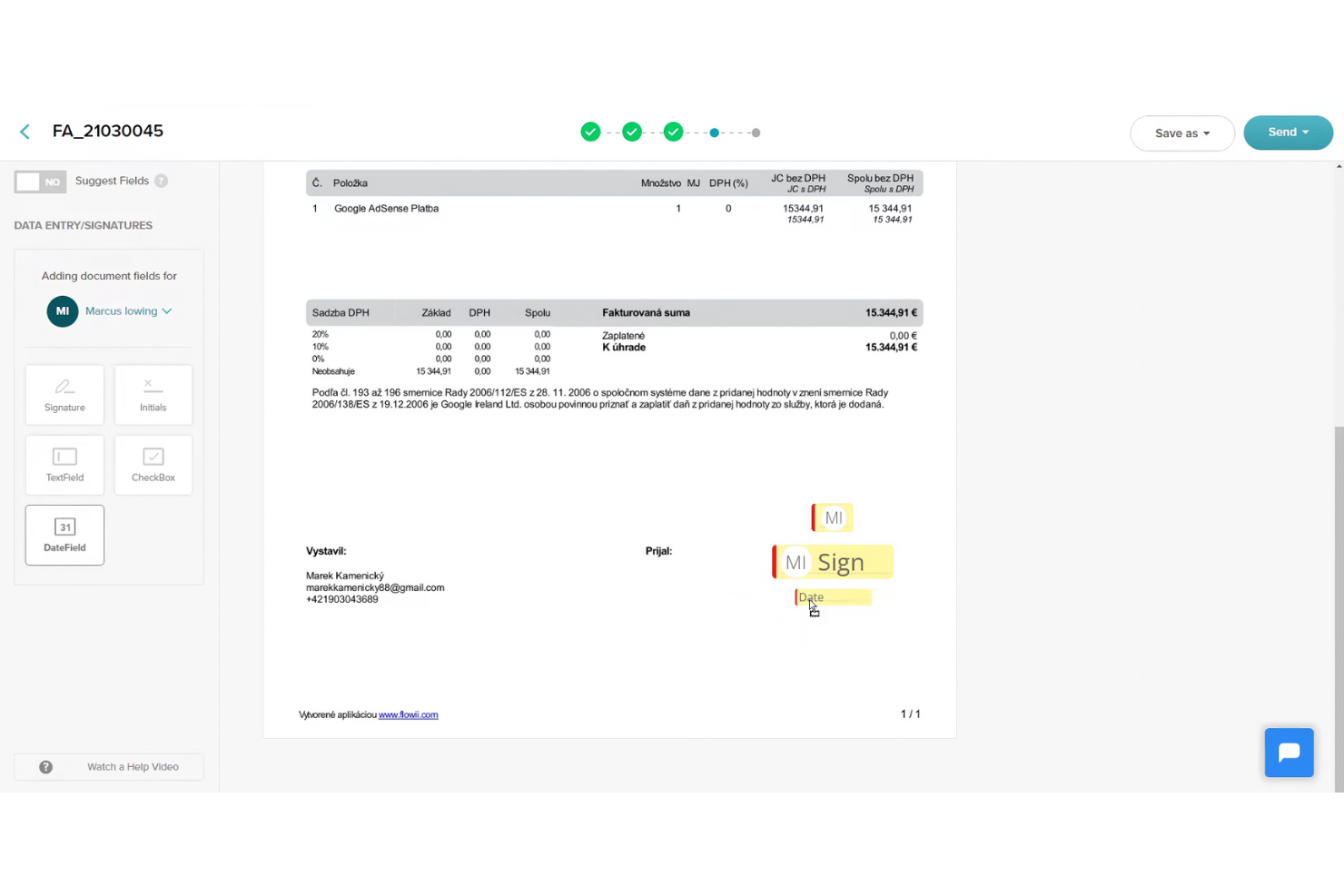
A differenza di Adobe Sign, che è un'ottima opzione per le grandi aziende, SignWell è uno strumento per la firma elettronica progettato per le piccole e medie imprese che necessitano di funzionalità efficienti per la firma dei documenti. Aiuta gli utenti a creare, gestire e firmare documenti online, rendendo il processo rapido e giuridicamente vincolante.
Perché è una buona alternativa a Docusign: SignWell offre l'integrazione con QuickBooks Online, un vantaggio per le aziende che già utilizzano QuickBooks per le proprie esigenze contabili. La piattaforma mette a disposizione modelli personalizzabili che fanno risparmiare tempo e garantiscono una formattazione coerente dei documenti. Le notifiche in tempo reale tengono il team aggiornato sullo stato dei documenti, contribuendo a evitare ritardi. Grazie all'attenzione alla semplicità, SignWell consente di gestire i documenti senza complessità superflue.
Funzionalità e integrazioni principali:
Le funzionalità includono i registri di controllo, che forniscono registrazioni dettagliate delle interazioni con i documenti. La piattaforma consente di configurare flussi di lavoro per la firma, assicurando che i documenti vengano firmati nell'ordine corretto e con le autorizzazioni appropriate. Apprezzerai anche l'editor con funzione di trascinamento per personalizzare facilmente i documenti.
Le integrazioni includono QuickBooks Online, Google Drive, Dropbox, Zapier, Microsoft 365 e altro.
Pros and Cons
Pros:
- Si integra con QuickBooks Online
- Editor semplice con funzione di trascinamento
- Fornisce registri di controllo
Cons:
- Funzionalità di reportistica di base
- Non è ideale per le grandi aziende

Ideale per la conformità legale e i modelli
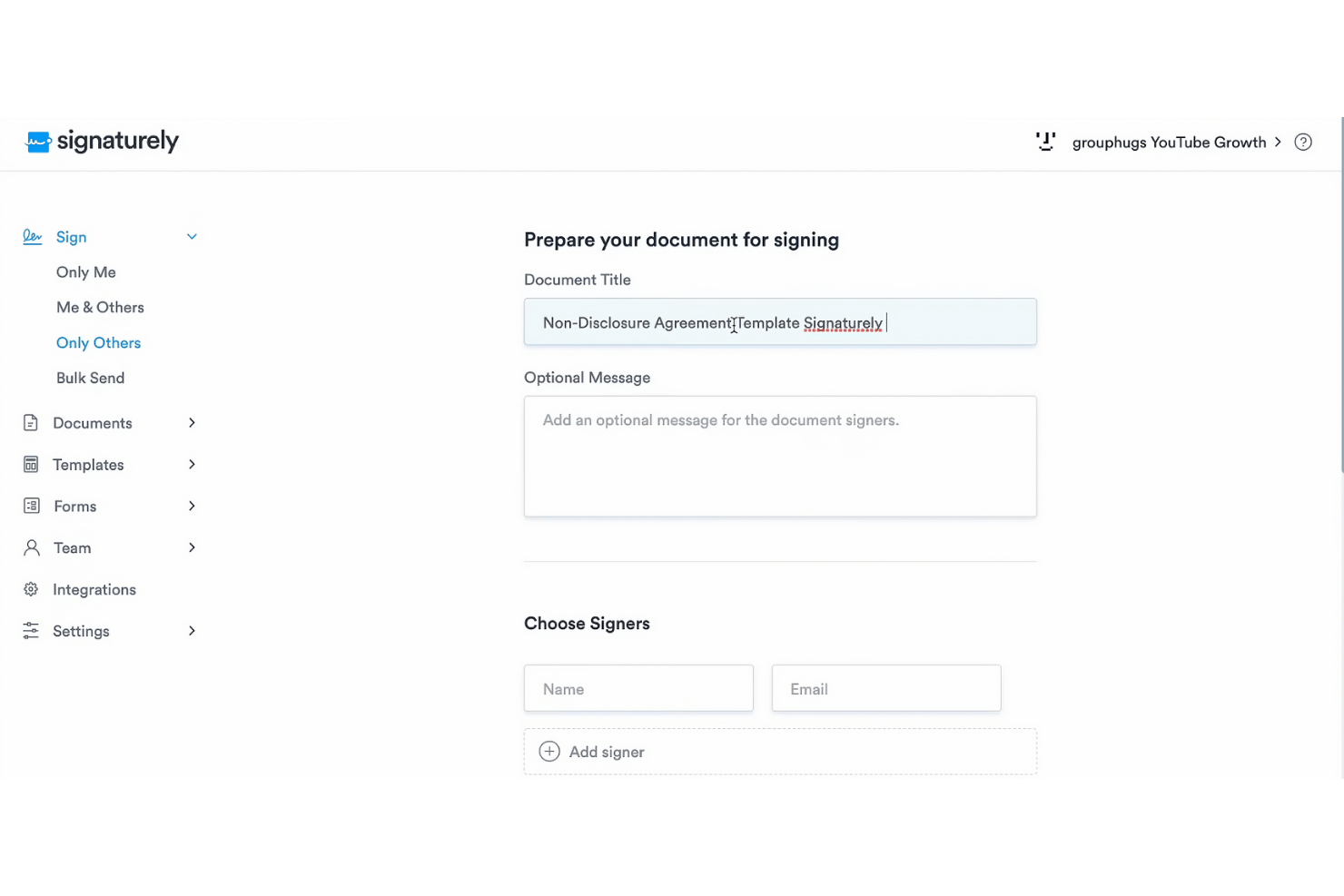
Signaturely è una piattaforma che fornisce firme elettroniche gratuite e legalmente vincolanti. Si rivolge sia a privati che ad aziende, aiutando gli utenti a gestire e firmare i documenti in modo rapido e sicuro.
Perché è una buona alternativa a Docusign: Signaturely si concentra sulla conformità legale e offre una vasta gamma di modelli che consentono di risparmiare tempo e sono facili da usare. I promemoria automatici garantiscono che i documenti non rimangano senza firma, mentre la sua interfaccia intuitiva semplifica la gestione delle pratiche. Queste funzionalità sono adatte a team e organizzazioni alla ricerca di una soluzione per le firme elettroniche semplice e affidabile.
Funzionalità e integrazioni principali:
Le funzionalità includono promemoria automatici per i documenti non firmati, funzionalità di gestione dei documenti e modelli che consentono di risparmiare tempo. Signaturely supporta inoltre le operazioni senza carta, in linea con gli obiettivi ambientali.
Le integrazioni includono Google Drive, Dropbox, OneDrive, Box, Microsoft Teams, Zapier e altro.
Pros and Cons
Pros:
- Garanzia di conformità legale
- Promemoria automatici
- Modelli che consentono di risparmiare tempo
Cons:
- Opzioni di personalizzazione limitate
- Non ideale per le grandi aziende

Juro
Ideale per la gestione dei contratti basata sull'intelligenza artificiale
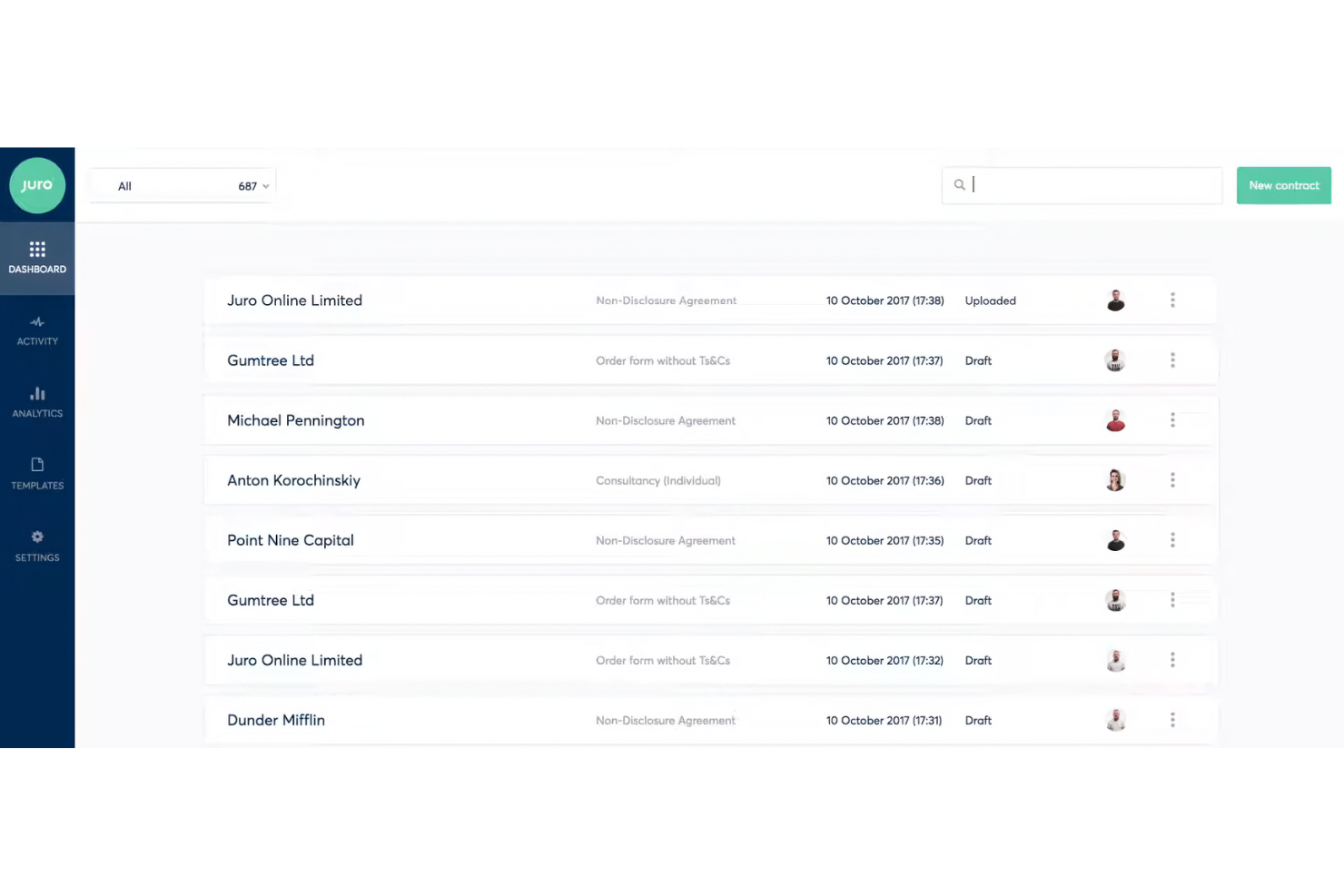
Juro è una piattaforma intelligente per la gestione dei contratti, progettata per i team legali, delle risorse umane, degli acquisti, delle vendite e finanziari. Aiuta questi team a gestire i contratti in modo efficiente attraverso la revisione basata sull'intelligenza artificiale e la gestione autonoma.
Perché è una buona alternativa a Docusign: Juro offre la revisione dei contratti basata sull'intelligenza artificiale e un archivio intelligente per i dati contrattuali, supportando una maggiore efficienza nella gestione dei contratti. A differenza di Docusign, Juro è pensato per i team che cercano funzionalità più avanzate di automazione dei contratti. Le funzionalità di gestione autonoma e la configurazione rapida lo rendono interessante per gli utenti che desiderano sostituire i sistemi tradizionali di gestione dei contratti.
Funzionalità e integrazioni principali:
Le funzionalità includono la revisione dei contratti basata sull'intelligenza artificiale, la gestione autonoma dei contratti e un archivio intelligente per i dati contrattuali. Juro dà inoltre priorità alla sicurezza attraverso misure di livello aziendale.
Le integrazioni includono Salesforce, HubSpot, ChatGPT, Slack, Google Drive, Zapier, Greenhouse e altro.
Pros and Cons
Pros:
- Automazione dei contratti basata sull'intelligenza artificiale
- Elevati standard di sicurezza
- Archivio dati efficiente
Cons:
- Personalizzazione limitata
- Non ideale per le aziende molto piccole

Ideale per flussi di lavoro di firma elettronica semplici e a basso costo

SignRequest è uno strumento per la firma elettronica ideale per le piccole e medie imprese che desiderano ottimizzare i processi di firma dei documenti. Offre una piattaforma semplice per creare e gestire firme elettroniche legalmente vincolanti.
Perché è una buona alternativa a Docusign: SignRequest offre una soluzione semplice ed economica per le firme elettroniche, rendendola accessibile a piccoli team e aziende. La piattaforma privilegia un design intuitivo, consentendo al tuo team di iniziare a utilizzarla rapidamente. Con SignRequest puoi monitorare facilmente lo stato dei documenti e inviare promemoria, garantendo il completamento tempestivo delle attività. La sua attenzione alla semplicità e alla convenienza la distingue dalle alternative più complesse.
Funzionalità principali e integrazioni:
Le funzionalità includono modelli personalizzabili, che consentono di adattare i documenti a esigenze specifiche. La piattaforma supporta più lingue, risultando versatile per i team internazionali. Sono inoltre disponibili registri di controllo utili per mantenere una cronologia dettagliata delle interazioni con i documenti.
Le integrazioni includono Google Drive, Slack, Zapier, HubSpot, Gmail, Google Workspace e altro ancora.
Pros and Cons
Pros:
- Conveniente per le piccole imprese
- Supporta più lingue
- Fornisce registri di controllo
Cons:
- Funzionalità di reportistica di base
- Offre poche opzioni di personalizzazione avanzate
PandaDoc
Ideale per l'automazione dei documenti nei flussi di lavoro CRM

PandaDoc è un software di automazione dei documenti pensato per i team di vendita, i professionisti del marketing e le aziende che devono creare, inviare e firmare elettronicamente i documenti in modo efficiente. Supporta i flussi di lavoro automatizzando la generazione dei documenti e migliorando la collaborazione.
Perché è una buona alternativa a Docusign: PandaDoc offre funzionalità avanzate di automazione dei documenti che semplificano la creazione e la gestione dei documenti. Le sue capacità di integrazione con i sistemi di gestione delle relazioni con i clienti (CRM) consentono al tuo team di collegare i flussi di lavoro dei documenti ai sistemi CRM. Il software offre modelli personalizzabili, che fanno risparmiare tempo e garantiscono coerenza tra i documenti. Le funzionalità di collaborazione in tempo reale migliorano il lavoro di squadra e la comunicazione.
Funzionalità e integrazioni principali:
Le funzionalità includono una libreria di contenuti, che consente di archiviare e riutilizzare gli elementi dei documenti. Il software offre anche analisi per monitorare le prestazioni e il coinvolgimento relativi ai documenti. Apprezzerai l'editor con funzionalità di trascinamento per personalizzare facilmente i documenti.
Le integrazioni includono Salesforce, HubSpot, Zoho CRM, Pipedrive, Microsoft Dynamics, Dropbox, Zapier, Slack, QuickBooks e altro ancora.
Pros and Cons
Pros:
- Funzionalità avanzate di automazione dei documenti
- Collaborazione in tempo reale
- Editor intuitivo con funzionalità di trascinamento
Cons:
- Configurazione iniziale lunga
- Non ideale per i team molto piccoli

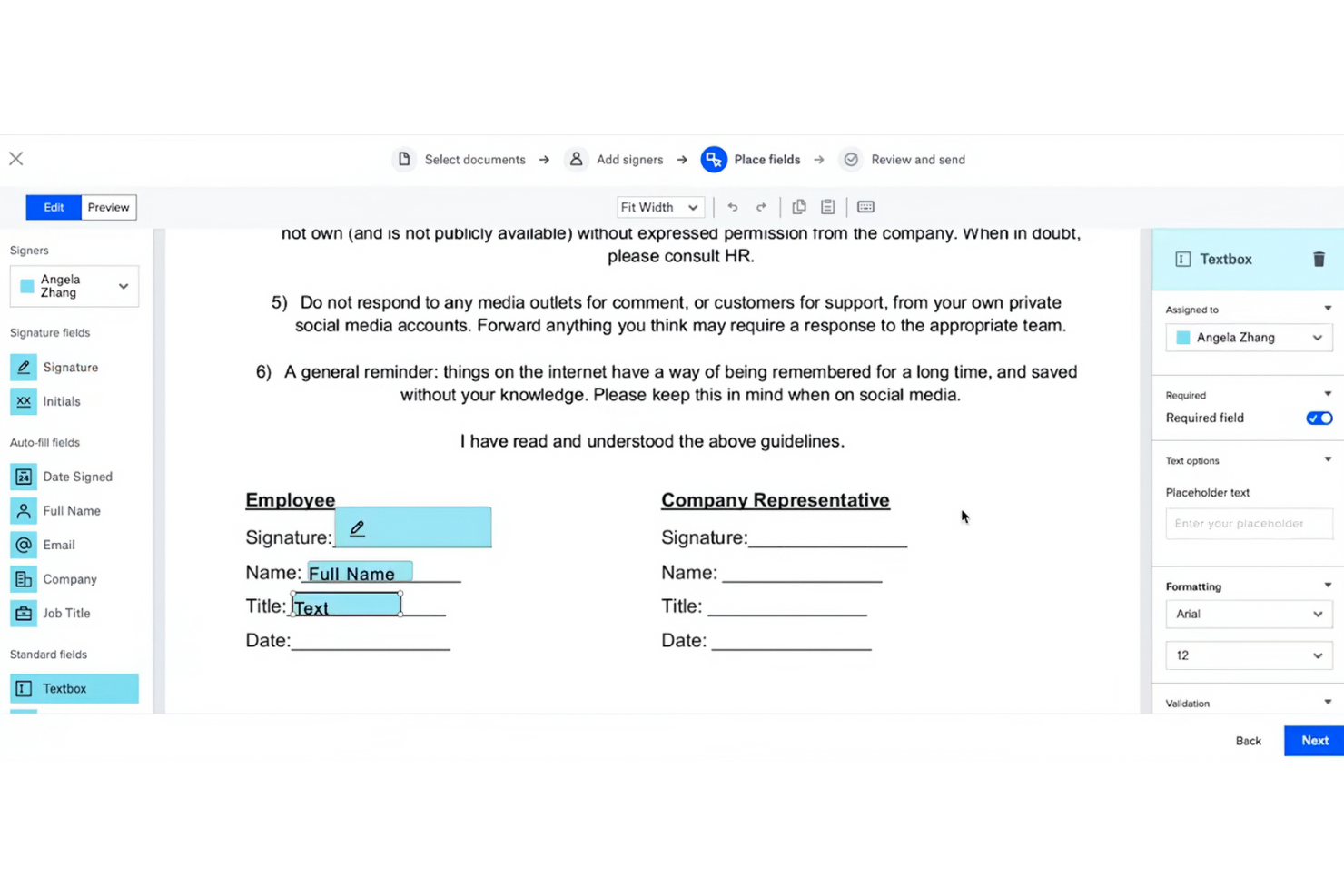
Dropbox Sign (precedentemente HelloSign) è uno strumento per la firma elettronica progettato per aziende e team che desiderano firmare documenti elettronicamente e gestire gli accordi in modo efficiente, analogamente ad Acrobat Pro. I suoi principali utenti includono professionisti dei settori legale, finanziario e delle vendite che necessitano di funzionalità affidabili per la firma dei documenti.
Perché è una buona alternativa a DocuSign: Dropbox Sign si integra con Dropbox, rendendolo perfetto per gli utenti che già utilizzano Dropbox per l'archiviazione. La sua interfaccia semplice e le funzionalità intuitive favoriscono la produttività dei team abituati all'ambiente Dropbox. Grazie all'attenzione alla sicurezza e alla conformità, offre tranquillità alle aziende che gestiscono documenti sensibili.
Caratteristiche e integrazioni principali:
Le funzionalità includono modelli personalizzabili, registri di controllo e opzioni per la firma di persona. È possibile monitorare facilmente lo stato dei documenti grazie a notifiche e promemoria automatici. La piattaforma supporta inoltre funzionalità di gestione dei team, aiutandoti a organizzare e supervisionare i flussi di lavoro dei documenti.
Le integrazioni includono Adobe Acrobat, Microsoft 365, Zapier e altro.
Pros and Cons
Pros:
- Si integra bene con Dropbox
- Potenti funzionalità di sicurezza
- Supporta la firma di persona
Cons:
- Potrebbe richiedere un account Dropbox
- Non è ideale per le grandi aziende


Zoho Sign è una soluzione di firma elettronica progettata per aziende e professionisti che desiderano firmare i documenti digitalmente. È pensata per i settori che richiedono elevati standard di conformità e privacy nella gestione dei documenti, come quello finanziario e sanitario.
Perché è una buona alternativa a Docusign: Zoho Sign offre solide funzionalità di conformità normativa, rendendola adatta ai settori con rigorosi requisiti di privacy. La piattaforma fornisce crittografia e registri di controllo per garantire la sicurezza dei dati. I flussi di lavoro personalizzabili consentono al tuo team di adattare il processo di firma a esigenze specifiche. L'integrazione con altri prodotti Zoho migliora la produttività e la gestione dei dati.
Funzionalità e integrazioni di spicco:
Le funzionalità includono opzioni di invio in blocco, che consentono di inviare documenti a più destinatari contemporaneamente. La piattaforma offre un registro di controllo per garantire trasparenza e responsabilità. Troverai inoltre utile la libreria di modelli per creare rapidamente documenti coerenti e professionali.
Le integrazioni includono Zoho CRM, Zoho Forms, Google Drive, Dropbox, OneDrive, Box, Microsoft 365, Zapier e altro.
Pros and Cons
Pros:
- Solida conformità normativa
- Garantisce la sicurezza dei dati
- Disponibili opzioni di invio in blocco
Cons:
- Non ideale per team molto piccoli
- Funzionalità di reportistica di base


OneSpan Sign (precedentemente noto come eSignLive) è una soluzione per la firma elettronica progettata per le aziende che necessitano di funzionalità di firma elettronica sicure, conformi alle normative e scalabili, in modo simile ad Acrobat Sign. Si rivolge principalmente a istituti finanziari, agenzie governative e grandi imprese che necessitano di soluzioni affidabili per la firma dei documenti.
Perché è una buona alternativa a DocuSign: OneSpan Sign è noto per le sue solide funzionalità di sicurezza, che lo rendono ideale per i settori in cui la protezione dei dati è una priorità. La piattaforma è conforme a rigorosi standard di sicurezza, mentre i metodi di autenticazione avanzati e i registri di controllo offrono un ulteriore livello di sicurezza. Queste funzionalità rendono OneSpan Sign particolarmente adatto alle imprese che danno priorità alla sicurezza e alla conformità.
Funzionalità e integrazioni principali:
Le funzionalità includono metodi di autenticazione avanzati, che consentono di verificare efficacemente l'identità dei firmatari. La piattaforma offre registri di controllo dettagliati per monitorare l'attività sui documenti e garantire la trasparenza. Potrai inoltre usufruire di opzioni di implementazione flessibili, scegliendo tra soluzioni basate sul cloud o locali.
Le integrazioni includono Salesforce, Microsoft Dynamics 365, SharePoint, Google Drive, Oracle Fusion e altro ancora.
Pros and Cons
Pros:
- Elevati standard di sicurezza
- Opzioni di autenticazione avanzate
- Adatto alle grandi imprese
Cons:
- Opzioni di personalizzazione rigide
- L'interfaccia appare complessa e poco intuitiva
eSignly
Ideale per la sicurezza garantita dalla crittografia completa da punto a punto

eSignly è un software per la firma elettronica pensato per aziende e privati che necessitano di un modo sicuro ed efficiente per firmare documenti online. Le sue funzioni principali includono la fornitura di firme elettroniche legalmente vincolanti, la sicurezza dei documenti e il mantenimento della conformità agli standard internazionali.
Perché è una buona alternativa a Docusign: eSignly dà particolare importanza alla crittografia completa da punto a punto, offrendo una sicurezza superiore per i tuoi documenti. La piattaforma è conforme a normative come il GDPR e l'HIPAA, garantendo una sicurezza aggiuntiva alle aziende che gestiscono informazioni sensibili. I modelli e i campi per la firma personalizzabili aumentano la flessibilità, mentre l'attenzione del software alla sicurezza garantisce che i tuoi documenti rimangano riservati e protetti durante tutto il processo di firma.
Funzionalità e integrazioni distintive:
Le funzionalità includono la validità legale delle firme elettroniche, garantendo che siano riconosciute come vincolanti. La piattaforma offre una crittografia avanzata per proteggere l'autenticità e la riservatezza dei documenti. Puoi inoltre utilizzare promemoria automatici per mantenere il processo di firma nei tempi previsti.
Le integrazioni includono Dropbox, Google Drive, OneDrive, Box, Salesforce, Microsoft Teams, Slack, Zoom e altro ancora.
Pros and Cons
Pros:
- Solida sicurezza basata sulla crittografia
- Conforme alle normative
- Promemoria automatici
Cons:
- Funzionalità di analisi di base
- Opzioni di personalizzazione avanzata limitate

OpenSign
Ideale per firme elettroniche con codice sorgente aperto e ospitate autonomamente

OpenSign è una piattaforma a codice sorgente aperto per la firma elettronica di PDF, pensata per singoli utenti, team e organizzazioni che desiderano un maggiore controllo sulla firma digitale. Ti aiuta a firmare, archiviare e proteggere i documenti online, monitorando ciò che accade a ciascun documento.
Perché OpenSign è una buona alternativa a Docusign: Con OpenSign ottieni firme digitali illimitate con un piano gratuito, senza doverti preoccupare dei limiti per busta. Poiché il codice sorgente è aperto, il tuo team può ospitarlo autonomamente e mantenere il controllo sui dati e sulla configurazione. I certificati di completamento e i registri degli accessi integrati forniscono una prova chiara di chi ha firmato cosa e quando, senza componenti aggiuntivi.
Funzionalità e integrazioni principali:
Le funzionalità includono il supporto per la firma di PDF crittografati, file DOCX e immagini, così puoi gestire molti tipi di documenti in un unico luogo. Puoi modificare i caratteri e i colori dei campi dei moduli, ruotare le pagine e affidarti al salvataggio automatico mentre configuri i documenti, senza perdere il lavoro svolto. Il tuo team può inoltre utilizzare profili pubblici e modelli per consentire alle persone di avviare autonomamente accordi comuni, senza dover preparare ogni documento da zero.
Le integrazioni includono Gmail, AWS S3, DigitalOcean Spaces e altro ancora.
Pros and Cons
Pros:
- Codice sorgente aperto
- Firme illimitate
- API flessibile
Cons:
- La configurazione autonoma richiede competenze tecniche
- Pochi strumenti per flussi di lavoro complessi
Altre alternative a Docusign
Ecco alcune alternative aggiuntive a Docusign che non sono state incluse nel mio elenco, ma che vale comunque la pena considerare:
- eSignatures
Ideale per prezzi convenienti
- airSlate SignNow
Ideale per la firma di documenti su dispositivi mobili
- Documenso
Ideale per il controllo del codice sorgente della firma elettronica


Come Valuto le Alternative a DocuSign
Divido ogni valutazione in requisiti di base—come le firme legalmente vincolanti e l'instradamento multiparte—e fattori differenzianti che distinguono uno strumento dall'altro per i team di project management.
Funzionalità di Base (Requisiti Fondamentali per Questa Lista)
Quando seleziono gli strumenti per la mia lista, valuto ognuno su una scala da 0 (non offre la funzionalità) a 5 (eccelle in quest'area) per ciascuna delle funzionalità di base elencate di seguito. Poi calcolo il punteggio totale dello strumento in percentuale. Ogni strumento deve raggiungere un punteggio totale minimo del 65% per essere preso in considerazione.
- Firme Elettroniche Legalmente Vincolanti: Controllo la conformità a ESIGN, UETA ed eIDAS affinché SOW e ordini di modifica firmati siano validi in tutte le giurisdizioni.
- Modelli di Documenti & Riutilizzabilità: Contano i modelli riutilizzabili con accesso condiviso al team—pensa ai modelli di NDA e SOW che il tuo PMO utilizza per ogni incarico.
- Workflow di Firma Multiparte: Valuto le opzioni di instradamento per firme sequenziali e parallele, perché la maggior parte dei contratti di progetto coinvolge più approvatori e clienti.
- Tracciabilità e Monitoraggio dello Stato: Un log a prova di manomissione con stato in tempo reale dei firmatari aiuta i project manager a individuare i colli di bottiglia prima che ritardino una milestone.
- Integrazioni con Strumenti PM: Connessioni native con strumenti come Asana, Jira o Smartsheet—oltre ad API o accesso tramite Zapier—mantenendo le fasi di firma all'interno dei workflow esistenti.
- Campi Compilabili & Preparazione del Documento: L'editor dei campi dovrebbe supportare firme, iniziali, date, testo e caselle di spunta, così puoi preparare un documento completo senza uscire dalla piattaforma.
Una volta identificati gli strumenti che soddisfano questi criteri, considero cosa distingue ciascuna piattaforma.
Fattori Differenzianti (Cosa Distingue i Fornitori)
Ecco come confronto e metto a confronto i diversi fornitori:
Funzionalità Distintive
L'invio massivo è fondamentale quando devi accogliere decine di subappaltatori o distribuire termini di progetto aggiornati su un elenco di fornitori. Guardo anche alla firma da mobile e offline, dato che i coordinatori di progetto sul campo spesso devono raccogliere firme in loco senza connessione affidabile. Anche l'analisi contrattuale tramite AI merita una valutazione—gli strumenti che riescono a estrarre date chiave, deliverable e importi dai contratti in arrivo fanno risparmiare davvero tempo ai PM durante le revisioni contrattuali.
Oltre le Funzionalità
La struttura dei prezzi è molto importante qui. Un modello di fatturazione per-busta può crescere rapidamente per i PMO che processano grandi volumi di ordini di modifica, quindi valuto se la piattaforma offre piani per utente o con invii illimitati. Sono importanti anche certificazioni di conformità come SOC 2 e ISO 27001, soprattutto per team che gestiscono progetti in settori regolamentati. Considero anche il time-to-value—modelli di documenti di progetto già pronti e onboarding in autonomia significano che il tuo team può iniziare a raccogliere firme in pochi giorni, non settimane.
Perché cercare un'alternativa a Docusign?
Sebbene Docusign offra funzionalità per la gestione dei documenti e le firme elettroniche, esistono diversi motivi per cui alcuni utenti cercano soluzioni alternative. Potresti essere alla ricerca di un'alternativa a Docusign perché…
- Hai bisogno di opzioni con prezzi più convenienti.
- Il tuo team desidera una migliore integrazione con gli strumenti esistenti.
- Cerchi funzionalità di sicurezza avanzate.
- Hai bisogno della conformità a normative specifiche.
- La tua azienda ha bisogno di più opzioni di personalizzazione.
Se ti riconosci in una di queste situazioni, sei nel posto giusto. Il mio elenco contiene diverse opzioni per la gestione dei documenti e le firme elettroniche, tra cui software per la firma elettronica basato sull'IA, più adatte ai team che affrontano queste difficoltà con Docusign e cercano soluzioni alternative.
Funzionalità
Ecco alcune delle principali funzionalità di Docusign per aiutarti a confrontare le soluzioni alternative:
- Firma elettronica: Invia, firma e monitora i documenti in modo efficiente per ottimizzare il tuo flusso di lavoro.
- Modelli: Crea modelli riutilizzabili per risparmiare tempo e standardizzare i tuoi documenti.
- Moduli web: Raccogli facilmente i dati con moduli interattivi, accelerando il processo di firma.
- Azioni collettive: Gestisci più documenti contemporaneamente per bilanciare il tuo carico di lavoro.
- Firma da dispositivi mobili: Firma i documenti da qualsiasi dispositivo, offrendo praticità al tuo team in tempo reale.
- Autenticazione: Verifica l'identità del firmatario con diversi metodi di autenticazione per garantire la sicurezza.
- Registro di controllo: Conserva una cronologia completa delle interazioni con i documenti per garantire trasparenza e conformità.
- Conformità: Rispetta le normative del settore, garantendo tranquillità rispetto ai requisiti legali.
- Integrazioni: Connettiti a diverse piattaforme, potenziando il tuo stack tecnologico esistente.
- Branding personalizzato: Modifica le email e le pagine web con il tuo logo e i tuoi colori per mantenere la coerenza del brand.