

10 alternative ad Apache Airflow per le pipeline di dati nel 2026

Selezione delle alternative ad Apache Airflow


Una valida alternativa ad Apache Airflow offre un’automazione affidabile dei flussi di lavoro, un’orchestrazione flessibile e il supporto per pipeline di dati complesse, senza il sovraccarico operativo che Airflow può comportare. Se stai cercando modi diversi per sostituire Airflow o andare oltre le sue funzionalità, probabilmente stai affrontando problemi di scalabilità, manutenibilità o integrazione nella configurazione attuale dell’automazione dei flussi di lavoro.
Questo elenco ti aiuterà a confrontare le principali opzioni, comprenderne i punti di forza distintivi e scegliere una piattaforma adatta ai requisiti tecnici del tuo team e alle esigenze del progetto. Che tu abbia bisogno di un supporto migliore per Kubernetes, di pipeline basate sul codice o di una collaborazione più semplice, qui troverai alternative pratiche per orientare la tua prossima scelta.
Che cos’è Apache Airflow?
Apache Airflow è una piattaforma open source per l’automazione dei flussi di lavoro, progettata per creare, pianificare e monitorare pipeline di dati complesse. Consente ai team di definire i flussi di lavoro come codice usando Python, semplificando la gestione delle dipendenze e l’orchestrazione delle attività tra sistemi distribuiti. Airflow è ampiamente utilizzato da data engineer e sviluppatori che devono automatizzare processi ETL, pipeline di machine learning e altre attività ricorrenti per le quali sono necessarie visibilità e controllo sull’esecuzione.
Tabella comparativa delle alternative ad Apache Airflow
Questa tabella comparativa riassume i dettagli dei prezzi delle principali alternative ad Apache Airflow che ho selezionato.
| Tool | Best For | Trial Info | Price | ||
|---|---|---|---|---|---|
| 1 | Ideale per l'orchestrazione nativa di Kubernetes | Not available | Gratuito | Website | |
| 2 | Ideale per l'orchestrazione cloud ibrida | Piano gratuito + demo gratuita disponibile | Da $35/utente/mese + utilizzo | Website | |
| 3 | Ideale per la pianificazione delle attività basata sulle dipendenze | Not available | Gratuito | Website | |
| 4 | Ideale per la prototipazione rapida in Python | Utilizzabile gratuitamente | Website | ||
| 5 | Ideale per la creazione di flussi di lavoro basati sul codice | Demo gratuita disponibile | A partire da $100/mese + elaborazione | Website | |
| 6 | Ideale per la progettazione modulare delle pipeline di dati | Prova gratuita di 30 giorni + demo gratuita disponibile | A partire da $10/mese | Website | |
| 7 | Ideale per la modifica collaborativa dei flussi di lavoro | Piano gratuito + dimostrazione gratuita disponibili | A partire da $150/utente con tariffa fissa/mese | Website | |
| 8 | Ideale per progetti di data science riproducibili | Not available | Gratuito | Website | |
| 9 | Ideale per la gestione di flussi di lavoro complessi con stato | Prova gratuita di 90 giorni disponibile | A partire da $100/mese | Website | |
| 10 | Ideale per la creazione di script di automazione con poco codice | Piano gratuito + demo gratuita disponibile | A partire da $10/mese | Website |
Perché fidarsi dei nostri consigli sui software
Il nostro team testa e recensisce software dal 2012. In quanto project manager noi stessi, sappiamo quanto sia difficile — e importante — scegliere il software giusto.
Per questa guida, abbiamo valutato gli strumenti attraverso test pratici e ricerche indipendenti, assegnando un punteggio agli strumenti in base ai nostri criteri di selezione. Ci basiamo inoltre sulle competenze di leader di pensiero del settore e di professionisti attivi nella gestione dei progetti.
Le nostre recensioni riflettono il nostro giudizio editoriale umano, non un discorso di vendita.
Revisori esperti:
Recensioni delle alternative ad Apache Airflow
Di seguito trovi i miei riepiloghi dettagliati delle migliori alternative ad Apache Airflow incluse nella mia selezione. Le mie recensioni offrono una panoramica dettagliata delle funzionalità, dei casi d’uso migliori e delle integrazioni di ciascuna piattaforma, per aiutarti a trovare quella più adatta al tuo team.

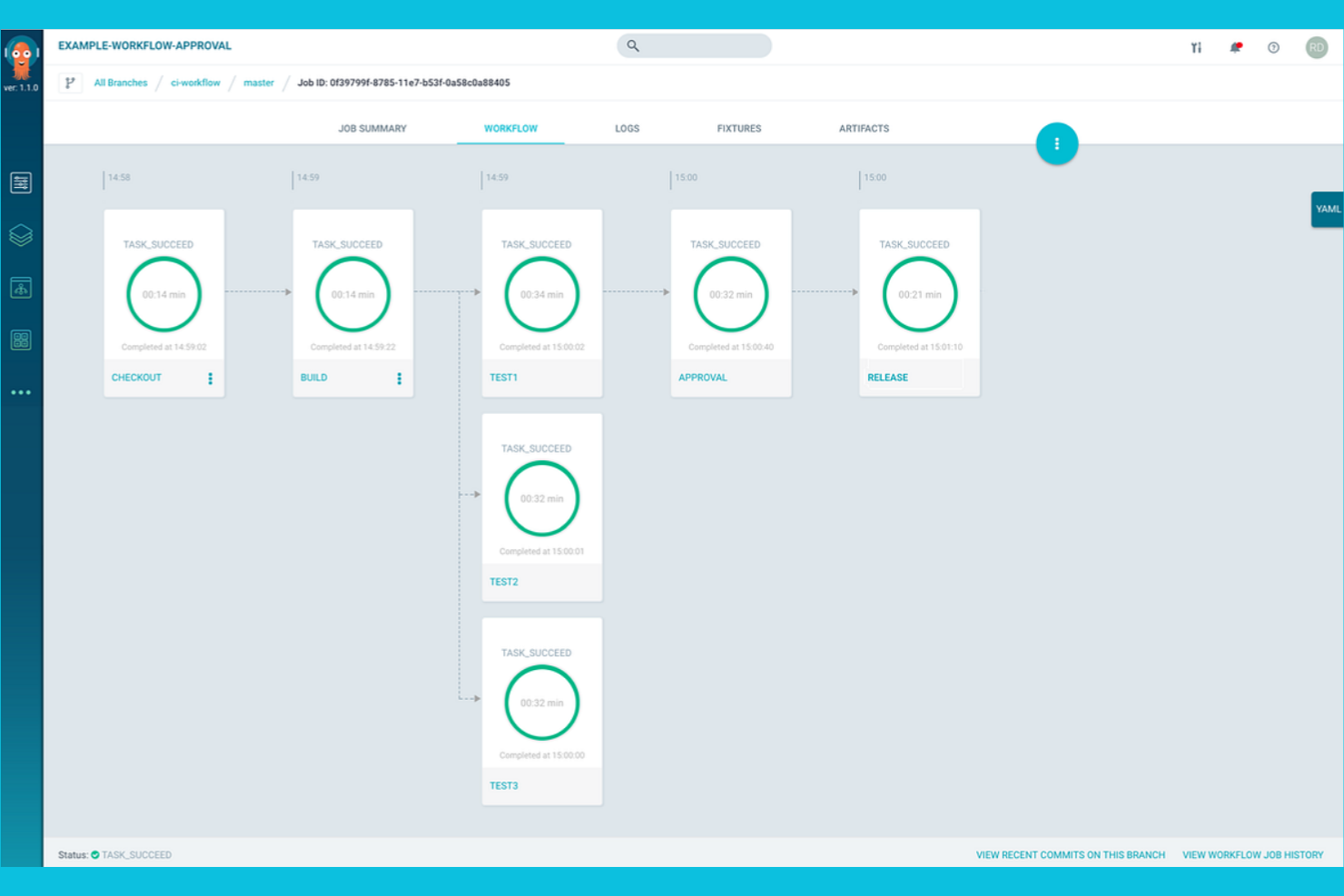
Per i team che eseguono carichi di lavoro su Kubernetes, Argo Workflows offre una piattaforma di automazione dei flussi di lavoro progettata specificamente per gli ambienti nativi del cloud. Gli ingegneri di piattaforma e i team DevOps utilizzano Argo Workflows per definire, pianificare e gestire pipeline complesse come risorse Kubernetes. A differenza di Apache Airflow, Argo Workflows è progettato per sfruttare funzionalità native di Kubernetes come l'orchestrazione dei container, la scalabilità e la configurazione dichiarativa.
Perché Argo Workflows è una buona alternativa ad Apache Airflow
Se hai bisogno di una piattaforma di automazione dei flussi di lavoro progettata appositamente per Kubernetes, Argo Workflows è una scelta valida. Ho scelto Argo Workflows perché consente di definire i flussi di lavoro come risorse personalizzate di Kubernetes, così le pipeline vengono eseguite nativamente all'interno del cluster.
Il suo approccio basato innanzitutto sui container fa sì che ogni passaggio del flusso di lavoro sia isolato, riproducibile e scalabile utilizzando le primitive di Kubernetes. Per i team che hanno già investito in Kubernetes, Argo Workflows offre un'orchestrazione che risulta nativa e sfrutta appieno la potenza dell'infrastruttura cloud.
Funzionalità principali di Argo Workflows
Tra le altre funzionalità di Argo Workflows che vale la pena evidenziare ci sono:
- Supporto per flussi di lavoro basati su DAG e passaggi: Definisci i flussi di lavoro utilizzando grafi aciclici diretti o modelli basati su passaggi per una progettazione flessibile delle pipeline.
- Archiviazione dei flussi di lavoro: Archivia e recupera la cronologia delle esecuzioni dei flussi di lavoro per attività di controllo e debug.
- Parametrizzazione e passaggio degli artefatti: Trasferisci parametri e artefatti tra i passaggi del flusso di lavoro per supportare pipeline dinamiche e basate sui dati.
- Interfaccia utente basata sul web: Monitora, gestisci e visualizza le esecuzioni dei flussi di lavoro tramite un'interfaccia web dedicata.
Integrazioni di Argo Workflows
Le integrazioni includono Argo Events, Couler, Hera, Katib, Kedro, Kubeflow Pipelines, Netflix Metaflow, Onepanel, Orchest e Seldon.
Pros and Cons
Pros:
- Integrazione nativa con Kubernetes per l'orchestrazione dei flussi di lavoro
- Supporta flussi di lavoro basati sia su DAG sia su passaggi
- I modelli di flusso di lavoro consentono di riutilizzare i componenti delle pipeline
Cons:
- Non offre supporto integrato per attività non containerizzate
- Non dispone di una pianificazione nativa al di fuori dei CronJob di Kubernetes

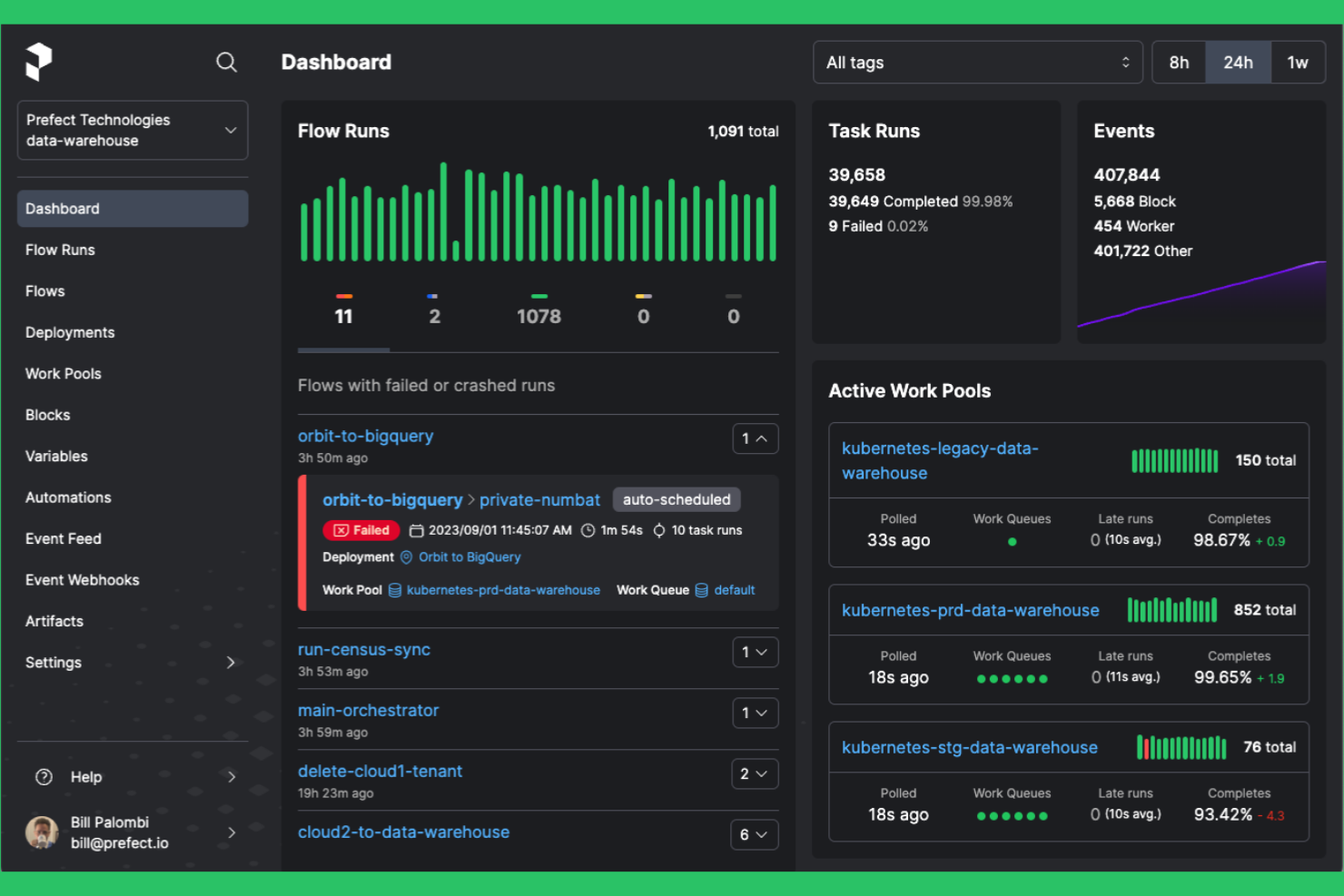
Prefect è progettato per i team che hanno bisogno di un'automazione flessibile dei flussi di lavoro sia negli ambienti cloud sia in quelli on-premises. È rivolto agli ingegneri dei dati e ai team IT alla ricerca di un'alternativa moderna ad Apache Airflow, con una distribuzione ibrida più semplice e una gestione dinamica dei flussi di lavoro. Prefect consente di orchestrare pipeline di dati complesse senza il sovraccarico della manutenzione di un'infrastruttura pesante.
Perché Prefect è una buona alternativa ad Apache Airflow
Ciò che distingue Prefect è il suo forte supporto per l'orchestrazione cloud ibrida, che lo rende una scelta pratica per i team che gestiscono flussi di lavoro in più ambienti. Ho scelto Prefect perché consente di distribuire ed eseguire flussi di lavoro on-premises, nel cloud o in entrambi gli ambienti, senza modificare la base di codice.
La sua architettura basata su agenti consente di controllare dove e come vengono eseguite le attività, caratteristica particolarmente utile per le organizzazioni con requisiti rigorosi di residenza dei dati o di sicurezza. Prefect offre anche una configurazione dinamica dei flussi di lavoro, così puoi adattare le pipeline alle esigenze infrastrutturali in continua evoluzione in tempo reale.
Funzionalità principali di Prefect
Alcune altre funzionalità di Prefect utili per l'automazione dei flussi di lavoro includono:
- Pianificatore delle esecuzioni dei flussi: Pianifica e attiva le esecuzioni dei flussi di lavoro in base all'orario, agli eventi o a condizioni personalizzate.
- Mappatura delle attività: Parallelizza automaticamente le attività su più input per velocizzare l'elaborazione dei dati.
- Opzioni di archiviazione dei risultati: Archivia i risultati dei flussi di lavoro in diversi backend, tra cui S3, Google Cloud Storage e Azure Blob Storage.
- Notifiche integrate: Configura avvisi e notifiche per errori, nuovi tentativi o completamenti dei flussi di lavoro tramite e-mail, Slack o altri canali.
Integrazioni di Prefect
Le integrazioni includono Amazon S3, Google Cloud Storage, Azure Blob Storage, Databricks, Snowflake, Slack, Kubernetes, Docker, GitHub e Twilio.
Pros and Cons
Pros:
- La distribuzione ibrida supporta sia il cloud sia gli ambienti on-premises
- Configurazione dinamica dei flussi di lavoro con Python
- Esecuzione basata su agenti per un posizionamento flessibile delle attività
Cons:
- Connettori integrati limitati per i sistemi legacy
- L'interfaccia utente può rallentare con flussi di lavoro su larga scala

Se il tuo team ha bisogno di un controllo preciso sulle dipendenze complesse tra le attività, Luigi offre un framework basato su Python creato proprio per questo scopo. Gli ingegneri dei dati e i team di analisi scelgono spesso Luigi per gestire flussi di lavoro batch in cui l'ordine delle attività e la risoluzione delle dipendenze sono fondamentali. A differenza di Apache Airflow, l'approccio di Luigi alla pianificazione basata sulle dipendenze è semplice e incentrato sul codice, il che lo rende particolarmente adatto ai team che desiderano definire i flussi di lavoro a livello programmatico.
Perché Luigi è una buona alternativa ad Apache Airflow
Luigi si distingue per i team che hanno bisogno di un controllo granulare e basato sul codice sulle dipendenze tra le attività nei propri flussi di lavoro. Ho scelto Luigi perché consente di definire direttamente in Python catene di dipendenze complesse, una soluzione ideale per gli scenari di ingegneria dei dati e ETL in cui l'ordine delle attività è fondamentale. Il suo pianificatore risolve automaticamente le dipendenze ed esegue le attività solo quando i relativi prerequisiti sono soddisfatti, riducendo la necessità di orchestrazione manuale. Se i tuoi progetti richiedono una gestione esplicita e programmatica delle dipendenze, Luigi offre un'alternativa mirata all'approccio più ampio basato su DAG di Airflow.
Funzionalità principali di Luigi
Altre funzionalità che rendono Luigi utile per l'automazione dei flussi di lavoro includono:
- Interfaccia utente centralizzata del pianificatore: Monitora e gestisci le attività in esecuzione tramite una dashboard basata sul web.
- Libreria di attività estensibile: Sfrutta i modelli di attività integrati per le operazioni comuni sui dati ed estendili per esigenze personalizzate.
- Gestione dei tentativi e degli errori: Configura tentativi automatici e una logica personalizzata per la gestione degli errori per singole attività.
- Destinazioni per file system e database: Utilizza il supporto integrato per tenere traccia degli output delle attività nei file system locali, in HDFS o nei database.
Integrazioni di Luigi
Le integrazioni includono Hadoop, Hive, Pig, HDFS, Spark, PostgreSQL, MySQL, Redshift, Kubernetes, Prometheus e Datadog.
Pros and Cons
Pros:
- La definizione dei flussi di lavoro nativa in Python semplifica l'integrazione del codice
- Supporto efficace per catene di dipendenze complesse
- Installazione leggera con requisiti esterni minimi
Cons:
- Nessun supporto integrato per DAG dinamici
- Manca un editor moderno dei flussi di lavoro basato sul web

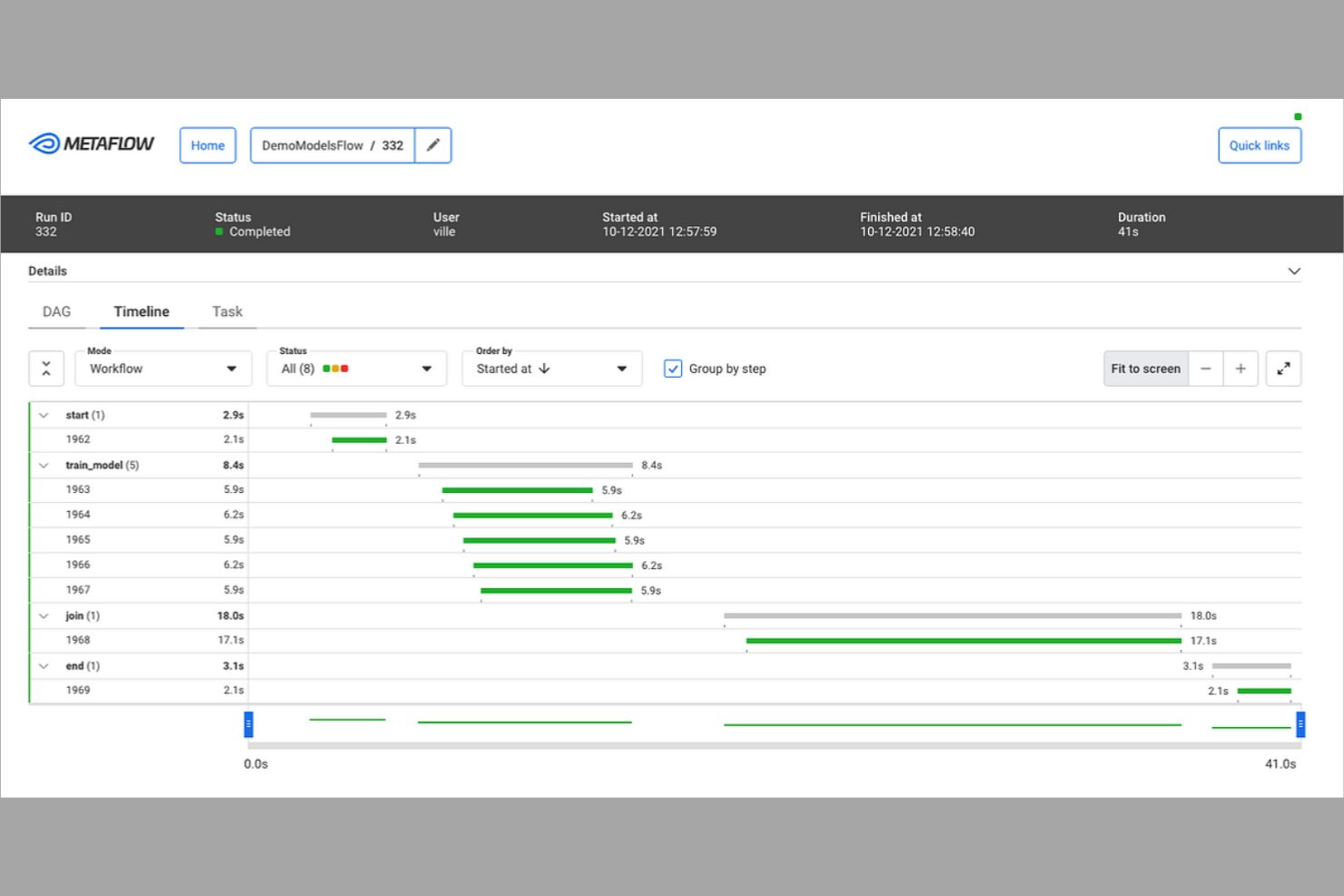
Se desideri creare e iterare rapidamente sui flussi di lavoro dei dati in Python, Metaflow è progettato per te. Gli scienziati dei dati e gli ingegneri dell'apprendimento automatico utilizzano Metaflow per prototipare, distribuire e gestire i flussi di lavoro senza uscire dal loro ambiente Python. A differenza di Apache Airflow, Metaflow pone l'accento sullo sviluppo rapido e sul controllo delle versioni, facilitando la sperimentazione e il passaggio dai taccuini alla produzione.
Perché Metaflow è una valida alternativa ad Apache Airflow
Per i team che desiderano muoversi rapidamente con flussi di lavoro basati su Python, Metaflow si distingue per la prototipazione rapida. Ho scelto Metaflow perché consente di definire, testare e iterare sui flussi di lavoro direttamente in Python, permettendo di passare dal taccuino alla produzione senza cambiare strumenti.
Le funzionalità integrate di controllo delle versioni e tracciamento della derivazione dei dati aiutano a monitorare gli esperimenti e le modifiche durante il perfezionamento dei flussi di elaborazione. Se hai bisogno di prototipare e ridimensionare rapidamente i flussi di lavoro dei dati, l'approccio di Metaflow incentrato su Python offre un'alternativa flessibile al modello di Apache Airflow, più orientato alla configurazione.
Funzionalità principali di Metaflow
Alcune altre funzionalità di Metaflow che vale la pena menzionare includono:
- Archiviazione integrata dei dati: archivia e recupera gli artefatti dei dati direttamente nei flussi di lavoro utilizzando la gestione dei dati integrata.
- Supporto per AWS Step Functions: esegui e ridimensiona i flussi di lavoro su AWS Step Functions con una configurazione minima.
- Logica di ripetizione automatica: riprova automaticamente i passaggi non riusciti dei flussi di lavoro per migliorarne l'affidabilità.
- Integrazione con CLI e taccuini: interagisci con i flussi di lavoro tramite strumenti da riga di comando e taccuini Jupyter.
Integrazioni di Metaflow
Le integrazioni includono AWS S3, AWS Batch, AWS Step Functions, Azure Blob Storage, Azure Kubernetes Service, Google Cloud Storage, Google Kubernetes Engine, Kubernetes, Jupyter e Python.
Pros and Cons
Pros:
- Definizione dei flussi di lavoro nativa in Python per un'iterazione rapida
- Controllo integrato delle versioni dei dati e tracciamento della derivazione
- Integrazione diretta con i taccuini Jupyter
Cons:
- Funzionalità native limitate per la pianificazione e l'orchestrazione
- Nessuna interfaccia web integrata per la gestione dei flussi di lavoro

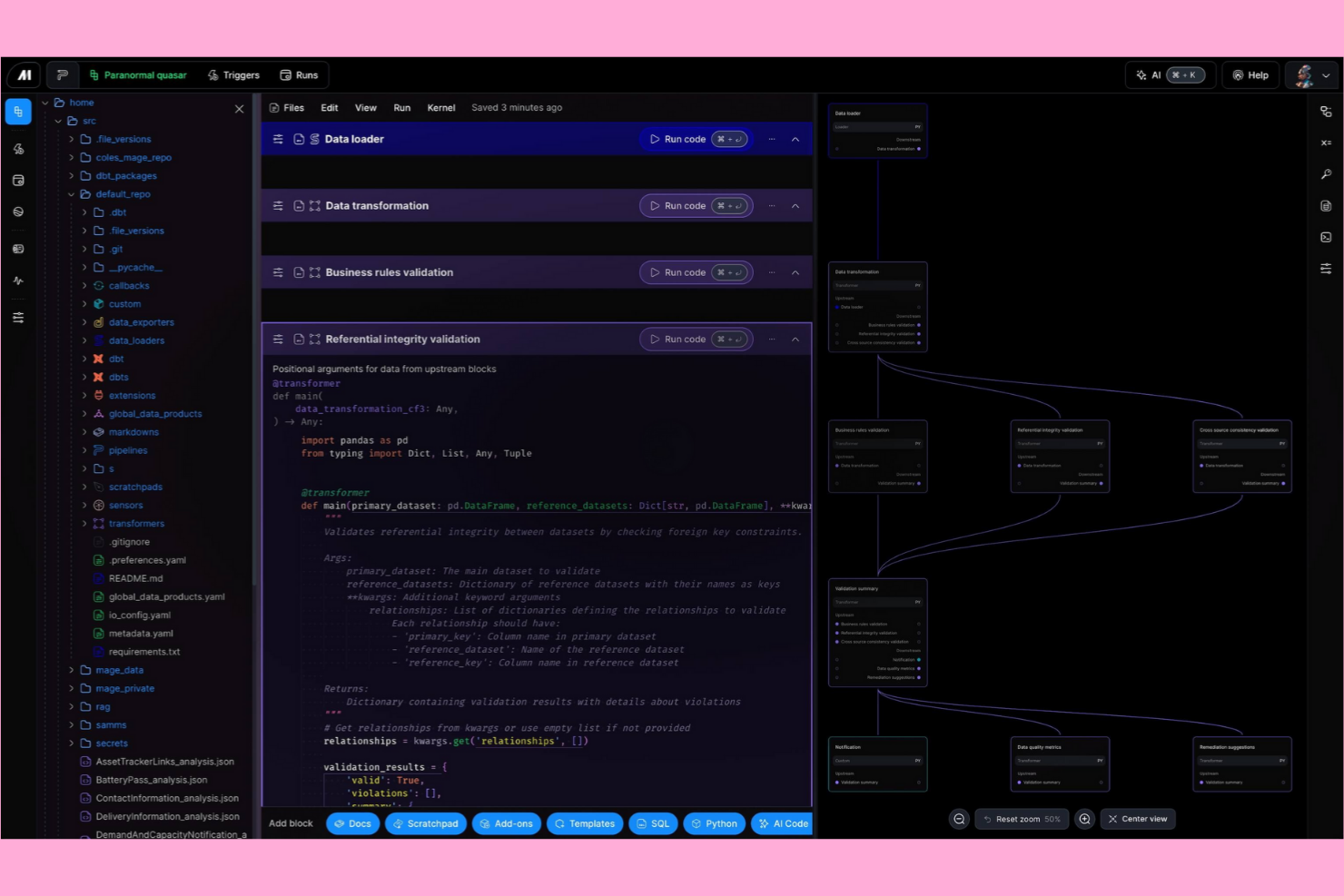
Mage AI offre agli ingegneri dei dati e agli sviluppatori una piattaforma basata sul codice per creare e gestire flussi di lavoro dei dati. È progettata per i team che desiderano lavorare direttamente in Python e hanno bisogno della flessibilità necessaria per personalizzare le pipeline senza fare affidamento su un'interfaccia visiva. Se cerchi una soluzione di automazione dei flussi di lavoro che privilegi il controllo degli sviluppatori e la possibilità di scrivere script rispetto agli strumenti drag-and-drop come Apache Airflow, Mage AI è stata concepita proprio per questo approccio.
Perché Mage AI è una buona alternativa ad Apache Airflow
Mage AI si distingue per i team che desiderano un'esperienza di creazione dei flussi di lavoro basata sul codice, rappresentando una valida alternativa ad Apache Airflow. Ho scelto Mage AI perché consente di definire, testare e distribuire le pipeline direttamente in Python, offrendo agli sviluppatori il pieno controllo sulla logica e sulle dipendenze.
La sua interfaccia in stile notebook supporta lo sviluppo iterativo e il debug, risultando particolarmente utile per i progetti di ingegneria dei dati e analisi. Per i team che preferiscono gli script agli editor visivi dei DAG, l'approccio di Mage AI offre una piattaforma di automazione dei flussi di lavoro più flessibile e incentrata sugli sviluppatori.
Caratteristiche principali di Mage AI
Alcune altre caratteristiche di Mage AI che vale la pena evidenziare includono:
- Monitoraggio delle pipeline in tempo reale: monitora l'esecuzione delle pipeline e visualizza i log mentre le attività vengono eseguite, per un riscontro immediato.
- Convalida dei dati integrata: configura controlli di convalida per garantire la qualità dei dati in ogni fase della pipeline.
- Integrazione con il controllo versione: connettiti a Git per gestire le modifiche al codice delle pipeline e collaborare con il tuo team.
- Sistema di plugin estensibile: aggiungi moduli personalizzati o integra strumenti esterni utilizzando l'architettura dei plugin di Mage AI.
Integrazioni di Mage AI
Le integrazioni includono dbt Cloud, Algolia, Athena, Azure Blob Storage, BigQuery, ClickHouse, Databricks, Google Sheets, MongoDB, Snowflake e Spark.
Pros and Cons
Pros:
- L'interfaccia notebook supporta lo sviluppo iterativo delle pipeline
- Supporto nativo per attività Python e SQL
- Convalida dei dati integrata in ogni fase della pipeline
Cons:
- Meno opzioni di pianificazione rispetto ad Airflow
- Meno connettori predefiniti per i sistemi legacy

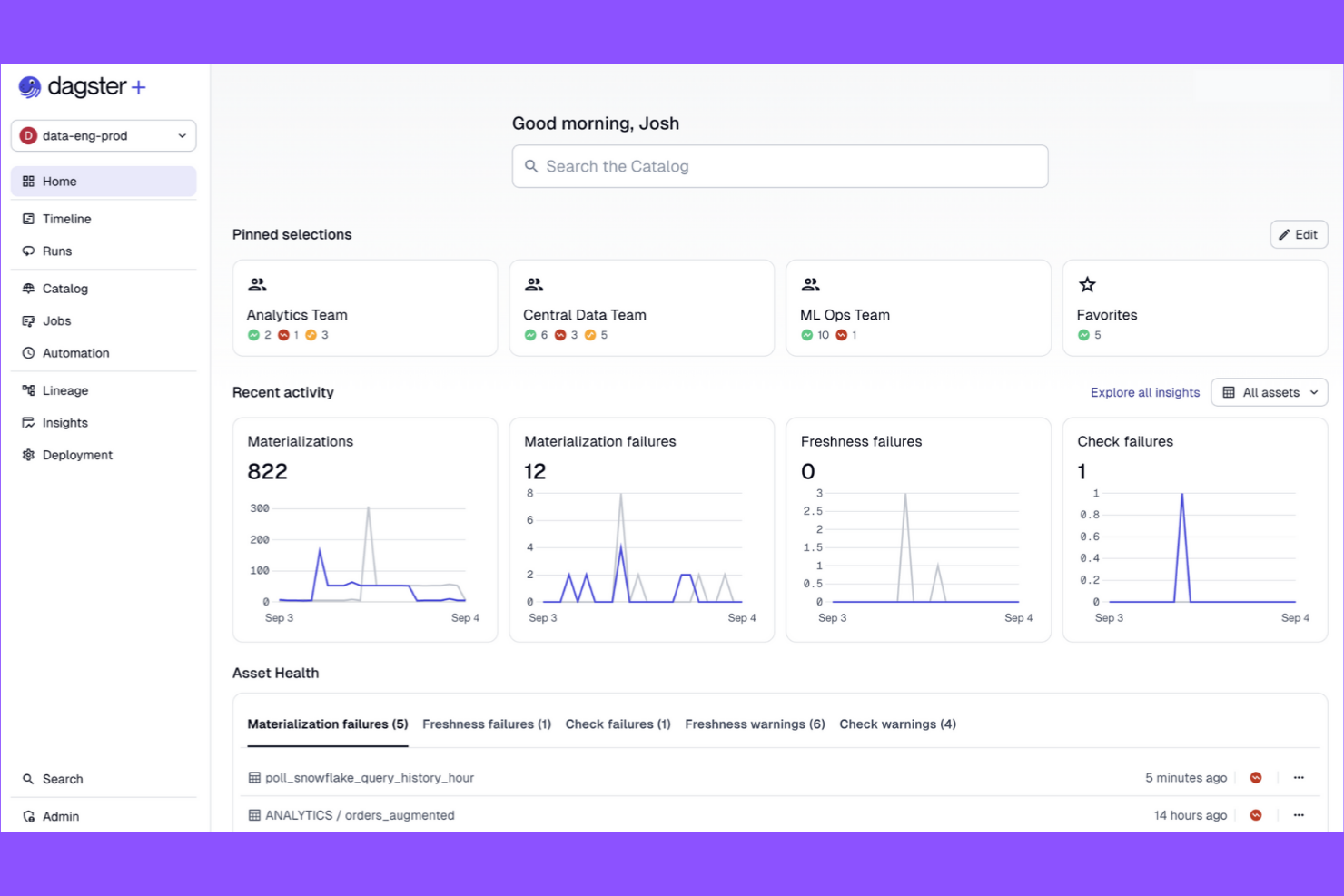
Dagster è una piattaforma di automazione dei flussi di lavoro progettata per i team che necessitano di pipeline di dati modulari e testabili. È adatta agli ingegneri dei dati e ai team di analisi che desiderano una solida osservabilità delle pipeline e componenti riutilizzabili. Se cerchi una soluzione basata sul codice che enfatizzi la struttura e la manutenibilità delle pipeline, Dagster offre una valida alternativa all'approccio incentrato sui DAG di Apache Airflow.
Perché Dagster è una buona alternativa ad Apache Airflow
Ciò che distingue Dagster è la sua attenzione alla progettazione modulare delle pipeline di dati, che offre ai team maggiore flessibilità nella creazione e nella manutenzione dei flussi di lavoro. Ho scelto Dagster perché consente di suddividere le pipeline in componenti riutilizzabili e testabili chiamati solidi e operazioni, rendendo più semplice la gestione di progetti complessi.
Il suo sistema di tipi applica contratti sui dati tra i passaggi della pipeline, riducendo gli errori e migliorando l'affidabilità. Per i team che desiderano iterare rapidamente e mantenere le pipeline organizzate, l'approccio modulare di Dagster offre un chiaro vantaggio rispetto alla struttura monolitica basata sui DAG di Airflow.
Caratteristiche principali di Dagster
Tra le altre caratteristiche di Dagster che si distinguono per i team addetti all'automazione dei flussi di lavoro figurano:
- API GraphQL: Accedi e controlla programmaticamente le esecuzioni delle pipeline, le pianificazioni e i log utilizzando una solida interfaccia GraphQL.
- Pianificatore integrato: Pianifica le esecuzioni delle pipeline con espressioni simili a cron e gestisci i processi ricorrenti direttamente dall'interfaccia utente di Dagster.
- Catalogo delle risorse: Tieni traccia, visualizza e gestisci le risorse di dati prodotte dalle tue pipeline per migliorare la derivazione e la tracciabilità dei dati.
- Strumenti di test integrati: Utilizza le utilità integrate per testare i componenti delle pipeline in isolamento prima di distribuirli in produzione.
Integrazioni di Dagster
Le integrazioni includono dbt, Fivetran, Snowflake, Databricks, AWS S3, GCP BigQuery, Airbyte, Looker, Slack e Kubernetes.
Pros and Cons
Pros:
- I componenti modulari delle pipeline favoriscono il riutilizzo del codice
- Il solido sistema di tipi applica contratti sui dati
- Catalogo delle risorse integrato per la derivazione dei dati
Cons:
- Meno integrazioni con sistemi legacy rispetto ad Airflow
- Community ed ecosistema più ridotti rispetto ad Airflow

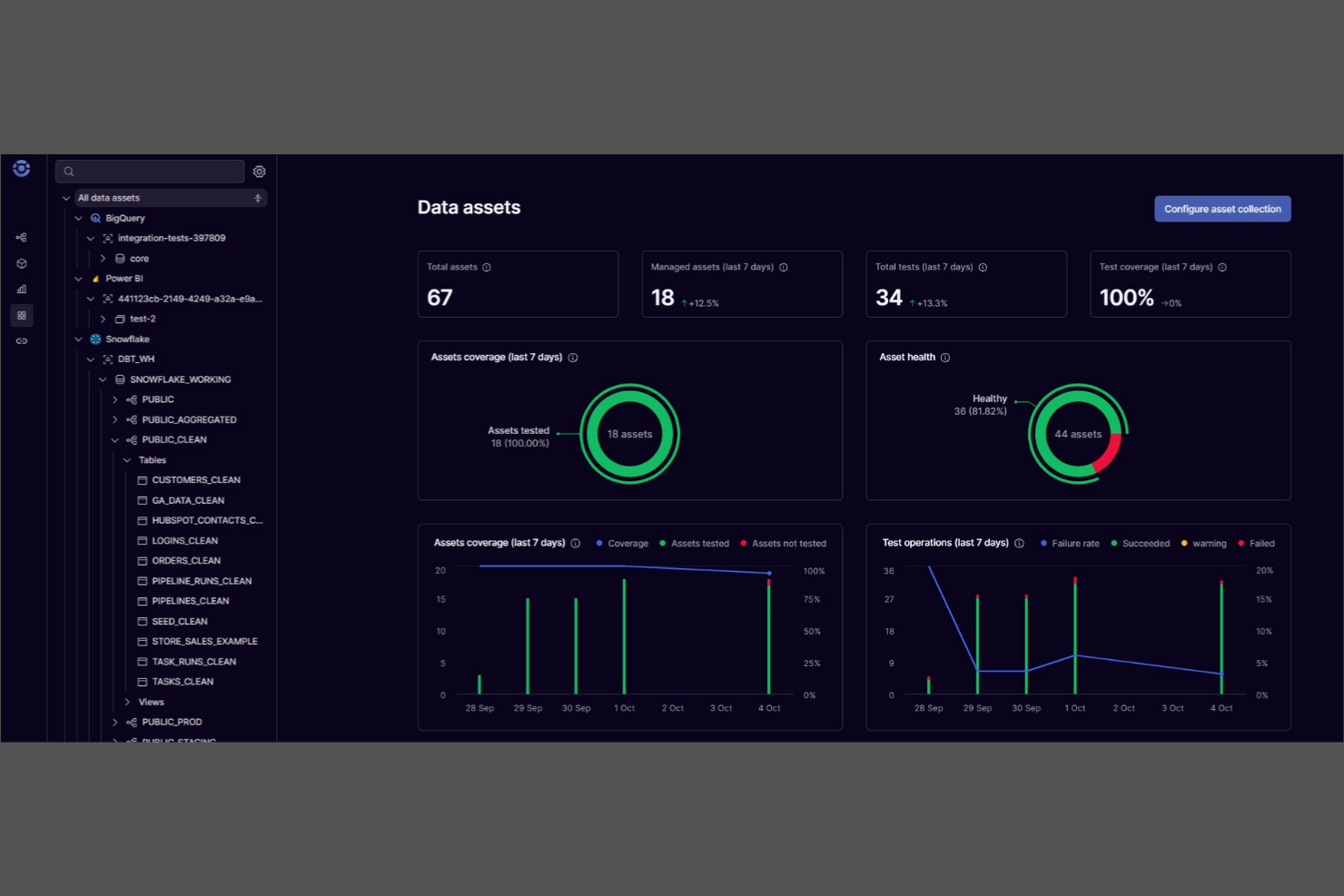
A differenza della maggior parte delle piattaforme di automazione dei flussi di lavoro, Orchestra è progettato per i team che devono progettare, modificare e gestire collaborativamente i flussi di lavoro in tempo reale. I product manager, i responsabili delle operazioni e i team interfunzionali utilizzano Orchestra per mappare visivamente e iterare insieme su processi complessi. Le sue funzionalità di modifica in tempo reale e controllo delle versioni lo distinguono da Apache Airflow, rendendolo una scelta efficace per le organizzazioni in cui la progettazione collaborativa dei flussi di lavoro è una priorità.
Perché Orchestra è una valida alternativa ad Apache Airflow
Per i team che devono progettare e perfezionare insieme i flussi di lavoro, Orchestra offre la modifica collaborativa dei flussi di lavoro, una funzionalità che Apache Airflow non supporta nativamente. Ho scelto Orchestra perché consente a più utenti di modificare, commentare e gestire le versioni dei flussi di lavoro in tempo reale, una caratteristica particolarmente utile per i team distribuiti o interfunzionali.
Il generatore visivo di flussi di lavoro della piattaforma e il controllo delle versioni integrato facilitano il monitoraggio delle modifiche e il mantenimento della chiarezza dei processi durante la collaborazione dei team. Se la tua organizzazione valorizza la responsabilità condivisa e la modifica in tempo reale della logica dei flussi di lavoro, Orchestra è una valida alternativa all’approccio incentrato sul codice di Airflow.
Funzionalità principali di Orchestra
Altre funzionalità che rendono Orchestra interessante per l’automazione dei flussi di lavoro includono:
- Assegnazione automatizzata delle attività: Assegna le fasi del flusso di lavoro a membri specifici del team in base ai ruoli o alla disponibilità.
- Registrazione degli audit: Tieni traccia di ogni modifica e azione all’interno dei flussi di lavoro per garantire conformità e trasparenza.
- Blocchi di logica condizionale: Crea flussi di lavoro che diramano o eseguono cicli in base a regole e trigger personalizzati.
- Generatore di integrazioni API: Collega strumenti e servizi esterni direttamente ai flussi di lavoro utilizzando un’interfaccia visiva.
Integrazioni di Orchestra
Le integrazioni includono Snowflake, Databricks, Fivetran, dbt, Coalesce, Iceberg, Estuary, Alteryx, Tableau e Google Cloud Dataflow.
Pros and Cons
Pros:
- La modifica dei flussi di lavoro in tempo reale favorisce la collaborazione del team
- Il generatore visivo riduce la necessità di scrivere script in Python
- Il controllo delle versioni integrato monitora le modifiche ai flussi di lavoro
Cons:
- Meno opzioni avanzate di pianificazione rispetto ad Airflow
- Nessuna distribuzione on-premise per le esigenze di hosting autonomo

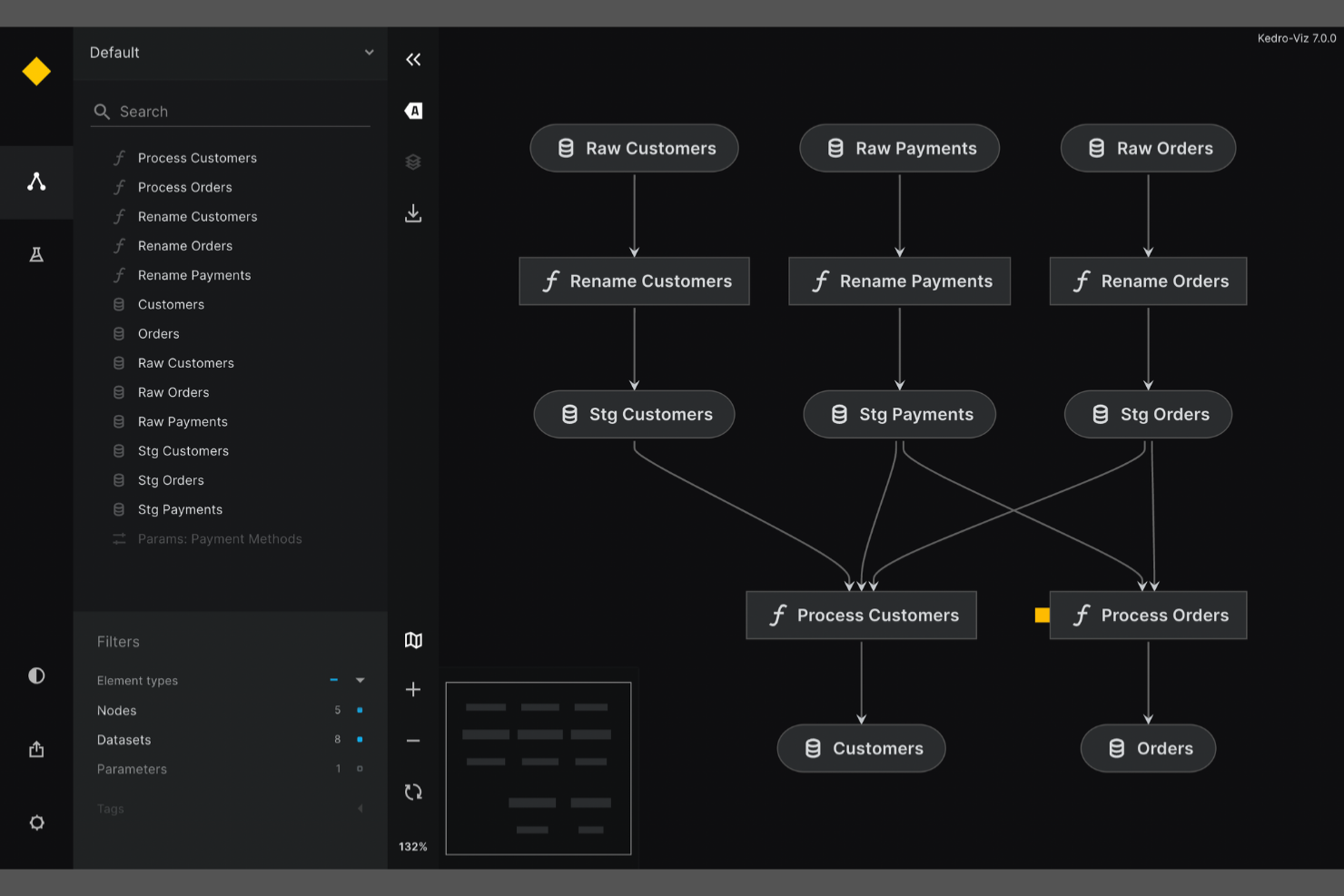
Se hai bisogno di garantire la riproducibilità e la modularità nei tuoi flussi di lavoro di data science, Kedro è stato sviluppato proprio per questo scopo. È particolarmente utile per i team che si occupano di dati e per gli ingegneri del machine learning che desiderano creare pipeline manutenibili e pronte per la produzione utilizzando Python. A differenza di Apache Airflow, Kedro pone l'accento sulla struttura del progetto, sulla catalogazione dei dati e sul controllo delle versioni, per aiutarti a fornire risultati coerenti e verificabili in tutti i progetti.
Perché Kedro è una buona alternativa ad Apache Airflow
Kedro è stato progettato appositamente per i team che hanno bisogno di progetti di data science riproducibili, caratteristica che lo distingue dall'approccio più ampio ai flussi di lavoro di Apache Airflow. Ho scelto Kedro perché impone una struttura di progetto modulare e utilizza un catalogo dati per tenere traccia dei dataset e delle relative versioni durante tutta la pipeline.
La sua astrazione delle pipeline consente di definire, riutilizzare e testare i componenti delle pipeline come unità autonome, rendendo la collaborazione e la manutenzione molto più semplici. Per i team di data science e machine learning, l'attenzione di Kedro alla riproducibilità e alla qualità del codice affronta direttamente le difficoltà legate alla scalabilità e alla messa in produzione dei flussi di lavoro analitici.
Funzionalità principali di Kedro
Altre funzionalità di Kedro degne di nota includono:
- Editor visivo delle pipeline: crea e modifica le pipeline utilizzando un'interfaccia drag-and-drop.
- Integrazione con Jupyter Notebook: sviluppa e testa interattivamente i nodi delle pipeline negli ambienti Jupyter.
- Framework di test integrato: scrivi ed esegui test unitari per i componenti delle pipeline direttamente all'interno del progetto.
- Ampio ecosistema di plugin: estendi le funzionalità con plugin per la distribuzione, la visualizzazione e l'integrazione con il cloud.
Integrazioni di Kedro
Le integrazioni includono Amazon SageMaker, Apache Airflow, Apache Spark, Azure ML, Dask, Databricks, Docker, Jupyter Notebook, Kubeflow e MLflow.
Pros and Cons
Pros:
- Impone una struttura di progetto modulare per le pipeline
- Catalogo dati integrato per la gestione dei dataset
- Supporta la riproducibilità con pipeline versionate
Cons:
- Nessun motore integrato per la pianificazione dei flussi di lavoro
- Meno connettori per i sistemi aziendali legacy

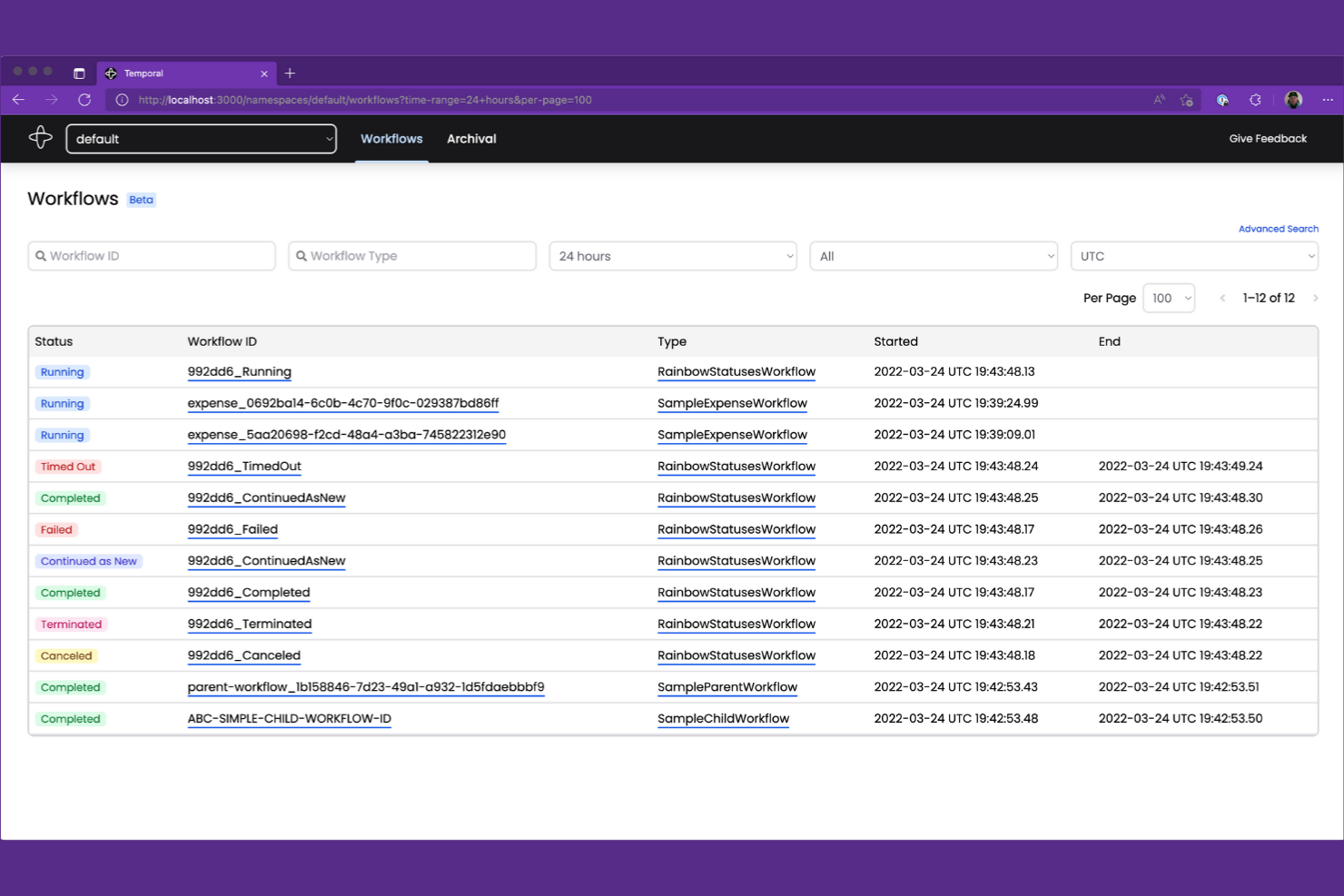
Quando il tuo team deve gestire flussi di lavoro complessi e di lunga durata con una logica con stato, Temporal offre un approccio unico. Gli ingegneri del software e i team di piattaforma utilizzano Temporal per creare, eseguire e scalare flussi di lavoro distribuiti che richiedono affidabilità e una gestione precisa dello stato. A differenza di Apache Airflow, Temporal è progettato per gestire processi ad alta concorrenza e basati su eventi, nei quali lo stato del flusso di lavoro e la cronologia dell'esecuzione devono essere preservati nel tempo.
Perché Temporal è una buona alternativa ad Apache Airflow
Se cerchi una piattaforma di automazione dei flussi di lavoro in grado di gestire processi complessi e con stato, Temporal è progettato esattamente per questa sfida. Ho scelto Temporal perché consente di definire i flussi di lavoro come codice, con supporto integrato per la gestione dello stato, dei tentativi e delle attività di lunga durata, che possono estendersi per giorni o persino mesi.
Le funzionalità di archiviazione degli eventi e della cronologia delle esecuzioni di Temporal garantiscono che ogni fase del flusso di lavoro venga tracciata e possa essere recuperata, anche dopo errori o riavvii. Per i team che lavorano con sistemi distribuiti e carichi di lavoro ad alta concorrenza, Temporal offre un livello di affidabilità e gestione dello stato superiore a quello che Apache Airflow è progettato per fornire.
Funzionalità principali di Temporal
Tra le altre funzionalità di Temporal che vale la pena evidenziare ci sono:
- SDK multilinguaggio: Crea flussi di lavoro in Go, Java, TypeScript e Python utilizzando gli SDK ufficiali.
- Scalabilità dinamica dei flussi di lavoro: Scala dinamicamente l'esecuzione dei flussi di lavoro in base al carico e alla domanda del sistema.
- API di visibilità: Interroga programmaticamente lo stato del flusso di lavoro e la cronologia dell'esecuzione per il monitoraggio e la reportistica.
- Isolamento degli spazi dei nomi: Organizza e isola flussi di lavoro e risorse utilizzando gli spazi dei nomi per ambienti con più team o più clienti.
Integrazioni di Temporal
Le integrazioni includono OpenAI, GitLab, Cloudflare, Salesforce, Twilio, NVIDIA, GoDaddy, Retool, Checkr e Descript.
Pros and Cons
Pros:
- Supporta l'esecuzione di flussi di lavoro con stato e di lunga durata
- Garantisce la durabilità del flusso di lavoro e la cronologia degli eventi
- SDK multilinguaggio per Go, Java, TypeScript e Python
Cons:
- Richiede un'infrastruttura server Temporal dedicata
- Nessuna interfaccia integrata per la progettazione visiva dei flussi di lavoro

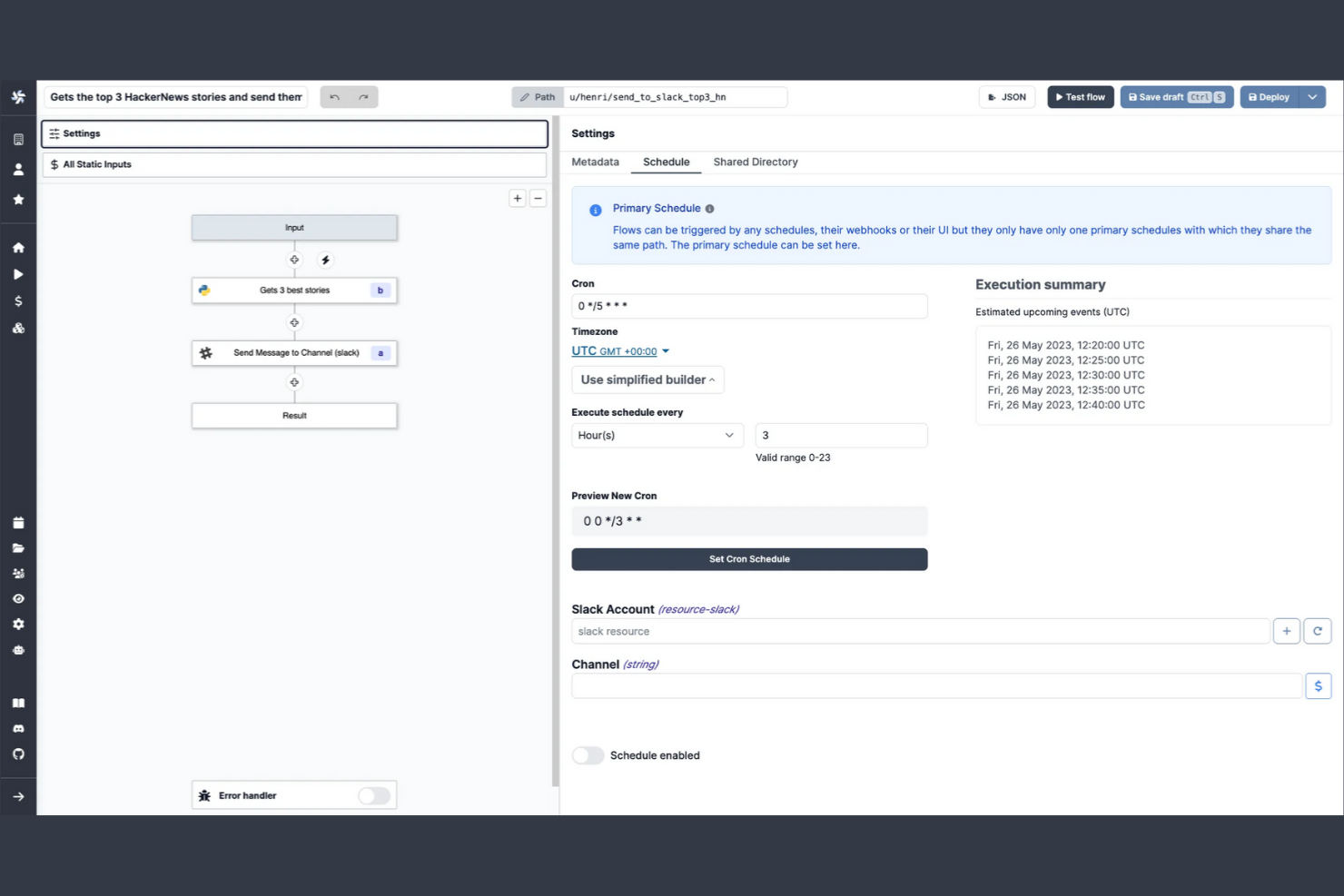
Windmill consente ai team di creare, eseguire e gestire flussi di lavoro automatizzati e strumenti interni utilizzando una combinazione di codice e interfacce a basso uso di codice. È progettato per sviluppatori e team operativi che desiderano orchestrare script, API e processi backend senza un’infrastruttura complessa. Essendo una piattaforma open source, installabile autonomamente, Windmill consente di automatizzare i processi, creare applicazioni interne ed esporre i flussi di lavoro come API, mantenendo al contempo il pieno controllo sulla distribuzione e sui dati.
Perché Windmill è una buona alternativa ad Apache Airflow
Windmill si distingue per i team che desiderano automatizzare i flussi di lavoro con il minimo sforzo di programmazione. Ho scelto Windmill perché consente di creare e distribuire script di automazione utilizzando un editor a basso uso di codice, permettendo così agli utenti sia tecnici sia non tecnici di contribuire. La piattaforma supporta modelli di script riutilizzabili e il controllo delle versioni, rendendo semplice standardizzare e aggiornare le automazioni in tutta l’organizzazione. Per i team che desiderano passare rapidamente dall’idea all’automazione, Windmill offre un approccio più accessibile e collaborativo rispetto ad Apache Airflow.
Funzionalità principali di Windmill
Altre funzionalità di Windmill degne di nota includono:
- Motore di pianificazione integrato: Pianifica l’esecuzione di script e flussi di lavoro a orari o intervalli specifici.
- Controllo degli accessi basato sui ruoli: Gestisci le autorizzazioni degli utenti e l’accesso a script e flussi di lavoro con un livello di granularità elevato.
- Mercato degli script: Accedi e condividi script di automazione predefiniti con la comunità di Windmill.
- Registri e monitoraggio in tempo reale: Visualizza i registri delle esecuzioni e monitora in tempo reale le esecuzioni dei flussi di lavoro per la risoluzione dei problemi e il controllo.
Integrazioni di Windmill
Le integrazioni includono Airtable, Discord, GitHub, Google Sheets, HubSpot, Notion, OpenAI, Slack, Stripe e Supabase.
Pros and Cons
Pros:
- L’editor visivo supporta la creazione di flussi di lavoro con poco codice
- Mercato degli script integrato per automazioni riutilizzabili
- I registri in tempo reale semplificano la risoluzione dei problemi dei flussi di lavoro
Cons:
- Nessun supporto per dipendenze DAG complesse
- Scalabilità limitata per carichi di lavoro ad alto volume
Altre alternative ad Apache Airflow
Ecco alcune ulteriori alternative ad Apache Airflow che non sono entrate nella mia selezione, ma che vale comunque la pena prendere in considerazione:


Come valuto le alternative ad Apache Airflow
Divido la mia valutazione in criteri di base che ogni sostituto di Airflow deve soddisfare, come l'orchestrazione dei DAG e l'affidabilità dello scheduler, e fattori distintivi importanti per il tuo team e il tuo stack specifici.
Funzionalità fondamentali (requisiti essenziali per questo elenco)
Quando seleziono gli strumenti per il mio elenco, assegno a ciascuno un punteggio su una scala da 0 (non offre la funzionalità) a 5 (eccelle in quest'area) per ogni funzionalità fondamentale. Ogni strumento deve raggiungere un punteggio totale minimo del 65% per essere preso in considerazione.
- Orchestrazione dei flussi di lavoro: valuto come ogni strumento gestisce le dipendenze basate sui DAG, i rami e l'esecuzione parallela.
- Pianificazione delle pipeline: ogni strumento deve supportare la pianificazione basata sul tempo, sugli eventi e tramite API, oltre al riempimento retroattivo per rielaborare i dati storici.
- Monitoraggio e osservabilità: cerco lo stato delle attività in tempo reale, registri consultabili, cronologia delle esecuzioni e avvisi configurabili.
- Integrazioni e connettori: lo strumento dovrebbe connettersi ai magazzini dati, ai laghi di dati e ai livelli di trasformazione già utilizzati dal team, come Snowflake, BigQuery e dbt.
- Gestione degli errori e nuovi tentativi: valuto i criteri di ritentativo configurabili, le funzioni di richiamo in caso di errore e l'instradamento degli avvisi.
- Pipeline come codice o generatore visuale: considero la possibilità di definire i flussi di lavoro in Python, YAML o tramite un'interfaccia visuale.
Fattori distintivi
Funzionalità distintive
L'hosting nel cloud gestito è un importante fattore distintivo. Valuto anche l'integrazione con Git, il supporto CI/CD e il monitoraggio della derivazione dei dati.
Oltre le funzionalità
Considero l'integrazione con lo stack di dati moderno, l'esperienza degli sviluppatori, la qualità della documentazione, gli strumenti per lo sviluppo locale e la trasparenza dei prezzi.
Perché cercare un’alternativa ad Apache Airflow?
Sebbene Apache Airflow sia una buona scelta come piattaforma per l’automazione dei flussi di lavoro, esistono diversi motivi per cui alcuni utenti cercano soluzioni alternative. Potresti essere alla ricerca di un’alternativa ad Apache Airflow perché…
- Hai bisogno di un processo di configurazione e manutenzione più semplice
- Il tuo team preferisce un generatore visivo di flussi di lavoro invece di DAG basati sul codice
- Hai bisogno di integrazioni native più approfondite con i servizi cloud
- Vuoi controlli degli accessi e una gestione degli utenti più granulari
- Hai bisogno di un supporto migliore per flussi di lavoro dinamici o basati su eventi
- Cerchi una community di supporto più attiva o reattiva
Se ti riconosci in una di queste situazioni, sei nel posto giusto. Il mio elenco contiene diverse opzioni di piattaforme per l’automazione dei flussi di lavoro più adatte ai team che affrontano queste difficoltà con Apache Airflow e cercano soluzioni alternative.
Caratteristiche principali di Apache Airflow
Ecco alcune delle funzionalità chiave di Apache Airflow, per aiutarti a confrontare le alternative e valutare cosa offrono:
- Modellazione dei flussi di lavoro tramite grafi aciclici diretti (DAG)
- Definizioni dei flussi di lavoro basate su Python
- Motore integrato di pianificazione ed esecuzione
- Gestione delle dipendenze tra attività
- Interfaccia utente web per il monitoraggio e la gestione
- Supporto per plugin e operatori personalizzati
- Integrazione con i principali provider cloud
- Controllo degli accessi basato sui ruoli
- Gestione automatizzata dei tentativi e degli errori
- Registri dettagliati e tracce di audit