

10 alternative a Skype per aziende per le chiamate di gruppo nel 2026

Elenco delle migliori alternative a Skype for Business


Se gestisci un team da remoto o ibrido, è probabile che Skype for Business abbia avuto un ruolo centrale nel modo in cui il tuo team comunicava. Da allora, Microsoft ha trasferito queste funzionalità in Microsoft Teams, ampliando la piattaforma fino a farne un hub più completo per chat, riunioni e collaborazione.
Per molti team, Teams offre tutto ciò di cui hanno bisogno. Per altri, però, il passaggio introduce nuove difficoltà, che si tratti di maggiore complessità, funzionalità sovrapposte, dubbi sui prezzi o flussi di lavoro che non si adattano perfettamente al modo in cui opera il team. In questi casi, vale la pena valutare se un altro strumento sia più adatto alle tue esigenze di comunicazione.
Ho testato e recensito una serie di alternative a Skype for Business, comprese opzioni pensate per videochiamate più semplici, una collaborazione più mirata o specifici casi d'uso aziendali. In questo articolo analizzerò le migliori alternative da prendere in considerazione, così potrai decidere se restare con Teams o scegliere uno strumento che supporti meglio il modo in cui il tuo team lavora davvero.
Che cos'è Skype for Business?
Skype for Business era una piattaforma aziendale di comunicazione e collaborazione progettata per aiutare i team a connettersi tramite videoconferenze, messaggistica istantanea, condivisione dello schermo e condivisione di file. Era ampiamente utilizzata dalle organizzazioni che avevano bisogno di modalità sicure e affidabili per comunicare con colleghi e clienti in sedi diverse.
Da allora Microsoft ha ritirato Skype for Business e ha trasferito le sue funzionalità principali in Microsoft Teams, che ora è la principale piattaforma di comunicazione aziendale di Microsoft. Teams si basa sulle funzionalità di chiamata e riunione di Skype for Business, aggiungendo chat persistenti, integrazioni più profonde con Microsoft 365 e strumenti di collaborazione più completi.
Riepilogo delle migliori alternative a Skype for Business
Questa tabella comparativa riassume i dettagli sui prezzi delle mie scelte migliori per aiutarti a trovare la migliore alternativa a Skype for Business, adatta sia al tuo budget sia alle esigenze della tua azienda.
| Tool | Best For | Trial Info | Price | ||
|---|---|---|---|---|---|
| 1 | Ideale per la messaggistica aziendale privata | Prova gratuita + demo disponibili | Da $6/mese | Website | |
| 2 | Ideale per l'integrazione con Google Workspace | Prova gratuita disponibile | A partire da $9.20/utente/mese (con fatturazione annuale) | Website | |
| 3 | Ideale per la gestione delle attività | Piano gratuito + demo gratuita disponibile | A partire da $3/utente/mese (con fatturazione annuale) | Website | |
| 4 | Ideale per chiamate globali gratuite | Demo gratuita disponibile | Gratuito | Website | |
| 5 | Ideale per soluzioni aziendali integrate | Prova gratuita disponibile | A partire da $4.00/utente/mese (fatturato annualmente) | Website | |
| 6 | Ideale per gli strumenti di comunicazione aziendale | Prova gratuita + demo gratuita disponibili | A partire da $12/organizzatore/mese (con fatturazione annuale) | Website | |
| 7 | Ideale per implementazioni sicure | Piano gratuito + dimostrazione gratuita disponibili | Prezzi su richiesta | Website | |
| 8 | Ideale per comunicazioni tutto-in-uno | Demo gratuita disponibile | Prezzi su richiesta | Website | |
| 9 | Ideale per ambienti critici per la missione | Dimostrazione gratuita disponibile | Prezzi su richiesta | Website | |
| 10 | Ideale per sistemi telefonici virtuali | Piano gratuito | Da $39/mese/10 utenti (con fatturazione annuale) | Website |
Perché fidarsi dei nostri consigli sui software
Il nostro team testa e recensisce software dal 2012. In quanto project manager noi stessi, sappiamo quanto sia difficile — e importante — scegliere il software giusto.
Per questa guida, abbiamo valutato gli strumenti attraverso test pratici e ricerche indipendenti, assegnando un punteggio agli strumenti in base ai nostri criteri di selezione. Ci basiamo inoltre sulle competenze di leader di pensiero del settore e di professionisti attivi nella gestione dei progetti.
Le nostre recensioni riflettono il nostro giudizio editoriale umano, non un discorso di vendita.
Revisori esperti:
Recensioni delle migliori alternative a Skype for Business
Di seguito trovi i miei riepiloghi dettagliati delle migliori alternative a Skype che sono entrate nel mio elenco. Le mie recensioni offrono uno sguardo approfondito sulle funzionalità principali, sui pro e contro, sulle integrazioni e sui casi d’uso ideali di ogni strumento, per aiutarti a trovare quello più adatto a te.
Brosix
Ideale per la messaggistica aziendale privata
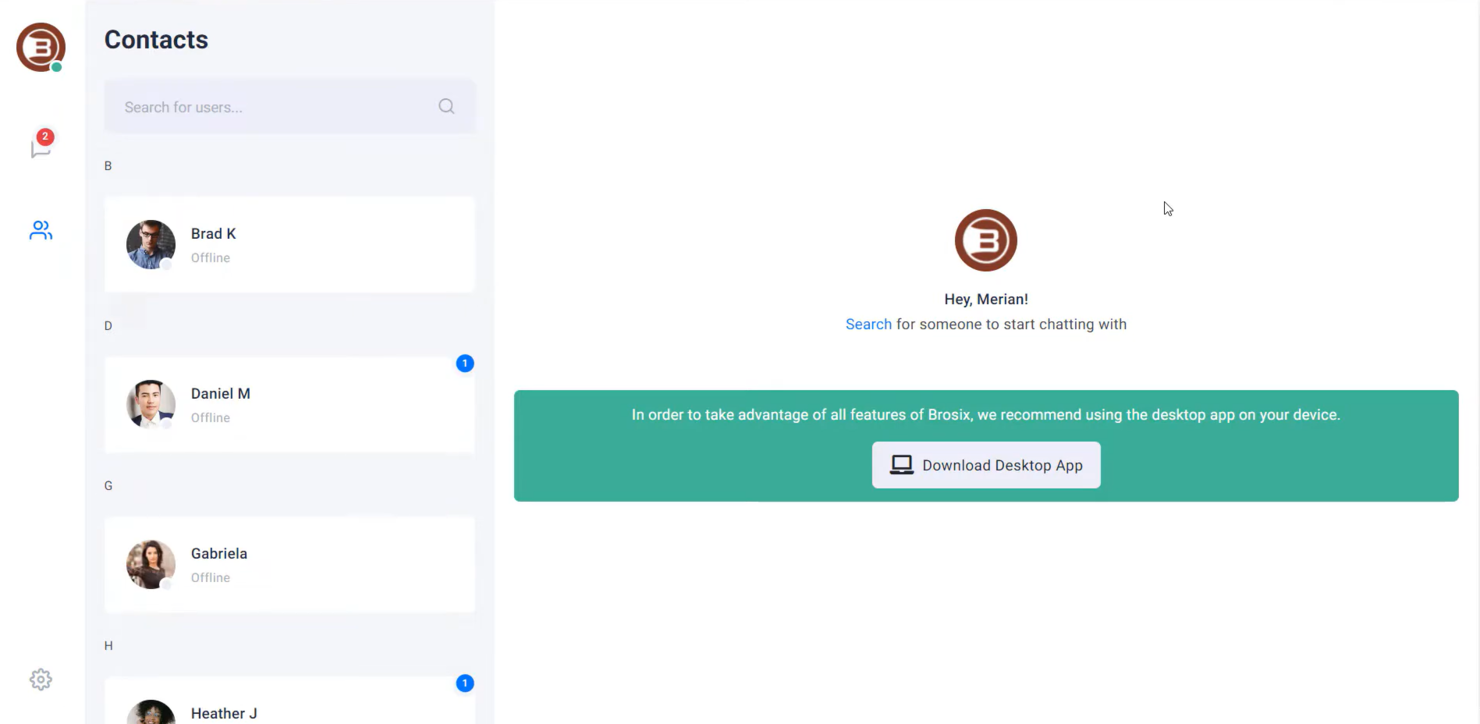
Brosix è un software di messaggistica istantanea progettato per le aziende che danno priorità alla comunicazione sicura e privata. È ideale per i team di settori come finanza, assistenza sanitaria e istruzione che necessitano di messaggistica e collaborazione crittografate.
Perché Brosix è una buona alternativa a Skype: Brosix offre messaggistica aziendale privata con crittografia end-to-end, garantendo la riservatezza delle comunicazioni. È possibile creare una rete chiusa per il proprio team, aumentando la sicurezza. Lo strumento mette a disposizione stanze di chat per le discussioni di gruppo, consentendo una collaborazione efficace tra i membri del team. Inoltre, la funzione di trasferimento dei file garantisce che i documenti vengano condivisi in modo sicuro all'interno della rete.
Funzionalità e integrazioni principali:
Le funzionalità includono uno strumento lavagna che consente al team di sviluppare idee visivamente. Brosix offre anche una funzione di condivisione dello schermo, facilitando la collaborazione sui progetti. Il software include uno strumento di navigazione condivisa, che aiuta ad assistere i membri del team o i clienti in tempo reale.
Le integrazioni includono Google Drive, Dropbox, Facebook, Shopify, Slack, Microsoft Teams, Salesforce, HubSpot e GitHub.
Pros and Cons
Pros:
- Crittografia avanzata
- Navigazione condivisa in tempo reale
- Condivisione sicura dei file
Cons:
- Personalizzazione limitata
- Design dell'interfaccia di base

Ideale per l'integrazione con Google Workspace

Google Meet è uno strumento per videoconferenze destinato ad aziende, istituti scolastici e privati che necessitano di riunioni online affidabili. Consente di effettuare videochiamate, webinar e lezioni virtuali, migliorando la comunicazione e la collaborazione.
Perché Google Meet è una valida alternativa a Skype: Google Meet si integra perfettamente con Google Workspace, risultando pratico per chi utilizza già i servizi Google. Offre sottotitoli in tempo reale durante le riunioni, migliorando l'accessibilità per tutti i partecipanti. È possibile pianificare le riunioni direttamente da Google Calendar, semplificando il processo per il team. Inoltre, Google Meet supporta riunioni su larga scala, ospitando fino a 250 partecipanti.
Funzionalità e integrazioni principali:
Le funzionalità includono una funzione che riduce il rumore di fondo durante le chiamate, migliorando la nitidezza dell'audio. La piattaforma offre una modalità per ambienti con scarsa illuminazione, che regola automaticamente il video per garantire la visibilità in condizioni di luce ridotta. Offre inoltre la registrazione delle riunioni, consentendo di salvarle su Google Drive e rendendo semplice condividerle con gli assenti.
Le integrazioni includono Google Calendar, Google Drive, Gmail, Microsoft Outlook, Microsoft Office, Slack, Trello, Zoom, Cisco Webex, Salesforce e altro ancora.
Pros and Cons
Pros:
- Facile integrazione con Google Workspace
- Funzione di cancellazione del rumore
- Sottotitoli in tempo reale disponibili
Cons:
- Nessuna sala per sottogruppi
- Controllo limitato sui partecipanti

Chanty
Ideale per la gestione delle attività
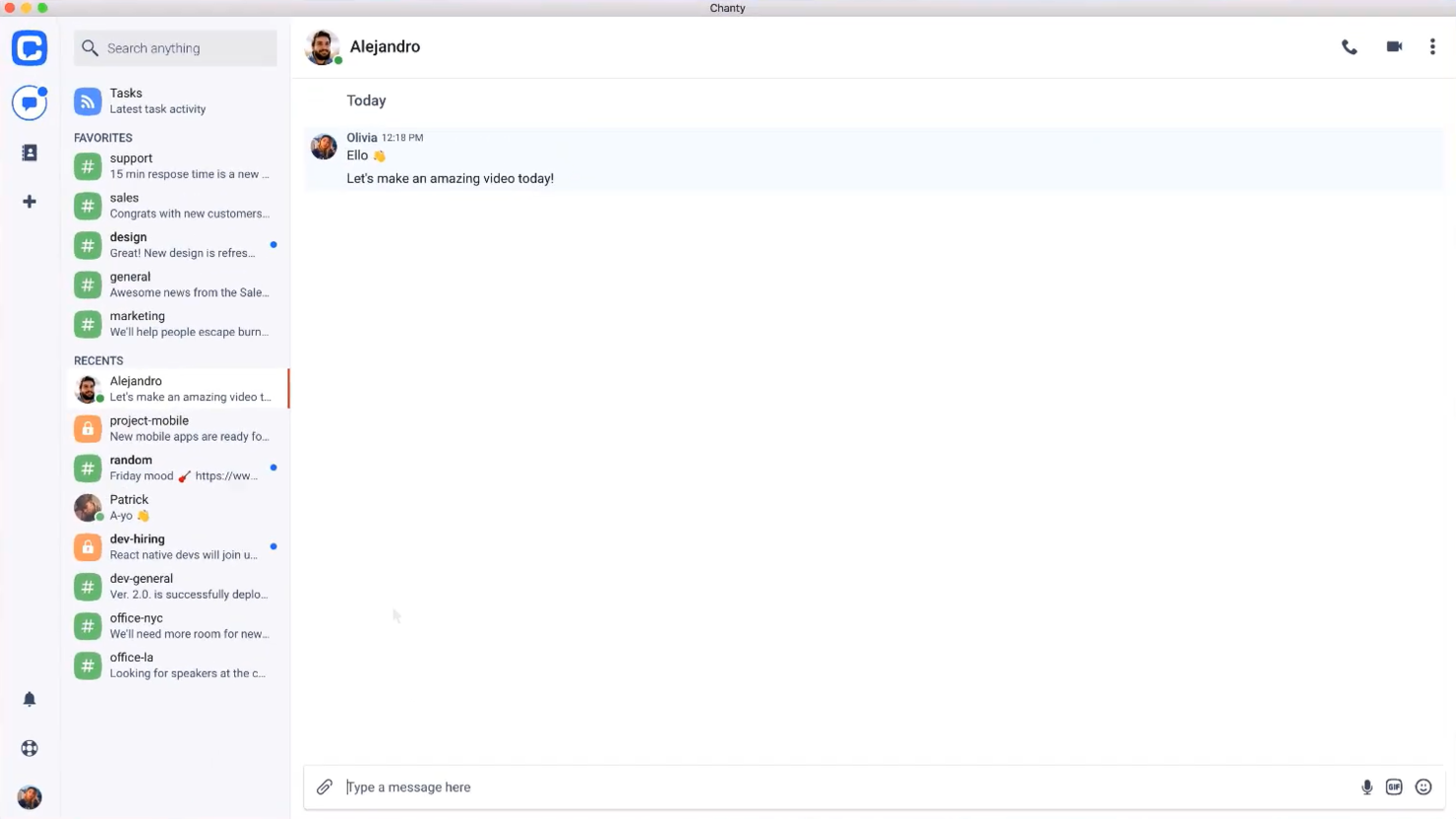
Chanty è uno strumento di comunicazione e collaborazione per team, progettato per settori quali assistenza sanitaria, vendita al dettaglio, marketing, istruzione e logistica. Si rivolge principalmente ai team che necessitano di funzionalità efficienti di messaggistica, videochiamate e gestione delle attività.
Perché Chanty è una buona alternativa a Skype: Chanty eccelle nella gestione delle attività, offrendo funzionalità come le bacheche Kanban e la creazione di attività direttamente dalla chat. A differenza di Skype, supporta videoconferenze e chiamate audio in 4K, migliorando la qualità della comunicazione. La condivisione dello schermo consente al team di collaborare visivamente, mentre l'integrazione con diverse app aiuta a supportare i flussi di lavoro. Queste funzionalità lo rendono una scelta ricca di funzioni per i team che necessitano di qualcosa di più della semplice comunicazione.
Funzionalità e integrazioni principali:
Le funzionalità includono la gestione delle attività con visualizzazione Kanban, la condivisione sicura dei file e i messaggi audio. È possibile creare attività direttamente dalla chat, facilitando la trasformazione delle discussioni in elementi operativi. Chanty pone inoltre l'accento sulla sicurezza dei dati, garantendo la conformità a standard quali ISO 27001 e GDPR.
Le integrazioni includono Trello, Asana, Google Drive, Dropbox, GitHub, Zapier, Mailchimp, Giphy, HubSpot e altro ancora.
Pros and Cons
Pros:
- Supporto per videochiamate in 4K
- Interfaccia intuitiva
- Accessibile ovunque
Cons:
- Il piano gratuito offre servizi molto basilari
- Poche opzioni di personalizzazione

Viber
Ideale per chiamate globali gratuite

Viber è un'app di comunicazione che privati e aziende utilizzano per messaggiare e comunicare tramite chiamate vocali e video. È pensata per gli utenti che necessitano di comunicazioni affidabili ed economiche con amici, familiari e colleghi in tutto il mondo.
Perché Viber è una buona alternativa a Skype: Viber offre chiamate globali gratuite, rendendola una scelta interessante per chi comunica frequentemente a livello internazionale. Puoi inviare messaggi di testo, foto e video, migliorando le tue possibilità di interazione. Grazie alle chiamate vocali e video di alta qualità, Viber garantisce comunicazioni nitide. Inoltre, l'app supporta le chat di gruppo, consentendoti di connetterti con più persone contemporaneamente.
Funzionalità e integrazioni distintive:
Le funzionalità includono la possibilità di creare community, che ti consente di interagire con grandi gruppi di persone accomunate da interessi condivisi. Viber offre anche messaggi a scomparsa, fornendo un ulteriore livello di privacy per le tue comunicazioni. Puoi utilizzare il marketplace degli adesivi dell'app per aggiungere un tocco divertente e personalizzare i tuoi messaggi.
Le integrazioni includono Facebook, Twitter, YouTube, Spotify, Giphy, Google Maps, Dropbox, Evernote, Slack, Microsoft Teams e altro ancora.
Pros and Cons
Pros:
- Chiamate vocali di alta qualità
- Supporta chat di gruppo numerose
- Coinvolgimento delle community con messaggi mirati
Cons:
- Nessuna funzionalità dell'app desktop
- Richiede una connessione Internet

Ideale per soluzioni aziendali integrate
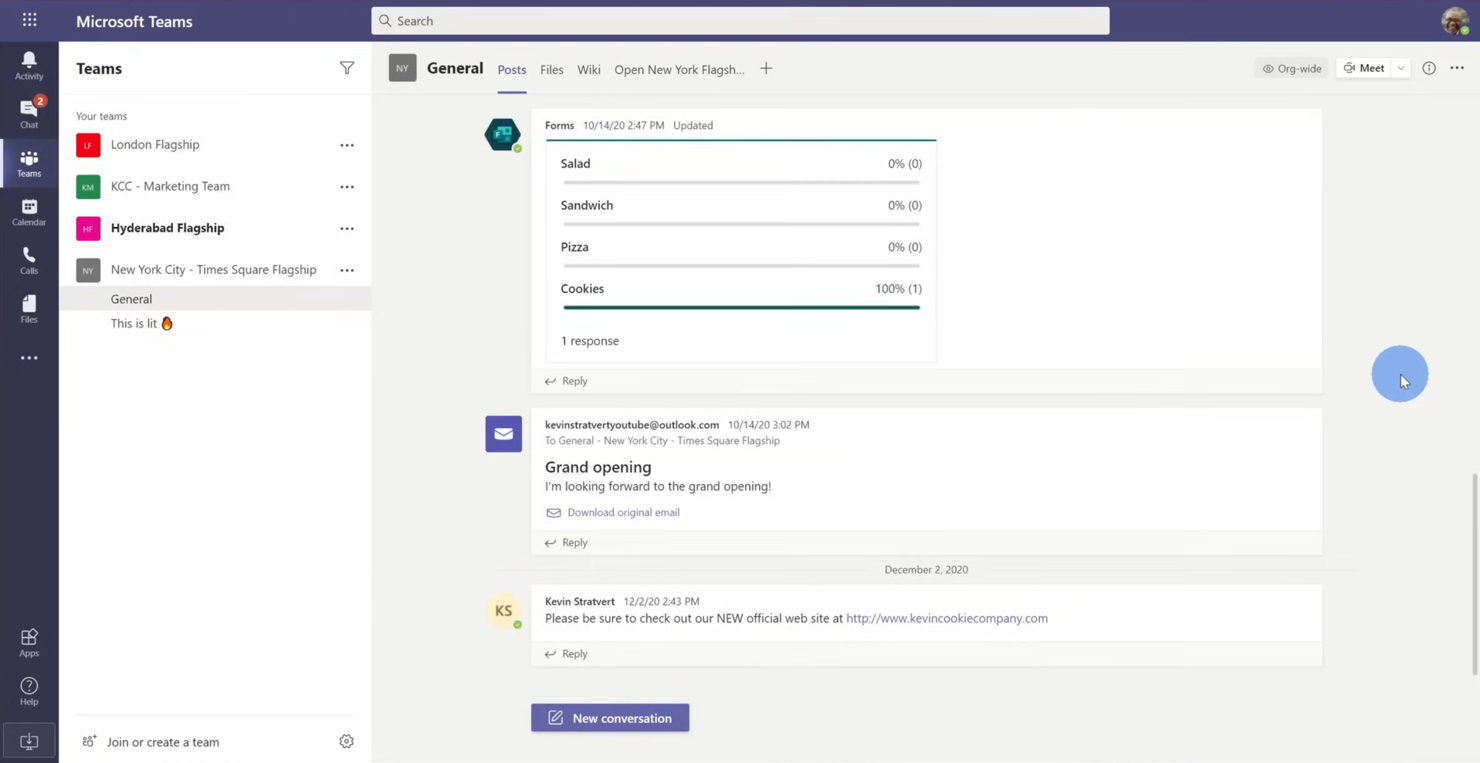
Microsoft Teams è una piattaforma di collaborazione progettata per aziende e organizzazioni che necessitano di strumenti integrati per la comunicazione e la produttività. Supporta chat, riunioni video e condivisione di file per rafforzare la collaborazione del team.
Perché Microsoft Teams è una buona alternativa a Skype: Microsoft Teams offre soluzioni aziendali integrate con funzionalità quali spazi di lavoro condivisi e collaborazione sui file. È possibile organizzare riunioni video con un massimo di 300 partecipanti, facilitando le interazioni tra team numerosi. La piattaforma consente di modificare i documenti in tempo reale, mantenendo il team aggiornato e allineato. Inoltre, le sue funzionalità di gestione delle attività aiutano a organizzare e monitorare i progetti in modo efficiente.
Funzionalità e integrazioni principali:
Le funzionalità includono uno strumento lavagna che consente al team di fare brainstorming e visualizzare insieme le idee. Microsoft Teams offre anche la trascrizione delle riunioni, fornendo una registrazione scritta delle discussioni per una facile consultazione. La piattaforma include un calendario integrato che aiuta a programmare e gestire le riunioni in modo efficace.
Le integrazioni includono Microsoft Office 365, SharePoint, OneDrive, Power BI, Trello, Zoom, Salesforce, Asana e altro.
Pros and Cons
Pros:
- Integrato con Microsoft Office
- Gestione delle attività integrata
- Trascrizione delle riunioni disponibile
Cons:
- Richiede un abbonamento a Microsoft 365
- Problemi occasionali di prestazioni

Ideale per gli strumenti di comunicazione aziendale

GoTo Meeting è uno strumento di conferenza web pensato per professionisti e aziende che necessitano di soluzioni affidabili per le riunioni online. Consente di effettuare videoconferenze, condividere lo schermo e collaborare con team e clienti da remoto.
Perché GoTo Meeting è una buona alternativa a Skype: GoTo Meeting offre strumenti di comunicazione aziendale che migliorano le riunioni virtuali con funzionalità come le videoconferenze in HD e un audio estremamente nitido. La piattaforma supporta fino a 250 partecipanti, risultando adatta alle riunioni di grandi dimensioni. È possibile registrare le sessioni per consultarle in futuro, assicurandosi che i dettagli importanti non vengano tralasciati. Inoltre, la sua app mobile mantiene il team connesso anche in movimento.
Funzionalità e integrazioni principali:
Le funzionalità includono una funzione di blocco della riunione che impedisce ai partecipanti non invitati di accedere, aggiungendo un ulteriore livello di sicurezza. GoTo Meeting offre strumenti di disegno che consentono di annotare gli schermi condivisi durante le presentazioni. La piattaforma fornisce inoltre link personalizzati per le riunioni, rendendo semplice invitare i partecipanti.
Le integrazioni includono Microsoft Office 365, Slack, Salesforce, Google Calendar, HubSpot, Microsoft Teams, Zoho CRM, Zendesk e altro ancora.
Pros and Cons
Pros:
- App mobile disponibile
- Audio e video ad alta definizione
- Funzione sicura di blocco della riunione
Cons:
- Può richiedere molte risorse
- Opzioni di personalizzazione di base

Ideale per implementazioni sicure
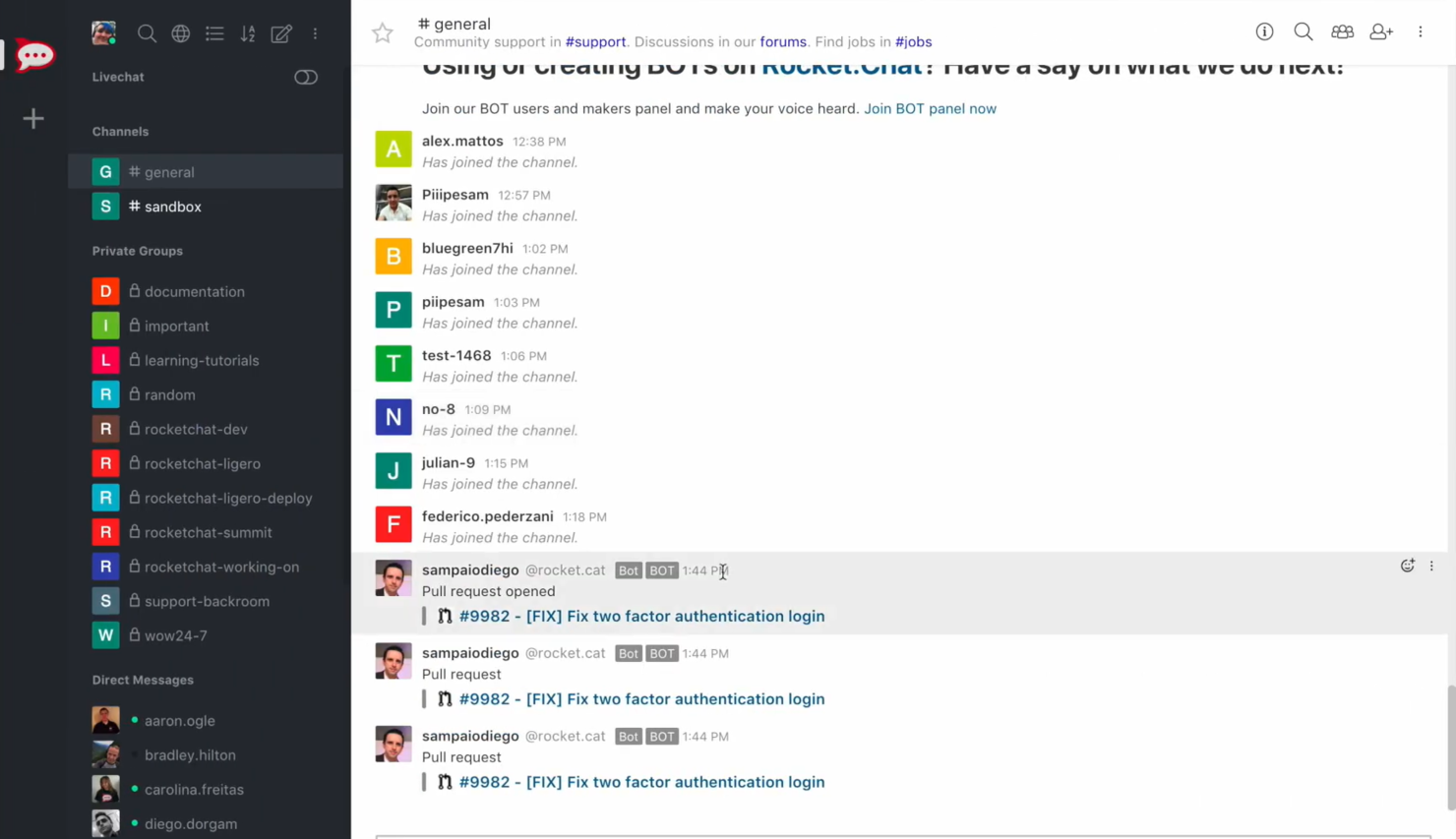
Rocket.Chat è una piattaforma di comunicazione progettata per aziende e organizzazioni attente alla privacy e alla sicurezza dei dati. È ideale per le squadre che operano in settori in cui è necessaria una comunicazione sicura, come l'assistenza sanitaria, la finanza e le amministrazioni pubbliche.
Perché Rocket.Chat è una buona alternativa a Skype: Rocket.Chat offre implementazioni sicure con hosting in sede, garantendo il pieno controllo sui propri dati. Grazie alla crittografia end-to-end, le conversazioni della squadra rimangono private. Supporta un numero illimitato di utenti, rendendolo scalabile per le organizzazioni più grandi. Inoltre, i ruoli e le autorizzazioni degli utenti personalizzabili assicurano che la squadra disponga del livello di accesso appropriato.
Funzionalità e integrazioni di spicco:
Le funzionalità includono l'assistenza tramite chat dal vivo, che consente di comunicare con i clienti in tempo reale. Rocket.Chat offre anche un'opzione con marchio personalizzato, che permette di personalizzare la piattaforma con il proprio marchio. Fornisce la traduzione in tempo reale, assicurando che le barriere linguistiche non ostacolino la comunicazione.
Le integrazioni includono GitHub, GitLab, Zapier, Google Drive, Dropbox Paper, Trello, Slack, Microsoft Teams Bridge e altro ancora.
Pros and Cons
Pros:
- Solidi controlli sulla privacy dei dati
- Autorizzazioni degli utenti personalizzabili
- Opzione con marchio personalizzato
Cons:
- Configurazione iniziale complessa
- Richiede competenze tecniche

Ideale per comunicazioni tutto-in-uno

RingCentral è una piattaforma di comunicazione basata sul cloud che si rivolge alle aziende che necessitano di una soluzione integrata per voce, video e messaggistica. Supporta le forze lavoro da remoto e aiuta i team a collaborare efficacemente da qualsiasi luogo.
Perché RingCentral è una valida alternativa a Skype: RingCentral offre una soluzione di comunicazione tutto-in-uno, che combina telefono, videoriunioni e messaggistica per i team. Fornisce videoconferenze ad alta definizione, migliorando la qualità delle riunioni virtuali. La piattaforma supporta funzionalità di gestione delle chiamate, come l'inoltro delle chiamate e il risponditore automatico, assicurando che il team rimanga connesso. Inoltre, i suoi strumenti di analisi e reportistica forniscono informazioni sui modelli di comunicazione.
Funzionalità e integrazioni distintive:
Le funzionalità includono un'app mobile che consente al team di rimanere connesso anche in mobilità. RingCentral offre la funzionalità di conversione dei messaggi vocali in email, permettendo di accedere ai messaggi in qualsiasi momento. La piattaforma fornisce strumenti di collaborazione per i team, tra cui l'assegnazione di attività e calendari condivisi, per migliorare la produttività.
Le integrazioni includono Microsoft Teams, Salesforce, Google Workspace, Zendesk e altro ancora.
Pros and Cons
Pros:
- Videochiamate nitide ad alta definizione
- Supporta le forze lavoro da remoto
- Include strumenti di analisi e reportistica
Cons:
- La configurazione può essere complessa
- Opzioni di personalizzazione limitate

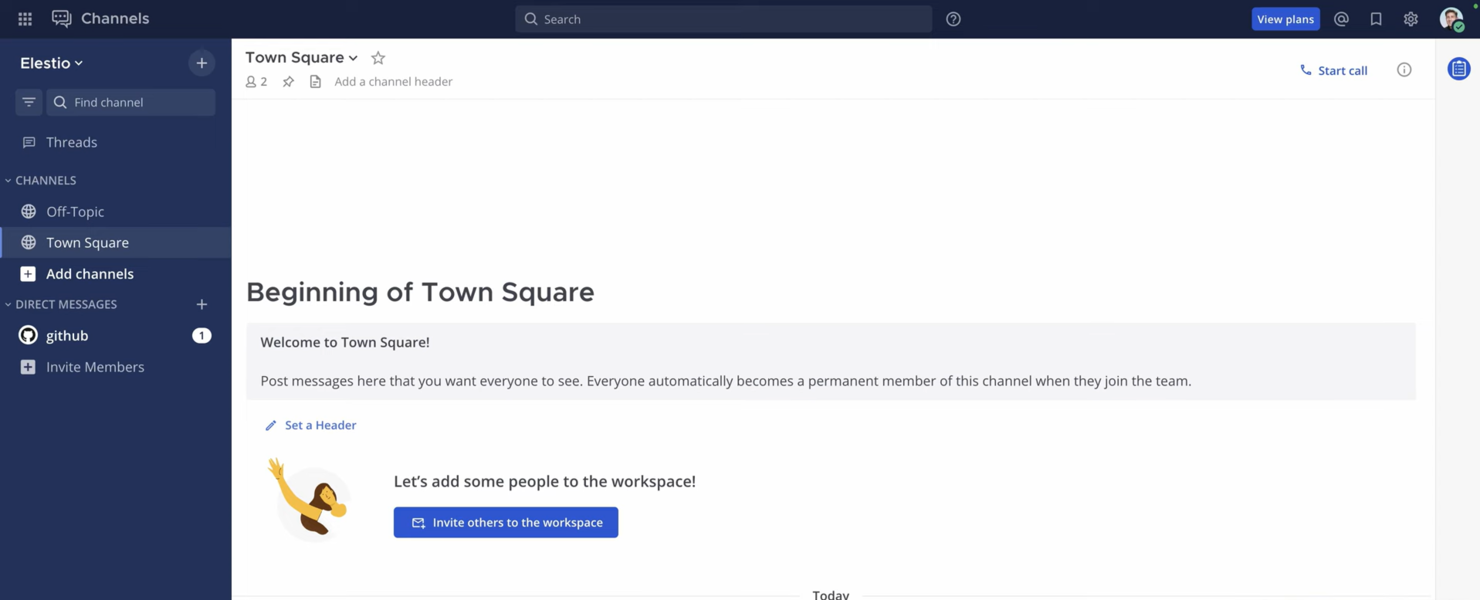
Mattermost è una piattaforma di messaggistica a codice sorgente aperto progettata per i gruppi che necessitano di soluzioni di comunicazione sicure e scalabili. È popolare in settori come tecnologia, sanità e pubblica amministrazione, dove la privacy dei dati è fondamentale.
Perché Mattermost è una buona alternativa a Skype: Mattermost offre ambienti critici per la missione con opzioni di distribuzione autogestita, garantendo il pieno controllo dei propri dati. Supporta la crittografia da punto a punto, assicurando la sicurezza delle conversazioni del gruppo. Grazie alla sua interfaccia personalizzabile, è possibile adattare la piattaforma alle esigenze della propria organizzazione. Inoltre, la piattaforma supporta la conformità agli standard di settore, incluso l'HIPAA, rendendola adatta ai settori regolamentati.
Funzionalità e integrazioni principali:
Le funzionalità includono la messaggistica organizzata in discussioni, che aiuta a mantenere ordinate le conversazioni. Mattermost offre anche la condivisione di file con spazio di archiviazione illimitato, consentendo al gruppo di collaborare in modo efficiente. La piattaforma offre funzionalità di ricerca avanzate, permettendo di trovare rapidamente informazioni e conversazioni pertinenti.
Le integrazioni includono Jira, GitHub, GitLab, Jenkins, Zoom, Cisco Syslog, Slack, Google Drive, Microsoft Teams, Trello e altro.
Pros and Cons
Pros:
- Distribuzione autogestita
- Interfaccia personalizzabile
- Supporta la conformità agli standard di settore
Cons:
- Richiede competenze tecniche
- La configurazione può essere complessa


Zadarma è un sistema telefonico virtuale pensato per piccole imprese, lavoratori da remoto, centri di assistenza telefonica e aziende. Offre chiamate tramite protocollo VoIP, numeri di telefono virtuali e un sistema multifunzionale di gestione delle relazioni con i clienti (CRM) per rafforzare la comunicazione e le attività aziendali.
Perché Zadarma è una buona alternativa a Skype: Zadarma offre un sistema telefonico virtuale con funzionalità di chiamata, come il centralino cloud e il trunk SIP, che non sono disponibili in Skype. Consente al tuo team di configurare rapidamente e gratuitamente un ufficio virtuale. Grazie al monitoraggio delle chiamate e all'analisi vocale, puoi ottenere informazioni utili sui tuoi processi di comunicazione. Inoltre, le sue funzionalità di videoconferenza offrono una soluzione di comunicazione completa per la tua azienda.
Funzionalità e integrazioni principali:
Le funzionalità includono un CRM multifunzionale per gestire i profili dei clienti, l'analisi vocale per monitorare le chiamate e un sistema di monitoraggio delle chiamate per valutare le prestazioni del team. Puoi anche effettuare chiamate direttamente dal browser, semplificando l'accesso degli utenti. La piattaforma supporta sia le videoconferenze sia i servizi SMS, aumentando la flessibilità della comunicazione.
Le integrazioni includono Zoho CRM, Slack, Zendesk, Salesforce, HubSpot, Microsoft Teams e altro.
Pros and Cons
Pros:
- Monitoraggio dettagliato delle chiamate
- Analisi vocale efficace
- Chiamate dirette dal browser
Cons:
- Nessuno strumento per grandi aziende
- Supporto limitato per app di terze parti
Altre alternative a Skype for Business
Ecco alcune ulteriori alternative a Skype che non sono entrate nel mio elenco, ma che vale comunque la pena valutare:


Come valuto le alternative a Skype for Business
Divido la mia valutazione in due livelli: le funzionalità di base che ogni strumento deve avere, come video di gruppo, chat persistente e VoIP, e gli elementi distintivi che separano gli strumenti validi da quelli eccellenti.
Funzionalità fondamentali (requisiti essenziali per questo elenco)
Quando seleziono gli strumenti per il mio elenco, assegno a ciascuno un punteggio su una scala da 0 (non offre la funzionalità) a 5 (eccelle in quest'area) per ogni funzionalità fondamentale elencata di seguito. Poi converto il punteggio totale dello strumento in una percentuale. Ogni strumento deve raggiungere un punteggio totale minimo del 75% per essere preso in considerazione.
- Videoconferenze: valuto la capacità delle videoconferenze di gruppo, la condivisione dello schermo e la registrazione, funzionalità su cui i team di progetto fanno affidamento per le revisioni degli sprint, le dimostrazioni ai clienti e le presentazioni agli stakeholder.
- Messaggistica istantanea: la chat persistente individuale e di gruppo con risposte organizzate in thread, condivisione di file e cronologia consultabile è importante quando il team deve risalire a una decisione presa settimane prima.
- Chiamate VoIP & audio: verifico se una piattaforma supporta le chiamate vocali basate su Internet e l'accesso opzionale tramite PSTN, poiché i team distribuiti hanno spesso bisogno di una chiamata rapida invece di una riunione programmata.
- Canali e spazi di lavoro del team: i canali organizzati per progetto, cliente o flusso di lavoro mantengono le conversazioni facilmente reperibili; valuto come ogni strumento gestisce le autorizzazioni, l'accesso degli ospiti e la struttura dei canali.
- Integrazioni di terze parti: cerco connessioni native a strumenti come Jira, Asana, Monday.com e Trello, oltre ad API aperte che consentano ai team di creare flussi di lavoro personalizzati tra il proprio insieme di strumenti per la gestione dei progetti e la piattaforma di comunicazione.
- Disponibilità multipiattaforma: verifico la disponibilità su desktop, dispositivi mobili e web con funzionalità coerenti, poiché i team ibridi passano da un dispositivo all'altro durante la giornata.
Una volta ottenuto un elenco di strumenti che soddisfano questi criteri, valuto ciò che distingue ogni piattaforma.
Elementi distintivi (ciò che differenzia i fornitori)
Ecco come confronto i diversi fornitori:
Funzionalità distintive
Gli assistenti per riunioni basati sull'intelligenza artificiale sono un importante elemento di differenziazione. Cerco strumenti che generino automaticamente riepiloghi ed estraggano elementi operativi, così i responsabili di progetto possono evitare di prendere appunti manualmente dopo ogni riunione quotidiana o chiamata con un cliente. Anche l'accesso per ospiti ed esterni è importante. I team delle agenzie e i responsabili della gestione dei progetti a contatto con i clienti devono poter coinvolgere le parti interessate nei canali o nelle riunioni senza obbligarle ad acquistare una licenza a pagamento. Valuto inoltre se una piattaforma include l'assegnazione integrata delle attività, poiché un minor numero di passaggi tra lo strumento di comunicazione e la bacheca per la gestione dei progetti significa meno attività che rischiano di sfuggire.
Oltre le funzionalità
Vale la pena verificare le certificazioni di sicurezza e conformità come SOC 2 e ISO 27001, soprattutto se i progetti riguardano dati sensibili dei clienti o settori regolamentati. Anche il supporto alla migrazione è un fattore che valuto attentamente: i team che abbandonano Skype for Business hanno bisogno di strumenti chiari o di un inserimento guidato per evitare tempi di inattività durante il passaggio. Considero inoltre la capacità di una piattaforma di adattarsi alla crescita, poiché uno strumento che funziona per un team di progetto di 10 persone ma cede con 500 partecipanti simultanei alle riunioni non sarà utile a lungo a un PMO in espansione.
Perché cercare un'alternativa a Skype for Business?
Sebbene Skype for Business e ora Microsoft Teams possano essere una scelta valida per la comunicazione aziendale, ci sono diversi motivi per cui alcuni team continuano a cercare soluzioni alternative. Potresti prendere in considerazione un'alternativa a Skype for Business se:
- Hai bisogno di una migliore integrazione con strumenti non Microsoft
- Il tuo team desidera controlli di sicurezza più avanzati o flessibili
- Cerchi una qualità o un'affidabilità delle chiamate migliori
- La tua azienda ha bisogno di una soluzione di comunicazione più scalabile o leggera
- Hai bisogno di una maggiore personalizzazione o di una configurazione più semplice
- Il tuo team ha bisogno di funzionalità di collaborazione più mirate
Se qualcuna di queste situazioni ti è familiare, sei nel posto giusto. Questo elenco include diversi strumenti di comunicazione aziendale che potrebbero adattarsi meglio ai team che hanno superato Microsoft Teams e che, idealmente, saranno più in linea con il loro modo di lavorare.
Funzionalità
Le funzionalità principali di Skype for Business, ora disponibili tramite Microsoft Teams, stabiliscono il punto di riferimento per ciò che molti team si aspettano dagli strumenti di comunicazione moderni. Usa queste funzionalità per confrontare ciò che offrono le soluzioni alternative:
- Videochiamate: Connettiti faccia a faccia con il tuo team o con i clienti
- Condivisione dello schermo: Condividi lo schermo per collaborare ai progetti in tempo reale
- Condivisione di file: Invia e ricevi documenti durante riunioni e chat
- Sottotitoli in tempo reale: Visualizza sottotitoli in tempo reale in più lingue per l'accessibilità
Collegamenti alle riunioni: Condividi i collegamenti alle riunioni con i partecipanti su qualsiasi dispositivo - Effetti dello sfondo: Personalizza gli sfondi in base ai diversi contesti delle riunioni
- Personalizzazione della chat: Personalizza i layout e i temi della chat
- Strumenti di collaborazione: Condividi contenuti e collabora durante le chiamate e le riunioni
Prossimi passi:
Se stai cercando alternative a Skype for Business, contatta gratuitamente un consulente di SoftwareSelect per ricevere consigli.
Compili un modulo e fai una breve conversazione durante la quale il consulente approfondirà le tue esigenze specifiche. Poi riceverai una lista ristretta di software da esaminare. Ti supporterà anche durante l'intero processo di acquisto, comprese le trattative sul prezzo.